Blog de Gridwise
¡Lee el blog de Gridwise para obtener consejos y sugerencias sobre cómo ganar más dinero mientras conduces para Lyft, Uber, DoorDash, GrubHub y más!

The Gridwise Job Board: Find Your Ideal Job or Gig Work
Gridwise is an essential assistant app created by gig workers for gig workers. Our mission is to support those engaged in gig work in every way possible. We understand how challenging it can be to deal with income instability, a lack of benefits, and job insecurity that often comes with gig work. The Gridwise app tracks and organizes earnings and expenses, and offers a wide array of discounts, deals, and services that make the lives of independent contractors easier and more rewarding.
We firmly believe it’s possible to make a viable living and create a gig experience that offers flexible hours, variety, and excitement. With issues such as consistent earnings and job security in mind, Gridwise is proud to offer a centralized platform that shows you how to find gig work and secure reliable opportunities. We’re proud to introduce the Gridwise Job Board.
[elementor-template id="20891"]
The Gridwise Job Board: Key features
Because Gridwise is dedicated to serving the gig worker community, we’ve filled the Gridwise Job Board with useful features that won’t waste your precious time.
- Comprehensive listings. Find part-time, full-time, temporary, and per-task work. Drive or deliver with your vehicle, utilize an employer’s vehicle, or even find non-driving gig work.
- User-friendly interface. Find the jobs that are right for you with a tap of your screen.
- Verified opportunities. We vet the jobs before they are listed to ensure you’re getting high-quality job postings.
How to get more gig work, seasonal, part-time or full-time jobs with the Gridwise Job Board
Looking specifically for “gig work apps” or “gig jobs near me?” You’re in luck. Our filters and search functions send you directly to the listings you seek.
Here’s how it works.
- Access the Job Board via the Gridwise website.
- Search for jobs by type, location, and more.
- Select the job that interests you, and read all about it.
- Scroll through the description, and if it appeals to you, click “Apply for job.”
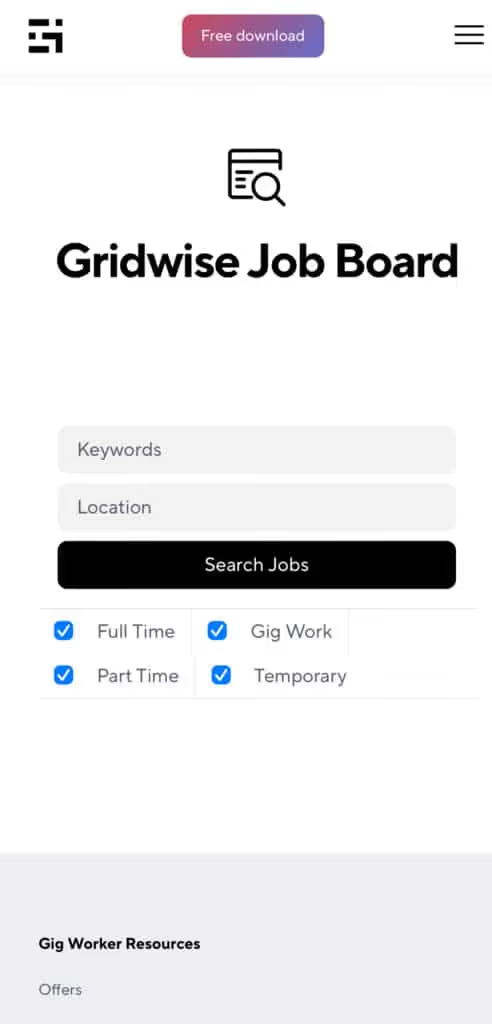
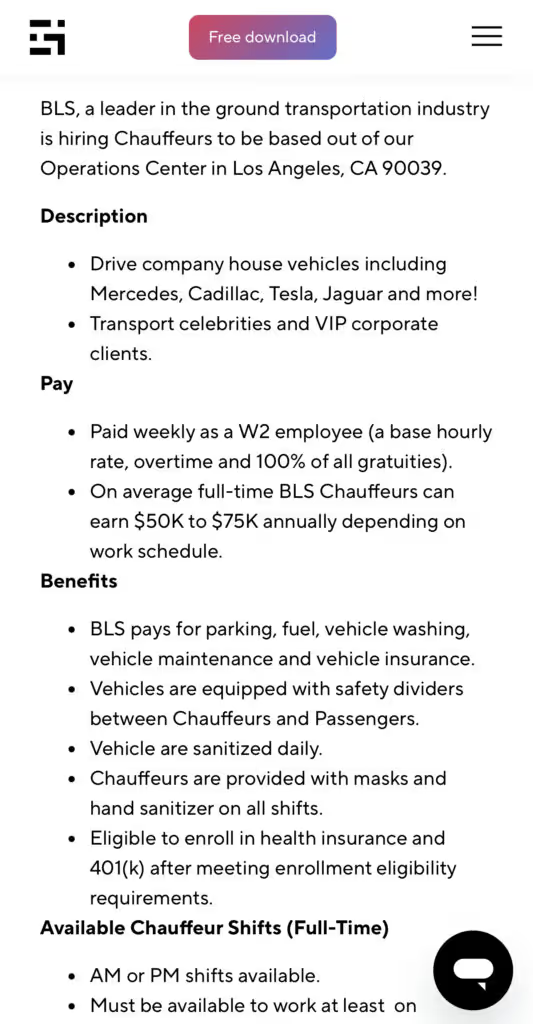
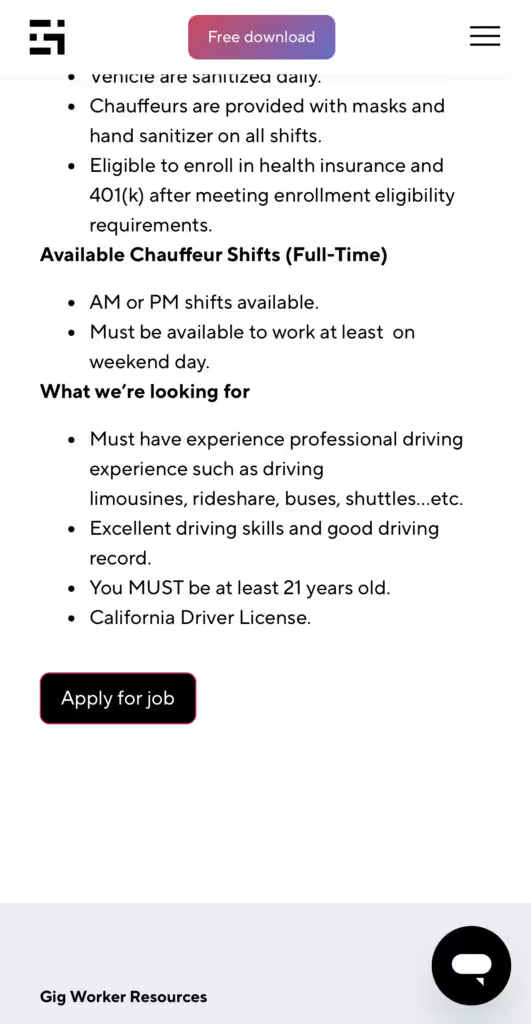
Many types of jobs are available. Adjust the search filter to see the full variety of opportunities that will let you cash in. Deliver food, set up catering, do rideshare driving, get paid for doing package delivery, and much more. You’ll find short-term gigs, long-term contracts, and part-time positions.
Perks of the Gridwise Job Board for gig workers
Gig workers who know how to make extra money will appreciate how the Gridwise Job Board lets you multiply your chances of bringing in big earnings. Here’s how:
- Increased stability. Use the Gridwise Job Board to find part-time or permanent jobs in addition to the part-time gigs you already have. Always keep a steady stream of earning opportunities flowing toward you.
- Flexibility and autonomy. Choose jobs that fit your schedule, work around other jobs and family duties, and still leave room for some fun in your life. Discover side hustles to supplement your full-time job, permanently or just for the season.
- Skill development. Find part-time work that lets you use a skill you already have, or try your hand at something new. It’s a smart way to develop a portfolio to showcase what you can do, or even to find permanent employment.
Get Gridwise and stay up to date on the Gridwise Job Board
Gig workers need plenty of information and assistance, and Gridwise is here to give it to you. Download the app and get essential features such as
- seamless earnings tracking
- mileage tracking
- expense recording, including notes
- low-cost and no-cost insurance benefits
- access to affordable medical, dental, vision, mental health, and alternative care
- professional services including legal and financial help
- deals and discounts
- weather, events, and traffic reports
- inside information on where and when to drive
[elementor-template id="20936"]
More to know about gig work:

5 Best Mileage Trackers For Gig Drivers
Many drivers ask, “Do I really need a mileage tracking app?” The answer is simple: only if you want to have an accurate count of all the miles you can legally deduct from your taxable income! You might think your rideshare or delivery driving app has got you covered. After all, they do quite a good job of logging the miles you drive while you’re on a trip or delivery. But, if you want to have the best app to track mileage for Uber, Lyft, Doordash, Instacart, or the other apps you may use, you need more. Why is that?
Without a separate tracker, you’re missing the miles you drive in between pings. Did you realize that all the miles you drive, from the moment you begin your shift until it’s over (as long as you don’t drive several miles on a break to hang with your friends), are tax deductible! That means you need something besides your driving app to keep an accurate count of your travels. Read this Gridwise post to see how important it is to keep track of every deductible mile.
You won’t be surprised to hear that there’s an app for tracking miles. In fact, there are several of them. Here, we’re going to tell you about five top mileage tracking apps, and help you figure out which one is best for you.
Before we get to the list and identify the best mileage tracker app, let’s clarify what exactly a mileage tracking app is. According to G2.com’s technology glossary, mileage tracking is done for the purpose of keeping a log of mileage that is either reimbursable or tax deductible.
And yes, of course you can track your miles simply by taking readings on your odometer. But are you really prepared to account for how many miles you drove for personal reasons and subtract them from the total to get your business mileage? Even if you can remember all that and do the arithmetic, if you want an accurate reading of the miles you drive for business, and can therefore deduct, a mileage tracking app will save you a lot of trouble and prevent you from making costly errors.
Plus, as a gig driver, you have specific needs when it comes to a mileage tracker. Ideally, you’d be able to handle mileage tracking and several other functions all in one app. It can be maddening enough to deal with driving apps, particularly if you’re an avid multi-apper. You would want your mileage tracker app to help you keep account of other aspects of your business, including income, expenses, and inside information about the art of gig driving.
Not all mileage apps are equal, to be sure! Let’s look at five of the best apps to track mileage and figure out which is the best app to track mileage with Uber and Lyft, or what mileage tracker app is best for DoorDash.
[elementor-template id="20891"]
1. Zoho Expense
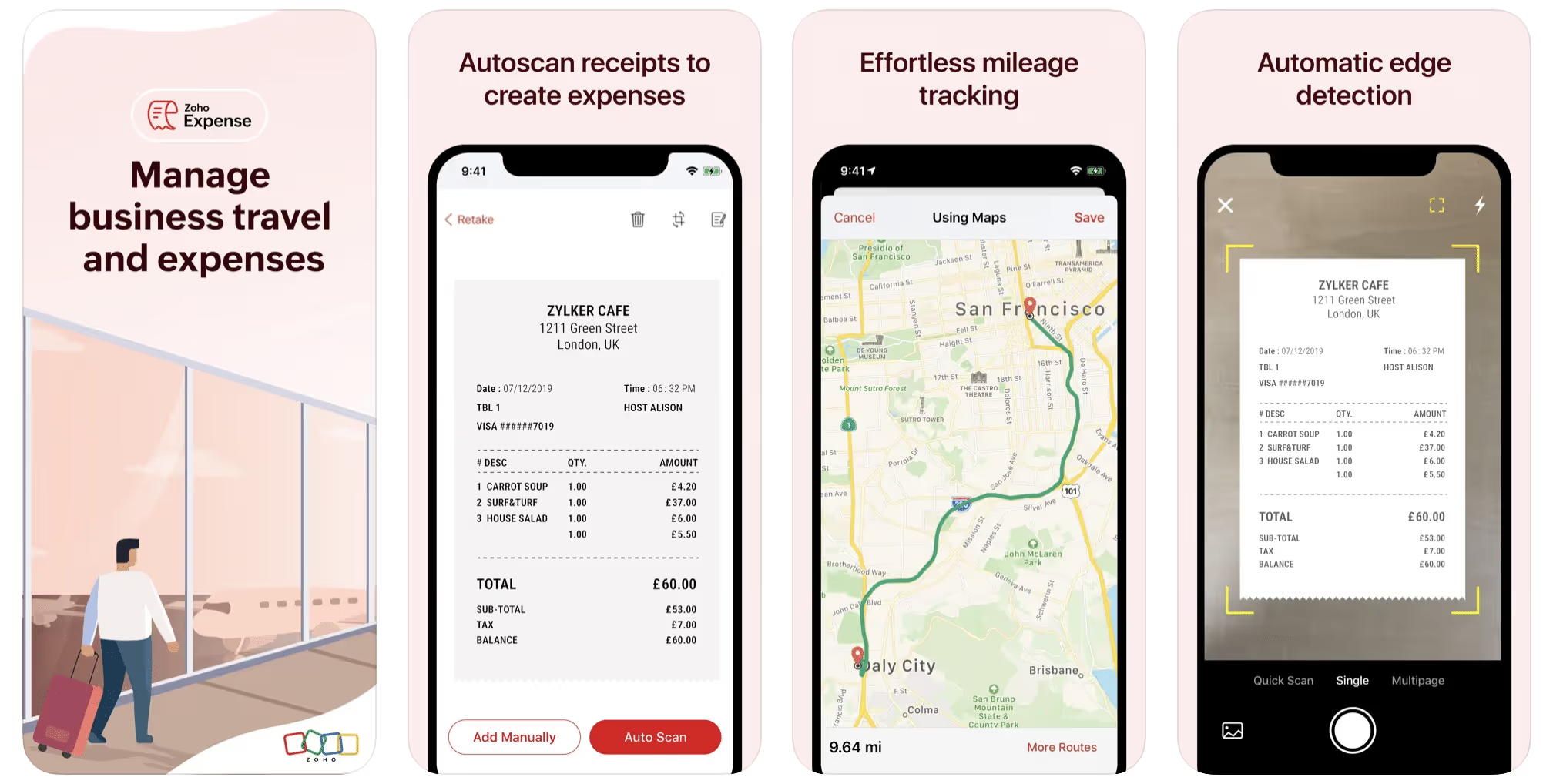
First up is Zoho Expense, which does exactly what its name says. This app is designed to allow companies to give employees a uniform way to create and submit expense reports. It can be used by individuals, including gig drivers, as well.
It includes a mileage tracker, as well as features that let you track other deductible expenses, including the ability to scan and record receipts.
Available on Android and Apple: Yes
Ratings: 4.8 stars on App Store, 4.7 stars on Google Play
Free Version: Yes
Subscription price: $3 per month, billed annually
Created specifically for gig drivers: No
2. Quickbooks Online
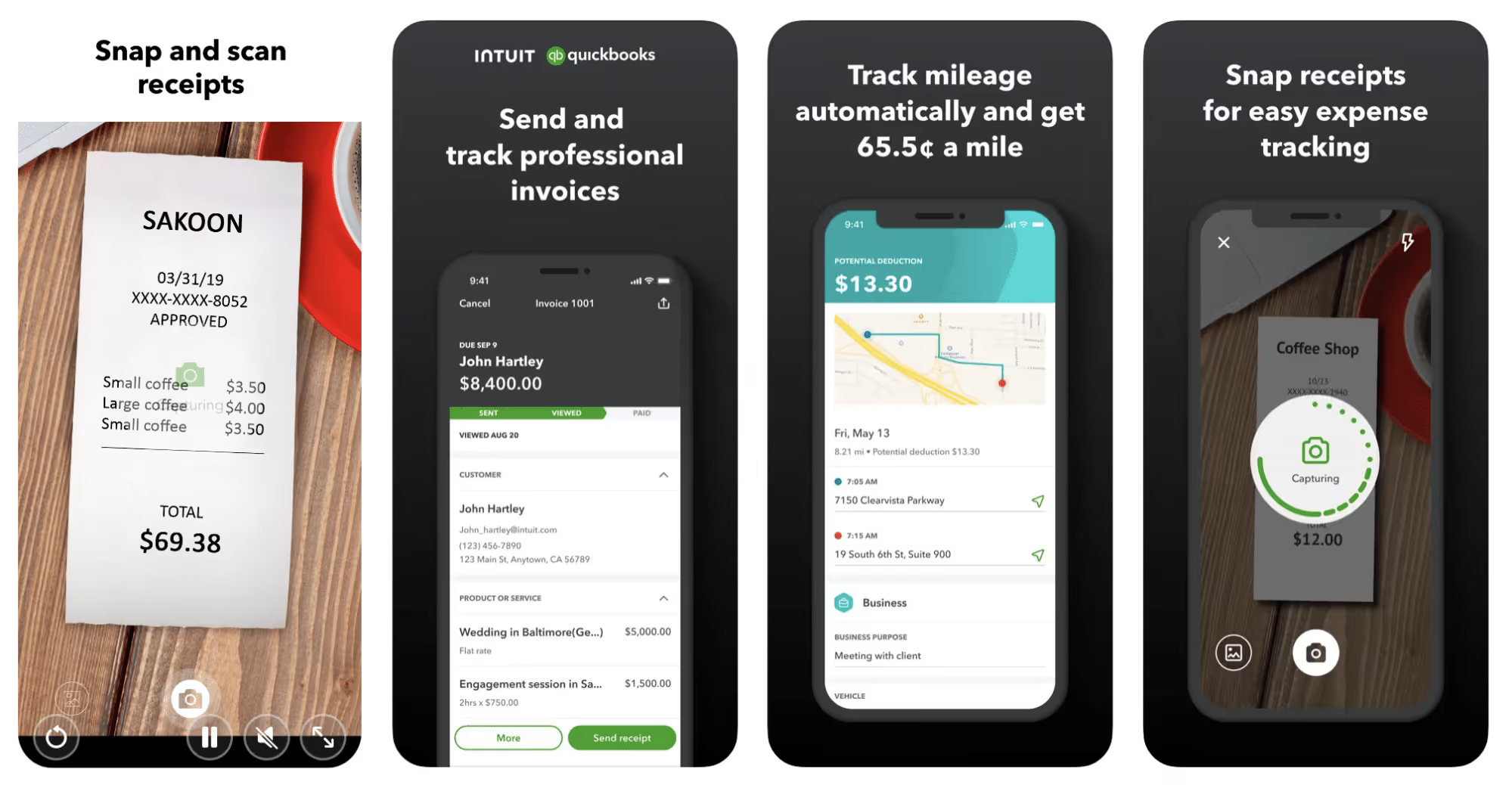
Quickbooks Online is a cloud-based app that allows you to track your mileage, earnings, and expenses. The information you enter can then be used to generate various reports that prepare you for tax time. It also allows you to create graphs that illustrate your cash flow, and includes a receipt scanner so you can instantly record deductible expenses. Quickbooks is popular, highly reliable, and designed mainly to help people keep track of their small businesses.
Available on Android and Apple: Yes
Ratings: 4.7 stars on App Store, 4.4 stars on Google Play
Free version: 30-day free trial
Subscription price: $15 per month for basic version if purchased for 3 months or more
Created specifically for gig drivers: No
Source: quickbooks.intuit.com
3. Shoeboxed
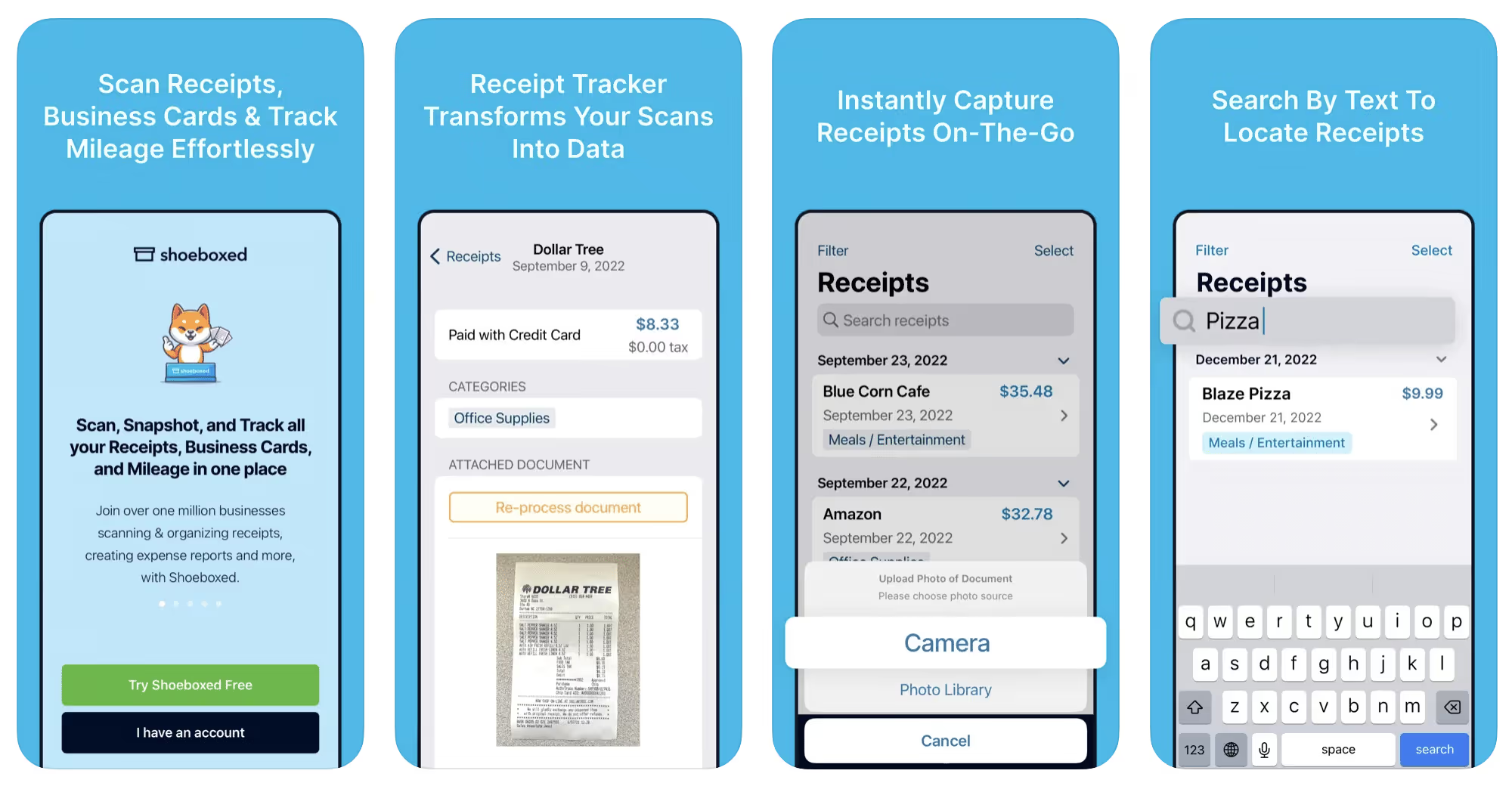
Shoeboxed started in 2007 as a service for scanning paper receipts into digital form. Now the app offers a free mileage tracker and has enabled users to scan receipts directly. It touts itself as the best mileage tracking app for DoorDash, but there are some elements missing that Dashers might like to have. While it provides features that record your expenses and prepare you for tax season, it doesn’t automatically track your earnings. The mileage tracker has a system where you can drop pins along your routes to make the tracking more precise, identifying those legs of a trip that you make for business purposes. The mileage tracker is “free” once you sign up for the basic version.
Available on Android and Apple: Yes
Ratings: 4.5 stars on App Store, 2.3 stars on Google Play
Free version: No
Subscription price: $18 per month for basic version
Created specifically for gig drivers: No
Source: blog.shoeboxed.com
4. Stride
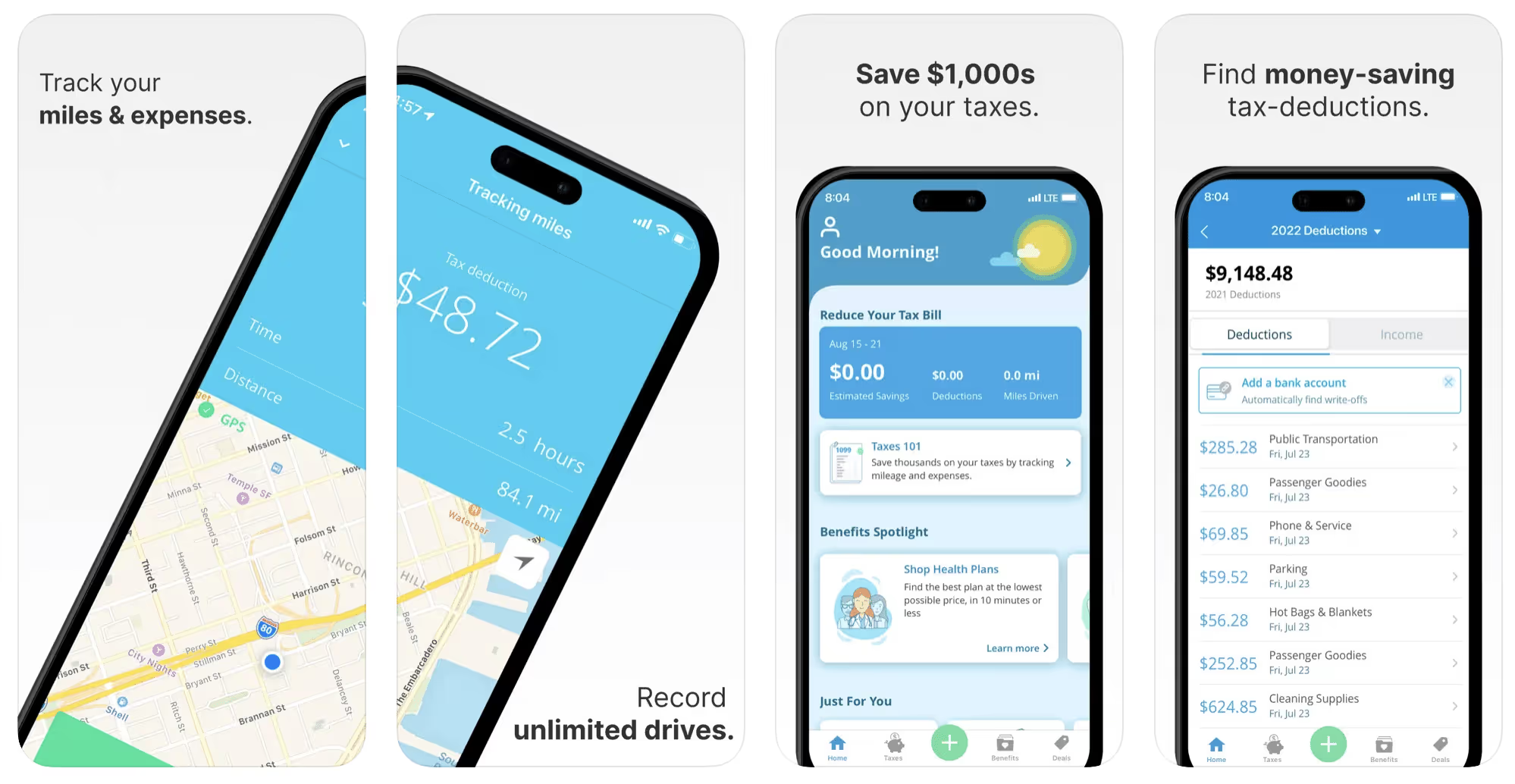
This free mileage tracker does a fair job of keeping track of the distances you rack up while gig driving, but it doesn’t automatically track earnings. It can be a big help, though, in tracking your expenses. You can link Stride to your bank account, and it will automatically scan your expenses to identify items you can potentially deduct. The app is totally free. This could make it the best free mileage tracker app, but there is a small price to pay. The app will persistently push you to consider various insurance plans that they are affiliated with. If you don’t mind that, this is a solid mileage tracker, even if it doesn’t track your earnings.
Available on Android and Apple: Yes
Ratings: 4.8 stars on App Store, 4.6 stars on Google Play
Free version: Yes
Subscription price: None. The app is free.
Created specifically for gig drivers: No
5. Gridwise
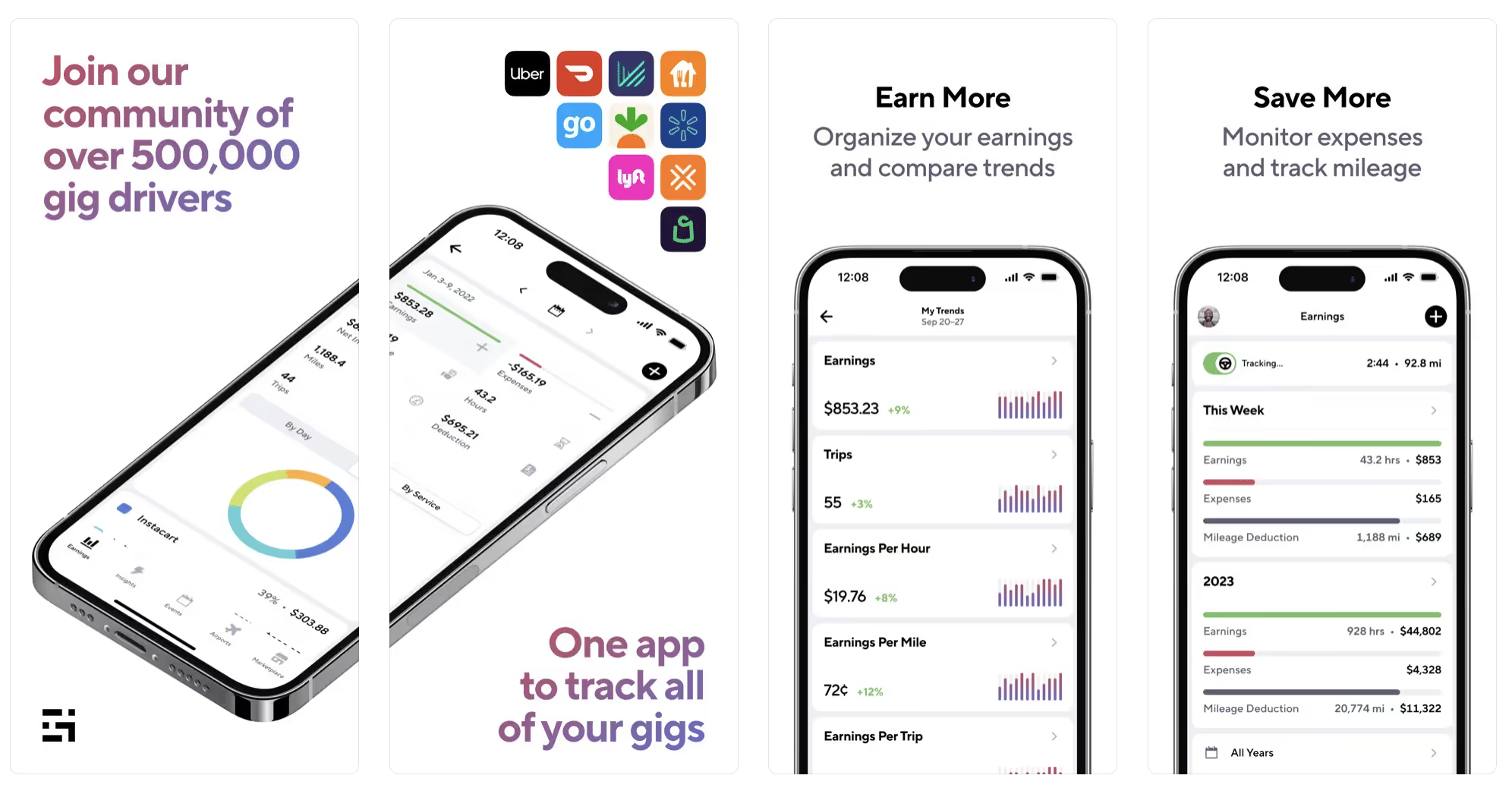
Gridwise has a free mileage tracker and free features that record your income and expenses. It gives you access to insurance and benefits, as well as insights about the best times and places to make the most money while gig driving. The Gridwise mileage tracker captures all the miles you drive while you’re on your driving shift, and it can be used if you have other trips you need to make which qualify as business travel.
Drivers love it because it is geared toward the needs of rideshare and delivery workers, providing free information about airport departures and arrivals, event start and let out times, weather, traffic, and more. The Gridwise Plus subscription adds value by providing additional insights and reports, discounts on benefits, the ability to export data in .csv format,, and more.
Available on Android and Apple: Yes
Ratings: 4.9 stars on App Store, 4.6 stars on Google Play
Free version: Yes
Subscription price: $9.95 per month for Gridwise Plus, or $95.99 per year (a $23.41 savings)
Created specifically for gig drivers: Yes!
What is the best mileage tracking app?
Now that we’ve checked them all out, we’re positive about the answer to that. Hands down, it’s Gridwise. Are we biased? You bet we are! But drivers love it too. Gridwise is the best mileage tracker app—and so much more. So many of the features are free, and the subscription to Gridwise Plus will pay for itself with additional insights to boost your earnings and deeper discounts on products and services.
Most important, Gridwise is designed specifically for gig drivers by experts who were once gig drivers themselves! Knowing what gig drivers need is a crucial step in creating an app that rideshare and delivery drivers can really use! Here are a few of the features, besides mileage tracking:
- seamless earnings tracking
- automatic, on/off toggle and manual mileage tracking
- mileage categorization
- airport, traffic, weather, and events information
- insights into where to drive and when to drive
- reports showing earnings across the platforms you use
- discounts on countless products and services for drivers
- additional resources for finding side gigs
- an informative and comprehensive blog
- affordable benefits, including insurance, medical, dental, and alternative practitioner discounts
- a community of drivers just like you
Don’t settle for just any app. Get the best mileage tracker, and so much more, from Gridwise!
[elementor-template id="21599"]

What Records Do Gig Drivers Need To Keep Track Of For Taxes?
* Gridwise does not provide tax, legal, or accounting advice. This material has been prepared for information purposes only, and is not intended to provide, and should not be relied on for tax, legal, or accounting advice. You should consult your own tax, legal, and accounting advisors before filing your return.
Record keeping? Who signed up for that? As a gig driver, it’s part of what you need to do to keep your business running. Don’t worry. It’s not as complicated as you might have been led to believe. This post will show you what you need to keep track of and the best ways to gather and preserve your tax-related records. We will cover
- How record keeping can help reduce income tax for freelancers
- Taxes and freelance work: Record keeping requirements
- Mileage tracking: Motives and methods
- More deductions and records to keep
- Make tax time easier
How record keeping can reduce income tax for freelancers
Tax time is not “fun time” for rideshare and delivery drivers. It’s easy to get used to watching your earnings pile up and come to believe they are all yours. Unfortunately, that isn’t the case. Gig work taxes can be especially painful because no one takes them out of your earnings for you, until the tax authorities insist that you do it for yourself.
You will need to show the tax authorities your income records, and they will gladly tell you to send them what they determine to be their fair share. Think that’s not fair? You’re not alone, but that doesn’t mean you’re going to get out of paying gig work taxes.
But you can find ways to pay the smallest amount that is legal and possible. The best way to defend yourself against having to pay astronomical amounts when you file your return is to know what expenses you can deduct from your gross income. When you subtract deductible expenses from your gross income, there is less left over to be taxed. This reduces the amount they can hit you with gig worker taxes. and can make your tax bill substantially lower.
While you want to keep good records so as to be in compliance with taxation entities such as the IRS, you also want to ensure you have proof of every last deductible expense you have accrued during the year. There are other records you must keep as well. Let’s look at some of the considerations you have, realizing that you now need to know how to do taxes as a freelancer.
Taxes and freelance work: Record keeping requirements
So many gig drivers fail to understand the responsibilities they have as independent contractors. Those who work part time for very few hours may even believe they don’t have to report the income they get from their driving gig payments. That would be a big mistake!
The company or companies you work for report your income to the IRS and state tax authorities. If you fail to report that income, you will risk some rather painful penalties. The IRS taxing side hustles is as much of a thing as the IRS taxing income from any other job. Your best bet is to report what you’ve earned, honestly and completely, and comply with other record keeping requirements such as
- gross income
- deductions and credits
- purchases (items you purchase and resell, such as snacks or bottled water)
- a log of all your mileage (or vehicle expenses, if greater)
- a list of all expenses and assets, such as utilities and other expenses associated with having a home office and equipment
- machinery and furniture you own, including when it was acquired, how much it cost, whether you previously took deductions on it, and selling price, if applicable (this includes your vehicle)
More things to consider:
- Pay attention to the retention of your records. You’ll need to keep all tax-return-related items— including income, deductions, and any tax credits reported— until the period of limitations runs out (3 years from date you filed, or 2 years from when you paid tax. If you have employees, keep your records for at least 4 years.)
- If you want to avoid paying self-employed taxes, you may want to set up a corporation or Limited Liability Corporation (LLC) for your business. This allows you to separate all your gig driving earnings from personal income, and permits you to take advantage of the additional advantages of working through a corporation. This includes exemption from self-employment taxes. You can learn more about how to pay self-employment taxes, if you opt for that, in this post from Keeper.
- You should always keep a separate checking account for your business, for convenience as well as clarity. While this is not a legal requirement, it is a smart move if you want to have an easier time managing your business.
- You are required, as an independent contractor, to file your taxes quarterly. Check out this Gridwise blog post for more information about quarterly tax payments and other matters that make filing delivery, Lyft and Uber taxes easier.
Mileage tracking: Motives and methods
Why you need to be meticulous about mileage
Mileage deduction, or the costs of operating your vehicle, will be the most important item to account for when you consider how to file taxes as a freelancer. While mileage is an important deduction for all independent contractors, as you might imagine, it’s even more essential for rideshare and delivery drivers.
There are two ways of keeping track of your mileage deduction. One is to use the IRS’ standard mileage deduction, which for 2022 is 58.5 cents per mile. This number takes into account the costs of operating your vehicle, from fuel and maintenance to registration, insurance, and depreciation. Alternatively, you can calculate all your own vehicle operating costs, but only after your first year of using the vehicle. You may discover that this second option allows you to have more money deducted from your taxable income. Learn more about the options for deducting your mileage in this Gridwise post.
No matter which way you decide to calculate the deductions for your mileage, you need to know what mileage you can and cannot deduct.
You can deduct
- miles driven to and from home when you go out to drive or deliver
- miles you accrue during your trips
- miles you drive on any other trips you make that are necessary as part of your business.
Examples:
- driving to return a lost cell phone or to an Uber Hub or another physical location where your company might make driver support available
- driving to pick up supplies, to get gas, or to have your car cleaned, serviced, or detailed, etc.
You cannot deduct
- miles you drive for personal trips
- miles for any trips you take that do not directly affect your business
Note: If imagining yourself becoming the not-so-proud owner of a shoebox filled with paper receipts gives you nightmares, stop worrying. Electronic records of purchases will satisfy reporting requirements. If you use cash, you can scan copies of your receipts, in some cases, right into your recording software or app. Gridwise and Keeper give you a simple to use interface that keeps all your receipts recorded without the messy pile of paper.
Mileage tracking methods
By now, you’re probably convinced that tracking mileage is important, despite all the other things drivers have to do. Now, let’s look at your options for keeping accurate records.
- Manual tracking: You can keep a logbook where you list every trip you make, starting and ending mileage, the date, and purpose of the trip. While this would work, it’s certainly not convenient. Besides, if that logbook gets lost, your plans for having a nice, fat tax deduction will go by the wayside.
- Spreadsheet: This is a bit more convenient and sophisticated way of tracking your business mileage. You’d need to be meticulous about making your entries, though. Even if you keep a spreadsheet app on your phone, it could be time consuming and inconvenient to keep doing it with all the other things going on in a rideshare or delivery driver’s day to day life.
- GPS-based mileage tracking apps: There are a bunch of apps that track mileage based on your GPS location, and most of them are pretty accurate and far more convenient than taking constant readings of your odometer. Your driving apps, such as Uber, Lyft, DoorDash, or Instacart, may also track your mileage, but be careful here. They will only track the miles you drive while you’re on a trip or delivery. They don’t count the miles you drive going to pick up a customer or when you make your move toward a restaurant or store.
Gridwise, on the other hand, will track all the miles you clock while you’re on your shift. All you need to do is make sure you start tracking the minute you leave home, and every gig driving mile will be logged. - OBD-II mileage tracking systems: There are plug-in modules that assess your vehicle’s mechanical health and track your miles. However, many authorities question the ability of OBD-II mileage tracking systems to get get accurate odometer readings. Insurance companies don’t consider them to be accurate enough gauges of odometer readings.
While mileage is a crucial deduction when you’re preparing your Uber, Lyft, or DoorDash taxes, it isn’t the only expense you’ll want to record.
More deductions and records to keep
Expenses you can deduct
You’re entitled to include the cost of other expenses that are directly related to your driving business. These include
- vehicle expenses
- equipment for your car and home office
- extra services and subscriptions
- business tools, including apps and software
You can learn much more about gig driver expenses that are eligible for deduction in this Gridwise article.
Ways to track and preserve deductible expenses
- The manual method: Just like you can with mileage, it’s possible to use a manual method, but in addition to logging each expense into a ledger, you would also need to keep physical receipts.
- Spreadsheets: You can record your expenses on a spreadsheet. This is somewhat less awkward than manually logging mileage, but there still will be plenty of room for failing to remember the case of water you bought for your customers, or losing the receipt from the thermal bag you purchased.
- Accounting software: You can use software that helps you track your expenses. This method usually interfaces well with any tax preparation software you or your tax professional might use.
- Gridwise: There are other apps that help you track your expenses, but Gridwise is designed specifically for gig drivers. It automatically tracks earnings and mileage, and lets you record your expenses the minute they come up. Gridwise’s partnership with Keeper gives you the ability to scan receipts and access a tax professional. This is a seamless way to record your expenses and a big help in learning how to file Uber taxes. Gridwise even provides .csv output, so you can feed your Gridwise data directly into tax preparation software. Check out what Gridwise and Keeper will do to super-charge your tax filing powers.
Organizing and categorizing expenses
Before you even begin to record expenses, you’ll want to set up categories for them. You can start by reviewing the categories listed above and checking out the Gridwise post that lists possible deductions.
If you’d like to learn more about how to categorize expenses, there is additional information available. This article from Motley Fool lists all possible categories any freelancer might use and also gives tips on how to customize them for your driving business.
One last tip
Using Gridwise, particularly for tracking mileage, is the easiest way to be in compliance with the IRS’ rules for deductible mileage. Gridwise tracks all the miles you drive for your gig, beyond what your company’s app might record. At the same time, you can log on and off Gridwise when you start and end your shift, so personal miles won’t be recorded. This eliminates confusion while capturing every deductible mile.
Gridwise Tax Help, a partnership with Keeper, has been created specifically to serve gig drivers. It provides affordable and easy ways to record expenses, scan receipts, and find deductions by analyzing your expenditures. Read about free resources from Keeper you can use to be fully prepared for tax season, and get all your earnings and expenses on the record.
Get the world’s best assistant for rideshare and delivery drivers, and tax help too.
Make tax time easier now!

TaskRabbit: Una plataforma flexible para ingresos extra
¿Estás buscando un trabajo secundario que sea totalmente flexible, fácil y que además pague bien? Taskrabbit podría ser la plataforma de trabajo independiente de tus sueños. Todo el mundo tiene tareas y trabajos pequeños que no pueden o no quieren hacer por sí mismos. Cuando te conviertes en un “Tasker” con TaskRabbit, ganas dinero mientras haces la vida de otras personas más fácil.
En Gridwise, siempre estamos buscando formas de ayudar a los trabajadores independientes a tomar decisiones informadas sobre qué trabajos secundarios se adaptarán mejor a ellos. Conocer lo que más les importa a los trabajadores independientes nos permite responder a cualquier pregunta que tengas, y abordar las inquietudes en las que quizás no has pensado todavía.
[elementor-template id="20891"]
¿Cómo funciona TaskRabbit?
TaskRabbit es una plataforma que conecta a los clientes que buscan trabajadores para hacer diferentes trabajos con personas como tú, a las que les pagan por hacerlo. Puede que puedas ofrecer tu trabajo y tiempo a la gente sin usar una aplicación como esta, pero TaskRabbit hace mucho más fácil encontrar clientes y gestionar clientes.
Los clientes saben que TaskRabbit te ha verificado y que contratarte les da una opción segura y fiable. También puedes estar seguro de que los clientes son fiables y que es muy probable que te paguen lo que deben.
¿Cómo es trabajar para TaskRabbit?
Trabajar para TaskRabbit es fácil porque controlas cuándo y cuánto trabajas, los tipos de trabajos que estás dispuesto a hacer y cuánto quieres que se te pague. Tú eliges si deseas dedicarte a tu trabajo independiente de TaskRabbit a tiempo completo o usarlo como un trabajo secundario.
TaskRabbit se esfuerza por mantener una comunidad segura y segura construida sobre la confianza mutua. Los derechos y responsabilidades de los clientes, así como de los Taskers, están claramente definidos por la empresa y son acordados por todas las partes interesadas. También existen procedimientos para abordar problemas y preocupaciones, en caso de que surjan. Esto reduce la cantidad de tiempo que tienes para resolver los problemas de los clientes—y elimina el estrés que traen consigo.
Beneficios de ser un trabajador de TaskRabbit
La mayor ventaja de esto o de cualquier trabajo secundario es el hecho de que tu puedes ser tu propio jefe. Podrás hacer cosas que te gusten, y podrás elegir tus propias horas de trabajo. ¡Por supuesto, eso significa que tendrás que motivarte a ti mismo! TaskRabbit hace eso más fácil ofreciéndote
- una amplia variedad de trabajos y servicios—gana dinero por hacer cosas que te gustan.
- una base de clientes establecida—no necesita marketing.
- interconectarse con los clientes para asegurarte de que te paguen—sin tener que perseguir tu dinero.
- la capacidad de establecer tus propias tarifas—conoce cuánto te pagarán!
- la oportunidad de expandir tu negocio—conseguir más clientes sólo ayuda a su negocio a crecer.
¿Qué tipos de trabajo están disponibles?
TaskRabbit tiene una variedad bastante impresionante de trabajos para que hagan los Taskers. También puedes trabajar en tantas categorías como quieras, siempre que tengas las habilidades necesarias. Ya seas un artesano práctico o del tipo administrativo, TaskRabbit te necesita.
- asistente personal, coordinador de proyectos, y organizador
- soporte para instalación de pisos y azulejos
- mudanzas—servicio completo y embalaje ligero
- ensamblado de muebles
- levantamiento y carga de objetos pesados
- pintura interior y exterior
- diseño de interiores
- ayuda con paisajismo, trabajos de jardinería y remoción de nieve
- lavandería y planchado
- carpintería ligera
- pequeñas reparaciones de hogar
- instalación y reparación de aparatos domésticos
- cuidado de mascotas
- ayuda de plomería
- coser
- instalación de smart-home
Las categorías de trabajo pueden variar según dónde vivas. Como esta lista completa de categorías muestra, hay suficientes opciones de trabajo disponibles para mantener los Taskers bastante ocupados!
Cuánto y cómo me pagarán?
Cuánto te pagarán depende en gran medida de ti. Como dijimos antes, tu puedes fijar la tarifa que estás dispuesto a aceptar por tus servicios y cuánto trabajarás.
Según Glassdoor, el Tasker promedio gana entre $17–$27 por hora, pero la cantidad exacta que ganes dependerá de la tarea y de la tarifa que cobres, así como del lugar en el que vivas. Trabajos grandes como el ensanblaje de muebles, servicios de reparación y mantenimiento y mudanzas pagarán más que el trabajo de patio o la costura.
Una vez que completes el trabajo, emites la factura al cliente. Todo lo que tiene que ver con tu pago se gestiona a través de la aplicación.
Proporciona a TaskRabbit con tu información de depósito directo cuando te registras, y te envían el pago, incluyendo propinas, a tu cuenta bancaria. Los Taskers reciben el 100% de la cantidad que le cobran a los clientes. TaskRabbit cobra su tarifa como porcentaje del costo de la(s) tarea(s) realizadas, y se la cobra al cliente, además de lo que pagan a la Tasker.
Lo fundamental que necesitas conocer
A estas alturas podrías estar listo para preguntar: "Cómo me inscribo para trabajar para TaskRabbit?", pero antes de hacerlo, necesitarás más información.
Al igual que con cualquier otro trabajo secundario, trabajas como contratista independiente con TaskRabbit. Eso significa que no eres un empleado, y no obtienes beneficios de TaskRabbit. Como resultado, tendrás algunas responsabilidades, como
- construir tu reputación en TaskRabbit obteniendo buenas reseñas de clientes
- desarrollar una estrategia ganadora para maximizar tus ganancias en TaskRabbit
- calcular y pagar tus propios impuestos
- hacer seguimiento de tus millas, ganancias y gastos
- asegurar tus propios programas de salud y seguros
Si esto suena a mucho, tienes razón. Hay muchas cosas que tienes que hacer como contratista independiente para gestionar tu negocio. Afortunadamente, hay ayuda. Gridwise maneja todos estos problemas. Hablaremos de eso más tarde. Primero, te ayudaremos a unirte a TaskRabbit.
[elementor-template id="21599"]
Cómo me inscribo para trabajar para TaskRabbit?
Registrándote en TaskRabbit
Antes de registrarte en TaskRabbit, asegúrate de cumplir con los requisitos básicos:
- vivir en una ciudad donde TaskRabbit esté disponible
- tener 18 años o más de edad
- pasar una verificación de antecedentes
- probar tu elegibilidad para trabajar, incluyendo un número de Seguro Social emitido por Estados Unidos
- tener una cuenta corriente válida y una tarjeta de crédito (para pagar la tarifa de registro de $25)
- tener un smartphone capaz de ejecutar la aplicación Tasker
Para algunas tareas, como las reparaciones menores de la casa y el montaje de muebles de IKEA, necesitas desarrollar las habilidades antes de ofrecerte a hacer el trabajo. No se proporciona “formación laboral en el trabajo”.
Una vez que estés seguro de cumplir con los requisitos, descarga la aplicación Tasker y crea su cuenta. La aplicación te llevará a través de los pasos para registrarte. Tendrás la oportunidad de establecer tus habilidades, ubicación y la distancia que estás dispuesto a viajar, y de verificar tu información. Aquí es donde tendrás que pagar la cuota de inscripción de $25.
El tiempo que necesitas esperar para averiguar si has sido aceptado en TaskRabbit variará dependiendo de dónde vivas. La mayoría de los Taskers están habilitados para empezar a trabajar en un plazo de cuatro días hábiles.
Consejos para configurar tu perfil
- Luce bien. Hay muchos Taskers ahí afuera, así que vas a querer que tu perfil destaque. Por superficial que parezca, una buena foto es crucial si quieres atraer clientes—clientes que querrán ver tu cara para hacerse una idea de como eres.
- Comunícate claramente. Escribe tu discurso de ventas rápido en lenguaje simple. Establece tu área de trabajo y tus habilidades para que coincidan con tu disposición a viajar y tus capacidad para realizar ciertas tareas.
- Ponte precio correctamente. El precio es crucial para tu éxito como Tasker. Si fijas tu precio demasiado alto, no obtendrás tantos puestos de trabajo. Si cotizas tu trabajo demasiado bajo, te sentirás engañado cuando hagas un trabajo por el que te deberían haber pagado más. Échale un vistazo a la competencia, mira lo que otros están cobrando por las mismas o similares tareas, y elige tu precio en función de cómo se comparen tus habilidades con las suyas, y fíjalo en consecuencia.
- Añada al menos un intervalo de tiempo disponible para reservar tareas. Si no tiene ningún horario indicado, los clientes no serán notificados sobre su disponibilidad. Elige tus horarios de trabajo en función de los momentos en que es probable que los clientes necesiten tus servicios y de lo que sea conveniente para ti.
- Dibuja tu área de trabajo en el mapa proporcionado en la aplicación Tasker. Incluye toda la zona a la que estás dispuesto a prestar servicios, pero ten en cuenta factores como la distancia, el tráfico y las condiciones generales de la carretera. También querrás incluir áreas en las que tus tareas tendrán demanda. Por ejemplo, una zona donde hay mayoritariamente inquilinos no generará muchos clientes que busquen reparaciones en el hogar o pintura exterior.
Una vez que estés configurado, dale a TaskRabbit unos dos días hábiles para verificar tu perfil y hacerlo visible al público.
Encontrar y aceptar tareas
La aplicación Tasker es muy conveniente de usar. Cuando un cliente quiere contratarte para completar una tarea, recibirás una invitación en la aplicación. A continuación, respondes a ella y o la aceptas o la rechazas.
También puedes usar la aplicación para programar disponibilidad, reiniciar tu mapa, enviar facturas, poner tu perfil en "pausa," y más.
Si bien tienes total libertad de elección a la hora de aceptar tareas, debes ser consciente de que hay ventajas de aceptar y facturar más de ellas.
TaskRabbit tiene un programa Tasker Elite , que otorga a ciertos Taskers el privilegio de ser resaltado en el lado del cliente de la aplicación. También reciben ventajas como ser miembro del Elite Tasker Discord Group, una insignia élite en sus perfiles, llamadas individuales para discutir sobre su negocio, y oportunidades adicionales para proporcionar retroalimentación a TaskRabbit.
En la mayoría de las ciudades, las Taskers alcanzan el estado de Elite, facturando al menos 10 tareas al mes, facturando al menos 50 tareas totales en una categoría determinada, entre el 15% más alto de Taskers por invitaciones a la relación de facturas y evitar cualquier violación de las condiciones de servicio de TaskRabbit.
Pero, en ciertas ciudades, los requisitos son más stringent. Además de las calificaciones anteriores, los Taskers deben haber reunido al menos 200 tareas totales bajo sus cintas desde el momento en que se unieron a la plataforma.
Cómo trabajar para TaskRabbit y gestionar todos tus trabajos secundarios
La libertad, la flexibilidad y el potencial de ingresos que al ser un trabajador gig le da son buenas razones para trabajar con TaskRabbit y otras aplicaciones gig. Pero, como hemos señalado anteriormente, también hay que estar preparado para gestionar su negocio a la hora de hacer trabajo gig . Para ello, necesitarás saber exactamente cuánto ganas y controlar muy de cerca tus potenciales deducciones fiscales. También querrás recibir tu propia atención médica y otras necesidades de seguro que te cuidarán.
Gridwise está diseñado con un conocimiento profundo de lo que se necesita para ejecutar trabajos secundarios. Gridwise te brinda el apoyo y las oportunidades que hacen que te sea mucho más fácil prosperar como contratista independiente.
Rastrear millas
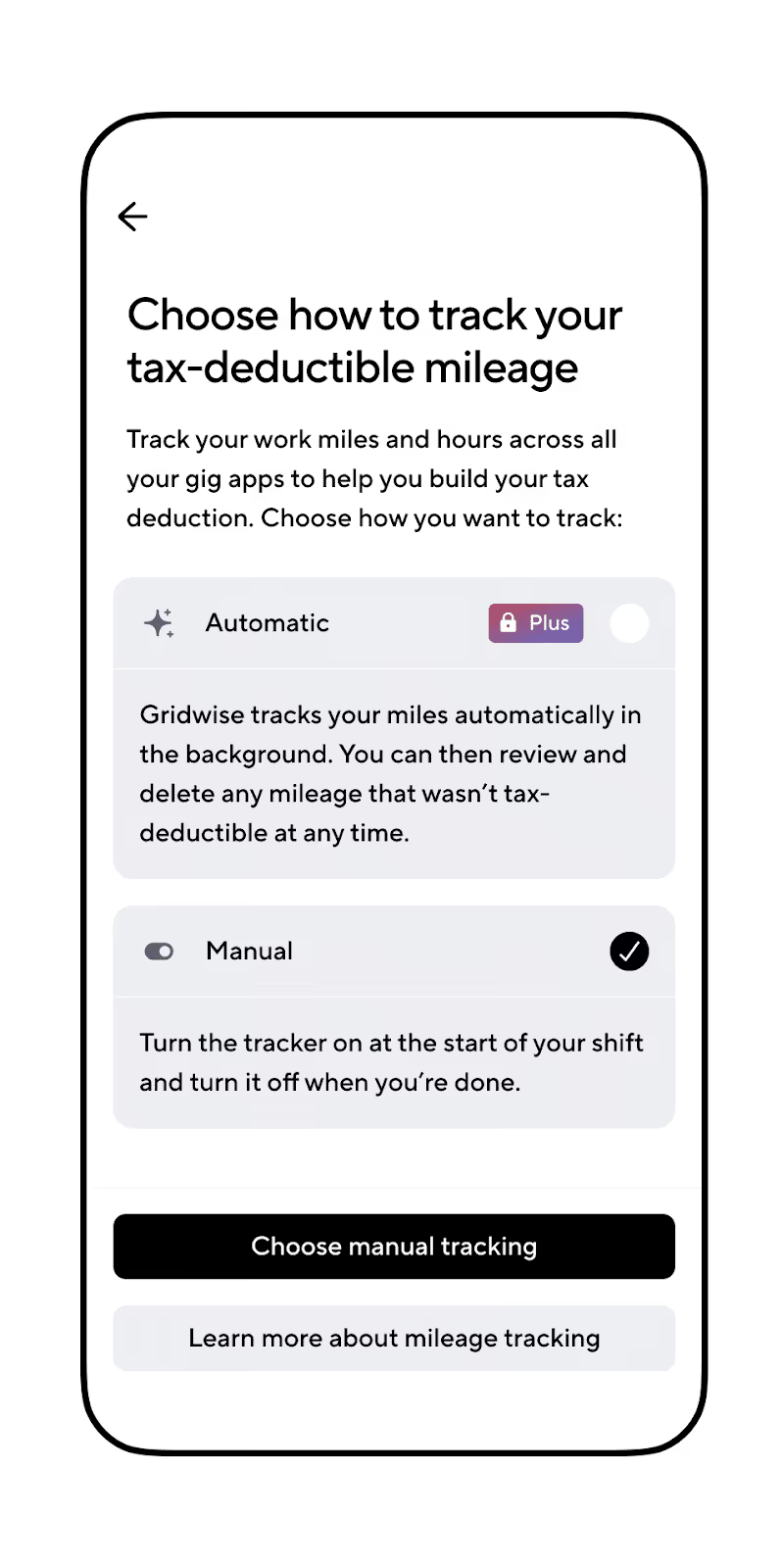
La función de seguimiento de millas de la aplicación Gridwise se adapta a sus necesidades. En lugar de limitarse a contar todas las millas que conduces, La red te permite encender y apagar el rastreador con facilidad, por lo que tienes el control de contabilizar el kilometraje deducible.
Enciende el rastreador cuando vas a ir a un gig o a comprar materiales, y luego apaga cuando termines el día de trabajo. Gridwise Plus te permitirá rastrear automáticamente tus millas, encendiendo el rastreador cuando muevas tu vehículo, y apagado cuando se detiene durante un período de tiempo que determina. Incluso puede introducir y corregir sus cifras de kilometraje manualmente.
Rastrear ingresos y gastos
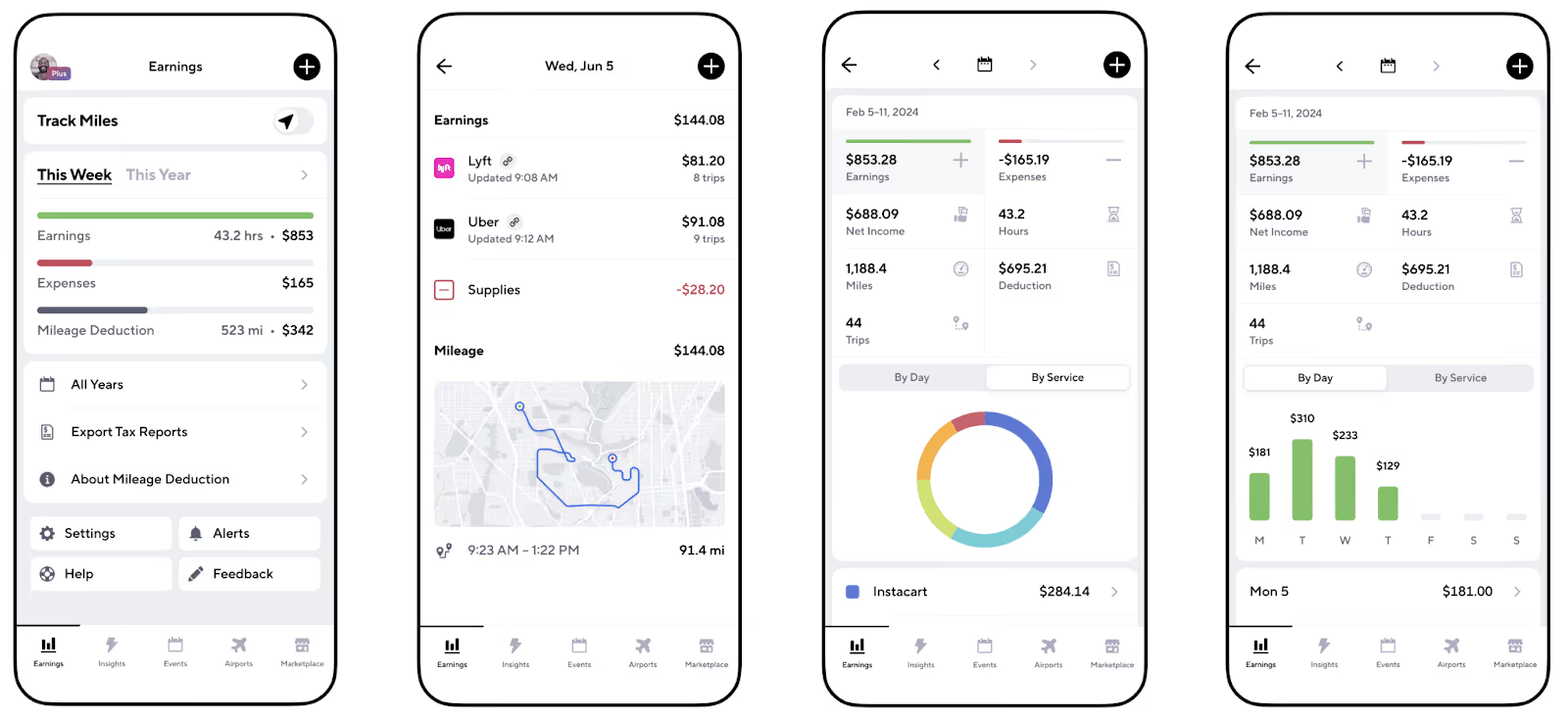
Con Gridwise en tu bolsillo puedes rastrear todas tus ganancias y gastos, así que nunca tendrás que preocuparte de recolectar montones de papel cuando llegue el tiempo impositivo. Gridwise genera automáticamente informes que le dan la oportunidad de ver la salud financiera de su negocio de un vistazo.
Obtener beneficios y beneficios de gig worker
Gridwise ofrece muchos de los servicios y comodidades que necesitas para facilitar tu trabajo con TaskRabbit y todos tus trabajos secundarios. Desde las pausas de precios en el gas, y descuentos en el mantenimiento de automóviles, hasta los planes de seguro bajos y sin costo, Beneficios en forma de parrilla sube todos sus beneficios y se integra en un paquete ordenado. Los miembros de Gridwise Plus obtienen más descuentos e incluso más ventajas gratuitas.
Aquí están sólo algunos de los beneficios ofrecidos por Gridwise:
- protección telefónica
- mercado de seguros de automóviles
- protección de robo de identidad
- descuentos en impuestos de Keeper
- medicamentos alternativos y beneficios quiroprácticos
- telesalud
- ayuda de crédito
- asesoramiento en vivienda
- acceso a beneficios de ayuda legal
Las ventajas de Gridwise permiten que trabajar en un trabajo secundario como TaskRabbit te brinde el apoyo que necesitas, además de maximizar tus ganancias. Mira cómo es usar una aplicación diseñada específicamente para los trabajadores gig como tú.
[elementor-template id="21599"]
Más sobre grandes gigs laterales
- Desbloquea tu potencial de ganancias
- Gana $1000 por semana con Uber Comats
- Conviértete en un jugador de patines
- Gana $1000 por semana con Walmart Spark

Gana más: El programa de recompensas para conductores de Walmart Spark
Ya sea que ya eres un Conductor de Walmart Spark o estás considerando añadir un trabajo de Spark a tu repertorio de trabajos secundario, necesitas aprender más sobre el programa de Recompensas para Conductores de Spark. ¿Por qué es tan importante esto?
Entre los retos de ser un trabajador independiente está el no obtener todos los beneficios de un trabajo a tiempo completo W-2. Los trabajadores independientes deben encontrar formas de obtener beneficios médicos, cobertura dental, seguro de vida y otros beneficios personales. Hay muchas cosas geniales sobre ser un trabajador independiente; una es la fantástica cantidad de ventajas y descuentos que obtienes con extras, como el Programa de Recompensas para Conductores de Spark. Si estás buscando más información sobre cómo ganar más con Walmart Spark, echa un vistazo a esta publicación también.
[elementor-template id="20891"]
Qué es el Programa de Recompensas para Conductores de Spark?
La mayoría de aplicaciones de trabajo independiente ofrecen a los trabajadores ventajas y privilegios basados en rendimiento. Los programas de recompensas basados en incentivos benefician tanto a los trabajadores independientes como a las empresas para las que trabajan. Cuando los conductores de Walmart Spark hacen más viajes, los clientes de la empresa reciben un servicio más rápido. Y cuanto más viajes hagan los conductores, más ventajas, beneficios y privilegios reciben.
Los programas de recompensas son una buena razón para seguir amando el trabajo independiente. Ofrecen una situación en la que ambas partes ganan. Pero lo que obtienes de distintos programas de recompensas depende de muchos factores diferentes. En lo que a nosotros en Gridwise respecta, el Programa de Recompensas para Conductores de Spark es bastante impresionante.
Qué beneficios puede esperar un conductor de Walmart Spark?
El Programa de Recompensas para Conductores de Spark reconoce a los conductores ofreciéndoles todo tipo de beneficios. Hay dos niveles de membresía. Un conductor de Walmart Spark puede calificar para los beneficios de Nivel 1 simplemente por estar en buena situación.
Los conductores de Spark de nivel 1 reciben:
- Acceso a la aplicación One Financial. Esta aplicación de banca móvil te da acceso a los servicios de Coastal Community Bank. Con la aplicación One, obtienes acceso instantáneo a tus ganancias y puedes configurar herramientas financieras que hacen que ganar, gastar y ahorrar tu dinero sea muy fácil!
- Descuento en Presentación de Impuestos y Seguimiento de Gastos con Keeper Tax. Keeper Tax hace que el seguimiento de los gastos y la presentación de impuestos sea extra sencillo. Esta poderosa aplicación incluso buscará en tus gastos para asegurar de que hayas aprovechado cada deducción posible. Los conductores de Walmart Spark obtienen un descuento de hasta el 65%.
Para obtener los beneficios adicionales ofrecidos en el Nivel 2, los conductores deben completar al menos 20 entregas en un mes calendario y mantener una calificación del cliente “verde” en la aplicación para Conductores de Spark.
Los conductores de Spark de nivel 2 obtienen estos beneficios adicionales:
- Planes móviles a menor costo. Quién no quiere un descanso cuando se trata de pagar por sus necesidades de servicio móvil? Con las Recompensas para Conductores de Spark, los descuentos de los principales proveedores de servicio incluyen
- un descuento de $10 al mes de AT&T
- datos ilimitados de T-Mobile
- Datos, llamadas, mensajes y hotspot ilimitados por $35 con Verizon
- Aplicación de Cámara de Tablero y Telemática de Driver Technologies: Convierte tu teléfono en una Cámara de Tablero (dashcam) con esta aplicación de vanguardia. El Programa de Recompensas Walmart Spark te da seis meses del Plan Prémium para Conductor y un soporte de teléfono para el auto genial, todo por $19.99!
- Membresía Walmart+ GRATUITA. Este es el beneficio favorito de los Conductores de Spark. Valorado en $98 al año o $12,95 por mes, Walmart+ te baña con descuentos y beneficios como
- envíos gratuitos
- descuentos en combustible
- grandes descuentos en medicamentos
- Suscripción a Paramount+
- aviso temprano en ofertas de Walmart
- devoluciones gratis
Estos requisitos deben cumplirse cada mes para que los beneficios continúen. Por ejemplo, si estás en el nivel 2 en octubre, pero no llegas a los 20 viajes para calificar para Noviembre, no obtendrás tus beneficios ese mes. La buena noticia es que, si haces 20 viajes en noviembre, estarás de vuelta en el nivel 2 para la temporada de compras navideñas y recuperarás todos esos grandes beneficios.
Cada mes, si calificas para beneficios de Nivel 2, te llegará un correo electrónico anunciando tu elegibilidad. Si crees que mereces beneficios de Nivel 2, pero no has recibido un correo electrónico, ponte en contacto con el servicio de soporte para apostar tu reclamo. Walmart Spark ofrece grandes oportunidades para ganar más, te contamos cómo puedes ganar $1000 por semana con ellos aquí.
Mantén los beneficios incluso cuando no llegues el nivel 2
Quieres asegurarte de recibir toneladas de beneficios de trabajador independiente, incluso si no llegas al Nivel 2 de Spark en un mes determinado? Usa Gridwise y recibirás muchos beneficios, ofertas y descuentos. Aunque no podemos darte Walmart+, deberías poder pagarlo fácilmente, gracias a las formas en las que Gridwise aumenta tus ganancias.
[elementor-template id="20949"]
Con Gridwise, tienes la garantía de obtener
- nuestro rastreador de millaje gratis, además de alertas meteorológicas, de eventos y de aeropuertos
- informes de ganancias y gastos
- ofertas y descuentos, incluyendo planes móviles de bajo costo y 30% de descuento en Keeper Tax
- hallazgos sobre cuándo y dónde conducir para ganar la mayor cantidad de dinero
- acceso a seguros, atención de salud y otros beneficios que trabajadores 1099 necesitan
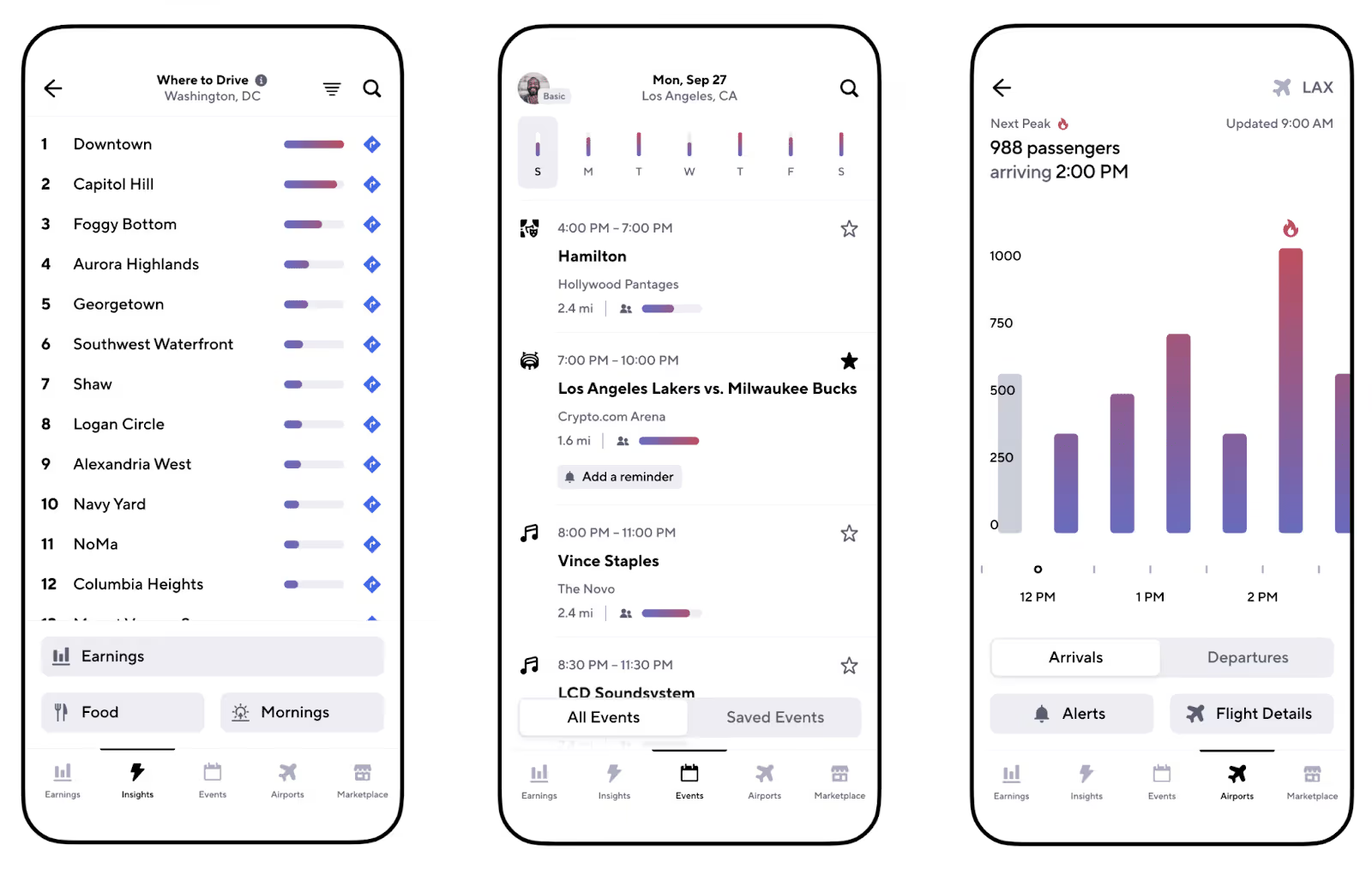
Las pantallas fáciles de leer de Gridwise colocan todos los datos e información que necesitas al alcance de la mano.
Vale la pena el Programa de Recompensas de Conductores de Spark?
Tus hábitos de conducción, cuánto tiempo tienes para Spark, y si eres un comprador regular de Walmart se combinarán para determinar que valor el Programa de Recompensas de Spark tiene para ti. Este video de Andando con Renia establece los pros y los contras en un lenguaje claro y honesto.
https://youtu.be/DSzo7G682KU?si=FNYMHv0q82lxb1xr
Si puedes realizar consistentemente 20 viajes o más cada mes, y mantener esa calificación del cliente “verde” del que habla Renia no hay duda de que la membresía gratis de Walmart+ por sí sola vale la pena el esfuerzo. Aprovecha y haz del Programa de Recompensas de Conductores de Spark tu máquina de hacer dinero!
Pero si trabajas con Spark a tiempo parcial realizas varios trabajos independientes diferentes y no tienes tiempo para completar la cuota completa de 20 viajes, es posible que quieras dejar que al Programa de Recompensas para Conductores de Spark pasar de largo.
Y si decides salir o no llegas al Nivel 2, ¡buena noticia, siempre puedes contar con Gridwise!
[elementor-template id="21599"]
Gana más con todos tus trabajos independientes:
- Obtén el mejor rastreador de millas
- Cómo registrarse para ser un conductor de Spark
- Gana $1000 por semana con Walmart Spark
- Cómo funcionan los incentivos de Doordash?
- Estate al tanto de Uber Pro
- Aplicaciones que te mantienen en marcha
Gig Worker Compensation: How Data Can Lead to Fair Legislation
Objective mobility and food delivery data will play a pivotal role in the continuing struggle between equitable gig driver pay and the need for gig platforms to make a profit. Caught in the middle of this tug-of-war are the passengers and food delivery consumers who pay for these services and have come to rely upon them, as well as the cities and other jurisdictions trying to establish equitable laws that are fair to all participants.
There is no better example of this than the current situation in Seattle, WA. In 2020, Seattle implemented an ordinance known as Fair Share, establishing minimum compensation for rideshare drivers. In 2022, they followed up with another ordinance known as PayUp, which addressed food delivery drivers and took effect in January 2024.
While the measures were well intended, the results don’t please everyone, and many point out flaws in the legislation. It’s not just about how much Uber Eats drivers make in Seattle. The universe of gig drivers, gig platforms, policy decision-makers, and even Seattle restaurants are struggling for clarity and leadership.
This is where Gridwise Analytics prevails. We have real-time, ground truth data.
[elementor-template id="20891"]
The gig driving landscape in Seattle
The tension between gig drivers and the gig platforms in Seattle resembles many large cities, with disagreements between platforms and drivers about fair compensation. Added to this, however, is a city government that is concerned about workers’ rights and equity in the workplace. According to TheStreet, a personal finance blog, Seattle has a minimum wage of $19.97 an hour, the highest in any major US city.
The Fare Share Law
In 2018 and 2019, Seattle saw increasing pressure from rideshare drivers who were concerned about low pay and unfair deactivations. The City Council unanimously passed Fare Share in 2020. Provisions of the ordinance mandated that drivers receive compensation of at least $0.57 per minute, $1.33 per mile, and a minimum of $5.00 a trip. There were also requirements for sick pay and protections against unfair deactivations.
To offset increased costs in the wake of Fare Share, Uber raised prices by 24%, reported Pymnts.com.
Interestingly, the ordinance was implemented simultaneously with the COVID-19 lockdown, making it difficult to determine how it affected the rideshare business. What is clear from the graph developed by Uber for a piece in The Medium is that the Seattle rideshare business, like rideshare across the US, cratered at the beginning of the pandemic. Rideshare in Seattle, however, has recovered at a slower pace than the national average and has yet to reach pre-pandemic levels.
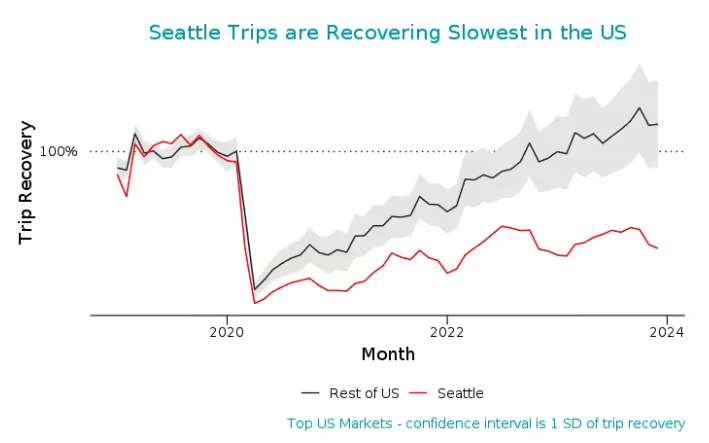
Source: Uber Under The Hood, Medium
The PayUp Law
The initial version of PayUp passed in 2022. As reported in the Seattle Times, the ordinance required gig platforms to compensate Seattle food delivery drivers at $0.44 a minute with a minimum per-mile amount of $0.74 while making a delivery or a minimum of $5 per order. The law applied equally to grocery delivery. Before the law took effect (but after it had passed), Shipt, the number two company in the grocery delivery market, suspended operations in Seattle with no comment on the reasons for the action.
Uber Eats and DoorDash added a $5 surcharge to Seattle orders, which they stated was necessary to maintain profit margins. They also warned that this would decrease order volume and driver income. DoorDash also responded by adjusting the suggested amount for tips in each order.
The following chart supplied by UberEats shows the aftermath of PayUp, with orders dropping almost 30%, starting when the law went into effect (signified by the vertical dashed line in early January 2024).
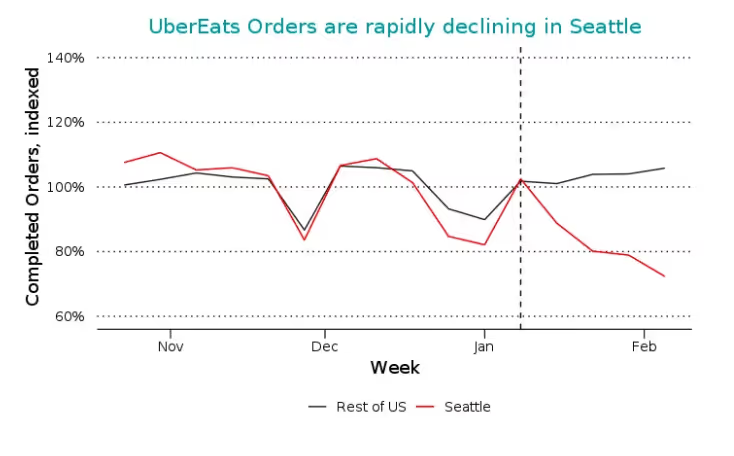
Source: Uber Under The Hood, Medium
Restaurants feel the effects of PayUp
Seattle restaurants are experiencing a drop in delivery business in the wake of PayUp, reports Geekwire. Uttam Mukherjee, co-owner of Indian street food restaurant Spice Waala, revealed that his restaurant experienced a 30% year-over-year decline in app-delivery orders this past January. In late February 2024, Uber Eats also reported a 30% decrease in food delivery orders.
Drivers are also feeling the effects of PayUp. The Geekwire article points out that although drivers make more per trip, the trip reduction means a lower net pay.
Carmen Figueroa, a veteran food delivery driver in Seattle and supporter of PayUp, told Geekwire, “I’m not making any more money.” She added that she’s getting fewer orders. Food delivery drivers all over Seattle report more pay-per-order but significantly fewer orders.
Drivers and allies call foul on price increases
Drivers and organizations allied with the drivers point to the $5 surcharge as part of a strategy the food delivery platforms use to prove that PayUp is a bad idea. As reported in another GeekWire article, nonprofit Working Washington, a previous PayUp supporter, said, “The new fees instituted by the delivery companies are a ‘clear attempt to distract from the fact that their business model is built on paying workers almost nothing while their CEOs and shareholders make millions.’”
Complicating matters even more, this past January, Uber released its earnings statement for 2023, revealing that for the first time, the company made a profit of $1.8 billion.
How can Gridwise Analytics data help solve the problem?
Developing a solution that is just and equitable to the gig platforms and drivers who make those platforms possible requires a clear picture of what is happening in the Seattle food delivery and rideshare market. Uber Eats, DoorDash, and the other gig platforms can and do provide data but often deny requests to look deeper into the information, citing proprietary concerns.
This leaves everyone with a clear need for accurate information so that legislation can reflect data-driven decisions.
Gridwise Analytics provides ground truth data on rideshare, food delivery, and grocery delivery activity. More than 500,000 drivers around the US, including in Seattle, use the Gridwise app to coordinate their gig driving activities by synching their gig platforms to the app. Gridwise Analytics anonymizes and aggregates the information from these drivers, turning it into raw data.
Gridwise Analytics can produce activity reports for specific dates and times, indicating increases and decreases in platform activity and driver earnings. It can also provide macro views of activity over a vast region and micro views of small market areas.
Precise, verifiable data from Gridwise means that all parties work from the same facts.
Gridwise provides comprehensive data on mobility and delivery services across the U.S., including food and grocery delivery. Data from Gridwise Analytics correlates up to 98% against quarterly metrics reported by the individual platforms.
Types of mobility and food delivery data from Gridwise Analytics
Comparing platforms
Gridwise Analytics can also compare order activity across various platforms for the same period, allowing decision-makers to see if policies affect all platforms similarly.
Gridwise Analytics can also view activity across platforms, allowing decision-makers to see if policies intended for one type of service, such as rideshare, affect food and grocery delivery.
In this case, the start of the PayUp Law is marked with a vertical black bar, giving viewers a clearer picture of its impact on activity before and after.
Driver earnings
DoorDash data can show how driver earnings break down over time, indicating how legislation and other factors affect base pay, bonus pay, incentives, and tips. Note again the vertical bar, indicating when PayUp went into effect.
How can this data be used?
Objective mobility and food delivery data, often called ground truth information, create a level playing field for all participants. As municipalities and other jurisdictions look to develop equitable regulations, they can use this data to guide their decision-making in several areas:
- Accuracy verification. By comparing data from individual parties with Gridwise Analytics, the information's accuracy can be verified, and conclusions can be based on factual data.
- Bias detection. News outlets may have certain biases that slant their reporting. Data from Gridwise Analytics provides an objective benchmark to identify and correct any potential biases or angles that the media might be promoting.
- Trend confirmation. Objective data allows all parties to identify food delivery and rideshare market trends. Are orders trending larger? Are they trending smaller? Are travel times getting longer? What areas of the city are generating rides or orders? Decision-makers can confirm or refute conclusions based on this and other data.
- Comprehensive analysis. Objective data allows for a more in-depth analysis, uncovering nuances and details that might not be evident otherwise.
- Policy impact assessment. It’s crucial to compare reported outcomes of new legislation (like Seattle's PayUp law) with actual data to assess the true impact of legislation on gig workers, gig platforms, and the economy.
- Market understanding. Objective data provides insights into market reactions that other sources may need to capture fully. This deeper understanding can guide strategic decisions for all parties in the gig economy.
- Crisis management. In times of crisis or controversy, the media can sensationalize events. A single comment from one driver becomes a story. Objective data helps all parties maintain a realistic stance. Responses reflect factual information.
- Data-driven decision-making. Objective data reinforces data-driven decision-making, ensuring reliable information guides strategies and actions.
- Trust. By demonstrating a commitment to factual data and transparency, all parties can agree on facts, paving the way toward equitable solutions.
Unbiased Data for Smarter Decisions
In over a decade, rideshare and food delivery have revolutionized transportation and dining habits, but this change comes with questions and challenges. Objective data is crucial as decision-makers develop solutions.
With access to Gridwise Analytics, companies gain a comprehensive view of mobility patterns across their competitive landscape. Regulators and researchers can explore pressing issues with robust, unbiased information. Municipal planners obtain insights guiding policies that support thriving gig economies and transportation systems optimized for the future.
Get in contact with our team to discover how Gridwise Analytics can sharpen your transportation and food delivery analytics.
Check out these articles to learn more about Gridwise Analytics:
Gridwise: The Best Business Mileage Tracking App
There is a term in business known as “sticky money.” It refers to how much of the money you earn sticks to you as opposed to having to pay it out in expenses and taxes. Some expenses you can control, but as a gig driver, taxes can decimate your earnings. Gig drivers are self-employed. In addition to the taxes on your earnings, there is a self-employment tax. Making matters more complicated, the gig companies don’t deduct these taxes for you. As a gig driver, you must discipline yourself to make those quarterly tax payments.
As a gig driver and a businessperson, one of the first questions you ask yourself, or another gig driver is, “How do I track my business mileage?”
This is easy if you have the wisdom and foresight to use the best business mileage tracking app—-Gridwise.
[elementor-template id="20891"]
App-based gig work has become common
Before getting into the need for the best mileage tracking app for business, let’s address our use of the term “business.” An unbelievable number came out of the Pew Research Center back in 2021. Over 16% of US adults have earned money working on gig platforms. That number has likely increased since then, considering that the number came during the pandemic. In light of the Great Resignation, tens of thousands have flocked to gig driving. More are using gig driving to fill gaps in their budget or to fund the “revenge travel” we hear so much about. Their number one reason is the flexibility. Uber alone increased their number of drivers globally by 31% in 2022, according to a report by Business Insider.
For all these drivers, gig driving is a business. That’s why it’s necessary to treat it like one, including using Gridwise, the best business mileage tracking app.
The Gridwise business mileage tracking app also works for gigpreneurs, businesspeople who have discovered that they can also earn money on gig apps that don’t involve gig driving. Many gig drivers also work with these apps. They find it breaks the monotony and gives them options in the event of an unfair deactivation or some other issue with their gig driving (see the Gridwise blog post Sudden account deactivations on delivery platforms: What can you do?). These include apps such as Rover (pet care), Taskrabbit (handyman services), and others.
[elementor-template id="20949"]
Business mileage tracking apps: What's all the fuss?
This past December, the IRS released an updated standard mileage deduction for miles incurred for business driving, with a1.5 cent increase, to 67 cents a mile. Full-time gig drivers can easily put 1,000 miles on their car weekly and 50,000 miles a year. At 67 cents a mile, you can deduct $33,500 miles from your taxable income. This kind of deduction makes a considerable difference for the tax bracket you fall into.
At the beginning of each year, gig drivers receive a report of their earnings for tax purposes. That report also includes the miles you covered as you earned that money. Most people don’t know that the gig platforms only track your mileage from the time you have received a ride request or food order, through the time you pick up the passenger or food, until you complete the ride or deliver the order. The gig platform apps do not record the time between rides or orders; they don’t track the miles you incur before your first order or ride request; and they don’t log the miles you cover when you go home at the end of your shift.
All those miles not counted by the gig app platforms are tax deductible. The Gridwise mileage tracker records all those miles. In many cases, that can add tens of thousands of business miles you can deduct.
Must-have features in an app for tracking business mileage
The question among drivers is, “What is the best app to track mileage for taxes?” The answer—Gridwise. It's the only business mileage tracking app designed for gig drivers by gig drivers. And since Gridwise understands that you're in business for yourself, the Gridwise app was developed to be the best app for tracking mileage for business gigpreneurs. Consider the features of the Gridwise app.
FeatureWhat it doesWhat you get out of itTracking exact mileageThe Gridwise mileage tracker links to the GPS on your cell phone. You get precise mileage,tracking every mile. Automatic reminder functionWhen you start to drive, the Gridwise mileage tracker senses movement and reminds you through your cell phone to activate your tracker. No more lost miles because you forgot to write down mileage at the beginning or end of your shift. Doesn’t interfere with other appsThe Gridwise mileage tracker works in the background. Gridwise doesn’t interfere with any gig app platforms you run on your phone, even if you're running two or three apps simultaneously. Easy setupIt takes just minutes to add all your apps to the Gridwise mileage tracker. Even if you multi-app several gig platforms, Gridwise quickly adapts, recording all the information needed to make you a better businessperson. Incorporates an expense trackerTake a photo of every receipt from every business expense related to your gig driving or other gig work, and add a quick description. The Gridwise mileage tracker saves it for tax time. All expenses are at your fingertips. View all your gigs at onceGridwise lets you view all your gigs at once, giving you a complete picture of your gig earnings. You can see trends and determine where your best jobs are coming from. Easily download informationDownload your mileage and expense records from the Gridwise mileage tracker into an easy-to-handle Excel file. Do calculations in minutes to come up with mileage totals. Without Gridwise, this is a daylong job.
The Gridwise mileage app is the best mileage tracking app for businesses. Download it today!
FAQs–taxes and business mileage
Am I better going with the standard mileage deduction or actual automobile expenses?
The IRS permits two ways of claiming mileage and automobile-related costs: actual expenses or the standard mileage rate. Both methods account for mileage and other auto expenses such as oil changes, tires, and repairs.
The standard mileage rate is easier. You determine the total miles you drive as part of your gig-driving job and write it off at 67 cents per mile (65.5 cents before January 1, 2024). In almost all cases, gig drivers and other business owners realize more significant savings using the standard mileage rate.
With method number two, deducting expenses only, you save all your receipts for fuel, repairs, and maintenance, and at the end of the year, you add them up. Businesspeople who use this deduction method typically do so in situations where they have less mileage, but drive an expensive car with significant maintenance costs.
Here’s another little jewel: the IRS allows you to compute your mileage at 67 cents per mile even if you drive an electric car.
What about claiming my fuel costs?
Your standard mileage rate includes fuel expenses. Claiming the standard mileage rate while at the same time claiming your gas expenses is a quick way to get audited.
What are the chances of a gig driver getting audited?
Estimates are that between 0.3% and 1% of all returns get audited. Remember, though, you're a self-employed businessperson, which increases your audit prospects. In addition, the gig industry is the newest area for IRS auditors to explore. It’s a bright, shiny thing for them, and they’re still trying to figure out how current IRS policies apply to the gig economy. Don’t take chances.
What if I didn’t keep a record of my mileage?
If you spent all of 2023 driving rideshare and didn’t keep a mileage log, your best option is to go with the report you received from Lyft or Uber. The same goes for meal and grocery delivery.
Another option is a technique the IRS calls “sampling.” After several false starts at keeping a mileage log, let's say you start using the Gridwise mileage tracker on October 1. For the year's final quarter, you must keep diligent mileage records. You can then extrapolate that report for the entire year. There is a good chance the IRS will accept that in an audit. Review Publication 463 (2021), Travel, Gift, and Car Expenses, for a full explanation of sampling. Look under Section 5, Recordkeeping.
Does the IRS require odometer readings as part of a mileage report?
Nothing in IRS policies says your records should include odometer readings.
The IRS instructs examiners to verify total miles for the year by requiring repair receipts or other records showing mileage at the beginning and end of the year. Take a photo of the odometer on the first and last day of the year and upload it to the Gridwise mileage tracker. That’s solid proof.
Can you round out your mileage numbers?
Stay away from rounded-off numbers. The IRS finds them a sign of less-than-stellar record keeping. Gridwise provides an accurate mileage reading. The more precise you can be in your information, the better you look in an audit.
The Gridwise mileage app is the best mileage tracking app for businesses. Download it today!
Gridwise provides the best business tools for gig drivers.
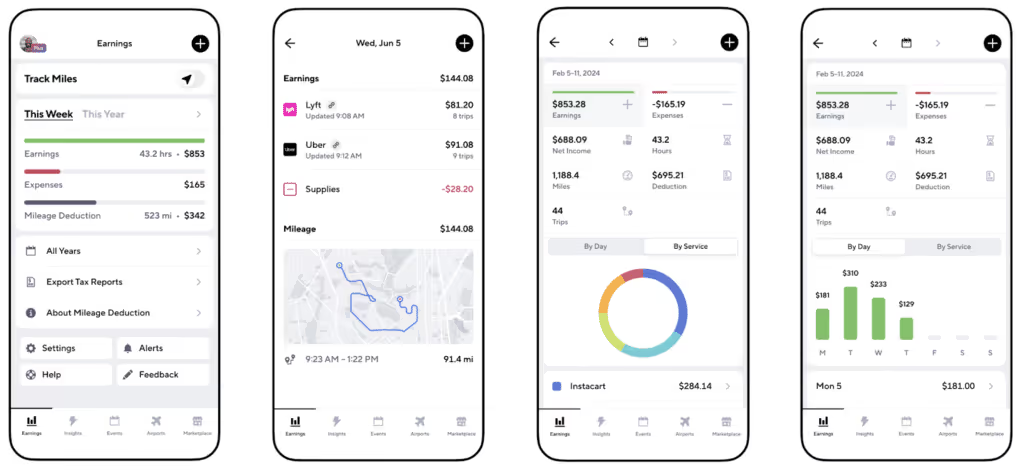
If you’re looking for an app for tracking business mileage, look no further than Gridwise. Veteran gig drivers developed the Gridwise mileage tracker specifically for other gig workers. They realized that gig driving was more than a way to make extra money. For many, it's a business, not just a side hustle.
[elementor-template id="21599"]
Check out these Gridwise pages to learn more about the Gridwise mileage tracker:
- Download the Gridwise app for free (includes the Gridwise mileage tracker)
- Download the Gridwise Annual Gig Mobility Report
- The best mileage tracking app for DoorDash
- The best business mileage tracking app
- The best mileage tracking app for delivery drivers

How To Use Gridwise Features To Maximize Your Gig Worker Tax Deductions
What counts as gig worker tax deductions? How do mileage deductions work? Why do delivery drivers and other gig workers have to know about the mileage tax deduction? If you have questions like these or think you already have them covered, keep reading. You’ll not only learn why and how to track mileage for taxes, you’ll discover the best app for mileage tracking and how to use it so you keep more of your hard-earned money.
[elementor-template id="20891"]
The power of Gridwise for tax management
Being a gig driver means you have more responsibilities than you would if you worked a job where your taxes are withheld for you. Not only do you have to pay your own taxes, you must find smart ways to maximize your deductions and simplify the tax filing process. This sounds rather straightforward, but in truth, you need help.
That’s where Gridwise comes in. Although Gridwise has a mileage tracker, it does much more! Gridwise is designed specifically for gig workers by people who have been gig workers. That’s why the app’s many features cater directly to the needs of rideshare and delivery drivers, as well as all sorts of gig workers across the board.
You’ll find this useful when it comes to managing your tax preparation needs and managing your gig worker tax deductions. Gridwise gives you tools that make it easy to record and compile the information you need to maximize your tax deductions.
- a customizable mileage tracker that records every deductible mile
- income information and analysis for all the driving apps you use
- expense logging
- professional tax software interface to identify gig worker tax deductions
- sleek reports that make tax time a no-stress, no-worry, no-brainer
Gridwise is an extremely powerful app that addresses the needs of gig drivers and can also help you keep track of your other side hustle tax deductions.
A guide to using Gridwise for tax management
Set up mileage tracking
What makes Gridwise such a cool tool for deducting mileage for business? You want to capture every mile you can legally deduct while you’re on your driving gig. The driving apps will indeed tell you how many miles you’ve clocked on the trips you make for them, but they leave a lot of mileage missing from their calculations.
You also need to log the miles you drive on the way to and from your gig and while waiting to get a ping for a ride or delivery. Your apps don’t count that mileage, but Gridwise does! In fact, Gridwise can log your miles automatically as soon as your car starts moving from its parking place.
Setting up automatic tracking is easy. First, you’ll have to download Gridwise and access Gridwise Plus to unlock this feature. Then, follow these simple steps. You can set a specific “idle time,” which tells Gridwise how long to wait before turning off automatic tracking. This makes your mileage tracking life loads easier.

You can also track your miles manually using Gridwise Plus, as well as the free version of Gridwise. Follow these instructions, and you’ll be all set. The manual shift tracker will let you catch all the miles you drive, so make sure you turn it off when you’re done for the day.
If you forget to turn the tracker off, or if you want to add to or adjust the miles you logged automatically, Gridwise makes it simple to edit your mileage figures. You can add mileage manually or make changes to your mileage whenever you need to do so.
With Gridwise, your mileage write-off will be accurate, and you’ll no longer have to worry about how to track mileage for taxes to add to your gig worker tax deductions. Gridwise does it for you!
Note that you can use Gridwise to track miles for all businesses that require the use of your vehicle. Whether you take short business trips or need your car to get from one client to another, Gridwise will help you capture each and every deductible mile.
Sync your earnings with gig apps
When you’re adding up all your gig income, you have choices. You can go through each and every app you drive for, and figure out the totals, or…you can use Gridwise to sync all your apps with your earnings records. Gig workers are busy people, and you can’t afford to spend hours manipulating figures (or missing gig worker tax deductions) and risking major math mistakes.
Streamline the process of adding up your earnings with Gridwise! All you need to do is sync your driving apps with Gridwise, and all your earnings will be recorded and retained. You’ll be able see, at a glance, how much each of the apps you use is earning for you.
Gridwise’s graphs and maps show you the details of your earnings by various factors. This makes it easy to prepare Uber taxes, Lyft taxes, Uber Eats taxes, DoorDash taxes, and taxes for all the apps you use.
You can enter your income figures manually. This and many of the income features are available in the free version, but as a Gridwise Plus driver you’ll enjoy the most number of features when it comes to syncing your apps and analyzing your earnings.

Log your expenses quickly and easily
Tax deduction for mileage isn’t the only delivery or rideshare tax-related item you can use to retain more of your income. Other expenses—from meals and phone costs to the equipment you buy to make your car more efficient for rideshare and delivery—can also be subtracted from your gross income.
You have to do more than take all the receipts you have and throw them in a shoebox so you can rifle through them at tax time. You need a tool with you at all times, one that gives you a place to record each and every expense you encounter. Gridwise is designed to be just that. Enter your expenses with the date and category, save them, and Gridwise will keep them impeccably organized.

Add, edit, or delete expenses using these directions. Later, you can view your total expenses on your earnings reports.
Generate and export tax reports
The real tax time magic happens when you generate and export your information to your or your tax preparer’s software program. From the earnings page, as shown in the screenshot above, simply tap on “Export Tax Reports.”
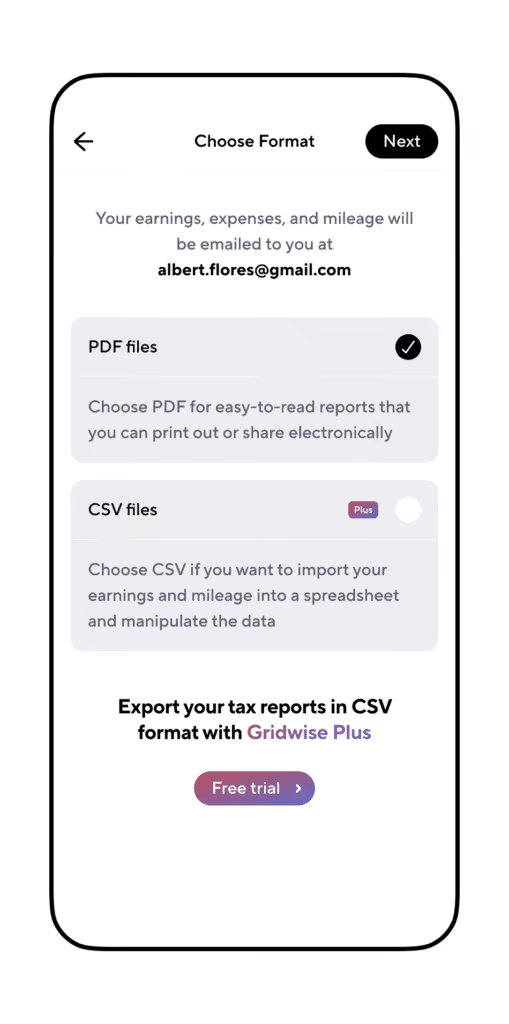
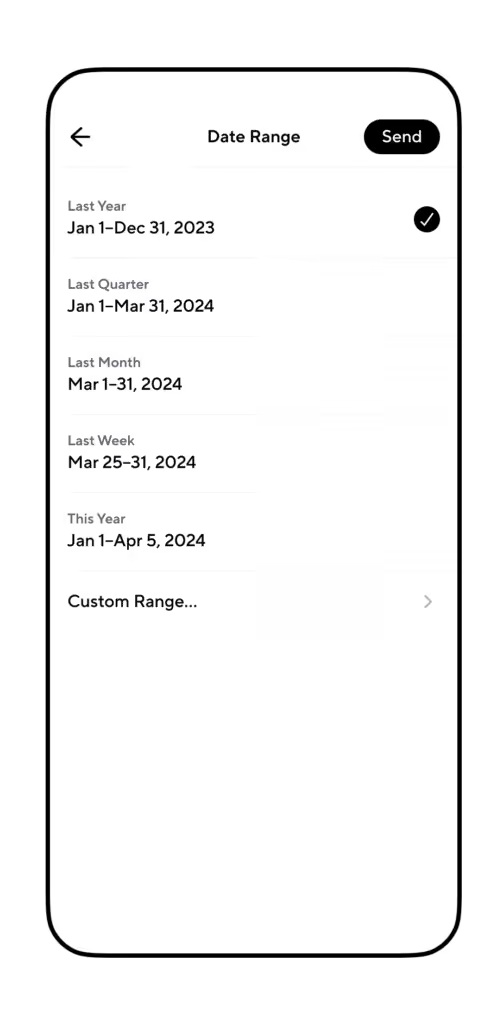
Gridwise Plus drivers can export their tax reports, which include accounting of all income from their various gigs as well as categorized expenses to .csv or .pdf formats. Free Gridwise app users can also export their information, but in .pdf format only.
Learn more about using Gridwise to generate tax reports and how to export them, so you can start using this convenient feature right away!
[elementor-template id="20949"]
Advanced tax features for gig workers
You can get tax help with a tap. Keeper is a tax filing app that offers support for all your tax preparation and filing needs with a big discount.
Access to Keeper through Gridwise gives you
- automatic categorization of your tax-deductible expenses
- write-off detection that identifies all your deductible expenses
- tax pros on standby to answer your questions
- tax filing services
Keeper is designed for independent contractors with 1099 income and also handles any W2 or other wage forms you might have. Let Gridwise and Keeper sort out the income from all your gigs and handle all your tax preparation needs. Upload your information, and you’ll never have to agonize over tax time again.
How exactly do Gridwise and Keeper make tax management easier?
Let’s start with tracking your expenses. There are so many purchases and services that are tax deductible. As a gig driver, keeping track of all your expenses, pinpointing which ones can be deducted from your gross income, and making sense of it all can get really complicated. Things get easier when you enter your expenses into Gridwise and let Keeper search your purchases to detect any tax deductible items you might have missed.
Got questions? Get answers. Do you really know how to claim mileage on taxes? Without Gridwise and Keeper, you’re stuck poring over IRS and state tax rules and regulations all by yourself. When you unleash the power of Gridwise and Keeper, you get access to qualified tax professionals to answer all your questions and guide you through the process of preparing to file.
Filing made simple. Once you submit your forms through Keeper’s highly intuitive drag-and-drop interface, a professional will verify your return. You can review a report listing your estimated taxes, your total deduction amounts, and any refunds you might receive from your state and federal returns. A Keeper tax professional will sign off on your returns, and you can keep driving without worrying about whether you got it right.

Source: Keepertax.com
Real-world benefits of using Gridwise for tax management
With Gridwise and Keeper on your side to help you with tax management, you have everything you need to streamline your accounting process and simplify the ordeal of filing your taxes.
Use Gridwise to:
Maximize deductions. Gridwise captures every mile you drive for business. This includes the distances traveled while you’re working but not on the gig app, and when you’re waiting to get a ping. You can also use Gridwise to track mileage for business trips you make for your other side gigs.
Organize your accounting. Use Gridwise to record your expenses, and let Keeper seek out other freelancer tax deductions you might not have considered. Keeper will also categorize your expenses so they can easily be entered on your tax returns.
Streamline the tax filing process. With Gridwise and Keeper, you can take the daunting task of sending tax returns to the authorities off your plate. Recording mileage, earnings, and expenses as you drive along will make it easy to compile the information you need to file. Then, with a Keeper tax expert checking your return over, you can be sure that it’s in compliance and done right.
Save time and reduce errors. All your tax management solutions are on one app when you use Gridwise. You can keep the focus on your job, which is earning more money on your driving gig. Let Gridwise and Keeper handle the rest, and be confident that you’re maximizing your income and holding on to as much of it as possible while remaining in full compliance.
Start organizing your gig business with Gridwise now, and take the responsibility of tracking, recording, and filing off your shoulders so you can sit back, relax, and keep driving.
[elementor-template id="21599"]
Learn about freelance tax deductions, Uber driver taxes, and more:
Lyft and Uber Pet Policy: A Guide for Drivers
You may love animals and want to welcome them into your car as much, or even more, than any other passenger, or you may not want to let them anywhere near your vehicle. In either case, you need to know the rules for carrying pets as passengers because those guidelines may be more important than you think. What about the Lyft and Uber pet policy?
[elementor-template id="20891"]
Understanding pet transportation rules
It’s your car, and it’s your body that might have an allergic reaction or aversion to animals. Are there really instances when you have to take an animal into your car?
In the case of service animals, the answer is yes.
The requirement to accept service animals is not only a rule imposed by your gig service company, it’s the law. The Americans with Disabilities Act (ADA) requires all government offices and businesses (including rideshare drivers) to accept service animals.
According to the ADA, service animals include dogs of any breed or size that are trained to perform a task directly related to a person’s disability.
If you are reported by a potential passenger for refusing to allow a service dog into your car, and an investigation by your rideshare platform proves that you refused them, you can be immediately and permanently deactivated from the driving app, whether it’s Uber or Lyft.
How can you know for sure if a passenger’s dog is a service animal?
To be honest, you can’t. The passenger is not required to present any papers or put special tags or other designations on the dog to prove that it’s a service animal. You’re only allowed to ask the passenger two questions:
- Is the service animal required because of a disability?
- What work or task has the dog been trained to perform?
The consensus, and the expectation of rideshare platforms is that most people are honest about the roles their animals play in their lives. As a driver, you’re just going to have to trust them.
And, according to many people with disabilities, they expect you to understand and help by preparing to take them and their animals. After all, people with disabilities need rideshare services and depend on them to live a comparatively everyday life.
What about pets that aren’t service animals?
It makes sense to try to accommodate your passengers’ needs to transport their pets because you’ll be able to make their experience with you more pleasurable. That will most likely mean you get higher ratings and more significant tips.
Of course, each driver has different preferences, and you do have options. You decide if and under which circumstances you’ll agree to take a pet on board. Let’s look at the pet policies of both Uber and Lyft to see exactly what these options are.
Uber’s policy when it comes to pets on rides
Uber’s pet policy addresses both service animals and other pets. You always have the option of accepting passengers with pets. Now, though, there’s Uber Pet. With this service, your customer's requests will be marked similarly to UberX rides. You can opt to take the passenger and pet, depending on your wishes. Uber's customers are charged extra for Uber Pet rides, and you’ll get paid a little more for them! Opt into Uber Pet rides from the work hub in the Uber app.
What is the Uber policy when it comes to cats?
This is an Uber pet policy cat lovers can appreciate as well. Uber drivers are expected to accept feline friends as part of the Uber Pet arrangement. When it comes to more exotic pets, from ferrets and hamsters to monitor lizards and boa constrictors, you can make the call. You won’t be penalized for refusing these pets.
What is Uber's policy if a pet or service animal leaves a mess?
Cleaning fees can be applied if a passenger's pet soils your vehicle, and the passenger won’t be refunded, except in most cases involving service animals. Your rideshare company will still reimburse you, but your passengers with service animals will have their cleaning fees refunded if the only mess is caused by shedding. If a service dog’s excessive hair or bodily fluids are part of the mess, the rider will not be charged for the first two incidents, but after that, the cleaning fee will not be refunded.
When you decide to accept Uber Pet rides, you will want to carry a tarp or a blanket for your backseat to prevent your car from being covered in pet hair. If you are allergic, or if you just don’t dig dogs or care for cats, be sure you opt out of Uber Pet on the app’s work hub. You, as a driver, still are required to take service dogs in your vehicle, though, so taking along that tarp or blanket is always a good idea.
What are Lyft’s policies for pets, and cleaning up after them?
Lyft pet policy is similar to Uber’s, but there is no special pet-friendly option for passengers. In general, customers are asked to call and tell you that they have an animal with them. If you’re not willing to take their pet, you can cancel the ride and make yourself available for another one. In this case, the customer won’t be charged a cancellation fee.
If a pet makes a mess in your car, you’d report it like any other damage. Lyft doesn’t state any specific company policy about how you’d be reimbursed for cleaning up after animals, and there is no distinction between soiling or other damage caused by service dogs versus ordinary pets. If you have to deal with a major mess left by a rider’s animal, Lyft recommends that you report the damage and seek reimbursement.
Does Lyft’s pet policy leave room for your own service animal?
What if you need to have a service animal with you? Under the law, you’re permitted to have a service animal with you while you’re driving. It’s polite and a smart policy, though, to call or otherwise inform your passengers that they can expect to meet your friend when they ride with you. Some people are allergic to or afraid of animals, and being in a car with one could be very unpleasant for them.
For safety as well as the comfort of your customers, consider restraining or kennelling your service animal, at least while others are in the car with you. This way, your furry friend will be able to remain focused on you, and won’t be distracted by passengers’ adoring comments.
What about emotional support animals?
In case you’re wondering, emotional support animals are not classified under the law the same way service animals are. Lyft’s pet policy doesn’t require you to accept rides with animals other than service dogs.
Just like with any pet, you can accept the animal or let the rider find a driver willing to take the ride. Remember, riders are instructed to inform you when they request the ride that they have a pee.
You can’t bring your pet or an emotional support animal for your rides, though. You’ll have to settle for meeting the furry friends your passengers might bring in. Carry along some sort of covering for your back seat so they can ride comfortably and still let you keep your car looking clean and fresh.
How to maximize your rideshare efficiency and service quality
Your rideshare driving experience is better when you go out of your way to provide safe and friendly service to your customers. You have the right to set your boundaries, including whether you will agree to transport someone’s pet in your vehicle. Being honest and courteous about expressing your preferences is always a good bet.
You have lots of reasons to drive for Uber and Lyft, including more freedom, time, and additional earnings. Knowing policies about pets, providing honest and sincere customer service, and accommodating your passengers’ requests with kindness and courtesy will help you get bigger tips!
It’s also smart to have the tools you need with you at all times to run your rideshare gig right. Gridwise makes managing your business easy by giving you
- mileage tracking
- earnings tracking
- insights
- airport and events information
- benefits and discounts
- a community of like-minded gig workers
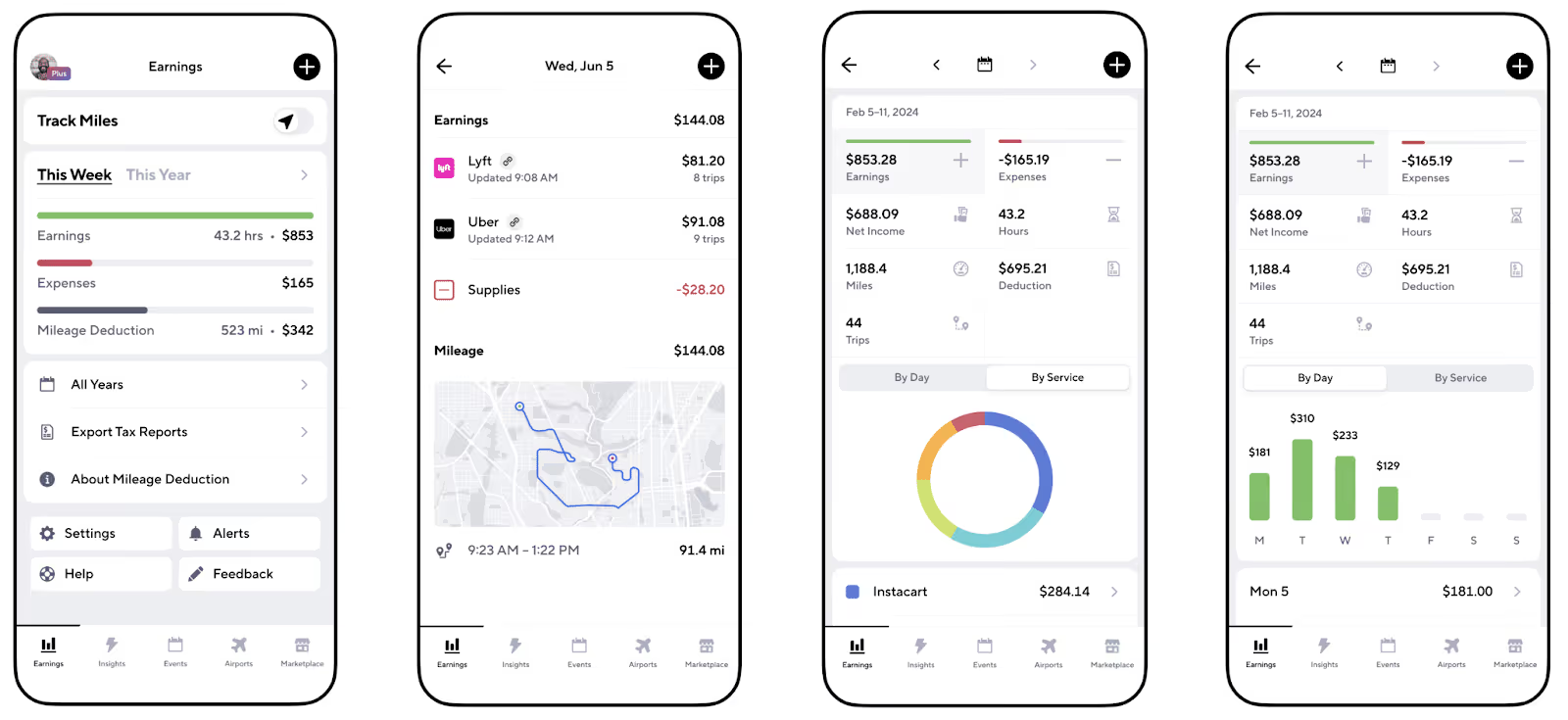
See the difference having a way to manage all your gigs in one place can make!
[elementor-template id="21599"]
More about boosting your earnings:

How to Track Mileage for Taxes With Gridwise
You're probably familiar with what a mileage tracker does, but finding the best one for your gig driving can be challenging. Many apps miss the mark when addressing the specific requirements of drivers, especially when it comes to tax deductions. Let’s delve into why it’s crucial to have a reliable mileage tracker tailored for gig drivers and learn how to track mileage for taxes effectively with Gridwise, the premier app for your needs!
[elementor-template id="20891"]
Reasons why mileage tracking is crucial for gig drivers
Why do you need a mileage tracker in the first place? Don’t the driving apps tell you how much you drive? In reality, the apps only record the distances you cover on trips. They miss the many miles you drive to and from your gig, and in between trips. Here are some reasons why it’s important to track all your gig-related miles.
- You need to track your tax deductible expenses. This is the number one reason why it’s so important to track your mileage accurately. The IRS rate for business mileage travel is $0.65 for 2023, and will be $0.67 for your 2024 tax year. Now, consider how many miles you put in doing rideshare and delivery work, do a bit of arithmetic, and you’ll come to a rather large sum that will become a substantial deduction from your taxable income.
- You benefit from income optimization and awareness. Here’s another wise way to use your mileage tracker app. When you keep accurate accounts of your mileage and income records, you’ll have the facts about how much money you get from your miles.
- You protect yourself from tax trouble. Reliably separating your business mileage lets you be in compliance with IRS regulations. Nobody wants to get burned by auditors out on the hunt for a bone to pick. Remember that you can deduct miles driven to and from your driving gig, as well as the miles accrued during each gig and in between them. You cannot deduct miles you drive for personal purposes, though. You need a mileage tracker that clearly differentiates between personal and business travel.
Gridwise: Your comprehensive, driver-friendly mileage tracker
Gridwise is more than a mileage tracker app. Created by gig workers, for gig workers, Gridwise doesn’t require you to adapt a generic tracker to your specific needs. The app gives you driver-friendly features that make it simple for you to track the miles that matter.
Gridwise also has features that assist drivers by informing them about events, traffic, and weather. It will also track your earnings and show you where and when you can make the most money.
Here’s why you’ll want to make Gridwise your comprehensive mileage tracking partner.
With Gridwise
- you choose from three options to attain complete control over your mileage figures
- you end the nightmare of manual mileage tracking or guesstimating your gig driving mileage
- you capture the miles you drive between rideshare or delivery trips
- you get fewer disruptions because Gridwise syncs with your driving apps and tracks your earnings seamlessly
Setting up Gridwise for your gigs
Getting started is easy. Your first step, of course, is to download the Gridwise app. Once you have the app loaded on your device, there are just a few more things you’ll need to set up.
First, you’ll need to enable location and motion detection and adjust a few additional settings on your phone.
Once you do that, you can choose from three ways to track your miles with Gridwise. Begin by deciding whether you’ll use manual or automatic tracking.
Note: Manual tracking is available in the free version. Gridwise Plus members benefit from automatic mileage tracking.

Gridwise offers a total of three options for tracking your mileage. The first two options for manual tracking are available on the free version as well as Gridwise Plus:
- Use on/off mileage tracking. Turn mileage tracking on and off when you begin and end your shifts. From the Earnings screen, tap the tracking button, and you’ll begin recording your miles. Turn tracking off when you finish your shift, and you will stop recording miles until you enable it at the beginning of your next shift.

Pro Tip: If you’re worried that you won’t remember to turn on tracking when you start your shift, don’t be. As long as you have Gridwise running in the background, a reminder to start tracking will appear every time you drive your vehicle. If you’re not driving for business, simply decline, and be on your way to wherever else you're going.
- Type in your mileage figures. If you want to clock your miles separately, and then add them to your records in Gridwise, simply tap the “+” button on the Earnings screen, fill in the information, and tap “Save.”
The third option, automatic tracking, is available to Gridwise Plus members only.
- Automatically track your mileage. This feature enables you to set up the tracker to detect when you move your vehicle, and need Gridwise to track your miles. Tracking stops once your vehicle is parked for a preset “idle” time period, which you can select and adjust. This makes accurate tracking more convenient for drivers who might not remember to turn tracking on and off during their shifts.
Wondering what happens if you make a mistake? What if you forget to turn the mileage tracker on or off? What happens if you accidentally track miles that aren’t tax deductible?
With Gridwise, you can always edit your mileage to make such adjustments. Add or delete mileage that you don’t want to include using these easy steps.
The best mileage tracker for tax purposes and more
Other mileage trackers only tell you how many miles you have driven. Because Gridwise is designed specifically for gig drivers, it enables you to track all the miles you drive for business. If you have a side gig or two that don’t involve driving apps, you can still use Gridwise to help you log all those deductible miles as well.
Gridwise Plus drivers benefit from enhanced features, but the free version of Gridwise is a powerful tool that outperforms other mileage trackers because it’s designed for gig drivers, by gig drivers!
[elementor-template id="20949"]
Maximize earnings with mileage data analysis
You can use mileage figures for more than just tax deductions. Gridwise stands out as the best mileage tracking app for delivery drivers and rideshare workers alike because it provides insightful reports.
- Compare and contrast your earnings and your mileage with the apps you work with, and determine where your time is best spent.
- Optimize routes, with efficiency in mind. You could find that driving those extra miles from one side of town to the other doesn’t pay off the way you thought they might. Pro tip: Use Where to Drive and When to Drive to show you where you can find the money, and when.
- Check out the correlation between earnings and mileage on different apps to see which are the most profitable.
Here’s how to find those useful Gridwise reports:
On the main screen, tap “Earnings,” and you’ll be whisked away to a summary of earnings for the current week and year. You’ll see your gross earnings, expenses, and mileage deduction figures, by week and by day. You can also see these figures by service—i.e., all the different gigs you work with.
Stay on top of your data and IRS information
The Gridwise app keeps accurate accounts of your mileage and income, and it pays for you to check in with it from time to time, so you’re on top of your gig driving performance and tax compliance.
- Review your data on a regular basis. You don’t want to let mileage get lost should you forget to add it in manually. In a similar way, you’ll want to keep an eye out for any instances where you recorded mileage for a road trip that was pure fun, and hence, not tax deductible.
- Back up your mileage data and earnings information to a source outside of your mobile device. A telephonic catastrophe could ruin your records, and you won’t want to lose the valuable information you’re collecting with Gridwise.
- Stay informed. Read up on IRS regulations to ensure that you’re in compliance with all the rules that are related to your mileage and other deductible expenses, as well as those involving work in the gig economy.
Beyond the best business mileage tracking app: Get more with Gridwise
The next time someone asks you about the best mileage tracking app for DoorDash or any other gig you drive for, you’ll know to tell them about Gridwise. While you’re at it, don’t forget to tell them about all the other driver-focused features the Gridwise app offers, including
- real-time weather, traffic, airport. and events information
- earnings insights
- deals and discounts
- tax help
- insurance and affordable health care options
- money-saving connections to automotive and financial services
All these features are available when you download the free app, but when you join Gridwise Plus, the discounts get deeper and the benefits multiply!
There’s even more value to being a Gridwise driver! The Gridwise community offers support from other drivers, along with special contests and giveaways. Join our Facebook community and follow us on Instagram to connect with awesome Gridwise drivers who share your issues and interests.
[elementor-template id="21599"]
More about mileage and other tax deductions for drivers:

The Best Times to Drive for Uber
As an Uber driver, you want to make the most money possible, right? To accomplish that, you need a sound strategy, mapping out optimal times to find passengers. You’ll also want to be assured that those customers will pay what you need to reach your desired hourly earnings rate.
How can you figure out the best times to drive and quickly discover what peak times will work with the rest of your schedule? We get into it in this blog.
[elementor-template id="20891"]
Passenger patterns: What are the best times to drive for Uber?
Surely you’ve seen the “heat map” on your Uber app. It shows the areas of town where there is supposedly the most demand for drivers. Sometimes it’s totally on the money, but at other times it doesn’t work so well. One reason might be that there’s a rush of other drivers only too willing to jump in for a chance to score the extra surge prices.
Even when the heat map is at its most torrid, it might not show you the most profitable places to drive. For instance, if there’s a huge concert, game, or festival, there will be a monstrous demand for Uber drivers. Once you race over to the site of the surges, you might also find that you’re stuck in traffic for an hour or two. This will make your trip to pick up Swifties, hockey fans, or denizens of the No Shoes Nation anything but profitable.
It always pays to factor in congestion and delays when you make your driving plans. Keep that in mind when you notice times that seem to be particularly popular with passengers. Uber’s website advises drivers to focus on weekends, rush hours, and evening hours, but these are not the only times you will find peaks in passenger demand. Here are some others.
- The weekday morning commute is always good for catching people on their way to work or caretakers bringing children to school. These will be short rides, by and large, but demand will be high and so will fares.
- Don’t miss out on weekday morning airport runs, particularly if you drive in a large metropolitan area. Business travel is still a thing, and people must be ferried to and from their flights. Hang out around hotels for departing guests and the airports themselves.
- Lunch meetings still happen on weekdays, perhaps for business, or just for fun. Some workers will want to run errands or make personal appointments on lunch breaks, so your availability will be just what the doctor ordered.
- The brunch crowd will be out in force on weekends. Cruise trendy neighborhoods or other areas where omelets, crepes, and pancakes are served up with mimosas, Bloody Mary’s, and piping hot coffee.
- During after-work and after-school commute times, as university classes change over, even short rides can keep you busy with the college crowd if you get enough of them.
- Thursday, Friday, and Saturday nights are busy nights in urban areas as passengers set out to celebrate the weekend at restaurants, bars, and events.
Is passenger demand predictable?
While it’s sensible to start putting your strategy together by considering ebbs and flows in passenger activity, you need more information than these general points provide. For one thing, every rush hour isn’t the same, not every airport time-window is equally lucrative, and some events attract more passengers than others.
You’ll also find different patterns depending on where you live. Every area has different traffic patterns, and a variety of events. For instance, you’d definitely want to know the opening and closing hours for museums and other tourist attractions in New York, but in Cleveland or Kansas City, the office and school traffic might make up more of your passenger count than tourist traffic, especially in the winter months.
This brings up another variable in passenger demand: weather, which affects Uber volume in different ways. While there may be less activity when outdoor conditions are too hot, cold, or stormy, demand for your rideshare services will soar because walking is out of the question.
As you can see, you need more information to get a more accurate read of what’s happening in your area and when you can expect the traffic to surge. You need data from drivers who are working in the same areas at the same times you want to work. Fortunately, you can get it very easily from Gridwise!
Use Gridwise and know when to drive
Gridwise is designed for drivers, by drivers. The When to Drive feature gives you insights no other app has to offer. It shows you the volume of earnings drivers experience at various times, based on actual figures! There is no guesswork involved in these numbers. Gridwise anonymously gathers earnings figures from drivers and brings them to you, so you know the best times to drive in your specific area!
Here are the steps to using the When to Drive feature on Gridwise:
- Download the Gridwise app.
- Sign in, tap “Insights,” and then scroll to “When to Drive.” This shows an overview of the big earning days in your area for the current week.

- To get additional data on the best times to drive, tap the bar chart and you’ll see further earnings numbers for different times of the day.

Now you can choose the time frame you want to learn about. Tap in the lower right hand corner where it says “Evenings,” and you’ll arrive at the screen that offers options.

- Select your option (the display will change) and you’ll see the information for the time period you’re most interested in.
- Gridwise When to Drive also provides the ability to compare the best times to drive for all the different services you work for. Tap “Compare Services” on the Insights screen. This takes you to a chart that compares all the services available in your area. You can change the time intervals you want to learn about by clicking on the time shown on the lower right-hand side of the screen.

Note that there are also comments indicating trends in earnings for the services that have experienced gains and losses over the time periods specified.
Gridwise is the very best source for information about the best times to drive. Don’t miss out on this valuable resource! Download the Gridwise App and get When to Drive, along with tons of other features to boost your earnings.
[elementor-template id="20936"]
Learn more about the best times to drive for Uber and other services:
Trabaje de forma más inteligente. Gane más.
Ya sea que conduzcas, entregues o recojas turnos, Gridwise te ayuda a hacer un seguimiento de las ganancias, el kilometraje y el rendimiento para que puedas mantener el control de tu trabajo. Descarga la aplicación y toma las riendas hoy mismo.
