Blog de Gridwise
¡Lee el blog de Gridwise para obtener consejos y sugerencias sobre cómo ganar más dinero mientras conduces para Lyft, Uber, DoorDash, GrubHub y más!

The Gridwise Job Board: Find Your Ideal Job or Gig Work
Gridwise is an essential assistant app created by gig workers for gig workers. Our mission is to support those engaged in gig work in every way possible. We understand how challenging it can be to deal with income instability, a lack of benefits, and job insecurity that often comes with gig work. The Gridwise app tracks and organizes earnings and expenses, and offers a wide array of discounts, deals, and services that make the lives of independent contractors easier and more rewarding.
We firmly believe it’s possible to make a viable living and create a gig experience that offers flexible hours, variety, and excitement. With issues such as consistent earnings and job security in mind, Gridwise is proud to offer a centralized platform that shows you how to find gig work and secure reliable opportunities. We’re proud to introduce the Gridwise Job Board.
[elementor-template id="20891"]
The Gridwise Job Board: Key features
Because Gridwise is dedicated to serving the gig worker community, we’ve filled the Gridwise Job Board with useful features that won’t waste your precious time.
- Comprehensive listings. Find part-time, full-time, temporary, and per-task work. Drive or deliver with your vehicle, utilize an employer’s vehicle, or even find non-driving gig work.
- User-friendly interface. Find the jobs that are right for you with a tap of your screen.
- Verified opportunities. We vet the jobs before they are listed to ensure you’re getting high-quality job postings.
How to get more gig work, seasonal, part-time or full-time jobs with the Gridwise Job Board
Looking specifically for “gig work apps” or “gig jobs near me?” You’re in luck. Our filters and search functions send you directly to the listings you seek.
Here’s how it works.
- Access the Job Board via the Gridwise website.
- Search for jobs by type, location, and more.
- Select the job that interests you, and read all about it.
- Scroll through the description, and if it appeals to you, click “Apply for job.”
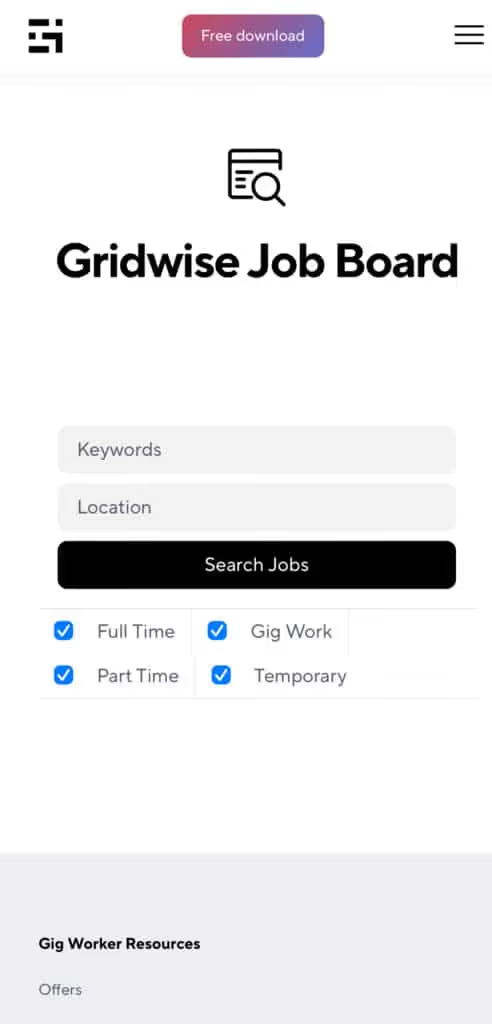
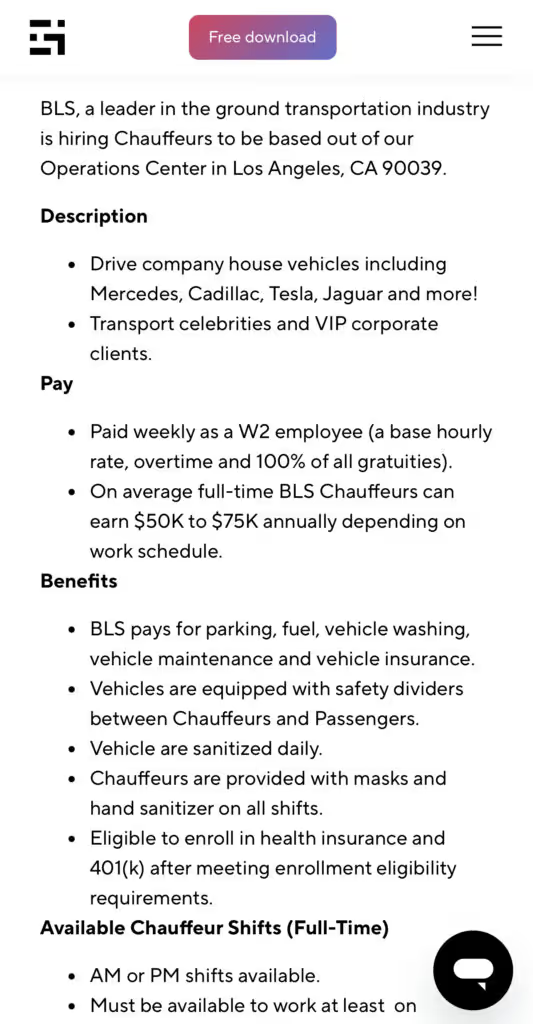
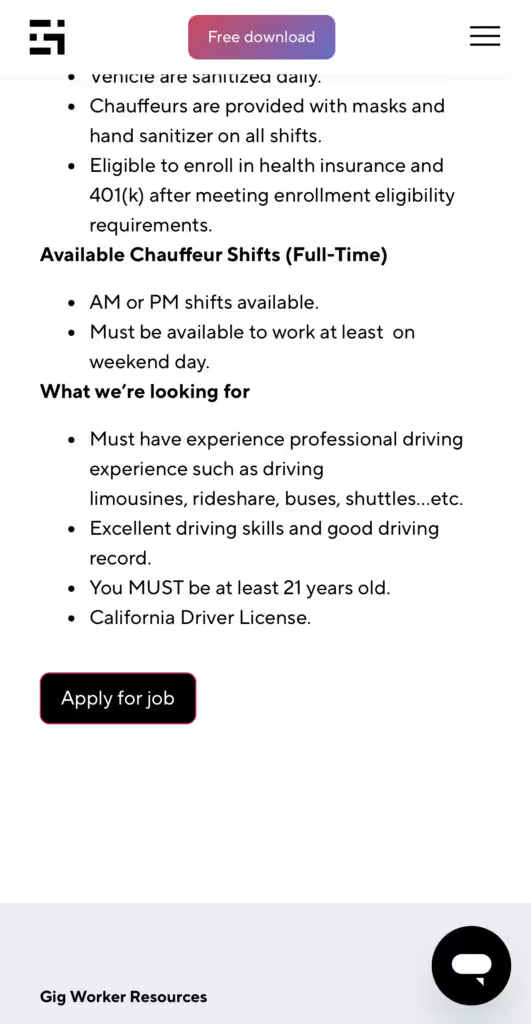
Many types of jobs are available. Adjust the search filter to see the full variety of opportunities that will let you cash in. Deliver food, set up catering, do rideshare driving, get paid for doing package delivery, and much more. You’ll find short-term gigs, long-term contracts, and part-time positions.
Perks of the Gridwise Job Board for gig workers
Gig workers who know how to make extra money will appreciate how the Gridwise Job Board lets you multiply your chances of bringing in big earnings. Here’s how:
- Increased stability. Use the Gridwise Job Board to find part-time or permanent jobs in addition to the part-time gigs you already have. Always keep a steady stream of earning opportunities flowing toward you.
- Flexibility and autonomy. Choose jobs that fit your schedule, work around other jobs and family duties, and still leave room for some fun in your life. Discover side hustles to supplement your full-time job, permanently or just for the season.
- Skill development. Find part-time work that lets you use a skill you already have, or try your hand at something new. It’s a smart way to develop a portfolio to showcase what you can do, or even to find permanent employment.
Get Gridwise and stay up to date on the Gridwise Job Board
Gig workers need plenty of information and assistance, and Gridwise is here to give it to you. Download the app and get essential features such as
- seamless earnings tracking
- mileage tracking
- expense recording, including notes
- low-cost and no-cost insurance benefits
- access to affordable medical, dental, vision, mental health, and alternative care
- professional services including legal and financial help
- deals and discounts
- weather, events, and traffic reports
- inside information on where and when to drive
[elementor-template id="20936"]
More to know about gig work:

5 Best Mileage Trackers For Gig Drivers
Many drivers ask, “Do I really need a mileage tracking app?” The answer is simple: only if you want to have an accurate count of all the miles you can legally deduct from your taxable income! You might think your rideshare or delivery driving app has got you covered. After all, they do quite a good job of logging the miles you drive while you’re on a trip or delivery. But, if you want to have the best app to track mileage for Uber, Lyft, Doordash, Instacart, or the other apps you may use, you need more. Why is that?
Without a separate tracker, you’re missing the miles you drive in between pings. Did you realize that all the miles you drive, from the moment you begin your shift until it’s over (as long as you don’t drive several miles on a break to hang with your friends), are tax deductible! That means you need something besides your driving app to keep an accurate count of your travels. Read this Gridwise post to see how important it is to keep track of every deductible mile.
You won’t be surprised to hear that there’s an app for tracking miles. In fact, there are several of them. Here, we’re going to tell you about five top mileage tracking apps, and help you figure out which one is best for you.
Before we get to the list and identify the best mileage tracker app, let’s clarify what exactly a mileage tracking app is. According to G2.com’s technology glossary, mileage tracking is done for the purpose of keeping a log of mileage that is either reimbursable or tax deductible.
And yes, of course you can track your miles simply by taking readings on your odometer. But are you really prepared to account for how many miles you drove for personal reasons and subtract them from the total to get your business mileage? Even if you can remember all that and do the arithmetic, if you want an accurate reading of the miles you drive for business, and can therefore deduct, a mileage tracking app will save you a lot of trouble and prevent you from making costly errors.
Plus, as a gig driver, you have specific needs when it comes to a mileage tracker. Ideally, you’d be able to handle mileage tracking and several other functions all in one app. It can be maddening enough to deal with driving apps, particularly if you’re an avid multi-apper. You would want your mileage tracker app to help you keep account of other aspects of your business, including income, expenses, and inside information about the art of gig driving.
Not all mileage apps are equal, to be sure! Let’s look at five of the best apps to track mileage and figure out which is the best app to track mileage with Uber and Lyft, or what mileage tracker app is best for DoorDash.
[elementor-template id="20891"]
1. Zoho Expense
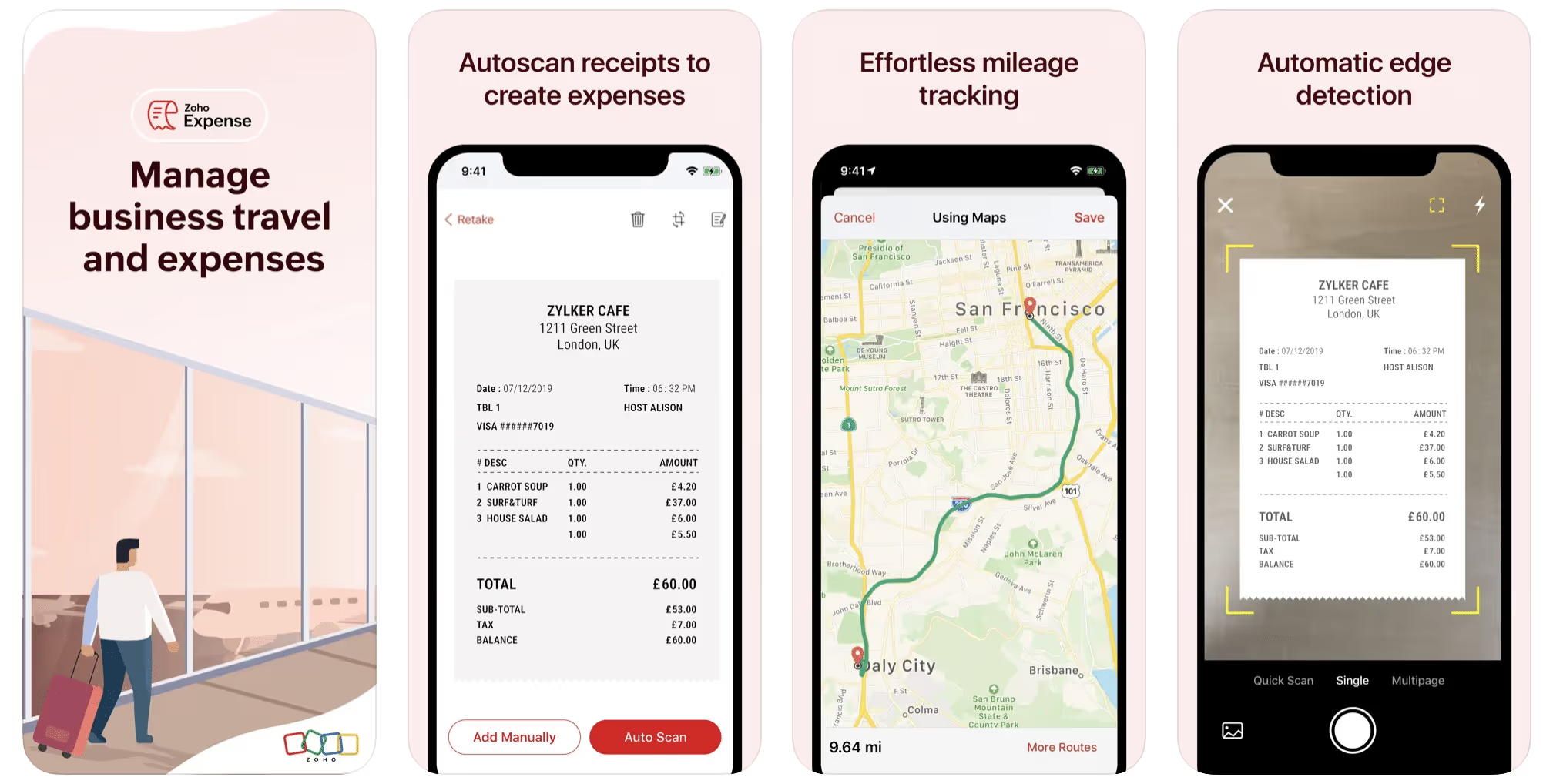
First up is Zoho Expense, which does exactly what its name says. This app is designed to allow companies to give employees a uniform way to create and submit expense reports. It can be used by individuals, including gig drivers, as well.
It includes a mileage tracker, as well as features that let you track other deductible expenses, including the ability to scan and record receipts.
Available on Android and Apple: Yes
Ratings: 4.8 stars on App Store, 4.7 stars on Google Play
Free Version: Yes
Subscription price: $3 per month, billed annually
Created specifically for gig drivers: No
2. Quickbooks Online
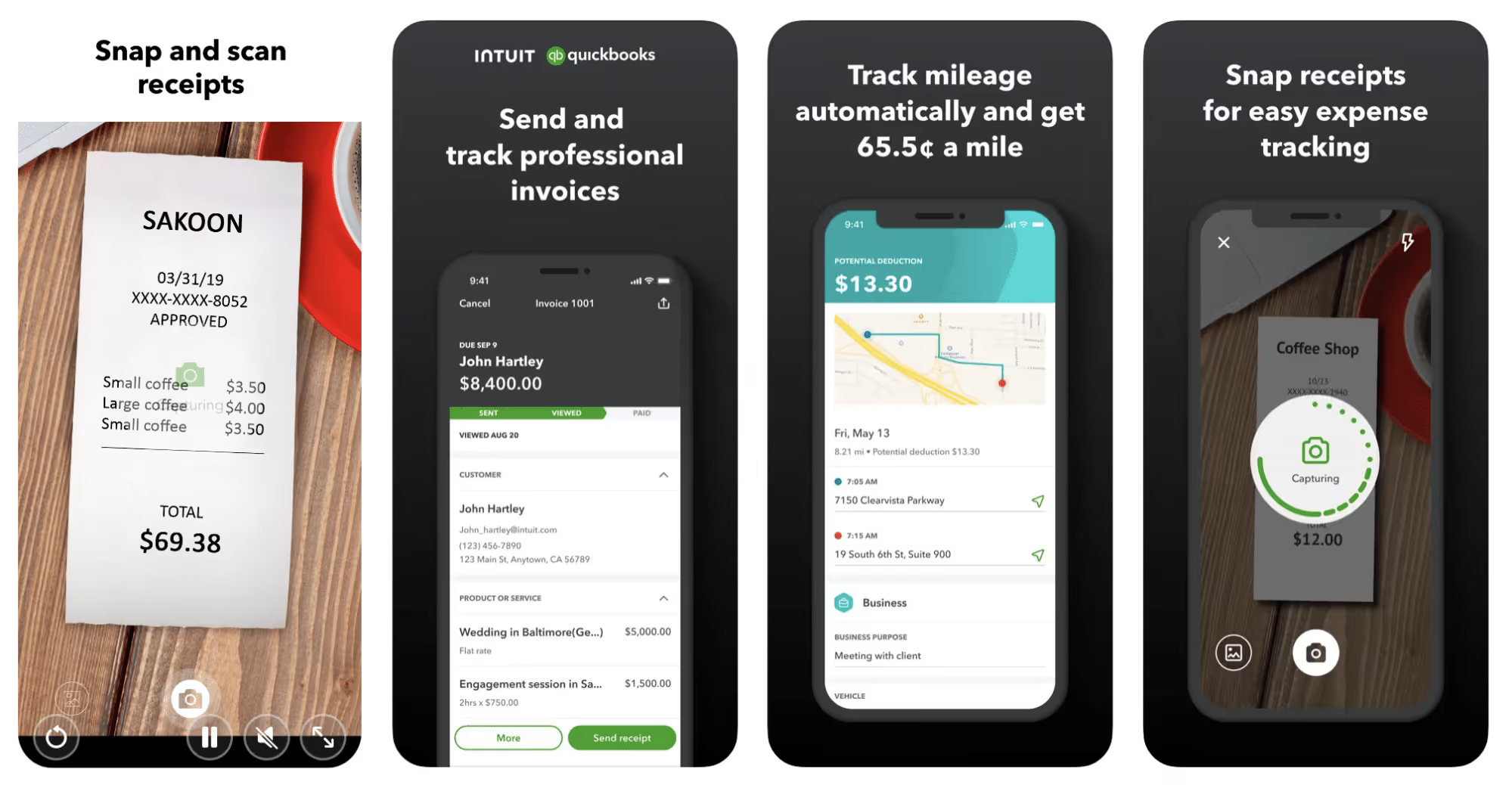
Quickbooks Online is a cloud-based app that allows you to track your mileage, earnings, and expenses. The information you enter can then be used to generate various reports that prepare you for tax time. It also allows you to create graphs that illustrate your cash flow, and includes a receipt scanner so you can instantly record deductible expenses. Quickbooks is popular, highly reliable, and designed mainly to help people keep track of their small businesses.
Available on Android and Apple: Yes
Ratings: 4.7 stars on App Store, 4.4 stars on Google Play
Free version: 30-day free trial
Subscription price: $15 per month for basic version if purchased for 3 months or more
Created specifically for gig drivers: No
Source: quickbooks.intuit.com
3. Shoeboxed
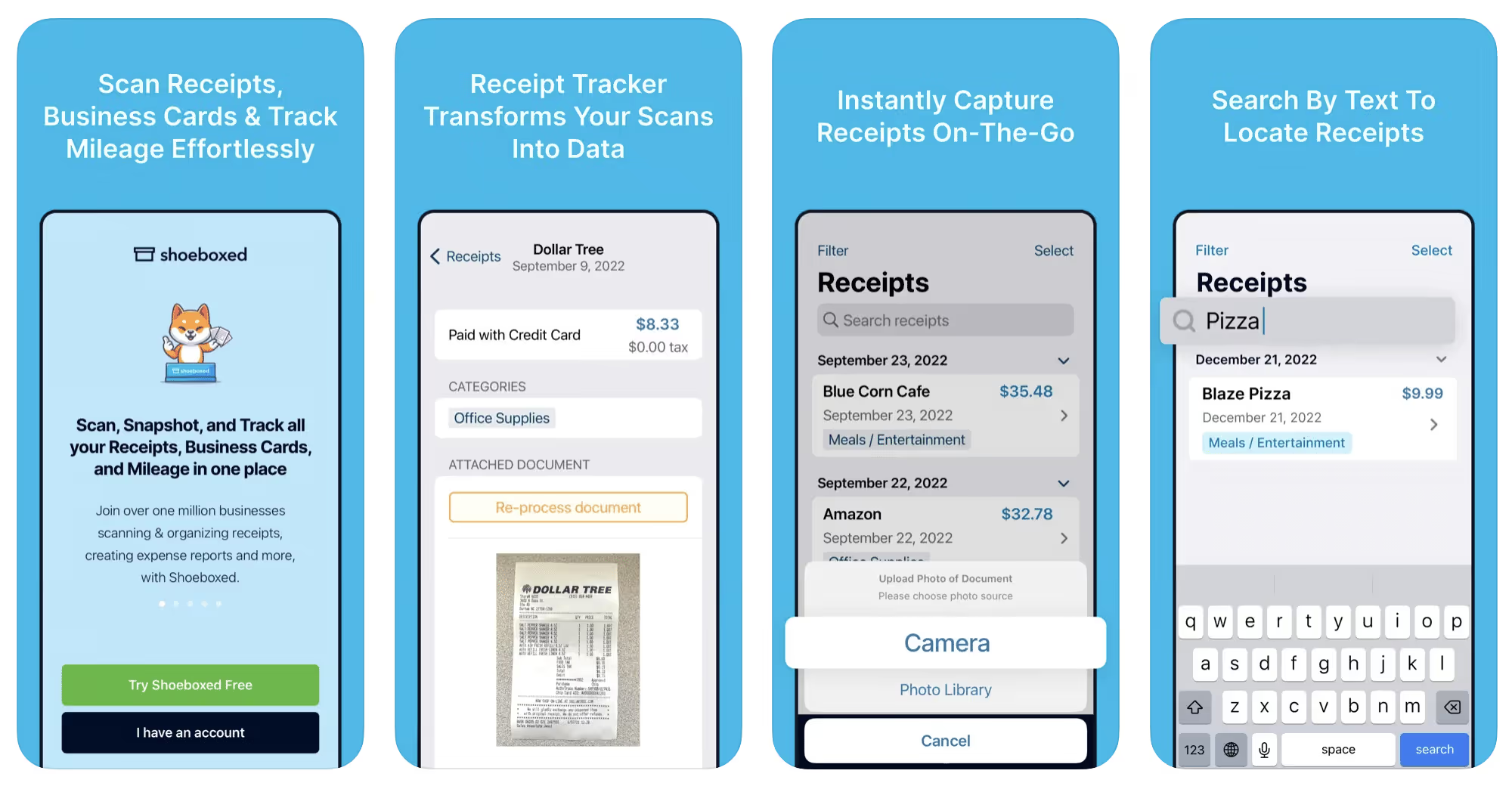
Shoeboxed started in 2007 as a service for scanning paper receipts into digital form. Now the app offers a free mileage tracker and has enabled users to scan receipts directly. It touts itself as the best mileage tracking app for DoorDash, but there are some elements missing that Dashers might like to have. While it provides features that record your expenses and prepare you for tax season, it doesn’t automatically track your earnings. The mileage tracker has a system where you can drop pins along your routes to make the tracking more precise, identifying those legs of a trip that you make for business purposes. The mileage tracker is “free” once you sign up for the basic version.
Available on Android and Apple: Yes
Ratings: 4.5 stars on App Store, 2.3 stars on Google Play
Free version: No
Subscription price: $18 per month for basic version
Created specifically for gig drivers: No
Source: blog.shoeboxed.com
4. Stride
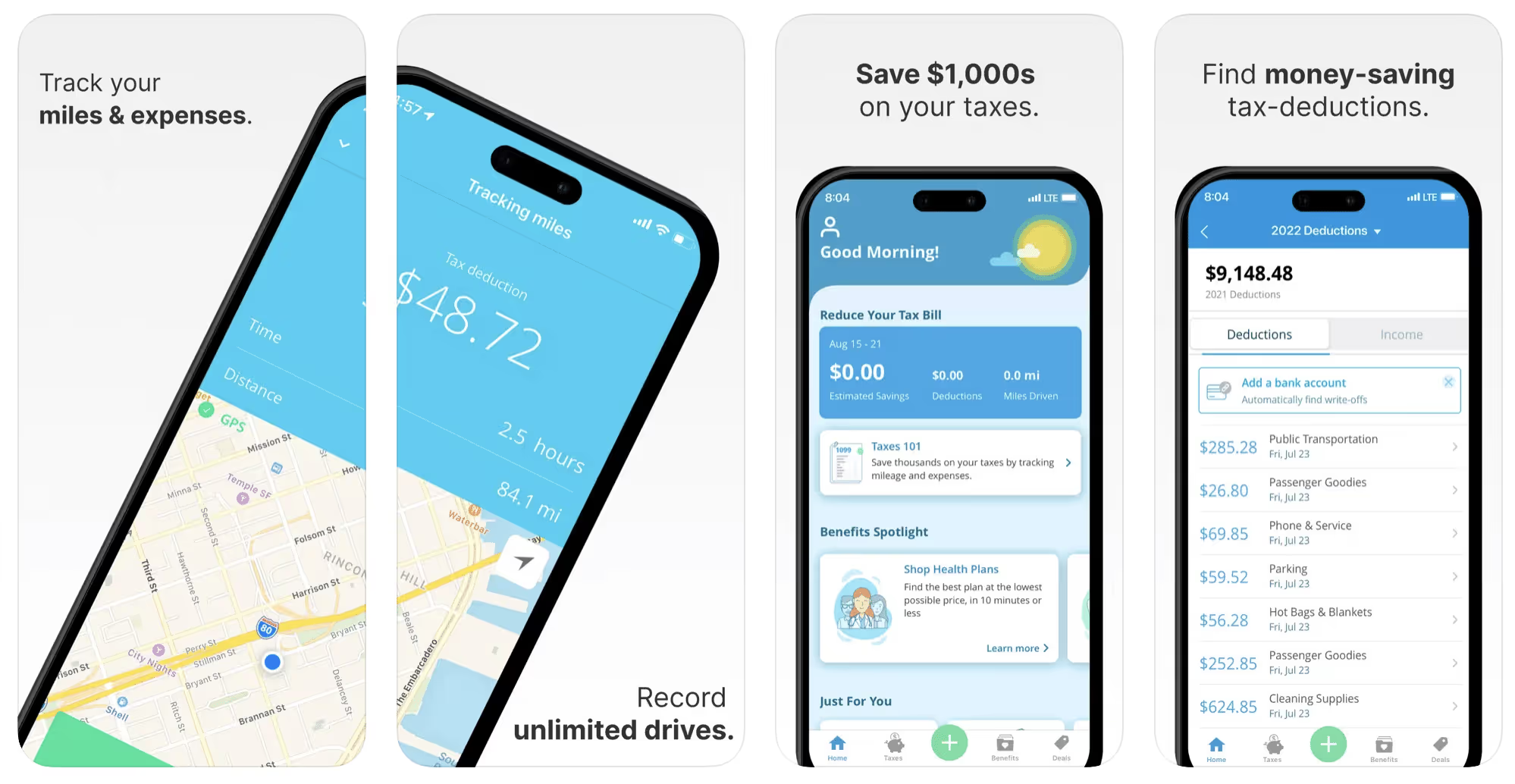
This free mileage tracker does a fair job of keeping track of the distances you rack up while gig driving, but it doesn’t automatically track earnings. It can be a big help, though, in tracking your expenses. You can link Stride to your bank account, and it will automatically scan your expenses to identify items you can potentially deduct. The app is totally free. This could make it the best free mileage tracker app, but there is a small price to pay. The app will persistently push you to consider various insurance plans that they are affiliated with. If you don’t mind that, this is a solid mileage tracker, even if it doesn’t track your earnings.
Available on Android and Apple: Yes
Ratings: 4.8 stars on App Store, 4.6 stars on Google Play
Free version: Yes
Subscription price: None. The app is free.
Created specifically for gig drivers: No
5. Gridwise
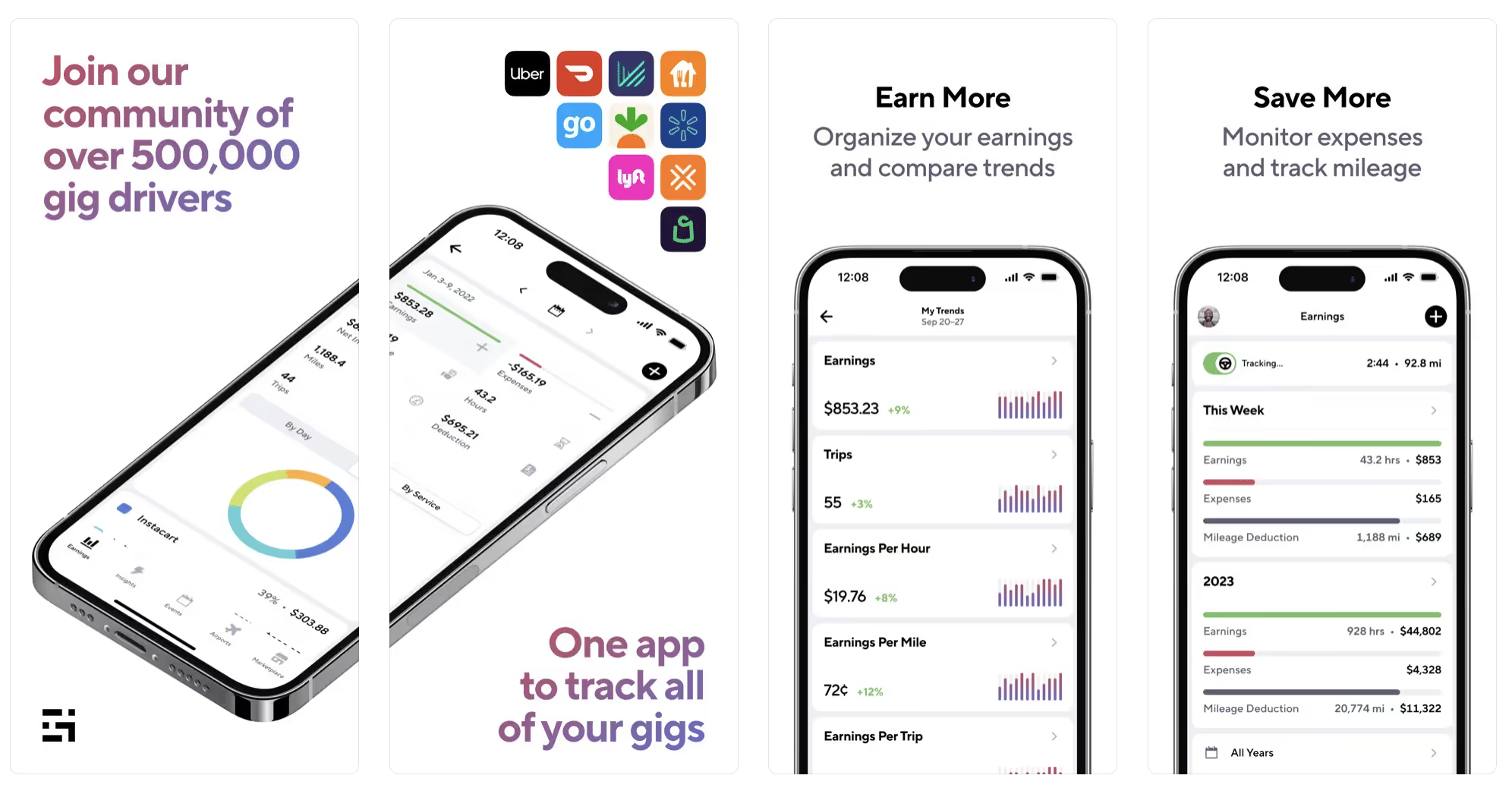
Gridwise has a free mileage tracker and free features that record your income and expenses. It gives you access to insurance and benefits, as well as insights about the best times and places to make the most money while gig driving. The Gridwise mileage tracker captures all the miles you drive while you’re on your driving shift, and it can be used if you have other trips you need to make which qualify as business travel.
Drivers love it because it is geared toward the needs of rideshare and delivery workers, providing free information about airport departures and arrivals, event start and let out times, weather, traffic, and more. The Gridwise Plus subscription adds value by providing additional insights and reports, discounts on benefits, the ability to export data in .csv format,, and more.
Available on Android and Apple: Yes
Ratings: 4.9 stars on App Store, 4.6 stars on Google Play
Free version: Yes
Subscription price: $9.95 per month for Gridwise Plus, or $95.99 per year (a $23.41 savings)
Created specifically for gig drivers: Yes!
What is the best mileage tracking app?
Now that we’ve checked them all out, we’re positive about the answer to that. Hands down, it’s Gridwise. Are we biased? You bet we are! But drivers love it too. Gridwise is the best mileage tracker app—and so much more. So many of the features are free, and the subscription to Gridwise Plus will pay for itself with additional insights to boost your earnings and deeper discounts on products and services.
Most important, Gridwise is designed specifically for gig drivers by experts who were once gig drivers themselves! Knowing what gig drivers need is a crucial step in creating an app that rideshare and delivery drivers can really use! Here are a few of the features, besides mileage tracking:
- seamless earnings tracking
- automatic, on/off toggle and manual mileage tracking
- mileage categorization
- airport, traffic, weather, and events information
- insights into where to drive and when to drive
- reports showing earnings across the platforms you use
- discounts on countless products and services for drivers
- additional resources for finding side gigs
- an informative and comprehensive blog
- affordable benefits, including insurance, medical, dental, and alternative practitioner discounts
- a community of drivers just like you
Don’t settle for just any app. Get the best mileage tracker, and so much more, from Gridwise!
[elementor-template id="21599"]

What Records Do Gig Drivers Need To Keep Track Of For Taxes?
* Gridwise does not provide tax, legal, or accounting advice. This material has been prepared for information purposes only, and is not intended to provide, and should not be relied on for tax, legal, or accounting advice. You should consult your own tax, legal, and accounting advisors before filing your return.
Record keeping? Who signed up for that? As a gig driver, it’s part of what you need to do to keep your business running. Don’t worry. It’s not as complicated as you might have been led to believe. This post will show you what you need to keep track of and the best ways to gather and preserve your tax-related records. We will cover
- How record keeping can help reduce income tax for freelancers
- Taxes and freelance work: Record keeping requirements
- Mileage tracking: Motives and methods
- More deductions and records to keep
- Make tax time easier
How record keeping can reduce income tax for freelancers
Tax time is not “fun time” for rideshare and delivery drivers. It’s easy to get used to watching your earnings pile up and come to believe they are all yours. Unfortunately, that isn’t the case. Gig work taxes can be especially painful because no one takes them out of your earnings for you, until the tax authorities insist that you do it for yourself.
You will need to show the tax authorities your income records, and they will gladly tell you to send them what they determine to be their fair share. Think that’s not fair? You’re not alone, but that doesn’t mean you’re going to get out of paying gig work taxes.
But you can find ways to pay the smallest amount that is legal and possible. The best way to defend yourself against having to pay astronomical amounts when you file your return is to know what expenses you can deduct from your gross income. When you subtract deductible expenses from your gross income, there is less left over to be taxed. This reduces the amount they can hit you with gig worker taxes. and can make your tax bill substantially lower.
While you want to keep good records so as to be in compliance with taxation entities such as the IRS, you also want to ensure you have proof of every last deductible expense you have accrued during the year. There are other records you must keep as well. Let’s look at some of the considerations you have, realizing that you now need to know how to do taxes as a freelancer.
Taxes and freelance work: Record keeping requirements
So many gig drivers fail to understand the responsibilities they have as independent contractors. Those who work part time for very few hours may even believe they don’t have to report the income they get from their driving gig payments. That would be a big mistake!
The company or companies you work for report your income to the IRS and state tax authorities. If you fail to report that income, you will risk some rather painful penalties. The IRS taxing side hustles is as much of a thing as the IRS taxing income from any other job. Your best bet is to report what you’ve earned, honestly and completely, and comply with other record keeping requirements such as
- gross income
- deductions and credits
- purchases (items you purchase and resell, such as snacks or bottled water)
- a log of all your mileage (or vehicle expenses, if greater)
- a list of all expenses and assets, such as utilities and other expenses associated with having a home office and equipment
- machinery and furniture you own, including when it was acquired, how much it cost, whether you previously took deductions on it, and selling price, if applicable (this includes your vehicle)
More things to consider:
- Pay attention to the retention of your records. You’ll need to keep all tax-return-related items— including income, deductions, and any tax credits reported— until the period of limitations runs out (3 years from date you filed, or 2 years from when you paid tax. If you have employees, keep your records for at least 4 years.)
- If you want to avoid paying self-employed taxes, you may want to set up a corporation or Limited Liability Corporation (LLC) for your business. This allows you to separate all your gig driving earnings from personal income, and permits you to take advantage of the additional advantages of working through a corporation. This includes exemption from self-employment taxes. You can learn more about how to pay self-employment taxes, if you opt for that, in this post from Keeper.
- You should always keep a separate checking account for your business, for convenience as well as clarity. While this is not a legal requirement, it is a smart move if you want to have an easier time managing your business.
- You are required, as an independent contractor, to file your taxes quarterly. Check out this Gridwise blog post for more information about quarterly tax payments and other matters that make filing delivery, Lyft and Uber taxes easier.
Mileage tracking: Motives and methods
Why you need to be meticulous about mileage
Mileage deduction, or the costs of operating your vehicle, will be the most important item to account for when you consider how to file taxes as a freelancer. While mileage is an important deduction for all independent contractors, as you might imagine, it’s even more essential for rideshare and delivery drivers.
There are two ways of keeping track of your mileage deduction. One is to use the IRS’ standard mileage deduction, which for 2022 is 58.5 cents per mile. This number takes into account the costs of operating your vehicle, from fuel and maintenance to registration, insurance, and depreciation. Alternatively, you can calculate all your own vehicle operating costs, but only after your first year of using the vehicle. You may discover that this second option allows you to have more money deducted from your taxable income. Learn more about the options for deducting your mileage in this Gridwise post.
No matter which way you decide to calculate the deductions for your mileage, you need to know what mileage you can and cannot deduct.
You can deduct
- miles driven to and from home when you go out to drive or deliver
- miles you accrue during your trips
- miles you drive on any other trips you make that are necessary as part of your business.
Examples:
- driving to return a lost cell phone or to an Uber Hub or another physical location where your company might make driver support available
- driving to pick up supplies, to get gas, or to have your car cleaned, serviced, or detailed, etc.
You cannot deduct
- miles you drive for personal trips
- miles for any trips you take that do not directly affect your business
Note: If imagining yourself becoming the not-so-proud owner of a shoebox filled with paper receipts gives you nightmares, stop worrying. Electronic records of purchases will satisfy reporting requirements. If you use cash, you can scan copies of your receipts, in some cases, right into your recording software or app. Gridwise and Keeper give you a simple to use interface that keeps all your receipts recorded without the messy pile of paper.
Mileage tracking methods
By now, you’re probably convinced that tracking mileage is important, despite all the other things drivers have to do. Now, let’s look at your options for keeping accurate records.
- Manual tracking: You can keep a logbook where you list every trip you make, starting and ending mileage, the date, and purpose of the trip. While this would work, it’s certainly not convenient. Besides, if that logbook gets lost, your plans for having a nice, fat tax deduction will go by the wayside.
- Spreadsheet: This is a bit more convenient and sophisticated way of tracking your business mileage. You’d need to be meticulous about making your entries, though. Even if you keep a spreadsheet app on your phone, it could be time consuming and inconvenient to keep doing it with all the other things going on in a rideshare or delivery driver’s day to day life.
- GPS-based mileage tracking apps: There are a bunch of apps that track mileage based on your GPS location, and most of them are pretty accurate and far more convenient than taking constant readings of your odometer. Your driving apps, such as Uber, Lyft, DoorDash, or Instacart, may also track your mileage, but be careful here. They will only track the miles you drive while you’re on a trip or delivery. They don’t count the miles you drive going to pick up a customer or when you make your move toward a restaurant or store.
Gridwise, on the other hand, will track all the miles you clock while you’re on your shift. All you need to do is make sure you start tracking the minute you leave home, and every gig driving mile will be logged. - OBD-II mileage tracking systems: There are plug-in modules that assess your vehicle’s mechanical health and track your miles. However, many authorities question the ability of OBD-II mileage tracking systems to get get accurate odometer readings. Insurance companies don’t consider them to be accurate enough gauges of odometer readings.
While mileage is a crucial deduction when you’re preparing your Uber, Lyft, or DoorDash taxes, it isn’t the only expense you’ll want to record.
More deductions and records to keep
Expenses you can deduct
You’re entitled to include the cost of other expenses that are directly related to your driving business. These include
- vehicle expenses
- equipment for your car and home office
- extra services and subscriptions
- business tools, including apps and software
You can learn much more about gig driver expenses that are eligible for deduction in this Gridwise article.
Ways to track and preserve deductible expenses
- The manual method: Just like you can with mileage, it’s possible to use a manual method, but in addition to logging each expense into a ledger, you would also need to keep physical receipts.
- Spreadsheets: You can record your expenses on a spreadsheet. This is somewhat less awkward than manually logging mileage, but there still will be plenty of room for failing to remember the case of water you bought for your customers, or losing the receipt from the thermal bag you purchased.
- Accounting software: You can use software that helps you track your expenses. This method usually interfaces well with any tax preparation software you or your tax professional might use.
- Gridwise: There are other apps that help you track your expenses, but Gridwise is designed specifically for gig drivers. It automatically tracks earnings and mileage, and lets you record your expenses the minute they come up. Gridwise’s partnership with Keeper gives you the ability to scan receipts and access a tax professional. This is a seamless way to record your expenses and a big help in learning how to file Uber taxes. Gridwise even provides .csv output, so you can feed your Gridwise data directly into tax preparation software. Check out what Gridwise and Keeper will do to super-charge your tax filing powers.
Organizing and categorizing expenses
Before you even begin to record expenses, you’ll want to set up categories for them. You can start by reviewing the categories listed above and checking out the Gridwise post that lists possible deductions.
If you’d like to learn more about how to categorize expenses, there is additional information available. This article from Motley Fool lists all possible categories any freelancer might use and also gives tips on how to customize them for your driving business.
One last tip
Using Gridwise, particularly for tracking mileage, is the easiest way to be in compliance with the IRS’ rules for deductible mileage. Gridwise tracks all the miles you drive for your gig, beyond what your company’s app might record. At the same time, you can log on and off Gridwise when you start and end your shift, so personal miles won’t be recorded. This eliminates confusion while capturing every deductible mile.
Gridwise Tax Help, a partnership with Keeper, has been created specifically to serve gig drivers. It provides affordable and easy ways to record expenses, scan receipts, and find deductions by analyzing your expenditures. Read about free resources from Keeper you can use to be fully prepared for tax season, and get all your earnings and expenses on the record.
Get the world’s best assistant for rideshare and delivery drivers, and tax help too.
Make tax time easier now!

Uber and Lyft Driver Instructions for Newark Liberty International Airport (EWR)
Wondering how to pick up passengers and find the rideshare waiting lot at Newark airport? We’re going to tell you exactly what drivers need to know about picking up passengers at Newark airport.
In 2019, the Newark Liberty International Airport (EWR) saw over 46 million passengers, the most ever in the airport’s 91-year history.
It’s one of the major airports serving the New York metropolitan area and ranked as the 12th busiest airport in the US. It is also a hub for FedEx Express and United Airlines-- as well as a focus city for JetBlue, Spirit, and Frontier. All these stats mean one thing: this aviation center is massive.
For Uber and Lyft drivers, this is great news. Millions of passengers at EWR means more riders lining up for those airport drives, which leads to greater earnings for rideshare drivers. If you drive in this area, odds are that you’ll probably make a Newark airport ride at some point. When you do, it pays to know your stuff.
The Newark airport allows Uber and Lyft vehicles at the pick-up and drop-off terminals, but before heading that way, there are a couple rules you’ll want to know. To maximize earnings (and avoid a ticket), it’s important to understand how to navigate the airport, join the queue, and legitimize your vehicle.
To help rideshare drivers be successful at the Newark Liberty International Airport, we put together this blog post to serve as a guide. The following topics are covered:
- What do you need to know or do before arriving at the Newark Liberty International Airport?
- Do you need any permits to drive there?
- Where is the rideshare waiting lot?
- What are the passenger pick-up rules?
- What are the passenger drop-off rules?
- When is the best time to drive at the airport?
- What is the best driving strategy?
Let’s dive in!
What do I need to do before I arrive at Newark Liberty International Airport and enter the airport queue?
To pick up passengers at EWR, you’ll need your trade dress: the Lyft or Uber decal that goes on the windshield of your car.
Uber mails this decal to drivers when you sign up. If you’ve lost yours since then, there’s a couple easy ways to replace it. You can request that a new one be mailed to you, pick one up at your local Greenlight Hub (be wary of recent closures), or print out a temporary version at home.
You can order a Lyft decal from your Dashboard, and print a temporary emblem to use while waiting for yours to come in the mail.
Where is the Uber/Lyft rideshare waiting lot?
The Newark Liberty International Airport has one staging area for rideshare drivers, called the Rideshare Hold Lot and located at the end of Earhart Drive.
Once you get to the staging lot you’ll automatically be entered into the airport queue. You’ll be able to check your place in line in the Lyft or Uber app.
While waiting for requests and depending on which app you use, you may get a “pre-dispatch” or “pre-match” message directing you to head to the terminal. While on route to the terminal, you’ll get a ride request. If no requests pop up, circle back to the lot-- you’ll be near the front of the line when you return.
Lyft drivers, please note: if you’re a driver whose home region is New Jersey, you will not be able to receive ride requests in New York City. If a rider brought you to the city, you’ll have to return to New Jersey to get another ride request. If your home region is New York City but you’ve ended up in New Jersey, your next request will be headed back to the city.
(Don’t worry. It’s a weird rule to us, too.)
How should Uber and Lyft drivers pick up passengers?
The driver who has been waiting the longest time in the staging area gets the next rider request. Make sure not to enter out of driver mode while you wait, or you’ll lose your spot in line!
Once you get a ride, a pin will be placed at the pick-up spot for you to meet them. A message will tell you what terminal to pick up your rider at the Arrivals level of EWR.
It can get crowded, so don’t hesitate to reach out to your rider to let them know you’ve arrived.
How should Uber and Lyft drivers drop off passengers at the Newark Liberty International Airport?
Luckily, dropping off passengers at EWR is a lot easier than picking them up. Just head to the Departures level at the passenger’s carrier of choice.
The Newark airport also offers a “Rematch” service, so that you can match with additional passengers after completing a drop-off without having to return to the staging area.
When is the best time to drive at the Newark Liberty International Airport?
Turn to your Gridwise app for information about all arrivals and departures at EWR, as well as delays and cancellations.
Typically, midday is the best time for airport driving; most passenger arrivals and departures occur sometime between 11:00 a.m. and 2:00 p.m.
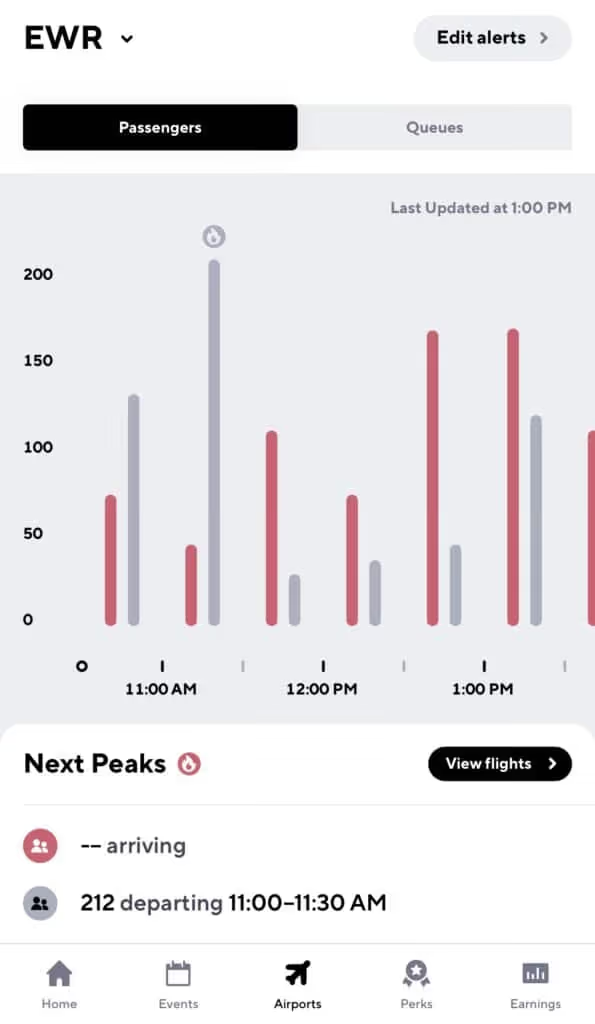
With Gridwise Plus you’ll be able to see airport data 24 hours in advance, so you can lock in a solid airport strategy the night before you head out.
What airport strategies should I use?
Pick up a passenger on the way to the airport
Count on Gridwise to let you know when there’s a peak in airport departures, so you can hang around near hotels at that time to maximize your chances of an airport ride.
Do not cancel on a passenger after you’ve accepted a fare
If you do, you will be bumped to the bottom of the queue and your wait starts all over again. The good news is that if it’s a short ride, some companies let you jump back in line after you’ve dropped that passenger off.
Be ready to present your waybill and keep your app updated
A waybill is essentially a receipt of the last trip you completed. Be prepared to present this to airport officials or law enforcement while waiting for arrivals.
Keeping your app updated is the best way to take advantage of features like Rematch that could mean bigger earnings in the long run.
Always be prepared
As always, you never know when law enforcement will show up. Keep your driver’s license, insurance card, and registration handy, and don’t forget to have your placard displayed.
Congrats! Now you’re all set to make some pick-ups and drop-offs at the Newark Liberty International Airport. Happy driving!
And when you need a little extra cash…
Whether it’s an unexpected car repair, medical bill, or another kind of expense, sometimes we all need a little extra cash.
At Gridwise, we get that. And it’s why we’ve partnered with a company called Coverr that provides drivers with a business cash advance of up to $1,500 for those unexpected emergencies.
Applying should only take about 10 minutes, approvals just two hours during business hours, and you’ll receive cash on the same day you apply.
So if you need a little extra cash for your rideshare business, apply with Coverr!


Uber and Lyft Instructions for Cleveland Hopkins International Airport (CLE)
During 2019, more than 9 million passengers filtered through the Cleveland Hopkins International Airport (CLE). As the primary airport serving Cleveland and Northeast Ohio, if you’re a rideshare driver in the Cleveland area, there’s a good chance you’ll end up at this airport at some point.
If you know what you’re doing, those 9 million passengers can be a great source of income for you.
To maximize your earning potential (and avoid a citation), you’ll have to know some baseline rules. That’s why we put together this guide to help rideshare drivers navigate the airport, join the in-app queue, and put the proper stickers on your vehicle.
We’ll cover the following topics:
- What should you do before arriving at Cleveland Hopkins International Airport?
- Do you need any permits to drive at Cleveland Hopkins International Airport?
- Where is the rideshare waiting area at Cleveland Hopkins International Airport?
- What are the passenger pick-up rules at Cleveland Hopkins International Airport?
- What are the passenger drop-off rules at Cleveland Hopkins International Airport?
- When is the best time to drive at Cleveland Hopkins International Airport?
- What is the best Cleveland Hopkins International Airport driving strategy?
Let’s dive in!
What should you do before arriving at Cleveland Hopkins International Airport and entering the airport queue?
To pick up passengers at CLE you’ll need your trade dress, which (as you know) is the Lyft or Uber decal that goes on the windshield of your car.
Uber sends out this decal when drivers sign up. If you’ve lost yours since then, there are a few easy ways to replace it. You can request that a new one be mailed to you, pick one up at your local Greenlight Hub (be wary of recent Hub closures), or print out a temporary version at home.
You can order a Lyft decal from your Dashboard and print a temporary emblem while waiting for yours to come in the mail.
Where is the Uber/Lyft waiting area at the Cleveland Hopkins International Airport?
CLE has one staging area for rideshare drivers to wait, located at 20001 Brookpark Road. Once this stage lot is full, you must leave the airport (or face a citation).
Once you get to the staging lot you’ll automatically be entered into the airport queue. You’ll be able to check your place in line in the app.
How should Uber and Lyft drivers pick up passengers at the Cleveland Hopkins International Airport?
The driver who has been waiting the longest in the staging area gets the next rider request. Once you accept a passenger, you’ll be shown in your rideshare app the exact door/location to meet them.
This will be at the arrivals level outside baggage claim. As of 2020, passengers can be picked up at both the upper and lower terminals at CLE.
How should Uber and Lyft drivers drop off passengers at the Cleveland Hopkins International Airport?
Drop-offs at CLE are a breeze! Just head to the departure level at the passenger’s carrier of choice.
With some driving companies, you’ll be quickly re-matched with a waiting passenger without having to get back into the staging lot.
When is the best time to drive at the Cleveland Hopkins International Airport?
For this, check your Gridwise app. You’ll find the information you need, including all arrivals and departures at CLE.
It looks like midday is the best time for airport driving; somewhere between noon and 1 p.m. sees the most passenger arrivals.
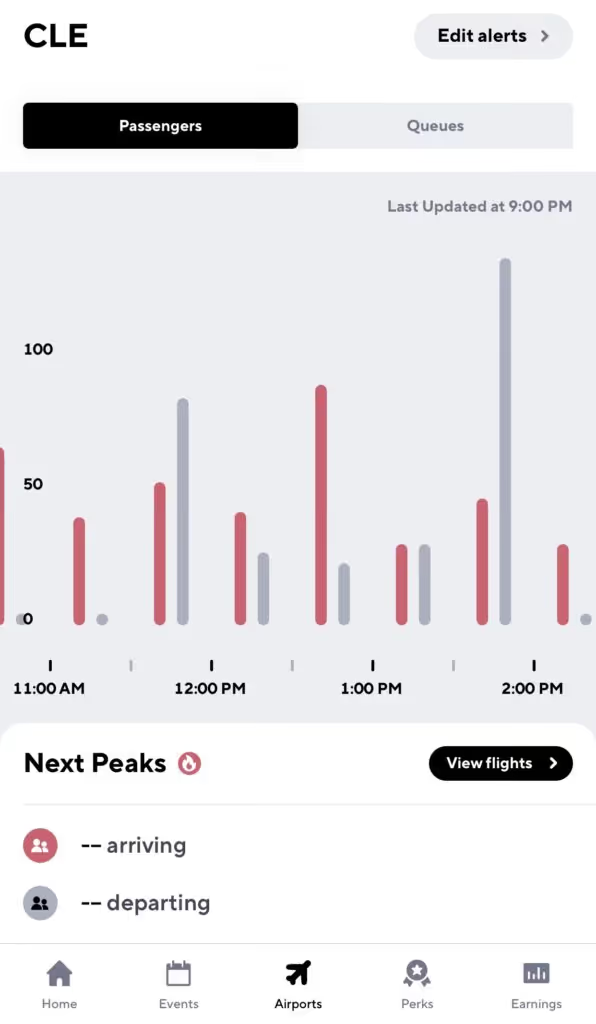
With Gridwise Plus you’ll be able to see airport data 24 hours in advance, so you can lock in a solid airport strategy the night before you head out. You’ll also be able to create custom alerts for arrivals and departures
What are some good airport strategies?
Pick up a passenger on the way to the airport!
Gridwise lets you know when there is a peak in airport departures, so you can hang around near hotels at that time to maximize your chances of an airport ride.
Do not cancel on a passenger after you’ve accepted a fare
If you do, you will be bumped to the bottom of the queue and your wait starts all over again. The good news is, if it’s a short ride some companies let you jump back in line after you’ve dropped that passenger off.
Always be prepared
As always, you never know when law enforcement will show up. Keep your driver’s license, insurance card, and registration handy, and don’t forget to have your placard displayed.
Now you’re off and ready to make some pick-ups and drop-offs at the Cleveland Hopkins International Airport. Happy driving!

Uber and Lyft Driver Instructions for Miami-International Airport (MIA)
The Miami-International Airport (MIA) has over 1,000 daily flights and 40 million passengers. It’s the 3rd busiest airport in the US by international passenger traffic and plays an important role in US aviation history. Florida’s biggest airport by total aircraft operations and an American Airlines hub to boot, this is all to say that the Miami air hub is no joke.
This is great news for Uber and Lyft drivers, because millions of passengers means major earnings as riders commute back and forth to the airport.
The Miami airport allows Uber and Lyft vehicles at the pick-up and drop-off terminals, but before heading that way, there are a couple rules you’ll want to know. To maximize earnings (and avoid a ticket), it’s important to understand how to navigate the airport, join the queue, and legitimize your vehicle.
To help rideshare drivers be successful at the Miami-International Airport, we put together this blog post to serve as a guide. The following topics are covered:
- What do you need to know or do before arriving at the Miami-International Airport?
- Do you need any permits to drive there?
- Where is the rideshare waiting area?
- What are the passenger pick-up rules?
- What are the passenger drop-off rules?
- When is the best time to drive at the airport?
- What is the best driving strategy?
Let’s dive in!
What do I need to do before I arrive at Miami-International Airport and enter the airport queue?
To pick up passengers at MIA, you’ll need your trade dress: the Lyft or Uber decal that goes on the windshield of your car.
Uber mails this decal to drivers when you sign up. If you’ve lost yours since then, there’s a couple easy ways to replace it. You can request that a new one be mailed to you, pick one up at your local Greenlight Hub (be wary of recent closures), or print out a temporary version at home.
You can order a Lyft decal from your Dashboard, and print a temporary emblem to use while waiting for yours to come in the mail.
Where is the Uber/Lyft waiting area?
The Miami-International Airport has one staging area for rideshare drivers, located on the northwest corner of McLaughlin Road and Northwest 20th Street.
Once you get to the staging lot you’ll automatically be entered into the airport queue. You’ll be able to check your place in line in the Lyft or Uber app. Unfortunately, if the lot is full you will have to leave the airport, and the lot closes nightly from 1:30-3:30 am. Rides will be dispatched by proximity before the lot closes.
While waiting for requests and depending on which app you use, you may get a “pre-dispatch” message directing you to head to the terminal. While on route to the terminal, you’ll get a ride request-- and if no requests pop up, circle back to the lot. You’ll be near the front of the line when you return.
How should Uber and Lyft drivers pick up passengers?
The driver who has been waiting the longest time in the staging area gets the next rider request. Make sure not to enter out of driver mode while you wait, or you’ll lose your spot in line!
Once you get a ride, a pin will be placed at the pick-up spot for you to meet them. This will be at Terminal D, either at the Arrivals lower level or on the upper level between Doors 8 and 33.
It can get tricky, so keep an eye on Google Maps and don’t hesitate to reach out to your rider.
How should Uber and Lyft drivers drop off passengers at the Miami-International Airport?
Luckily, dropping off passengers at MIA is a lot easier than picking them up. Just head to the Departures level at the passenger’s carrier of choice. And if you’re doing a drop-off at Terminal D, make sure you’re past Door 5 before stopping your car to avoid traffic from building up.
The Miami airport also offers a “Rematch” service, so that you can match with additional passengers after completing a drop-off without having to return to the staging area.
When is the best time to drive at the Miami-International Airport?
Turn to your Gridwise app for information about all arrivals and departures at MIA, as well as delays and cancellations.
Typically, midday is the best time for airport driving; most passenger arrivals and departures occur sometime between 10:30 a.m. and 1:00 p.m.
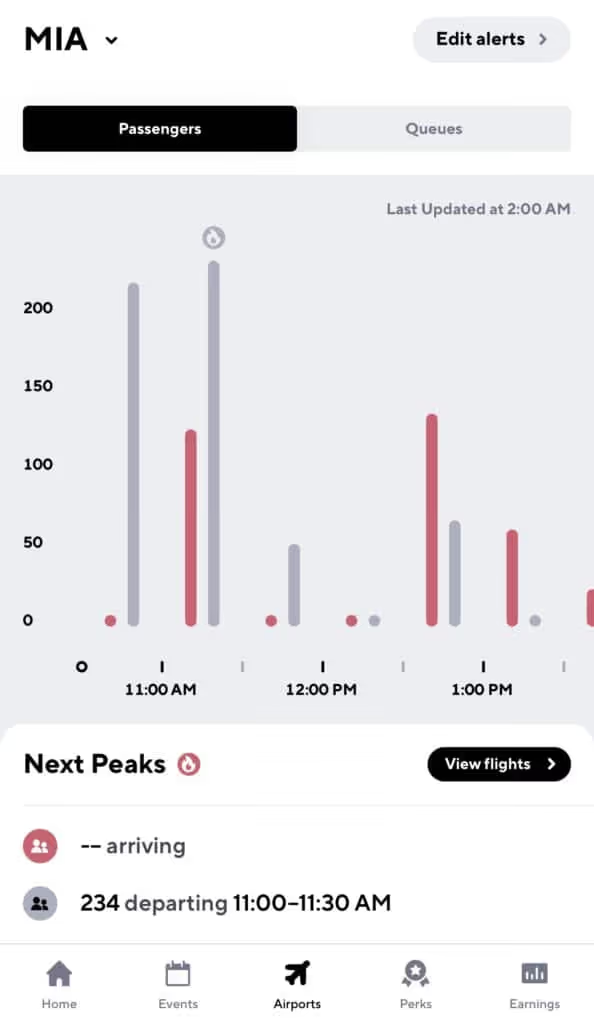
With Gridwise Plus you’ll be able to see airport data 24 hours in advance, so you can lock in a solid airport strategy the night before you head out.
What airport strategies should I use?
Pick up a passenger on the way to the airport
Count on Gridwise to let you know when there’s a peak in airport departures, so you can hang around near hotels at that time to maximize your chances of an airport ride.
Do not cancel on a passenger after you’ve accepted a fare
If you do, you will be bumped to the bottom of the queue and your wait starts all over again. The good news is that if it’s a short ride, some companies let you jump back in line after you’ve dropped that passenger off.
Be ready to present your waybill and keep your app updated
A waybill is essentially a receipt of the last trip you completed. Be prepared to present this to airport officials or law enforcement while waiting for arrivals.
Keeping your app updated is the best way to take advantage of features like Rematch that could mean bigger earnings in the long run.
Always be prepared
As always, you never know when law enforcement will show up. Keep your driver’s license, insurance card, and registration handy, and don’t forget to have your placard displayed.
Congrats! Now you’re all set to make some pick-ups and drop-offs at the Miami-International Airport—and maybe sneak a trip to the beach in between.

Uber and Lyft Driver Instructions for Seattle-Tacoma International Airport (SEA)
The Seattle-Tacoma International Airport (SEA), also called Sea-Tac, is the eighth busiest airport in the US by passenger traffic. It saw over 50 million passengers in 2019 and is considered one of the fastest growing airports in the country. It’s a primary hub for Alaska Airlines as well, which is all to say that this is a pretty important airport.
It also means major earning potential for rideshare drivers in the Seattle Area.
Sea-Tac Airport allows Uber and Lyft vehicles at the pick-up and drop-off terminals, but before heading that way, there are a few rules you’ll want to know. To maximize earnings (and avoid a ticket), it’s important to understand how to navigate the airport, join the queue, and legitimize your vehicle.
To help rideshare drivers be successful at the Sea-Tac Airport, we put together this blog post to serve as a guide. The following topics are covered:
- What should you do before arriving?
- Do you need any permits to drive there?
- Where is the rideshare waiting area?
- What are the passenger pick-up rules?
- What are the passenger drop-off rules?
- When is the best time to drive at the airport?
- What is the best driving strategy?
Let’s dive in!
What should you do before arriving at Seattle-Tacoma International Airport and entering the airport queue?
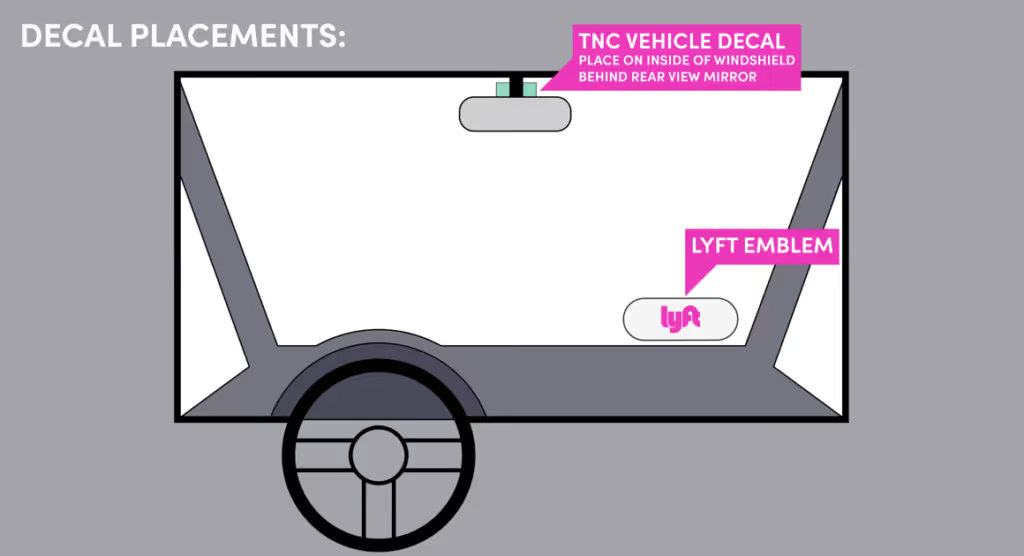
To pick up passengers at SEA, you’ll need your trade dress, which (as you know) is the Lyft or Uber decal that goes on the lower passenger-side windshield of your car.
Uber sends out this decal when drivers sign up. If you’ve lost yours since then, there are a few easy ways to replace it. You can request that a new one be mailed to you, pick one up at your local Greenlight Hub (be wary of recent closures), or print out a temporary version at home.
You can order a Lyft decal from your Dashboard, and print a temporary emblem to use while waiting for yours to come in the mail.
You’ll also need your FHP ID (For-Hire Permit Identification) Card. You can apply for that here on the King County site. Your TNC vehicle decal comes with this card, and this has to be placed inside the windshield behind your rearview mirror.
One last thing-- the Port of Seattle will only allow vehicles to pick up at Sea-Tac if they have a blended MPG rating of 40 or higher for Lyft and 45 or higher for Uber. You can check your MPG here. If your MPG is lower than 40, you’ll have to leave the staging lot and won’t be entered into the queue-- but you will be able to drive through the Re-match program. (Stay tuned for an explanation of Rematch).
Where is the Uber/Lyft waiting area?
If you drive for Uber, the waiting area is located at 2902 S. 171st Street SeaTac, WA 98188. You can also use the lot located at 3037 S 160th Street. These lots are where you’ll head when you first arrive at the airport.
The Ground Transportation Lot for Lyft drivers is located at 1069 S. 160th Street, SeaTac, Washington 98188.
Once you get to your staging lot, you’ll automatically be entered into the airport queue. You’ll be able to check your place in line in the Lyft or Uber app. Unfortunately, if the lot is full you’ll have to leave the airport.
How should Uber and Lyft drivers pick up passengers?
The driver who has been waiting the longest in the staging area gets the next rider request as part of the TNC’s “FIFO” (first-in-first-out) technology. Make sure not to enter out of driver mode while you wait or you’ll lose your spot in line.
Once you get a ride, a pin will be placed at the pick-up spot for you to meet your rider. Follow the signs for Arrivals, then keep left for the “Ground Transportation- Authorized Vehicles Only” area to pick up passengers in the parking garage.
This will be on the 3rd floor of the garage at Row I. Do not pick up passengers at the curbside terminal entrance, and note that you are only permitted to wait 15 minutes in the parking lot for your passenger.
It can get tricky, so don’t hesitate to reach out to your passenger to confirm where they are.
How should Uber and Lyft drivers drop off passengers at the Seattle-Tacoma International Airport?
Luckily, dropping off passengers at SEA is a lot easier than picking them up. Just head to the upper departures level and drop your passenger off curbside at the terminal of their choice.
At this point you’ll be eligible for Rematch. Rematch means you can receive a pickup request up to 1 minute after dropping off a passenger-- and you won’t have to go back to the staging lot.
If you are Rematched, proceed through the far-right lane under “Terminal Direct Parking” past the “STOP” sign, proceed up the helix to the third floor, and find the App Based Rideshare pickup area in Sections G-J. You will not have to meet any MPG requirements for Rematch.
If you aren’t Rematched, either head to the staging lot or to the open road.
When is the best time to drive at the Seattle-Tacoma International Airport?
Turn to your Gridwise app for information about all arrivals and departures at SEA, as well as delays and cancellations.
Typically, midday is the best time for airport driving; most passenger arrivals and departures occur sometime between 11:00 a.m. and 3:00 p.m.
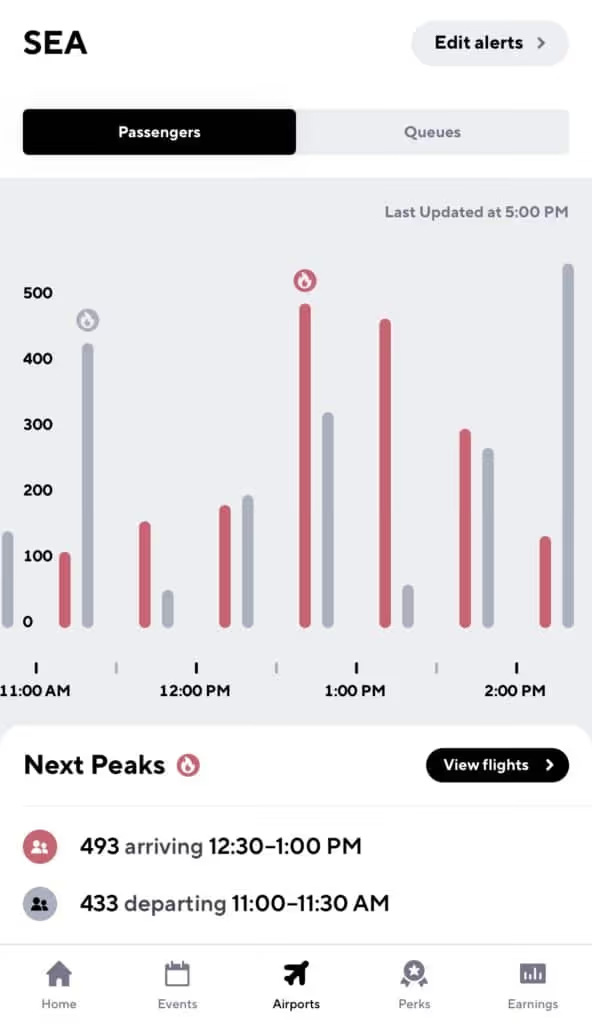
With Gridwise Plus you’ll be able to see airport data 24 hours in advance, so you can lock in a solid airport strategy the night before you head out. You’ll also be able to turn on custom alerts, maximizing your earnings by staying ahead of Arrivals and Departures.
What are some good airport strategies?
Follow the rules
SEA has some safety requirements for drivers, including keeping your headlights on at all times, staying under 10 mph, stopping at crosswalks, and not stopping at thru lanes. Uber and Lyft won’t pay your fine if you get one, so stay diligent about following the rules and listening to SEA’s airport staff.
Pick up a passenger on the way to the airport
Count on Gridwise to let you know when there’s a peak in airport departures, so you can hang around near hotels at that time to maximize your chances of an airport ride.
Do not cancel on a passenger after you’ve accepted a fare
If you do, you will be bumped to the bottom of the queue and your wait starts all over again. The good news is that if it’s a short ride, some companies let you jump back in line after you’ve dropped the passenger off.
Be ready to present your waybill and keep your app updated
A waybill is essentially a receipt of the last trip you completed. Be prepared to present this to airport officials or law enforcement while waiting for arrivals. Keeping your app updated is the best way to take advantage of programs like Rematch that can mean bigger earnings.
Always be prepared
The fact is, you never know when law enforcement will show up. Keep your driver’s license, insurance card, and registration handy-- in addition to your trade dress, TNC vehicle decal, and FHP ID Card. Just in case.
Congrats! Now you’re all set to make some pick-ups and drop-offs at the Seattle-Tacoma International Airport—and maybe take a trip up the Space Needle in between.

Uber and Lyft Instructions for Milwaukee’s General Mitchell International Airport (MKE)
Only eight miles from downtown Milwaukee, the Mitchell International Airport (MKE) sees more than 3 million passengers each year. That’s a lot of arrivals and departures—and a lot of riders for Uber and Lyft drivers looking to make a nice profit on airport drives.
But in order to maximize your earnings at Wisconsin’s busiest airport, you’ll need to know how to navigate the staging lots and arrivals queues. This involves having a solid airport strategy and knowing how to avoid citations.
That’s why we put together this instructional guide to help Uber and Lyft drivers be successful when driving at the Milwaukee Mitchell International Airport. We’ll walk you through everything from trade dress to airport peak times, so all you have to do is get on the road. The following topics are covered:
- What should you do before arriving at Milwaukee Mitchell International Airport?
- Do you need any permits to drive at Milwaukee Mitchell International Airport?
- Where is the rideshare waiting area at Milwaukee Mitchell International Airport?
- What are the passenger pick up rules at Milwaukee Mitchell International Airport?
- What are the passenger drop off rules at Milwaukee Mitchell International Airport?
- When is the best time to drive at Milwaukee Mitchell International Airport?
- What is the best Milwaukee Mitchell International Airport strategy?
Let’s dive in!
What should you do before arriving at the Milwaukee Mitchell International Airport and entering the airport queue?
First things first. Get your trade dress, which (as you know) is the Lyft or Uber decal that goes on the windshield of your car.
Uber sends out this decal when drivers sign up. If you’ve lost yours since then, there’s a couple easy ways to replace it. You can request that a new one be mailed to you, pick one up at your local Greenlight Hub (be wary of recent Hub closures), or print out a temporary version at home.
You can order a Lyft decal from your Dashboard and print a temporary emblem while waiting for yours to come in the mail.
Where is the Uber/Lyft waiting area at the Milwaukee Mitchell International Airport?
Currently, all rideshare drivers share the staging lot that is located on St. Jasper Avenue off West College Avenue.
Once you enter the staging lot you’ll automatically be entered into the airport queue. Make sure not to log out of the app, cancel rides, or drive off airport property—you could lose your spot.
The queue is ordered first in-first out, so whoever has been waiting the longest will get the next request.
How should Uber and Lyft drivers pick up passengers at the Milwaukee Mitchell International Airport?
Once you receive a request, follow the route down South Howell Avenue.
If you’re with Lyft, look for Lyft signs outside Carousel 2 of the baggage claim, where your passenger will be waiting.
If you’re with Uber, follow the Uber signs nearer to Carousel 1 of the baggage claim.
It can get tricky, so keep an eye on Google Maps and don’t hesitate to reach out to your rider.
How should Uber and Lyft drivers drop off passengers at the Milwaukee Mitchell International Airport?
Dropping off passengers at the Milwaukee airport is simple. All you have to do is take passengers to the terminal of their aircraft carrier.
That's it, then you're back on the road!
When is the best time to drive at the Milwaukee Mitchell International Airport?
The Milwaukee Airport is pretty busy, and you’re not the only driver in the area who knows that. This is why waiting in the queue can be frustrating, especially when you could be making money on the road.
What that means is the best time to drive at MKE is when the ratio of passengers to drivers is at its absolute highest.
For flight insights, check your Gridwise app. The Airports tab lets you compare queue times to passenger arrival times. At MKE, the best time for driving tends to be around midday, where there’s a spike in departures.
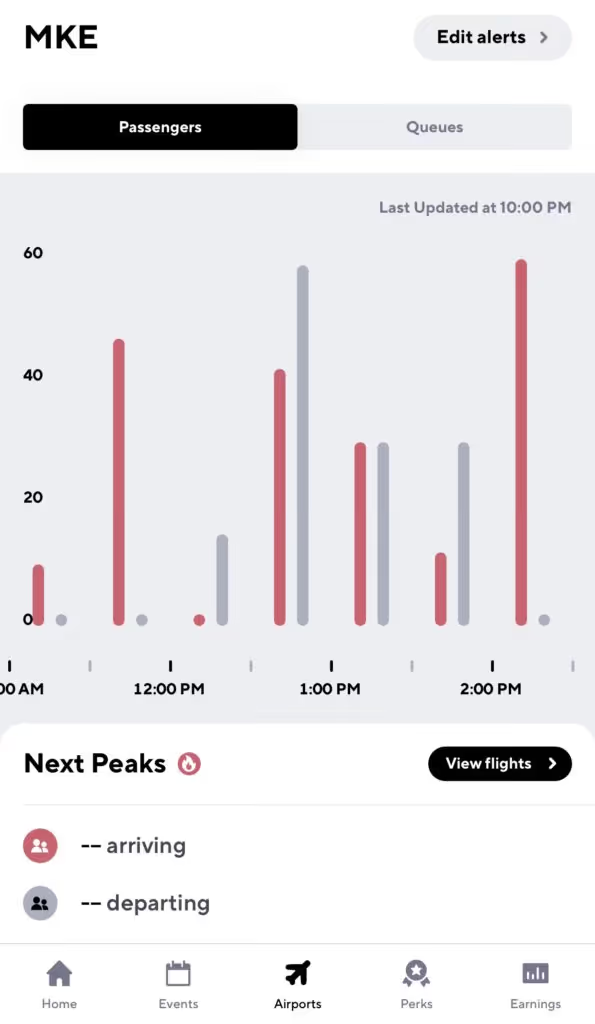
There are, of course, certain times of year that receive more passengers, like Christmas, Thanksgiving, and New Years. Still, the best way to understand rider demand at your airport is with Gridwise.
With Gridwise Plus you’ll be able to see airport data 24 hours in advance, so you can lock in a solid airport strategy the night before you head out. You’ll also be able to create custom alerts for arrivals and departures.
What are some good airport strategies?
Pick up a passenger on the way to the airport!
Don’t just be a driver who picks up passengers at the airport—also pick them up when they are heading to the airport. Gridwise does a great job of telling you when there’s also a peak in airport departures, so you can hang around near hotels at that time to maximize your chances of an airport ride.
Do not cancel on a passenger after you’ve accepted a fare
If you do, you’ll be bumped to the bottom of the queue and your wait starts all over again. The good news is, if it’s a short ride, some companies let you jump back in line after you’ve dropped that passenger off.
Fortunately, if a passenger cancels on you, it does not affect your place in line.
Look out for your short ride bump
After waiting at the airport for a passenger, there is nothing more frustrating than getting a ride that’s just five minutes away. That’s why the major rideshare companies have some form of a short ride bump that allows you to jump back into the front of the line if you get a very short ride request.
To take advantage of a short ride bump, simply complete your short ride and watch for a text message or in-app message that gives you the option to head back to the MKE lot for a spot in the queue.
Always be prepared
You never know when law enforcement will show up, so always keep your driver’s license, insurance card, and registration handy. And don’t forget to have your trade dress displayed, as well as be ready to show your waybill (an in-app receipt of your last drive) to airport officials.
Now you should be ready to make that drive to Milwaukee General Mitchell International Airport. Happy driving!

Uber and Lyft Instructions for Cincinnati/Northern Kentucky International Airport (CVG)
The Cincinnati airport is a global hub for Amazon Air and DHL Aviation, ranking 4th in North America for total cargo operations. That’s a lot of packages coming in and out. But what about passengers?
Serving the Northern Kentucky and Southern Ohio areas, this airport sees over 8 million people arriving or departing per year. That gives rideshare drivers in this area a great opportunity to profit on longer rides.
But if you’re going to maximize your earnings at CVG, you’ll need to know how to navigate. That takes a solid airport strategy, and knowing how to avoid citations. That’s why we put together this instructional guide to help Uber and Lyft drivers be successful when driving at the Cincinnati/Northern Kentucky International Airport.
We’ll walk you through everything from trade dress to airport peak times, so all you have to do is get on the road. The following topics are covered:
- What do you need to do before arriving at Cincinnati/Northern Kentucky International Airport?
- Do you need any permits to drive at Cincinnati/Northern Kentucky International Airport?
- Where is the rideshare waiting area at Cincinnati/Northern Kentucky International Airport?
- What are the passenger pick-up rules at Cincinnati/Northern Kentucky International Airport?
- What are the passenger drop-off rules at Cincinnati/Northern Kentucky International Airport?
- When is the best time to drive at Cincinnati/Northern Kentucky International Airport?
- What is the best Cincinnati/Northern Kentucky International Airport strategy?
Let’s dive in!
What do you need to do before arriving at the Cincinnati/Northern Kentucky International Airport and entering the airport queue?
You’ll need your trade dress, which (as you know) is the Lyft or Uber decal that goes on the windshield of your car.
Uber sends out this decal when drivers sign up. If you’ve lost yours since then, there are a few easy ways to replace it. You can request that a new one be mailed to you, pick one up at your local Greenlight Hub (be wary of recent Hub closures), or print out a temporary version at home.
You can order a Lyft decal from your Dashboard and print a temporary emblem while waiting for yours to come in the mail.
Where is the Uber/Lyft waiting area at the Cincinnati/Northern Kentucky International Airport?
Currently, all rideshare drivers share the staging lot that is located on Barkley Drive off Loomis Road. If it’s a busy day and the staging lot is full, you’ll have to leave the airport.
Once you enter the staging lot you’ll automatically be entered into the airport queue. Make sure not to log out of the app, cancel rides, or drive off airport property—you could lose your spot.
How should Uber and Lyft drivers pick up passengers at the Cincinnati/Northern Kentucky International Airport?
Once you receive a request, follow the route from the waiting lot to the pick-up point. Turn left on Loomis Road, right onto Donaldson Road, right onto Lincoln Road, and follow signs to the Pickup Zone outside Door 10 of the terminal building.
With certain rideshare companies, you’ll pull into a numbered parking lot in the commercial vehicle lot. Then, you text your passenger the number so they can come find you.
It can get tricky, so keep an eye on Google Maps and don’t hesitate to reach out to your rider.
How should Uber and Lyft drivers drop off passengers at the Cincinnati/Northern Kentucky International Airport?
Dropping off passengers at Cincinnati/Northern Kentucky International Airport is simple. All you have to do is take passengers to the terminal of the aircraft carrier.
When is the best time to drive at the Cincinnati/Northern Kentucky International Airport?
CVG is a pretty busy airport, and you’re not the only driver in the area who knows that. This is why the queue can be frustratingly long, especially when you could be making money on the road rather than waiting.
So the best time to drive at CVG is when the ratio of passengers to drivers is at its absolute highest.
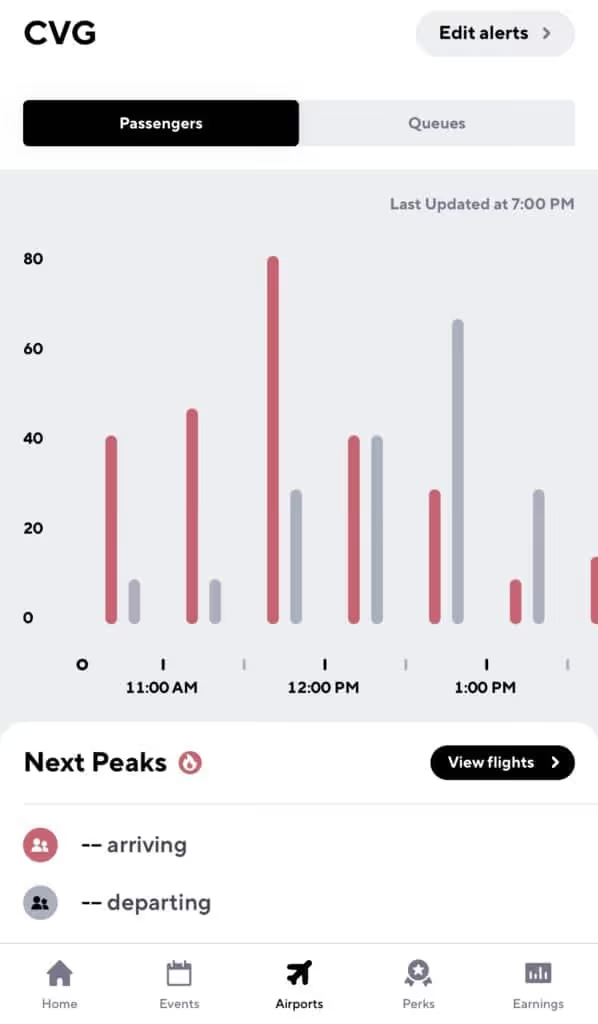
For flight insights, check your Gridwise app. The Airports tab lets you compare queue times to passenger arrival times.
There are, of course, certain times of year that receive more passengers, such as Christmas, Thanksgiving, and New Years. Still, the best way to understand rider demand at your airport is with Gridwise.
The best time for driving appears to be around midday, where there’s a spike in departures.
What is the best airport strategy for the Cincinnati/Northern Kentucky International Airport?
Pick up a passenger on the way to the airport!
Don’t just be a driver that picks up passengers at the airport. Also pick them up when they are heading to the airport. Gridwise does a great job of telling you when there is also a peak in airport departures, so you can hang around near hotels at that time to maximize your chances of an airport ride.
Do not cancel on a passenger after you’ve accepted a fare
If you do, you will be bumped to the bottom of the queue and your wait starts all over again. The good news is that if it’s a short ride, some companies let you jump back in line after you’ve dropped that passenger off. Fortunately, a passenger canceling on you does not affect your place in line.
Look out for your short ride bump
After waiting at the airport for a passenger, there is nothing worse than getting a ride that’s just five minutes away. That’s why the major rideshare companies have some form of a short ride bump that allows you to jump back into the front of the line if you get a very short ride request.
To take advantage of a short ride bump, simply complete your short ride and look out for a text message or in-app message that gives you the option to head back to the CVG lot for a spot in the queue.
Always be prepared
You never know when law enforcement will show up, so always keep your driver’s license, insurance card, and registration handy. And don’t forget to have your trade dress displayed, as well as be ready to show your waybill (basically a receipt of your last drive) to airport officials.
Now you should be ready to make that drive to CVG. Happy driving!

Uber and Lyft Driver Instructions for Orlando International Airport (MCO)
The Orlando International Airport (MCO) saw over 50 million visitors in 2019, making it the busiest airport in Florida and the tenth busiest airport in the United States. As an operating base for JetBlue, Southwest Airlines, and Spirit Airlines—as well as the home of a maintenance base for United Airlines—this is an important airport.
That means high potential earnings for rideshare drivers who are driving those millions of passengers to and from the aviation hub.
Orlando International Airport allows Uber and Lyft vehicles at the pick-up and drop-off terminals, but before heading that way, there are a few rules you’ll want to know. To maximize earnings (and avoid a ticket), it’s important to understand how to navigate the airport, join the queue, and legitimize your vehicle.
To help rideshare drivers be successful at the Orlando International Airport, we put together this blog post to serve as a guide. The following topics are covered:
- What should you do before arriving at the Orlando International Airport?
- Do you need any permits to drive there?
- Where is the rideshare waiting area?
- What are the passenger pick-up rules?
- What are the passenger drop-off rules?
- When is the best time to drive at the airport?
- What is the best driving strategy?
Let’s dive in!
What should you do before arriving at Orlando International Airport and entering the airport queue?
To pick up passengers at MCO, you’ll need your trade dress, which (as you know) is the Lyft or Uber decal that goes on the windshield of your car.
Uber sends out this decal when drivers sign up. If you’ve lost yours since then, there are a few easy ways to replace it. You can request that a new one be mailed to you, pick one up at your local Greenlight Hub (be wary of recent closures), or print out a temporary version at home.
You can order a Lyft decal from your Dashboard, and print a temporary emblem to use while waiting for yours to come in the mail. Keep in mind that the Orlando airport requires two Lyft decals: one on the front windshield and one in the back.
Where is the Uber/Lyft waiting area?
The Orlando International Airport has one staging area for rideshare drivers to wait in, and it’s located off Bear Road. If you’re driving for Uber, head to the waiting area adjacent to B-52 Memorial Park. If you’re with Lyft, the address is 8149 Bear Road.
Once you get to the staging lot, you’ll automatically be entered into the airport queue. You’ll be able to check your place in line in the Lyft or Uber app. Unfortunately, if the lot is full you’ll have to leave the airport.
How should Uber and Lyft drivers pick up passengers?
The driver who has been waiting the longest in the staging area gets the next rider request. Make sure not to enter out of driver mode while you wait or you’ll lose your spot in line.
Once you get a ride, a pin will be placed at the pick-up spot for you to meet your rider. This will be located on Level 2 of designated airport areas marked “TNC Pick-Ups,” just outside the baggage claim. There are two terminals here: Terminal A (at Doors 1 and 14) and Terminal B (Doors 20 and 31).
How should Uber and Lyft drivers drop off passengers at the Orlando International Airport?
Luckily, dropping off passengers at MCO is a lot easier than picking them up. Just head to the departure level at the passenger’s carrier of choice. Make sure not to linger here to avoid creating traffic.
That’s it, and you’re back on the road!
When is the best time to drive at the International Orlando Airport?
Turn to your Gridwise app for information about all arrivals and departures at MCO, as well as delays and cancellations.
Typically, midday is the best time for airport driving; most passenger arrivals and departures occur sometime between 11:00 a.m. and 2:00 p.m.
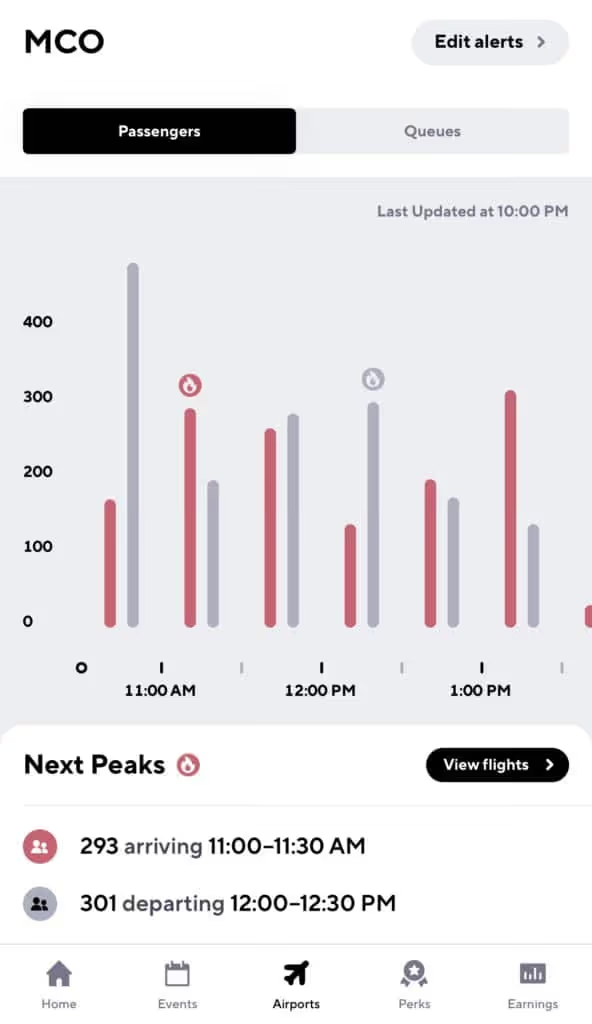
With Gridwise Plus you’ll be able to see airport data 24 hours in advance, so you can lock in a solid airport strategy the night before you head out.
What are some good airport strategies?
Pick up a passenger on the way to the airport
Count on Gridwise to let you know when there’s a peak in airport departures, so you can hang around near hotels at that time to maximize your chances of an airport ride.
Do not cancel on a passenger after you’ve accepted a fare
If you do, you will be bumped to the bottom of the queue and your wait starts all over again. The good news is that if it’s a short ride, some companies let you jump back in line after you’ve dropped the passenger off.
Be ready to present your waybill and keep your app updated
A waybill is essentially a receipt of the last trip you completed. Be prepared to present this to airport officials or law enforcement while waiting for arrivals.
Always be prepared
The fact is, you never know when law enforcement will show up. Keep your driver’s license, insurance card, and registration handy, and don’t forget to have your placard displayed.
Congrats! Now you’re all set to make some pick-ups and drop-offs at the Orlando International Airport—and maybe sneak a Dole Whip in betwee

Uber and Lyft Driver Instructions for Charlotte Douglas International Airport (CLT)
Last year, the Charlotte Douglas International Airport (CLT) saw over 50 million visitors, making it one of the busiest airports in America—and based on aircraft movements, the sixth busiest airport in the world. As a hub for American Airlines and a home to the Charlotte Air National Guard Base, it’s safe to say this is a major airport.
And with great airports comes great rideshare opportunities. Millions of annual passengers means major earnings for Uber and Lyft drivers who are driving passengers to and from the aviation hub.
The Charlotte airport allows Uber and Lyft vehicles at the pick-up and drop-off terminals, but before heading that way, there are a couple rules you’ll want to know. To maximize earnings (and avoid a ticket), it’s important to understand how to navigate the airport, join the queue, and legitimize your vehicle.
To help rideshare drivers be successful at the Charlotte Douglas International Airport, we put together this blog post to serve as a guide. The following topics are covered:
- What should you do before arriving at the Charlotte Douglas International Airport?
- Do you need any permits to drive there?
- Where is the rideshare waiting area?
- What are the passenger pick-up rules?
- What are the passenger drop-off rules?
- When is the best time to drive at the airport?
- What is the best driving strategy?
Let’s dive in!
What should you do before arriving at Charlotte Douglas International Airport and entering the airport queue?
To pick up passengers at CLT, you’ll need your trade dress, which (as you know) is the Lyft or Uber decal that goes on the windshield of your car.
Uber sends out this decal when drivers sign up. If you’ve lost yours since then, there are a few easy ways to replace it. You can request that a new one be mailed to you, pick one up at your local Greenlight Hub (be wary of recent closures), or print out a temporary version at home.
You can order a Lyft decal from your Dashboard, and print a temporary emblem to use while waiting for yours to come in the mail.
Where is the Uber/Lyft waiting area?
The Charlotte Douglas International Airport has one staging area for rideshare drivers to wait in, and it’s located on 5608 Wilkinson Blvd. (do not wait for requests on Stafford Avenue).
Once you get to the staging lot, you’ll automatically be entered into the airport queue. You’ll be able to check your place in line in the Lyft or Uber app. Unfortunately, if the lot is full you’ll need to leave the airport.
How should Uber and Lyft drivers pick up passengers?
The driver who has been waiting the longest time in the staging area gets the next rider request. Make sure not to enter out of driver mode while you wait, or you’ll lose your spot in line.
Once you get a ride, a pin will be placed at the pick-up spot for you to meet your passenger. For Uber drivers, this pick-up will be at Zone E of the lower Arrivals level. For Lyft, a pin will be placed at a pre-approved meeting location at Zone D of the lower Arrivals level.
It can get tricky, so keep an eye on Google Maps and don’t hesitate to reach out to your rider.
How should Uber and Lyft drivers drop off passengers at the Charlotte Douglas International Airport?
Luckily, dropping off passengers at CLT is a lot easier than picking them up. Just head to the departure level at the passenger’s carrier of choice. Make sure not to linger there to avoid creating traffic.
That’s it, and you’re back on the road!
When is the best time to drive at the Charlotte Douglas International Airport?
Turn to your Gridwise app for information about all arrivals and departures at CLT, as well as delays and cancellations.
Typically, midday is the best time for airport driving; most passenger arrivals and departures occur sometime between 11:30 a.m. and 2:00 p.m.
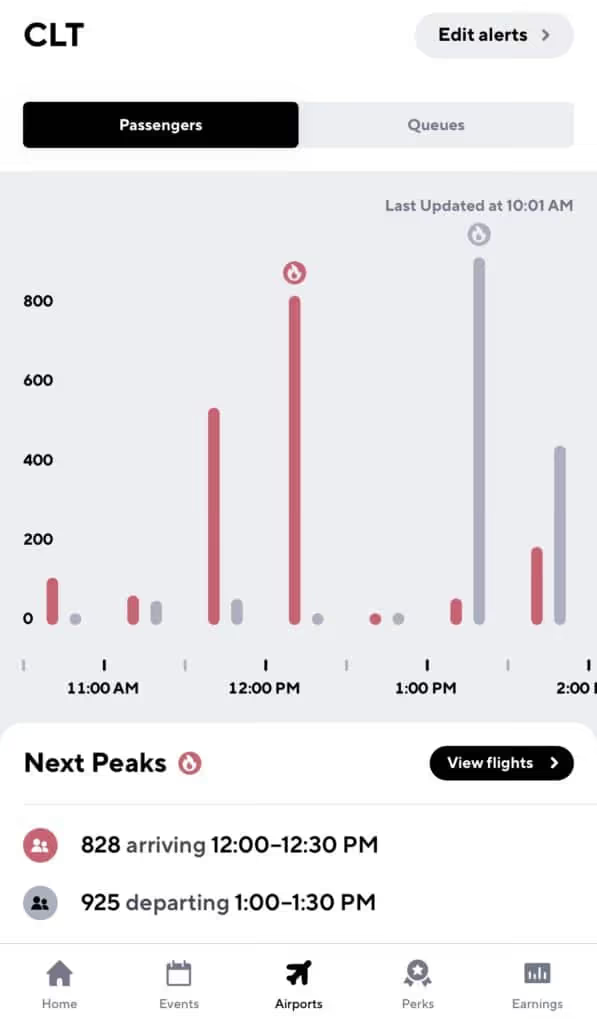
With Gridwise Plus you’ll be able to see airport data 24 hours in advance, so you can lock in a solid airport strategy the night before you head out.
What are some good airport strategies?
Pick up a passenger on the way to the airport
Count on Gridwise to let you know when there’s a peak in airport departures, so you can hang around near hotels at that time to maximize your chances of an airport ride.
Do not cancel on a passenger after you’ve accepted a fare
If you do, you’ll be bumped to the bottom of the queue and your wait starts all over again. The good news is that if it’s a short ride, some companies let you jump back in line after you’ve dropped that passenger off.
Be ready to present your waybill and keep your app updated
A waybill is essentially a receipt of the last trip you completed. Be prepared to present this to airport officials or law enforcement while waiting for arrivals.
Always be prepared
As always, you never know when law enforcement will show up. Keep your driver’s license, insurance card, and registration handy, and don’t forget to have your placard displayed.
Congrats! Now you’re all set to make some pick-ups and drop-offs at the Charlotte Douglas International Airport. Happy driving!
Trabaje de forma más inteligente. Gane más.
Ya sea que conduzcas, entregues o recojas turnos, Gridwise te ayuda a hacer un seguimiento de las ganancias, el kilometraje y el rendimiento para que puedas mantener el control de tu trabajo. Descarga la aplicación y toma las riendas hoy mismo.
