Blog de Gridwise
¡Lee el blog de Gridwise para obtener consejos y sugerencias sobre cómo ganar más dinero mientras conduces para Lyft, Uber, DoorDash, GrubHub y más!

The Gridwise Job Board: Find Your Ideal Job or Gig Work
Gridwise is an essential assistant app created by gig workers for gig workers. Our mission is to support those engaged in gig work in every way possible. We understand how challenging it can be to deal with income instability, a lack of benefits, and job insecurity that often comes with gig work. The Gridwise app tracks and organizes earnings and expenses, and offers a wide array of discounts, deals, and services that make the lives of independent contractors easier and more rewarding.
We firmly believe it’s possible to make a viable living and create a gig experience that offers flexible hours, variety, and excitement. With issues such as consistent earnings and job security in mind, Gridwise is proud to offer a centralized platform that shows you how to find gig work and secure reliable opportunities. We’re proud to introduce the Gridwise Job Board.
[elementor-template id="20891"]
The Gridwise Job Board: Key features
Because Gridwise is dedicated to serving the gig worker community, we’ve filled the Gridwise Job Board with useful features that won’t waste your precious time.
- Comprehensive listings. Find part-time, full-time, temporary, and per-task work. Drive or deliver with your vehicle, utilize an employer’s vehicle, or even find non-driving gig work.
- User-friendly interface. Find the jobs that are right for you with a tap of your screen.
- Verified opportunities. We vet the jobs before they are listed to ensure you’re getting high-quality job postings.
How to get more gig work, seasonal, part-time or full-time jobs with the Gridwise Job Board
Looking specifically for “gig work apps” or “gig jobs near me?” You’re in luck. Our filters and search functions send you directly to the listings you seek.
Here’s how it works.
- Access the Job Board via the Gridwise website.
- Search for jobs by type, location, and more.
- Select the job that interests you, and read all about it.
- Scroll through the description, and if it appeals to you, click “Apply for job.”
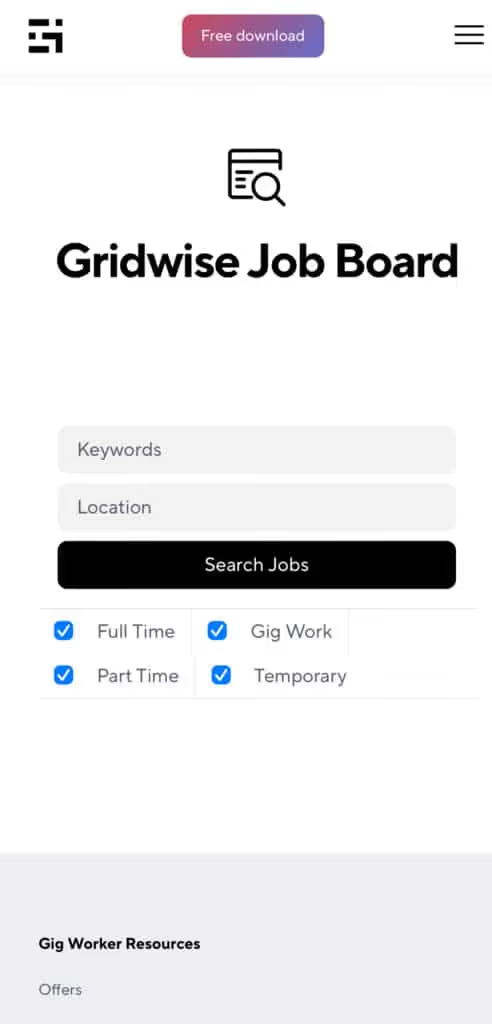
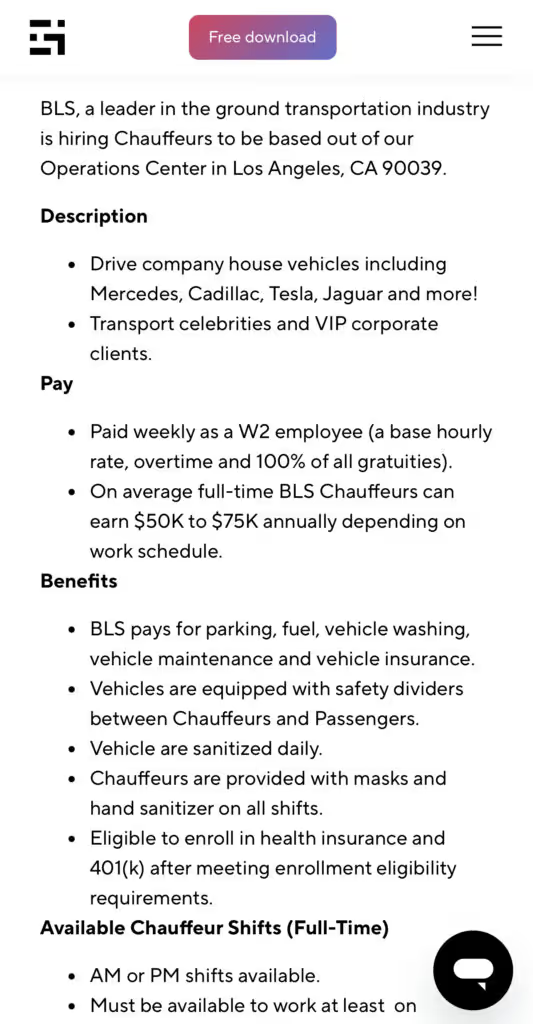
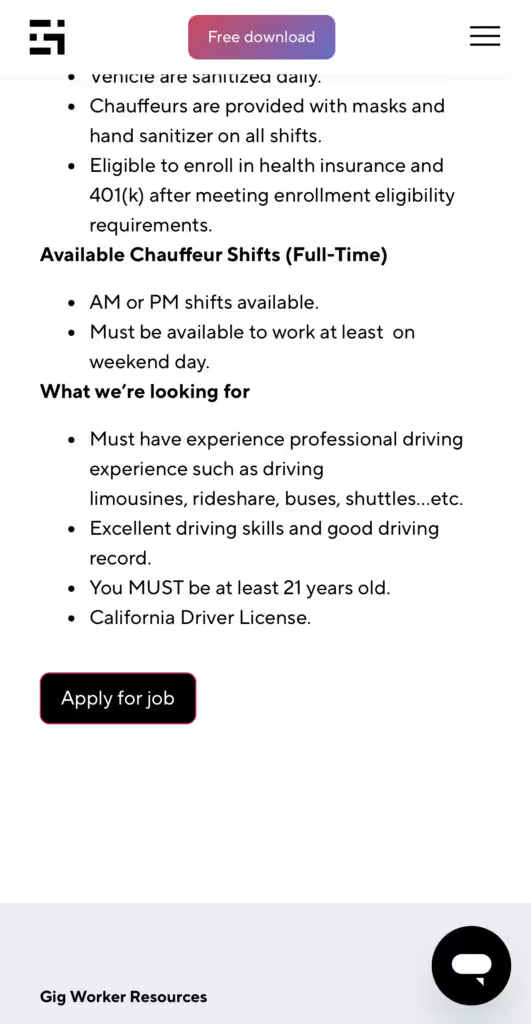
Many types of jobs are available. Adjust the search filter to see the full variety of opportunities that will let you cash in. Deliver food, set up catering, do rideshare driving, get paid for doing package delivery, and much more. You’ll find short-term gigs, long-term contracts, and part-time positions.
Perks of the Gridwise Job Board for gig workers
Gig workers who know how to make extra money will appreciate how the Gridwise Job Board lets you multiply your chances of bringing in big earnings. Here’s how:
- Increased stability. Use the Gridwise Job Board to find part-time or permanent jobs in addition to the part-time gigs you already have. Always keep a steady stream of earning opportunities flowing toward you.
- Flexibility and autonomy. Choose jobs that fit your schedule, work around other jobs and family duties, and still leave room for some fun in your life. Discover side hustles to supplement your full-time job, permanently or just for the season.
- Skill development. Find part-time work that lets you use a skill you already have, or try your hand at something new. It’s a smart way to develop a portfolio to showcase what you can do, or even to find permanent employment.
Get Gridwise and stay up to date on the Gridwise Job Board
Gig workers need plenty of information and assistance, and Gridwise is here to give it to you. Download the app and get essential features such as
- seamless earnings tracking
- mileage tracking
- expense recording, including notes
- low-cost and no-cost insurance benefits
- access to affordable medical, dental, vision, mental health, and alternative care
- professional services including legal and financial help
- deals and discounts
- weather, events, and traffic reports
- inside information on where and when to drive
[elementor-template id="20936"]
More to know about gig work:

5 Best Mileage Trackers For Gig Drivers
Many drivers ask, “Do I really need a mileage tracking app?” The answer is simple: only if you want to have an accurate count of all the miles you can legally deduct from your taxable income! You might think your rideshare or delivery driving app has got you covered. After all, they do quite a good job of logging the miles you drive while you’re on a trip or delivery. But, if you want to have the best app to track mileage for Uber, Lyft, Doordash, Instacart, or the other apps you may use, you need more. Why is that?
Without a separate tracker, you’re missing the miles you drive in between pings. Did you realize that all the miles you drive, from the moment you begin your shift until it’s over (as long as you don’t drive several miles on a break to hang with your friends), are tax deductible! That means you need something besides your driving app to keep an accurate count of your travels. Read this Gridwise post to see how important it is to keep track of every deductible mile.
You won’t be surprised to hear that there’s an app for tracking miles. In fact, there are several of them. Here, we’re going to tell you about five top mileage tracking apps, and help you figure out which one is best for you.
Before we get to the list and identify the best mileage tracker app, let’s clarify what exactly a mileage tracking app is. According to G2.com’s technology glossary, mileage tracking is done for the purpose of keeping a log of mileage that is either reimbursable or tax deductible.
And yes, of course you can track your miles simply by taking readings on your odometer. But are you really prepared to account for how many miles you drove for personal reasons and subtract them from the total to get your business mileage? Even if you can remember all that and do the arithmetic, if you want an accurate reading of the miles you drive for business, and can therefore deduct, a mileage tracking app will save you a lot of trouble and prevent you from making costly errors.
Plus, as a gig driver, you have specific needs when it comes to a mileage tracker. Ideally, you’d be able to handle mileage tracking and several other functions all in one app. It can be maddening enough to deal with driving apps, particularly if you’re an avid multi-apper. You would want your mileage tracker app to help you keep account of other aspects of your business, including income, expenses, and inside information about the art of gig driving.
Not all mileage apps are equal, to be sure! Let’s look at five of the best apps to track mileage and figure out which is the best app to track mileage with Uber and Lyft, or what mileage tracker app is best for DoorDash.
[elementor-template id="20891"]
1. Zoho Expense
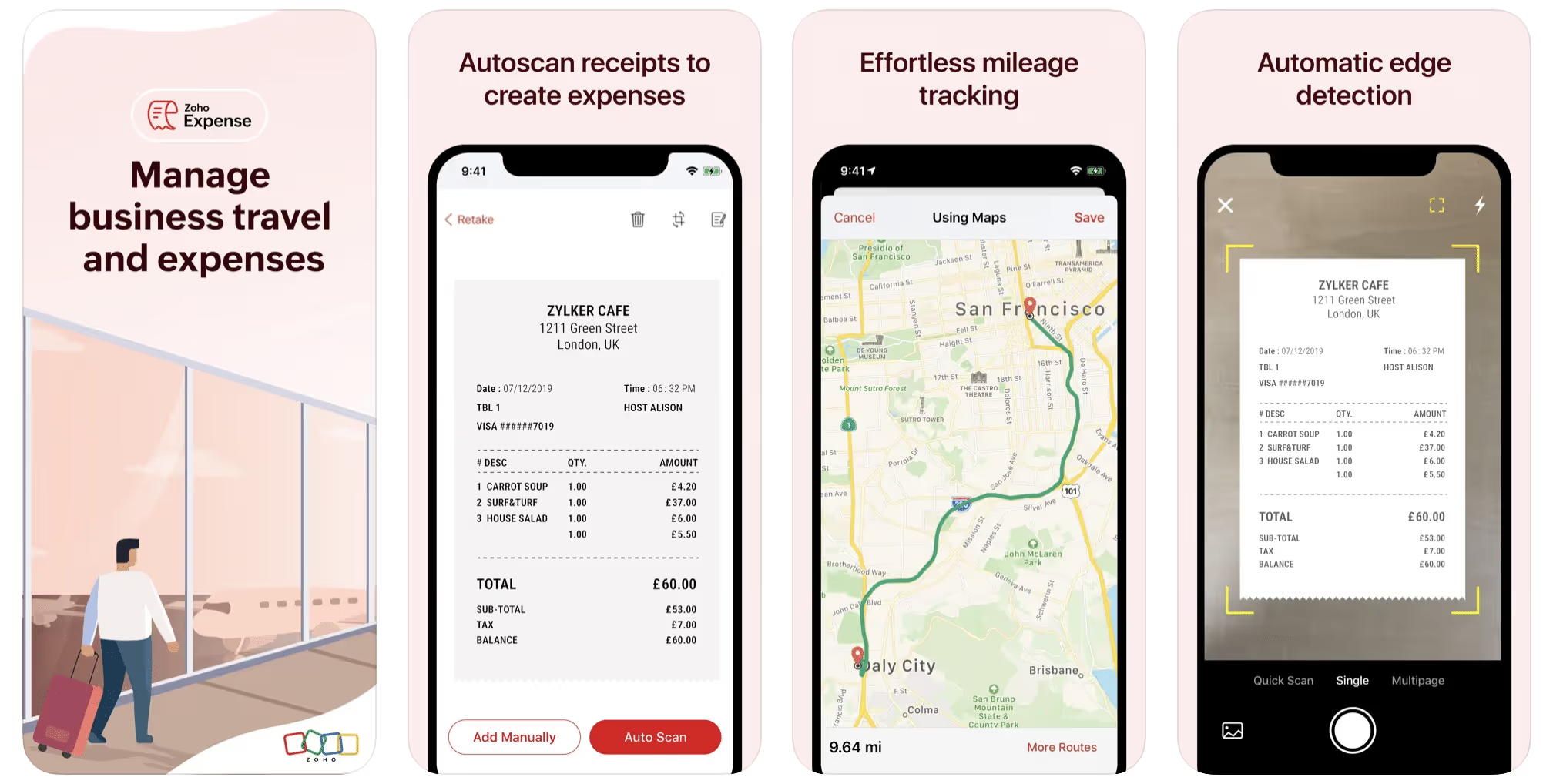
First up is Zoho Expense, which does exactly what its name says. This app is designed to allow companies to give employees a uniform way to create and submit expense reports. It can be used by individuals, including gig drivers, as well.
It includes a mileage tracker, as well as features that let you track other deductible expenses, including the ability to scan and record receipts.
Available on Android and Apple: Yes
Ratings: 4.8 stars on App Store, 4.7 stars on Google Play
Free Version: Yes
Subscription price: $3 per month, billed annually
Created specifically for gig drivers: No
2. Quickbooks Online
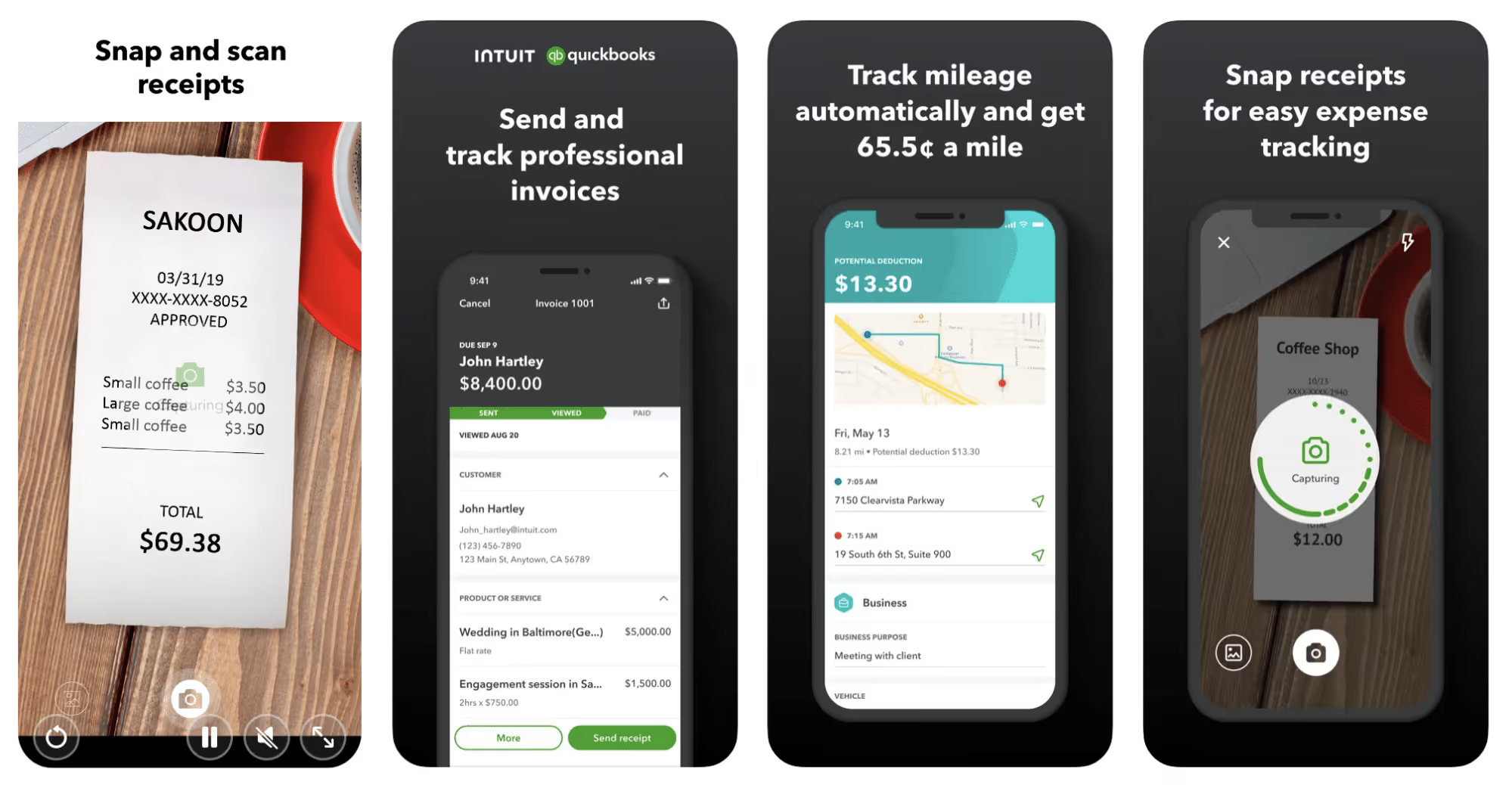
Quickbooks Online is a cloud-based app that allows you to track your mileage, earnings, and expenses. The information you enter can then be used to generate various reports that prepare you for tax time. It also allows you to create graphs that illustrate your cash flow, and includes a receipt scanner so you can instantly record deductible expenses. Quickbooks is popular, highly reliable, and designed mainly to help people keep track of their small businesses.
Available on Android and Apple: Yes
Ratings: 4.7 stars on App Store, 4.4 stars on Google Play
Free version: 30-day free trial
Subscription price: $15 per month for basic version if purchased for 3 months or more
Created specifically for gig drivers: No
Source: quickbooks.intuit.com
3. Shoeboxed
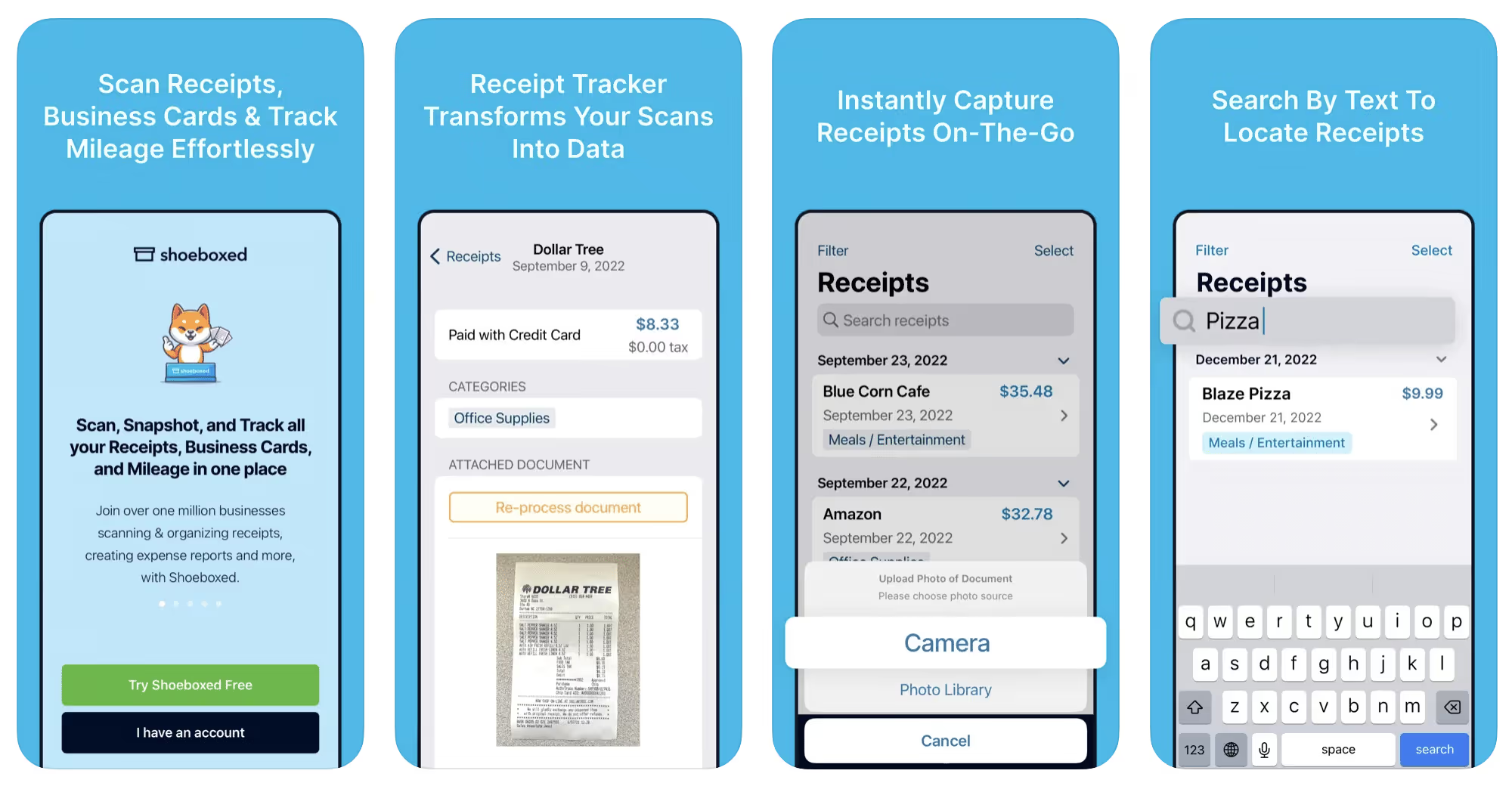
Shoeboxed started in 2007 as a service for scanning paper receipts into digital form. Now the app offers a free mileage tracker and has enabled users to scan receipts directly. It touts itself as the best mileage tracking app for DoorDash, but there are some elements missing that Dashers might like to have. While it provides features that record your expenses and prepare you for tax season, it doesn’t automatically track your earnings. The mileage tracker has a system where you can drop pins along your routes to make the tracking more precise, identifying those legs of a trip that you make for business purposes. The mileage tracker is “free” once you sign up for the basic version.
Available on Android and Apple: Yes
Ratings: 4.5 stars on App Store, 2.3 stars on Google Play
Free version: No
Subscription price: $18 per month for basic version
Created specifically for gig drivers: No
Source: blog.shoeboxed.com
4. Stride
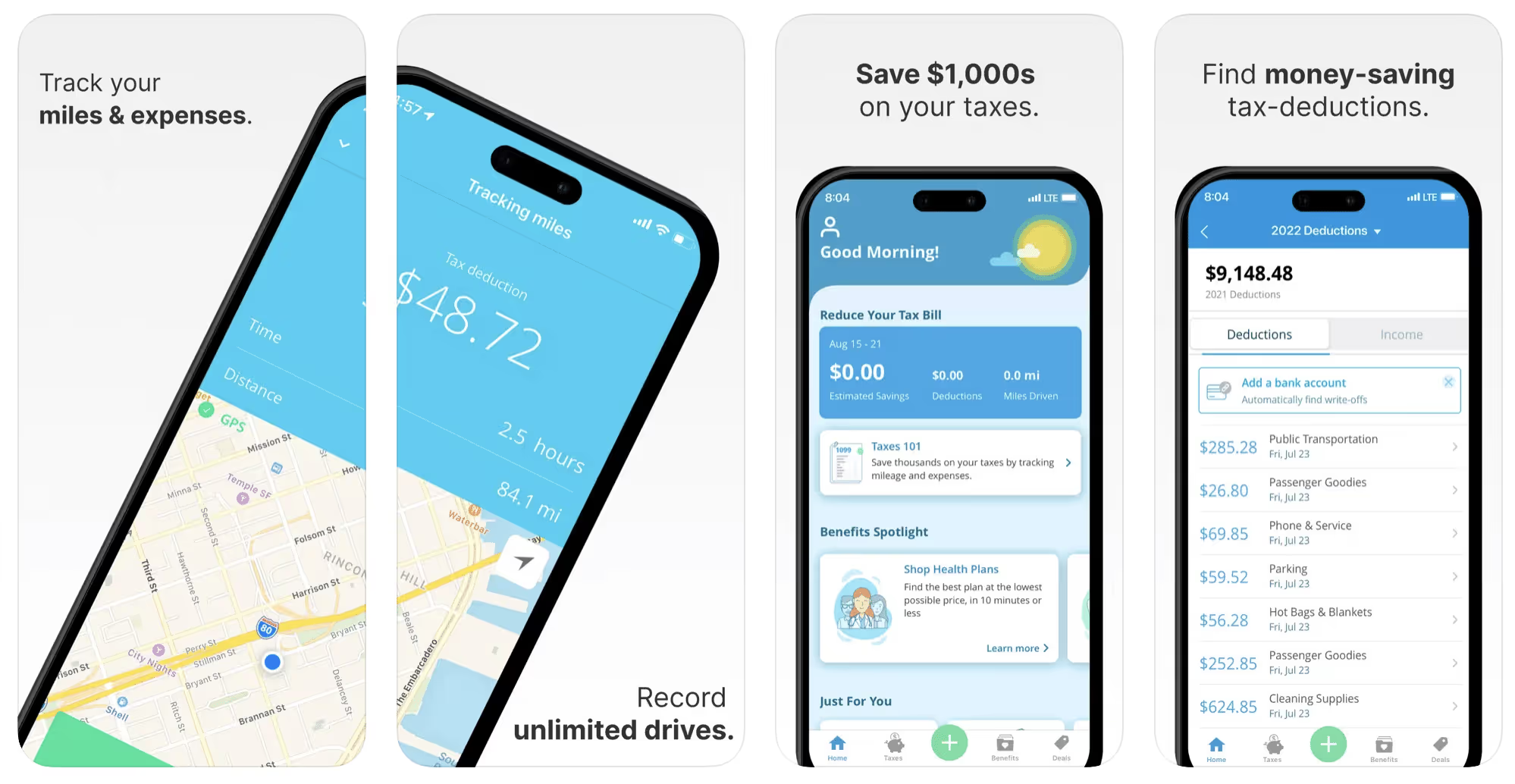
This free mileage tracker does a fair job of keeping track of the distances you rack up while gig driving, but it doesn’t automatically track earnings. It can be a big help, though, in tracking your expenses. You can link Stride to your bank account, and it will automatically scan your expenses to identify items you can potentially deduct. The app is totally free. This could make it the best free mileage tracker app, but there is a small price to pay. The app will persistently push you to consider various insurance plans that they are affiliated with. If you don’t mind that, this is a solid mileage tracker, even if it doesn’t track your earnings.
Available on Android and Apple: Yes
Ratings: 4.8 stars on App Store, 4.6 stars on Google Play
Free version: Yes
Subscription price: None. The app is free.
Created specifically for gig drivers: No
5. Gridwise
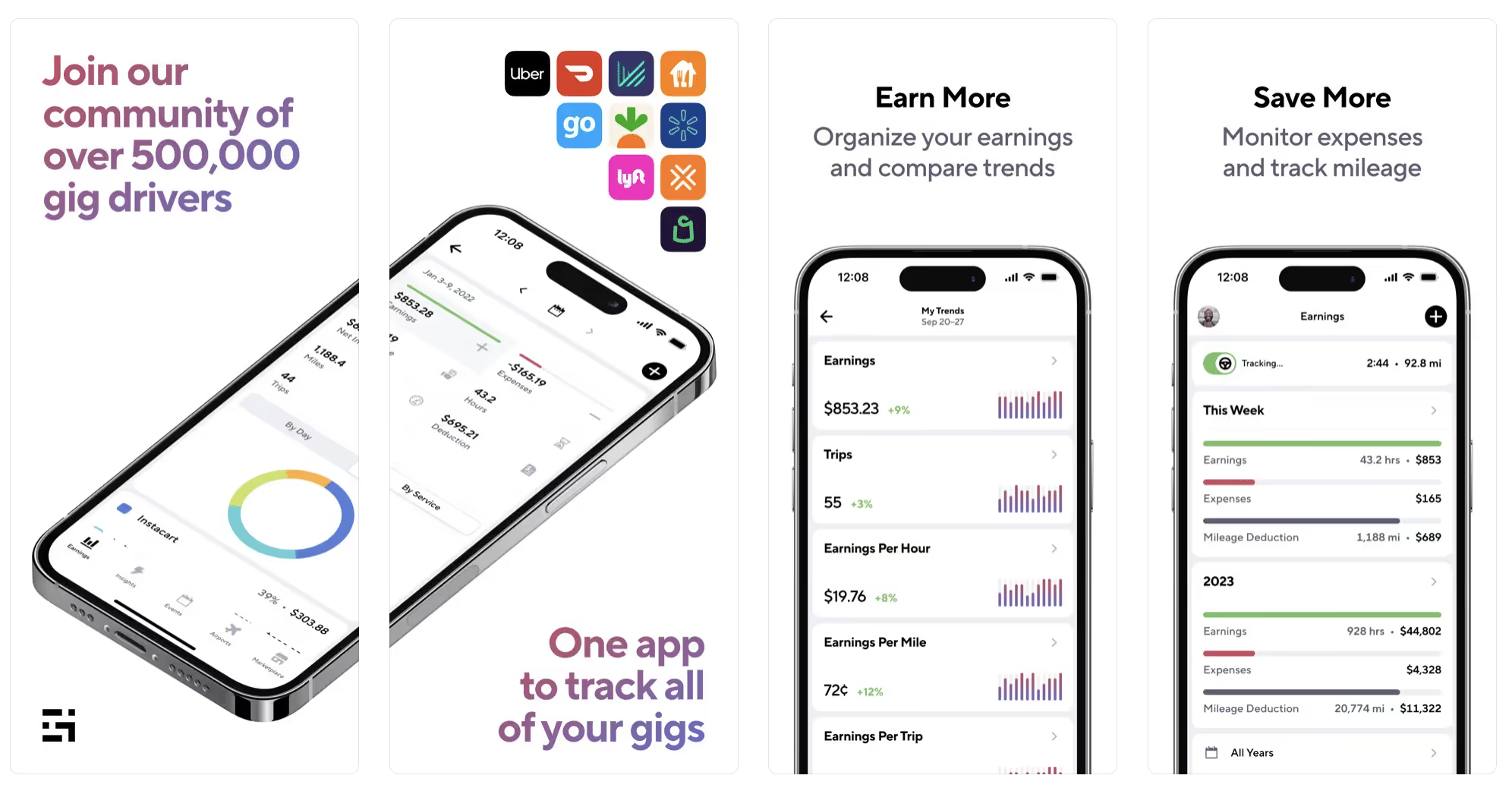
Gridwise has a free mileage tracker and free features that record your income and expenses. It gives you access to insurance and benefits, as well as insights about the best times and places to make the most money while gig driving. The Gridwise mileage tracker captures all the miles you drive while you’re on your driving shift, and it can be used if you have other trips you need to make which qualify as business travel.
Drivers love it because it is geared toward the needs of rideshare and delivery workers, providing free information about airport departures and arrivals, event start and let out times, weather, traffic, and more. The Gridwise Plus subscription adds value by providing additional insights and reports, discounts on benefits, the ability to export data in .csv format,, and more.
Available on Android and Apple: Yes
Ratings: 4.9 stars on App Store, 4.6 stars on Google Play
Free version: Yes
Subscription price: $9.95 per month for Gridwise Plus, or $95.99 per year (a $23.41 savings)
Created specifically for gig drivers: Yes!
What is the best mileage tracking app?
Now that we’ve checked them all out, we’re positive about the answer to that. Hands down, it’s Gridwise. Are we biased? You bet we are! But drivers love it too. Gridwise is the best mileage tracker app—and so much more. So many of the features are free, and the subscription to Gridwise Plus will pay for itself with additional insights to boost your earnings and deeper discounts on products and services.
Most important, Gridwise is designed specifically for gig drivers by experts who were once gig drivers themselves! Knowing what gig drivers need is a crucial step in creating an app that rideshare and delivery drivers can really use! Here are a few of the features, besides mileage tracking:
- seamless earnings tracking
- automatic, on/off toggle and manual mileage tracking
- mileage categorization
- airport, traffic, weather, and events information
- insights into where to drive and when to drive
- reports showing earnings across the platforms you use
- discounts on countless products and services for drivers
- additional resources for finding side gigs
- an informative and comprehensive blog
- affordable benefits, including insurance, medical, dental, and alternative practitioner discounts
- a community of drivers just like you
Don’t settle for just any app. Get the best mileage tracker, and so much more, from Gridwise!
[elementor-template id="21599"]

What Records Do Gig Drivers Need To Keep Track Of For Taxes?
* Gridwise does not provide tax, legal, or accounting advice. This material has been prepared for information purposes only, and is not intended to provide, and should not be relied on for tax, legal, or accounting advice. You should consult your own tax, legal, and accounting advisors before filing your return.
Record keeping? Who signed up for that? As a gig driver, it’s part of what you need to do to keep your business running. Don’t worry. It’s not as complicated as you might have been led to believe. This post will show you what you need to keep track of and the best ways to gather and preserve your tax-related records. We will cover
- How record keeping can help reduce income tax for freelancers
- Taxes and freelance work: Record keeping requirements
- Mileage tracking: Motives and methods
- More deductions and records to keep
- Make tax time easier
How record keeping can reduce income tax for freelancers
Tax time is not “fun time” for rideshare and delivery drivers. It’s easy to get used to watching your earnings pile up and come to believe they are all yours. Unfortunately, that isn’t the case. Gig work taxes can be especially painful because no one takes them out of your earnings for you, until the tax authorities insist that you do it for yourself.
You will need to show the tax authorities your income records, and they will gladly tell you to send them what they determine to be their fair share. Think that’s not fair? You’re not alone, but that doesn’t mean you’re going to get out of paying gig work taxes.
But you can find ways to pay the smallest amount that is legal and possible. The best way to defend yourself against having to pay astronomical amounts when you file your return is to know what expenses you can deduct from your gross income. When you subtract deductible expenses from your gross income, there is less left over to be taxed. This reduces the amount they can hit you with gig worker taxes. and can make your tax bill substantially lower.
While you want to keep good records so as to be in compliance with taxation entities such as the IRS, you also want to ensure you have proof of every last deductible expense you have accrued during the year. There are other records you must keep as well. Let’s look at some of the considerations you have, realizing that you now need to know how to do taxes as a freelancer.
Taxes and freelance work: Record keeping requirements
So many gig drivers fail to understand the responsibilities they have as independent contractors. Those who work part time for very few hours may even believe they don’t have to report the income they get from their driving gig payments. That would be a big mistake!
The company or companies you work for report your income to the IRS and state tax authorities. If you fail to report that income, you will risk some rather painful penalties. The IRS taxing side hustles is as much of a thing as the IRS taxing income from any other job. Your best bet is to report what you’ve earned, honestly and completely, and comply with other record keeping requirements such as
- gross income
- deductions and credits
- purchases (items you purchase and resell, such as snacks or bottled water)
- a log of all your mileage (or vehicle expenses, if greater)
- a list of all expenses and assets, such as utilities and other expenses associated with having a home office and equipment
- machinery and furniture you own, including when it was acquired, how much it cost, whether you previously took deductions on it, and selling price, if applicable (this includes your vehicle)
More things to consider:
- Pay attention to the retention of your records. You’ll need to keep all tax-return-related items— including income, deductions, and any tax credits reported— until the period of limitations runs out (3 years from date you filed, or 2 years from when you paid tax. If you have employees, keep your records for at least 4 years.)
- If you want to avoid paying self-employed taxes, you may want to set up a corporation or Limited Liability Corporation (LLC) for your business. This allows you to separate all your gig driving earnings from personal income, and permits you to take advantage of the additional advantages of working through a corporation. This includes exemption from self-employment taxes. You can learn more about how to pay self-employment taxes, if you opt for that, in this post from Keeper.
- You should always keep a separate checking account for your business, for convenience as well as clarity. While this is not a legal requirement, it is a smart move if you want to have an easier time managing your business.
- You are required, as an independent contractor, to file your taxes quarterly. Check out this Gridwise blog post for more information about quarterly tax payments and other matters that make filing delivery, Lyft and Uber taxes easier.
Mileage tracking: Motives and methods
Why you need to be meticulous about mileage
Mileage deduction, or the costs of operating your vehicle, will be the most important item to account for when you consider how to file taxes as a freelancer. While mileage is an important deduction for all independent contractors, as you might imagine, it’s even more essential for rideshare and delivery drivers.
There are two ways of keeping track of your mileage deduction. One is to use the IRS’ standard mileage deduction, which for 2022 is 58.5 cents per mile. This number takes into account the costs of operating your vehicle, from fuel and maintenance to registration, insurance, and depreciation. Alternatively, you can calculate all your own vehicle operating costs, but only after your first year of using the vehicle. You may discover that this second option allows you to have more money deducted from your taxable income. Learn more about the options for deducting your mileage in this Gridwise post.
No matter which way you decide to calculate the deductions for your mileage, you need to know what mileage you can and cannot deduct.
You can deduct
- miles driven to and from home when you go out to drive or deliver
- miles you accrue during your trips
- miles you drive on any other trips you make that are necessary as part of your business.
Examples:
- driving to return a lost cell phone or to an Uber Hub or another physical location where your company might make driver support available
- driving to pick up supplies, to get gas, or to have your car cleaned, serviced, or detailed, etc.
You cannot deduct
- miles you drive for personal trips
- miles for any trips you take that do not directly affect your business
Note: If imagining yourself becoming the not-so-proud owner of a shoebox filled with paper receipts gives you nightmares, stop worrying. Electronic records of purchases will satisfy reporting requirements. If you use cash, you can scan copies of your receipts, in some cases, right into your recording software or app. Gridwise and Keeper give you a simple to use interface that keeps all your receipts recorded without the messy pile of paper.
Mileage tracking methods
By now, you’re probably convinced that tracking mileage is important, despite all the other things drivers have to do. Now, let’s look at your options for keeping accurate records.
- Manual tracking: You can keep a logbook where you list every trip you make, starting and ending mileage, the date, and purpose of the trip. While this would work, it’s certainly not convenient. Besides, if that logbook gets lost, your plans for having a nice, fat tax deduction will go by the wayside.
- Spreadsheet: This is a bit more convenient and sophisticated way of tracking your business mileage. You’d need to be meticulous about making your entries, though. Even if you keep a spreadsheet app on your phone, it could be time consuming and inconvenient to keep doing it with all the other things going on in a rideshare or delivery driver’s day to day life.
- GPS-based mileage tracking apps: There are a bunch of apps that track mileage based on your GPS location, and most of them are pretty accurate and far more convenient than taking constant readings of your odometer. Your driving apps, such as Uber, Lyft, DoorDash, or Instacart, may also track your mileage, but be careful here. They will only track the miles you drive while you’re on a trip or delivery. They don’t count the miles you drive going to pick up a customer or when you make your move toward a restaurant or store.
Gridwise, on the other hand, will track all the miles you clock while you’re on your shift. All you need to do is make sure you start tracking the minute you leave home, and every gig driving mile will be logged. - OBD-II mileage tracking systems: There are plug-in modules that assess your vehicle’s mechanical health and track your miles. However, many authorities question the ability of OBD-II mileage tracking systems to get get accurate odometer readings. Insurance companies don’t consider them to be accurate enough gauges of odometer readings.
While mileage is a crucial deduction when you’re preparing your Uber, Lyft, or DoorDash taxes, it isn’t the only expense you’ll want to record.
More deductions and records to keep
Expenses you can deduct
You’re entitled to include the cost of other expenses that are directly related to your driving business. These include
- vehicle expenses
- equipment for your car and home office
- extra services and subscriptions
- business tools, including apps and software
You can learn much more about gig driver expenses that are eligible for deduction in this Gridwise article.
Ways to track and preserve deductible expenses
- The manual method: Just like you can with mileage, it’s possible to use a manual method, but in addition to logging each expense into a ledger, you would also need to keep physical receipts.
- Spreadsheets: You can record your expenses on a spreadsheet. This is somewhat less awkward than manually logging mileage, but there still will be plenty of room for failing to remember the case of water you bought for your customers, or losing the receipt from the thermal bag you purchased.
- Accounting software: You can use software that helps you track your expenses. This method usually interfaces well with any tax preparation software you or your tax professional might use.
- Gridwise: There are other apps that help you track your expenses, but Gridwise is designed specifically for gig drivers. It automatically tracks earnings and mileage, and lets you record your expenses the minute they come up. Gridwise’s partnership with Keeper gives you the ability to scan receipts and access a tax professional. This is a seamless way to record your expenses and a big help in learning how to file Uber taxes. Gridwise even provides .csv output, so you can feed your Gridwise data directly into tax preparation software. Check out what Gridwise and Keeper will do to super-charge your tax filing powers.
Organizing and categorizing expenses
Before you even begin to record expenses, you’ll want to set up categories for them. You can start by reviewing the categories listed above and checking out the Gridwise post that lists possible deductions.
If you’d like to learn more about how to categorize expenses, there is additional information available. This article from Motley Fool lists all possible categories any freelancer might use and also gives tips on how to customize them for your driving business.
One last tip
Using Gridwise, particularly for tracking mileage, is the easiest way to be in compliance with the IRS’ rules for deductible mileage. Gridwise tracks all the miles you drive for your gig, beyond what your company’s app might record. At the same time, you can log on and off Gridwise when you start and end your shift, so personal miles won’t be recorded. This eliminates confusion while capturing every deductible mile.
Gridwise Tax Help, a partnership with Keeper, has been created specifically to serve gig drivers. It provides affordable and easy ways to record expenses, scan receipts, and find deductions by analyzing your expenditures. Read about free resources from Keeper you can use to be fully prepared for tax season, and get all your earnings and expenses on the record.
Get the world’s best assistant for rideshare and delivery drivers, and tax help too.
Make tax time easier now!

How to Rent a Car to Drive for Uber
Driving for Uber sounds great to many of us. All we have to do is drive our car from one place to the next, and magically … we make money!
Well … that’s a little simplistic, although being a rideshare driver is pretty easy. But there is one thing that can get between you and that pile of cash at the end of the day.
What’s that one thing? Not having a car.
It may surprise you to know, however, that driving for Uber is not contingent on owning a car. Instead, you can rent one. Even if you are a car owner you may want to give your vehicle a break from wear and tear and/or heavy mileage for a while. Whatever your reasons, renting might be a good option for you. Read on to learn more about what’s involved.
Some things to ponder
Before you get too excited, be aware that there are some restrictions. You can’t simply run down to the local car rental place and rent one of their vehicles to drive for Uber—it doesn’t work that way. Issues involving insurance, not to mention Uber’s approval requirements, prohibit that.
Still, there are ways for you to legally and safely rent a vehicle to use for Uber driving. How does it work? Uber partners with a group of companies that rent vehicles to drivers who need them. We’ll dig into that later in this post.
Know the rules
If you decide to go with the car rental option, it’s important to understand the requirements and restrictions that are in place. One pertains to age. You must be of a certain age, which is typically 21 or 25, depending on the rental company’s regulations. You also need a credit or debit card. In most cases a debit card will be accepted, but the rental company will take a deposit and hold it until the car is returned. In other words, you’ll need to have a “spare” lump sum (usually a few hundred dollars) that you can live without for a while.
It goes without saying that you’ll need a good driving record and be able to pass a background check, just as you would if you want to drive for Uber with your own car. If you’re ready to drive enough to pay for the car and make a profit, and you meet all the other qualifications, you’re all set.
Next steps
If you haven’t already done so, download the Uber app and sign up to become a driver. If you’re an Uber driver already, you’re good to go. Now, from the home screen tap on your photo in the upper right hand corner. On the next screen, also in the upper right corner, tap where it says “H..P?”. This will open the Help section.
Here, you’ll tap “Signing up,” and then, on the next screen, tap “Getting a vehicle.” Next tap “Can I use a rental car to drive?” and you’ll see a message stating Uber’s policy regarding approved partnerships and locations for Uber drivers. The vehicles are insured by the rental partners specifically for Uber drivers, so you won’t get in trouble for using them.
Next, tap “Uber-approved rental car providers,” and you’ll be whisked to a screen that tells you to send a message to learn more about what’s available in your location.
Note: Some cities don’t have the option to rent cars, but even if yours doesn’t, don’t give up. There will probably be deals that offer flexible leases and discounts on new cars. You can check with Uber to see what might be available to you, either through the app or the Uber website.
Uber’s approved providers
There are several Uber-approved rental car providers, and they vary from city to city. That’s why it’s crucial for you to go through the Uber app to find out which companies and locations will work for you.
You’ll want to know more about each of them before you make a commitment, right? Here’s a rundown of the companies Uber lists—but remember, all of them might not be available in your location. Also, think about whether you want to rent on an hourly or weekly basis, and if you don’t know, look at the rates and let the numbers help you decide.
Fair
One option is the Fair program, which offers weekly rates as low as $214. Auto liability insurance is included, as are basic routine oil and filter changes, multi-point inspections, tire rotations and fluids. Fair also charges a $200 security deposit, but it is refundable. When you return your car, the deposit can be applied to any amounts you owe, including past payments, damage, or gas charges.
Getaround
Another rental option is Getaround, a program that allows you to rent by the hour or the week. Getaround’s rates begin at $4 for a day, $239 per week, or $219 per week if you rent for four weeks at a time. You can book on your phone and use Getaround’s app to extend your agreement. Insurance, unlimited mileage, 24/7 support, and roadside assistance come with every rental. So far, drivers in Atlanta, Boston, Denver, Los Angeles, Philadelphia, San Francisco Bay Area and Washington D.C. can get hourly and weekly rentals. In Portland, Oregon, and San Diego, it’s hourly rentals only.
Hertz and Avis
Uber has an agreement with Hertz that allows drivers to rent a car for $214 per week plus a $200 refundable deposit. The cost includes auto insurance, basic maintenance, and unlimited miles. Hertz highlights a “lower credit requirement” in its offer, and currently the company’s cars are available to Uber drivers in 32 American cities.
Avis lets you rent a car to drive for Uber, too. The company has offers starting at $214 per week, plus a $250 security deposit. Insurance, unlimited mileage, and vehicle warranty are included in the price. Applicable taxes and fees, gas, and other products (think windshield wipers) are not.
Zipcar
If you like the idea of renting by the hour, Zipcar might be a good option to consider. The company’s rates start at $5.50 per hour on weekdays, which includes gas, insurance, and 180 miles per day (you’ll be charged 45 cents per mile after that). So far, this service is available in Baltimore.
HyreCar
A new concept in car rentals is HyreCar, a company that facilitates rental transactions between drivers and private individuals. You must already be an approved Uber driver to apply, and you can rent from people who list their cars with Uber.
Here’s how it works: You download the HyreCar app, create an account, enter your location and desired pickup and dropoff dates, and you’ll be able to search through the selection of cars listed by local owners.
Once you book the car and are approved, you receive the three documents (inspection, registration, and insurance) that you’ll need to upload to your Uber account. Be sure to upload the documents right away so Uber will have time to approve them before you want to start driving. You’ll do this by adding a car to your account.
After that, you make arrangements with the owner to either pick up the car or have it delivered. At the end of your rental period, you replace the gas you used, return the car to the owner, and you’re done.
Check it out
Renting a car to drive for Uber makes it easy for everyone to enjoy the freedom and financial benefits of the rideshare business. Find the solution that works for you, and get on out there!

The Best Ways for Drivers to Contact Lyft Support
As Lyft drivers, we receive a lot of communication from the company. They tell us how well we’re doing, whether we missed a ride, and when we got a tip. They never have a problem getting through to us; it all comes automatically through the app.
It’s a bit different when we’re talking about communication from drivers to Lyft. Why? Because it isn’t automatic.
There are lots of reasons drivers might need to contact Lyft Customer Support. For instance ...
- There might be a dispute over a payment
- You could get an unfair rating or comment you wish to contest
- You might want to print out monthly income or tax information
- There may be incidents you need to report such as accidents or damages caused by passengers.
How you should contact Lyft Customer Support depends on your reason for contacting them. Here are the various options so you can decide which works best for your specific concerns.
The In-app Help Section
Lyft’s colorful way of interacting with people who use the service is also part of the fabric of the app. You’ll notice this as you work your way toward the In-app Help Section.
Tap on your photo on the upper left of the screen, then tap “Help.” Here you have the option of tapping one of the topics listed, or one of the bright pink icons on the bottom of the screen.
The icons can lead you to help with most concerns, such as reporting an accident, lost and found, earnings or bonuses, safety issues and passenger problems, profile settings, express drive, and “other topics.”
The information under the list of topics can also be found through the icons. The lines with words provide a shortcut to some “hot topics.”
Passenger Scenario ...
Now let’s try it out. Say your rider wants you to make an unscheduled stop, and wait while he or she goes into the house to change clothes for work. If you think it’s worth your time to wait, then go ahead and wait.
But knowing that a driver’s time easily converts to money, it’s hard to imagine that a ten-minute, unscheduled and marginally paid wait period is something you want to deal with. As you can imagine, though, saying “no” could lead to an issue. Whether you give in to the passenger’s whims or stand your ground, you’re still probably going to get less than a five-star rating.
You can give the passenger a one- or two-star rating as well, and you’ll get a chance to say exactly why you did so right in the app—but you may want to let Lyft know what happened.
From the array of icons, tap on the shield and the words, “Ride, passenger, or safety issue.” Next, tap “Issue with a passenger,” and then, “I was rated unfairly.”
A new screen pops up, and at the top you’ll see some information about ratings, and how you can rate passengers and provide information in the app, up to 24 hours after the ride.
If you still need to express yourself more clearly or at greater length than you can in the app, you can scroll down to the “Contact us” button, and tap it. That allows you to tell Lyft how you wish to be contacted, whether by phone, text, or email. A Lyft representative will get back with you, usually within a reasonable time frame.
Also note that you can set up your app to reflect your preferred way for Lyft to contact you.
The In-app Help Section is a convenient way to contact Lyft customer support, and it can also help you get in touch with an actual human being. This feature can also be a worthwhile source of general information about driving for Lyft.
Using the Dashboard
There is an alternate way to get assistance through the Lyft app, and it’s through the dashboard. Tap on your photo from the main screen, and then on “Dashboard.” Tap the three lines on the upper left, and your dashboard options will open.
Scroll all the way to the bottom of the screen, and tap “Help.” You’ll see the same help screen that appears on the Lyft website, which is for both passengers and drivers. Although this can be a useful interface, it’s not as direct and concise as the In-app Help Section.
The next time you stop for coffee, or when you’re parked and waiting for your town to come alive with Lyft passengers, read through the help section and familiarize yourself with how to use it. You’ll be glad you did that if you need to contact Customer Support in a hurry.
Contacting Lyft via Email or Phone
There is no direct email address or phone number for Lyft Customer Support. Instead, as discussed in the previous section, you let them know you want to email, text, or speak with a representative by following the prompts in the app or on the website.
In either case, tap on “Contact Support” and a series of forms will pop up. Describe your question or concern in detail, and submit your form. This is as close as you will come to direct email, but be assured that it works.
Lyft’s Customer Support team is very responsive and supportive. It’s easy to see how the method they use to get information tells them exactly what you need, which can make them even more efficient.
The Lyft Hub
Lyft Hubs offer a warm welcome and face-to-face help. You can pick up your amp, learn how to use it, tackle features of the app that have been baffling you, and ask any kind of question you want about your status, including how to be a great driver and how to get those five-star ratings.
Find a Lyft Hub near you. You’ll say, “Sweet!” when they offer you a cushy chair and a piece of candy when you visit.
Safety with Lyft
If you are in any kind of trouble during your driving shift, Lyft is NOT the first point of contact. Always dial “911” for emergencies.
Once you are safe again, use the In-app Help Section to report an accident, a need for roadside assistance, or to tell Lyft about a citation, damage, or a need to have your car cleaned.
Lyft on Social Media
Lyft on Facebook
You can visit Lyft on Facebook at https://www.facebook.com/lyft/. There you’ll find photos and videos of drivers and riders smiling ear-to-ear during their Lyft experiences. There are also listings for local Lyft events, from launch parties for new hubs to tailgate rallies for drivers who appreciate those large, ride-rich events.
Lyft on Twitter
Lyft uses Twitter in an interesting way—you can actually contact Customer Support through their feed! It’s the same deal as the email form, though. Tweet to them, and they will get back to you as soon as humanly possible.
Here’s how to find Lyft on Twitter: https://twitter.com/lyft. You’ll find some interesting stories and videos as well.
Lyft on Instagram
There’s even more fun to be had on Lyft’s Instagram. Lots of video stories on topics such as safety and culture, plus phenomenal photos of happy people tootling around the planet in their Lyft vehicles. Find them all at @lyft.

Should Rideshare Drivers Deliver for goPuff
Before you think, “Ah, just another food courier service,” think again. Founded in 2013 by two college students, goPuff has changed the delivery game by focusing all its efforts on the huge demand for convenience store items. From mouthwash to cereal to a pint of ice cream, goPuff allows customers to order everything they could find at their local convenience store and have it delivered to their door.
What differentiates from other courier services is that it goes beyond just delivering—it’s the first-of-its-kind digital convenience retailer. With 150+ centrally located facilities throughout the U.S., each of which stocks more than 2,500 products, goPuff is changing the courier game by not just delivering the products, but also stocking and supplying them.
While the business model itself seems great, we’re more focused on understanding one thing: Is it worth it to drive for goPuff? Read on to see what you think.
Driver requirements
As a fast-growing company, goPuff needs drivers in many cities, and this demand will grow rapidly with its continued expansion into new locations. To become a goPuff driver, you must be passionate about helping people and meet the following requirements:
- Be at least 21 years old
- Have a valid driver's license
- Have a car and auto insurance in your own name
- Have an iPhone 5 with iOS 10 or newer, or an Android 4.4.3 or newer
- Be willing and able to pass a background check
- Be willing and able to pass a prepaid alcohol delivery training course (where applicable)
If you fit these requirements, check goPuff’s website to confirm that there’s a warehouse in your city. If there isn’t, don’t be discouraged because that could change.
The process of applying for a goPuff driver position is quick and easy, and you can fill out an application on the website in less than ten minutes. Once you’ve completed it, you’ll be prompted to schedule an interview. Depending on your location, it will take place either in person or on the phone. Once you’ve been hired, you can start scheduling shifts immediately unless you’re in a location that allows alcohol delivery. In that case, you’ll need to pass a delivery training course before you can start driving.
How does it work for drivers?
If you drive for goPuff, you can arrange a schedule that works best for you. The company has its drivers sign up for shifts a week in advance.
When it’s time for your shift, you’ll go to the goPuff warehouse and wait for orders to be ready for delivery. Drivers have commented in online career websites that they don’t have to wait very long for orders to be ready. Deliveries are made within a 30-minute drive from the warehouse, and once completed you head back for more.
How much can you make with goPuff?
One thing that makes goPuff different from other delivery services is that drivers don’t have to run around so much. Rather than having to go to a convenience store, pick out the items, pay for the items, and then deliver the items, drivers go to one central location: the goPuff warehouse. An operations team fulfills the order, packs it up, and hands it to you—all you have to do is grab it and go.
The goPuff business model promises customers that they will only be charged a set delivery fee of $1.95, and there are no added surge charges when demand is high. This is great for the customer—but what about the drivers delivering these products?
Like other delivery services, goPuff drivers are independent contractors. To ensure adequate pay, the company guarantees a minimum hourly wage for drivers of $10 on weekdays and $12 on weekends (these may vary based on your market). Drivers can also keep 100 percent of their tips.
Here’s a goPuff wage scenario: Let’s say you drive a five-hour shift with a minimum of $12 per hour for a total of $60 pay but only end up making $50, goPuff will pay you the $10 difference. There is the opportunity to make more if you get multiple back to back deliveries and tips, and most drivers have reported making $10 - $16/hour on average.
Pros of driving with goPuff
No driving around to restaurants or stores: Because all items for delivery are stored in the goPuff warehouse, your only destination to complete a delivery is the customer’s location.
Guaranteed pay: goPuff’s minimum hourly wage guarantee means drivers are properly compensated. If your pay doesn’t add up to the minimum promised, goPuff will make up the difference, taking the guesswork out of your hourly pay.
Ability to make more money: Like most other delivery apps, there is no earnings cap. Although we haven’t heard of any drivers making more than $16 per hour (yet), the possibility is there with nearby deliveries and generous tips.
Cons of driving with goPuff
Delivery distance: Because goPuff drivers deliver up to a thirty-minute radius of the warehouse, a single delivery could potentially take up to an hour.
Lack of flexibility: Similar to delivering for a local restaurant, you have a set schedule that you create the week before. As a result, there’s no option to start and stop driving as you please.
Potentially lower compensation than other courier services: While it’s great that goPuff ensures a minimum hourly wage, the payment model does not take distance driven into consideration like Uber Eats and other apps do.
Is goPuff right for me?
Driving for goPuff means consistent pay and work without the hassle of picking up orders at convenience stores or restaurants. If you’re looking to diversify your rideshare driving with some deliveries and want something with a guaranteed minimum hourly pay and set schedules, goPuff may be a good fit for you. As the company continues to expand to new markets at a rapid pace, there will be a growing need for delivery drivers and more shifts available.
How does it stack up against the competition?
Interested in how driving for goPuff stacks up against other courier delivery apps? We’ve got you covered! Check out the graphic below to see driving requirements, payment details, and more.
Top Rideshare Services that Drivers are Using (and Why)
If you’re a rideshare driver, odds are you work with either Uber or Lyft. By far the most popular platforms here in the US, these apps have taken over the ride-sharing services marketplace in a major way.
Ten years ago, this wasn’t the case. Options for rideshare were limited because they mostly didn’t exist yet.
Now, the success of app-based ride share has rapidly expanded the industry, allowing for specializations by region and purpose. Hailing a cab in New York? There’s a rideshare app for that. Getting kids to school? An app for that, too.
Let’s examine the top rideshare services and why the drivers are choosing these platforms.
With over two million drivers in 80 different countries, Uber is by and large the most popular and widespread rideshare service. It was the first contender in the market and has been working to disrupt a system that hadn’t seen any major changes since the 1930s.
With brand recognition and a host of premium vehicle choices, full-time and part-time drivers sign up to drive for Uber for the options it creates. The demand for Uber rides is highest in cities, but the company continues to grow and the market continues to expand.
Lyft is Uber’s fiercest competitor. Although its user base is smaller (Lyft holds around 30% of the ride hail market share), Lyft can be just as useful to have in your driver’s arsenal as Uber. Maybe you won’t be getting back-to-back pings, but many drivers even prefer using this service over the other competition.
For one, it can be less overwhelming to the rookie driver. You can turn the app on and pick up passengers at a more leisurely rate, giving you time to take breaks and hone your driving practices.
Via is about actually sharing rides. The app, available now in ten US cities, links riders headed in the same direction to carpooling drivers, cutting carbon emissions and offering riders cheaper prices than Uber or Lyft.
Via offers its drivers two ways to earn: Blue mode and Flex mode. Flex mode is a flat-rate payment system where drivers earn per ride while Blue mode guarantees an hourly wage.
Via operates in spaces where there is a lot of driver demand, putting fewer miles on your vehicle and eliminating the need for long-distance trips. You’ll likely develop regulars and be able to build a relationship with your passengers. Since you typically work during commuter hours, your passengers are also easier to handle than night-time riders.
Wingz connects passengers to a personal driver for pre-scheduled, door-to-door rides. Earnings are determined per ride, so how much you earn depends on how much you want to work.
Drivers will see a lot of airport and event drives (good for higher fares and friendly clients) as well as senior rides. Wingz is a smaller service, but the pre-schedule feature allows drivers more peace of mind about who is getting in your car.
CURB allows passengers to hail yellow cabs in the moment or in advance, and they can be tracked easily through the app. As a taxi driver, you are fully covered under insurance and are paid based on how long the meter is running.
Since your drives are metered, it’s easy enough to take detours at the passenger’s request. There’s no surge pricing option, but the fares are slightly higher and there’s a service fee up front to help recover costs.
Arro is a global ride-share service for taxi drivers. It offers low fees, driver support, and fast pickups in Boston, Chicago, Houston, Miami, NYC, and San Francisco.
In addition to getting riders connected to taxi drivers, it allows an easy payment system for riders already in your car. The app also allows drivers to schedule bookings two days in advance- which helps drivers plan their day.
Kango is Uber for families. If you’re over 21 and have experience in childcare, Kango is a great way to earn $35/hour and maintain flexible hours. It also offers a $25 activation bonus for your first completed ride. This service offers grocery delivery, restaurant take-out, and pharmacy pick-up-- your happy customers get their errands done, and you get paid.
There’s a strict approval process, though. Expect to get a background check, fingerprinted, and to attend a Kango training session. Want to earn even more? Drivers can offer to babysit, tutor, help with homework, and help kids with e-learning services.
If you’re in the NYC area, Kid Car offers a kid-centered experience for drivers who want friendly riders and daytime hours. Another plus with Kid Car is that rides are scheduled 24 hours in advance- so you can build your day ahead of time with the hours you want.
The opportunity for recurring rides with the same family increases tip earnings, and Kid Car promises 1.5-3x the earnings on local rides and airport transfers. The vetting process is important- so make sure your driving record is squeaky clean.
Veyo connects qualified drivers with seniors and disabled people who need a lift to non-emergency medical appointments. Operating in Arizona, California, Connecticut, Florida, Michigan, and Virginia, it’s looking for drivers that are CPR and first-aid certified, and will undergo APA/HIPAA education, customer sensitivity training, and a background check. Don’t have all that? Veyo will provide it for free.
Pay is determined by the city and the number of miles driven. Veyo also offers hundreds of dollars of potential bonuses in the driver sign-up and referral process.
Another rideshare app for kids, this service is great for drivers who don’t want to deal with the safety concerns of driving adults around at night. With the chance to earn up to $30 an hour, a massive opportunity for tips, and pay estimates before you accept a ride, it’s a good alternative to typical rideshare services.
Drivers are screened for criminal records, must have 5 years of childcare experience, be 23 or older, and have a newer car.
Using the right tools can maximize your driving profits, learn the best apps for rideshare drivers.
How drivers are using a “hybrid gig driving strategy” to make $1500 per week (even in a pandemic!)
COVID-19 sure has made a mess of things.
For drivers, the bulk of the chaos we’ve endured involves the way the gig economy landscape was turned over on its head. It’s no longer a no-brainer to go out and make money doing rideshare only. People aren’t back in restaurants and bars just yet, and those ball games and huge concert events that generated tons of riders are still a long ways off.
At Gridwise, we want to help you create a set of circumstances where you can work and make the kind of money you (and we!) know you deserve.
In this new and strange world, we have to put something straight and right up front. If you want to succeed, you’re going to have to find more than one way to bring in the money.
The good news is, once you do that, you can make as much or more than you did before COVID caused the economy to hit the skids.
With your monetary health in mind, we put together this post to give you ideas to help you put together, and build, a hybrid driving gig of your own - one that’s perfect for your lifestyle and excellent for your financial stability. Here’s what we’ll cover.
- How rideshare & delivery have changed since COVID-19
- The solution: Hybrid driving gigs - earning from more than one platform
- How you can track and analyze your earnings
- Finding the “best” times to drive
- Know what you’re doing around airports
- Find new “hives” of activity for riders
- Surges: a gift they probably won’t keep giving
- Collect more tips: add that extra garnish to inspire customer generosity
How rideshare & delivery have changed since COVID-19
Before you can figure out how to make the most of the changes that have taken place, let’s take a closer look at them.
People are working from home, they’re doing their shopping online, they aren’t really yet going to movies or plays in droves, and the bars are operating at limited capacity. Rideshare business is picking up, but it’s different than it was before. There aren’t as many people out there, and you won’t find them in all the “usual” places.
What’s more, there are many indications that things might stay this way, at least to some degree, even after the last speck of virus has been eradicated from planet earth. People will continue to work from home, mainly because they (and their companies) have discovered that they can!
Also, companies are reluctant to send people back to the office while they’ll have to invest in tons of new office fixtures and enforce new policies to foster social distancing. There’s also the possibility that there could be a recurrence of the virus, and workers would have to go back home again.
The cost of moving delicate office equipment and highly protected data is high, and the idea of doing it twice is downright daunting to corporate CFOs, to say the least. Ultimately, some of them might even begin to think how nice it would be to no longer be on the line for that expensive office space.
For rush hour drivers, there is no rush anymore. Sure, there are some workers who have to report to offices or other facilities, but that 9-5 crowd is more than a little sparse these days. Happy hour is off the table right now, too, since people are no longer at work to hang after work.
Recreation has taken an even bigger hit, as bars and restaurants can only slowly come back to operating at full capacity. Summer fun - as in amusement parks, outdoor festivals, concerts, and even swimming pools will only be open with limited operations, or not even open at all this summer.
Yup. it’s a summer bummer!
For delivery, though, all of this is a good thing! They say people are getting spoiled, and now even have come to expect, to get everything they want delivered to their doors. Because there’s so much new business, the delivery apps have been trying to entice new drivers to work for them.
Should you convert to being only a delivery driver? That’s probably not such a great idea. While you might do fabulous business while people are still staying at home, things could change as the economy opens up more, later in the year.
Also, while there’s been this tremendous surge in delivery volume, the companies are struggling to make a profit. One day soon, they’ll have to cut their expenses, and one of them might be the bonuses and perks they’re offering drivers at the moment.
So...if you can’t depend on rideshare OR delivery for a sole source of income, what options are left?
The solution: The hybrid driving gig - earning from more than one platform
Seeing how the world has changed, those of us who depend on the gig economy are going to have to go through a transformation of our own. That might mean working across the available platforms.
Even if the morning rush hour rideshare customers stay at home forever, there will be companies (like Amazon and Uber) looking for drivers like you to do early morning deliveries from retailers to customers and also between work colleagues and friends.
Later in the day, you might find the happy hour crowd waiting like a bunch of hungry birds for your food deliveries! Then, a little later, after the dinner calls die down, you can switch to rideshare to ferry people back and forth to visit one another’s apartments or homes...or even to the bars and back.
You get the idea, and trust us when we say the opportunities are out there. In fact, we’ve already put together blog posts that give you inside information on the various rideshare and delivery companies, their platforms, new services, and their successes.
Remember: There is nothing stopping you from driving for as many platforms as you want. There is no cost to download the apps, and as long as you are approved, you’re free to move freely from one to the other whenever you wish!
How you can track and analyze your earnings
As you try all the different platforms, you’ll want to know how you’re doing on each one. Trying to keep track of them individually could get confusing, unless you’re really good at setting up your own spreadsheets and crunching numbers. But wait! You’re not? Don’t worry. You don’t have to do that!
The Gridwise app lets you use as many services as you want. Then, it’ll track ALL your earnings,, and mileage too! Once you do that, you can arrange the data and see it all on one screen.
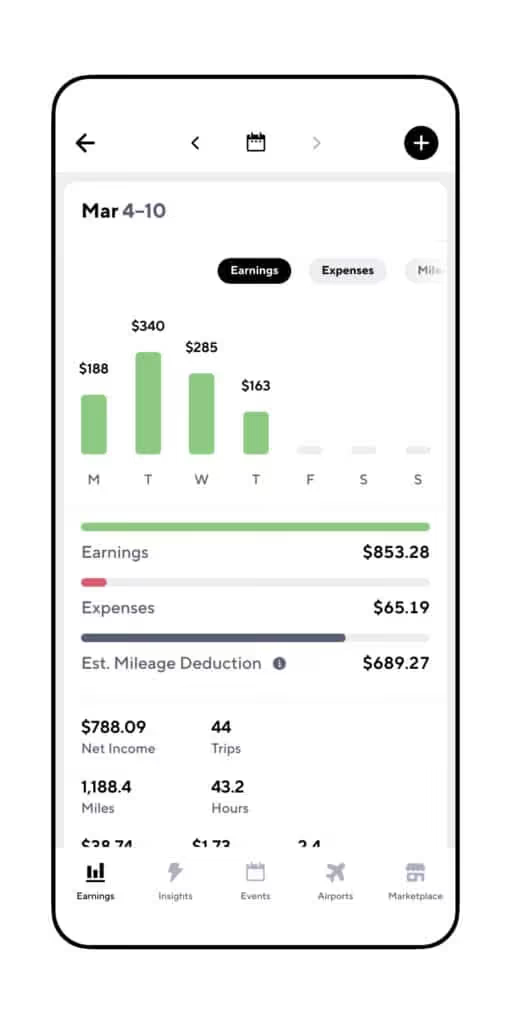
That’ll give you a picture of which of the apps are making the most money for you, so you can plan your days and nights based on the best ways to keep on cashing in!
All you have to do is open Gridwise, turn on the tracking feature, and drive, deliver, and do what you need to do out there. Then, when you finish your day’s work, you can enter your earnings for each individual app, and Gridwise will do all the fancy - and easy to read - graphics for you. You can give it a try right now - download it here.
Finding the “best” times to drive
There’s really no way anyone can tell you what the most profitable times to drive and deliver will be for you. For one thing, you’ll want to set your own hours. You might have other gigs, or the need to care for children or other family members. Driving might have to be worked around those scheduling constraints.
For another, where you live is going to play a major part in what your hybrid gig life will look like. If you’re in a city, there will be rhythms to traffic and certain hours that are nowhere near as active as they once were.
If you’re in the suburbs or the country, the delivery business might be quite brisk during the week, and then die off on weekends. Or, it could be the reverse! You’ll have to run your own experiment.
Be patient and observant. Sure, people aren’t going to baseball games anymore, but they are playing golf and tennis, and some other sports too! Sometimes they need a “Lyft” from home to the court, course, or playing field and back again.
Know what you’re doing around airports
In case you well-seasoned drivers are offended, we’re not insinuating you don’t know what you’re doing - but things are different than they used to be. While it might have paid to start your work day sitting in the airport queue before, now that people aren’t flying very many places, you might be stuck there all day.
Gridwise always has one finger on the pulse of airport traffic, so use the airport tab to see what the daily passenger volume looks like. That way, you won’t be waiting for passengers that may never ping you! You can check on the status of the queues, too.
Find new “hives” of activity for riders
As society has gone through the COVID-19 lockdowns, much has changed, to be sure. Some “old” passenger-rich venues are closed or on different schedules, while new and different activities have become possible. Passengers tell us bars at 50% capacity are beginning to hop a lot earlier. Revelers come out at around 8 or 9 rather than 10 or 12, to make sure they get in.
Outside of the bar scene, other areas have taken on more importance in the daily lives of riders. Here are a few.
- Parks
- Trail heads
- Open green spaces in cities
- Restaurants with outdoor dining
- Large bars where 50% capacity will be a large crowd of people
- Hospitals
- Courthouses
- Factories
- Universities (some researchers are being welcomed back for summer)
Surges: a gift that probably won’t keep giving
In many areas, the rideshare and delivery companies are offering premiums to drivers. This has a lot to do with trying to get people to come back out to work. To make it enticing enough for drivers to give up collecting unemployment (plus the $600 a week supplement), the companies are placing big surges on rideshare and delivery prices, at all hours of the day and night.
The customers aren’t too happy about this, but that doesn’t mean they won’t ride with you or request a delivery. They almost expect to pay a premium, because they realize a lot of drivers haven’t come back to work yet.
The companies aren’t happy at all about this, and they probably won’t be offering them for much longer. Have you ever heard that old saying, “Make hay while the sun shines?” It applies here. Watch the various apps for surges and bonuses. Some (especially Postmates and Grubhub) will send you push notifications. Use this info to figure out who you’ll work for on a given day.
Collect more tips: add that extra garnish to inspire customer generosity
As your earnings pile up (and you track them with Gridwise!), you might notice something else that’s different from times past. In this crazy environment, customers and passengers are tipping more!
Maybe it’s because they have to wait longer for you to get there, and have time to think about how much you’re sacrificing to be out there working. Whatever the reason, we can't help but like it!
If you want this new and wildly appealing trend to continue, stay at the top of your game. Go that extra mile to offer extras, from opening doors and trunks (so they don’t have to touch yet another strange surface), to engaging them in conversation at the level where they feel comfortable, even while you talk through a mask.
For delivery, always honor their wishes. Maybe a busy mom wants contact-free delivery to the front porch, while Grandpa needs you to bring it to his apartment door. A knock on the door or a ring on the bell is always appreciated by people who are awaiting package deliveries. Leave a little note in the app, too - the personal touch can often bring out the best in people.
Also - follow all the guidelines for sanitization and social distancing. When you run a “tight ship,” showing your care and concern for your riders and customers, they’re far more likely to see how much you deserve that little something extra from them.
Adaptability = success
Sure, the rideshare and delivery world has been turned upside down, and you’re going to have to think beyond what was “normal” several months ago. That’s easy for you, though! As a gig economy worker, you’re used to blazing your own path. The point is to be adaptable, and use the resources available to you.
Those include rideshare apps, delivery apps, and other businesses that are cropping up to serve the new situation that’s been created by the coronavirus situation. Lucky for you, there’s lots of help...from Gridwise! Download the app to get everything you need to keep track of your earnings and record your mileage for optimizing your tax deductions.
Check the Perks tab for quick connections to news about your hybrid driving gig on our blog, and J and Brandon’s podcast.

Gridwise Academy - Become a 5 Star Driver
Lecture 1: Why Your Rating Matters
Both Uber & Lyft platforms use a star system to rate drivers and passengers. The highest rating is 5 stars, and the lowest is 1 star. The star rating system matters in two ways:
- Giving you crucial information about a passenger before you accept
- Increase the frequency you receive trips
How star rating is calculated
With Gridwise Academy, It is essential to learn the foundations of the star rating system before we dive into the strategies you can leverage. The average driver rating is 4.7 stars. New drivers start fresh with 5 stars and are rated after each completed trip.
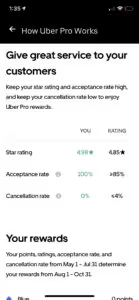
Most passengers tend to rate 5 stars if they get safely to their destination. Exceptional drivers consistently rate 4.85 or above. This rating is also the minimum required for some benefits.
Your star rating can affect your ability to earn money on each platform. A low star rating can lead to deactivation, so take your rating seriously, as too many complaints and low scores are a clear signal to have your account reviewed.
Important Note: Only the recent 500 rated trips will be used to calculate your star rating, so do not be afraid of old ratings. Focus on improving new trips. Gridwise J Tweet
Passenger ratings offer clues about the trip before you accept
Customers can be rated just like drivers are. A passenger star rating is shown to you when you are offered a trip on the driver app. Use this rating to decide if the trip is worth taking.
The average passenger star rating is lower than the average driver rating. A typical passenger rating is 4.6 stars. Passenger ratings below 4 stars can warn you of trouble. Think about what caused other drivers like you to rate this passenger low. Maybe they have a problematic pick up, or perhaps they do not tip.
A high star rating is required for driving Premium or Lux
Certain benefits require a minimum star rating. For example, premium drivers are required to have 4.85 stars or higher to qualify for premier trips. These trips pay more than regular trips if your vehicle qualifies. If you don't meet the requirements, then you will miss out on these additional trips.
Your rating affects your driver benefits
Both Uber & Lyft offer benefits to drivers that are only available to highly-rated drivers. For example, the Uber Pro program's upper rewards tiers require a minimum star rating to qualify. These benefits directly impact the ability for you to save money.
Take Action For Lecture 1
- Find your star rating in your driver app
- Think of ways to increase your rating, or take our course on just that
Academia Gridwise - Limpieza y Mantenimiento de tu Auto
Tabla de Contenidos
Lección 1: Suministros que Debes Tener a Mano
Tener estos suministros de limpieza disponibles con anticipación te ahorrará muchos problemas cuando las cosas se ensucien. Los pasajeros son personas, y las personas a veces pueden ensuciar. Aunque la mayoría es cortés cuando está en el vehículo de otra persona, los accidentes ocurren.
Esta lista de artículos que te recomendamos tener también te ahorrará dinero en limpiezas más grandes. Ten en cuenta que los artículos que recomendamos que tengas en tu kit listo para usar son un gasto comercial deducible de impuestos, así que asegúrate de revisar nuestras lecciones de impuestos nuevamente para recordar cómo rastrear este tipo de gastos.
Artículos para guardar en tu maletero
- Cubeta lo suficientemente grande para guardar todos tus artículos
- Spray limpiador de interiores
- Toallas de papel
- Bolsas de plástico
- Spray limpiador de vidrios
Artículos para guardar en la cabina
- Bolsas para el mareo
- Tapetes de goma para invierno
- Plumero
Acción para la Lección 1
- Empieza a rastrear estos gastos en la aplicación Gridwise
Academia Gridwise - Propinas
Tabla de Contenidos
Lección 1: (Academia Gridwise): Cómo Aumentar tus Propinas
Las propinas no son obligatorias, pero puedes aumentar las posibilidades de recibirlas
- Termina el viaje de forma segura
- Sé amable
- Sé conversacional
- Ofrece comodidades adicionales
Termina el viaje de forma segura
La conducción segura es la principal causa de quejas y calificaciones de 1 estrella según una encuesta que realizamos a 1,000 pasajeros.
Llevar a tu pasajero a donde quiere ir de forma segura será la mayor razón para que recibas una propina. Esto significa concentrarte en conducir de forma segura en todo momento y en una buena navegación para llevar a tu cliente desde la recogida hasta la entrega, y deberías ver más propinas y más estrellas en tu aplicación.
Sé amable
Trata a los demás como quieres ser tratado tú mismo. Esto es aún más cierto cuando estás recogiendo clientes que pagan y que pueden esperar esto como parte de tu servicio. Sé amable con tus pasajeros, y no solo recibirás un trato amable de vuelta, sino que también podrías ver más dinero en tu frasco de propinas.
Sé conversacional
El viaje promedio de Uber o Lyft dura 13 minutos. Eso es mucho tiempo en el pequeño espacio del auto. Somos criaturas sociales, y las conversaciones ocurren de forma natural. Ten en cuenta este flujo conversacional y síguelo. Si tu pasajero parece querer tener una conversación, entrétenlo con ella. Si tu pasajero tiene audifonos puestos y quiere que lo dejen solo, entonces deja que esté solo y enfócate en conducir de forma segura.
Ofrece comodidades adicionales
Aunque el rideshare consiste simplemente en llevar a un pasajero desde la recogida hasta la entrega, puedes ofrecer otras cosas para hacer su viaje más agradable. Muchos conductores ofrecen agua y mentas, música y aire acondicionado. Estas comodidades no son obligatorias, pero podrías encontrar clientes más satisfechos y más propinas si las ofreces.
Acción para la Lección 1
- Considera ofrecer servicios y comodidades adicionales
- Entabla una conversación amigable con tu próximo pasajero
- Empieza a registrar tus ganancias de propinas en la aplicación Gridwise ahora
- Registra consistentemente tus ganancias de propinas durante las próximas semanas para ver si este curso te ayudó
Trabaje de forma más inteligente. Gane más.
Ya sea que conduzcas, entregues o recojas turnos, Gridwise te ayuda a hacer un seguimiento de las ganancias, el kilometraje y el rendimiento para que puedas mantener el control de tu trabajo. Descarga la aplicación y toma las riendas hoy mismo.
