Blog de Gridwise
¡Lee el blog de Gridwise para obtener consejos y sugerencias sobre cómo ganar más dinero mientras conduces para Lyft, Uber, DoorDash, GrubHub y más!

The Gridwise Job Board: Find Your Ideal Job or Gig Work
Gridwise is an essential assistant app created by gig workers for gig workers. Our mission is to support those engaged in gig work in every way possible. We understand how challenging it can be to deal with income instability, a lack of benefits, and job insecurity that often comes with gig work. The Gridwise app tracks and organizes earnings and expenses, and offers a wide array of discounts, deals, and services that make the lives of independent contractors easier and more rewarding.
We firmly believe it’s possible to make a viable living and create a gig experience that offers flexible hours, variety, and excitement. With issues such as consistent earnings and job security in mind, Gridwise is proud to offer a centralized platform that shows you how to find gig work and secure reliable opportunities. We’re proud to introduce the Gridwise Job Board.
[elementor-template id="20891"]
The Gridwise Job Board: Key features
Because Gridwise is dedicated to serving the gig worker community, we’ve filled the Gridwise Job Board with useful features that won’t waste your precious time.
- Comprehensive listings. Find part-time, full-time, temporary, and per-task work. Drive or deliver with your vehicle, utilize an employer’s vehicle, or even find non-driving gig work.
- User-friendly interface. Find the jobs that are right for you with a tap of your screen.
- Verified opportunities. We vet the jobs before they are listed to ensure you’re getting high-quality job postings.
How to get more gig work, seasonal, part-time or full-time jobs with the Gridwise Job Board
Looking specifically for “gig work apps” or “gig jobs near me?” You’re in luck. Our filters and search functions send you directly to the listings you seek.
Here’s how it works.
- Access the Job Board via the Gridwise website.
- Search for jobs by type, location, and more.
- Select the job that interests you, and read all about it.
- Scroll through the description, and if it appeals to you, click “Apply for job.”
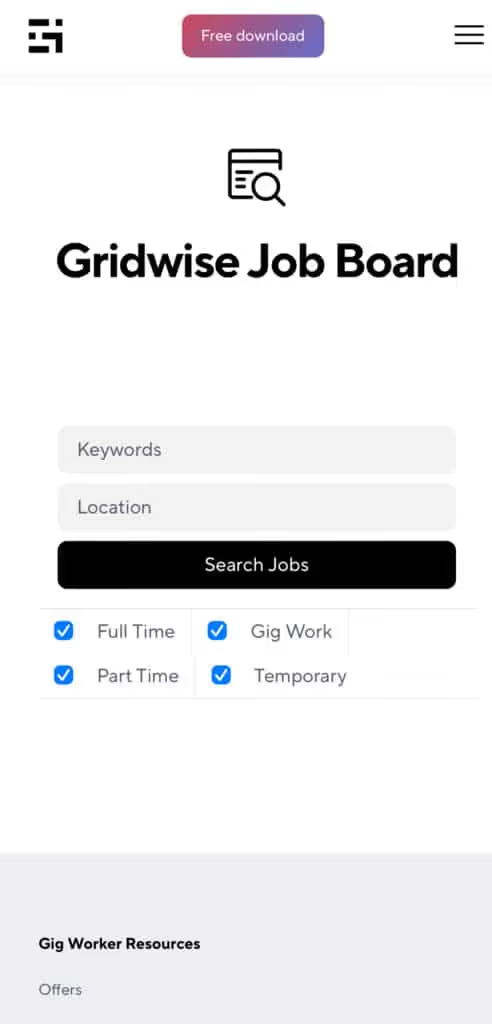
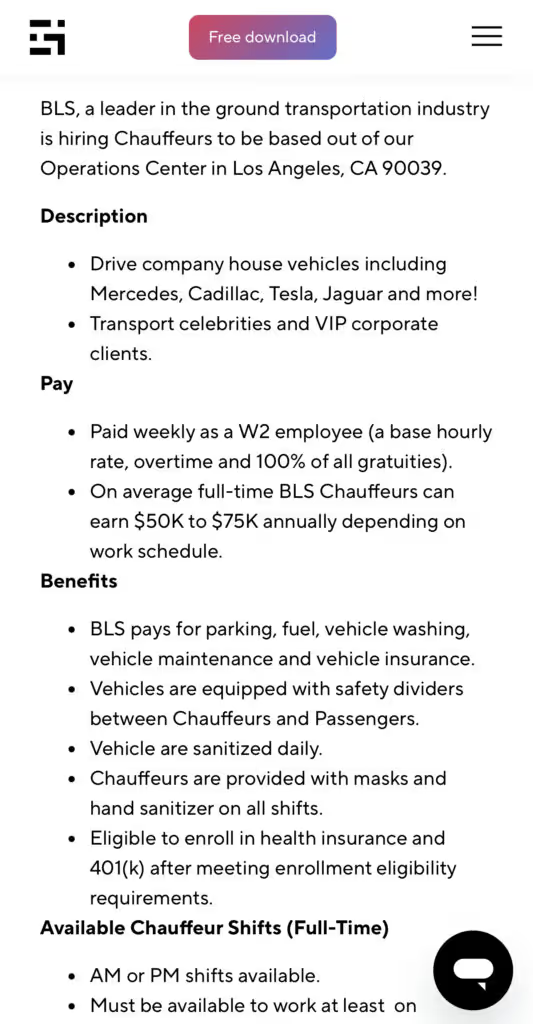
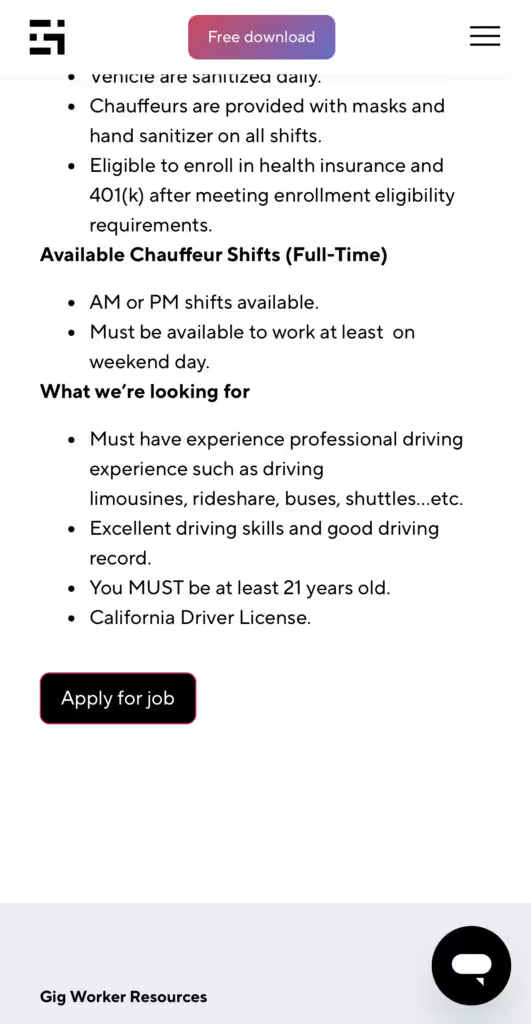
Many types of jobs are available. Adjust the search filter to see the full variety of opportunities that will let you cash in. Deliver food, set up catering, do rideshare driving, get paid for doing package delivery, and much more. You’ll find short-term gigs, long-term contracts, and part-time positions.
Perks of the Gridwise Job Board for gig workers
Gig workers who know how to make extra money will appreciate how the Gridwise Job Board lets you multiply your chances of bringing in big earnings. Here’s how:
- Increased stability. Use the Gridwise Job Board to find part-time or permanent jobs in addition to the part-time gigs you already have. Always keep a steady stream of earning opportunities flowing toward you.
- Flexibility and autonomy. Choose jobs that fit your schedule, work around other jobs and family duties, and still leave room for some fun in your life. Discover side hustles to supplement your full-time job, permanently or just for the season.
- Skill development. Find part-time work that lets you use a skill you already have, or try your hand at something new. It’s a smart way to develop a portfolio to showcase what you can do, or even to find permanent employment.
Get Gridwise and stay up to date on the Gridwise Job Board
Gig workers need plenty of information and assistance, and Gridwise is here to give it to you. Download the app and get essential features such as
- seamless earnings tracking
- mileage tracking
- expense recording, including notes
- low-cost and no-cost insurance benefits
- access to affordable medical, dental, vision, mental health, and alternative care
- professional services including legal and financial help
- deals and discounts
- weather, events, and traffic reports
- inside information on where and when to drive
[elementor-template id="20936"]
More to know about gig work:

5 Best Mileage Trackers For Gig Drivers
Many drivers ask, “Do I really need a mileage tracking app?” The answer is simple: only if you want to have an accurate count of all the miles you can legally deduct from your taxable income! You might think your rideshare or delivery driving app has got you covered. After all, they do quite a good job of logging the miles you drive while you’re on a trip or delivery. But, if you want to have the best app to track mileage for Uber, Lyft, Doordash, Instacart, or the other apps you may use, you need more. Why is that?
Without a separate tracker, you’re missing the miles you drive in between pings. Did you realize that all the miles you drive, from the moment you begin your shift until it’s over (as long as you don’t drive several miles on a break to hang with your friends), are tax deductible! That means you need something besides your driving app to keep an accurate count of your travels. Read this Gridwise post to see how important it is to keep track of every deductible mile.
You won’t be surprised to hear that there’s an app for tracking miles. In fact, there are several of them. Here, we’re going to tell you about five top mileage tracking apps, and help you figure out which one is best for you.
Before we get to the list and identify the best mileage tracker app, let’s clarify what exactly a mileage tracking app is. According to G2.com’s technology glossary, mileage tracking is done for the purpose of keeping a log of mileage that is either reimbursable or tax deductible.
And yes, of course you can track your miles simply by taking readings on your odometer. But are you really prepared to account for how many miles you drove for personal reasons and subtract them from the total to get your business mileage? Even if you can remember all that and do the arithmetic, if you want an accurate reading of the miles you drive for business, and can therefore deduct, a mileage tracking app will save you a lot of trouble and prevent you from making costly errors.
Plus, as a gig driver, you have specific needs when it comes to a mileage tracker. Ideally, you’d be able to handle mileage tracking and several other functions all in one app. It can be maddening enough to deal with driving apps, particularly if you’re an avid multi-apper. You would want your mileage tracker app to help you keep account of other aspects of your business, including income, expenses, and inside information about the art of gig driving.
Not all mileage apps are equal, to be sure! Let’s look at five of the best apps to track mileage and figure out which is the best app to track mileage with Uber and Lyft, or what mileage tracker app is best for DoorDash.
[elementor-template id="20891"]
1. Zoho Expense
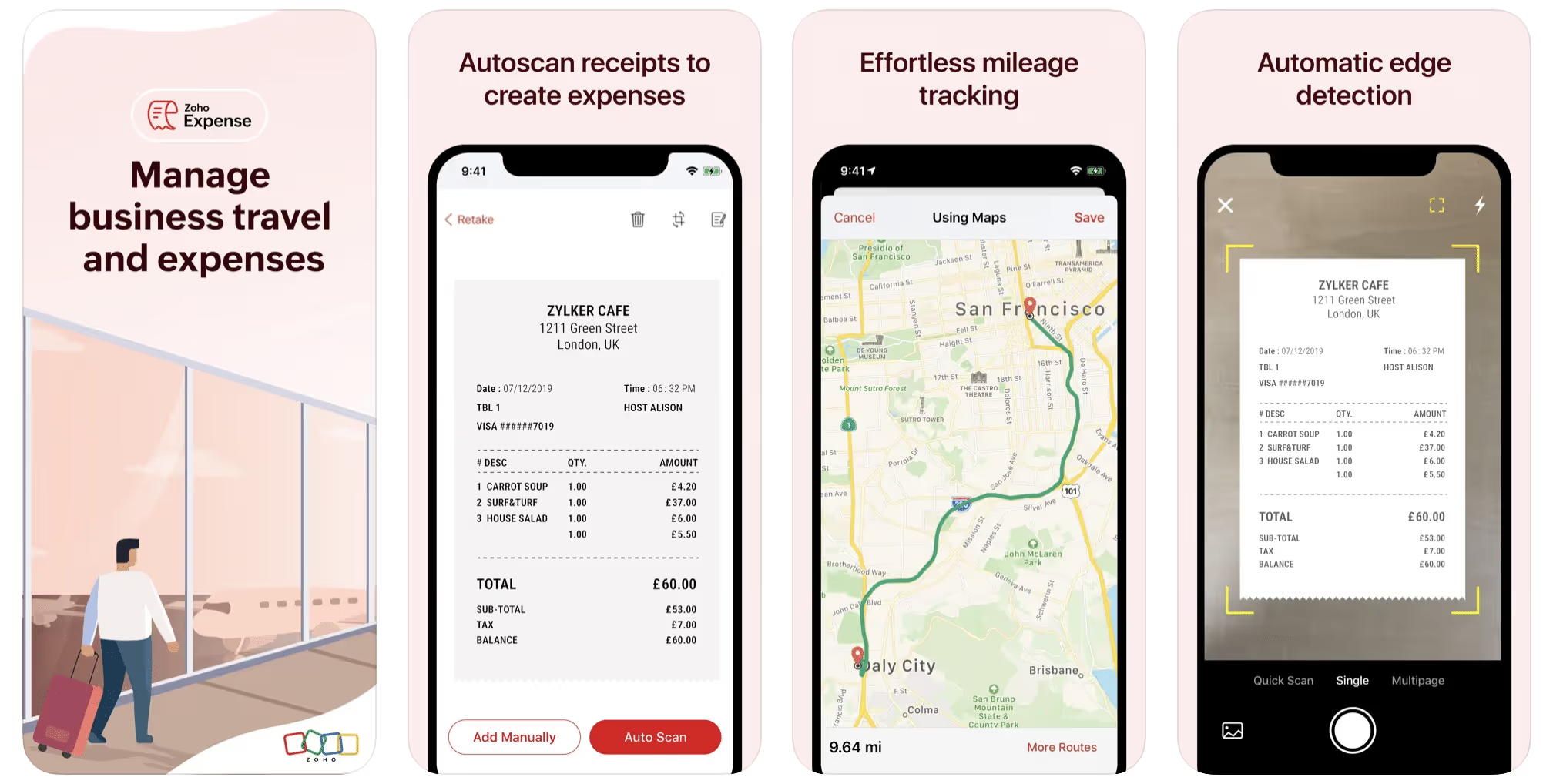
First up is Zoho Expense, which does exactly what its name says. This app is designed to allow companies to give employees a uniform way to create and submit expense reports. It can be used by individuals, including gig drivers, as well.
It includes a mileage tracker, as well as features that let you track other deductible expenses, including the ability to scan and record receipts.
Available on Android and Apple: Yes
Ratings: 4.8 stars on App Store, 4.7 stars on Google Play
Free Version: Yes
Subscription price: $3 per month, billed annually
Created specifically for gig drivers: No
2. Quickbooks Online
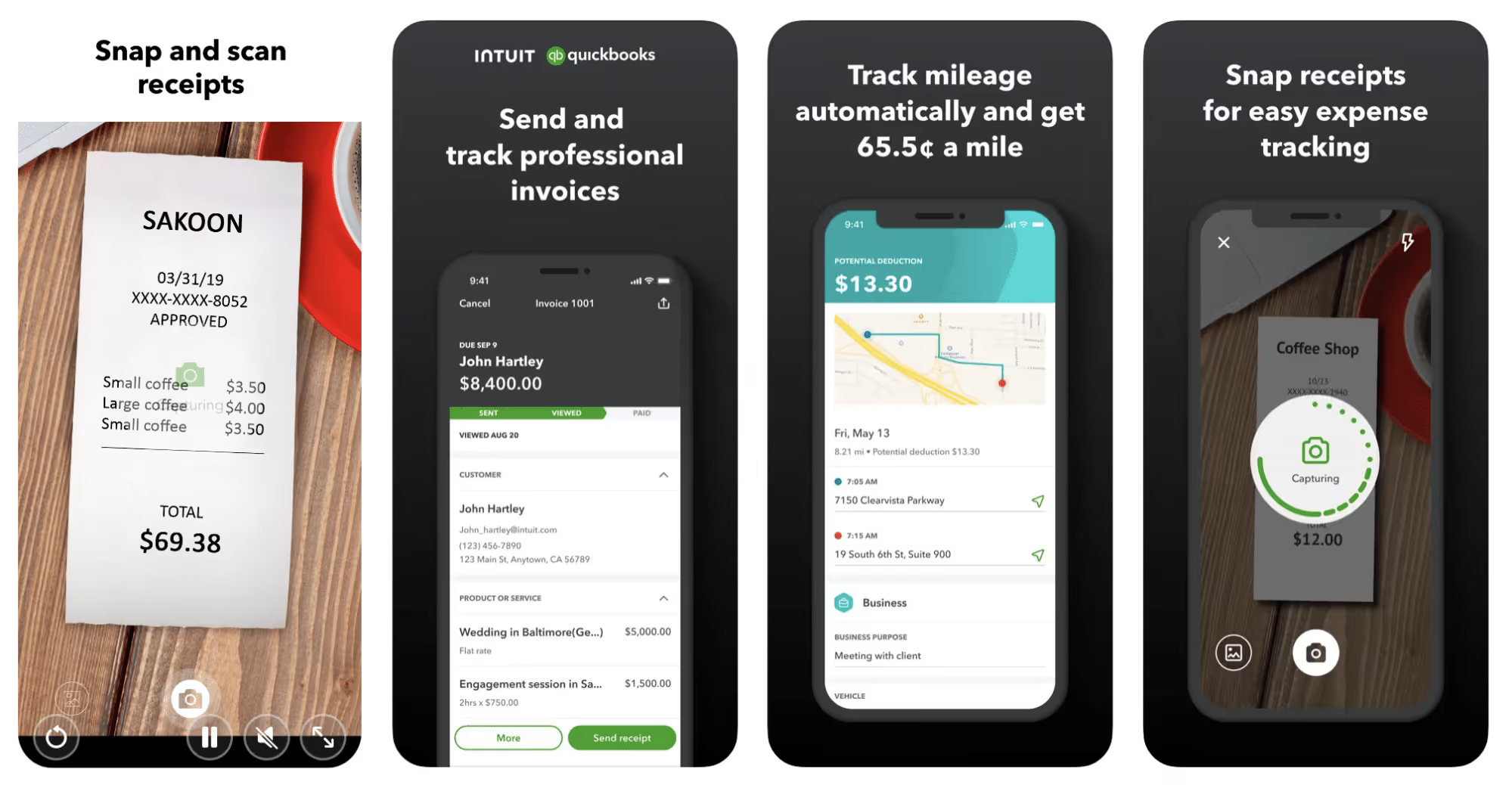
Quickbooks Online is a cloud-based app that allows you to track your mileage, earnings, and expenses. The information you enter can then be used to generate various reports that prepare you for tax time. It also allows you to create graphs that illustrate your cash flow, and includes a receipt scanner so you can instantly record deductible expenses. Quickbooks is popular, highly reliable, and designed mainly to help people keep track of their small businesses.
Available on Android and Apple: Yes
Ratings: 4.7 stars on App Store, 4.4 stars on Google Play
Free version: 30-day free trial
Subscription price: $15 per month for basic version if purchased for 3 months or more
Created specifically for gig drivers: No
Source: quickbooks.intuit.com
3. Shoeboxed
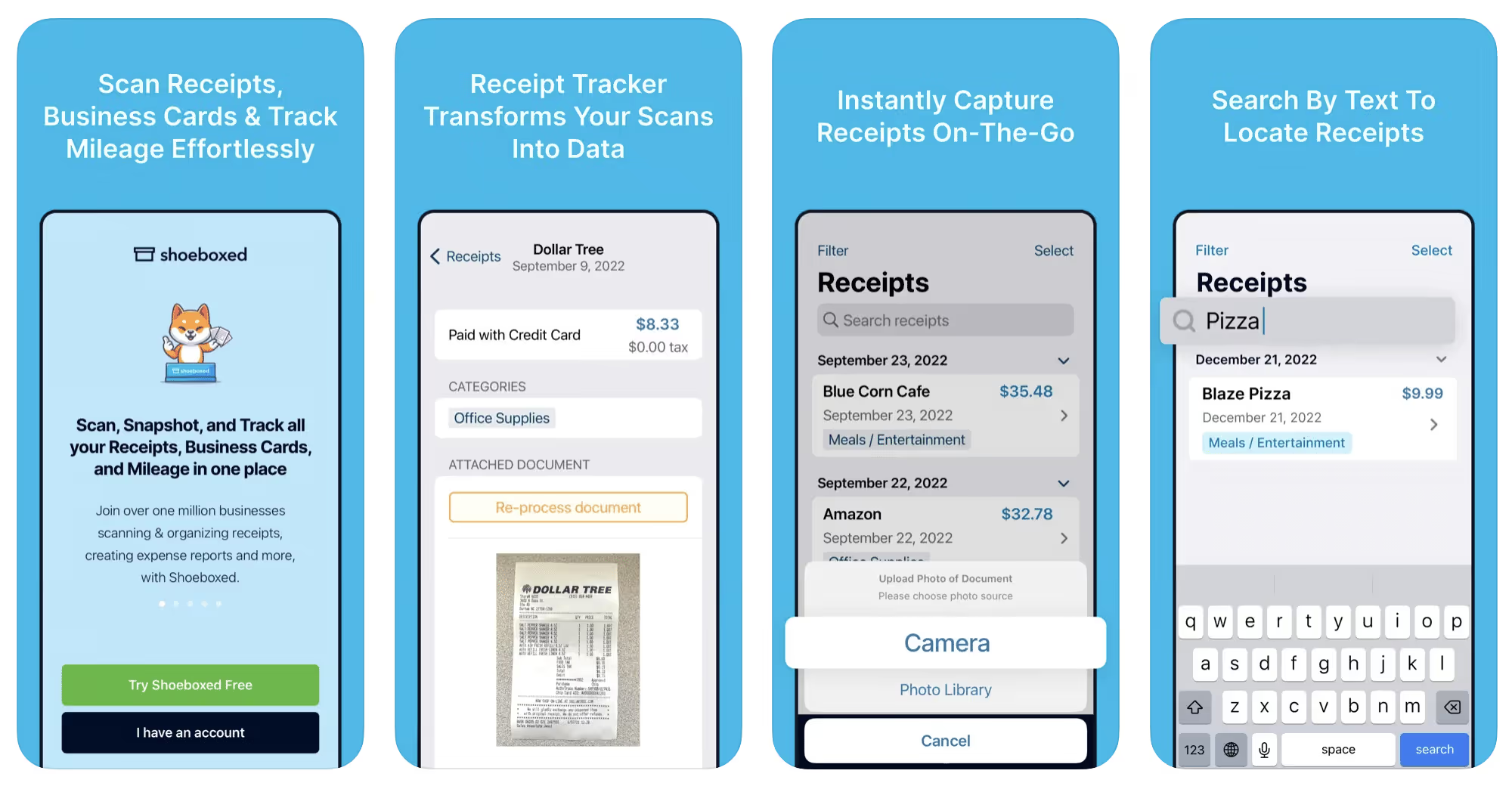
Shoeboxed started in 2007 as a service for scanning paper receipts into digital form. Now the app offers a free mileage tracker and has enabled users to scan receipts directly. It touts itself as the best mileage tracking app for DoorDash, but there are some elements missing that Dashers might like to have. While it provides features that record your expenses and prepare you for tax season, it doesn’t automatically track your earnings. The mileage tracker has a system where you can drop pins along your routes to make the tracking more precise, identifying those legs of a trip that you make for business purposes. The mileage tracker is “free” once you sign up for the basic version.
Available on Android and Apple: Yes
Ratings: 4.5 stars on App Store, 2.3 stars on Google Play
Free version: No
Subscription price: $18 per month for basic version
Created specifically for gig drivers: No
Source: blog.shoeboxed.com
4. Stride
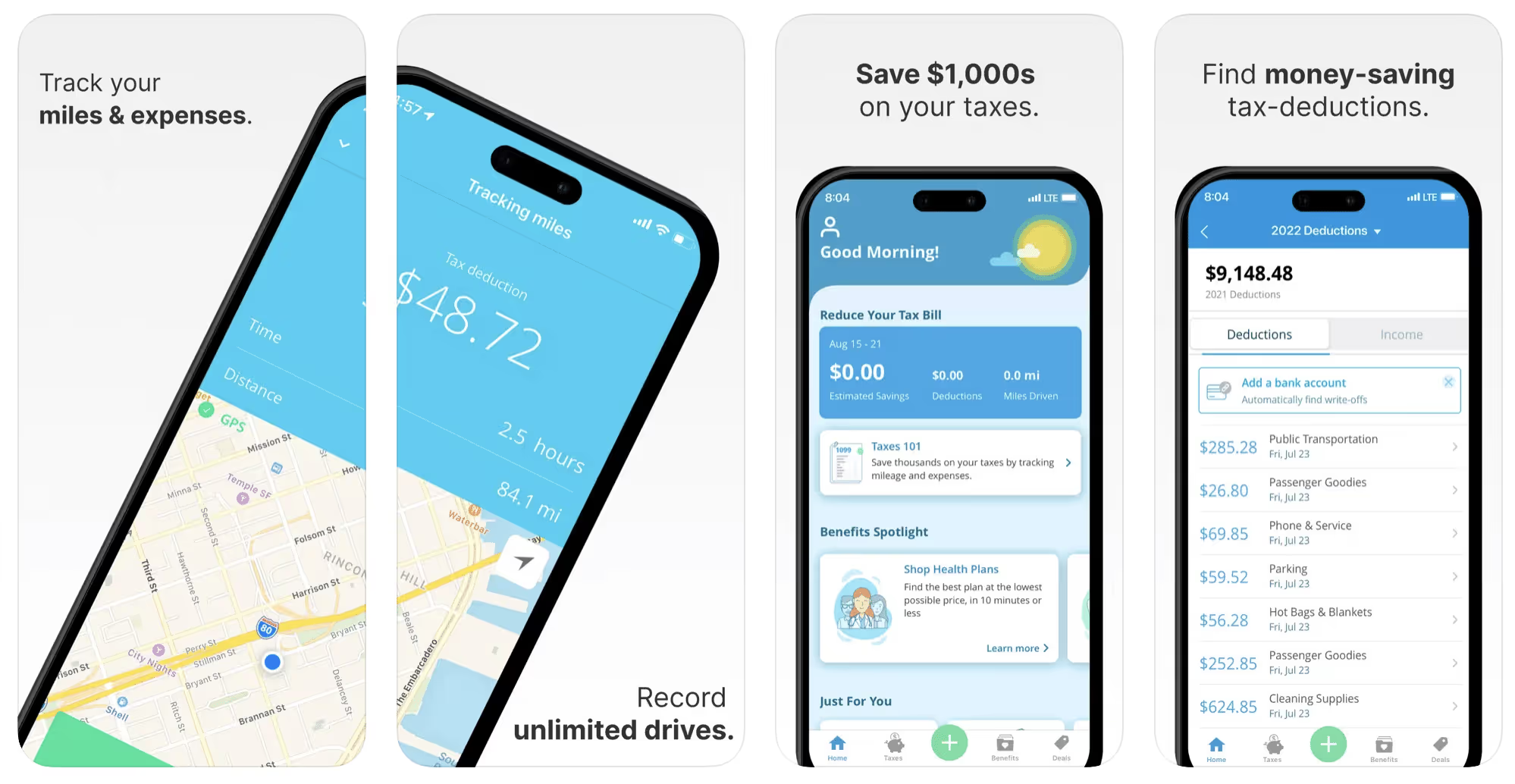
This free mileage tracker does a fair job of keeping track of the distances you rack up while gig driving, but it doesn’t automatically track earnings. It can be a big help, though, in tracking your expenses. You can link Stride to your bank account, and it will automatically scan your expenses to identify items you can potentially deduct. The app is totally free. This could make it the best free mileage tracker app, but there is a small price to pay. The app will persistently push you to consider various insurance plans that they are affiliated with. If you don’t mind that, this is a solid mileage tracker, even if it doesn’t track your earnings.
Available on Android and Apple: Yes
Ratings: 4.8 stars on App Store, 4.6 stars on Google Play
Free version: Yes
Subscription price: None. The app is free.
Created specifically for gig drivers: No
5. Gridwise
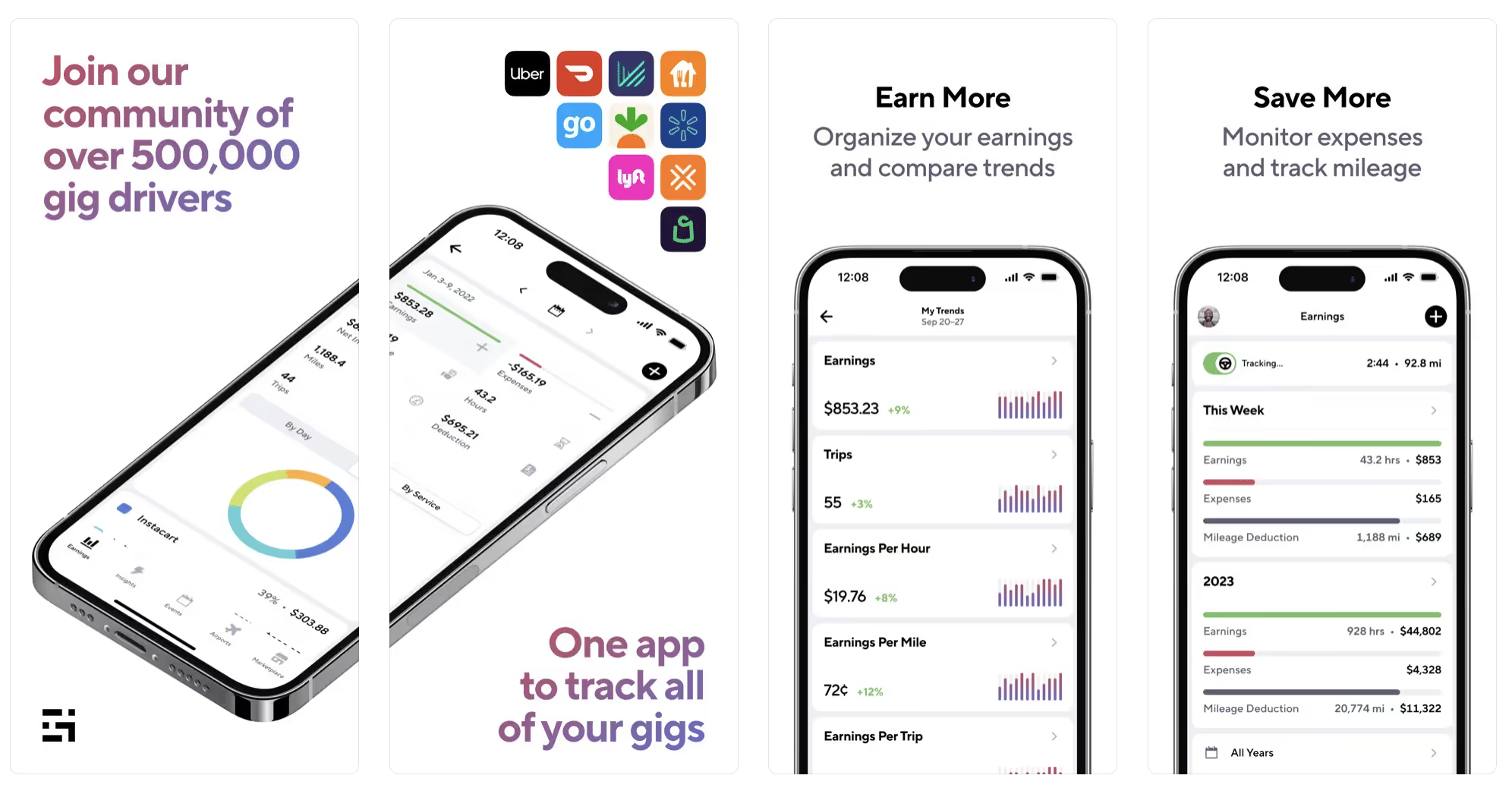
Gridwise has a free mileage tracker and free features that record your income and expenses. It gives you access to insurance and benefits, as well as insights about the best times and places to make the most money while gig driving. The Gridwise mileage tracker captures all the miles you drive while you’re on your driving shift, and it can be used if you have other trips you need to make which qualify as business travel.
Drivers love it because it is geared toward the needs of rideshare and delivery workers, providing free information about airport departures and arrivals, event start and let out times, weather, traffic, and more. The Gridwise Plus subscription adds value by providing additional insights and reports, discounts on benefits, the ability to export data in .csv format,, and more.
Available on Android and Apple: Yes
Ratings: 4.9 stars on App Store, 4.6 stars on Google Play
Free version: Yes
Subscription price: $9.95 per month for Gridwise Plus, or $95.99 per year (a $23.41 savings)
Created specifically for gig drivers: Yes!
What is the best mileage tracking app?
Now that we’ve checked them all out, we’re positive about the answer to that. Hands down, it’s Gridwise. Are we biased? You bet we are! But drivers love it too. Gridwise is the best mileage tracker app—and so much more. So many of the features are free, and the subscription to Gridwise Plus will pay for itself with additional insights to boost your earnings and deeper discounts on products and services.
Most important, Gridwise is designed specifically for gig drivers by experts who were once gig drivers themselves! Knowing what gig drivers need is a crucial step in creating an app that rideshare and delivery drivers can really use! Here are a few of the features, besides mileage tracking:
- seamless earnings tracking
- automatic, on/off toggle and manual mileage tracking
- mileage categorization
- airport, traffic, weather, and events information
- insights into where to drive and when to drive
- reports showing earnings across the platforms you use
- discounts on countless products and services for drivers
- additional resources for finding side gigs
- an informative and comprehensive blog
- affordable benefits, including insurance, medical, dental, and alternative practitioner discounts
- a community of drivers just like you
Don’t settle for just any app. Get the best mileage tracker, and so much more, from Gridwise!
[elementor-template id="21599"]

What Records Do Gig Drivers Need To Keep Track Of For Taxes?
* Gridwise does not provide tax, legal, or accounting advice. This material has been prepared for information purposes only, and is not intended to provide, and should not be relied on for tax, legal, or accounting advice. You should consult your own tax, legal, and accounting advisors before filing your return.
Record keeping? Who signed up for that? As a gig driver, it’s part of what you need to do to keep your business running. Don’t worry. It’s not as complicated as you might have been led to believe. This post will show you what you need to keep track of and the best ways to gather and preserve your tax-related records. We will cover
- How record keeping can help reduce income tax for freelancers
- Taxes and freelance work: Record keeping requirements
- Mileage tracking: Motives and methods
- More deductions and records to keep
- Make tax time easier
How record keeping can reduce income tax for freelancers
Tax time is not “fun time” for rideshare and delivery drivers. It’s easy to get used to watching your earnings pile up and come to believe they are all yours. Unfortunately, that isn’t the case. Gig work taxes can be especially painful because no one takes them out of your earnings for you, until the tax authorities insist that you do it for yourself.
You will need to show the tax authorities your income records, and they will gladly tell you to send them what they determine to be their fair share. Think that’s not fair? You’re not alone, but that doesn’t mean you’re going to get out of paying gig work taxes.
But you can find ways to pay the smallest amount that is legal and possible. The best way to defend yourself against having to pay astronomical amounts when you file your return is to know what expenses you can deduct from your gross income. When you subtract deductible expenses from your gross income, there is less left over to be taxed. This reduces the amount they can hit you with gig worker taxes. and can make your tax bill substantially lower.
While you want to keep good records so as to be in compliance with taxation entities such as the IRS, you also want to ensure you have proof of every last deductible expense you have accrued during the year. There are other records you must keep as well. Let’s look at some of the considerations you have, realizing that you now need to know how to do taxes as a freelancer.
Taxes and freelance work: Record keeping requirements
So many gig drivers fail to understand the responsibilities they have as independent contractors. Those who work part time for very few hours may even believe they don’t have to report the income they get from their driving gig payments. That would be a big mistake!
The company or companies you work for report your income to the IRS and state tax authorities. If you fail to report that income, you will risk some rather painful penalties. The IRS taxing side hustles is as much of a thing as the IRS taxing income from any other job. Your best bet is to report what you’ve earned, honestly and completely, and comply with other record keeping requirements such as
- gross income
- deductions and credits
- purchases (items you purchase and resell, such as snacks or bottled water)
- a log of all your mileage (or vehicle expenses, if greater)
- a list of all expenses and assets, such as utilities and other expenses associated with having a home office and equipment
- machinery and furniture you own, including when it was acquired, how much it cost, whether you previously took deductions on it, and selling price, if applicable (this includes your vehicle)
More things to consider:
- Pay attention to the retention of your records. You’ll need to keep all tax-return-related items— including income, deductions, and any tax credits reported— until the period of limitations runs out (3 years from date you filed, or 2 years from when you paid tax. If you have employees, keep your records for at least 4 years.)
- If you want to avoid paying self-employed taxes, you may want to set up a corporation or Limited Liability Corporation (LLC) for your business. This allows you to separate all your gig driving earnings from personal income, and permits you to take advantage of the additional advantages of working through a corporation. This includes exemption from self-employment taxes. You can learn more about how to pay self-employment taxes, if you opt for that, in this post from Keeper.
- You should always keep a separate checking account for your business, for convenience as well as clarity. While this is not a legal requirement, it is a smart move if you want to have an easier time managing your business.
- You are required, as an independent contractor, to file your taxes quarterly. Check out this Gridwise blog post for more information about quarterly tax payments and other matters that make filing delivery, Lyft and Uber taxes easier.
Mileage tracking: Motives and methods
Why you need to be meticulous about mileage
Mileage deduction, or the costs of operating your vehicle, will be the most important item to account for when you consider how to file taxes as a freelancer. While mileage is an important deduction for all independent contractors, as you might imagine, it’s even more essential for rideshare and delivery drivers.
There are two ways of keeping track of your mileage deduction. One is to use the IRS’ standard mileage deduction, which for 2022 is 58.5 cents per mile. This number takes into account the costs of operating your vehicle, from fuel and maintenance to registration, insurance, and depreciation. Alternatively, you can calculate all your own vehicle operating costs, but only after your first year of using the vehicle. You may discover that this second option allows you to have more money deducted from your taxable income. Learn more about the options for deducting your mileage in this Gridwise post.
No matter which way you decide to calculate the deductions for your mileage, you need to know what mileage you can and cannot deduct.
You can deduct
- miles driven to and from home when you go out to drive or deliver
- miles you accrue during your trips
- miles you drive on any other trips you make that are necessary as part of your business.
Examples:
- driving to return a lost cell phone or to an Uber Hub or another physical location where your company might make driver support available
- driving to pick up supplies, to get gas, or to have your car cleaned, serviced, or detailed, etc.
You cannot deduct
- miles you drive for personal trips
- miles for any trips you take that do not directly affect your business
Note: If imagining yourself becoming the not-so-proud owner of a shoebox filled with paper receipts gives you nightmares, stop worrying. Electronic records of purchases will satisfy reporting requirements. If you use cash, you can scan copies of your receipts, in some cases, right into your recording software or app. Gridwise and Keeper give you a simple to use interface that keeps all your receipts recorded without the messy pile of paper.
Mileage tracking methods
By now, you’re probably convinced that tracking mileage is important, despite all the other things drivers have to do. Now, let’s look at your options for keeping accurate records.
- Manual tracking: You can keep a logbook where you list every trip you make, starting and ending mileage, the date, and purpose of the trip. While this would work, it’s certainly not convenient. Besides, if that logbook gets lost, your plans for having a nice, fat tax deduction will go by the wayside.
- Spreadsheet: This is a bit more convenient and sophisticated way of tracking your business mileage. You’d need to be meticulous about making your entries, though. Even if you keep a spreadsheet app on your phone, it could be time consuming and inconvenient to keep doing it with all the other things going on in a rideshare or delivery driver’s day to day life.
- GPS-based mileage tracking apps: There are a bunch of apps that track mileage based on your GPS location, and most of them are pretty accurate and far more convenient than taking constant readings of your odometer. Your driving apps, such as Uber, Lyft, DoorDash, or Instacart, may also track your mileage, but be careful here. They will only track the miles you drive while you’re on a trip or delivery. They don’t count the miles you drive going to pick up a customer or when you make your move toward a restaurant or store.
Gridwise, on the other hand, will track all the miles you clock while you’re on your shift. All you need to do is make sure you start tracking the minute you leave home, and every gig driving mile will be logged. - OBD-II mileage tracking systems: There are plug-in modules that assess your vehicle’s mechanical health and track your miles. However, many authorities question the ability of OBD-II mileage tracking systems to get get accurate odometer readings. Insurance companies don’t consider them to be accurate enough gauges of odometer readings.
While mileage is a crucial deduction when you’re preparing your Uber, Lyft, or DoorDash taxes, it isn’t the only expense you’ll want to record.
More deductions and records to keep
Expenses you can deduct
You’re entitled to include the cost of other expenses that are directly related to your driving business. These include
- vehicle expenses
- equipment for your car and home office
- extra services and subscriptions
- business tools, including apps and software
You can learn much more about gig driver expenses that are eligible for deduction in this Gridwise article.
Ways to track and preserve deductible expenses
- The manual method: Just like you can with mileage, it’s possible to use a manual method, but in addition to logging each expense into a ledger, you would also need to keep physical receipts.
- Spreadsheets: You can record your expenses on a spreadsheet. This is somewhat less awkward than manually logging mileage, but there still will be plenty of room for failing to remember the case of water you bought for your customers, or losing the receipt from the thermal bag you purchased.
- Accounting software: You can use software that helps you track your expenses. This method usually interfaces well with any tax preparation software you or your tax professional might use.
- Gridwise: There are other apps that help you track your expenses, but Gridwise is designed specifically for gig drivers. It automatically tracks earnings and mileage, and lets you record your expenses the minute they come up. Gridwise’s partnership with Keeper gives you the ability to scan receipts and access a tax professional. This is a seamless way to record your expenses and a big help in learning how to file Uber taxes. Gridwise even provides .csv output, so you can feed your Gridwise data directly into tax preparation software. Check out what Gridwise and Keeper will do to super-charge your tax filing powers.
Organizing and categorizing expenses
Before you even begin to record expenses, you’ll want to set up categories for them. You can start by reviewing the categories listed above and checking out the Gridwise post that lists possible deductions.
If you’d like to learn more about how to categorize expenses, there is additional information available. This article from Motley Fool lists all possible categories any freelancer might use and also gives tips on how to customize them for your driving business.
One last tip
Using Gridwise, particularly for tracking mileage, is the easiest way to be in compliance with the IRS’ rules for deductible mileage. Gridwise tracks all the miles you drive for your gig, beyond what your company’s app might record. At the same time, you can log on and off Gridwise when you start and end your shift, so personal miles won’t be recorded. This eliminates confusion while capturing every deductible mile.
Gridwise Tax Help, a partnership with Keeper, has been created specifically to serve gig drivers. It provides affordable and easy ways to record expenses, scan receipts, and find deductions by analyzing your expenditures. Read about free resources from Keeper you can use to be fully prepared for tax season, and get all your earnings and expenses on the record.
Get the world’s best assistant for rideshare and delivery drivers, and tax help too.
Make tax time easier now!

This is what Chicago Area Rideshare Drivers Make
Considering becoming a rideshare driver in Chicago? Before you take the plunge, it helps to know how much you can expect to make.
Your actual total pay depends largely on how many hours you put in behind the wheel. But if you would like to estimate your salary based on the number of hours you can commit to driving, this article will give you an overview of how much TNCs pay drivers in Chicago per hour.
Uber
A great way to start thinking about how much you'll be making as an Uber driver is to look at how your pay breaks down.
As an Uber driver, when someone takes a ride with you they are charged a fare plus a “Rider Fee”. The fare for UberX in Chicago is currently $0.20 per minute plus $.95 per mile. On top of that, there is a $1.70 base fare plus a $1.60 booking fee according to Uber.
Uber often advertises that they only charge a 25% commission of the fares. According to The Rideshare Guy, however, these figures ignore the “Booking Fee” that the company adds on top of each ride, which goes solely to the TNC. The booking fee amount varies from city to city. The resulting effects of this fee and the 25% commission mean that when passengers step outside of their Uber and only see a $5 charge, the driver will receive around half of that.
Uber claims that the average Chicago trip pay out for a UberX driver is $15.66. If you're making tow trips per hour, it would make sense that you would be making $31.32 per hour.
This does not happen because as we all know, it is difficult to consistently get two trips per hour.
Sherpashare completed a study that suggests the average Chicago Uber driver actually makes $10.99 per hour based on user surveys in 2015.
Another great way to measure your possible hourly wage driving Uber is Glassdoor.
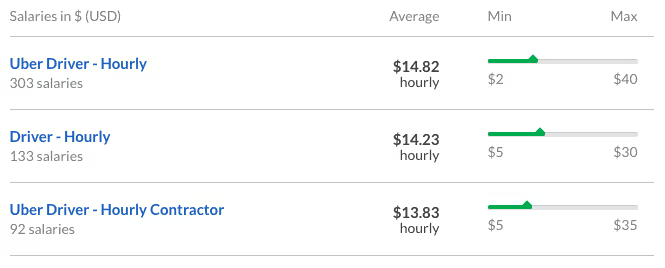
Chicago drivers have claimed to have earned more than $30 per hour, however, the average claimed hourly wage for a Chicago Uber driver is anywhere from $13.83 per hour to $14.82 per hour.
Assuming an average Uber driver commits to working about 30 hours per week, the overall per-week earnings would be $415 - $444.60. If you are driving closer to full-time hours which would be around 60 hours per week, you can expect to double this.
Lyft
Similar to Uber, there are advertisements about Lyft taking only 25% commission, but once again this does not include the “Trust and Service Fee” which they take for each trip.
According to Lyft, driver pay includes time spent waiting, starting one minute after you’ve confirmed your arrival. The ride fare includes base fare, cost per mile, and cost per minute. In Chicago, the base fare is $1.60, the cost per mile is $.95, and the cost per minute is $0.20.
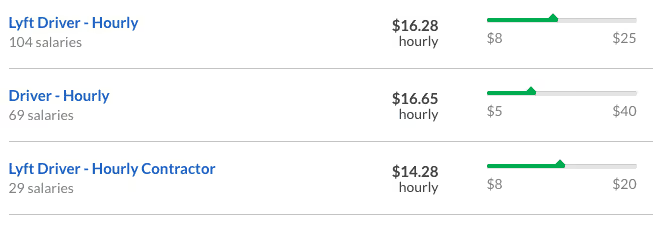
According to a 2015 Sherpashare report, Lyft drivers make on average slightly more at $11.15 per hour. Glassdoor, on the other hand, reports Chicago Lyft drivers making an average of $14.28 - $16.65.
Via
Via has a significantly smaller market share in Chicago than Uber or Lyft, however, this TNC pays drivers considerably more than both Uber and Lyft. As mentioned above, Uber and Lyft take a 25% commission from their drivers. Whereas Via takes only a 12.5% commission from drivers in Chicago, which is the lowest among any rideshare company.
The Rideshare Guy reports that Via will pay per trip in a similar manner to other rideshare companies, with rate cards similar to Uber or Lyft. Via has also recently announced Rocket Rates, which are equivalent to surge pricing with Uber and prime-time pricing with Lyft. Via's website explains that during high demand hours, fares will be multiplied by the “Rocket Rate” that will be announced to drivers through text message. Multipliers have been in the range of 1.3 to 2.5 times the fare, which can make trips more profitable. However, one Via driver shares that the rocket rates only operate during Flex mode hours, which fall between midnight and 6 am.
At all other hours, Via has an undisclosed, guaranteed hourly rate for drivers that fluctuates throughout the day. For example, during peak hours (i.e., from 7-9am and 5-8pm) Via offers $20/hour while online. This means that drivers can be paid regardless of how many passengers they pick up.
Curbed
Curb only employs professional drivers for their service, which can be hailed through the Curb app. The Ride Guru explains that since Curb drivers are traditional taxi drivers their payout is based on the standard average taxi cab driver payout. However, the Curb app does take $2 from each payout for using the app.
To estimate how much this TNC pays drivers in Chicago we can look at salary reports for the average Chicago taxi driver. According to Salary.com, the annual base salary for taxi drivers in Chicago is $36,407. Therefore, it can be projected that Curb pays drivers in Chicago approximately the same minus the $2 Curb fee. Unlike other rideshare services, though, cabs have traditionally been a tipping industry, so receiving a tip is more common through this service than all of the others.
As a rideshare driver, what do you think about how TNCs pay drivers in Chicago? Leave us your thoughts in a comment below!
Peak Rideshare Driving Times in Chicago
Chicago Driving Strategy: Your Guide to Peak Driving Hours
I remember my first time out on the road like it was yesterday.
My car was as clean as it has ever been, I had an on a nice button down shirt and my car was stocked with waters and snacks.
When I finally hit the road, I parked in what I thought was a prime location, turned on my app and waited for my first ping.
I waited.... and waited... and waited... but nothing.
Why? Because I didn't realize that 12:30 pm on a Monday wasn’t exactly prime time.
I wasn't being strategic.
That's when I realized that I needed to have a plan to make money as a rideshare driver, and so do you.
We chatted with a few veteran Chicagoland area drivers about their strategies and came up with a list of the best times to drive in Chicago.
Weekdays (Monday – Wednesday)
The morning rush (5 am – 10 am)
In Chicago, the morning rush on weekdays can be one of the most profitable times to drive because you have so many areas that you can take advantage of.
One of the very best options for rideshare drivers is to focus on airports early in the morning, around 4:30 or 5:00 am.
If you're starting out in the suburbs, you can count on a ride to the airport or downtown this early in the morning. Northwest and Western Suburbs like Naperville, Aurora, and Glen Ellyn are ripe with business travelers that need an early morning ride, so hang out in those areas early and expect to get a ping.
If you start off in the city, areas like Lakeview, Lincoln Park, Gold Coast, the West Loop, and The Loop are all heavily occupied by young business travelers so if you're there before 6:00 am, you'll likely find a rider headed to the airport.
Once you drop your passenger at the airport, check to see how many passengers are coming into your respective airport.

Monday's and Tuesday's are big commuter days for business travelers coming into Chicago as well, so you'll likely be taken right into downtown Chicago.
After you make it back to the city, you can find a significant amount of rider demand in the Lincoln Park, Lakeview, and Wicker Park areas with riders looking to come into The Loop for work.
If you end up with an airport trip that takes you out to the suburbs, work the suburbs until about 10:00 unless you get a rider taking you downtown. Traffic will be costly from almost any suburb, so you'll want to avoid it until at least 10:00.
Once 10:00 rolls around, you can set your destination to downtown Chicago and try to find a ride as you head into the city.
The afternoon rush hour (3-6)
Another great time to be out is during the afternoon rush hour, but you need to be careful to avoid common pitfalls like traffic which can eat up valuable time.
If you're downtown after 3:00, you can position yourself in the loop and wait for a ping. You'll likely receive one in just a few minutes as people are leaving work to go home. These riders will go to various suburbs around Chicago and neighborhoods in the city, so after your first ride, you need to be smart.
If you end up in the suburbs, don't try to make it back into the city until at least 7:00. to avoid traffic. Instead, focus on key areas in the suburbs. These include:
- Northern suburbs such as Deerfield which have a few business centers with large corporations like Baxter International and All state, so demand from workers that need rides home will pop up in those areas.
- Metro stations. Many Metro riders will come from the city but still need a ride home. These are usually shorter rides, but will keep you busy
- Colleges such as Northwestern, North Central, and even College of DuPage can keep a driver busy with students needing a ride home from class
If you can stay in the city you'll have an easier time finding a ride, but you'll likely need to fight more traffic. When your rider takes you away from downtown to northern, southern, and western neighborhoods, start to make your way back towards The Loop as you'll pick up a ride as you make your way back.
You can continue to drive around downtown Chicago until around 6:00 when things will die down again. After that, your best bet is to save your gas, grab some dinner, and wait for the late-night crowd.
Late night (10 – 3)
The late night crowd early in the week in Chicago isn't nearly as large as on the weekends, so you won't get as frequent of surges, but there is still plenty of demand to go around if you're smart.
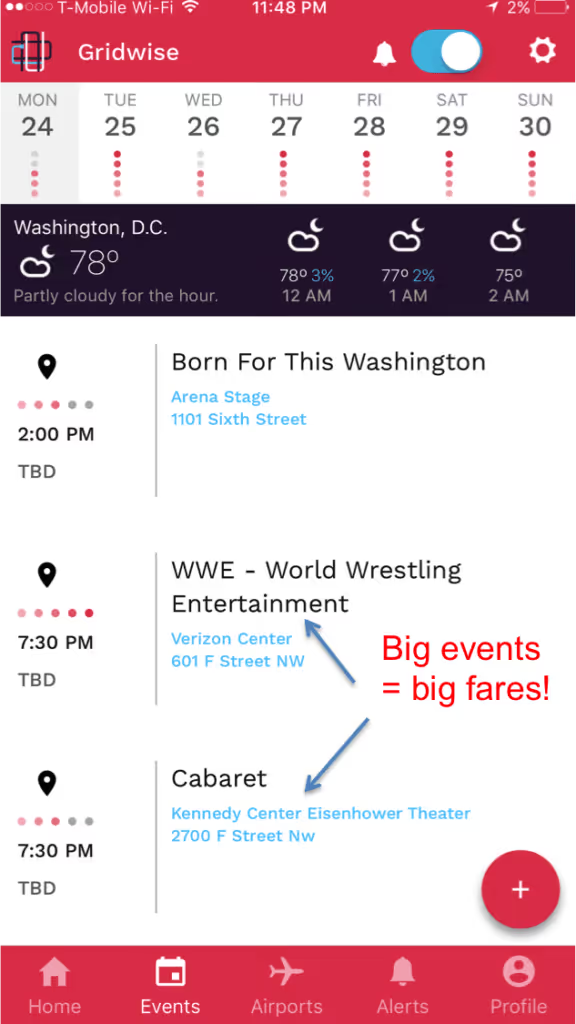
Check your Gridwise app for events going on around town. The United Center, Navy Pier, The Vic Theatre, Riviera Theatre and other venues will all regularly have significant sized events that you should keep an eye on.
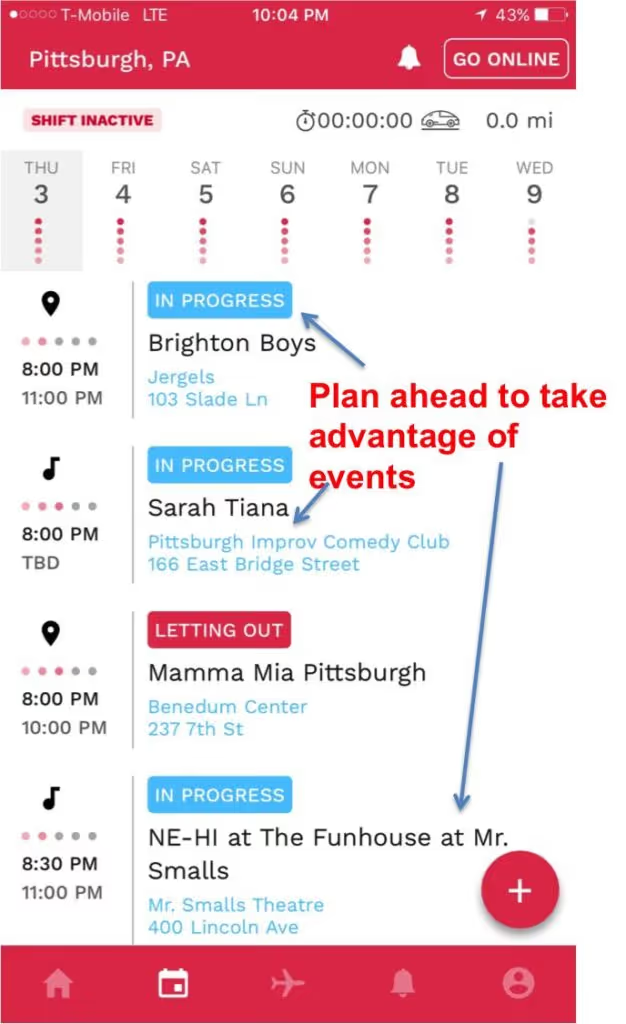
Also, be sure to check the airport schedule. Business travelers often come in on Monday nights and will need rides from the airport to their hotels.
Weekends (Thursday – Saturday)
The morning rush (5 am – 10 am)
Thursday and Friday mornings are going to be similar to Monday – Wednesday mornings. The exception is that you’ll likely see a boost of riders heading to the airport for their weekend trips. You can predict airport demand again using your Gridwise app.
You'll also likely see a rush of business travelers that are leaving their hotels to go home during Thursday and Friday morning. If you are starting your morning in the city, hang out near the hotels and you'll find a passenger quickly.
If you are in the suburbs, consider gravitating towards the business-centric areas like Deerfield, Schaumburg, and Oakbrook which have a significant amount of business hotels that will have travelers that need rides to the airport.
Check your Gridwise app in the morning and identify the times when there will be peak departures. You'll want to be near hotels about two hours before peak departures in the morning.

Early Saturday morning demand for riders in Chicago tends to be light, and nearly nonexistent if you are in the suburbs. This is a great time to rest up and prepare for a late night shift or hit the airports.
Because the rest of the city is going to be slow, you may see an influx of drivers in the Chicago airport. Before you head that direction, check your Gridwise app to see how many riders are in the queue.
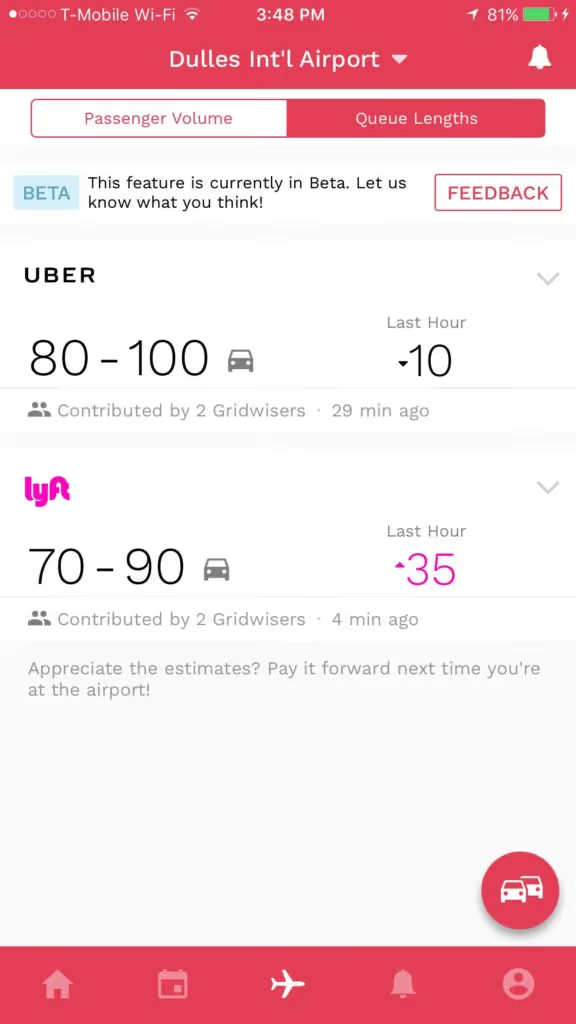
If there are a lot of drivers and not much demand, you should check to see if there are any events going on.
Daytime hours (10 – 3)
Daytime hours on Thursday and Friday in Chicago are relatively quiet. Save your gas unless there is a compelling event going on.
On Saturdays, you can always find riders, especially in the summertime in the city, because there is so much going on. Think about popular tourist attractions such as Museum Campus, Navy Pier, and The Art Museum on Michigan Ave and gravitate towards those areas.
Trendy areas such as Wicker Park, Logan Square, and Boys Town are going to be buzzing with activity and events all day, so plan your day around those events.
If you're committed to staying in the suburbs on Saturday, make sure you look for and take advantage of events going on in the suburbs and know the Metra schedule as you will be able to pick up riders that are leaving downtown.
If you want to maximize your profits however, we'd recommend heading to downtown Chicago.
The afternoon rush hour (3-7)
Thursday and Friday’s rush hours are similar to Monday – Wednesday. Stick to your common business area’s and you’ll find rider demand.
On Saturday’s you need to again be strategic and focus on areas that are hotbeds for events. Around 7:00 many people will just start to go out to bars and restaurants around town.
If you're in the suburbs, this would be a great time to catch a ride into the city as you’ll find passengers looking to come downtown for an event or dinner.
You’ll also want to keep an eye on airport traffic. During the fall you’ll find an increase in airport demand due to the fans of Bears opponents arriving to watch their team get smacked around. Go Bears!
Late night (10 – 3)
Late nights on the weekend are BIG time hours for rideshare drivers.
You will encounter some intoxicated passengers, but you'll get the most steady stream of passengers between 10pm and 3am Saturday night/Sunday morning.
No matter where you start, you should focus on driving downtown as much as possible. There is some demand in the suburbs, but it will be inconsistent at best.
If you're coming from the western suburbs, you can set your destination to downtown and head into the city. You will not find much, if any, traffic. If you're coming in from the northern suburbs, you can stop in Evanston and try to take a few trips from the college students at Northwestern. They will likely want short trips in Evanston, however, some will want to go downtown.
When you eventually find yourself downtown, there are a few main areas that you can work.
- Lakeview/Boys Town/Lincoln Park
- Wicker Park/Logan Square/Bucktown
- River North/Gold Coast
All of these areas are going to be buzzing with activity the entire night, so you don't need to be overly picky on where you are going. The trick is to quickly move back to one of these areas after you have completed a drop-off.
If you are a suburban driver, you can set your destination to your town around 1:00am and you'll likely find a rider going the same way as you. Once you're back in the suburbs, you should be able to catch the bar closings, especially in Naperville and Evanston.
If you stay in the city, continue to move through the popular areas mentioned above and you'll have a busy night.
Sunday
The morning rush (4 am – 10 am)
Chicago is a mighty sleepy city Sunday morning, so you won’t miss much if you decide to sleep in as well. You'll find a few people catching rides from the night before, but demand is going to drop pretty quickly after 4:00am.
Daytime hours (10 – 3)
Chicago is becoming more and more of a brunch city, so Sunday mornings can be surprisingly fruitful in the city. Around 11:00am, brunchers from trendy areas like Wicker Park, Boys Town, and Lincoln Park will be out looking for a mean and a drink, so you may find riders in those areas.
During the fall, you'll of course have Bears games that will bring tons of people to the South Loop where Soldiers Field is. There aren't many hotels near the South Loop, so many fans will have to stay in Northern neighborhoods or in The Loop. If you hang out in those areas, you'll be sure to catch a rider that is headed down to the game.
Check your Gridwise app for alerts on when the Bears game will end and position yourself in the stadium queue.
The suburbs are unfortunately going to be very quiet on Sunday's, so heading to the city will be your best bet.
The afternoon rush hour (3-7)
Sunday afternoons in Chicago are very event-driven. There are going to be show's at the many Chicago venues, various games at the United Center, Wrigley Field, Soldier Field, and US Cellular Field.
You’ll also start to see airport demand start to creep up for both departing and arriving passengers. Keep an eye on your Gridwise app so you don’t miss crucial airport peaks.
Late night (10 – 3)
Sunday nights in Chicago are event-driven as well.
You’ll continue to find business travelers looking to come into or leave out of the city on Sunday evenings, so check your flight schedules using the Gridwise app. Gravitating towards the downtown area where popular business hotels are located will yield you a ride to one of Chicago’s airports.
With any luck, you’ll arrive at a peak airport time and can catch a ride back into the city.
Chicago is a big city with many potential passengers, but also many drivers, so you'll want to be strategic. There are a few times where you can count on rider demand as long as you drive in popular areas.
During slower hours it’s important to be strategic and have a plan before you get out on the road. Use apps like Gridwise to help you understand what’s going on in your city and develop a solid driving plan in just a few minutes.
Now, what’s your favorite time to drive in Chicago? Share in the comments below!

The Ultimate Airport Guide for Rideshare Drivers: Chicago
We’ve been talking to a lot of Chicago area rideshare drivers lately about their experiences and we’re constantly hearing about the airports.
Some drivers can’t wait to tell us how much of a waste of time the airports are, however, for some drivers O’Hare is their bread and butter.
Why the disconnect?
The drivers that are having success are the ones that don’t just show up and hope for the best, they have a rock-solid strategy. Those drivers were gracious enough to talk to us about what has been working for them and in today’s blog post we’re going to share with you what we learned.
This post will include:
- How to navigate each of Chicago’s airports
- When to go to each airport
- How to mitigate your non-airport airport ping risk
How it works
Uber, Lyft, and other TNC’s specially designate airports with a “geofence” that tightly defines the airport area. As a driver, if you have an app on in those areas, you’ll be placed in a queue that acts as a virtual driver line.
As you wait in the queue, you’ll cycle through the line (hopefully quickly) and finally be pinged by a rider.
Navigating O’Hare and Midway
Your first few times as a rideshare driver can be a bit disorienting because of all of the rules and regulations that differ from city to city and airport to airport.
Let’s first talk about what those rules are at each airport and you can comply.
O’Hare International Airport (ORD)
The flagship airport of Chicago/The Midwest is not for the faint of heart because of the high volume of people and cars, not to mention some confusing roads. However, when you figure it out, it is worth it.
Where to wait
The TNC lot at O’Hare is on the Jawa Entry Roadway which is just off Balmoral Ave.
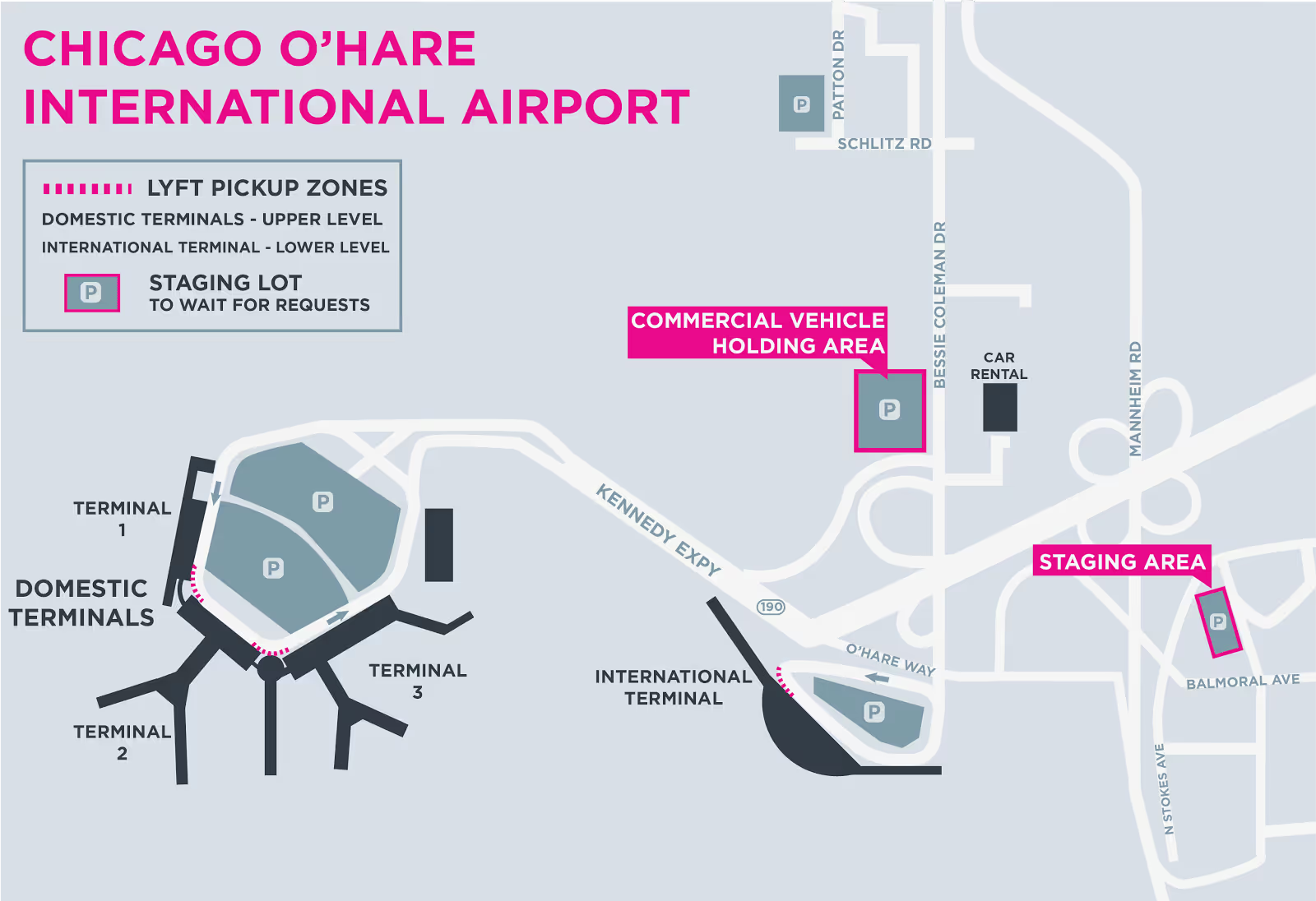
Where to pick up
O’Hare is a large airport so has multiple pickup spots. Passengers arriving domestically will have two places they can be picked up from depending on their location.
Domestic passengers will be directed to one of the following rideshare pickup areas:
- On the upper level between Terminals 1 and 2, directly to the right of Door 2A, between the signs.
- On the upper level between Terminals 2 and 3, directly to the right of Door 3A, between the signs.
International passengers will be directed to the rideshare area on the lower level of Terminal 5 at Door 3.
Midway Airport (MDW)
O’hare’s little brother is certainly a easier airport to navigate because of its smaller size. There are still a few things you’ll want to keep in mind however.
Where to wait
The TNC lot at Midway is at the corner of South Cicero Ave and 72nd Street.
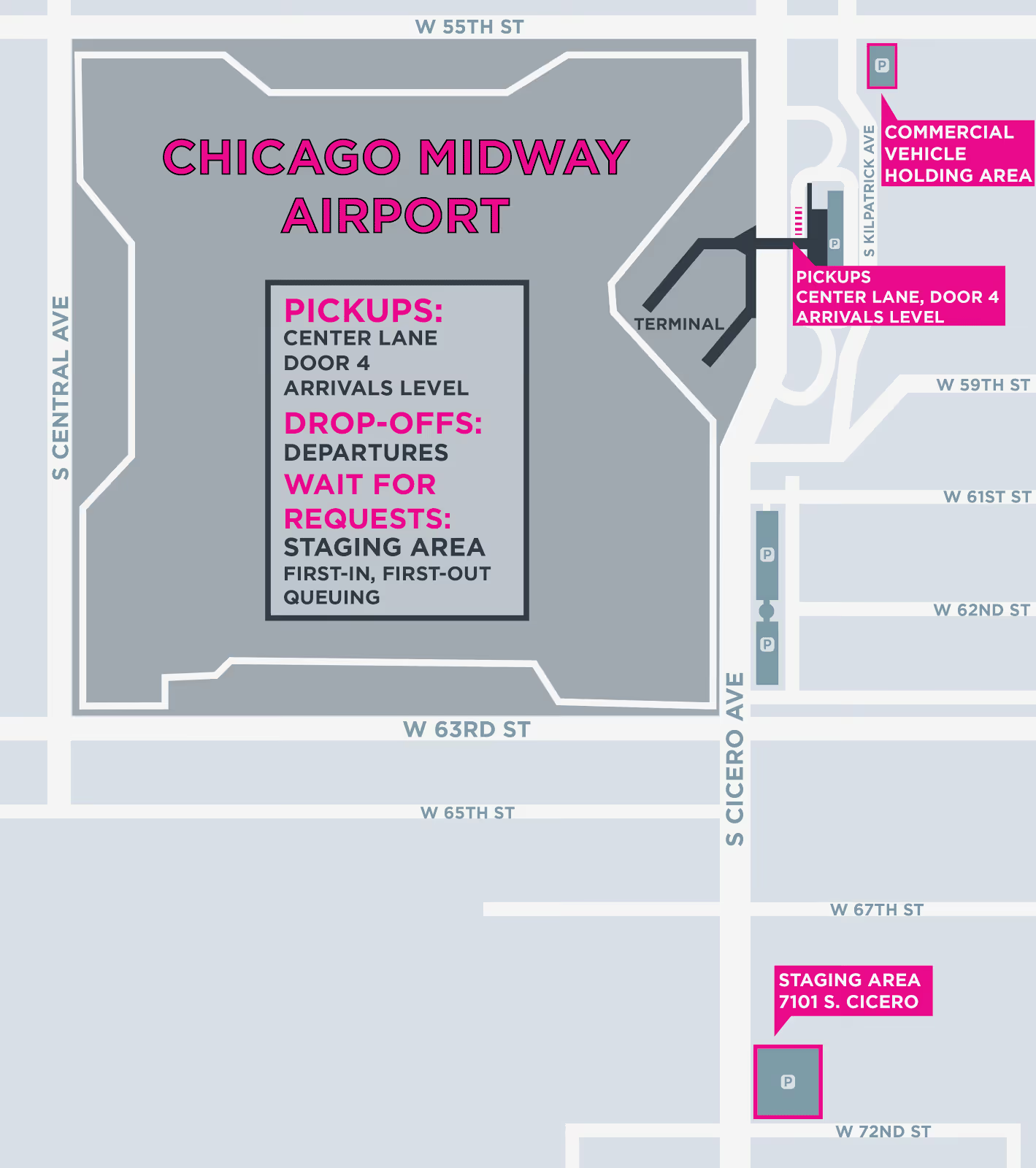
Where to pick up
Midway has a pretty straightforward pickup system. You simply meet your rider on the Arrivals level outside Door 4.
You’ll likely encounter some traffic when going to pickup your passenger, so call them and let them know you are on your way. They should be looking out for you and if possible trying to move closer to where you will be.
When to go to the airports
Now let’s talk airport strategy.
A successful airport driver is a master of his or her time. You don’t want to be caught waiting around for hours in the airport queue while you could be making money elsewhere. You can avoid this by understanding when the most passengers are both arriving and departing.
There are a few go to times when there are many coming into O’Hare and Midway. Monday and Tuesday mornings for instance are a boon for business travelers arriving for a week of work in the city. They tend to leave again Thursday and Friday afternoons which causes another surge of those travelers leaving from Downtown.
- Other busy times for travel include:
- Christmas and Thanksgiving Holidays
- 4th of July
- Saturday’s before Ravens or Redskins games
- The week of large parades
Take advantage of these travel heavy times by positioning yourself in the queue 10 - 15 minutes before there is a peak in arriving airports. You can easily predict when these times will be using the free Gridwise App.
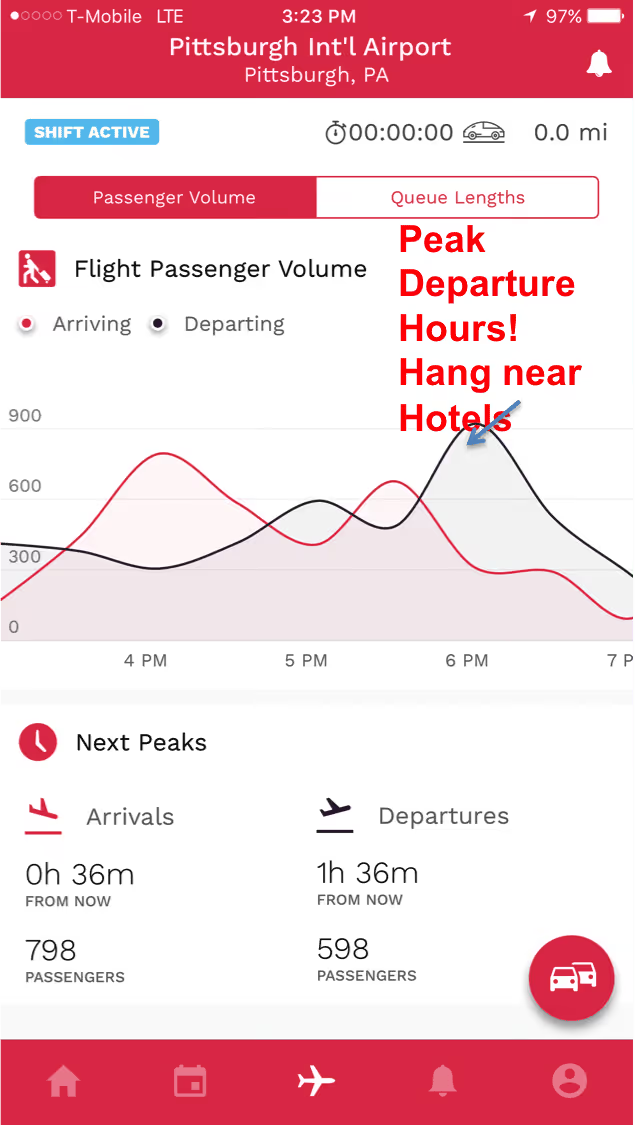
Another great trick is to understand how many drivers are in the TNC lot before you even go. This will help you avoid waiting in unnecessarily long lines. There are a few great Facebook groups that share this information, however, you can get a more real time view of the airport queue using Gridwise.
Many drivers forget about passengers that are heading to the airport, however they can be profitable as well. Position yourself near hotels downtown in the loop to maximize your chances of getting a long airport fare.
Use your cancels wisely
Remember that heartbreaking tale that I told you to start this blog post? Well, the truth is there is no way to guarantee this won’t happen to you.
You can, however, decrease your chances of getting pulled out of the queue for another ride by using your cancels wisely and positioning yourself well within the airport zone.
Uber and Lyft’s ping algorithms are still under lock and key so it’s difficult to completely understand how drivers are selected, however, we do know that riders are supposed to be selected based on proximity to the rider.
So that stands to reason that if you move closer to the airport and away from the surrounding city that you’ll decrease your chances of being pinged outside the airport. The TNC lots are great for this, the cell lots would be better, however rideshare drivers are not officially allowed in those lots. So approach at your own risk.
Your next strategy is to be fully loaded with “timeouts” so you can ignore a call at least once without being sent to the back of the line.
Remember, you only need about a 90% acceptance rate to stay in good standing with the TNC and get your weekly driver rewards, so use the few timeouts you have at the airport if you know you’re going to incorporate them into your strategy for the day.
Things to remember
A great airport strategy can lead to a consistent and predictably high income for the smart rideshare driver. We recently wrote a story about Jeff who has been conquering rideshare up in Pittsburgh for the last year, so you can take his strategy and make it your own. Just remember a few extra things:
- Always reach out to your passenger and confirm their location right before you depart
- DO NOT cancel on a passenger after you’ve accepted a fare. You’ll be moved to the bottom of the queue and could face deactivation by your TNC
- Be mindful of law enforcement and don’t risk getting a ticket by handing out in the cell lots
- Be prepared when you come to the airport. This means trade dress displayed along with your airport placard and citytax emblem, insurance card and registration available and don’t forget your driver's license
Alright, that’s it! Everything you need to know to get started at the airports in Chicago.
Are you an experienced TNC airport warrior? Did we miss any great airport tips? Let us know and we’ll add them to the list!
The worst types of Uber passengers (and how to deal with them)
Rideshare drivers know that the most interesting part of the job is by far the passengers. Some passengers can be a joy to talk to, some can be a complete bore, and a special few will stand out in our minds forever as simply, "The Worst".
We do our best to avoid these passengers by checking their ratings before accepting the ride, but when you're working your tail off as a late-night driver, near colleges, or in big cities, sometimes you're going to have some unpleasant experiences.
It's just part of the job.
Over the past few weeks, we've been hanging out with drivers, listening to their best passenger stories, and gathering advice on how to deal with bad passengers.
So in today's post, we're going to have a laugh (and possibly a cry), as we look at the 5 worst types of rideshare passengers and give you advice on how to best deal with them.
The Eater
"The Eater" is a normally solid rideshare passenger, which is what makes them so deceptive. They might have a 4.9 rating, but for some reason they pick you and your freshly detailed car to transform into this "The Eater".
How to spot them?
You can't spot an eater until you drive up to them and see a pizza box or McDonald's, Burger King, or Wendy's bag in their hands. They'll likely already be snacking when you first see them while using their pants as a napkin.
When they jump in your car, don't expect them to ask if they can eat in your car, and don't expect much conversation. You should, however, be looking out for hands with just a bit of sauce on your cloth seats.
How to deal with them?
Nip this one in the bud right when they get in your car by letting them know that they need to keep their food in the box or bag at all times. For most passengers, this is enough to keep the sauce stains at bay, but some of the hungrier passengers may need a reminder or two. And don't for a second let them put their box down.
They have a way of "forgetting" things in your car. Check out the video below for a cautionary tale on the eater.
At the end of the day, these passengers are a pain, but if you're upfront and explain that eating is NOT OK in your car, you should be fine.
Keep some cleaning supplies in the trunk just in case.
How do you rate them?
The rating for this type of passenger really depends on if they listen and if they leave a mess. If you have a passenger that decides not to obey the rules and leaves an empty box as a gift in your car, they get 1 star... 4 stars if they keep it clean.
The Backseat Driver
Above all else, this passenger is just incredibly annoying. For some reason, they think they know the roads better than the all powerful, all seeing Google and can't wait to tell you about it.
How to spot them?
It's impossible to know if you're getting a backseat driver until it's too late. But when you get one, you'll know immediately. From the get-go, you'll be micromanaged like a 14-year old at their first grocery store job.
At times it will almost feel like the passenger is competing with your voice navigation and you'll find yourself wondering if all this hassle is worth arriving 60 seconds earlier, IF they are correct with their "shortcut" (hint: they aren't).
How to deal with them?
Your best bet here is to remain cool, calm, and collected. Yes, this is annoying, but things certainly could be worse. Simply remind them that you do indeed have a GPS that uses all of Google's superpowers to tell you the very best route to drive depending on traffic conditions.
This type of passenger is likely not to listen the first time, so remain calm and just point out traffic conditions that Google Maps or Waze is alerting you to that are changing the route that you take.
If you're like me and like to find more laid back passengers that just let you do your thing, think about leveraging events. Passengers leaving concerts, games, plays and other events are usually not in a huge rush so will just sit back and enjoy the ride.
How do you rate them?
This depends on the attitude of the passenger. If they get snarky, they get 2 stars. If they can find it in themselves to take a chill pill, we can do 4-stars.
The Drunk
Possibly the most disruptive type of passenger is the drunk, and for obvious reasons.
If you're not a late-night driver you may have been able to avoid this type of passenger, but those of us driving after 11 pm Thursday, Friday, and Saturday know these folks all too well.
How to spot them?
You can spot an intoxicated passenger a mile away. They are usually in one of three states:
- Swaying vigourously in the wind as they wait for you to drive up and stumble to the car.
- Leaning on a light pole, nearly completely bent over, visibly one shot away from covering the whole sidewalk with vomit.
- Actively covering the whole sidewalk with vomit.
How to deal with them?
The one thing that you want to avoid at all costs is someone painting your car puke orange. Yes, you will have the opportunity to collect a cleanup fee if someone can't hold their alcohol, but your night will be over and you'll be spending your time cleaning up a mess instead of making money.
So when driving during popular going out hours you'll want to be selective about who you pick up.
Passengers #1 and #2 are likely going to be fine. They've had a few too many but should be able to keep it together. If they seem like they're teetering, you'll have to make a judgment call on if you want to risk it or not.
These passengers are likely going to be either way too excited or immediately pass out. If they are with a group, they'll likely be the former and will be very chatty. Go ahead and chat with them, but always remain professional.
Some of my best tips have come from groups that have clearly done their fair share of pregaming before going to the bars. So don't be afraid to chat, but know where to draw the line.
Passengers in category #3 usually haven't called you themselves, but a "friend" has. This "friend" will try and plop your would be passenger into your car even though they are clearly blacked out and probably won't be able to get out of your car even if they make it home.
If at all possible, avoid these passengers. They are a safety risk to you and themselves as they can be unpredictable. When you see this, I would recommend telling their friends that they will need to cut their night short and escort their friend home.
How do you rate them?
If they puke in your car they get 1-star + a cleaning fee and probably some unkind words... If they hold it together and are entertaining, let them pass with 4 stars.
If you want to avoid these types of passengers at all costs, adjust your driving strategy away from the late night bar scene to something like airports. You can even use the Gridwise app to check how many passengers you have incoming and the queue length.
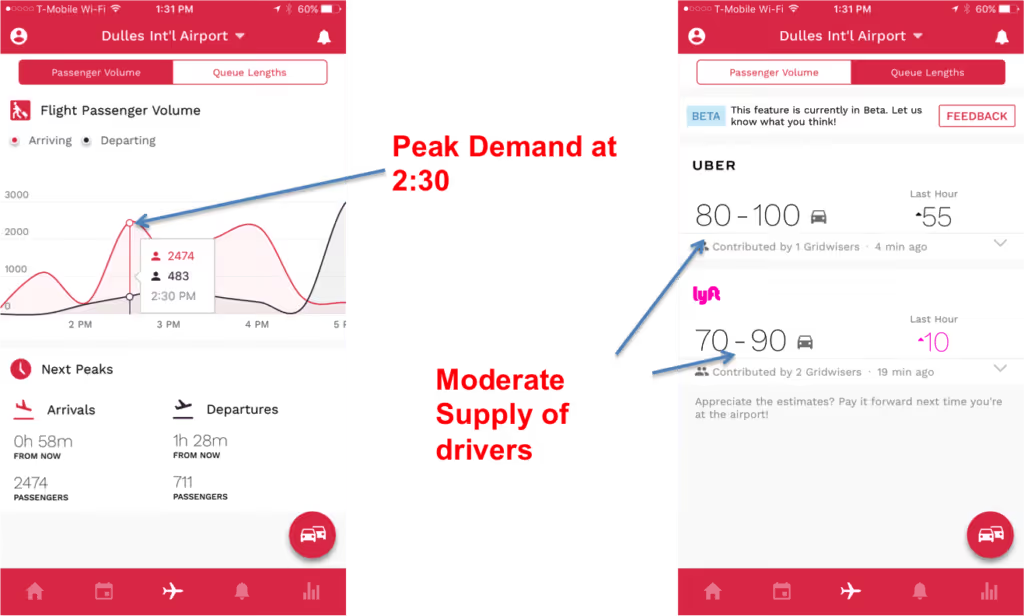
Download Gridwise to see airport demand and queue lengths
The Underage Rider
Most TNC's clearly state that their service is intended for people over 18 and that anyone under the age of 18 must be accompanied by a parent or guardian.
People don't care.
They will make you drive all the way to them so you can find their clearly underage kid waiting.
How to spot them?
When you drive up and what looks like a 15-year old is hailing you, you've got an underage passenger.
What to do about them?
There are two major camps for how to deal with underage passengers. Many drivers will play it safe, cancel the request, and contact their TNC. This can result in the passengers account being deactivated.
Most drivers, however, will take the approach of picking the passenger up and then explaining to them that Uber and Lyft is intended for passengers that are 18 or older. That will usually result in the passenger saying they didn't know, which we all know isn't true. So just reiterate that it's important for them to follow this rule.
How do you rate them?
1-Star... stop breaking the rules!
The PAX that asks if you can go through a drive through
This passenger for some reason believes that you are their own personal chauffeur. This passenger usually asks you to stop at a McDonald's or Wendy's, but sometimes will go as far as asking you to make a pit-stop at Chipotle...
Yes... we've seen this happen.
How to spot them?
This is usually a group of passengers that may be heading home from an event, so it's understandable that they are hungry.
If you pay attention to their conversation you'll start to hear rumblings of "I'm hungry" and "We should grab something to eat while we're out"... that's when you know you're in trouble.
What to do about them?
When you're asked to make a pit stop, remember that the bulk of your pay comes by the mile, not by the minute. So sitting in a drive through inching toward the payment window for 10-minutes likely isn't worth your time.
To avoid this, you can simply state that it's against Uber's Terms of Service to make these types of stops. Unfortunately, the conversation is likely not going to end there, so you have to be adamant, but polite.
Some passengers will go as far as offering a generous tip if you stop. If so, the stop may be worth it. You'll have to be the judge there.
If you do give in and take them to a drive through, make sure you position the back window in front of the speaker and the payment window. Also, don't expect any food kickbacks, but it's worth asking!
How do you rate them?
5-stars if you get a food kickback or a nice tip... 3-stars if you just get nagged.
Summing Things Up
We all know some passengers can be an incredible pain, and this is just the beginning of the list. When these situations come up, remember to keep your cool and understand that you're not conducting brain surgery. One bad passenger or one bad rating isn't going to make or break you.
Even the worst rides will rarely last more than an hour, and then you don't have to see them again. So don't let a bad passenger ruin your mood. Keep your smile, and keep making money! Or, keep your spirits up by reading more on how much rideshare drivers make.
If you have any memorable experiences with passengers, please share below!

The 5 Best Cars for Uber and Lyft Drivers
If you’re thinking about jumping into the rideshare game, there are a lot of factors to consider, including which ones are the top rideshare services drivers are using. But another very crucial element takes the cake. Sure, we can talk all day about how to plan your strategy or strike up conversations to get better tips, but none of that matters if you don’t have a good, reliable car to get you and your passengers around. And deciding what car to buy—or whether you even need to buy a new car—takes some consideration.
First of all, it’s important to know the car requirements for each rideshare platform. Though it can vary from city to city, to drive for UberX driver in most, you need a four-door, 2002 or newer vehicle. For Lyft, you need a 2005 or newer in most cities.
If you’re planning on driving multiple passengers, however, you’ll want to spring for a bigger car. UberXL and Lyft Plus require a vehicle that can hold up to 6 passengers, so the little four-door sedan won’t cut it.
Then, of course, there’s the luxury side of things, which is more strict. To drive for UberBlack or Lyft Premier, your car has to be a pristine Jaguar, Lexus, BMW or similar. UberBlack takes it a step further by requiring that the car have black leather interior as well.
Most likely, though, you’re not looking to buy a Jaguar or a passenger van, but something basic and dependable. So here are the five cars you should consider.
1. Toyota Corolla
The Toyota Corolla is a good bet for an inexpensive, durable car. New ones start around $18,500, and get 30 MPG in the city, 40 on the highway. It’s also a four-cylinder engine, so that means less fuel consumption.
The Corolla is also on the Consumer Reports list of cars that can reach over 200,000 miles, which is important if you’re going to be driving all day every day.
Corolla’s are known to need little maintenance, and when they do it’s relatively inexpensive.
One downside is that the handling and maneuverability aren’t the greatest, but what it lacks in movement it makes up for in reliability.
2. Toyota Prius V
The Prius is the car for good gas mileage, with an added bonus of environmental sustainability, if you’re into that kind of thing. Prius’s boast 51 MPG on the highway and 48 in the city, so you’ll save at the pump and maximize profits for sure. The only downside is the initial price tag; new Prius’ start at around $23,500.
If you’re in for the splurge, though, the Prius will get you far. Consumer Reports also has it in the “over-200,000-miles club,” and some even say it can take you 315,000 miles with proper upkeep. For the basics, maintenance is as affordable (and infrequent) as any other Toyota, but replacing the battery comes with a hefty price tag.
The car is also fairly heavy, so brakes can wear out faster. Additionally, the weight makes for a semi-clunky ride, so your passengers may not be as comfortable as in zippier cars.
3. Chevy Volt
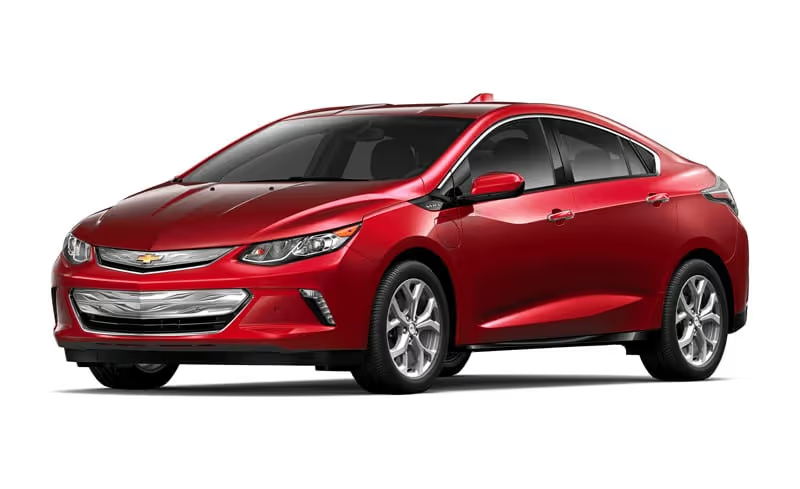
The Volt has a lot going for it. Like the Prius, it is a hybrid electric car, and that makes for fewer and cheaper trips to the gas station, which you’ll need to make up for the sticker price: The 2017 Volt starts at $33,220.
Fully charged, the Volt can go 50 miles on the battery alone and more than 400 with a fully charged battery and a full tank of gas. In gas-only mode, the Volt gets 37 MPG. In combined gas-electric mode, it jumps up to 62 MPG.
The Volt is also speedier and handles better than most hybrids on the road, so you can expect smoother driving and a fatter wallet. And because it is so fuel-efficient, buying the Volt also means receiving an additional tax credit come tax season.
The Volt will also last you a long time. Green Car Report found a 2012 Volt that surpassed 300,000 miles and counting.
Like the Prius, the maintenance cost that could get you is the battery. But so long as that lasts as long as it should, regular maintenance on the Volt will be cheap.
4. Toyota Yaris
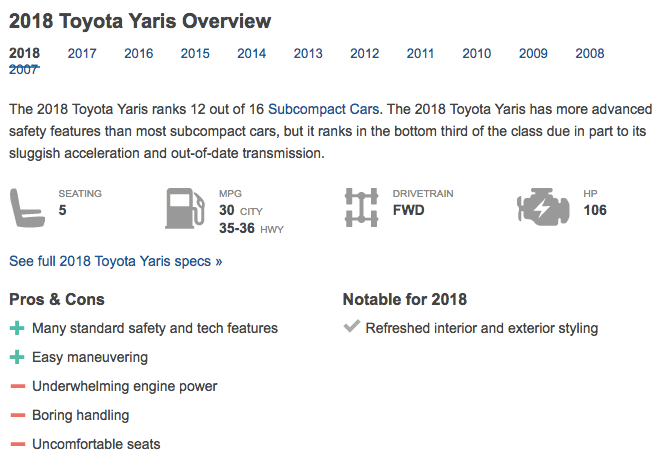
If you’re looking for a reliable new car but don’t want to shell out too much cash, the Toyota Yaris may be the right choice. At $15,250, the light, compact Yaris will get you some bang for the buck: It gets 30 MPG in the city and 36 MPG highway.
Fuel-efficient and easy to maintain, the Yaris will also last you awhile: Forbes counts it as one of the cars that will go to 200,000 miles, and others have reported having a Yaris last beyond 250,000.
Some downsides: The Yaris is compact, so tall drivers—and passengers—may have a hard time getting comfortable, and the hatchback style leaves less room in the back for luggage. It also doesn’t handle as smooth as some cars, but it’ll get the job done.
5. Ford Fusion
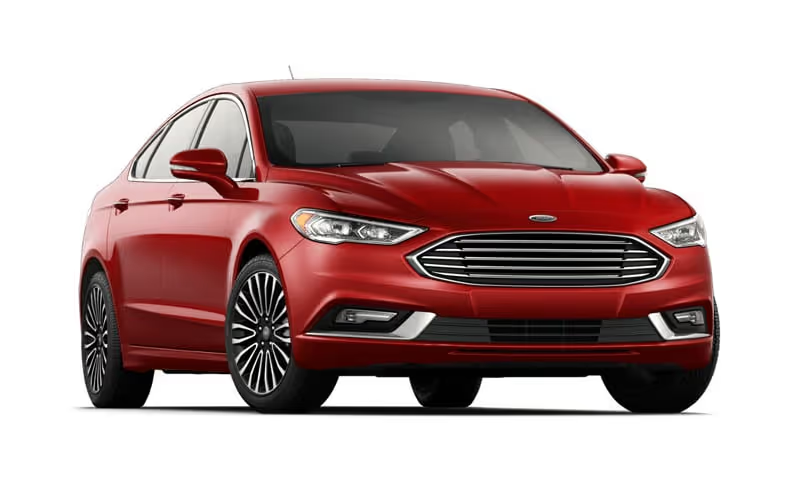
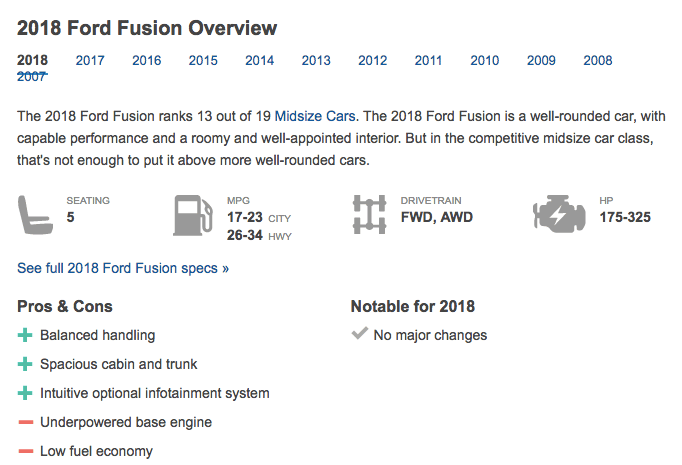
If you’re looking for a smooth and responsive ride at a decent price, the Ford Fusion may be the car for you. Fusion’s start at $22,600 and are known for their quick response and easy handling, and also have low and affordable maintenance.
The Fusion’s only get 23 MPG in the city and 32 on the highway, however, so for those long days of driving, you might have to make frequent stops for gas. But, a Fusion will last you a long time: Many Fusion owners report pushing their cars beyond 200,000.
Best way to get a car
- Buy. Before splurging on a new car, there are some things you should think about. For one, can you really afford a new car? Most Uber drivers make $14 to $16 an hour, and to get a loan for a new car requires good credit.Additionally, consider your needs outside of work. Do you need a new car anyway? Do the cars that are best for rideshare driving match your personal needs?With all that taken into consideration, buying a car may be the best option for you. And while a bright, shiny new one may sound appealing, that’s not the only option. You can always buy a mildly used car, or even lease one.
- Hertz. If you’re not in a position to buy a car, or just don’t want to own one, there are other options.The car rental service, Hertz, has partnered with Uber and Lyft to provide rideshare rentals at affordable prices. Lyft's deal starts at $165 for weekly rentals, and after a certain number of rides per week (based on your region), drivers can earn bonuses that cover the rental cost.For Uber, $180 per week will get you a car, but after 75 rides, you can get the car free.
- Hyrecar. Another option is to rent a car from a private person instead of a company. Hyrecar connects rideshare drivers with car owners and allows you to rent them at varying rates. There are no contracts or sign-up fees, and daily rates are as low as $35. Weekly rates float around $200 to $300.Hyrecar is also great if you want to try rideshare driving for a while before committing to buying a car for the job.
5 Things to Consider Before Becoming a Full-Time Rideshare Driver
If the thought of becoming your own boss, setting your own schedule and getting out of that office has led you to consider becoming a full-time rideshare driver, you’re not alone. Thousands of people across the world have dropped the 9-to-5 in favor of driving, but, of course, it’s not always as easy as it sounds.
Here are five important things to consider before taking the leap.
Am I ready to drive 12 hours a day?
Sure, it’s nice to dream about driving just a few hours here and there whenever you want, but that won’t really work. To make a living as a rideshare driver, you may have to work overtime. In other words, being a full-time driver is really full-time. So the first thing you need to ask yourself is, am I ready to drive 12 hours a day (at least sometimes)?
Here are some things to consider:
- Back pain: 12 hours is a long time to sit. And this extended time in one position can really hurt your back, or exacerbate already-existing back and body issues. Is this something you can deal with?
- Lack of exercise: Being in the car that long also means you’re not exercising. Sure, that 9-to-5 office job meant little exercise too, but at least you got up and walked to the copier, or did a few blocks on foot to grab lunch, or stood on the train during your commute. With rideshare driving, it’s hard to avoid sitting the whole time.
- Boredom: Think back to that really long road trip you took. Remember how boring those hours of driving were? Really consider if you could do that five days a week.
- Overall long hours: There are a million other reasons why the long hours might get to you. Do you have side projects you still want to work on? A family at home that you want to spend time with? A dog that needs walking? Think of all your other obligations and aspirations and be honest about how much time you can take away from them.
Of course, there are ways to drive full-time and not totally sacrifice your well being. You just have to commit to remaining healthy while driving. Here’s how you can do it.
- Set aside time for exercise. Either before, during or after your shift, try to fit in at least 15 minutes of strenuous exercise a day. Even if you can’t hit the gym, take a break and stretch, do some jumping jacks or take a walk.
- Make it fun. You’re going to have to entertain yourself for long hours, so make sure you’ve got some stuff to occupy your mind while you drive. Load your phone up with good music, download some interesting podcasts for between rides, and brush up those conversation skills.
When do I want to have flexibility?
Like any full-time job, it’s good to have a set schedule that you stick to at least most of the time. And when you’re your own boss, you can build your schedule in whatever way makes sense to you. But there are some caveats when it comes to rideshare driving.
For one, you will want to maximize your earnings by working during peak hours. That means doing the morning commute, evening commute, nights and/or weekends. And because that means you’ll be working when most people aren’t (and for long hours on top of that) you have some FOMO. Here’s what you can do about that.
- Plan to be around when your friends and family are. If you need to help get your kids off to school, plan on skipping the morning commute. If you and your family like to go out on the weekends, drive during the weekdays. If you like to go out at night with your friends, drive during the day. In other words, identify the times that are important to you, and try to maximize the hours you work around that.
- Use your off-time well. If you drive late, it may be tempting to sleep in until your next shift, but try to be disciplined about maximizing your off-time as much as you do your working hours. If you’re enjoying your remaining time, the 12-hour shifts won’t feel so bad.
Am I a people person?
At its core, rideshare driving is a service job. And like all service jobs, you have to be good with people to enjoy it and do it well. If you’re considering jumping into the game full-time, make sure you ask yourself if you’re ready for what that means.
- You will be meeting and talking to a lot of people. If you don’t find people’s stories interesting or find yourself exhausted by the thought of talking to so many people every day, you may not be cut out for full-time driving. On the flip side, if this idea excites you, you’re in the right business.
- Ratings and tips depend on likeability. Whether you consider yourself a people person or not, your ratings and tips will be determined by how people perceive you. So if you want to get that extra boost in cash – and keep your job – you’re going to have to be likeable.
That said, you can still do this job even if you’re not an extrovert. Here are some tips to be more outgoing, and maybe even become more of a people person:
- Open up. The first step is just plain talking. Always greet your rider, ask them how they’re doing, and learn some good conversation starters. Ask questions, talk about the weather, or ask them where they’re headed.
- Read people. Knowing when to talk is just as important as knowing when to stop talking. Learn to read your passengers for cues of conversation willingness. Are they looking at their phone? Have their head tilted back and eyes closed? That’s a good time to turn on some music and let them be.
- Have a good time and don’t be too serious. People always like a happy person, so don’t be too serious. Even if you’re not talking, a rider can pick up on your mood, so if you’re enjoying yourself, you’re more likely to get better ratings and tips, and have better conversations.
Do I have the right equipment?
Rideshare driving isn’t just about having a clean car and knowing how to drive. Any pro driver will tell you that you shouldn’t go full-time until you’re stocked with the right equipment, from car to GPS.
So before getting started, make sure you have:
- A newish, reliable, low-mileage, efficient car. Don’t skimp, but don’t go overboard, either. Lease payments can be pricey, but so can repairs. Do your research and find the right car for you.
- The right tech. Get a smartphone mount for hands-off, easy driving; a dashcam in case something happens; a mileage log; an illuminated Uber/Lyft sign for night driving; plenty of phone chargers for you and your passengers; and a good GPS system.
- Emergency equipment. Make sure you’re prepared for emergencies with a first aid kit, seat belt cutters and a roadside tool kit.
Am I ready to treat this like a business?
The last question you need to ask yourself is if you’re ready to be a small business owner. That may sound a little overly ambitious, but the truth is, if you’re your own boss, you are a business owner. And that means there’s some extra things to consider.
Here are the main things you need to think about – and be on top of – as a full-time rideshare driver:
- Car maintenance. Driving full-time is going to put some wear and tear on your car. And that means you’re going to have to get it maintenanced more often than you’re used to. That means you need to not only be on top of getting new tires, oil changes, and tune ups on the regular, you also need to set aside money in order to do so.
- Healthcare. Now that’s you’re not employed by a company, you’re going to be paying your own healthcare costs. Depending on where you are and what your general health is, they may or may not be a big deal. Before going full-time, really think about what you can and can’t afford to live without.
- Taxes. Taxes are way more complicated when all your paychecks aren’t automatically deducting taxes and you don’t get a single W2. Consider how organized you are before doing this full-time. Can you keep track of expenses? Do you know the rules of filing as a freelancer? Make sure you know what you’re getting into so it won’t come back to bite you.
So... what else are we missing from this list? Full-time drivers, what else should part-time drivers consider before taking the full-time plunge? Which apps are your favorite for rideshare and delivery?
Let us know in the comments below!
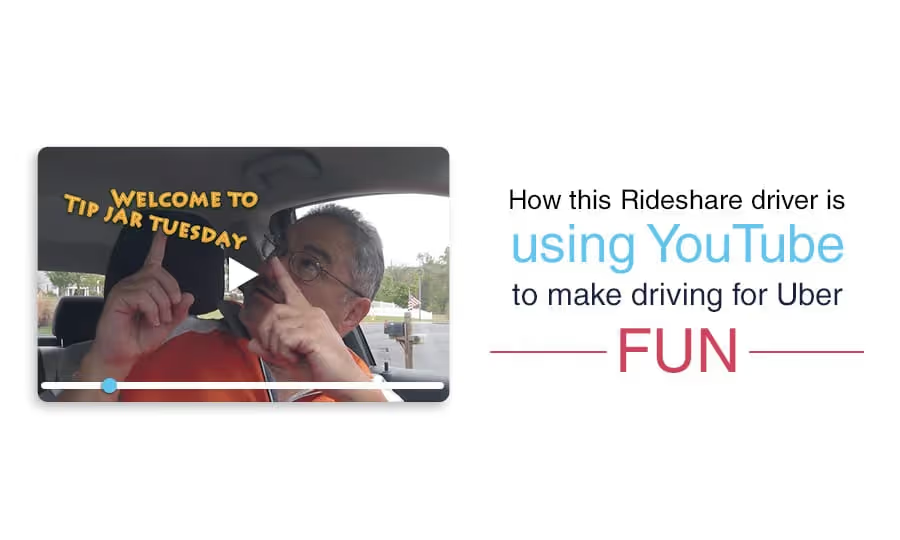
How this Rideshare driver is using YouTube to make driving for Uber Fun
We get it. Driving can be a grind, and it’s not always going to be a good time. Sometimes you’ll get a grouchy passenger, or a nightmare pool, or a bad review. And while these days are always going to happen, there are some things you can do to make driving more enjoyable, despite the odds.
Just ask Paul.
Paul moonlights as a driver in the D.C. and Northern Virginia area in the evenings and on the weekends. He has a full-time job doing something that he loves, but decided to give rideshare driving a go after a friend suggested he make a little extra money on all the driving around he was already doing. And he thought, why not?
The prospect of a little extra vacation money was tempting, but really, Paul’s in it for the fun. That’s right – for fun.
“Uber’s marketing makes it sound like you can make a ton of money, but you aren’t exactly going to get rich here,” Paul says. “But overall, as long as I’m in the black, I’m a happy camper. Even if it’s only 10 bucks this week, 100 bucks next week, and it’s still fun, that’s all I care about.”
Sure, not everyone has the luxury of driving part-time for fun and a little extra cash. But there’s still something to be learned from Paul’s attitude. So why does he love driving so much?
“The people, hands down,” he says. “I love meeting all different kinds of people.”
If you get in Paul's car, you can't help but notice.

Paul is a self-described people-person and has got “the gift of gab,” so for him, the best part of the job is chatting with his passengers, and getting them to open up.
Of course, he recognizes that sometimes people don’t want to talk, or they’re in a bad mood. When he comes across that, he decides to try to make them feel better non-verbally.
“I turn the music down a little bit, change it to jazz, get them to relax without saying anything,” he says. “I try to get some positive vibes into that person.”
Because he likes talking to new people so much, that is what keeps him going, and makes what could be a long shift in the car fly by.
“You know how runners get a ‘runner’s high?’ Sometimes I’ll get a driver’s high,” he says. “Just, ‘What a great day to be driving!’ People are climbing in the car, I’m making money. And I’m just like, ‘This is great.’ And next thing I know it’s eight hours later. It feels good and you don’t want it to stop. And it’s not even based on the money. It’s just a feeling.”
Building a Youtube Channel
Paul also decided to make driving fun for himself by setting up a YouTube channel for drivers, Uber DC, which is full of tips, stories and even a game show.
The impulse to start filming came right when he started driving. As a golfer, Paul had gotten into GoPro cameras and filmed some of his rounds. He had a YouTube account but hadn’t done much with it. Then when he decided to start driving, he got a “wild hair” to film his first day.
The six-minute video chronicling his first fares is by far his most popular one with over 550,000 views. But in the two years since, he’s made countless others, and has even created regular segments: “Tip Jar Tuesday,” in which he counts his tips for the week and gives advice to other drivers for how to get more, and “PAX - A Rideshare Game Show.”
PAX is where Paul gets truly unique – and has the most fun. If he has a long drive with a passenger ahead – and the passenger is willing – he’ll play a live trivia game with them, MCed and filmed by him.
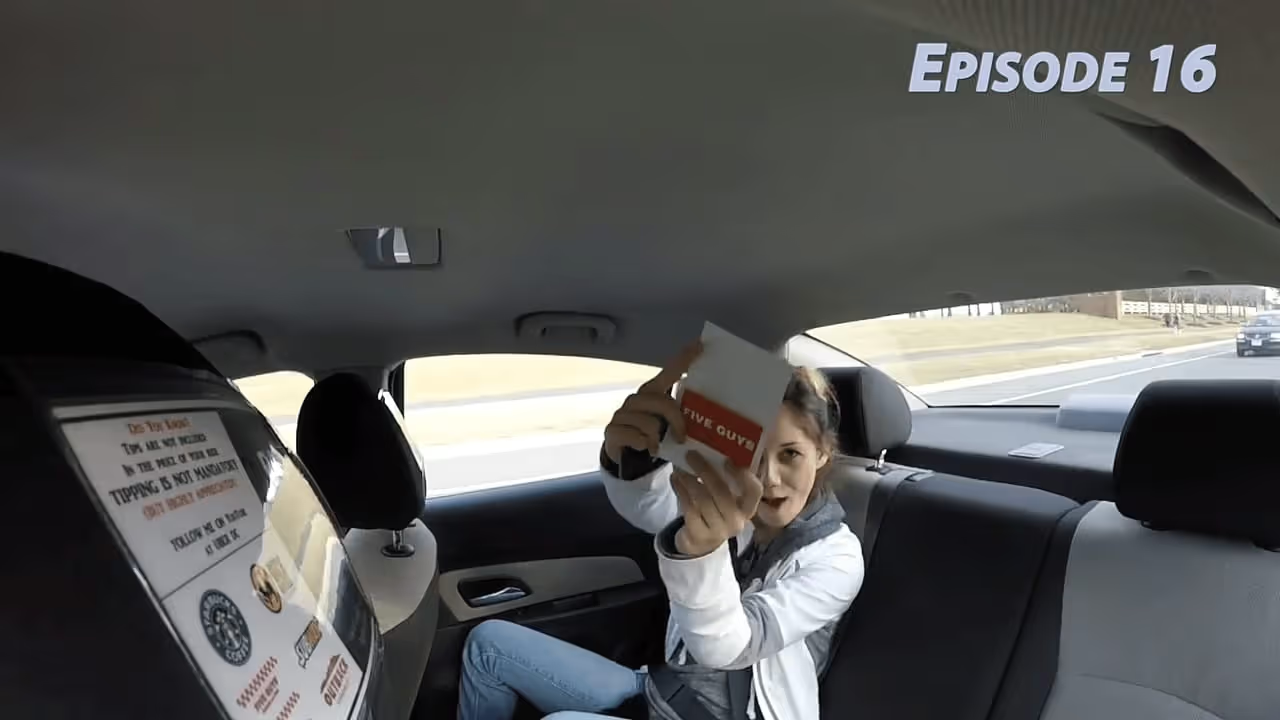
Paul gets the questions online and prints and laminates the cards himself. Then he puts them in a little black bag, which passengers can select from.
Paul also keeps a sign on the dashboard that says “Ask Me About PAX” – a natural conversation-starter even if the passenger doesn’t want to play.
Challenges
Of course, it hasn’t all been easy. When he first started, the biggest issue was learning the app.
“First of all, you want to make sure you’re hitting all the buttons right,” he laughs. “A couple times I forgot to start the trip. So, in the beginning, I took long breaks between the rides to reevaluate what I did and make sure I did it right.”
Next came the unfamiliar territories.
“It took a while to comfortable knowing the neighborhoods I was driving in.”
Even as a pro driver now, he has hit some obstacles. Recently, when trying to meet a Quest, he decided to take a pool ride. After waiting past the allocated two minutes for his passenger to arrive, the rider came out and said it would be another minute. Paul then started the trip, waited two more minutes, and then canceled the ride when the passenger didn’t reappear.
In the end, what should have been $4 for his wasted time ended being $0, and his complaint to Uber didn’t get him his money. But that doesn’t get him too down.
“It happens,” he says. “I just keep driving.”
Strategy
This “just-keep-driving” attitude is also at the center of his driving strategy.
“I just go from point to A to point B,” he says, admitting that he doesn’t have much of a master plan when he gets in his car beyond getting pings. “It blows me away that people turn down rides.... The whole idea is to make money, and the way to make money is to have a body in your car.”
Granted, that might not work for everyone. But for Paul’s goal of having fun – and maybe playing some trivia – he doesn’t care where he’s going as long as he’s going.
Paul’s driving tips:
- Know your market.
GPS is helpful, but Paul says it’s important to know where you’re going, have a plan and work it. - Be people-friendly.
If you’ve taken anything from Paul’s story, it should be this.“You’ve got to put that smile on and be people friendly,” he says. “Treat people the way you’d want to be treated.”While this means chatting with people and maybe playing a game or two, it also means going out of your way to be helpful. This means opening doors, helping with luggage and groceries, and waiting for passengers to get inside the house before driving off. - Don’t take it personally.
When you run into that inevitable unhappy passenger, don’t let it ruin it your day.“People have bad days, but it’s only one ride,” he says. “You’ve got to have thick skin. If you’re a real sensitive person, this isn’t the job for you.”
Check out Paul's PAX Game Show Season 3 Episode #26 below:
[embed]https://www.youtube.com/watch?v=pPJGRMWBP2o[/embed]
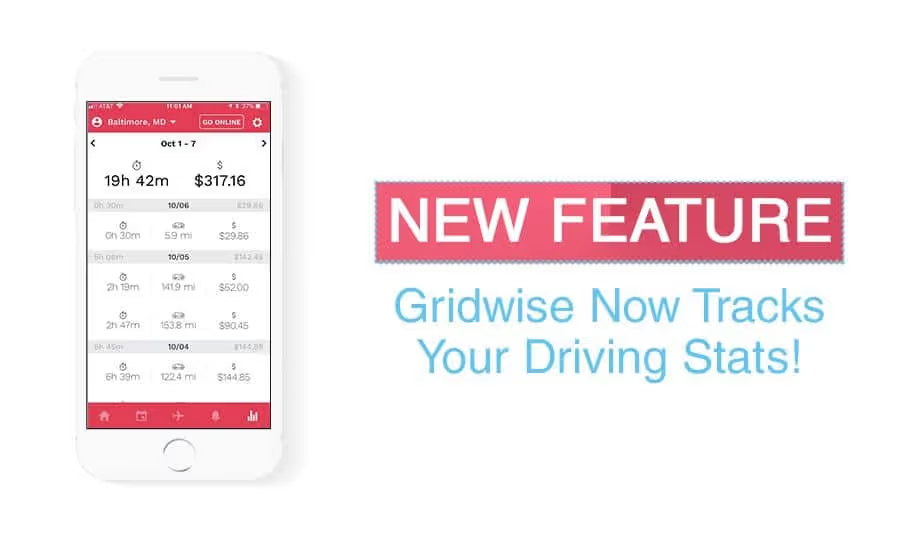
Nueva Función - ¡Gridwise rastrea tus estadísticas de conducción!
Presentando: Rastreo de Turnos
Esta semana lanzamos la capacidad de rastrear tus métricas de rendimiento en TODOS tus servicios de rideshare.
¿Y qué significa esto?
Los conductores tendrán la capacidad de rastrear y analizar las siguientes métricas:
- Total de Millas Conducidas
- Ganancias Totales
- $/hora
- $/milla
- viajes/hora
- $/turno
- Ganancias por milla
- Ahorros en Impuestos
Todo en la Aplicación Gridwise.

Gridwise ha hecho un gran trabajo ayudando a los conductores a entender dónde y cuándo deben conducir, pero algo que siempre surge cuando hablamos con los conductores son las métricas de rendimiento.
Los conductores de rideshare nos dijeron que quieren saber cuánto han estado conduciendo y qué tan bien han conducido.
Ahora puedes rastrear esto.
Así es como funciona.
Como conductor, ahora tienes un botón que dice “Conectarse” en la parte superior de tu pantalla en la aplicación Gridwise. Puedes presionar ese botón y comenzarás una sesión de conducción.
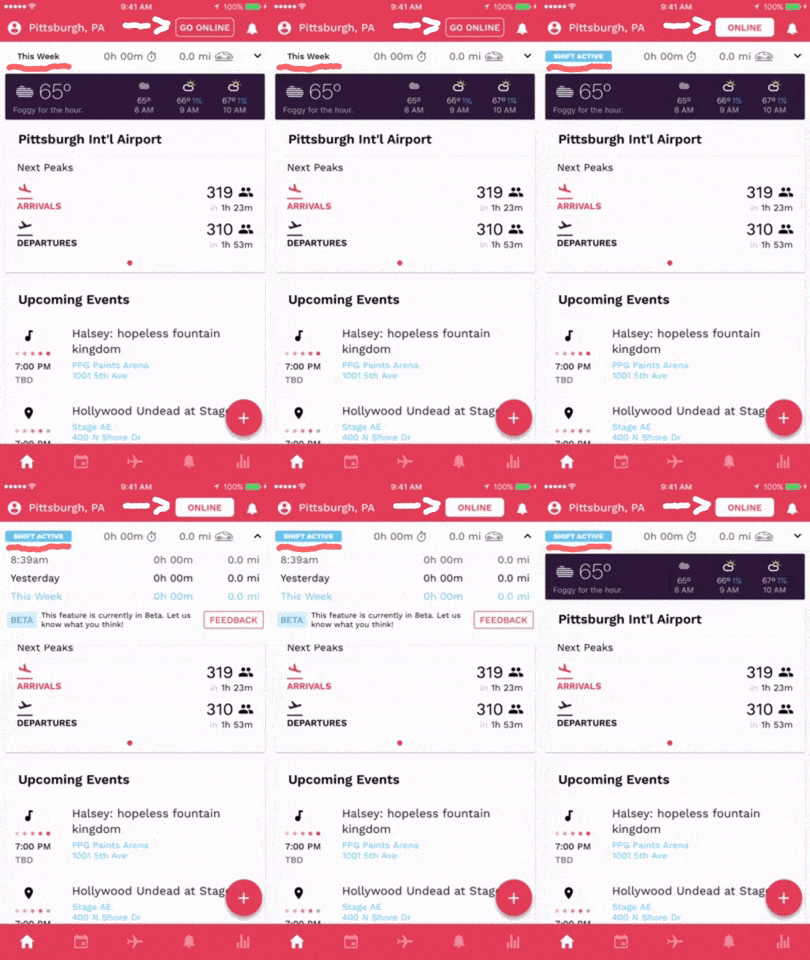
Ahora verás una barra de “Turno Activo”.
Aquí tendrás una vista en tiempo real de cuánto has conducido y por cuánto tiempo has conducido durante el día, el día anterior y toda la semana.
Cambia tu estado de turno a activo cada vez que comiences a conducir para que tus millas y tiempo sean rastreados automáticamente.
Después de terminar un turno, se te pedirá que ingreses tus estadísticas de conducción para tu sesión.
Y podrás ver tus resultados semanales y diarios en la pestaña de análisis. Esto incluirá tus ganancias totales, el número total de viajes realizados
Luego recibirás un correo electrónico de resumen de turno con estadísticas más detalladas.

Esta función ya está disponible para TODOS los usuarios de Gridwise, ¡así que inicia sesión y comienza a rastrear tu rendimiento!
Trabaje de forma más inteligente. Gane más.
Ya sea que conduzcas, entregues o recojas turnos, Gridwise te ayuda a hacer un seguimiento de las ganancias, el kilometraje y el rendimiento para que puedas mantener el control de tu trabajo. Descarga la aplicación y toma las riendas hoy mismo.
