Blog de Gridwise
¡Lee el blog de Gridwise para obtener consejos y sugerencias sobre cómo ganar más dinero mientras conduces para Lyft, Uber, DoorDash, GrubHub y más!

The Gridwise Job Board: Find Your Ideal Job or Gig Work
Gridwise is an essential assistant app created by gig workers for gig workers. Our mission is to support those engaged in gig work in every way possible. We understand how challenging it can be to deal with income instability, a lack of benefits, and job insecurity that often comes with gig work. The Gridwise app tracks and organizes earnings and expenses, and offers a wide array of discounts, deals, and services that make the lives of independent contractors easier and more rewarding.
We firmly believe it’s possible to make a viable living and create a gig experience that offers flexible hours, variety, and excitement. With issues such as consistent earnings and job security in mind, Gridwise is proud to offer a centralized platform that shows you how to find gig work and secure reliable opportunities. We’re proud to introduce the Gridwise Job Board.
[elementor-template id="20891"]
The Gridwise Job Board: Key features
Because Gridwise is dedicated to serving the gig worker community, we’ve filled the Gridwise Job Board with useful features that won’t waste your precious time.
- Comprehensive listings. Find part-time, full-time, temporary, and per-task work. Drive or deliver with your vehicle, utilize an employer’s vehicle, or even find non-driving gig work.
- User-friendly interface. Find the jobs that are right for you with a tap of your screen.
- Verified opportunities. We vet the jobs before they are listed to ensure you’re getting high-quality job postings.
How to get more gig work, seasonal, part-time or full-time jobs with the Gridwise Job Board
Looking specifically for “gig work apps” or “gig jobs near me?” You’re in luck. Our filters and search functions send you directly to the listings you seek.
Here’s how it works.
- Access the Job Board via the Gridwise website.
- Search for jobs by type, location, and more.
- Select the job that interests you, and read all about it.
- Scroll through the description, and if it appeals to you, click “Apply for job.”
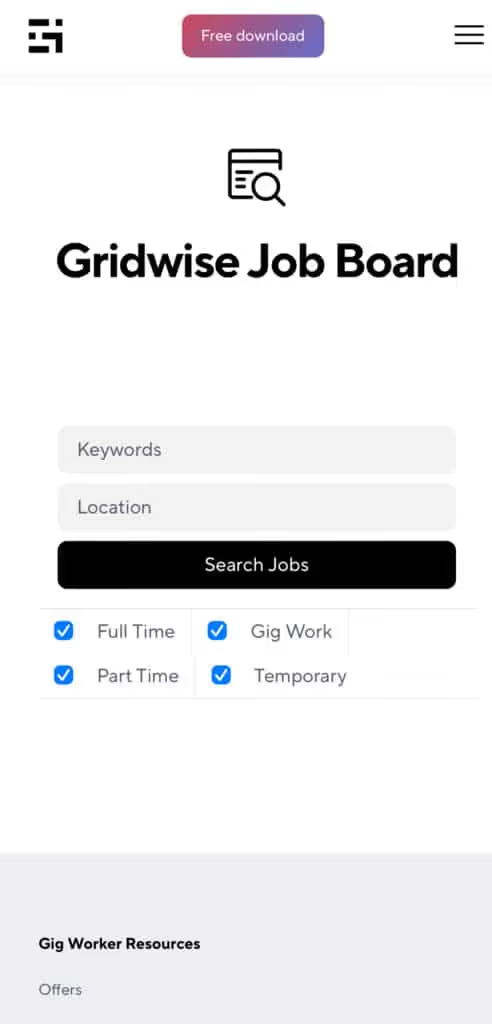
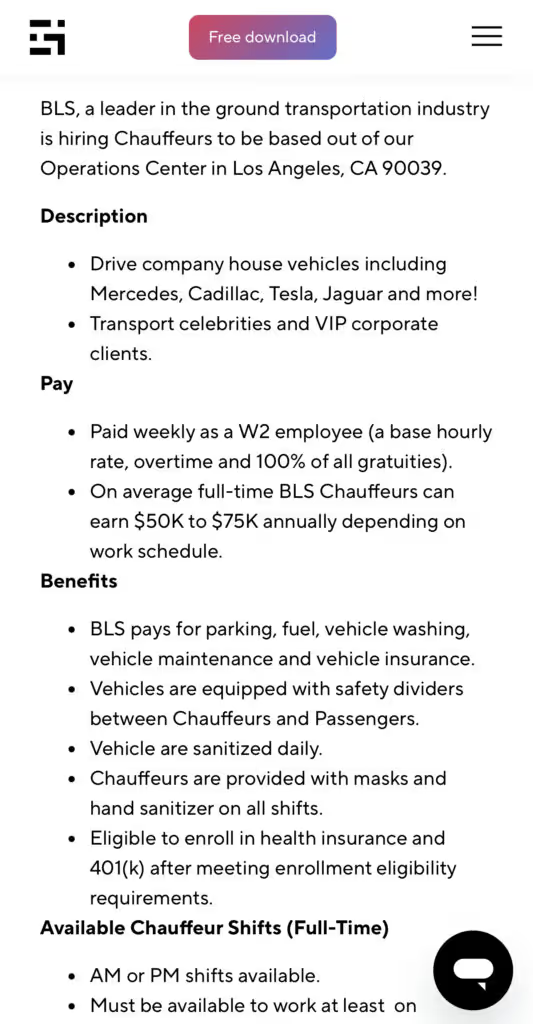
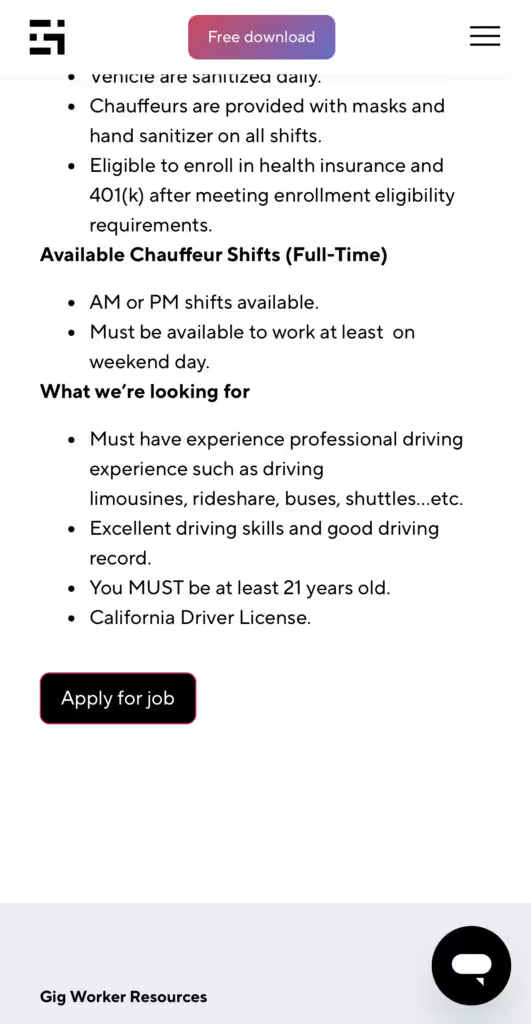
Many types of jobs are available. Adjust the search filter to see the full variety of opportunities that will let you cash in. Deliver food, set up catering, do rideshare driving, get paid for doing package delivery, and much more. You’ll find short-term gigs, long-term contracts, and part-time positions.
Perks of the Gridwise Job Board for gig workers
Gig workers who know how to make extra money will appreciate how the Gridwise Job Board lets you multiply your chances of bringing in big earnings. Here’s how:
- Increased stability. Use the Gridwise Job Board to find part-time or permanent jobs in addition to the part-time gigs you already have. Always keep a steady stream of earning opportunities flowing toward you.
- Flexibility and autonomy. Choose jobs that fit your schedule, work around other jobs and family duties, and still leave room for some fun in your life. Discover side hustles to supplement your full-time job, permanently or just for the season.
- Skill development. Find part-time work that lets you use a skill you already have, or try your hand at something new. It’s a smart way to develop a portfolio to showcase what you can do, or even to find permanent employment.
Get Gridwise and stay up to date on the Gridwise Job Board
Gig workers need plenty of information and assistance, and Gridwise is here to give it to you. Download the app and get essential features such as
- seamless earnings tracking
- mileage tracking
- expense recording, including notes
- low-cost and no-cost insurance benefits
- access to affordable medical, dental, vision, mental health, and alternative care
- professional services including legal and financial help
- deals and discounts
- weather, events, and traffic reports
- inside information on where and when to drive
[elementor-template id="20936"]
More to know about gig work:

5 Best Mileage Trackers For Gig Drivers
Many drivers ask, “Do I really need a mileage tracking app?” The answer is simple: only if you want to have an accurate count of all the miles you can legally deduct from your taxable income! You might think your rideshare or delivery driving app has got you covered. After all, they do quite a good job of logging the miles you drive while you’re on a trip or delivery. But, if you want to have the best app to track mileage for Uber, Lyft, Doordash, Instacart, or the other apps you may use, you need more. Why is that?
Without a separate tracker, you’re missing the miles you drive in between pings. Did you realize that all the miles you drive, from the moment you begin your shift until it’s over (as long as you don’t drive several miles on a break to hang with your friends), are tax deductible! That means you need something besides your driving app to keep an accurate count of your travels. Read this Gridwise post to see how important it is to keep track of every deductible mile.
You won’t be surprised to hear that there’s an app for tracking miles. In fact, there are several of them. Here, we’re going to tell you about five top mileage tracking apps, and help you figure out which one is best for you.
Before we get to the list and identify the best mileage tracker app, let’s clarify what exactly a mileage tracking app is. According to G2.com’s technology glossary, mileage tracking is done for the purpose of keeping a log of mileage that is either reimbursable or tax deductible.
And yes, of course you can track your miles simply by taking readings on your odometer. But are you really prepared to account for how many miles you drove for personal reasons and subtract them from the total to get your business mileage? Even if you can remember all that and do the arithmetic, if you want an accurate reading of the miles you drive for business, and can therefore deduct, a mileage tracking app will save you a lot of trouble and prevent you from making costly errors.
Plus, as a gig driver, you have specific needs when it comes to a mileage tracker. Ideally, you’d be able to handle mileage tracking and several other functions all in one app. It can be maddening enough to deal with driving apps, particularly if you’re an avid multi-apper. You would want your mileage tracker app to help you keep account of other aspects of your business, including income, expenses, and inside information about the art of gig driving.
Not all mileage apps are equal, to be sure! Let’s look at five of the best apps to track mileage and figure out which is the best app to track mileage with Uber and Lyft, or what mileage tracker app is best for DoorDash.
[elementor-template id="20891"]
1. Zoho Expense
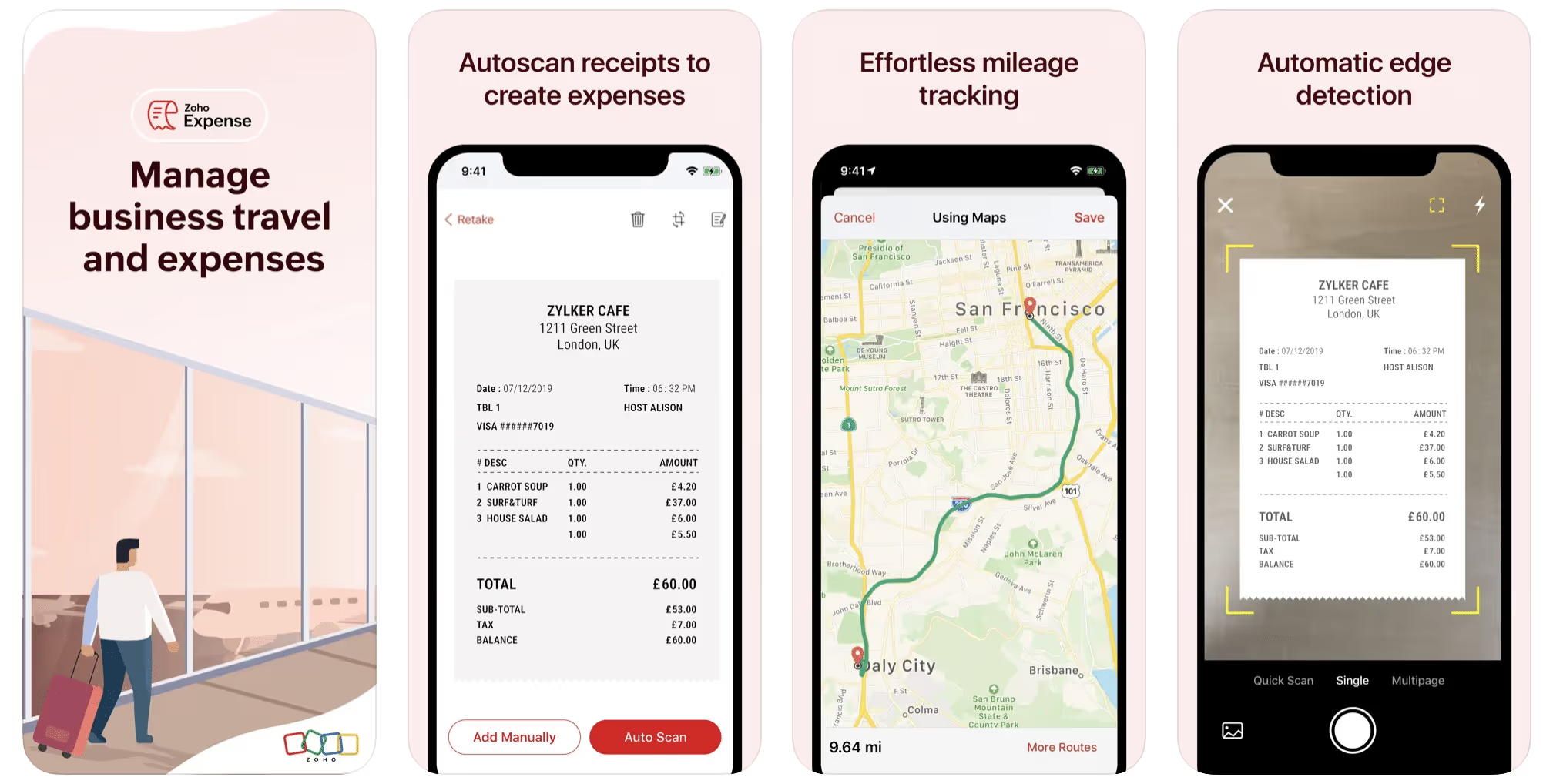
First up is Zoho Expense, which does exactly what its name says. This app is designed to allow companies to give employees a uniform way to create and submit expense reports. It can be used by individuals, including gig drivers, as well.
It includes a mileage tracker, as well as features that let you track other deductible expenses, including the ability to scan and record receipts.
Available on Android and Apple: Yes
Ratings: 4.8 stars on App Store, 4.7 stars on Google Play
Free Version: Yes
Subscription price: $3 per month, billed annually
Created specifically for gig drivers: No
2. Quickbooks Online
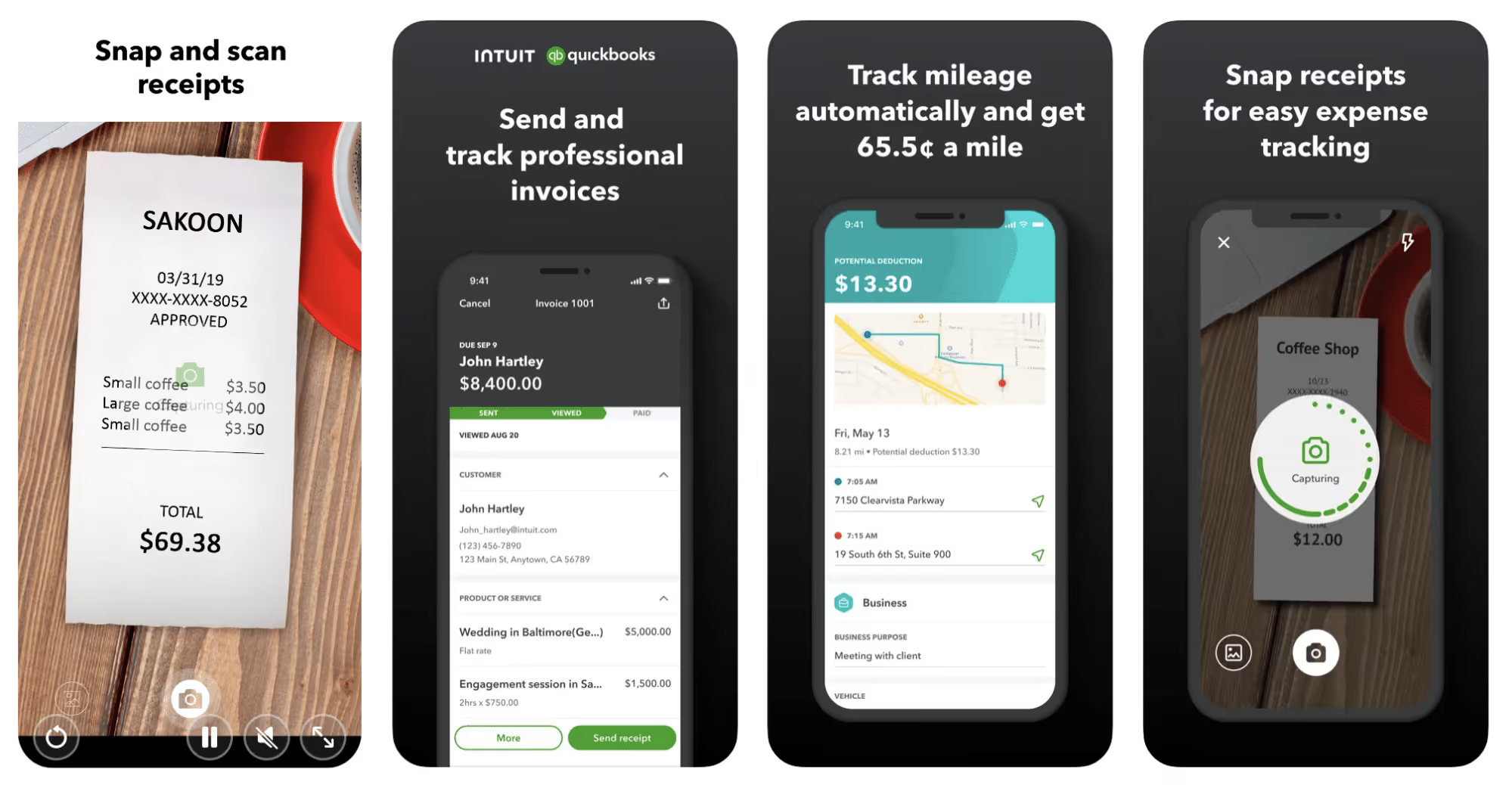
Quickbooks Online is a cloud-based app that allows you to track your mileage, earnings, and expenses. The information you enter can then be used to generate various reports that prepare you for tax time. It also allows you to create graphs that illustrate your cash flow, and includes a receipt scanner so you can instantly record deductible expenses. Quickbooks is popular, highly reliable, and designed mainly to help people keep track of their small businesses.
Available on Android and Apple: Yes
Ratings: 4.7 stars on App Store, 4.4 stars on Google Play
Free version: 30-day free trial
Subscription price: $15 per month for basic version if purchased for 3 months or more
Created specifically for gig drivers: No
Source: quickbooks.intuit.com
3. Shoeboxed
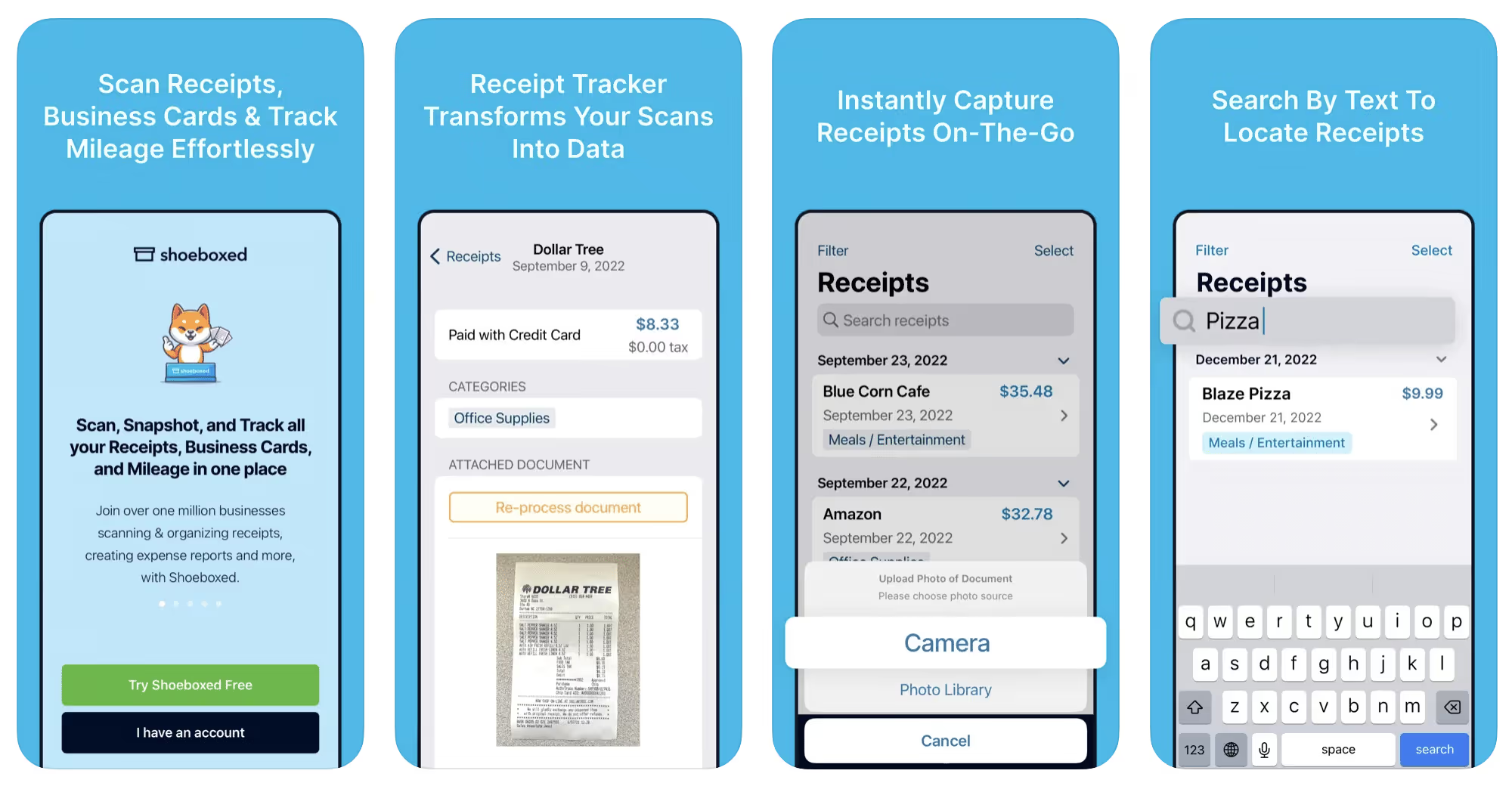
Shoeboxed started in 2007 as a service for scanning paper receipts into digital form. Now the app offers a free mileage tracker and has enabled users to scan receipts directly. It touts itself as the best mileage tracking app for DoorDash, but there are some elements missing that Dashers might like to have. While it provides features that record your expenses and prepare you for tax season, it doesn’t automatically track your earnings. The mileage tracker has a system where you can drop pins along your routes to make the tracking more precise, identifying those legs of a trip that you make for business purposes. The mileage tracker is “free” once you sign up for the basic version.
Available on Android and Apple: Yes
Ratings: 4.5 stars on App Store, 2.3 stars on Google Play
Free version: No
Subscription price: $18 per month for basic version
Created specifically for gig drivers: No
Source: blog.shoeboxed.com
4. Stride
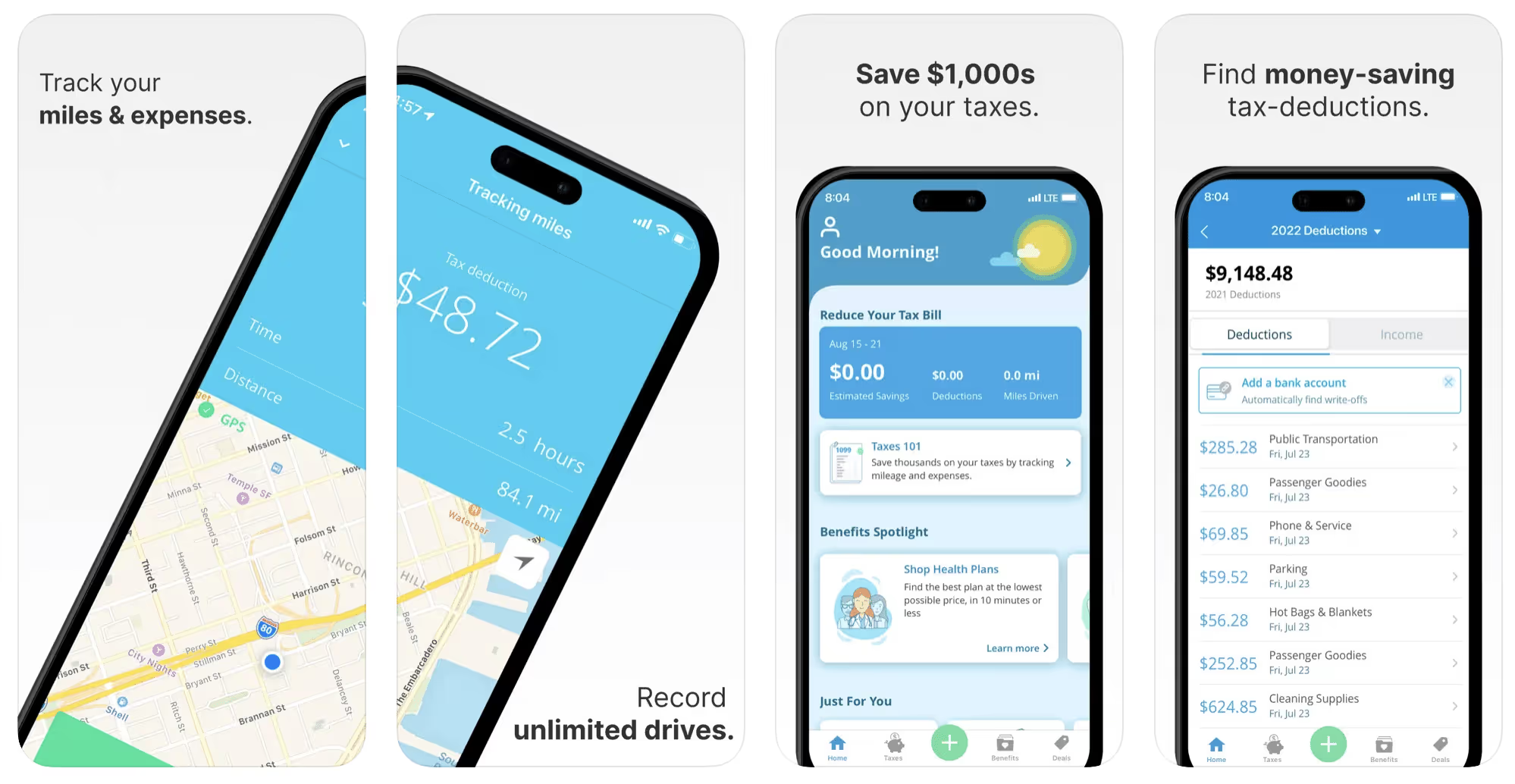
This free mileage tracker does a fair job of keeping track of the distances you rack up while gig driving, but it doesn’t automatically track earnings. It can be a big help, though, in tracking your expenses. You can link Stride to your bank account, and it will automatically scan your expenses to identify items you can potentially deduct. The app is totally free. This could make it the best free mileage tracker app, but there is a small price to pay. The app will persistently push you to consider various insurance plans that they are affiliated with. If you don’t mind that, this is a solid mileage tracker, even if it doesn’t track your earnings.
Available on Android and Apple: Yes
Ratings: 4.8 stars on App Store, 4.6 stars on Google Play
Free version: Yes
Subscription price: None. The app is free.
Created specifically for gig drivers: No
5. Gridwise
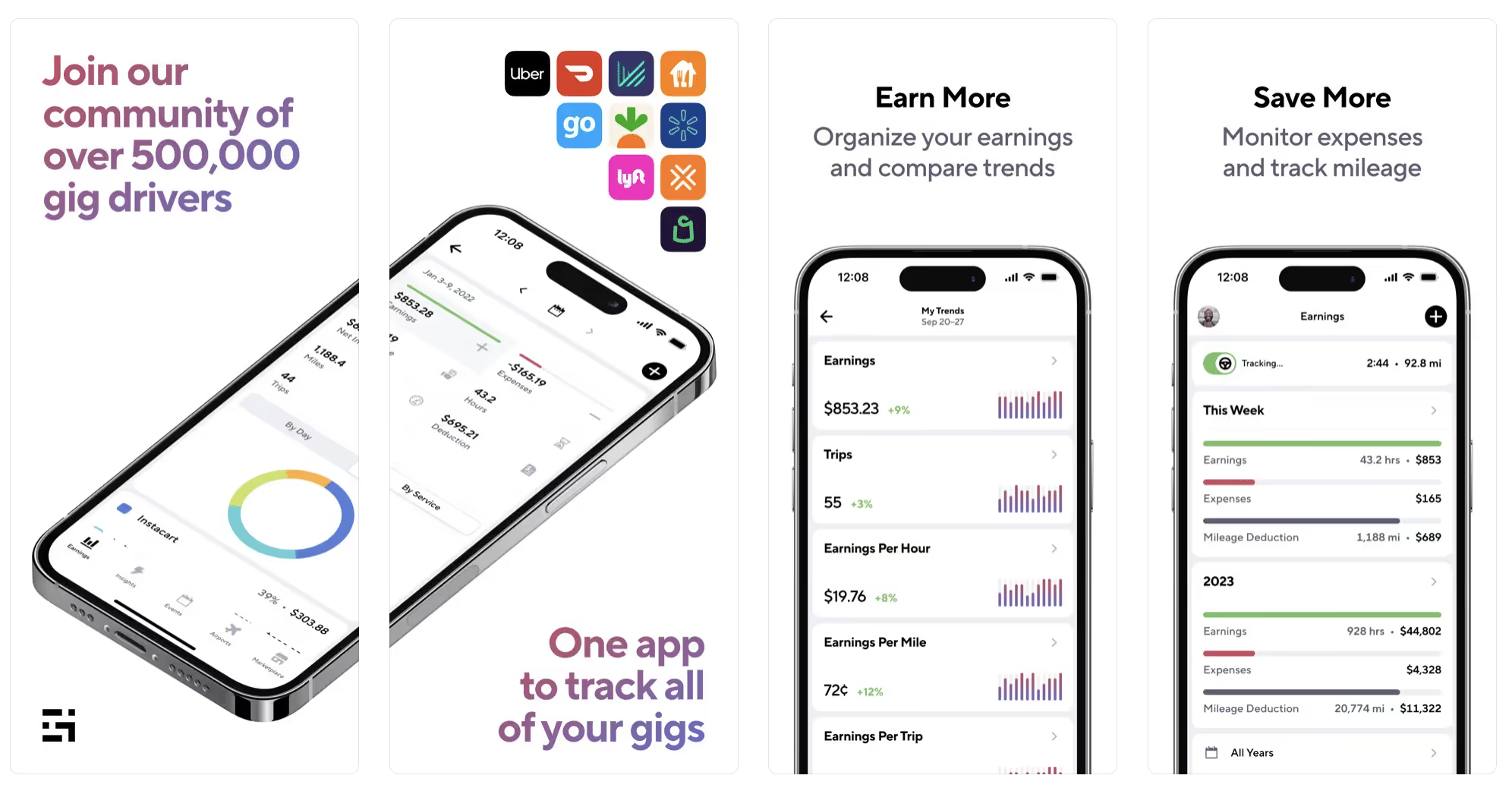
Gridwise has a free mileage tracker and free features that record your income and expenses. It gives you access to insurance and benefits, as well as insights about the best times and places to make the most money while gig driving. The Gridwise mileage tracker captures all the miles you drive while you’re on your driving shift, and it can be used if you have other trips you need to make which qualify as business travel.
Drivers love it because it is geared toward the needs of rideshare and delivery workers, providing free information about airport departures and arrivals, event start and let out times, weather, traffic, and more. The Gridwise Plus subscription adds value by providing additional insights and reports, discounts on benefits, the ability to export data in .csv format,, and more.
Available on Android and Apple: Yes
Ratings: 4.9 stars on App Store, 4.6 stars on Google Play
Free version: Yes
Subscription price: $9.95 per month for Gridwise Plus, or $95.99 per year (a $23.41 savings)
Created specifically for gig drivers: Yes!
What is the best mileage tracking app?
Now that we’ve checked them all out, we’re positive about the answer to that. Hands down, it’s Gridwise. Are we biased? You bet we are! But drivers love it too. Gridwise is the best mileage tracker app—and so much more. So many of the features are free, and the subscription to Gridwise Plus will pay for itself with additional insights to boost your earnings and deeper discounts on products and services.
Most important, Gridwise is designed specifically for gig drivers by experts who were once gig drivers themselves! Knowing what gig drivers need is a crucial step in creating an app that rideshare and delivery drivers can really use! Here are a few of the features, besides mileage tracking:
- seamless earnings tracking
- automatic, on/off toggle and manual mileage tracking
- mileage categorization
- airport, traffic, weather, and events information
- insights into where to drive and when to drive
- reports showing earnings across the platforms you use
- discounts on countless products and services for drivers
- additional resources for finding side gigs
- an informative and comprehensive blog
- affordable benefits, including insurance, medical, dental, and alternative practitioner discounts
- a community of drivers just like you
Don’t settle for just any app. Get the best mileage tracker, and so much more, from Gridwise!
[elementor-template id="21599"]
What Records Do Gig Drivers Need To Keep Track Of For Taxes?
* Gridwise does not provide tax, legal, or accounting advice. This material has been prepared for information purposes only, and is not intended to provide, and should not be relied on for tax, legal, or accounting advice. You should consult your own tax, legal, and accounting advisors before filing your return.
Record keeping? Who signed up for that? As a gig driver, it’s part of what you need to do to keep your business running. Don’t worry. It’s not as complicated as you might have been led to believe. This post will show you what you need to keep track of and the best ways to gather and preserve your tax-related records. We will cover
- How record keeping can help reduce income tax for freelancers
- Taxes and freelance work: Record keeping requirements
- Mileage tracking: Motives and methods
- More deductions and records to keep
- Make tax time easier
How record keeping can reduce income tax for freelancers
Tax time is not “fun time” for rideshare and delivery drivers. It’s easy to get used to watching your earnings pile up and come to believe they are all yours. Unfortunately, that isn’t the case. Gig work taxes can be especially painful because no one takes them out of your earnings for you, until the tax authorities insist that you do it for yourself.
You will need to show the tax authorities your income records, and they will gladly tell you to send them what they determine to be their fair share. Think that’s not fair? You’re not alone, but that doesn’t mean you’re going to get out of paying gig work taxes.
But you can find ways to pay the smallest amount that is legal and possible. The best way to defend yourself against having to pay astronomical amounts when you file your return is to know what expenses you can deduct from your gross income. When you subtract deductible expenses from your gross income, there is less left over to be taxed. This reduces the amount they can hit you with gig worker taxes. and can make your tax bill substantially lower.
While you want to keep good records so as to be in compliance with taxation entities such as the IRS, you also want to ensure you have proof of every last deductible expense you have accrued during the year. There are other records you must keep as well. Let’s look at some of the considerations you have, realizing that you now need to know how to do taxes as a freelancer.
Taxes and freelance work: Record keeping requirements
So many gig drivers fail to understand the responsibilities they have as independent contractors. Those who work part time for very few hours may even believe they don’t have to report the income they get from their driving gig payments. That would be a big mistake!
The company or companies you work for report your income to the IRS and state tax authorities. If you fail to report that income, you will risk some rather painful penalties. The IRS taxing side hustles is as much of a thing as the IRS taxing income from any other job. Your best bet is to report what you’ve earned, honestly and completely, and comply with other record keeping requirements such as
- gross income
- deductions and credits
- purchases (items you purchase and resell, such as snacks or bottled water)
- a log of all your mileage (or vehicle expenses, if greater)
- a list of all expenses and assets, such as utilities and other expenses associated with having a home office and equipment
- machinery and furniture you own, including when it was acquired, how much it cost, whether you previously took deductions on it, and selling price, if applicable (this includes your vehicle)
More things to consider:
- Pay attention to the retention of your records. You’ll need to keep all tax-return-related items— including income, deductions, and any tax credits reported— until the period of limitations runs out (3 years from date you filed, or 2 years from when you paid tax. If you have employees, keep your records for at least 4 years.)
- If you want to avoid paying self-employed taxes, you may want to set up a corporation or Limited Liability Corporation (LLC) for your business. This allows you to separate all your gig driving earnings from personal income, and permits you to take advantage of the additional advantages of working through a corporation. This includes exemption from self-employment taxes. You can learn more about how to pay self-employment taxes, if you opt for that, in this post from Keeper.
- You should always keep a separate checking account for your business, for convenience as well as clarity. While this is not a legal requirement, it is a smart move if you want to have an easier time managing your business.
- You are required, as an independent contractor, to file your taxes quarterly. Check out this Gridwise blog post for more information about quarterly tax payments and other matters that make filing delivery, Lyft and Uber taxes easier.
Mileage tracking: Motives and methods
Why you need to be meticulous about mileage
Mileage deduction, or the costs of operating your vehicle, will be the most important item to account for when you consider how to file taxes as a freelancer. While mileage is an important deduction for all independent contractors, as you might imagine, it’s even more essential for rideshare and delivery drivers.
There are two ways of keeping track of your mileage deduction. One is to use the IRS’ standard mileage deduction, which for 2022 is 58.5 cents per mile. This number takes into account the costs of operating your vehicle, from fuel and maintenance to registration, insurance, and depreciation. Alternatively, you can calculate all your own vehicle operating costs, but only after your first year of using the vehicle. You may discover that this second option allows you to have more money deducted from your taxable income. Learn more about the options for deducting your mileage in this Gridwise post.
No matter which way you decide to calculate the deductions for your mileage, you need to know what mileage you can and cannot deduct.
You can deduct
- miles driven to and from home when you go out to drive or deliver
- miles you accrue during your trips
- miles you drive on any other trips you make that are necessary as part of your business.
Examples:
- driving to return a lost cell phone or to an Uber Hub or another physical location where your company might make driver support available
- driving to pick up supplies, to get gas, or to have your car cleaned, serviced, or detailed, etc.
You cannot deduct
- miles you drive for personal trips
- miles for any trips you take that do not directly affect your business
Note: If imagining yourself becoming the not-so-proud owner of a shoebox filled with paper receipts gives you nightmares, stop worrying. Electronic records of purchases will satisfy reporting requirements. If you use cash, you can scan copies of your receipts, in some cases, right into your recording software or app. Gridwise and Keeper give you a simple to use interface that keeps all your receipts recorded without the messy pile of paper.
Mileage tracking methods
By now, you’re probably convinced that tracking mileage is important, despite all the other things drivers have to do. Now, let’s look at your options for keeping accurate records.
- Manual tracking: You can keep a logbook where you list every trip you make, starting and ending mileage, the date, and purpose of the trip. While this would work, it’s certainly not convenient. Besides, if that logbook gets lost, your plans for having a nice, fat tax deduction will go by the wayside.
- Spreadsheet: This is a bit more convenient and sophisticated way of tracking your business mileage. You’d need to be meticulous about making your entries, though. Even if you keep a spreadsheet app on your phone, it could be time consuming and inconvenient to keep doing it with all the other things going on in a rideshare or delivery driver’s day to day life.
- GPS-based mileage tracking apps: There are a bunch of apps that track mileage based on your GPS location, and most of them are pretty accurate and far more convenient than taking constant readings of your odometer. Your driving apps, such as Uber, Lyft, DoorDash, or Instacart, may also track your mileage, but be careful here. They will only track the miles you drive while you’re on a trip or delivery. They don’t count the miles you drive going to pick up a customer or when you make your move toward a restaurant or store.
Gridwise, on the other hand, will track all the miles you clock while you’re on your shift. All you need to do is make sure you start tracking the minute you leave home, and every gig driving mile will be logged. - OBD-II mileage tracking systems: There are plug-in modules that assess your vehicle’s mechanical health and track your miles. However, many authorities question the ability of OBD-II mileage tracking systems to get get accurate odometer readings. Insurance companies don’t consider them to be accurate enough gauges of odometer readings.
While mileage is a crucial deduction when you’re preparing your Uber, Lyft, or DoorDash taxes, it isn’t the only expense you’ll want to record.
More deductions and records to keep
Expenses you can deduct
You’re entitled to include the cost of other expenses that are directly related to your driving business. These include
- vehicle expenses
- equipment for your car and home office
- extra services and subscriptions
- business tools, including apps and software
You can learn much more about gig driver expenses that are eligible for deduction in this Gridwise article.
Ways to track and preserve deductible expenses
- The manual method: Just like you can with mileage, it’s possible to use a manual method, but in addition to logging each expense into a ledger, you would also need to keep physical receipts.
- Spreadsheets: You can record your expenses on a spreadsheet. This is somewhat less awkward than manually logging mileage, but there still will be plenty of room for failing to remember the case of water you bought for your customers, or losing the receipt from the thermal bag you purchased.
- Accounting software: You can use software that helps you track your expenses. This method usually interfaces well with any tax preparation software you or your tax professional might use.
- Gridwise: There are other apps that help you track your expenses, but Gridwise is designed specifically for gig drivers. It automatically tracks earnings and mileage, and lets you record your expenses the minute they come up. Gridwise’s partnership with Keeper gives you the ability to scan receipts and access a tax professional. This is a seamless way to record your expenses and a big help in learning how to file Uber taxes. Gridwise even provides .csv output, so you can feed your Gridwise data directly into tax preparation software. Check out what Gridwise and Keeper will do to super-charge your tax filing powers.
Organizing and categorizing expenses
Before you even begin to record expenses, you’ll want to set up categories for them. You can start by reviewing the categories listed above and checking out the Gridwise post that lists possible deductions.
If you’d like to learn more about how to categorize expenses, there is additional information available. This article from Motley Fool lists all possible categories any freelancer might use and also gives tips on how to customize them for your driving business.
One last tip
Using Gridwise, particularly for tracking mileage, is the easiest way to be in compliance with the IRS’ rules for deductible mileage. Gridwise tracks all the miles you drive for your gig, beyond what your company’s app might record. At the same time, you can log on and off Gridwise when you start and end your shift, so personal miles won’t be recorded. This eliminates confusion while capturing every deductible mile.
Gridwise Tax Help, a partnership with Keeper, has been created specifically to serve gig drivers. It provides affordable and easy ways to record expenses, scan receipts, and find deductions by analyzing your expenditures. Read about free resources from Keeper you can use to be fully prepared for tax season, and get all your earnings and expenses on the record.
Get the world’s best assistant for rideshare and delivery drivers, and tax help too.
Make tax time easier now!
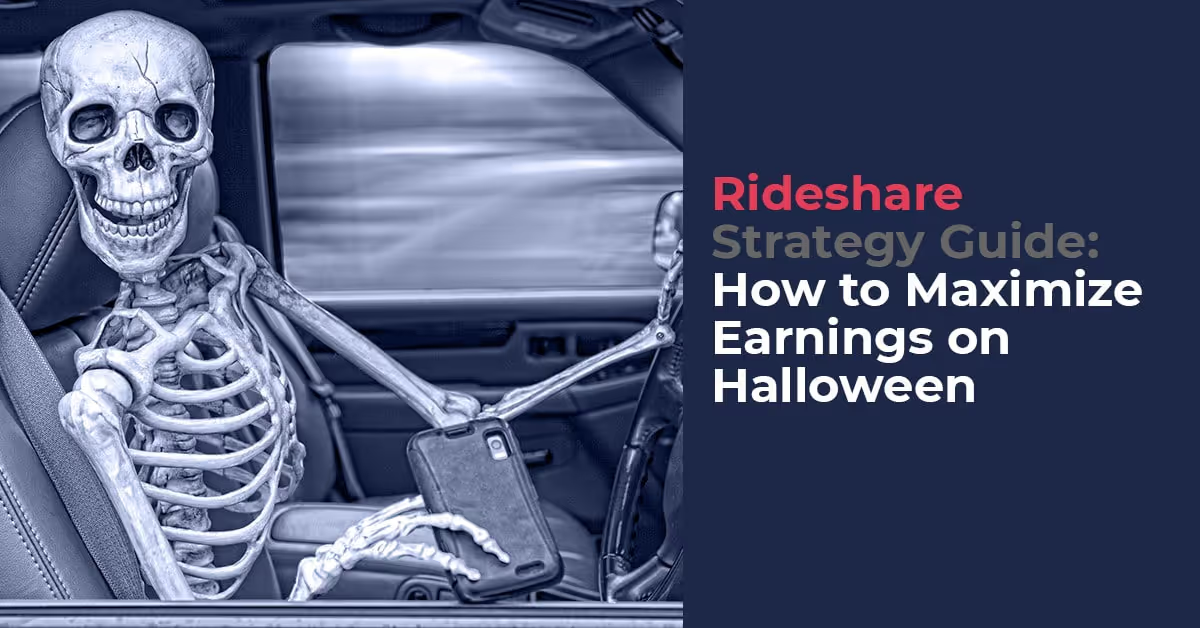
Rideshare Strategy Guide: How to Maximize Earnings on Halloween
There are a few days every year that are special for rideshare drivers.
The best holiday earnings for ride share drivers are New Years Eve, St. Patrick's Day, Black Friday, Christmas Day and Halloween are days where rideshare drivers can put up numbers that are unbelievable. We’re talking $100 an hour - unbelievable.
Even on the best of days, most rideshare drivers aren’t making $100 an hour like the guy above; however, long weekends and holidays still tend to provide higher earning opportunities.
Since Halloween is right around the corner, we wanted to find out exactly how much more rideshare drivers were making during a Holiday like Halloween, so we checked out our anonymized data from last year and compared earnings during the week of Halloween to earnings two weeks before and two weeks after. The results are clear:
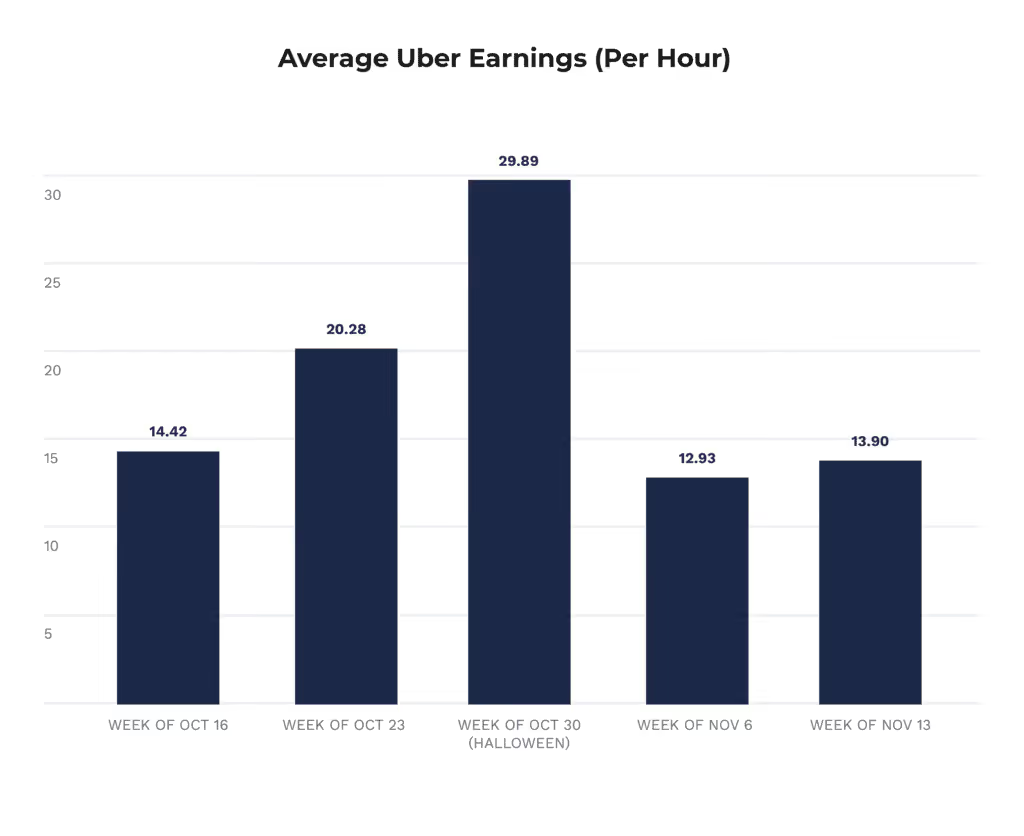
Drivers are earning significantly more money during the week of Halloween than the weeks right before and after.
This is great to know, but what’s really going to help is understanding how these drivers are boosting their hourly earnings so significantly. We talked to a few veteran drivers who have crushed their fair share of Halloweens to find out how they plan to tackle the spookiest holiday this year and we’re sharing the five strategies that we believe are going to rule Halloween 2018.
Let’s dig in!
Strategy #1: Forget about the surge
The surge isn’t dead… yet. However, in many markets like Chicago, D.C., Charlotte, Baltimore and Pittsburgh, it isn’t what it used to be. “It’s time to start getting used to life after surge,” says Jason, a Chicago-area rideshare driver. “Say goodbye to 5.2x surges and $200 unicorn rides.”
Every market is different, but if you’re in a city that has implemented flat-rate surge pricing that caps your surge fee at a certain dollar amount, you need to forget about the idea of making a ton of money on surges. That is not to say you won’t see any surges at all, but instead of hoping for and chasing surges, you need to build your strategy around finding areas with the most passenger demand and the least driver supply.
Strategy #2: Consider suburban areas
If you’re looking for a strategy that is going to position you near high passenger demand with relatively few drivers, you need to consider the suburbs. In the downtown or popular going out areas of your city, there is always plenty of demand on Friday and Saturday night. During Halloween weekend there will be more demand, but there will also be more drivers on the road. With more drivers on the road comes more traffic.
By focusing on the popular Friday and Saturday night areas you would normally frequent, you’re putting yourself in a position to get the volume of rides you normally see while sitting in traffic. This may have been more or less ok in the past because of lucrative surge pricing, but if you’re in a city with a capped flat-rate, this might not be an attractive option any longer.
Come Friday and Saturday night, consider moving out into the suburbs, which will still see an increase in overall demand, but in less dense areas with fewer drivers. This means you’ll stay busy without having to deal with traffic; and as we all know, drivers get paid more by the mile than by the minute. Rack up the most miles in the least amount of time in the suburbs.
Also, don’t forget to drive for multiple TNC’s whenever possible, so you can ensure that you are minimizing your downtime.
Strategy #3: Use destination filters to reposition yourself
If you use the strategy above to tackle the suburbs, you may find yourself taking passengers who are traveling from the suburbs, downtown. This should make for a nice long fare, but you may find yourself dangerously close to traffic in the traditionally popular areas of your city. Use your destination filter to find passengers heading back out to suburban areas.
If you are starting your night in the suburbs and want to get downtown at some point, just be sure to use your destination filter and you’ll likely catch a party goer looking for a ride into the city.
Strategy #4: Focus on Halloween Day
When Halloween falls on a weekday, many drivers assume that most of their money is going to be made on the weekend prior. However, our data shows that Halloween day is actually when drivers see the biggest uptick in their overall earnings. That’s because while there are more passengers on the road, the majority of those passengers would already be out, even if it wasn’t Halloween. People don’t usually hangout at bars on Tuesday or Wednesdays night, which Halloween happens to fall on this year.
So if possible, invest your time in going out on Halloween day, as that might be your most profitable Wednesday of the year.
Strategy #5: Have a little fun
Don’t forget that Halloween is supposed to be fun… and it doesn’t hurt that passengers tend to tip a little more to drivers that buy into the holiday. Don’t be afraid to deck out your car, wear a costume or give out a little candy.
Check out what drivers have done on Halloween in the past.



Now we want to hear from you! What’s your Halloween driving strategy? Let us know in the comments below.
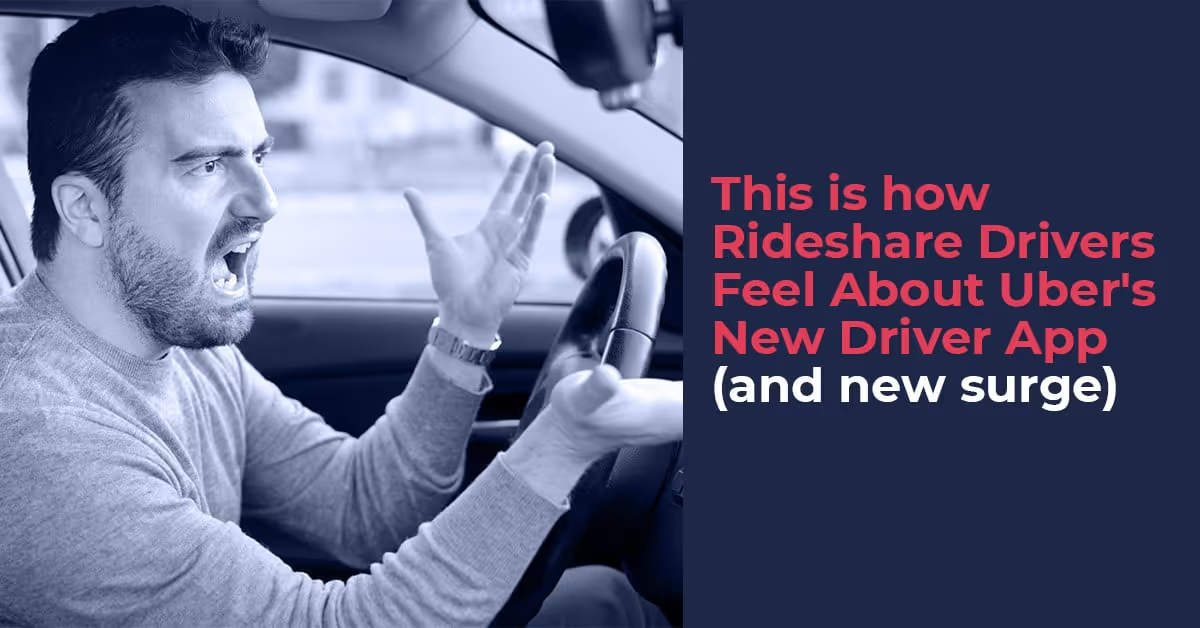
This is How Drivers Feel About Uber’s New Driver App (and new surge)
Chatting with Rideshare drivers is always an experience. This industry has some of the most interesting, charismatic, and just outgoing people I have ever had a chance to work with, so every conversation I have with a driver feels like a completely new adventure.
These days, many of my interactions with drivers have been related to the new driver app that Uber rolled out over the past three months. Many drivers are really enjoying the new driver app as there are a number of really nice improvements. For one, the map interface is much cleaner and the navigation has improved.
You will also see improved messaging capabilities, an overhaul of many key screens, and your earnings are even easier to find. We won’t do a complete rundown of all of the new features in this post, but you can read about them all here.
These welcome additions should clearly help drivers, but even with all of these improvements over the last few weeks, the vast majority of my conversations with drivers have been about one thing…
The Charlotte Surge.
It sounds like a myth doesn’t it? Like a story passed down from rideshare driver generation to rideshare driver generation, except the Charlotte Surge is a real thing, it’s a big part of Uber’s new app, and drivers really hate it.
To be clear, the Charlotte Surge is just another name for Uber’s latest surge pricing system which instead of giving drivers a multiplier, gives drivers a flat dollar amount that will be added onto there regular fare as the surge fee.
This means drivers see maps that look like this:
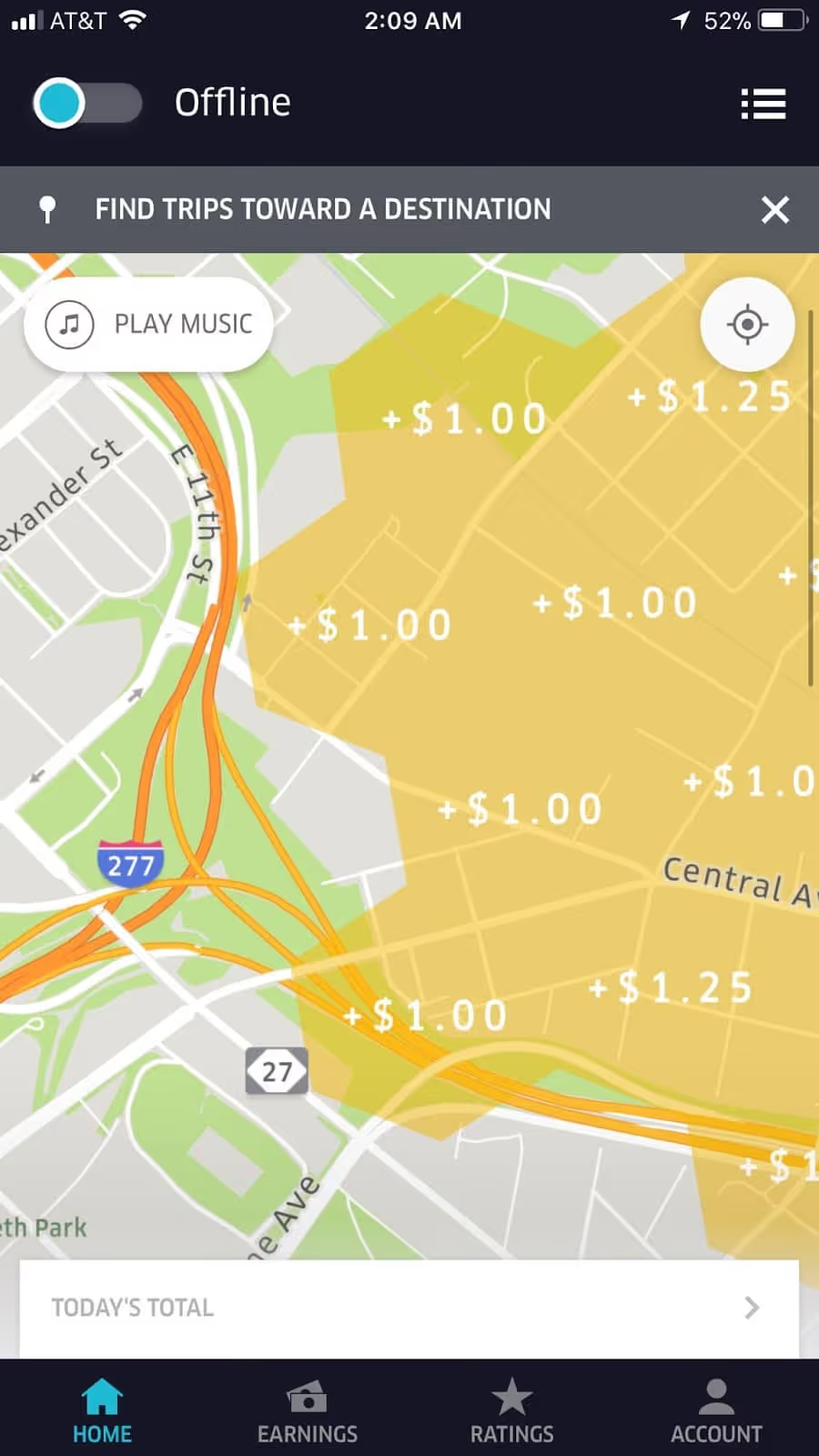
Notice that instead of multipliers you see dollars that represent a flat fee to be added to your non-surge fair.
This means that a driver that picks up a rider from downtown Chicago and drives out to the suburbs won’t get between 1.5x or 3x the total ride, they’ll get whatever the flat fee is, which could be much lower than they would have earned with the old app.
What really has drivers up in arms is that riders are still charged a multiplying fee. So the cash that used to go to the driver, now seemingly is going to Uber.
Well, after a few weeks and dozens of conversations with rideshare drivers about the new app, we decided to gather quantitative data from rideshare drivers across the US to understand how they are feeling about Uber’s new app, and the results of our survey are in!
So let’s take a look at what we found.
Takeaway #1: Uber Drivers Believe Their Earnings Have Decreased
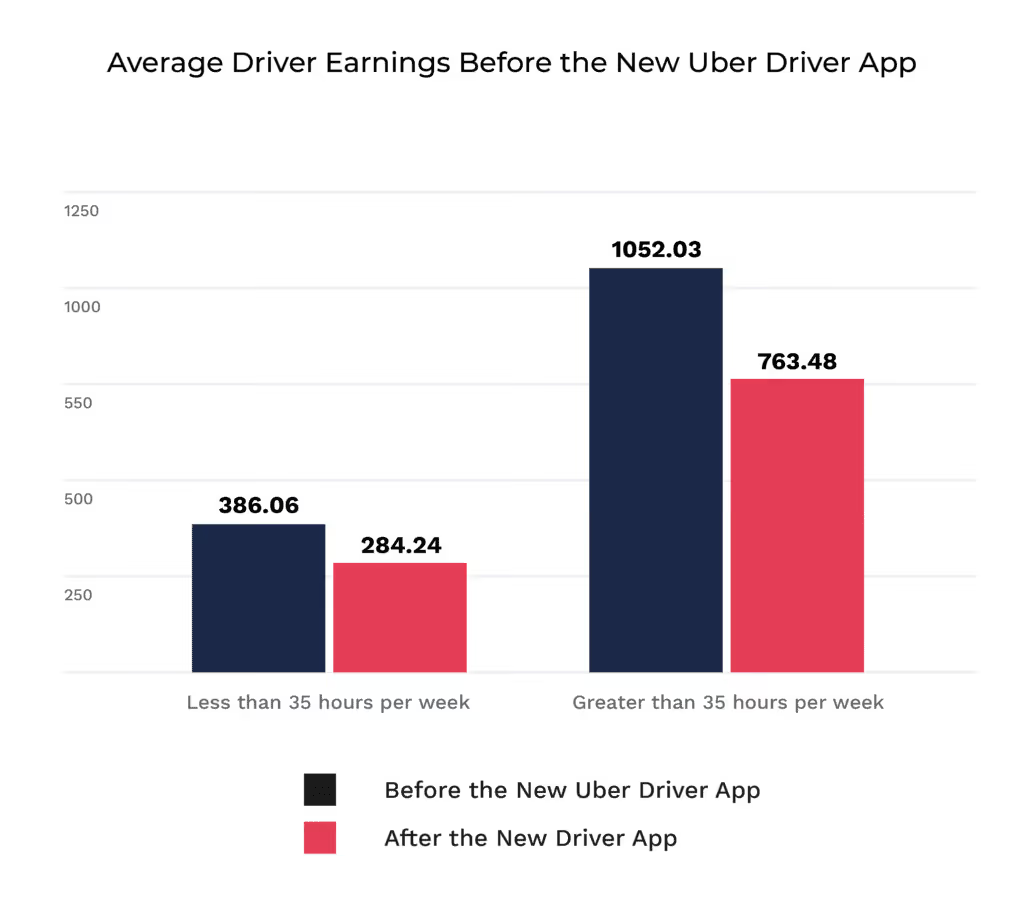
Drivers that we surveyed have overwhelmingly expressed their dissatisfaction with their income after Uber’s latest Driver App update. In fact, 90% of drivers nationwide expressed that they are now making less or the same amount they were making before.

Drivers working over 35 hours per week claim to be making about $288 less per week than they were previously, while drivers working less than 25 hours per week are said to be making about $101 less per week. This represents a 27% and 26% difference in overall weekly earnings.
Takeaway #2 Uber Drivers Are Not Fans of the New Surge and are Receiving Fewer Requests
The next logical question is why. Why are rideshare drivers making earning less?
Well, you would think that the easy answer to this question would be the “Charlotte Surge” that we’re hearing so much about, and it certainly looks like that is part of the answer.
When we asked “What do you dislike the most about the new Uber Driver App?” 26 of 145 respondents to that question mentioned “surge”. Here’s what they had to say:
Surges are very bad. They show a dollar amount as opposed to a percentage. We make less $.
Earning details are delayed and surge prices are capped so long trips are not worth it.
Uber charges the rider the old fare with surge and stealing my portion
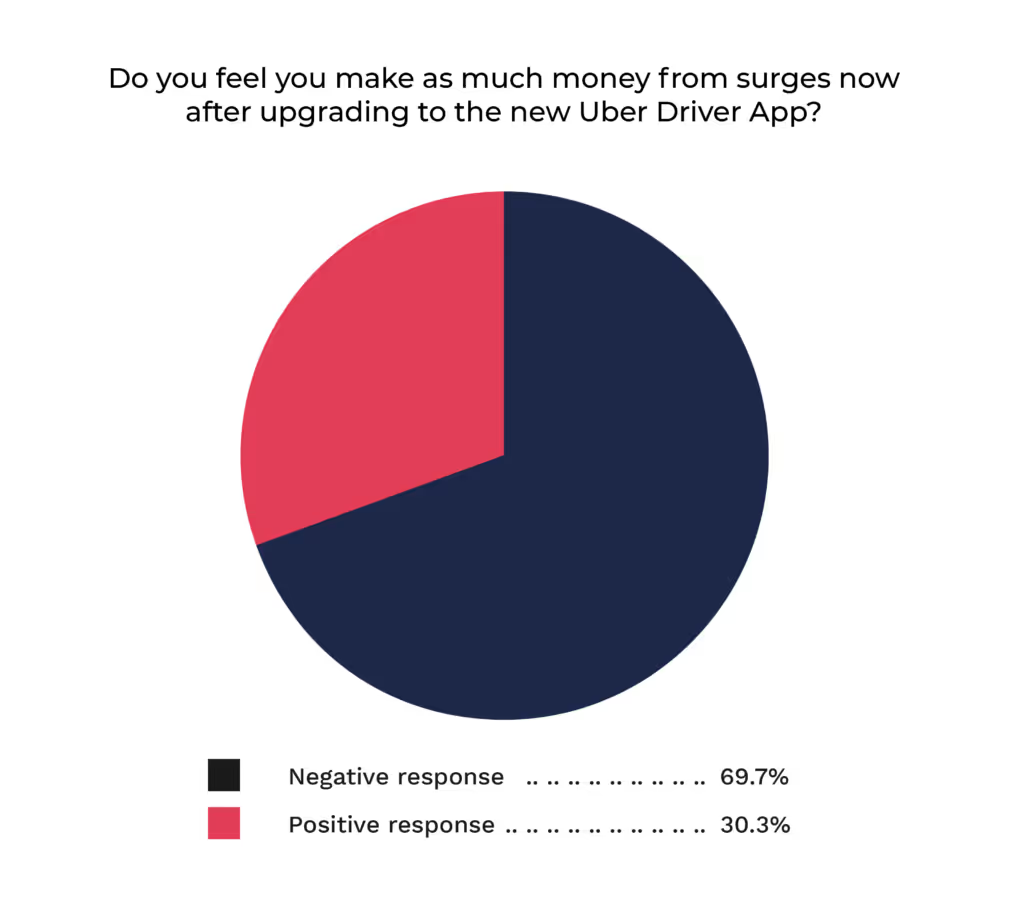
We then asked flat out “Do you feel you make as much money from surges now after upgrading to the new Uber Driver App?” 103 out of 145 respondents to this question had a negative answer indicating that they did NOT feel like they were making as much money from surges now after upgrading to the new Uber Driver App.
Takeaway #3: Uber Drivers are Receiving Fewer Requests
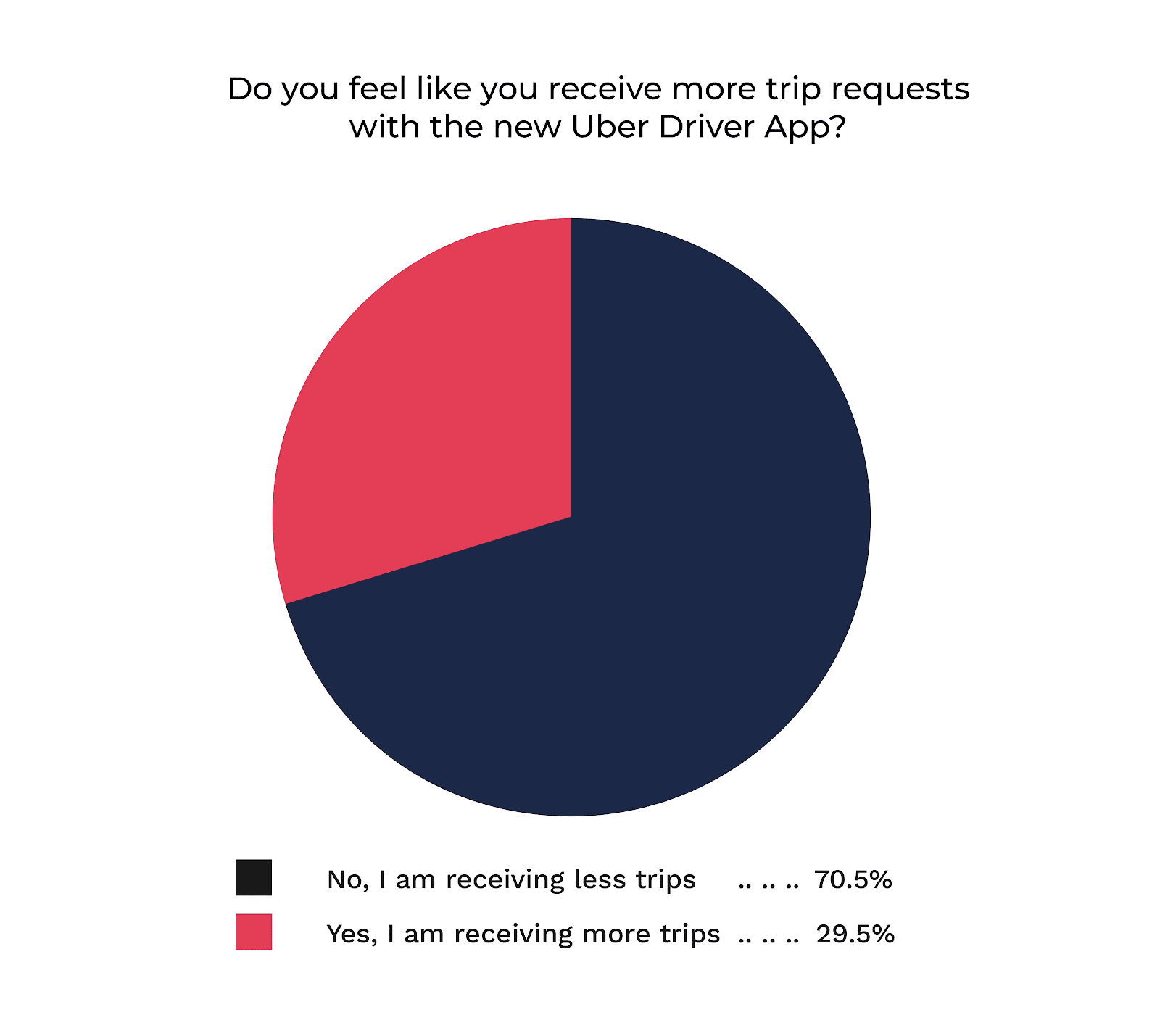
Clearly, Uber’s new surge pricing is affecting driver earnings, but that’s only part of the story. Drivers are also saying that they are receiving significantly fewer trips after the update.
A whopping 70% of survey respondents said they were receiving less trips.
We did not expect this.
Why would drivers be receiving fewer trips from the new app? We would think that this number would stay consistent.
Well, drivers could be feeling this way for a number of reasons. One being the technical issues that Uber seems to be experiencing. Again, when we asked drivers “What do you hate the most about the new Uber Driver App?” they had the following answers:
The app freezes more, the GPS is worst…
It has issues crashing. Causing drivers to lose trips
Glitches with trip processing
Can't get the navigation to work most times, Missing trips and payments.
It keeps freezing so I have to force quit it often and the seeing lower number of requests
These are technical issues that we would expect Uber to figure out pretty quickly.
We also found that drivers in general just were not used to, or did not like Uber’s new layout. When asked the same question as above, other drivers had the following answers:
Some things are harder to get to
Features missing. Trip type too small on ping. Nav button too small. Missing cancel and acceptance rates.
Freezes. Poor Navigation
It appears, that a number of Uber drivers are having problems just getting the app to work as it should and also getting used to the new interface. While it appears this is having a significant effect on drivers, we would expect the kinks with the app to be worked out.
Takeaway #4: Uber’s New App is Making Drivers Consider Other Services
One troubling sign for Uber is that the Uber’s new app appears to be making drivers think twice about driving with Uber. Drivers are claiming that Uber’s new app is affecting them enough to consider using other services.

It’s no secret that most drivers work with at least 1 other rideshare service regularly, however, Uber tends to be the app most drivers see as their main app. Uber’s new driver app could be pushing drivers to Lyft, Via, and Juno.
So how can drivers continue to find success even in the face of “The Charlotte Surge”?
So it’s clear that drivers aren’t fans of Uber’s new driver app and their flat-rate surge pricing, and it does appear to be affecting the wallets of drivers. But, there are a few things that drivers can do to ensure that they’re still maximizing their profits.
1 Forget About the Surge
Even before Uber’s new flat-surge pricing seasoned drivers knew that surge chasing would leave you driving back and forth through your city getting very few ride requests. With the changes to Uber’s driver app, not only must drivers not chase surges, but you must eliminate them from your income calculations. Meaning, don’t plan to make your money based on surges. Instead, arm yourself with information so that you can drive where the most passenger demand and the least driver supply is.
2 Plan Ahead When Driving
If you’re going to focus on finding the maximum amount of passenger demand and the minimum amount of driver supply, then you need to plan ahead. That means know when and where you plan to drive before you goout everyday. You should know what events are going on in your city, when the airports will be busy, when travelers will be leaving from their hotels to go to the airport, and you should always be aware of the weather.
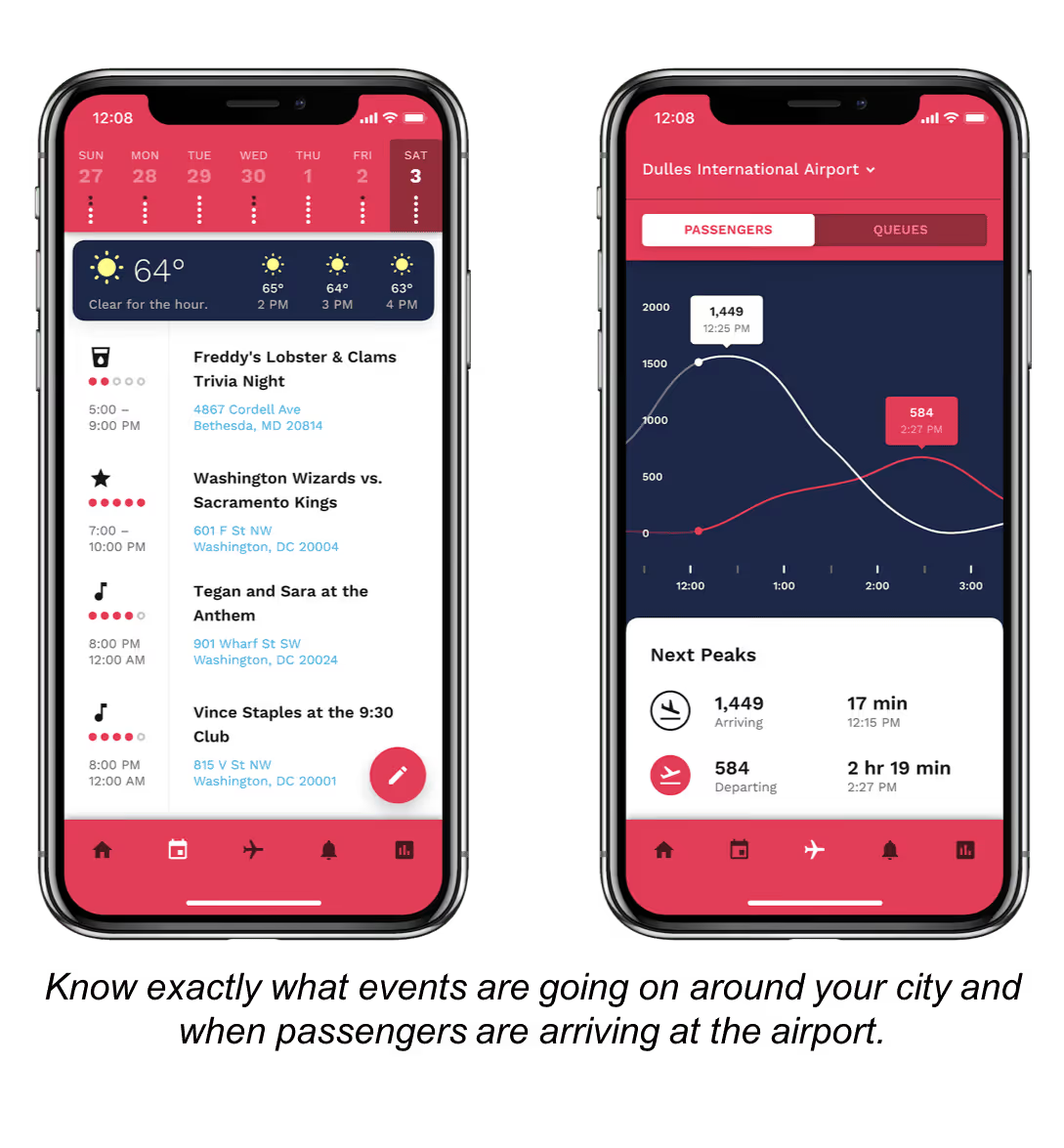
3 Know What’s Happening in Real-Time
Even if you plan ahead, you still need to know when certain events and happenings around your city that you didn’t plan for are ending or beginning so you can position yourself to take advantage of a peak in passenger demand. Use a tool like Gridwise ensure that you never miss out on an opportunity in your city.
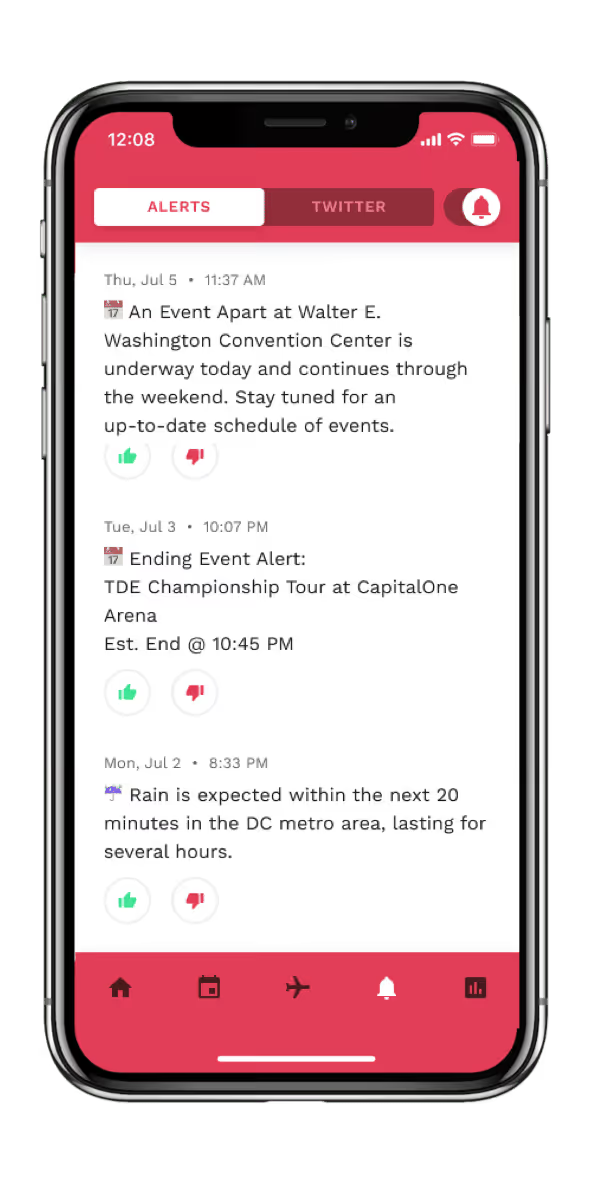
4. Track Your Performance
You cannot improve what you don’t measure.
Many drivers track their mileage for tax purposes, but the true value of tracking your mileage and earnings is so you can understand what’s working and what’s not. Track your mileage and earnings on every shift so you can understand if your performance is trending up or down and figure out what driving strategies are most profitable for you.
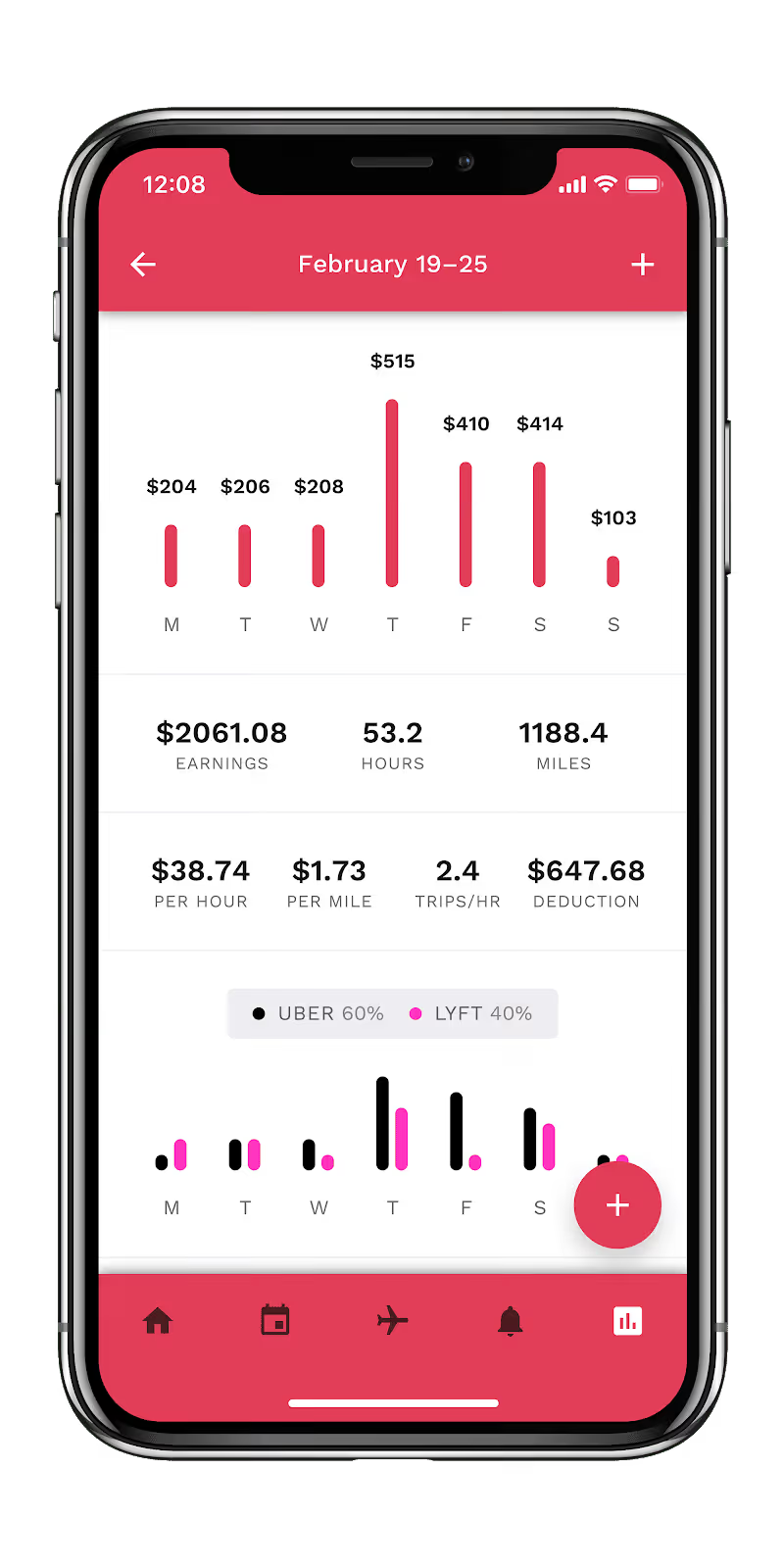
Track your performance so you know what’s working and what’s not
Now, we want to hear from you drivers! Have you been making more or less with the new Uber App? Let us know in the comments below!

Rideshare Rules: Do I HAVE to Allow Pets in my Car
I like dogs... I really do.I may not be coming home with an 8-week old Great Dane anytime soon, but I understand the appeal.What I don't like, however, is dog fur. Specifically, dog fur in my car, on my cloth seats.Nope. Nope. Nope.So when I started driving for Uber a few years back, one of the first things that I looked up was the rules for passengers with furry friends. It turns out, that drivers actually have a fair say in this... Except when it comes to service animals.
Service Animal Policies
When it comes to service animals, rideshare companies don't make the rules, the government does.Currently, both rideshare companies and taxi companies must follow ADA laws as transportation providers. After a 2014 lawsuit from the National Federation of the Blind, Uber and other rideshare companies implemented a strict Service Animal Policy. See them below:
Lyft Service Animal Policy
When it comes to transporting riders with service animals, drivers on the Lyft platform should remember one thing: Always Say Yes. That's because drivers must comply with applicable laws and Lyft’s Service Animal Policy. The law and Lyft's Service Animal Policy state that drivers may not deny service or otherwise discriminate against passengers with service animals. This means that drivers must transport a rider with a service animal regardless of whether a driver is allergic or afraid of these animals, or has a religious or cultural objection to them.A service animal is an animal, usually a dog, that is trained to perform tasks for an individual with a disability, like blindness or deafness. Service animals are not required to wear a tag or vest or be registered. Riders with service animals do not need to display any kind of proof that their animal is a service animal. In other words, if a rider with a dog says it is a service animal, the driver should transport the rider.
Uber Service Animal Policy
State and federal law prohibit driver-partners using the Uber Driver App from denying service to riders with service animals because of the service animals, and from otherwise discriminating against riders with service animals. As explained in Uber’s Non-Discrimination Policy, driver-partners who engage in discriminatory conduct in violation of this legal obligation will lose their ability to use the Driver App.Allowing service animals is a fair policy and a legal requirement so I have no problem with it. Service animals are well trained and generally docile dogs. However, there is the question of if the animal really is a service animal. The passenger could, after all, be lying to get there dog a ride. So it would make sense to ask for some sort of proof or documentation right?Wrong.According to the American with Disabilities Act, a business or service provider is not allowed to ask for or require documentation stating that a service dog is, in fact, a service dog.You can, however, ask two very specific questions unless the need for a service animal is obvious.
- Is this animal required because of a disability?
- What work or task has this animal been trained to perform?
The ADA states that these questions will determine if an animal is a service animal and if a passenger answers satisfactorily, you MUST accept that ride.But... what is considered work or tasks under the ADA’s definition of a service animal? See a list of examples below:
- Assisting individuals who are blind or have low vision
- Alerting individuals who are deaf or hard of hearing to the presence of people or sounds
- Pulling a wheelchair
- Alerting individuals to the presence of certain allergens
- Retrieving items like as medicine, a phone, or other emergency tools
- Providing physical support and assistance with balance and stability
And what is NOT considered as a work task?
- Emotional support
- Comfort
- Companionship
- Crime deterrence or potentially violent protection
Non-service Animal Pet Policy
So yes, drivers must ensure that service animals are accommodated for legal reasons, however, the pet policy for non-service animals gives drivers more freedom to choose.
Lyft/Uber Non-Service Animal Pet Policy
Although drivers aren't allowed to bring their own own furry friends along for the ride when driving (after all, some passengers have allergies or are otherwise uncomfortable with unfamiliar animals), some passengers will ask to bring their pets along with them when requesting a ride. Unless the passenger has a service animal, it's entirely up to the driver whether or not to allow the passenger’s pet in the vehicle.Drivers certainly don't have to allow passengers to bring pets, however, if you take certain steps it shouldn't be a problem to allow most dogs in your car AND avoid a hairy mess by communicating a few rules to your passenger.
Ask passengers to bring a pet carrier
Many owners of small dogs or cats will naturally bring a pet carrier when traveling, so if you have a passenger that calls and tells you they are bringing an animal, request that they bring a cage and have the animal stay in the cage for the entire ride.
Ask passengers to bring a towel
For larger dogs and animals that don't have cages, I recommend either having your passenger bring a towel or blanket for the dog to sit on, or keeping one in your car. This will help keep the dog's fur and claws off your seats.
Be mindful of the size of your car
Most passengers with larger dogs will naturally order an Uber XL and call you before attempting to get in the car with a 100-lb German Shepard. However, if you do run into someone that attempts to bring a large dog in an UberX, make sure that you can still safely and comfortably drive. If not, have the passenger request a larger vehicle.
Warn passengers about a potential cleaning fee
Unfortunately, even when we take precautions pets do occasionally make messes. If someone brings an uncaged pet in your vehicle, give them a heads up that sometimes cleaning fees occur. They'll appreciate your transparency.

The Top 10 Rideshare YouTubers you Need to Watch Today
Sometimes, rideshare drivers just need to vent and someone to relate to.
After dealing with “interesting” passengers all day, it can be therapeutic to connect with someone going through the same experiences as you. Fortunately, rideshare drivers are a tech savvy bunch and dozens upon dozens of drivers have flocked to YouTube to create compelling content around their rideshare experiences.
So in today's blog post we're going to mix things up. Instead of talking about strategy and how much rideshare drivers make, we're going to give a shout out to the top rideshare drivers on YouTube that are entertaining us every day.
This list is in no particular order and is not all inclusive, however, these are some of the most unique and entertaining driver channels we've had the pleasure of watching.
1. Ryan Is Driving
Arguably the most popular rideshare Youtube personality is our guy Ryan. He's been making video's for just over a year, and his most popular video "Woman Tries to Get a Free Ride" has over 10M views.
Not a bad audience for a rideshare driver.
Ryan's content is usually more conversational than this video. His content is great because of the real conversations that he has with his passengers. This channel's not about strategy or education, you're just here to witness a couple people in a car having a conversation, and somehow it just works.
He's also active on Twitter, so check him out and be sure to follow!
2. Marc Freccero
One of the original rideshare YouTubers and one of the most well known rideshare YouTubers is Marc Freccero. He does a ton of the more educational content on YouTube and his hit video "10 Things I Wish I Knew BEFORE Driving for Uber & Lyft" has over 850k views, so there is a good chance you've watched his content before.
The interesting thing about Marc however is that he doesn't just talk about the rideshare business, he talks about his entire life and really shows how drivers are a group of people that are generally using rideshare as a step to something more. That could be entrepreneurship, acting, being a DJ, or just being their for your family.
A lot of great content on his channel.
3. Drive Girl Drive
In my opinion, the most under-viewed rideshare Youtuber is Cecily and her Drive Girl Drive channel.
She brings a women's perspective with great videos like "My Scariest Moment as a Woman Uber Driver", which is content that we need, however, her most brilliant content comes when she is speaking directly to her viewers and giving them real advice.
4. Terry Tips
I'll be honest, as of 2 days ago I had never heard of Terry Tips and certainly had never watched one of his videos...
But after this video, he's made a instant fan.
Don't ask questions, just watch his rideshare commercial.
5. Ollie B
Ollie B is pure entertainment. He's really more of a rapper who sometimes dresses up like a nerd or grandpa, turns on the Uber app, and goes out and performs for a few passengers. The thing is he is actually a pretty good rapper and the passenger reactions are priceless.
He doesn't put out a ton of videos, but what he does is gold.
Check out his grandpa rap below.
6. Uber DC
Uber DC is a YouTuber out of, well, D.C., who is famous for his "Tip Jar Tuesday" videos where he counts his tips and talks about his week as a driver.
It is surprisingly awesome because while he is one of the nicest guys we've ever met (yes we've met!), he keeps it real and tells drivers exactly how it is.
He does a few really cool trivia videos where he plays trivia with his passengers, however, this is truly a rideshare YouTube channel for rideshare drivers.
7. munchkym
One of the most informational drivers out there making content is munchkym, AKA Kym who is also very active on Twitter.
Kym is a smart driver. She is experienced and clearly does tons of research and is thoughtful about what she says in her videos. Her ability to be real, while speaking intelligently on subjects makes for some interesting Q&A videos like the one below.
8. Baltimore Rides
One of my all-time favorite YouTubers right now is Mike who makes the Baltimore Rides channel. He started out as a fresh driver and was offering interesting tips and takes on becoming a rideshare driver. However, the video series has evolved into really a window into his life. He talks candidly about his home life, his career, and his interactions with passengers.
Not the most popular channel, but great content that goes deeper than just rideshare.
9. The Passive Driver
Will from The Passive Driver has been a YouTuber for about 10 months now and has already released some great informational videos and is tackling a few interesting questions that not a ton of people in the rideshare business have thought to ask and answer. Will is definitely a thinker and likes to experiment with different tactics and strategies, so if you are looking to drive more strategically, he's your guy.
10. Shaq
Because Shaq (and Lyft's own YouTube channel) is the awesome.
Is there anyone on this list that we missed? Did we miss you? Share with us who your favorite rideshare YouTubers are in the comments below so we can enjoy the great content!

A Data Driven Analysis of The Most Profitable Time to Drive
Over the last few months, we've interviewed countless rideshare drivers in an effort to learn from their experiences as a driver, and spread their advice among the rideshare community.
Well, we wanted to go beyond sharing general advice from drivers and start sharing more data-driven insights derived from our anonymized driving data, and we're starting by trying to understand the answer to one of the most important and common questions we hear from drivers.
When is the most profitable time to drive?
Well, conventional wisdom says that driving late nights and during rush hours proves to be the most profitable. But, let's take a look at what the data says, we'll start by looking at Earnings Per Mile by time of day.
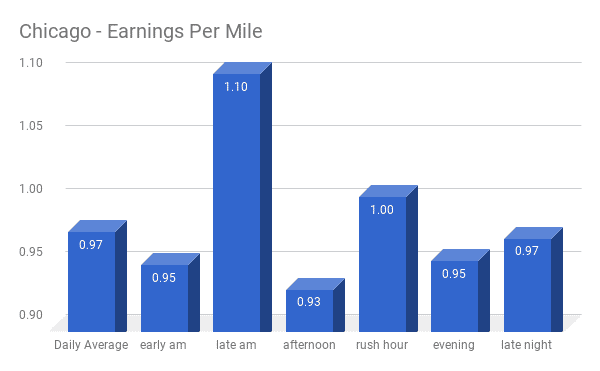
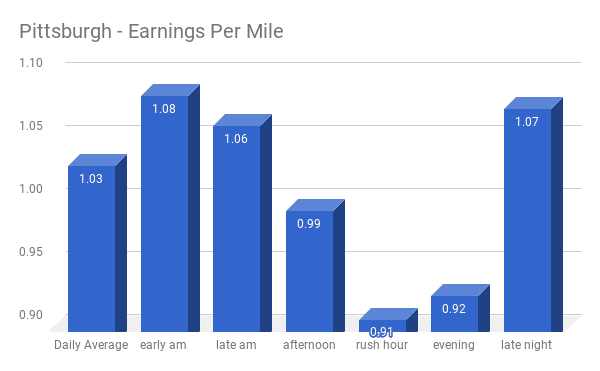
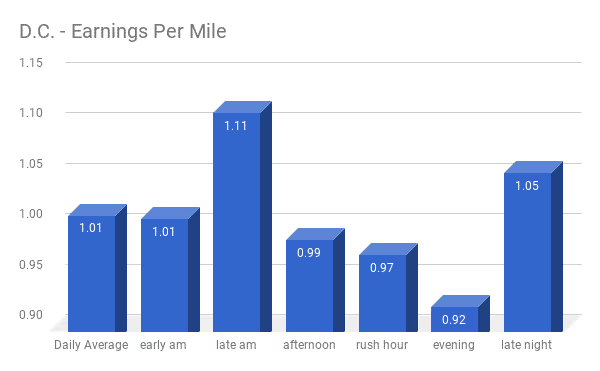
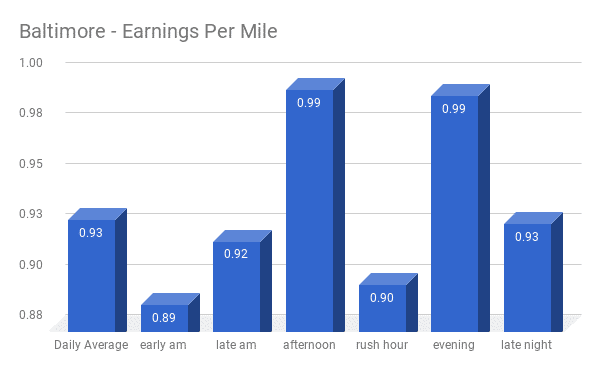
Here, we can see that across almost all markets, driving during a rush hour period means that your earnings per mile will be significantly less than other times. We can also see that driving during late mornings in Pittsburgh, D.C., and Chicago is one of the MOST profitable times to drive from a per mile basis, which is generally considered a non-peak time period.
Let's also take a look at the average total earnings per trip:
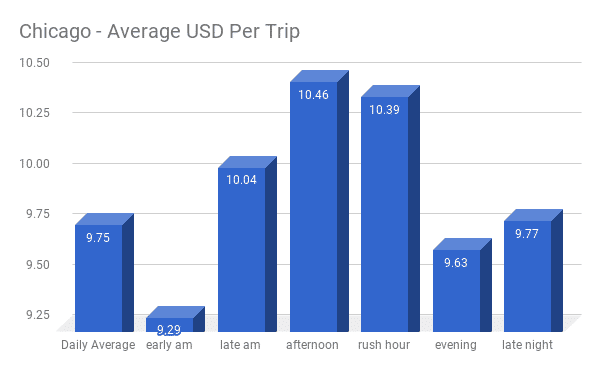
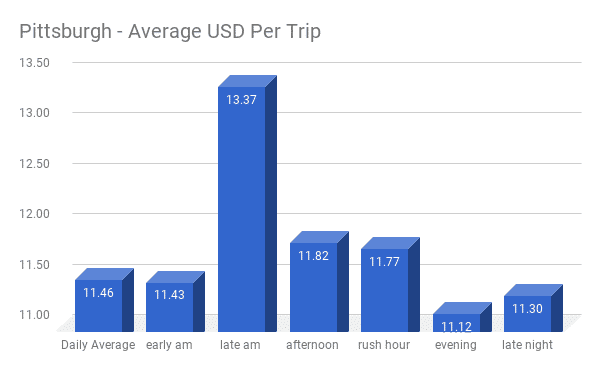
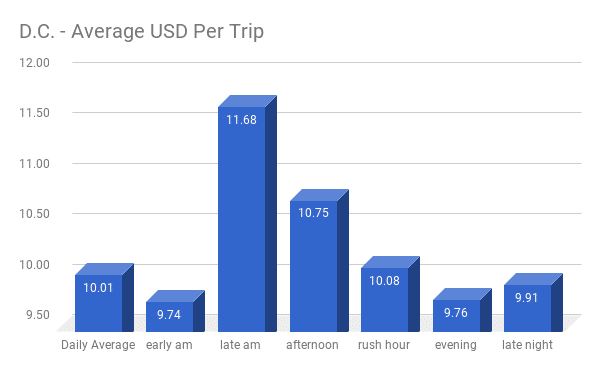
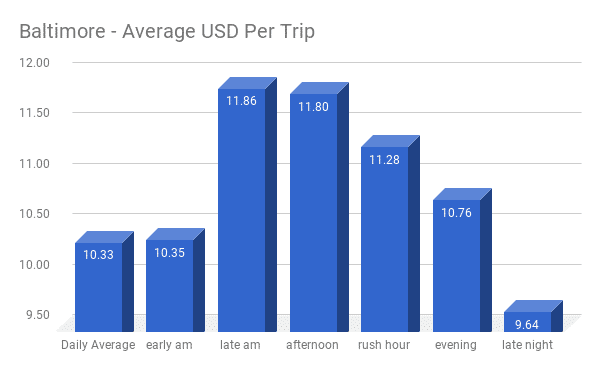
Here we can see that again, Pittsburgh, Baltimore, and D.C. have significantly higher total earnings per trip in the late morning hours than any other time, while rush hour earnings lag behind.
Rush hour is a peak hour... shouldn't it be more profitable?
Many drivers that we speak to talk about the rush hour as one of the best times to drive. It is, after-all, a time where there are significantly more potential passengers. So why would earnings per mile skew lower during these off peak hours?
To better understand this, let's think for a second about how earnings are calculated.
A drivers earnings per trip is made up of 4 variables:
- Base Fare
- Pay per mile
- Pay per minute
- Surge
The calculation for drivers earnings looks like this:
Drivers Earnings = (((Base Fare + Time(X) + Distance(Y)) x Surge Multiplier)) - Commission
Drivers generally get paid more by the mile than by the minute, so it's more profitable to take longer distance rides where you are always moving quickly than shorter distance rides that take about the same amount of time.
So if a driver were to drive a certain distances with virtually no traffic, as opposed to that same distance with traffic and a longer trip from a time perspective, he or she would likely see their earnings per hour increase while earnings per mile would remain about the same. In fact, earnings per mile may actually increase if you are driving slow enough.
So why does the morning and afternoon rush hour, tend to result in lower earnings per mile?
We have found that significantly more drivers come online to drive during these hours along with more passengers. This increase in drivers can often start to outweigh the increase in demand, which means that even if you are available during the rush hour, you may have to drive farther and farther to actually reach your customer.
This means you are putting extra miles on your car between trips, which drives your overall shift mileage up and drives your earnings per mile down because of those "dead miles".
We could also be seeing drivers repositioning themselves to what they believe are more profitable areas. These dead miles can easily add up during your shift and cause your earnings per mile to decrease. These reasons for dead miles also include:
- More cancellations in peak hours as riders try to "shop around"
- More miles spent driving trying to find a passengers drop off or pick up location
We can also see that earnings per trip is lower in almost all cities except for Chicago during the rush hour. What we are likely seeing here is earnings per trip decrease during rush hour because of the types of trips drivers are likely receiving.
Let's take a look at the total size of these cities:
Chicago: 234.00 Square Miles
D.C.: 68.34 Square Miles
Baltimore: 92.28 Square Miles
Pittsburgh: 58.35 Square Miles
People getting rides during a rush hour are usually either going to or from work/school. These trips tend to be shorter than your average trip, unless you are in a large city because work/school is more likely to be farther away.
Chicago is a much larger city than any other city in our study, so it is understandable that these trips "home" are taking much longer than those same trips home in the smaller D.C., Baltimore, and Pittsburgh.
Would it be better to look at earnings per hour?
When looking at total profitability, it is important to measure your profitability against your costs to understand what is your ROI. For many professions, this is simply earnings vs. hours spent as time is the most valuable asset you exchange in this case.
However, for rideshare drivers, while time is an important asset that we are exchanging, we are actually spending a finite amount of money per mile in order to do our jobs. In fact, Ridester released an article last year that states per mile expenses for a rideshare driver who drives a hybrid vehicle will be about $.43 per mile.
Since we want to measure our return based on our most valuable exchanged asset, we will be looking at earnings per mile primarily. However, earnings per hour is a very important metric.
Looking at earnings per trip will help tell us a story about the trips that drivers are receiving and tells us how long vs short trips effect earnings per mile.
How should drivers approach non-peak hours?
Our data suggest that non-peak hours can indeed be the most profitable, which goes against conventional wisdom. But, how?
Well, generally speaking, there are fewer passengers out on the road during non-peak hours, but there are also fewer drivers out on the roads along with less overall traffic. So if drivers can find pockets of demand in those peak hours, then they can find more open road and be more profitable.
Off-peak hour drivers will have to be more strategic, so check your events calendar on Gridwise to understand where rider demand might fluctuate and when rider demand at airports will be highest.
Drivers should also be working to avoid traffic by leveraging a mixture of Gridwise, and your preferred navigation tool (we prefer Waze!).
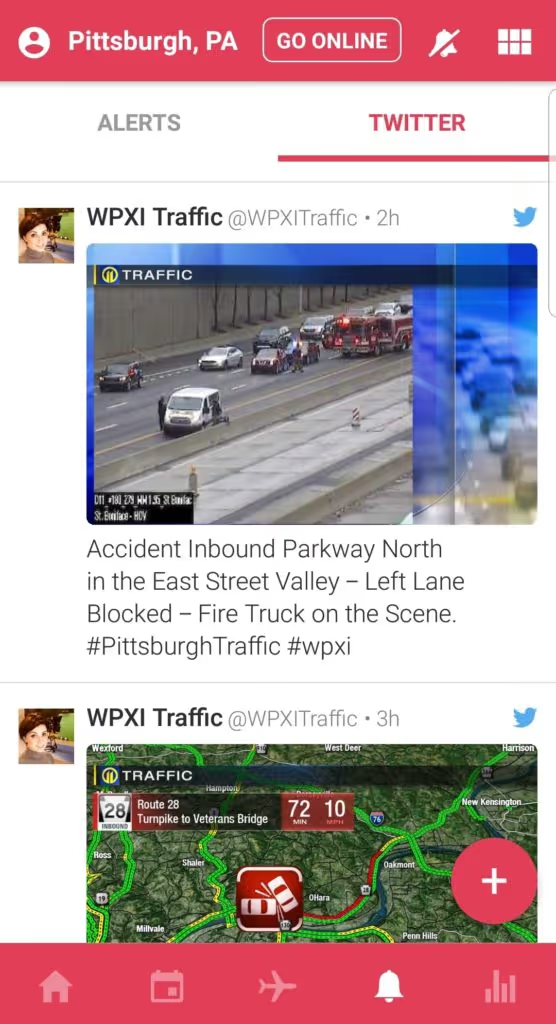
Use these tools to not only avoid traffic while you navigate, but also gravitate away from traffic as you pick up passengers. If you find yourself continously getting sucked toward a traffic area, you may want to go as far as setting your destination filters to an area with less traffic.
Don't Abandon a Surge
Avoiding too many other drivers is important, however, if you are consistently finding that peak hour surge, make sure you are taking advantage of them. We have found that drivers in Chicago are likely to find surges during off peak hours, so that could also contribute to their increased rush hour earnings. So if you are driving during a rush hour and frequently see surging in a certain area, continue to take advantage of that surge.
If you are not seeing surges, however, consider looking at different areas and different times.
More to come
We love data-driven insights, so we'll be providing you with more blog posts that leverage this sort of information on this very topic and many others. For our Gridwise users, you'll also receive a weekly report that helps you become a higher performing driver by giving you insight into how well you are performing compared to your peers in your city who drive as much as you do.
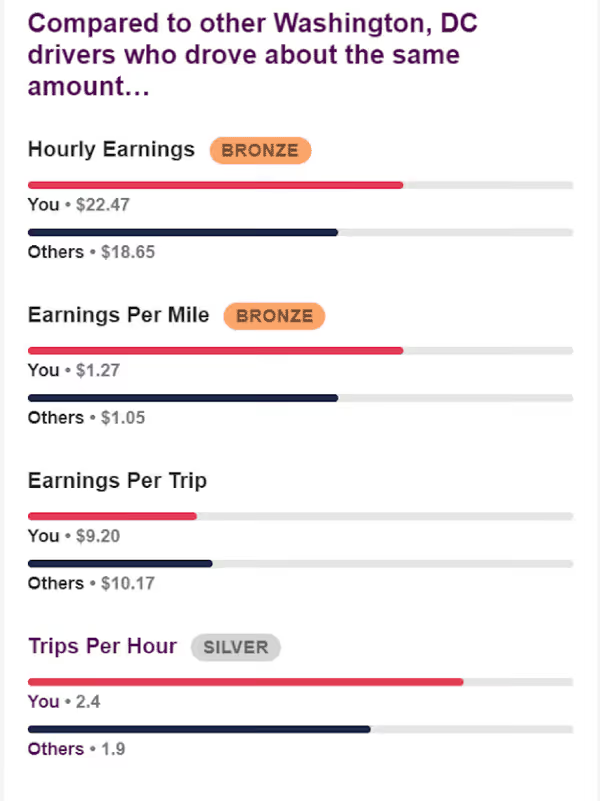
So check your inbox every Monday for your report, and if you aren't a Gridwise user, download the FREE app so you can start tracking your performance metrics today.
`
How Rideshare Drivers are Maximizing Their Earnings Using Destination Filters
Possibly the most underutilized tool at a rideshare drivers disposal is the destination filter.
This isn't to say that drivers aren't using the feature at all, many just aren't taking full advantage of all of that a destination filter can help you with.
The Gridwise team has been hanging out at airports in Chicago, Pittsburgh, and D.C. over the last few weeks, so drivers have been schooling me on how they are using destination filters to maximize their earnings.
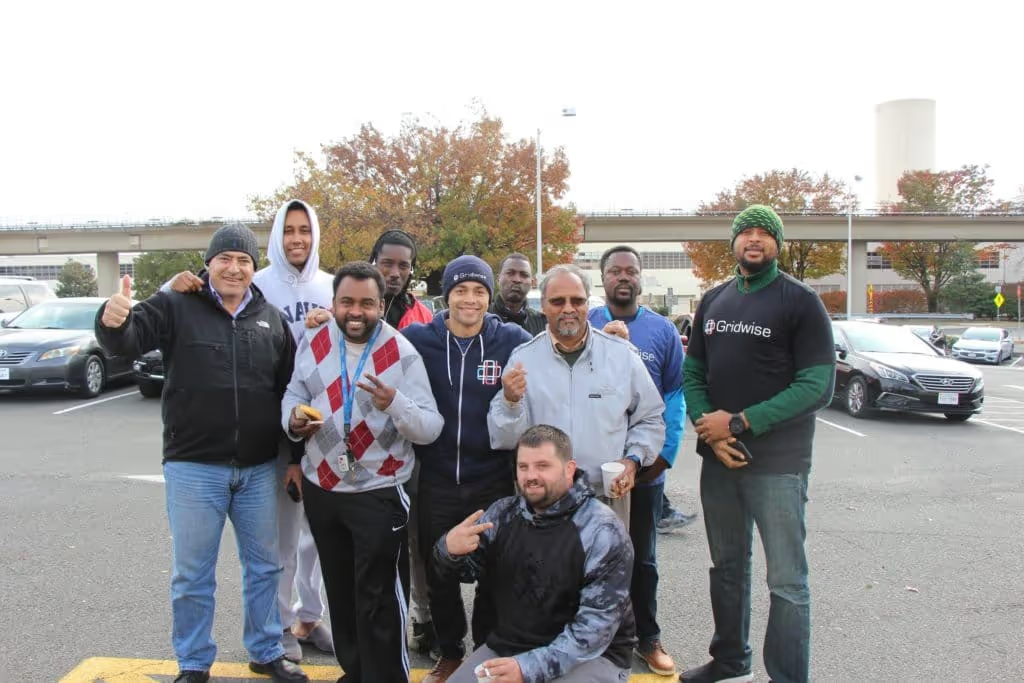
These D.C. drivers taught me a few things last fall
They gave me the OK to spill the beans on their secrets to success, but let's first dive into what exactly destination filters are and how they work.
How the Destination Filter Works
Destination filters are easy to understand. You simply set a desired location, and Uber or Lyft will do their best to give you a ride headed in that general direction. It doesn't take you exactly where you want to go, but it SHOULD give you a ride headed in that general direction.
There are a few slight differences between Uber and Lyft's offerings.
How Lyft's Destination Mode Works
Lyft calls their destination feature "Destination mode" and according to Lyft, when Destination Mode is activated, you'll only receive requests from passengers that get you closer to your destination. You may not always be closer in terms of miles, but you will be closer to your destination in terms of travel time to your destination.
What Lyft appears to do is map what route you would be using to go to your destination, and gives you rides that take you along that route. This means that sometimes you could get a passenger that moves you slightly away from your destination IF the route that you would otherwise take to that destination calls for that.
This is an important distinction to keep in mind.
Lyft also allows you to use destination filters six times per day.
How Uber's Destination Filters Work
Uber's destination filter feature works similarly to Lyft, except it is less tied to the route that you would take to get to that destination. Meaning, Uber tries its best to get you to that area, unlike Lyft which tries its best to get you on your route. I suspect this is because Uber tends to have more volume and you're more likely to find a rider headed toward your location.
Uber gives you two destination filters per day.
When to use Destination Filters
The original thought behind Uber creating these destination filters seems to be for drivers that are headed home and want to get that last ride. That's an obvious and extremely useful use case, but savvy drivers have found more and more interesting and profitable times to use destination filters.
When Driving Back to Civilization
If you're usually a city driver, I'm sure there have been times when you have been taken out into the suburbs and have gotten the feeling you're in the middle of nowhere. Well, usually you have two options in this situation. You can head back to a more populated area, or hangout in the suburbs driving around to see if you can grab a few rides.
A few drivers we spoke with during our Chicago trip earlier this year had different ideas, however.

Coffe and donuts with Chicago drivers... it's a bit cold
Instead of just heading directly back to the city, they checked Gridwise to see if there were any events going on in the suburbs, and then checked to see what the airport queue was.
If the airport was about to peak for departures, they would set a destination filter to head to the airport.
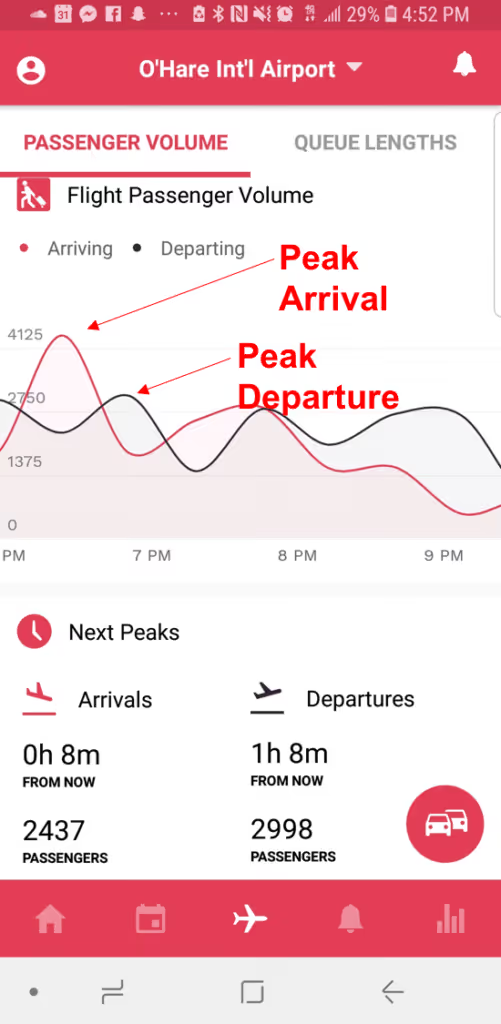
Being out in the suburbs a few hours before a departure peak means that passengers are likely to be headed toward the airport which means a nice long airport trip. What's even better is when there is also an arrival peak, meaning many passengers are coming into the airport.
There isn't always an airport peak, however, which is why drivers also check to see if any big events are going on in the suburbs.
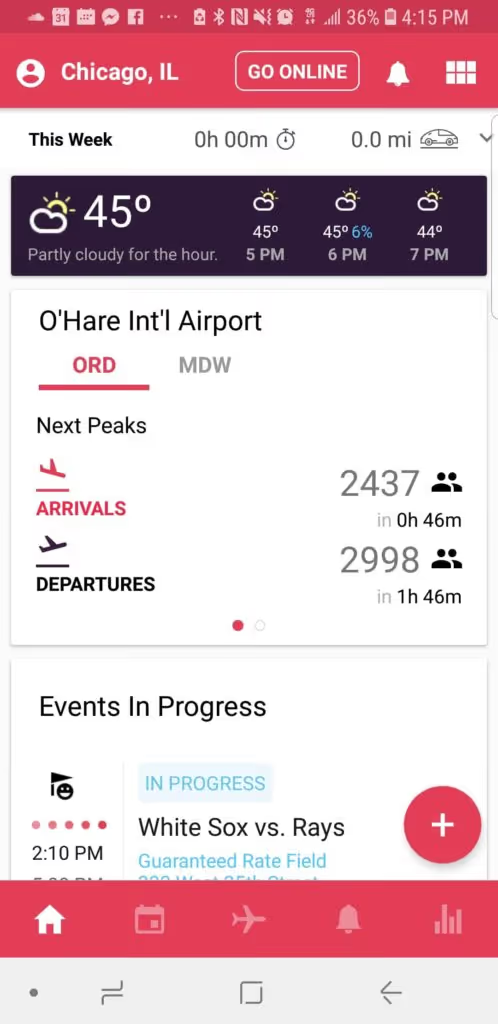
If nothing is going on in the suburbs, drivers will simply check and see what events are going on in the city and set their destination there.
"One of my favorite moves is to set my destination to the CIBC theatre when I'm out in the suburbs in the evenings because a ton of people are headed to see Hamilton." said Reggie, a Chicago rideshare driver "I get into the city with a passenger easily."
Head Toward Hotels Before Peak
I love this move.
You all know that you can check Gridwise and understand when passengers are arriving at the airport and when they should be departing, which means we can understand when people at hotels are most likely leaving to head to the airport.
What some drivers are doing is setting their destination to busy hotel areas about 2.5 hours before a departure peak which is when passengers are most likely headed to the airport. From there, they're reporting getting rides to the airport when they hangout here the majority of the time.
This is a great way to ensure a long trip to an airport.
This can also be expanded on if there is an arrival peak around the departure peak. That way you can get a long ride to the airport, and back.
Head Toward the Airport Before an Arrival Peak
Speaking of being at the airport for an arrival peak, you can always set your destination for the airport where ever you are if you see an arrival peak that you want to take advantage of.
Moving Away From Traffic
Traffic sucks.
Not only is it boring, but it makes you less profitable as a driver because speed is a major factor in your overall profitability. You see, drivers get paid more by the mile than the minute, so the faster you can pick up rides, drop them off, and get to the next one, the more money you make.
That's why trips per hour is such an important stat for rideshare drivers.
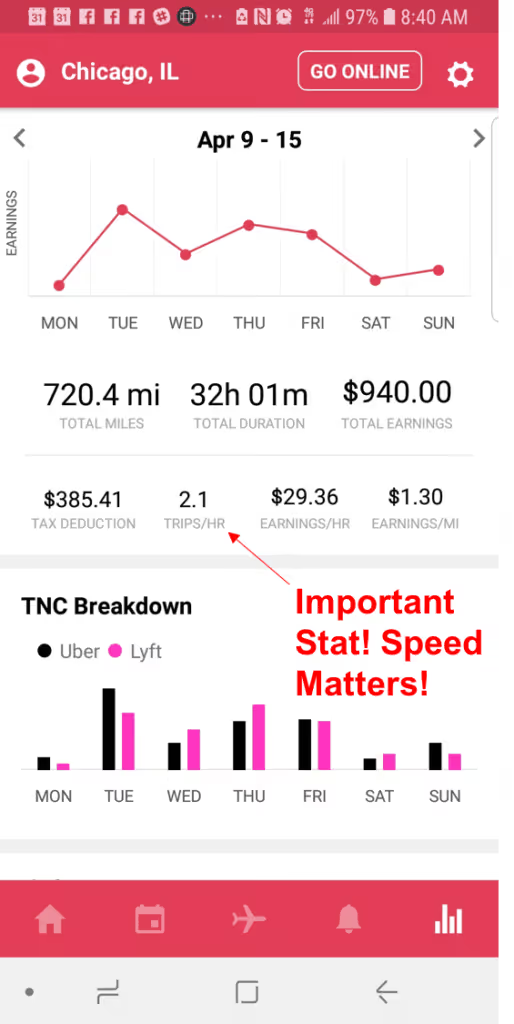
Drivers are using destination filters to make sure they don't get stuck in traffic by setting their destination away from known heavy traffic areas, or areas they get traffic alerts from Gridwise about.
Getting Back Downtown During Rush Hour
Some cities like Chicago, D.C., and Pittsburgh have VERY profitable rush hours for rideshare drivers. Between 4:00 pm and 6:00 pm business districts are hotbeds for rides and surges, however, you have to make sure that you are able to stay around the business district in order to reap the benefits.
So many rideshare drivers are heading to these business districts, getting rides away from them, and then using destination filters to get back to these business districts. They are using Lyft's filters as there are significantly more of them to do this.
This is a great tactic that can keep a driver busy for an afternoon while using 3 or 4 destination filters.
How Are You Using Filters?
These are just a few interesting ways we've seen drivers use destination filters, but now I want to hear from you. How are you using destination filters? Let us know in the comments below? Your fellow drivers thank you!
How This Full-Time Student and Soon to be Dad Became a Highly Profitable Rideshare Driver in Days. Not Months.
Everyone starts driving for their own unique reasons.
Some people want to escape their mundane corporate jobs and try something new for awhile. Many people are starting their own businesses or following their passion and need extra side income. Some even just want an opportunity to talk to and meet new people.
Everyone has their own "why", and for Sean, a rideshare driver out of Northern Virginia, his "why" was the little one that he has on the way.
You see, Sean is a full-time student, with a part-time job and a baby on the way. Oh, and he occasionally makes the trek down to Virginia Beach to do odd jobs around the house for his elderly parents.
So not only is Sean a busy guy, but he's also a guy that could use some extra cash. Therein lies Sean's "why", his reason for becoming a driver and using his spare time to earn instead of relaxing. However, being a rideshare driver wasn't the first thing that came to mind when he decided to find a way to make some extra cash.
"I told my wife that I really wanted to make some extra cash that we can use for the baby, but I needed something extremely flexible. That's when she brought up Uber, I didn't exactly jump at the idea initially" says Sean. "But when I started to dig in and do some research, that's when I realized how great this could be for us."
That initial research that Sean did which helped convince him that he should be a rideshare driver, also helped him become a highly profitable rideshare driver almost immediately. That's because we know how easy it is to become a rideshare driver, it only takes a car, a clean background and a bit of will power. However, becoming a highly profitable rideshare driver isn't easy, and tends to take a lot of time.
According to a Stanford study from earlier this year, it takes approximately 1500 trips to become a "good" rideshare driver.
Well, Sean didn't have that type of time, so he took matters into his own hands and built a strategy that nearly eliminated his ramp up time and helped him make a great hourly wage after being a driver for just a few days. In this blog post, we're going to look at what Sean did before he became a driver and in his first few days and weeks as a driver that helped him ramp up so quickly.
Have a Strategy From Day 1
One of the biggest and most common mistakes that new rideshare drivers make is starting to drive without a strategy. Too many new drivers expect to be able to turn on their app and get tons of pings wherever they are. Nope. It's not 2012 anymore.
Passenger demand is out there, but it's not just waiting for you, you have to go get it.
Sean did hours of research before he even signed up to become a rideshare driver, so he already knew that he couldn't just drive anywhere. He had to be strategic.
That's why he built a strategy that consists of the following:
- Driving late nights AWAY from bars
- Using destination filters to get back to popular areas
- Driving past airports at peak hours
"I knew that I could drive the bar scene in D.C. and Northern Virginia, but that would mean drunk people and traffic. Two things I want to avoid," said Sean. "That's why I focus on more suburban areas, and a few other hot spots not downtown."
Instead of relying on the bar scene, Sean focuses on areas like the MGM casino in D.C. and the National Harbor which is a restaurant district close to D.C. By understanding where those areas were before he started driving, Sean was able to use these hotspots as starting points and points that he could always gravitate back towards if he needs to find a passenger.
Sean also quickly realized that just because he started in a certain area, that doesn't mean he's going to stay there.
"I would frequently start near National Harbor but could be brought all the way out to a suburb pretty easily," said Sean.
This can make for a tough decision for many drivers. Do you stay in the suburbs and hope for a ride, or do you head back to a downtown area? Well, instead of having to make a blind choice, Sean uses Gridwise to help him understand what events are going on immediately around him or in his surrounding areas so he knows if there will be demand around him soon.
If there is demand coming, he can afford to wait a few minutes for a ping, if it looks like there will be greater demand downtown or even at an airport, he can place a destination filter toward that area and start making his way there.
Sean can also use Gridwise to understand when there will be a peak in airport passengers, so a little trick he learned was to always strategically drive past the airport during a peak time.
"It isn't supposed to work this way, but sometimes if I'm just driving near an airport I'll get a ping from the airport. It's always a lucrative ride, so I try and get lucky every once and awhile."
Track Miles and Performance
Mileage deductions are crucial for rideshare drivers, and if you're just using what Uber and Lyft are giving you, then you're likely missing out on a ton of miles that you should be tracking, as these TNC's don't report on miles that you are driving to get to your main driving area and miles that you are driving from when you start, to when you go home.
Sean understood this, which is why he tracked his mileage from day one. So when tax season comes, he will feel confident that he has maximized his tax deduction.
With Gridwise, drivers can automatically track their mileage and time driven, along with other stats like earnings, and number of trips.
Maximize Your Bonus Opportunities
One of the most important things that every driver needs to do when they start driving is maximize your initial bonus. Every TNC will have a lucrative bonus opportunity that they are advertising for your specific area. Before you enter just any bonus code into your sign up form, check to make sure you're getting the largest bonus possible as they can change monthly.
Also, don't take on too many bonuses at once, especially if they are timed. If you only have one month to do 1,000 rides on Uber for a $1,000 bonus and one month to do 1,000 rides on Via for a $1,000 bonus, it might be difficult for you to hit both of those goals. So stagger when you start up on a TNC to be sure you have time for all of your bonuses.
Remember your Why
Driving rideshare is a customer facing job, which means it isn't always going to be easy. However, if you're smart and stay focused on your why, whether it be a kid on the way, a business you're trying to start, or just a desire to meet new people, you can have a great time being a profitable driver in no time.
The State of Rideshare in 2018: Are Autonomous Cars Taking Over
The last 18 months have not gone well for Uber, and early in March things took another tumultuous turn when one of their self-driving vehicles struck and killed a woman in Tempe, Arizona. The incident rocked the company and has resulted in Uber halting all of their self-driving cars across all cities including San Francisco, Pittsburgh, Phoenix, Tempe, and Toronto.
This unfortunate event leads us to ask the questions: What is the state of self-driving cars? Are they coming soon? Are they safe? And, how will they affect Rideshare drivers and Taxi drivers?
We took a look at the autonomous car landscape to see if we can answer some of the most pressing questions on the minds of rideshare drivers and passengers including:
- Who is making self-driving cars?
- How far are we away from self-driving cars?
- What states allow self-driving cars?
- How safe are self-driving cars?
- How will self-driving effect rideshare drivers?
Let's dive in.
What are autonomous cars?
Easy question to answer right?
Not so much. You see, there are various levels of "autonomous cars" and companies are developing technology to tackle each one of them.
Brian Solis, a principal analyst of Altimeter, has defined autonomous cars as follows:

Picture Via: The Race to 2021: The State of Autonomous Vehicles and a "Who's Who" of Industry Drivers
Most cars are still at Level 2, where drivers are still in full control of the car, have their hands on the wheel and eyes on the road, however, have some sort of cruise control functionality enabled. Many automakers are promising to move from Level 2 all the way to Level 5 by the end of 2021.
In fact, you can see a list of automakers that have made significant progress toward a fully autonomous car and are said to be on pace to reach their goals by 2021 below:
- Uber (in partnership with Volvo)
- Lyft (in partnership with General Motors and Ford)
- Google's Waymo
- Toyota
- BMW
- Nissan
- Ford
- Daimler
- Tesla
- Baidu
- Bosch
How will autonomous cars be used?
To a rideshare driver and the public, one of the most lucrative markets for an autonomous car would seem to be taxi services, however, there are many use cases for these vehicles.
According to Brian Solis, there are 5 main categories for autonomous cars with multiple use cases within each category
Industrial
- Warehouse
- Farming
- Construction
- Military
Purpose/Specialized
- Tourism/Travel
- Care/Medical
- Racing
Transportation
- Mass Transit
- Shuttle
- Ride/Hail
Consumer
- Owned
- Shared
- Task driven
- Retail delivery
Logistics
- Cargo/Freight
- Delivery
- Parcel
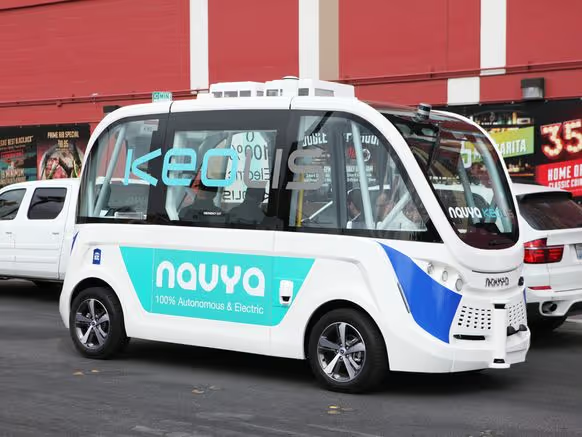
While the use cases for a taxi like service is more visible, use cases such as trucking, parcel delivery, and shuttles have seen more traction. For instance, in Europe and Asia, there are many hospitals, airports, and university campuses that use a service called Navya instead of standard shuttle buses.
What Legal Hurdles Stand in The Way?
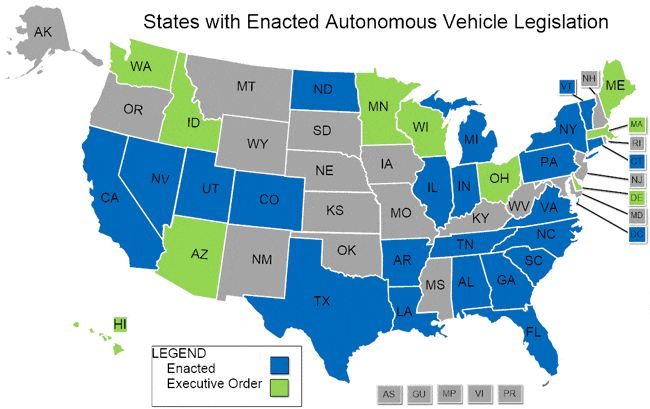
As of today, there are 21 states that have passed some sort of legislation allowing autonomous cars in some form or fashion.
See a map below from the National Conference of State Legislators:
Last September Congress also passed the SELF DRIVE Act, which lays out a basic federal framework for autonomous vehicle regulation, signaling that federal lawmakers are finally ready to think seriously about self-driving cars and what they mean for the future of the country.
Now I know what you're thinking, disruptive technology companies have famously done a lousy job working with regulators across the globe. Uber, Lyft, Airbnb, and other tech giants have had their fair share of public court cases, however, automobile manufacturers, more than anyone else, have a reputation for working closely with the government to understand (and potentially shape) regulations and compliance.
Given automobile makers willingness to work with legislators along with Congress's new found interest in the self-driving car industry, it appears that regulation for these vehicles will be worked out.
How safe are autonomous cars?
One of the largest hurdles that any company will need to jump over will be ensuring autonomous cars are safe, which is why Uber's incident in Arizona was such a big deal.
Since then, Arizona has suspended Uber's autonomous car program for the time being, even after Uber had voluntarily pulled its autonomous cars from the road and every autonomous car maker is having to answer questions about safety in their cars.
Lyft's cofounder and CEO John Zimmer was quoted as saying “I don’t know all the specifics. I did see the video. It did look like both the tech and the driver could have or should have prevented that. But I don’t know all the details,” while also stating that “We need to make sure that all players are acting responsibly because, again, the goal is to actually make it a safer opportunity for people.”
What's important to note in this statement is that the goal of autonomous cars is to make driving significantly safer for pedestrians and drivers alike.
While the accident in Arizona was tragic and a catastrophic blow for Uber's self driving initiatives, it is worth noting that this was just the first instance of fully autonomous car resulting in a pedestrian fatality while more than 6,000 pedestrians were killed in accidents involving human drivers in just 2016. So while the self driving car industry is appropriately being scrutinized for it's failure, these cars so far are significantly safer than human driven cars in many circumstances.
What does all this mean for rideshare drivers?
For rideshare drivers, the most important thing to understand is that the world isn't just going to flip a switch and be completely autonomous. We are still 4-5 years away from autonomous cars being available to consumers, and even then, we could be 20+ years away from autonomous cars being the standard.
Just last year, Lyft's Vice President of Engineering Luc Vincent stated that the company would "always operate a hybrid network, with rides from both human-driven and self-driving cars.” He added that “When a passenger requests a ride that a self-driving car can complete, we may send one to complete the trip,” he also stated that “If that person needs to go somewhere self-driving cars are unable to navigate, or their needs call for a different level of service, they will have a driver. But in either event, we’ll make sure everyone can get where they need to go.”
Here, Vincent is talking about cases where human interaction is still vital. Philipp Kampshoff of the consulting firm McKinsey & Co noted a prime example of a use case that is extremely difficult to automate. "Another example is a construction site where you have a red traffic light, and the autonomous vehicle is approaching the red traffic light, but there is a construction worker who waves the people and cars through. How does the autonomous vehicle know that it can ignore the red traffic light? So these are the kinds of edge cases that have to be overcome for autonomous vehicles to really be out there in mass adoption."
Because of these fringe cases, we believe that there will always be a place for a driver behind the wheel, however, autonomous cars may make for additional opportunities for rideshare drivers as Lyft's Director of Product Taggart Matthiesen alluded to in a conversation with Recode from last August.
"As far as I’m concerned, they will (human drivers) continue to be that. Over time, technology will give us the opportunity to provide additional services on our platform, whether that is a concierge service, whether that is an in-vehicle experience ... these are all things that we will slowly evolve and work with our drivers on."
Here, Taggart is referring to the ability for drivers in vehicles to act as operators or even a concierge service for the cars instead of drivers. This is similar to how the trucking industry views the role of drivers.
Taggert later added “If I need to go to the doctor’s office and my leg is in a cast and I can’t drive, we have a service for that,” he said. “If you get into the world of autonomous, we may need someone in that vehicle to help that person. There are things we’re doing beyond getting a passenger from point A to point B, additional services that we as a company can look at.”
There may be even more opportunity for rideshare drivers to become operators of their own fleet of autonomous cars. This would be similar to Turo's model where drivers simply rent out their autonomous cars to the Uber's and Lyft's of the world and take home some fee as they sit at home. Drivers would just need to keep the vehicles well maintained.
Don't Worry, But Stay Vigilant
We are far from a seeing the current rideshare model make any significant amount of changes, so you don't need to worry about a robot car overtaking you as a rideshare driver any time soon. However, drivers do need to stay Vigilant about emerging trends and technologies so you can see what's coming and *take advantage of opportunities*.
Trabaje de forma más inteligente. Gane más.
Ya sea que conduzcas, entregues o recojas turnos, Gridwise te ayuda a hacer un seguimiento de las ganancias, el kilometraje y el rendimiento para que puedas mantener el control de tu trabajo. Descarga la aplicación y toma las riendas hoy mismo.
