Blog de Gridwise
¡Lee el blog de Gridwise para obtener consejos y sugerencias sobre cómo ganar más dinero mientras conduces para Lyft, Uber, DoorDash, GrubHub y más!

The Gridwise Job Board: Find Your Ideal Job or Gig Work
Gridwise is an essential assistant app created by gig workers for gig workers. Our mission is to support those engaged in gig work in every way possible. We understand how challenging it can be to deal with income instability, a lack of benefits, and job insecurity that often comes with gig work. The Gridwise app tracks and organizes earnings and expenses, and offers a wide array of discounts, deals, and services that make the lives of independent contractors easier and more rewarding.
We firmly believe it’s possible to make a viable living and create a gig experience that offers flexible hours, variety, and excitement. With issues such as consistent earnings and job security in mind, Gridwise is proud to offer a centralized platform that shows you how to find gig work and secure reliable opportunities. We’re proud to introduce the Gridwise Job Board.
[elementor-template id="20891"]
The Gridwise Job Board: Key features
Because Gridwise is dedicated to serving the gig worker community, we’ve filled the Gridwise Job Board with useful features that won’t waste your precious time.
- Comprehensive listings. Find part-time, full-time, temporary, and per-task work. Drive or deliver with your vehicle, utilize an employer’s vehicle, or even find non-driving gig work.
- User-friendly interface. Find the jobs that are right for you with a tap of your screen.
- Verified opportunities. We vet the jobs before they are listed to ensure you’re getting high-quality job postings.
How to get more gig work, seasonal, part-time or full-time jobs with the Gridwise Job Board
Looking specifically for “gig work apps” or “gig jobs near me?” You’re in luck. Our filters and search functions send you directly to the listings you seek.
Here’s how it works.
- Access the Job Board via the Gridwise website.
- Search for jobs by type, location, and more.
- Select the job that interests you, and read all about it.
- Scroll through the description, and if it appeals to you, click “Apply for job.”
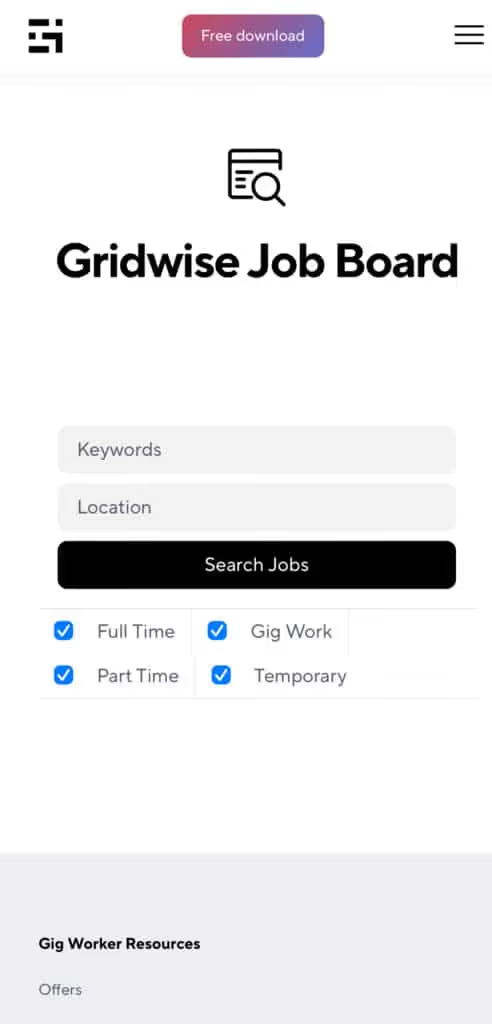
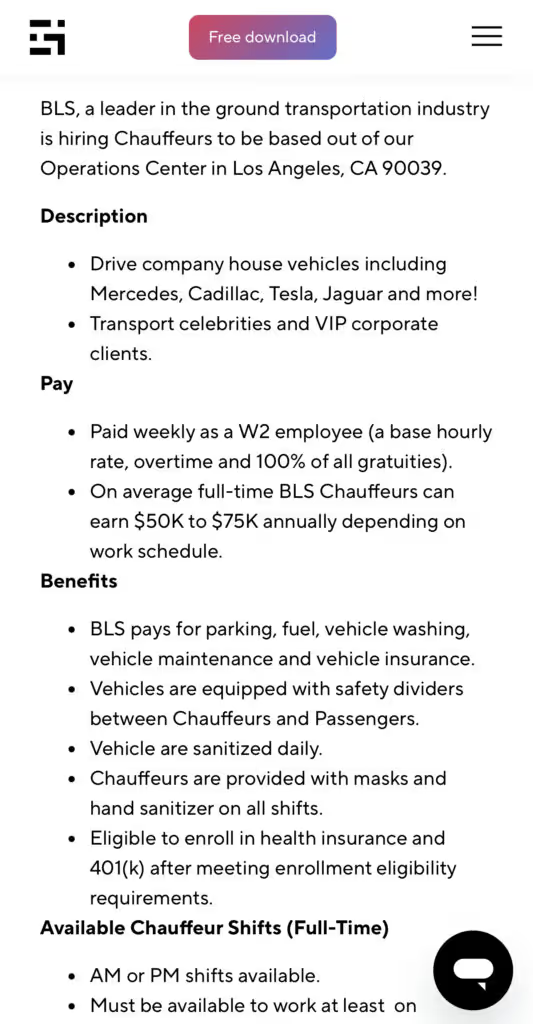
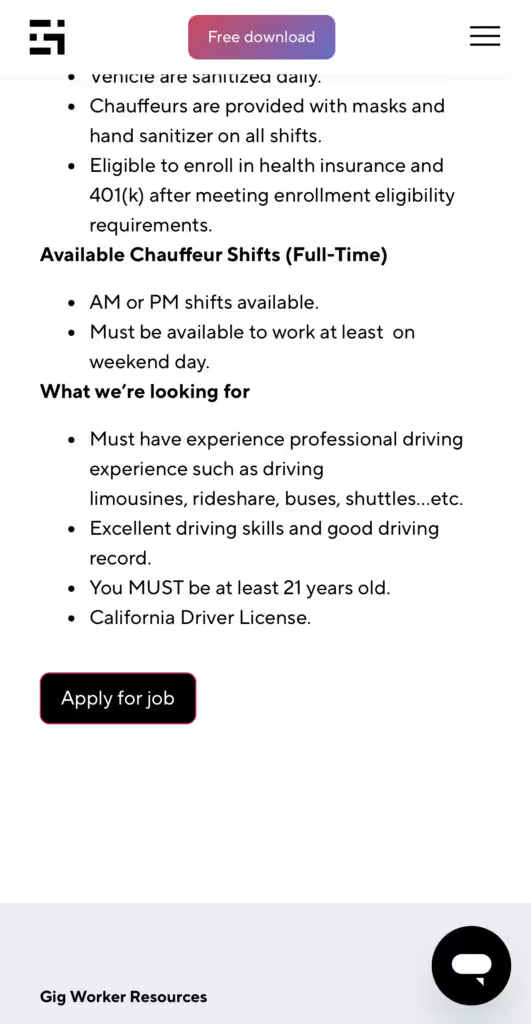
Many types of jobs are available. Adjust the search filter to see the full variety of opportunities that will let you cash in. Deliver food, set up catering, do rideshare driving, get paid for doing package delivery, and much more. You’ll find short-term gigs, long-term contracts, and part-time positions.
Perks of the Gridwise Job Board for gig workers
Gig workers who know how to make extra money will appreciate how the Gridwise Job Board lets you multiply your chances of bringing in big earnings. Here’s how:
- Increased stability. Use the Gridwise Job Board to find part-time or permanent jobs in addition to the part-time gigs you already have. Always keep a steady stream of earning opportunities flowing toward you.
- Flexibility and autonomy. Choose jobs that fit your schedule, work around other jobs and family duties, and still leave room for some fun in your life. Discover side hustles to supplement your full-time job, permanently or just for the season.
- Skill development. Find part-time work that lets you use a skill you already have, or try your hand at something new. It’s a smart way to develop a portfolio to showcase what you can do, or even to find permanent employment.
Get Gridwise and stay up to date on the Gridwise Job Board
Gig workers need plenty of information and assistance, and Gridwise is here to give it to you. Download the app and get essential features such as
- seamless earnings tracking
- mileage tracking
- expense recording, including notes
- low-cost and no-cost insurance benefits
- access to affordable medical, dental, vision, mental health, and alternative care
- professional services including legal and financial help
- deals and discounts
- weather, events, and traffic reports
- inside information on where and when to drive
[elementor-template id="20936"]
More to know about gig work:

5 Best Mileage Trackers For Gig Drivers
Many drivers ask, “Do I really need a mileage tracking app?” The answer is simple: only if you want to have an accurate count of all the miles you can legally deduct from your taxable income! You might think your rideshare or delivery driving app has got you covered. After all, they do quite a good job of logging the miles you drive while you’re on a trip or delivery. But, if you want to have the best app to track mileage for Uber, Lyft, Doordash, Instacart, or the other apps you may use, you need more. Why is that?
Without a separate tracker, you’re missing the miles you drive in between pings. Did you realize that all the miles you drive, from the moment you begin your shift until it’s over (as long as you don’t drive several miles on a break to hang with your friends), are tax deductible! That means you need something besides your driving app to keep an accurate count of your travels. Read this Gridwise post to see how important it is to keep track of every deductible mile.
You won’t be surprised to hear that there’s an app for tracking miles. In fact, there are several of them. Here, we’re going to tell you about five top mileage tracking apps, and help you figure out which one is best for you.
Before we get to the list and identify the best mileage tracker app, let’s clarify what exactly a mileage tracking app is. According to G2.com’s technology glossary, mileage tracking is done for the purpose of keeping a log of mileage that is either reimbursable or tax deductible.
And yes, of course you can track your miles simply by taking readings on your odometer. But are you really prepared to account for how many miles you drove for personal reasons and subtract them from the total to get your business mileage? Even if you can remember all that and do the arithmetic, if you want an accurate reading of the miles you drive for business, and can therefore deduct, a mileage tracking app will save you a lot of trouble and prevent you from making costly errors.
Plus, as a gig driver, you have specific needs when it comes to a mileage tracker. Ideally, you’d be able to handle mileage tracking and several other functions all in one app. It can be maddening enough to deal with driving apps, particularly if you’re an avid multi-apper. You would want your mileage tracker app to help you keep account of other aspects of your business, including income, expenses, and inside information about the art of gig driving.
Not all mileage apps are equal, to be sure! Let’s look at five of the best apps to track mileage and figure out which is the best app to track mileage with Uber and Lyft, or what mileage tracker app is best for DoorDash.
[elementor-template id="20891"]
1. Zoho Expense
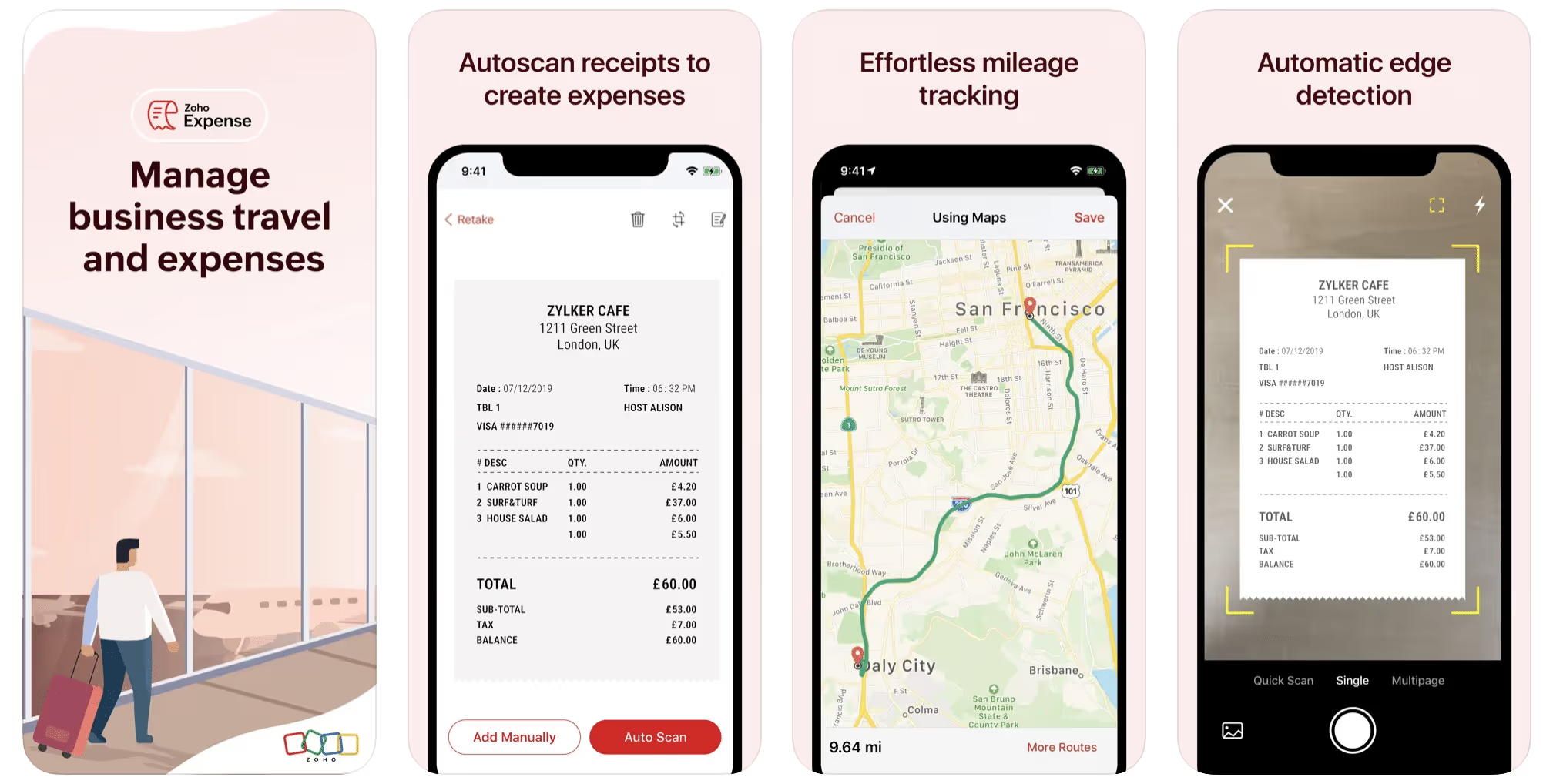
First up is Zoho Expense, which does exactly what its name says. This app is designed to allow companies to give employees a uniform way to create and submit expense reports. It can be used by individuals, including gig drivers, as well.
It includes a mileage tracker, as well as features that let you track other deductible expenses, including the ability to scan and record receipts.
Available on Android and Apple: Yes
Ratings: 4.8 stars on App Store, 4.7 stars on Google Play
Free Version: Yes
Subscription price: $3 per month, billed annually
Created specifically for gig drivers: No
2. Quickbooks Online
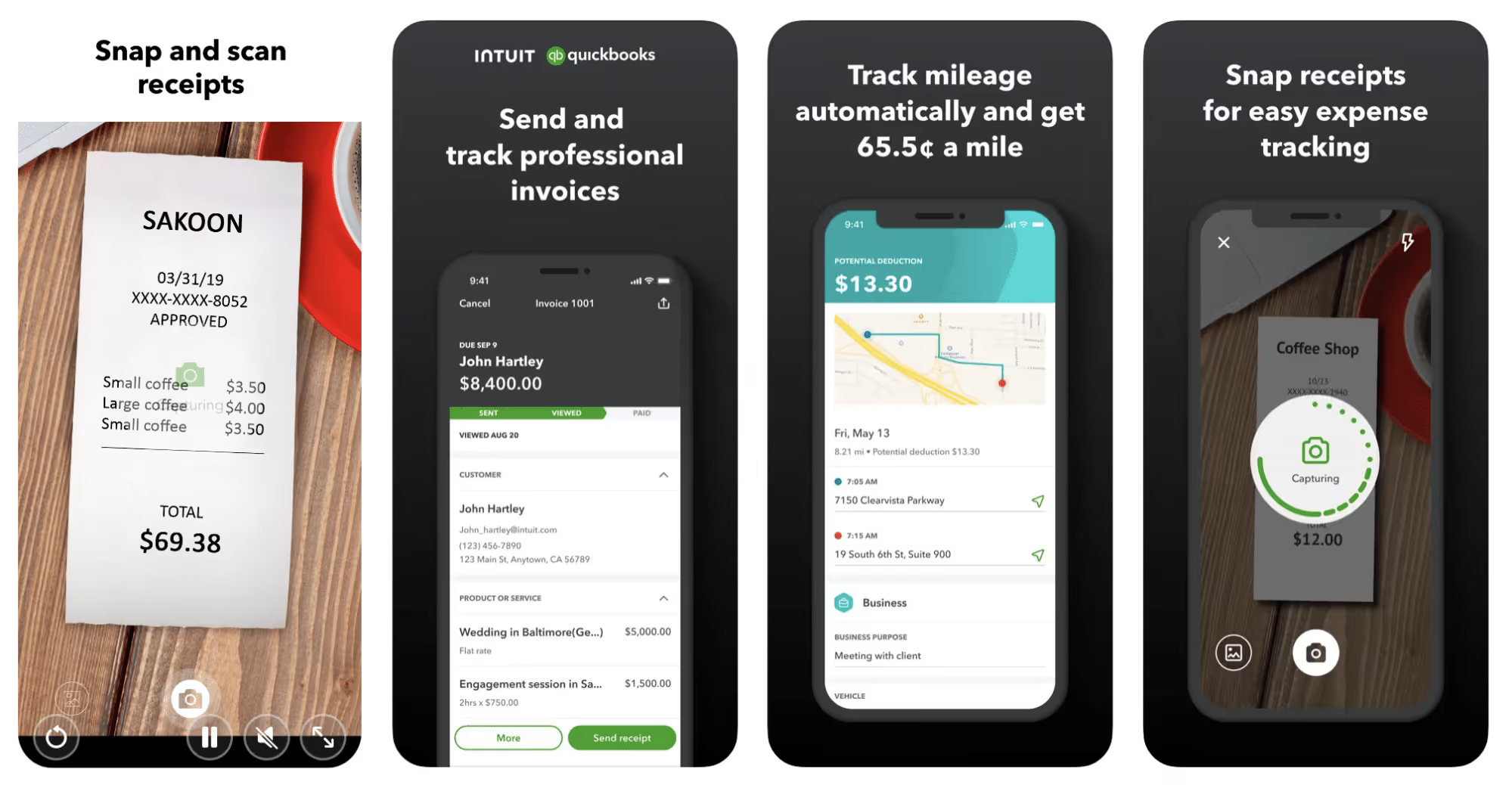
Quickbooks Online is a cloud-based app that allows you to track your mileage, earnings, and expenses. The information you enter can then be used to generate various reports that prepare you for tax time. It also allows you to create graphs that illustrate your cash flow, and includes a receipt scanner so you can instantly record deductible expenses. Quickbooks is popular, highly reliable, and designed mainly to help people keep track of their small businesses.
Available on Android and Apple: Yes
Ratings: 4.7 stars on App Store, 4.4 stars on Google Play
Free version: 30-day free trial
Subscription price: $15 per month for basic version if purchased for 3 months or more
Created specifically for gig drivers: No
Source: quickbooks.intuit.com
3. Shoeboxed
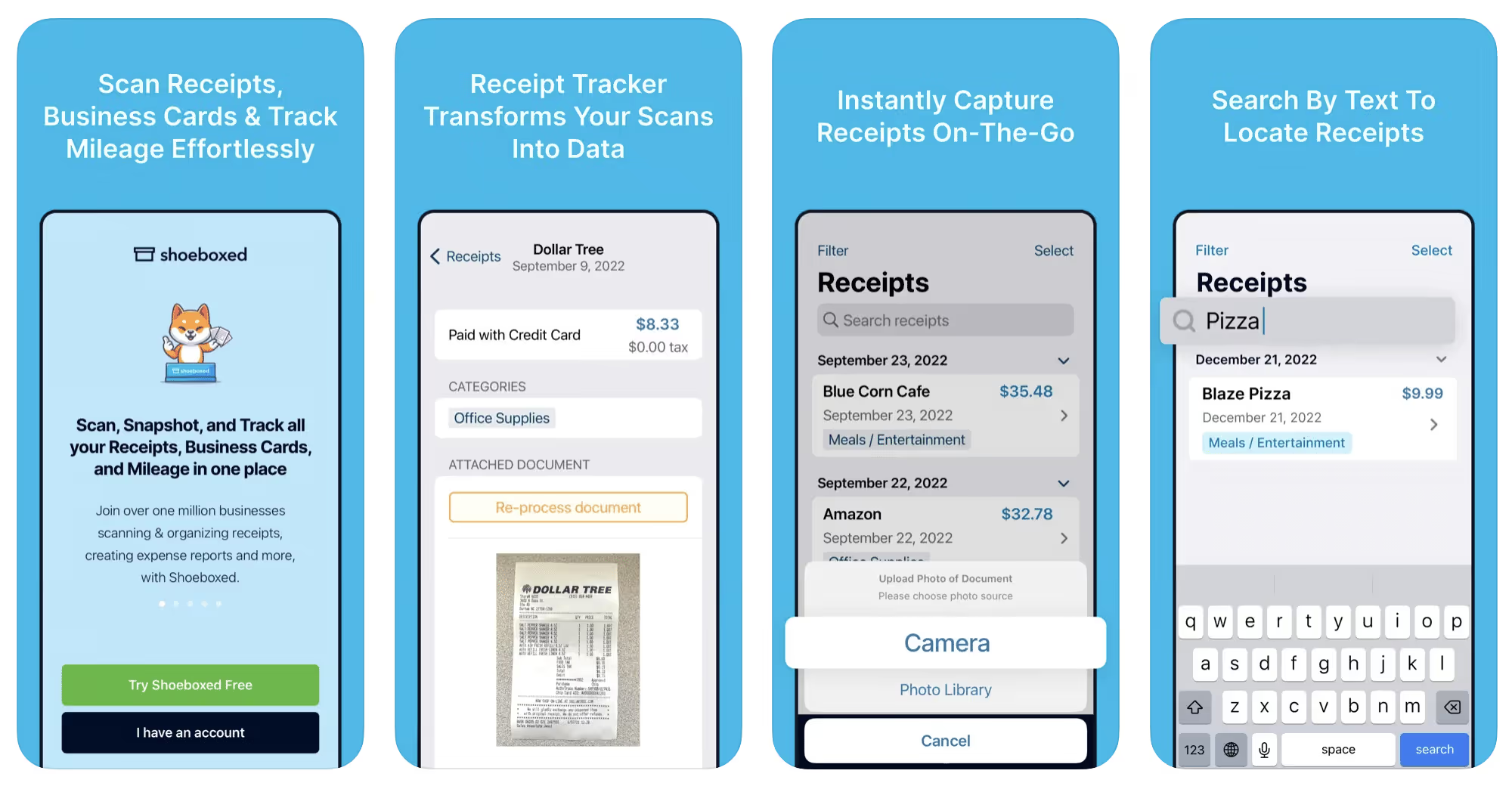
Shoeboxed started in 2007 as a service for scanning paper receipts into digital form. Now the app offers a free mileage tracker and has enabled users to scan receipts directly. It touts itself as the best mileage tracking app for DoorDash, but there are some elements missing that Dashers might like to have. While it provides features that record your expenses and prepare you for tax season, it doesn’t automatically track your earnings. The mileage tracker has a system where you can drop pins along your routes to make the tracking more precise, identifying those legs of a trip that you make for business purposes. The mileage tracker is “free” once you sign up for the basic version.
Available on Android and Apple: Yes
Ratings: 4.5 stars on App Store, 2.3 stars on Google Play
Free version: No
Subscription price: $18 per month for basic version
Created specifically for gig drivers: No
Source: blog.shoeboxed.com
4. Stride
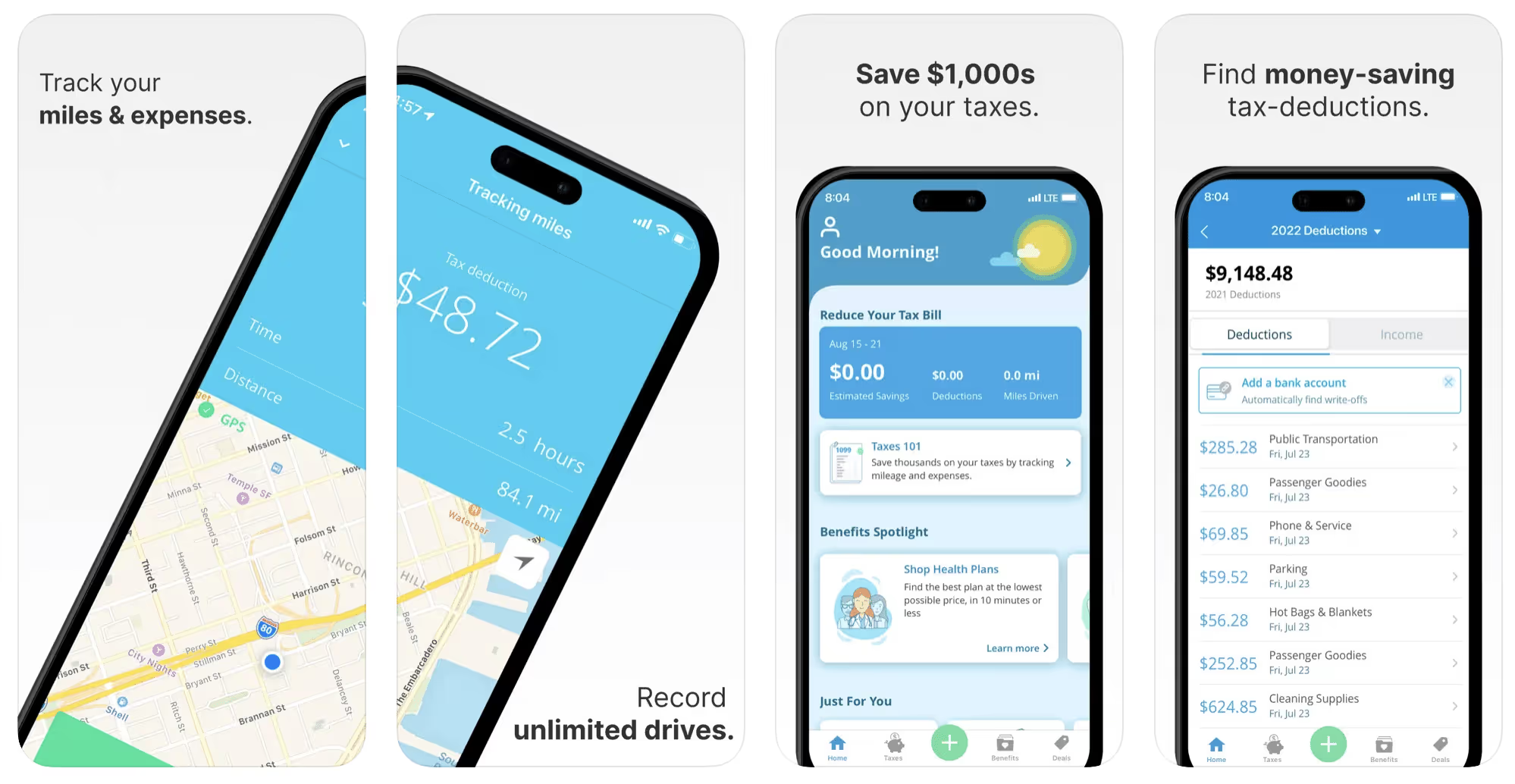
This free mileage tracker does a fair job of keeping track of the distances you rack up while gig driving, but it doesn’t automatically track earnings. It can be a big help, though, in tracking your expenses. You can link Stride to your bank account, and it will automatically scan your expenses to identify items you can potentially deduct. The app is totally free. This could make it the best free mileage tracker app, but there is a small price to pay. The app will persistently push you to consider various insurance plans that they are affiliated with. If you don’t mind that, this is a solid mileage tracker, even if it doesn’t track your earnings.
Available on Android and Apple: Yes
Ratings: 4.8 stars on App Store, 4.6 stars on Google Play
Free version: Yes
Subscription price: None. The app is free.
Created specifically for gig drivers: No
5. Gridwise
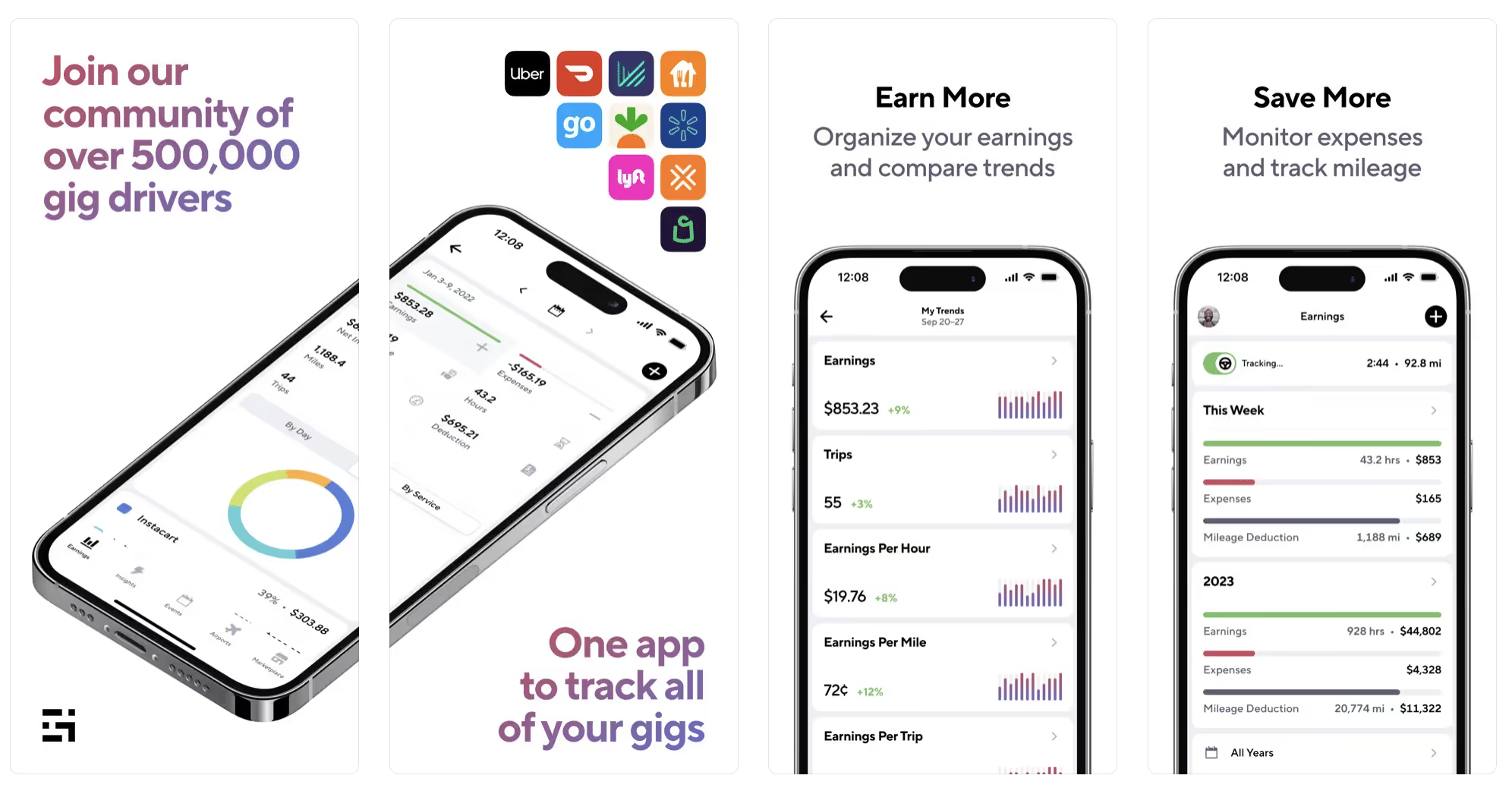
Gridwise has a free mileage tracker and free features that record your income and expenses. It gives you access to insurance and benefits, as well as insights about the best times and places to make the most money while gig driving. The Gridwise mileage tracker captures all the miles you drive while you’re on your driving shift, and it can be used if you have other trips you need to make which qualify as business travel.
Drivers love it because it is geared toward the needs of rideshare and delivery workers, providing free information about airport departures and arrivals, event start and let out times, weather, traffic, and more. The Gridwise Plus subscription adds value by providing additional insights and reports, discounts on benefits, the ability to export data in .csv format,, and more.
Available on Android and Apple: Yes
Ratings: 4.9 stars on App Store, 4.6 stars on Google Play
Free version: Yes
Subscription price: $9.95 per month for Gridwise Plus, or $95.99 per year (a $23.41 savings)
Created specifically for gig drivers: Yes!
What is the best mileage tracking app?
Now that we’ve checked them all out, we’re positive about the answer to that. Hands down, it’s Gridwise. Are we biased? You bet we are! But drivers love it too. Gridwise is the best mileage tracker app—and so much more. So many of the features are free, and the subscription to Gridwise Plus will pay for itself with additional insights to boost your earnings and deeper discounts on products and services.
Most important, Gridwise is designed specifically for gig drivers by experts who were once gig drivers themselves! Knowing what gig drivers need is a crucial step in creating an app that rideshare and delivery drivers can really use! Here are a few of the features, besides mileage tracking:
- seamless earnings tracking
- automatic, on/off toggle and manual mileage tracking
- mileage categorization
- airport, traffic, weather, and events information
- insights into where to drive and when to drive
- reports showing earnings across the platforms you use
- discounts on countless products and services for drivers
- additional resources for finding side gigs
- an informative and comprehensive blog
- affordable benefits, including insurance, medical, dental, and alternative practitioner discounts
- a community of drivers just like you
Don’t settle for just any app. Get the best mileage tracker, and so much more, from Gridwise!
[elementor-template id="21599"]

What Records Do Gig Drivers Need To Keep Track Of For Taxes?
* Gridwise does not provide tax, legal, or accounting advice. This material has been prepared for information purposes only, and is not intended to provide, and should not be relied on for tax, legal, or accounting advice. You should consult your own tax, legal, and accounting advisors before filing your return.
Record keeping? Who signed up for that? As a gig driver, it’s part of what you need to do to keep your business running. Don’t worry. It’s not as complicated as you might have been led to believe. This post will show you what you need to keep track of and the best ways to gather and preserve your tax-related records. We will cover
- How record keeping can help reduce income tax for freelancers
- Taxes and freelance work: Record keeping requirements
- Mileage tracking: Motives and methods
- More deductions and records to keep
- Make tax time easier
How record keeping can reduce income tax for freelancers
Tax time is not “fun time” for rideshare and delivery drivers. It’s easy to get used to watching your earnings pile up and come to believe they are all yours. Unfortunately, that isn’t the case. Gig work taxes can be especially painful because no one takes them out of your earnings for you, until the tax authorities insist that you do it for yourself.
You will need to show the tax authorities your income records, and they will gladly tell you to send them what they determine to be their fair share. Think that’s not fair? You’re not alone, but that doesn’t mean you’re going to get out of paying gig work taxes.
But you can find ways to pay the smallest amount that is legal and possible. The best way to defend yourself against having to pay astronomical amounts when you file your return is to know what expenses you can deduct from your gross income. When you subtract deductible expenses from your gross income, there is less left over to be taxed. This reduces the amount they can hit you with gig worker taxes. and can make your tax bill substantially lower.
While you want to keep good records so as to be in compliance with taxation entities such as the IRS, you also want to ensure you have proof of every last deductible expense you have accrued during the year. There are other records you must keep as well. Let’s look at some of the considerations you have, realizing that you now need to know how to do taxes as a freelancer.
Taxes and freelance work: Record keeping requirements
So many gig drivers fail to understand the responsibilities they have as independent contractors. Those who work part time for very few hours may even believe they don’t have to report the income they get from their driving gig payments. That would be a big mistake!
The company or companies you work for report your income to the IRS and state tax authorities. If you fail to report that income, you will risk some rather painful penalties. The IRS taxing side hustles is as much of a thing as the IRS taxing income from any other job. Your best bet is to report what you’ve earned, honestly and completely, and comply with other record keeping requirements such as
- gross income
- deductions and credits
- purchases (items you purchase and resell, such as snacks or bottled water)
- a log of all your mileage (or vehicle expenses, if greater)
- a list of all expenses and assets, such as utilities and other expenses associated with having a home office and equipment
- machinery and furniture you own, including when it was acquired, how much it cost, whether you previously took deductions on it, and selling price, if applicable (this includes your vehicle)
More things to consider:
- Pay attention to the retention of your records. You’ll need to keep all tax-return-related items— including income, deductions, and any tax credits reported— until the period of limitations runs out (3 years from date you filed, or 2 years from when you paid tax. If you have employees, keep your records for at least 4 years.)
- If you want to avoid paying self-employed taxes, you may want to set up a corporation or Limited Liability Corporation (LLC) for your business. This allows you to separate all your gig driving earnings from personal income, and permits you to take advantage of the additional advantages of working through a corporation. This includes exemption from self-employment taxes. You can learn more about how to pay self-employment taxes, if you opt for that, in this post from Keeper.
- You should always keep a separate checking account for your business, for convenience as well as clarity. While this is not a legal requirement, it is a smart move if you want to have an easier time managing your business.
- You are required, as an independent contractor, to file your taxes quarterly. Check out this Gridwise blog post for more information about quarterly tax payments and other matters that make filing delivery, Lyft and Uber taxes easier.
Mileage tracking: Motives and methods
Why you need to be meticulous about mileage
Mileage deduction, or the costs of operating your vehicle, will be the most important item to account for when you consider how to file taxes as a freelancer. While mileage is an important deduction for all independent contractors, as you might imagine, it’s even more essential for rideshare and delivery drivers.
There are two ways of keeping track of your mileage deduction. One is to use the IRS’ standard mileage deduction, which for 2022 is 58.5 cents per mile. This number takes into account the costs of operating your vehicle, from fuel and maintenance to registration, insurance, and depreciation. Alternatively, you can calculate all your own vehicle operating costs, but only after your first year of using the vehicle. You may discover that this second option allows you to have more money deducted from your taxable income. Learn more about the options for deducting your mileage in this Gridwise post.
No matter which way you decide to calculate the deductions for your mileage, you need to know what mileage you can and cannot deduct.
You can deduct
- miles driven to and from home when you go out to drive or deliver
- miles you accrue during your trips
- miles you drive on any other trips you make that are necessary as part of your business.
Examples:
- driving to return a lost cell phone or to an Uber Hub or another physical location where your company might make driver support available
- driving to pick up supplies, to get gas, or to have your car cleaned, serviced, or detailed, etc.
You cannot deduct
- miles you drive for personal trips
- miles for any trips you take that do not directly affect your business
Note: If imagining yourself becoming the not-so-proud owner of a shoebox filled with paper receipts gives you nightmares, stop worrying. Electronic records of purchases will satisfy reporting requirements. If you use cash, you can scan copies of your receipts, in some cases, right into your recording software or app. Gridwise and Keeper give you a simple to use interface that keeps all your receipts recorded without the messy pile of paper.
Mileage tracking methods
By now, you’re probably convinced that tracking mileage is important, despite all the other things drivers have to do. Now, let’s look at your options for keeping accurate records.
- Manual tracking: You can keep a logbook where you list every trip you make, starting and ending mileage, the date, and purpose of the trip. While this would work, it’s certainly not convenient. Besides, if that logbook gets lost, your plans for having a nice, fat tax deduction will go by the wayside.
- Spreadsheet: This is a bit more convenient and sophisticated way of tracking your business mileage. You’d need to be meticulous about making your entries, though. Even if you keep a spreadsheet app on your phone, it could be time consuming and inconvenient to keep doing it with all the other things going on in a rideshare or delivery driver’s day to day life.
- GPS-based mileage tracking apps: There are a bunch of apps that track mileage based on your GPS location, and most of them are pretty accurate and far more convenient than taking constant readings of your odometer. Your driving apps, such as Uber, Lyft, DoorDash, or Instacart, may also track your mileage, but be careful here. They will only track the miles you drive while you’re on a trip or delivery. They don’t count the miles you drive going to pick up a customer or when you make your move toward a restaurant or store.
Gridwise, on the other hand, will track all the miles you clock while you’re on your shift. All you need to do is make sure you start tracking the minute you leave home, and every gig driving mile will be logged. - OBD-II mileage tracking systems: There are plug-in modules that assess your vehicle’s mechanical health and track your miles. However, many authorities question the ability of OBD-II mileage tracking systems to get get accurate odometer readings. Insurance companies don’t consider them to be accurate enough gauges of odometer readings.
While mileage is a crucial deduction when you’re preparing your Uber, Lyft, or DoorDash taxes, it isn’t the only expense you’ll want to record.
More deductions and records to keep
Expenses you can deduct
You’re entitled to include the cost of other expenses that are directly related to your driving business. These include
- vehicle expenses
- equipment for your car and home office
- extra services and subscriptions
- business tools, including apps and software
You can learn much more about gig driver expenses that are eligible for deduction in this Gridwise article.
Ways to track and preserve deductible expenses
- The manual method: Just like you can with mileage, it’s possible to use a manual method, but in addition to logging each expense into a ledger, you would also need to keep physical receipts.
- Spreadsheets: You can record your expenses on a spreadsheet. This is somewhat less awkward than manually logging mileage, but there still will be plenty of room for failing to remember the case of water you bought for your customers, or losing the receipt from the thermal bag you purchased.
- Accounting software: You can use software that helps you track your expenses. This method usually interfaces well with any tax preparation software you or your tax professional might use.
- Gridwise: There are other apps that help you track your expenses, but Gridwise is designed specifically for gig drivers. It automatically tracks earnings and mileage, and lets you record your expenses the minute they come up. Gridwise’s partnership with Keeper gives you the ability to scan receipts and access a tax professional. This is a seamless way to record your expenses and a big help in learning how to file Uber taxes. Gridwise even provides .csv output, so you can feed your Gridwise data directly into tax preparation software. Check out what Gridwise and Keeper will do to super-charge your tax filing powers.
Organizing and categorizing expenses
Before you even begin to record expenses, you’ll want to set up categories for them. You can start by reviewing the categories listed above and checking out the Gridwise post that lists possible deductions.
If you’d like to learn more about how to categorize expenses, there is additional information available. This article from Motley Fool lists all possible categories any freelancer might use and also gives tips on how to customize them for your driving business.
One last tip
Using Gridwise, particularly for tracking mileage, is the easiest way to be in compliance with the IRS’ rules for deductible mileage. Gridwise tracks all the miles you drive for your gig, beyond what your company’s app might record. At the same time, you can log on and off Gridwise when you start and end your shift, so personal miles won’t be recorded. This eliminates confusion while capturing every deductible mile.
Gridwise Tax Help, a partnership with Keeper, has been created specifically to serve gig drivers. It provides affordable and easy ways to record expenses, scan receipts, and find deductions by analyzing your expenditures. Read about free resources from Keeper you can use to be fully prepared for tax season, and get all your earnings and expenses on the record.
Get the world’s best assistant for rideshare and delivery drivers, and tax help too.
Make tax time easier now!
Why You Should Never Chase Surges (and what to do instead)
As I write this article I am no less than a week past committing the cardinal sin of driving for a rideshare service.
Yes… I chased a surge.
Don't laugh at me! We've all been hypnotized by that beautiful dark shade of red. I also had just dropped off a 3x surge rider so I was feeling lucky. Like today was my day! So with a glimmer of hope and determination in my eye, I set off to go conquer another surge!
What a bad idea that was.
Not only did I miss the surge, but I wasted 30-minutes stuck in traffic all while a surge appeared from the EXACT area that I had just come from.

As rideshare drivers, we must face the fact that surges just are not worth it. So in today’s post, we’ll examine why chasing surges is a no-no for good rideshare drivers and 4 tactics you should use instead.
Let’s dive in!
What surge prices REALLY do
Uber and Lyft’s surge algorithms remain somewhat of a mystery, however, our friends over at Cornell have done a great job of decoding and explaining how Uber’s Surge pricing works… But let me explain this it to you in English.
Ideally, the number of drivers in a given area will be exactly equal to the number riders in a given area. So whenever there are more riders than drivers, rideshare services will launch a surge.
This doesn’t necessarily mean there are a ton of potential riders, there is just an imbalance. So the surge is simply meant to do one thing:
Redistribute drivers.
The problems with Surging
This model wouldn’t be so bad in a perfect world, however, two things happen that work against the rideshare driver.
- Riders can easily game the system multiple ways
- MANY more drivers than necessary will flock to a surge area.
Now let's pause for a quick question.
If I offered to give you a 50% discount on your steak dinner tonight if you wait ten minutes, would you do it?
Yep, you would in a heartbeat.
Riders are the exact same way. If they can just wait for 10-minutes for a cheap ride, they will wait out the surge. This means while you and 50 other drivers are headed to an area, riders will actually stop requesting rides.
“I’ve sat right in the middle of surges downtown for 15 - 20 minutes and never received a call,” says D.C. rideshare driver David. “I used to chase surges, wait there for 20 minutes and get nothing. I stopped making that mistake pretty quick.”
By simply waiting a few minutes and even checking other apps, riders can “game” the system and wait until Uber pulls all of us drivers to their area and subsequently drops prices. So while you’re chasing the big red zone, your riders are just waiting until it disappears before calling you.
You end up driving across town for a normal fare. Not great.
Riders are also becoming more aware of the predefined surge zones that rideshare services have created, which means they can simply walk a few blocks and be in a non-surging zone. It’s not uncommon to get pinged from just outside a surge zone while you are driving IN a surge zone. Again, not great.
What’s the impact of surges?
While income from surges can add a nice boost to your daily payouts, it certainly won’t make up the bulk of your earnings. In fact, a 2017 report from RideSharingDriver indicated that less than 10% of uber driver earnings came as a result of incremental income from surges.
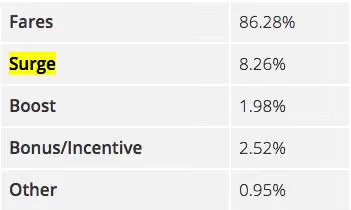
Given these numbers, if you’re a part time driver averaging $1,500 per month driving Uber or Lyft, you can expect surge charges to make up less than $150 of your monthly pay.
Not. Great.
Find demand, don’t chase surges
With only a small piece of our earnings coming from surges, not to mention the fact that Uber is constantly considering doing away with surges, drivers need to be maximizing earnings by minimizing ideal time and maximizing their chances for long rides. So how do you do it?
- Brave the bars
- Wake up for the morning rush
- Know about big events
- Get out in the rain
Brave the bars
The late night bar crowd on Thursday’s, Friday’s, and Wednesday’s can be a gold mine for the driver willing to deal with a more “exuberant” crowd. From about 9:00 - 11:00 you can find riders that are headed to the bars from the more docile parts of the city. Then from 1:30 - 3:00 you can catch riders in popular going out area’s who will need a designated driver to get them back home. These areas will almost always have big increases in demand which turn into predictable and sustainable surges.
You’ll have to deal with riders that may have had too much to drink so come prepared with a barf bag and a few cleaning supplies to ensure that you can get back on the road quickly. Puke related accidents don’t always happen though.
“I’ve completed more than 3000 rides over the past 4 years for Uber and Lyft and have never had someone vomit in my ride.” says one of our Gridwisers Jeff. “I could just be lucky, but people for the most part just fall asleep”
Wake up for the morning rush
If you’re not a night owl then you better be an early bird if you want to maximize your earnings from ridesharing services like Uber and Lyft. Demand during the early morning hours from 6:00 - 10:00 is very high in most cities because of the high volume of commuters either going to work, going to the airport, or leaving the airport.
Depending on your city, you can find workers either coming from the suburbs or more residential parts of the city into the downtown areas.
Mornings are also a great time to catch business travelers going to and coming from airports. You can use your Gridwise app to know when flights are coming in and catch a big fare at the airport. Or hang near hotels and find a traveler catching their early flight.
Know about big events
If you want to predict rider demand look no further than your local sporting, concert, and theatre venues. When they are having some of their bigger events, hundreds to thousands of people will be looking for rides to their next destination after the event is over.
You can spend an hour so looking through multiple websites for events or you can check use Gridwise to see a listing of events in your area.
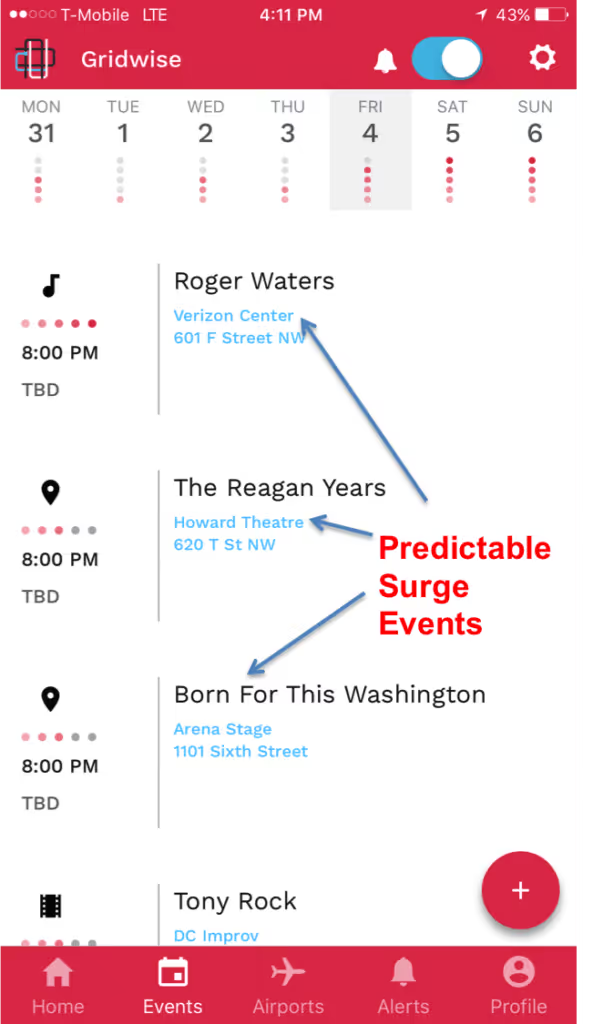
[su_note note_color="#fefedf"]Free Bonus: Know what events are going on in your city in seconds using theFREE Gridwise app.[/su_note]
Get out in the rain
Many drivers have a love/hate relationship with the rain. While it can be a pain to drive in a downpour, there is almost always a significant amount of demand during a rainstorm because riders who may have otherwise taken a long walk to their destination will decide to take a ride, while some drivers will decide it’s not worth it to try and drive.
As a driver, you’ll need to take precautions to ensure that you are driving safely and deal with a bit of extra traffic, but you’ll likely be rewarded with a nice surge fair.
Incorporating demand PREDICTION into your strategy
There is no single strategy that works for all drivers because with every driver comes a unique circumstance. While you may not be able to incorporate all of the above tactics in your strategy, you can use them as inspiration.
If you are a suburban driver that goes into the city, do your best to catch a ride from the airport into the city in the morning, or possibly a commuter making their way to their downtown office. Alternatively, if you are a single dad in the city and can't drive during the mornings, find events that in the evenings and get out there on Friday and Saturday nights.
Every city is different and every driver is different, so what's different about your strategy? We want to know!
Sound off in the comments below
[Update!] Peak Rideshare Driving Times in DC
I found out the hard way that the time of day that you’re driving for rideshare services like Uber and Lyft can be the difference between making $30 per hour, and heading home having made $40 from a 5-hour shift. I want to make sure that none of my fellow DC rideshare drivers go through the agony (yes agony) of an unprofitable driving session, so I’ve listed out the best times to drive rideshare in DC.
Weekdays (Monday - Wednesday)
The morning rush (6 am - 10 am)
The D.C. metro system is possibly the cleanest mass transit system in America, and those sparkling benches come in handy when the infamous Red Line has been delayed 30 minutes.Again.Because of how unreliable, and expensive, the DC metro is, commuters often turn to rideshare partners to provide transportation to work. There are tons of riders who regularly ride Uber or Lyft to get to work, however, there are many riders that rely on rideshare services when their train has been delayed.Follow twitter accounts like @wmata, @Metrorailinfo, and my personal favorite @unsuckdcmetro for key alerts about metro service. When you see tweets like these:
Go ahead and gravitate toward those areas.Many commuters from places like Silver Spring, Bethesda, and the Virginia Suburbs are going to be looking for rides into the downtown area. If you live in these areas, it is worth it to stick around and try to find a ride into the city. Otherwise, your best bet is to stay in areas of the city like DuPont Circle, Adams Morgan, and Georgetown to find students and workers getting to work.Monday’s and Tuesday’s are also busy days for business travelers, so use your Gridwise app to identify the best times to hit which airports to maximize your earnings.
The afternoon rush hour (3-6)
The afternoon rush hour is similar to the morning rush hour because the bulk of the rider demand stems from riders who are leaving work. The great thing about this rush hour is that these commuters tend to be more centrally located in areas like McPherson, NoMa, and Downtown, so if you hang near those areas you’re likely to find a rider trying to get home.Always be on the lookout for weather alerts as bad weather almost always causes train delays and many riders will forgo even attempting to ride the Metro in the rain.
[su_note note_color="#fefedf"]Free Bonus: To get instant weather and traffic alerts tailored to D.C. rideshare drivers download the FREE Gridwise app here.[/su_note]
Late night (10 - 3)
The late night hours early in the week rarely end up having much rider demand. That doesn’t mean you should completely give up on this block of time. You’ll just need to be strategic! Check your Gridwise app for events going on around town. The Kennedy Center, Verizon Center, and Lincoln Theater will all regularly have significant sized events that you should keep an eye on.
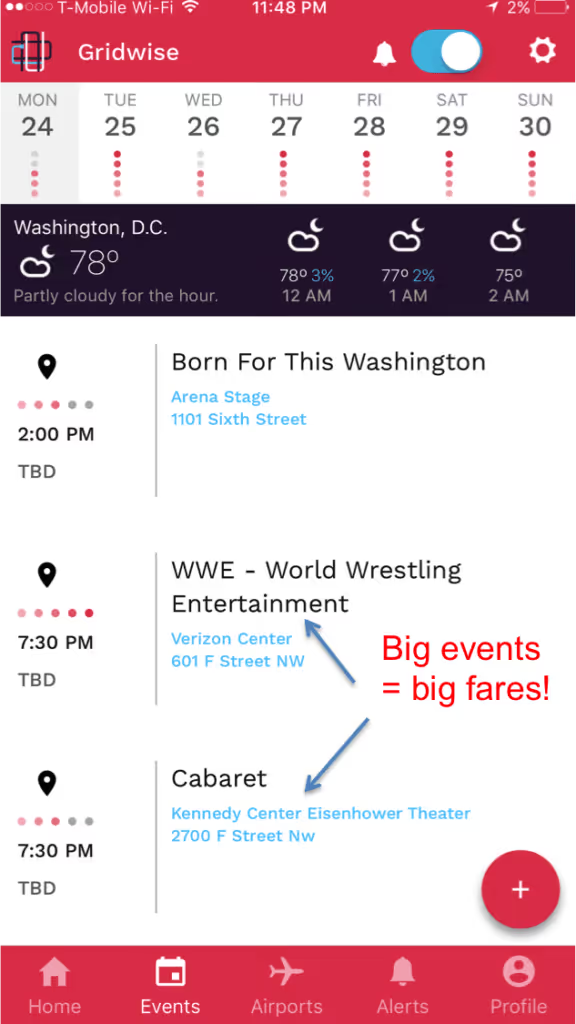
Also, be sure to check the airport schedule. Business travelers often come in on Monday nights and will need rides from the airport to their hotels.
Weekends (Thursday - Saturday)
The morning rush (6 am - 10 am)
Expect the morning rush hours to be just as lucrative on Thursday and Friday in DC as they are Monday - Wednesday as these are still peak hours for Lyft and Uber demand. You can also look for business travelers to be heading home from some of the downtown hotels Friday morning, so check the airport departure schedules.
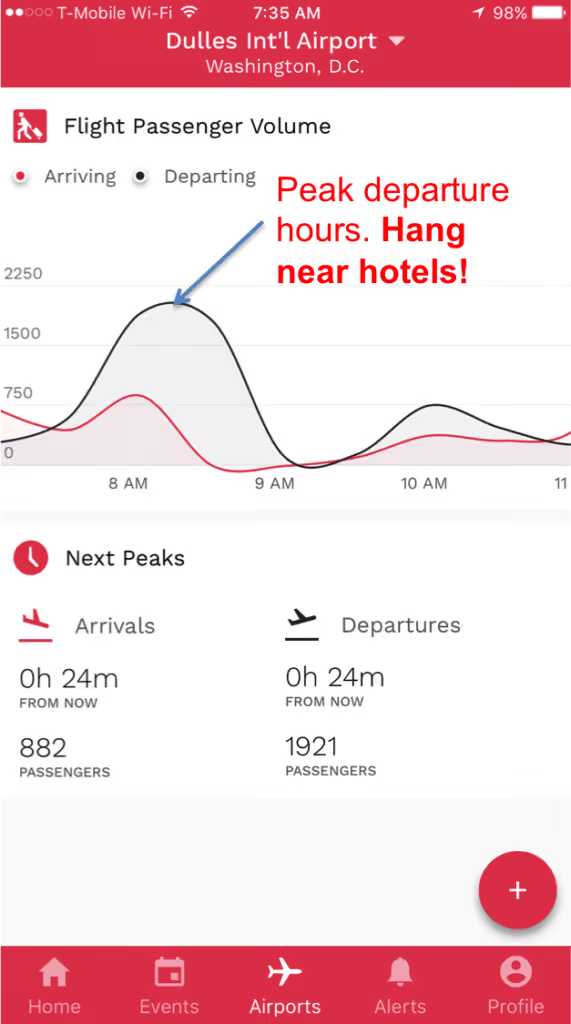
Rider demand on Saturday mornings is usually very low unless you’re taking advantage of an event. Otherwise, sleep in and prepare for the late night rush.
The afternoon rush hour (3-6)
Tourists are plentiful on Saturday’s in D.C., especially around the downtown area where many hotels are and near the monuments. These locations can be your bread and butter on most Saturday afternoons, but watch your alerts for any parades that are going on. You don’t want to get stuck trying to cross parade traffic.Also be mindful of Nationals Park near Navy Yard. Saturday games have the potential for 100’s of rides.
Late night (10 - 3)
For the weekend driver, late night rides are where you will make the bulk of your money. D.C. is full of young transplants and students that flock to places like Adams Morgan, DuPont Circle, and H Street to hit the bar and club scenes.Students coming from Georgetown and Foggy Bottom will make up a large bulk of your rides, so when school is in session hang near those neighborhoods early in the night around 9:00 o’clock and catch a ride into the more popular bar neighborhoods.From there, you’ll likely be able to give bar goers rides as they cross town going from bar to bar or party to party.The Verizon center while often have Saturday night events as well, however, keep an eye on your Gridwise app to monitor traffic. You don’t want to get stuck in gridlock traffic picking up a ride at the Verizon center when there are plenty of rides in other parts of town.
Sunday
The morning rush (6 am - 10 am)
While Saturday night is usually a frenzy of activity, Sunday morning is going to be downright boring for Uber drivers on most days. You may find a few folks heading back from clubs, parties, or bars but for the most part, you’ll see a heavy drop in rider demand.Take this time to sleep in!
The afternoon rush hour (1-6)
There is a mini afternoon rush hour caused by one of D.C.’s most popular pastimes.Brunch!Local’s will frequent the common bar areas to find the best bottomless mimosa deals, which means they’ll be looking for safe rides to and from restaurants. You won’t see the same amount of activity as a Saturday night unless there is a big event going on, but if you stick to popular areas like DuPont Circle you won’t have a problem finding a rider.
Late night (10 - 3)
Sunday nights in D.C. are relatively slow. You’ll find that business travelers often come into or leave out of the city on Sunday evenings, so check your flight schedules using the Gridwise app. Gravitating toward the downtown area where popular business hotels are located will commonly yield you a ride to one of D.C.’s airports. With any luck, you’ll arrive at a peak airport time and can catch a ride back into the city. Also, check for events going on at the Kennedy Center and local theaters. Always plan before you drive! There are a few times where you can count on a ton of rider demand as long as you drive in popular areas. During slower hours it’s important to be strategic and have a plan before you get out on the road. Use apps like Gridwise to help you understand what’s going on in your city and develop a solid driving plan in just a few minutes. Now, what’s your favorite time to drive in D.C.? Share in the comments below!
Qualifications Needed to Drive for Various TNCs
At Gridwise, our mission is to increase performance, efficiency, and earnings for all ride-hailing drivers by empowering the drivers of today and the future. To accomplish this mission, the Gridwise app provides a service-agnostic solution for drivers of any rideshare service.
Additionally, we want to equip drivers with knowledge so that they can make informed decisions-- which leads to greater earnings. Therefore, this article will provide you with the qualifications needed to drive for various TNC’s so that you can make the best decision when it comes to choosing a rideshare service to drive for. Specifically, we will be discussing the top 6 rideshare services that the majority of drivers are using: Uber, Lyft, Via, Gett, Curb, and zTrip.
Uber
As the most popular and widespread rideshare service, Uber has set forth an extensive list of requirements if you wish to start driving for them. However, the qualifications needed to drive for Uber may not be difficult for most people to attain.
First, let’s start with the driver requirements. To drive for Uber you must be at least 21 years of age and have 3 years of driving experience in the US, or you can be 23 years of age or older with 1 or more years of US driving experience. An Uber driver must have an in-state driver’s license, in-state personal auto insurance with your name listed on the insurance card.
Another qualification needed to drive for Uber is to pass a name-based background check, which requires a clean driving record and a Social Security number in order to process it. The background check is processed by a company called Checkr and looks over your driving record over the past 7 years for:
- No DUI or drug related offenses
- No history of reckless driving
- No fatal accidents
- No criminal record
Moving on to the vehicle requirements, in order to drive for Uber your car must be registered in-state, however, it does not need to be in your name. Whether your car is owned or leased, it must meet the following UberX vehicle requirements:
- 4-door sedan with a total of five seatbelts
- Year 2001 or newer in most cities
- In-state license plates
- No marked, taxi, or salvaged vehicles
- Pass the Uber vehicle inspection
- Up to date registration
Lyft
The qualifications needed to drive for Lyft are fairly similar to Uber. Drivers must be 21 years of age at the time of application with a valid in-state driver’s license and at least one year of driving experience.
Similar to Uber, driver applicants must have a clean driving record and complete a background check. However, Lyft is not as strict as Uber when they say “clean” driving record. Here is what you can/can’t have on your driving record in order to qualify for Lyft:
- No more than 3 moving violations in the last 3 years (seatbelts, traffic lights, fender benders).
- No major violations in the last three years (Driving on a suspended license, driving recklessly).
- No DUI’s or drug related violations in the last 7 years.
- No extreme infractions within the last 7 years (hit and run, felonies involving a vehicle).
Lyft uses a different company than Uber to process applicants’ background checks called SterlingBackcheck. The check is pretty thorough and ensures the applicants have not been convicted of any of the following within the past 7 years: felonies, violent crimes, sexual offenses, theft, property damage, and drug related offenses. Additionally, Lyft also does not allow anyone who is registered on the National Sex Offender Registry and DOJ 50-State Sex Offender Registry at the time that their background check is conducted, regardless of how long ago the individual was put on that registry.
As for the vehicle qualifications needed to drive for Lyft, they are surprisingly more stringent than Uber.
- Model: 2005 or newer (in most markets)
- Four doors: all four need to be able to open and close from the interior and the exterior, and passengers need to be able to unlock and lock their own doors
- All lights (i.e. turn signals, high beams, etc.) must work
- A/C and heat must work
- All car windows must roll up and down fully
- No cracks in windshield, windows, or mirrors with the exception of minor damage as long as it does not obstruct driver’s field of vision
- Working horn
- Tire tread depth must pass the penny test
- 5 functioning seat-belts
In addition to the standard driver and vehicle requirements, both Uber and Lyft have pretty strict requirements on their drivers’ ratings, according to The Rideshare Guy. In order to remain active on either platform, drivers must keep their rating above 4.6 (on a scale of 1 to 5). The difference between the two companies is how they calculate the ratings. With Lyft, only your last 100 rides count towards your rating and older ratings are dismissed. On the other hand, Uber takes into account your last 500 rides, which can make it difficult to redeem yourself if you get a low rating.
Via
The Via rideshare service is actually about passengers sharing rides. Currently, Via is only in New York, Chicago, and Washington DC. Via requires their drivers’ vehicles to be 2010 model year or newer, have leather or fabric seats, and to be approved for the Via System.
There is also a list of approved vehicles on the Via website. However, keep in mind that it is not a comprehensive list. If you own a vehicle which is not on this list, and you’re still interested in driving for Via, you can contact Via Customer Service to determine if your car is eligible.
Other qualifications needed to drive for Via are split between vehicles with livery plates and vehicles with private plates. For vehicles with livery plates, Via requires DMV registration, PPVL (front and back), and vehicle insurance. For vehicles with private plates, Via requires DMV registration, a valid insurance card, completion of a vehicle inspection form, and photos of the vehicle (rear exterior and interior).
Gett
With the promise of up to 25% higher pay than Uber, Gett can be an appealing rideshare option for drivers in NYC. Gett is a global network that serves over 100 cities across four countries, however, New York City is the only location for this service in the US.
When it comes to qualifications needed to drive for Gett, along with standard driver requirements, you must have a higher level of driving expertise to be considered as a Gett driver. However, with a higher level of expertise comes a higher paycheck: sedans get $0.70/min net plus tip where SUV’s get about $0.85/min, plus there are generous referral bonuses. Overall, the money drivers can make with Gett can be significantly higher than with driving for Uber or Lyft.
According to Gett, vehicles must be at least 2011 or newer and it must be black, dark blue, grey, silver or white. It should also be registered with the NYC Taxi & Limousine Commission.
Curb
The Curb app is available in 65 US cities and focuses on their speed of service by claiming that a ride can be requested in seconds and a driver will arrive in minutes. Besides using quick, convenient service to their advantage the company also homes in on safety by only working with professional taxi drivers. Every time you ride with Curb you’ll ride with a fully licensed, insured driver without any exceptions.
Curb is the solution for the ever-growing popularity of rideshare services that have seemingly taken over the traditional taxi. The company employs over 100,000 drivers.
So what are the qualifications needed to drive for Curb? As stated above, Curb only hires professional drivers with a valid license to drive a for-hire vehicle (taxi, sedan, or other). Besides that, the requirements are pretty standard: the driver must have a valid government ID and receive approval from the Curb Team.
zTrip
The zTrip app allows drivers to choose between a black car or taxi, customize their pickup options, and pay up-front. zTrip is available in over 30 cities and services over 70 airports. Drivers are given two options for vehicles: they can choose the Yellow Z service, which allows them to use their own car, or they can lease a zTrip car to prevent wear and tear on their personal vehicles.
The zTrip driver application will ask you the following questions:
- Are you over 23 years old?
- Are you a citizen or permanent resident authorized to work in the US?
- What is your name, address, and phone number?
- Which city would you like to drive in?
- Have you been convicted of a felony?
After reading the requirements for these 6 rideshare services, which one do you think sounds the most appealing as a driver? Leave us your thoughts in the comment section below!

4 Ways to Increase Your Tip Earnings
Ride-hailing has traditionally been a tipping industry. When you took a ride in a taxi you were expected to tip your driver. Then, Uber stepped into the game and put an end to this expectation. From the very beginning, Uber promoted itself for offering a cashless experience to riders. All payments could be completed through the app, yet the app failed to include a way for riders to tip their driver. The company claimed that tips were already calculated and added to the driver’s fare (although most drivers would argue that this was not the case).
At first, this helped Uber gain traction over cabs. Riders liked that cash tipping was not part of the equation. Even though riders were pleased, quite the opposite was true for Uber drivers. Especially when rivals such as Lyft released an in-app tipping feature, which started to win over frustrated Uber drivers. In order to stay on top of the game, Uber announced that they would finally be adding a tipping feature to their app.
According to The Verge, the Uber tipping feature will debut in three cities (Seattle, Minneapolis, and Houston) and will be extended to the rest of Uber's American service areas by the end of July. The Uber tipping feature gives passengers the opportunity to tip their driver after a ride with either a pre-determined amount of $1, $3, or $5, or they can choose to enter a custom amount.
Since Uber has trained customers for almost a decade that tipping is optional and maybe not even necessary, what can you do to start bringing in those tips and increasing your earnings? The new Uber tipping feature opens up the door for all rideshare drivers to start thinking about ways to increase tip earnings. To get you started, we have gathered some of the secrets we’ve learned from drivers and experts on how you can start increasing your tip earnings regardless of which TNC you drive for.
1. Change your mindset
By clicking on this post, we know that you’re interested in how to increase your tip earnings so that you can maximize your income as a rideshare driver. A simple way to accomplish this is by changing your mindset, meaning instead of thinking about driving as a job start thinking about it as a business.
HyreCar suggests that the question to ask yourself should not be “How do I make more money,” it should be “How do I run a better business?” By changing your mindset, you’ll start considering and planning for how you can make money come in longer, more often, and in bigger numbers. The ideas below will go further into detail on how you can start running a better business and how you can set yourself apart from your competitors.
2. Anticipate your passenger’s needs
Whether your passengers are tipping through an app or handing you cash, you may notice that you’re often only receiving a few bucks, if that. According to Psychology Today, customers only tip the minimum because they feel obligated by social norms. However, customers will tip more if they like the people who serve them.
It goes without saying that your passengers will be more inclined to like you (and tip you) if you always remain friendly and courteous. Smile, introduce yourself by name, and exchange the typical pleasantries when your passenger enters the car. However, be sure to look for cues that might suggest he or she may need some quiet time during the ride. On the other hand, if your conversation begins to flow easily, stay engaged in conversation with your passenger. Understanding the level of interaction that your passenger needs is important so that you don’t offend or bother them, which could deter them from leaving a tip.
Another way you can anticipate your passenger’s needs is by creating a comfortable environment. In fact, Psychology Today says that “the key to receiving higher tips is to create an environment that predisposes customers to be more generous.” A comfortable environment starts with keeping your vehicle clean and organized. Offer water bottles and snacks. Plus, you can almost guarantee that an airport passenger who has just spent the whole day travelling is going to love you if they find an extra phone charger in your car. It’s the small details that encourage your customers’ delight and increase your tip earnings.
3. Add a sign
Even with the new Uber tipping feature and other in-app tipping features, adding a sign asking for tips can help to increase your tip earnings. The Rideshare Guy explained that many drivers are a little bit shy about using a tip sign because they fear that it will affect their ratings. However, many experienced drivers that have added tip signs say that it has not negatively impacted their rating. Of course, you should always make sure your sign politely solicits tips. Remind customers that tips are not required, but they are always appreciated.
Keep in mind, though, that if you’re going to ask for tips, you should provide a level of service or amenities that other drivers aren’t. As mentioned above, this improves your likeability and will help you stand out from the pack.
4. Don’t act entitled
Even though the new Uber tipping feature gives riders the opportunity to tip their driver, it doesn’t mean that tips are required. If your passenger starts talking to you about tips, The Rideshare Guy reminds drivers that it’s important not to seemed entitled to receiving a tip. Once again, if your goal is to increase your tip earnings, you have to offer value to your passengers. Going above and beyond your passenger’s expectation of just getting from point A to point B will increase your likelihood of receiving a nice tip.
In conclusion
With the announcement of the Uber tipping feature on everyone’s mind, it’s more important than ever for drivers to implement new ways to start bringing in tips. As always, our goal at Gridwise is to help increase your performance on the road by providing recommendations like these as well as all of the resources and features in our app. Download the app now to see everything it can offer you as a rideshare driver!

How Much Do TNCs Pay Drivers in DC
If you are considering a career as a rideshare driver in Washington DC, knowing how much the various TNCs pay drivers in DC can be helpful. Of course, your actual salary depends largely on how many hours you put in behind the wheel. But if you would like to estimate your salary based on the number of hours you can commit to driving, this article will give you an overview of how much TNCs pay drivers in DC.
Uber
Fortunately, Uber posts on their website driver salary projections for various cities, including Washington DC, and updates the numbers frequently.
As an Uber driver, when someone takes a ride with you they are charged a fare plus a “Rider Fee”. The fare for UberX in Washington DC is currently $0.17 per minute plus $1.02 per mile. On top of that, there is a $1.15 base fare plus a $1.55 booking fee. Thus, according to Uber the average Washington trip pay out for an UberX driver is $13.73. Since Uber drivers on average make about 2 rides per hour, the hourly earnings for an UberX driver equates to approximately $27.46.
Assuming an average Uber driver commits to work about 30 hours per week, the overall per-week earnings would be $824 — making annual salary for Washington UberX drivers equal to $42,838.
However, this estimation does not include if you drive during a time when “surge pricing” is available. Surge pricing means Uber increases the fare prices during certain times of higher demand, making these hours more attractive for drivers. If you drive during surge pricing, then the entire fare is multiplied by that number.
Uber often advertises that they only charge a 25% commission of the fares. According to The Rideshare Guy, however, these figures ignore the “Booking Fee” that the company adds on top of each ride, which goes solely to the TNC. The booking fee amount varies from city to city. The resulting effects of this fee and the 25% commission mean that when passengers step outside of their Uber and only see a $5 charge, the driver will receive around half of that.
Lyft
Similar to Uber, there are advertisements about Lyft taking only 25% commission, but once again this company does not include the “Trust and Service Fee” which they take for each trip.
According to Lyft, driver pay includes time spent waiting, starting one minute after you’ve confirmed your arrival. The ride fare includes base fare, cost per mile, and cost per minute. In Washington DC, the base fare is $1.15, the cost per mile is $1.02, and the cost per minute is $0.17.
Alvia.com shares methodology for calculating the earnings of a Lyft driver in Washington DC based on the following:
An average trip for a Lyft driver pays out approximately $11.26 in the Washington D.C. area, and Lyft drivers are able to complete about two full trips per hour (i.e., a total of $22.52). Since an average Lyft driver works about 30 hours per week, the total per-week earnings are $675.60 per week — making a year’s salary for a driver $35,131.20.
Additionally, at times of high demand your fare may be subject to a ‘Prime Time’ multiplier to keep vehicles available. The multiplier, if any, will be communicated to you at the time of your ride request.
Via
Even though Via is the new rideshare app on the block, it turns out this TNC pays drivers considerably more than both Uber and Lyft. As mentioned above, both Uber and Lyft take a 25% commission from their drivers. Whereas Via takes only a 10% commission from drivers in DC.
The Rideshare Guy reports that Via will pay per trip in a similar manner to other rideshare companies, with rate cards similar to Uber or Lyft. Via has also recently announced Rocket Rates, which are equivalent to surge pricing with Uber and prime-time pricing with Lyft. The Via website explains that during high demand hours, fares will be multiplied by the “Rocket Rate” that will be announced to drivers through text message. Multipliers have been in the range of 1.3 to 2.5 times the fare, which can make trips more profitable. However, one Via driver shares that the rocket rates only operate during Flex mode hours, which fall between midnight and 6am.
At all other hours, Via has an undisclosed, guaranteed hourly rate for drivers that fluctuates throughout the day. For example, during peak hours (i.e., from 7-9am and 5-8pm) Via offers $30/hour while online. This means that drivers can be paid regardless of how many passengers they pick up. The rate also varies based on the type of car you drive. It has been reported that luxury SUV driver earnings start at $1,800 per week and those who drive a sedan can make $1,200 per week.
One key difference, though, is that Via will automatically apply a pay boost to rides that are “matched” with other riders. This incentivizes drivers to get matching rides in order to increase their earnings. The premium ranges between 5% and 20% depending on what city you drive in or how many matches you get.
Curb
Curb only employs professional drivers for their service, which can be hailed through the Curb app. The Ride Guru explains that since Curb drivers are traditional taxi drivers their payout is based on the standard average taxi cab driver payout. However, the Curb app does take $2 from each payout for using the app.
To estimate how much this TNC pays drivers in DC we can look at salary reports for the average DC taxi driver. According to Salary.com, the annual base salary for taxi drivers in DC is $36,547. Therefore, it can be projected that Curb pays drivers in DC approximately the same minus the $2 Curb fee. Unlike other rideshare services, though, cabs have traditionally been a tipping industry, so receiving a tip is more common through this service than all of the others.
As a rideshare driver, what do you think about how TNCs pay drivers in DC? Leave us your thoughts in a comment below!

4 Ways That Pittsburgh Drivers Can Increase Their Earnings
According to The Pittsburgh Post-Gazette, a survey of rideshare drivers in 20 cities across the United States found that drivers in Pittsburgh are roughly in the middle of the pack when it comes to how much they earn per trip. So what can you do to start being a more profitable rideshare driver? Whether you’re a casual rideshare driver or consider it your full-time career, below we have 4 ways that drivers in Pittsburgh can increase their earnings.
1. Know the Pittsburgh hotspots
If you want to increase your earnings (which we all do) you’ll have to know the times and locations for the Pittsburgh hotspots. So what exactly is a “hotspot”? Hotspots are geographic areas which experience extremely high passenger demand at certain times of the week. Below are some of the top Pittsburgh hotspots that rideshare drivers should become familiar with.
Southside
Take one look at East Carson Street on a Friday or Saturday night and you’ll understand why Southside is definitely a Pittsburgh hotspot. With 3 major colleges all within close proximity to the Southside along with the slew of bars and restaurants on East Carson Street, this location is definitely one to become familiar with as a rideshare driver, especially on weekend nights.
Shadyside
The primary riders in this centrally located neighborhood are the college students and young professionals that inhabit the area. In contrast to Southside, however, there’s a greater likelihood of getting ride requests during the week from commuters.
North Shore
Located in downtown Pittsburgh along the Allegheny and Ohio Rivers, the North Shore is most famous for its iconic sports venues: Heinz Field and PNC Park. This hotspot is a must for rideshare drivers who want to take advantage of potential surge pricing after Steelers games at Heinz Field and Pirates games at PNC Park.
2. Drive for more than one TNC
If you’re currently driving for one TNC and enjoy the income, you may want to consider how driving for a second company can increase your earnings. Driving for two different services at the same time opens you up to getting more requests and diversifies your income stream. Ultimately, this will lead to more money in your pocket. TNCs in the Pittsburgh area include Uber, Lyft, zTrip, and Cabby Go.
Another way that working for more than one TNC can help drivers in Pittsburgh increase their earnings is through the sign-up bonuses that different companies offer. According to Rideshare Connection, the current sign-up bonuses for drivers in Pittsburgh are $300 for Uber and $100 for Lyft. While Lyft publishes sign-up bonuses on their website, Uber does not. Blogs and websites like Rideshare Connection use feedback from readers and partners to create their list of offers, but you can always contact the TNC directly to verify the current bonus offer for the Pittsburgh area.
3. Always plan ahead
When it comes to rideshare driving amongst all of the one-way streets and hundreds of bridges that make up the City of Pittsburgh, planning ahead is necessary to use your time most efficiently and increase your earning potential.
Even though rush hour downtown and late weekend nights in the South Side may seem like the best places to be in order to take advantage of the surge, driving during these busy times without a plan will get you nowhere fast. In fact, experienced rideshare drivers often recommend to avoid chasing the surge. While it may seem tempting, many veterans say it rarely pays off. Aimlessly chasing the surge is not only a waste of time, but also a waste of gas along with the addition of wear and tear to your vehicle.
A better course of action is to plan your days ahead of time so you can be in the hotspot areas just before the surge begins. Driving efficiently during these peak times is a great way for drivers in Pittsburgh to increase their earnings because they are able to take advantage of surge pricing.
4. Use the Gridwise app to drive more efficiently
Gridwise is a service-agnostic platform created to increase rideshare drivers’ performance, thus resulting in increased earnings. No matter which rideshare service you drive for, the Gridwise app provides you with features that enable you to drive more efficiently.
For example, the Gridwise mobile app offers a Airport Demand Data feature that can be used to gauge driver demand at the Pittsburgh International Airport.
Additionally, the Gridwise app provides a 7-day outlook on events and end time updates from the major events. You’ll be updated if the Steelers head into overtime and you’ll know exactly when the Katy Perry concert ends at PPG Arena. This way you won’t have to waste time waiting outside these venues, estimating when events will end.
Don’t just take our word for it, though - download the Gridwise app now to see all the features and resources you’ll have available right at your fingertips!
Spotlight on Uber's Self-Driving Cars in Pittsburgh
In September of 2016, the City of Pittsburgh became the host for Uber’s latest endeavor: self-driving cars. At this time, Bill Peduto, the Mayor of Pittsburgh, demonstrated enthusiasm for the experiment by saying, “You can either put up red tape or roll out the red carpet. If you want to be a 21st-century laboratory for technology, you put out the carpet.” (New York Times) It was seen as an opportunity to transform their urban transportation system as well as boost the city’s reputation as a tech economy.
Just nine months later, however, Mayor Peduto along with the residents of Pittsburgh have quite a different outlook on Uber’s presence in their city. Are the self-driving cars in Pittsburgh not performing adequately? What is the future of autonomous vehicles in Pittsburgh? Read on to find out the answers to these questions and more that surround the presence of self-driving cars in Pittsburgh.
Uber’s self-driving cars in Pittsburgh
The tension between Uber and the city of Pittsburgh is based on a clash of private-versus-public interests, rather than problems with self-driving cars themselves. In fact, during the time Uber’s self-driving cars navigated the narrow roads, steep hills, and hundreds of bridges of Pittsburgh there were no major accidents.
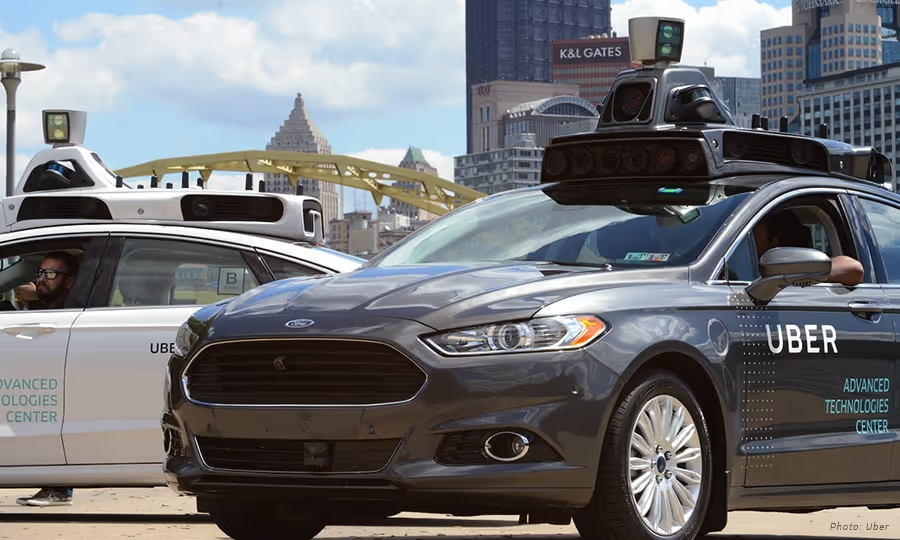
Of note, while these cars do drive autonomously, they still require two Uber drivers to be present in the vehicle. One is prepared to grab the wheel and apply a foot to the brake pedal if necessary. The person in the passenger seat monitors a computer screen that shows the view from the car’s rooftop LIDAR, a laser-bouncing radar. (NPR)
It turns out that having the Uber drivers present in the self-driving cars was a necessity. Earlier in 2017, Recode reported that Uber’s self-driving cars only drove an average of close to 0.8 miles before the safety driver had to take over for one reason or another.
While Uber’s self-driving cars are not fully autonomous yet, they are using information learned from these trials through the streets of Pittsburgh to make improvements. However, Mayor Peduto has said that he does not think that Uber is sharing what it’s learning, which is just one factor contributing to the controversy between Uber and the City of Pittsburgh.
In addition to the insufficient data from Uber, The New York Times reports that the company has not lived up to its end of the bargain with Pittsburgh based on the following perceived infringements:
- Uber began charging for driverless rides that were initially pitched as free
- The company withdrew support from Pittsburgh’s application for a $50 million federal grant to revamp transportation
- Uber has not created the jobs it proposed in a struggling Pittsburgh neighborhood that houses its autonomous car testing track
Linda Bailey, the executive director of the National Association of City Transportation Officials, states that Uber “is a business, and they want to make money. With Pittsburgh, we learned we need to present the city’s needs upfront.” (New York Times)
What is the future of autonomous vehicles?
Of course, while Uber is one of the top rideshare services that drivers are using, it isn’t the only company pursuing the development of self-driving cars. Apple, Google, Lyft, Tesla, Ford, GM, Toyota, and Chevrolet are some of the big names pursuing this new technology, along with many other companies across the globe.
While major strides have been made in the development of self-driving cars, the predictions for vehicles that are fully autonomous is pretty far off. For example, Tesla estimates that its autonomous vehicles will reach the market around 2023, and Uber doesn’t expect its self-driving cars until at least 2030.
In regards to the future of self-driving cars in Pittsburgh, Mayor Peduto states that he is now talking to Ford about signing commitments on data sharing and workforce development. (The NY Times) Ford is investing $1 billion in a Pittsburgh-based driverless technology company, Argo AI.
Raj Rajkumar, a Carnegie Mellon electrical and computer engineering professor, says that a world where such cars are the norm is a long way off. "It turns out that driving is a very complex activity. In fact, it may be the most complex activity that most adults on the planet engage in," Rajkumar explains. (NPR) Plus, when you add in local driving quirks, such as The Pittsburgh Left, driving can become even more complicated. Overall, the technology and engineering that go into developing these vehicles is impressive, but seeing autonomous vehicles take over the road is not in the foreseeable future.
Have you seen Uber’s self-driving cars in Pittsburgh? What are your thoughts on the future of autonomous vehicles in the rideshare industry? Leave us a comment below!

4 Ways DC Rideshare Drivers Can Increase Their Earnings
Did you know that Washington DC was named the best city in the country for rideshare drivers? An article from The Washington Post describes a study which examined factors like the number of rich young people in a city and the population’s reliance on public transit to determine the places most ripe for rideshare drivers, with Washington DC coming out on top.
Albeit, these results were from 2015, but with the hundreds of thousands of drivers and millions of users across the US, it is safe to say that this new industry is still exploding. So as a DC rideshare driver, how can you stay ahead of the competition and increase your earnings?
1. Drive for more than one TNC
The primary TNCs that currently have a presence in the District include Uber, Lyft, Via, and Curb. If you already drive for one of these companies and enjoy the income, you may want to consider signing up for another company as well. Driving for two different services at the same time opens you up to getting more requests and diversifies your income stream. Ultimately, this will lead to more money in your pocket.
If the increased earning potential from driving for more than one rideshare service sounds enticing, you may want to also keep in mind the sign-up bonuses that different companies offer. According to Rideshare Connection, the current sign-up bonuses for drivers in Washington DC are $300 for Uber and $200 for Lyft. While Lyft publishes sign-up bonuses on their website, Uber does not. Blogs and websites like Rideshare Connection use feedback from readers and partners to create their list of offers, but you can always contact the TNC directly to verify the current bonus offer for the DC area.
2. Know the DC hotspots
If you want to increase your earnings (which we all do) you’ll have to know the times and locations for the DC hotspots. So what exactly is a “hotspot”? Hotspots are geographic areas which experience extremely high passenger demand at certain times of the week.
In Washington DC, the local hotspots currently include the following areas:
- Georgetown - The primary riders in this historic neighborhood are the young professionals that inhabit the area as well as tourists who are interested in getting a ride to destinations such as Tudor Palace and the Chesapeake & Ohio Canal.
- Arlington - The metro access and lower prices for rent draw a younger crowd to this area, so you can expect your typical drive to head to and from U Street as well as commuter trips.
- Bethesda and Silver Spring - These two suburban cities that surround the capital are popular for those that want the city life but not the city hassles. You can expect passengers to be either commuters or those who want to be a part of DC nightlife.
- Southern Maryland & Northern Virginia Suburbs - Most commonly passengers from these two areas will need a ride to or from the airport. However, more and more commuters are originating from these areas due to the population increase in the DC metro area.
3. Always plan ahead
When it comes to rideshare driving, making a plan before you start driving is necessary to use your time most efficiently and increase your earning potential.
Even though rush hour in downtown and weekend late nights on 14th St. may seem like the best places to be in order to take advantage of the surge, driving during these busy times without a plan will get you nowhere fast.
In fact, experienced rideshare drivers recommend to newbies to never chase the surge. While it may be tempting, many veterans say it rarely pays off. Aimlessly chasing the surge is not only a waste of time, but also a waste of gas along with the addition of wear and tear to your vehicle.
A better course of action is to plan your days ahead of time so you can be in the hotspot areas just before the surge begins. Driving during these peak times increases your earnings per trip compared to what you would receive without the surges.
4. Use the Gridwise app to drive more efficiently
Gridwise is a service-agnostic platform created to increase rideshare drivers’ performance, thus resulting in increased earnings. No matter which rideshare service you drive for, the Gridwise app provides you with features that enable you to drive more efficiently.
For example, the Gridwise mobile app offers an Airport Demand Data feature that can be used to gauge driver demand at the three major airports in the DC area. Additionally, the Gridwise app provides a 7-day outlook on events. The end time updates from the major events, like when the Redskins go into overtime with the Bengals or when Kanye West is going to end at the Verizon Center, will help you be in the right place at the right time.
Don’t just take our word for it, though - download the Gridwise app now to see all the features and resources you’ll have available right at your fingertips!
Trabaje de forma más inteligente. Gane más.
Ya sea que conduzcas, entregues o recojas turnos, Gridwise te ayuda a hacer un seguimiento de las ganancias, el kilometraje y el rendimiento para que puedas mantener el control de tu trabajo. Descarga la aplicación y toma las riendas hoy mismo.
