Gridwise blog
Tips, insights, and advice to help you earn more and work smarter, whether you do gig work, hourly, or shift work.

How to Make $1,000 a Week With Uber Eats in 2026 (Tips + Hourly Data)
In this blog, we'll explore the strategies and techniques that can show you how to earn $1000 per week as an Uber Eats delivery driver. We'll cover everything from optimizing your delivery zones and schedules to maximizing your tips and customer satisfaction. Whether you're a seasoned Uber Eats driver or just starting out, this guide will provide you with the insights and actionable steps to take your Uber Eats driver earnings to the next level.
Becoming an Uber Eats delivery partner can be a lucrative opportunity, especially if you're able to consistently earn $1000 a week. By understanding the platform, optimizing your delivery strategies, and focusing on customer satisfaction, you can maximize your earnings and turn Uber Eats into a reliable source of income.
We’ll cover the following topics to provide coaching and ideas to help you push your earnings up to that $1000 per week level:
What do Uber Eats drivers do?
Uber Eats drivers deliver prepared food most of the time, but they also might shop for and deliver goods from convenience outlets and grocery stores. The job is pretty simple. You get a request for an order, you drive to the restaurant or store to pick it up, and then you deliver it to the customer. If you already drive for Uber, you can choose to take orders for Uber Eats delivery any time.
If you’re not an Uber Eats driver yet, it’s pretty easy to become one. This Gridwise post tells you what you need to do if you want to sign up and start making money Uber Eats style. Many rideshare drivers welcome the chance to deliver food rather than people. This article from Nerdwallet covers the Uber Eats gig from that angle.
There are some sweet advantages to working with Uber Eats. In lots of cities you don’t even need to have a car. You can use a bike or a scooter, or even walk, to make your rounds. If you do use a car, Uber Eats’ requirements are a lot easier to meet than they are for Uber rideshare driving.
You also have a lot of flexibility. You can shop and deliver convenience items and groceries, but you don’t have to. And, like most driving gigs, you can choose your own hours, and map out the locations where you want to work.
Use Gridwise features When to Drive and Where to Drive to help you figure out what work hours and which specific areas will be the most profitable for you. Real data from real delivery people will show you earning patterns for drivers in your town.
How much can you earn doing Uber Eats?
The honest answer to this question is: basically, as much as you want! It all depends on how many hours you put in and how strategic you are about your gig. Earnings vary from one area to another, as this article from Entrepreneur points out. To give you a baseline, let’s look at the earnings of Uber Eats drivers who tracked their earnings with Gridwise.
Remember that these numbers show us only average earnings. To make $1,000 a week with Uber Eats, you’re going to have to be better than average, and we’ll show you how. For now, though, it’s good to have these figures so you get a ballpark number of where to start.
How much do Uber Eats drivers make?
Gridwise data tell us the following:
- Monthly earnings average around $444.00 per month.
- Gross earnings per trip are between $9.00 and $10.00.
- Tips make up about 50% of most Uber Eats drivers’ income, which amounts to about $225.00 per month.
Is Uber Eats good money? It can be. While there are other gigs that pay more per trip, if you drive for Uber Eats, you’ll always be pretty busy.
https://datawrapper.dwcdn.net/HPAz8/3
You can also see that, unlike many other gigs, tips play a huge role in Uber Eats earnings.

With these numbers as a baseline, what can we say about how to earn $1,000 a week with Uber Eats? As we said in the introduction, it’s going to be a hustle, but it’s really possible. To figure out how to make the most money with Uber Eats, let’s start by looking at how many trips these “average” drivers made each month.
We know that average gross earnings were $444.00 per month, and drivers got around $10.00 per trip. That means they took 44 or 45 trips per month, which breaks down to 11 trips per week. That’s not a lot of Uber Eats delivery, is it?
The fact that Uber Eats drivers averaged so few trips shows us that many drivers use more than one app at the same time. This is called multi-apping, and you can learn more about it in this Gridwise post. If you want to answer the question of how much you can make with Uber Eats, then you need to stick with the app and keep plugging away at those orders. You also need solid strategies, as well as some inside tips and tricks.
How to make the most money on Uber Eats: Delivery driving tactics
Getting to that $1,000 a week with Uber Eats isn’t so hard when you remember that the drivers we saw making about $111 a week were only taking around 11 trips in the same time period. That’s not much at all! If you work the Uber Eats app like a boss, you’ll soon have many more trips than that, easily reaching the number needed to get you to $1,000 a week. Now, let’s get to some tactics you’ll need to make that kind of bank.
- Stay with the Uber Eats app, and track your earnings. Gridwise can easily do that for you. Simply sync your Uber Eats app with Gridwise, and you’ll be able to see how much you’ve earned with Uber Eats, what times were most profitable, and your average hourly pay. Racking up trips with Uber Eats has other benefits, including perks and bonuses that are awarded to top drivers.
- Leverage surge pricing and promotions. Surge pricing is applied when there is a lot of demand. When surge pricing is in effect, many of the trips you make will pay more than usual. Promotions are offered to drivers who complete a given number of trips in a certain time period. High traffic volume days, nights, and times give you these chances to get extra earnings. Challenging yourself to complete the right number of trips for promotions will add to the number of trips you can count on for big bucks, too. Learn more about Uber Eats surge pay, boosts, and promotions in this Gridwise blog post.
- Say yes to doubling up on orders. With Uber Eats, you can get back-to-back orders or receive batched orders. Back-to-back orders happen when you receive a new request while you’re on the way to deliver an original order. The Uber Eats app routes these trips automatically, so you won’t be sent out of your way.
Batched orders are Uber Eats’ way of bundling together orders from either the same restaurant, or two nearby eating establishments. You get money, and trip count credit, for all the orders you complete, plus customer tips, without having to make a bunch of separate trips.
- Turn on the charm and get bigger tips. Being nice really is part of the Uber Eats driver’s job, and getting tips is one way people who drive for Uber Eats make money beyond their basic pay.. Bring along those extra napkins and condiments, use equipment that keeps food and drinks at the right temperatures and prevents spilling, and consider your customers’ needs. If you deliver groceries, be extra careful with delicate items such as bread and eggs.
And, most important, follow your customers’ directions, and stay in communication with them if you are going to be delayed, or if you have questions about their order. This Gridwise post will tell how to get bigger tips as a delivery driver.
- Use even more charm to keep your ratings high. As an Uber Eats driver, you will be rated by the restaurant or store where you pick up the orders as well as the customers who are waiting for the deliveries. This two-way rating system is designed to keep you on your toes, so Uber can keep people satisfied with your service. Don’t worry, you get to rate them, too.
There’s another reason why your rating as a driver is important. It not only keeps you in good standing with Uber; it helps you to qualify for the Uber Eats Pro incentive program. To learn more about Uber Eats Pro, and what it takes to earn perks such as preferred services, discounts, and deals, check out this Gridwise blog post.
Smart business moves that seal the deal
Now that you know how to gobble up the deliveries you need to make $1,000 a week with Uber Eats, it’s going to be a breeze to get there. Let’s make it even easier, with business moves that boost your earnings and shrink your expenses. If you use these, it will also be easy to say yes when people ask, “Can you make good money with Uber Eats?”
Minimize expenses. Avoid racking up big fast-food bills by bringing your own food and beverages. You might not think you’re hungry when you first start your Uber Eats run, but once the aroma of pepperoni pizza, premium cheeseburgers, and piping hot fries start wafting through your car, that might change. Bring a sandwich or other healthy food from home, and buy bottled water in bulk to save tons of cash compared to what it costs to buy single servings.
Maximize tax deductions. Another way to minimize your expenses is to maximize your tax deductions. Start by tracking mileage with Gridwise.

Gridwise App
Gridwise captures every deductible mile you drive, including the distance you cover between the trips your driving app records. Know what expenses you can deduct, and put them to work for you when tax time comes. Learn more about tax deduction strategies in the Gridwise Tax Guide for drivers.
Boost earnings with referrals
As an independent contractor, you’re probably looking for ways to make even more money than you can with Uber Eats. And most gig workers like you enjoy getting passive income. With Uber Eats, there’s a really easy way to do that, referrals!
All you need to do is find friends and encourage them to deliver for Uber Eats. If they make a certain number of deliveries within a specified time, you will get paid for doing nothing more than having them sign up under your referral code! Rates of pay vary by city, so check your Uber Eats app to find out what the current deal might be, and learn more about the referral program on the Uber Eats website.
Also remember: “friends” don’t have to be your best buds. Many delivery people carry cards with a QR code linking to their referral information, so just about anyone you encounter can join Uber Eats and boost your earnings. You could meet a source of passive income at the gas station, on social media, or at your high school reunion. The more you hustle, the more there is to gain, right?
Master the art of self-employment
As an Uber Eats driver, you’re an independent contractor. That means the company isn’t going to withhold your taxes, provide insurance, keep track of your earnings, or tell you about tax deductions. You’ll have to do all these things for yourself.
If you want to maximize your tax advantages, open an official business entity. You can incorporate (create a corporation) or you can work as a limited liability corporation (LLC). You can also work with a DBA (Doing Business As) arrangement, but the corporation or LLC will do a better job of protecting you from liability.
Establishing a corporation or LLC offers better tax advantages than being a sole proprietor. For instance, if you simply collect your earnings into your private account, you’ll be charged self-employment taxes in most states. And paying extra taxes is something we all want to avoid, within legal limits, as much as possible.
Every Uber Eats driver needs to learn about self-employment, and there are some great resources you can review. Check out the CareerOneStop website about self employment which will help explain the basics. You can also check with a professional tax accountant, or look other websites to learn more about actually creating a business.
Scope out your market
Look at the area around you to see where you’re likely to get the most deliveries. Where are all the restaurants? Where might people be more inclined to order deliveries? What hours do you want to drive? What activities might be going on around those times? Think about late-night and after-school times as well as breakfast, lunch, and dinner times.
Be realistic about the potential for your area and aware of new services opening up. For example, in New York, there is already a tab on the Uber Eats app that allows customers to order groceries. In our article about the best food delivery service to work for you’ll see that Uber Eats stacks up well against other delivery companies, mainly because of its potential for expanded opportunities for drivers to earn.
So, is Uber Eats good money? As we said, it isn’t an automatic guarantee that everyone will make $1,000 a week with Uber Eats. Trying out the suggestions we give you here, though, should put you on the right track! Go out there and start stacking up those orders and raking in some impressive earnings!
Get more inside information on Uber Eats in these posts from the Gridwise blog:
- The delivery driver guide: Using the Uber Eats app
- Everything you need to know about driving for Uber Eats
- Uber Eats Pro: What drivers need to know
- Looking for a different gig, part-time or full time job? Check out the Gridwise Job board.
Uber Eats FAQ
How does the Uber Eats platform work for drivers?
Uber Eats is a food delivery service that connects customers with local restaurants and independent delivery partners. As an Uber Eats driver, you'll receive notifications of nearby delivery requests, which you can accept and complete. The platform provides flexibility, allowing you to work on your own schedule and earn money based on the number of deliveries you complete.
What are the requirements to become an Uber Eats delivery partner?
To become an Uber Eats delivery partner, you'll need to meet certain requirements, such as having a valid driver's license, a registered vehicle, and passing a background check.
How can I choose the right delivery zone to maximize my earnings?
Selecting the right delivery zone can significantly impact your earnings, as some areas may have higher demand and better-paying orders. It's important to research and identify the zones in your area that tend to have the most consistent and lucrative delivery opportunities.
How can I take advantage of peak delivery hours and surge pricing?
Understanding peak delivery hours, such as mealtimes and weekends, and taking advantage of surge pricing can boost your earnings. Be aware of when demand is highest in your area and adjust your schedule accordingly to capitalize on these peak periods.
What are some tips for maximizing tips and customer satisfaction?
Providing excellent customer service and going the extra mile to ensure a positive experience can lead to more tips and repeat business. Prioritize communication, timeliness, and attention to detail to keep your customers happy and satisfied.
How can I set realistic weekly goals to reach my $1000 target?
To make $1000 a week with Uber Eats, it's essential to set realistic weekly goals and track your earnings and expenses. Start by determining your target earnings and breaking it down into achievable daily or weekly goals. This will help you stay on track and make adjustments as needed.
What are some strategies for efficient route planning and navigation?
Effective route planning and navigation can save you time and fuel, allowing you to complete more deliveries. Utilize mapping apps and take advantage of features like real-time traffic updates and turn-by-turn directions to find the quickest routes.
How can I balance my Uber Eats deliveries with other commitments?
Develop a schedule that allows you to capitalize on peak delivery hours while still maintaining a healthy work-life balance. Consider using tools like calendar apps to plan your availability and track your hours to ensure you're maximizing your earning potential without sacrificing your personal life.
What are the key considerations for maintaining my vehicle as an Uber Eats driver?
Keeping your car clean and well-maintained is crucial for maximizing your Uber Eats earnings. Regularly scheduled oil changes, tire rotations, and other preventive maintenance can help extend the life of your vehicle and minimize downtime. Additionally, budgeting for vehicle-related expenses, such as fuel, insurance, and repairs, will ensure you're accounting for these costs and maximizing your net earnings.
What are the tax obligations and legal considerations for Uber Eats drivers?
As an Uber Eats delivery driver, it's essential to understand the tax obligations and legal considerations that come with being an independent contractor. This includes properly reporting your earnings, deducting eligible business expenses, and making quarterly estimated tax payments. Additionally, you'll need to ensure you have the appropriate insurance coverage, such as personal auto insurance and possibly commercial auto insurance, to protect yourself and your vehicle while on the road making deliveries.

The Gridwise Job Board: Find Your Ideal Job or Gig Work
Gridwise is an essential assistant app created by gig workers for gig workers. Our mission is to support those engaged in gig work in every way possible. We understand how challenging it can be to deal with income instability, a lack of benefits, and job insecurity that often comes with gig work. The Gridwise app tracks and organizes earnings and expenses, and offers a wide array of discounts, deals, and services that make the lives of independent contractors easier and more rewarding.
We firmly believe it’s possible to make a viable living and create a gig experience that offers flexible hours, variety, and excitement. With issues such as consistent earnings and job security in mind, Gridwise is proud to offer a centralized platform that shows you how to find gig work and secure reliable opportunities. We’re proud to introduce the Gridwise Job Board.
The Gridwise Job Board: Key features
Because Gridwise is dedicated to serving the gig worker community, we’ve filled the Gridwise Job Board with useful features that won’t waste your precious time.
- Comprehensive listings. Find part-time, full-time, temporary, and per-task work. Drive or deliver with your vehicle, utilize an employer’s vehicle, or even find non-driving gig work.
- User-friendly interface. Find the jobs that are right for you with a tap of your screen.
- Verified opportunities. We vet the jobs before they are listed to ensure you’re getting high-quality job postings.
How to get more gig work, seasonal, part-time or full-time jobs with the Gridwise Job Board
Looking specifically for “gig work apps” or “gig jobs near me?” You’re in luck. Our filters and search functions send you directly to the listings you seek.
Here’s how it works.
- Access the Job Board via the Gridwise website.
- Search for jobs by type, location, and more.
- Select the job that interests you, and read all about it.
- Scroll through the description, and if it appeals to you, click “Apply for job.”



Many types of jobs are available. Adjust the search filter to see the full variety of opportunities that will let you cash in. Deliver food, set up catering, do rideshare driving, get paid for doing package delivery, and much more. You’ll find short-term gigs, long-term contracts, and part-time positions.
Perks of the Gridwise Job Board for gig workers
Gig workers who know how to make extra money will appreciate how the Gridwise Job Board lets you multiply your chances of bringing in big earnings. Here’s how:
- Increased stability. Use the Gridwise Job Board to find part-time or permanent jobs in addition to the part-time gigs you already have. Always keep a steady stream of earning opportunities flowing toward you.
- Flexibility and autonomy. Choose jobs that fit your schedule, work around other jobs and family duties, and still leave room for some fun in your life. Discover side hustles to supplement your full-time job, permanently or just for the season.
- Skill development. Find part-time work that lets you use a skill you already have, or try your hand at something new. It’s a smart way to develop a portfolio to showcase what you can do, or even to find permanent employment.
Get Gridwise and stay up to date on the Gridwise Job Board
Gig workers need plenty of information and assistance, and Gridwise is here to give it to you. Download the app and get essential features such as
- seamless earnings tracking
- mileage tracking
- expense recording, including notes
- low-cost and no-cost insurance benefits
- access to affordable medical, dental, vision, mental health, and alternative care
- professional services including legal and financial help
- deals and discounts
- weather, events, and traffic reports
- inside information on where and when to drive
More to know about gig work:

5 Best Mileage Trackers For Gig Drivers
Many drivers ask, “Do I really need a mileage tracking app?” The answer is simple: only if you want to have an accurate count of all the miles you can legally deduct from your taxable income! You might think your rideshare or delivery driving app has got you covered. After all, they do quite a good job of logging the miles you drive while you’re on a trip or delivery. But, if you want to have the best app to track mileage for Uber, Lyft, Doordash, Instacart, or the other apps you may use, you need more. Why is that?
Without a separate tracker, you’re missing the miles you drive in between pings. Did you realize that all the miles you drive, from the moment you begin your shift until it’s over (as long as you don’t drive several miles on a break to hang with your friends), are tax deductible! That means you need something besides your driving app to keep an accurate count of your travels. Read this Gridwise post to see how important it is to keep track of every deductible mile.
You won’t be surprised to hear that there’s an app for tracking miles. In fact, there are several of them. Here, we’re going to tell you about five top mileage tracking apps, and help you figure out which one is best for you.
Before we get to the list and identify the best mileage tracker app, let’s clarify what exactly a mileage tracking app is. According to G2.com’s technology glossary, mileage tracking is done for the purpose of keeping a log of mileage that is either reimbursable or tax deductible.
And yes, of course you can track your miles simply by taking readings on your odometer. But are you really prepared to account for how many miles you drove for personal reasons and subtract them from the total to get your business mileage? Even if you can remember all that and do the arithmetic, if you want an accurate reading of the miles you drive for business, and can therefore deduct, a mileage tracking app will save you a lot of trouble and prevent you from making costly errors.
Plus, as a gig driver, you have specific needs when it comes to a mileage tracker. Ideally, you’d be able to handle mileage tracking and several other functions all in one app. It can be maddening enough to deal with driving apps, particularly if you’re an avid multi-apper. You would want your mileage tracker app to help you keep account of other aspects of your business, including income, expenses, and inside information about the art of gig driving.
Not all mileage apps are equal, to be sure! Let’s look at five of the best apps to track mileage and figure out which is the best app to track mileage with Uber and Lyft, or what mileage tracker app is best for DoorDash.
1. Zoho Expense

First up is Zoho Expense, which does exactly what its name says. This app is designed to allow companies to give employees a uniform way to create and submit expense reports. It can be used by individuals, including gig drivers, as well.
It includes a mileage tracker, as well as features that let you track other deductible expenses, including the ability to scan and record receipts.
Available on Android and Apple: Yes
Ratings: 4.8 stars on App Store, 4.7 stars on Google Play
Free Version: Yes
Subscription price: $3 per month, billed annually
Created specifically for gig drivers: No
2. Quickbooks Online

Quickbooks Online is a cloud-based app that allows you to track your mileage, earnings, and expenses. The information you enter can then be used to generate various reports that prepare you for tax time. It also allows you to create graphs that illustrate your cash flow, and includes a receipt scanner so you can instantly record deductible expenses. Quickbooks is popular, highly reliable, and designed mainly to help people keep track of their small businesses.
Available on Android and Apple: Yes
Ratings: 4.7 stars on App Store, 4.4 stars on Google Play
Free version: 30-day free trial
Subscription price: $15 per month for basic version if purchased for 3 months or more
Created specifically for gig drivers: No
Source: quickbooks.intuit.com
3. Shoeboxed

Shoeboxed started in 2007 as a service for scanning paper receipts into digital form. Now the app offers a free mileage tracker and has enabled users to scan receipts directly. It touts itself as the best mileage tracking app for DoorDash, but there are some elements missing that Dashers might like to have. While it provides features that record your expenses and prepare you for tax season, it doesn’t automatically track your earnings. The mileage tracker has a system where you can drop pins along your routes to make the tracking more precise, identifying those legs of a trip that you make for business purposes. The mileage tracker is “free” once you sign up for the basic version.
Available on Android and Apple: Yes
Ratings: 4.5 stars on App Store, 2.3 stars on Google Play
Free version: No
Subscription price: $18 per month for basic version
Created specifically for gig drivers: No
Source: blog.shoeboxed.com
4. Stride

This free mileage tracker does a fair job of keeping track of the distances you rack up while gig driving, but it doesn’t automatically track earnings. It can be a big help, though, in tracking your expenses. You can link Stride to your bank account, and it will automatically scan your expenses to identify items you can potentially deduct. The app is totally free. This could make it the best free mileage tracker app, but there is a small price to pay. The app will persistently push you to consider various insurance plans that they are affiliated with. If you don’t mind that, this is a solid mileage tracker, even if it doesn’t track your earnings.
Available on Android and Apple: Yes
Ratings: 4.8 stars on App Store, 4.6 stars on Google Play
Free version: Yes
Subscription price: None. The app is free.
Created specifically for gig drivers: No
5. Gridwise

Gridwise has a free mileage tracker and free features that record your income and expenses. It gives you access to insurance and benefits, as well as insights about the best times and places to make the most money while gig driving. The Gridwise mileage tracker captures all the miles you drive while you’re on your driving shift, and it can be used if you have other trips you need to make which qualify as business travel.
Drivers love it because it is geared toward the needs of rideshare and delivery workers, providing free information about airport departures and arrivals, event start and let out times, weather, traffic, and more. The Gridwise Plus subscription adds value by providing additional insights and reports, discounts on benefits, the ability to export data in .csv format,, and more.
Available on Android and Apple: Yes
Ratings: 4.9 stars on App Store, 4.6 stars on Google Play
Free version: Yes
Subscription price: $9.95 per month for Gridwise Plus, or $95.99 per year (a $23.41 savings)
Created specifically for gig drivers: Yes!
What is the best mileage tracking app?
Now that we’ve checked them all out, we’re positive about the answer to that. Hands down, it’s Gridwise. Are we biased? You bet we are! But drivers love it too. Gridwise is the best mileage tracker app, and so much more. So many of the features are free, and the subscription to Gridwise Plus will pay for itself with additional insights to boost your earnings and deeper discounts on products and services.
Most important, Gridwise is designed specifically for gig drivers by experts who were once gig drivers themselves! Knowing what gig drivers need is a crucial step in creating an app that rideshare and delivery drivers can really use! Here are a few of the features, besides mileage tracking:
- seamless earnings tracking
- automatic, on/off toggle and manual mileage tracking
- mileage categorization
- airport, traffic, weather, and events information
- insights into where to drive and when to drive
- reports showing earnings across the platforms you use
- discounts on countless products and services for drivers
- additional resources for finding side gigs
- an informative and comprehensive blog
- affordable benefits, including insurance, medical, dental, and alternative practitioner discounts
- a community of drivers just like you
Don’t settle for just any app. Get the best mileage tracker, and so much more, from Gridwise!

How to Make $1,000 a Week With Uber in 2026 | Gridwise Data
For many Uber drivers, the aspiration to earn over $1,000 weekly is not just a dream, it's an achievable goal with the right strategies and commitment. By understanding market dynamics and optimizing driving hours, drivers can significantly increase their earnings. This section outlines a structured approach to help drivers reach that financial milestone, detailing the necessary hours, potential earnings, and practical strategies to maximize profits. Below, you will find a comprehensive breakdown on how to make $1000 a week with Uber.
"1600 in about 33 hours last week. Definitely possible driving at the right times. About 12% of that was tips" (Reddit user Nythain, 2023). - Reddit. (2023). Is it possible to consistently make $1000 per week?
This approach will focus on achieving earnings in the 90th percentile of Uber drivers, as that's the key to reaching the $1,000+ weekly goal.
Realistic Breakdown to Earn $1,000+ Per Week with Uber
CategoryDetailsTarget Weekly Earnings$1,200+ (aiming above $1,000 for buffer)Hours Worked35-40 hoursAverage Hourly Rate$30-$33 (90th percentile earnings)Daily Schedule5-6 days per week, 6-8 hours per dayFocus AreasUrban areas, rush hours, nightlife hotspotsKey Strategies1. Drive during peak hours and surge times
2. Be selective with ride acceptance
3. Utilize driver incentives and bonuses
4. Maximize airport runs
5. Increase tips through excellent serviceAdditional IncomeUtilize Uber Eats during slow rideshare periodsExpense ManagementTrack mileage and expenses for tax deductions
To achieve this earnings goal, let’s re-iterate these points:
- Timing is crucial: Focus on driving during peak hours, typically morning and evening rush hours, and late nights around popular nightlife.
- Location strategy: Concentrate on urban areas with high ride demand. Use the Gridwise app's "Where to Drive" feature to identify hotspots.
- Surge pricing: Take advantage of surge pricing periods, which can significantly boost your hourly rate.
- Ride selection: Be strategic about which rides you accept. Prioritize rides that keep you in high-demand areas.
- Maximize bonuses: Stay alerted to Uber's incentives, such as the new "trips in a row" promotion offering up to 20% bonuses.
- Airport focus: Incorporate airport runs into your strategy, as they often provide consistent ride opportunities.
- Enhance tip earnings: Aim to increase your tips above the average 10-11% by providing excellent service, offering amenities, and maintaining a clean, comfortable vehicle1
- Utilize downtime: Consider switching to Uber Eats during slower rideshare periods to maintain a steady income stream.
By implementing these strategies and maintaining a consistent schedule, drivers can realistically aim for the $1,000+ weekly earnings goal. Remember that earnings can fluctuate based on market conditions, so it's essential to remain flexible and adapt your strategy.
The good news is that there is only one overarching goal for how to make more than $1,000 per week with Uber. That goal is to get your earnings into the 90th percentile of Uber drivers. Let’s look at the numbers, and you’ll see what we mean.
Uber driver earnings, January–September 2023
PeriodGross earnings per work hourTotal tripsWork hoursWork milesHours required to achieve $1,000/wkEarnings for drivers performing in the 90th percentile2023-01$20.0411235.4768.249.9$30.702023-02$21.6111235.1773.546.27$32.532023-03$21.7011738.9849.946.08$33.012023-04$21.6311036.8803.546.23$33.532023-05$19.8410336.5802.350.40$31.542023-06$18.319837.1812.554.61$29.422023-07$18.4010037.1817.054.35$29.432023-08$18.6810338.4840.953.53$29.072023-09$19.6211139.0857.650.97$31.00
How much does Uber pay? As you can see, the average gross Uber driver pay per hour (column 2) hovered between $18.31 and $21.70. The best month in 2023 was March, when drivers earning the average had to work just over 46 hours to earn $1000 a week with Uber.
But let’s focus on column 7. In the first three quarters of 2023, gross Uber driver pay per hour for those drivers in the 90th percentile was anywhere from $29.07 to as much as $33.53. As reflected in column 8, these drivers worked under 35 hours a week during the first nine months of 2023; and in April 2023, drivers in the 90th percentile worked less than 30 hours to achieve the $1,000 goal.
Let’s look at it another way. Drivers in 2023 who were in the 90th percentile of earnings earned 50% more per hour than those in the average gross Uber pay rate. If they worked 40 hours a week, they were averaging over $1,200.
As an Uber driver, you can’t afford not to be in that 90th percentile.
How to make more money on Uber: The strategies and details
There are things you can do to move yourself up to that 90th percentile of the Uber pay rate, and the reality is that these strategies are relatively straightforward. If you incorporate them into your daily driving, they’ll quickly become routine. We briefly touched on them, but now we will go into more detail.
Monitor all the numbers
“What gets measured gets improved.” This is the foundation of business philosophy, and it's true. Smart drivers look at all the numbers.
- Bonus and incentive earnings. Are you taking advantage of rate surges and driver incentives?
- Tip earnings. This area is where you can have the greatest impact, and it doesn’t take much.
- Total trips. This is also looked at in terms of per-trip earnings. What it comes down to is how much you average per trip. You increase earnings if you can increase your number of trips per hour.
- Work miles. Fuel is your largest expense. Concentrate on driving in target-rich areas with many rides, and shave a few travel miles off each day.
- Work hours. How long did it take you to realize your earnings?
Remember, what gets measured gets improved. It’s an important strategy of a successful Uber driver.
HOT TIP #1: Download the Gridwise app and use the Earnings Tracker. You can follow all these numbers and see them at a glance on one screen.
Know when and where to drive with Uber
Uber drivers in the 90th percentile have a good philosophy. They drive where the rides are and when they are there.
Busy times and areas often have patterns. Most often, rides tend to be in urban areas, where the people are. More rides go into the areas of employment in the mornings, with a higher number coming out in the evenings. These times parallel rush hours. There are also more rides in and around the hot spots for evening nightlife.
Remember, though, every driver is different. We knew of a driver who hit the road around midnight and stayed out until at least 8:00 am. He knew the hot spots, including hospitals and employers that operated around-the-clock shifts. His Uber driver salary averaged $1,400 a week.
HOT TIP #2: The Gridwise app includes the invaluable features When to Drive and Where to Drive. Download the Gridwise app today.
Be selective about the Uber rides you accept
Now that the Uber driver app tells you your destination upfront, you can be more selective about the rides you accept. The main question you have to ask yourself is, Does the drive end in a location where I have a reasonable chance of getting another ride quickly? A long drive to the outer suburbs might look like a tempting price tag, but if it leaves you in an area with few rides, you have an empty car. As a rideshare driver, empty cars make no money.
A more attractive ride brings you to an area where you're likely to get another passenger quickly. A series of shorter rides in a metropolitan area will often net you more than the long rides occupying the same time.
We’ve all heard the urban legend of a gig driver who took a passenger from Los Angeles to Las Vegas. It was an excellent fare, but the reality is that they likely had an empty car on the way back.
Yes, being selective will affect your acceptance rate, but the rideshare companies are not as persnickety about acceptance rates as they were a few years back.
Uber surges
When a special event lets out, or the bars start turning out the last revelers shortly before 2:00 am, the Uber app often has a situation where there are more passenger requests in a specific area than there are drivers. The app automatically attracts drivers by increasing fares by a multiplier (we’ve seen it anywhere from x0.25 (a 25% increase in fare) to a x4 (a 400% increase in fare). Surges are indicated on your phone by a heat overlay. The darker the overlay, the higher the surge. One or two surge rides can turn a mediocre shift into a really good haul.
HOT TIP #3: Don’t chase surges. Surges are transitory. As soon as there are enough drivers, the surge is gone. Unless you're seconds away, driving to a surge overlay on your map is a waste of time.
HOT TIP #4: Surges often happen in repetitive patterns. If you see a surge, remember it next time you're driving in the same area at the same time. It could be connected to a theater that lets out at a certain time, a sporting event, or a large employer at shift change.
Special events
Trade shows, conventions, concerts, and sporting events all offer the chance to make extra money. Keep tabs on what’s happening in your region. One sure way is to download the Gridwise app and check out the Events tab.
Driver incentives
Uber used to have an incentive where you could earn a bonus if you accepted a specific number of drives in a specified period of time. For example, accept four rides in a designated area in a two-hour period and earn a $15 bonus.
Incentives like these were interesting because as soon as you completed your last ride in the series and then accepted the next ride, the bonus started over again; and sometimes the only thing required was that your first ride happen within the specified period. The remainder could extend outside the period. These bonuses were usually announced in the app.
Incentives depended on whether the app perceived there was a specific need for drivers in an area. Sometimes the rules changed, and for some inexplicable reason the offer was often driver-specific (not every driver would get the same offer).
Uber might also run an incentive like this in advance of an anticipated need for drivers (such as a sporting event or concert letting out). Some drivers theorize that these offers were made to new drivers to keep them from getting discouraged in those first few weeks.
In August 2024, Uber released a promotion called trips in a row that applies to UberX drivers. There will be specific offers, seen on your app, in which you can receive a bonus of 5% for accepting a ride in a designated region during a designated time. The next ride you accept increases the bonus 5% more (that’s 10%). The increases go up by 5% per ride until you reach 20%. The offers are in select markets, and there is no word as to what markets those are. You can even cancel a ride during the period and not lose your incentives; you just get knocked down a level. If you're at a 10% bonus level and you cancel a ride, then the next one remains at the 10% level.
There are also other incentives. You need to be vigilant. Bonuses and incentives almost always appear on the app and are designed to keep drivers loyal to the Uber app, as opposed to multi-apping.
Multi-apping
While we are on the subject, let’s talk about multi-apping, or the popular practice of operating two or more apps at the same time. If you're on the Uber app, then you're automatically cleared to deliver for Uber Eats. Drivers work the other food delivery apps also.
Roadie, which specializes in package delivery, can dovetail nicely with Uber rideshare. Get an assignment from Roadie to pick up a suitcase at the airport and deliver it later that day to a passenger at a hotel or their home. What’s nice is that the time requirements to get the job done are flexible. To learn more about Roadie, refer to these Gridwise blog posts: The Ultimate Guide to Being a Roadie Driver, and How Much Do Roadie Drivers Make in 2024?
Airports
Airports are a favorite of many drivers and a good source of rides. It’s not uncommon to drive into the airport, drop off your passenger, and leave with another one. The areas surrounding an airport are often carpeted with hotels and restaurants, all good sources of rides. Download the Gridwise app and check out the Airport tab, which features arrival times, flight delays, and other info.
Track your Uber mileage
As a contract employee, you're in business for yourself. Uber doesn’t withhold taxes and neither does any other gig job. Mileage is the most significant write-off you have as a gig driver, and there is no better tool than the Gridwise mileage tracker. Download it for free as part of the Gridwise app. Set it up once, and it passively tracks your mileage.
Also track your expenses in the Gridwise expense tracker. At tax time, you can download your mileage record into an Excel file for easy handling. While you’re at it, use Gridwise to help you file your taxes. You won’t realize these savings on a weekly or monthly basis, but at the end of the year, taxes are a big deal.
Increase your tips
Tips average 10% to 11% for rideshare drivers, but as a driver in the 90th percentile you should be earning more in tips. Here are some things you can do:
- Maintain a playlist of good music. Have a couple of different genres and mix it up.
- Carry gum and mints. Useful for those passengers on their way to a date or job interview, or who enjoyed a recent garlic-laden dinner.
- Supply charging cords. Set your car up so that passengers can charge their iPhone or Android phone.
- Open the car door. While a passenger is getting their stuff together, you should be holding the door open for them.
- Be a good conversationalist. Most people love to talk, and it’s an extra bonus if you call them by their first name. People love to hear the sound of their name.
- Dress nicely. People respect someone who takes a few minutes to look well presented.
- Maintain a few cash apps. For whatever reason, a customer might want to tip you off the app but they don’t carry cash. One good example is car dealerships that use Uber to their shuttle service customers. The dealership is paying for the ride, so if the passenger wants to tip you, they can’t do it through the app. This happens more than you would think. Maintain a selection of cash apps on your phone (they’re almost always free), so this is no longer a problem.
There are other things you can do to earn more tips, but these are the big ones. If you have a few minutes, check out this Gridwise blog post, How to Boost Rideshare Driver Earnings and Earn Bigger Tips.
How Gridwise can increase Uber driver earnings
We filled this blog post with information on how to make $1,000 a week as an Uber driver. We’ve talked about When to Drive and Where to Drive features. We also revealed how you can save big money by using the Gridwise mileage tracker to keep tabs on your mileage. You can also follow the Gridwise blog, which is full of information about the latest trends in gig driving, and how to earn more by working smart. Numerous benefits and discounts on insurance, car repairs, and other services are also available in the Gridwise app.
You owe it to yourself to check out the Gridwise website and download the Gridwise app. It’s the ticket to the best earnings as a gig driver and an expert guide for how to make $1,000 per week with Uber, or whichever gig driver service you choose to work for.
Check out these links to learn more about earning $1,000 a week on other platforms, or to discover valuable Gridwise services.
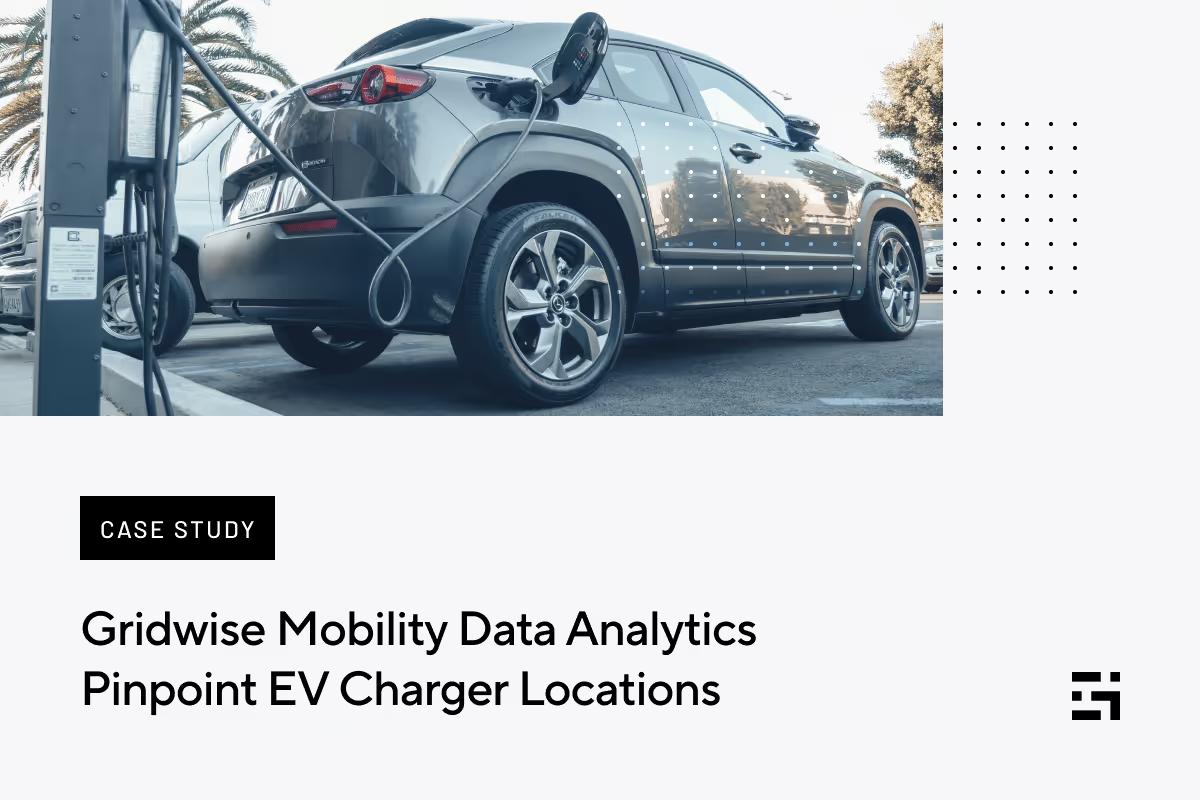
Gridwise Mobility Data Analytics Pinpoint EV Charger Locations
The customer
In 2010, two entrepreneurs launched an electric vehicle infrastructure company, providing charging stations for EVs (electric vehicles). They placed these EV chargers in crucial traffic areas in large cities. There were competitors in this business, but they all followed the same basic model based on an app that
- allowed EV owners to locate the nearest EV charger through their mobile devices
- allowed EV owners to activate the EV charger through the app
- allowed EV owners to pay for EV charger usage through the app using a credit or debit card
Before their partnership with Gridwise Analytics, the client used third-party sources to guide their decisions in the EV charger locations. However, they still needed additional data to more accurately validate and further enhance their findings.
Background
Clean Technica reports that in 2022, approximately 5.7% of US car sales were fully electric models. These numbers are still in the single digits, but the increases are dramatic: up from 3.2% in 2021, 1.7% in 2020, and 1.4% in 2019 (these numbers reflect only electric car sales, as opposed to other studies that combine the sales of electric cars, plug-in hybrids, and sometimes conventional hybrids). Adoption rates of 5% to 10% have been historically significant, indicating that a product or service is likely to be adopted by mainstream users.
More significant is the number of consumers planning to purchase an EV the next time they buy a car. The Ernst & Young Mobility Consumer Index reports that 52% of respondents intending to buy a car in 2022 wanted to purchase an EV. This is the first time the number has exceeded 50%, representing an increase of 22 percentage points in just two years.
Several factors affect the actual cost of an EV vs. the cost of a conventional gas-powered car. When comparing the cost of electricity vs. fuel, EV owners spend only a third to a half of what the owner of a comparable fuel-powered car spends in a year.
Most EV owners charge their car at home using a conventional 110-volt outlet and a cord supplied with the vehicle, but this is the slowest type of charge, known as Level 1 charging, aka trickle charge. This type of charging provides about three miles for every hour charged.
Level 2 charging, on the other hand, provides about 35 miles of range per hour but requires a 220-volt outlet, which is unavailable in every home.
Level 3 allows an EV owner to charge as much as 80% battery capacity in 20 minutes to an hour using direct current, not typically found in homes.
The alternative for owners is to find an EV charger on the road where they can charge their car. However, one of the most significant blockades to EV growth is the availability of EV chargers. There are stories of EV owners not being able to find an available charger, one that other drivers are not using, or finding one only to discover that it is inoperable or damaged by accident or vandalism.
The challenge
The client maintains more than 2,000 EV chargers in the US, in 23 states. These chargers are compatible with all major plug-in hybrid and electric vehicles marketed in the US. Optimizing EV network expansion must be deliberate as EV chargers require significant up-front costs, and the payback could be faster. Reaching profitability requires placing the EV charger locations where they receive the highest level of use and pay for themselves quickly. Providers must find suitable locations, negotiate with property owners (typically retail centers, malls, and office buildings), and install the chargers.
The client used transportation analytics and data from Gridwise to learn where rideshare and food delivery trips start and end. The information gave insight into how many people in the broader driving population are moving in an area and where they are moving to, thereby revealing additional key EV charger locations.
Determining the best locations for EV chargers is even more critical now because the federal government has pledged $7.5 billion to develop an EV charging infrastructure. When validating EV charger locations for grant applications they must include mobility data analytics to justify their locations and expected usage. This requires quality information and granular data:
“When applying for grants and incentives, it is necessary to show that money is deployed to its best use,” said a former industry CFO and Gridwise Analytics user, “and also that the EV chargers will have the greatest number of visitations to reduce the payback period.”

The client had already procured data to pinpoint optimal EV charger locations. Still, they were critically aware that the numbers they submitted for grants would be subject to verification and audits. They were seeking more granular data to confirm their decisions.
The client chose Gridwise Analytics for several reasons:
- Uber and Lyft data analysis and data from the food delivery drivers mirror consumer traffic patterns, providing an excellent way to pinpoint ideal EV charging station site selection.
- Mobility data analytics from Gridwise represent near-real-time information and can be refreshed quickly in light of new information, making it easier to predict future demand.
A former industry CFO and Gridwise Analytics user added, “Gridwise Analytics gave us the micro-level data needed to make specific location-based decisions, and that is important as EV chargers are ‘rooted’ in the ground. Once installed, moving EV chargers is a difficult and costly operation.”
The client was awed by the Gridwise vehicle trip data regarding pickup and drop-off locations and the uniqueness of data from various parts of the country. The client also found the data was very clean and required no editing, allowing them to incorporate it into their current models without having to manipulate it. In one instance, the client detected a significant number of inaccuracies in their own data regarding one city. But when they imported Gridwise vehicle trip data applications they quickly sorted out the clutter, so much so that the result allowed them to close a seven-figure deal.
Partner with Gridwise
By serving drivers, Gridwise gathers vehicle trip data across all major gig service platforms so that, in the aggregate, both Gridwise and drivers can see transportation analytics that help them work more efficiently and profitably.
Gridwise vehicle trip data also offers unique insights for companies serving the broader transportation infrastructure, showing how people and goods move from one location to another. The granular data shows where trips originate, where they end, and the major travel corridors. Data researchers can sort this information to reflect daily, monthly, and annual patterns. Gridwise data is presented in a clean format, with little or no need to manipulate it to fit into the model you might be using.
For a demonstration of how Gridwise Analytics vehicle trip data can sharpen your transportation analytics, contact us below.
Point Pickup: A Flexible Package Delivery Gig for Drivers
Are you at the point where you can’t deal with one more nasty passenger or stingy delivery customer? You don’t have to rub a lamp with a genie in it so your wish to avoid them can come true. Thanks to a different kind of delivery company, you can get an abundance of flexibility, a break from the people problems you encounter with food delivery and rideshare, and ways to make plenty of money, too.
Point Pickup is a same-day delivery service that serves retail stores of all kinds. Retail locations, such as Walmart, prepare the packages completely, and then you pick them up for delivery.
If that sounds too good to be true, you need to read more. In this post, we’ll tell you what Point Pickup is all about and how you can get in on a deal that will take away your woes!
What is Point Pickup?
Point Pickup is a same day service that delivers packages from retail stores and other locations to customers. The lion’s share of orders come from Walmart, which includes groceries. So, like Instacart or Shipt, you may need to do shopping from time to time. Point Pickup offers various choices, so you can tailor deliveries to fit your qualifications and preferences.
Headquartered in Connecticut, Point Pickup has extensive operations in New York and New England. As of this writing it has a presence in all 50 states. You’ll need to check the app to see if delivering for Point Pickup is a possibility where you live.
Point Pickup offers opportunities to all kinds of drivers. You might be looking for a part-time delivery gig, be a full-time independent contractor, or a licensed trucker. You can even use a bike, scooter, or motorcycle to deliver in many locations. In every case, Point Pickup will help you find ways to make money delivering goods with far less hassle.
How does driving for Point Pickup compare to rideshare and food delivery?
Flexibility is the standout feature that makes Point Pickup very different from rideshare gigs and other delivery apps. You choose the deliveries you want to make. No need to drive around hoping to get a ping. You don’t have to set a schedule block, either. Simply check with the app to see what deliveries are available, and select your jobs in advance. You can deliver one order or several, based on your schedule and the demand for your delivery services.
Here’s what that looks like in the Point Pickup app.
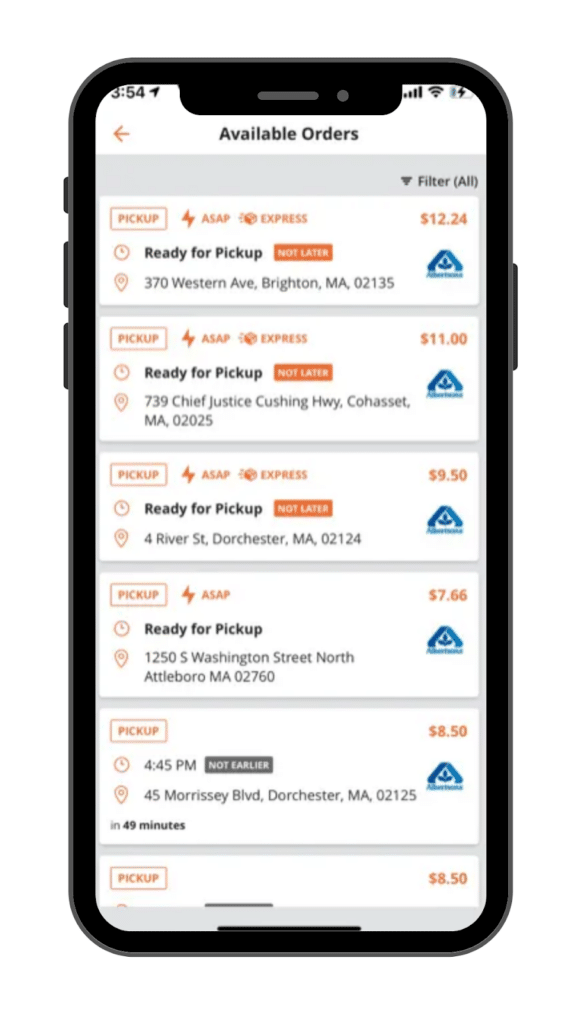
Flexibility is only one of the advantages Point Pickup offers. Here are some more:
- customizable driver profile for your licenses (HIPAA, TSA, CDL) and vehicles
- ability to accept multiple, pre-routed, and recurring orders
- option to set up your own driving times and driving zones
- benefit from favorite driver and rating qualifiers based on your performance
- easily interface Point Pickup with GPS apps
- transaction history recorded
- auto pay/direct deposit on a daily basis
You can also elect to take batch orders. The app shows you how:
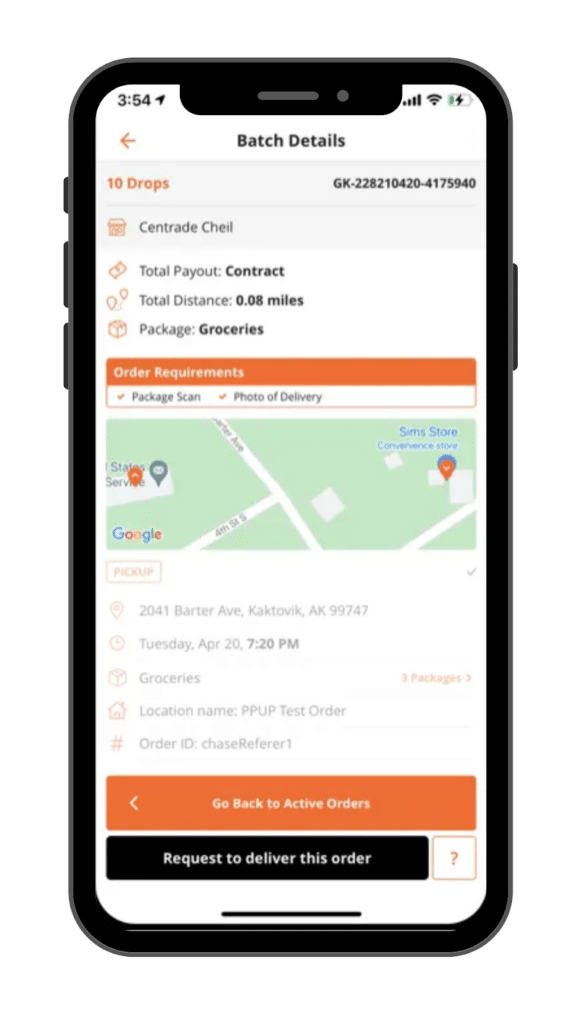
Except for grocery shopping and delivery, you won't need to interact with passengers or wait for a backed-up kitchen to prepare and package your delivery. The packages you deliver will be there waiting for you, all ready to go.
How does Point Pickup work?
Point Pickup’s app will take the information you give it, (e.g., any licenses you hold, vehicle type(s), available hours, etc.) and match you with potential delivery jobs. You decide whether to accept each assignment, giving you freedom from specific hours or obligations to take every delivery the app offers. Point Pickup pays drivers for each package they deliver.
You get to set your preferences, and the app only sends you deliveries that fit within the parameters you specify. Here’s what the package preferences screen looks like:
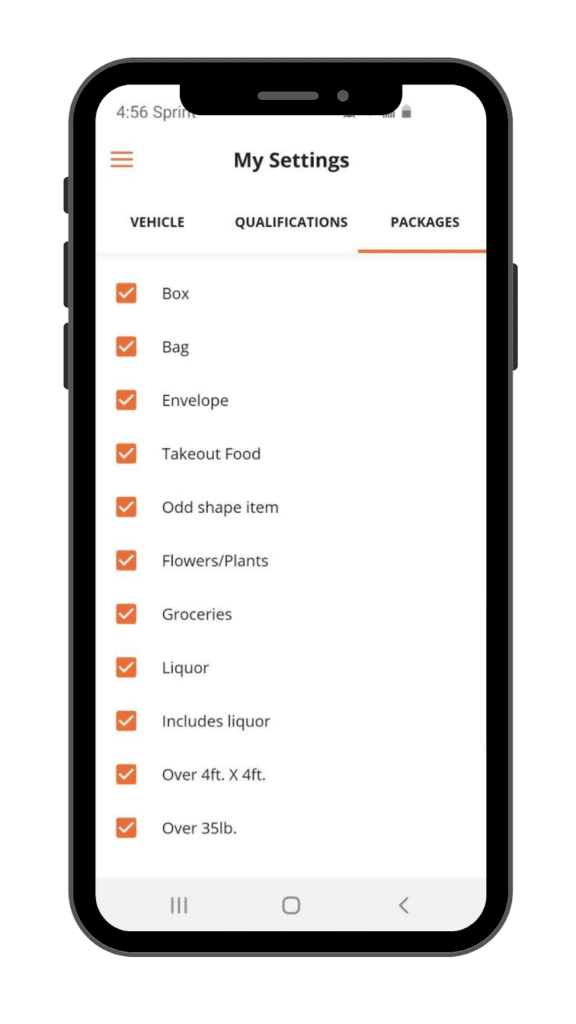
As you can see, you can customize your options to fit your capabilities. If you opt to deliver takeout food, customers who order takeout food should inform the restaurant about your scheduled pickup time.
In addition to licenses, vehicles, and package specifications, you can filter delivery requests by your schedule. Enter your available times, and you will choose from only those orders that come up during those periods.
Customers specify the location of the pickup and the dropoff. Point Pickup charges customers directly, and they do have the opportunity to tip you in the app. Drivers retain 100% of any tips they receive.
When available orders appear, the app shows you the distance you'll need to drive and the payment for each pickup and delivery. You can decide whether to accept an order. Once you accept a delivery, you are expected to fulfill your part of the agreement. Payments go directly into the bank account you specified at signup, and you can withdraw your earnings daily. Point Pickup pays its drivers through Stripe.
What are Point Pickup’s driver requirements?
Point Pickup doesn't require drivers to have a special vehicle or a commercial license, making it easy to qualify. However, you should consider adding an endorsement to your private auto insurance policy to cover your vehicle during commercial use.
Here is all you need in order to become a Point Pickup driver:
- at least 18 years of age
- a valid driver’s license
- a Social Security number
- the ability to pass a background check
How do you apply to be a Point Pickup driver?
Point Pickup makes signing up to drive for them easy. Your first step is to download the Point Pickup driver app. From there, simply follow the prompts as they pop up on your screen. Here are a few samples that show what the process looks like:
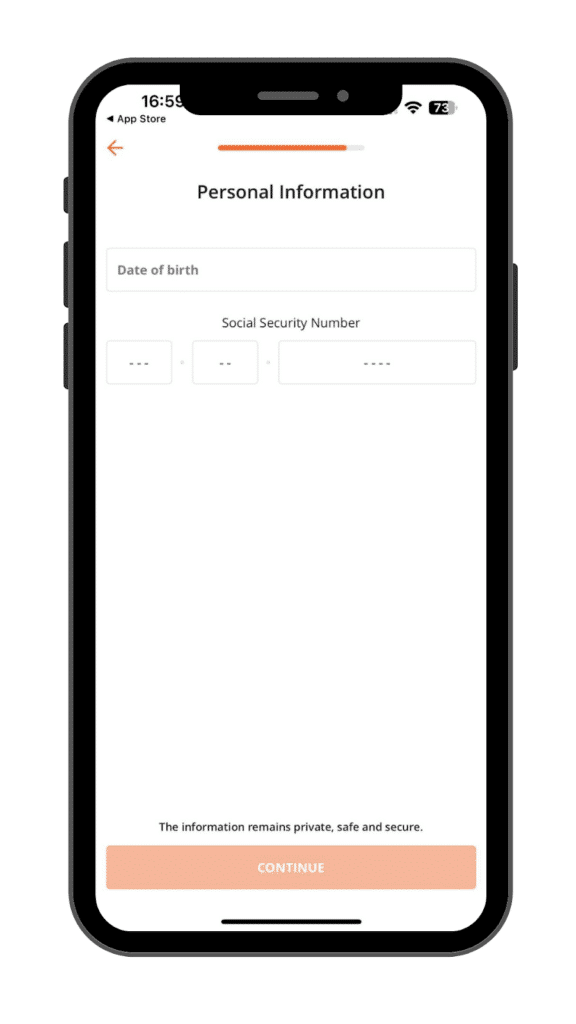
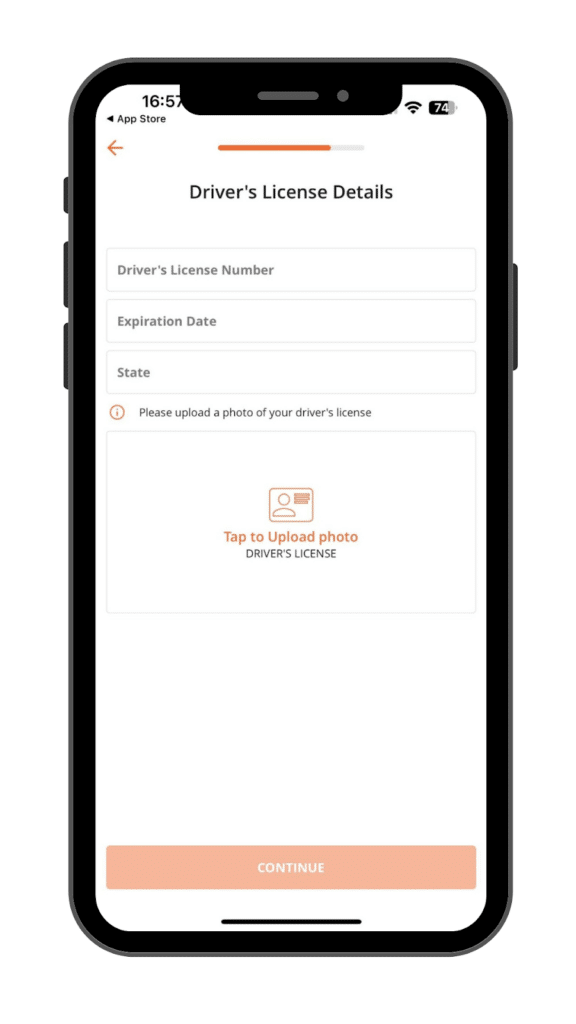
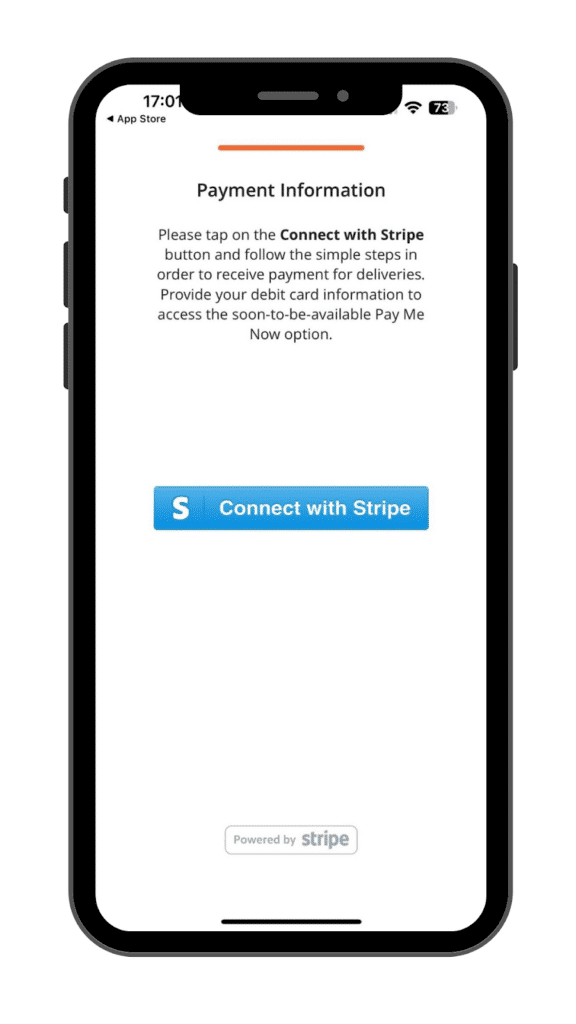
Like every other app, you’ll give them the information they request, and then wait a few days for the background check to come through. Once it does, you’ll be all set to enjoy the flexibility of earning extra cash with Point Pickup!
What if your background check doesn’t clear? This does happen from time to time with all driving and delivery apps. You can always appeal to the background check company, as they do make mistakes. However, if the reason for your failure to pass the check is valid, you might need to look for work elsewhere.
As long as you know you can pass a background check without a problem, you’re going to find the signup process for Point Pickup to be a breeze. Before you know it, you’ll be ready to see some money blowing your way.
What does Point Pickup driver pay look like?
While some sources claim Point Pickup pay isn’t all that great, Gridwise data paint a much brighter picture. Our anonymized information from real drivers tells us that the average hourly pay for Point Pickup drivers is $24.00! That’s very impressive. The average monthly pay, however, is just $236, which speaks to the part-time nature of Point Pickup work. Point Pickup driver pay is broken down as follows: 45% base pay, 23% tips, and 32% bonuses.
How does Point Pickup pay work? Point Picku drivers are paid per package for the deliveries they make. The amount paid per package depends on its size and the distance to delivery. Drivers can also keep 100% of any tips they may receive. There’s a referral program that’ll score you $20.00 for each person you refer, provided they meet Point Pickup’s requirements.
Most reviewers and drivers will tell you that while Point Pickup is a less stressful gig than others, it’s more useful as a side hustle than as a mainstay. You can always do some Point Pickup work when you just need a break or want to supplement income you make from other sources. You can also make it part of your multi-apping repertoire. If that’s exactly you’re looking for, Point Pickup could be a great gig for you.
A must have for Point Pickup drivers: Gridwise
Whether you decide to drive for Point Pickup, use it as part of your multi-apping strategy, or choose to stay with the company you’ve been with for years, you’ll make more money with far less frustration when you ride with Gridwise! Track earnings and mileage for free while keeping all your info in one place for tax time.
See in this article how much using Gridwise can simplify your tax preparation process.
Gridwise supports rideshare and delivery drivers by providing everything from driving information to driver discounts and benefits for independent contractors. When you drive for an app such as Point Pickup, you’ll appreciate the extra help Gridwise gives you.
Gridwise features Point Pickup drivers will love
Informative features can even help you earn bigger tips and generally maximize the amount of money you make with Point Pickup. Here are some of the benefits Gridwise gives you:
- mileage tracking: Gridwise seamlessly tracks all the miles you drive while you’re on your gig, not just the ones from the pickup point to the delivery destination.
- earnings tracking: You can gauge your hourly earnings by letting Gridwise automatically record what you’re being paid by the Point Pickup app and any others you use.
- strategic insight: When there’s not a lot of business out there, it pays to know when and where to find what is available. When to Drive and Where to Drive from Gridwise give you the ability to see what other drivers are making, and which locations and times are “hottest” for your favorite driving apps.
- useful information: Gridwise offers you up-to-the-minute reports on events in your area and other factors that might influence traffic. There are also weather alerts that keep you in the know about what it’s going to be like out on the road.
- driver-oriented support: As an independent contractor, you need to find ways to get affordable insurance, roadside assistance, healthcare, tax help, discounts on auto repairs, and more. Gridwise has a suite of products designed for drivers and their many needs. Check them out on the Gridwise Benefits webpage.
When you have an effective driving strategy, plus inexpensive ways to take care of your “real life” needs, you make more money.

The Ultimate Guide to being a Lime scooter charger/juicer
How can you get to be a Lime scooter charger/juicer? What does it take, and how much can you make?
Lime scooter charger/juicers service dockless electric scooters that are shared by riders in cities all over the world. We’ve all seen them around, but you might be amazed when you find out just how popular e-scooters have become.
In this post, we’ll take a look at what Lime, the e-scooter company, is all about, and specifically what it’s like working as a Lime charger/juicer.
What is the growth of scooter use?
According to an August 2020 article in Bloomberg CityLab, the National Association of City Transportation Officials (NACTO) reported that scooter ridership increased from 38.5 million in 2018 to 88.5 million in 2019 – a growth rate of 130%.
Scooters have already surpassed bikes when it comes to their share of the micromobility market. This graph, from Appinventiv shows the growth of the e-scooter market. They also state that by the year 2023, this percentage will touch the milestone of 8%. The below display Bird and Lime scooter weekly app installs.
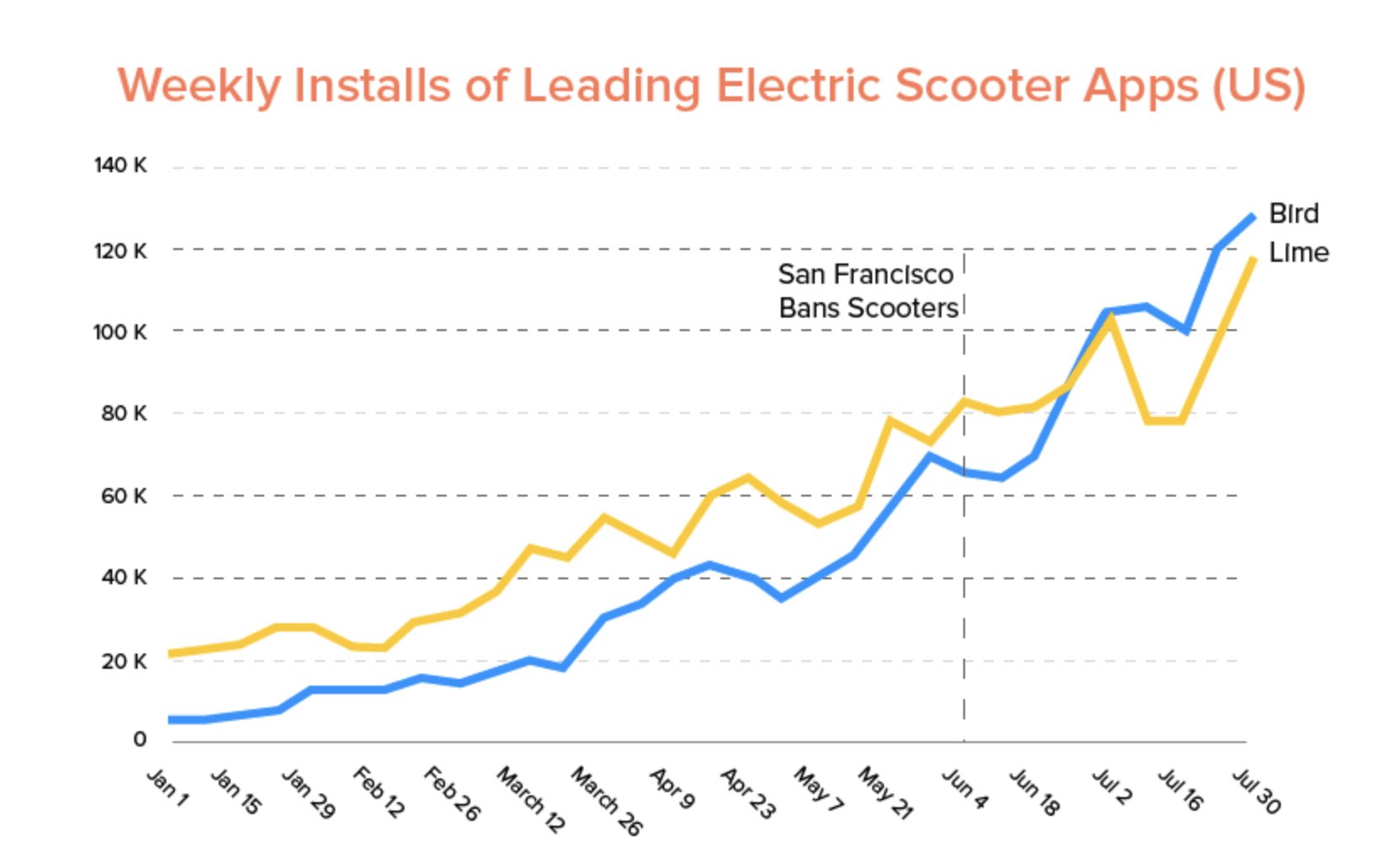
Graph credit: appinventiv.com, November 23, 2023
What is Lime?
Lime is one of the hottest scooter startups transforming the micromobility industry. Just like its competitor, Bird, Lime provides motorized scooters that users can rent via a smartphone app.
The process is simple: When customers want a ride, they access the Lime app, find out the location of the nearest scooter, and electronically unlock the scooter. Then, they’re off … at approximately 15 miles per hour! The scooters cost $1 to unlock and then 15 cents per minute after the initial charge.
Going only 15 miles per hour isn’t much of a problem in most big cities. As traffic comes back to its pre-COVID volumes, more and more cities are opting to give Lime’s eco-friendly, convenient, and socially distanced means of transport a try. Here’s a list of U.S. and international cities where Lime operates.
New York recently ended its ban on e-scooters and is instituting a trial with Lime. Scooters will begin rolling around the Bronx sometime during summer 2021.
Now that you know something about Lime, let’s look at the job of being a juicer.
How does “juicing” work?
Because Lime scooters are electric, they need to be charged regularly – and that’s where you come in. Lime employs contract scooter chargers, whom they call “juicers”, to pick scooters up off the streets and charge them every night after 9:00 p.m.
As a Lime juicer, you will gain access to their Lime juicer map where you can view scooters in real time that are ready to charge, as well as how much Lime will pay you for each charge. Since the scooters are always picked up at night and charged at your home, you can essentially make money while you sleep.
Keep in mind that Lime recruits heavily in cities where it needs contractors to charge scooters. You’ll want to apply as early as possible when Lime comes to your city. That way, you have a stronger chance of getting approved, and you’ll earn more money because there will be less competition.
How to harvest and serve for Lime
There are two steps to charging scooters for Lime: harvesting and serving. “Harvesting” means picking up a scooter from the street that is ready to be charged, juicing it up, and then dropping the scooter off in a designated spot by the time given in the app.
The harvest process looks like this: Find the scooter you’re looking for, scan its QR code, place it in your vehicle, and either take it back to your charging station or continue collecting more scooters.
“Serving” refers to the final step you need to take before completing the charging task. Lime has a list of standards they call “BLT,” which stands for battery, location, and timing. These standards are described as:
- Battery: Scooters must have at least a 95% battery when served in order to receive the full payout.
- Location: In the app, you will be able to see where scooters are, reserve them, and navigate to the locations of scooters in need of some juice.
- Timing: The app specifies the time by which each scooter needs to be served. Again, you’ll find out from the app by what time each scooter you’ve picked up needs to be dropped off.
Once all the scooters you’ve picked up at night are dropped off (the next morning) at their specified location, Lime will credit your account for your juicing job.
How much do Lime juicers make?
When you check the app for scooters that need to be harvested, you’ll be able to see how much each scooter will earn you. Lime juicers report an average of about $8 per scooter, with $5 to $12 per scooter as a reasonable range.
You can probably expect to make around $20 to $30 per hour. For comparison, check out our insights into rideshare driver earnings as well as average earnings for food delivery drivers. You’ll see that the hourly rate for juicing compares favorably.
The only drawback is, your hours as a juicer are limited. You need to do your work at the end of the day and in the morning. You can still pull in a nice chunk of change, though, and your effort will be minimal if you develop a plan and stick to it.
Here’s an inside tip from masters of the juicing game: To make the most money for the least amount of effort, collect multiple scooters that are relatively close together, rather than going out of your way for more profitable scooters that might be harder to retrieve.
Try Gridwise as the perfect gigwork companion:
What are the requirements to be a Lime charger?
Lime has a few requirements that are pretty cut and dried, and make sense for the job. You must:
- Be 18 years old
- Have a vehicle (preferably on the large side)
- Have a valid driver’s license
- Have a helmet for scooter driving
- Have a smartphone to use the app
You can usually be approved to juice for Lime rather quickly. There’s no background check, so you won’t have to wait for that to come through before you can get to work.
How to sign up for Lime
If you meet Lime’s requirements, you can sign up to be a juicer online. Depending on the competition in your city amongst other chargers, you might have to wait for a while for a response back.
Then, you’ll be asked to complete a “How to Juice” course and sign a W-9 form and a standard agreement. Once your application is approved and you’ve completed those tasks, you will receive instructions on how to purchase your chargers. Then, you can order up to four of the chargers (listed at $19 each) from Lime’s online store. Once you receive your chargers, you’re all set to begin juicing.
Note: you can also start out by simply harvesting scooters for juicing. While this won’t pay as much, it’s a good way to get started, see if you like the gig, and then make the investment in chargers if you’re interested in continuing.
How do I contact Lime support?
Lime provides a Help Center for juicers as well as the ability to submit a request via the website. In the Help Center, you can view the pay portal, see your payout summary, and learn more information about harvesting, serving, retrieving, and more.
10 Tips for Maximizing Your Earnings as a Lime Juicer
- Plan efficient routes: Map out a strategic path to collect multiple scooters in close proximity, minimizing travel time and fuel costs.
- Use the Reserve feature: Take advantage of Lime's Reserve feature to claim scooters in advance, reducing competition and wasted trips.
- Invest in quality charging equipment: Purchase reliable chargers to ensure faster and more efficient charging cycles.
- Optimize your charging schedule: Charge scooters overnight to make the most of your time and electricity usage.
- Focus on high-density areas: Target locations with a higher concentration of scooters to maximize your collection efficiency.
- Stay informed about local events: Be aware of concerts, festivals, or other gatherings that might lead to increased scooter usage and potential charging opportunities.
- Maintain a good relationship with Lime: Follow their guidelines closely to avoid penalties and maintain your juicer status.
- Track your expenses: Keep detailed records of your mileage, equipment costs, and other expenses for tax purposes.
- Collaborate with other juicers: Share information and tips with fellow juicers to improve your overall strategy.
- Diversify your gig work: Consider combining Lime juicing with other gig economy jobs like rideshare or food delivery to maximize your overall earnings.
Understanding Local Regulations: A Must for Lime Juicers
When becoming a Lime juicer, it's crucial to be aware of local laws and regulations regarding e-scooters, as these can vary significantly by city and affect how and where scooters can be deployed. Some cities may have specific requirements for where scooters can be parked, operational hours, and safety standards. For instance, certain jurisdictions might restrict scooter usage in specific areas or during particular times of the day. Others may impose stringent safety regulations that juicers must adhere to when charging and deploying scooters. Staying informed about these local regulations ensures compliance and helps avoid potential fines or penalties. Additionally, understanding these rules can optimize your juicing strategy by aligning it with local guidelines, thereby enhancing efficiency and profitability. Always check with local transportation authorities or Lime's guidelines for the most up-to-date information on e-scooter regulations in your area.
Lime vs. Bird
Why would you choose to juice for Lime rather than Bird? Let’s go through a few quick facts, and you’ll see.
Both Lime and Bird have similar payment models, in which they pay you a base rate of $3 to $5 for charging and dropping off each scooter.
But, pay per scooter varies based on when the scooter becomes available for a charge and how long it's been since its last charge. Bird has a range of $3 to $20 per scooter, whereas Lime usually starts out with a base rate of $5 to $12 per scooter.
An upside of charging for Bird is that you’ll be paid at a reduced rate if you release a scooter that isn’t at 100% charge. Lime withholds payment for not meeting charge standards, and may even revoke your juicer status at times. That’s because Lime wants to give the best possible service to its customers by making sure its scooters are charged at at least 95%.
When choosing whether to charge for Lime or Bird, it really comes down to convenience for you and figuring out which hubs you’re closest to. If Lime hubs or Bird hubs are inconvenient spots for you, you’ll make less money if you have to travel too far to get the job done. Depending on the popularity of either company in your city, this is a huge consideration to factor in.
Hoarding
In some cases, juicers can get cutthroat about grabbing up scooters. Lime is bringing order to the chaos by introducing a Reserve feature. This allows juicers to reserve, and lay claim to, a scooter before picking it up at the end of the day for charging.
Now, harvesting for Lime is not a first-come, first-served situation. In the past, harvesting could only be done once the juicer arrived at the scooter’s location and unlocked it with the Lime app.
There have been some scary situations that involved people hoarding scooters in an attempt to defraud the companies, with criminals using scooters to lure juicers into unsafe areas. Since this job takes you to strange places mostly at night, there are serious safety concerns to consider before working as a juicer, and it’s important that you stay vigilant and take common-sense precautions.
Make Lime juicing your next side gig
If you want an easy after-hours gig to add to your rideshare or delivery income, juicing for Lime could be just the ticket. Like all gig driving work, there are some risks to deal with, but for the most part, the benefits outweigh the risks.
And, just like rideshare and delivery, having a strategy is crucial. Once you get the hang of things, figure out where the best scooter hubs are, and lay out your money-making plan from there.
One last consideration about being a juicer: You’ll need a vehicle that’s large enough to hold the scooters. You’ll also need to take measures to protect the inside of the car from upholstery tears and scuff marks, or other damage caused by the scooters.
When you’re ready to roll, all you need to do is start juicing for Lime.
Do you have any tips and tricks for being a Lime juicer? Leave your comment to tell us how to make this gig even sweeter.
More resources you might enjoy

The Best Side Hustle Websites
Many rideshare and food delivery drivers have discovered the attraction of gig work, including jobs that don’t require a car. Gig workers or side hustlers can control when, where, and how much you make by assembling a collection of side hustles matching your strengths, resources, and lifestyle if you work for one of the best side hustle websites.
The best way to immerse yourself in gig work is by working with the best side hustle websites and apps. Some of these platforms offer side hustle jobs from home. Others take you out into the world. This is a collection of some of the best side hustle platforms that have come to our attention.
If you earn your living from side hustle platforms, you fall into the category of self-employed. That’s really great because it gives you immense freedom and power, but it also means responsibilities. You need to know your expenses and where you make the most money. This is where the Gridwise app can be your best friend. Read to the end of this blogpost and learn how Gridwise can help you earn more, keep more, and pay less in taxes.
If you like, you can also refer to a previous Gridwise article, Unlock Your Earning Potential: The Best Side Hustle Jobs in 2024.
Why should you use an app or side hustle platform?
Using apps or side hustle websites to search for work has distinct advantages. Yes, most of them take a small fee to administer the site, but they are often worth the investment. Consider these benefits:
Central platform. Finding work is one of the most challenging tasks when embarking on a side hustle career. Knocking on doors is time-consuming and unproductive. Voicemail makes phone calls frustrating. However, if someone posts a gig on a side hustle platform or app, you know they are interested. These platforms give you a central location for researching jobs. You know these people are looking for your service.
Job specific. Whether your side hustle is rideshare, delivery, dog walking, or handyman services, there is probably an app or platform full of jobs in your specialty. You’re not having to search all over.
Geography specific. Some side hustles allow you to work from anywhere in the world. For instance, freelance writers and graphic designers can work anyplace they can set up their laptop and get a Wi-Fi connection. If you specialize in personal services, such as dog walking, handyman jobs, and delivery—all jobs tied to a specific geographical region—then you will want to refine your search to a particular area. Apps and websites can help you do this.
Ensure payment. The best side hustle websites and apps administer payment. They require the entity seeking work to register a credit card or bank account. When a work agreement is reached, they hold the funds in escrow, ensuring that you get paid. This keeps you from getting burned by dishonest clients.
The best side hustle websites and apps
So you’ve decided to embark on a career of side hustles. Let’s look at some side hustle companies and platforms out there. If you remember from reading the Gridwise article, Unlock Your Earning Potential: The Best Side Hustle Jobs in 2024, the term side hustle stack, refers to a collection of side hustles. You should consider any of these for your side hustle stack.
Food delivery companies
We all know the food delivery story. These apps and companies skyrocketed in popularity during the pandemic, and users have found them a hard habit to break. Some restaurants are doing as much as 30% to 40% of their business in delivery, and industry experts expect this sector to continue growing. The bottom line is that food delivery apps—prepared food and groceries—will continue to generate a lot of gig work, making them a profitable side hustle.
You need access to a reliable car, although densely populated areas may support delivery on a bicycle or scooter.
Websites: DoorDash, Uber Eats, Grubhub
Rideshare companies
Uber and Lyft continue to rule this market. Drivers who are strategic in their hours and where they work can do well. Large metropolitan areas, especially with airports, provide lots of rides for drivers. Lyft and Uber continue to innovate their apps with new related services that promise extra rides for drivers that include priority pickups, saving a little by waiting a few minutes longer for a car, or added comfort with larger cars.
You will need a late-model car. Check your specific region, as requirements differ from one service area to another.
Roadie
If you’re a rideshare driver, Roadie represents an opportunity for you. The best and most strategic rideshare drivers can predict the areas they will be in during a shift. Since many deliveries on the Roadie app are not time sensitive, you can pick up a delivery if you know you’ll eventually be near the airport or downtown area sometime later to make the drop-off. Many airlines use Roadie to deliver misrouted baggage. So if you know you’ll be at the airport, and the delivery is on your way home at the end of a shift, you can earn the money for the delivery with minimal effort.
Website: Roadie.com
There are side hustles for services that you haven’t even considered. The best way to discover them is to check out this recent Gridwise article, Unlock Your Earning Potential: The Best Side Hustle Jobs in 2024.
Deliveroo
If you're thinking of moving across the pond to any of a number of European countries, and you want to continue earning a living with side hustles, consider Deliveroo. The company operates in the United Kingdom, France, Belgium, Ireland, Italy, Singapore, Hong Kong, the United Arab Emirates, Kuwait, and Qatar. Deliveroo is also involved in cloud kitchens, where the staff prepares for delivery only. You can do Deliveroo in a reliable car, bicycle, or scooter.
Website: Deliveroo.co.uk
TaskRabbit
Are you handy with a hammer and drill? TaskRabbit’s jobs range from mounting a flatscreen television or chandelier to more involved projects. Thumb through the app and look for the projects that you know you're capable of completing in a professional manner. TaskRabbit stresses same-day service, so you should be ready to work, and it’s necessary to have your own tools.
Website: Taskrabbit.com
FlexJobs
FlexJobs is your site for hybrid and remote work. Jobs include accounting, call centers, customer service, data entry, finance, and more. FlexJobs’ client list includes companies such as CVS Health, Progressive, DocuSign, and others.
Website: Flexjobs.com
Nextdoor
Nextdoor is a neighborhood website where you can advertise your services—including handyman, childcare, senior care, or whatever else you do. The great feature is that you can advertise hyper-locally so that you remain in your community as much as possible. The downside is that Nextdoor doesn't administer payment, so negotiating fees and getting paid is between you and the client.
Website: Nextdoor.com
Thumbtack
Thumbtack is similar to Taskrabbit, although Thumbtack offers a broader array of job types, including DJs, wedding planners, event planners, musicians, and lots more. Thumbtack also integrates with other customer management tools (Housecall Pro, Jobber, and others) that you might use to manage your side hustle business.
Website: Thumbtack.com
Bark.com
Don’t let the name fool you. Bark is not a dog walking or pet care service. The website covers everything from writing services to tutoring to personal training and massage therapy.
Website: Bark.com
Rover
Rover, on the other hand, is a pet-care site. You can sign up for boarding in your home, overnight pet sitting in the owner’s home, drop-in visits, dog walking, and other pet-related services. You can go onto the Rover app and mark when you're available, set your schedule and prices, and indicate the areas you specialize in. Like many of these sites, Rover handles payment and allows you to set prices.
Website: Rover.com
Do you want to know how to assemble the ultimate side hustle stack? The best place to start is with Gridwise. Read this recent article, Unlock Your Earning Potential: The Best Side Hustle Jobs in 2024.
TaskEasy
This site takes us back to the more traditional handyman services but focuses on the property maintenance aspect of work. If you specialize in condominium communities or business parks, this website and app is for you.
Website: Taskeasy.com
Ivueit
If you know about construction, Ivueit.com might be the site for you. These are primarily home inspections, routinely required when someone is selling or purchasing a home. The Ivueit app walks you through the process, allows you to take photos, and helps you produce a professional report.
Better yet, this is the kind of side hustle that you can dovetail with your other activities. Sign up through the Ivueit app to inspect a home in a specific neighborhood, and then rideshare your way there using the Set Destination function on your rideshare app. You earn money on your way to earning more money.
Website: Ivueit.com
Fiverr
Fiverr takes a different turn, focusing on the more creative side—graphic designers, web designers, voiceover, and product marketing. In addition, Fiverr has gigs in software development, data science, and more. If you have some professional skills, this is the site for you.
Website: Fiverr.com
Upwork
Upwork is a close competitor to Fiverr, and lately, they’ve been doing a fair amount of advertising on network and cable television. Like Fiverr, you register your profile and designate your specialty—graphic design, technical writing, programming, personal assistant, etc. Upwork is one of the most thorough and popular side hustle apps available, with tutorials and webinars on earning more.
Website: Upwork.com
Care
Care is a site for house cleaning and pet care, but it goes further and connects people with babysitters and even senior care. Senior care will become an increasingly vital service as the baby boomers grow older and their children, Gen Xers and millennials, struggle to meet their needs. Check online for babysitting and senior care certifications that will qualify you for these jobs.
Website: Care.com
How not to get hustled on your side hustle
Thousands of people, even tens of thousands, make their living with a side hustle stack. Depending on the hustles you work, making decent money is possible. Unfortunately, it's also possible to get taken advantage of. Here are some tips for not getting hustled by your side hustle.
Set a price for yourself
Determine what kind of income you want to generate, break it down to a daily or hourly rate, and then engage in side hustles that allow you to make that level of money—and stick to your established level of earnings! People are out there who will offer to pay you peanuts for your services, and if you let them get away with it, they will continue to do so.
Sites like Fiverr and Upwork allow you to set an hourly rate. If a potential client’s budget doesn’t meet your threshold, pass them over. Plenty of clients will be willing to pay the appropriate rates. In many cases, you have been doing this for a while. You might even have a college degree. You need to be paid appropriately for your services.
Another version is the client who asks you to do a test job for free. They say things like, “Let’s see how it works out,” or “We want to ensure we like your work.” Hang up the phone, kill the internet connection, and don’t answer their emails. This rarely works out in your favor.
Research how to work on these sites
Lots of experienced side hustlers have been there before you and have valuable advice. On Google or YouTube try entering “Tips for working on Rover” or “How to make six figures annually on Upwork.” Learn from other’s mistakes and get some solid advice before taking on any of the most popular side hustle websites.
Verify how payment works
As we mentioned earlier, many of these sites handle payment. This is convenient because it makes it difficult for you to get burned. The app may charge an administration fee, but it’s almost always worth it.
Beware of scams
They are out there. We know of a freelance writer who applied for a job on a site, and the client approached him within hours with an offer for a full-time job with a well-known European media conglomerate moving into the US. They sent him an official-looking employment contract, offering a handsome wage and excellent benefits.
Then they said that he had to purchase their equipment from a third-party vendor, and they would reimburse him for it, to the tune of about $5,000.
That’s when the freelancer got suspicious. He looked up the company and sent an email to their PR department. They knew nothing about any such activity, weren’t moving into the US and had never heard the name of his contact. Everything was bogus. In all likelihood, the third-party vendor was someone’s personal bank account and reimbursement would never come, and neither would the equipment.
Some apps are trying to crack down on this activity, but they still sneak through. You need to beware.
Other warning signs
There are also warning signs and things you should not do while working on an app. These are especially true for those apps that advertise professional services such as writing, bookkeeping, graphic design. The apps try to weed out these scammers, but occasionally they infiltrate. Here is what to look for.
Unbelievable offers: There’s a simple rule: if it’s too good to be true, it usually is. Just like our freelancer who was offered a high-paying position, scammers will try to lure you with the promise of fantastic earnings and a low bar to entry. The unbelievable offers are a significant warning sign.
Trying to lure you off the app: If you encounter a client through an app, most terms of service prohibit you from working with that company or individual outside the app, at least for a specific time. If someone asks you to communicate with them off the app, this is typically a warning that they are trying to scam you.
An always available contact: Most client companies on these apps and websites run a nine-to-five operation. If your contact is messaging you at all hours, or is responding to your messages 24/7, that is suspicious. You should be aware.
Any suspicious activity: Most apps have a contract mechanism spelling out the work expectations and the compensation you will receive. If a client wants you to call third parties, ask for information, sell services, or make other offers, especially if you don’t have a contract, then they are likely involved in or getting set up for a scam.
The world of side hustles is immense and gets bigger every day. Do you want to see how your experience and talent might fit into a side hustle? Read this recent article, Unlock Your Earning Potential: The Best Side Hustle Jobs in 2024.
How the Gridwise app can help you with your side hustle
Remember that if you make a living through side hustles, you almost always work as an independent contractor. Neither the apps nor your clients withhold taxes for the IRS or the state. Taxes are your responsibility. The better you track your income and expenses, the better the odds you won’t pay unnecessary taxes.
Job-related vehicle mileage can be a substantial deduction for side hustle earners, especially considering the standard IRS mileage deduction in 2024 is 67 cents a mile for business use. The Gridwise mileage tracker, part of the Gridwise app, is the perfect way to passively track your miles and easily download them at the end of the year. Installation is simple, and once installed, the Gridwise mileage tracker passively records your mileage.
Most expenses incurred while working a side hustle are also deductible. The Gridwise expense tracker allows you to photograph receipts and type in a few words about each expense.
The Gridwise app stores mileage and business expense information so that you can download it into a file and manipulate it with Excel or other software. What used to take days at tax time is now accomplished in minutes with the Gridwise app.
Finally, the Gridwise app lets you enter your side hustles and compare them to see where you’re earning the most. You can be more efficient and spot those little sleeper hustles that could become big earners for you with a bit of work and ingenuity.
Check out these Gridwise pages to learn more about the Gridwise mileage tracker:
- Download the Gridwise app (includes the Gridwise mileage tracker)
- Unlock Your Earning Potential: The Best Side Hustle Jobs in 2024
- TaskRabbit: A Flexible Side Hustle Platform

The Ultimate Guide To Being A Roadie Driver
“A side hustle to someone’s side hustle.” That’s the description of Roadie, a delivery service that relies on gig drivers to deliver anything from lost luggage to furniture to prescription drugs. The quote comes from Marc Gorlin, the founding CEO of Roadie. Roadie might be the ultimate in multi-apping. It’s possible for a Roadie driver to schedule a pickup and have that assignment active on the Roadie app while delivering food or transporting rideshare customers.
How does Roadie work?
The origin story
Marc Gorlin, already a veteran of tech-related startups, conceived of Roadie in 2014 when an order of tile for his Florida condominium arrived at the contractor’s yard. The shipment was hopelessly damaged. A replacement order was available but stuck in an Alabama warehouse and would not arrive for several days.
Gorlin sat in his car on a freeway overpass contemplating the delay of his remodel while watching empty pickup trucks passing in both directions on the interstate. He knew some of them were probably traveling between where his tile was warehoused and his condominium, but there was no way he could get any of those drivers to agree to transport it. Gorlin later discovered the potential of those cars.
“That’s an unbelievable resource,” Gorlin told UGA Today, a publication of his alma mater, the University of Georgia, “250 million passenger vehicles hit the road daily with almost 4 billion cubic feet of excess capacity.”
Almost a decade later, Roadie has more than 200,000 drivers and serves about 90% of the US population. The firm claims it can deliver just about anything the same day, next day, and urgently to 20,000+ zip codes nationwide.
Roadie contracts with major airlines to deliver lost luggage. Retailers such as Best Buy, Home Depot, and Tractor Supply use Roadie to transport purchases. The pandemic brought a skyrocketing demand for deliveries to businesses and homebound consumers looking for that last-mile delivery. In September 2021, UPS acquired Roadie. According to the Atlanta Business Chronicle, the purchase price was north of $500 million.
Roadie in action
Retailers, airlines, and other entities needing items delivered post their requests on the Roadie app. Information includes the item being picked up, pickup location, where it’s going, size, weight, delivery deadline (if any), and what the gig pays. Roadie refers to each delivery as a “gig.” Drivers indicate through the app if they are interested in the delivery. Once the gig is assigned, they pick it up and make the delivery. Both pickup and delivery are confirmed through photos on the app.
How the Roadie driver app works with other apps
You’re a rideshare driver living in New Jersey near Newark Liberty International Airport, but your strategy is to hit the road at 4:00 am, when you’re likely to get a passenger heading to JFK International Airport, which pays a handsome fare. Before you turn on your rideshare app, you check the Roadie driver app. An airline in Newark needs a misrouted piece of luggage transported to JFK by 11:00 am. You pick up the luggage at the Newark airport, turn on your rideshare app, and head for JFK, predictably picking up a ride en route. You drop off the passenger, then go to the terminal for the lost luggage and make that delivery before 7:00 am.
You just got paid for two deliveries at once. Then you can look for another Roadie delivery or spend the rest of the day in New York City on the rideshare app. When it’s time to go home, you check the Roadie driver app for misrouted luggage that needs to get from JFK to Newark or any other delivery along your travel route.
What you could deliver as a Roadie driver
Roadie drivers are known for their versatility in transporting a diverse array of items, such as:
- Small packages and personal effects
- Large and cumbersome items
- Various types of furniture including chairs and sofas
- Electronic devices like laptops and tablets
- Major household appliances, including fridges and ovens
- Musical instruments from guitars to tubas
- Sporting equipment, including kayaks and bikes
- A range of food products, including perishables
- Essential medical supplies
- Art pieces and valuable collectibles
- Goods purchased from online platforms like Craigslist or eBay
- Misplaced luggage, in collaboration with airlines such as Delta
Roadie's service offerings are notably adaptable, proudly delivering everything "from cupcakes to couches". They efficiently manage same-day, urgent, and planned deliveries for both commercial clients and private individuals throughout the United States.
Roadie particularly highlights their expertise in transporting items that pose challenges for conventional shipping methods, especially those that are oversized or bulky. Additionally, their service is tailored to accommodate the needs of various sectors.
How much do Roadie delivery drivers earn?
Roadie deliveries are best when used in a blend of gig driving activities, allowing drivers to earn more during what is otherwise considered downtime. A recent blog post on Sidehusl.com reports that Roadie deliveries average $13, with a range of $8 up to $100. Bulkier items often command a higher price tag and may require a truck or van.
Here is a look at Roadie driver earnings according to numbers collected from drivers using the Gridwise app.
- 2022 Q1: $124 base, $9 tips, $140 total, 11 trips, $12.73 per delivery, 5.04 hours worked, $27.78 an hour
- 2022 Q2: $162 base, $5 tips, $177 total, 12 trips, $14.75 per delivery, 6.3 hours worked, $28.10 an hour
- 2022 Q3: $123 base, $4 tips, $132 total, 9 trips, $14.67 per delivery, 6.15 hours worked, $21.46 an hour
- 2022 Q4: $168 base, $7 tips, $181 total, 14 trips, $12.93 per delivery, 6.42 hours worked, $28.19 an hour
- 2023 Q1: $132 base, $5 tips, $146 total, 11 trips, $13.27 per delivery, 6.72 hours worked, $21.73 an hour
*Note that there is a discrepancy between the combination of base and tip earnings and what is stated in the gross earnings. This is due to a 5% variance in computing numbers for comparison.
In reviewing these numbers, consider that they represent earnings from all Roadie drivers for a quarter, including those who have done one or two deliveries and those that do dozens of deliveries. Nevertheless, Roadie pays among the highest of any gig driving job when broken down into hourly earnings.
But a review of Roadie numbers for the top-performing drivers (those in the 90th percentile) presents a more inviting picture.
- 2022 Q1: $1,081 base, $109 tips, $1,241 total, 91 trips, $13.64 per delivery, 33.87 hours worked, $36.64 an hour
- 2022 Q2: $1,571 base, $92 tips, $1,695 total, 102 trips, $16.62 per delivery, 44.64 hours worked, $37.97 an hour
- 2022 Q3: $1,230 base, $74 tips, $1,341 total, 87 trips, $15.41 per delivery, 28.77 hours worked, $46.61 an hour
- 2022 Q4: $1,381 base, $84 tips, $1,486 total, 130 trips, $11.43 per delivery, 32.76 hours worked, $45.36 an hour
- 2023 Q1: $1,135 base, $73 tips, $1,197 total, 102 trips, $11.73 per delivery, 42.68 hours worked, $27.90 an hour
*Note the discrepancy between the combination of base and tip earnings and what is stated in the gross earnings. This is due to a 5% variance in computing numbers for comparison.
Top-producing drivers are earning some of the best hourly wages of gig drivers.
Payments
According to its website, Roadie processes payments to gig drivers every Tuesday. Depending on the recipient bank, deposits appear in the driver’s bank account in one to three days. There is also an Instant Pay option.
Tax Implications for Roadie Drivers
As a gig worker, particularly for those driving with Roadie, managing your taxes can often seem like navigating through a complex maze. However, understanding the basics and organizing your finances can make tax season a breeze rather than a burden.
Navigating taxes as a gig worker can be tricky. Here are some key points to remember:
- You're considered an independent contractor, responsible for your own taxes
- Keep meticulous records of your earnings and expenses
- Use mileage tracking apps to maximize your mileage deductions
- Set aside a portion of your earnings for quarterly estimated tax payments
Streamline your mileage, income and expense records with Gridwise
For gig drivers looking to streamline their operations and maximize earnings, adopting Gridwise is a game-changer, particularly when tax season rolls around. This powerful app not only meticulously tracks your mileage (a significant deductible for drivers), but it also organizes your earnings and expenses across multiple platforms in one convenient dashboard.
By using Gridwise, you can ensure that no deductible expense or mile goes unrecorded, thus maximizing your potential tax deductions. This organized data simplifies the process of filing taxes, potentially reducing your taxable income and increasing your refund.
Essentially, Gridwise doesn't just help you manage your driving gigs—it empowers you to take full control of your financial health, turning tax time from a headache into a rewarding end-of-year ritual.
How to become a roadie driver, the sign up process
To become a Roadie driver, sign up through the website.
Qualifications needed to be a Roadie delivery driver
Minimum qualifications include
- being 18 years old
- possessing a valid driver’s license
- having a Social Security number
- maintaining a minimum 4-star rating in the Roadie driver database, based on feedback from senders
Roadie delivery driver vehicle requirements
The Roadie.com website does not currently state any requirements for the type of vehicle a driver can use; however, their terms and conditions note that senders can indicate which type of vehicle to use for a delivery, such as a truck for delivering large items.
Roadie driver reviews and ratings
Roadie drivers are reviewed by senders based on a five-star system. The firm is serious about reviews—drivers who fall under four stars risk suspension from the app.
Roadie delivery driver tips
Your tips come from senders and are passed on to the drivers through the app. Tips for Roadie drivers average less than 10% of total earnings and often considerably less. This is most likely due to the high percentage of deliveries from corporate-owned retailers with managers working with limited budgets.
Roadie delivery driver rewards
Roadie has yet to have a driver rewards or incentive program that Gridwise has been able to verify, nor has Roadie revealed plans to establish one.
Roadie’s Gig Matching
More than a year ago, Gridwise ran a blog post about Roadie titled How Much Did Roadie Drivers Make in 2021? In this post, we addressed the various levels of Roadie certifications. These included
- Cargo Trailer
- Extra Equipped
- TSA Certification
The Roadie website lists how drivers can attain these levels.
More recently, the company has developed a system referred to as Gig Matching. When multiple Roadie drivers indicate an interest in a particular delivery, the Roadie algorithm rates the riders based on predetermined criteria. This criteria includes the listed certification levels as well as other factors, such as
- vehicle size
- driver ratings
- gigs the driver is already delivering
- proximity to pickup location
- the direction the driver is already headed
Roadie’s Gig Matching algorithm weighs these factors and others in selecting the driver for a particular gig. It will match drivers with multiple deliveries when they are all going in one general region and meet the qualifications.
As mentioned earlier, Roadie recently started delivering for ScriptDrop, a healthcare technology company connecting pharmacies to delivery partners. Drivers who qualify for ScriptDrop deliveries must use the app to take a photo of themselves when they pick up the prescription and another photo when they drop it off.
Roadie Driver Support
Roadie offers comprehensive support to its drivers, ensuring they have the resources needed to succeed. This includes:
- 24/7 customer service hotline
- In-app chat support for real-time assistance
- Detailed FAQ section on the Roadie website
- Regular driver newsletters with tips and updates
- Local driver meetups for networking and problem-solving
Roadie Driver Reviews
At the end of the day, what drivers experience when driving for a platform has a bearing on their overall satisfaction. On looking into Roadie reviews, Roadie delivery driver reviews provide valuable insights into the Roadie experience.
This is the gist of what drivers say:
- Many drivers appreciate the flexibility of choosing their own schedules
- Some report earning potential of $100-$200 per day with strategic gig selection
- Positive feedback often mentions the user-friendly app interface
- Criticisms sometimes include inconsistent gig availability in certain areas
- Overall, drivers rate the experience 4.2 out of 5 stars on average
Advice for Roadie drivers
The Roadie website does an excellent job of educating Roadie drivers on the ins and outs of their job, complete with videos. Here are specific tips:
Make regular offers on Roadie gigs. You won’t get every gig you make an offer on, but when you see something that makes sense for where you’re going, put your name in.
Be on time. Arrive to pick up the item when you said you would get there, and ensure items are delivered by the hour indicated.
Avoid cancellations. Roadie does allow you to cancel a gig you have committed to, but abusing this will affect your rating, sometimes to the point of temporary suspension.
Take good gig photos. Roadie requires photos of most gigs, when you pick up items and when you deliver them.
Be a nice person. Even though you're a contract worker and technically self-employed, you're the face of Roadie to both senders and recipients. Roadie wants you to be your best self.
Prioritize your gigs. If you're mixing a Roadie gig with another gig, such as driving a rideshare passenger to the airport and dropping off a piece of lost luggage, don’t ask the passenger to wait in the car while you deliver the luggage first. Plan your gigs so that they are independent of one another.
Keep a folding box for multiple gigs. Doing Roadie deliveries for ScriptDrop is an excellent example where you might get multiple deliveries. Keep them organized with a folding box in your car.
Experiment, experiment, experiment. Sometimes, you’ll want to turn off your other apps and work exclusively for Roadie, especially when making multiple deliveries. Constantly experiment to see what works.
Best practices on customer service for Roadie Drivers
In the fast-paced gig economy, especially for Roadie drivers, stellar customer service is crucial for enhancing your ratings and securing more lucrative gigs.
Here are some refined customer service strategies every Roadie driver should remember to ensure exemplary service and improve their standing on the platform:
- Punctuality and professionalism
Timeliness is critical in setting the right impression for your service delivery. Strive to be on time or ideally, a few minutes early. Professionalism also extends to how you present yourself and the condition of your vehicle. A clean and tidy vehicle not only respects your deliveries but also enhances the customer’s experience. - Handle items with care
Whether delivering small packages or larger parcels, each item should be treated with the highest level of care and respect. Securely place all items in your vehicle to prevent any damage during transit. This careful handling will reflect positively in your service ratings. - Go the extra mile
When the situation allows, exceed the basic service expectations. Simple acts like assisting with heavy or awkward packages can greatly enhance the customer experience and positively impact your ratings. These additional efforts can also increase the likelihood of receiving higher tips and better reviews. - Maintain a high rating
Delivering consistently excellent customer service is key to building and keeping a strong rating. Remember, a higher rating can lead to more frequent and more profitable driving opportunities.
Gridwise makes Roadie even more profitable
Roadie drivers use Gridwise's mileage tracker to maximize their mileage deduction, and Gridwise's earning tracker keeps everything organized in one place.
Gridwise also shows drivers the most profitable times and places to drive.

How To Build Great Credit As A Rideshare Or Delivery Driver
How To Build Great Credit As A Rideshare Or Delivery Driver
Knowledge is power, and when it comes to your credit report, knowledge can help you establish and manage your credit history. Credit is important. It dictates how much you will pay for your next car loan, a home mortgage, and even gig driver car insurance.
Yes, according to Insurance.com, a low credit score can affect what you pay for rideshare car insurance. Studies indicate a driver with bad credit has a greater chance of filing more and bigger claims.
How much higher a rate can you pay? Bad credit can cost you as much as 71% more in gig driver car insurance. That’s a lot.
Gridwise recently established a benefits partnership with Self, a company based in Austin, Texas. Self has developed financial tools that help people struggling with how to build a good credit score. They also provide credit education. Remember, knowledge is power, and what you don’t know about credit reports can cost you a lot of money and affect your gig-driving career.
The confounding world of credit
Credit is important for rideshare and delivery driver expenses. Their car is their primary business tool. It is important to have a reliable model that looks nice. There are other reasons, too. At the top is the sheer size of the investment in a car. Aside from buying a house, a car is often the largest purchase you will ever make. Cars are a big part of gig driver finance, and your credit score will often dictate what kind of car you can buy.
Here are some other things to know.
Different companies provide different reports on your credit
Most of us are familiar with the three major credit reporting companies: Experian, Equifax, and TransUnion. These companies report on credit ratings, helping lenders determine an individual’s FICO score, or credit score. FICO stands for Fair Isaac Corporation, the firm that developed the method of computing a person’s credit score. Your FICO Score governs what interest rate you will pay on a loan.
Each one of the credit reporting companies uses slightly different methods of compiling information, and they may arrive at slightly different answers. Scores range from 300 to 850. The higher the score, the better you are as a credit risk, and the more likely you will get a lower interest rate and corresponding lower payments.
Finance entities don’t all report the same thing to the same credit agency
You have a car loan that reports to all three credit agencies but a department store credit card that only reports to one. This inconsistency can skew your credit report, driving it up or down, and is one reason agencies report differently.
Depending on what you are financing, the lender might use a different credit score
Banks and car dealerships use a different source for your FICO score, often called a FICO Auto Score. These scores come from the same three companies, but they base the score on a different set of considerations.
Suppose someone has a mortgage or rent payment, a car loan, and a credit card payment. How will they prioritize those loans or payments if they have financial difficulty? The mortgage or rent payment usually comes first because somewhere to live is critical. The car payment comes next since getting to work and other places is also essential. Credit cards and other loans follow and are more likely to get missed.
But people are different, and they manage their money differently. Your base FICO Score evaluates how you will manage any payment in the next 24 months. A FICO Auto Score looks at your credit history and asks, How likely is this person to miss a car payment based on their credit history? This gives you a slightly different score.
Making it even more confusing, banks and car dealerships use different versions to compute their FICO Auto Score. A Self blog post compares it to the “many versions of smartphone software, and how some users will update their operating systems while others continue to use older options.”
The VantageScore is a newer system of scoring auto loan recipients, but even it has newer and older versions. The newer VantageScore system scores similar to the industry standard of 300 to 850, while the older VantageScore System uses a scoring range of 501 to 990. Both are still used by car dealerships. You can imagine the confusion.
A good credit score can save you lots of money
Imagine that you are in the market for a good used car for rideshare and other gig driving activities. You’ve had some back luck, and your credit score is 575, making you a subprime credit prospect, which is not good. On a used car purchase, according to CarsDirect.com, you could be stuck with an interest rate of 17.29% and more than $5,000 in additional finance costs, depending on the amount financed.
Your FICO Score affects other things besides what interest rate you pay
We’ve already talked about how good credit can help gig drivers in their quest on how to lower car insurance payments, but Investopedia reports that bad credit can also affect your ability to rent a home or apartment. Utilities may require you to pay a deposit, and bad credit can affect your ability to qualify for certain jobs. Potential employers might consider a low credit score a sign of untrustworthiness.
Incidentally, and not surprisingly, another version of the FICO score is used to evaluate someone for a home mortgage.
Build and maintain credit with Self
Remember, information is power. The Self website, especially the blog, contains helpful information. The Self Personal Finance Blog answers questions about credit, how to build and maintain it, and other topics, including how to deal with money when you realize a significant other has a different perspective on the subject.
Build credit. Self Credit Builder Accounts help you learn how to manage money and how to build credit.
Build more credit. You can qualify for a Self VISA Credit Card. Self reports to all three credit reporting agencies, helping you build a consistent credit history.
Build credit using non-traditional sources. Self can help you use payment histories from rent, utilities, and even cell phone bills to help build credit—sources not traditionally considered in your credit history.
Self has multiple seals of approval
There are firms that market credit repair and other credit solutions. Many charge a lot for very few services.
Self is different. The firm has attracted venture capital and other funding from discerning sources such as Altos Ventures, Meritech Capital Partners, Conductive Ventures, Silverton Partners, Kickstart Seed Fund, Techstars, and Galvanize Ventures, now known as Upslope.
This past August, Self was named one of the 25 Austin-based startups to watch in 2022 by SiliconHillsNews.com, a technology website reporting on tech news in the Texas communities of Austin and San Antonio. USA Today featured Self in a recent article. The list goes on …
This new partnership between Gridwise and Self offers benefits to gig drivers
Gridwise knows that lowering expenses is crucial for gig drivers - that’s why we recommend Self! Self can help you lower your auto insurance payment by building your credit score. Not sure if Self is meant for you? Self has helped over 4 million people from all careers and backgrounds. They’re built for everyone, including gig drivers.
So, ready to start building your credit score?
Get started with Self today
Get started with Self today
*All Credit Builder Accounts made by Lead Bank, Member FDIC, Equal Housing Lender, Sunrise Banks, N.A. Member FDIC, Equal Housing Lender or SouthState Bank, N.A. Member FDIC, Equal Housing Lender. Subject to ID Verification. Individual borrowers must be a U.S. Citizen or permanent resident and at least 18 years old. Valid bank account and Social Security Number are required. All loans are subject to consumer report review and approval. All Certificates of Deposit (CD) are deposited in Lead Bank, Member FDIC, Sunrise Banks, N.A., Member FDIC or SouthState Bank, N.A., Member FDIC.
1The Self Visa® Credit Card is issued by Lead Bank, Member FDIC, Equal Housing Lender or SouthState Bank, N.A., Member FDIC, Equal Housing Lender. Individual results will vary. Visit self.inc for more details. Card eligibility requirements include having an active Credit Builder Account in good standing, making 3 on time payments and having $100 or more in savings progress. All requirements are subject to change.
Gridwise: The Best Mileage Tracking App for Doordash
DoorDash's market share in food delivery is 78.6%, according to the Annual Gig Mobility Report from Gridwise Analytics. This statistic alone has compelled many food delivery drivers to conclude that DoorDash is the gig platform of choice for earning money. But what is best mileage tracking app for DoorDash? Why is this important for earnings?
DoorDash drivers have also found that they can increase their DoorDash profits by legitimately paying less in taxes. They accomplish this by maintaining an accurate record of the miles they cover as a food delivery driver. DoorDash drivers looking for these tax deductions find that the best mileage tracking app for DoorDash is Gridwise. Gridwise mileage reports not only save drivers from paying unnecessary taxes, but they are also handy should they ever get audited by the IRS.
Read on and learn all about the Gridwise mileage tracker and what the best mileage tracking app for DoorDash is. The first thing you should do, though, is download it.
Should DoorDash drivers track mileage?
There is anecdotal evidence from a Reddit thread that it’s not uncommon for full-time DoorDash drivers to put as much as 200 job-related miles on their car per shift, equalling 1,000 miles a week and 50,000 a year. According to a recent release by the IRS, the standard business mileage deduction has been increased to 67 cents a mile. That allows a DoorDash driver to subtract $33,500 from their taxable income, placing them in a considerably lower tax bracket.
For example, a DoorDash driver who earned $45,000 in 2023 (when the standard mileage deduction was 65.5 cents) would have a tax deduction on mileage alone of $32,750 based on 50,000 miles. That leaves a taxable income of $12,250. The federal tax on that is $1,223. This does not include any additional deduction you might get from expenses besides the standard mileage deduction (e.g., extra thermal bags, flashlight, etc.).
As you can see, accurately tracking your mileage can only work to your advantage, and the best mileage tracking app for DoorDash drivers is Gridwise.
Why do I need a mileage tracker when the gig platforms give me my mileage?
One of the first questions in any DoorDash driver discussion is whether to look for the best app for tracking mileage. For many gig platforms, the year-end earnings statement lists the miles you covered while picking up and delivering food orders.
However, this statement is not completely accurate. The miles you drive before your first order, the miles covered between orders, and the miles driving home at the end of your shift are all tax deductible.
It’s a hassle to keep a written log of your mileage. You forget to record your starting mileage or your ending mileage at the conclusion of your shift. Pretty soon, you resort to guesstimating and then completely neglecting the log. At tax time, you rely on the figure you get from your earnings statement, or you make it up and hope you don’t get audited by the IRS.
Gridwise also provides easy-to-print mileage reports. Should your tax return get audited, the agent will appreciate straightforward reports from your Gridwise mileage tracker. Instead of an adversarial relationship with the agent, your session may end up more with information sharing. They will be thankful you have such well-organized and accurate records to present.
What app do DoorDash drivers use? To get an accurate mileage record, rely on Gridwise, the best mileage tracking app.
Gridwise: The best mileage tracking app for DoorDash
When it comes to tracking miles on the DoorDash platform, you unsurpirisinglt can’t go wrong with Gridwise. Veteran gig-platform drivers, the creators of Gridwise, realized that drivers must record every mile of their gig driving business. Gridwise can help you save hundreds, even thousands of dollars in taxes.
Must-have features in an app for tracking DoorDash mileage
Why is Gridwise the best mileage tracking app for DoorDash? Simply put, the Gridwise developers have done their homework.
Features of the Gridwise mileage tracker include
- Accuracy. The Gridwise mileage tracker synchronizes with the GPS on your cell phone, accurately tracking every mile you drive when the app is on.
- Independence. The Gridwise mileage tracker operates in the background of your phone. You don’t have to think about it.
- Convenience. The Gridwise mileage tracker has a setting that senses when you begin to drive and sends a message through your phone asking if you want to turn on the mileage tracker. No more lost miles because you forgot to record your starting mileage. If you forget to turn off the Gridwise mileage tracker at the end of your shift, the Gridwise mileage tracker senses you’re no longer driving and asks if you want to turn off the app.
- Reporting. You can download the mileage record from the Gridwise mileage tracker into a Microsoft Excel file for easy manipulation. Drop in a formula, and you have weekly, monthly, and annual mileage counts in minutes, making tax time a breeze.
- Expenses. The Gridwise mileage tracker lets you take photos of expense receipts and add a brief description. The next time you purchase a wagon for large orders or something else to make dashing easier, you’ll have a record of the expense for tax time.
- Ease of mind. With Gridwise, you know you have a solid record of the miles you traveled. In the event of an IRS audit, it’s solid proof.
The idea of an IRS audit alone should be enough to compel you to start using Gridwise. Gig drivers are the newest classification of businesses for IRS auditing. Auditors jump at the chance to dive into something new and different, eager to figure out how existing IRS regulations apply.
Don’t be the IRS guinea pig. Download the Gridwise mileage tracker today.
Gridwise offers more benefits to DoorDash drivers
You will get even more with the Gridwise mileage tracker. The Gridwise app includes features to boost your earnings potential as a DoorDash driver and for working on other gig platforms, too.
- Earning trends: If you multi-app (a strategy many successful drivers use), Gridwise allows you to link all your gig platforms. You can view them on a single screen on your cell phone and see trends and patterns that earn you more.
- When to drive: Every platform has its peak hours. The When to Drive tab on the Gridwise app tracks the most profitable times for you to drive any platform.
- Where to drive: Every neighborhood has specific rideshare and food delivery needs. Gridwise tracks geographical demand for you. Check out the Gridwise Where to Drive tab to earn the maximum dollars.
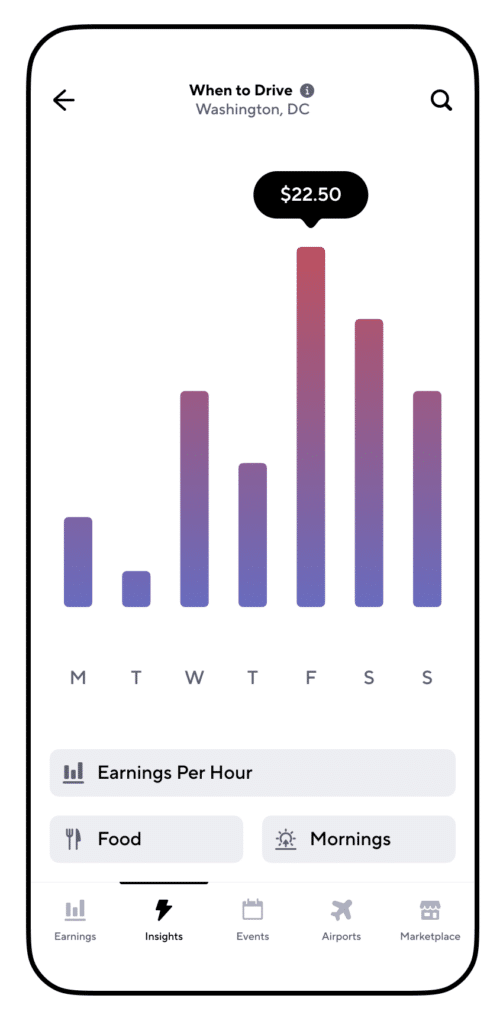
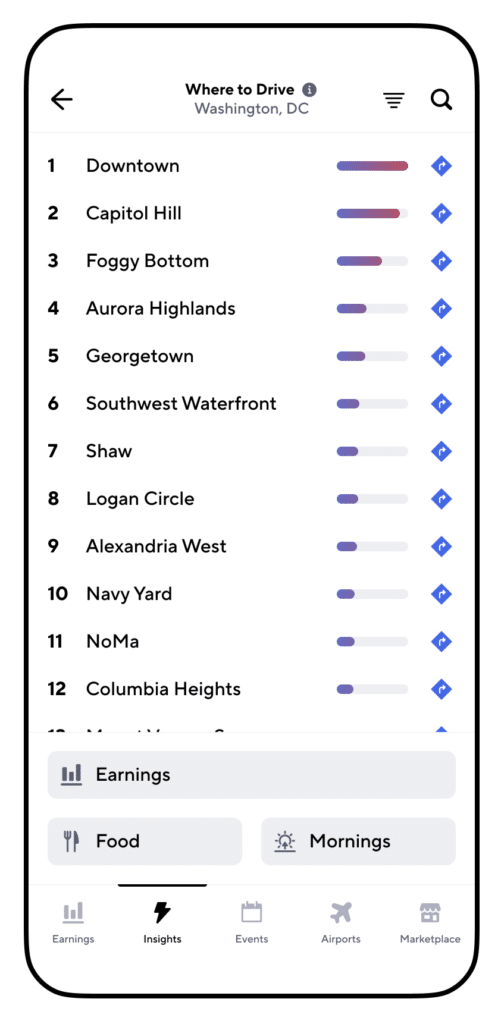
DoorDash drivers can save miles and gas when they pay attention to the Gridwise Where to Drive and When to Drive tabs.
- Events. You’ll find the most current information for your region on the Gridwise app. Learn about sporting events, concerts, trade shows, exhibitions, and other happenings that generate rides.
- Messaging. Is a baseball game running into extra innings? Has a football or soccer game gone into overtime? New developments bring a constant wave of opportunities for gig drivers. The Gridwise messaging function lets you know about real-time changes.
- Weather info. Inclement weather is enough to make some drivers stay in, but consumers don’t want to venture out, either. They would rather order in. With Gridwise, you’ll know when to turn these times to your advantage.
- Traffic alerts. For DoorDash drivers, traffic is always an issue. Folks want their food promptly, and they want it at the appropriate temperature. Rely on Gridwise traffic alerts to inform you of delays and route changes.
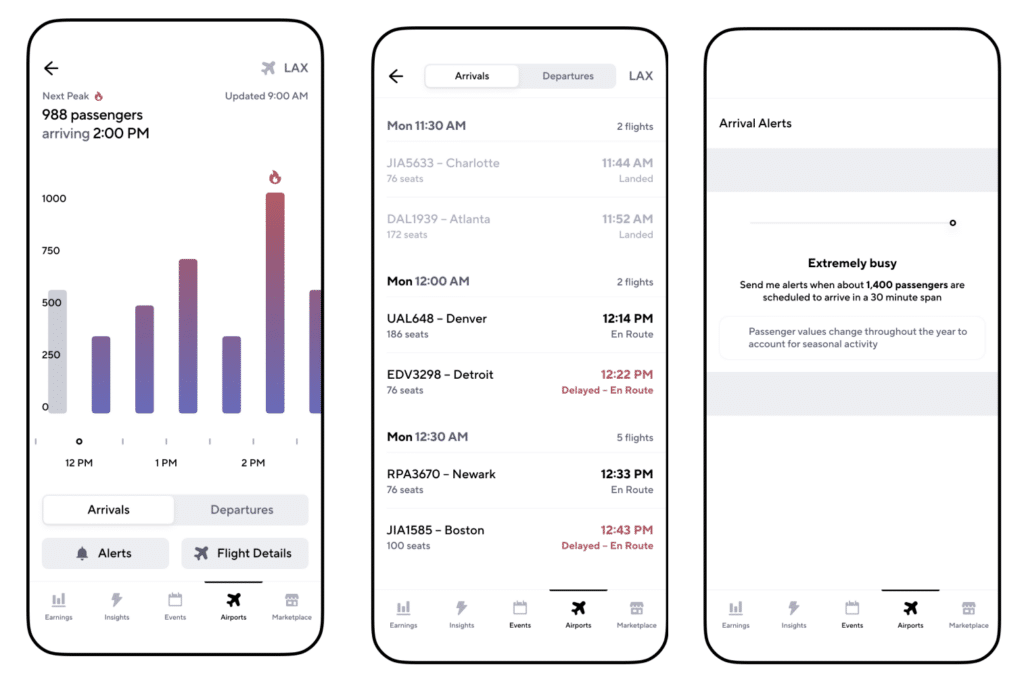
Making a switch to rideshare later in the evening? The Gridwise app can solve the mystery of airport arrivals.
- Airport status. Time to switch to rideshare? With Gridwise the airports are no longer a mystery. The Gridwise app displays arrival times and other vital information to help you maximize your time.
- Information. Gridwise has a blog that includes the latest news on strategies and other opportunities for gig drivers. Learn about new legislation, car rental opportunities, benefits, and other information vital to your gig.
- Contribute to the gig community. Gridwise anonymizes and aggregates the data collected by the Gridwise app. This allows Gridwise to provide analytics on earnings and trends that make you a better driver.
Gridwise: The best tool for DoorDash drivers
Veteran drivers founded Gridwise and their commitment has always been to making gig drivers more successful. They are always looking for new ways to give drivers the most pertinent, helpful, and accurate information.
Check out these Gridwise pages to learn more about the Gridwise mileage tracker:
Work smarter. Earn more.
Whether you drive, deliver, or pick up shifts — Gridwise helps you track earnings, mileage, and performance so you stay in control of your work. Download the app and take charge today.
