
Here's what we cover:
The State of Rideshare in 2019: How Much are Drivers Really Making
There’s no question that 2018 was a year to remember for rideshare drivers.
But when we think about 2018, should we remember it as a year where drivers earned more than ever, or the year when drivers said goodbye to surge as we know it?
Should we think about the effort that Dara Khosrowshahi made to reach out to drivers, or should we think about the fact that Uber Pool is still largely unpopular (and unprofitable) when we think about 2018?
Well, in a year when the term “fake news” has been thrown around more than a few times, we thought the best way to figure out how we should remember 2018, and think about 2019, is to start with the facts.
So in this report, we’re going to give you a complete rundown of the facts.
We’re going to look at how much drivers have been earning across the United States, what services they’ve been using, how they have found success, what their most profitable hotspots were, and much much more.
Let’s dive in by looking at 4 key takeaways from this report.
4 Key Takeaways From This Report
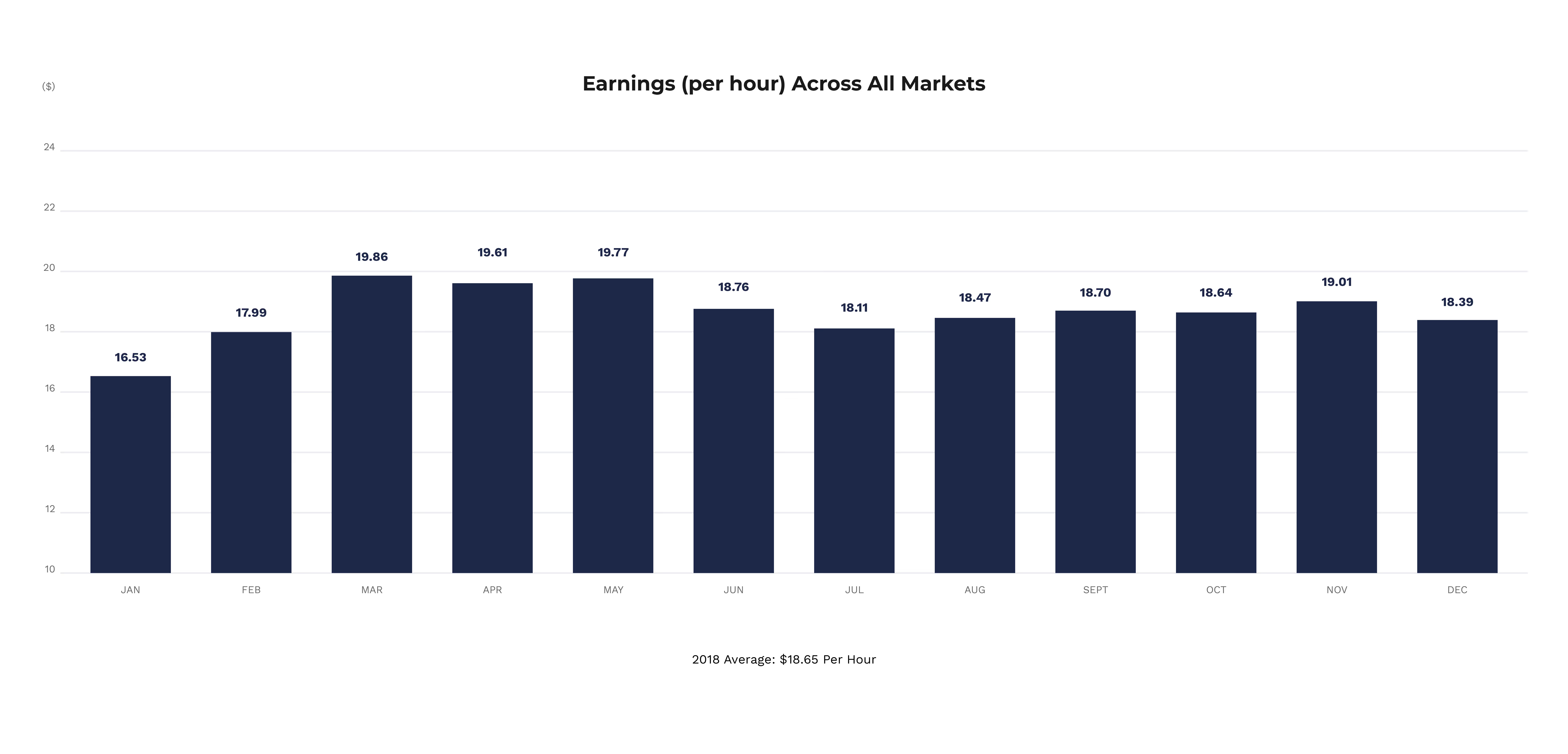
Takeaway #1: Drivers made on average $18.65 per hour in 2018
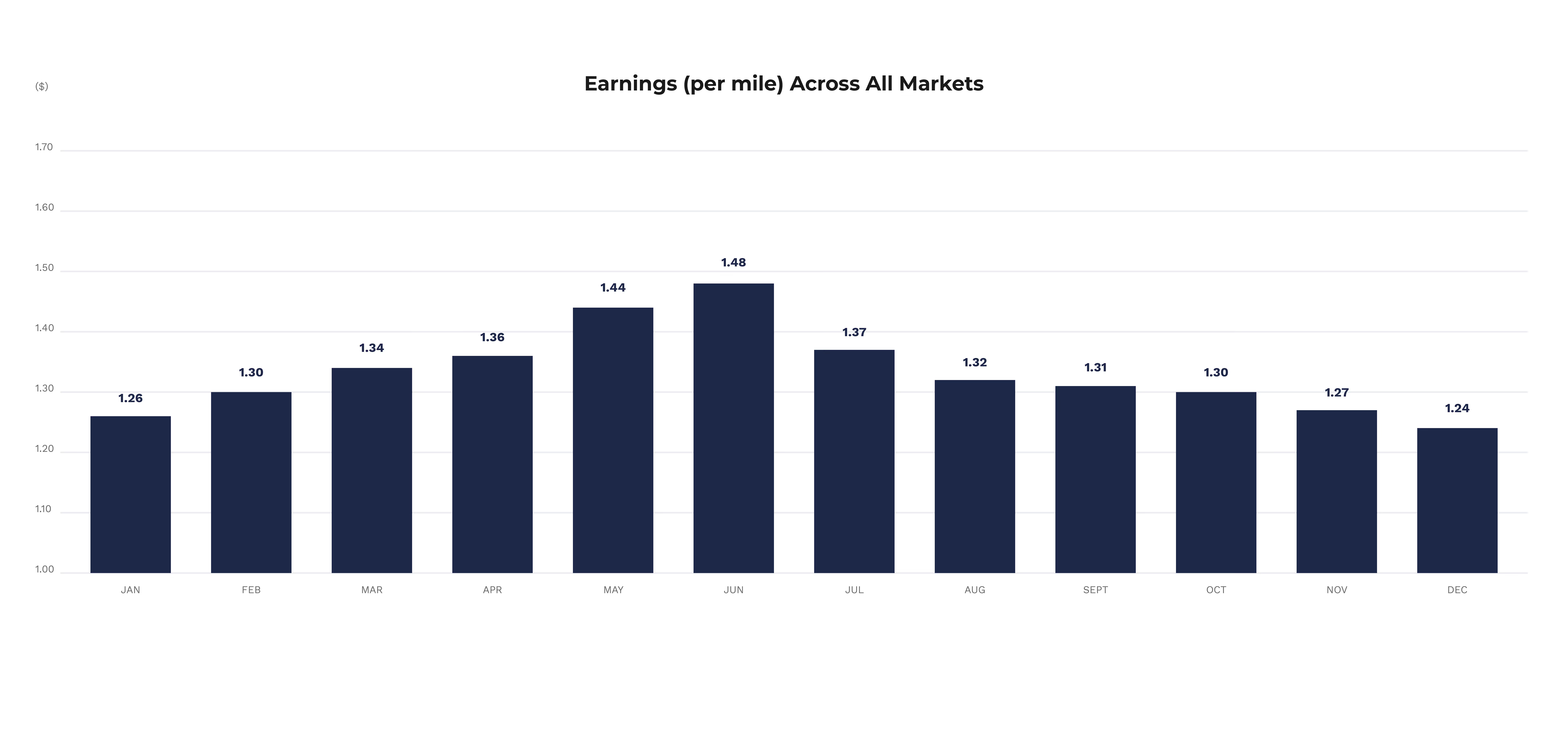
Takeaway #2: Drivers made on average $1.33 per mile in 2018
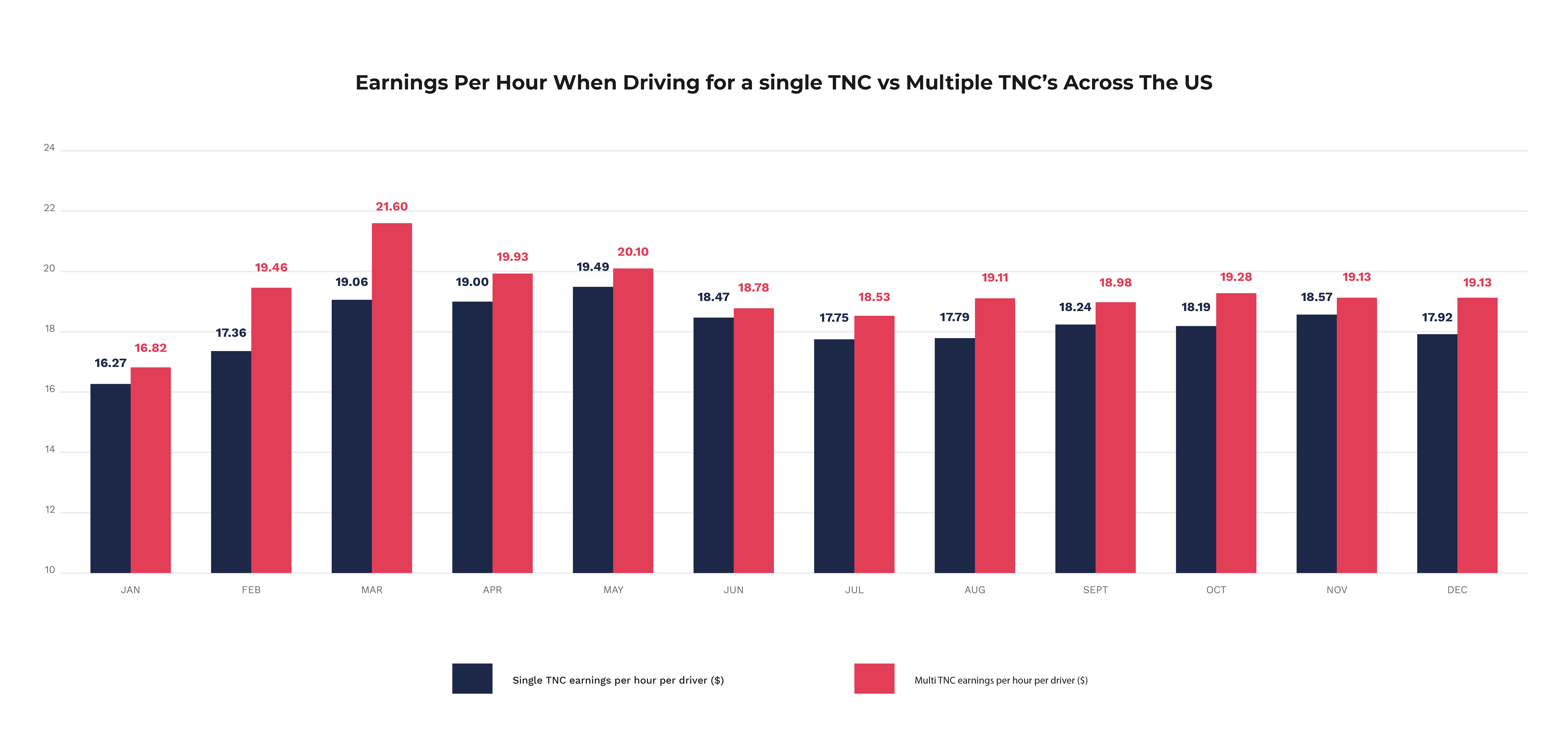
Takeaway #3: Drivers that are using 2 or more services are making $1.05 more per hour
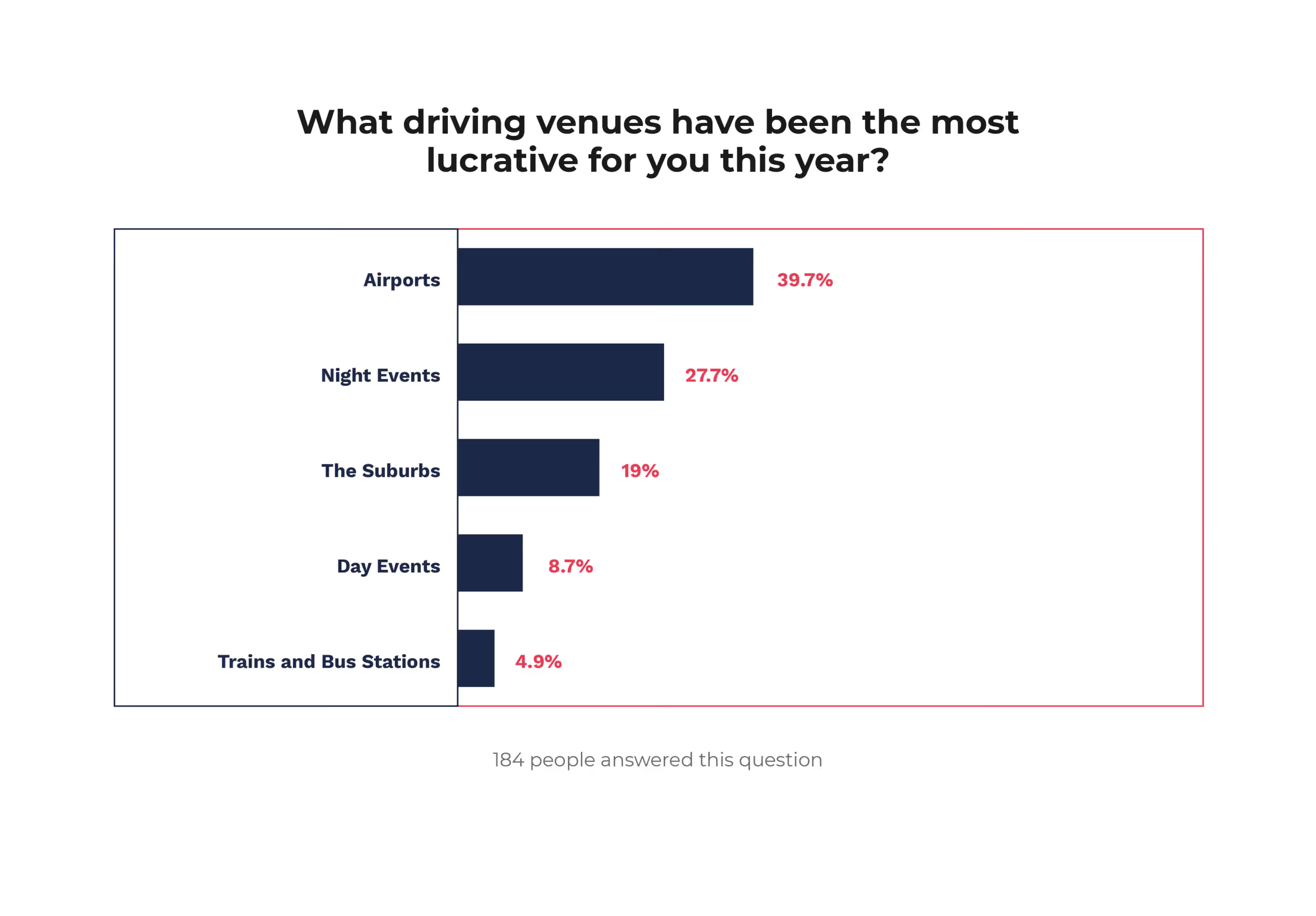
Takeaway #4: Nearly 40% of drivers said their most lucrative driving venues were airports
How we built this report
Rideshare drivers log 10,000’s of miles per day and track $10,000’s per week using Gridwise. So for our earnings reports, we look at the anonymized driving statistics for drivers in a number of markets. For the purposes of this report, we have analyzed the earnings and mileage of over 30,000 drivers in various markets across the United States.
Because of our data collecting methodology, our earnings reports are far more accurate than any driver earnings surveysavailable as drivers log their trips & earnings on Gridwise as they drive multiple times per week. So not only are the reported earnings accurate, but drivers don’t cherry pick their best or worse days to show us. This gives us the most realistic view of how much drivers are really making over time.
This report also includes qualitative driver information that we have received from a survey of over 180 rideshare drivers across the United States.
The Results
Driver Earnings - Per Hour
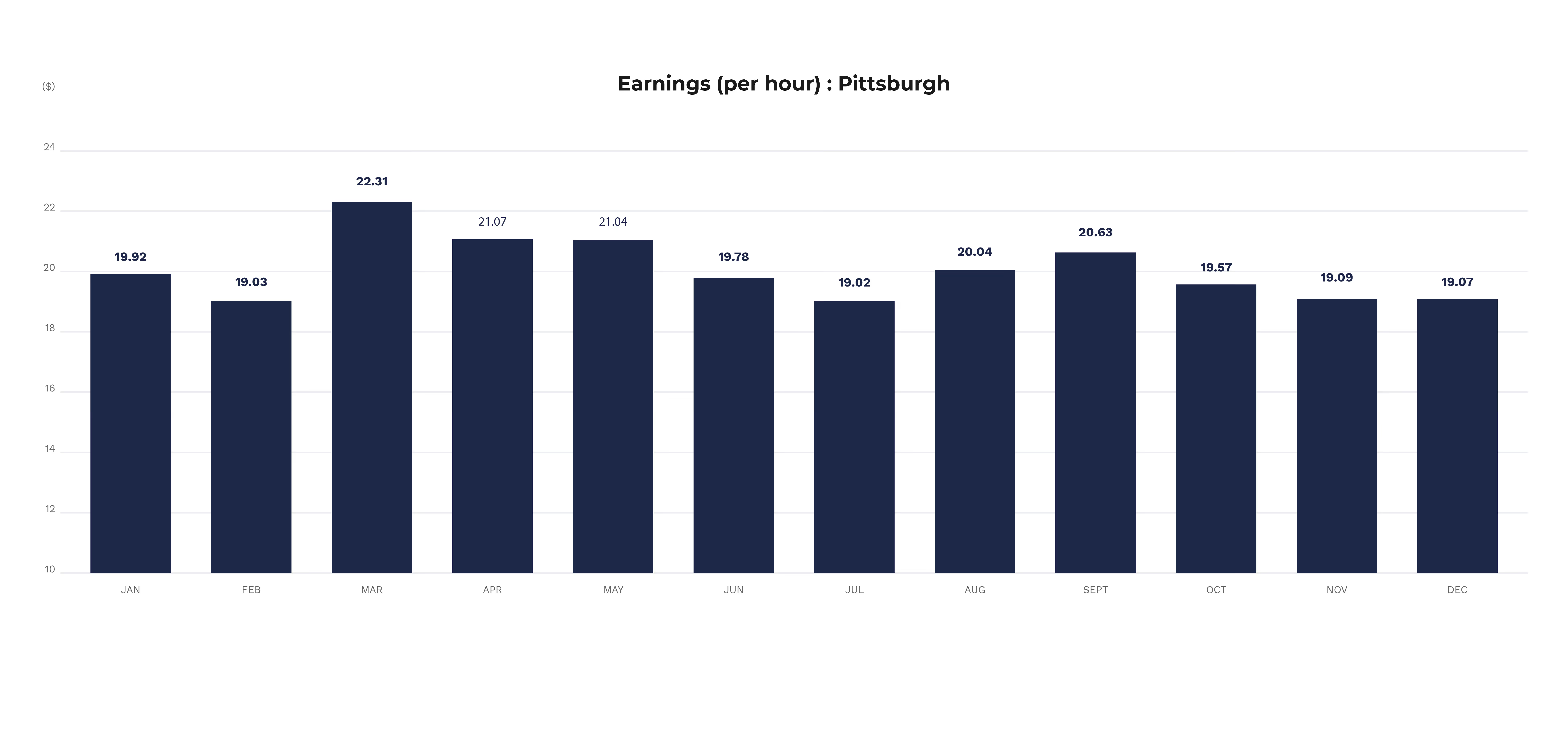
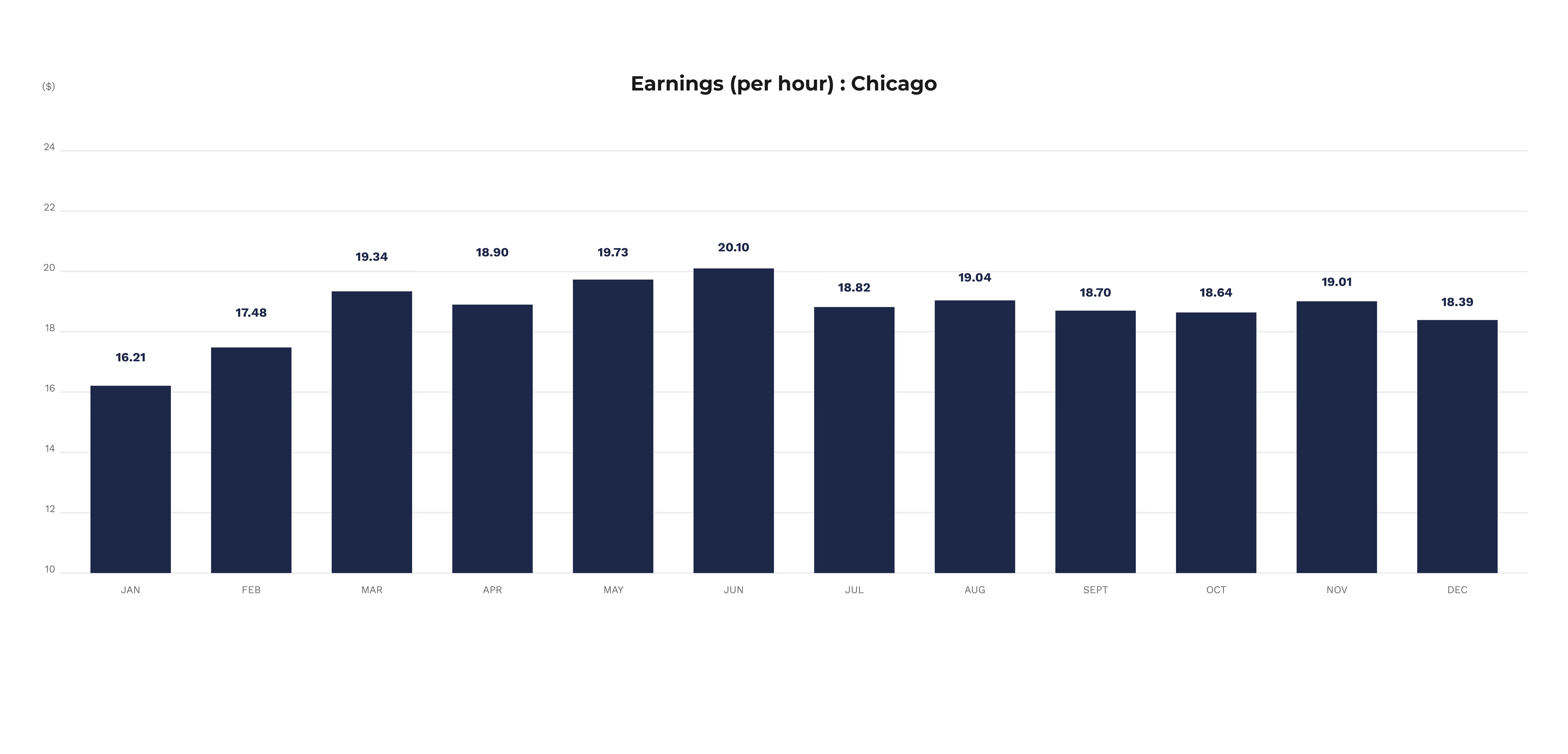
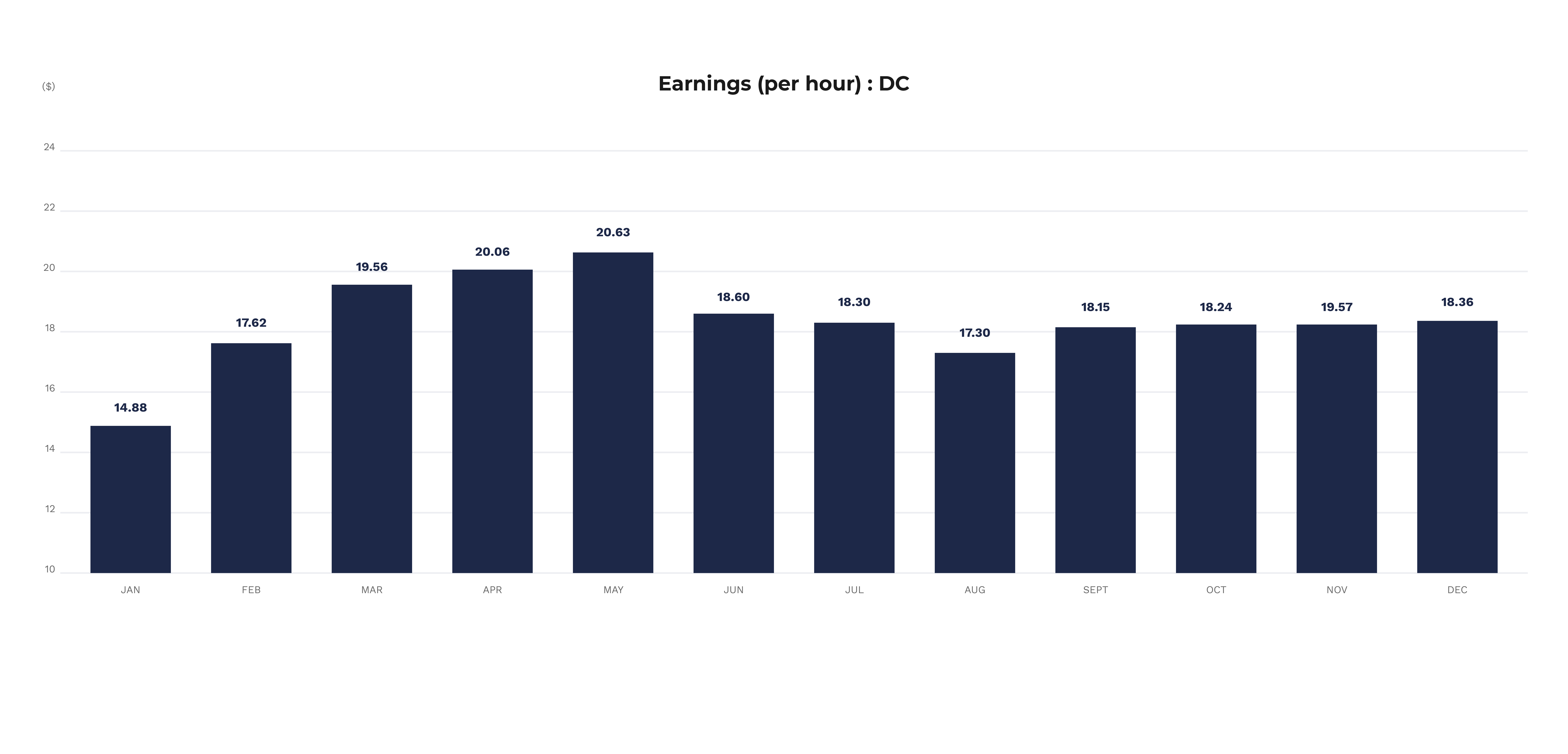
Across the United States, drivers generally made an average of $18.65 per hour in 2019 before expenses. However, earnings are heavily affected by the city where you drive.
Earnings Per Hour Across The US
Earnings Per Hour: Pittsburgh
Earnings Per Hour: Chicago
Earnings Per Hour: D.C.
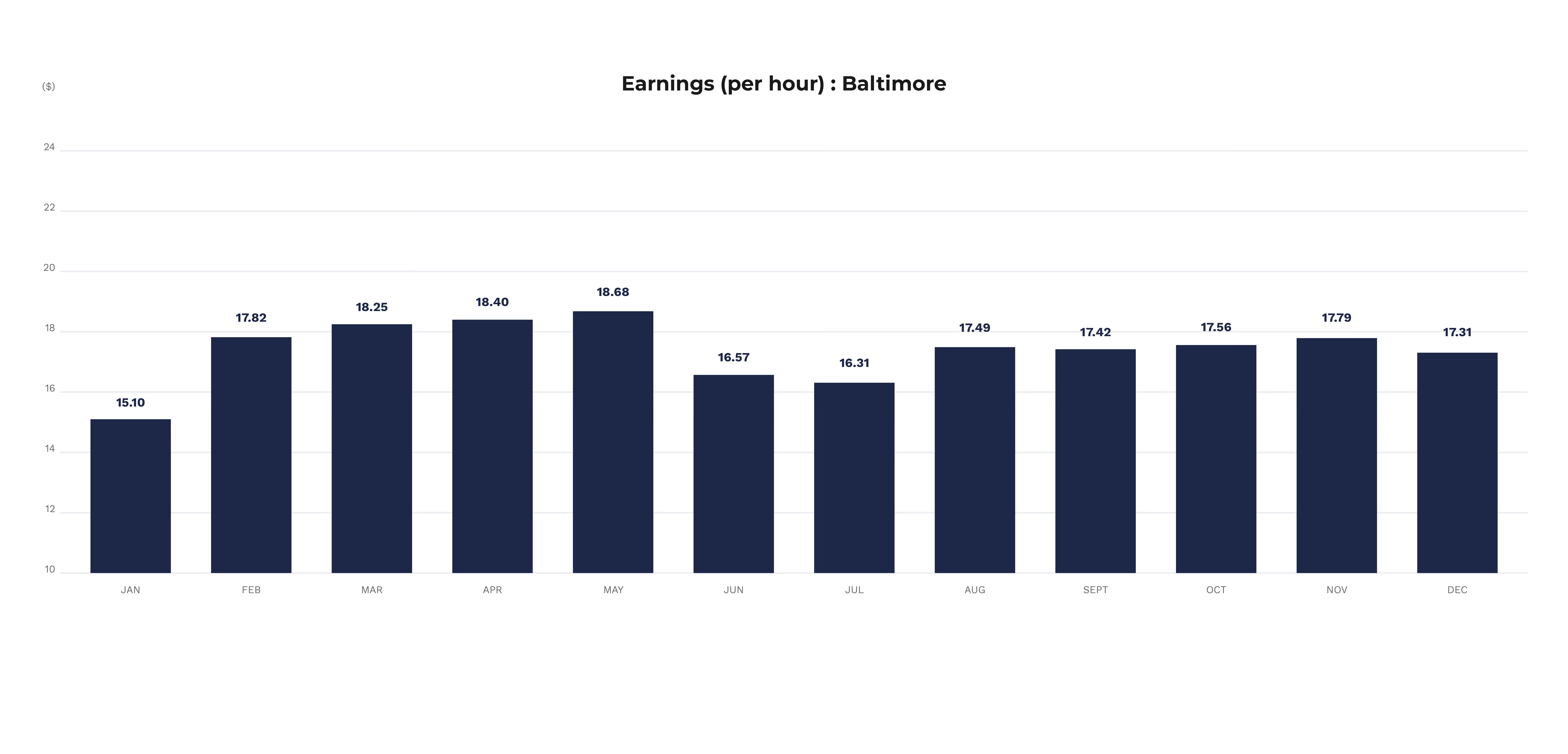
Earnings Per Hour: Baltimore
Driver Earnings - Per Mile
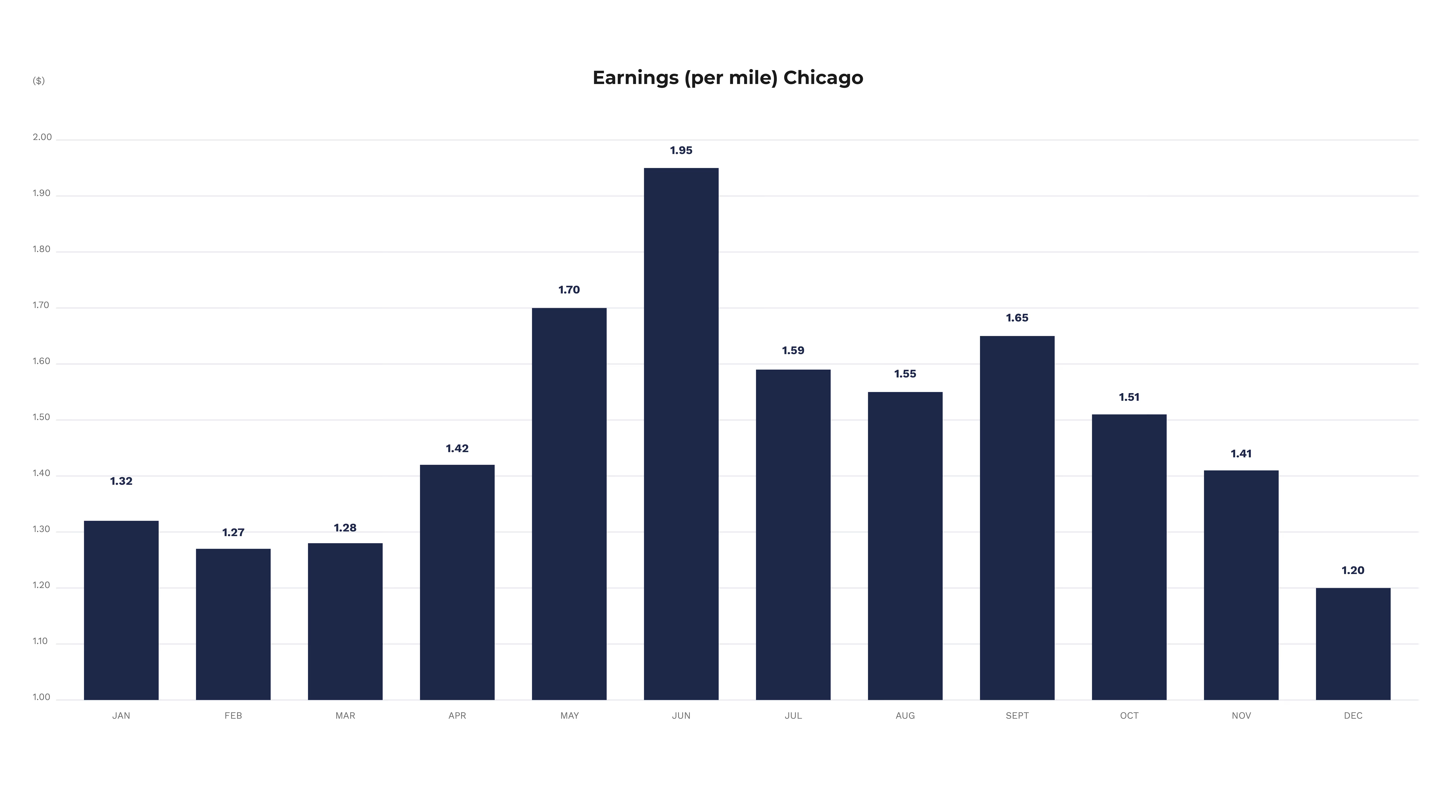
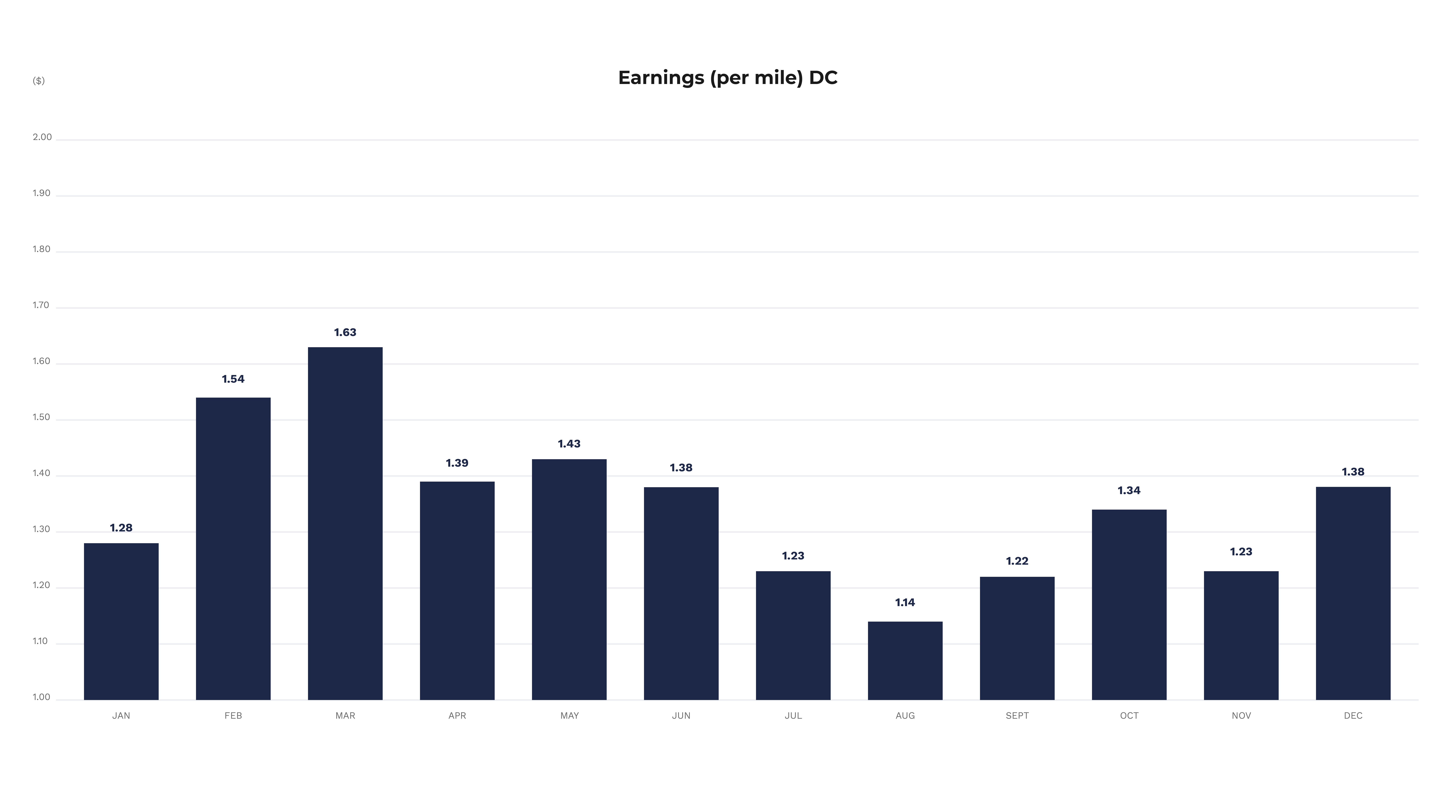
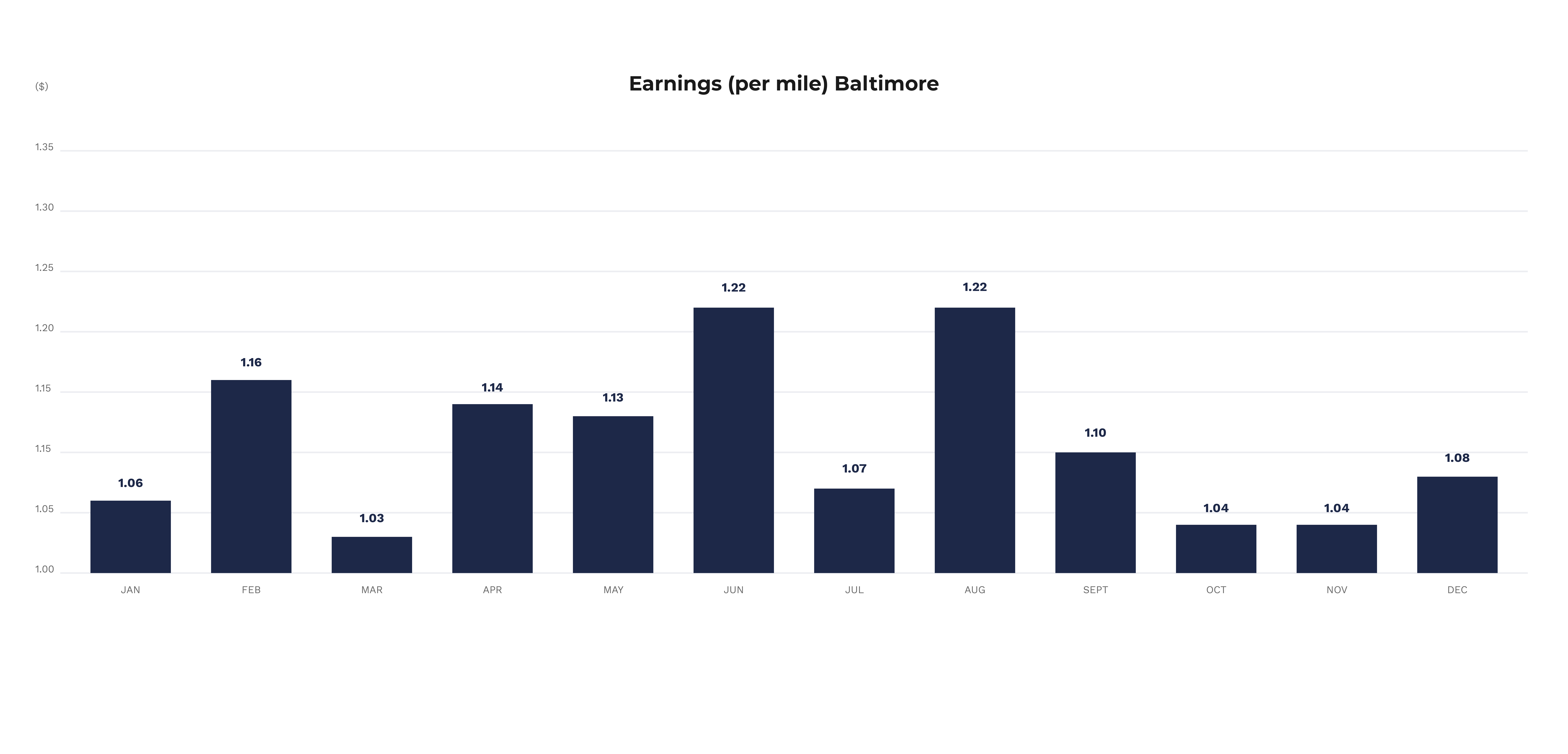
This year, we're also measuring earnings per mile, and in 2019 rideshare drivers across the United States made an average of $1.33 per mile before expenses. Again, earnings are heavily affected by the city where you drive.
Earnings Per Mile: Pittsburgh

Earnings Per Mile Chicago
Earnings Per Mile: DC
Earnings Per Mile Baltimore
Bad weather matters…
Inclement weather does play a role in overall earnings per hour, but it appears that in the winter months this difference is much more pronounced. As you can see below, earnings per hour in inclement weather are about the same as earnings per hour in non-inclement weather except for January and February.
Inclement Weather vs Non-Inclement Weather Earnings Across the Nation

It pays to drive with multiple TNC’s
Our data shows that one of the most important factors in profitability for rideshare drivers is the number of TNC’s that a driver drives for. Across the US, we observed drivers making more while driving for at least two rideshare companies.
Earnings Per Hour When Driving for a single TNC vs Multiple TNC’s Across The US
Only about half of rideshare drivers have dedicated rideshare insurance
Insurance remains a big question for rideshare drivers going into 2019 as almost half of drivers don’t have dedicated rideshare insurance and thus, may not be fully covered.

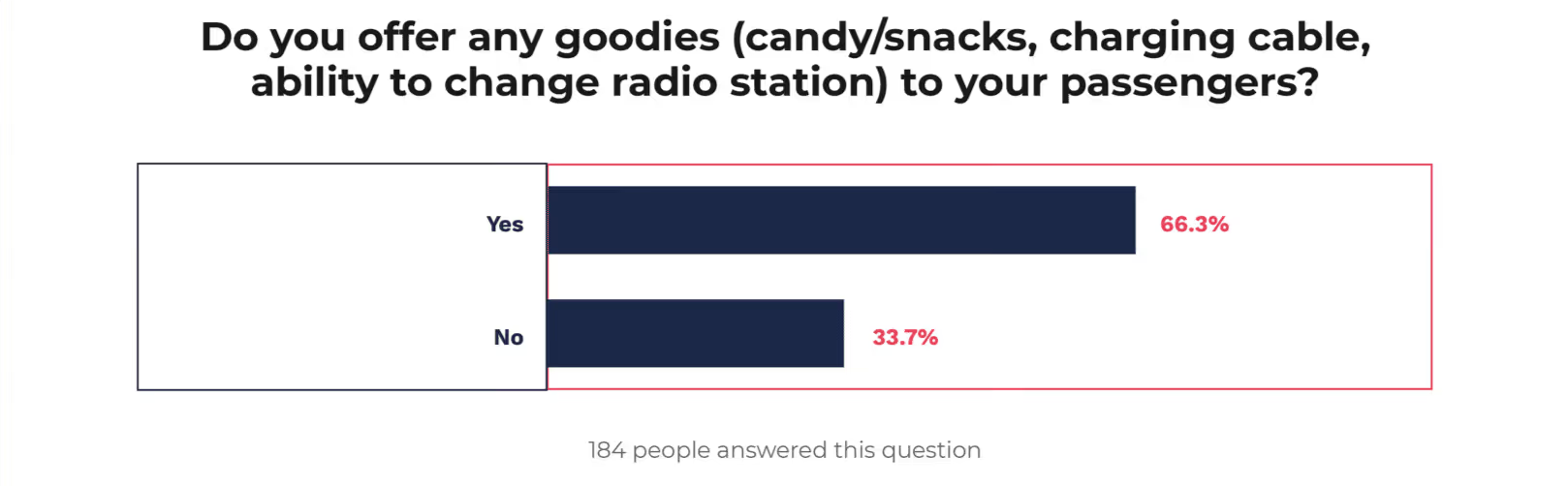
Most rideshare drivers are giving goodies away
Services like Cargo are repopularizing the idea of having snacks and goodies available for riders as a way to increase tips and boost ratings. It appears that many drivers are using goodies as giveaways in some form.
The most lucrative place to drive in 2018 was airports
It appears that airports were their most lucrative venue in 2018 for rideshare drivers with Night Events being second, and surprisingly, suburbs coming in 3rd.
This could be a sign that rideshare companies are beginning to have more and more widespread adoption outside of big cities which is allowing drivers to expand their footprint outside of popular downtown and bar areas.
Overall, about half of drivers were satisfied with their experience as a driver in 2018
For the most part, drivers were satisfied with their experiences as drivers in 2018.
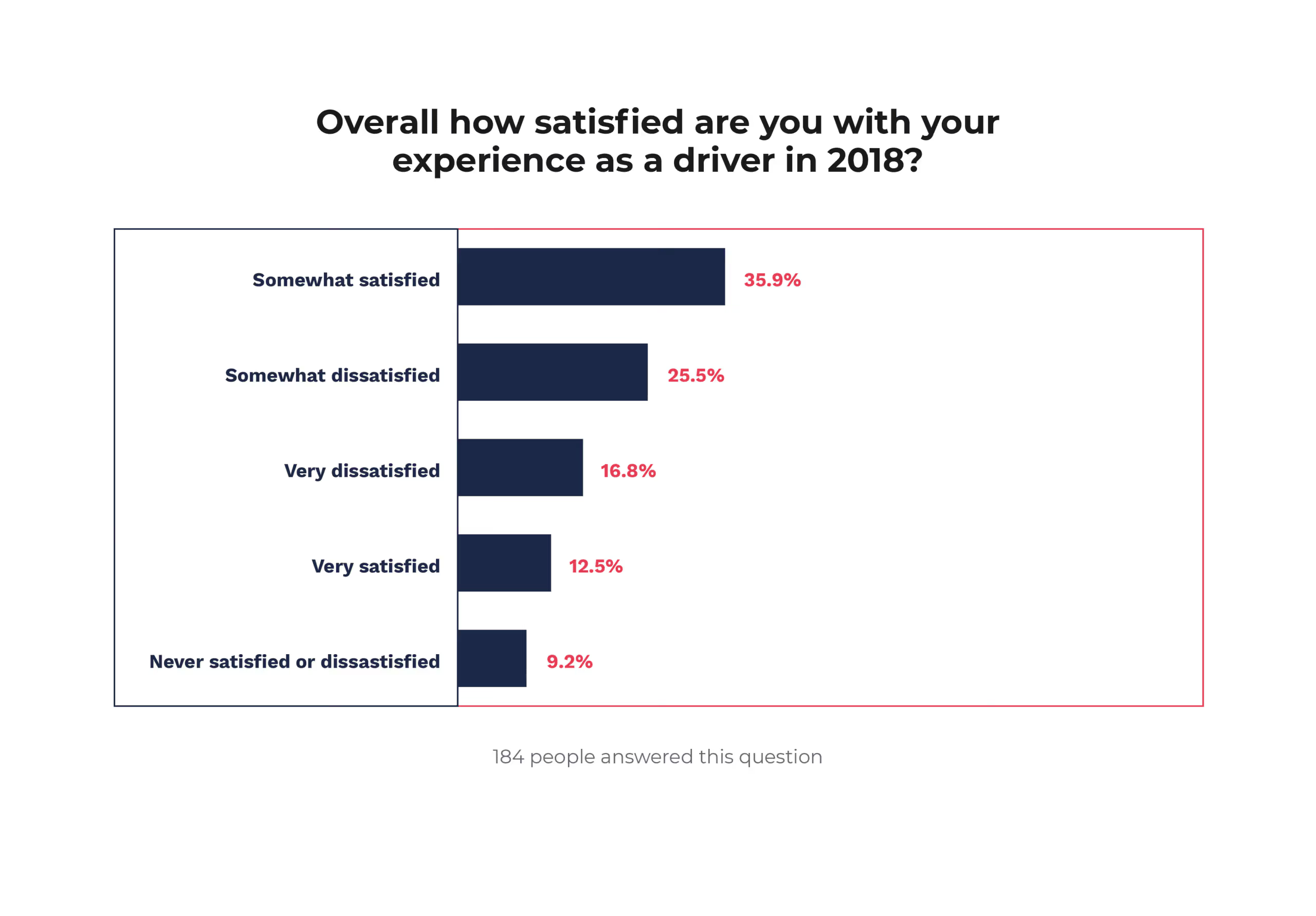
But more than half of drivers are very dissatisfied or somewhat dissatisfied with their Uber Pool Experience.
However, drivers continue to be extremely dissatisfied with their experience with both Uber Pool and Lyft Line. This is a glaring issue that the rideshare companies will need to work on with drivers as they push these services more and more.

Predictions
Now that we’ve reviewed what happened in 2018, let’s look forward to 2019 and understand what changes rideshare drivers can expect.
Lyft will exceed 35% market share
While both Uber and Lyft are growing quickly, Lyft is reportedly growing twice as fast as Uber and cutting into Uber’s market share. In 2019, expect Lyft to continue to grow faster than Uber and reach 35% market share in the US.
Why does this matter to rideshare drivers?
More riders on Lyft means that more and more drivers are going to need at the very least have Lyft as a secondary platform, if not their main platform.
Uber delays their IPO to 2020
One surprising effect of the longest government shutdown in US history is that the IPOs of both Uber and Lyft may be delayed to 2020.
You see, because of the shutdown the SEC is unable to provide feedback and approval on filings that issuers need to move their registration statements forward. In other words, the government shutdown is slowing down IPOs enough to push Uber’s offering to 2020.
Why does this matter to rideshare drivers?
It’s not completely clear how a rideshare IPO will affect drivers, but many industry experts believe that by going public, there will be more pressure on services to increase profitability and thus, take more money for every ride. This, of course, will take money from the pockets of drivers.
Without an IPO there will be less investor pressure for rideshare companies to reach profitability which should be good for drivers.
Government regulations will slow the growth of self-driving cars
Self-driving cars had an up and down 2018, but they will continue to press forward in 2019. Expect ridesharing companies like Waymo to do their best to rapidly expand their fleet of self-driving ridehailing vehicles.
However, you can also expect government regulations to slow the growth of the self-driving car business in 2019 as safety concerns stemming from high profile accidents in 2018 will continue.
Why does this matter to rideshare drivers?
Many people believe the days of rideshare drivers are numbered because of self driving cars. However, 2019 will prove once again that rideshare drivers are going to be around for the long haul as we see how far self driving cars have to go to become mainstream.
We will see more and more regional rideshare service, providers
In 2018 we saw the launch of multiple regional rideshare service providers including Jayride for airport trips, Safr for women, SpotOn for pet lovers, and a Dallas based rideshare company called Alto.
In 2019, expect to see more of these regional and market specific rideshare services to pop up that are servicing a very unique market and clientel.
Why does this matter for drivers?
More driving services mean more apps that drivers will need to know about and juggle to ensure profitability. Keeping up with these new services will be a new challenge for rideshare drivers in 2019.
Drivers: Take Action
Now that we know how much the average driver is making and have an idea as to why, we can look at how drivers can stay ahead of the curve.
Drive for Multiple TNC’s
The number of TNC’s that you drive for clearly matters. If you’re just driving for Uber, Lyft, Via, or Juno, you are missing out on income. So do yourself a favor and sign up for another TNC and start driving! You’ll also likely be eligible for a nice bonus as well.
Monitor your performance
As we saw time and time again when reviewing these figures, keeping up with what’s happening in your city and your driving performance is paramount.
It is very difficult to be a profitable driver if you don’t have a keen understanding of where to drive in your city and when to drive in your city. New drivers can use Gridwise to help them immediately understand their city while also taking cues from blogs like this one, along with city-specific Facebook groups and forums like UberForum.
Items for our next report
We’re going to do continue to improve these reports as we grow. For our next release, we plan to include:
- Earnings per trip
- Earnings per shift
Let us know if there is anything else that you would like to see in future reports.
Now we’re curious, are you seeing earnings in line with these various reports? What do you think is the biggest factor in your earnings success? Let us know in the comments below!
Share article:
Related posts
Are Airport Queues Worth It for Rideshare Drivers in 2026?
You pull into the waiting lot. There are 40 cars ahead of you. The Uber app says "short wait, high earnings." You settle in, check your phone, and wait. Twenty minutes pass. Then thirty. Then forty. When you finally get dispatched, it's one ride.
Was that worth it?
The honest answer depends on numbers the app isn't showing you. Wait time isn't free. Every minute parked in that lot is an unpaid minute. And when you stack enough of those minutes against the fare you eventually earn, the math can turn ugly fast. At a small airport like Jacksonville International with 40-50 cars in the queue, the calculation is already close. At a major hub like Miami, Orlando, or Atlanta, where 150-200 drivers are competing for the same rides, it can get worse.
That doesn't mean airport queues are always a bad play. Done right, with real flight data and an honest read on queue depth, they can deliver two solid hours of back-to-back airport pickups and a paycheck to match. The difference between a good airport session and a wasted afternoon comes down to knowing when to stay and knowing when to leave.
This post breaks down the real math on airport queues, what the apps are and aren't telling you, and how to use actual flight data to make smarter decisions every time you consider pulling into a waiting lot.
In this post:
- Why smaller airports can work better than major hubs for queue waits
- The real cost of unpaid wait time on your effective hourly rate
- What "short wait, high earnings" actually means (and what it doesn't)
- How $148 in two hours is possible and when it isn't
- Using flight arrival data to decide whether to stay or go
An active rideshare driver put Jacksonville International Airport's queue to a live test, showing real wait times, actual fares, and effective hourly earnings on screen. The written breakdown below goes deeper on the math and what to actually do with it.
Smaller Airports Give You a Better Shot at a Fast Turnaround
There's a reason a 50-car queue at Jacksonville hits differently than a 200-car queue at Hartsfield-Jackson. Queue depth is the single biggest variable in whether the wait is worth it.
At a smaller regional airport, flights arrive in clusters. When a wave lands, the queue moves fast. A well-timed session at Jacksonville can have you picking up, dropping off, circling back, and picking up again in rapid succession, with only a few minutes of unpaid downtime between rides. When it works, it works well. Two hours, multiple rides, steady fares: the kind of session that makes airport queues look like the obvious move.
At a major airport, the calculus flips. With 150-200 drivers competing for the same flights, the queue clears slower. More drivers are waiting per passenger. The odds that you're near the front when a big wave lands shrink. And the time you've already sunk into the lot is already eroding your hourly rate before you've earned a dollar.
This doesn't mean you should avoid major airports entirely. But it does mean the bar for "worth it" is higher there. You need a bigger wave, better timing, and a shorter queue to make the numbers work.
The App Only Pays You When You're Moving, and That Changes Everything
Here's the thing the queue never tells you: the app doesn't care how long you waited. It pays you from the moment you're dispatched to the moment you drop off. The 40 minutes you spent parked in the lot? That's your time, not Uber's problem.
This is why effective hourly rate matters more than fare size. A $25 airport ride sounds solid. But if you waited 45 minutes unpaid to get it, and the ride itself took 20 minutes, you just earned $25 across 65 minutes of your time. That's around $23 an hour before expenses. You can do better than that driving in most active markets without ever touching a waiting lot.
The math only works in your favor when rides come fast enough to keep your unpaid time low. A session where you pick up, drop off, return to the queue, and pick up again within a few minutes is a completely different equation than one where you sit for an hour, get one ride, and drive home. Both sessions might produce the same fare. Only one of them was worth your time.
Uber's "Short Wait, High Earnings" Push Is Designed to Fill the Lot, Not to Help You
The in-app notifications that push drivers toward airport queues are not neutral information. When Uber tells you "short wait, high earnings," it is trying to ensure there are enough drivers in the lot to fulfill incoming requests quickly. That's good for the platform. It's not always good for you.
In practice, those notifications can fire even when conditions aren't favorable. Flights might be delayed. The queue might be long. A notification that was accurate when it sent might be outdated by the time you arrive. The app has no way of knowing how long you'll actually wait. It just knows there's demand and not enough drivers nearby.
The live test at Jacksonville caught this directly: during one stretch, the app was showing short wait times while all incoming flights had been delayed for at least another hour. Drivers already in the lot had no way of knowing this from the app alone. The ones who checked real flight data knew to leave. The ones relying only on the app kept waiting.
What $148 in Two Hours Actually Looks Like, and When You Can Replicate It
The best airport sessions happen when you catch the right flight wave at the right time. At Jacksonville, a two-hour window from 3:00 to 5:00 p.m. produced $148 across multiple back-to-back pickups. The key was a large batch of arrivals in the early afternoon that kept the queue moving. Rides stacked on top of each other with minimal gaps between drop-off and the next dispatch.
That kind of session is real. But it's not guaranteed, and it requires conditions that don't always line up: a meaningful wave of arrivals, a manageable queue depth, and enough passengers ordering rides to clear the lot before it backs up again.
When those conditions are present, airport queues deliver. When flights are delayed, staggered, or the lot is oversaturated, the same amount of time spent working a busy nearby area, a downtown corridor, a stadium district, a dense neighborhood at peak hour, will often produce more. The question is always whether the airport represents the best use of your time right now, not whether airport rides are good in the abstract.
Use Flight Arrival Data to Decide When to Stay and When to Leave
The single most useful thing you can do before pulling into an airport lot is check real-time flight arrivals. Not what the app says. Not the airport's general reputation. Actual incoming flights, actual estimated arrival times, and a read on how many people are likely to be requesting rides in the next 20-30 minutes.
Gridwise shows airport arrivals and departures directly in the app, so you can see whether a real wave is incoming before you commit your time to the lot. If a cluster of flights is landing in the next 15 minutes with a manageable queue, that's a green light. If flights are delayed across the board and the queue is already backed up with drivers, that's your signal to work a different area.
The same logic applies once you're already in the lot. Set a hard time limit for yourself before you arrive: 20 minutes, 30 minutes, whatever your personal threshold is. If you hit that limit without a dispatch and the arrival data isn't improving, leave. The opportunity cost of staying is real and it compounds fast.
The Queue Pays When You Work It Smart
Airport queues aren't a guaranteed win or a guaranteed waste. They're a calculation, and the driver who does the math before pulling in is the one who comes out ahead. Smaller airports with manageable queue depths give you a real shot at back-to-back rides and a productive two-hour session. Major hubs with 150-200 drivers competing for the same arrivals flip those odds fast.
In-app notifications don't do that math for you. "Short wait, high earnings" is designed to fill the lot, not to tell you whether the wait will actually be worth it by the time you get dispatched. Every unpaid minute in the waiting lot counts against your real hourly rate, whether the app acknowledges it or not.
Check actual flight arrivals before you commit. Set a hard time limit before you even pull in. If a real wave is incoming and the queue is short, stay. If flights are delayed and drivers are stacking up, go find a better place to work. The data makes the call obvious — you just have to look at it before the waiting lot makes it for you.
Want to see real-time flight arrivals at airports near you before you decide to wait? Download Gridwise free and get the data you need to make smarter decisions about where your time is actually worth the most.
Uber and Lyft Gas Perks in 2026: What Drivers Need to Know
Fuel is one of the most significant costs you carry as a rideshare driver. Unlike most job-related expenses, it hits your bank account every few days, tracks directly with how much you drive, and moves with the market whether you're ready for it or not. When gas prices rise, the impact on your weekly take-home is immediate.
Over the past year, both Uber and Lyft have sent communications to drivers promoting gas relief programs: discounts at the pump, cashback cards, and partnerships with fuel apps. For drivers watching their margins, that sounds meaningful. Understanding what these programs actually include helps you decide how much weight to give them.
An active rideshare driver with over 3,600 Uber trips across markets from Miami to Atlanta recently broke this down in a Gridwise video. The breakdown below builds on that analysis with the underlying math and a practical look at how to use what's available.
In this post:
- How Uber and Lyft's gas perk programs are structured
- How status tiers affect what you can access
- What the savings actually add up to
- How fuel perks interact with per-mile earnings
- How to use Gridwise to know whether a perk is moving your numbers
The host of Fares and Frustrations covers what these programs include and where the limits are. The analysis below goes deeper on the numbers and what to actually do with them.
Most Gas Perks Are Third-Party Programs Surfaced Through the Platform
The programs Uber and Lyft promote in their gas communications — Upside, Shell Fuel Rewards, and similar offers — are not Uber or Lyft programs. They are independent services with their own apps, their own terms, and their own cashback rates. Drivers can sign up for Upside or Shell Fuel Rewards directly, without any connection to a rideshare platform.
What both platforms do is surface these existing partnerships inside their driver apps or reward emails. That makes them easier to discover, which is useful. But the discount itself comes from the partner program, not from the platform. The cashback rate, the station availability, and the payout timing are all determined by the third party.
This distinction matters practically: if a program changes its terms or removes a station from its network, that has nothing to do with your platform relationship. The programs are worth using, but they are separate tools.
Status Tiers Affect Access to the Best Rates
Both Uber and Lyft attach their most valuable gas-related perks to driver status tiers. The higher cashback rates on the Uber Pro Card, for example, are available at higher Pro tiers. The same applies to some of the Lyft Direct debit card benefits.
This means that accessing the best version of a perk is linked to driving volume and platform loyalty. A driver who completes fewer trips per week may find that the top-tier rates are out of reach, at least in the short term.
The practical implication is that the benefit scales with how much you're already driving. If you're a high-mileage driver, the programs are most accessible and most valuable. If you're part-time, the math is more modest.
What the Savings Actually Add Up To
For a high-mileage driver who stacks multiple programs consistently, saving $10-20 per week on fuel is achievable. That range assumes active use of Upside, a fuel rewards card, and any platform-specific cashback available at your status level.
Over a full year, $15 per week compounds to $780. That is real money and worth capturing if you are buying gas anyway. The programs require some setup and habit change — checking the app before each fill-up, using the right card — but the friction is low once the routine is in place.
The ceiling matters too. If you drive 40,000 miles a year and your effective per-mile earnings have shifted by two cents per mile, that gap is $800 annually — roughly equivalent to a year of stacked fuel savings. The programs address expenses at the margin. Whether they offset broader shifts in your earnings depends on your specific numbers, which is where tracking becomes important.
How Fuel Perks Interact With Per-Mile Earnings
Gas prices fluctuate with the market. Per-mile and per-minute earnings on rideshare platforms are set rates that adjust on a different timeline, if they adjust at all. When fuel costs rise sharply, there is typically a lag before driver pay reflects the change.
The programs described above operate on the expense side of the equation. They reduce what you spend per gallon. They do not change what you earn per mile. A driver experiencing a cost squeeze may find that fuel savings help at the edges without closing the gap fully.
Understanding this distinction helps you read platform announcements with appropriate context. A new perk partnership and a change to base earnings per mile are different things with different impacts on take-home pay. Knowing which is which lets you calibrate your expectations before committing to a new program.
How to Use Gridwise to Know If a Perk Is Actually Working
The practical challenge with gas perks is that without data, it is difficult to tell whether a program is making a meaningful difference to your bottom line or just adding a small positive number that gets absorbed by other variables.
Gridwise tracks earnings across Uber and Lyft in one place alongside your mileage and fuel costs, so you can see your actual profit per mile and profit per hour week over week. When you activate a new gas perk, you can look at whether your weekly profit moved in a direction you would expect, or whether the change is too small to see in the numbers.
That kind of visibility is more useful than any promo code on its own. It turns a general sense that this should help into a data point you can actually act on.
Key Takeaways
- Most platform gas perks surface existing third-party programs (Upside, Shell Fuel Rewards, etc.) — you can sign up for these directly, outside of any platform relationship.
- The best rates are often tied to driver status tiers, meaning higher-volume drivers get more access.
- High-mileage drivers stacking available programs can realistically save $10-20 per week on fuel — worth doing if you are driving anyway.
- Fuel savings address the expense side of your margins. They are separate from per-mile earnings, which move on a different schedule.
- Tracking actual profit per mile with Gridwise is the clearest way to know whether a perk is having a measurable impact on your take-home.
Want to see what your actual profit per mile looks like right now? Download Gridwise free and track your earnings, mileage, and fuel costs across all your platforms in one place.
.png)
Gridwise vs Solo: Which Gig Driver App Is Worth It in 2026?
If you're deciding between Gridwise and Solo, you're already ahead of most drivers. Tracking your earnings, mileage, and expenses isn't optional if you want to keep more of what you make, and both apps are built to help you do exactly that.
But these two apps take very different approaches. Solo focuses heavily on scheduling optimization and income predictions, with a unique Pay Guarantee that will cover the difference if you don't hit your projected earnings for the day. Gridwise focuses on giving you real-time market intelligence: airport queues, local events, optimal driving zones. That means better decisions on the fly and more control over your shift.
On paper, both offer mileage tracking, expense logging, and platform integrations. But the features that separate them are the ones that actually move the needle on your weekly take-home. That's where this comparison focuses.
We've dug into both apps, checked the current pricing and ratings, and laid out what each does well and where each falls short. Here's what drivers need to know in 2026.
In this post:
- What Solo offers and how it's priced
- What Gridwise offers and how it's priced
- A side-by-side feature comparison
- Why Solo's Pay Guarantee has real limitations
- Why Gridwise comes out ahead for most drivers
Solo Covers the Basics and Adds a Scheduling Layer on Top
Solo has been around since 2020 and has built a solid product for gig workers who drive for multiple platforms. The app earns 4.7 stars on the App Store (13K ratings) and 4.27 on Google Play, which reflects a genuinely useful tool with a loyal user base.
At its core, Solo tracks your income, mileage, and expenses across platforms like Uber, Lyft, DoorDash, Instacart, GrubHub, and GoPuff. The free tier gives you automatic mileage tracking and manual income entry. Step up to a paid plan and you get automatic income syncing, Smart Schedule, and market-level pay insights.
The marquee feature is the Pay Guarantee. Once you build your schedule using Solo's Smart Schedule tool, you can use credits to lock in an earnings floor for each hour. If you work the hour and earn less than predicted, Solo pays the difference. Pro Plus subscribers get 60 free credits per month; additional credits run $0.40 each.
Current Solo pricing:
| Plan | Monthly | Annual (per month) | Annual total |
|---|---|---|---|
| Free | $0 | $0 | $0 |
| Basic | $10 | $8 | $96 |
| Pro | $15 | $10 | $120 |
| Pro Plus | $20 | $15 | $180 |
Annual Pro and Pro Plus subscribers get free federal and state tax filing through the app, which is a genuine perk. Basic subscribers pay $30 to file, and non-subscribers pay $50.
Gridwise Was Built by Gig Drivers and the Feature Set Shows It
Gridwise earns a 4.9 on the App Store and 4.6 on Google Play: the highest ratings of any app in this category. It started as a rideshare-focused tool and has expanded to support delivery drivers across every major platform, including Uber Eats, DoorDash, Instacart, Amazon Flex, and more.
Where Solo leans on scheduling predictions, Gridwise leans on real-time market intelligence. Where to Drive shows you which neighborhoods are generating demand right now. When to Drive helps you plan around historical earnings patterns in your city. The airport feature goes beyond a simple queue indicator: it surfaces live flight arrivals and departures, delay alerts, and wait time estimates so you can decide whether the airport is worth your time before you head there.
Gridwise Plus also includes event notifications that let you set alerts for concerts, games, and other demand spikes in your area, performance benchmarking against other drivers in your market, and a benefits marketplace with access to health, dental, vision, and accident coverage. Solo offers none of those.
Current Gridwise pricing:
| Plan | Monthly | Annual (per month) | Annual total |
|---|---|---|---|
| Basic | Free | Free | Free |
| Gridwise Plus | $15 | $9 | $108 |
Both plans include a free trial: 14 days for Gridwise, 7 days for Solo.
At the annual level, Gridwise Plus ($108/year) is actually cheaper than Solo Pro ($120/year) and comes with features Solo Pro doesn't include.
Gridwise vs Solo: Side-by-Side Comparison
| Feature | Gridwise | Solo |
|---|---|---|
| App Store Rating | ⭐ 4.9 | ⭐ 4.7 |
| Google Play Rating | ⭐ 4.6 | ⭐ 4.27 |
| Free Tier | Yes | Yes (mileage + manual tracking) |
| Paid Plan Starting Price (Annual) | $9/mo ($108/yr) | $8/mo ($96/yr, Basic only) |
| Free Trial | 14 days | 7 days |
| Automatic Income Tracking | Yes (Plus) | Yes (Basic and above) |
| Automatic Mileage Tracking | Yes | Yes |
| Automatic Expense Tracking | Yes (Plus) | Yes (Pro and above, via Plaid) |
| CSV + PDF Tax Reports | Yes (Plus) | Yes (Basic and above) |
| In-App Tax Filing | No (KeeperTax integration) | Yes (free for annual Pro/Pro+) |
| Real-Time Market Insights | Yes: Where to Drive, When to Drive (Plus) | Yes: Smart Schedule (Pro and above) |
| Airport Queue Info | Yes: live flights, delays, wait estimates (Plus) | Limited |
| Event Notifications | Yes: set custom alerts (Plus) | No |
| Performance Benchmarking | Yes: vs. drivers in your city (Plus) | Leaderboard only |
| Pay Guarantee | No | Yes: Pro Plus (60 credits/mo); extra credits $0.40 each |
| Driver Benefits (Insurance, Perks) | Yes: health, dental, vision, accident, and more (Plus) | No |
| Ad-Free Experience | Yes (Plus) | Yes |
| Supported Platforms | Uber, Lyft, DoorDash, Instacart, Amazon Flex, and more | Uber, Lyft, DoorDash, Instacart, GrubHub, GoPuff, and more |
Solo's Pay Guarantee Has Real Restrictions Most Flexible Drivers Will Hit
The Pay Guarantee is Solo's most talked-about feature, and for good reason. The concept is genuinely compelling: use Solo's Smart Schedule, lock in your hours with credits, and if you earn less than predicted, Solo pays the difference. To date, Solo has guaranteed over $14 million in earnings across their user base.
But the fine print matters. To qualify for a payout, you have to work only the platform you scheduled: no multi-apping during a guaranteed hour. You have to stay within your designated city boundary at least 70% of the time. You have to complete at least one job per hour. And the guarantee only applies in 100-plus metro areas where Solo has enough data to make reliable predictions.
For drivers who stick to one platform and work in a major market, the Pay Guarantee can function as a genuine safety net. For drivers who flex between platforms depending on where the money is, which is how most experienced drivers actually work, the restrictions make it much harder to benefit. Locking yourself into one platform for a guaranteed hour means passing on the Lyft surge that just started while you're sitting at the DoorDash hot zone.
Gridwise's market intelligence is designed for exactly that kind of flexibility. Where to Drive and When to Drive aren't tied to a schedule or a platform. They're live data you can act on whenever and however you want.
Gridwise Comes Out Ahead for Most Gig Drivers
Solo is a legitimate app with a loyal user base. If you're a full-time driver who sticks to one or two platforms in a major city and you like the idea of predictable daily earnings, the Pay Guarantee is a feature worth paying for.
But for the majority of rideshare and delivery drivers, Gridwise covers more ground at a lower annual cost. The airport feature alone, with live flight arrivals, delay alerts, and wait time estimates, is the kind of real-time intelligence that can save you 30 minutes on a slow afternoon. Event notifications mean you're not caught off guard by a stadium crowd or a downtown concert. Performance benchmarking against other drivers in your city gives you context that raw earnings numbers don't.
The ratings tell part of the story too. Gridwise's 4.9 on iOS compared to Solo's 4.7 reflects not just satisfaction, but the trust that comes from an app built specifically for gig drivers from day one. Gridwise Plus members also earn 30% more on average within their first month, a result that comes from better market decisions, not from avoiding multi-apping.
At $108 a year, Gridwise Plus costs less than Solo Pro ($120/year) and significantly less than Solo Pro Plus ($180/year). You get a longer free trial, a richer feature set, and driver benefits that Solo doesn't touch. For expense tracking and mileage, both apps do the job. For earning more while you drive, Gridwise gives you more to work with.
Key Takeaways
- Gridwise rates higher than Solo on both the App Store (4.9 vs 4.7) and Google Play (4.6 vs 4.27).
- Gridwise Plus costs less per year than Solo Pro ($108/yr vs $120/yr), and comes with features Solo Pro doesn't include.
- Solo's Pay Guarantee requires you to stick to one platform per hour, stay within your city 70% of the time, and spend credits earned through a paid plan.
- Gridwise Plus includes live airport intelligence, custom event notifications, and a driver benefits marketplace that Solo does not offer at any price.
- Gridwise gives you a 14-day free trial to test the full feature set; Solo offers 7 days.
Ready to see how your earnings, mileage, and costs stack up right now? Download Gridwise free and start tracking everything in one place, with a 14-day trial of Gridwise Plus included.
Work smarter. Earn more.
Whether you drive, deliver, or pick up shifts — Gridwise helps you track earnings, mileage, and performance so you stay in control of your work. Download the app and take charge today.
