Gridwise blog
Tips, insights, and advice to help you earn more and work smarter, whether you do gig work, hourly, or shift work.

How to Make $1,000 a Week With Uber Eats in 2026 (Tips + Hourly Data)
In this blog, we'll explore the strategies and techniques that can show you how to earn $1000 per week as an Uber Eats delivery driver. We'll cover everything from optimizing your delivery zones and schedules to maximizing your tips and customer satisfaction. Whether you're a seasoned Uber Eats driver or just starting out, this guide will provide you with the insights and actionable steps to take your Uber Eats driver earnings to the next level.
Becoming an Uber Eats delivery partner can be a lucrative opportunity, especially if you're able to consistently earn $1000 a week. By understanding the platform, optimizing your delivery strategies, and focusing on customer satisfaction, you can maximize your earnings and turn Uber Eats into a reliable source of income.
We’ll cover the following topics to provide coaching and ideas to help you push your earnings up to that $1000 per week level:
What do Uber Eats drivers do?
Uber Eats drivers deliver prepared food most of the time, but they also might shop for and deliver goods from convenience outlets and grocery stores. The job is pretty simple. You get a request for an order, you drive to the restaurant or store to pick it up, and then you deliver it to the customer. If you already drive for Uber, you can choose to take orders for Uber Eats delivery any time.
If you’re not an Uber Eats driver yet, it’s pretty easy to become one. This Gridwise post tells you what you need to do if you want to sign up and start making money Uber Eats style. Many rideshare drivers welcome the chance to deliver food rather than people. This article from Nerdwallet covers the Uber Eats gig from that angle.
There are some sweet advantages to working with Uber Eats. In lots of cities you don’t even need to have a car. You can use a bike or a scooter, or even walk, to make your rounds. If you do use a car, Uber Eats’ requirements are a lot easier to meet than they are for Uber rideshare driving.
You also have a lot of flexibility. You can shop and deliver convenience items and groceries, but you don’t have to. And, like most driving gigs, you can choose your own hours, and map out the locations where you want to work.
Use Gridwise features When to Drive and Where to Drive to help you figure out what work hours and which specific areas will be the most profitable for you. Real data from real delivery people will show you earning patterns for drivers in your town.
How much can you earn doing Uber Eats?
The honest answer to this question is: basically, as much as you want! It all depends on how many hours you put in and how strategic you are about your gig. Earnings vary from one area to another, as this article from Entrepreneur points out. To give you a baseline, let’s look at the earnings of Uber Eats drivers who tracked their earnings with Gridwise.
Remember that these numbers show us only average earnings. To make $1,000 a week with Uber Eats, you’re going to have to be better than average, and we’ll show you how. For now, though, it’s good to have these figures so you get a ballpark number of where to start.
How much do Uber Eats drivers make?
Gridwise data tell us the following:
- Monthly earnings average around $444.00 per month.
- Gross earnings per trip are between $9.00 and $10.00.
- Tips make up about 50% of most Uber Eats drivers’ income, which amounts to about $225.00 per month.
Is Uber Eats good money? It can be. While there are other gigs that pay more per trip, if you drive for Uber Eats, you’ll always be pretty busy.
https://datawrapper.dwcdn.net/HPAz8/3
You can also see that, unlike many other gigs, tips play a huge role in Uber Eats earnings.

With these numbers as a baseline, what can we say about how to earn $1,000 a week with Uber Eats? As we said in the introduction, it’s going to be a hustle, but it’s really possible. To figure out how to make the most money with Uber Eats, let’s start by looking at how many trips these “average” drivers made each month.
We know that average gross earnings were $444.00 per month, and drivers got around $10.00 per trip. That means they took 44 or 45 trips per month, which breaks down to 11 trips per week. That’s not a lot of Uber Eats delivery, is it?
The fact that Uber Eats drivers averaged so few trips shows us that many drivers use more than one app at the same time. This is called multi-apping, and you can learn more about it in this Gridwise post. If you want to answer the question of how much you can make with Uber Eats, then you need to stick with the app and keep plugging away at those orders. You also need solid strategies, as well as some inside tips and tricks.
How to make the most money on Uber Eats: Delivery driving tactics
Getting to that $1,000 a week with Uber Eats isn’t so hard when you remember that the drivers we saw making about $111 a week were only taking around 11 trips in the same time period. That’s not much at all! If you work the Uber Eats app like a boss, you’ll soon have many more trips than that, easily reaching the number needed to get you to $1,000 a week. Now, let’s get to some tactics you’ll need to make that kind of bank.
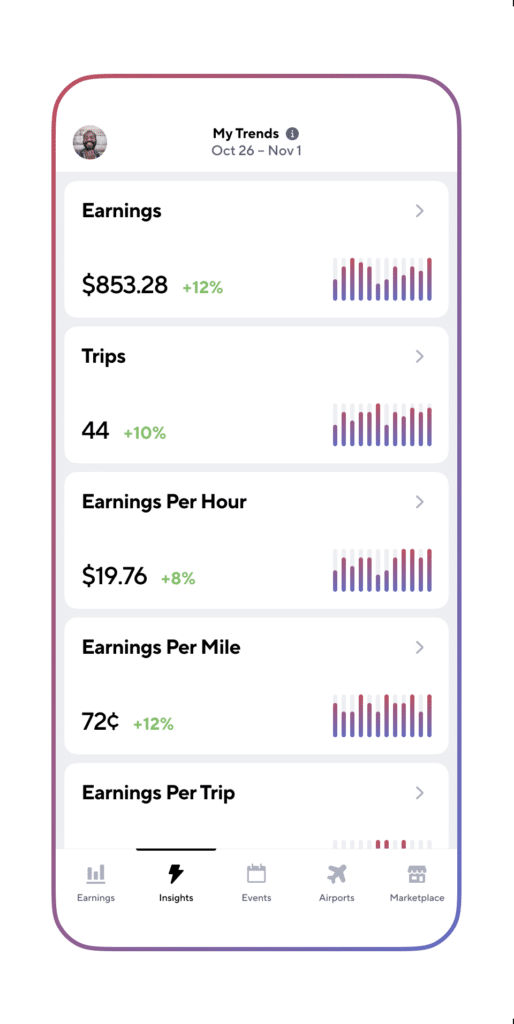
- Stay with the Uber Eats app, and track your earnings. Gridwise can easily do that for you. Simply sync your Uber Eats app with Gridwise, and you’ll be able to see how much you’ve earned with Uber Eats, what times were most profitable, and your average hourly pay. Racking up trips with Uber Eats has other benefits, including perks and bonuses that are awarded to top drivers.
- Leverage surge pricing and promotions. Surge pricing is applied when there is a lot of demand. When surge pricing is in effect, many of the trips you make will pay more than usual. Promotions are offered to drivers who complete a given number of trips in a certain time period. High traffic volume days, nights, and times give you these chances to get extra earnings. Challenging yourself to complete the right number of trips for promotions will add to the number of trips you can count on for big bucks, too. Learn more about Uber Eats surge pay, boosts, and promotions in this Gridwise blog post.
- Say yes to doubling up on orders. With Uber Eats, you can get back-to-back orders or receive batched orders. Back-to-back orders happen when you receive a new request while you’re on the way to deliver an original order. The Uber Eats app routes these trips automatically, so you won’t be sent out of your way.
Batched orders are Uber Eats’ way of bundling together orders from either the same restaurant, or two nearby eating establishments. You get money, and trip count credit, for all the orders you complete, plus customer tips, without having to make a bunch of separate trips.
- Turn on the charm and get bigger tips. Being nice really is part of the Uber Eats driver’s job, and getting tips is one way people who drive for Uber Eats make money beyond their basic pay.. Bring along those extra napkins and condiments, use equipment that keeps food and drinks at the right temperatures and prevents spilling, and consider your customers’ needs. If you deliver groceries, be extra careful with delicate items such as bread and eggs.
And, most important, follow your customers’ directions, and stay in communication with them if you are going to be delayed, or if you have questions about their order. This Gridwise post will tell how to get bigger tips as a delivery driver.
- Use even more charm to keep your ratings high. As an Uber Eats driver, you will be rated by the restaurant or store where you pick up the orders as well as the customers who are waiting for the deliveries. This two-way rating system is designed to keep you on your toes, so Uber can keep people satisfied with your service. Don’t worry, you get to rate them, too.
There’s another reason why your rating as a driver is important. It not only keeps you in good standing with Uber; it helps you to qualify for the Uber Eats Pro incentive program. To learn more about Uber Eats Pro, and what it takes to earn perks such as preferred services, discounts, and deals, check out this Gridwise blog post.
Smart business moves that seal the deal
Now that you know how to gobble up the deliveries you need to make $1,000 a week with Uber Eats, it’s going to be a breeze to get there. Let’s make it even easier, with business moves that boost your earnings and shrink your expenses. If you use these, it will also be easy to say yes when people ask, “Can you make good money with Uber Eats?”
Minimize expenses. Avoid racking up big fast-food bills by bringing your own food and beverages. You might not think you’re hungry when you first start your Uber Eats run, but once the aroma of pepperoni pizza, premium cheeseburgers, and piping hot fries start wafting through your car, that might change. Bring a sandwich or other healthy food from home, and buy bottled water in bulk to save tons of cash compared to what it costs to buy single servings.
Maximize tax deductions. Another way to minimize your expenses is to maximize your tax deductions. Start by tracking mileage with Gridwise.

Gridwise App
Gridwise captures every deductible mile you drive, including the distance you cover between the trips your driving app records. Know what expenses you can deduct, and put them to work for you when tax time comes. Learn more about tax deduction strategies in the Gridwise Tax Guide for drivers.
Boost earnings with referrals
As an independent contractor, you’re probably looking for ways to make even more money than you can with Uber Eats. And most gig workers like you enjoy getting passive income. With Uber Eats, there’s a really easy way to do that, referrals!
All you need to do is find friends and encourage them to deliver for Uber Eats. If they make a certain number of deliveries within a specified time, you will get paid for doing nothing more than having them sign up under your referral code! Rates of pay vary by city, so check your Uber Eats app to find out what the current deal might be, and learn more about the referral program on the Uber Eats website.
Also remember: “friends” don’t have to be your best buds. Many delivery people carry cards with a QR code linking to their referral information, so just about anyone you encounter can join Uber Eats and boost your earnings. You could meet a source of passive income at the gas station, on social media, or at your high school reunion. The more you hustle, the more there is to gain, right?
Master the art of self-employment
As an Uber Eats driver, you’re an independent contractor. That means the company isn’t going to withhold your taxes, provide insurance, keep track of your earnings, or tell you about tax deductions. You’ll have to do all these things for yourself.
If you want to maximize your tax advantages, open an official business entity. You can incorporate (create a corporation) or you can work as a limited liability corporation (LLC). You can also work with a DBA (Doing Business As) arrangement, but the corporation or LLC will do a better job of protecting you from liability.
Establishing a corporation or LLC offers better tax advantages than being a sole proprietor. For instance, if you simply collect your earnings into your private account, you’ll be charged self-employment taxes in most states. And paying extra taxes is something we all want to avoid, within legal limits, as much as possible.
Every Uber Eats driver needs to learn about self-employment, and there are some great resources you can review. Check out the CareerOneStop website about self employment which will help explain the basics. You can also check with a professional tax accountant, or look other websites to learn more about actually creating a business.
Scope out your market
Look at the area around you to see where you’re likely to get the most deliveries. Where are all the restaurants? Where might people be more inclined to order deliveries? What hours do you want to drive? What activities might be going on around those times? Think about late-night and after-school times as well as breakfast, lunch, and dinner times.
Be realistic about the potential for your area and aware of new services opening up. For example, in New York, there is already a tab on the Uber Eats app that allows customers to order groceries. In our article about the best food delivery service to work for you’ll see that Uber Eats stacks up well against other delivery companies, mainly because of its potential for expanded opportunities for drivers to earn.
So, is Uber Eats good money? As we said, it isn’t an automatic guarantee that everyone will make $1,000 a week with Uber Eats. Trying out the suggestions we give you here, though, should put you on the right track! Go out there and start stacking up those orders and raking in some impressive earnings!
Get more inside information on Uber Eats in these posts from the Gridwise blog:
- The delivery driver guide: Using the Uber Eats app
- Everything you need to know about driving for Uber Eats
- Uber Eats Pro: What drivers need to know
- Looking for a different gig, part-time or full time job? Check out the Gridwise Job board.
Uber Eats FAQ
How does the Uber Eats platform work for drivers?
Uber Eats is a food delivery service that connects customers with local restaurants and independent delivery partners. As an Uber Eats driver, you'll receive notifications of nearby delivery requests, which you can accept and complete. The platform provides flexibility, allowing you to work on your own schedule and earn money based on the number of deliveries you complete.
What are the requirements to become an Uber Eats delivery partner?
To become an Uber Eats delivery partner, you'll need to meet certain requirements, such as having a valid driver's license, a registered vehicle, and passing a background check.
How can I choose the right delivery zone to maximize my earnings?
Selecting the right delivery zone can significantly impact your earnings, as some areas may have higher demand and better-paying orders. It's important to research and identify the zones in your area that tend to have the most consistent and lucrative delivery opportunities.
How can I take advantage of peak delivery hours and surge pricing?
Understanding peak delivery hours, such as mealtimes and weekends, and taking advantage of surge pricing can boost your earnings. Be aware of when demand is highest in your area and adjust your schedule accordingly to capitalize on these peak periods.
What are some tips for maximizing tips and customer satisfaction?
Providing excellent customer service and going the extra mile to ensure a positive experience can lead to more tips and repeat business. Prioritize communication, timeliness, and attention to detail to keep your customers happy and satisfied.
How can I set realistic weekly goals to reach my $1000 target?
To make $1000 a week with Uber Eats, it's essential to set realistic weekly goals and track your earnings and expenses. Start by determining your target earnings and breaking it down into achievable daily or weekly goals. This will help you stay on track and make adjustments as needed.
What are some strategies for efficient route planning and navigation?
Effective route planning and navigation can save you time and fuel, allowing you to complete more deliveries. Utilize mapping apps and take advantage of features like real-time traffic updates and turn-by-turn directions to find the quickest routes.
How can I balance my Uber Eats deliveries with other commitments?
Develop a schedule that allows you to capitalize on peak delivery hours while still maintaining a healthy work-life balance. Consider using tools like calendar apps to plan your availability and track your hours to ensure you're maximizing your earning potential without sacrificing your personal life.
What are the key considerations for maintaining my vehicle as an Uber Eats driver?
Keeping your car clean and well-maintained is crucial for maximizing your Uber Eats earnings. Regularly scheduled oil changes, tire rotations, and other preventive maintenance can help extend the life of your vehicle and minimize downtime. Additionally, budgeting for vehicle-related expenses, such as fuel, insurance, and repairs, will ensure you're accounting for these costs and maximizing your net earnings.
What are the tax obligations and legal considerations for Uber Eats drivers?
As an Uber Eats delivery driver, it's essential to understand the tax obligations and legal considerations that come with being an independent contractor. This includes properly reporting your earnings, deducting eligible business expenses, and making quarterly estimated tax payments. Additionally, you'll need to ensure you have the appropriate insurance coverage, such as personal auto insurance and possibly commercial auto insurance, to protect yourself and your vehicle while on the road making deliveries.

The Gridwise Job Board: Find Your Ideal Job or Gig Work
Gridwise is an essential assistant app created by gig workers for gig workers. Our mission is to support those engaged in gig work in every way possible. We understand how challenging it can be to deal with income instability, a lack of benefits, and job insecurity that often comes with gig work. The Gridwise app tracks and organizes earnings and expenses, and offers a wide array of discounts, deals, and services that make the lives of independent contractors easier and more rewarding.
We firmly believe it’s possible to make a viable living and create a gig experience that offers flexible hours, variety, and excitement. With issues such as consistent earnings and job security in mind, Gridwise is proud to offer a centralized platform that shows you how to find gig work and secure reliable opportunities. We’re proud to introduce the Gridwise Job Board.
The Gridwise Job Board: Key features
Because Gridwise is dedicated to serving the gig worker community, we’ve filled the Gridwise Job Board with useful features that won’t waste your precious time.
- Comprehensive listings. Find part-time, full-time, temporary, and per-task work. Drive or deliver with your vehicle, utilize an employer’s vehicle, or even find non-driving gig work.
- User-friendly interface. Find the jobs that are right for you with a tap of your screen.
- Verified opportunities. We vet the jobs before they are listed to ensure you’re getting high-quality job postings.
How to get more gig work, seasonal, part-time or full-time jobs with the Gridwise Job Board
Looking specifically for “gig work apps” or “gig jobs near me?” You’re in luck. Our filters and search functions send you directly to the listings you seek.
Here’s how it works.
- Access the Job Board via the Gridwise website.
- Search for jobs by type, location, and more.
- Select the job that interests you, and read all about it.
- Scroll through the description, and if it appeals to you, click “Apply for job.”



Many types of jobs are available. Adjust the search filter to see the full variety of opportunities that will let you cash in. Deliver food, set up catering, do rideshare driving, get paid for doing package delivery, and much more. You’ll find short-term gigs, long-term contracts, and part-time positions.
Perks of the Gridwise Job Board for gig workers
Gig workers who know how to make extra money will appreciate how the Gridwise Job Board lets you multiply your chances of bringing in big earnings. Here’s how:
- Increased stability. Use the Gridwise Job Board to find part-time or permanent jobs in addition to the part-time gigs you already have. Always keep a steady stream of earning opportunities flowing toward you.
- Flexibility and autonomy. Choose jobs that fit your schedule, work around other jobs and family duties, and still leave room for some fun in your life. Discover side hustles to supplement your full-time job, permanently or just for the season.
- Skill development. Find part-time work that lets you use a skill you already have, or try your hand at something new. It’s a smart way to develop a portfolio to showcase what you can do, or even to find permanent employment.
Get Gridwise and stay up to date on the Gridwise Job Board
Gig workers need plenty of information and assistance, and Gridwise is here to give it to you. Download the app and get essential features such as
- seamless earnings tracking
- mileage tracking
- expense recording, including notes
- low-cost and no-cost insurance benefits
- access to affordable medical, dental, vision, mental health, and alternative care
- professional services including legal and financial help
- deals and discounts
- weather, events, and traffic reports
- inside information on where and when to drive
More to know about gig work:

5 Best Mileage Trackers For Gig Drivers
Many drivers ask, “Do I really need a mileage tracking app?” The answer is simple: only if you want to have an accurate count of all the miles you can legally deduct from your taxable income! You might think your rideshare or delivery driving app has got you covered. After all, they do quite a good job of logging the miles you drive while you’re on a trip or delivery. But, if you want to have the best app to track mileage for Uber, Lyft, Doordash, Instacart, or the other apps you may use, you need more. Why is that?
Without a separate tracker, you’re missing the miles you drive in between pings. Did you realize that all the miles you drive, from the moment you begin your shift until it’s over (as long as you don’t drive several miles on a break to hang with your friends), are tax deductible! That means you need something besides your driving app to keep an accurate count of your travels. Read this Gridwise post to see how important it is to keep track of every deductible mile.
You won’t be surprised to hear that there’s an app for tracking miles. In fact, there are several of them. Here, we’re going to tell you about five top mileage tracking apps, and help you figure out which one is best for you.
Before we get to the list and identify the best mileage tracker app, let’s clarify what exactly a mileage tracking app is. According to G2.com’s technology glossary, mileage tracking is done for the purpose of keeping a log of mileage that is either reimbursable or tax deductible.
And yes, of course you can track your miles simply by taking readings on your odometer. But are you really prepared to account for how many miles you drove for personal reasons and subtract them from the total to get your business mileage? Even if you can remember all that and do the arithmetic, if you want an accurate reading of the miles you drive for business, and can therefore deduct, a mileage tracking app will save you a lot of trouble and prevent you from making costly errors.
Plus, as a gig driver, you have specific needs when it comes to a mileage tracker. Ideally, you’d be able to handle mileage tracking and several other functions all in one app. It can be maddening enough to deal with driving apps, particularly if you’re an avid multi-apper. You would want your mileage tracker app to help you keep account of other aspects of your business, including income, expenses, and inside information about the art of gig driving.
Not all mileage apps are equal, to be sure! Let’s look at five of the best apps to track mileage and figure out which is the best app to track mileage with Uber and Lyft, or what mileage tracker app is best for DoorDash.
1. Zoho Expense

First up is Zoho Expense, which does exactly what its name says. This app is designed to allow companies to give employees a uniform way to create and submit expense reports. It can be used by individuals, including gig drivers, as well.
It includes a mileage tracker, as well as features that let you track other deductible expenses, including the ability to scan and record receipts.
Available on Android and Apple: Yes
Ratings: 4.8 stars on App Store, 4.7 stars on Google Play
Free Version: Yes
Subscription price: $3 per month, billed annually
Created specifically for gig drivers: No
2. Quickbooks Online

Quickbooks Online is a cloud-based app that allows you to track your mileage, earnings, and expenses. The information you enter can then be used to generate various reports that prepare you for tax time. It also allows you to create graphs that illustrate your cash flow, and includes a receipt scanner so you can instantly record deductible expenses. Quickbooks is popular, highly reliable, and designed mainly to help people keep track of their small businesses.
Available on Android and Apple: Yes
Ratings: 4.7 stars on App Store, 4.4 stars on Google Play
Free version: 30-day free trial
Subscription price: $15 per month for basic version if purchased for 3 months or more
Created specifically for gig drivers: No
Source: quickbooks.intuit.com
3. Shoeboxed

Shoeboxed started in 2007 as a service for scanning paper receipts into digital form. Now the app offers a free mileage tracker and has enabled users to scan receipts directly. It touts itself as the best mileage tracking app for DoorDash, but there are some elements missing that Dashers might like to have. While it provides features that record your expenses and prepare you for tax season, it doesn’t automatically track your earnings. The mileage tracker has a system where you can drop pins along your routes to make the tracking more precise, identifying those legs of a trip that you make for business purposes. The mileage tracker is “free” once you sign up for the basic version.
Available on Android and Apple: Yes
Ratings: 4.5 stars on App Store, 2.3 stars on Google Play
Free version: No
Subscription price: $18 per month for basic version
Created specifically for gig drivers: No
Source: blog.shoeboxed.com
4. Stride

This free mileage tracker does a fair job of keeping track of the distances you rack up while gig driving, but it doesn’t automatically track earnings. It can be a big help, though, in tracking your expenses. You can link Stride to your bank account, and it will automatically scan your expenses to identify items you can potentially deduct. The app is totally free. This could make it the best free mileage tracker app, but there is a small price to pay. The app will persistently push you to consider various insurance plans that they are affiliated with. If you don’t mind that, this is a solid mileage tracker, even if it doesn’t track your earnings.
Available on Android and Apple: Yes
Ratings: 4.8 stars on App Store, 4.6 stars on Google Play
Free version: Yes
Subscription price: None. The app is free.
Created specifically for gig drivers: No
5. Gridwise

Gridwise has a free mileage tracker and free features that record your income and expenses. It gives you access to insurance and benefits, as well as insights about the best times and places to make the most money while gig driving. The Gridwise mileage tracker captures all the miles you drive while you’re on your driving shift, and it can be used if you have other trips you need to make which qualify as business travel.
Drivers love it because it is geared toward the needs of rideshare and delivery workers, providing free information about airport departures and arrivals, event start and let out times, weather, traffic, and more. The Gridwise Plus subscription adds value by providing additional insights and reports, discounts on benefits, the ability to export data in .csv format,, and more.
Available on Android and Apple: Yes
Ratings: 4.9 stars on App Store, 4.6 stars on Google Play
Free version: Yes
Subscription price: $9.95 per month for Gridwise Plus, or $95.99 per year (a $23.41 savings)
Created specifically for gig drivers: Yes!
What is the best mileage tracking app?
Now that we’ve checked them all out, we’re positive about the answer to that. Hands down, it’s Gridwise. Are we biased? You bet we are! But drivers love it too. Gridwise is the best mileage tracker app, and so much more. So many of the features are free, and the subscription to Gridwise Plus will pay for itself with additional insights to boost your earnings and deeper discounts on products and services.
Most important, Gridwise is designed specifically for gig drivers by experts who were once gig drivers themselves! Knowing what gig drivers need is a crucial step in creating an app that rideshare and delivery drivers can really use! Here are a few of the features, besides mileage tracking:
- seamless earnings tracking
- automatic, on/off toggle and manual mileage tracking
- mileage categorization
- airport, traffic, weather, and events information
- insights into where to drive and when to drive
- reports showing earnings across the platforms you use
- discounts on countless products and services for drivers
- additional resources for finding side gigs
- an informative and comprehensive blog
- affordable benefits, including insurance, medical, dental, and alternative practitioner discounts
- a community of drivers just like you
Don’t settle for just any app. Get the best mileage tracker, and so much more, from Gridwise!
2025 Gig Driver Tax Guide
*Gridwise does not provide tax, legal, or accounting advice. This material has been prepared for information purposes only, and is not intended to provide, and should not be relied on for tax, legal, or accounting advice. You should consult your own tax, legal, and accounting advisors before filing your return.
Just when you thought winter was over, a blizzard of information about how to pay taxes comes flying at you. While much of the information is useful, it can be hard to plow through. That’s why we’ve created this tax guide. Simply scan the topics and get the info you need right now, at crunch time, without having to scroll through an intimidatingly long roll of hard-to-decipher text.
Here’s a list of resources and topics you can start with:
Delivery and rideshare tax strategies
The way that the government taxes freelance workers is different from the way taxes are levied on employee wages and investments. That’s why you need strategies. When it comes to filing tax for Uber drivers and delivery workers, and calculating tax for Lyft drivers, the name of the game is keeping as much of your earnings as possible. Here are some strategies we suggest:
- Get educated about freelancer tax deductions
- Prepare your taxes ahead of time
- Make use of tax deductible investments
- Set up a system for recording your expenses as they occur
- Learn about quarterly tax payments
- Know when to ask for help
If you would like more information about tax strategies, check out this Gridwise blog post.
All about deductions: Tax write-offs for Uber drivers and other gig workers
Keeping the biggest share possible of your earnings is easy when you know what you can deduct, and the best ways of doing so. Your delivery or rideshare gig is a business, so many of the costs you encounter in the course of operating your gig can be deducted from your taxable income. We’ll list a few of them here.
- automotive expenses (use either the standard IRS mileage deduction rate, or, after your first year, the actual cost method)
- equipment (phone, dashcam, floor mats, seat covers, etc.)
- any extra delivery bags or containers you might purchase
- extra services and amenities (e.g. satellite radio or bottled water for passengers)
- business tools (computer, software, home office equipment)
- accounting and legal help
- apps you use to support your driving gig
There is more help coming your way from these Gridwise articles about delivery and rideshare taxes and deductions. They show you how to reduce Uber taxes, offer Lyft tax relief, and help to minimize the tax bills of delivery drivers.
Read this blog post to discover how important it is to maximize your deductions.
Learn even more details about the tax write-offs you can use to your advantage in this post.
Lyft, delivery, and Uber driver accounting: Tracking your expenses
Isn’t it enough to have to pay attention to the apps you’re using, be on top of traffic and weather, deliver food through apartment building labyrinths, and keep your driver ratings high? Tracking expenses might sound like an unnecessary hassle, but in truth, it will save you a ton of money.
This Gridwise blog post enumerates the expenses you will need to keep track of to help keep your Lyft and Uber taxes to a minimum. There are things you do every day in the course of executing your driving gig that can be charged as an expense of doing business. And yes, it can seem cumbersome to keep track of them all.
Fortunately, there is a tool you can use to help you record your expenses. Gridwise helps you keep track of important expenses, from the mileage you rack up while on your driving gig to the tissues you keep for your passengers’ convenience.
When you log on to Gridwise at the beginning of your driving shift, the app
- automatically tracks your earnings for each delivery or driving app you use
- instantly logs the miles you drive on your shift
- offers you space to record your everyday expenses with simple entries
- provides a way to scan receipts through Gridwise Tax Help with Keeper Tax
- exports the information into .csv file format, so you can easily send it along to tax preparation apps and software
The Expense Tracking feature on the Gridwise app is super easy to use. Simply tap on “Expenses” in the Earnings section. From there, click on the “+” sign, then “Add expense.” Enter the date, category, and amount, and the app automatically tabulates everything, storing the info until you need to report it.

The .csv export feature adds to the convenience and utility of the Gridwise Expense Tracking feature.
Maximize your delivery or rideshare mileage deduction with automatic tracking
We’ve mentioned that the Gridwise app automatically tracks the miles you drive on your shifts, but do you realize how important this is? If you fail to track your mileage, you’ll miss out on a huge deduction from your taxable income. You’ll want to start using Gridwise if you don’t already—but what if you forgot or failed to record all your gig driving miles? Here are some things you can do:
- Know which miles count. You can deduct more than just the miles your driving apps record: the miles you drove getting to and from your gig also qualify. You cannot, however, count miles used for any other purpose, unless they were directly related to your rideshare or delivery work.
- Estimate your mileage based on an average gig-driving shift.
- Document the procedure you used for your estimate when you submit it to the IRS.
This Gridwise post gives more details about how to reconstruct your mileage report if you didn’t use Gridwise or record your mileage in any other way. It also shows you why tracking your mileage with Gridwise is as effective as it is simple. Here is a step-by-step guide:
- Simply log on to Gridwise when you leave to begin your shift. You’ll capture those miles your driving apps won’t include. As you drive on your shift, just let Gridwise continue to track your miles.
- Be sure to log off Gridwise when you are not driving for your gig, both after your shift and at any time you stop for personal reasons in between rides or deliveries.
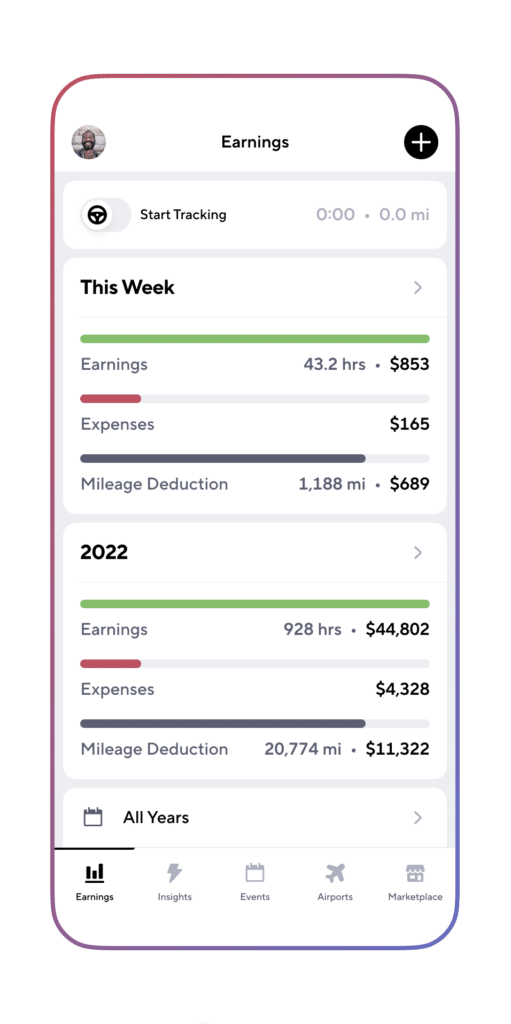
- The Gridwise app will record your mileage figures. In the Earnings tab you can see your mileage deduction, based on the IRS mileage compensation rate.
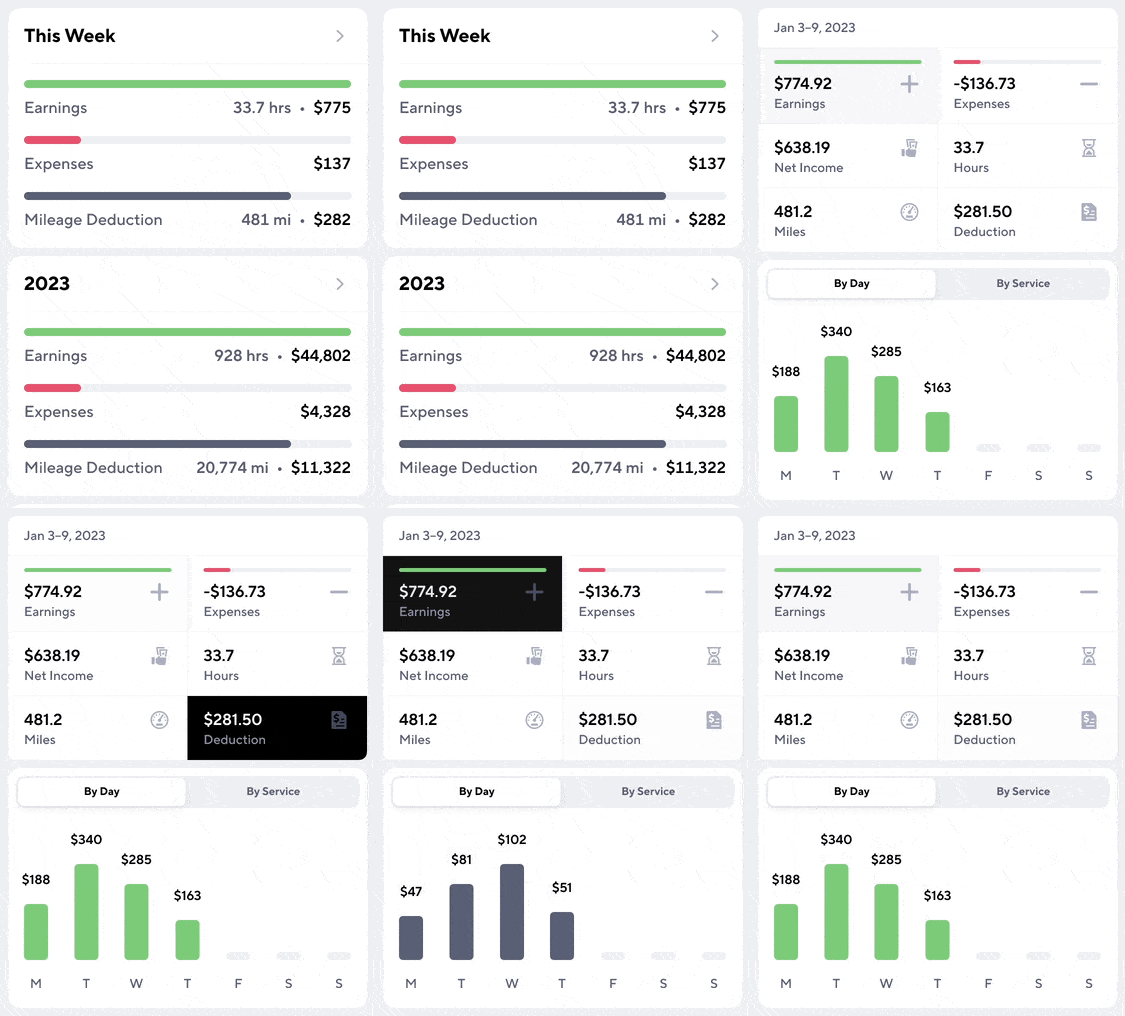
Are you worried what might happen if you forget to log on or sign off Gridwise at the right times? Don’t be. You can always enter mileage manually, so you will continue to keep accurate records that will save you money.
- Read more about what you can do if you forget to track your miles in this Gridwise post.
- This Gridwise article discusses the 2023 IRS mileage rate and what it means to drivers.
Delivery, Lyft, and Uber tax help: Advice on calculations and compliance
When it comes to tax compliance, independent contractors carry a lot of responsibility on their shoulders. You might think you’re not “important” enough to be noticed, should you fail to submit your tax return in a way the IRS will accept and approve, but you might be surprised. The IRS looks at the returns of independent contractors with greater scrutiny than they might use with a company employee, because they expect gig workers are going to try to use every loophole they can, and possibly invent a few more.
You do not want to know what being audited by state or federal tax authorities would do to your life. Rather than being on the road making money, you’ll be pulling out copies of your receipts and putting them under the nose of a not-very-cheerful agent whose job it is to find your errors and omissions.
Being audited is a costly and stressful process that is best to avoid. And, if you do try to get away with taking more deductions than you really have, or otherwise underpaying your tax bill, you could wind up paying penalties and interest, and possibly face court-related expenses—and even worse consequences. That’s one kind of expense you don’t want to have to deduct!
You probably see why it’s important to be compliant when it comes to paying your taxes. The rules are complex, and if you’re not experienced at filing taxes as an independent contractor, you could run into trouble. Fortunately, there’s help designed specifically for gig drivers.
Gridwise Tax Help supports your every need when it comes to tracking your earrings and expenses, and filing your tax returns. This unique service for drivers gives you
- access to a tax professional
- automatic receipt scanning
- automatic mileage reporting
- an automated tax deduction finder
With Gridwise Tax Help, you’ll get professional support and tons of tools to make record keeping and tax filing as easy as it gets.
The Best Times to DoorDash in 2026 (Hours, Days & Surge Strategy)
As a DoorDash driver, finding the best times to DoorDash can be the difference between an average shift and a highly profitable one. Timing your driving sessions around peak hours ensures that you’ll spend less time waiting for orders and more time earning. This guide will walk you through the best times to DoorDash, both on weekdays and weekends, with tips on how to use the Gridwise When to Drive feature to maximize your earnings.
Why Timing Matters for DoorDash Drivers
When optimizing your delivery schedule, you need to know the best times to DoorDash. Driving during peak hours can significantly boost your earnings, thanks to higher demand, surge pricing, and bonuses from DoorDash. But beyond general busy times, using data and tools like Gridwise allows you to predict precisely when the market will be highest. This will help you to work during the most profitable hours.
Peak Hours for DoorDash: A General Guide
If you’re wondering when are the best times to DoorDash, you can typically rely on the meal rushes. For most cities, the following hours are peak times:
- Breakfast: 7:00 AM – 9:00 AM
- Lunch: 11:00 AM – 2:00 PM
- Dinner: 5:00 PM – 9:00 PM
Driving during these hours ensures you’re active when the most orders are being placed. However, the best times to DoorDash in my area can vary based on local trends. That’s where Gridwise can help.
Best Times to DoorDash on Weekdays
For most drivers, weekday shifts can be quieter outside of meal times. However, knowing the best times to DoorDash on weekdays can allow you to strategically drive when competition is lower, but demand is still high.
- Lunch rush (11:00 AM – 2:00 PM) is particularly strong during weekdays, as office workers often order delivery.
- Dinner rush (5:00 PM – 9:00 PM) sees a steady flow of orders from families and commuters getting home from work.
By focusing on these peak hours, especially during Monday through Friday, you’ll find the best times to DoorDash for steady income.
Best Times to DoorDash on Weekends
Weekends are prime time for DoorDash drivers because demand is consistently higher. But what are the best times to DoorDash on Saturdays and Sundays? Generally, the peak hours remain similar to weekdays, but there are additional high-demand opportunities:
- Brunch (10:00 AM – 1:00 PM) is more popular on weekends, as people often order in for late breakfasts.
- Late-night orders (9:00 PM – 1:00 AM) tend to spike, especially on Friday and Saturday nights when people are out socializing or relaxing at home.
These factors make the best times to DoorDash on weekends more varied, giving you extra chances to increase your earnings.
How to Find Your City's Best Time to Doordash
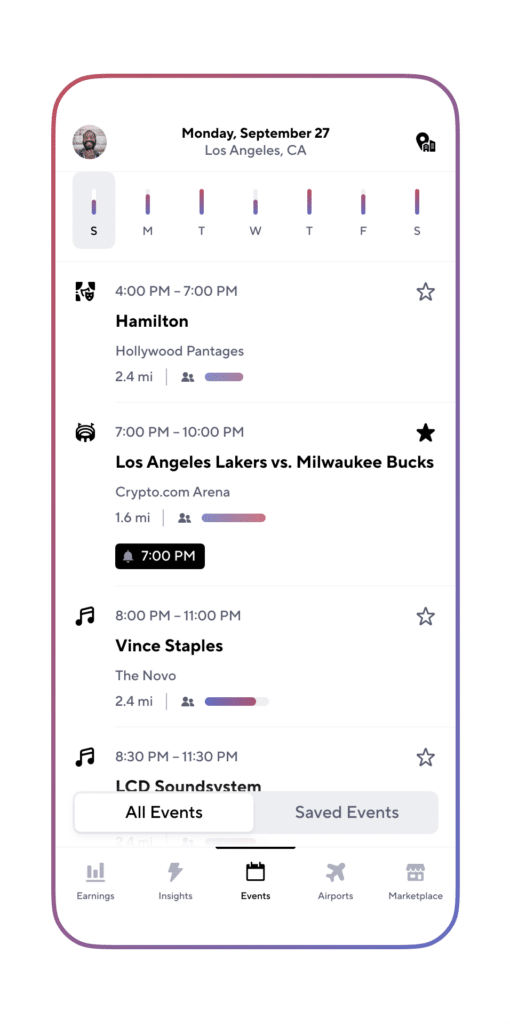
While general guidelines are helpful, knowing the exact best times to DoorDash in my area can provide a major advantage. That’s where Gridwise’s When to Drive feature comes in. It uses real-time data and historical trends to predict peak demand hours, helping you pinpoint the best times to DoorDash with precision.
Here’s how you can use the When to Drive feature to maximize your earnings:
- Open the Gridwise app: Navigate to the When to Drive feature.
- View high-demand times: Based on your location, Gridwise will display the most profitable times to drive.
- Plan your shifts accordingly: By adjusting your schedule to match these peak hours, you’ll ensure you’re driving when orders are most frequent.
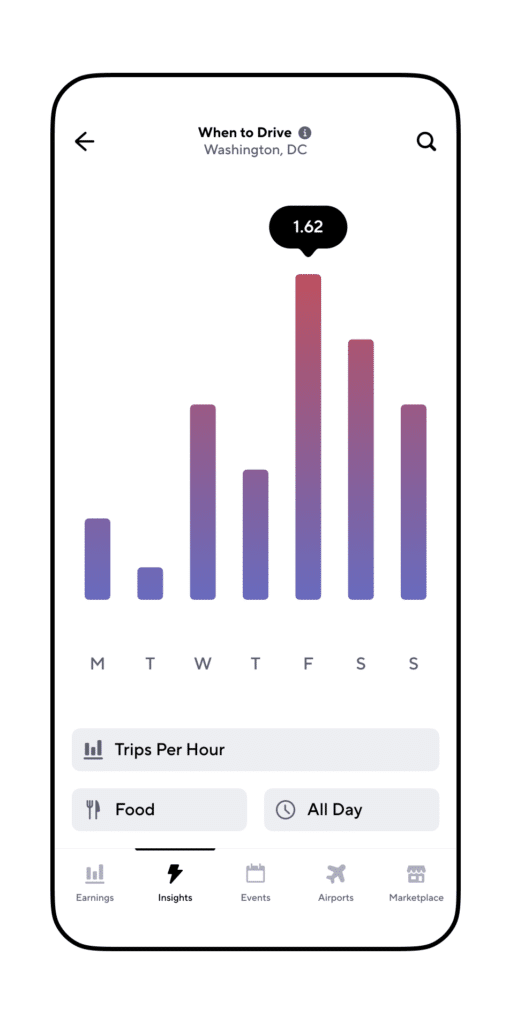
Gridwise’s When to Drive feature takes the guesswork out of figuring out when are the best times to DoorDash, ensuring you’re always online when the demand is at its highest.
Tips to Maximize Earnings During Peak Hours
Identify the best times to DoorDash using the Gridwise app. And then here are some additional strategies to help you make the most of your time:
- Use multiple apps: During peak hours, try multi-apping (using DoorDash alongside Uber Eats or GrubHub). This can reduce your downtime and increase your overall earnings.
- Position yourself near high-demand areas: Stay close to popular restaurants or areas with lots of activity, especially during rush hours.
- Avoid long-distance orders: Shorter trips during peak times will allow you to complete more deliveries and make more money.
More Gridwise Features to Help You Maximize Your Earnings
Gridwise offers a variety of other tools that can help you become a more efficient and profitable driver. Here are some key features that can take your gig work to the next level:
- Mileage and Expense Tracker: Tracking your miles is essential for maximizing tax deductions. With Gridwise, you can automatically track your mileage and record other expenses. This makes it easier to manage your finances and reduce your tax burden.
- Earnings Tracker: Gridwise helps you keep track of your earnings across multiple gig platforms like DoorDash, Uber Eats, and Lyft. By analyzing your income and hours, you can better understand which platforms are most profitable.
- Airport Demand Insights: Are you driving for rideshare apps too? This feature gives you real-time data on passenger demand at airports. It helps you determine whether waiting at an airport is worth your time, so you can maximize your driving efficiency.
- Real-Time Weather and Traffic Alerts: Gridwise provides real-time updates on weather conditions and traffic patterns in your area. This helps you avoid delays and stay safe on the road.
By using these features, you can streamline your gig work, save money, and drive smarter. Whether tracking your earnings or understanding local traffic, Gridwise equips you with the tools you need to thrive in the gig economy.
Looking for Other Delivery Articles?
- How Much Do DoorDash Drivers Make? - Learn the earning potential of a DoorDash driver and how to boost your income.
- How to Make $1,000 a Week with DoorDash - Discover proven strategies to earn $1,000 weekly as a DoorDash driver.
- How to Make $1,000 a Week with Uber Eats - Find out how top drivers reach $1,000 a week with Uber Eats.
- Gig Driver Job Board - Explore new job opportunities and maximize your gig driving career.
How to Make $1,000 a Week With DoorDash in 2026 (Data-Backed Strategies)
Make $1000 A Week With DoorDash? Is that possible? Earning $1,000 a week is regarded by many as the magic number. Depending on where you live, you can afford an apartment (a roommate makes it easier), a car payment, some utilities, and generally get by.
If you can earn $1,000 a week delivering restaurant food on a DoorDash driver salary, that’s even better because we all know how much fun gig driving is.
What’s the 411 on DoorDash?
Three Stanford college students, Andy Fang, Tony Xu, and Stanley Tang, founded Doordash in 2013. Gridwise’s blog post Uber Eats vs. DoorDash Pay: How Much Did Drivers Earn in 2022? describes how the trio took a gamble and sidestepped the competition, focusing on the larger suburban markets as opposed to the urban centers. Their research told them that the more family-oriented neighborhoods generated orders with a larger ticket size.
The strategy worked; by 2019 DoorDash had a 59% market share. The rest of the competition was playing catch-up. Statistica reported that in early 2023 DoorDash’s market share grew to 65%. Uber Eats has 23%; the rest are in the single digits.
Is it possible to make $1000 a week with DoorDash?
Achieving these earnings as a DoorDash driver certainly requires dedication and strategic planning, but it can be achieved. According to our analysis, drivers aiming for about $970 per week will need to commit to approximately 48.5 hours, strategically distributed across peak periods including lunch, dinner, and late-night shifts. This level of income means longer hours, but also smart work, choosing the right times and places to drive.
While the hours needed and the strategic approach required might seem daunting, with the right mindset and optimization of one's schedule and tactics, driving for DoorDash can indeed be a lucrative gig. It's about working smarter with the hours you have, ensuring that each decision and action taken is geared towards maximizing your earnings potential.
Read on as we discuss the strategies you can try. We also explore the pay and hour breakdown.
How can you earn $1000 in a week with DoorDash?
We have to do the math to see how much you can make in DoorDash weekly. Let’s start with, how much do DoorDashers make an hour? There is good news here. According to recent numbers, based on driver input, DoorDash driver earnings reached an average of $19 an hour in December 2022 through Q1 2023. This includes base pay and tips. That puts Dashers at the top compared to other restaurant food delivery services. (By the way, when you become a DoorDash driver, you're called a Dasher.)
Remember, your goal is $1,000 a week. To accomplish this, it helps to be a top-performing driver. According to Gridwise numbers, the average salary for a DoorDash driver in the 90th percentile (meaning the top 10% of earners) is $20 an hour. This is what we will use for the breakdown.
So to make $1,000 a week on a DoorDash driver salary, you need to work 50 hours a week earning a higher than average hourly rate. The problem? There may not be 50 hours of prime DoorDash time available. You will have to work seven days a week, and even then, you might fall short.
Here is one way it could work out, and this is with a broad brush, based on the earnings of a top-performing driver (based on $20 an hour driving in a higher earning zone):
- Lunch (11:30 am to 1:30 pm): 2 hours x 5 days a week = 10 hours, $200. Weekends tend to eliminate the business lunch crowd.
- Dinner (5:00 pm to 9:00 pm): 4 hours x 7 days a week = 28 hours, $560. Hours may vary for your region.
- Late night: 1.5 hours x 7 days a week = 10.5 hours, $210. You will get good results in this block if your territory includes colleges and universities.
- Total: 48.5 hours, $970
At $970.00 a week, that’s close to your goal. But there are some considerations here. First, you're working seven days a week. That’s tough. Second, you're counting on everything going well, and it doesn’t always happen that way. Nonetheless, some drivers claim they hit and often exceed $1,000 weekly in DoorDash driver earnings. We have seen figures go as high as $23 an hour.
To answer "How much can you make on DoorDash", let’s take a closer look at the Gridwise numbers. These represent a weekly average from December 2022 to Q1 2023. Again, these Gridwise numbers are based on driver input.
Gridwise earnings: How much does DoorDash pay?
Understanding the Earnings Potential for DoorDash Drivers
DoorDash drivers' earnings can vary, and often they are influenced by factors such as location, the number of hours worked, and delivery efficiency. On average, drivers earn around $15 per hour. These earnings can also surge during peak times or within high-demand areas, reflecting the dynamic nature of gig economy opportunities.
DoorDash drivers earn a combination of base pay, promotions, and customer tips, with typical earnings per delivery ranging from $7 to $10, although this can vary with the distance and size of the order.
When looking at Doordash daily earnings, it's important to note that these hours are average and most drivers do not work a full day driving for DoorDash.
However, it’s crucial to account for expenses like gas and vehicle maintenance, which can significantly affect take-home pay. Consequently, to optimize earnings, experienced drivers often adopt strategies such as working during peak demand hours, selectively choosing orders that offer better pay per mile, and delivering exceptional customer service to enhance tip potential. By understanding and leveraging these aspects, DoorDash drivers can effectively maximize their earnings while navigating the challenges of gig work.
Some drivers report that the DoorDash app is especially good at giving drivers two or three orders at a time. This makes it incredibly productive.
How can drivers make $1,000 a week on DoorDash?
According to the screenshots of driver apps we see online, making $1,000 a week delivering Doordash is possible. But to bring in that kind of money, you will need to use everything in your gig driving bag of tricks and tips. Here are 19 of our favorite tactics.
Drive smarter, not harder. Gridwise shows you the best times, places, and platforms to drive. Download for free →
- You have to hustle
You're pushing the envelope of how much you can make with DoorDash. The breakdown above shows how difficult it is to make $1,000 weekly on DoorDash. You will work hard. But it is do-able with the right strategies.
- Verify you’re in a DoorDash region
DoorDash has a commanding market share nationally, but that doesn’t always play out at a regional level. A 2021 report by McKinsey and Company describes the restaurant food delivery market in the US as “complex,” with dominant companies at a local level changing rapidly as the platforms battle for local markets. There are some regions where Uber Eats might command the local market share. There is no way to discern if your area is strong for DoorDash other than to go out and experiment. If your market is not good for DoorDash, you're fighting an unwinnable war.
- Understand the evolving food business
Technology brought innovation to the restaurant food business. Lunch wagons morphed into food trucks, and those food trucks posted their daily location on social media. At the same time, the restaurant food delivery business became a thing. Then came the advent of virtual or ghost kitchens, which are kitchens without bricks and mortar, and some are pretty good. Now you have warehouses that have been subdivided, plumbed, and have HVAC installed, capable of supporting 20 of these operations or even more. It’s either pickup or delivery. As a Dasher, it's gold if you can locate a ghost kitchen market like this in your region. Check out this article in the Los Angeles Times about the growth of this restaurant industry sector.
- Work the right hours
You saw it in our chart. To make $1,000 a week in DoorDash driver earnings, you have two hours around lunch and four hours in the evening. It’s a split shift, and those are the hours you have to work, with maybe some variation from market to market.
- Become a different type of sports or TV fan
The Super Bowl, March Madness, the Grammy Awards, the Oscars, and the season finale of Game of Thrones are all television events that generate higher-than-average DoorDash orders. You'll have to watch the reruns if you want to make $1,000 a week in DoorDash earnings.
- Do you have colleges and universities in your area?
You know those crazy college kids. They’re up at all hours of the night, cramming for finals and coming home from parties at 2:00 am. They can be a good source of business in the late night and wee hours of the morning. Again, experiment and figure it out in your area.
- Schedule your dashes
DoorDash allows you to schedule your dashes up to five days in advance, starting at midnight. You should do this. It guarantees you a slot to work. The alternative is what Dashers call the Dash Now button, and the app might not let you on. Smart Dashers schedule in advance.
- Become a Top Dasher
Dashers with the highest acceptance rates, completion rates, and customer ratings attain what is referred to as Top Dasher status. If you achieve this, you can schedule your dashes a day earlier than regular Dashers. Check out the DoorDash website to see how you can qualify.
- Look for DoorDash promotions
DoorDash Challenges let you collect bonuses for completing a designated number of deliveries during a specified window. Periodically check the Dash Now panel of the Dasher app home screen for these challenges. There is also the DoorDash Large Order program. This allows top-performing Dashers to accept high-value orders in their area (that hopefully have commensurate tips). Check out the link for details on how this program works.
- Learn the restaurants in your area that are good for Dashers
Some restaurants are poorly managed. Orders are never ready for the Dasher, and you're left to cool your heels and surf TikTok. Avoid these establishments. When you see an order from a restaurant where you have had this experience, pass on it. They are a waste of time. Look for orders from the restaurants that appreciate you and make the Dasher life easy.
- Work those tips
Remember the breakdown above. Tips make up half your income and are what set many Dashers apart. You have to work for them. Communicate with the customer about their delivery. Tell them when you're on your way and if there is a holdup. Even if there is a problem with the delivery or it’s running late, they will forgive you if you keep in contact. Include lots of condiments, napkins, and the free goodies. Even if the customer indicates they want a no-contact delivery, smile as you walk up to the door, a big one with lots of teeth. People like happy Dashers, and they tip them.
- When it rains, be a mudder
That’s what they call racehorses that run well in the rain (it’s a golf term, too). Everyone is considering staying in when it rains, including customers and other DoorDash drivers. You need to get out your raincoat and galoshes. You’ll find fewer drivers and more deliveries.
- Update and restart your DoorDash app regularly
The companies that use gig apps continually update them, add features, and fix bugs. Updating your app ensures you have the latest and best version. Some drivers claim you can refresh the DoorDash app more efficiently by turning the app on and off.
- Be selective about your orders
Ask yourself two questions when evaluating orders on the app. Do they pay enough (top drivers suggest you set a minimum of at least a dollar per mile driven)? Also, does the order take you too far from your region? You’ll spend too much time getting back to where the business is. Pass on orders that have either one of these red flags.
- Monitor Reddit and YouTube for tips and advice
There’s a lot of good information on new strategies for making $1,000 a week on DoorDash. Once or twice perusing YouTube, and you’ll find your favorites. There is lots of complaining on Reddit, but you can also find good information.
- Make extra money with referrals
When you sign up for DoorDash, you receive a referral code. You get a referral bonus when someone uses that code to sign up as a Dasher. Print business cards for a minimal investment and hand them out to friends, family, restaurant workers looking for a side hustle, and anyone else that asks. Not every region offers referrals all the time. It depends on whether that region needs more drivers. The bonus amount also varies, but sometimes it's as much as $300.
- Practice fuel economy
Fuel is your major expense. Every dollar you save on fuel is another dollar in your pocket and another dollar saved for your DoorDash driver earnings. Downloading the Gridwise app might be the best way to save on gas as a gig driver. Once you’ve downloaded the app, you can sign up for Gridwise Gas and save up to $50/month on fuel. You can also check out the Gridwise blog post 13 Ways to Save Money on Gas as a Rideshare or Delivery Driver. Every little bit helps.
- Maximize your tax deductions
Like fuel, the less you pay in taxes, the more money remains in your pocket. The Gridwise app includes the best mileage tracker for gig drivers. It provides an accurate record of all the miles you drive. The Gridwise Expense Tracker is another feature that helps you to easily keep track of your expenses. Both tools are invaluable. As a gig driver, mileage is your most significant write-off, and Gridwise gives you the best record of it.
- Multi-app
This article primarily details how to make $1,000 a week on DoorDash, but we would be remiss if we didn’t recommend that you multi-app. Here are four reasons you should do so:
- You might be unjustly suspended from the app while DoorDash investigates an erroneous customer complaint. It happens. Multi-apping means you have exposure to other apps and services, so you can continue earning.
- We’ve already mentioned that restaurant food delivery is a shifting market. Companies regularly trade the top spot in select regions. Multi-apping allows you to monitor the activity on other apps.
- If you are a high-performing driver, you’re likely to find success, and more business and income, on other apps, too.
- There are gaps between primetime hours for DoorDash. Instead of going home, you can drive another gig for a few hours. That’s one of the secrets of a top-performing driver.
For more information on multi-apping, check out the Gridwise blog post, The Art of Multi-apping: How-Tos and Strategies for Gig Drivers.
How do Doordashers get paid?
The Dasher workweek is from 12:01 am Monday to midnight the following Sunday (Monday morning to Sunday night). Payment usually hits your bank account Wednesday night, which means you will see it Thursday morning.
The final tip: use the Gridwise app
DoorDash drivers are getting more out of their earnings by tracking everything in one place for FREE with Gridwise. On top of getting free trackers to organize your info for tax season, you'll also get data on hot neighborhoods and profitable days of the week to drive (so you can hit that goal of $1000 a week!).
Are you looking for more Doordash articles or looking to earn more as a Doordash driver? Look at these articles:
- How to make $1000 a week with Amazon Flex
- Here's how to make $1000 with Uber Eats a week
- Compare earnings: DoorDash vs. Uber Eats
- Maximize earnings with Gridwise features
- Check out the Gridwise Job Board
*Actual earnings may differ and depend on factors like number of deliveries you accept and complete, time of day,
location, and any costs. Hourly pay is calculated using average Dasher payouts while on a delivery (from the time you accept an order until the time you drop it off) over a 90 day period and includes compensation from tips, peak pay, and other incentives.

Uber Eats vs DoorDash Pay in 2026: Which Pays More Per Hour?
As demand for meal delivery continues to grow, drivers in the gig economy want to know: Which service pays better, DoorDash or Uber Eats? Whether you’re a full-time delivery driver or just looking to boost your income, understanding the earnings potential between Uber Eats vs DoorDash can help you make the best choice. This year’s data highlights substantial differences in each platform's hourly, daily, and monthly earnings. We’ll explore Uber Eats vs DoorDash pay across all key metrics, giving you a complete picture of earnings potential in 2025.
Why Food Delivery is Booming
The food delivery industry continues its rapid expansion, with analysts projecting a 12.33% annual growth rate, potentially reaching $1.45 trillion globally by 2027. Changing consumer habits, the rise of ghost kitchens, and advancements in delivery technology are opening new opportunities for customers and drivers. In 2024, over 37% of Americans were expected to use a food delivery service at least once, creating a high demand for Uber Eats and DoorDash drivers.
Comparing Hourly Earnings for Uber Eats vs DoorDash
When we compare hourly earnings, Uber Eats currently offers higher pay per hour compared to DoorDash.
- Hourly gross: DoorDash $13.03, Uber Eats $17.72
- Hourly bonus and tips: DoorDash $5.90, Uber Eats $6.96
- Total hourly pay: DoorDash $18.93, Uber Eats $24.68
Source: Gridwise, 2023 Q1 to 2024 Q2
Analysis: Uber Eats drivers make approximately $24.68 per hour, while DoorDash drivers average $18.93 per hour when bonuses and tips are included. Uber Eats has a higher hourly gross at $17.72 compared to DoorDash’s $13.03. Additionally, Uber Eats drivers typically receive higher tips and bonuses per hour, averaging $6.96, compared to DoorDash’s $5.90. This hourly pay structure may make Uber Eats more appealing for drivers aiming to maximize earnings within shorter shifts.
A Deep Dive into Daily Earnings on DoorDash vs. Uber Eats
Daily earnings can vary depending on order volume, demand in each market, and driver strategy. Here’s how DoorDash and Uber Eats compare in daily gross and per-task earnings:
- Daily gross: DoorDash $63.66, Uber Eats $52.94
- Daily before tips: DoorDash $32.14, Uber Eats $27.75
- Per task average: DoorDash $8.49, Uber Eats $10.00
Source: Gridwise, 2023 Q1 to 2024 Q2
Analysis: DoorDash drivers report a higher daily gross of $63.66 compared to $52.94 for Uber Eats. However, Uber Eats has a higher per-task average of $10.00 per delivery, while DoorDash’s per-task average is $8.49. For drivers who prefer completing fewer, higher-paying orders, Uber Eats may be a better fit. Conversely, DoorDash’s higher daily earnings may benefit drivers who can complete multiple trips per shift or work in high-demand areas where order volume is higher.
Weekly and Monthly Gross Earnings: Which Platform Comes Out on Top?
Let’s take a closer look at the gross pay for both platforms over weekly and monthly timeframes, which offer insights into potential earnings for drivers working consistently.
- Weekly gross: DoorDash $232.35, Uber Eats $170.44
- Monthly gross: DoorDash $719.91, Uber Eats $479.95
Source: Gridwise, 2023 Q1 to 2024 Q2
Analysis: DoorDash leads in weekly and monthly gross pay, averaging $232.35 per week and $719.91 per month. In contrast, Uber Eats drivers earn around $170.44 per week and $479.95 per month in gross income. For drivers working full-time or close to it, DoorDash offers a more stable income, especially in areas with consistent order volume.
These numbers indicate that DoorDash could be the better choice for those looking for steady income, while Uber Eats may be more suitable for drivers who focus on maximizing earnings per order.
Bonuses and Surge Pricing: DoorDash vs Uber Eats Incentives
In addition to gross pay, both DoorDash and Uber Eats offer opportunities to increase earnings through bonuses and peak-time pricing, but each platform takes a slightly different approach:
DoorDash Bonuses
- Challenges and Goals: DoorDash occasionally offers bonuses for reaching specific delivery targets within a certain time frame. These incentives vary by market and are often promoted within the driver app during high-demand periods.
- Top Dasher Program: Drivers meeting specific performance metrics (such as high customer ratings and a high order completion rate) can earn “Top Dasher” status, which provides scheduling priority and access to peak times even with high driver availability.
On average, DoorDash drivers earn an additional $114.84 per week and $356.33 per month from bonuses and tips.
Uber Eats Surge and Boost Pricing
- Surge Pricing: Uber Eats offers surge pricing during times of high demand, particularly in urban areas. This can mean significant pay increases for drivers working peak hours, as Uber Eats adjusts rates dynamically based on order volume.
- Boost Pay: Boost promotions guarantee higher pay for each trip in specific locations and times. This type of incentive can be especially valuable for drivers who are flexible with their locations.
Uber Eats drivers earn about $84.70 per week and $238.57 per month in additional income from surge and boost promotions.
Key Takeaway: While DoorDash bonuses tend to provide more predictable monthly earnings, Uber Eats’ surge and boost pricing options allow drivers to capitalize on peak demand, which may lead to higher earnings during limited periods. Drivers seeking more stable bonuses might prefer DoorDash, whereas those looking for flexibility and the potential for higher earnings on a per-trip basis may favor Uber Eats.
Uber Eats Driver vs DoorDash Driver: Which Platform is Better?
Choosing between Uber Eats vs DoorDash pay often depends on each driver’s market and other factors, including where you drive, your schedule, and your income goals.
Here’s a quick summary to help you decide:
- Earnings Stability: DoorDash’s consistent weekly and monthly earnings may be better suited for drivers looking for steady income.
- Peak Earnings Potential: Uber Eats provides lucrative surge and boost pricing during peak hours, which can be beneficial for drivers in urban areas or those with flexible schedules.
- Order Volume: DoorDash typically has a higher order volume in suburban markets, making it a good option for drivers in less densely populated areas.
For the best of both worlds, many drivers succeed in multi-apping, using both platforms to maximize earnings. Gridwise wide range of features and benefits are designed to simplify your life and help delivery workers coordinate income, and expenses and track performance across apps to identify the most profitable times and strategies.
How Gridwise Can Help Maximize Your Earnings
Regardless of your chosen platform, Gridwise can help you take control of your gig-driving career. Our app automatically tracks earnings and mileage, giving you insight into your average hourly and monthly earnings for Uber Eats and DoorDash. With features like When to Drive, Gridwise helps you identify the best times and locations for maximizing your earnings on either platform.
Get started with Gridwise
- Download the Gridwise app for free
- Track your earnings and mileage automatically
- Optimize your schedule with real-time data on peak times
Using Gridwise, you can easily analyze your Uber Eats vs DoorDash pay data and make adjustments to improve your results. Download Gridwise now and start tracking today!
Find out more about how much gig workers earn here:
- How Much Do Uber Drivers Make?
- How Much Do Lyft Drivers Make?
- How Much Do DoorDash Drivers Make?
- Everything You Need to Know About Amazon Flex
- Walmart Spark Delivery Driver Pay: How Much Does a Walmart Spark Driver Make?
- How Much Can You Make on Instacart?
- How Much Do Shipt Shoppers Make?
- How Much Do Uber Eats Drivers Make?
How Much Do Uber Eats Drivers Make in 2026? ($18.06/hr + Tips Data)
The love affair between consumers and prepared food delivery isn’t letting up. The industry continues to boast double-digit growth and is expected to do so for the foreseeable future. Restaurants up and down the spectrum, from quick-serve to fine dining, all offer delivery, most of the time through third-party vendors like Uber Eats. Gig drivers find Uber Eats to be a great way to add to their gig economy earnings.
We’ll examine the nitty-gritty of how much Uber Eats drivers make. Holding a solid second place in the food delivery arena with a 23% market share, Uber Eats is included by many gig drivers in their stack of gig jobs.
How much do Uber Eats drivers actually make?
The best food delivery drivers and the best gig drivers look at all the numbers. They want to understand and determine: Is Uber Eats worth it for drivers? How much is Uber Eats driver pay? They want to see data on earnings from Uber Eats driver tips. What is Uber Eats hourly rate? What’s included in Uber Eats driver incentives?
By understanding each of these factors, it’s easier to see areas for improvement.
How much do Uber Eats drivers earn per delivery?
In many markets, food delivery demand is driven by events and the day of the week. Football season gives you four days a week for earning opportunities, with college games on Saturdays, professional games on Sundays, and professional football on Monday and Thursday nights. The food delivery industry sees peak order times each year starting in September.
As you review the chart below, note that from a data perspective statisticians classify each food delivery as a distinct task. Rather than “earnings per delivery,” they label it “earnings per task.”
As you can see, Uber Eats driver pay per task goes up and down throughout the year. Drivers consistently earned between $9 and $10 per delivery, with the highest rates during Q1 and the beginning of Q4 through Super Bowl Sunday in February.
Strategic drivers like to look at their per-delivery pay, knowing that increasing their deliveries per hour can also increase their hourly rate.
What is Uber Eats hourly rate?
Not surprisingly, an Uber Eats hourly-rate graph mirrors the per-task rate, although the extremes are less severe. Uber Eats drivers earn between $13.49 to over $16.50 an hour. However, drivers can increase that figure if they complete more deliveries per hour.
How much do Uber Eats drivers make overall?
If we look at overall earnings for Uber Eats, we see a combination of
- Uber Eats base pay
- hourly earnings before tips
- tips (which average 40%–50% of total earnings)
These numbers amount to an average hourly earnings range of $13 to $16. Keep in mind that this is a nationwide average number. In some regions, drivers see higher earnings.
- Hourly earnings: $13 to $16, including base pay, tips, incentives, and bonuses
- Earnings before tips: $7 to $9 per hour in base pay
- Tips: $7 to $8 per hour, roughly 40% to 50% of total earnings
- Earnings per delivery: $7 to $11, varying by location and other factors
- Daily earnings: $70 to $130, depending on hours worked and location
Source: Gridwise, 2023
How do Uber Eats earnings vary by market?
In certain cities, Uber Eats drivers average much higher than the national average. For many drivers living in the suburbs of these cities, the earning increase is enough to compel them to travel a short way into a high-earning territory.
Los Angeles Uber Eats drivers earn an average of $18.93 per hour, the highest among major markets.
Chicago delivery partners for Uber Eats can expect to make around $14.05 hourly.
In New York City, Uber Eats couriers typically receive $13.96 per hour for their services.
Dallas/Fort Worth Uber Eats deliverers bring in approximately $13.92 an hour.
Miami's Uber Eats delivery workers earn about $12.05 per hour, the lowest among these major metropolitan areas.
CityAverage Hourly EarningsLos Angeles$18.93Chicago$14.05New York City$13.96Dallas/Fort Worth$13.92Miami$12.05Source: Gridwise 2023
Maximizing Uber Eats earnings
How do you boost your earnings as an Uber Eats driver? Surprisingly, it’s not that hard.
Pay attention to Uber Eats peak hours
Food delivery most definitely has peak hours, and you can boost earnings by taking advantage of the best times to drive for Uber Eats. On the weekdays, the lunch surge, especially for businesses, goes from about 11:30 am to 2:00 pm. The real surge is for dinner, beginning at 4:30 pm and continuing until roughly 9:00 pm. Morning and mid-afternoon hours see minimal action. Also, keep in mind that peak hours will vary by location.
Keep tabs on special events on TV
We’re in the season of politics. There are lots of political junkies glued to the television for the debates, election night, and other related events. Likewise, the Academy Awards, the Grammys, and other shows generate prepared food home deliveries. Be sure to work those nights.
Work football season and other sporting events
From September until February, Sunday is a full day of professional football games, and women now comprise more than 50% of NFL viewership. Devotees find they enjoy the game much more when food is delivered.
Pay attention to neighboring markets
As mentioned earlier, driving from the outer suburbs to more profitable areas is often worth the time and extra gas.
Watch the trends tab on your Uber Eats app
One way to identify the best markets is to check the trends tab on your Uber Eats app. This feature gives you a 28-day history of what’s been happening in your market, showing you peak days and best times.
Pick and choose your orders
Some orders are more profitable than others. Learn how to discern which ones to accept. Be careful about taking orders with a long driving distance. Once you drop off the order, returning to an area where more orders are available might take a while. That’s time you could be accepting and delivering other orders. Some orders are just not profitable and are an inefficient use of your time. When in doubt, use this handy Uber Eats earnings calculator.
Pick and choose your restaurants
Some restaurants are better organized for the delivery business. When drivers arrive, the orders are ready and always correct. Other restaurants just can’t get the delivery business right; orders are often not ready to be picked up and are incorrect. As a driver, slow orders mean you stand around cooling your heels when you could be on the road making deliveries. Incorrect orders also affect tips. Always accept orders from restaurants you know are better for delivery. Avoid the slower, less organized ones.
Consider bike and scooter deliveries
Food delivery gig workers have found bicycles and scooters advantageous in densely populated downtown areas. They can quickly maneuver through traffic while avoiding parking problems. Many of them earn as much or even more than if they were driving.
Take advantage of Uber Eats driver incentives
Watch your Uber Eats app for additional earnings opportunities. Uber Eats offers a per-delivery bonus in some service areas if you remain in a specific territory. You can also take advantage of other Uber Eats bonuses, in which drivers earn extra money for completing a set number of orders in a designated time.
How to increase Uber Eats driver tips
We’ve already discussed the factors contributing to Uber Eats driver pay. These include Uber Eats base pay, the delivery fee, any incentives Uber Eats offers, and customer tips. Of these four, customer tips is where drivers have the most influence. Tips often exceed 50% of food delivery driver earnings.
Here are some ways to ensure better tips as an Uber Eats driver:
- Ensure correct orders. One of the biggest complaints of food delivery customers is an incorrect order. This is likely the restaurant’s fault, but as the delivery person, you’re the last link in the chain and you get blamed. Check orders to ensure correctness.
- Use a thermal bag. Cold food is another frequent customer complaint. A thermal bag should be an Uber Eats driver requirement.
- Don’t forget the extras. Extra napkins, extra forks, and extra condiments are always appreciated.
- Deliver on time. Customers don’t like to wait. Avoid traffic, and don’t dawdle.
- Communicate clearly. This is a customer favorite. Let them know when you have the order in your car and how long you expect to be. Also, let people know if the restaurant doesn’t have their order ready or if you get caught in traffic.
- Leave a nice note on the app. Something as simple as “Enjoy your meal” or “Have a nice evening” impresses the customer.
- Remember the regulars. If someone is a regular and you have contact with them, commit their name to memory. People love to hear their name; it’s their favorite word.
- Smile. Even if you don’t see the customer face-to-face, they might be watching on their doorbell camera. People reward happiness.
- Follow directions. Watch for special requests such as “Deliver to the pool in the backyard” or “Come to the side door.” People appreciate it when you follow their special instructions.
- Be mindful of your Uber Eats driver reviews. Customers check these things, and they like to reward winners. If you have five stars, you can expect better tips.
Gridwise helps increase Uber Eats driver pay
Another way to increase Uber Eats driver pay is by taking advantage of every tax write-off available as a gig driver. Gridwise helps you do this through the Gridwise mileage tracker.
Program it once, it’s a simple process, and you won’t have to think about it until tax time. Then, download the report. Gone are cumbersome mileage logs and a day spent adding up miles for taxes.
The Gridwise app also includes other features, such as When to Drive and Where to Drive, that help you know when and where to find target-rich environments for food delivery opportunities.
Check out these links to learn more about driving for Uber Eats, or to learn about valuable Gridwise services.
- How Much Do Uber Drivers Make?
- How Much Do Lyft Drivers Make?
- How Much Do DoorDash Drivers Make?
- Everything You Need to Know About Amazon Flex
- Walmart Spark Delivery Driver Pay: How Much Does a Walmart Spark Driver Make?
- How Much Can You Make on Instacart?
- How Much Do Shipt Shoppers Make?How to Make $1000 a Week with Uber Eats
- Here's how to make $1000 a week with DoorDash
- Everything You Need to Know About Driving for Uber Eats
- Uber Eats vs. DoorDash Pay: How Much Are Drivers Earning?
- Check out the Gridwise Job Board
- Download the Gridwise App
Doing Rideshare And Delivery In Snowy Conditions: What To Know
Winter is far from over, and with January in full swing, extreme weather continues to grip much of the U.S. From heavy snowfalls to icy roads, the season demands extra caution—especially when it comes to driving.
In this blog, we’ll cover essential tips to help you stay safe behind the wheel during winter’s toughest conditions. Whether you're navigating snowy streets, or freezing rain, a little preparation and awareness can make all the difference.
Whether you’re picking up passengers or dropping off orders, here’s what you need to know to navigate snowy conditions with confidence.
Most people are not used to driving in bad weather
Yeah, gig driving in extreme winter conditions is serious business—but you are a gig driver, and there are people that need to go places or have food and packages delivered. They expect Doordash during a snowstorm.
If you live in an area of the country where the winters are severe, such as most of the US northern latitudes, snow is a fact of life. Even if you don’t live in the traditional snow states, there are times when you will encounter it. According to Tom Skilling, chief meteorologist for WGN-TV in Chicago, it snows in 49 out of the 50 states at least once a year.
Added to that, populations are shifting. A report by the Brookings Institution reveals a decline in the nation’s 56 major metropolitan areas (populations exceeding one million). People have moved out of the larger cities. The smaller metro areas are growing, experiencing the greatest population gain in over a decade. In many of these burgeoning regions, however, the infrastructure is still catching up with better roads and the ability to get snowplows out in the winter.
But many people find the tranquil summers of their new home offset by some serious winters and weather that they have never experienced, much less driven in. You might be one of them, and if you brought your gig driving job with you (because one of the nice things about gig driving hustles is that they are portable), driving Uber or Lyft in a snowstorm is a challenge. The same is true for food delivery. You need to know how to drive safely in snowy and icy conditions.
Preparing your car for winter driving
First, prepare your car for the winter season. Ideally, check all these things before the first snow falls, and recheck them as needed throughout the winter.
Maintain your car. This is an autumn ritual. Take time to replace the wiper blades, check that headlights and running lights are in good working order, and consider replacing the fluid in your radiator with a more appropriate mix of antifreeze. Starting your car on cold winter mornings puts extra demand on the battery. You might want to replace it if it’s nearing the end of its life.
Check your tires. Tires are arguably the most important component of snow driving. They are your contact with the road. Evaluate the tread on your tires to determine if they are sufficient to get you through the cold season. Air contracts in volume in lower temperatures, so make sure you check your tire pressure regularly. Later we’ll discuss snow tires and chains.
Check other items that wear out. Rubber and plastic components freeze and crack in the cold. Check all your hoses and belts. Replace any that look suspect. Also, check the bushings and rubber bearing boots underneath your car for excessive wear. PRO TIP: Components on a car tend to wear out in pairs. If there are two of anything on your vehicle and one wears out, the other is likely not far behind. This is true of belts, hoses, and even headlights. If you replace one, replace the other.
Make sure you can see. Those low winter temperatures mean ice on the windshield. Replace the wiper fluid in the reservoir with a solution formulated for winter. PRO TIP: A quick way to rid the windshield of ice on cold mornings (instead of standing there for 10 minutes laboring with an ice scraper) is to combine isopropyl alcohol and water in a spray bottle. Spraying this solution directly onto the ice melts it on contact.
This might be the time for a yearly professional oil change. Do you change the oil yourself? Lots of people do. But that late fall oil change might be the time to take it into the garage. Have them lubricate the underside of the chassis, the ball joints, and anything that needs attention. Ask the mechanic to examine the car for any problems you need to remedy before that first snow.
Don’t forget to save your receipts. As a gig driver, these expenses are tax deductible.
Transitioning to winter driving habits
The second change you need to make as winter approaches is in your driving habits. Driving requires concentration, but even more so when the weather turns cold and snow falls.
Do you really have to drive in the snow? The first tip for driving in the snow is just don’t do it. There is a high risk of an accident. True, most are low-speed fender benders with less of a chance for injury, but you don’t need the hassle of tow trucks and car repairs, and squabbles with your insurance company. There is always the reality of getting hurt, too. But driving during a snowstorm is a reality if you earn your income from gig driving.
Give other cars additional space. Driving instructors recommend a car length, perhaps a length and a half, for every ten miles of speed, and that’s in good weather. In the snow, however, steering is less responsive, and braking takes longer. You need extra time. Consider two lengths minimum, and perhaps even three. You’ll also need extra time for most other driving maneuvers such as pulling out into traffic and lane changes.
Avoid driving alongside other cars. Sudden braking or evasive maneuvers can send you in unpredictable directions. Maintain space so that if you go into a spin, you will be less likely to hit another car or fall victim to another driver’s misfortune.
Back off the accelerator. Find a speed you are comfortable with in the snow, and then reduce it by ten miles an hour. That’s your ideal snow speed. You want plenty of time to react to any situation, from a red light to a car spinning out of control in front of you.
Periodically test your car and conditions. Different road surfaces react differently in the snow. If you have a spot where you have plenty of extra space on the road, tap on your brakes to get a feel for how your car reacts. This way, when you have to hit the brakes, you’ll have a better idea of what to expect.
Remember to steer into a skid. Should you hit ice and the rear wheels lose traction and start to drift, steer in the same direction that they go. If your car's back end drifts to the right, then turn your steering wheel to the right. If the back end drifts to the left, then steer to the left. If you want a clearer explanation of how to steer into a skid, check out this video from CNN.com.
Resist hitting the brakes if you start to skid. Your first reaction should be to take your foot off the accelerator. Hitting the brakes won’t stop you, and when the wheels gain traction, your car will go whichever way they are pointing, like into the next lane.
Give a wide berth to semi-trucks. It’s never a good idea to mess with a semi-truck. Fully loaded, the tractor and trailer weigh 40 to 50 tons (more in states where they allow three trailers). Even if you are in the right, you will lose. In the snow, these trucks are tough to stop. Truck drivers maintain as much space as possible. Let them have it.
Keep the gas tank full. A full tank helps avoid ice in the fuel lines. You also want a full tank if you become stranded in the snow. You’ll need to run the engine to use the car’s heater.
Chains vs. snow tires
For those who have recently moved to snow country, one of the big questions is, chains or snow tires? The answer depends on how severe the winters are. If they are intense, snow tires are an absolute must. People without snow tires are the ones who end up in the ditch during a snowstorm. They are more expensive than chains, but an article in Forbes magazine reports that snow tires give you better performance, especially in mountain driving and the coldest weather.
When temperatures drop, the rubber used in all-weather tires hardens. This means less contact with the road. Snow tires employ formulated rubber that remains soft in colder temperatures, spreading out and almost “gripping” the road. Snow tires also have specially designed treads, enhancing their effectiveness. Some designs even incorporate metal studs.
Some states in the continental US require snow tires or chains under certain conditions. Large parts of Canadian British Columbia legally mandate snow tires for as much as six months out of the year.
Snow tires wear out quickly in warmer weather. So when spring comes around, it’s time to go back to your tire store or garage and switch to your all-season tires. If you are a purist, you can purchase an extra set of rims to have them mounted on and do the transition yourself. Worried about the cost? Some places like Discount Tire offer discounts to gig drivers.
Snow chains are a less expensive option and store easily in your trunk. In areas that are cold enough and get snow regularly, you’ll see signs telling you to use chains with special roadside pull-outs for mounting them. When you purchase your snow chains, look for brands featuring a YouTube video for how to install them. When there is no snow, practice a few times in your driveway so that when you have to mount them, you’ll know how.
Read your car manual for instructions on using chains. You typically mount chains on the drive tires of your car. For cars with all-wheel drive, once again, check the manual.
Are you thinking about purchasing a new car for your gig driving activities? According to Shift.com and many other sources, front-wheel drive cars or all-wheel drive cars generally perform better in snow and ice.
Whatever maintenance you get done to prepare your car for bad weather, make sure you look for special discounts for drivers. Those dollars add up fast!
Getting stranded in a snowstorm
One of the harshest realities of living and driving in harsh winter is getting stuck in your car in a snowstorm. It happens more than you may think.
- In January 2022, hundreds of motorists were stranded all night in freezing temperatures along a 50-mile stretch of Interstate 95 in Virginia, as reported in the Washington Post. Adding to the difficulty, several tractor-trailers jack-knifed, leaving the roads impassable.
- In December 2014, ABC News reported on a snowstorm in Southern California that trapped drivers overnight on Highway 138 in the San Bernardino Mountains.
Here are a few tips on preparing should you get stranded.
Stay in your car. This is the safest option. As cold as it may get in your car, it will be colder outside. This is another reason why you should always keep a full tank. You can run the engine regularly without fear of running out of gas. Most experts suggest running the engine and heater for ten minutes every hour.
Carry an extendable, window-mounted antenna in your car. These are available on Amazon. They allow you to monitor weather channels, and they double as a mounting pole for a bright-colored piece of cloth, making you more visible to searchers.
Keep a foldable shovel in your trunk. Before running the engine to stay warm, use the shovel to ensure the tailpipe is not blocked by snow. You don’t want deadly carbon monoxide fumes backing up and leaking into the engine compartment.
Carry snacks. Your body burns more calories in lower temperatures. Keep a supply of high-calorie food: energy bars, nuts, jerky, and granola. You’ll be glad you did.
Keep a bag of road salt and another of kitty litter. You’ll need road salt to help melt the snow when it becomes manageable and kitty litter to help gain traction on snow and ice.
Maintain a snowstorm survival kit. These are the smart items to have:
- first aid kit
- extra water
- important medications
- jumper cables
- duct tape
- scraper for removing ice from windshield and mirrors
- tow strap
- tire pressure gauge
- extra change of clothes
- extra winter jacket
- mittens and hat
- work gloves
- good snow boots
- battery-powered radio
- spare charged battery packs for your cell phone
- flashlight
- book of crossword puzzles
- pens and pencils
- folding knife
- kit of essential tools
- spare change and cash
- compass
- thick blanket
Other tools to stay safe
Good advice on how gig drivers can stay safe in a snowstorm is just one of the many things you learn from the Gridwise blog.
There are tons of discounts exclusive to Gridwise that will save you $100s on everything from car maintenance to phone protection.

Airport Pickup Rules for Uber and Lyft Drivers in 2025
If you’re a rideshare driver and your driving turf includes a major airport, you learn quickly that these transportation hubs are very profitable. Every driver knows there are airport drop-off and pickup rules. Veteran rideshare drivers, those who have been around for at least four years, recall when they could drive into a major airport and drop off or pick up passengers with little or no concern. Few rules existed other than exercising common sense and consideration for other drivers.
That’s not so today. If the major airports in your driving region have not yet instituted stricter rules regarding rideshare drivers, they’re thinking about it really hard.
It’s up to you, however, to know the rules.
Gridwise can make your next rideshare excursion to the airports more profitable. The Gridwise app includes a tab showing peak arrivals and departures. Download the Gridwise app today and be prepared for your next airport trip.
Airport trivia: Which city claims to be served by the most airports? That honor falls to Los Angeles. According to the website Simple Flying, the behemoth airport in the region is LAX. Still, four other airports serve the metropolitan Los Angeles area: Ontario International Airport, Burbank Airport, John Wayne Airport in Orange County, and Long Beach Airport.
Airports are in a constant state of change
If your rideshare region includes a large airport, you’ve likely noticed that construction is a constant. Every time you enter the airport, a new crane or piles of construction material appear in a different location. This happens for a few reasons.
- External changes. Airports need to change to keep up with the times. Whether determining how to deal with the massive number of rideshare drivers, accommodating population growth or all the travelers showing up for that $99 flight special, airports regularly have to change, expand, or reconfigure to meet the demand.
- Funding. Airports get funding from all sorts of sources. The recent Infrastructure Act was a boon to airports, allocating $1 billion to 99 airports nationwide, according to TravelPerk. State and city funding is also regularly available. There are other sources. When funding becomes available, airports need to have projects ready.
- Increase capacity. Airport administrators are closely allied to the cities and metropolitan areas they serve. If a city is expanding its transit system to handle more demand for airport trips, then the airport will want to make changes to accommodate that new capacity.
Every time airport infrastructure changes, administrators have to ask themselves how these changes affect traffic patterns and how to optimize that traffic, including rideshare drivers. This is why you see frequent changes to airport rules about rideshare drivers.
The good news is that the airports and the rideshare companies have gotten good at coordinating these changes.
Users of the Gridwise app always know when peak arrival and departure times are by keeping track of the Gridwise airport tab on their app. Download the Gridwise app today and be prepared for your next airport trip.
Understand your airport’s pickup and drop-off rules
If you're an experienced airport driver, you know where the terminals are, which terminals serve which airlines, and all the shortcuts. You might even know where the VIP terminal is (usually well hidden). Chances are that you’re keenly aware of any impending changes. You will hear about them through messages on your rideshare app and signage at the airport.
You can also check the website of any airport you visit. They typically post plans, which are a good source of information about changes coming to the airport and how rideshare drivers might be affected. Many of them also post rules applying to rideshare drivers.
Don’t be surprised if your airport has separate areas for drop-offs and pickups for rideshare drivers. This eases the traffic burden and likely makes your job easier.
If you’re a new driver and have not been to the airport(s), check your rideshare company's website for their rules and suggestions. They are generally the same, but there are slight differences between Uber and Lyft. Uber airport pickup rules include all the latest and most up-to-date information. The same is true for Lyft airport pickup rules.
Both Uber and Lyft do an excellent job of keeping their drivers informed. If you visit the links referenced above, you can find a directory of US airports and the latest rideshare rules for each. Many of these rideshare web pages include maps to ease your navigation.
There is more good news. Uber and Lyft work well with airports to ensure their apps reflect new rules. For example, all pickups at LAX require drivers to go to a particular lot, LAXit, right next to the airport. If you accept a pickup at LAX, the app automatically directs you to LAXit to pick up that passenger.
Make sure you have a TNC permit
TNC, transportation network company, is a certification issued at the state level. When you become a gig driver, part of your onboarding process includes getting a TNC permit. This varies slightly from state to state, but the TNC permit certifies that you have the required licensing and insurance to operate a car service from an online-enabled platform, mobile device, or application. TNC permits are usually issued by Lyft or Uber when you become a rideshare driver. You must carry it in your car, usually posted on the windshield.
Airport personnel can stop and ask you for your TNC permit. You could get a citation if you don’t have it or it’s expired.
In some Uber or Lyft regions, getting a TNC permit requires a short orientation, usually done online. These presentations are typically video or PowerPoint-style.
You also need a waybill
Most drivers never need to produce a waybill (a document containing transportation details), but you should know that they are available on your app and how to produce them when required. Your app makes and stores a waybill of every trip, recording essential details such as pickup and drop-off locations, fare, and driver and passenger information. If there is a problem, such as an accident at the airport, airport officials may ask you to produce a waybill. Typically, the image of a waybill on your phone's screen will suffice. Airport officials might ask you to create a screenshot of the waybill and text or email it to them.
Passenger requests that might violate airport rules
Every airport is different. Some allow you to drop off passengers inside the airport, but they require that you go to a separate lot (typically adjacent to the airport and very close) to pick up passengers who have just arrived. Others require you to pick up and drop off at a central shuttle terminal or similar facility. Although they may seem intimidating, airports are generally easy to navigate, and in most instances, the rideshare app will guide you through the process.
It’s essential, however, to know the rules of the airport you are visiting. Occasionally, you’ll encounter passengers who are not familiar with the rules and might ask you to violate them. They may want a ride into the airport, directly to their terminal, but the airport might require that you drop them off at a shuttle terminal. Politely explain the airport system and rules to them.
Most passengers understand; others are infrequent travelers who don’t know the rules, and airports can be imposing places. As a rideshare driver, you're often their guide to the airport. A calm and courteous approach will frequently earn you a tip.
What’s the best way to track peak arrival and departure times at the airport? Download the Gridwise app today and check out the airport tab.
Best practices for airport pickups and drop-offs
There are additional measures you can take to make your airport experiences more successful and less stressful for your passengers.
Keep the trunk of your car clutter-free. You never know when you will be going to the airport. Keep your trunk as empty as possible to accommodate luggage. Leave your gym bag and golf clubs at home.
Assist passengers with luggage. While we’re talking about luggage, you should always offer to help passengers with their luggage. You're more familiar with your car and how the bags will best fit, and they might be exhausted.
Know the shortcuts. Airports are notorious for long waits in heavy traffic. If you know the shortcuts, you can get your passengers to their terminal or shuttle drop-off quicker, freeing up your time for more passengers.
Put safety first. Airports at peak times often resemble anarchy, with cars pulling in at compromised angles or dropping off passengers in the middle of traffic. Your goal should be to drop off or pick up passengers only in safe areas.
Be a considerate driver. Many rideshare drivers are veterans of the airports in their region, while most other people drive into an airport a few times a year, if ever. Be considerate and watch for people making unexpected moves.
Equip yourself with helpful provisions. Your passenger might have just come off a twelve-hour overnight flight. Their mouth might feel like the Russian army just camped in it. Gum and mints are often well-received. They may need to charge their phone or quench their thirst, so have water and charging cords available.
Learn where the bathrooms are. Airport traffic can be unpredictable, and the last thing you want is to sit in it with a bursting bladder. If you're making a pickup, take a bathroom break before entering the airport. When you're leaving with a passenger, they may also need to go.
Prepare for airport chaos. When procedures change, you can expect confusion on all sides: drivers, passengers, and even airport personnel. When LAX inaugurated its LAXit program, drivers reported waiting an hour to make a pickup. When you learn of changes in procedures at the airport, you might want to avoid the place for a few weeks and let them get all the kinks ironed out.
How the Gridwise app can help you at airports
Gridwise is a rideshare driver’s best friend at the airport. The Gridwise app includes a tab with peak arrival and departure times at all the airports in your region. Smart drivers rely on this information to determine when to head to their closest airport. The Gridwise app also includes other features, such as When to Drive and Where to Drive, that help you know where and when to find target-rich environments for rides.
Taxes are a breeze, thanks to the Gridwise mileage tracker. You can track your miles passively, ensuring you get the maximum tax deduction. The Gridwise expense tracker is just as convenient, helping you keep track of the dollars you spend on gig driving activities. These features allow you to download records into a database file such as Excel for easy handling.
You can’t go wrong with the Gridwise app. Download it today.
Check out these Gridwise articles to learn more about the Gridwise mileage tracker:
A Guide to Dashing: DoorDash For New Drivers vs. Experienced Drivers
Delivering for DoorDash, aka being a “Dasher,” is a reasonably easy and profitable way to be part of the gig economy. You can rise faster through the ranks and make better earnings, though, if you approach it with a beginner’s mind and a willingness to learn what it takes to succeed.
When you start a new job, no matter how smart or savvy you might be, there are details that you need to know. That’s why we’re offering great DoorDash beginner tips here. This post will not only get you acquainted with one of the hottest apps for drivers, DoorDash; it will also give you a leg up as you first get started. You’ll get some DoorDash driver pro tips, as well. Here’s a rundown of what you’ll learn as you read on.
How Doordash works
As you probably already know, DoorDash is an app-driven food delivery service. You receive requests for deliveries, travel to restaurants to retrieve them, and deliver them to hungry customers. Like a rideshare driver app, DoorDash syncs to your bank account to pay you for your delivery work.
To sign up with DoorDash, go to the DoorDash website and fill in the information. You’ll need to meet some requirements, but there’s nothing too rigorous about the selection process. Read more about the DoorDash sign-up process in this Gridwise blog post.
Once you’re on board, you’ll receive a Dasher branded thermal bag and a red card in the mail. We’ll explain the red card in a bit, but before we do, let’s go through some of the issues that will help you get started on the right foot.
Even though you’re just beginning, it’s wise to keep your long-term goals in mind. You are going to want to take actions that maximize earnings and income for gig drivers. Even though you're bound to make a few mistakes, you’ll do well as long as you look at your gig driving for what it is. It’s a business—your business.
Smart business practices for Dashers
When you work with a gig company, whether you’re using a rideshare app or delivery app, there are things you need to know. The most important is that you are an independent contractor. DoorDash does not employ you. They merely give you access to their app so that you can be a self-employed gig worker.
As an independent contractor, you will not get benefits such as insurance, paid time off, or sick days. You will not get guaranteed hours or guaranteed pay. There are a few exceptions, where cities and states have gone through changes in the law as a result of the city or state government hoping to make gig economy delivery drivers employees, but even in these cases, certain elements of being an independent contractor still apply.
For example, you will not get taxes taken out of your earnings. You’ll have to set a certain amount of income aside to cover your federal, state, and local income taxes. Most authorities on the subject recommend you reserve 20–30% of gross earnings.
You will also be responsible for recording all your tax deductions, including mileage, fuel, and gas maintenance. Needless to say, this can get a bit unwieldy, especially when your job already has you on the go. You need help.
Top DoorDash earners rely on Gridwise, a delivery and rideshare assistant app that makes much of this a lot easier. With Gridwise, you can:
- track your mileage
- record your expenses
- track your earnings
- get deals on benefits designed for drivers
The best part is that you can do all this for free! Drivers have called it the best mileage tracking app and earnings tracker app for gig drivers, and it’s super easy for anyone to use. You’ll also be able to get more comfortable about life as an independent contractor with the safety net Gridwise Benefits can provide.
Explore the app for yourself!
Dasher do’s and don’ts
This video presentation offers great DoorDash tips for beginners. You’ll see many of these items in the clip, but let’s list them, plus a few others the video doesn’t cover, so you can see everything in one place.
- Learn the app. You will have to know what you’re doing with the app, so get familiar with it even before you go out. Learn what it means to schedule blocks rather than Dash on demand, and see what it takes to accept, decline, cancel, and unassign orders.
There are many videos online that help with this, but the best way to learn the app is to use it. If you have a friend who’s already a seasoned Dasher, that person can show you the ropes as well. Also, start by working from home, so you can give yourself a chance to become familiar with the app.
- Learn how to schedule blocks. This is an essential part of Dashing. You’ll want to choose the times that fit into your schedule, and zones where you’re likely to have the best results. It’s possible to book your areas and time slots as many as six days in advance. You can Dash on demand, simply making yourself available whenever you like, once you become established as a Dasher.
- Learn about the red card. The DoorDash red card is how you’ll pay for orders that have not been covered by the customer online. You may have to place the order yourself, or you might find that the payment is being made with the card when you check out. It usually works just fine, but if there’s a problem, you can get it corrected by contacting DoorDash customer service through your app.
- Use branded materials. DoorDash will send you a branded insulated bag in the mail when you sign up, but if you go to the Dasher online store, you’ll be able to purchase beverage carriers, caps, T-shirts, and other materials. These items will identify you as a Dasher, both at restaurants and while you’re making your deliveries to your customers.
- Take your time. While one of the things that makes you stand out as a top Dasher will be your prompt service, you also have to get the right order, go to the right address, and avoid spills or mishaps that can turn a stellar delivery into a disaster. Even well-seasoned DoorDash top earners know how important it can be to move carefully, even if that means walking or driving slowly.
- Look at your dollar-to-mile ratio before accepting a delivery. It’s easy to calculate how much you’ll get paid per mile of driving. Simply look at the delivery, and divide the amount of the order by the number of miles you’ll need to travel. If the result is between $1.00 and $2.00, you’ll want to skip it, but most drivers believe that $3.00 or more is ideal.
- Decline unworthy orders. You have every right to decline an order, and your driver rating won’t suffer if you do. Someone else is bound to pick up that $3.50 trip that’s 15 miles away from your location. And if they don’t, DoorDash is likely to raise the price, much like it’s done at auctions.
However, if you cancel a lot of orders, you could suffer nasty consequences, up to and including deactivation.
- Keep communication channels open. Put yourself in the position of your hungry customer, waiting for food to arrive. If you’re caught up in a backlogged restaurant or a traffic jam, call or text the customer to inform them of any delay that might take place.
- Carry the right stuff. While it isn’t mandatory to own equipment such as pizza bags, beverage carriers, or an insulated backpack, it’s smart to get whatever it takes for you to do a good job. Avoid spills, splashes, and cold food by acquiring the equipment you need to do the job. Here’s a list of some useful items:
- extra insulated bags
- beverage holders
- crates or boxes to prevent spills
- extra napkins and condiments
- a flashlight or headlamp
- safety equipment for your vehicle
- your own food and beverages so you don’t go hungry and can stay hydrated
- a Sharpie pen for writing customer names on orders
- Position yourself. Don’t drive around looking for orders. Park and wait. Of course, your best bet will be to park in a place where lots of different restaurants will be generating orders, unless there are already too many Dashers in the neighborhood.
- Map out local restrooms. Needing to “go” is a fact of life. Know which restaurants allow Dashers to duck into their facilities, and identify other spots with public access to places where you can take your “bio breaks.”
- Manage stacked orders. From time to time, and especially at busy fast-food restaurants, the Dasher app will send you stacked orders, that is two or more orders on the same trip. This could happen at the time you receive the call through the app, or it might occur once you arrive at the restaurant. There are two things to know about these orders.
- If you receive both orders through the app, and one seems to be too much mileage for not enough pay, you can unassign yourself from the order.
- If you want to receive a stacked order at a given restaurant, stay put for around 30–60 seconds when you arrive. This gives the app a chance to offer you a stacked order.
That’s a pretty long list of DoorDash driver do’s, but our DoorDash pro tips wouldn’t be complete without adding a few don’ts as well.
- Don’t accept every order. When you’re new to delivery driving, it’s kind of thrilling to get requests for delivery. Not all are worth taking, though. Run them through that dollar-to-mile ratio test under number 6 above.
- Don’t cancel too many orders. It’s always better to simply decline an order than to cancel one that you’ve already accepted. As we mentioned before, too many cancellations can lead to unpleasant consequences.
- Don’t drive when there’s no peak pay. If your schedule allows, try to stick to driving at peak hours and at times when people are handing out big gratuities. Pro Tip: Late night noshers tend to be more generous with doling out extra cash to their delivery drivers.
- Don’t be anything but nice. Even when restaurant servers treat you with less dignity than the burgers they’re flipping, or a customer glares at you for walking on their lawn, keep your cool. Becoming irate or sarcastic with the people you interact with will only reflect badly on you. If you encounter a really nasty piece of work in human form, you can rate them accordingly within the Dasher app.
- Don't ignore your appearance. We're not saying you should wear a suit all the time - make sure you're comfortable and authentic to yourself! But you can look nice and be comfortable at the same time. Looking put together and professional can only help you earn more and get into less trouble.
Now that you know what’s good and not-so-good to do when you start out as a Dasher, let’s move on to building your best approach to your gig driving business.
Easy strategies for maximum results
Talking about strategy doesn’t necessarily mean things are going to get complicated. In fact, when you optimize your driving time, you’ll maximize your job satisfaction as well as your earnings.
If you want to be one of the highest DoorDash earners, you need to set up certain practices. Rideshare companies and rideshare driver apps tend to provide more information than delivery driving apps do, but that doesn’t have to stop you from getting even more information than the average rideshare app can deliver.
Pro Tip: Put the best rideshare and delivery assistant to work for you!
Gridwise makes it easy to put together a driving schedule and strategy that will keep your stress levels low and your earnings high. With Gridwise, you can find out everything you need to know about your delivery business. Not only is it an awesome mileage tracking app for delivery drivers, it gives you all kinds of inside information. Want to know about Uber hourly pay in your area, or have you ever asked yourself, “How much do Uber drivers make a month?”
With Gridwise features Where to Drive and When to Drive, you can satisfy your curiosity about Uber drivers, find out more about the earnings of the average Roadie driver, and most important—discover how much DoorDash pays per trip in your area, when Dashers are making the most money, and where DoorDash customers are giving out the biggest tips. You’ll have an easy time becoming a real DoorDash pro!
These features, in addition to all the mileage, tax deduction, and earnings tracking capabilities of this powerful—and free—app can be yours in an instant.
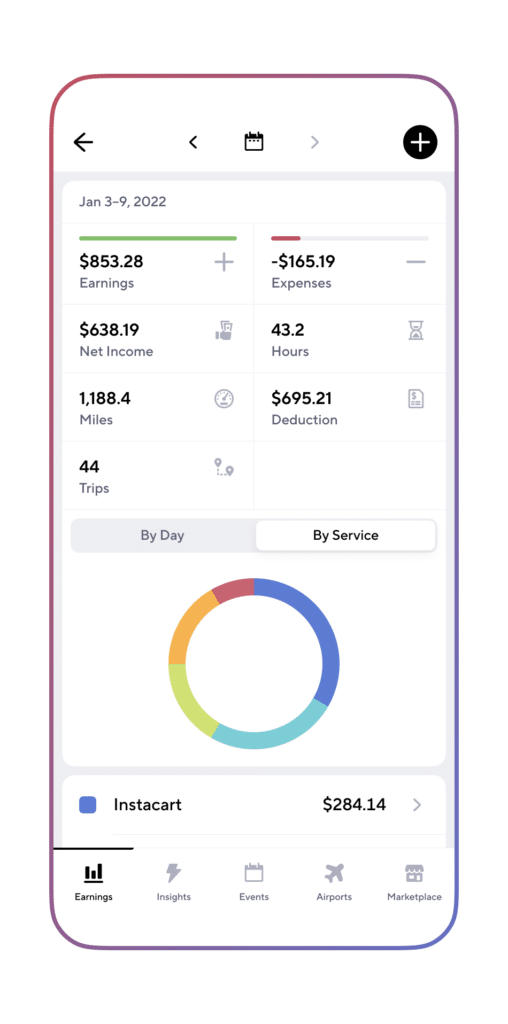
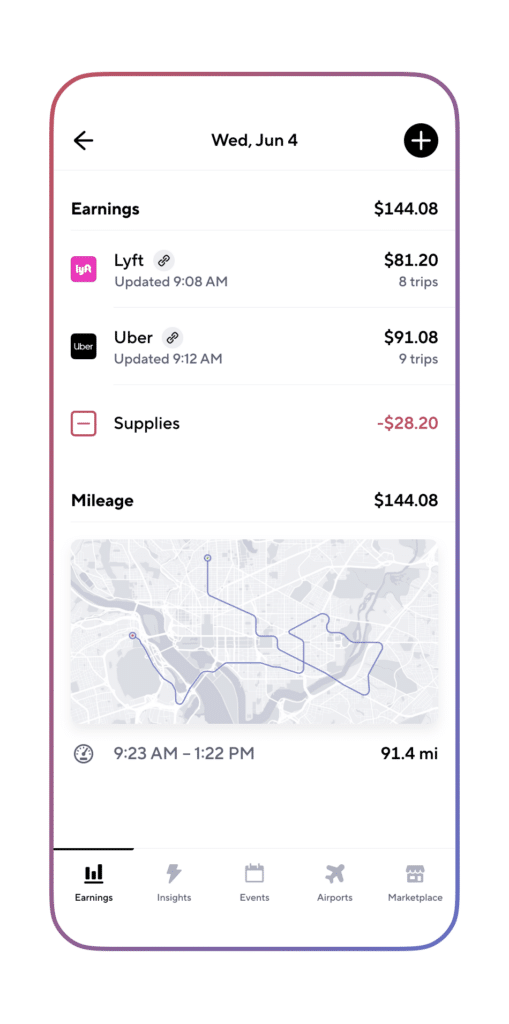
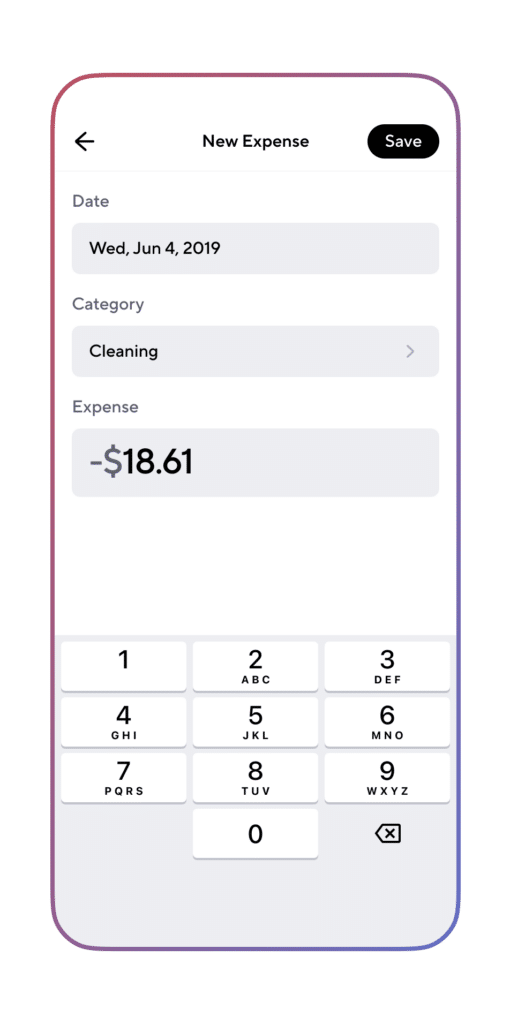
Are you looking for more Doordash resources and information?
Work smarter. Earn more.
Whether you drive, deliver, or pick up shifts — Gridwise helps you track earnings, mileage, and performance so you stay in control of your work. Download the app and take charge today.
