Gridwise blog
Tips, insights, and advice to help you earn more and work smarter, whether you do gig work, hourly, or shift work.

How to Make $1,000 a Week With Uber Eats in 2026 (Tips + Hourly Data)
In this blog, we'll explore the strategies and techniques that can show you how to earn $1000 per week as an Uber Eats delivery driver. We'll cover everything from optimizing your delivery zones and schedules to maximizing your tips and customer satisfaction. Whether you're a seasoned Uber Eats driver or just starting out, this guide will provide you with the insights and actionable steps to take your Uber Eats driver earnings to the next level.
Becoming an Uber Eats delivery partner can be a lucrative opportunity, especially if you're able to consistently earn $1000 a week. By understanding the platform, optimizing your delivery strategies, and focusing on customer satisfaction, you can maximize your earnings and turn Uber Eats into a reliable source of income.
We’ll cover the following topics to provide coaching and ideas to help you push your earnings up to that $1000 per week level:
What do Uber Eats drivers do?
Uber Eats drivers deliver prepared food most of the time, but they also might shop for and deliver goods from convenience outlets and grocery stores. The job is pretty simple. You get a request for an order, you drive to the restaurant or store to pick it up, and then you deliver it to the customer. If you already drive for Uber, you can choose to take orders for Uber Eats delivery any time.
If you’re not an Uber Eats driver yet, it’s pretty easy to become one. This Gridwise post tells you what you need to do if you want to sign up and start making money Uber Eats style. Many rideshare drivers welcome the chance to deliver food rather than people. This article from Nerdwallet covers the Uber Eats gig from that angle.
There are some sweet advantages to working with Uber Eats. In lots of cities you don’t even need to have a car. You can use a bike or a scooter, or even walk, to make your rounds. If you do use a car, Uber Eats’ requirements are a lot easier to meet than they are for Uber rideshare driving.
You also have a lot of flexibility. You can shop and deliver convenience items and groceries, but you don’t have to. And, like most driving gigs, you can choose your own hours, and map out the locations where you want to work.
Use Gridwise features When to Drive and Where to Drive to help you figure out what work hours and which specific areas will be the most profitable for you. Real data from real delivery people will show you earning patterns for drivers in your town.
How much can you earn doing Uber Eats?
The honest answer to this question is: basically, as much as you want! It all depends on how many hours you put in and how strategic you are about your gig. Earnings vary from one area to another, as this article from Entrepreneur points out. To give you a baseline, let’s look at the earnings of Uber Eats drivers who tracked their earnings with Gridwise.
Remember that these numbers show us only average earnings. To make $1,000 a week with Uber Eats, you’re going to have to be better than average, and we’ll show you how. For now, though, it’s good to have these figures so you get a ballpark number of where to start.
How much do Uber Eats drivers make?
Gridwise data tell us the following:
- Monthly earnings average around $444.00 per month.
- Gross earnings per trip are between $9.00 and $10.00.
- Tips make up about 50% of most Uber Eats drivers’ income, which amounts to about $225.00 per month.
Is Uber Eats good money? It can be. While there are other gigs that pay more per trip, if you drive for Uber Eats, you’ll always be pretty busy.
https://datawrapper.dwcdn.net/HPAz8/3
You can also see that, unlike many other gigs, tips play a huge role in Uber Eats earnings.

With these numbers as a baseline, what can we say about how to earn $1,000 a week with Uber Eats? As we said in the introduction, it’s going to be a hustle, but it’s really possible. To figure out how to make the most money with Uber Eats, let’s start by looking at how many trips these “average” drivers made each month.
We know that average gross earnings were $444.00 per month, and drivers got around $10.00 per trip. That means they took 44 or 45 trips per month, which breaks down to 11 trips per week. That’s not a lot of Uber Eats delivery, is it?
The fact that Uber Eats drivers averaged so few trips shows us that many drivers use more than one app at the same time. This is called multi-apping, and you can learn more about it in this Gridwise post. If you want to answer the question of how much you can make with Uber Eats, then you need to stick with the app and keep plugging away at those orders. You also need solid strategies, as well as some inside tips and tricks.
How to make the most money on Uber Eats: Delivery driving tactics
Getting to that $1,000 a week with Uber Eats isn’t so hard when you remember that the drivers we saw making about $111 a week were only taking around 11 trips in the same time period. That’s not much at all! If you work the Uber Eats app like a boss, you’ll soon have many more trips than that, easily reaching the number needed to get you to $1,000 a week. Now, let’s get to some tactics you’ll need to make that kind of bank.
- Stay with the Uber Eats app, and track your earnings. Gridwise can easily do that for you. Simply sync your Uber Eats app with Gridwise, and you’ll be able to see how much you’ve earned with Uber Eats, what times were most profitable, and your average hourly pay. Racking up trips with Uber Eats has other benefits, including perks and bonuses that are awarded to top drivers.
- Leverage surge pricing and promotions. Surge pricing is applied when there is a lot of demand. When surge pricing is in effect, many of the trips you make will pay more than usual. Promotions are offered to drivers who complete a given number of trips in a certain time period. High traffic volume days, nights, and times give you these chances to get extra earnings. Challenging yourself to complete the right number of trips for promotions will add to the number of trips you can count on for big bucks, too. Learn more about Uber Eats surge pay, boosts, and promotions in this Gridwise blog post.
- Say yes to doubling up on orders. With Uber Eats, you can get back-to-back orders or receive batched orders. Back-to-back orders happen when you receive a new request while you’re on the way to deliver an original order. The Uber Eats app routes these trips automatically, so you won’t be sent out of your way.
Batched orders are Uber Eats’ way of bundling together orders from either the same restaurant, or two nearby eating establishments. You get money, and trip count credit, for all the orders you complete, plus customer tips, without having to make a bunch of separate trips.
- Turn on the charm and get bigger tips. Being nice really is part of the Uber Eats driver’s job, and getting tips is one way people who drive for Uber Eats make money beyond their basic pay.. Bring along those extra napkins and condiments, use equipment that keeps food and drinks at the right temperatures and prevents spilling, and consider your customers’ needs. If you deliver groceries, be extra careful with delicate items such as bread and eggs.
And, most important, follow your customers’ directions, and stay in communication with them if you are going to be delayed, or if you have questions about their order. This Gridwise post will tell how to get bigger tips as a delivery driver.
- Use even more charm to keep your ratings high. As an Uber Eats driver, you will be rated by the restaurant or store where you pick up the orders as well as the customers who are waiting for the deliveries. This two-way rating system is designed to keep you on your toes, so Uber can keep people satisfied with your service. Don’t worry, you get to rate them, too.
There’s another reason why your rating as a driver is important. It not only keeps you in good standing with Uber; it helps you to qualify for the Uber Eats Pro incentive program. To learn more about Uber Eats Pro, and what it takes to earn perks such as preferred services, discounts, and deals, check out this Gridwise blog post.
Smart business moves that seal the deal
Now that you know how to gobble up the deliveries you need to make $1,000 a week with Uber Eats, it’s going to be a breeze to get there. Let’s make it even easier, with business moves that boost your earnings and shrink your expenses. If you use these, it will also be easy to say yes when people ask, “Can you make good money with Uber Eats?”
Minimize expenses. Avoid racking up big fast-food bills by bringing your own food and beverages. You might not think you’re hungry when you first start your Uber Eats run, but once the aroma of pepperoni pizza, premium cheeseburgers, and piping hot fries start wafting through your car, that might change. Bring a sandwich or other healthy food from home, and buy bottled water in bulk to save tons of cash compared to what it costs to buy single servings.
Maximize tax deductions. Another way to minimize your expenses is to maximize your tax deductions. Start by tracking mileage with Gridwise.

Gridwise App
Gridwise captures every deductible mile you drive, including the distance you cover between the trips your driving app records. Know what expenses you can deduct, and put them to work for you when tax time comes. Learn more about tax deduction strategies in the Gridwise Tax Guide for drivers.
Boost earnings with referrals
As an independent contractor, you’re probably looking for ways to make even more money than you can with Uber Eats. And most gig workers like you enjoy getting passive income. With Uber Eats, there’s a really easy way to do that, referrals!
All you need to do is find friends and encourage them to deliver for Uber Eats. If they make a certain number of deliveries within a specified time, you will get paid for doing nothing more than having them sign up under your referral code! Rates of pay vary by city, so check your Uber Eats app to find out what the current deal might be, and learn more about the referral program on the Uber Eats website.
Also remember: “friends” don’t have to be your best buds. Many delivery people carry cards with a QR code linking to their referral information, so just about anyone you encounter can join Uber Eats and boost your earnings. You could meet a source of passive income at the gas station, on social media, or at your high school reunion. The more you hustle, the more there is to gain, right?
Master the art of self-employment
As an Uber Eats driver, you’re an independent contractor. That means the company isn’t going to withhold your taxes, provide insurance, keep track of your earnings, or tell you about tax deductions. You’ll have to do all these things for yourself.
If you want to maximize your tax advantages, open an official business entity. You can incorporate (create a corporation) or you can work as a limited liability corporation (LLC). You can also work with a DBA (Doing Business As) arrangement, but the corporation or LLC will do a better job of protecting you from liability.
Establishing a corporation or LLC offers better tax advantages than being a sole proprietor. For instance, if you simply collect your earnings into your private account, you’ll be charged self-employment taxes in most states. And paying extra taxes is something we all want to avoid, within legal limits, as much as possible.
Every Uber Eats driver needs to learn about self-employment, and there are some great resources you can review. Check out the CareerOneStop website about self employment which will help explain the basics. You can also check with a professional tax accountant, or look other websites to learn more about actually creating a business.
Scope out your market
Look at the area around you to see where you’re likely to get the most deliveries. Where are all the restaurants? Where might people be more inclined to order deliveries? What hours do you want to drive? What activities might be going on around those times? Think about late-night and after-school times as well as breakfast, lunch, and dinner times.
Be realistic about the potential for your area and aware of new services opening up. For example, in New York, there is already a tab on the Uber Eats app that allows customers to order groceries. In our article about the best food delivery service to work for you’ll see that Uber Eats stacks up well against other delivery companies, mainly because of its potential for expanded opportunities for drivers to earn.
So, is Uber Eats good money? As we said, it isn’t an automatic guarantee that everyone will make $1,000 a week with Uber Eats. Trying out the suggestions we give you here, though, should put you on the right track! Go out there and start stacking up those orders and raking in some impressive earnings!
Get more inside information on Uber Eats in these posts from the Gridwise blog:
- The delivery driver guide: Using the Uber Eats app
- Everything you need to know about driving for Uber Eats
- Uber Eats Pro: What drivers need to know
- Looking for a different gig, part-time or full time job? Check out the Gridwise Job board.
Uber Eats FAQ
How does the Uber Eats platform work for drivers?
Uber Eats is a food delivery service that connects customers with local restaurants and independent delivery partners. As an Uber Eats driver, you'll receive notifications of nearby delivery requests, which you can accept and complete. The platform provides flexibility, allowing you to work on your own schedule and earn money based on the number of deliveries you complete.
What are the requirements to become an Uber Eats delivery partner?
To become an Uber Eats delivery partner, you'll need to meet certain requirements, such as having a valid driver's license, a registered vehicle, and passing a background check.
How can I choose the right delivery zone to maximize my earnings?
Selecting the right delivery zone can significantly impact your earnings, as some areas may have higher demand and better-paying orders. It's important to research and identify the zones in your area that tend to have the most consistent and lucrative delivery opportunities.
How can I take advantage of peak delivery hours and surge pricing?
Understanding peak delivery hours, such as mealtimes and weekends, and taking advantage of surge pricing can boost your earnings. Be aware of when demand is highest in your area and adjust your schedule accordingly to capitalize on these peak periods.
What are some tips for maximizing tips and customer satisfaction?
Providing excellent customer service and going the extra mile to ensure a positive experience can lead to more tips and repeat business. Prioritize communication, timeliness, and attention to detail to keep your customers happy and satisfied.
How can I set realistic weekly goals to reach my $1000 target?
To make $1000 a week with Uber Eats, it's essential to set realistic weekly goals and track your earnings and expenses. Start by determining your target earnings and breaking it down into achievable daily or weekly goals. This will help you stay on track and make adjustments as needed.
What are some strategies for efficient route planning and navigation?
Effective route planning and navigation can save you time and fuel, allowing you to complete more deliveries. Utilize mapping apps and take advantage of features like real-time traffic updates and turn-by-turn directions to find the quickest routes.
How can I balance my Uber Eats deliveries with other commitments?
Develop a schedule that allows you to capitalize on peak delivery hours while still maintaining a healthy work-life balance. Consider using tools like calendar apps to plan your availability and track your hours to ensure you're maximizing your earning potential without sacrificing your personal life.
What are the key considerations for maintaining my vehicle as an Uber Eats driver?
Keeping your car clean and well-maintained is crucial for maximizing your Uber Eats earnings. Regularly scheduled oil changes, tire rotations, and other preventive maintenance can help extend the life of your vehicle and minimize downtime. Additionally, budgeting for vehicle-related expenses, such as fuel, insurance, and repairs, will ensure you're accounting for these costs and maximizing your net earnings.
What are the tax obligations and legal considerations for Uber Eats drivers?
As an Uber Eats delivery driver, it's essential to understand the tax obligations and legal considerations that come with being an independent contractor. This includes properly reporting your earnings, deducting eligible business expenses, and making quarterly estimated tax payments. Additionally, you'll need to ensure you have the appropriate insurance coverage, such as personal auto insurance and possibly commercial auto insurance, to protect yourself and your vehicle while on the road making deliveries.

The Gridwise Job Board: Find Your Ideal Job or Gig Work
Gridwise is an essential assistant app created by gig workers for gig workers. Our mission is to support those engaged in gig work in every way possible. We understand how challenging it can be to deal with income instability, a lack of benefits, and job insecurity that often comes with gig work. The Gridwise app tracks and organizes earnings and expenses, and offers a wide array of discounts, deals, and services that make the lives of independent contractors easier and more rewarding.
We firmly believe it’s possible to make a viable living and create a gig experience that offers flexible hours, variety, and excitement. With issues such as consistent earnings and job security in mind, Gridwise is proud to offer a centralized platform that shows you how to find gig work and secure reliable opportunities. We’re proud to introduce the Gridwise Job Board.
The Gridwise Job Board: Key features
Because Gridwise is dedicated to serving the gig worker community, we’ve filled the Gridwise Job Board with useful features that won’t waste your precious time.
- Comprehensive listings. Find part-time, full-time, temporary, and per-task work. Drive or deliver with your vehicle, utilize an employer’s vehicle, or even find non-driving gig work.
- User-friendly interface. Find the jobs that are right for you with a tap of your screen.
- Verified opportunities. We vet the jobs before they are listed to ensure you’re getting high-quality job postings.
How to get more gig work, seasonal, part-time or full-time jobs with the Gridwise Job Board
Looking specifically for “gig work apps” or “gig jobs near me?” You’re in luck. Our filters and search functions send you directly to the listings you seek.
Here’s how it works.
- Access the Job Board via the Gridwise website.
- Search for jobs by type, location, and more.
- Select the job that interests you, and read all about it.
- Scroll through the description, and if it appeals to you, click “Apply for job.”



Many types of jobs are available. Adjust the search filter to see the full variety of opportunities that will let you cash in. Deliver food, set up catering, do rideshare driving, get paid for doing package delivery, and much more. You’ll find short-term gigs, long-term contracts, and part-time positions.
Perks of the Gridwise Job Board for gig workers
Gig workers who know how to make extra money will appreciate how the Gridwise Job Board lets you multiply your chances of bringing in big earnings. Here’s how:
- Increased stability. Use the Gridwise Job Board to find part-time or permanent jobs in addition to the part-time gigs you already have. Always keep a steady stream of earning opportunities flowing toward you.
- Flexibility and autonomy. Choose jobs that fit your schedule, work around other jobs and family duties, and still leave room for some fun in your life. Discover side hustles to supplement your full-time job, permanently or just for the season.
- Skill development. Find part-time work that lets you use a skill you already have, or try your hand at something new. It’s a smart way to develop a portfolio to showcase what you can do, or even to find permanent employment.
Get Gridwise and stay up to date on the Gridwise Job Board
Gig workers need plenty of information and assistance, and Gridwise is here to give it to you. Download the app and get essential features such as
- seamless earnings tracking
- mileage tracking
- expense recording, including notes
- low-cost and no-cost insurance benefits
- access to affordable medical, dental, vision, mental health, and alternative care
- professional services including legal and financial help
- deals and discounts
- weather, events, and traffic reports
- inside information on where and when to drive
More to know about gig work:

5 Best Mileage Trackers For Gig Drivers
Many drivers ask, “Do I really need a mileage tracking app?” The answer is simple: only if you want to have an accurate count of all the miles you can legally deduct from your taxable income! You might think your rideshare or delivery driving app has got you covered. After all, they do quite a good job of logging the miles you drive while you’re on a trip or delivery. But, if you want to have the best app to track mileage for Uber, Lyft, Doordash, Instacart, or the other apps you may use, you need more. Why is that?
Without a separate tracker, you’re missing the miles you drive in between pings. Did you realize that all the miles you drive, from the moment you begin your shift until it’s over (as long as you don’t drive several miles on a break to hang with your friends), are tax deductible! That means you need something besides your driving app to keep an accurate count of your travels. Read this Gridwise post to see how important it is to keep track of every deductible mile.
You won’t be surprised to hear that there’s an app for tracking miles. In fact, there are several of them. Here, we’re going to tell you about five top mileage tracking apps, and help you figure out which one is best for you.
Before we get to the list and identify the best mileage tracker app, let’s clarify what exactly a mileage tracking app is. According to G2.com’s technology glossary, mileage tracking is done for the purpose of keeping a log of mileage that is either reimbursable or tax deductible.
And yes, of course you can track your miles simply by taking readings on your odometer. But are you really prepared to account for how many miles you drove for personal reasons and subtract them from the total to get your business mileage? Even if you can remember all that and do the arithmetic, if you want an accurate reading of the miles you drive for business, and can therefore deduct, a mileage tracking app will save you a lot of trouble and prevent you from making costly errors.
Plus, as a gig driver, you have specific needs when it comes to a mileage tracker. Ideally, you’d be able to handle mileage tracking and several other functions all in one app. It can be maddening enough to deal with driving apps, particularly if you’re an avid multi-apper. You would want your mileage tracker app to help you keep account of other aspects of your business, including income, expenses, and inside information about the art of gig driving.
Not all mileage apps are equal, to be sure! Let’s look at five of the best apps to track mileage and figure out which is the best app to track mileage with Uber and Lyft, or what mileage tracker app is best for DoorDash.
1. Zoho Expense

First up is Zoho Expense, which does exactly what its name says. This app is designed to allow companies to give employees a uniform way to create and submit expense reports. It can be used by individuals, including gig drivers, as well.
It includes a mileage tracker, as well as features that let you track other deductible expenses, including the ability to scan and record receipts.
Available on Android and Apple: Yes
Ratings: 4.8 stars on App Store, 4.7 stars on Google Play
Free Version: Yes
Subscription price: $3 per month, billed annually
Created specifically for gig drivers: No
2. Quickbooks Online

Quickbooks Online is a cloud-based app that allows you to track your mileage, earnings, and expenses. The information you enter can then be used to generate various reports that prepare you for tax time. It also allows you to create graphs that illustrate your cash flow, and includes a receipt scanner so you can instantly record deductible expenses. Quickbooks is popular, highly reliable, and designed mainly to help people keep track of their small businesses.
Available on Android and Apple: Yes
Ratings: 4.7 stars on App Store, 4.4 stars on Google Play
Free version: 30-day free trial
Subscription price: $15 per month for basic version if purchased for 3 months or more
Created specifically for gig drivers: No
Source: quickbooks.intuit.com
3. Shoeboxed

Shoeboxed started in 2007 as a service for scanning paper receipts into digital form. Now the app offers a free mileage tracker and has enabled users to scan receipts directly. It touts itself as the best mileage tracking app for DoorDash, but there are some elements missing that Dashers might like to have. While it provides features that record your expenses and prepare you for tax season, it doesn’t automatically track your earnings. The mileage tracker has a system where you can drop pins along your routes to make the tracking more precise, identifying those legs of a trip that you make for business purposes. The mileage tracker is “free” once you sign up for the basic version.
Available on Android and Apple: Yes
Ratings: 4.5 stars on App Store, 2.3 stars on Google Play
Free version: No
Subscription price: $18 per month for basic version
Created specifically for gig drivers: No
Source: blog.shoeboxed.com
4. Stride

This free mileage tracker does a fair job of keeping track of the distances you rack up while gig driving, but it doesn’t automatically track earnings. It can be a big help, though, in tracking your expenses. You can link Stride to your bank account, and it will automatically scan your expenses to identify items you can potentially deduct. The app is totally free. This could make it the best free mileage tracker app, but there is a small price to pay. The app will persistently push you to consider various insurance plans that they are affiliated with. If you don’t mind that, this is a solid mileage tracker, even if it doesn’t track your earnings.
Available on Android and Apple: Yes
Ratings: 4.8 stars on App Store, 4.6 stars on Google Play
Free version: Yes
Subscription price: None. The app is free.
Created specifically for gig drivers: No
5. Gridwise

Gridwise has a free mileage tracker and free features that record your income and expenses. It gives you access to insurance and benefits, as well as insights about the best times and places to make the most money while gig driving. The Gridwise mileage tracker captures all the miles you drive while you’re on your driving shift, and it can be used if you have other trips you need to make which qualify as business travel.
Drivers love it because it is geared toward the needs of rideshare and delivery workers, providing free information about airport departures and arrivals, event start and let out times, weather, traffic, and more. The Gridwise Plus subscription adds value by providing additional insights and reports, discounts on benefits, the ability to export data in .csv format,, and more.
Available on Android and Apple: Yes
Ratings: 4.9 stars on App Store, 4.6 stars on Google Play
Free version: Yes
Subscription price: $9.95 per month for Gridwise Plus, or $95.99 per year (a $23.41 savings)
Created specifically for gig drivers: Yes!
What is the best mileage tracking app?
Now that we’ve checked them all out, we’re positive about the answer to that. Hands down, it’s Gridwise. Are we biased? You bet we are! But drivers love it too. Gridwise is the best mileage tracker app, and so much more. So many of the features are free, and the subscription to Gridwise Plus will pay for itself with additional insights to boost your earnings and deeper discounts on products and services.
Most important, Gridwise is designed specifically for gig drivers by experts who were once gig drivers themselves! Knowing what gig drivers need is a crucial step in creating an app that rideshare and delivery drivers can really use! Here are a few of the features, besides mileage tracking:
- seamless earnings tracking
- automatic, on/off toggle and manual mileage tracking
- mileage categorization
- airport, traffic, weather, and events information
- insights into where to drive and when to drive
- reports showing earnings across the platforms you use
- discounts on countless products and services for drivers
- additional resources for finding side gigs
- an informative and comprehensive blog
- affordable benefits, including insurance, medical, dental, and alternative practitioner discounts
- a community of drivers just like you
Don’t settle for just any app. Get the best mileage tracker, and so much more, from Gridwise!

How to Track Mileage for Taxes With Gridwise
You're probably familiar with what a mileage tracker does, but finding the best one for your gig driving can be challenging. Many apps miss the mark when addressing the specific requirements of drivers, especially when it comes to tax deductions. Let’s delve into why it’s crucial to have a reliable mileage tracker tailored for gig drivers and learn how to track mileage for taxes effectively with Gridwise, the premier app for your needs!
Reasons why mileage tracking is crucial for gig drivers
Why do you need a mileage tracker in the first place? Don’t the driving apps tell you how much you drive? In reality, the apps only record the distances you cover on trips. They miss the many miles you drive to and from your gig, and in between trips. Here are some reasons why it’s important to track all your gig-related miles.
- You need to track your tax deductible expenses. This is the number one reason why it’s so important to track your mileage accurately. The IRS rate for business mileage travel is $0.65 for 2023, and will be $0.67 for your 2024 tax year. Now, consider how many miles you put in doing rideshare and delivery work, do a bit of arithmetic, and you’ll come to a rather large sum that will become a substantial deduction from your taxable income.
- You benefit from income optimization and awareness. Here’s another wise way to use your mileage tracker app. When you keep accurate accounts of your mileage and income records, you’ll have the facts about how much money you get from your miles.
- You protect yourself from tax trouble. Reliably separating your business mileage lets you be in compliance with IRS regulations. Nobody wants to get burned by auditors out on the hunt for a bone to pick. Remember that you can deduct miles driven to and from your driving gig, as well as the miles accrued during each gig and in between them. You cannot deduct miles you drive for personal purposes, though. You need a mileage tracker that clearly differentiates between personal and business travel.
Gridwise: Your comprehensive, driver-friendly mileage tracker
Gridwise is more than a mileage tracker app. Created by gig workers, for gig workers, Gridwise doesn’t require you to adapt a generic tracker to your specific needs. The app gives you driver-friendly features that make it simple for you to track the miles that matter.
Gridwise also has features that assist drivers by informing them about events, traffic, and weather. It will also track your earnings and show you where and when you can make the most money.
Here’s why you’ll want to make Gridwise your comprehensive mileage tracking partner.
With Gridwise
- you choose from three options to attain complete control over your mileage figures
- you end the nightmare of manual mileage tracking or guesstimating your gig driving mileage
- you capture the miles you drive between rideshare or delivery trips
- you get fewer disruptions because Gridwise syncs with your driving apps and tracks your earnings seamlessly
Setting up Gridwise for your gigs
Getting started is easy. Your first step, of course, is to download the Gridwise app. Once you have the app loaded on your device, there are just a few more things you’ll need to set up.
First, you’ll need to enable location and motion detection and adjust a few additional settings on your phone.
Once you do that, you can choose from three ways to track your miles with Gridwise. Begin by deciding whether you’ll use manual or automatic tracking.
Note: Manual tracking is available in the free version. Gridwise Plus members benefit from automatic mileage tracking.

Gridwise offers a total of three options for tracking your mileage. The first two options for manual tracking are available on the free version as well as Gridwise Plus:
- Use on/off mileage tracking. Turn mileage tracking on and off when you begin and end your shifts. From the Earnings screen, tap the tracking button, and you’ll begin recording your miles. Turn tracking off when you finish your shift, and you will stop recording miles until you enable it at the beginning of your next shift.

Pro Tip: If you’re worried that you won’t remember to turn on tracking when you start your shift, don’t be. As long as you have Gridwise running in the background, a reminder to start tracking will appear every time you drive your vehicle. If you’re not driving for business, simply decline, and be on your way to wherever else you're going.
- Type in your mileage figures. If you want to clock your miles separately, and then add them to your records in Gridwise, simply tap the “+” button on the Earnings screen, fill in the information, and tap “Save.”
The third option, automatic tracking, is available to Gridwise Plus members only.
- Automatically track your mileage. This feature enables you to set up the tracker to detect when you move your vehicle, and need Gridwise to track your miles. Tracking stops once your vehicle is parked for a preset “idle” time period, which you can select and adjust. This makes accurate tracking more convenient for drivers who might not remember to turn tracking on and off during their shifts.
Wondering what happens if you make a mistake? What if you forget to turn the mileage tracker on or off? What happens if you accidentally track miles that aren’t tax deductible?
With Gridwise, you can always edit your mileage to make such adjustments. Add or delete mileage that you don’t want to include using these easy steps.
The best mileage tracker for tax purposes and more
Other mileage trackers only tell you how many miles you have driven. Because Gridwise is designed specifically for gig drivers, it enables you to track all the miles you drive for business. If you have a side gig or two that don’t involve driving apps, you can still use Gridwise to help you log all those deductible miles as well.
Gridwise Plus drivers benefit from enhanced features, but the free version of Gridwise is a powerful tool that outperforms other mileage trackers because it’s designed for gig drivers, by gig drivers!
Maximize earnings with mileage data analysis
You can use mileage figures for more than just tax deductions. Gridwise stands out as the best mileage tracking app for delivery drivers and rideshare workers alike because it provides insightful reports.
- Compare and contrast your earnings and your mileage with the apps you work with, and determine where your time is best spent.
- Optimize routes, with efficiency in mind. You could find that driving those extra miles from one side of town to the other doesn’t pay off the way you thought they might. Pro tip: Use Where to Drive and When to Drive to show you where you can find the money, and when.
- Check out the correlation between earnings and mileage on different apps to see which are the most profitable.
Here’s how to find those useful Gridwise reports:
On the main screen, tap “Earnings,” and you’ll be whisked away to a summary of earnings for the current week and year. You’ll see your gross earnings, expenses, and mileage deduction figures, by week and by day. You can also see these figures by service—i.e., all the different gigs you work with.
Stay on top of your data and IRS information
The Gridwise app keeps accurate accounts of your mileage and income, and it pays for you to check in with it from time to time, so you’re on top of your gig driving performance and tax compliance.
- Review your data on a regular basis. You don’t want to let mileage get lost should you forget to add it in manually. In a similar way, you’ll want to keep an eye out for any instances where you recorded mileage for a road trip that was pure fun, and hence, not tax deductible.
- Back up your mileage data and earnings information to a source outside of your mobile device. A telephonic catastrophe could ruin your records, and you won’t want to lose the valuable information you’re collecting with Gridwise.
- Stay informed. Read up on IRS regulations to ensure that you’re in compliance with all the rules that are related to your mileage and other deductible expenses, as well as those involving work in the gig economy.
Beyond the best business mileage tracking app: Get more with Gridwise
The next time someone asks you about the best mileage tracking app for DoorDash or any other gig you drive for, you’ll know to tell them about Gridwise. While you’re at it, don’t forget to tell them about all the other driver-focused features the Gridwise app offers, including
- real-time weather, traffic, airport. and events information
- earnings insights
- deals and discounts
- tax help
- insurance and affordable health care options
- money-saving connections to automotive and financial services
All these features are available when you download the free app, but when you join Gridwise Plus, the discounts get deeper and the benefits multiply!
There’s even more value to being a Gridwise driver! The Gridwise community offers support from other drivers, along with special contests and giveaways. Join our Facebook community and follow us on Instagram to connect with awesome Gridwise drivers who share your issues and interests.
More about mileage and other tax deductions for drivers:

The Best Times to Drive for Uber
As an Uber driver, you want to make the most money possible, right? To accomplish that, you need a sound strategy, mapping out optimal times to find passengers. You’ll also want to be assured that those customers will pay what you need to reach your desired hourly earnings rate.
How can you figure out the best times to drive and quickly discover what peak times will work with the rest of your schedule? We get into it in this blog.
Passenger patterns: What are the best times to drive for Uber?
Surely you’ve seen the “heat map” on your Uber app. It shows the areas of town where there is supposedly the most demand for drivers. Sometimes it’s totally on the money, but at other times it doesn’t work so well. One reason might be that there’s a rush of other drivers only too willing to jump in for a chance to score the extra surge prices.
Even when the heat map is at its most torrid, it might not show you the most profitable places to drive. For instance, if there’s a huge concert, game, or festival, there will be a monstrous demand for Uber drivers. Once you race over to the site of the surges, you might also find that you’re stuck in traffic for an hour or two. This will make your trip to pick up Swifties, hockey fans, or denizens of the No Shoes Nation anything but profitable.
It always pays to factor in congestion and delays when you make your driving plans. Keep that in mind when you notice times that seem to be particularly popular with passengers. Uber’s website advises drivers to focus on weekends, rush hours, and evening hours, but these are not the only times you will find peaks in passenger demand. Here are some others.
- The weekday morning commute is always good for catching people on their way to work or caretakers bringing children to school. These will be short rides, by and large, but demand will be high and so will fares.
- Don’t miss out on weekday morning airport runs, particularly if you drive in a large metropolitan area. Business travel is still a thing, and people must be ferried to and from their flights. Hang out around hotels for departing guests and the airports themselves.
- Lunch meetings still happen on weekdays, perhaps for business, or just for fun. Some workers will want to run errands or make personal appointments on lunch breaks, so your availability will be just what the doctor ordered.
- The brunch crowd will be out in force on weekends. Cruise trendy neighborhoods or other areas where omelets, crepes, and pancakes are served up with mimosas, Bloody Mary’s, and piping hot coffee.
- During after-work and after-school commute times, as university classes change over, even short rides can keep you busy with the college crowd if you get enough of them.
- Thursday, Friday, and Saturday nights are busy nights in urban areas as passengers set out to celebrate the weekend at restaurants, bars, and events.
Is passenger demand predictable?
While it’s sensible to start putting your strategy together by considering ebbs and flows in passenger activity, you need more information than these general points provide. For one thing, every rush hour isn’t the same, not every airport time-window is equally lucrative, and some events attract more passengers than others.
You’ll also find different patterns depending on where you live. Every area has different traffic patterns, and a variety of events. For instance, you’d definitely want to know the opening and closing hours for museums and other tourist attractions in New York, but in Cleveland or Kansas City, the office and school traffic might make up more of your passenger count than tourist traffic, especially in the winter months.
This brings up another variable in passenger demand: weather, which affects Uber volume in different ways. While there may be less activity when outdoor conditions are too hot, cold, or stormy, demand for your rideshare services will soar because walking is out of the question.
As you can see, you need more information to get a more accurate read of what’s happening in your area and when you can expect the traffic to surge. You need data from drivers who are working in the same areas at the same times you want to work. Fortunately, you can get it very easily from Gridwise!
Use Gridwise and know when to drive
Gridwise is designed for drivers, by drivers. The When to Drive feature gives you insights no other app has to offer. It shows you the volume of earnings drivers experience at various times, based on actual figures! There is no guesswork involved in these numbers. Gridwise anonymously gathers earnings figures from drivers and brings them to you, so you know the best times to drive in your specific area!
Here are the steps to using the When to Drive feature on Gridwise:
- Download the Gridwise app.
- Sign in, tap “Insights,” and then scroll to “When to Drive.” This shows an overview of the big earning days in your area for the current week.

- To get additional data on the best times to drive, tap the bar chart and you’ll see further earnings numbers for different times of the day.

Now you can choose the time frame you want to learn about. Tap in the lower right hand corner where it says “Evenings,” and you’ll arrive at the screen that offers options.

- Select your option (the display will change) and you’ll see the information for the time period you’re most interested in.
- Gridwise When to Drive also provides the ability to compare the best times to drive for all the different services you work for. Tap “Compare Services” on the Insights screen. This takes you to a chart that compares all the services available in your area. You can change the time intervals you want to learn about by clicking on the time shown on the lower right-hand side of the screen.

Note that there are also comments indicating trends in earnings for the services that have experienced gains and losses over the time periods specified.
Gridwise is the very best source for information about the best times to drive. Don’t miss out on this valuable resource! Download the Gridwise App and get When to Drive, along with tons of other features to boost your earnings.
Learn more about the best times to drive for Uber and other services:
Understanding Gig Drivers: Investor Insights From Gridwise Analytics
"Ultimately, the power of Uber is the six-and-a-half million earners who are on our platform and the services they provide for everybody." Those were the words of Uber CEO Dara Khosrowshahi, as reported by Business Insider, at an appearance in Bengaluru, India, in February of this year. Khosrowshahi mirrors what many CEOs say: “Employees make the company.”
As Khosrowshahi spoke these words, the Gridwise Annual Gig Mobility Report revealed other news about gig economy trends. Uber and Uber Eats led the downward curve in gig driver earnings in 2022 and 2023. For rideshare, Uber drivers’ monthly income dropped 17.1% in the last two years. Uber Eats drivers saw a drop of 15.4%.
For investors and analysts it’s essential to understand the importance of drivers to the success of a gig platform. We’ve all experienced having to wait twenty minutes for a rideshare or even longer for a meal to be delivered. Part of that problem is not enough drivers. If you want to understand gig drivers, the Gridwise Annual Gig Mobility Report is the best place to start. Download your copy here.
How did Gridwise Analytics gather this information?
Gridwise markets a companion app for gig drivers: rideshare, food delivery, grocery delivery, and parcel delivery. The app gives drivers various insights into their earnings—when and where to drive, information on special events, traffic reports, weather reports, etc.—allowing them to be more efficient in their work.
In addition to helping gig drivers earn more, Gridwise captures driver information—where rides originate, where they end, time of day, driver earnings—then anonymizes and aggregates it into mobility and delivery data. These transportation analytics reflect activity across twelve gig platforms, correlating up to 98% against quarterly metrics reported by these platforms.
For the Gridwise Annual Gig Mobility Report (AGMR), researchers interviewed 528 US-based gig drivers from November 27 through December 19, 2023. Gridwise also interviewed another 1,000 US-based gig consumers on January 19, 2024.
Unless otherwise noted, all numbers in this blog post are from the AGMR.
The ecosystem of gig driver platforms
We can generally divide gig platforms into four categories.
- Rideshare. Uber and Lyft are the leaders in ridesharing, with market shares of 65% and 35%, respectively.
- Food delivery. This market is dominated by DoorDash, with a whopping 78.6% market share. Uber Eats is second (18.7% market share), followed by Grubhub (2.7%).
- Grocery delivery. Instacart dominates this market at 72.5%. According to a report by EMarketer, DoorDash, Uber, and Shipt make up the market’s remainder of the market. Walmart has its own proprietary gig driver delivery service called Walmart Spark.
- Parcel delivery. Several companies share this market, including Amazon Flex (Amazon packages only), Roadie, and other smaller platforms. At various times rideshare drivers are also called upon to deliver items. One former Lyft driver reports he once delivered blueprints, car keys, industrial parts, and hair products.
Uber is credited with founding and popularizing the gig industry with rideshare in 2012, followed quickly by Lyft. Food delivery and grocery companies promptly followed. Although rideshare grew in popularity, food and grocery delivery platforms stumbled along until the pandemic in 2020; then they skyrocketed as people quarantined in their homes. Meanwhile, rideshare took a hit. Four years later, rideshare has recovered, while food and grocery delivery continue their popularity.
Growth of the platforms
The Uber rideshare platform saw the most significant trip bump in 2022 and 2023, with a 66.3% increase. Lyft trip numbers also increased by 52.1% in the same period.
DoorDash experienced solid growth in food delivery, with a 34% increase during the reporting period. The platform now dominates the market with a 78.6% share. Uber Eats orders are slightly down. Their market share has shrunk to 18.7%, but food delivery is a significant part of Uber’s income.
Gig driver preference for platforms
- Food delivery has surpassed rideshare in the last 12 months, with 76% of drivers saying they’ve worked the food delivery platforms.
- Grocery delivery came in second, with 32.2% of drivers working these platforms in the same period.
- Rideshare came in third, with 28.8% working on these platforms.
As many as 41% of drivers work multiple platforms, a practice called multi-apping. Drivers work platforms simultaneously or one at a time, depending on the peak hours of individual platforms. More about that later.
If you want a closer look at the companies that employ gig drivers, get your copy of the Gridwise AGMR. Download your report today.
Gig economy workforce earnings
Here is a review of gig drivers’ monthly earnings on the various platforms for 2022 and 2023.
What role does tipping play for the gig economy workforce?
There is a marked difference in tipping for drivers on the different gig platforms. Food and grocery drivers earn more than 50% of their income from tips, while rideshare drivers earn only about 10% of their income this way.
There is also a difference in tipping frequency on the various gig platforms:
- 28.3% of rideshare trips result in a tip
- 74.5% of grocery delivery trips result in a tip
- 88.5% of food delivery trips result in a tip
Of the drivers surveyed, 78.4% say tips matter significantly to their overall income, while 68.6% claim that tips bolster their enthusiasm and job satisfaction.
Consumers of gig driver services are surprisingly aware of the importance tipping plays in gig driver income. Of those surveyed, 76.4% recognize that gig drivers rely heavily on tips, and 58.5% feel obligated to tip gig drivers.
However, there is a clear difference of opinion about the amount suitable for a tip.
SOURCE: Gridwise Analytics Annual Gig Mobility Report
What has caused the drop in gig driver earnings?
While Uber drivers monthly income showed a marked decline, this isn’t true for all the platforms. Lyft rideshare and Grubhub are up 2.5% and 6.0%, respectively. We can, however, make some general observations about why earnings are down overall.
- Oversaturation of drivers. In a previous Gridwise blog post, How Much Do Uber Drivers Make In 2024?, we reported that the ranks of Uber gig drivers swelled by 31% in 2022. This means two things:
- More drivers are competing for rides, driving down individual earnings. You’ll often hear this referred to as an oversaturation of drivers.
- New drivers who are not familiar with rideshare strategies tend to make less.
- A more savvy rideshare consumer. Passengers are getting smarter. Many have figured out that waiting fifteen minutes after the bars close or an event lets out allows surge prices to pass. Articles such as this one in The Penny Hoarder inform rideshare passengers of other techniques to save money on rideshare.
- Gig platforms are still tweaking formulas. Uber’s profit report puts pressure on the other companies running gig platforms to show black ink. Platforms will continue experimenting with how much they charge the consumer and pay gig drivers.
Gig earnings will continue to fluctuate as these factors and others put pressure on the market. To get a better look at gig companies' earnings, have a look at the Gridwise Annual Gig Marketing Report.
Gig economy workforce demographics
According to a study from the Pew Research Center, in 2021 more than 16% of the US population had at least experimented as a member of the gig economy workforce, either in rideshare, food delivery, or package delivery. This includes those who work just a few hours a week to full-time drivers putting in 40 to 60 hours a week. That Pew number, by the way, was compiled before Uber swelled its US driver numbers by 31% these last two years.
More recently, Gridwise Analytics has compiled demographic information on these drivers.
The gender breakdown of the gig economy workforce
The Gridwise Annual Gig Mobility Report breaks down gender into the four main gig platform categories.
- Rideshare: 25% women, 72% men
- Food delivery: 40% women, 59% men
- Grocery delivery: 43% women, 54% men
- Package delivery: 33% women, 65% men
The survey also revealed that women are twice as likely as men to be concerned about the safety of having a stranger in their car. This explains why food and grocery delivery see a higher percentage of women drivers.
How did drivers define the commitment level to their gig job?
- 68% considered it a side job
- 41% drove less than 10 hours a week
- 31% considered it their primary job
- 29% drove 10–30 hours a week
- 8% stated they drove more than 30 hours a week
Longevity of the gig economy workforce
Driver churn, the term referring to the number of drivers who leave the job, is a problem for gig platforms. According to the Gridwise Annual Gig Mobility Report
- 74.8% of drivers started in the last three years
- 49.4% started in 2023
- 38% work five times a week or more
FintechNexus.com reports that “the cost of turnover is estimated to be 0.5 to 2 times the employee’s earnings, even for a gig worker.” This is a drain on the bottom line for the gig platforms, requiring these firms to spend money and resources on recruiting drivers.
The Gridwise Annual Gig Marketing Report is a complete look at gig drivers, their demographics and motivations. Get your free copy here.
Other factors that contribute to those seeking gig driver work
There are also societal factors that make gig work attractive to individuals who previously worked 9-to-5 jobs.
- The Great Resignation. The COVID-19 pandemic compelled a number of workers to re-evaluate their jobs and lifestyles. Folks quit working in droves, looking instead for jobs that offered more flexibility and freedom. Gig-driving jobs provide these things. The money may not be as good, but many people have re-prioritized their lives.
- The aging of baby boomers. The children of baby boomers, Gen Xers, and Millennials find they must care for their aging parents as they encounter the infirmities of old age. Alzheimer's and other forms of dementia are at record highs. In 2020, there were over 55 million people globally who have dementia, according to the website of Alzheimer’s Disease International. “This number will almost double every 20 years, reaching 78 million in 2030 and 139 million in 2050. Much of the increase will be in developing countries.” The children of these patients need jobs with flexibility to accommodate their caregiving activities, and gig driving offers that flexibility.
How do drivers see their future working on a gig platform?
According to the 2023 Griwise AGMR, 45% of drivers see their commitment to gig driving as a long-term plan instead of a temporary job. Another 26% see it as a short-term remedy to their job situation. Finally, 29% say they are unsure about their work as a gig driver.
What role does multi-apping play with drivers?
A common practice for many drivers is multi-apping, in which drivers run two or more apps simultaneously. According to the Gridwise AGMR, only 24.3% of drivers switch between apps during a working period, but there’s plenty of curiosity about this practice. Of those drivers interviewed, 41.7% have experimented with the various gig platforms in the last year. Many drivers find the information they get from the Gridwise app allows them to multi-app more efficiently.
Gridwise Analytics has the ground truth
One of the keys to success for investing in gig platforms, especially the emerging ones, will be understanding the drivers who deliver these services, whether it’s rideshare, food delivery, package delivery, or any other service that may develop in the coming years. Successfully recruiting these drivers means having an insight into what motivates them. Gridwise Analytics, with insights into the activities of hundreds of thousands of drivers, can deliver that insight.
Get in touch with us today to discover what we can deliver.
Check out these articles to learn more about Gridwise Analytics:
DoorDash Incentives: How Do They Work?
Incentives are some of the best things about gig driving. They can make or break your success while working for any given platform because they do so much to add to earnings. DoorDash does a good job of dishing out incentives to their drivers, and in this post we’ll give you the full picture of what they can do for you.
DoorDash incentives: What they deliver
There are several types of DoorDash incentives, and they all aim to entice drivers to work for and stay loyal to the company. For the most part, DoorDash driver promos and earned incentives are much like those offered by other rideshare and delivery companies.
Some drivers complain that the offers change so often it becomes difficult to keep up with them. This video from Dasher Sarah Elizabeth outlines the latest version of DoorDash’s driver rewards program that’s under beta testing now. Low-acceptance-rate drivers might lose out on discounts and privileges that come with this program, according to this DoorDash driver.
Companies have their reasons for offering incentives, as well as the right to limit them or exclude drivers who don’t meet certain metrics. A low acceptance rate might indicate a driver isn’t doing everything possible to make DoorDash look good to its customers. On the other hand, when they want to entice drivers, the apps will dish out the dough.
This article from Gridwise shows how aggressive companies began offering incentives in 2021 when there was a shortage of delivery drivers. Naturally, when a company has enough drivers to satisfy demand, they will be less generous about the incentives they offer to potential as well as established gig drivers. That could be why the programs change so much and so often.
The quantity and potential earnings and/or rewards available are driven by the company’s own incentive to attract and keep their drivers. They are also always mindful of how they can please their customers by maintaining a high degree of availability and reliability for DoorDash services.
A look at the individual ways DoorDash lays incentives on its Dashers will help you get a better idea of what’s available and how much extra you might be able to earn.
Peak Pay promotions and DoorDash driver challenges
These incentives are very common and easy to get:
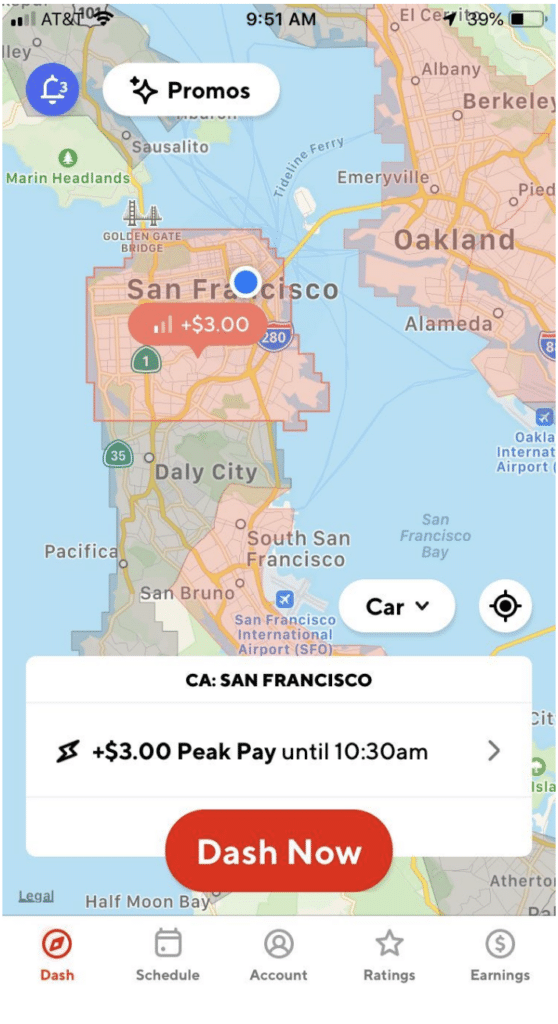
Peak Pay is available at certain times of day, when there is a lot of business and there are not so many drivers. The only thing you need to do to qualify is schedule time blocks when Peak Pay is in effect in your area.
The map shown below illustrates what Peak Pay promotions look like in the app:
Source: DoorDash website
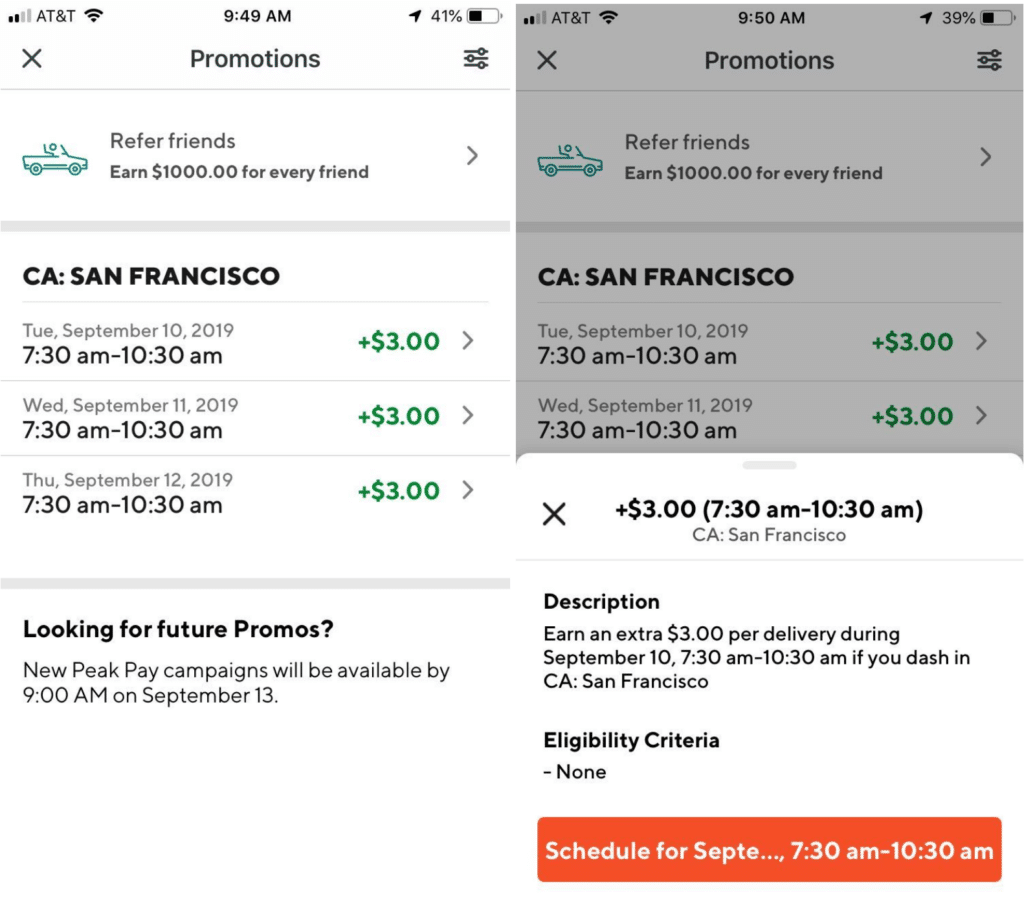
You can also find incentives under the promotions tab:
Source: DoorDash website
DoorDash driver challenges
Challenges appear at random, and it’s hard to tell exactly when you will see them. The challenge might ask you to complete a certain number of deliveries within a given time frame. Receiving $20 for making five deliveries in a few hours is a common example, but the requirements and rewards vary widely.
Challenges normally pop up when you are using Dash Now, but it’s possible to be eligible for them while driving on a scheduled shift. Drivers suspect there are reasons besides demand behind DoorDash’s challenges. These might include being new to DoorDash or returning to your Dasher duties after a long absence.
At the time of this writing, DoorDash states that challenges are in a beta testing phase. They may or may not be available in your area. More will be revealed if and when DoorDash rolls out the challenge program fully.
The DoorDash new driver bonus: Guaranteed earnings
While there’s not really a DoorDash sign-up bonus, there are benefits to signing on. New Dashers can benefit from a guaranteed earnings program if they sign up to drive using a guaranteed earnings sign-up page. Driver referral codes are widely available, and may or may not appear on your sign-up page. This article from the DoorDash website explains the program in detail.
The guaranteed earnings incentive operates pretty much the way it sounds. DoorDash guarantees you will make a certain amount of money on a given number of deliveries within a certain time frame. If the money you make on those deliveries fails to meet the guaranteed amount, DoorDash will pay the difference.
Let’s say the offer states you’ll be paid $1,500 if you make 150 deliveries in your first 30 days. If you only make $1,300 from delivering within that time frame, DoorDash will pay the $200 difference. However, if you make the same or more, you will simply keep your earnings, and DoorDash will not pay you anything in addition.
Guaranteed earnings is a very nice incentive for new drivers, and it’s also good for DoorDash. This enticement trains drivers to make as many deliveries as possible in a reasonably short period of time, helping them to set a pattern they’ll probably follow in the future.
New Dashers who use a DoorDash driver referral code might also benefit the driver that invited them to join DoorDash. If the new Dasher meets the criteria of making the full number of deliveries in a given time frame, the referring driver could receive a bonus. DoorDash states these offers change weekly, so it always pays to check the app to see what’s available near you.
Other Dasher promotions
If you don’t see a way to get a DoorDash bonus, or even if you do, there are other offers DoorDash extends to its drivers that you should know about. “Top Dasher” is one that most drivers strive to achieve. Top Dashers are drivers who maintain superlative ratings, high acceptance rates, and solid completion numbers.
The only privilege DoorDash lists on their website is the ability to use Dash Now at any time. However, the program has, from time to time, included other perks such as priority scheduling and VIP service from Dasher support. Read this article from Gridwise to get all the details about the program and how it might benefit some drivers more than others.
Below are the current requirements to be a Top Dasher. You need to maintain these numbers every month. You’ll have your status either reinstated or removed on the second day of each month.
- customer rating of at least 4.7
- acceptance rate of at least 70%
- completion rate of at least 95%
- 100 completed deliveries during the last month
- at least 200 lifetime deliveries completed
You may wonder, as a driver for Doordash, “How do I check incentives?” The Dasher app is one of the most slick and comprehensive platforms out there. Always look to the app for whatever you need. Current offers, your ratings, and other qualifying factors for Top Dasher and the Dasher rewards program can be found on the app dashboard.
You need Gridwise! Download the app, and you’ll see how you can boost your earnings while getting a whole array of conveniences that have been designed for gig drivers, by gig drivers! Gridwise gives you all the things you need to thrive with DoorDash and all your driving gigs.

Unlock Your Earning Potential: The Best Side Hustle Jobs in 2024
First, there was the job: how you made money to pay the bills and support your lifestyle. Then came the second job, or the part-time job, or moonlighting. Now the popular handle for that activity is the side hustle job, but many just call it the side hustle.
Then came the concept of gig work, specifically gig driving: rideshare, food delivery, and parcel delivery. All of these center around online platforms accessible through an app. But why stop at gig driving? There are side hustle apps for all sorts of money-making ventures. Many people have a group of side hustles they’ve assembled that provide them with a respectable income. An individual with a collection of side hustles has a side hustle stack (sort of like a pride of lions, a murder of crows, or a flamboyance of flamingos).
One thing remains constant, though. The Gridwise app helps you manage your side hustle stack. You can keep track of mileage, expenses, earnings, and more. Gridwise designed features to assist you in making more money, controlling expenses, and maximizing tax deductions. Every dollar you save in taxes is money in your pocket.
If you haven’t already, download the Gridwise app and learn how to be more profitable with your side hustles.

Increase Your Earnings in 2024! How to Make $1000 per Week With Uber
Drivers are still asking how to make $1000 per week with Uber. Well, the latest numbers are out. The good news is that it’s a very doable goal.
The path to that kind of Uber pay rate is within the grasp of full-time or near full-time drivers working in the right markets. It hinges on your ability to strategize driving, identify the right markets, and provide the best service. It also means using the right tools, including the Gridwise companion app for gig drivers.
How much does Uber pay?
To help you get a good picture of Uber driver earnings in 2023, have a look at the below chart. It incorporates input from more than 500,000 drivers who have downloaded the Gridwise app. The aggregated and anonymized results provide one of the best pictures available to answer, How much does Uber pay?
Uber driver earnings, 2023
12345678PeriodGross earnings per work hour Total trips Work hours Work miles Hours required to achieve $1,000/wkEarnings for drivers performing in the 90th percentileHours required to achieve $1,000/wk at the 90th percentile2023-01$20.0411235.4768.249.9$30.7032.572023-02$21.6111235.1773.546.27$32.5330.742023-03$21.7011738.9849.946.08$33.0130.292023-04$21.6311036.8803.546.23$33.5329.822023-05$19.8410336.5802.350.40$31.5431.702023-06$18.319837.1812.554.61$29.4233.902023-07$18.4010037.1817.054.35$29.4333.982023-08$18.6810338.4840.953.53$29.0734.402023-09$19.6211139.0857.650.97$31.0032.26
All numbers are based on mean averages, source: Gridwise Analytics
These numbers represent both part-time and full-time drivers. So for example, a full-time driver earning the average Uber driver pay per hour ($19.62) would have to drive more than 50 hours to earn $1,000 a week in September 2023.
What about the Uber driver salary of high-performing drivers?
You could, however, be a high-performing Uber driver. Column 7 represents what drivers earned who were in the 90th percentile, meaning their income was higher than 90% of drivers. These top earners are likely working in a major metropolitan market and employing a winning driving strategy. Such a driver (earning $31 per hour in September 2023) would have had to drive only slightly more than 32 hours to earn $1,000 a week.
For a closer look at Uber pay rate in 2023, check out this Gridwise blog post, How Much do Uber Drivers Make in 2023? How to Make More.
Would you like to contribute to these numbers? It’s easy. Download the Gridwise app today.
You can learn more about the Uber Pro program on the Uber website or from a recent Gridwise blog post, Uber Pro 2023: What Should Uber Drivers Know?
How to make $1000 per week with Uber
To achieve the goal of making $1000 per week with Uber, it's essential to establish realistic targets, track your earnings and expenses, and take advantage of available bonuses and incentives. By focusing on these key strategies, you can maximize your earning potential as an Uber driver and consistently reach your weekly income goals.
Setting Realistic Goals
Start by setting a weekly earnings target that aligns with your financial needs and the prevailing market conditions in your area. Consider factors such as the average hourly rate for Uber drivers in your region, the number of hours you're willing to work, and your overall living expenses. Establishing a realistic, yet ambitious, weekly goal will help you stay motivated and focused as you work towards your $1000 target.
Tracking Your Earnings and Expenses
Consistently monitoring your earnings, mileage, and expenses is crucial for optimizing your Uber driving strategy. Utilize the comprehensive reporting features within the Uber app or a dedicated expense tracking app to keep a close eye on your income and costs. This data will allow you to identify areas for improvement, such as optimizing your driving schedule or reducing unnecessary expenses, to maximize your take-home pay.
Leveraging Bonuses and Incentives
Take advantage of any Uber driver bonuses, promotions, or incentives available in your market. These can include surge pricing during peak demand periods, referral bonuses for recruiting new drivers, or incentives for reaching specific milestones, such as a certain number of rides or consecutive days of active driving. By strategically taking advantage of these opportunities, you can significantly boost your weekly earnings and move closer to your $1000 goal.
Steps to make $1000 a week with UberImportanceSetting Realistic GoalsEstablishing a weekly earnings target that aligns with your financial needs and local market conditions is crucial for staying motivated and focused on your $1000 goal.Tracking Your Earnings and ExpensesClosely monitoring your income, mileage, and costs allows you to identify areas for optimization and maximize your take-home pay.Leveraging Bonuses and IncentivesTaking advantage of Uber's surge pricing, referral programs, and other driver incentives can significantly boost your weekly earnings.
What factors go into an Uber driver salary?
When you look at Uber driver salary, remember that you’re not seeing a single number but rather a set of numbers that, when added up, produce what we refer to as gross earnings. Let’s look at the different factors comprising these gross earnings and how they determine your Uber pay rate.
Average Earnings for Uber Drivers
The average uber driver earnings can vary significantly based on several factors. Factors such as the geographical location, the time of day drivers operate, and the level of demand in the area all play a crucial role in determining how much Uber drivers can make. Additionally, factors like the driver's experience and customer service skills can also influence their overall earnings potential.
Factors Affecting Uber Driver Income
There are several key factors that influence uber driver income, which drivers should be aware of to optimize their earnings. These include the local market conditions, the time of day and day of the week they choose to drive, the number of rides completed, and the driver's overall customer service and rating. Understanding how these factors determine how much uber drivers make will enable you to strategically plan your driving schedule and approach to maximize your weekly take-home pay.
FactorImpact on Uber Driver IncomeLocationEarnings can vary significantly based on the cost of living and demand for rides in a particular city or region.Time of DayDriving during peak hours, such as weekday rush hours and late nights, can result in higher earnings due to increased demand and surge pricing.Day of the WeekWeekends, particularly Friday and Saturday nights, tend to have higher demand and surge pricing, leading to increased earnings for Uber drivers.Driver ExperienceExperienced drivers who provide excellent customer service often earn more per ride and receive higher ratings, leading to more repeat business and referrals.Number of RidesThe more rides a driver completes, the higher their overall earnings, as they can take advantage of surge pricing and incentives more frequently.
Uber Base earnings
Base earnings are where it begins when computing how much do Uber drivers make. This is the root of your earnings, minus all incentives, bonuses, and tips.
Base earnings are a combination of a per-mile rate and a per-minute rate. In some cities, you will also earn a base fee. You should know that these rates vary from one region to another. This is important to know because it can help dictate where you drive.
Did you know the Gridwise app includes a feature called Where to Drive? It's an important part of how you can maximize your earnings and worth checking out.
Uber Bonus earnings
If you want to know how to make 1000 in a week driving for Uber, you need to take advantage of bonus earnings. Uber gives you two different ways to earn bonuses.
Uber Quests. Quests are typically announced on the Uber app in advance, so you can plan for them, and are often individualized to the driver. This means that not all drivers get the same Quest offering. A typical Uber Quest is that you take three consecutive rides between 7:00 am and 8:00 am on Tuesday, Wednesday, and Thursday of each week. Make sure you read the details of each offer because they can vary, and you must meet all the requirements.
The bonus appears on your earnings when you complete the required rides.
Uber Boost+. Uber uses Uber Boost+ to attract drivers to a specific area in anticipation of increased ride demand within a few hours. If there is a sporting event, for instance, Uber wants drivers in the area when that event lets out. A Boost+ offer is what gets those drivers there.
A Boost+ zone is designated on your app by a distinct blue shading with a blue boundary. A typical Boost+ surcharge is $1 or $2.
Incentive earnings
Incentive earnings lure drivers into a specific area.
Surges. When ride demand exceeds the supply of drivers in a particular area, Uber will surge prices. A transparent orange heat overlay on the map of your Uber app designates a surge. The darker the orange, the higher the premium.
These premiums are in the form of “multipliers.” An area with moderate demand might offer a multiplier of 1.25 or 1.50of your base fare. A multiplier of 1.25 means you earn base fare plus 25%. A multiplier of 1.50 means you earn base fare plus 50%. If demand is high enough, it's possible to see surges that increase rates by a factor of 3 or 4. We’ll discuss using surges to increase your earnings later in this blog post.
Bonuses. Although bonuses have always been around for rideshare drivers, they became very popular as an incentive to get drivers back onto the road during and after the COVID-19 pandemic.
Drivers who quit over concerns about the pandemic found their email inboxes flooded with offers. They were tricky, though. What sounded like a $1,000 bonus if you completed 100 rides in a month was actually a guarantee of $1,000 in earnings. In other words, give 100 rides in January, and if you don’t earn $1,000, Uber would make up the difference.
Uber makes other offers that guarantee actual bonuses paid beyond earnings. Always read the details and understand how the bonuses work. As with many special offers Uber makes, they are often individualized to specific drivers, so don’t be surprised if you find other drivers are presented with different offers.
Tip earnings
Tips averaged between 11.6% and 13.1% of driver base pay in 2023. Uber passes 100% of tip earnings to drivers. Drivers can make a difference in their tips by offering top-drawer service. Want to know how to increase tips? Your first stop should be a recent Gridwise blog post, Lyft and Uber Driver Skills: 5 Ways to Improve Your Customer Service.
Other offerings to boost your Uber driver salary
Uber has launched additional programs to boost the Uber pay rate.
Uber Reserve. Passengers can reserve an Uber for pick-up at a specific time. According to reports, these rides pay as much as double the regular rate and are available by checking your app. You can also set your app up so that Reserve rides will flash across your screen when you're online. Drivers have a window of a few seconds in which they can accept these rides, which can appear as much as seven days in advance.
If you read all the details about Uber Reserve rides, they may not sound like such a good deal, but Gridwise has heard anecdotal stories that lead us to think otherwise. It’s worth experimenting to see if they work for you. Learn more about Uber Reserve rides on the Uber driver website.
Uber Pro. Uber Pro is part of Uber’s driver loyalty efforts. The program has various levels, including Blue, Gold, Platinum, and Diamond (the highest). To qualify for the Uber Pro program, drivers must meet these basic requirements:
- star rating of 4.85 or above
- acceptance rate of 85% or above
- cancellation rate of 4% or lower
Drivers receive points for each ride they give, with additional points awarded for rides with areas and times that are predesignated. Various levels offer discounts on gas and EV charging, translating into more money left in your pocket. There is also a one-time cash award if you achieve Diamond status, but that offer expired this past October 31, 2023. There’s no word on whether Uber will renew the offer.
You can learn more about the Uber Pro program on the Uber website or from a recent Gridwise blog post, Uber Pro 2023: What Should Uber Drivers Know?
Does loyalty to Uber increase your Uber driver salary?
Although the exact details of the algorithm remain secret, Uber has long hinted that it favors drivers with high acceptance rates on the platform. The same is rumored to be true for drivers who take Uber Reserve rides or participate in the Uber Pro program.
Other drivers feel that multi-apping is a key part of maximizing their earnings. Indeed, 31% of drivers multi-app on Uber and Lyft, according to a Gridwise blog post, Want to Improve Gig Driver Loyalty? Use Data to Stay Competitive.
Remember that Uber has a commanding lead in the rideshare world. In September 2023 Bloomberg Second Measure reported that Uber had a 74% slice of the rideshare market. Their 2023 Q3 report to shareholders boasted a 31% increase in income from gross bookings over 2022. If you drive for Uber, chances are you will get more rides than Lyft. Drivers that multi-app often go with whatever platform they feel offers them the most profitable rides.
If you are considering multi-apping, be sure to check out the Gridwise blog post The Art of Multi-apping: How-Tos and Strategies for Gig Drivers. More information can also be found in another post, Does Your Uber Acceptance Rate Matter?
How to make more money on Uber
Those who fall into the category of high-performing Uber drivers, at the 90th percentile of earnings, have learned strategies and tactics that allow them to earn a higher Uber driver pay per hour. What are these tactics? Let’s briefly review the most popular and effective ones.
Know your regions and their boundaries
The numbers we reviewed at the beginning of this article represent national averages. Uber driver salary in the larger metropolitan areas is higher, especially for strategic drivers. Population density and the prevalence of professional sports, concerts, and special events play into these Uber pay rate increases.
The compensation difference in markets can also vary dramatically between adjoining regions. While the per-mile rate in Los Angeles for Uber might be 80 cents a mile, the rate in the outer suburbs is often less, as much as 20 cents a mile less. The rate card is in the Uber driver app. Make sure you're familiar with it. It pays to venture into a higher-earning region if you're close to the border.
Research drive times
Driving during peak drive times maximizes your Uber driver pay per hour, so know when things get busy in your region. The nightlife scene on Friday and Saturday nights is always good. Large towns and those with universities and colleges are also familiar with Thirsty Thursdays, the phenomenon of people starting their weekend early. Bars and restaurants are often full.
Familiarize yourself with the shift changes of large companies. People are always looking for rides to and from work. Hospitals can be good places for rides, too, even in the middle of the night. The When to Drive feature on the Gridwise app is an excellent source of information on peak driving hours.
Watch for surges
Surge pricing is a significant factor for increasing your Uber pay rate. In 2023, Uber drivers added 12% to over 22% to their base earnings by taking advantage of surges. Look for those orange heat overlays on your Uber driver app.
The best tactic is to make note of where and when surges occur, allowing you to position yourself properly. Surges are often transitory, and chasing them can be counterproductive. If you have to drive a mile or two to get to a surge, it might be gone by the time you get there. You're better off positioning yourself in the middle of an area you know will likely surge.
Surge pricing can also mean sitting in traffic, such as at concerts or sporting events. You need to weigh the wait time of bumper-to-bumper congestion versus spending your time in another area and picking up rides. Sometimes, the math doesn’t justify the surge.
Increase your Uber pay rate with great tips
Tips account for an increase of 11% to 13% over your base pay. You should monitor your tips to ensure they fall within this range (something you can do when you download the Gridwise app). You can learn how to enhance your tip income to make even more by reading this Griwise blog post, 12 Ways Rideshare Drivers Can Earn More Tips.
Experiment, experiment, experiment
Every market is unique, and so is every driver. Occasionally, try driving at different hours, on different days, or in a different neighborhood. Sometimes, you’ll see patterns that no app would detect. Mix things up. Try something new. You’ll be amazed at what you discover.
Use Gridwise to help record all expenses
In addition to valuable services such as where and when to drive, reports on special events, and airport arrivals, Gridwise also has the best mileage tracker for Uber drivers and an expense tracker.
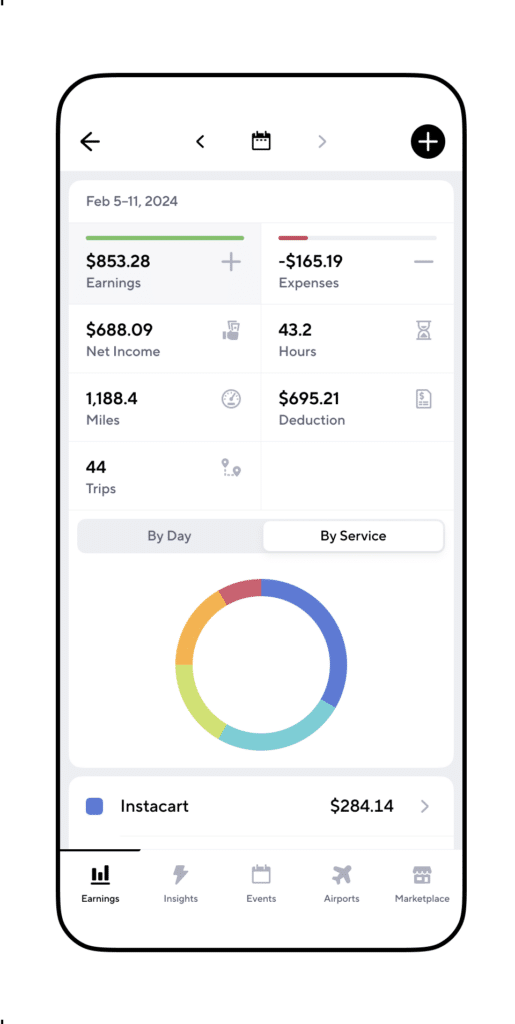
The standard mileage deduction for 2023 is 65.5 cents per mile. That means that for every 10,000 miles you drive and record through the Gridwise tracker, you can lower your taxable income by $6,550. For more information, check out a recent Gridwise blog post, 8 Strategies for Maximizing Rideshare and Delivery Tax Deductions.
Looking for more resources? Be sure to check out:
- Download the Gridwise app and start exploring it today!
- How to Find the Best Times and Places to Drive for Uber, Lyft
- How to Make $1,000 a Week with Uber Eats
- Does Your Uber Acceptance Rate Matter
- Looking for a different gig, part-time or full time job? Check out the Gridwise Job board.
FAQ
What are the best times to drive for Uber to maximize earnings?
Peak hours for Uber typically include weekday rush hours, weekends, and late nights when demand for rides is highest. During these times, Uber often implements surge pricing, which can increase the base fare by up to 2-3 times. By strategically positioning yourself in busy areas and being responsive to surge notifications, you can capitalize on these lucrative periods and earn more per ride.
You can use Gridwise to help you pick the best times to drive.
How can Uber drivers provide outstanding customer service?
Delivering an exceptional customer experience is crucial for Uber drivers who want to maximize their earnings. Maintaining a clean and comfortable vehicle, ensuring excellent vehicle maintenance, and developing strong interpersonal skills can all contribute to higher ratings and more positive reviews from passengers. Passengers are more likely to tip well and provide positive feedback for drivers who go above and beyond to make their ride enjoyable.
What are some steps to make $1000 per week with Uber?
To achieve the goal of making $1000 per week with Uber, it's important to establish realistic targets, track your earnings and expenses, and take advantage of available bonuses and incentives. Start by setting a weekly earnings goal that aligns with your financial needs and the local market conditions in your area. Consistently monitor your earnings, mileage, and expenses to identify areas for improvement and optimize your driving strategy. Additionally, research and take advantage of any Uber driver incentives, such as surge pricing, promotions, or bonuses for reaching specific milestones, as these can significantly boost your weekly take-home pay.
How can Uber drivers expand their earning potential?
To further increase your weekly earnings with Uber, consider expanding your earning potential by driving for multiple rideshare services or offering additional services to your passengers. By signing up for and driving for other platforms like Lyft or DoorDash, you can diversify your income streams and take advantage of different demand patterns and surge pricing opportunities. Additionally, you can explore offering complementary services such as delivering food, grocery shopping, or even providing personal concierge services to your passengers, all of which can contribute to your overall weekly earnings.
What safety considerations should Uber drivers keep in mind?
As an Uber driver, your safety and the safety of your passengers are of paramount importance. Develop defensive driving techniques, such as maintaining a safe following distance, being aware of your surroundings, and anticipating potential hazards. Additionally, be prepared to handle difficult situations, such as unruly passengers or unexpected incidents, by having a clear plan of action and knowing when to contact Uber support or emergency services.
How can Uber drivers build a loyal customer base?
One of the keys to consistently earning $1000 per week with Uber is to build a loyal customer base. By providing memorable experiences for your passengers, you can encourage repeat business and positive reviews. Engage with your passengers, offer personalized amenities or recommendations, and go the extra mile to ensure their ride is comfortable and enjoyable. Leverage these positive reviews to attract new customers and maintain a strong rating, which can lead to more high-paying ride requests and a steady stream of income.
How can Uber drivers stay motivated and avoid burnout?
Driving for Uber can be a rewarding experience, but it's important to maintain a healthy work-life balance to avoid burnout and stay motivated. Set achievable goals for your weekly earnings and take regular breaks to recharge. Consider taking vacations or short trips to refresh yourself and prevent burnout. By prioritizing your well-being and maintaining a positive mindset, you can sustain your Uber driving efforts and consistently earn $1000 per week or more.
9 Must Have Apps For Gig Drivers
You spend tons of time in the car and are always looking for ways to make the process of driving, running your gig driving business, and earning even more on the side less of an energy drain. Well, what do ya know? There are apps for that!
That’s why we put together this list of some of the best gig driver apps out there. Many will be familiar to you, while a few might give you ways you didn’t know existed to get things done faster and more easily. Check them out, and let the download marathon begin!
Gridwise
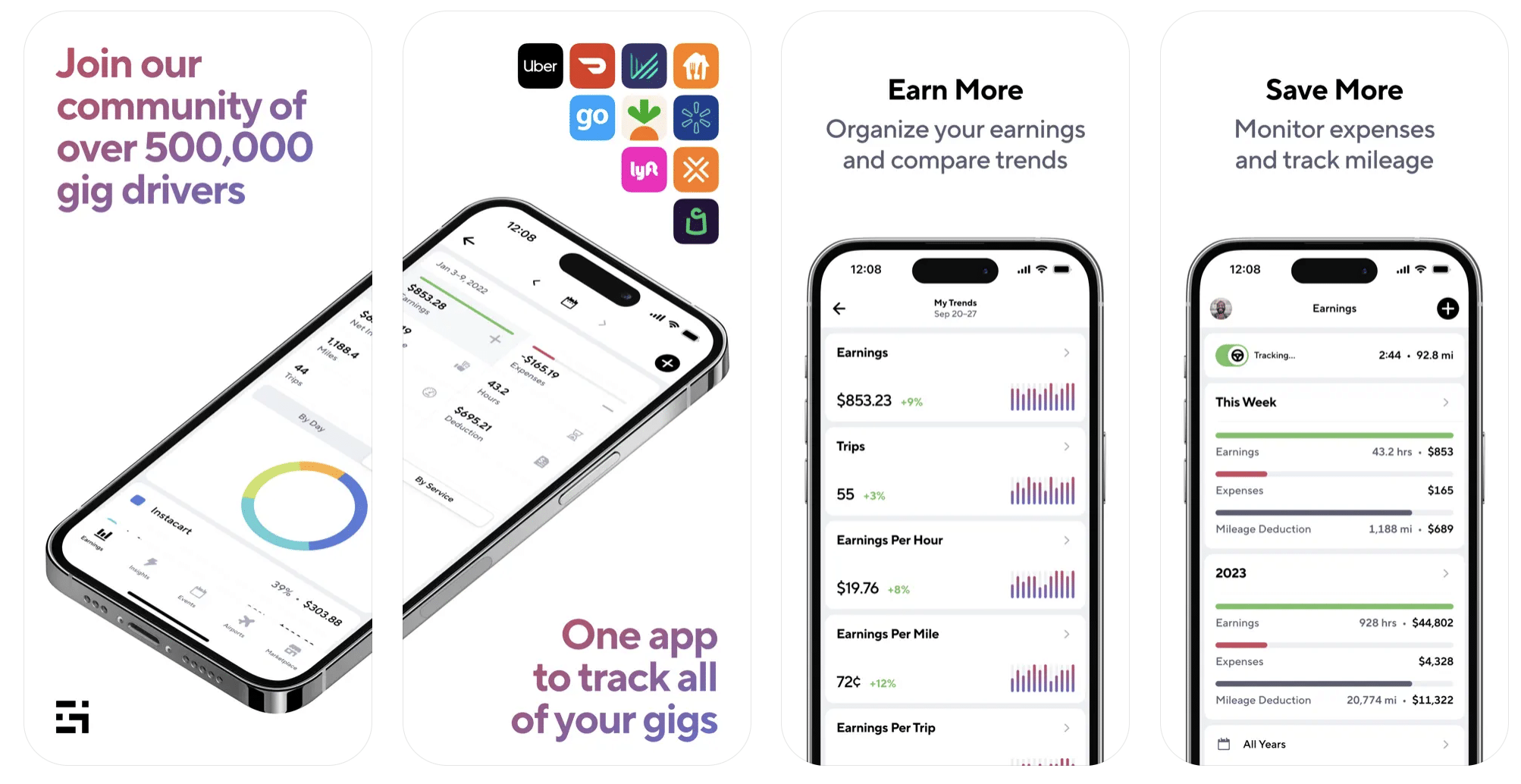
Image source: Gridwise’s Apple App Store Previews
We’d be remiss if we didn’t mention Gridwise first. Gig driving has several moving parts, and there are a lot of apps that take care of one or two of them at a time. Designed for drivers by drivers, Gridwise conquers just about all the cares and concerns you have as a driver. It also offers you tons of benefits, from discounts on automotive items to insurance and other services you need to procure as an independent contractor.
What it is: gig driver assistant app
App store rating: 4.9 stars
Free version available? yes
Cost: Gridwise Plus at just $14.99/month or $107.99/year
Free version features:
- mileage tracker. Capture every deductible mile when you start tracking at the beginning of your shift. Gridwise is the best free mileage tracker app there is. (on/off toggle enabled)
- expense records. Record your deductible business expenses by category, and they will be integrated into earnings reports.
- tax reports. Generate earnings and expenses reports to use for taxes, and, with Gridwise Plus, export them to pdf format.
- insights. Find out what other drivers are earning in your area, and what times are the most fruitful with Where to Drive and When to Drive. (Additional insights available with Gridwise Plus.)
- event times. When you know where and when events are taking place in your town, it’s always easy to get a customer. Gridwise tells you what’s going on, when events start, and estimated let out times.
- weather and traffic alerts. You’ll find out right away when there’s incoming bad weather or a traffic problem that could become a major obstacle.
- marketplace. Deals and discounts for drivers, on everything from gas and car maintenance to insurance, healthcare, financial, and legal help are available in the free version. Gridwise Plus members often receive deeper discounts and additional perks.
- blog. The Gridwise blog is packed with information and ideas drivers can always use.
Gridwise Plus (paid) features:
- ad-free app. Get all the great Gridwise features, deals, and discounts without the ads.
- additional assistant power. Gridwise Plus users enjoy extra insights on earnings, where to drive, and when to drive.
- tax report export capability. Load your earnings and expenses from Gridwise directly into your tax preparation software in .csv format.
- support for serious airport drivers. Get access to 24/7 flight times, extra flight details, and alerts.
- better rates and deeper discounts. Gridwise Plus members get extra-special treatment from our partners, so they get to save even more money.
Pro tip: Gridwise is rated as one of the best apps for gig drivers - download now to see for yourself!
Keeper
Image source: Keeper’s Apple App Store Previews
Who doesn’t need help with taxes? Keeper will rescue you from the confusion you might experience filing taxes as an independent contractor. Designed to assist 1099 workers, Keeper is an economical way to maximize your tax write-offs and get sound tax advice, and is the best tax app for Uber drivers, Lyft drivers, and delivery drivers that we have seen.
What it is: tax write-off and tax filing help
App store rating: 4.8 stars
Free version available? no
Cost: $16 month for the annual plan and $20 month for the monthly plan (50% discount for Gridwise Plus members, plus an optional $89 fee if you use Keeper to file your tax returns)
Features:
- write-off detection. Connect your bank to Keeper and the app will scan your expenses for possible deductions.
- tax estimates. Get a preview of your estimated tax payments and possible refund information year-round.
- tax filing. For an additional fee of $89, you can file your federal and state tax returns via Keeper.
- professional tax help. Get all your questions answered with 24/7 access to tax professionals via chat.
This Gridwise post tells you why you need Keeper, lays out the details of how it works, and shows you how to get Keeper through Gridwise Tax Help.
Save 30% on a Keeper plan through Gridwise
Spotify
Image source: Spotify’s Apple App Store Previews
Music soothes the savage beast in all of us, and that’s why it’s imperative to have tunes on tap that satisfy both you and your passengers. With Spotify, you can offer your customers a chance to play deejay, or create a selection of sick playlists that fit the many moods of your music loving passengers. There are many music apps, but Spotify earned its popularity by remaining a low cost option with ease of use and infinite flexibility. It’s a favorite Uber rideshare driver app for good reason. Passengers love it too.
What it is: streaming app featuring music, podcasts, playlists, and more
App store rating: 4.8 stars
Free version available? yes, with ads
Cost: $9.99 per month for single, $12.99 per month for a couple, $15.99 per month for family (up to six accounts), and $4.99 per month for students
Features:
- listening. Stream your favorite songs, artists, albums, playlists, and podcasts.
- choice. With the premium subscription, no ads and no forced shuffle mode on mobile devices.
- high quality streams. You won’t miss a beat with up to 320 Kbps with premium subscription.
- offline downloads. Your premium subscription lets you download material so you don’t run up your data usage while you tune in.
Fun fact: You can link some navigation apps to Spotify or any other music app you use, so you can keep your maps and your tunes all on a single screen.
Swagbucks
Image source: Swagbuck’s Apple App Store Previews
Whether you’re in the middle of a slow rideshare run or waiting for the next peak delivery time to begin, there’s no reason to go without making money while you’re waiting around. Swagbucks helps you to keep the cash coming by paying you to take surveys online. It’s extremely simple, and not a scam! Earn gift cards or have the money deposited in your PayPal account or credited to a Mastercard gift card.
What it is: a portal for online surveys that pay you money
App store rating: 4.6 stars
Cost: $3.99 for Swagbucks Plus
Features:
- surveys that make you money. Swagbucks gives you surveys to complete, ads to evaluate, and even games to play and test. You get paid for your time and choose how to have your payment come to you.
- cash back deals. Get cash back on your purchases at select stores (double cash back for Swagbucks Plus members).
- instantly shipped gift cards. Join as a Swagbucks Plus member and get up to $50 in gift cards, instantly.
- rewards program. Get extra rewards by earning points, from either taking at least five surveys a month, or signing on as a Swagbucks Plus member.
Honk
Image source: Honk’s Apple App Store Previews
Roadside assistance is a must when you drive for a living. While there are many alternatives, Honk gives you immediate access to roadside help without membership fees or extra charges. You also get upfront pricing from the services that answer your call and can choose the best deal.
What it is: roadside assistance
App store rating: 4.0 stars
Cost: N/A (you pay for the services, but not for the referral)
Features:
- towing and roadside assistance. Simply tap your app to get in touch with the help you need.
- 15–30 minute ETAs, 24/7. Guaranteed early responses from Honk’s network of 108,000 service vehicles.
- upfront pricing. No negotiating needed, since you know what you’ll pay before the driver arrives.
- pay on your phone. Use your app to pay for the services and avoid the need to get cash to cover the bill.
A better deal: You can sign up for roadside assistance coverage from Gridwise for $1 per month, and get up to $100 for towing, emergency tire changes, lockouts, battery services, and fuel delivery.
Weather Underground
Image source: Weather Underground’s Apple App Store Previews
Weather apps are everywhere but few are as concise and comprehensive as Weather Underground. The app gives you a one-page view of temperatures, precipitation, wind speeds, and radar. Scroll down and get day by day and hourly forecasts. You will see sunrise and sunset times, real-feel temperatures, and a summary of everything, too.
An upgrade to the app’s premium version gives you additional features, including 15 days of forecasts and weather predictions based on activities you enjoy, such as boating or hiking. If you’re not up for another phone app, remember that Gridwise also gives you weather updates that affect your driving.
What it is: the ultimate weather app!
App store rating: 4.0 stars
Cost: $19.99 per year, $3.99 per month
Features:
- weather forecasts. See what the weather is and what it will be when you go out to drive.
- high-res radar and satellite images. A picture is the fastest way to see if you should prepare for rain, snow, or intense heat.
- hyper-local temperature maps. See how much cooler it is in different locations for your area.
- warnings about severe weather. Know when it might be a good idea to pull over or to head home to protect yourself from high winds or other nasty weather conditions.
- data from over 250,000 personal weather stations. An amalgamation of data this large gives this app a whole lot of weather forecasting power.
- proprietary forecast model. A scientifically developed forecast model created especially for this app guarantees up-to-the-minute reports and forecasts that make driving conditions more predictable.
- useful extras. Besides radar and satellite maps, Weather Underground gives you an air quality index, rise and set times for the sun and the moon, and the ability to send your current weather directly to friends and family or on social media.
Flight Stats
Image source: Flight Stats’ Apple App Store Previews
Drivers love airport runs, and some make it a constant source of business. Flight Stats is a rideshare driver app that gives you plenty of information about the status of your local airport(s) and how likely you are to do the kind of business you need in order to make more money.
What it is: flight information aggregator
Interesting thing to know: the Gridwise app provides airport arrival and departure information.
App store rating: 4.8 stars
Cost: $2.99 per month, $24.99 per month for professional version
Features (free version):
- flight tracker. See where flights are coming from and going to.
- airport conditions. Get reports on weather, construction, and other conditions at airports so you can anticipate delays or difficulties.
- airport delay maps. A heat map displays where delays are taking place in your state or country.
Standard paid account features:
- airport arrivals and departures. Use a table of flight arrivals and departures, arranged however you like, to determine your airport driving strategy.
- flight alerts. Receive alerts via email or text when flights are departing, arriving, or delayed. Use up to 25 rules per month for your alerts.
- ad-free use. No more ads to distract you. Get only the facts about airport activity, in real time.
- professional account features. The professional version allows you to use up to 250 rules for flight alerts per month, and perform historical searches by flight and airport/route for 250 flights per month.
Wave
Image source: Wave’s Apple App Store Previews
Do you have another gig besides driving that also involves contractors? You might need Wave. This app allows you to create invoices, make payments, and do your accounting. Many Wave features are free. Wave’s amazing accounting and invoicing tools are likely to knock your socks off. The paid services could also benefit you and your small business.
What it is: small business software for your side gigs
App store rating: 4.5 stars
Cost: varies according to service
Features:
- invoicing. Generate professional looking invoices and send them right away.
- online payment processing. Let your customers send payments to you by credit card, bank transfer, or Apple Pay. (Fee-based on a per transaction basis.)
- free accounting software. Keep track of your income and expenses, and stay in a state of perpetual readiness for tax time.
- mobile receipts. Scan your receipts and skip saving those pesky scraps of paper.
- payroll. Do you have staff? Let Wave handle your payroll problems, and your staff will have everything they need (additional fee required).
- experts. Get advice on payroll, accounting, and bookkeeping from professional support staff and coaches (additional fee required).
Flush
Image source: Flush’s Apple App Store Previews
This one is a must on the list of best driver gig apps. Oh, dear. How many times have you had to “go” but had no idea where you might find a place to “do your business”? Believe it or not, there’s an app that tells you where the toilets are! It’s called Flush, and once you download it, you won’t be stuck without a place to relieve yourself ever again.
What it is: restroom facilities locator
App store rating: 4.6 stars
Free version available? yes
Cost: N/A
Features:
- toilet locator. The driver’s pleas for relief are answered by a map with available toilets indicated by green pins.
- tap the map. Something that makes this one of the best gig driver apps is its simplicity. Tap the pin nearest to your location, and directions pop up to guide you there.
- ratings. Those who’ve been there before you can rate the toilet, so you can check out the quality of the facility before you go.
Usage information. You’ll be able to tell if a facility requires payment or a key, and if there is disabled access.
Looking for other great apps and resources for gig workers?
The Impact of Third-Party Food Delivery on Quick Service Restaurants
According to the 2023 Gridwise Gig Mobility Report, QSRs emerged as the leaders in the delivery market, dominating the top ten restaurants for delivery. They adapted and thrived in this new normal.
Much of this growth has been a by-product of the pandemic. QSRs with delivery in their service mix did a booming business, propelled by sales to customers looking for a contact-free transaction. As the pandemic subsided and Americans learned to live with COVID-19, these same consumers continued many new habits, including food delivery.
Those QSRs that continue to thrive do so because they take advantage of one of the powerful by-products of food delivery: the collected data. They can see the demographics of who's ordering, what they’re ordering, when they’re ordering, the ticket size, and other trends and patterns. Larger chains have already mastered much of this data implementation, but smaller chains and independents still have open opportunities.
How does Gridwise Analytics gather this data on QSR food delivery?
Gridwise markets one of the leading companion apps for food delivery drivers. The app gives drivers insights into their earnings—when and where to drive, traffic reports, weather reports, etc.—allowing them to be more efficient in their work. In the US, more than 500,000 gig drivers use the Gridwise app, linking it to the various food delivery platforms they work with.
Gridwise Analytics segments driver data so that Gridwise can specifically break out QSR delivery drivers and look at their activity. Gridwise captures driver information, such as where orders come from, where they’re delivered to, time of day, and driver earnings, then anonymizes and aggregates it into delivery data. This data correlates up to 98% against quarterly metrics reported by the individual platforms. This is the only study of its kind.
QSRs dominate the delivery landscape
The 2023 Gridwise Gig Mobility Report lists the top ten restaurants in the US marketplace that are most popular for food delivery based on number of trips. Not surprisingly, QSRs dominate the list:
- McDonald’s
- Taco Bell
- Starbucks
- Chick-fil-A
- Chipotle
- Wendy’s
- Wingstop
- Panda Express
- Burger King
- Dunkin’
Why understanding third-party food delivery is critical to success for QSRs
Food delivery data affords owners and managers of QSRs a deep dive into their delivery customers. Insights include:
- Defining your customer base. Delivery allows QSRs to expand their customer reach beyond their physical location. Delivery data tells you how far your reach extends. This ability to attract new customers is especially important for small and independent QSRs.
- Fine-tune the delivery menu. Delivery customers have favorites, which can differ from in-store orders. By watching delivery trends, you can optimize the delivery menu, increase orders with add-on sales, and increase profits.
- Insights into pricing. Delivery data allows you to experiment with and gauge the results of pricing strategies and determine what the QSR customer is willing to pay for delivery services.
- Defining marketing strategies and tactics. Delivery data uncovers new customers, allowing you to tailor your marketing and reach more people.
- Make better staffing decisions. Gridwise Analytics provides historical data so you can make accurate staffing decisions for your QSR. What was business like last year during March Madness? What events require you to add staff? What are the busiest days of the week?
- Better inventory decisions. Again, you can look at the historical data and determine the proper inventory levels. No one likes to run out of a menu item. You miss out on sales, and customers remember those things.
The landscape of food delivery for QSRs
Third-party food delivery accounts for an estimated $29.8 billion in revenue for restaurants in 2022. Industry projections are that by 2028, food delivery will represent $64.8 billion.
DoorDash dominates the third-party delivery market in the US, with a 78.6% market share as of December 2023. Uber Eats commands less than a fifth of the market, at 18.7%. Grubhub has a 2.7% share.
Despite DoorDash’s dominance of the US market, individual companies dominate specific regional markets. A 2021 report by McKinsey & Company revealed that DoorDash had about a quarter of the market in New York City, with Grubhub holding more than a third.
Market shares fluctuate regionally all across the US. We can expect this regional share to continue to fluctuate as gig delivery companies experiment with offers and partnerships to build their market share.
How do food delivery apps make their money?
There are as many models for making money in the food delivery business as there are companies, but here are a few main ways.
- Commissions. The delivery companies charge each QSR a commission on the order. This ranges, usually up to 20% of the order but sometimes lower. Some QSRs pass this charge along to the customer; others don’t. It comes down to what the market will bear.
- Charges to the end customer. The food delivery company also charges the end customer.
- Special services. Food delivery companies also allow QSRs to post their menu on the app, sometimes for a fee. The cost often affects the ability to make changes quickly, add new items, and increase the QSR’s prominence on the app.
- Promotions. Many major platforms have tied into third-party partners like Amazon and Disney.
Things are constantly changing. Expect to see more partnerships and services aimed at making delivery more efficient for QSRs and more profitable for delivery companies.
It is important for QSR executives to consult the data in their markets to determine the dominant delivery platform and develop a strong relationship with it. For that delivery platform to remain competitive in that market, it must have a strong contingent of drivers. For QSRs, available drivers mean food gets delivered quickly, which translates to happy customers.
Gridwise Analytics offers QSRs granular data
For QSR operators and decision-makers, the more granular the information, the better they can make calls on items such as menu offerings, pricing, marketing campaigns, and other parameters. Below are samples of the information available to QSRs. You can see what the competition is doing, look back at historical data, and see what’s happening in real time.
Restaurant delivery efficiency, measured by speed and distance
While distance remains similar for all QSRs, the duration of the trip is longer for Burger King than it is for McDonald's by about ten minutes. This could be caused by traffic congestion, kitchen operations, or increased on-site customer demand. Since these are averages, very long trips could also skew data higher for specific QSRs. If you’re interested in optimizing your QSR performance, Gridwise can show which specific restaurants are taking longer than others within a city. While a three minute difference may not sound like a lot, QSRs must optimize operations to enhance profit margins.
QSR operators can see average delivery charges from any store and compare them against other stores and the competition. Obviously, operators want to recoup the cost of delivery in their charges to the customer.
QSR Operators and decision-makers can also examine the smallest and largest deliveries for orders. This information can give operators greater insight into what kinds of delivery charges the market will accept.
Map-based information

Source: Gridwise Analytics
Gridwise can also generate maps with heat overlays to reflect activity. This map example shows how your QSR matches up to the competition for pre-selected parameters. In this case, we’re looking at information on McDonald’s, Taco Bell, and Burger King. The map feature can be programmed to reflect activity on specific dates and times.
Gridwise Analytics shows the entire picture
Individual delivery companies share their data with QSRs but often charge for it and limit the data they share. In addition, their data is limited to what is available through their app. Uber Eats and DoorDash can provide data for their platform only. Gridwise Analytics provides data that crosses over, supplying a bird’s-eye view of all QSRs and all food delivery apps.
Gridwise Analytics can also drill down for a more granular focus, looking at individual stores in a chain for location-level insights.
This option of both a micro and macro focus across all delivery platforms for QSRs is only available from Gridwise.
Contact Gridwise Analytics for more information
Gridwise Analytics is the ground truth source for delivery data in the QSR sector. Our information is timely and accurate and can fit into your existing databases with minimal manipulation. Get in touch with us today to discover what we can deliver.
Check out these links to learn more about Gridwise Analytics:
Work smarter. Earn more.
Whether you drive, deliver, or pick up shifts — Gridwise helps you track earnings, mileage, and performance so you stay in control of your work. Download the app and take charge today.
