Gridwise blog
Tips, insights, and advice to help you earn more and work smarter, whether you do gig work, hourly, or shift work.

How to Make $1,000 a Week With Uber Eats in 2026 (Tips + Hourly Data)
In this blog, we'll explore the strategies and techniques that can show you how to earn $1000 per week as an Uber Eats delivery driver. We'll cover everything from optimizing your delivery zones and schedules to maximizing your tips and customer satisfaction. Whether you're a seasoned Uber Eats driver or just starting out, this guide will provide you with the insights and actionable steps to take your Uber Eats driver earnings to the next level.
Becoming an Uber Eats delivery partner can be a lucrative opportunity, especially if you're able to consistently earn $1000 a week. By understanding the platform, optimizing your delivery strategies, and focusing on customer satisfaction, you can maximize your earnings and turn Uber Eats into a reliable source of income.
We’ll cover the following topics to provide coaching and ideas to help you push your earnings up to that $1000 per week level:
What do Uber Eats drivers do?
Uber Eats drivers deliver prepared food most of the time, but they also might shop for and deliver goods from convenience outlets and grocery stores. The job is pretty simple. You get a request for an order, you drive to the restaurant or store to pick it up, and then you deliver it to the customer. If you already drive for Uber, you can choose to take orders for Uber Eats delivery any time.
If you’re not an Uber Eats driver yet, it’s pretty easy to become one. This Gridwise post tells you what you need to do if you want to sign up and start making money Uber Eats style. Many rideshare drivers welcome the chance to deliver food rather than people. This article from Nerdwallet covers the Uber Eats gig from that angle.
There are some sweet advantages to working with Uber Eats. In lots of cities you don’t even need to have a car. You can use a bike or a scooter, or even walk, to make your rounds. If you do use a car, Uber Eats’ requirements are a lot easier to meet than they are for Uber rideshare driving.
You also have a lot of flexibility. You can shop and deliver convenience items and groceries, but you don’t have to. And, like most driving gigs, you can choose your own hours, and map out the locations where you want to work.
Use Gridwise features When to Drive and Where to Drive to help you figure out what work hours and which specific areas will be the most profitable for you. Real data from real delivery people will show you earning patterns for drivers in your town.
How much can you earn doing Uber Eats?
The honest answer to this question is: basically, as much as you want! It all depends on how many hours you put in and how strategic you are about your gig. Earnings vary from one area to another, as this article from Entrepreneur points out. To give you a baseline, let’s look at the earnings of Uber Eats drivers who tracked their earnings with Gridwise.
Remember that these numbers show us only average earnings. To make $1,000 a week with Uber Eats, you’re going to have to be better than average, and we’ll show you how. For now, though, it’s good to have these figures so you get a ballpark number of where to start.
How much do Uber Eats drivers make?
Gridwise data tell us the following:
- Monthly earnings average around $444.00 per month.
- Gross earnings per trip are between $9.00 and $10.00.
- Tips make up about 50% of most Uber Eats drivers’ income, which amounts to about $225.00 per month.
Is Uber Eats good money? It can be. While there are other gigs that pay more per trip, if you drive for Uber Eats, you’ll always be pretty busy.
https://datawrapper.dwcdn.net/HPAz8/3
You can also see that, unlike many other gigs, tips play a huge role in Uber Eats earnings.

With these numbers as a baseline, what can we say about how to earn $1,000 a week with Uber Eats? As we said in the introduction, it’s going to be a hustle, but it’s really possible. To figure out how to make the most money with Uber Eats, let’s start by looking at how many trips these “average” drivers made each month.
We know that average gross earnings were $444.00 per month, and drivers got around $10.00 per trip. That means they took 44 or 45 trips per month, which breaks down to 11 trips per week. That’s not a lot of Uber Eats delivery, is it?
The fact that Uber Eats drivers averaged so few trips shows us that many drivers use more than one app at the same time. This is called multi-apping, and you can learn more about it in this Gridwise post. If you want to answer the question of how much you can make with Uber Eats, then you need to stick with the app and keep plugging away at those orders. You also need solid strategies, as well as some inside tips and tricks.
How to make the most money on Uber Eats: Delivery driving tactics
Getting to that $1,000 a week with Uber Eats isn’t so hard when you remember that the drivers we saw making about $111 a week were only taking around 11 trips in the same time period. That’s not much at all! If you work the Uber Eats app like a boss, you’ll soon have many more trips than that, easily reaching the number needed to get you to $1,000 a week. Now, let’s get to some tactics you’ll need to make that kind of bank.
- Stay with the Uber Eats app, and track your earnings. Gridwise can easily do that for you. Simply sync your Uber Eats app with Gridwise, and you’ll be able to see how much you’ve earned with Uber Eats, what times were most profitable, and your average hourly pay. Racking up trips with Uber Eats has other benefits, including perks and bonuses that are awarded to top drivers.
- Leverage surge pricing and promotions. Surge pricing is applied when there is a lot of demand. When surge pricing is in effect, many of the trips you make will pay more than usual. Promotions are offered to drivers who complete a given number of trips in a certain time period. High traffic volume days, nights, and times give you these chances to get extra earnings. Challenging yourself to complete the right number of trips for promotions will add to the number of trips you can count on for big bucks, too. Learn more about Uber Eats surge pay, boosts, and promotions in this Gridwise blog post.
- Say yes to doubling up on orders. With Uber Eats, you can get back-to-back orders or receive batched orders. Back-to-back orders happen when you receive a new request while you’re on the way to deliver an original order. The Uber Eats app routes these trips automatically, so you won’t be sent out of your way.
Batched orders are Uber Eats’ way of bundling together orders from either the same restaurant, or two nearby eating establishments. You get money, and trip count credit, for all the orders you complete, plus customer tips, without having to make a bunch of separate trips.
- Turn on the charm and get bigger tips. Being nice really is part of the Uber Eats driver’s job, and getting tips is one way people who drive for Uber Eats make money beyond their basic pay.. Bring along those extra napkins and condiments, use equipment that keeps food and drinks at the right temperatures and prevents spilling, and consider your customers’ needs. If you deliver groceries, be extra careful with delicate items such as bread and eggs.
And, most important, follow your customers’ directions, and stay in communication with them if you are going to be delayed, or if you have questions about their order. This Gridwise post will tell how to get bigger tips as a delivery driver.
- Use even more charm to keep your ratings high. As an Uber Eats driver, you will be rated by the restaurant or store where you pick up the orders as well as the customers who are waiting for the deliveries. This two-way rating system is designed to keep you on your toes, so Uber can keep people satisfied with your service. Don’t worry, you get to rate them, too.
There’s another reason why your rating as a driver is important. It not only keeps you in good standing with Uber; it helps you to qualify for the Uber Eats Pro incentive program. To learn more about Uber Eats Pro, and what it takes to earn perks such as preferred services, discounts, and deals, check out this Gridwise blog post.
Smart business moves that seal the deal
Now that you know how to gobble up the deliveries you need to make $1,000 a week with Uber Eats, it’s going to be a breeze to get there. Let’s make it even easier, with business moves that boost your earnings and shrink your expenses. If you use these, it will also be easy to say yes when people ask, “Can you make good money with Uber Eats?”
Minimize expenses. Avoid racking up big fast-food bills by bringing your own food and beverages. You might not think you’re hungry when you first start your Uber Eats run, but once the aroma of pepperoni pizza, premium cheeseburgers, and piping hot fries start wafting through your car, that might change. Bring a sandwich or other healthy food from home, and buy bottled water in bulk to save tons of cash compared to what it costs to buy single servings.
Maximize tax deductions. Another way to minimize your expenses is to maximize your tax deductions. Start by tracking mileage with Gridwise.

Gridwise App
Gridwise captures every deductible mile you drive, including the distance you cover between the trips your driving app records. Know what expenses you can deduct, and put them to work for you when tax time comes. Learn more about tax deduction strategies in the Gridwise Tax Guide for drivers.
Boost earnings with referrals
As an independent contractor, you’re probably looking for ways to make even more money than you can with Uber Eats. And most gig workers like you enjoy getting passive income. With Uber Eats, there’s a really easy way to do that, referrals!
All you need to do is find friends and encourage them to deliver for Uber Eats. If they make a certain number of deliveries within a specified time, you will get paid for doing nothing more than having them sign up under your referral code! Rates of pay vary by city, so check your Uber Eats app to find out what the current deal might be, and learn more about the referral program on the Uber Eats website.
Also remember: “friends” don’t have to be your best buds. Many delivery people carry cards with a QR code linking to their referral information, so just about anyone you encounter can join Uber Eats and boost your earnings. You could meet a source of passive income at the gas station, on social media, or at your high school reunion. The more you hustle, the more there is to gain, right?
Master the art of self-employment
As an Uber Eats driver, you’re an independent contractor. That means the company isn’t going to withhold your taxes, provide insurance, keep track of your earnings, or tell you about tax deductions. You’ll have to do all these things for yourself.
If you want to maximize your tax advantages, open an official business entity. You can incorporate (create a corporation) or you can work as a limited liability corporation (LLC). You can also work with a DBA (Doing Business As) arrangement, but the corporation or LLC will do a better job of protecting you from liability.
Establishing a corporation or LLC offers better tax advantages than being a sole proprietor. For instance, if you simply collect your earnings into your private account, you’ll be charged self-employment taxes in most states. And paying extra taxes is something we all want to avoid, within legal limits, as much as possible.
Every Uber Eats driver needs to learn about self-employment, and there are some great resources you can review. Check out the CareerOneStop website about self employment which will help explain the basics. You can also check with a professional tax accountant, or look other websites to learn more about actually creating a business.
Scope out your market
Look at the area around you to see where you’re likely to get the most deliveries. Where are all the restaurants? Where might people be more inclined to order deliveries? What hours do you want to drive? What activities might be going on around those times? Think about late-night and after-school times as well as breakfast, lunch, and dinner times.
Be realistic about the potential for your area and aware of new services opening up. For example, in New York, there is already a tab on the Uber Eats app that allows customers to order groceries. In our article about the best food delivery service to work for you’ll see that Uber Eats stacks up well against other delivery companies, mainly because of its potential for expanded opportunities for drivers to earn.
So, is Uber Eats good money? As we said, it isn’t an automatic guarantee that everyone will make $1,000 a week with Uber Eats. Trying out the suggestions we give you here, though, should put you on the right track! Go out there and start stacking up those orders and raking in some impressive earnings!
Get more inside information on Uber Eats in these posts from the Gridwise blog:
- The delivery driver guide: Using the Uber Eats app
- Everything you need to know about driving for Uber Eats
- Uber Eats Pro: What drivers need to know
- Looking for a different gig, part-time or full time job? Check out the Gridwise Job board.
Uber Eats FAQ
How does the Uber Eats platform work for drivers?
Uber Eats is a food delivery service that connects customers with local restaurants and independent delivery partners. As an Uber Eats driver, you'll receive notifications of nearby delivery requests, which you can accept and complete. The platform provides flexibility, allowing you to work on your own schedule and earn money based on the number of deliveries you complete.
What are the requirements to become an Uber Eats delivery partner?
To become an Uber Eats delivery partner, you'll need to meet certain requirements, such as having a valid driver's license, a registered vehicle, and passing a background check.
How can I choose the right delivery zone to maximize my earnings?
Selecting the right delivery zone can significantly impact your earnings, as some areas may have higher demand and better-paying orders. It's important to research and identify the zones in your area that tend to have the most consistent and lucrative delivery opportunities.
How can I take advantage of peak delivery hours and surge pricing?
Understanding peak delivery hours, such as mealtimes and weekends, and taking advantage of surge pricing can boost your earnings. Be aware of when demand is highest in your area and adjust your schedule accordingly to capitalize on these peak periods.
What are some tips for maximizing tips and customer satisfaction?
Providing excellent customer service and going the extra mile to ensure a positive experience can lead to more tips and repeat business. Prioritize communication, timeliness, and attention to detail to keep your customers happy and satisfied.
How can I set realistic weekly goals to reach my $1000 target?
To make $1000 a week with Uber Eats, it's essential to set realistic weekly goals and track your earnings and expenses. Start by determining your target earnings and breaking it down into achievable daily or weekly goals. This will help you stay on track and make adjustments as needed.
What are some strategies for efficient route planning and navigation?
Effective route planning and navigation can save you time and fuel, allowing you to complete more deliveries. Utilize mapping apps and take advantage of features like real-time traffic updates and turn-by-turn directions to find the quickest routes.
How can I balance my Uber Eats deliveries with other commitments?
Develop a schedule that allows you to capitalize on peak delivery hours while still maintaining a healthy work-life balance. Consider using tools like calendar apps to plan your availability and track your hours to ensure you're maximizing your earning potential without sacrificing your personal life.
What are the key considerations for maintaining my vehicle as an Uber Eats driver?
Keeping your car clean and well-maintained is crucial for maximizing your Uber Eats earnings. Regularly scheduled oil changes, tire rotations, and other preventive maintenance can help extend the life of your vehicle and minimize downtime. Additionally, budgeting for vehicle-related expenses, such as fuel, insurance, and repairs, will ensure you're accounting for these costs and maximizing your net earnings.
What are the tax obligations and legal considerations for Uber Eats drivers?
As an Uber Eats delivery driver, it's essential to understand the tax obligations and legal considerations that come with being an independent contractor. This includes properly reporting your earnings, deducting eligible business expenses, and making quarterly estimated tax payments. Additionally, you'll need to ensure you have the appropriate insurance coverage, such as personal auto insurance and possibly commercial auto insurance, to protect yourself and your vehicle while on the road making deliveries.

The Gridwise Job Board: Find Your Ideal Job or Gig Work
Gridwise is an essential assistant app created by gig workers for gig workers. Our mission is to support those engaged in gig work in every way possible. We understand how challenging it can be to deal with income instability, a lack of benefits, and job insecurity that often comes with gig work. The Gridwise app tracks and organizes earnings and expenses, and offers a wide array of discounts, deals, and services that make the lives of independent contractors easier and more rewarding.
We firmly believe it’s possible to make a viable living and create a gig experience that offers flexible hours, variety, and excitement. With issues such as consistent earnings and job security in mind, Gridwise is proud to offer a centralized platform that shows you how to find gig work and secure reliable opportunities. We’re proud to introduce the Gridwise Job Board.
The Gridwise Job Board: Key features
Because Gridwise is dedicated to serving the gig worker community, we’ve filled the Gridwise Job Board with useful features that won’t waste your precious time.
- Comprehensive listings. Find part-time, full-time, temporary, and per-task work. Drive or deliver with your vehicle, utilize an employer’s vehicle, or even find non-driving gig work.
- User-friendly interface. Find the jobs that are right for you with a tap of your screen.
- Verified opportunities. We vet the jobs before they are listed to ensure you’re getting high-quality job postings.
How to get more gig work, seasonal, part-time or full-time jobs with the Gridwise Job Board
Looking specifically for “gig work apps” or “gig jobs near me?” You’re in luck. Our filters and search functions send you directly to the listings you seek.
Here’s how it works.
- Access the Job Board via the Gridwise website.
- Search for jobs by type, location, and more.
- Select the job that interests you, and read all about it.
- Scroll through the description, and if it appeals to you, click “Apply for job.”



Many types of jobs are available. Adjust the search filter to see the full variety of opportunities that will let you cash in. Deliver food, set up catering, do rideshare driving, get paid for doing package delivery, and much more. You’ll find short-term gigs, long-term contracts, and part-time positions.
Perks of the Gridwise Job Board for gig workers
Gig workers who know how to make extra money will appreciate how the Gridwise Job Board lets you multiply your chances of bringing in big earnings. Here’s how:
- Increased stability. Use the Gridwise Job Board to find part-time or permanent jobs in addition to the part-time gigs you already have. Always keep a steady stream of earning opportunities flowing toward you.
- Flexibility and autonomy. Choose jobs that fit your schedule, work around other jobs and family duties, and still leave room for some fun in your life. Discover side hustles to supplement your full-time job, permanently or just for the season.
- Skill development. Find part-time work that lets you use a skill you already have, or try your hand at something new. It’s a smart way to develop a portfolio to showcase what you can do, or even to find permanent employment.
Get Gridwise and stay up to date on the Gridwise Job Board
Gig workers need plenty of information and assistance, and Gridwise is here to give it to you. Download the app and get essential features such as
- seamless earnings tracking
- mileage tracking
- expense recording, including notes
- low-cost and no-cost insurance benefits
- access to affordable medical, dental, vision, mental health, and alternative care
- professional services including legal and financial help
- deals and discounts
- weather, events, and traffic reports
- inside information on where and when to drive
More to know about gig work:

5 Best Mileage Trackers For Gig Drivers
Many drivers ask, “Do I really need a mileage tracking app?” The answer is simple: only if you want to have an accurate count of all the miles you can legally deduct from your taxable income! You might think your rideshare or delivery driving app has got you covered. After all, they do quite a good job of logging the miles you drive while you’re on a trip or delivery. But, if you want to have the best app to track mileage for Uber, Lyft, Doordash, Instacart, or the other apps you may use, you need more. Why is that?
Without a separate tracker, you’re missing the miles you drive in between pings. Did you realize that all the miles you drive, from the moment you begin your shift until it’s over (as long as you don’t drive several miles on a break to hang with your friends), are tax deductible! That means you need something besides your driving app to keep an accurate count of your travels. Read this Gridwise post to see how important it is to keep track of every deductible mile.
You won’t be surprised to hear that there’s an app for tracking miles. In fact, there are several of them. Here, we’re going to tell you about five top mileage tracking apps, and help you figure out which one is best for you.
Before we get to the list and identify the best mileage tracker app, let’s clarify what exactly a mileage tracking app is. According to G2.com’s technology glossary, mileage tracking is done for the purpose of keeping a log of mileage that is either reimbursable or tax deductible.
And yes, of course you can track your miles simply by taking readings on your odometer. But are you really prepared to account for how many miles you drove for personal reasons and subtract them from the total to get your business mileage? Even if you can remember all that and do the arithmetic, if you want an accurate reading of the miles you drive for business, and can therefore deduct, a mileage tracking app will save you a lot of trouble and prevent you from making costly errors.
Plus, as a gig driver, you have specific needs when it comes to a mileage tracker. Ideally, you’d be able to handle mileage tracking and several other functions all in one app. It can be maddening enough to deal with driving apps, particularly if you’re an avid multi-apper. You would want your mileage tracker app to help you keep account of other aspects of your business, including income, expenses, and inside information about the art of gig driving.
Not all mileage apps are equal, to be sure! Let’s look at five of the best apps to track mileage and figure out which is the best app to track mileage with Uber and Lyft, or what mileage tracker app is best for DoorDash.
1. Zoho Expense

First up is Zoho Expense, which does exactly what its name says. This app is designed to allow companies to give employees a uniform way to create and submit expense reports. It can be used by individuals, including gig drivers, as well.
It includes a mileage tracker, as well as features that let you track other deductible expenses, including the ability to scan and record receipts.
Available on Android and Apple: Yes
Ratings: 4.8 stars on App Store, 4.7 stars on Google Play
Free Version: Yes
Subscription price: $3 per month, billed annually
Created specifically for gig drivers: No
2. Quickbooks Online

Quickbooks Online is a cloud-based app that allows you to track your mileage, earnings, and expenses. The information you enter can then be used to generate various reports that prepare you for tax time. It also allows you to create graphs that illustrate your cash flow, and includes a receipt scanner so you can instantly record deductible expenses. Quickbooks is popular, highly reliable, and designed mainly to help people keep track of their small businesses.
Available on Android and Apple: Yes
Ratings: 4.7 stars on App Store, 4.4 stars on Google Play
Free version: 30-day free trial
Subscription price: $15 per month for basic version if purchased for 3 months or more
Created specifically for gig drivers: No
Source: quickbooks.intuit.com
3. Shoeboxed

Shoeboxed started in 2007 as a service for scanning paper receipts into digital form. Now the app offers a free mileage tracker and has enabled users to scan receipts directly. It touts itself as the best mileage tracking app for DoorDash, but there are some elements missing that Dashers might like to have. While it provides features that record your expenses and prepare you for tax season, it doesn’t automatically track your earnings. The mileage tracker has a system where you can drop pins along your routes to make the tracking more precise, identifying those legs of a trip that you make for business purposes. The mileage tracker is “free” once you sign up for the basic version.
Available on Android and Apple: Yes
Ratings: 4.5 stars on App Store, 2.3 stars on Google Play
Free version: No
Subscription price: $18 per month for basic version
Created specifically for gig drivers: No
Source: blog.shoeboxed.com
4. Stride

This free mileage tracker does a fair job of keeping track of the distances you rack up while gig driving, but it doesn’t automatically track earnings. It can be a big help, though, in tracking your expenses. You can link Stride to your bank account, and it will automatically scan your expenses to identify items you can potentially deduct. The app is totally free. This could make it the best free mileage tracker app, but there is a small price to pay. The app will persistently push you to consider various insurance plans that they are affiliated with. If you don’t mind that, this is a solid mileage tracker, even if it doesn’t track your earnings.
Available on Android and Apple: Yes
Ratings: 4.8 stars on App Store, 4.6 stars on Google Play
Free version: Yes
Subscription price: None. The app is free.
Created specifically for gig drivers: No
5. Gridwise

Gridwise has a free mileage tracker and free features that record your income and expenses. It gives you access to insurance and benefits, as well as insights about the best times and places to make the most money while gig driving. The Gridwise mileage tracker captures all the miles you drive while you’re on your driving shift, and it can be used if you have other trips you need to make which qualify as business travel.
Drivers love it because it is geared toward the needs of rideshare and delivery workers, providing free information about airport departures and arrivals, event start and let out times, weather, traffic, and more. The Gridwise Plus subscription adds value by providing additional insights and reports, discounts on benefits, the ability to export data in .csv format,, and more.
Available on Android and Apple: Yes
Ratings: 4.9 stars on App Store, 4.6 stars on Google Play
Free version: Yes
Subscription price: $9.95 per month for Gridwise Plus, or $95.99 per year (a $23.41 savings)
Created specifically for gig drivers: Yes!
What is the best mileage tracking app?
Now that we’ve checked them all out, we’re positive about the answer to that. Hands down, it’s Gridwise. Are we biased? You bet we are! But drivers love it too. Gridwise is the best mileage tracker app, and so much more. So many of the features are free, and the subscription to Gridwise Plus will pay for itself with additional insights to boost your earnings and deeper discounts on products and services.
Most important, Gridwise is designed specifically for gig drivers by experts who were once gig drivers themselves! Knowing what gig drivers need is a crucial step in creating an app that rideshare and delivery drivers can really use! Here are a few of the features, besides mileage tracking:
- seamless earnings tracking
- automatic, on/off toggle and manual mileage tracking
- mileage categorization
- airport, traffic, weather, and events information
- insights into where to drive and when to drive
- reports showing earnings across the platforms you use
- discounts on countless products and services for drivers
- additional resources for finding side gigs
- an informative and comprehensive blog
- affordable benefits, including insurance, medical, dental, and alternative practitioner discounts
- a community of drivers just like you
Don’t settle for just any app. Get the best mileage tracker, and so much more, from Gridwise!

40 ways rideshare and delivery drivers can make money from home
Beat the Coronavirus Blues
As a rideshare driver, you’re probably suffering from a severe case of Coronavirus Blues since everyone is stuck at home--including you. Even though you have your car packed and loaded with hand sanitizer and antibacterial wipes, your app just isn’t pinging you the way it used to because very few people are moving around.
Hopefully this will change before too long. But in the meantime, whether you’re a part-time driver who’s more attached to that extra income than you’d like to admit, or a full-time rideshare warrior who relies on it as your main source of cash flow, you’ll need to find some other ways to earn.
The Gridwise team doesn’t want you to feel financial pain. So we spent a lot of time pulling together a list of money-making ideas that you can work on from home, which can help you stave off financial scarcity while being productive.
Be Resourceful
When the sinking feeling of losing your passengers hits, you can get lost in negativity and ask the question, “What am I going to do now??”--but you’ll be in far better shape if you skip that and take action right away. Believe in yourself. There are other ways to make money, and some good things can happen as you find new ways to work from home. Such as ...
- Getting some cash coming in to cover expenses
- Finding out you have more talents than you thought
- Maybe discovering this new way of earning can add to your income permanently, even after the coronavirus crisis has ended.
One thing you can definitely do is make a shift from driving to delivery. Many rideshare drivers find traffic on the food and dry goods delivery apps is reaching new peaks. This is something you can do safely, and continue to bring in at least some money to meet your basic needs. Check out our article about delivery driving for more tips and tricks.
If you don’t find enough delivery traffic to keep you collecting some cash, or if you’re not in a position to take the risk of venturing out into the public, you still have alternatives.
There are plenty of jobs you can do from home, and along with making you money they might turn out to be fun. We hope this list of portals and places inspires you to explore, and find, your ideal way(s) of working from home, at least until you can get back on the road--and maybe even after that.
Surveys for Cash and Cards
There are quite a few services that pay people to complete surveys. We picked out the best below.
Survey Junkie
Yes, you really can earn money sitting at your computer, or even using your phone, to offer your opinion to companies who want to know what’s on your mind. Survey Junkie will pay you with points, which you can cash in for gift cards or payments via PayPal. All you need to do is create your profile, and you’ll be matched to surveys that match your needs and interests.
Branded Surveys
Here’s another chance for you to get paid for your opinions. You’ll be sent surveys, based on what you tell the company when you sign up and create your profile. The company pays with points, which you redeem for gift cards or cash. Some surveys might be geared toward TV shows, while others focus on brands that you love or have special knowledge about.
LifePoints
The LifePoints model is similar to the others: you earn points for completing surveys, which you can trade for cash on a card or gift cards. This company has been around since the 1940s so the topics might seem less trendy, but meatier. You could be asked about automobiles and household goods rather than shoes or nail polish, but you’ll get paid just the same.
Vindale Research
If you just want the cash and don’t want to fool around with a point system, Vindale Research could be the company for you. The hitch is, you’ll have to accumulate $50 or more before you can cash out. Since you’re collecting only $.50 to $2.00 for each survey, you’ll need to keep busy! This can still work for you, though, because the surveys are short and there are a lot of them. Besides … where do you think you’re going to go?
Swagbucks
Rideshare drivers like variety. So, because Swagbucks lets you do more than just fill out surveys, this might appeal to you more than the others. You can get paid with cards or cash, and you can watch videos, shop online, or search the web … and then give your feedback and get paid.
Survey Club
Now, if you really want to get sophisticated about your survey game, Survey Club will hook you up with just about any survey that exists in the known universe. The pay varies, and you’ll notice the site is actually an aggregator of many of the companies mentioned here. Still, this brings them all together and allows you to pick and choose what you want to do on a given day, based on what’s available in your area and for your demographic group.
GetPaidTo
This one literally involves fun and games. You can get paid for testing games, writing reviews, testing out offers, and of course, filling out surveys. When you get bored with rearranging your furniture, this can definitely help you pass the time, and make some money in the process.
Computer as Cash Cow
If you can type, even at the basic hunt-and-peck level, you can make money with your computer. Companies want you to post links, send emails, and make social media posts on their behalf. This may not be as exciting as a Saturday night rider surge, but it’s a somewhat lucrative way to pass the time while you’re holed up in the house.
Computer Purpose
You’ll get tutorials, coaching, and coaxing from this company, and word has it they do pretty well by you. Your tasks will range from posting links and opening emails to making social media posts, and you’ll put in about 60 minutes a day. You have to pay $47 to get started, but if you’re even halfway serious about developing this into a side gig, that’s a drop in the bucket. By some accounts, if you get serious enough about it you can make $500 or more a week.
Rev (Transcription Service)
If words are your thing, and you’re really, really fast with your fingers, and you’re as accurate as you are fast, you can type your way to a fatter bank balance by signing up with this service. You listen to a recording and type every word that’s said. There are very specific instructions, and if you follow them, you’ll build your confidence and be able to build up to some decent pay.
Mechanical Turk
In case you’ve ever thought computers were smarter than you, the fact that this mechanism exists will prove you wrong. Amazon (who’s behind Mechanical Turk) collects requests from a wide variety of companies. You might be asked to complete a survey, rephrase a sentence, or create a title for a video you watch. The pay isn’t so great, but it goes up as you do more work. This is one way to salvage your brain before it turns into a pool of Netflix-inflicted mush.
Freelance marketplaces
All drivers have talents that go way beyond the road. Freelance marketplaces are great places to sell your skills and services.
Upwork
Diverse is one way to describe this site. It’s also project-based. The pay might be hourly or by the piece, depending on the kind of work you can and want to do. You’ll probably be pulling a skill out of your back pocket here, such as writing or even drafting or engineering. It’s worth a try to see if you have some stuff you can offer to the huge community of employers this website serves.
LocalSolo/Comuno
It’s important to connect the right gig professional with the proper employer, and that seems to be the thing at LocalSolo. Now, they used to work solely with face-to-face relationships, but now, like most of the rest of the world these days, they’re embracing telecommuting. That will eliminate any fear you might have of not getting hired until after the social distancing rules are relaxed, at least enough to be in the same room with your team!
Guru
If you would call yourself a “guru” at something, be it web developing or legalese, this is a great sight for you to peruse. From the artistically creative to technologically imaginative, there are jobs to suit people with all different kinds of talents, and chances are you could be one of them.
Fiverr
This is a very cool electronic bulletin board, and you can put yourself on it. Fiverr offers freelance workers to the business community, so you will create a beautiful profile detailing what it is you’re able and willing to do for money. You’ll be inspired to assess yourself, identify your talents, and put your abilities to the test, as you make money engaged in things you can and enjoy doing! Write blog posts, offer consulting services, create websites, produce business cards, produce or edit videos … the possibilities are virtually endless.
Behance
“Creative “ is a word that gets thrown around a lot, but if you know you are, it’s good to find out about this site. It offers full and part time jobs to people who have visual or verbal talents. A little tech savvy-ness never hurts when you’re looking at gigs like this, either. Never say no one’s looking for someone like you, because this company has a ton of people in heavy pursuit of hot creative talent.
Freelancer.com
You know that hobby you have, or that little knack for design, writing, or coding? You might not want to do that kind of thing full-time, but there’s plenty of work out there for you to bring in a little money now. You might even get hooked on using your other-than-driving skills, and discover a whole new stream of income! Employers put up listings of what they need, and you bid the jobs. If you’re selected, you do the job...and get paid. Worth trying, right?
Jobs That Keep You Moving
If you’d be shocked to hear it’s possible to make money while doing things that actually benefit you, join the club. You might have to be self-motivated as well as eager to learn for these gigs, but there is some decent money involved; and even some gift cards and free merchandise. Plus, there are side benefits you might not have ever expected.
HealthyWage
With the painful absence of fresh sporting events, those of us who like to place a bet here and there will be happy to hear about this opportunity. Healthy Wage allows you to (get this) bet on your ability to lose weight! You tell them how much weight you want to lose, the amount of time you bet it will take you, and you’re on. You have to pay to play, which is incentive enough to stop opening your refrigerator! If you “win,” there can be serious money coming your “weigh.”
DietBet
This one brings out your competitive spirit. You sign up for challenges in exercise and weight loss, and everybody who’s “in” contributes to the pot. If you beat out all the other people in the challenge with you, you get all the money. Sound good? Start cranking out those crunches.
Runtopia
If you’re more into moving than staying in one place, this is the game for you. It’s more about self-motivation than competition, and there’s no betting involved. You simply track your progress in the running game, and set goals. Your ability to outdo yourself can win you prizes such as smartphones and gift cards. Not up for being a marathoner? You can do a walking or walk/run version, too.
Swagbucks
You don’t even really have to move a whole lot to get prizes here. You do have to let them know how you like the items they recommend for you. The other catch is you have to buy the items, which include everything from fitness wear to protein powders. Still, when you redeem your Swagbucks, you get far more than you put in, and you can cash out for gift cards from more than 200 brands.
Map My Fitness
With your wages on the downslide, it can’t hurt to get some free stuff from everybody’s favorite brand. Under Armour invented this app, and you get to sign up for challenges, prove you met expectations (possibly even by connecting to your Under Armour Smart Shoes), and then get some really useful and cool Under Armour gear.
For the Handy. Hearty, and Clean
When your head is filled with bad news, like it’s been lately, it can be very therapeutic to work with your hands. Now, some of us are better at doing work around the house than are others, but as the economy begins to open up, there will be a lot of demand for people to come by to fix leaky toilets and squeaking doors.
If you have that ability to look at something that needs to be fixed and make it work again, here are some ways you can get gigs that will hold you till they let everyone out to ride in your car once more.
Angie’s List
Trust is a big deal when people let you into their house, and this service puts that quality about its people up front. It will cost you money, but you’re almost guaranteed to get referrals for your investment. If you have the ability to do work around people’s houses, this could work for you. Gutters seem to be a big thing these days, so if you’re good at that, it looks like you could make out particularly well!
Home Advisor
You’ll need to pay for a listing on this service, but it’s very well advertised and highly trusted by the people who will ultimately be doing the hiring. It can’t hurt to have an app right there on your phone, too. Even after you go back to driving, you can pick up gigs here and there to pay for extra expenses, right?
Cleaning Gigs
Glamorous? Maybe not; but cleaning for a gig can be flexible, rewarding, and lucrative - all the things you love about driving. While you can always do this as a private, cash-only kind of thing, working with a service has its perks. One of them is insuring you, and also getting the gigs so you don’t have to exhaust yourself finding people who need your services.
Commercial Sanitizing
What kind of crazy maneuvers do you think companies will go through once they have to clean up after coronavirus? One can only imagine. But...if you happen to memorize the steps recommended by the Centers for Disease Control, and can talk some local businesses into letting you clean up for them, you can probably get a lot of work once the economy starts to open up. Here’s a cheat sheet for you, here and in the title above.
Simple Start-Ups
What do you do well? What do you like to do? Answer those two questions, and you have the key to success in starting your own side hustle/business. You don’t have to make a million bucks; all you have to do is keep the money flowing while you’re waiting for the quarantine to come to a most welcomed end.
But...as a driver, you have the incentive to make your own way through any economy, so who’s to say you won’t keep your little biz going even after we’re back to whatever “the new normal” might be?
Here are some ideas you might want to ponder:
Be a personal/virtual assistant
This isn’t always the most glamorous of jobs, but it can bring in money and keep you busy during quarantine. In essence, you’ll be in charge of keeping someone else organized. You’ll make and take calls, run errands, and be a good listener. You’ll have to know what you like to do and be honest about what you can do well, but don’t limit yourself. You’ll never believe how easily this job puts all your talents to good use.
Kiss up to being a dating consultant
Who? You? Who better than you? As a driver, how many romances have you witnessed? From first dates with all the right sparks flying, or two people who were ready to throw in the towel, they’ve all been in your vehicle, and you probably had some advice you wanted to offer. As a dating consultant or coach, you won’t have to bite your tongue any longer. You can get right in there and help people find the love that will entertain and enchant many rideshare drivers in the future.
Flip Websites for Fun
You’ve heard about flipping houses, and that would be cool...if only you had a couple of hundred grand or so to spare. Chances are, especially post-COVID, that you don’t; but there’s no need to give up. You can flip websites instead! This is the art of buying and selling urls - the names people use to attract visitors to their sites. Pick something you’re passionate about, think of some catchy names, and put them up for sale. This could be kind of addicting, come to think of it, but potentially lucrative, too.
Translate Your Way to Pay
Do you happen to be...bilingual? There are tons of drivers who speak more than one language, and we’ve taken a lot of flak for English maybe not being the one we speak best. Now...you can make money with your native language, or any you happen to be fluent in, by being a translator. This is one of those jobs that can also be really heart-warming. Picture yourself helping an older person navigate some government bureaucracy with you by his or her side, using all the right words!
Tutor Eager Pupils
You’ve got skills, so why not share them with others, and get paid? You can teach languages, math, and just about any subject or topic on line, from your home. With all the social distancing rules in effect, can you imagine the demand for people like you who can help people learn everything from academic ABCs to welding, keyboarding, or even driving? You’re a smart cookie, so let your brain leverage a little dough for you.
Cook for Corporate Sharks - in Their Homes
Sounds dangerous, but it isn’t. Can you imagine what it’s like to work from home, run a huge corporate job, manage kids, AND cook meals? People must be pulling their hair out. Keep their coifs intact by selling them your culinary skills. There are plenty of openings for you, if you’ve got the cooking chops, to provide healthy meals for families who might otherwise be living on bad pizza and burgers.
Convert Old Video to New Formats
With all that time...days on end with nothing to do but binge on trashy TV, there’s something you can do to make the most of the time and create a cash stream, too. Tons of people have video stored on old media, such as VHS tapes and even those awkward video cameras people hauled out at all those 1990s birthday parties. With a minor investment, you can make a mint converting the old stuff to new and usable formats!
Okay. People aren’t going on those three-week treks to New Zealand these days, but there still is a need for dog walkers! Think about those health care workers who are hardly ever home now, or the disabled vet down the street, whose two huge huskies are just too much for him to handle. There are no-contact ways of doing this good deed, and people pay a lot for you to do it, too. In a world where human touch is taboo, the unconditional love of a pet - even someone else’s - will brighten your day, too.
Become an Influencer
It may be some time before you become an Instagram sensation, but you have lots of that on your hands these days. “Influencers” are people with large social media followings, who then leverage all the contacts they make to get free swag. Those marketing new products, from grooming aids to masks you can wear to protect yourself while driving (hint-hint), look for people who will display them on social media, and “influence” their following to click and buy.
Get Crafty and Creative
Are you good at making useful or fun things for people to buy? You could jump on the COVID train and create your own special hand sanitizer, craft reusable gloves, or design protective masks. If you figure there’s enough competition already, maybe you have another craft you’re good at. Create a jigsaw puzzle, invent a card game, or build toys that can keep little hands busy at something besides playing video games.
The next question is, how do you find advice about being an entrepreneur of this nature? Check out this sub-reddit group, Entrepreneur Ride Along. It might have little or nothing to do with Uber or Lyft, but it sounds about right for rideshare and delivery driver types, right?
Jobs Inside, Outside, and Even Around the Town
The coronavirus crisis has left us with just a few businesses staying open so the rest of us can get essential goods and services--and this has created job openings. Your local drugstore, for example, will need help, as will local grocery stores and big box stores that remain open for business. And of course Amazon is hiring vast numbers of new workers to help them handle the surge in orders they’re suddenly dealing with.
These companies advertise job openings, part-time and otherwise, and can really be a lifesaver as you wait for your rideshare app to start pinging you again.
Steady
This job listing service works on your computer or as an app on your phone. It lists a wide variety of jobs, from work at home and work anytime, part-time, and full-time. Simply enter your zip code and the listings will populate your screen. There’s way more work out there than you might imagine, and Steady lists lots of it for you, all in one place.
Indeed
This is a wildly popular site for job seekers of all kinds. Although you’re probably already aware of it, there are some things about Indeed you might not realize. For instance, did you know there are more than a thousand delivery-type job listings? Even if you don’t decide to apply, reading through the listings can give you leads and ideas for other things you can do, with or without your car.
Glassdoor
Glassdoor runs as a phone app or a browser site. It lists jobs from just about any field you can imagine, and in every location you can think of, including your living room or car. One of the sweet features of this outfit is their company reviews. While the employer you’re applying to sweetalks you in the listing, you can get their backstory from people who actually work there - or used to!
UberWorks
Most rideshare drivers recognize that name, right? In case you didn’t notice, Uber is rolling out a way to introduce people like you to shift work in a variety of industries. You could find yourself packing stuff up part time in a warehouse, lugging chairs and tables to set up events, or logging in time as a customer service agent. Say what you want about Uber, but this outfit is pretty good at bringing people together, so chances are you might be able to meet the perfect part-time gig to fill you in till “Coronavirus” is no longer a word you hear every 3 minutes. Check and see if it’s made it to your area yet.
Task Rabbit
You have to play to the audience you’ve got, and right now people are stuck in their homes. There’s no way it’s easy to take care of a houseful of family while you’re trying to please a boss while you’re “working from home.” That’s where you come in. Task Rabbit connects you with people who need you to run the errands they can’t even think about having time to do. As a great driver who knows your way around, you’ll be every client’s favorite “bunny” runner.
Win Your Victory Over This Virus
You’re a rideshare driver--resourceful, dynamic, and ready for anything. There’s no doubt you can overcome the obstacles that might be in your way at the moment. We hope the suggestions we’ve offered here will help you rearrange your life just enough to keep money coming in until the crisis is over.
If you still find yourself falling short of the income you need, don’t forget about the new provisions in the CARES Act that allow you to collect unemployment benefits, even as an independent contractor. Here’s some insight into what’s available, and how you can apply for assistance in this recent Gridwise article.
Meanwhile, keep in touch with us on the app. If you haven’t done so already, one of the many things you do while you’re all secluded and sequestered is download Gridwise now!
An open letter to rideshare and delivery companies: Do more to help drivers through the COVID-19 crisis
The COVID-19 shockwave is still shaking the foundation of the rideshare and delivery driver community. The companies have said a lot about all the things they'll do for drivers, and they have suggested ways for you to stay safe … but what have they actually done?
Not nearly enough.
So with that in mind we’ve put together an open letter to the rideshare and delivery companies, which appears at the end of this article. As you’ll see, we covered a lot in the letter, and asked the companies to take steps that would make the lives of drivers safer and as lucrative as possible during the COVID-19 crisis.
We’re not asking for much. We’re not asking for handouts. But we are asking Uber, Lyft, DoorDash, Postmates, Instacart, and every other transportation and delivery company to be fair to the backbones of their operations.
The drivers.
The relationship between drivers and rideshare/ delivery companies
Let’s face facts. These companies need drivers. You’re the producers in this game, and without you, they wouldn’t be able to deliver their services. What would their apps be, beyond sophisticated tracking software, without you? Not much.
Sure, you benefit from having these companies to work for; but you give a lot of yourself to make it happen. That’s never been truer than it is right now.
The unique structure of rideshare and delivery companies relies on a population of gig workers like you. You work for yourself on a freelance basis. You get to choose your hours, but the companies depend on you to keep coming back from day to day.
You can see how much they need you when the companies entice you with bonuses and other perks.
While the arrangement between drivers and the companies works well most of the time, COVID-19 has changed things radically. A new factor, mainly gig workers’ health, has made its way into the cost-benefit analysis of working as a driver.
Companies acknowledge this risk. But due to the nature of the company-driver relationship, they are also well aware that their liability is somewhat limited. That’s why they may need a little reminding about how much they need their drivers.
Yes, there are benefits to being a rideshare driver. The biggest positive aspect is your freedom, the ability to to choose your own work hours (within reason), and still make decent money. The downside consists of having no unemployment insurance, retirement, or pension funds. As for medical coverage, that isn’t easy to come by either.
Drivers have been working to improve this situation for quite awhile, and now, with the pandemic and its ramifications, the need for companies to consider the needs of their drivers has become glaringly obvious.
What does the company-driver relationship look like under COVID-19 conditions?
The risks for drivers
With a very serious and highly contagious virus making its way through the rideshare population, the risks drivers are taking can be life-threatening. What might happen if you can’t work anymore, either because you’re sick with COVID-19 or have been exposed to it?
After all, even without any symptoms a driver who’s been exposed needs to be quarantined. The companies will cancel the accounts of drivers the moment they find out they have been exposed to or have tested positive for COVID-19.
Any rational person would understand why the companies must take these conditions into consideration. As for the companies, they should certainly understand the need to take care of their drivers … even if they’re thinking more about other concerns.
The exposure for companies
While drivers fear the risk of catching COVID-19 from being exposed to rideshare customers, the companies fear that if they let a driver keep working, and he or she infects a passenger, they could get slapped with a huge lawsuit.
Although it might not seem right, the companies’ motivations are not just about taking care of their drivers. A lot has to do with limiting their exposure to potential problems down the road.
How can this be fixed?
Once it became apparent that COVID-19 could escalate into a huge problem for the rideshare community, companies started introducing ways to help drivers.
One example is the latest policy updates related to protection from the virus. This included recommending that drivers wear face coverings, and making hand sanitizer and antibacterial wipes available to them.
There have been reports, however, that these “free” supplies are not readily available from the companies. As soon as Uber announced the availability of wipes and hand sanitizer, for instance, the company closed down the greenlight hubs that were supposed to hand the supplies out.
You can read more about the tactics Lyft and Uber have implemented on their websites.
Postmates and DoorDash are two of the delivery companies that have instituted contact-free delivery, whereby drivers deliver food or other items to the customer’s door and leave the packages there, without having any contact with the customer. Drivers typically take a photo before leaving to prove that the goods were delivered.
This method of delivery is compliant with social distancing rules, and it does protect both the driver and the customer … but it’s still not 100% safe.
Delivery drivers are going into restaurants, touching surfaces, and getting close to workers when the packages are handed over. Thus, the virus could conceivably be passed along from worker to driver to package—where it can survive for hours.
It would be nice, for those who choose to continue driving, to have clear policies that promote social distancing, provide cleaning and protective supplies, and offer a bit of good advice. But there are also other things drivers would like while COVID-19 continues to rage on.
What’s been missing all along—and is sorely needed—is clear communication between drivers and the companies they drive for. That’s why we’re offering this open letter to the rideshare and delivery companies: to help you, as drivers, clarify your needs and get your message across to the companies. Read it over, and then get back to us with other concerns you might want to add to it.
An open letter to rideshare and delivery companies ...
Dear rideshare and delivery companies,
It’s not easy for any of us to deal with the strange and scary world the COVID-19 pandemic has pulled us into. We know you have concerns about business, and we do too. When there are lots of rides and people are going about their normal activities, we all benefit and we all make money.
In this circumstance, though, it isn’t happening quite that way. Ridership is way down, and delivery is difficult. Many of us are unable to drive because we are sick, or in quarantine, or at risk of exposing family members. Any of these conditions leads to the same fact:
We’re not making nearly enough money.
Your company may be able to pull back on what it spends, but that's not possible for drivers. We need to pay our rent, put food on the table, and pay other bills NOW. We can't afford to wait this out.
Here are the issues we need you to address:
Increase driver rates
As drivers, we've endured pay cut after pay cut as major rideshare and delivery companies have actually increased their pricing to customers. During this time, we believe drivers should have the opportunity to make a living wage, which is why we believe rates should go back to 2014 levels.
Financial support
Deciding to drive in the midst of the COVID-19 crisis means we have to calculate the risks and possible outcomes if we were to get infected, or have to stop driving for another reason. By choosing to drive, we are literally risking our lives along with the lives of our family members. Business is already reduced so much that it’s hard to pay our bills; what can you do to help us keep making a living wage?
We understand the government has taken over to some degree, by offering us a chance to get unemployment compensation. This is complicated, and there are many delays involved. Can we get guidance for collecting unemployment under the new CARES Act? Many of us don’t carry health insurance. What happens, even if we just want to get tested for COVID-19? It would be nice if you’d help us cover these costs.
You fought hard to make sure drivers remain independent contractors rather than become employees. But remember: if we get sick, or are scared of getting sick, you’ll lose the people who normally do your driving or delivering. It’s time for you to step up and stand behind us.
If we do get sick with COVID-19, the monetary compensation you offer is nowhere near enough to carry us through an illness of this severity, especially if we develop complications. The most generous of the offers from companies is for two weeks of pay. What if we’re hospitalized, or sick for two weeks and then quarantined for two more? More flexibility and understanding in this area would do a lot to help your drivers and delivery people feel relieved, happy, and loyal to you.
Clearly communicate about policy.
Rumors fly freely during a crisis, and this one is no exception. Can you be more specific about our status as “essential employees?” Many drivers are afraid to go out at all for fear of violating stay-at-home orders, and others wonder what will happen if they’re caught driving after a curfew time.
Is my company sticker in the window enough, or should you provide a document that says it’s okay for me to be out in a car despite the stay-at-home order? If you don’t want to bother with the letter, please at least let us know our sticker, amp, or branded bag will be enough to satisfy the needs of authorities who might stop us.
These restrictions seem to be changing all the time, so knowing the rules we have to work with, from the companies we work for, would help immensely.
Show concern for our health and safety.
Even in the event we do have some business, we worry about our health and safety. You say you’ll provide us with supplies we can use to protect ourselves, such as masks, hand sanitizer, and disinfectant wipes, but it seems impossible to get those items from you. So, we’re having to use our own money to buy those items—from earnings that have already drastically declined.
We understand that you’re not doing so great now either, but the fact is you have more and better resources for procuring these things than we do. We’d like to see more consistent instructions about where to pick up the supplies you’re already distributing.
It would be wonderful if you were to deliver the supplies in accordance with the promises you make in all the PR-focused news articles we’re reading.
Show appreciation for your drivers.
When the world isn’t normal (like right now), customers who use rideshare and delivery services start making requests that make our jobs harder. We often get put in a tough position, especially with people coming into our cars and getting closer to us than they should.
A simple email thanking us for taking the risk to drive, or telling us what we can do to stay safe, would be a welcome morale booster, but it’s not enough. Hazard pay, considering the risks we take driving in these conditions, would be appropriate. It also wouldn’t hurt for you to remind customers how much of a chance we’re taking, and maybe encourage them to keep their distance and tip more than usual.
Best regards,
Review your situation
If you’re skeptical about whether the companies will ever read or hear about your concerns, you’re probably not far off the mark. However, just seeing some of the concerns that are important to you in writing might be enough to get you thinking, and taking action to ask for what you need—and deserve. At least we hope so.
Gridwise will be addressing more driver concerns about working (or not) in the COVID-19 environment. Look for future articles about payments, protecting your mental health, and other alternatives for work as we all wait for the rideshare and delivery world to return to its normal state.
Make sure you download and stick with the Gridwise app, too. We always strive to provide information and tools that will make your job easy, interesting, and profitable.

What does the coronavirus relief bill mean for rideshare drivers
The coronavirus nightmare has been especially hard on rideshare and delivery drivers. Rides are waaaaaaaay down, and even if you’ve defaulted to alternative means, such as food delivery, business is nowhere near what it was before this health crisis started.
The gig driving industry is not the only sector of our economy that’s suffering, but we’re certainly feeling a lot of financial pain. Most of us probably expected to fall between the cracks because we’re independent contractors, rather than employees. But, to our great relief (and shock), that didn’t happen this time. A miracle has apparently occurred in the halls of government, and now independent contractors are getting a BIG break.
Congress has come up with a bipartisan bill that, once fully ratified and signed by the President, will be put into law. As of this writing, the legislation has been blessed by the Senate and awaits final approval from the House of Representatives. Once it becomes law, it extends unemployment benefits to part-time workers—and yes, that includes rideshare and delivery drivers!
We know you’re champing at the bit to have the information you need to get these benefits, so we’ll cover it quickly and easily for you.
What Exactly Is the CARES Act?
The bill in question is known as CARES, the Coronavirus Aid, Relief, and Economic Securities Act. In Section 2102 of the act, there are provisions that make it possible for rideshare and delivery drivers who have lost business due to the coronavirus crisis to collect unemployment compensation.
You can read the full CARES Act here.
Do Rideshare and Delivery Drivers Qualify to Receive Benefits from the CARES Act?
Drivers will certainly recognize themselves as workers who are defined in the act as “those not traditionally eligible for Unemployment Compensation, (such as the self-employed, independent contractors, and individuals who were scheduled to begin work but are now unable)...” With this bill, which specifically relates to the coronavirus-related crisis in the United States, rideshare and delivery drivers will qualify for unemployment compensation.
So gig workers are now eligible for their respective state's unemployment benefits AND the extra $600/week bonus that is also part of the legislation.
What Benefits Will Rideshare and Delivery Drivers Get? For How Long Will We Receive Them?
For a number of reasons, benefits won’t be the same for everyone. They vary from state to state, and the amount you qualify for will depend on how much you regularly earn. Most likely, you’ll have to show your earnings statements from the company that runs your driving platform. Specific stipulations have not been fully announced as of this writing, and may vary from one state to another.
As far as what we know is being offered, the federal provisions in the legislation state:
“These individuals would be provided broad categories of eligibility such that nearly any individual whose employment is adversely impacted by COVID-19 (including individuals who quit their job), other than those able to telework or receiving paid leave, would be eligible for up to 39 weeks of benefits, fully funded by the federal government. These benefits will cover weeks of unemployment from January 27, 2020, to December 31, 2020, that are directly attributable to COVID-19.”
How Do I Apply?
Before you start stretching your hands to warm up your fingers, and fire up your device so you can fill out the online application, take a few moments to keep reading ...
First, you'll have to wait for the bill to be approved by the House of Representatives and signed by the President. Once that happens, it will become law. Then it will be time to apply for benefits.
You’ll file your application with your state’s unemployment agency. This website is a useful source with a pulldown search menu so you can check your own state’s unemployment policies.
Once the CARES Act has been signed into law, individual states should be prepared to receive and process applications for unemployment compensation from gig workers, including rideshare and delivery drivers.
Don’t be surprised if you experience some disruptions in service, because of an overwhelming demand for unemployment compensation. Your state’s website will undoubtedly be under strain. Try applying during off-hours, when traffic volume may be lower.
What If I’m Still Working?
Even if you’ve continued to work during the coronavirus crisis, your income is probably less than it usually is. You’ll have to indicate your income on your application, and check with your state about how this affects your compensation.
What Happens When It’s Safe to Go Back to the Normal Work Schedule?
When you learn more about the regulations in your individual state, you’ll see that unemployment compensation will be extended to you only as long as you’re not making more money than the maximum allowed by your state.
You will have to decide for yourself when you’re ready to go back to work, especially if you have a health condition that would make you highly susceptible to the virus and its potential effects. It may also depend on how much your area is affected by COVID-19 as the pandemic drags on.
The reality is, however, that any unemployment you receive will probably not be as bountiful as your regular earnings. So once you’re certain that the danger has passed, you’ll probably want to go back to your regular gig.
Will Rideshare and Delivery Drivers Get the $1,200 Stimulus Payment Everybody’s Talking About?
Yes--as long as certain conditions are met. There’s nothing about being a rideshare driver that would qualify or disqualify you for the cash payments being offered by the federal government. The cash payment is being awarded to the entire American population, as long as …
- You have a Social Security number (Individual Taxpayer Identification Number does not qualify)
- Your adjusted gross income is $75,000 or less ($150,000 for married couples)
- You filed a federal income tax form in 2019 or 2018
As of this writing, the stimulus check will be $1,200 for each adult in the household, $2,400 for each couple (in the case of joint filing), and $500 for each child in the household.
If you filed and received an IRS refund electronically in the past few years, your stimulus payment will be directly deposited in that same account. If this account has changed, you’ll want to report the change to the IRS. In all other cases, a check will be issued to you and sent via the U.S. Postal Service.
Has the Tax Deadline Been Pushed Back?
Yes. The normal tax filing deadline date is April 15, but this year it has been pushed back three months to July 15, 2020.
As a driver (and independent contractor) you’ll undoubtedly owe taxes when you file for 2019. So, the three-month extension might seem like a relief to you—but don’t waste that time. Instead, use it to plan and save for your tax obligations.
Note that this extension officially applies to federal taxes only. Even though it is likely that states will also extend their deadlines, you’ll want to check your state’s treasury office to understand exactly when those taxes are due. This website can help you find information for your state.
Other Benefits
The CARES Act includes a few other benefits that will be important for some rideshare drivers:
- All federal student loan payments will be suspended through Sept. 30;
- Foreclosures on federally backed mortgages are blocked for at least 60 days (if the homeowner stipulates that their finances have been affected by the coronavirus outbreak);
- Eviction filings at properties connected to the federal government are temporarily banned.
What Should Drivers Do Now?
Having the protection of unemployment compensation is a big comfort, especially at a time like this. The individual stimulus payment is pretty sweet too. It’s a nice surprise that, despite all the negative press about being independent contractors, we rideshare drivers can share in the emergency measures that are being taken—and in the process, we can rest easy about being able to pay for our essential needs.
At Gridwise, we’re always looking out for drivers, and hoping to make your lives easier. Let us know how this new legislation pans out for you, and make sure you download our app so you can continue to reap the benefits Gridwise has to offer.
Above all … be careful and be safe.

How rideshare drivers can stay financially stable amid COVID-19
When all’s right with the world, being a rideshare driver is a great way to earn money. You’re your own boss, you get plenty of human interaction, and the wages are better than most full-time or part-time jobs that offer far less flexibility and enjoyment.
In today’s climate, with the coronavirus (COVID-19) crisis heating up from a simmer to a rolling boil, our world has changed--a lot. In an effort to curtail the virus, public officials are ordering non-essential businesses to close, bars are no longer open, and many restaurants have switched to take-out only. Schools have closed, sporting events, concerts, and other large public gatherings are canceled or postponed. To say there have been drastic changes is an understatement.
These unprecedented moves are unsettling to everyone, but for rideshare drivers they are especially disturbing. Without people moving from place to place, where will you find your business? Chances are, while these measures are being taken, the places where you routinely pick up riders look like ghost towns.
Then there’s another problem: What if you take a rideshare customer in your car, find out the person is sick, and discover you’ve picked up way more than you bargained for? Even if you don’t fall ill, you could wind up carrying the virus to someone who is especially vulnerable. Or, you might discover that you’ve been put into quarantine, because a government official found out you were exposed and ordered you to live in temporary isolation.
It’s easy to see how quickly your rideshare income can shrink and even disappear as this crisis builds. Suddenly, being an independent contractor, free of restrictions and able to take advantage of flexible hours, doesn’t seem quite so appealing.
Here at Gridwise, we take this crisis and the way it affects rideshare drivers very seriously. That’s why we developed a summary of what financial help is available to you, with up-to-the-minute information and links that could be your lifeline at this critical time.
Don’t Panic
There’s no doubt that this is a major, disruptive event, regardless of the scale of stress it’s measured against. Still, it’s important that the uncertainty of these times doesn’t push you (or any of us) to get caught up in the vortex of negative energy that’s sure to be a part of the public reaction.
There will be places to fall back on financially, whether that is your rideshare company, the companies to whom you owe money on a monthly basis, charities, or the government. Let’s look at some of them here, and give you the opportunity to form a strategy that will protect you from losing your ability to cope.
Help from Rideshare Companies
If you’re an active driver, you’ve probably already received a notice from Uber and/or Lyft telling you that they will offer support to drivers who are either diagnosed with COVID-19, or who have been quarantined by a government entity. Here are the details for both companies.
Lyft
While Lyft openly expresses a promise of financial support for drivers, there are not many details about exactly how much help will be available and how it can be procured. The company’s statement reads as follows:
“We will provide funds to drivers should they be diagnosed with COVID-19 or put under individual quarantine by a public health agency. This helps support drivers financially when they can't drive, while also protecting our riders’ health. These funds will be given to affected drivers who are identified to us by public health officials or who contact our support team to self-report and provide documentation that they have been diagnosed with COVID-19 or put under individual quarantine by a public health agency. We will provide funds to affected drivers based on the rides they provided on the Lyft platform over the last four weeks.”
If you’re eligible for the support Lyft offers via this policy, contact Lyft support here.
Uber
Uber’s policy is quite specific, which has its good and bad points. While you can know what to expect as an Uber driver, there are limits on the help that’s being offered. In general, if you have been diagnosed with COVID-19, or if you are placed under quarantine by a public health official, or if you are asked to self-isolate by a licensed medical provider, you’re eligible for help. You can also get assistance if Uber restricts your account because you have the virus, or have been exposed to someone who has been diagnosed with COVID-19.
Also, to get financial help from Uber, you must have a record of driving for the company that shows you were active within 30 days before March 6, 2020. Then, Uber will examine your average daily earnings for the previous six months, and pay you that amount of money … but only for two weeks.
This policy might evolve as the coronavirus crisis unfolds, but in any case, it makes sense to take advantage of whatever assistance Uber is offering. You can read the company’s entire policy and report your situation to Uber here.
If you are still unable to work after two weeks of compensation, there are other ways to get financial support and cope during the coronavirus crisis.
Managing Monthly Finances
It’s a fact that the economic impact of the coronavirus outbreak will affect almost everyone. Remember that you’re not alone, and asking for help or leniency isn’t going to make you a less honorable or competent human being. There are many ways you can help yourself, and get help from others.
Assess the Damage and Set Priorities
When you lose your source of income, even if the flow is only temporarily interrupted you still have bills to pay. So, you’ll need to prioritize. Take a hard look at exactly what money you have coming in, and then figure out what you must pay first, rather than looking at all your expenses at once. This helps keep you from becoming overwhelmed.
Essential Living Expenses- Mortgage & Rent
The first thing you have to pay for is a place to live. Whether this involves paying rent or making a mortgage payment, keeping a roof over your head is your first priority. If you can’t make this payment, you need to communicate with your landlord or mortgage lender so you can potentially work out an agreement of some kind.
Start by studying your lease or mortgage agreement. Maybe you can make a late payment, or work out a plan for paying less over a longer period of time. In any case, communicate your situation and ask for what you need. This gives you a far greater chance at getting a reasonable response than if you simply fail to pay anything--which could result in losing that roof over your head.
Keeping Your Place on The Grid - Utilities, Phone, Internet
The same goes for utilities. If you anticipate problems keeping your utility bills paid, contact the companies immediately to negotiate a payment plan. Here’s a timely USA Today article about how utility, phone, and Internet providers are giving consumers a break during the coronavirus crisis.
No matter what your specific financial challenges may be, the crucial element is communication. Companies, big and small, are more likely to work with you when you are open and honest about your situation, and show your willingness to pay what you can.
If your landlord, lender, or utility company can’t or won’t be flexible, there are places to get help. You can get grants from organizations such as Catholic Charities, as well as the government. Check out Lavish Green, a portal online that leads to opportunities for procuring grants that help with rent, utilities, and other basic expenses.
Staying Well-Fed
Food is a high-priority item, and there are ways to keep to a food budget manageable, even when your income is low. Preparing meals at home, of course, is the number-one way to keep food expenses under control. Make simple dishes that stretch a long way. Be prepared to serve up leftovers, and learn to like them. Your culinary creativity will come into full bloom. If you don’t know how to cook, or would like to learn more, visit your local library. You’ll be amazed at all the cookbooks that can be yours for the borrowing.
Good nutrition is crucial, because you want to keep your immune system strong and your mind nimble as the environment becomes increasingly uncertain. Make sure you’re eating enough and getting solid protein, despite the need to conserve your financial resources. Consider canned tuna, beans, and other meats and vegetables as cheap-but-practical staples that are easy to prepare.
If you are simply too short of money to buy food, you do not need to go hungry. Visit a local food bank, where you can get basic food staples at no cost. They are usually sponsored by charitable organizations, or they might receive grants from various levels of government.
Another option is the Supplemental Nutrition Assistance Program (SNAP), which was formerly known as food stamps. Along with the new name came a simpler, more private way of redeeming SNAP benefits: a debit card that looks just like any other kind of plastic you’d use to pay for groceries. Visit this website to find out more about the SNAP program, including eligibility requirements. But don’t put it off--apply as soon as you know your income will be interrupted. That way, you’ll be able to receive help before you run out of the food you have on hand.
Keeping Your Car
Reduced income can definitely affect your ability to make car payments. Similar to mortgage payments and rent, you may be able to negotiate for lower payments, or even skip them for a short period of time--and as a rideshare driver, you’ll want to take care of this as soon as possible.
While most companies allow you to miss three payments before they start the repossession ball rolling, you don’t want to take any chances with losing your means of transportation--and livelihood. Save yourself a panic situation by taking care of this sooner, rather than later.
It might also comfort you to know that as the coronavirus crisis continues to expand, auto companies are taking action to alleviate pressure from those of us who depend on our cars and are unable to handle loan payments at this time.
Ford, Nissan, GM, and Toyota said they’ll provide payment relief options such as deferred payments and extensions to people who have been affected by the virus. All these companies joined Hyundai in delaying payments on new cars. Hyundai also said it would provide up to six months of payment relief for customers who lose their jobs.
Even if you hear about your car loan company offering these relief measures, remember that you must communicate with them to let them know you need their assistance. Also, they’re awarding this support on a case-by-case basis, so your credit rating is going to be an important factor in whether you’ll get them to help you out.
The Credit Card Conundrum
Like other types of creditors, credit card companies will treat you better if you (A) communicate with them, and (B) at least try to pay something on your bill, rather than nothing at all. You must do this carefully, though, and get their consent to an alternate arrangement.
Do NOT simply skip a payment or pay less than the minimum amount due without talking with the company first. It’s important to know that if you skip payments for 60 days, your account will go into collection. After 90 days without submitting a payment, you’ll be subject to having your account closed and sold off to a collection agency--and you could wind up being sued.
The worst possible thing you can do is ignore your bills. This will have an extremely bad effect on your credit rating, and ultimately, your economic freedom.
So how can you avoid encountering the wrath of the credit card companies, when your income doesn’t provide enough to make the minimum payments? You can arrange for a “workout plan,” with the cooperation of each credit card company. This will allow you to restructure the loan, and get it paid off in increments that are easier for you to manage. The company might eliminate fees or interest to make it easier for you to manage. This arrangement, aptly, is also known as a “debt management plan.”
Depending on your situation, it might make sense for you to arrange for a hardship plan. You must have paid your bills on time up to the time your income dissipated, and you must agree to continue making payments as soon as your income is reinstated.
The hardship plan puts your account on”hold.” You won’t be charged during the time period you are unable to pay, but you won’t be allowed to use your card until you begin to make payments again. This could be good, but make sure you still have a way to pay for gas.
Without question, it’s best to communicate with the credit card companies as soon as you know you’re not going to be able to pay them. Look further into the methods outlined here, and know what will work best for you before you call. It might take some effort to get to the right supervisor or manager, but your persistence will pay off.
For more information on how credit card companies are working with consumers during the coronavirus crisis, check out this CNBC article. Here’s another article on dealing with creditors that you might also find helpful.
Help with Student Loans
It’s really difficult to get out of paying your student loans, but there are remedies available when your income trickles down to a slow drip. Again, make sure you communicate with the financial institution that gave you the loan, and if you haven’t already, you can begin to negotiate what is called an income-driven plan.
This arrangement is usually restricted to government-backed loans, and is not as easy to procure in the case of private loans. The plan allows you to set up a payment schedule based on the monies you have coming in, and would take account of your reduced income.If you already have an income driven plan, you can renegotiate it at this time.
In the case of private loans, you can try to negotiate a hardship modification for your plan. This might give you some relief, but in the future your payments could rise higher to compensate for the break you get now.
At the moment, there are no public plans to offer relief from student loans due to the coronavirus crisis. It would take an act of Congress to make changes to current laws, so it might be worth a call to your representatives to alert them to your needs, and request that they take action.
What’s Next?
The situation surrounding the COVID-19 pandemic is changing rapidly, so it’s impossible to know exactly what’s coming next. As of this writing, the U.S. Senate is reworking a bill that was originally crafted by the House of Representatives. The bill is expected to help compensate people and companies for loss of income that has resulted from the coronavirus outbreak. In addition to income supplements, there will be other accommodations, including a deferment of the April 15th tax payment deadline, for three months. This was announced by U.S. Treasury Secretary Mnuchin on March 17, 2020.
This will be good for you as a rideshare driver, as you’ll be able to put off paying your tax bill. However, if you have other employment besides driving, and think you’ll have a refund coming, it makes more sense to file before the usual deadline.
On March 16th, the President and Vice President’s task force announced recommendations that limit public gatherings to 10 people or less at least through March 31st. Although a national lockdown has not occurred, there are new guidelines that urge people to avoid unnecessary travel and eating in restaurants, food courts, and other public places.
Also, a growing number of states have passed their own restrictions, which are discussed in this March 17, 2020 article.
For now, the food to-go business seems to be in for a boom, so it could be time to branch out to one of the delivery services as a source of income--but only if you’re healthy. If you have symptoms of COVID-19, which you can learn about here in an informative article by the CDC, you will need to get help and stay isolated to keep the virus from spreading.
Pool & Share Rides Suspended
On March 17, 2020 Uber and Lyft announced they would suspend pool and share rides, to help stem the spread of the virus. It makes a lot of sense to limit the number of people who are in your car at one time, for you and your passengers.
Take Care and Stay Safe
We hope this article has given you some ideas about where you can get the help you may need. We also hope you’ll take all necessary steps to stay strong and healthy.
Uber offers these tips to keep your drives safe:
- Wash your hands before and after entering your car
- Give space by asking passengers to sit in the back seat
- Cover the mouth or nose to contain coughs or sneezes
- Consider rolling down the window to improve ventilation
Follow these and other common-sense practices, and we’ll get through this together.
The best rideshare apps for Uber and Lyft drivers in 2020
Apps are a part of life for most everyone, but for rideshare drivers they’re essential. In fact, it’s hard to imagine how we’d stay in business without them.
First and foremost, we have our rideshare apps. Uber and Lyft are both pretty sophisticated. When you think about it, the whole process of how drivers and riders find one another is miraculous and awe-inspiring.
With that said, we do a bunch of other things in our cars, from listening to music that we and our customers can live with, to knowing where and when the next thunderstorm or snow shower might blow in and totally change our driving game. Also, there are those pesky realities like the need for road service and car maintenance, and fun diversions we can deploy while we’re waiting for rides in the airport queues.
We’ve listed some of our favorite apps here, which will hopefully give you some tips that make your driving experience as profitable and enjoyable as possible.
Gas Discount apps for Uber and Lyft Drivers
There are tons of fuel payment apps, and most gas brands have their own. Some help us save a few pennies on the gallon, in addition to offering the option to pay from your phone rather than in-store or through the pad on the pump.
Here are a few others that help us find the fueling stations of our choice, save some cash, and pick up other fun freebies.
GasBuddy: Helps you find cheap gas prices near you and maps the fastest route to the station of your choice. Rewards and a “Pay with GasBuddy” card are among the perks. You can shop other brands off-road and rack up points, which you can use for more gas savings.
GetUpside: Along with locating nearby gas stations, this app gives discounts at the stations, as well as at restaurants and grocery stores. You’ll only find stations that offer cash back for gas, though, so if you’re already on empty you might want to seek out other options.
Gas Guru: If you just want to find the nearest gas station, this app is what you need. You can sort your lists by price as well as distance.
Fuelly: Assuming your car’s onboard computer doesn’t already have this capability, Fuelly will help you calculate your gas mileage.
iExit Interstate Exit Guide: Perfect for those trips that take you out on a highway you don’t know so well, iExit gives you info on what options you have for gas, food, lodging, ATMs, and other items that will comfort you on the return trip.
EVgo (network for EV): As more electric vehicles hit the road, demand for this app is sure to grow. It maps out EV charging stations and assists in the payment process.
PlugShare: Also for electric vehicle drivers, PlugShare maps out charging stations and lets you connect to a community of other EV drivers.
Music apps for Uber and Lyft Drivers
Most people know about Spotify, Pandora, Apple Music, Google Play, and Amazon Music. There’s also iHeartRadio, TuneIn, and others.
Here are a few you might not know about, plus tips on other apps that can work seamlessly with your faves.
Waze: Wait—isn’t Waze a nav app and driver community? Yes, but … it also lets you interface directly to the music app of your choice. When you connect it through your Waze settings, it will launch automatically. Just tap on the little music note on your map. Works especially well if you link to Waze through your rideshare app.
Steereo Driver: This one is, potentially, music to a driver’s ears. You play new tunes (pre-loaded by the app) for your passengers, and Steereo pays you for playing the music. There are a few caveats, but for a driver who puts in serious hours, it could make a rather rockin’ “ka-ching” sound.
Crazy Taxi City Rush: Sick of playing dorky games while you’re waiting for pax in the airport queue? Now you can play this resurrected Sega classic, and fantasize what it would be like if you could be an Uber driver and a crazy taxi pilot too.
Weather apps for Uber and Lyft Drivers
It’s virtually impossible to avoid having a weather app on your device, but not all of them are good for rideshare driving. Videos, for example, are not the optimal way to get the basic information about the weather while you’re tooling around town or driving down the highway.
Here are a few apps you can use for weather and some other conditions that might also affect your driving performance.
Dark Sky: This weather app’s specialty is alerting you to precipitation, but it’s also pretty good at giving straightforward summaries of existing conditions and forecasts. It’s simple, but extremely useful.
Weather Underground: Don’t let the subversive-sounding name fool you. This is a legitimate, legal weather app powered by IBM. This app gives more detail on its main page, offering everything from winds and air quality to moon phases and hours of sunlight.
Allergy Pollen Count: This information is nothing to sneeze at! Allergies can make us miserable, not to mention that itchy eyes and runny noses are not attractive traits for drivers. This app lets you know what’s in the air on any given day in your local area, so you can bring along the remedies you need to breathe freely.
Roadside assistance apps for Uber and Lyft Drivers
Honk: When the worst happens, and you need a tow, tire change, a jump, fuel, or lock-out service, Honk can help. Prices for service start at $49, and there are no membership fees.
AAA: Old, yes. Reliable, that too. Not bad traits. At times the waits can be long, but depending on where you live, AAA can offer great service and other benefits to members. Their app offers discounts, travel services, and mapping. TripTiks—but digital. Sweet!
Urgent.ly: Like AAA, you’ll have to join the club to benefit from its services. This provider claims to be faster, more streamlined, and less expensive.
The Swiss Army Knife of rideshare tools
GRIDWISE: So full transparency here, I’m going to plug Gridwise. That’s because the best app that a rideshare driver can have to maximize their earnings and minimize their tax deduction is Gridwise.
Gridwise users can use our airport passengers graphs and queues to know exactly when they should wait at the airport for a juicy airport ride.

And Find popular events full of potential passengers with our event listings and reminders.
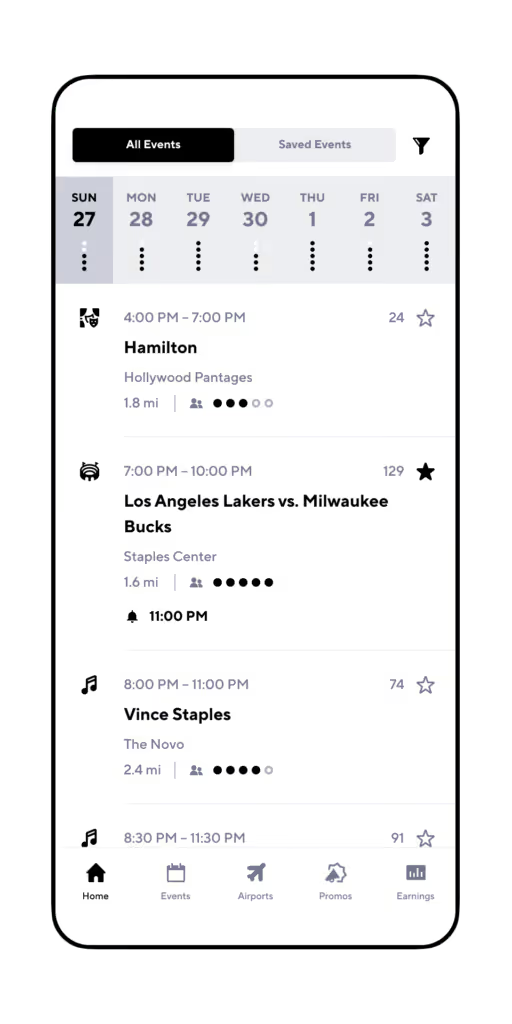
While effortlessly tracking ALL rideshare miles to maximize their tax deduction

Drivers can even compare their earnings per hour, mile, and trip across multiple platforms so you know what services are best for you

What? You don’t have Gridwise yet?
Now that we’ve shared our favorite apps for drivers, what are some of yours? If you know of one or two that make your lives easier, it’s only fair to share!
Is Rideshare Safe for Drivers
Whose Safety Is It, Anyway?
We hear a lot about Uber and Lyft rider safety in the media, but what about driver safety? Background checks and intermittent verification of IDs improve the likelihood that passengers are safe... but what about drivers?
Thus far, neither Uber nor Lyft requires a background check for passengers. Depending on which expert you ask, it may or may not be legal to investigate customers, and it certainly isn’t very practical.
Riders want to download the app and use it right away. There is no time for them to be checked to prove that they aren’t, say, a serial assault felon, a sexual predator, or… an axe murderer. Plus, the companies don’t want to pay for those millions of riders to have background checks.
The fact is, most passengers are perfectly nice, and are kind and decent people. They want a safe, comfortable, and uneventful ride to get them where they need to be, and that’s all.
Most rideshare drivers are good human beings too—and safer than many people riders are likely to meet. They’ve been background-checked, and their cars and safety records must undergo rigorous inspections to qualify to work for the rideshare company.
Of course there are inevitably a few bad apples, such as the drivers who fly off the handle when placed under stress. And, from the driver’s point of view, there is always a chance that someone who is mentally unstable, or even criminal, will get in the car.
Just as passengers have the right to know they are safe with their drivers, drivers have every right to ask just how safe working in rideshare is for them.
Some Facts About Driver Safety
If you only paid attention to media reports, you’d think the rideshare driver community was a collection of social deviants. You might also conclude that rideshare companies don’t care enough about safety, or protecting riders and drivers.
As it turns out, neither of these assumptions is true. In December 2019 Uber published its US Safety Report, which is an extensive research study covering driver and rider safety. The study examined data from 2017 and 2018—a timeframe when an average of 3.1 million trips took place each day in the United States. There were many interesting conclusions, with some that stand out more than others. Like this one:
“...our data shows that drivers report assaults at roughly the same rate as riders across the 5 most serious categories of sexual assault. Drivers are victims, too.”
If you need visual evidence of the bad things that can happen to drivers, you can watch the videos below to see a driver get attacked for not dodging traffic in Queens, New York.
If you conduct your own online video search, you’re sure to find other instances of drivers getting threatened, injured, and worse.
But wait! Before you run off to cancel your driver account out of sheer terror, you should know about an essential finding of the Uber study, as the report states: “The vast majority (99.9%) of Uber trips end without any safety-related issue at all.” Of the more than 3 million trips studied for 2017 and 2018, for example:
• 1.4 percent of trips had a support request of any kind, most frequently for issues such as lost items, refunds, or route feedback;
• 0.1 percent of trips had a support request for a safety-related concern, the majority of which were about minor safety issues such as complaints of harsh braking or a verbal argument;
• 0.0003 percent of trips had a report of a critical safety incident, which are the incidents referenced in the report.
How Do Companies Protect Drivers?
All companies are concerned about the people who work for them, even if the employees are contractors. The main reason (despite their efforts to make us believe they “love” us) is their own legal liability.
Could Uber or Lyft be sued if you are attacked by a rider? Probably. Would you win the lawsuit? Assuming you have the financial means to even start a lawsuit, you might win, but it isn’t a done deal. Because drivers are contract employees, there surely won’t be any workers’ compensation, or the opportunity to organize and push for safer working conditions.
Protective Practices
In some cases, rideshare companies protect drivers with insurance policies. For example, if you were outside your car, helping a rider with luggage, and got struck by another vehicle, your medical costs would be covered by the company’s insurance.
However, when the harm done to a driver is not accidental (such as harm caused by a rider committing a crime), the resolution is not so crystal-clear.
To protect themselves a bit better, rideshare companies have taken measures to increase the level of driver safety. Here are some of them.
In-app Assistance
Calling 911
Always call 911 for a true emergency. Along with making the call with your phone, another option is using your driver app.
Uber has an almost-instant way to contact emergency rideshare services. From any ride-related screen, the driver can tap on the blue shield icon in the lower left hand corner, and then call 911. A similar screen is available to both drivers and riders in the Lyft app.
Following Your Ride
Uber’s Follow My Ride feature allows family members or other loved ones to monitor your movements, stops, and, of course, your location.
You can set up the app to contact anyone you designate to “watch over” you. When you activate Follow My Ride, this person will be able to monitor your trip, and know exactly where you are at all times.
It’s always best to leave emergency situations to the professionals, but it can’t hurt to have someone who knows and loves you on call. This person can advocate for you, and make sure you get the right kind of help in a timely manner.
You control when Follow My Ride kicks in, so you won’t be under constant surveillance. There’s no need to let your loved ones know how many times you stopped for a milkshake—but you’ll be glad to know that when you tap the button, they can be alerted to watch your every move.
Built-In Monitoring Features
Thanks to GPS, and those clever coders who care enough to consider driver safety, there are ways for the rideshare company to detect when you might be in trouble.
Uber already has the Ride Check feature up and running. You might get a ping from it when your rider is taking an extra-long time to buy lottery tickets on the way home, or if you have a collision. If you don’t answer the ping by indicating that you’re safe, Uber will offer tools to help get you out of a serious or threatening situation.
According to representatives from Lyft, the company will roll out a similar app feature in the near future.
General Safety Guidelines
Abiding by Community Standards
Uber and Lyft stress that the purpose of their “community standards” is to ensure driver safety, as well as the safety of riders.
Physical contact, sexual assault or misconduct, discrimination, threatening language or actions, and unwanted contact after the ride, are all violations of community standards. They are also grounds for being deactivated from rideshare platforms. If you feel that you are the target of any of these acts, report it to your rideshare company.
If you are physically assaulted or threatened, you should immediately call 911. Once the authorities have processed the incident, you should also contact the rideshare company to report it. Get your side of the story on the record, right away, before the rider presents an account that is very different from yours.
Driver General Safety Practices: Do’s ... and Don’ts
There are many ways you can protect yourself as a driver, but carrying a weapon is NOT one of them. Unless you are an authorized person, such as working for the rideshare company as a security officer, you are not allowed to carry any firearm with you.
This prohibition may extend to items such as stun guns, tasers, and knives. Check with Lyft or Uber before you bring anything that might be classified as a weapon into your car while you’re on duty.
If a rider spots a weapon in your car, you could be reported, and you will be deactivated. This goes in both directions, of course. If you notice that a rider is carrying a weapon, you have every right to refuse the ride, and to report the person to the rideshare company.
Uber does have one exception to its firearms policy. If a firearm is legal under state regulations, and it is unloaded, contained in a hard case, and in the trunk of the car, Uber will allow the firearm to be carried while a driver is online.
Now, here are some tips that can help keep you safe. Some are suggested by the rideshare companies, and all really come from a reasonable application of common sense.
- Wait for riders to identify you by name before you let them in your car. This way, you know they are the person authorized (and identified) on the account.
- Don’t accept riders who are not the person on the account. For example, if the account says you’re going to pick up Marvin, and the rider announces that she’s his girlfriend, you can, and probably should, refuse the ride.
- Keep the conversation casual and consensual. Learn how to monitor how much a rider wants to talk, and follow the person’s lead. Even if you wind up having a lovely chat, don’t give out any information about yourself that could lead to unwanted contact after the ride.
- Never allow a minor (a person under the age of 18) to ride in your car without an accompanying adult. This is in violation of company policy for both Uber and Lyft, and your insurance will not cover this rider in the event of an accident.
- Stand just outside your vehicle if the parent of a minor child should leave them there, even momentarily. This helps you avoid any appearance of being less than a safe and watchful adult.
- Don’t make stops unless they are put into the app by the rider. You want the app to continue tracking your position, and how long you stay in one spot.
- Don’t be scared. Your own fear can be your biggest enemy in an unsafe situation. If you don’t already have training, consider taking a self-defense course. While you hope you never have to engage in actual hand-to-hand combat, you’ll learn how to carry yourself and be aware of your surroundings. These are the things that make you feel safe and be safe, everywhere, especially when you’re driving for Uber or Lyft.
Both rideshare companies provide a lot of features that ensure your safety as a driver. In addition to in-app safety resources, there is a lot of safety information that every driver should know before going out on the road.
Do Rideshare Companies Do Enough?
Despite the in-app assistance and general education the rideshare companies offer to their drivers, being a rideshare driver can be risky. Friends, relatives, and even riders ask questions like, “Aren’t you afraid to let strangers ride with you in your car?”
Ideally, drivers would be more certain about the backgrounds of the people they pick up as passengers. A quick criminal background check could go a long way to prevent horrendous incidents. The rider might cover it as part of the agreement to use the service, or the rideshare company could share the cost.
One solution might be a classification system for riders, just as there are for drivers. Of course, the mutual rating system is already in place—although the stars don’t really offer a lot of assurance. In the flurry and potential rush of accepting a ride, a customer would rarely have a rating that was consistently low enough for a driver to notice.
If rideshare companies created a distinctive classification for riders who have undergone a background check, this would provide some level of protection. Yet even with a system like this, there would be no guarantee that someone who passed a background check last week won’t turn into a raging maniac after a bout of raucous partying this Saturday night.
The companies’ reliance on “community guidelines” is overly optimistic. People may not read the guidelines thoroughly, and even if they do, they will likely forget much of what they learned when faced with difficult situations. From the over-caffeinated office worker who needs to vent to an impaired passenger looking for the next bar, rideshare drivers are faced with some tough customers, and are often at risk because of it.
The best way to stay safe while driving for a rideshare company is to use your own common sense, and make safety your top priority. Use the tools the companies provide, and learn how to protect yourself.
Bending the rules or going against your instincts can be far more costly than the few bucks you might make by taking rides that put you in uncomfortable or unsafe situations. While you want to please your customers and support your rideshare company, the most important thing to keep in mind is to always protect yourself.

UBER is now allowing drivers to set their own rates! Gridwise Podcast #15
Some drivers in California can now choose their own rates! Check out the Gridwise Podcast on your favorite podcasting platform and hear what this new development could mean for drivers!
Youtube
Spotify
Other Networks
Rideshare drivers: Stop giving your passengers free water and treats (do this instead)
Every 3 or 4 Uber rides I take I find a driver with his car decked out like this:
I’ve seen a few that looked like this:
And this guy:
I get it. These drivers are just trying to make sure they have as high of a rating as possible and maybe even pull in some tips.
I understand their thought process, but for just a minute put yourselves in the shoes of a passenger and think about how much you would really care about these extra treats:
It’s Tuesday morning and you’ve already had one of those days. You woke up nearly 30-minutes late because your phone charger decided it wasn’t going to work that night and that your phone was better off dead.
So you end up rushing to get ready for an 8:00 am meeting that your boss sprung on you at the last minute, but your oh so reliable roommate forgot to pick up the dry cleaning like he promised.
Again.
So looks like you’ll be stuck trotting around the office all day in pants you haven’t washed in three wears and your dingiest white shirt.
Now, would you rather a have driver that:
- Arrives in a car equipped with no extra phone chargers and somehow finds every traffic jam in the city making you even later, and putting the final nail in your career coffin… but they offer you water and a mint!
OR
- Arrives in a clean car, offers you a charger for your phone and finds the best route to get you where you are going quickly… and no treats.
Which one are you tipping?
Still not convinced? Well, we asked 1,000 rideshare passengers if they ever take water or snacks from drivers when offered and almost 75% of them said no.
Tips and 5 Star ratings come from customer interactions
To be clear, we're not saying that rideshare drivers should never offer their passengers treats, but you shouldn't be paying for those treats out of your own pocket (more on that later) and you shouldn't expect treats to be the only driver behind your tips and 5-star ratings.
The thing to remember is that people give tips because of the driver and their vehicle, not just because of the treats that they give you.
This simply means that you need to be sure to have positive interactions with your passengers.
You can start with the first interaction. Instead of just asking them if they are the correct passenger, ask them if they are in a rush as well. If they are, see if you can find a safe route to get them to their destination more quickly.
But let's be real for a second. 95% of the time you're not going to be able to make a huge difference in how quickly you drop off a passenger, but passengers will appreciate that you put forth the effort.
Remember that your passenger's first, second, and third goal is to get where they’re going safely and quickly (in that order).
A driver that is familiar with traffic patterns and alternative routes that can help passengers arrive at their destination faster is much more valuable than a bottle of water.
Depending on who’s in your car, let your passengers know about interesting concerts, festivals, parties, or other events that are happening in your city. For tourists, simply letting them know where the must-go places in the city are is invaluable information and creates another positive interaction.
Oh, but do you know how to guarantee a positive interaction with your passengers?
Offer them a phone charger.
People are serious about not letting their phones die.
Nothing is worse than being caught with your battery at 2% when you need a ride or need to call someone, so take advantage of this opportunity to create a positive interaction.
Use Cargo To Give Away Treats (For Free!)
Again, we're not saying that giving away treats to passengers is horrible, you just shouldn't spend YOUR hard-earned money on those treats. Instead, consider using Cargo, which is essentially an in-car vending machine that drivers can use 100% for free.
Drivers can use this link to simply apply to be a driver with Cargo and receive your free Cargo box. In no time you'll receive your free Cargo box that you can install in your vehicle and passengers can purchase items or receive free items through your box.
Best of all, you NEVER have to worry about inventory. Cargo will handle refilling inventory at absolutely no charge to you.
By focusing on positive interactions while letting Cargo take care of the candy and treats, you'll be better positioned to maximize your tip income and ratings!
Work smarter. Earn more.
Whether you drive, deliver, or pick up shifts — Gridwise helps you track earnings, mileage, and performance so you stay in control of your work. Download the app and take charge today.
