Gridwise blog
Tips, insights, and advice to help you earn more and work smarter, whether you do gig work, hourly, or shift work.

How to Make $1,000 a Week With Uber Eats in 2026 (Tips + Hourly Data)
In this blog, we'll explore the strategies and techniques that can show you how to earn $1000 per week as an Uber Eats delivery driver. We'll cover everything from optimizing your delivery zones and schedules to maximizing your tips and customer satisfaction. Whether you're a seasoned Uber Eats driver or just starting out, this guide will provide you with the insights and actionable steps to take your Uber Eats driver earnings to the next level.
Becoming an Uber Eats delivery partner can be a lucrative opportunity, especially if you're able to consistently earn $1000 a week. By understanding the platform, optimizing your delivery strategies, and focusing on customer satisfaction, you can maximize your earnings and turn Uber Eats into a reliable source of income.
We’ll cover the following topics to provide coaching and ideas to help you push your earnings up to that $1000 per week level:
What do Uber Eats drivers do?
Uber Eats drivers deliver prepared food most of the time, but they also might shop for and deliver goods from convenience outlets and grocery stores. The job is pretty simple. You get a request for an order, you drive to the restaurant or store to pick it up, and then you deliver it to the customer. If you already drive for Uber, you can choose to take orders for Uber Eats delivery any time.
If you’re not an Uber Eats driver yet, it’s pretty easy to become one. This Gridwise post tells you what you need to do if you want to sign up and start making money Uber Eats style. Many rideshare drivers welcome the chance to deliver food rather than people. This article from Nerdwallet covers the Uber Eats gig from that angle.
There are some sweet advantages to working with Uber Eats. In lots of cities you don’t even need to have a car. You can use a bike or a scooter, or even walk, to make your rounds. If you do use a car, Uber Eats’ requirements are a lot easier to meet than they are for Uber rideshare driving.
You also have a lot of flexibility. You can shop and deliver convenience items and groceries, but you don’t have to. And, like most driving gigs, you can choose your own hours, and map out the locations where you want to work.
Use Gridwise features When to Drive and Where to Drive to help you figure out what work hours and which specific areas will be the most profitable for you. Real data from real delivery people will show you earning patterns for drivers in your town.
How much can you earn doing Uber Eats?
The honest answer to this question is: basically, as much as you want! It all depends on how many hours you put in and how strategic you are about your gig. Earnings vary from one area to another, as this article from Entrepreneur points out. To give you a baseline, let’s look at the earnings of Uber Eats drivers who tracked their earnings with Gridwise.
Remember that these numbers show us only average earnings. To make $1,000 a week with Uber Eats, you’re going to have to be better than average, and we’ll show you how. For now, though, it’s good to have these figures so you get a ballpark number of where to start.
How much do Uber Eats drivers make?
Gridwise data tell us the following:
- Monthly earnings average around $444.00 per month.
- Gross earnings per trip are between $9.00 and $10.00.
- Tips make up about 50% of most Uber Eats drivers’ income, which amounts to about $225.00 per month.
Is Uber Eats good money? It can be. While there are other gigs that pay more per trip, if you drive for Uber Eats, you’ll always be pretty busy.
https://datawrapper.dwcdn.net/HPAz8/3
You can also see that, unlike many other gigs, tips play a huge role in Uber Eats earnings.

With these numbers as a baseline, what can we say about how to earn $1,000 a week with Uber Eats? As we said in the introduction, it’s going to be a hustle, but it’s really possible. To figure out how to make the most money with Uber Eats, let’s start by looking at how many trips these “average” drivers made each month.
We know that average gross earnings were $444.00 per month, and drivers got around $10.00 per trip. That means they took 44 or 45 trips per month, which breaks down to 11 trips per week. That’s not a lot of Uber Eats delivery, is it?
The fact that Uber Eats drivers averaged so few trips shows us that many drivers use more than one app at the same time. This is called multi-apping, and you can learn more about it in this Gridwise post. If you want to answer the question of how much you can make with Uber Eats, then you need to stick with the app and keep plugging away at those orders. You also need solid strategies, as well as some inside tips and tricks.
How to make the most money on Uber Eats: Delivery driving tactics
Getting to that $1,000 a week with Uber Eats isn’t so hard when you remember that the drivers we saw making about $111 a week were only taking around 11 trips in the same time period. That’s not much at all! If you work the Uber Eats app like a boss, you’ll soon have many more trips than that, easily reaching the number needed to get you to $1,000 a week. Now, let’s get to some tactics you’ll need to make that kind of bank.
- Stay with the Uber Eats app, and track your earnings. Gridwise can easily do that for you. Simply sync your Uber Eats app with Gridwise, and you’ll be able to see how much you’ve earned with Uber Eats, what times were most profitable, and your average hourly pay. Racking up trips with Uber Eats has other benefits, including perks and bonuses that are awarded to top drivers.
- Leverage surge pricing and promotions. Surge pricing is applied when there is a lot of demand. When surge pricing is in effect, many of the trips you make will pay more than usual. Promotions are offered to drivers who complete a given number of trips in a certain time period. High traffic volume days, nights, and times give you these chances to get extra earnings. Challenging yourself to complete the right number of trips for promotions will add to the number of trips you can count on for big bucks, too. Learn more about Uber Eats surge pay, boosts, and promotions in this Gridwise blog post.
- Say yes to doubling up on orders. With Uber Eats, you can get back-to-back orders or receive batched orders. Back-to-back orders happen when you receive a new request while you’re on the way to deliver an original order. The Uber Eats app routes these trips automatically, so you won’t be sent out of your way.
Batched orders are Uber Eats’ way of bundling together orders from either the same restaurant, or two nearby eating establishments. You get money, and trip count credit, for all the orders you complete, plus customer tips, without having to make a bunch of separate trips.
- Turn on the charm and get bigger tips. Being nice really is part of the Uber Eats driver’s job, and getting tips is one way people who drive for Uber Eats make money beyond their basic pay.. Bring along those extra napkins and condiments, use equipment that keeps food and drinks at the right temperatures and prevents spilling, and consider your customers’ needs. If you deliver groceries, be extra careful with delicate items such as bread and eggs.
And, most important, follow your customers’ directions, and stay in communication with them if you are going to be delayed, or if you have questions about their order. This Gridwise post will tell how to get bigger tips as a delivery driver.
- Use even more charm to keep your ratings high. As an Uber Eats driver, you will be rated by the restaurant or store where you pick up the orders as well as the customers who are waiting for the deliveries. This two-way rating system is designed to keep you on your toes, so Uber can keep people satisfied with your service. Don’t worry, you get to rate them, too.
There’s another reason why your rating as a driver is important. It not only keeps you in good standing with Uber; it helps you to qualify for the Uber Eats Pro incentive program. To learn more about Uber Eats Pro, and what it takes to earn perks such as preferred services, discounts, and deals, check out this Gridwise blog post.
Smart business moves that seal the deal
Now that you know how to gobble up the deliveries you need to make $1,000 a week with Uber Eats, it’s going to be a breeze to get there. Let’s make it even easier, with business moves that boost your earnings and shrink your expenses. If you use these, it will also be easy to say yes when people ask, “Can you make good money with Uber Eats?”
Minimize expenses. Avoid racking up big fast-food bills by bringing your own food and beverages. You might not think you’re hungry when you first start your Uber Eats run, but once the aroma of pepperoni pizza, premium cheeseburgers, and piping hot fries start wafting through your car, that might change. Bring a sandwich or other healthy food from home, and buy bottled water in bulk to save tons of cash compared to what it costs to buy single servings.
Maximize tax deductions. Another way to minimize your expenses is to maximize your tax deductions. Start by tracking mileage with Gridwise.

Gridwise App
Gridwise captures every deductible mile you drive, including the distance you cover between the trips your driving app records. Know what expenses you can deduct, and put them to work for you when tax time comes. Learn more about tax deduction strategies in the Gridwise Tax Guide for drivers.
Boost earnings with referrals
As an independent contractor, you’re probably looking for ways to make even more money than you can with Uber Eats. And most gig workers like you enjoy getting passive income. With Uber Eats, there’s a really easy way to do that, referrals!
All you need to do is find friends and encourage them to deliver for Uber Eats. If they make a certain number of deliveries within a specified time, you will get paid for doing nothing more than having them sign up under your referral code! Rates of pay vary by city, so check your Uber Eats app to find out what the current deal might be, and learn more about the referral program on the Uber Eats website.
Also remember: “friends” don’t have to be your best buds. Many delivery people carry cards with a QR code linking to their referral information, so just about anyone you encounter can join Uber Eats and boost your earnings. You could meet a source of passive income at the gas station, on social media, or at your high school reunion. The more you hustle, the more there is to gain, right?
Master the art of self-employment
As an Uber Eats driver, you’re an independent contractor. That means the company isn’t going to withhold your taxes, provide insurance, keep track of your earnings, or tell you about tax deductions. You’ll have to do all these things for yourself.
If you want to maximize your tax advantages, open an official business entity. You can incorporate (create a corporation) or you can work as a limited liability corporation (LLC). You can also work with a DBA (Doing Business As) arrangement, but the corporation or LLC will do a better job of protecting you from liability.
Establishing a corporation or LLC offers better tax advantages than being a sole proprietor. For instance, if you simply collect your earnings into your private account, you’ll be charged self-employment taxes in most states. And paying extra taxes is something we all want to avoid, within legal limits, as much as possible.
Every Uber Eats driver needs to learn about self-employment, and there are some great resources you can review. Check out the CareerOneStop website about self employment which will help explain the basics. You can also check with a professional tax accountant, or look other websites to learn more about actually creating a business.
Scope out your market
Look at the area around you to see where you’re likely to get the most deliveries. Where are all the restaurants? Where might people be more inclined to order deliveries? What hours do you want to drive? What activities might be going on around those times? Think about late-night and after-school times as well as breakfast, lunch, and dinner times.
Be realistic about the potential for your area and aware of new services opening up. For example, in New York, there is already a tab on the Uber Eats app that allows customers to order groceries. In our article about the best food delivery service to work for you’ll see that Uber Eats stacks up well against other delivery companies, mainly because of its potential for expanded opportunities for drivers to earn.
So, is Uber Eats good money? As we said, it isn’t an automatic guarantee that everyone will make $1,000 a week with Uber Eats. Trying out the suggestions we give you here, though, should put you on the right track! Go out there and start stacking up those orders and raking in some impressive earnings!
Get more inside information on Uber Eats in these posts from the Gridwise blog:
- The delivery driver guide: Using the Uber Eats app
- Everything you need to know about driving for Uber Eats
- Uber Eats Pro: What drivers need to know
- Looking for a different gig, part-time or full time job? Check out the Gridwise Job board.
Uber Eats FAQ
How does the Uber Eats platform work for drivers?
Uber Eats is a food delivery service that connects customers with local restaurants and independent delivery partners. As an Uber Eats driver, you'll receive notifications of nearby delivery requests, which you can accept and complete. The platform provides flexibility, allowing you to work on your own schedule and earn money based on the number of deliveries you complete.
What are the requirements to become an Uber Eats delivery partner?
To become an Uber Eats delivery partner, you'll need to meet certain requirements, such as having a valid driver's license, a registered vehicle, and passing a background check.
How can I choose the right delivery zone to maximize my earnings?
Selecting the right delivery zone can significantly impact your earnings, as some areas may have higher demand and better-paying orders. It's important to research and identify the zones in your area that tend to have the most consistent and lucrative delivery opportunities.
How can I take advantage of peak delivery hours and surge pricing?
Understanding peak delivery hours, such as mealtimes and weekends, and taking advantage of surge pricing can boost your earnings. Be aware of when demand is highest in your area and adjust your schedule accordingly to capitalize on these peak periods.
What are some tips for maximizing tips and customer satisfaction?
Providing excellent customer service and going the extra mile to ensure a positive experience can lead to more tips and repeat business. Prioritize communication, timeliness, and attention to detail to keep your customers happy and satisfied.
How can I set realistic weekly goals to reach my $1000 target?
To make $1000 a week with Uber Eats, it's essential to set realistic weekly goals and track your earnings and expenses. Start by determining your target earnings and breaking it down into achievable daily or weekly goals. This will help you stay on track and make adjustments as needed.
What are some strategies for efficient route planning and navigation?
Effective route planning and navigation can save you time and fuel, allowing you to complete more deliveries. Utilize mapping apps and take advantage of features like real-time traffic updates and turn-by-turn directions to find the quickest routes.
How can I balance my Uber Eats deliveries with other commitments?
Develop a schedule that allows you to capitalize on peak delivery hours while still maintaining a healthy work-life balance. Consider using tools like calendar apps to plan your availability and track your hours to ensure you're maximizing your earning potential without sacrificing your personal life.
What are the key considerations for maintaining my vehicle as an Uber Eats driver?
Keeping your car clean and well-maintained is crucial for maximizing your Uber Eats earnings. Regularly scheduled oil changes, tire rotations, and other preventive maintenance can help extend the life of your vehicle and minimize downtime. Additionally, budgeting for vehicle-related expenses, such as fuel, insurance, and repairs, will ensure you're accounting for these costs and maximizing your net earnings.
What are the tax obligations and legal considerations for Uber Eats drivers?
As an Uber Eats delivery driver, it's essential to understand the tax obligations and legal considerations that come with being an independent contractor. This includes properly reporting your earnings, deducting eligible business expenses, and making quarterly estimated tax payments. Additionally, you'll need to ensure you have the appropriate insurance coverage, such as personal auto insurance and possibly commercial auto insurance, to protect yourself and your vehicle while on the road making deliveries.

The Gridwise Job Board: Find Your Ideal Job or Gig Work
Gridwise is an essential assistant app created by gig workers for gig workers. Our mission is to support those engaged in gig work in every way possible. We understand how challenging it can be to deal with income instability, a lack of benefits, and job insecurity that often comes with gig work. The Gridwise app tracks and organizes earnings and expenses, and offers a wide array of discounts, deals, and services that make the lives of independent contractors easier and more rewarding.
We firmly believe it’s possible to make a viable living and create a gig experience that offers flexible hours, variety, and excitement. With issues such as consistent earnings and job security in mind, Gridwise is proud to offer a centralized platform that shows you how to find gig work and secure reliable opportunities. We’re proud to introduce the Gridwise Job Board.
The Gridwise Job Board: Key features
Because Gridwise is dedicated to serving the gig worker community, we’ve filled the Gridwise Job Board with useful features that won’t waste your precious time.
- Comprehensive listings. Find part-time, full-time, temporary, and per-task work. Drive or deliver with your vehicle, utilize an employer’s vehicle, or even find non-driving gig work.
- User-friendly interface. Find the jobs that are right for you with a tap of your screen.
- Verified opportunities. We vet the jobs before they are listed to ensure you’re getting high-quality job postings.
How to get more gig work, seasonal, part-time or full-time jobs with the Gridwise Job Board
Looking specifically for “gig work apps” or “gig jobs near me?” You’re in luck. Our filters and search functions send you directly to the listings you seek.
Here’s how it works.
- Access the Job Board via the Gridwise website.
- Search for jobs by type, location, and more.
- Select the job that interests you, and read all about it.
- Scroll through the description, and if it appeals to you, click “Apply for job.”



Many types of jobs are available. Adjust the search filter to see the full variety of opportunities that will let you cash in. Deliver food, set up catering, do rideshare driving, get paid for doing package delivery, and much more. You’ll find short-term gigs, long-term contracts, and part-time positions.
Perks of the Gridwise Job Board for gig workers
Gig workers who know how to make extra money will appreciate how the Gridwise Job Board lets you multiply your chances of bringing in big earnings. Here’s how:
- Increased stability. Use the Gridwise Job Board to find part-time or permanent jobs in addition to the part-time gigs you already have. Always keep a steady stream of earning opportunities flowing toward you.
- Flexibility and autonomy. Choose jobs that fit your schedule, work around other jobs and family duties, and still leave room for some fun in your life. Discover side hustles to supplement your full-time job, permanently or just for the season.
- Skill development. Find part-time work that lets you use a skill you already have, or try your hand at something new. It’s a smart way to develop a portfolio to showcase what you can do, or even to find permanent employment.
Get Gridwise and stay up to date on the Gridwise Job Board
Gig workers need plenty of information and assistance, and Gridwise is here to give it to you. Download the app and get essential features such as
- seamless earnings tracking
- mileage tracking
- expense recording, including notes
- low-cost and no-cost insurance benefits
- access to affordable medical, dental, vision, mental health, and alternative care
- professional services including legal and financial help
- deals and discounts
- weather, events, and traffic reports
- inside information on where and when to drive
More to know about gig work:

5 Best Mileage Trackers For Gig Drivers
Many drivers ask, “Do I really need a mileage tracking app?” The answer is simple: only if you want to have an accurate count of all the miles you can legally deduct from your taxable income! You might think your rideshare or delivery driving app has got you covered. After all, they do quite a good job of logging the miles you drive while you’re on a trip or delivery. But, if you want to have the best app to track mileage for Uber, Lyft, Doordash, Instacart, or the other apps you may use, you need more. Why is that?
Without a separate tracker, you’re missing the miles you drive in between pings. Did you realize that all the miles you drive, from the moment you begin your shift until it’s over (as long as you don’t drive several miles on a break to hang with your friends), are tax deductible! That means you need something besides your driving app to keep an accurate count of your travels. Read this Gridwise post to see how important it is to keep track of every deductible mile.
You won’t be surprised to hear that there’s an app for tracking miles. In fact, there are several of them. Here, we’re going to tell you about five top mileage tracking apps, and help you figure out which one is best for you.
Before we get to the list and identify the best mileage tracker app, let’s clarify what exactly a mileage tracking app is. According to G2.com’s technology glossary, mileage tracking is done for the purpose of keeping a log of mileage that is either reimbursable or tax deductible.
And yes, of course you can track your miles simply by taking readings on your odometer. But are you really prepared to account for how many miles you drove for personal reasons and subtract them from the total to get your business mileage? Even if you can remember all that and do the arithmetic, if you want an accurate reading of the miles you drive for business, and can therefore deduct, a mileage tracking app will save you a lot of trouble and prevent you from making costly errors.
Plus, as a gig driver, you have specific needs when it comes to a mileage tracker. Ideally, you’d be able to handle mileage tracking and several other functions all in one app. It can be maddening enough to deal with driving apps, particularly if you’re an avid multi-apper. You would want your mileage tracker app to help you keep account of other aspects of your business, including income, expenses, and inside information about the art of gig driving.
Not all mileage apps are equal, to be sure! Let’s look at five of the best apps to track mileage and figure out which is the best app to track mileage with Uber and Lyft, or what mileage tracker app is best for DoorDash.
1. Zoho Expense

First up is Zoho Expense, which does exactly what its name says. This app is designed to allow companies to give employees a uniform way to create and submit expense reports. It can be used by individuals, including gig drivers, as well.
It includes a mileage tracker, as well as features that let you track other deductible expenses, including the ability to scan and record receipts.
Available on Android and Apple: Yes
Ratings: 4.8 stars on App Store, 4.7 stars on Google Play
Free Version: Yes
Subscription price: $3 per month, billed annually
Created specifically for gig drivers: No
2. Quickbooks Online

Quickbooks Online is a cloud-based app that allows you to track your mileage, earnings, and expenses. The information you enter can then be used to generate various reports that prepare you for tax time. It also allows you to create graphs that illustrate your cash flow, and includes a receipt scanner so you can instantly record deductible expenses. Quickbooks is popular, highly reliable, and designed mainly to help people keep track of their small businesses.
Available on Android and Apple: Yes
Ratings: 4.7 stars on App Store, 4.4 stars on Google Play
Free version: 30-day free trial
Subscription price: $15 per month for basic version if purchased for 3 months or more
Created specifically for gig drivers: No
Source: quickbooks.intuit.com
3. Shoeboxed

Shoeboxed started in 2007 as a service for scanning paper receipts into digital form. Now the app offers a free mileage tracker and has enabled users to scan receipts directly. It touts itself as the best mileage tracking app for DoorDash, but there are some elements missing that Dashers might like to have. While it provides features that record your expenses and prepare you for tax season, it doesn’t automatically track your earnings. The mileage tracker has a system where you can drop pins along your routes to make the tracking more precise, identifying those legs of a trip that you make for business purposes. The mileage tracker is “free” once you sign up for the basic version.
Available on Android and Apple: Yes
Ratings: 4.5 stars on App Store, 2.3 stars on Google Play
Free version: No
Subscription price: $18 per month for basic version
Created specifically for gig drivers: No
Source: blog.shoeboxed.com
4. Stride

This free mileage tracker does a fair job of keeping track of the distances you rack up while gig driving, but it doesn’t automatically track earnings. It can be a big help, though, in tracking your expenses. You can link Stride to your bank account, and it will automatically scan your expenses to identify items you can potentially deduct. The app is totally free. This could make it the best free mileage tracker app, but there is a small price to pay. The app will persistently push you to consider various insurance plans that they are affiliated with. If you don’t mind that, this is a solid mileage tracker, even if it doesn’t track your earnings.
Available on Android and Apple: Yes
Ratings: 4.8 stars on App Store, 4.6 stars on Google Play
Free version: Yes
Subscription price: None. The app is free.
Created specifically for gig drivers: No
5. Gridwise

Gridwise has a free mileage tracker and free features that record your income and expenses. It gives you access to insurance and benefits, as well as insights about the best times and places to make the most money while gig driving. The Gridwise mileage tracker captures all the miles you drive while you’re on your driving shift, and it can be used if you have other trips you need to make which qualify as business travel.
Drivers love it because it is geared toward the needs of rideshare and delivery workers, providing free information about airport departures and arrivals, event start and let out times, weather, traffic, and more. The Gridwise Plus subscription adds value by providing additional insights and reports, discounts on benefits, the ability to export data in .csv format,, and more.
Available on Android and Apple: Yes
Ratings: 4.9 stars on App Store, 4.6 stars on Google Play
Free version: Yes
Subscription price: $9.95 per month for Gridwise Plus, or $95.99 per year (a $23.41 savings)
Created specifically for gig drivers: Yes!
What is the best mileage tracking app?
Now that we’ve checked them all out, we’re positive about the answer to that. Hands down, it’s Gridwise. Are we biased? You bet we are! But drivers love it too. Gridwise is the best mileage tracker app, and so much more. So many of the features are free, and the subscription to Gridwise Plus will pay for itself with additional insights to boost your earnings and deeper discounts on products and services.
Most important, Gridwise is designed specifically for gig drivers by experts who were once gig drivers themselves! Knowing what gig drivers need is a crucial step in creating an app that rideshare and delivery drivers can really use! Here are a few of the features, besides mileage tracking:
- seamless earnings tracking
- automatic, on/off toggle and manual mileage tracking
- mileage categorization
- airport, traffic, weather, and events information
- insights into where to drive and when to drive
- reports showing earnings across the platforms you use
- discounts on countless products and services for drivers
- additional resources for finding side gigs
- an informative and comprehensive blog
- affordable benefits, including insurance, medical, dental, and alternative practitioner discounts
- a community of drivers just like you
Don’t settle for just any app. Get the best mileage tracker, and so much more, from Gridwise!
This is how much DoorDash drivers are making amid COVID-19
Back in January 2020, most rideshare drivers wouldn't have even considered working for an outfit like DoorDash. Rides were plentiful, and earnings were high.
With our minds firmly set on the “Nothing beats rideshare--nothing!” perspective, we wondered why a rideshare driver would want to go through the extra work and time to deliver food. Who seriously orders enough food for delivery to make money for drivers?
Those were pretty typical questions for drivers until the COVID-19 shutdowns started happening and the rideshare slowdown began. Suddenly, we could no longer stay fixated on rideshare driving. We had to open our minds to other opportunities … like, for instance, food delivery.
Because the reality is, people are indeed ordering enough food for drivers to make money delivering it, and the need is greater than ever before. The volume of DoorDash deliveries is way, way, up … and so are DoorDash driver earnings.
So how much have DoorDash drivers been earning?
Just look at the money that’s been coming in for DoorDash drivers nationwide.
Keep in mind, these figures represent median earnings per hour, which is the middle number in our sample range of hourly wages. Depending on where you are, you could make a little less than the median, or a whole lot more. However, it’s very clear that rideshare drivers are making around $16.50 per hour across the nation.
With rideshare earnings down, it makes sense for drivers to explore delivery options,, and it certainly beats making nothing, or waiting for unemployment comp that may never arrive. The money is just one reason we think driving for DoorDash is worth looking into. Here’s what you might experience when you sign up to be a DoorDash driver, known as a Dasher.
What’s it like to deliver for DoorDash?
Driving for DoorDash can definitely keep the cash flowing, even during the ravages of the COVID-19 situation. And DoorDash makes it really easy to become one of their Dashers. Here are the requirements:
- Age 18 or older
- Own any kind of vehicle; in some places, a bicycle or scooter will suffice
- Have a valid driver’s license
- Have a Social Security number
- Consent to and pass a background check
First, you’ll have to make sure DoorDash needs drivers in your area, which you’ll find out when you sign up. If they’re not accepting drivers at that moment, you can be assured they will be before too long so hang in there. You’ll eventually get an invitation to open the app.
Once you get in, you could be taken to a short video orientation where the company shows you how to use the app and how to complete your calls. Then, you can get started.
Working for DoorDash is a lot like driving for rideshare. You wait for a ping, and then a delivery will be (briefly) described to you on the screen. You’ll be shown the restaurant where you have to do the pickup, and how long it will take to complete the order.
At this point you can decide whether to take the delivery or not. There’s no punishment for not taking an order, but if you refuse too many you may get a message saying that you won’t be offered as many orders unless you accept more pings.
Assuming you do accept the order, you’ll park your car, and in COVID-19 conditions, you’ll look at the door of the restaurant for instructions. In some cases you’ll have to go inside. CDC and local guidelines, almost universally, require you to wear a mask when you go inside a business of any kind, but especially a restaurant. So be prepared ahead of time with a mask.
Some restaurants have stickers on the floor showing you where it’s safe to stand, at a safe social distance from other drivers and individuals, who are also there to pick up their meals. Other establishments will ask you to use the drive-thru, and then there are eateries that ask you to wait in the car while they collect your order and bring it out to you.
Once the pickup is complete, you’re ready to drive the food to the customer. You’ll go to the delivery screen, where you’ll see any special instructions. You might be asked to leave the order at the door, or in the entranceway of an apartment building. It’s always a good idea to take a picture of the order at the door to prove you completed it.
What about hours and equipment?
Just like rideshare, you get to choose your own hours with DoorDash, but you’ll also have to use common sense. You wouldn’t want to go out from 3 to 5 p.m., for instance; you’ll want to go out during peak eating hours. You’ll have to test out your own locality to determine exactly what those hours might be.
Maybe there’s a rush for lunch, but there’s most likely going to be a big demand for dinner. And yes, there could be those late-night snack runs as well. People aren’t gathering in big groups these days, but families big and small still get hungry for pizza and nachos at all hours.
It’s also good to know that when there’s a big crunch, DoorDash will lay two or more deliveries on you at once. It’s pretty much a no-brainer, but it can get confusing. You’ll want to make sure the orders are clearly marked, so the right food gets to the correct customers. You don’t want the three extra-large all-meat pizzas to mistakenly end up with the vegan group waiting for the tofu special.
That’s why it will be helpful to have the right equipment, which DoorDash will mail to you a day or three after signing up. In the Dash kit will be a thermal bag and a credit card, known as the Dasher Red Card.
The thermal bag is serviceable, but you may want to carry a second one. It doesn’t hold much, and it sure wouldn’t win any awards for “most durable delivery bag ever constructed.”
Before you get too excited about the credit card, it isn’t for you! It’s for your customers. They pay for their food through the app, and in instances when the app doesn’t pay the establishment, DoorDash pays with the credit card you carry. Like any credit card, you’ll need to activate it first. Just follow the instructions in the folder it comes in, and make sure you carry the card with you when you’re out there Dashing.
How do you get paid … and tipped?
Pay for you, the DoorDash driver, comes through the app, just like rideshare. It’s based on three factors:
- Base Pay: DoorDash’s base contribution for each order. It ranges from $2 to $10, and it’s a function of time, distance, and desirability of the order. If you get a call that’s not-so-popular among drivers, your pay will be higher.
- Promotions: As with rideshare, there are peak periods and challenges. Peak periods are like surges, and challenges give bonuses for completing a certain number of deliveries in a given time period. If you get a large order, say a grocery load that costs a lot, you’ll earn a large order fee.
- Tips: We all love tips, and in the virus-mandated lockdown, people are more generous than you might imagine. They can tip when they check out of the app, or after you deliver. Service does matter, and if you do something extra, or if you’re just extra-kind and careful about COVID-19 protocol, you’ll probably get even more.You get to keep 100% of your tips, and they’re on top of base pay and promotions.
What’s the downside of delivering for DoorDash?
Like every gig, DoorDash isn’t perfect, and there are a couple of disadvantages. The biggest one is the number of times you have to park your car, and get in and out of it. Much depends on where most restaurants around you are located, whether on city streets or in suburban or semi-rural strip malls.
During the COVID-19 situation, parking is easier to find than usual, especially in cities. Still, it can be an issue. Getting in and out can also present problems in downpours, windstorms, and days so hot you can’t stop sweating even in air conditioning.
Other potential challenges involve the restaurants. Not every order will be ready on time. Sometimes they don’t even get the orders; you might have to put them in yourself, and then wait around for them to be filled. This is especially true at fast-food restaurants.
You may even have to go through the drive-thru. The items your customer wants will be in the app. This can eat up a lot of your time, and be pretty frustrating when the restaurant is out of one or more of the items.
There are some gaps in menu item availability, for sure. Some are based on supply chain issues, and other times they arise from the fact that restaurants don’t always know how much to order. You’ll have to be patient in these instances, and hope the customer is, too. You can always try to make contact by phone, through the app, to ask if they want to choose substitutions. Most people are pretty cool about it, but once in a while, they end up cancelling the order.
A great way to make decent money, NOW
Despite a few drawbacks, driving for DoorDash can be a very good thing. It’s tough waiting for unemployment compensation to come in, and it’s likely going to be a while before rideshare comes back to where it was. For now, DoorDash could be a really great way to fill the gap. One thing’s for sure: it’s more lucrative than it used to be, and it’ll probably stay like that for a long time to come.
With all that cash coming in, you’ll need to keep track of your earnings, of course. Gridwise has exactly what you need, when you need it. Download the app, and you’ll see how easy it is to track your total income, time worked, hourly rate, mileage, and other expenses for DoorDash as well as the other services you might be working for.
We wish you all the best as you endeavor to keep yourself solvent in the gig economy. We’ll keep digging up the info you need to make your wishes a reality. Do you have questions or comments? Write them in the space below. We always love to get your ideas and feedback.
Rideshare and delivery driver COVID-19 sick pay: Are the gig-services companies delivering on what they promised
For most drivers, the idea of actually being unable to work because they’ve been exposed to COVID-19, or are already sick with it, is something they worry about, but haven’t yet faced. For others, it’s real … very real.
Since the middle of March, most rideshare and delivery companies have made public announcements about their intentions to provide sick pay for drivers affected by COVID-19. When this all started, companies stated that sick pay would only be awarded to drivers who test positive for the virus, as well as those who have been quarantined by a physician for being exposed to COVID-19.
For obvious reasons, this didn’t always work so well. What if you can’t be tested for the virus, or you’re so sick you’re unable to submit the documentation needed to “qualify” you for sick pay? The companies have made some effort, it appears, to put the focus more on those drivers who are out there still working through the crisis. Still, in many cases, it’s still necessary to get the proof of your COVID-19 situation before you can get their attention.
It sounds simple enough. You either get exposed to the virus, are individually ordered to self-quarantine, or (worst of all) are diagnosed with COVID-19; then the company gives you money. What happens, really?
We took a look at companies’ policies and got reports from drivers who have been in this situation, and found that things are not going quite the way they’re supposed to.
The plight of the independent contractor
Why is it so hard to get sick pay to begin with?
When you sign up to drive for rideshare or delivery, you’re told in no uncertain terms where you stand with the company. You are not an employee, you don’t get benefits, there will be no paid holidays, and there’s no such thing as sick time. It’s all part of the agreement with which we’re all familiar; part of being gig workers.
The importance of sick pay in a pandemic
When you’re first signing on, it doesn’t seem so bad. You drive and you get money for it—but that’s when everything is normal.
If there ever was a time when everything was far from normal, it’s now, with the COVID-19 crisis. All kinds of situations we could never have expected are upon us. On top of the “Closed” signs on the doors and windows of most every business your passengers once frequented, you risk becoming infected with a serious virus that can be deadly.
Even in the delivery game, you won’t have a parade of riders to worry about, but you’ll still be exposed to workers in restaurants and stores, plus the people waiting for you to bring groceries, beverages, and/or dinner to their doors. In all these cases, doing your job forces you to take your life in your hands.
If you know you’ve been exposed to the virus, and you still have to work to put food on the table and a roof over your head, would you stop driving or delivering? That’s the question companies should ask when they consider the questions of providing independent contractors with sick pay of this nature during the pandemic.
If they fail to offer compensation to drivers who have been exposed to the virus, or who are at high risk due to their age or health problems, they could be contributing to the pandemic by forcing these people out into a workplace that’s extremely dangerous to them and the people with whom they come into contact.
Perhaps out of prudence - or the desire to avoid being held liable for such catastrophe - companies have formulated sick pay policies, even for independent contractors. Let’s see what they bring to the table.
Companies to the rescue … sort of
It makes sense that the companies, who are making even more money than you are by completing your rides and deliveries, would help you out. Just what are they doing, and is it enough?
On the rideshare side, Uber and Lyft have policies that give drivers one-time payments. Here are the programs they offer, in a nutshell:
Uber
Recognizing that their first efforts at providing compensation for drivers affected by COVID-19 were woefully inadequate, Uber updated their financial assistance program in mid-April. It applies both to rideshare drivers and delivery workers for Uber Eats. Their policy was expanded to encompass those who were told to isolate because they have pre-existing conditions that put them in the high-risk category for COVID 19.
This is a sign of somewhat more compassion, and that’s the good news. The not-so-great part is that, at the same time, Uber decided to set a maximum payment per person. This gets tricky, because Uber says there is no one set amount. It will vary by location, and will be based not just on your earnings, but on the average earnings of drivers in your area.
How payments are calculated:
Your basic payment will be figured based on the three months prior to the date of your application for assistance. There will be up to 14 days’ compensation, but this amount will start at $50 minimum, even if you did just one ride, and top off based on the average earnings of drivers in your area. Uber gives these examples:
Los Angeles: $459
Coloumbus, OH: $244
Rio Grande Valley, TX: $136
What you must do to apply, and qualify:
- Have an active case of COVID-19, or
- Be individually ordered to self-quarantine because you are suspected of having the virus, or
- Be individually ordered to self-quarantine because you have pre-existing, underlying health conditions that place you in the high risk category.
If you meet these requirements, then you need to:
- Complete at least one trip or delivery on Uber in the 30 days leading up to the date of your documentation
- Submit documentation containing your full name, full name of the doctor or public health official, their contact information, and the diagnosis date/start date of quarantine.
- Submit your documents within 30 days of your date of diagnosis/start of quarantine.
Uber says they will attempt to process requests within 7 business days, but also adds the disclaimer that due to high volume (not to mention the recent layoffs of customer service personnel), it may take longer.
Note: Once you apply for assistance from Uber, your account will be put on hold! In general, the hold will be for 14 days, unless the time period stated in your documentation states it should be otherwise.
This is an audacious change in policy, and it surely doesn’t seem to be for the better. Before April 10th, all drivers were awarded up to 14 days’ compensation, based on the previous six months of earnings. There was no maximum amount set.
As a result, drivers in California recently took legal action against Uber, and in late April they won a little more out of the company than what it was offering. According to a post from CNet,
“The company has agreed to pay $360 -- calculated as three 8-hour work days at $15 an hour -- to all drivers who've been diagnosed with COVID-19, had symptoms of the disease or believe they were exposed to the virus. Uber is also offering the financial assistance to drivers with preexisting health conditions that make them susceptible to COVID-19, including being over the age of 60.”
Even at that, Uber doesn’t seem to be fulfilling its responsibility in terms of protecting its drivers - or the rider community with whom they are mutually exposed. Even with the 14-day pay policy, it’s hard to imagine that a person who’s sick enough to be in ICU on a respirator would be ready to go back to work in that short of a time period.
Lyft
It would be so pleasant to be able to say this company does do better, but we can’t lie to you. Yes, they have also expanded their program to support drivers who are at high risk due to age and/or underlying high-risk health conditions. Yet, they are extremely vague about how much they will compensate drivers for this or for any other reason COVID-19 would stop them from driving. The only things they are clear on is that you must present documentation to them, and it will take some time to process your application.
With all of that, Lyft’s website makes it plain they feel they are making a huge contribution to the cause of dealing with COVID-19. They state that in addition to providing safety and sanitizing equipment to drivers and the community with a $6.5 million commitment, they are providing support for affected drivers. These are their specific words:
“We’re providing funds directly to qualifying drivers diagnosed with COVID-19 or put under individual quarantine by a public health agency — an amount determined by the driver’s previous activity on the Lyft platform.”
This tells us very little about how much Lyft will award drivers individually. Also, they seem to believe their “additional support”, namely alerting drivers to the benefits of the CARES act (unemployment for independent contractors and PPP loans) is a big deal. And oh, right - they will also suspend your account if you indicate you need help because you’ve been exposed to or diagnosed with COVID-19.
If that’s all they’ve got - a vague compensation policy and a few words about government programs, it’s evident that what Lyft has to offer is in no way commensurate with the risks drivers are taking, either.
Doordash, Instacart, Grubhub and the rest
Many delivery companies also offer help to drivers impacted by COVID-19. Recently, they have expanded coverage to include those who have been exposed and quarantined. In general, here’s what delivery drivers and Instacart workers can expect:
- Companies that pay by the hour offer 14 days of pay. Companies that pay per delivery base their compensation on 14 days of a driver’s average earnings.
- Instacart is offering sick-pay to in-store shoppers now, and also offering up to 14 days of pay for full-service shopper or part-time employee who is diagnosed, or placed in mandatory quarantine.
- DoorDash and Caviar require that drivers be on the platform for at least 60 days in order to collect benefits.
- These companies have activity requirements: DoorDash (30 deliveries in last 30 days); Grubhub (one delivery in last 30 days); Caviar (30 deliveries in last 30 days); Wanelo (based on amount of time currently working).
- All companies require written documentation of COVID-19 diagnosis or medical quarantine order.
- Some companies inform you how soon payment will be received, while others do not. Grubhub says it will take two pay periods, while Postmates says you’ll get the money on the Friday of the week you’re approved.
- Some additional information: Postmates requires you to have a Starship HSA account, which is their healthcare savings plan. Instacart says additional sick pay is available, Amazon Flex says “employees with hardships” can receive $400 to $5,000, and Wanelo is extending flextime to all employees.
Of all these companies, Doordash is the one whose policy stands out at being most comprehensive and specific. While announcements have been made about Instacart and other companies expanding their programs, little detail is immediately available.
Because they’ve made the the particulars readily available, we’ll give more information about Doordash’s policy here:
The work requirements (30 days and 30 deliveries in a 30 day period) cited above still apply. The same requirements as Uber, namely, testing positive for COVID-19, being under mandatory quarantine or under a doctor-recommended quarantine (all with medical documentation), or at higher risk, or (and this is unique among the companies we could find details on)...you can prove you live with someone who fulfills one of the above-mentioned criteria.
They also help drivers secure medical documentation by offering a discount code for Doctor on Demand, which would provide a virtual visit for $4.00. Financial assistance for childcare is also available, and all this can be accessed through the Doordash support web form.
Do companies offer realistic COVID-19 assistance, considering the risks drivers and shoppers take?
The feedback we’re getting tells us companies are getting mixed reviews so far—and that’s putting it politely. Not only are drivers reporting delays and obstacles when they apply for compensation, there are other issues companies don’t seem to have taken into account.
One of these is the issue of underlying health problems, including being over age 60, and being of increased risk. Uber and Lyft have specified they extended their policies to cover this group, as has Doordash, but other companies have not. Will they have to continue working, even though they know they should be at home?
It seems the companies really fumbled the ball over the issue of protecting their independent contractors from harm during this pandemic, and even the “band-aids” they’re applying at this stage fail to make it much better.
In this Business Insider article, an Uber spokeswoman admitted the company’s hastily rolled out policy may not cover enough people. And there are other matters the companies seem to have overlooked as well. Many drivers, for instance, are now taking care of children who are not in school, or perhaps tending to older or disabled relatives who have gotten sick. How are these drivers supposed to continue to work now that their family members are at home and in need of their care?
Even when drivers meet the companies’ requirements of being infected or exposed, some odd things tend to happen. Drivers have reported, for instance, that telling their companies about relatives who are COVID-positive has resulted in an immediate suspension of their accounts, but no compensation (or at least a long wait for it).
This could lead to drivers who have been exposed to COVID-19 feeling forced to keep it a secret. They may continue working—which means they’re taking scary chances with their riders’ health, as well as their own. Yet they have to make a choice: either keep a paycheck or lose it after having a medical check-up.
COVID-19 war stories: delayed responses
An Uber driver in San Francisco developed COVID-19, which he believes he caught from two passengers he picked up at the airport. Wisely, the driver stopped taking trips, went to get tested, and found he was indeed positive.
When he uploaded his doctor’s letter, which ordered him to self-quarantine, the driver was taken aback by Uber’s response. The company requested further personal information, along with several requests to accept conditions related to being an independent contractor rather than an employee.
Another driver reported having to wait an inordinate amount of time to hear back from Uber about his request for COVID-19 compensation. In both cases, these drivers got on Twitter and called out Uber CEO Dara Khosrowshahi in their tweets.
The social media machine did its usual thing and Khosrowshahi’s shaming was pretty effective. Uber responded rapidly to the drivers’ requests ... but unless you’re healthy enough and willing to embarrass a major executive on the Twittersphere, you could be waiting a long time for your sick pay compensation.
The companies’ side of the story
To be fair, the companies are scrambling to cope with the coronavirus pandemic as much as the rest of us. They’ve been flooded with driver requests, their own operations are severely hindered by stay-at-home orders, and it is likely that many of their employees have gotten sick or are quarantined.
Let’s remember that the companies have benefited from the government’s recent easing of unemployment regulations. With the recently enacted CARES Act, independent contractors can apply for their state subsidies and collect $600 per week from the federal government.
If you find yourself in a situation where you’re unable to work because there isn’t enough business, or you have to care for a family member, unemployment compensation might be a good option for you. (Read more about how drivers can get unemployment compensation here.)
Be smart and stay healthy
At Gridwise, we want nothing more than for you to stay healthy and avoid catching this beast of a virus. But we want you to have the peace of mind that if you’re facing a COVID-19 diagnosis, or are threatened by exposure to it, you’ll receive the benefits you deserve.
Rideshare and delivery companies are still absorbing the shock of this situation, as we all are. Even they seem to recognize that they could be doing a better job. Let’s hope they get there before it’s too late.
Keep up to date on this situation and everything you need to know about rideshare and delivery driving when you download the Gridwise app. Still haven’t? Do it now!
This is how much Instacart drivers are making in 2020 amid COVID-19
Most rideshare drivers think of delivery as that thing other people do, or maybe something they’ll try from time to time. Rarely would a driver think of delivery as more profitable than riding with passengers. When times were good, drivers could opt out of those Uber Eats deliveries whenever they wanted.
So why would a rideshare driver consider switching to grocery shopping and delivery? Isn’t that even less profitable than being a take-out food courier?
You might be surprised.
It’s a fact that the normal paradigm has shifted for drivers due to the ravages of COVID-19 on the gig economy. Passenger traffic is way down, the distance drivers have to travel between trips is long, and the hourly rate for rideshare has plummeted. Learn more about how much gig drivers are making during the COVID 19 pandemic.
With so many of our riders working from home, schooling their own children, and trying their best to avoid getting out too much, fewer people need those rideshare trips. No longer are they going out to dinner, or meeting friends for a drink, or spending the evening at a pub. So (at least for now) they don’t need the safety of your rideshare car to shield them from the illegalities of combining alcohol and driving.
And they certainly don’t need a ride home from the office. They’re alone, together with their families, and they don’t need you to drive them around.
So, what services are the #AloneTogether crowd paying for? Turns out it’s delivery.
This really isn’t that surprising. In the COVID-19 lockdown era, many adults are trying to perform their jobs from home while also making sure the kids are being schooled, entertain ed, and fed. And speaking of feeding, people are cooking more—which means they’re buying a lot more groceries than they used to. So it only makes sense that the people you used to pick up after happy hour are now interested in having their grocery shopping done for them and their order delivered to their front door.
In case you’re still on the fence about this, we have some numbers that might convince you.
So how much are grocery delivery drivers making?
We’ve compiled anonymized earnings data from more than 105,000 drivers, and found that grocery delivery drivers are making as much as or more than rideshare drivers were making—even before the COVID-19 crisis.
As you can see, the earnings for grocery delivery drivers is not too shabby. The peak of $20.72 per hour for the week of April 13 is certainly what most rideshare drivers would expect on a good day. The average hourly rate, based on the entire time period from March 30 through the week of April 27, is $17.93. That’s also pretty good.
It sure beats what drivers were getting from rideshare at the beginning of the COVID-19 pandemic. Check out national rideshare figures from late December 2019 to late March 2020. Even the highest figure, $19.36, doesn’t match the highest figure for grocery delivery driving. The low for rideshare, $12.35 in mid-March, is significantly less than what you can make as a grocery gig worker.

How does grocery delivery work?
Good question. It’s always best to understand exactly what you’re getting into before making the leap. The first thing to know is that there are two main companies in the business: Instacart and Shipt.
With Instacart you have two options, the first of which is working directly for the company as an employee. This arrangement requires you to work in stores, filling orders for customers and packing the orders to be picked up, either by the customer or a driver who will deliver the items to the customer’s door. You’ll make an average of $9 to $10 per hour and will receive unemployment insurance, but not health insurance. Instacart caps working time for shoppers at 29 hours per week.. Beyond providing your own transportation to and from the store where you work, you won’t have any expenses.
Your second option with Instacart is being a full-service shopper. You’ll be responsible for driving to the store, doing the shopping, and delivering the orders to customers. The money can be very good: up to $25 per hour including tips, and about $15 per hour if you don’t count tips. As an independent contractor, you’ll have the convenience of flexibility: being your own boss, and setting your own schedule and hours.
Of course, part of being an independent contractor means you forego most benefits and perks that are available to hired employees, including health insurance. In addition, you’ll need to keep close track of your expenses because you’ll need that information at tax time. Learn more about your options for working on the Instacart platform here.
Shipt, another grocery delivery leader, is a membership-based shipping-for-hire business headquartered in Birmingham, Alabama. Similar to Instart, as a full-service Shipt shopper, you handle the task from order through shopping and delivery. Once you get the call about an order, you’ll drive to the store, shop for the items in the order, and deliver it all to the customer.
According to Shipt, experienced shoppers make an average of $22 per hour. All the independent contractor conditions apply here as well. For more details about becoming a Shipt shopper, visit the website.
Is grocery delivery right for you?
Only you can make this decision, of course. You can temporarily hang up your rideshare driver tip jar and dive right into a career working in grocery delivery. You might enjoy it, and you could make really good money.
Many other drivers are permanently getting out of the drivers seat and joining code and UX design camps like the ones offered at Kenzie.
But what if your instincts tell you not to give up rideshare just yet?
There’s another option. You could do some rideshare and take-out delivery with one platform, and then do a little grocery delivery driving with another. If you approach work this way, diversifying your business activities, you could soon find that you’re making as much as you did before COVID-19 came on the scene and put a damper on everything.
Many drivers are diversifying like this for a couple of reasons: one, to capitalize on opportunities to make money; and two, to avoid being inside their cars with several different riders per day, which elevates the risk of being infected by the virus.
In any case, the decision is totally up to you.
Is it possible to tell which app earns me the most?
Yep. To keep track of your earnings, expenses, mileage, and all the other information that’s crucial to your driving gig life, all you need to do is...
You’ll see right away why Gridwise is the ultimate rideshare and delivery assistant. You can enter your earnings from each app you’re using, and get a definite grip on which services are making you the most money. You can analyze what days are good for delivery versus rideshare, and optimize your time according to the data you save in the app.
You can also track mileage and other expenses to maximize your tax deductions, and cut your calculation time down to a bare minimum. Then, once this virus crisis is over, you’ll get a heads-up on all events, and the lowdown on all the airport action. It’ll be great to sit in those long queues in the cell phone lot once again, won’t it?
Also, if you haven't signed up to be an Instacart driver yet, you can use the link below to sign up!
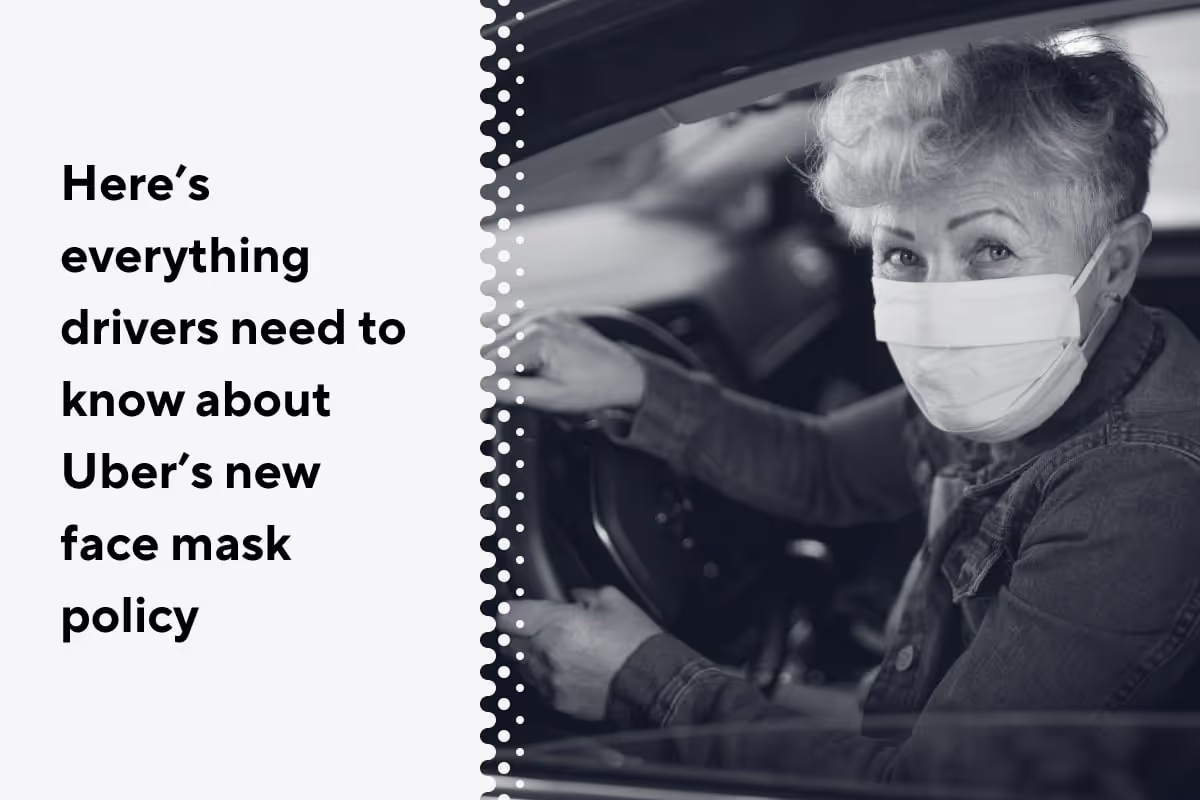
Here’s everything Uber drivers need to know about Uber’s new face mask policy for drivers and passengers
It’s easy to understand why it’s been necessary for drivers, and riders, to stay home and maintain social distancing during the COVID-19 crisis. Slowing down the spread of the novel coronavirus and staying safe are top priorities for everyone right now.
Still … many of us are more than ready to get back on the road. And in many states, stay-at-home orders are being relaxed by government authorities. As a result, many drivers—and the riders we seek—are starting to emerge from isolation, and once again we’ll be sharing space in our rideshare vehicles.
This could be risky, so it’s important to create an environment that’s safe for everyone, even if we have to cope with some slightly inconvenient rules.
So, because health risks will continue to linger long after stay-at-home orders expire, Uber is implementing a significant safety policy. The company will require all drivers and riders to wear masks or other face coverings while using the Uber platform. Although no official policy statement has been announced, Uber confirmed the decision to CNN Business on May 3, 2020.
Have Lyft and other companies required face masks?
It appears Uber has taken the lead on this, since there’s no evidence of Lyft or any other rideshare companies making similar decisions.
Uber may want to get out in front of this issue in order to make both drivers and riders feel safer about coming back out to reanimate Uber’s bustling business.
Lyft generally follows Uber’s lead on major initiatives like this, so we would expect Lyft to implement a similar policy.
When will this policy be fully implemented?
Uber has been mum about this new policy, but drivers should expect to see official communication from Uber over the next few weeks. A spokesperson from Uber has confirmed that they will begin rolling the requirement out to markets in the coming weeks.
How will this policy be enforced?
The more rebellious among us may be thinking about how to avoid abiding by the new rule, while others are happy to comply. Enforcement of the mask-wearing rule could get extremely controversial, and we can’t help wondering what it will look like.
Uber hasn’t told us exactly how they’ll execute their new mask policy, but those of us who drive for them can probably guess. The company already has a facility on the app that’s used to identify drivers.
Sometimes when drivers tap the app to go online, a message pops up asking them to pull over, take a selfie, and submit it. They must do so before their app will open and start receiving requests. Drivers fit their faces into the circle on the screen, snap the picture, and after it’s been confirmed to match the photo on record, they can proceed. It’s possible Uber will use this same tactic to verify that drivers are wearing masks as the company has confirmed that it is in the process of developing technology to detect drivers' usage of face coverings.
This could be challenging, however, because facial recognition technology relies on face shape. If you’ve worn a mask, you’ve probably noticed your phone’s face-related lock doesn’t know it’s you until you remove it—or just give up and enter the passcode. Uber has a very clever technology department, so they may have already found a way around this.
What about the passengers? How will the policy be enforced for them?
This new policy leaves a lot of questions about passengers.
How will Uber enforce their mask-wearing rule on passengers?
Should drivers refuse to pick them up if they’re not wearing a mask, or won’t put one on? Should drivers take a photo of them to prove it?
Are drivers supposed to take the hit, both in terms of losing ride revenue and enduring verbal abuse from irate passengers? What if the customer decides to take off the mask during the ride? These and other questions will have to be answered before Uber can enforce wearing masks as a definite policy.
Since none of us has ever lived through a global pandemic before, it’s no wonder everything seems so uncertain, and sometimes downright frightening. We seriously don’t know what’s going to happen from one day to the next. So it only makes sense that widespread mask-wearing is strange to us—and we need to remember that it’s also strange for our passengers. Will they trust us more or less because we’re wearing a mask? What will happen when we inform them it’s necessary for them to wear one? What if they don’t have a mask? Even if we carry spares, how do we enforce the policy when a rider refuses to put one on?
Let’s hope we don’t run into that. Hopefully, our passengers will understand why we’re wearing masks, and why they must also wear one. That would certainly be ideal, but as we know, experience with driving people around for a living removes any preconceived notion that everyone is nice, kind, and courteous. In fact, anyone who’s ever driven rideshare has most likely had some experience with the difficult passenger.
Until Uber (and other rideshare and delivery companies) come up with clearer policies, you’re going to have to be proactive. The fact is, riders are not always thinking about your welfare. They may object when you refuse to take them because they aren’t wearing a mask. They may write to your company and complain that you’re not wearing one, even if that isn’t true.
How do you prevent your own reputation from being damaged, and protect your account from being deactivated as the result of a false report from a cantankerous customer?
The best thing you can do is be polite but firm when explaining the regulations, and communicate with your rideshare service if there’s a problem with a rider. You’re likely to get a complaint email, but you’ll also get a chance to tell your side of the story. Do that by answering the email promptly and completely.
It’s also wise to be proactive. If you can arrange it, stop driving for a few minutes and write your own complaint about what happened. As long as you stick to the facts and remain courteous throughout the interactions with the passenger and your company, chances are the company will trust that you’re doing your best to keep everyone safe.
What will wearing a mask do for your safety?
Do you feel safe while wearing a mask? Would you feel safer if your riders were wearing masks? Although they can be inconvenient, the policy of having you and your riders wear masks can help protect you and them. Still, the cloth masks you are likely to encounter are not a complete safeguard.
The Centers for Disease Control and Prevention (CDC) recommends that in addition to wearing masks, people should continue to maintain social distancing. This paragraph is from an article on the CDC’s website:
“Wearing cloth face coverings is an additional public health measure people should take to reduce the spread of COVID-19. CDC still recommends that you stay at least 6 feet away from other people (social distancing), frequent hand cleaning and other everyday preventive actions. A cloth face covering is not intended to protect the wearer, but it may prevent the spread of virus from the wearer to others. This would be especially important if someone is infected but does not have symptoms.”
As the CDC notes, even while you’re wearing a mask the recommendation for social distancing remains in effect. This can be awkward when you have passengers who want to sit in your front seat—but your first priority is safety. Your passenger should sit in the back seat, and if you do not feel safe, you don’t have to take the ride.
As long as you’re following the guidelines set forth by the CDC and your individual state/city, a disgruntled passenger would have a hard time getting your company to penalize you for protecting yourself. And once the social distancing rule is relaxed, you may then feel comfortable enough to let passengers sit in the front seat.
What more can Uber and other companies do?
It’s been a big disruption to shut down our way of life for these past weeks, and it will take big adjustments to bring us back to operating again. The companies depend on drivers to work for them, and before we all run back out, possibly exposing ourselves to the dangers of COVID-19, we need some assurances.
Here are some suggestions for the companies to consider:
- Be clear about policies, with riders as well as drivers. Drivers shouldn’t be put in the position of reminding riders to wear masks. It might be helpful for the company to warn riders they could risk losing their access to the platform if they don’t comply with the rules.
- Provide masks and materials. Uber is handing out masks, but so far they can only service the areas that have been hit hardest by the pandemic. If they can’t furnish masks to everyone, maybe they could reimburse drivers for buying a supply to keep on hand for themselves and their passengers.
- Educate drivers and riders about the importance of compliance. Sometimes it isn’t enough to just expect people to be considerate of others. In-app push notifications to passengers as well as drivers could help them to learn why it’s so important to protect one another from the scourges of COVID-19.
What more can we all do?
If we ever hope to get back to normal, we have to acknowledge and provide protection from the risks that face us now, and also convey a sense of feeling safe. As a driver, it’s up to you to protect yourself, while offering a sense of safety to your passengers. Comment and let us know how you feel about Uber’s new “mandate for masks,” and what you would like to see the companies do to protect you and your customers.
One really great way for drivers to deal with the issue of COVID-19 safety is to be supplied with face coverings and masks. Check this Gridwise article for information about where you can get them, or how you can make them. And make sure you download the Gridwise app so you can stay up to date with COVID-19 issues and everything you need to know to make the most out of your driving and delivery gigs.
COVID-19 is causing the ride-hailing industry to pump the brakes. So how should TNCs respond
COVID-19 has decimated the ride-hailing industry. So how will TNCs respond?
COVID-19, the vicious viral disease caused by the infamous novel coronavirus, has crippled the once flourishing ride-hailing industry.
As most major cities throughout the world implemented lockdowns and shelter-in-place orders to slow the infection rate of the virus, they also brought movement in cities to a near standstill — and the demand for ride-hailing with it.
On March 19th, 2020, Uber CEO Dara Khosrowshahi told analysts that Uber bookings were down some 60% to 70% in “more recently impacted markets like Seattle.” Khosrowshahi also noted that the company was expecting a rebound to begin in the middle of the second quarter, roughly near the end of April.
Things didn’t quite happen according to Dara Khosrowshahi’s plan, however, because as we write this article at the end of April 2020, most citizens are still sheltering in place.
We, of course, can understand this by simply turning on the news and seeing most major cities around the globe extend stay at home orders instead of reducing them, but we can also look to mobility data to tell us a more detailed story about how COVID-19 and stay-at-home orders have affected urban mobility.
How? One of the best ways to measure the amount of movement in a city is by understanding congestion as quantified by driving speed. Less movement in a city means less congestion, which means fewer drivers on the road.
At Gridwise, we can leverage the anonymized data of more than 105,000 ride-hail drivers to understand how people are moving around their city. When we look at the average speed of ride-hail drivers in major urban centers who’ve been hit hard by the COVID-19 pandemic, we’ve noticed a stark increase in speed for those drivers who are still out on the road.
In New York City, for instance, we saw ride-hail speeds increase by 32.29% in April when compared to January, which was a result of drivers just not being on the road.
And New York City isn’t the only city that has seen its streets go barren.
As the coronavirus pandemic tightens its grip on cities around the world, city streets have been transformed overnight. Offices, schools, businesses, and public institutions closed their doors and households buttoned up under stay-at-home and shelter-in-place orders. Roads from NYC to Chicago have become arteries without blood, and the visualizations below make this strikingly clear.

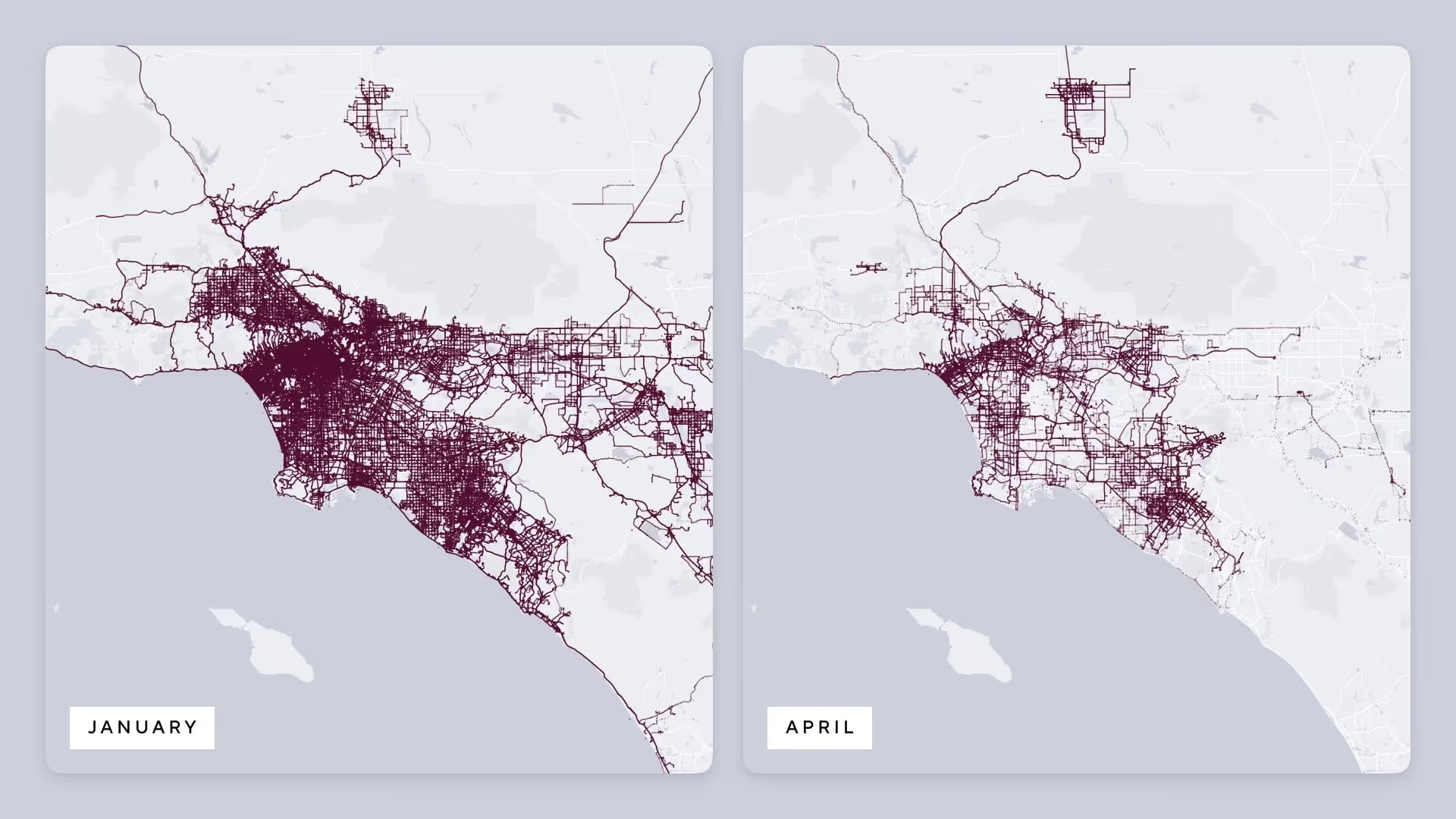
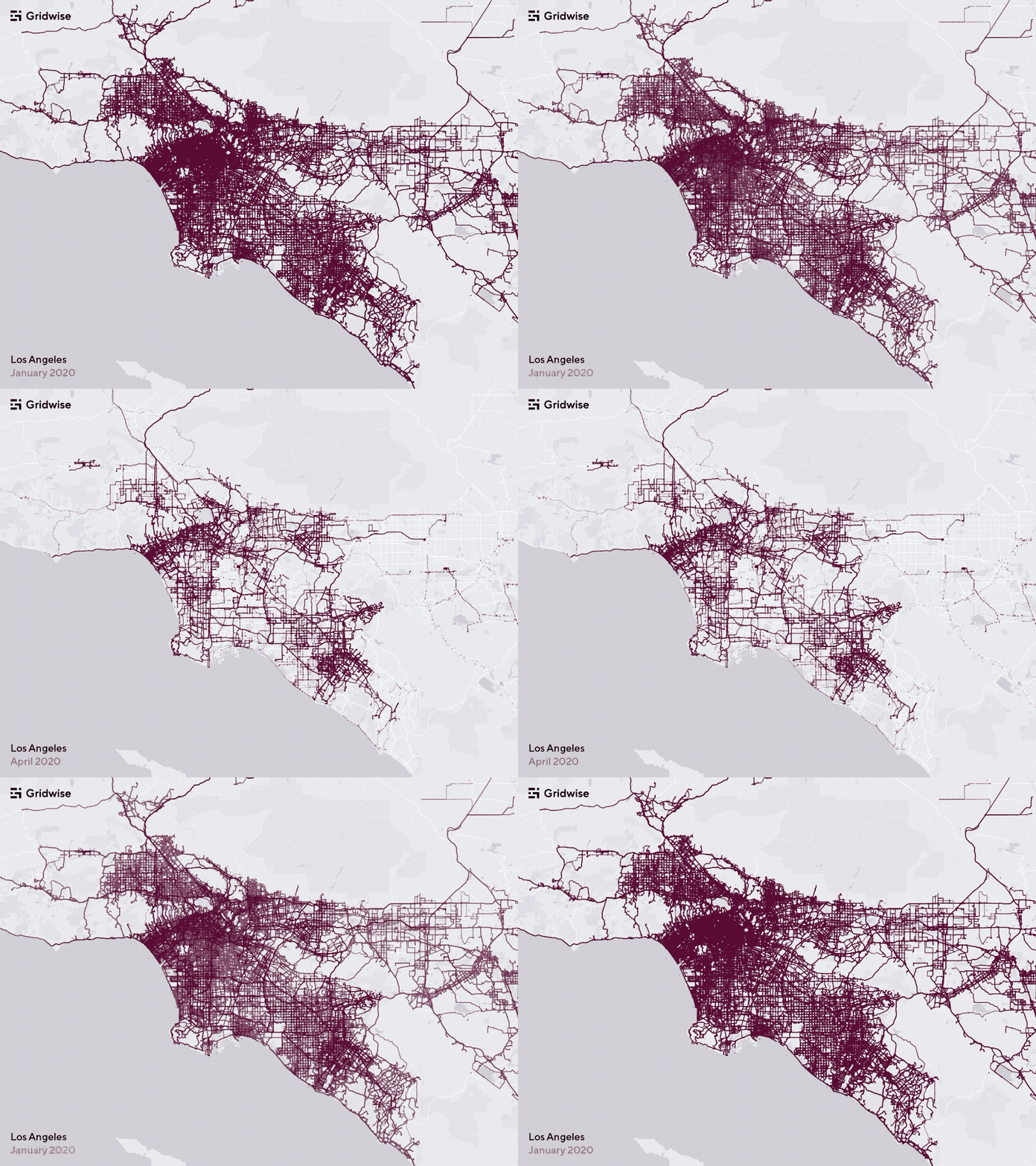
These maps show rideshare activity in New York City and Los Angeles respectively in January and April of 2020.
In the January maps, you can see that rideshare vehicles were covering every corridor of a city as activity was still persisting with strong adoption across all services as it had in previous months.
Not shown on a map (but burned into our memories) is what happened in mid-March. U.S. cities implemented lockdowns and stay-at-home orders, which brought mobility to a near halt.
At this point in time, ride-hail trip volume had plummeted up to 70% in major cities — while at the same time delivery has started to explode in volume, with select services seeing an uptick of 87% in daily revenue.
The persistent activity has resulted from ride-hail vehicles moving essential workers, as well as deliveries.
Significant decrease in ride-hail driver earnings
From the first national broadcast about the rapid spread of COVID-19, companies and workers throughout the United States started feeling the disastrous effects of the crisis, and it’s been especially tough on ride-hail drivers.
The graph below shows the volatility of median hourly wages for U.S. ride-hail drivers.
We can see that national driver earnings reached a high of $19.36 per hour on February 24, 2020 before decreasing by more than 35% to an abysmally low $12.35 per hour in mid-March.
The decline in driver earnings isn’t surprising. As demand decreases, driver earnings will inevitably decrease along with it.
So why, then, are we seeing earnings increase? Because the supply of drivers has decreased as well.
We at Gridwise wanted to know more about the supply side of the rideshare industry, so we conducted a study that included more than 2,000 of our drivers. We found that 46% of drivers stopped driving for rideshare services completely because they felt it was unsafe to keep driving with a deadly virus on the loose. When asked separately if they started driving for a delivery service, 49% said they were driving for services like DoorDash, Postmates, or Instacart.
Los Angeles is a great example of a city whose hourly earnings initially declined and then rebounded weeks after a lockdown went into effect. You can see this on the graph below. Take a look at how earnings plummeted from March 9 to March 16, and dropped even further on March 23. Then by the next week, earnings had jumped from a low of $11.79 back to $15.50.
Why? Because these earnings graphs only include the hourly earnings of drivers still on the road. Not those who have chosen not to drive.
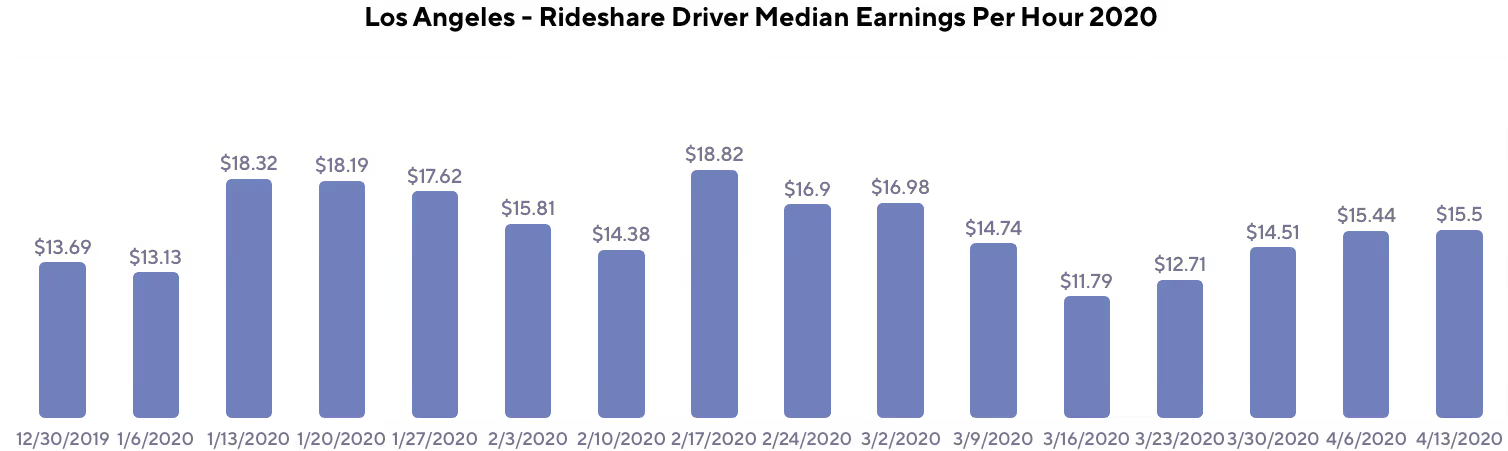
What will happen when stay-at-home orders end?
First, let’s talk about what won’t happen. As soon as these orders are lifted, we’ll all breathe a sigh of relief — but the reality is, ride-hailing demand won’t immediately go back to pre-COVID-19 levels.
At Gridwise we conducted another study (we do that a lot). This time we surveyed 800 consumers because we wanted to better understand consumer perspectives on mobility in 2020. Our study revealed that riders plan to take an average of 25% fewer rides to work using ride-hailing services, and about 17% fewer rides with ride-hailing services for recreational purposes.
This actually makes perfect sense. Even as stay-at-home orders are lifted, most people will still be extra cautious when venturing outside.
Our study confirmed that too. Nearly half of the respondents told us that as long as COVID-19 is still a threat in 2020, they plan to go out 75% less often than they normally would, and more than one-third plan to reduce going out by anywhere from 25% to 50%.
Also not surprising is what people say about using public transportation — which in many ways will be hit even harder than ride-hail. We found that riders plan to use public transportation 23% less often to get to work and 31% less often for recreational purposes than they did before COVID-19.
Based on these insights, we expect to see frequent public transit users flock more toward ride-hailing services for their primary mode of transportation in an effort to steer clear of crowded areas.
So how can TNCs not only survive, but thrive?
By embracing delivery, of course. You already see this happening across the ride-hailing industry.
Lyft, for instance, previously had no delivery business, and in April 2020 launched a service aimed to deliver meals and groceries to essential workers.
Uber has not only doubled down on an Uber Eats business that was already larger than Grubhub, but they have also expanded their offerings. Uber now offers Uber Direct, which expands its services to include grocery and retail delivery services, and Uber Connect, which is a peer-to-peer delivery service.
You even have Alto, a Dallas-based ride-hailing service that has completely pivoted to the delivery market.
While these changes may feel abrupt, the data show that focusing on delivery is the right thing to do not only in the short term, but the medium term as well.
Our consumer sentiment analysis also shows that since the COVID-19 crisis hit, food delivery consumers have been ordering out about 16% more often than they did before the crisis. They also told us they expect to continue ordering out at about that same rate throughout 2020 as stay-at-home orders subside, but COVID-19 remains a persistent, everyday issue.
Even more interesting is the fact that customers are ordering groceries a whopping 62% more than they previously did. This will probably drop slightly after stay-at-home orders are lifted. But there will still be a huge increase in grocery deliveries compared to pre-COVID times as consumers say they will still order delivery 55% more often than they did before.
So which TNCs will win?
Using proprietary data, we have concluded that companies well equipped to focus on food, grocery, and retail product delivery are well-positioned for growth through 2020 and beyond. Uber is well-positioned in the food delivery space to continue to grow while competing with food delivery companies such as Postmates, DoorDash, Grubhub, and others.
Although late to the game, services like Lyft and Alto have started delivery segments of their business as they realize that operating a delivery segment is key for today’s survival and future growth.
Drivers who focus on delivery will also benefit throughout 2020. The graph below shows that while ride-hail drivers have unfortunately been making less through April 2020, delivery drivers are earning more each week.
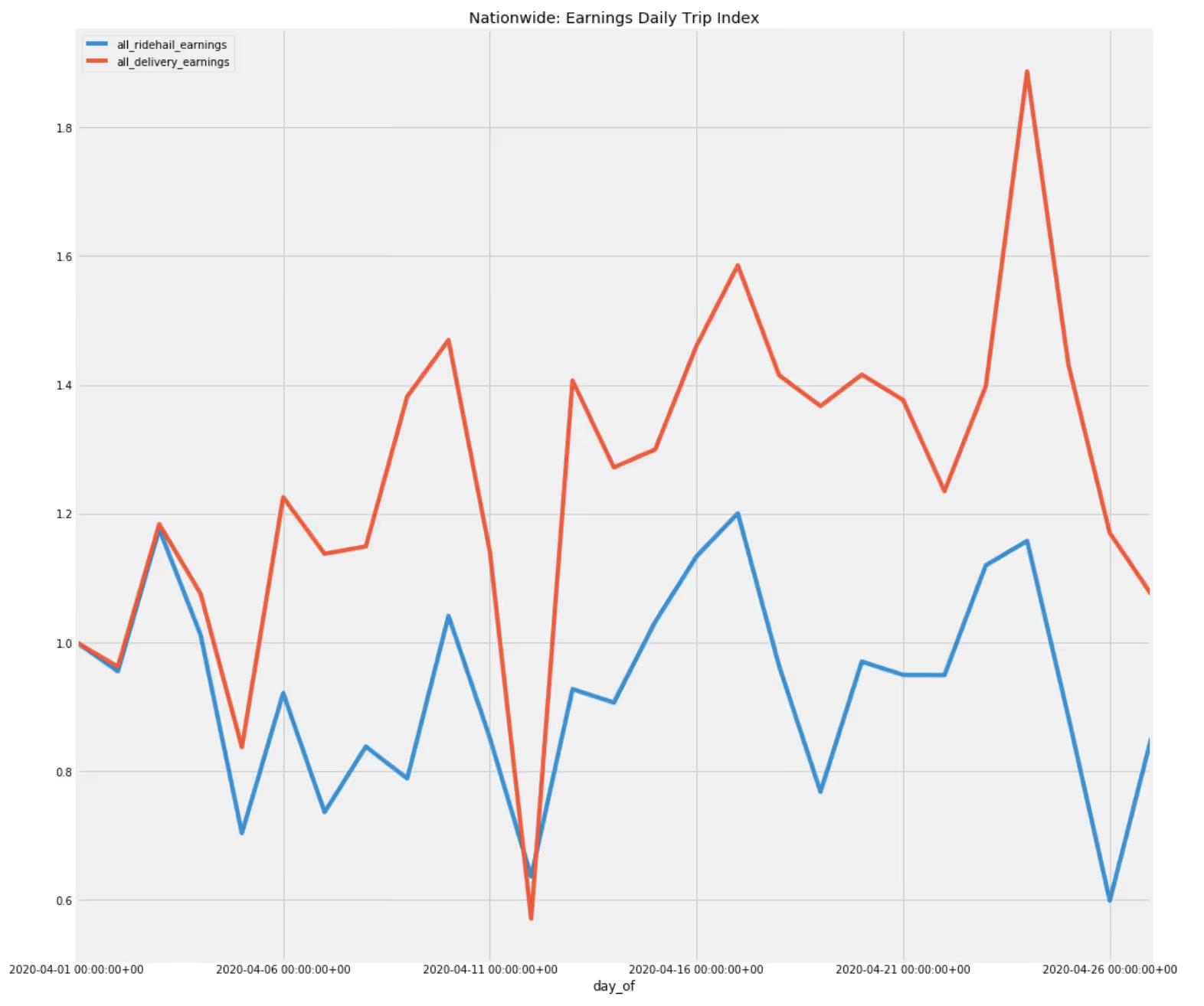
But is the ride-hailing industry in trouble?
Reports of the death of the ride-hailing industry have been greatly exaggerated.
Despite COVID-19, the ride-hailing industry does appear to be well-primed for medium- and long-term success.
Uber and Lyft have around $13 billion in cash on hand and the ability to raise more funds if needed, which gives both companies plenty of runway to weather the COVID-19 storm.
But even more importantly, ride-hailing is well-positioned against public transportation when it comes to winning back recreational travelers within urban environments.
Our consumer analysis study also found that while consumers plan to use ride-hail services 17% less for recreational purposes throughout 2020 when compared to a pre-COVID-19 world, consumers also say they will use public transportation 31% less.
These data confirm the obvious: that consumers will shy away from public transportation and move toward ride-hail services when they do go out.
And you can expect ride-hail companies to lean into this by building their images around being the sanitized travel option for consumers.
Uber and Lyft also have room to decrease prices, as they have been slowly but surely increasing their prices since the beginning of 2019 as competition decreased. Unfortunately, drivers on the supply side may see their rates cut so these companies can remain profitable. But with TNCs and delivery companies receiving record numbers of driver applications, this may prove to be a non-issue.
So in the short-term, the major ride-hailing companies will certainly take a hit to their revenue — but with a $13 billion war chest between them, don’t expect them to go away anytime soon. In the short-term, they’ll focus on delivery, while picking up riders that would have otherwise taken public transportation throughout the rest of 2020. This will prime them for a strong 2021.
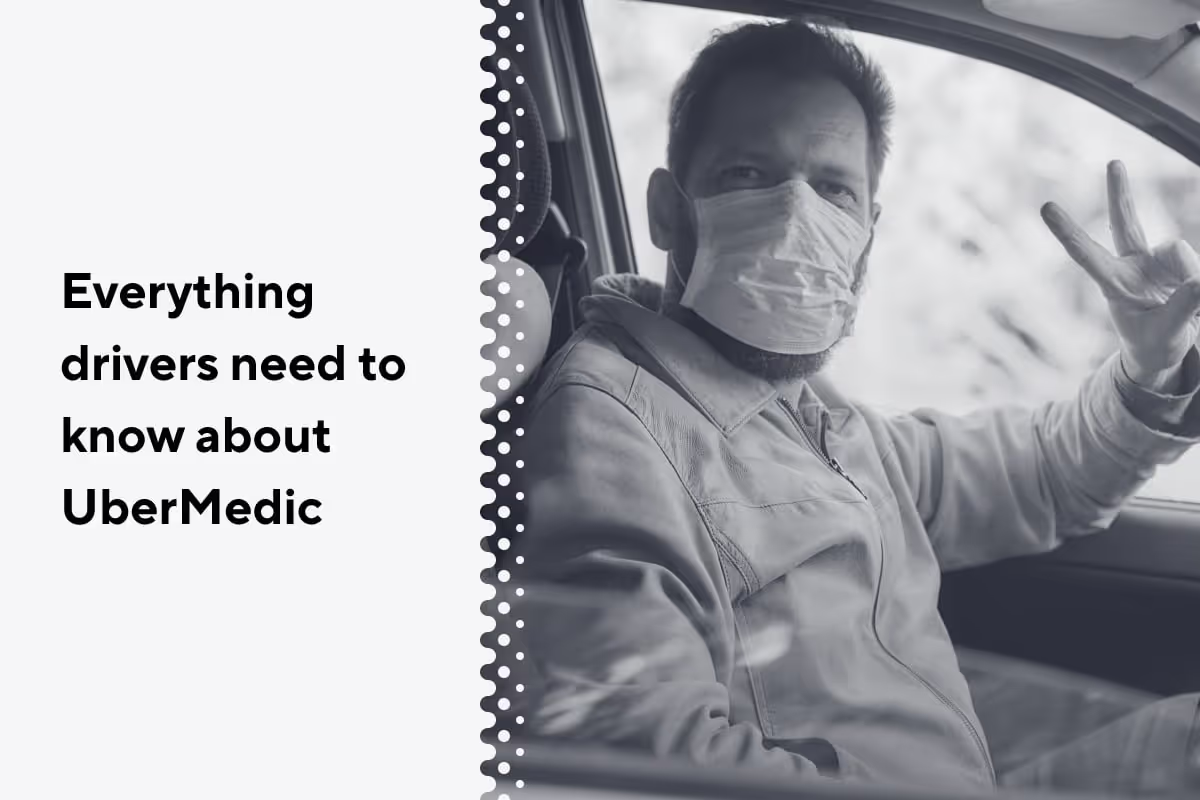
Everything drivers need to know about Uber Medics
One of the most gratifying things about being a rideshare driver is providing rides for people who do the type of work we literally couldn’t live without. How many times have you picked up an overworked doc, a bone-tired nurse, an EMT just coming off a long shift, or a late-night nursing home attendant, and thought how good it was to know you could help them out.
Today, no group of workers is more deserving of extra consideration and recognition than medical workers. During this pandemic, they haven’t had much of a chance (if any) to binge-watch a TV series or spend the afternoon cleaning out closets and drawers. They’ve been frantically busy, on the front lines of the war against the novel coronavirus and the vicious respiratory disease it causes, COVID-19.
Day in and day out, these people have reported faithfully to work in a potentially high-risk environment. Whether they’re actually treating COVID-19 patients, or doing their regular jobs in a facility where everyone thinks nonstop about the virus and what it can do, they need understanding and support. And, from time to time they need a ride.
Knowing that medical personnel need to get their rides quickly and safely, Uber created a new class of trips for them called Uber Medics. Like Uber X, Uber XL, Uber Eats, and other classifications, Uber Medics is a type of trip Uber will allow certain drivers to accept. People have lots of questions about Uber Medics, and we’ll do our Gridwise best to address them here.
What riders are eligible for Uber Medics trips?
Medical professionals are the passengers who are eligible for Uber Medics trips. When they enter a special code, they’ll be routed into the Uber Medics request queue. They will also receive a 25% discount from Uber.
Will drivers get more money for Uber Medics trips?
No. According to Uber, drivers will be paid the same as they are for any other ride. Drivers won’t get any less, either. Any discount given to the medical professionals will be absorbed by Uber.
What if I don’t want to risk being in close quarters with medical professionals, and don’t want to accept Uber Medics trips?
First, only top-rated drivers will be eligible to accept these trips. Drivers with excellent ratings who are deemed eligible for Uber Medics will have the option of being included in the program or not being included. You can select the kinds of trips you want to accept using the trip type filter in the app.
At this time, Uber Medics is available only in select areas. These include Denver, New York City and suburbs, Upstate NY, San Francisco, Washington D.C., Chicago, New Jersey, Boston, Philadelphia, and Sacramento. Uber generally launches services in a few markets and then expands, so if and when it is available in your area, you’ll be notified and the Uber Medics option will appear in your app settings.
What if I don’t want to be too close to medical professionals, even if they aren’t using Uber Medics?
There is a chance you’ll be called to pick up a medical professional, even outside the Uber Medics program. Not all of them will have codes, and Uber Medics isn’t available in every community, so you could definitely get ordinary requests from riders who are medical professionals.
If for any reason you feel unsafe taking a passenger in your car, including concern about exposure to the coronavirus, you can always cancel the trip. Remember, your car, your rules.
What is Uber doing to protect drivers who choose to drive for Uber Medics?
Uber is partnering with hospitals and health centers to supply drivers with masks, hand sanitizer, gloves, and disinfectant spray. Also, Uber will give extra safety training to Uber Medics drivers, emphasizing essentials such as not allowing passengers to sit in the front seat.
Uber’s actually doing another good thing: offering the use of an app to help drivers assess their health status. Through Uber’s partnership with a third-party telehealth portal called Ro, Uber drivers can list their symptoms, and if warranted, they’ll be referred to a healthcare service for further evaluation, testing, and/or treatment. A driver’s evaluation will be confidential, as with any medical examination.
New opportunities and individual choices
As with all things COVID-19, it’s important to weigh the risks to your health or the health of a high-risk loved one against the opportunities being offered. Uber Medics is a great service for a community of essential workers who deserve extra support during this crisis. You can participate if you want, but you can also opt out.
We hope this information has answered your questions about Uber Medics, but if you have some we didn’t cover, please comment below and we’ll get right on it. And … don’t forget to download the Gridwise app to keep up with current news, and to track your activity as you work your way through the COVID-19 crisis.
Can rideshare and delivery drivers work and still collect unemployment
The COVID-19 crisis has been quite a shock, and fortunately, measures are being taken to help us absorb it.
One welcome surprise was hearing that drivers are now eligible for unemployment compensation. On March 27, 2020, emergency legislation known as the Coronavirus Aid, Relief, and Economic Security (CARES) Act was signed into law. Part of the Act is a program called Pandemic Unemployment Assistance (PUA), which extends unemployment benefits to independent contractors who are not usually eligible for those benefits—like rideshare drivers and other gig workers.
If you haven’t applied yet, or want to know more about unemployment for drivers under the CARES Act, you’ll find lots of information in this Gridwise article.
The unemployment compensation train may be on its way, but in many drivers’ cases, it hasn’t made it into the station yet. One reason for the delay is the unprecedented onslaught of applications. Also, applications for benefits, including authorization for the extra $600 per week from the federal government, are being administered by individual states.
At first, turning to your state for assistance sounds much easier than going to the Feds, but in this case that isn’t necessarily true. Each state has its own rules and guidelines for unemployment, and each state’s computer system must be configured to accommodate the new rules that apply to independent contractors.
That means 50+ government entities have had to alter their computer systems, websites, and the ways they mete out money. Most states are making progress, but the first payment hasn’t even come through yet in many of them. If you’re among those who are stuck waiting, you might want to explore more ways to bring in money in the meantime. Check out this Gridwise article for some ideas.
New law brings big questions
Aside from all the snags and delays, if you do apply for unemployment compensation, it will make its way to you ... eventually. Will you get enough to pay your bills? What if you don’t? Even with the extra $600 per week, most full time drivers won’t be making as much as they did before the COVID-19 crisis knocked us flat.
Another burning question is, what happens if you work while you’re collecting unemployment? If you list this extra income in your weekly or bi-weekly claim, will your benefits be reduced? Will you still get the $600 per week from the Feds?
We at Gridwise really wish we could answer these questions for everybody with one simple answer, but unfortunately that isn’t possible. Like most everything else related to unemployment benefits, the answers you need depend on the state in which you live and work. What we can do is provide you with information we’ve collected from all the states. So read on ...
State-by-state guidelines for earning while unemployed
Right upfront, we need you to know that we are not legal experts. We’re simply conveying information to lead you toward the answers that are factual and legal in your particular case. You’re responsible for following the procedures and laws that are specific to your state when you apply.
A good place to start is your state’s unemployment website, which hopefully has been updated with the new information. Find whatever section addresses CARES Act benefits, and read what your state’s policies are. If you prefer to handle this via telephone, you should be able to find the number on the website.
In the meantime, we’re offering a glimpse at the different states’ policies. Look for yours, and you’ll find out what might happen if you work while collecting unemployment benefits, and if that’s allowed, how much you’re permitted to earn.
Note: In some states, you must first apply for regular unemployment compensation before applying for PUA.
Also, in some cases, the maximum benefits and rules for partial unemployment may not apply for PUA recipients. In many cases, the rules are more lenient. We’ve gathered some information for you here, but most of it refers to partial unemployment before the CARES law was passed.
You definitely need to refer to your state’s website for all the details, and direct any questions you have to your state authorities.
Alabama — Maximum benefits: $265 per week. Partial unemployment is calculated based on your weekly earnings report. You’ll get the difference between your weekly benefit and your wages for the week.
Arizona — Maximum benefit: $240 per week. You can earn up to $30.50 each week with no effect. After that, partial unemployment will be calculated by subtracting each dollar you earn above $30.50 from your benefit amount.
Arkansas — aximum benefit: $451 per week. If you work less than 40 hours and earn less than 140% of your weekly benefit, you’ll still get your benefits. Once earnings go up to 40% of your payment, your benefits will be reduced.
California — Maximum benefit: $450 per week. You can earn up to $25.99 without penalty. If you earn between $26 and $99.99, any amount over $25 will be deducted from your benefits. If you earn over $100, 75% of the wages will be deducted from your compensation.
Connecticut — Maximum benefit: $590 per week. Two-thirds of the amount of your earnings would be deducted from your weekly allocation.
Colorado — Maximum benefit: $529 per week. If you work more than 32 hours in a given week, you’ll be considered to be working full time, and partial benefits won’t be paid for that week. You can earn up to 25% of your benefit amount for any given week without reducing your benefits. Any earnings greater than that, but less than your benefit amount, will be subtracted dollar-for-dollar. If your earnings exceed your benefit amount, you won’t be paid for that week.
D.C. — Maximum benefit: $359 per week. 80% of your earnings plus $20 will be used as a basis for partial unemployment benefits, i.e. earnings in addition to your benefits.
Delaware — Maximum benefit: $330 per week. You can earn 50% of your benefit without penalty. Anything over that is deducted dollar for dollar.
Florida — Maximum benefit: $275 per week. Any income you make will be deducted from your payments.
Georgia — Maximum benefit: $330 per week. With partial unemployment, you can earn the amount of your payment, plus $50 and still get your full benefit amount.
Hawaii — Maximum benefit: $560 per week. Partial unemployment allows you to earn up to the level of your benefit amount, as long as you don’t work full time. You will be paid the difference between your benefit and your gross earnings, plus $150.
Idaho — Maximum benefit: $336 per week. If you earn half of your allowed amount or less, you’ll still get the full benefit. If you earn more than 50% of your benefit, your benefit will be reduced dollar for dollar. If you work full time (40 hours or more), or earn 150% of your benefit in gross earnings in one week, you won’t get a payment for that week. If you earn 150% of your benefit for two weeks in succession, you’ll have to open a new claim on the third week if you still need it.
Illinois — Maximum benefit: $418 per week. If you earn more than half of your weekly rate, your benefit will be reduced by the amount of money that is over $50% of your wages.
Indiana — Maximum benefit: $390 per week. You can work part time and earn less than your benefit amount, but dollar-for dollar deductions are made for all wages that are 20% or more of your weekly benefit amount.
Kansas — Maximum benefit: $420 per week. You can work less than full time and earn less than your benefit amount, but any money you earn over 25% of your benefit will be subtracted from your weekly unemployment compensation.
Kentucky — Maximum benefit: $415 per week. You can work less than full time and earn less than 125% of your weekly benefit. However, 80% of your gross wages will be deducted from your benefit.
Louisiana — Maximum benefit: $247 per week. You may earn less than your weekly benefit amount. Each case is reviewed individually, to determine if any reduction in benefits will be made.
Maine — Maximum benefit: $378 per week. You can earn $25 per week with no impact on your benefit. After that, anything you earn is deducted from your payment. If you earn $5 or more over your benefit, you won’t get a payment for that week.
Maryland — Maximum benefit: $430 per week. You can earn up to $50 per week before deductions go into effect. If you earn more than that, the amount you earn will be deducted from your weekly benefit.
Massachusetts — Maximum benefit: $674 per week. You can earn 33% of the amount of your benefit check. The benefit will be reduced dollar for dollar for amounts over 33%. Once the benefit is reduced to $0, you no longer qualify for benefits. Also, you must not work more than 35 hours per week, or you will be considered to be working full time and will not be eligible for that week.
Michigan — Maximum benefit: $362 per week. You can earn money, but your benefits will be reduced by 40% if you do. If your wages exceed your payment, but are less than 1.6 times your benefit, your total wages are subtracted from 1.6 times your benefit.
Minnesota — Maximum benefit: $629 per week. You can work less than 32 hours and still collect, as long as your earnings are less than your weekly payment amount, but your benefit will be reduced by 50%.
Mississippi — Maximum benefit: $325 per week. Any earnings over $40 will be deducted from the weekly payment.
Missouri — Maximum benefit: $320 per week. Earning up to 20% of your benefits won’t result in a reduction, but your benefit will be reduced dollar for dollar for earnings over 20% of the benefit amount.
Montana — Maximum benefit: $464 per week. You can work less than 40 hours a week, and as long as you’re working for all the available hours, you’ll still get a partial payment. Your earnings have to be less than twice the amount of your benefit amount. If you earn more than 25% of your benefit in any week, your payment will be reduced by $.50 for each dollar over that amount.
Nebraska — Maximum benefit: $362 per week. You can earn up to 25% of your weekly benefit, but after that, earnings are deducted dollar for dollar from the benefit amount.
Nevada — Maximum benefit: $407 per week. If your gross earnings are less than the benefit amount, 75% of that amount will be deducted from the weekly benefit. They will, at least, hold on to those funds in case you need them in the future.
New Hampshire — Maximum benefit: $427 per week. You can work less than 20 hours, and your benefit amount will be reduced by any amount that exceeds 30% of the weekly benefit.
New Jersey — Maximum benefit: $611 per week. You can earn up to 20% of your benefit amount without penalty, but beyond that, earnings will be deducted from your weekly payment.
New Mexico — Maximum benefit: $397 per week. You can earn up to 20% of your benefit amount, but if you earn more, your payment gets reduced dollar for dollar. You can’t receive any benefits if your earnings are equal to or greater than your benefit amount.
New York — Maximum benefit: $420 per week. Each hour you work is counted as working a day, so your benefits are reduced by 25%. If you work 4 days, you lose your benefits for the week.
North Carolina — Maximum benefit: $350 per week. Your payment gets reduced by the amount of any wages that exceed 20% of your benefit payment.
North Dakota — Maximum benefit: $470 per week. You may earn up to 60% of your benefit amount, but every dollar you earn after that is subtracted from your weekly payment. If your earnings exceed the amount of your benefit, you are not eligible for that week.
Ohio — Maximum benefit: $418 per week. You can earn up to 20% of your benefit amount, and then earnings will be deducted from your payment.
Oklahoma — Maximum benefit: $440 per week. As long as you work less than 32 hours, which is considered full time, and earnings are less than your weekly benefit plus $100, you qualify for your full payment.
Oregon — Maximum benefit: $538 per week. You can earn ten times the minimum wage or 33% of your weekly benefit amount before deductions are made. Deductions are the amount of earnings over that amount.
Pennsylvania — Maximum benefit: $573 per week. If you earn less than 40% of your weekly benefit rate while working part-time, you still get your full payment. If you earn more than 40% of your benefit, as long as your part-time earnings (when added to your weekly benefit) do not exceed your weekly benefit plus 40% of that amount, you’ll still be entitled to collect payments. Reductions will be made according to a formula.
Rhode Island — Maximum benefit: $566 per week. You can still collect your payment as long as your gross earnings are less than your benefit rate. Your benefit will be reduced by the difference between the payment and your earnings, plus 20% of your benefit.
South Carolina — Maximum benefit: $326 per week. Your earnings must be less than your weekly benefit amount. 25% of your eligible benefit amount will be subtracted from your earnings. Then, the rest of the earnings will be deducted from your payment.
South Dakota — Maximum benefit: $345 per week. If your earnings are equal to or greater than your benefit amount, you will not be paid your benefits. This is also the case if you worked 40 hours or more: 75% of your earnings over $25 will be taken away from your weekly benefit amount.
Tennessee — Maximum benefit: $275 per week. Earnings over $50 (or 25% of your weekly benefit) will not reduce your payment from the state. If you go over your weekly benefit amount, your claim will be suspended, and you’ll have to re-open it.
Texas — Maximum benefit: $465 per week. Part time workers can earn up to 25% of the payment before it gets reduced.
Utah — Maximum benefit: $479 per week. It’s all right to earn up to 30% of your benefit amount without getting a reduction. Once you go over that amount, your benefit will be reduced dollar for dollar. If you earn an amount that’s equal to or greater than your payment, or work full time (40 hours or more), you won’t get your payment.
Vermont — Maximum benefit: $425 per week. Any money you earn will be subtracted from your payment.
Virginia — Maximum benefits: $378 per week. You can earn up to $50 without losing your benefit. After that, deductions will be made dollar for dollar. If you earn the amount of your benefit or greater, you will not receive a payment for that week.
Washington — Maximum benefits: $637 per week. Working part time will result in a reduction in benefits. Your gross earnings, minus $5, times 75% will be deducted from your payment.
West Virginia — Maximum benefits: $424 per week. As long as your earnings aren’t greater than your benefit amount, plus $60, you’ll still receive benefits. Earnings over $60 will be deducted from the weekly payment, however.
Wisconsin — Maximum benefit: $370 per week. You can earn $30 without penalty, but for every dollar you earn after that, $.67 will be taken from your benefits. You won’t get any benefits if you work more than 32 hours in a week, or if your total gross pay is more than $500. However, not everyone has the same limit on weekly earnings. They provide a formula for calculating it.
Wyoming — Maximum benefit: $471. Once you earn 50% of your benefit amount, your weekly payment will be reduced. If you work 35 hours or more, or earn more than your weekly benefit amount, you won’t be paid benefits. If you earn more than 50% of your maximum amount, benefits will be reduced dollar for dollar.
So should you work while you’re collecting unemployment … or not?
It seems incongruous to think you might make more money by staying home than by working, but that’s how unemployment works—at least this time. Without a doubt, the state amounts alone would incentivize people to get other work. However, the additional $600 per week from the federal government adds a huge incentive to work only as much as you can without losing your benefits.
There's a good reason for that. Of course, government leaders don’t want people to be out working if they’re unhealthy, or if there’s a chance they’ll spread COVID-19. This is a very specific and unique situation, and it won’t last forever.
In some states, you can probably do some work and collect a little unemployment, and still get the $600 per week from the Feds. You’ll have to check your state’s restrictions and determine what’s best for you. No matter what you decide, we can’t emphasize enough the importance of being completely honest about your unemployment claims, and any earnings you report. The legal consequences for hiding income or trying to game the system in any other way can be deadly serious.
Make your decision, and remain informed
Whether to work or not to work during the COVID-19 crisis, and while you’re accepting unemployment, is a decision only you can make. Here at Gridwise, we like to give you the information you need to make your choice based on knowledge. Do you have any inside information about unemployment in your state, and how your state is handling PUA benefits? Tell us about it in the comments section. And—make sure you download Gridwise so you’ll continue to be in the know about the best strategies for getting the benefits you deserve until you can get back out there on the road!
Beyond Unemployment Comp: 10+ ways drivers can get more financial assistance amid COVID-19
There’s no doubt the whole COVID-19 situation has brought disaster to way too many lives. Yet, out of this turmoil, some good things have arisen.
There’s a lot more camaraderie and a spirit of appreciation for the helpers in our world. Neighbors are coming to one another’s aid, sharing resources, and doing favors for one another. If you’ve been driving or delivering, you probably noticed something else that’s pretty nice: people are tipping!
That doesn’t mean things are all that great for drivers though. As you’ve undoubtedly seen by now, being qualified and applying for unemployment compensation doesn’t mean it comes right away. And even though people are slowly coming back to business, driving is nowhere near what it once was—and for many of us, it still holds dangers. What that means, to a large degree, is that drivers are still left holding the (woefully empty) bag.
What can you do to make sure you stay afloat? There are some steps you can take … many are easy, and others require creativity. We hope to help you here with some inspiration and guidance about securing your financial integrity.
First, in case you haven’t heard yet, you can get unemployment compensation (UC). When the CARES Act was passed in March, independent contractors became eligible for the first time. Not only can drivers collect state UC now, you can also receive $600 per week in federal funds through July 2020. If you haven’t applied yet, it’s definitely something you should consider. Here’s a Gridwise article that’ll give you the information you need to put your application together.
Collecting unemployment: a slow and difficult process for drivers
It’s hard to find a driver who’s not grateful for the possibility of collecting unemployment while we wait for this crisis to end … but so far, actually getting unemployment has been difficult. A huge factor in the delay is the flood of applications that hit antiquated state computer systems, many of which had no way of handling information from independent contractors such as drivers.
Can you say n-i-g-h-t-m-a-r-e?
On top of that, the IRS website has only recently started allowing people who have not yet received their $1,200 stimulus checks to enter their bank information and get direct deposit. If you’re like many of us and are still waiting for your money, you can go to this IRS site, which is finally ready, at long last, to receive your bank information.
Before signing onto the site, have your tax return (2018 or 2019) handy. The IRS needs your adjusted gross income and the amount you owe(d). You’ll also need your bank’s routing number and your account number, and you can find that info on the bottom of one of your checks.
The delays with unemployment and the IRS payment—money we thought would be coming to us by now—have been long. In the meantime, bills continue to pile up. Sure, it’s good to know that there will be a nice amount of cash coming your way ... one day. But what about the bills you need to deal with in the meantime?
SBA loans and grants: programs to support small businesses, like yours
When the CARES Act was passed, a big part of it involved help for small businesses and independent contractors beyond unemployment. You’ve probably heard about the Paycheck Protection Program (PPP). It helps small businesses continue to keep employees on the payroll and pay their basic expenses. It was immensely popular—so much so that the program ran out of money in just two weeks because so many people applied.
You’d expect that to happen to some degree, but what no one was ready for was the way not-so-small businesses, namely restaurant chains and huge, well-endowed universities went after what they considered to be their share.
The programs have recently been replenished, as Congress passed a bill to add $484 billion to the PPP fund and other programs, and for aid to hospitals and to states doing COVID-19 testing. For you as a driver, it will be easiest if you’ve already got a business set up as a LLC, and possibly employ people to support that business. But even if you don’t, there are still some options.
If you prefer, you can apply for a PPP loan as an individual. The process for independent contractors isn’t overly clear, but provisions are in the legislation. If you get the loan, and you use it only for covering expenses that are directly related to your business such as rent and utilities, you won’t have to repay it. If you can’t or don’t use all of it for these purposes, you’ll have to pay it back within two years, with a 1% interest rate.
There is also another program that drivers might consider called the Economic Injury Disaster (EID) Program. This program administers loans during emergencies such as the one we’re dealing with now, and they carry a very low interest rate. If you apply for a loan, you can get an emergency grant, which could be up to $10,000.
Before you can get this grant, you must apply for the loan as an independent contractor. If you get the grant while you’re waiting for your application to be processed, you have no obligation to repay it. If you also have a PPP loan, the amount of the grant will be subtracted from the loan amount.
The sweet thing about the EID loan and grant program is the grant money could come to you as soon as three days after you apply for the EID loan. The less-than-reliable part of this strategy for getting aid is not knowing how much you’re going to get.
The rule of thumb the Small Business Administration uses for the PPP loan is up to 2.5 times your average monthly income for the last 12 months. It might not be very much, as you’ll be competing with businesses that need to support employees and cover expenses.
Also, doing the administrative work for a loan can be challenging for those of us who have no support staff to help with paperwork and record keeping. On top of having to allow the government to examine all your tax records, which can be quite time-consuming, your credit score will be a major factor in the approval process. You’ll want to make sure it’s pretty solid before you even think about applying. If you do get the loan, you’ll have to be impeccable about your accounting, so consider that as well.
If none of this intimidates you, go ahead and apply for the loan, and then ask for the grant. You could get some money while you’re waiting for the loan to be processed or UC payments to start coming your way.
Just do it soon. This fund is first come, first served … and as we already said, there have been some greedy companies and institutions trying to grab huge handfuls from the government cookie jar. There’s no telling how soon it will be before we’re down to the crumbs again.
Before you apply: Be very careful about double-dipping! You’ll want to inquire about whether it’s okay to get UC in addition to a loan or grant, if this is your plan. You’ll apply for the loan at your local lending institution, so it should be pretty easy to get straight answers in a reasonable amount of time.
Funds dedicated to independent contractors
If government loans don’t work for you, special funds set up by organizations that support independent contractors can give you options for a solid stopgap measure.
This organization gathered a group of corporate sponsors, most of which rely on freelancers, to create a fund for those in need. Just like the government, this fund got overwhelmed quickly by an onslaught of requests. Keep checking the site. Chances are they’ll start to take applications again once more funding appears.
Contributors support this fund, which is for those of us who are suddenly struggling to pay our bills. You can apply for help directly through the site, and hopefully one day you’ll be able to make a contribution for someone else in need.
Freelance Artists (and friends)
The Freelance Artists Emergency Fund is geared primarily toward artists (including writers). Their information is useful no matter what you do, but it’s even more helpful if you happen to be an artist in addition to being a driver, as so many of us are. The list of available funds could help keep you from falling through the cracks while you wait for your money situation to improve.
I Care if You Listen: Funds for Musicians
We know there are many musician-type drivers, so we’re listing this site for you to explore. Yours is an industry that will be disrupted by social distancing for a really long time. The site offers links to many resources for money aimed at helping out the troubadours and lutemasters of our age. But even if you can’t carry a tune in a bucket, you might still get some ideas for resources here. Don’t be afraid to look.
Oh yeah, you can do this. How many people you know have started one of these and made out pretty well? You’ve probably been a donor at some point in the past. If you’re too proud to do one just for you, consider a page for drivers in your city. Getting a fund going is a pretty smart and direct way to get the help you need.
Landlords lend a hand
Okay, maybe in some cases it was necessary to twist their arms. But it’s true that there’s some chance of rent relief, as well as forgiveness for onerous mortgage payments. The good old CARES Act has us covered here too.
Here are some facets of this new law that can help you keep a roof over your head. That’s become excruciatingly more important now that you have to stay home so much of the time.
CARES Act Eviction Protection
If you live in any kind of federally funded housing, you are now protected from eviction for 120 days. During this time, the landlord cannot charge you late fees or turn you out of your home. You’ll still be responsible for the rent, by the way, but you’ll get these four months to get caught up.
CARES Act Tenant-Based Rental Assistance
The Department of Housing and Urban Development (HUD) was allocated more than $17 billion to administer vouchers and affordable housing to those who need it. Check out the programs here.
Indirect Relief
Don’t forget you have that $1,200 check coming to you, and more if you have a partner and/or children. You can use that to help with the rent, of course. Also, your landlord is counting on you to apply for unemployment compensation.
Direct Negotiation
Most landlords understand you’re under pressure right now, so many will allow you to defer or break up your rent payments without a fee. Normally, if you can show the landlord or management company that you have applied for unemployment or some other subsidy, they’ll negotiate with you. From their point of view, getting something from you is better than getting nothing. They’ll be more strapped than usual too, so they have to understand what it feels like.
Mortgage Relief
Federally backed mortgages
Mortgages backed by the federal government are a good thing to have, especially now. The CARES Act directs lenders to suspend payments for 12 months, and suspends eviction proceedings for the duration of the COVID-19 crisis. There are other provisions that allow you to defer mortgage payments too. Learn more about them here.
Lending Institution-based Mortgages
As with landlords, banks and other lenders have to know how difficult it might be for you to make your payments on time under the current conditions. Go to your lender and ask what programs they’ve put in place to help you and others who are affected by the crisis. Even though they’re not required by law, many are putting programs in place to support your need to defer payments without penalties and late fees. It’s always better to ask for help than to stop making payments. With the lender’s help, your credit rating can remain intact.
Utilities and Insurance
Many utilities have put moratoriums on disconnecting service for nonpayment during the COVID-19 crisis. Some have even reduced their rates, or allowed customers to break their bills into separate payments.
The big phone, internet, and cable companies might need a little cajoling (or shaming) into helping people out, but it’s always worth a try. Their services may not be as essential as electricity and natural gas, so, as a rule, they feel less obligated to the public. Still, most of these companies are eliminating late fees and disconnects until we get through this crisis. (Can you imagine “staying at home” without internet service??)
Insurance companies, especially those that deal with auto insurance, have taken it upon themselves to reduce, if ever so slightly, their monthly premium charges. They figure if you’re not driving they’ll be processing fewer claims, and they’re probably right!
Medical insurance payments might be a different story, but if you can’t pay, call them and ask what they can do for you. The same goes for medical providers who may have you on a payment plan.
In all cases, the magic word is negotiate. If you’re in a spot where you can’t come up with the cash to pay in full, or pay at all, communicate your needs, and chances are you’ll get them met. At the very least, you’ll have it on record that you tried, and didn’t just default on your responsibilities.
There’s lots of help in your neighborhood
Like we said at the beginning of this article, this whole mess has brought out a lot of really good people. One obvious example of this is FindHelp.org, a website created and launched to distribute valuable information about getting help in this crisis. Just enter your zip code, and you’ll find resources for food, housing, essential supplies, transit, health, money, care, education, jobs, and even medical and legal assistance.
After entering your zip code, a map will come up with resources in your neighborhood so you’ll know where to find them. With the situation drivers are dealing with right now, seeing this much effort into getting help to the right people feels especially encouraging.
Support yourself
Drivers are very motivated people, and for many, it hurts to be out of work and out of money. Be kind to yourself during this time. Rather than falling into a state of panic or despair, rise to the occasion and get busy. Do your research, fill out the applications, and make the calls you need to make in order to keep your head above water until the crisis is over.
Gridwise app wants to support you in every way possible, and we know the best way to do that is helping drivers connect as a community. If you have comments about this article, or more suggestions about places for drivers to get financial help, leave us a comment and get the conversation started.
But remember, you can’t leave a comment or get a new tip until you download the app. So do it now.
Work smarter. Earn more.
Whether you drive, deliver, or pick up shifts — Gridwise helps you track earnings, mileage, and performance so you stay in control of your work. Download the app and take charge today.
