Gridwise blog
Tips, insights, and advice to help you earn more and work smarter, whether you do gig work, hourly, or shift work.

How to Make $1,000 a Week With Uber Eats in 2026 (Tips + Hourly Data)
In this blog, we'll explore the strategies and techniques that can show you how to earn $1000 per week as an Uber Eats delivery driver. We'll cover everything from optimizing your delivery zones and schedules to maximizing your tips and customer satisfaction. Whether you're a seasoned Uber Eats driver or just starting out, this guide will provide you with the insights and actionable steps to take your Uber Eats driver earnings to the next level.
Becoming an Uber Eats delivery partner can be a lucrative opportunity, especially if you're able to consistently earn $1000 a week. By understanding the platform, optimizing your delivery strategies, and focusing on customer satisfaction, you can maximize your earnings and turn Uber Eats into a reliable source of income.
We’ll cover the following topics to provide coaching and ideas to help you push your earnings up to that $1000 per week level:
What do Uber Eats drivers do?
Uber Eats drivers deliver prepared food most of the time, but they also might shop for and deliver goods from convenience outlets and grocery stores. The job is pretty simple. You get a request for an order, you drive to the restaurant or store to pick it up, and then you deliver it to the customer. If you already drive for Uber, you can choose to take orders for Uber Eats delivery any time.
If you’re not an Uber Eats driver yet, it’s pretty easy to become one. This Gridwise post tells you what you need to do if you want to sign up and start making money Uber Eats style. Many rideshare drivers welcome the chance to deliver food rather than people. This article from Nerdwallet covers the Uber Eats gig from that angle.
There are some sweet advantages to working with Uber Eats. In lots of cities you don’t even need to have a car. You can use a bike or a scooter, or even walk, to make your rounds. If you do use a car, Uber Eats’ requirements are a lot easier to meet than they are for Uber rideshare driving.
You also have a lot of flexibility. You can shop and deliver convenience items and groceries, but you don’t have to. And, like most driving gigs, you can choose your own hours, and map out the locations where you want to work.
Use Gridwise features When to Drive and Where to Drive to help you figure out what work hours and which specific areas will be the most profitable for you. Real data from real delivery people will show you earning patterns for drivers in your town.
How much can you earn doing Uber Eats?
The honest answer to this question is: basically, as much as you want! It all depends on how many hours you put in and how strategic you are about your gig. Earnings vary from one area to another, as this article from Entrepreneur points out. To give you a baseline, let’s look at the earnings of Uber Eats drivers who tracked their earnings with Gridwise.
Remember that these numbers show us only average earnings. To make $1,000 a week with Uber Eats, you’re going to have to be better than average, and we’ll show you how. For now, though, it’s good to have these figures so you get a ballpark number of where to start.
How much do Uber Eats drivers make?
Gridwise data tell us the following:
- Monthly earnings average around $444.00 per month.
- Gross earnings per trip are between $9.00 and $10.00.
- Tips make up about 50% of most Uber Eats drivers’ income, which amounts to about $225.00 per month.
Is Uber Eats good money? It can be. While there are other gigs that pay more per trip, if you drive for Uber Eats, you’ll always be pretty busy.
https://datawrapper.dwcdn.net/HPAz8/3
You can also see that, unlike many other gigs, tips play a huge role in Uber Eats earnings.

With these numbers as a baseline, what can we say about how to earn $1,000 a week with Uber Eats? As we said in the introduction, it’s going to be a hustle, but it’s really possible. To figure out how to make the most money with Uber Eats, let’s start by looking at how many trips these “average” drivers made each month.
We know that average gross earnings were $444.00 per month, and drivers got around $10.00 per trip. That means they took 44 or 45 trips per month, which breaks down to 11 trips per week. That’s not a lot of Uber Eats delivery, is it?
The fact that Uber Eats drivers averaged so few trips shows us that many drivers use more than one app at the same time. This is called multi-apping, and you can learn more about it in this Gridwise post. If you want to answer the question of how much you can make with Uber Eats, then you need to stick with the app and keep plugging away at those orders. You also need solid strategies, as well as some inside tips and tricks.
How to make the most money on Uber Eats: Delivery driving tactics
Getting to that $1,000 a week with Uber Eats isn’t so hard when you remember that the drivers we saw making about $111 a week were only taking around 11 trips in the same time period. That’s not much at all! If you work the Uber Eats app like a boss, you’ll soon have many more trips than that, easily reaching the number needed to get you to $1,000 a week. Now, let’s get to some tactics you’ll need to make that kind of bank.
- Stay with the Uber Eats app, and track your earnings. Gridwise can easily do that for you. Simply sync your Uber Eats app with Gridwise, and you’ll be able to see how much you’ve earned with Uber Eats, what times were most profitable, and your average hourly pay. Racking up trips with Uber Eats has other benefits, including perks and bonuses that are awarded to top drivers.
- Leverage surge pricing and promotions. Surge pricing is applied when there is a lot of demand. When surge pricing is in effect, many of the trips you make will pay more than usual. Promotions are offered to drivers who complete a given number of trips in a certain time period. High traffic volume days, nights, and times give you these chances to get extra earnings. Challenging yourself to complete the right number of trips for promotions will add to the number of trips you can count on for big bucks, too. Learn more about Uber Eats surge pay, boosts, and promotions in this Gridwise blog post.
- Say yes to doubling up on orders. With Uber Eats, you can get back-to-back orders or receive batched orders. Back-to-back orders happen when you receive a new request while you’re on the way to deliver an original order. The Uber Eats app routes these trips automatically, so you won’t be sent out of your way.
Batched orders are Uber Eats’ way of bundling together orders from either the same restaurant, or two nearby eating establishments. You get money, and trip count credit, for all the orders you complete, plus customer tips, without having to make a bunch of separate trips.
- Turn on the charm and get bigger tips. Being nice really is part of the Uber Eats driver’s job, and getting tips is one way people who drive for Uber Eats make money beyond their basic pay.. Bring along those extra napkins and condiments, use equipment that keeps food and drinks at the right temperatures and prevents spilling, and consider your customers’ needs. If you deliver groceries, be extra careful with delicate items such as bread and eggs.
And, most important, follow your customers’ directions, and stay in communication with them if you are going to be delayed, or if you have questions about their order. This Gridwise post will tell how to get bigger tips as a delivery driver.
- Use even more charm to keep your ratings high. As an Uber Eats driver, you will be rated by the restaurant or store where you pick up the orders as well as the customers who are waiting for the deliveries. This two-way rating system is designed to keep you on your toes, so Uber can keep people satisfied with your service. Don’t worry, you get to rate them, too.
There’s another reason why your rating as a driver is important. It not only keeps you in good standing with Uber; it helps you to qualify for the Uber Eats Pro incentive program. To learn more about Uber Eats Pro, and what it takes to earn perks such as preferred services, discounts, and deals, check out this Gridwise blog post.
Smart business moves that seal the deal
Now that you know how to gobble up the deliveries you need to make $1,000 a week with Uber Eats, it’s going to be a breeze to get there. Let’s make it even easier, with business moves that boost your earnings and shrink your expenses. If you use these, it will also be easy to say yes when people ask, “Can you make good money with Uber Eats?”
Minimize expenses. Avoid racking up big fast-food bills by bringing your own food and beverages. You might not think you’re hungry when you first start your Uber Eats run, but once the aroma of pepperoni pizza, premium cheeseburgers, and piping hot fries start wafting through your car, that might change. Bring a sandwich or other healthy food from home, and buy bottled water in bulk to save tons of cash compared to what it costs to buy single servings.
Maximize tax deductions. Another way to minimize your expenses is to maximize your tax deductions. Start by tracking mileage with Gridwise.

Gridwise App
Gridwise captures every deductible mile you drive, including the distance you cover between the trips your driving app records. Know what expenses you can deduct, and put them to work for you when tax time comes. Learn more about tax deduction strategies in the Gridwise Tax Guide for drivers.
Boost earnings with referrals
As an independent contractor, you’re probably looking for ways to make even more money than you can with Uber Eats. And most gig workers like you enjoy getting passive income. With Uber Eats, there’s a really easy way to do that, referrals!
All you need to do is find friends and encourage them to deliver for Uber Eats. If they make a certain number of deliveries within a specified time, you will get paid for doing nothing more than having them sign up under your referral code! Rates of pay vary by city, so check your Uber Eats app to find out what the current deal might be, and learn more about the referral program on the Uber Eats website.
Also remember: “friends” don’t have to be your best buds. Many delivery people carry cards with a QR code linking to their referral information, so just about anyone you encounter can join Uber Eats and boost your earnings. You could meet a source of passive income at the gas station, on social media, or at your high school reunion. The more you hustle, the more there is to gain, right?
Master the art of self-employment
As an Uber Eats driver, you’re an independent contractor. That means the company isn’t going to withhold your taxes, provide insurance, keep track of your earnings, or tell you about tax deductions. You’ll have to do all these things for yourself.
If you want to maximize your tax advantages, open an official business entity. You can incorporate (create a corporation) or you can work as a limited liability corporation (LLC). You can also work with a DBA (Doing Business As) arrangement, but the corporation or LLC will do a better job of protecting you from liability.
Establishing a corporation or LLC offers better tax advantages than being a sole proprietor. For instance, if you simply collect your earnings into your private account, you’ll be charged self-employment taxes in most states. And paying extra taxes is something we all want to avoid, within legal limits, as much as possible.
Every Uber Eats driver needs to learn about self-employment, and there are some great resources you can review. Check out the CareerOneStop website about self employment which will help explain the basics. You can also check with a professional tax accountant, or look other websites to learn more about actually creating a business.
Scope out your market
Look at the area around you to see where you’re likely to get the most deliveries. Where are all the restaurants? Where might people be more inclined to order deliveries? What hours do you want to drive? What activities might be going on around those times? Think about late-night and after-school times as well as breakfast, lunch, and dinner times.
Be realistic about the potential for your area and aware of new services opening up. For example, in New York, there is already a tab on the Uber Eats app that allows customers to order groceries. In our article about the best food delivery service to work for you’ll see that Uber Eats stacks up well against other delivery companies, mainly because of its potential for expanded opportunities for drivers to earn.
So, is Uber Eats good money? As we said, it isn’t an automatic guarantee that everyone will make $1,000 a week with Uber Eats. Trying out the suggestions we give you here, though, should put you on the right track! Go out there and start stacking up those orders and raking in some impressive earnings!
Get more inside information on Uber Eats in these posts from the Gridwise blog:
- The delivery driver guide: Using the Uber Eats app
- Everything you need to know about driving for Uber Eats
- Uber Eats Pro: What drivers need to know
- Looking for a different gig, part-time or full time job? Check out the Gridwise Job board.
Uber Eats FAQ
How does the Uber Eats platform work for drivers?
Uber Eats is a food delivery service that connects customers with local restaurants and independent delivery partners. As an Uber Eats driver, you'll receive notifications of nearby delivery requests, which you can accept and complete. The platform provides flexibility, allowing you to work on your own schedule and earn money based on the number of deliveries you complete.
What are the requirements to become an Uber Eats delivery partner?
To become an Uber Eats delivery partner, you'll need to meet certain requirements, such as having a valid driver's license, a registered vehicle, and passing a background check.
How can I choose the right delivery zone to maximize my earnings?
Selecting the right delivery zone can significantly impact your earnings, as some areas may have higher demand and better-paying orders. It's important to research and identify the zones in your area that tend to have the most consistent and lucrative delivery opportunities.
How can I take advantage of peak delivery hours and surge pricing?
Understanding peak delivery hours, such as mealtimes and weekends, and taking advantage of surge pricing can boost your earnings. Be aware of when demand is highest in your area and adjust your schedule accordingly to capitalize on these peak periods.
What are some tips for maximizing tips and customer satisfaction?
Providing excellent customer service and going the extra mile to ensure a positive experience can lead to more tips and repeat business. Prioritize communication, timeliness, and attention to detail to keep your customers happy and satisfied.
How can I set realistic weekly goals to reach my $1000 target?
To make $1000 a week with Uber Eats, it's essential to set realistic weekly goals and track your earnings and expenses. Start by determining your target earnings and breaking it down into achievable daily or weekly goals. This will help you stay on track and make adjustments as needed.
What are some strategies for efficient route planning and navigation?
Effective route planning and navigation can save you time and fuel, allowing you to complete more deliveries. Utilize mapping apps and take advantage of features like real-time traffic updates and turn-by-turn directions to find the quickest routes.
How can I balance my Uber Eats deliveries with other commitments?
Develop a schedule that allows you to capitalize on peak delivery hours while still maintaining a healthy work-life balance. Consider using tools like calendar apps to plan your availability and track your hours to ensure you're maximizing your earning potential without sacrificing your personal life.
What are the key considerations for maintaining my vehicle as an Uber Eats driver?
Keeping your car clean and well-maintained is crucial for maximizing your Uber Eats earnings. Regularly scheduled oil changes, tire rotations, and other preventive maintenance can help extend the life of your vehicle and minimize downtime. Additionally, budgeting for vehicle-related expenses, such as fuel, insurance, and repairs, will ensure you're accounting for these costs and maximizing your net earnings.
What are the tax obligations and legal considerations for Uber Eats drivers?
As an Uber Eats delivery driver, it's essential to understand the tax obligations and legal considerations that come with being an independent contractor. This includes properly reporting your earnings, deducting eligible business expenses, and making quarterly estimated tax payments. Additionally, you'll need to ensure you have the appropriate insurance coverage, such as personal auto insurance and possibly commercial auto insurance, to protect yourself and your vehicle while on the road making deliveries.

The Gridwise Job Board: Find Your Ideal Job or Gig Work
Gridwise is an essential assistant app created by gig workers for gig workers. Our mission is to support those engaged in gig work in every way possible. We understand how challenging it can be to deal with income instability, a lack of benefits, and job insecurity that often comes with gig work. The Gridwise app tracks and organizes earnings and expenses, and offers a wide array of discounts, deals, and services that make the lives of independent contractors easier and more rewarding.
We firmly believe it’s possible to make a viable living and create a gig experience that offers flexible hours, variety, and excitement. With issues such as consistent earnings and job security in mind, Gridwise is proud to offer a centralized platform that shows you how to find gig work and secure reliable opportunities. We’re proud to introduce the Gridwise Job Board.
The Gridwise Job Board: Key features
Because Gridwise is dedicated to serving the gig worker community, we’ve filled the Gridwise Job Board with useful features that won’t waste your precious time.
- Comprehensive listings. Find part-time, full-time, temporary, and per-task work. Drive or deliver with your vehicle, utilize an employer’s vehicle, or even find non-driving gig work.
- User-friendly interface. Find the jobs that are right for you with a tap of your screen.
- Verified opportunities. We vet the jobs before they are listed to ensure you’re getting high-quality job postings.
How to get more gig work, seasonal, part-time or full-time jobs with the Gridwise Job Board
Looking specifically for “gig work apps” or “gig jobs near me?” You’re in luck. Our filters and search functions send you directly to the listings you seek.
Here’s how it works.
- Access the Job Board via the Gridwise website.
- Search for jobs by type, location, and more.
- Select the job that interests you, and read all about it.
- Scroll through the description, and if it appeals to you, click “Apply for job.”



Many types of jobs are available. Adjust the search filter to see the full variety of opportunities that will let you cash in. Deliver food, set up catering, do rideshare driving, get paid for doing package delivery, and much more. You’ll find short-term gigs, long-term contracts, and part-time positions.
Perks of the Gridwise Job Board for gig workers
Gig workers who know how to make extra money will appreciate how the Gridwise Job Board lets you multiply your chances of bringing in big earnings. Here’s how:
- Increased stability. Use the Gridwise Job Board to find part-time or permanent jobs in addition to the part-time gigs you already have. Always keep a steady stream of earning opportunities flowing toward you.
- Flexibility and autonomy. Choose jobs that fit your schedule, work around other jobs and family duties, and still leave room for some fun in your life. Discover side hustles to supplement your full-time job, permanently or just for the season.
- Skill development. Find part-time work that lets you use a skill you already have, or try your hand at something new. It’s a smart way to develop a portfolio to showcase what you can do, or even to find permanent employment.
Get Gridwise and stay up to date on the Gridwise Job Board
Gig workers need plenty of information and assistance, and Gridwise is here to give it to you. Download the app and get essential features such as
- seamless earnings tracking
- mileage tracking
- expense recording, including notes
- low-cost and no-cost insurance benefits
- access to affordable medical, dental, vision, mental health, and alternative care
- professional services including legal and financial help
- deals and discounts
- weather, events, and traffic reports
- inside information on where and when to drive
More to know about gig work:

5 Best Mileage Trackers For Gig Drivers
Many drivers ask, “Do I really need a mileage tracking app?” The answer is simple: only if you want to have an accurate count of all the miles you can legally deduct from your taxable income! You might think your rideshare or delivery driving app has got you covered. After all, they do quite a good job of logging the miles you drive while you’re on a trip or delivery. But, if you want to have the best app to track mileage for Uber, Lyft, Doordash, Instacart, or the other apps you may use, you need more. Why is that?
Without a separate tracker, you’re missing the miles you drive in between pings. Did you realize that all the miles you drive, from the moment you begin your shift until it’s over (as long as you don’t drive several miles on a break to hang with your friends), are tax deductible! That means you need something besides your driving app to keep an accurate count of your travels. Read this Gridwise post to see how important it is to keep track of every deductible mile.
You won’t be surprised to hear that there’s an app for tracking miles. In fact, there are several of them. Here, we’re going to tell you about five top mileage tracking apps, and help you figure out which one is best for you.
Before we get to the list and identify the best mileage tracker app, let’s clarify what exactly a mileage tracking app is. According to G2.com’s technology glossary, mileage tracking is done for the purpose of keeping a log of mileage that is either reimbursable or tax deductible.
And yes, of course you can track your miles simply by taking readings on your odometer. But are you really prepared to account for how many miles you drove for personal reasons and subtract them from the total to get your business mileage? Even if you can remember all that and do the arithmetic, if you want an accurate reading of the miles you drive for business, and can therefore deduct, a mileage tracking app will save you a lot of trouble and prevent you from making costly errors.
Plus, as a gig driver, you have specific needs when it comes to a mileage tracker. Ideally, you’d be able to handle mileage tracking and several other functions all in one app. It can be maddening enough to deal with driving apps, particularly if you’re an avid multi-apper. You would want your mileage tracker app to help you keep account of other aspects of your business, including income, expenses, and inside information about the art of gig driving.
Not all mileage apps are equal, to be sure! Let’s look at five of the best apps to track mileage and figure out which is the best app to track mileage with Uber and Lyft, or what mileage tracker app is best for DoorDash.
1. Zoho Expense

First up is Zoho Expense, which does exactly what its name says. This app is designed to allow companies to give employees a uniform way to create and submit expense reports. It can be used by individuals, including gig drivers, as well.
It includes a mileage tracker, as well as features that let you track other deductible expenses, including the ability to scan and record receipts.
Available on Android and Apple: Yes
Ratings: 4.8 stars on App Store, 4.7 stars on Google Play
Free Version: Yes
Subscription price: $3 per month, billed annually
Created specifically for gig drivers: No
2. Quickbooks Online

Quickbooks Online is a cloud-based app that allows you to track your mileage, earnings, and expenses. The information you enter can then be used to generate various reports that prepare you for tax time. It also allows you to create graphs that illustrate your cash flow, and includes a receipt scanner so you can instantly record deductible expenses. Quickbooks is popular, highly reliable, and designed mainly to help people keep track of their small businesses.
Available on Android and Apple: Yes
Ratings: 4.7 stars on App Store, 4.4 stars on Google Play
Free version: 30-day free trial
Subscription price: $15 per month for basic version if purchased for 3 months or more
Created specifically for gig drivers: No
Source: quickbooks.intuit.com
3. Shoeboxed

Shoeboxed started in 2007 as a service for scanning paper receipts into digital form. Now the app offers a free mileage tracker and has enabled users to scan receipts directly. It touts itself as the best mileage tracking app for DoorDash, but there are some elements missing that Dashers might like to have. While it provides features that record your expenses and prepare you for tax season, it doesn’t automatically track your earnings. The mileage tracker has a system where you can drop pins along your routes to make the tracking more precise, identifying those legs of a trip that you make for business purposes. The mileage tracker is “free” once you sign up for the basic version.
Available on Android and Apple: Yes
Ratings: 4.5 stars on App Store, 2.3 stars on Google Play
Free version: No
Subscription price: $18 per month for basic version
Created specifically for gig drivers: No
Source: blog.shoeboxed.com
4. Stride

This free mileage tracker does a fair job of keeping track of the distances you rack up while gig driving, but it doesn’t automatically track earnings. It can be a big help, though, in tracking your expenses. You can link Stride to your bank account, and it will automatically scan your expenses to identify items you can potentially deduct. The app is totally free. This could make it the best free mileage tracker app, but there is a small price to pay. The app will persistently push you to consider various insurance plans that they are affiliated with. If you don’t mind that, this is a solid mileage tracker, even if it doesn’t track your earnings.
Available on Android and Apple: Yes
Ratings: 4.8 stars on App Store, 4.6 stars on Google Play
Free version: Yes
Subscription price: None. The app is free.
Created specifically for gig drivers: No
5. Gridwise

Gridwise has a free mileage tracker and free features that record your income and expenses. It gives you access to insurance and benefits, as well as insights about the best times and places to make the most money while gig driving. The Gridwise mileage tracker captures all the miles you drive while you’re on your driving shift, and it can be used if you have other trips you need to make which qualify as business travel.
Drivers love it because it is geared toward the needs of rideshare and delivery workers, providing free information about airport departures and arrivals, event start and let out times, weather, traffic, and more. The Gridwise Plus subscription adds value by providing additional insights and reports, discounts on benefits, the ability to export data in .csv format,, and more.
Available on Android and Apple: Yes
Ratings: 4.9 stars on App Store, 4.6 stars on Google Play
Free version: Yes
Subscription price: $9.95 per month for Gridwise Plus, or $95.99 per year (a $23.41 savings)
Created specifically for gig drivers: Yes!
What is the best mileage tracking app?
Now that we’ve checked them all out, we’re positive about the answer to that. Hands down, it’s Gridwise. Are we biased? You bet we are! But drivers love it too. Gridwise is the best mileage tracker app, and so much more. So many of the features are free, and the subscription to Gridwise Plus will pay for itself with additional insights to boost your earnings and deeper discounts on products and services.
Most important, Gridwise is designed specifically for gig drivers by experts who were once gig drivers themselves! Knowing what gig drivers need is a crucial step in creating an app that rideshare and delivery drivers can really use! Here are a few of the features, besides mileage tracking:
- seamless earnings tracking
- automatic, on/off toggle and manual mileage tracking
- mileage categorization
- airport, traffic, weather, and events information
- insights into where to drive and when to drive
- reports showing earnings across the platforms you use
- discounts on countless products and services for drivers
- additional resources for finding side gigs
- an informative and comprehensive blog
- affordable benefits, including insurance, medical, dental, and alternative practitioner discounts
- a community of drivers just like you
Don’t settle for just any app. Get the best mileage tracker, and so much more, from Gridwise!
4 Reasons rideshare drivers should accept rides 10+ minutes away
What has been the farthest that Uber, Lyft, or another transportation company has tried to get you to drive to pick up a passenger?
15-minutes away? 20-minutes away?
A few years ago, I was pinged a to pick up a passenger that ended up being 22 minutes away from me. I was a relatively new driver at that point and hadn't seen much action that day, so I quickly accepted the ride.
After fighting through traffic and dealing with an irate passenger calling/texting me every 5 minutes even though I was clearly on my way, I finally arrived and picked up the passenger...
For a 7-minute ride.
Experiences like this can quickly turn someone off from taking far away requests, however, there are a few situations where it makes sense to drive 15+ minutes to pick up a passenger.
In today's post, we're going to talk about the 4 most common reasons that you will want to pick up a passenger that is far from your current location.
It is a weekday morning between 4:00 am and 6:00 am
If you're an early morning driver in a city with a popular airport then you know that these are prime hours for business travelers heading out for the week. These rides are usually long fares, so it is worth it to accept a ride that is farther away because you'll likely be getting a large fare.
To make the trip even more worth your while, check your Gridwise app to see if there is a peak in demand coming in.
Then check your Gridwise app to see how many other drivers are at the airport.
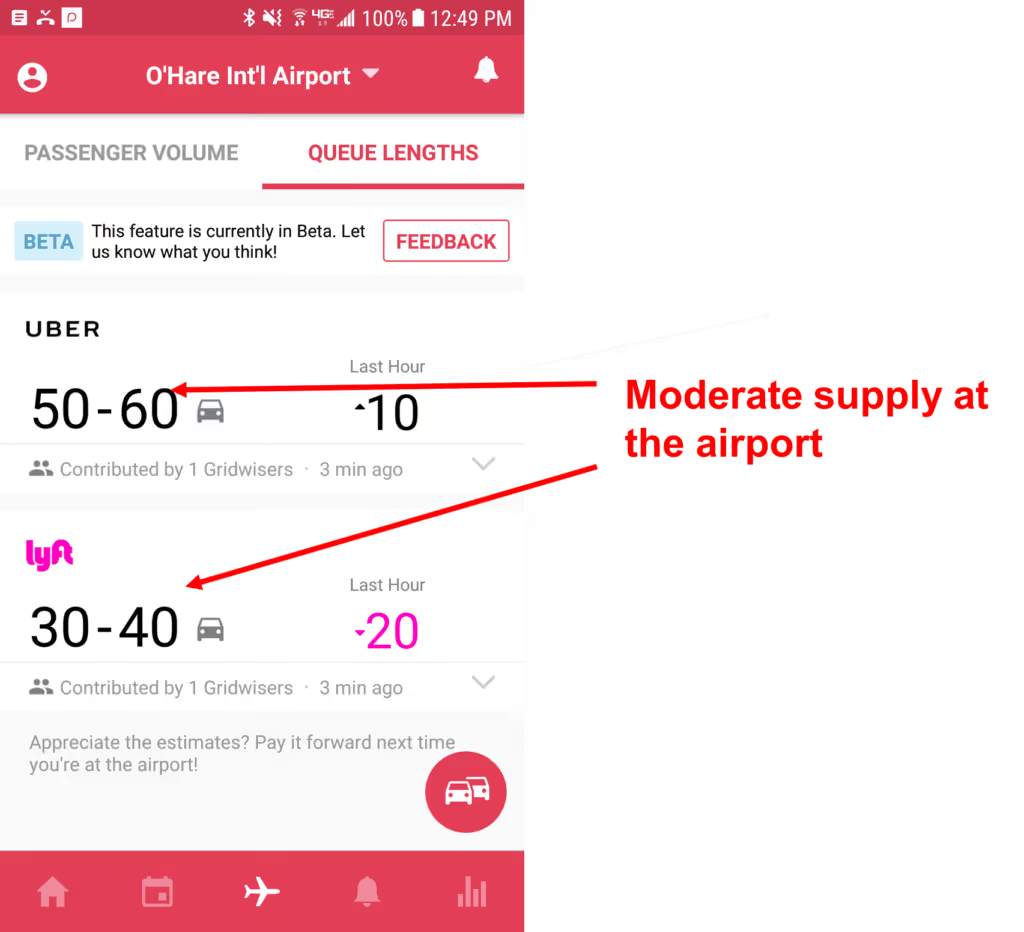
If there is a peak in demand and a moderate to low amount of drivers at the airport, you'll be able to quickly catch another long ride leaving the airport. This makes accepting these pings from far away worthwhile.
Surging
If you're lucky enough to get a ping into a surge area from 15-minutes away, just take the ride! The extra that you're going to be getting because of the surge pricing will more than make-up for the fact that you have to go farther to pick up your passenger.
when it's in a location I want to go
Many drivers like to stay in their sweet spot.
That means they like to drive in certain parts of the city and don't venture out too far, too often. If you're a driver that wants to stay in a certain part of town, but a passenger has taken you away from your zone, don't hesitate to take a ride that is coming from an area close to where you want to go.
When picking up from hotel
The people that you pick up from hotels will almost always be headed out of town which means they'll want to be taken to the airport. As we discussed above, these airport trips can be very profitable, not just because of the initial long fare, but the fares leaving the airport.
Use Gridwise to check the airport stats before you accept a ride, however, most trips from a hotel to a airport should be worth your time.
Bonus: Uber Rarely (if ever) deactivates users for not accepting rides.
Many drivers are afraid to ignore ride requests because they fear being deactivated by Uber, Lyft, or whoever they may be driving for.
Actually, Uber and Lyft don't explicitly state that a driver can be deactivated for a low acceptance rate... Check out this excerpt from Uber's community guidelines.
"High acceptance rates are a critical part of reliable, high-quality service, but not accepting trip requests does not lead to permanent loss of your account.
Consistently accepting trip requests helps maximize earnings for drivers and keeps the system running smoothly. We know that sometimes things come up that prevent you from accepting every trip request, or you may want to take a break. But not accepting trip requests causes delays and degrades the reliability of the system. If you don’t want to accept trips, just log off.
If you consistently decline trip requests, we will assume you do not want to accept more trips and you may be logged out of the app. [3]"
When you don't accept a ride, Uber will put you in "time-out" for 2-30 minutes depending on your city. This means you won't be able to accept any rides.
This isn't a big deal really as most of these time-outs don't last more than five minutes. If you're on your third ping and you're about to get timed out, you can always accept the ride and cancel it. Unfortunately, a high cancellation rate IS likely to get you deactivated by Uber or Lyft. So tread lightly.
If you do happen to get locked out by Uber... just turn your Lyft app on and drive for them!
Should Uber drivers work for Postmates
Should Uber drivers work for Postmates?
In the process of dialing in your rideshare strategies and figuring out how much do rideshare drivers make, you’ve likely thought about the potential of adding a food delivery app or two to your repertoire. But is it worth it? And which services are the best ones to work for?
These, of course, are big questions. And we’re here to help you work them out. Here’s the skinny on adding DoorDash, UberEats, and Postmates to your workload.
Working for DoorDash
DoorDash is an on-demand food delivery app that hires independent drivers to do deliveries. Unlike with other rideshare and delivery apps, with DoorDash you sign up for shifts up to six days in advance instead of just logging onto the app. You can always drop into a shift without signing up in advance if slots are available, but you can’t always count on that. In other words, it’s not as on-the-fly as other platforms.
DoorDash Requirements
- Be 18 years or older
- Have access to any car, truck, motorcycle, or scooter
- Own a smartphone
- Have a driver’s license with at least two years of driving experience
- Have valid insurance
- Provide a social security number (for a background check)
- Pass a background and driving record check
- Complete an orientation online or in person
How much does DoorDash Pay
DoorDash’s website claims a driver can make up to $25/hour, but that might be a stretch. Most Dashers make $8-15 an hour, including tips. However, DoorDash guarantees you’ll make at least $10/hour, so if you make less than that, the company will pay the difference.
Ultimately, what you make depends on how many deliveries you can do per shift. Every delivery has a minimum payout of $6 per order and there are things that can bump that up. For one, you get to keep 100% of the tips, and unlike some delivery apps, DoorDash’s app encourages tipping.
On top of that, DoorDash implements a system called “pay boost,” which gives you a little extra cash based on the difficulty of the delivery, the distance, etc. Additionally, some cities give new drivers a $100 on-boarding bonus.
Pros
- Minimum hourly wage. DoorDash ensures you’re making at least $10/hour, so if it’s a slow day, you don’t have to worry too much about losing cash.
- Tips. The DoorDash app encourages tipping, so it’s more likely you’ll bring home a little extra cash with this app over others.
- Drive what you want. Unlike Uber and Lyft, driving for DoorDash does not require you to have a specific year, make or model of—or even a car at all. A motorcycle, scooter, or even bike will do.
Cons
- Set shifts. If you’re trying to supplement your rideshare driving with some deliveries peppered in between rides, DoorDash might not be right for you. When you sign up for a shift, you’re basically commiting to driving for DoorDash for a set amount of time, meaning it’s harder to drive for, say, Lyft in between.
- Set geographical areas. When you sign up for a shift, you also select a specific geographic area. You won’t get any orders outside of this area. While that’s helpful when you’re driving specifically for DoorDash (i.e. you won’t be forced to waste time driving all over town) it might hinder your ability to also give rides in between
- Ordering. While sometimes customers will order and pay directly through the app, sometimes you have to personally put in the order and pay with a Red Card, a company-provided expense card, at the time of pickup. This can take up a lot of time that could be spent driving.
Working for UberEATS
UberEATS is Uber’s food delivery arm, which is an option within the normal Uber app (as well as a stand-alone app). While some markets allow you to sign up to exclusively be an EATS driver, others require that also be an UberX driver. That can affect some of the below requirements.
UberEATS Requirements
- Be 19 years or older (21 in Canada)
- Have a driver’s license and at least 1 year of driving experience
- Have regular insurance
- Have proof of vehicle registration
- For EATS-only profiles, your car must be 1996 or newer. Otherwise, vehicle requirements are the same as UberX
How much does UberEATS pay
EATS drivers are paid for each delivery based on a pickup fee, a drop-off fee, and a mileage fee. Uber then takes a 25% cut of each order (though some markets may be 20%). If you have to do more than one drop off, you’ll get a drop-off fee for each different address that you have to deliver to.
So, using Los Angeles as an example, here’s what you’d get paid for a delivery: $2.50 for a pickup + $0.60 for mileage (3 miles at $0.20/mile) + $3.00 drop off fee = $6.10. Uber’s 25% fee would take $1.52, so your total payout would be $4.58. If you receive a tip, that’s all yours, but they are rare with EATS (see below).
That said, UberEATS drivers can expect to make around $8-12/hour
Pros
- Flexible hours. Unlike DoorDash, with EATS there is no shift scheduling format. Just sign into the app and you’re good to go. This makes it easy to incorporate EATS into your usual rideshare strategy by picking up orders between rides. Additionally, EATS deliveries count towards Quest rides, so if you’re going for that Uber bonus on a slow night for rides, EATS can help get you there.
- No ordering or PEX cards. Also unlike DoorDash, EATS will only you ping you with a pickup once the order has been placed with the restaurant. You don’t have to mess around with ordering or payment cards. Just food.
- Wider geography. EATS will send you far and wide for a delivery, but this isn’t a bad thing: because you get paid per mile, a higher-distance delivery will yield a higher fares.
Cons
- No payment for waiting time. Because you’re getting paid per order with no minimum hourly payment guarantee, waiting around for food can feel like a waste of time. Postmates pays for this time (more on that below), but EATS does not.
- No in-app tip option. The EATS app doesn’t prompt customers to give a tip, so you’re relying on relying on cash at the time of delivery. And this doesn’t happen very often.
- Vehicle requirements. Other services don’t care what you’re driving as long as it’s legal and gets you there. Uber, however, is far more picky.
- No guaranteed payout. As mentioned before, a slow night driving for EATS will take a bite out of your profits.
Working for Postmates
Like DoorDash, Postmates is an independent food delivery service that has both restaurants and stores on the platform. So unlike with the other food delivery apps, you might be stopping by a 7-Eleven on occasion to deliver someone a slurpee.
Postmates Requirements
- Be 18 years or older
- Have a valid driver’s license
- Have a car or a bicycle
- Have insurance
- Own a smartphone (or lease one from Postmates)
- Pass a background check
How much does Postmates pay
Like DoorDash, Postmates claims that “experienced” couriers can make up to $25/hour, but research suggests otherwise. To break it down, Postmates pays all drivers a base pay of $1.35 per order as soon as you accept the delivery + $0.10/minute while you wait at the restaurant + $1.03/mile between the restaurant and the drop off location. So if you drive 3 miles and wait 5 minutes, that’s $4.94 per delivery.
You do receive 100% of tips, and customers are prompted to tip inside the app after the delivery is complete.
In some markets, hourly wage guarantees are sometimes offered, but you have to accept 100% of requests to qualify.
Additionally, Postmates offers Blitz pricing, which is similar to Uber’s surge pricing and increases the delivery fees during peak hours for an opportunity to make a little extra.
All told, you can expect to make $8-15/hour in most markets.
Pros
- Tips. Having a tipping option in the app makes all the difference.
- Drive what you want. Like DoorDash, any car that will get you there is good with Postmates.
- Flexible hours. Just sign in and start delivering.
- Order stacking. Postmates allowd you to pick up several orders from restaurants at once, then focus on delivering in a way that makes sense. This can save time and boost productivity.
- Waiting time. If the restaurant is taking their sweet time, you don’t (totally) lose out on cash.
Cons
- App functionality. Unlike most on-demand apps, Postmates doesn't snap to the foreground when a ping come in. That makes it pretty easy to miss the orders and miss the money.
- Ordering. Like DoorDash, Postmates often requires that you make the order yourself (sometimes at the restaurant or shop) and pay with an expense card. This alone takes up time, but Postmates also requires you to take photos of the receipts so the card can be reimbursed. That’s a time suck and an easy step to forget.
- Long wait times. Likely the reason Postmates introduced waiting time payments is because the ordering system often requires you to wait a long time. While other delivery apps already have the restaurants cooking the food while you’re driving to them, Postmates often has you placing the order once you get there.
Who should drive courier services?
Though the companies all say it’s possible to make good money driving for their platforms, it’s clear that isn’t really the case. Even the CEO of Postmates said at a TechCrunch event: “I’d like it to be a full-time job in the future, but the reality is it’s probably a really good part-time job.”
That said, it just might be the right part-time job to supplement your ridesharing work. If you’re having a slow night, you can switch over to a courier service and see if you get any action there. Or if you’re working towards a Quest, an UberEATS delivery can quickly get you there.
Additionally, it can be taxing to deal with driving people around all day. Switching to having food as your passenger for a little while can help keep the less outgoing drivers sane.
Our best advice: Don’t bet on making all your money this way, but adding it to your action plan can yield strong results.
How to stay healthy as a rideshare driver
Being a rideshare driver isn't exactly the healthiest job in the world.You sit on your bum for 8+ hours a day while munching on what is most likely a very unhealthy snack.When finally catch a break, you likely proceed to the nearest fast food restaurant to consume about 1000 calories that you have zero chance of burning while driving around all day.When you are off, you're way too tired to even think about a gym.It's easy to see why many Uber and Lyft drivers gain a few pound after they've started driving.We want you drivers to stay healthy and fit while on the road, which is why we've put together a quick guide to staying healthy as a rideshare driver.
Eat Healthy
This is the big one.To be a healthy rideshare driver, you absolutely must eat well.That starts as soon as you wake up in the morning with breakfast.Yes, breakfast, that wonderful meal that you're probably skipping in favor of a latte is important.Eating breakfast has been proven to lower your risk of type 2 diabetes, improve your heart health, and lower your cholesterol levels according to WebMD.What's even more surprising is that people that eat breakfast tend to lose more weight.Why?Well, that's up for the debate, but many believe that people that eat breakfast are more satiated throughout the day and thus crave unhealthy snacks less.
Bring Your Lunch
You can't eat fast food everyday and expect to be any kind of healthy. It's just not going to happen.That's why you need to learn to bring your lunch (or late night snack) with you when you're driving. This doesn't mean you need to start eating kale salads right away, but simply packing a turkey sandwich on wheat (yes wheat!) bread with an apple and a yogurt will do wonders.
Bring Healthy Snacks
If you're a driver that is clocking in more than 7+ hour at a time, then just having lunch may not be enough. In that case, don't reach for a bag of chips from your nearest gas station, instead look for a healthy snack you can bring from home.Check out this list of healthy snacks from NutritionRealm.
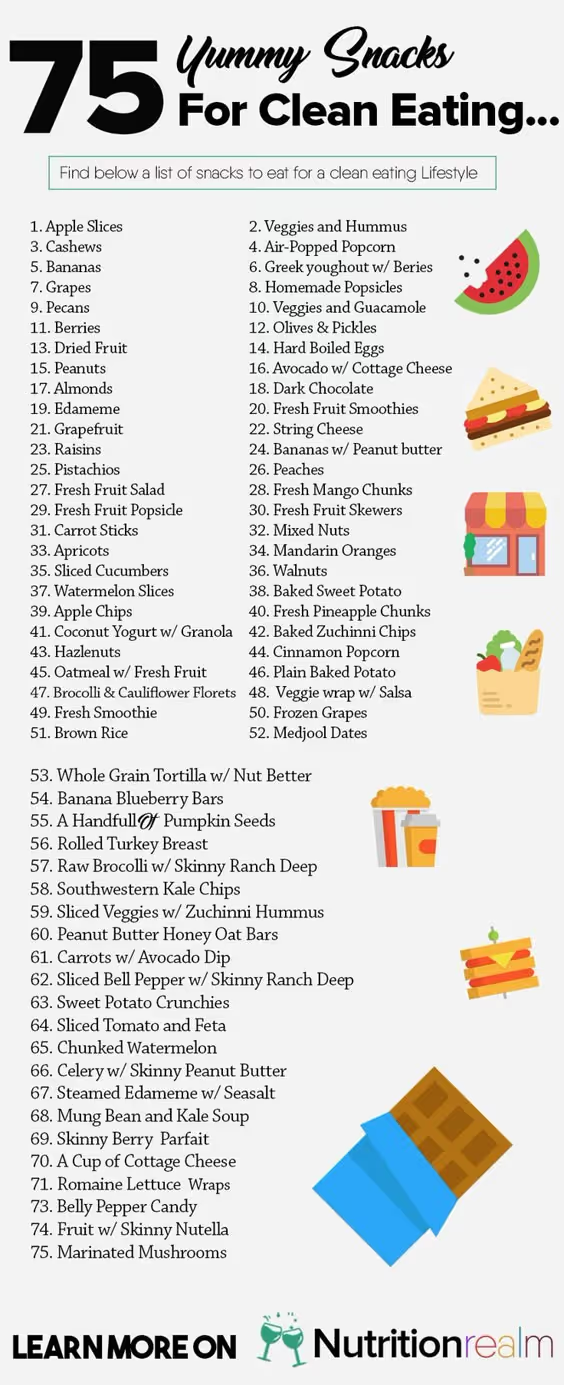
Any one of these snacks would be a significant improvement over the processed food that you can get from your local convenience store, so when you're packing your lunch throw in one of these.
Track Your Calories
Just like with your driving stats, you can't improve what you don't measure. That's why we suggest using a calorie counting app to help you understand how much you're eating every day.You can easily use any of the following apps:- MyFitnessPal- FatSecret- Poundaweek- LifeSum
Exercise
You knew this one was coming. Eating healthy is great, but making sure you exercise is absolutely paramount.The great thing about being a rideshare driver is that you have your own little space (your car) along with a big public space (the world) that can act as your personal gym, if you know how.Let's look at a few great excerciese that you can do in your car with the help of a tennis ball... Just one tennis ball.
Chest and Shoulders
Place the tennis ball in the palm of your hands and interlace your fingers over the top of the ball. Raise your elbows up to your side, almost like you're praying, and press the tennis ball between your palms for 5 seconds and then let go.Did you feel your chest flex?Then you did this correctly.Do 3 sets of 20 of these for a complete set.
Forearms
This one is simple and could be used with a stress ball as well. Simply firmly grab your tennis ball and squeeze as tight as you can for three seconds, then relax. Do 3 sets of 20 here as well.
Abductors
Let's mix in some legs! This one is easy, you simply place the tennis ball between your legs and squeeze for a three count and then relax. 3 sets of 20 for this exercise as well.
Calves
Let's continue legs by working the calves. Place the tennis ball under one of your toes and do a complete heel raise with a nice squeeze at the top. Do one leg at a time for 3 complete sets (both legs is one set) of 30 reps.
Abs
Finally, let's work the core!You can drop the tennis ball for this one and simply sit up straight in your car seat and slowly start to draw your belly to your spine. Focus on using your abs to complete 100% of the motion and squeeze your abs tight at the top of the lift. I recommend completing 4 sets of 25.These exercises won't have you ripping your shirt off, but they'll get the blood flowing, heart rate up, and have your muscles working!
Stretch it out
One of the most important yet undrrated things you can do to manage your health as a rideshare driver is to stretch.Why?Because stretching helps you prevent muscle pains and back aches that will keep you out of the drivers seat. Check out the stretches below.
Neck rolls
Neck rolls are a great way to warm up. Simply sit up straight and drop your head to your chin. Roll your neck slowly to the right, taking your right ear to your right shoulder, your head back, and then your left ear to your left shoulder. Repeat for 10 - 15 seconds.
Shoulder Roll
Again, sit up straight with great posture. Once you're settled bring your shoulders back while trying to touch your shoulder blades and roll your shoulders around to the front of your body. Repeat this for 10 - 15 seconds.
Ankle Stretch
Sit comfortably and give yourself a bit of extra leg room. Bring your ankle and foot all the way up and try to touch your toe to your shin.Do this slowly for a count of 15 for each leg.
Seated Forward Bend
You can either do this completely in your car or with your legs hanging out your driver's side door.However you position yourself, start by raising your arms over your head and giving them a good stretch to the sky. Then bring them down under your legs as you exhale.Drop your head between your legs and let your shoulders fall. Breath deeply and let that stretch sit for 10 seconds. Repeat for 3 - 4 reps.
Lastly, let's loosen up those hips
To do a seated hip stretch you may need to let your legs hang from your open door again.Simply sit up straight, and fold your left knee over your right. Reach high into the air to get a good stretch and then let your arms fall down slowly below your legs and fold over.Your arms should be near the floor. Hold this for 5 to 10 seconds and repeat for 3 to 4 reps while alternating legs.
Don't forget your mental health!
Being health conscious isn't just about your physical health, but also your mental health, and being a rideshare driver isn't always great for your that.That's why you need be sure to take care of yourself. See your family and friends, enjoy life, and don't take the job so seriously!Remember that one bad rating isn't the end of the world and life is bigger than your little rideshare gig!So that's our advice on staying healthy as a rideshare driver and now we want to hear from you guys! What do you do to stay fit out on the road? Let's talk in the comments below!

This is what Chicago Area Rideshare Drivers Make
Considering becoming a rideshare driver in Chicago? Before you take the plunge, it helps to know how much you can expect to make.
Your actual total pay depends largely on how many hours you put in behind the wheel. But if you would like to estimate your salary based on the number of hours you can commit to driving, this article will give you an overview of how much TNCs pay drivers in Chicago per hour.
Uber
A great way to start thinking about how much you'll be making as an Uber driver is to look at how your pay breaks down.
As an Uber driver, when someone takes a ride with you they are charged a fare plus a “Rider Fee”. The fare for UberX in Chicago is currently $0.20 per minute plus $.95 per mile. On top of that, there is a $1.70 base fare plus a $1.60 booking fee according to Uber.
Uber often advertises that they only charge a 25% commission of the fares. According to The Rideshare Guy, however, these figures ignore the “Booking Fee” that the company adds on top of each ride, which goes solely to the TNC. The booking fee amount varies from city to city. The resulting effects of this fee and the 25% commission mean that when passengers step outside of their Uber and only see a $5 charge, the driver will receive around half of that.
Uber claims that the average Chicago trip pay out for a UberX driver is $15.66. If you're making tow trips per hour, it would make sense that you would be making $31.32 per hour.
This does not happen because as we all know, it is difficult to consistently get two trips per hour.
Sherpashare completed a study that suggests the average Chicago Uber driver actually makes $10.99 per hour based on user surveys in 2015.
Another great way to measure your possible hourly wage driving Uber is Glassdoor.
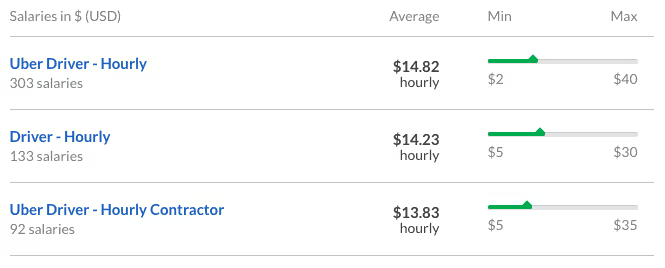
Chicago drivers have claimed to have earned more than $30 per hour, however, the average claimed hourly wage for a Chicago Uber driver is anywhere from $13.83 per hour to $14.82 per hour.
Assuming an average Uber driver commits to working about 30 hours per week, the overall per-week earnings would be $415 - $444.60. If you are driving closer to full-time hours which would be around 60 hours per week, you can expect to double this.
Lyft
Similar to Uber, there are advertisements about Lyft taking only 25% commission, but once again this does not include the “Trust and Service Fee” which they take for each trip.
According to Lyft, driver pay includes time spent waiting, starting one minute after you’ve confirmed your arrival. The ride fare includes base fare, cost per mile, and cost per minute. In Chicago, the base fare is $1.60, the cost per mile is $.95, and the cost per minute is $0.20.
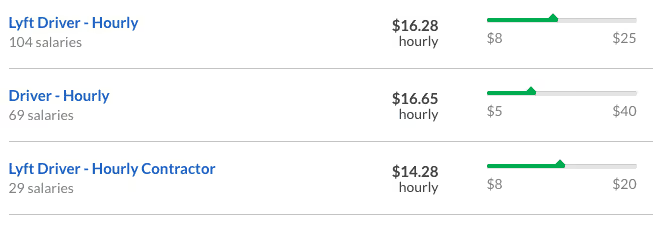
According to a 2015 Sherpashare report, Lyft drivers make on average slightly more at $11.15 per hour. Glassdoor, on the other hand, reports Chicago Lyft drivers making an average of $14.28 - $16.65.
Via
Via has a significantly smaller market share in Chicago than Uber or Lyft, however, this TNC pays drivers considerably more than both Uber and Lyft. As mentioned above, Uber and Lyft take a 25% commission from their drivers. Whereas Via takes only a 12.5% commission from drivers in Chicago, which is the lowest among any rideshare company.
The Rideshare Guy reports that Via will pay per trip in a similar manner to other rideshare companies, with rate cards similar to Uber or Lyft. Via has also recently announced Rocket Rates, which are equivalent to surge pricing with Uber and prime-time pricing with Lyft. Via's website explains that during high demand hours, fares will be multiplied by the “Rocket Rate” that will be announced to drivers through text message. Multipliers have been in the range of 1.3 to 2.5 times the fare, which can make trips more profitable. However, one Via driver shares that the rocket rates only operate during Flex mode hours, which fall between midnight and 6 am.
At all other hours, Via has an undisclosed, guaranteed hourly rate for drivers that fluctuates throughout the day. For example, during peak hours (i.e., from 7-9am and 5-8pm) Via offers $20/hour while online. This means that drivers can be paid regardless of how many passengers they pick up.
Curbed
Curb only employs professional drivers for their service, which can be hailed through the Curb app. The Ride Guru explains that since Curb drivers are traditional taxi drivers their payout is based on the standard average taxi cab driver payout. However, the Curb app does take $2 from each payout for using the app.
To estimate how much this TNC pays drivers in Chicago we can look at salary reports for the average Chicago taxi driver. According to Salary.com, the annual base salary for taxi drivers in Chicago is $36,407. Therefore, it can be projected that Curb pays drivers in Chicago approximately the same minus the $2 Curb fee. Unlike other rideshare services, though, cabs have traditionally been a tipping industry, so receiving a tip is more common through this service than all of the others.
As a rideshare driver, what do you think about how TNCs pay drivers in Chicago? Leave us your thoughts in a comment below!
Peak Rideshare Driving Times in Chicago
Chicago Driving Strategy: Your Guide to Peak Driving Hours
I remember my first time out on the road like it was yesterday.
My car was as clean as it has ever been, I had an on a nice button down shirt and my car was stocked with waters and snacks.
When I finally hit the road, I parked in what I thought was a prime location, turned on my app and waited for my first ping.
I waited.... and waited... and waited... but nothing.
Why? Because I didn't realize that 12:30 pm on a Monday wasn’t exactly prime time.
I wasn't being strategic.
That's when I realized that I needed to have a plan to make money as a rideshare driver, and so do you.
We chatted with a few veteran Chicagoland area drivers about their strategies and came up with a list of the best times to drive in Chicago.
Weekdays (Monday – Wednesday)
The morning rush (5 am – 10 am)
In Chicago, the morning rush on weekdays can be one of the most profitable times to drive because you have so many areas that you can take advantage of.
One of the very best options for rideshare drivers is to focus on airports early in the morning, around 4:30 or 5:00 am.
If you're starting out in the suburbs, you can count on a ride to the airport or downtown this early in the morning. Northwest and Western Suburbs like Naperville, Aurora, and Glen Ellyn are ripe with business travelers that need an early morning ride, so hang out in those areas early and expect to get a ping.
If you start off in the city, areas like Lakeview, Lincoln Park, Gold Coast, the West Loop, and The Loop are all heavily occupied by young business travelers so if you're there before 6:00 am, you'll likely find a rider headed to the airport.
Once you drop your passenger at the airport, check to see how many passengers are coming into your respective airport.

Monday's and Tuesday's are big commuter days for business travelers coming into Chicago as well, so you'll likely be taken right into downtown Chicago.
After you make it back to the city, you can find a significant amount of rider demand in the Lincoln Park, Lakeview, and Wicker Park areas with riders looking to come into The Loop for work.
If you end up with an airport trip that takes you out to the suburbs, work the suburbs until about 10:00 unless you get a rider taking you downtown. Traffic will be costly from almost any suburb, so you'll want to avoid it until at least 10:00.
Once 10:00 rolls around, you can set your destination to downtown Chicago and try to find a ride as you head into the city.
The afternoon rush hour (3-6)
Another great time to be out is during the afternoon rush hour, but you need to be careful to avoid common pitfalls like traffic which can eat up valuable time.
If you're downtown after 3:00, you can position yourself in the loop and wait for a ping. You'll likely receive one in just a few minutes as people are leaving work to go home. These riders will go to various suburbs around Chicago and neighborhoods in the city, so after your first ride, you need to be smart.
If you end up in the suburbs, don't try to make it back into the city until at least 7:00. to avoid traffic. Instead, focus on key areas in the suburbs. These include:
- Northern suburbs such as Deerfield which have a few business centers with large corporations like Baxter International and All state, so demand from workers that need rides home will pop up in those areas.
- Metro stations. Many Metro riders will come from the city but still need a ride home. These are usually shorter rides, but will keep you busy
- Colleges such as Northwestern, North Central, and even College of DuPage can keep a driver busy with students needing a ride home from class
If you can stay in the city you'll have an easier time finding a ride, but you'll likely need to fight more traffic. When your rider takes you away from downtown to northern, southern, and western neighborhoods, start to make your way back towards The Loop as you'll pick up a ride as you make your way back.
You can continue to drive around downtown Chicago until around 6:00 when things will die down again. After that, your best bet is to save your gas, grab some dinner, and wait for the late-night crowd.
Late night (10 – 3)
The late night crowd early in the week in Chicago isn't nearly as large as on the weekends, so you won't get as frequent of surges, but there is still plenty of demand to go around if you're smart.
Check your Gridwise app for events going on around town. The United Center, Navy Pier, The Vic Theatre, Riviera Theatre and other venues will all regularly have significant sized events that you should keep an eye on.
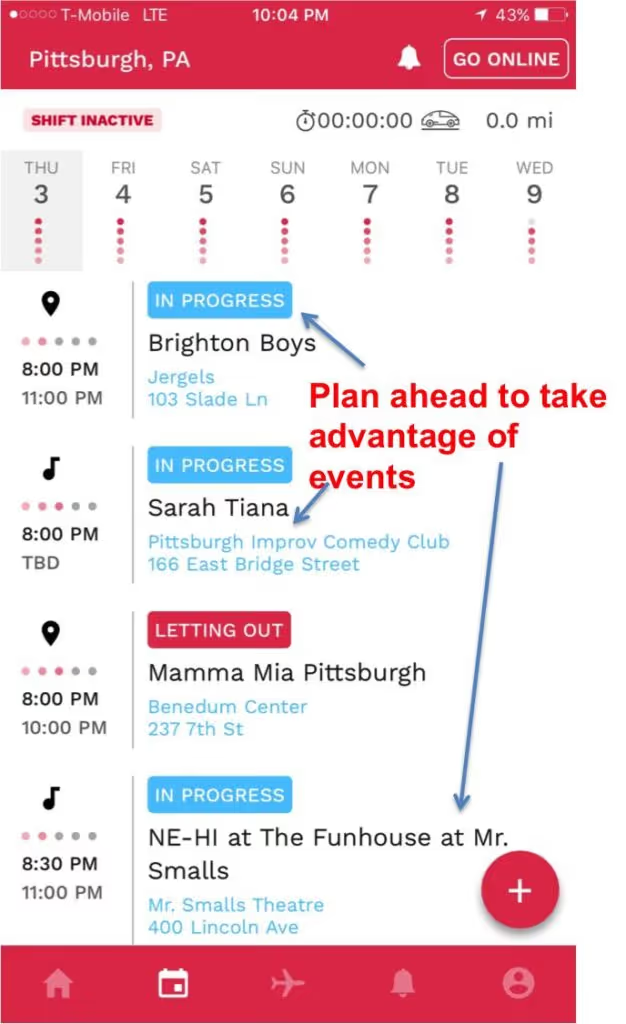
Also, be sure to check the airport schedule. Business travelers often come in on Monday nights and will need rides from the airport to their hotels.
Weekends (Thursday – Saturday)
The morning rush (5 am – 10 am)
Thursday and Friday mornings are going to be similar to Monday – Wednesday mornings. The exception is that you’ll likely see a boost of riders heading to the airport for their weekend trips. You can predict airport demand again using your Gridwise app.
You'll also likely see a rush of business travelers that are leaving their hotels to go home during Thursday and Friday morning. If you are starting your morning in the city, hang out near the hotels and you'll find a passenger quickly.
If you are in the suburbs, consider gravitating towards the business-centric areas like Deerfield, Schaumburg, and Oakbrook which have a significant amount of business hotels that will have travelers that need rides to the airport.
Check your Gridwise app in the morning and identify the times when there will be peak departures. You'll want to be near hotels about two hours before peak departures in the morning.

Early Saturday morning demand for riders in Chicago tends to be light, and nearly nonexistent if you are in the suburbs. This is a great time to rest up and prepare for a late night shift or hit the airports.
Because the rest of the city is going to be slow, you may see an influx of drivers in the Chicago airport. Before you head that direction, check your Gridwise app to see how many riders are in the queue.
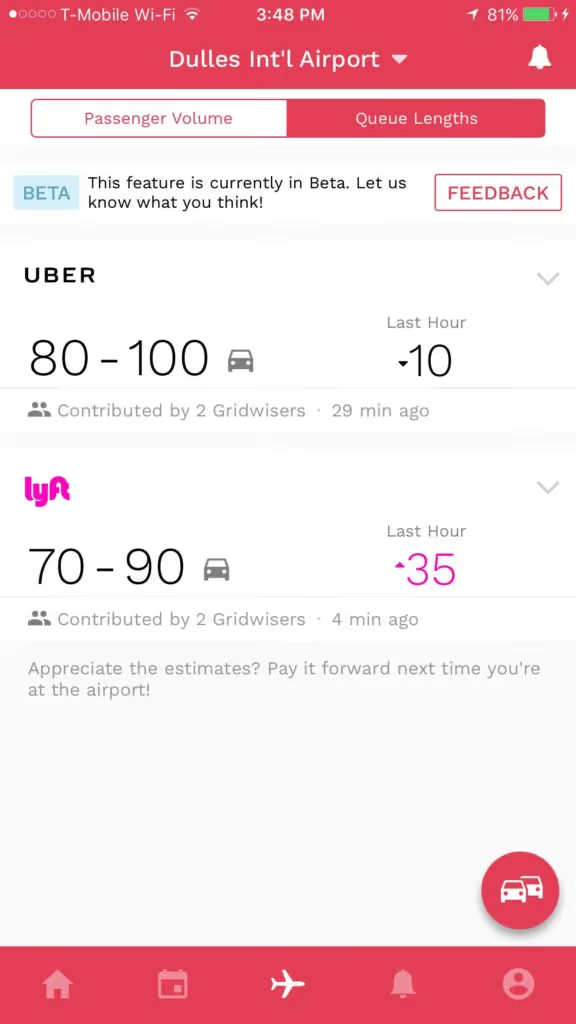
If there are a lot of drivers and not much demand, you should check to see if there are any events going on.
Daytime hours (10 – 3)
Daytime hours on Thursday and Friday in Chicago are relatively quiet. Save your gas unless there is a compelling event going on.
On Saturdays, you can always find riders, especially in the summertime in the city, because there is so much going on. Think about popular tourist attractions such as Museum Campus, Navy Pier, and The Art Museum on Michigan Ave and gravitate towards those areas.
Trendy areas such as Wicker Park, Logan Square, and Boys Town are going to be buzzing with activity and events all day, so plan your day around those events.
If you're committed to staying in the suburbs on Saturday, make sure you look for and take advantage of events going on in the suburbs and know the Metra schedule as you will be able to pick up riders that are leaving downtown.
If you want to maximize your profits however, we'd recommend heading to downtown Chicago.
The afternoon rush hour (3-7)
Thursday and Friday’s rush hours are similar to Monday – Wednesday. Stick to your common business area’s and you’ll find rider demand.
On Saturday’s you need to again be strategic and focus on areas that are hotbeds for events. Around 7:00 many people will just start to go out to bars and restaurants around town.
If you're in the suburbs, this would be a great time to catch a ride into the city as you’ll find passengers looking to come downtown for an event or dinner.
You’ll also want to keep an eye on airport traffic. During the fall you’ll find an increase in airport demand due to the fans of Bears opponents arriving to watch their team get smacked around. Go Bears!
Late night (10 – 3)
Late nights on the weekend are BIG time hours for rideshare drivers.
You will encounter some intoxicated passengers, but you'll get the most steady stream of passengers between 10pm and 3am Saturday night/Sunday morning.
No matter where you start, you should focus on driving downtown as much as possible. There is some demand in the suburbs, but it will be inconsistent at best.
If you're coming from the western suburbs, you can set your destination to downtown and head into the city. You will not find much, if any, traffic. If you're coming in from the northern suburbs, you can stop in Evanston and try to take a few trips from the college students at Northwestern. They will likely want short trips in Evanston, however, some will want to go downtown.
When you eventually find yourself downtown, there are a few main areas that you can work.
- Lakeview/Boys Town/Lincoln Park
- Wicker Park/Logan Square/Bucktown
- River North/Gold Coast
All of these areas are going to be buzzing with activity the entire night, so you don't need to be overly picky on where you are going. The trick is to quickly move back to one of these areas after you have completed a drop-off.
If you are a suburban driver, you can set your destination to your town around 1:00am and you'll likely find a rider going the same way as you. Once you're back in the suburbs, you should be able to catch the bar closings, especially in Naperville and Evanston.
If you stay in the city, continue to move through the popular areas mentioned above and you'll have a busy night.
Sunday
The morning rush (4 am – 10 am)
Chicago is a mighty sleepy city Sunday morning, so you won’t miss much if you decide to sleep in as well. You'll find a few people catching rides from the night before, but demand is going to drop pretty quickly after 4:00am.
Daytime hours (10 – 3)
Chicago is becoming more and more of a brunch city, so Sunday mornings can be surprisingly fruitful in the city. Around 11:00am, brunchers from trendy areas like Wicker Park, Boys Town, and Lincoln Park will be out looking for a mean and a drink, so you may find riders in those areas.
During the fall, you'll of course have Bears games that will bring tons of people to the South Loop where Soldiers Field is. There aren't many hotels near the South Loop, so many fans will have to stay in Northern neighborhoods or in The Loop. If you hang out in those areas, you'll be sure to catch a rider that is headed down to the game.
Check your Gridwise app for alerts on when the Bears game will end and position yourself in the stadium queue.
The suburbs are unfortunately going to be very quiet on Sunday's, so heading to the city will be your best bet.
The afternoon rush hour (3-7)
Sunday afternoons in Chicago are very event-driven. There are going to be show's at the many Chicago venues, various games at the United Center, Wrigley Field, Soldier Field, and US Cellular Field.
You’ll also start to see airport demand start to creep up for both departing and arriving passengers. Keep an eye on your Gridwise app so you don’t miss crucial airport peaks.
Late night (10 – 3)
Sunday nights in Chicago are event-driven as well.
You’ll continue to find business travelers looking to come into or leave out of the city on Sunday evenings, so check your flight schedules using the Gridwise app. Gravitating towards the downtown area where popular business hotels are located will yield you a ride to one of Chicago’s airports.
With any luck, you’ll arrive at a peak airport time and can catch a ride back into the city.
Chicago is a big city with many potential passengers, but also many drivers, so you'll want to be strategic. There are a few times where you can count on rider demand as long as you drive in popular areas.
During slower hours it’s important to be strategic and have a plan before you get out on the road. Use apps like Gridwise to help you understand what’s going on in your city and develop a solid driving plan in just a few minutes.
Now, what’s your favorite time to drive in Chicago? Share in the comments below!

The Ultimate Airport Guide for Rideshare Drivers: Chicago
We’ve been talking to a lot of Chicago area rideshare drivers lately about their experiences and we’re constantly hearing about the airports.
Some drivers can’t wait to tell us how much of a waste of time the airports are, however, for some drivers O’Hare is their bread and butter.
Why the disconnect?
The drivers that are having success are the ones that don’t just show up and hope for the best, they have a rock-solid strategy. Those drivers were gracious enough to talk to us about what has been working for them and in today’s blog post we’re going to share with you what we learned.
This post will include:
- How to navigate each of Chicago’s airports
- When to go to each airport
- How to mitigate your non-airport airport ping risk
How it works
Uber, Lyft, and other TNC’s specially designate airports with a “geofence” that tightly defines the airport area. As a driver, if you have an app on in those areas, you’ll be placed in a queue that acts as a virtual driver line.
As you wait in the queue, you’ll cycle through the line (hopefully quickly) and finally be pinged by a rider.
Navigating O’Hare and Midway
Your first few times as a rideshare driver can be a bit disorienting because of all of the rules and regulations that differ from city to city and airport to airport.
Let’s first talk about what those rules are at each airport and you can comply.
O’Hare International Airport (ORD)
The flagship airport of Chicago/The Midwest is not for the faint of heart because of the high volume of people and cars, not to mention some confusing roads. However, when you figure it out, it is worth it.
Where to wait
The TNC lot at O’Hare is on the Jawa Entry Roadway which is just off Balmoral Ave.
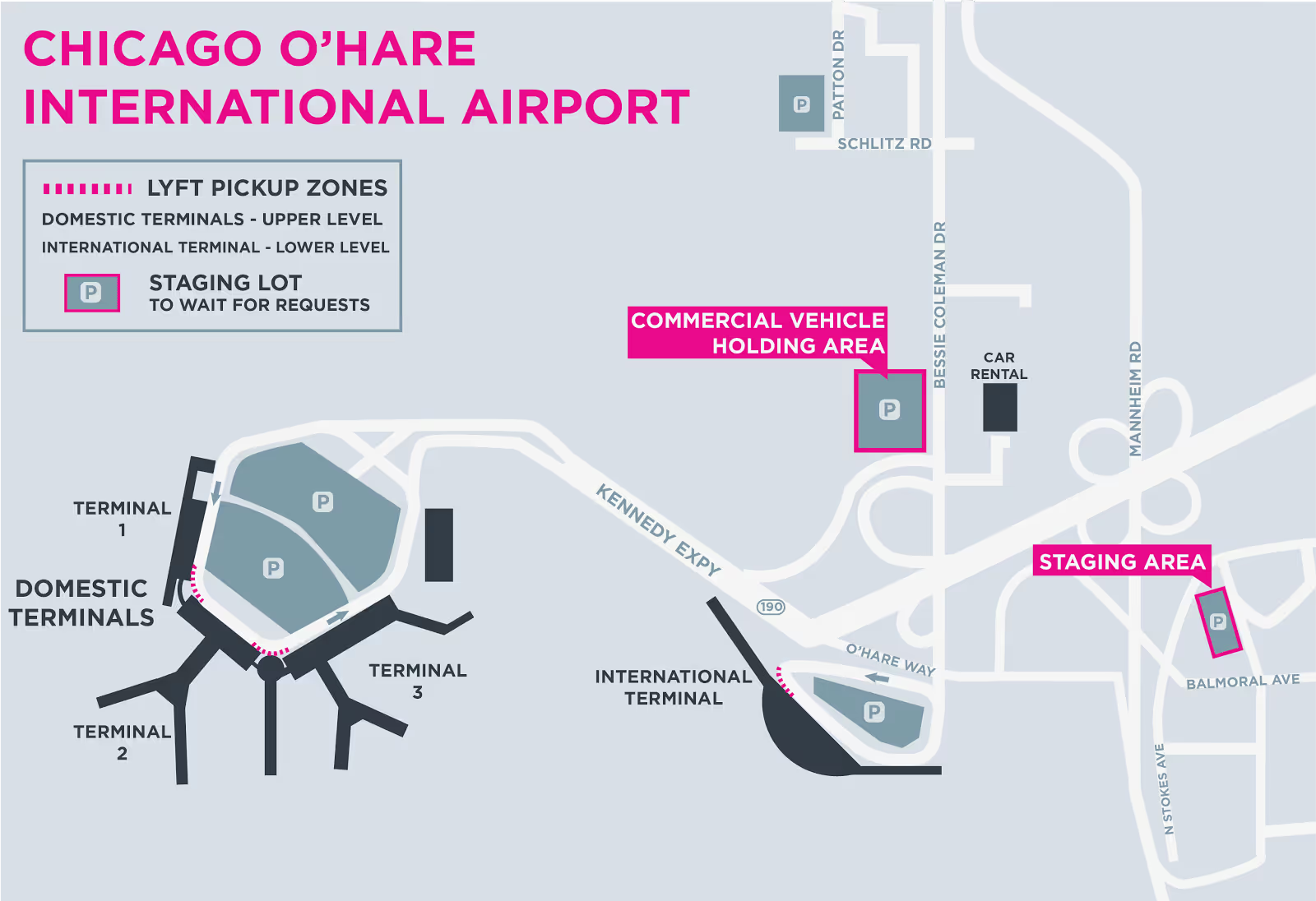
Where to pick up
O’Hare is a large airport so has multiple pickup spots. Passengers arriving domestically will have two places they can be picked up from depending on their location.
Domestic passengers will be directed to one of the following rideshare pickup areas:
- On the upper level between Terminals 1 and 2, directly to the right of Door 2A, between the signs.
- On the upper level between Terminals 2 and 3, directly to the right of Door 3A, between the signs.
International passengers will be directed to the rideshare area on the lower level of Terminal 5 at Door 3.
Midway Airport (MDW)
O’hare’s little brother is certainly a easier airport to navigate because of its smaller size. There are still a few things you’ll want to keep in mind however.
Where to wait
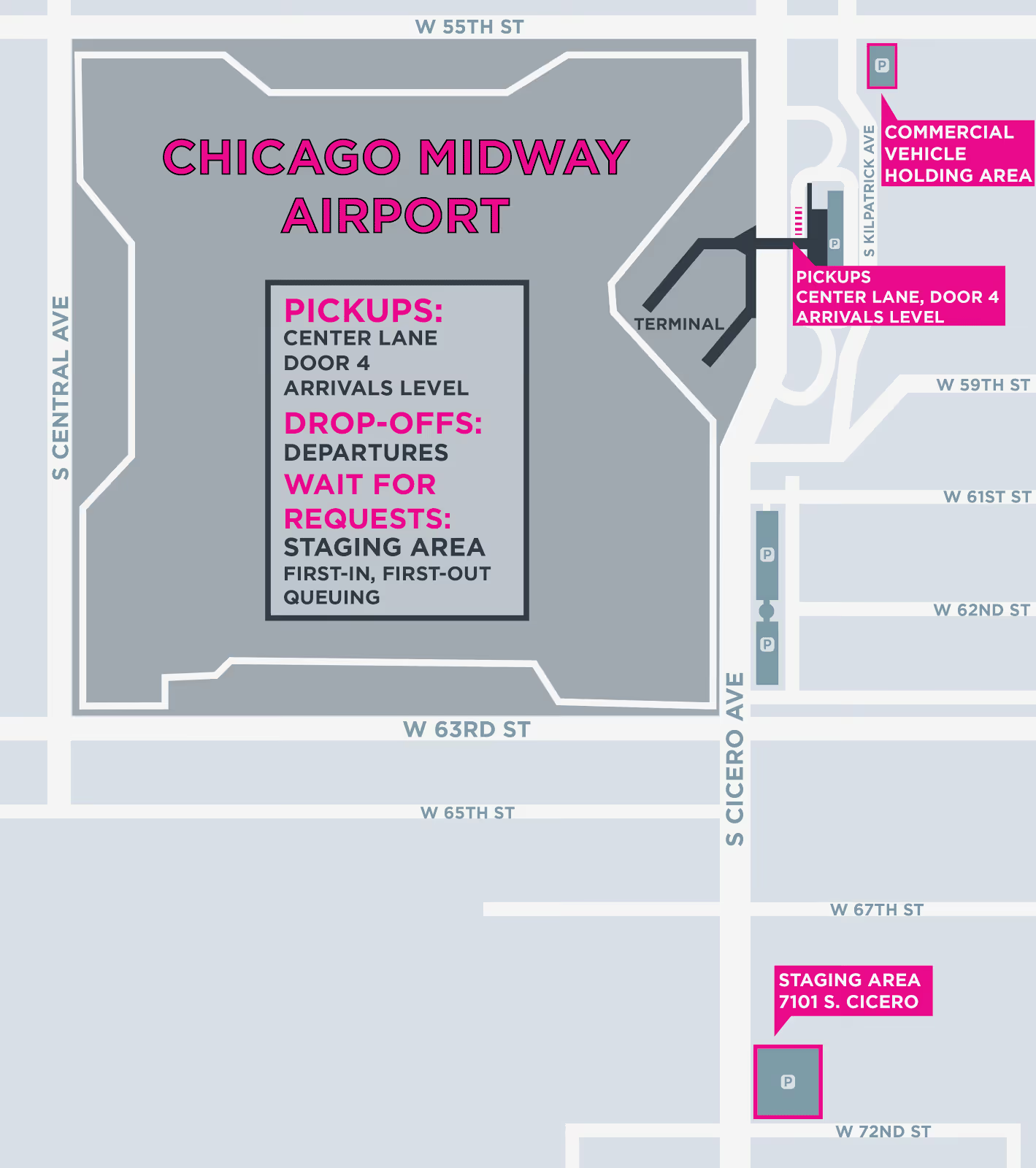
The TNC lot at Midway is at the corner of South Cicero Ave and 72nd Street.
Where to pick up
Midway has a pretty straightforward pickup system. You simply meet your rider on the Arrivals level outside Door 4.
You’ll likely encounter some traffic when going to pickup your passenger, so call them and let them know you are on your way. They should be looking out for you and if possible trying to move closer to where you will be.
When to go to the airports
Now let’s talk airport strategy.
A successful airport driver is a master of his or her time. You don’t want to be caught waiting around for hours in the airport queue while you could be making money elsewhere. You can avoid this by understanding when the most passengers are both arriving and departing.
There are a few go to times when there are many coming into O’Hare and Midway. Monday and Tuesday mornings for instance are a boon for business travelers arriving for a week of work in the city. They tend to leave again Thursday and Friday afternoons which causes another surge of those travelers leaving from Downtown.
- Other busy times for travel include:
- Christmas and Thanksgiving Holidays
- 4th of July
- Saturday’s before Ravens or Redskins games
- The week of large parades
Take advantage of these travel heavy times by positioning yourself in the queue 10 - 15 minutes before there is a peak in arriving airports. You can easily predict when these times will be using the free Gridwise App.
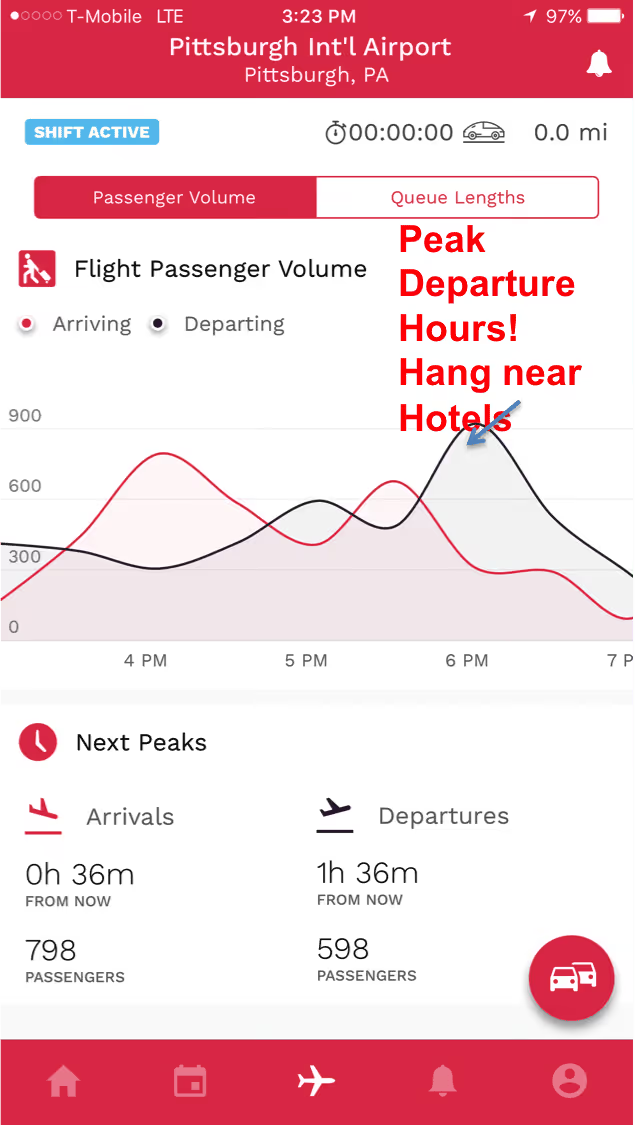
Another great trick is to understand how many drivers are in the TNC lot before you even go. This will help you avoid waiting in unnecessarily long lines. There are a few great Facebook groups that share this information, however, you can get a more real time view of the airport queue using Gridwise.
Many drivers forget about passengers that are heading to the airport, however they can be profitable as well. Position yourself near hotels downtown in the loop to maximize your chances of getting a long airport fare.
Use your cancels wisely
Remember that heartbreaking tale that I told you to start this blog post? Well, the truth is there is no way to guarantee this won’t happen to you.
You can, however, decrease your chances of getting pulled out of the queue for another ride by using your cancels wisely and positioning yourself well within the airport zone.
Uber and Lyft’s ping algorithms are still under lock and key so it’s difficult to completely understand how drivers are selected, however, we do know that riders are supposed to be selected based on proximity to the rider.
So that stands to reason that if you move closer to the airport and away from the surrounding city that you’ll decrease your chances of being pinged outside the airport. The TNC lots are great for this, the cell lots would be better, however rideshare drivers are not officially allowed in those lots. So approach at your own risk.
Your next strategy is to be fully loaded with “timeouts” so you can ignore a call at least once without being sent to the back of the line.
Remember, you only need about a 90% acceptance rate to stay in good standing with the TNC and get your weekly driver rewards, so use the few timeouts you have at the airport if you know you’re going to incorporate them into your strategy for the day.
Things to remember
A great airport strategy can lead to a consistent and predictably high income for the smart rideshare driver. We recently wrote a story about Jeff who has been conquering rideshare up in Pittsburgh for the last year, so you can take his strategy and make it your own. Just remember a few extra things:
- Always reach out to your passenger and confirm their location right before you depart
- DO NOT cancel on a passenger after you’ve accepted a fare. You’ll be moved to the bottom of the queue and could face deactivation by your TNC
- Be mindful of law enforcement and don’t risk getting a ticket by handing out in the cell lots
- Be prepared when you come to the airport. This means trade dress displayed along with your airport placard and citytax emblem, insurance card and registration available and don’t forget your driver's license
Alright, that’s it! Everything you need to know to get started at the airports in Chicago.
Are you an experienced TNC airport warrior? Did we miss any great airport tips? Let us know and we’ll add them to the list!
The worst types of Uber passengers (and how to deal with them)
Rideshare drivers know that the most interesting part of the job is by far the passengers. Some passengers can be a joy to talk to, some can be a complete bore, and a special few will stand out in our minds forever as simply, "The Worst".
We do our best to avoid these passengers by checking their ratings before accepting the ride, but when you're working your tail off as a late-night driver, near colleges, or in big cities, sometimes you're going to have some unpleasant experiences.
It's just part of the job.
Over the past few weeks, we've been hanging out with drivers, listening to their best passenger stories, and gathering advice on how to deal with bad passengers.
So in today's post, we're going to have a laugh (and possibly a cry), as we look at the 5 worst types of rideshare passengers and give you advice on how to best deal with them.
The Eater
"The Eater" is a normally solid rideshare passenger, which is what makes them so deceptive. They might have a 4.9 rating, but for some reason they pick you and your freshly detailed car to transform into this "The Eater".
How to spot them?
You can't spot an eater until you drive up to them and see a pizza box or McDonald's, Burger King, or Wendy's bag in their hands. They'll likely already be snacking when you first see them while using their pants as a napkin.
When they jump in your car, don't expect them to ask if they can eat in your car, and don't expect much conversation. You should, however, be looking out for hands with just a bit of sauce on your cloth seats.
How to deal with them?
Nip this one in the bud right when they get in your car by letting them know that they need to keep their food in the box or bag at all times. For most passengers, this is enough to keep the sauce stains at bay, but some of the hungrier passengers may need a reminder or two. And don't for a second let them put their box down.
They have a way of "forgetting" things in your car. Check out the video below for a cautionary tale on the eater.
At the end of the day, these passengers are a pain, but if you're upfront and explain that eating is NOT OK in your car, you should be fine.
Keep some cleaning supplies in the trunk just in case.
How do you rate them?
The rating for this type of passenger really depends on if they listen and if they leave a mess. If you have a passenger that decides not to obey the rules and leaves an empty box as a gift in your car, they get 1 star... 4 stars if they keep it clean.
The Backseat Driver
Above all else, this passenger is just incredibly annoying. For some reason, they think they know the roads better than the all powerful, all seeing Google and can't wait to tell you about it.
How to spot them?
It's impossible to know if you're getting a backseat driver until it's too late. But when you get one, you'll know immediately. From the get-go, you'll be micromanaged like a 14-year old at their first grocery store job.
At times it will almost feel like the passenger is competing with your voice navigation and you'll find yourself wondering if all this hassle is worth arriving 60 seconds earlier, IF they are correct with their "shortcut" (hint: they aren't).
How to deal with them?
Your best bet here is to remain cool, calm, and collected. Yes, this is annoying, but things certainly could be worse. Simply remind them that you do indeed have a GPS that uses all of Google's superpowers to tell you the very best route to drive depending on traffic conditions.
This type of passenger is likely not to listen the first time, so remain calm and just point out traffic conditions that Google Maps or Waze is alerting you to that are changing the route that you take.
If you're like me and like to find more laid back passengers that just let you do your thing, think about leveraging events. Passengers leaving concerts, games, plays and other events are usually not in a huge rush so will just sit back and enjoy the ride.
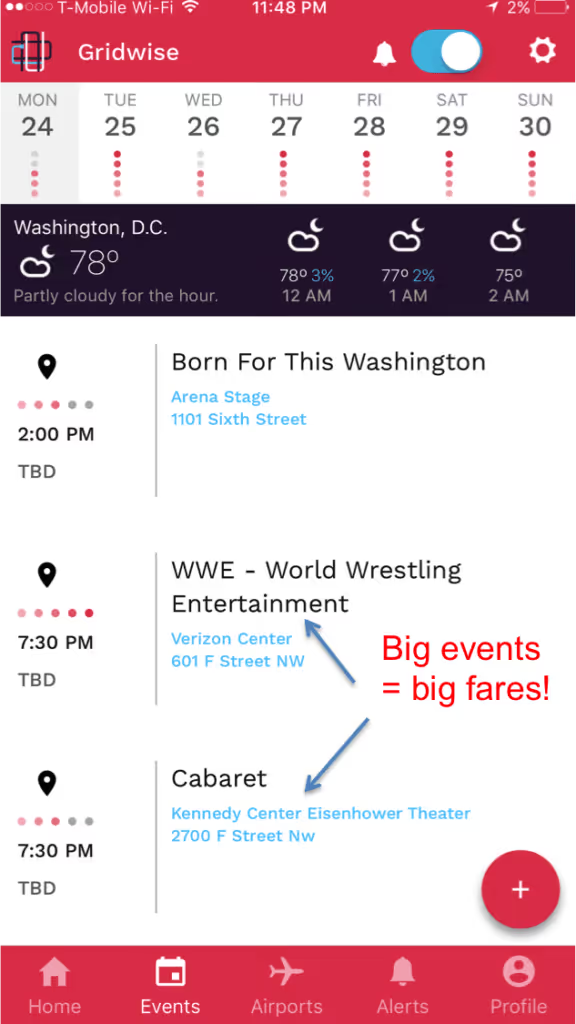
How do you rate them?
This depends on the attitude of the passenger. If they get snarky, they get 2 stars. If they can find it in themselves to take a chill pill, we can do 4-stars.
The Drunk
Possibly the most disruptive type of passenger is the drunk, and for obvious reasons.
If you're not a late-night driver you may have been able to avoid this type of passenger, but those of us driving after 11 pm Thursday, Friday, and Saturday know these folks all too well.
How to spot them?
You can spot an intoxicated passenger a mile away. They are usually in one of three states:
- Swaying vigourously in the wind as they wait for you to drive up and stumble to the car.
- Leaning on a light pole, nearly completely bent over, visibly one shot away from covering the whole sidewalk with vomit.
- Actively covering the whole sidewalk with vomit.
How to deal with them?
The one thing that you want to avoid at all costs is someone painting your car puke orange. Yes, you will have the opportunity to collect a cleanup fee if someone can't hold their alcohol, but your night will be over and you'll be spending your time cleaning up a mess instead of making money.
So when driving during popular going out hours you'll want to be selective about who you pick up.
Passengers #1 and #2 are likely going to be fine. They've had a few too many but should be able to keep it together. If they seem like they're teetering, you'll have to make a judgment call on if you want to risk it or not.
These passengers are likely going to be either way too excited or immediately pass out. If they are with a group, they'll likely be the former and will be very chatty. Go ahead and chat with them, but always remain professional.
Some of my best tips have come from groups that have clearly done their fair share of pregaming before going to the bars. So don't be afraid to chat, but know where to draw the line.
Passengers in category #3 usually haven't called you themselves, but a "friend" has. This "friend" will try and plop your would be passenger into your car even though they are clearly blacked out and probably won't be able to get out of your car even if they make it home.
If at all possible, avoid these passengers. They are a safety risk to you and themselves as they can be unpredictable. When you see this, I would recommend telling their friends that they will need to cut their night short and escort their friend home.
How do you rate them?
If they puke in your car they get 1-star + a cleaning fee and probably some unkind words... If they hold it together and are entertaining, let them pass with 4 stars.
If you want to avoid these types of passengers at all costs, adjust your driving strategy away from the late night bar scene to something like airports. You can even use the Gridwise app to check how many passengers you have incoming and the queue length.
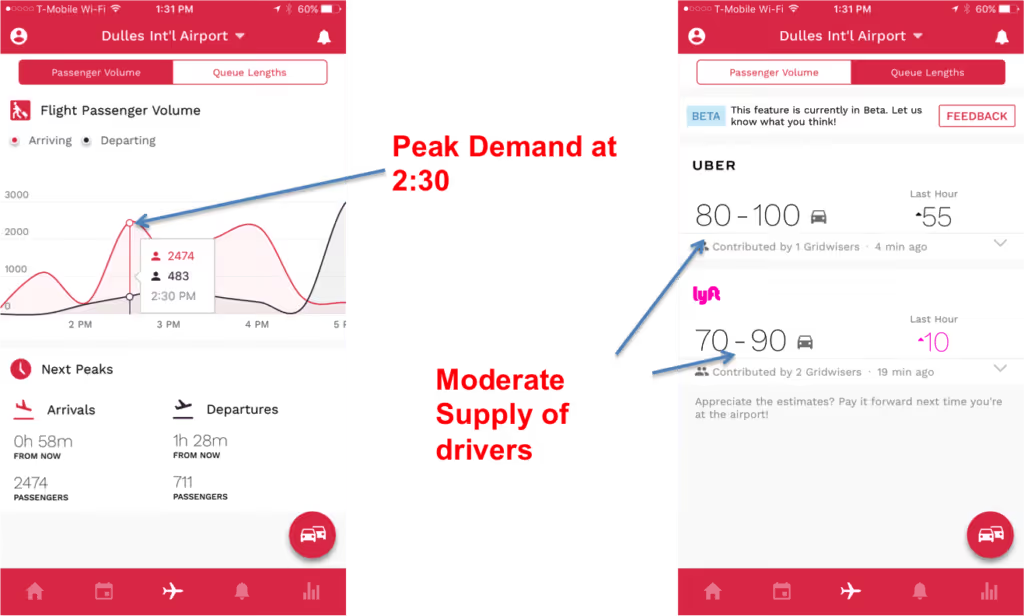
Download Gridwise to see airport demand and queue lengths
The Underage Rider
Most TNC's clearly state that their service is intended for people over 18 and that anyone under the age of 18 must be accompanied by a parent or guardian.
People don't care.
They will make you drive all the way to them so you can find their clearly underage kid waiting.
How to spot them?
When you drive up and what looks like a 15-year old is hailing you, you've got an underage passenger.
What to do about them?
There are two major camps for how to deal with underage passengers. Many drivers will play it safe, cancel the request, and contact their TNC. This can result in the passengers account being deactivated.
Most drivers, however, will take the approach of picking the passenger up and then explaining to them that Uber and Lyft is intended for passengers that are 18 or older. That will usually result in the passenger saying they didn't know, which we all know isn't true. So just reiterate that it's important for them to follow this rule.
How do you rate them?
1-Star... stop breaking the rules!
The PAX that asks if you can go through a drive through
This passenger for some reason believes that you are their own personal chauffeur. This passenger usually asks you to stop at a McDonald's or Wendy's, but sometimes will go as far as asking you to make a pit-stop at Chipotle...
Yes... we've seen this happen.
How to spot them?
This is usually a group of passengers that may be heading home from an event, so it's understandable that they are hungry.
If you pay attention to their conversation you'll start to hear rumblings of "I'm hungry" and "We should grab something to eat while we're out"... that's when you know you're in trouble.
What to do about them?
When you're asked to make a pit stop, remember that the bulk of your pay comes by the mile, not by the minute. So sitting in a drive through inching toward the payment window for 10-minutes likely isn't worth your time.
To avoid this, you can simply state that it's against Uber's Terms of Service to make these types of stops. Unfortunately, the conversation is likely not going to end there, so you have to be adamant, but polite.
Some passengers will go as far as offering a generous tip if you stop. If so, the stop may be worth it. You'll have to be the judge there.
If you do give in and take them to a drive through, make sure you position the back window in front of the speaker and the payment window. Also, don't expect any food kickbacks, but it's worth asking!
How do you rate them?
5-stars if you get a food kickback or a nice tip... 3-stars if you just get nagged.
Summing Things Up
We all know some passengers can be an incredible pain, and this is just the beginning of the list. When these situations come up, remember to keep your cool and understand that you're not conducting brain surgery. One bad passenger or one bad rating isn't going to make or break you.
Even the worst rides will rarely last more than an hour, and then you don't have to see them again. So don't let a bad passenger ruin your mood. Keep your smile, and keep making money! Or, keep your spirits up by reading more on how much rideshare drivers make.
If you have any memorable experiences with passengers, please share below!
The 5 Best Cars for Uber and Lyft Drivers
If you’re thinking about jumping into the rideshare game, there are a lot of factors to consider, including which ones are the top rideshare services drivers are using. But another very crucial element takes the cake. Sure, we can talk all day about how to plan your strategy or strike up conversations to get better tips, but none of that matters if you don’t have a good, reliable car to get you and your passengers around. And deciding what car to buy—or whether you even need to buy a new car—takes some consideration.
First of all, it’s important to know the car requirements for each rideshare platform. Though it can vary from city to city, to drive for UberX driver in most, you need a four-door, 2002 or newer vehicle. For Lyft, you need a 2005 or newer in most cities.
If you’re planning on driving multiple passengers, however, you’ll want to spring for a bigger car. UberXL and Lyft Plus require a vehicle that can hold up to 6 passengers, so the little four-door sedan won’t cut it.
Then, of course, there’s the luxury side of things, which is more strict. To drive for UberBlack or Lyft Premier, your car has to be a pristine Jaguar, Lexus, BMW or similar. UberBlack takes it a step further by requiring that the car have black leather interior as well.
Most likely, though, you’re not looking to buy a Jaguar or a passenger van, but something basic and dependable. So here are the five cars you should consider.
1. Toyota Corolla
The Toyota Corolla is a good bet for an inexpensive, durable car. New ones start around $18,500, and get 30 MPG in the city, 40 on the highway. It’s also a four-cylinder engine, so that means less fuel consumption.
The Corolla is also on the Consumer Reports list of cars that can reach over 200,000 miles, which is important if you’re going to be driving all day every day.
Corolla’s are known to need little maintenance, and when they do it’s relatively inexpensive.
One downside is that the handling and maneuverability aren’t the greatest, but what it lacks in movement it makes up for in reliability.
2. Toyota Prius V
The Prius is the car for good gas mileage, with an added bonus of environmental sustainability, if you’re into that kind of thing. Prius’s boast 51 MPG on the highway and 48 in the city, so you’ll save at the pump and maximize profits for sure. The only downside is the initial price tag; new Prius’ start at around $23,500.
If you’re in for the splurge, though, the Prius will get you far. Consumer Reports also has it in the “over-200,000-miles club,” and some even say it can take you 315,000 miles with proper upkeep. For the basics, maintenance is as affordable (and infrequent) as any other Toyota, but replacing the battery comes with a hefty price tag.
The car is also fairly heavy, so brakes can wear out faster. Additionally, the weight makes for a semi-clunky ride, so your passengers may not be as comfortable as in zippier cars.
3. Chevy Volt
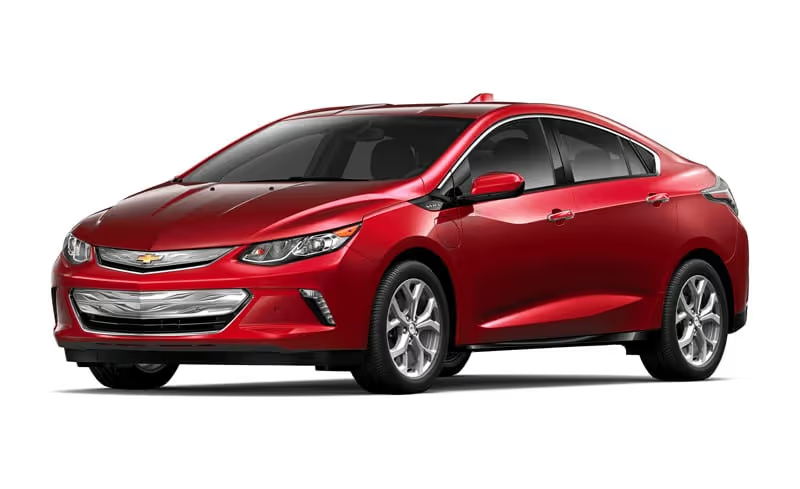
The Volt has a lot going for it. Like the Prius, it is a hybrid electric car, and that makes for fewer and cheaper trips to the gas station, which you’ll need to make up for the sticker price: The 2017 Volt starts at $33,220.
Fully charged, the Volt can go 50 miles on the battery alone and more than 400 with a fully charged battery and a full tank of gas. In gas-only mode, the Volt gets 37 MPG. In combined gas-electric mode, it jumps up to 62 MPG.
The Volt is also speedier and handles better than most hybrids on the road, so you can expect smoother driving and a fatter wallet. And because it is so fuel-efficient, buying the Volt also means receiving an additional tax credit come tax season.
The Volt will also last you a long time. Green Car Report found a 2012 Volt that surpassed 300,000 miles and counting.
Like the Prius, the maintenance cost that could get you is the battery. But so long as that lasts as long as it should, regular maintenance on the Volt will be cheap.
4. Toyota Yaris
If you’re looking for a reliable new car but don’t want to shell out too much cash, the Toyota Yaris may be the right choice. At $15,250, the light, compact Yaris will get you some bang for the buck: It gets 30 MPG in the city and 36 MPG highway.
Fuel-efficient and easy to maintain, the Yaris will also last you awhile: Forbes counts it as one of the cars that will go to 200,000 miles, and others have reported having a Yaris last beyond 250,000.
Some downsides: The Yaris is compact, so tall drivers—and passengers—may have a hard time getting comfortable, and the hatchback style leaves less room in the back for luggage. It also doesn’t handle as smooth as some cars, but it’ll get the job done.
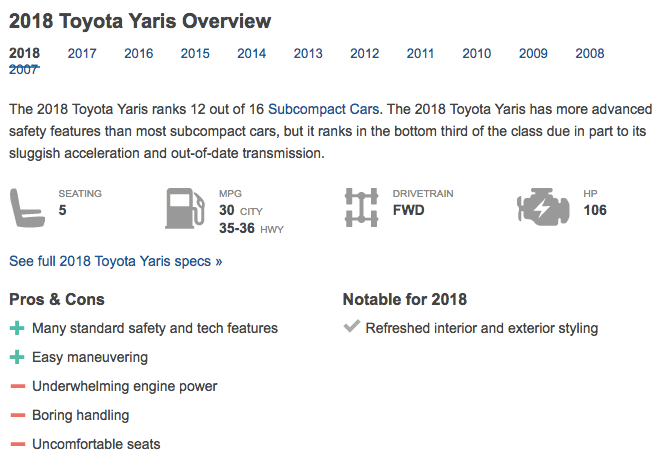
5. Ford Fusion
If you’re looking for a smooth and responsive ride at a decent price, the Ford Fusion may be the car for you. Fusion’s start at $22,600 and are known for their quick response and easy handling, and also have low and affordable maintenance.
The Fusion’s only get 23 MPG in the city and 32 on the highway, however, so for those long days of driving, you might have to make frequent stops for gas. But, a Fusion will last you a long time: Many Fusion owners report pushing their cars beyond 200,000.
Best way to get a car
- Buy. Before splurging on a new car, there are some things you should think about. For one, can you really afford a new car? Most Uber drivers make $14 to $16 an hour, and to get a loan for a new car requires good credit.Additionally, consider your needs outside of work. Do you need a new car anyway? Do the cars that are best for rideshare driving match your personal needs?With all that taken into consideration, buying a car may be the best option for you. And while a bright, shiny new one may sound appealing, that’s not the only option. You can always buy a mildly used car, or even lease one.
- Hertz. If you’re not in a position to buy a car, or just don’t want to own one, there are other options.The car rental service, Hertz, has partnered with Uber and Lyft to provide rideshare rentals at affordable prices. Lyft's deal starts at $165 for weekly rentals, and after a certain number of rides per week (based on your region), drivers can earn bonuses that cover the rental cost.For Uber, $180 per week will get you a car, but after 75 rides, you can get the car free.
- Hyrecar. Another option is to rent a car from a private person instead of a company. Hyrecar connects rideshare drivers with car owners and allows you to rent them at varying rates. There are no contracts or sign-up fees, and daily rates are as low as $35. Weekly rates float around $200 to $300.Hyrecar is also great if you want to try rideshare driving for a while before committing to buying a car for the job.
Work smarter. Earn more.
Whether you drive, deliver, or pick up shifts — Gridwise helps you track earnings, mileage, and performance so you stay in control of your work. Download the app and take charge today.
