Gridwise blog
Tips, insights, and advice to help you earn more and work smarter, whether you do gig work, hourly, or shift work.

How to Make $1,000 a Week With Uber Eats in 2026 (Tips + Hourly Data)
In this blog, we'll explore the strategies and techniques that can show you how to earn $1000 per week as an Uber Eats delivery driver. We'll cover everything from optimizing your delivery zones and schedules to maximizing your tips and customer satisfaction. Whether you're a seasoned Uber Eats driver or just starting out, this guide will provide you with the insights and actionable steps to take your Uber Eats driver earnings to the next level.
Becoming an Uber Eats delivery partner can be a lucrative opportunity, especially if you're able to consistently earn $1000 a week. By understanding the platform, optimizing your delivery strategies, and focusing on customer satisfaction, you can maximize your earnings and turn Uber Eats into a reliable source of income.
We’ll cover the following topics to provide coaching and ideas to help you push your earnings up to that $1000 per week level:
What do Uber Eats drivers do?
Uber Eats drivers deliver prepared food most of the time, but they also might shop for and deliver goods from convenience outlets and grocery stores. The job is pretty simple. You get a request for an order, you drive to the restaurant or store to pick it up, and then you deliver it to the customer. If you already drive for Uber, you can choose to take orders for Uber Eats delivery any time.
If you’re not an Uber Eats driver yet, it’s pretty easy to become one. This Gridwise post tells you what you need to do if you want to sign up and start making money Uber Eats style. Many rideshare drivers welcome the chance to deliver food rather than people. This article from Nerdwallet covers the Uber Eats gig from that angle.
There are some sweet advantages to working with Uber Eats. In lots of cities you don’t even need to have a car. You can use a bike or a scooter, or even walk, to make your rounds. If you do use a car, Uber Eats’ requirements are a lot easier to meet than they are for Uber rideshare driving.
You also have a lot of flexibility. You can shop and deliver convenience items and groceries, but you don’t have to. And, like most driving gigs, you can choose your own hours, and map out the locations where you want to work.
Use Gridwise features When to Drive and Where to Drive to help you figure out what work hours and which specific areas will be the most profitable for you. Real data from real delivery people will show you earning patterns for drivers in your town.
How much can you earn doing Uber Eats?
The honest answer to this question is: basically, as much as you want! It all depends on how many hours you put in and how strategic you are about your gig. Earnings vary from one area to another, as this article from Entrepreneur points out. To give you a baseline, let’s look at the earnings of Uber Eats drivers who tracked their earnings with Gridwise.
Remember that these numbers show us only average earnings. To make $1,000 a week with Uber Eats, you’re going to have to be better than average, and we’ll show you how. For now, though, it’s good to have these figures so you get a ballpark number of where to start.
How much do Uber Eats drivers make?
Gridwise data tell us the following:
- Monthly earnings average around $444.00 per month.
- Gross earnings per trip are between $9.00 and $10.00.
- Tips make up about 50% of most Uber Eats drivers’ income, which amounts to about $225.00 per month.
Is Uber Eats good money? It can be. While there are other gigs that pay more per trip, if you drive for Uber Eats, you’ll always be pretty busy.
https://datawrapper.dwcdn.net/HPAz8/3
You can also see that, unlike many other gigs, tips play a huge role in Uber Eats earnings.

With these numbers as a baseline, what can we say about how to earn $1,000 a week with Uber Eats? As we said in the introduction, it’s going to be a hustle, but it’s really possible. To figure out how to make the most money with Uber Eats, let’s start by looking at how many trips these “average” drivers made each month.
We know that average gross earnings were $444.00 per month, and drivers got around $10.00 per trip. That means they took 44 or 45 trips per month, which breaks down to 11 trips per week. That’s not a lot of Uber Eats delivery, is it?
The fact that Uber Eats drivers averaged so few trips shows us that many drivers use more than one app at the same time. This is called multi-apping, and you can learn more about it in this Gridwise post. If you want to answer the question of how much you can make with Uber Eats, then you need to stick with the app and keep plugging away at those orders. You also need solid strategies, as well as some inside tips and tricks.
How to make the most money on Uber Eats: Delivery driving tactics
Getting to that $1,000 a week with Uber Eats isn’t so hard when you remember that the drivers we saw making about $111 a week were only taking around 11 trips in the same time period. That’s not much at all! If you work the Uber Eats app like a boss, you’ll soon have many more trips than that, easily reaching the number needed to get you to $1,000 a week. Now, let’s get to some tactics you’ll need to make that kind of bank.
- Stay with the Uber Eats app, and track your earnings. Gridwise can easily do that for you. Simply sync your Uber Eats app with Gridwise, and you’ll be able to see how much you’ve earned with Uber Eats, what times were most profitable, and your average hourly pay. Racking up trips with Uber Eats has other benefits, including perks and bonuses that are awarded to top drivers.
- Leverage surge pricing and promotions. Surge pricing is applied when there is a lot of demand. When surge pricing is in effect, many of the trips you make will pay more than usual. Promotions are offered to drivers who complete a given number of trips in a certain time period. High traffic volume days, nights, and times give you these chances to get extra earnings. Challenging yourself to complete the right number of trips for promotions will add to the number of trips you can count on for big bucks, too. Learn more about Uber Eats surge pay, boosts, and promotions in this Gridwise blog post.
- Say yes to doubling up on orders. With Uber Eats, you can get back-to-back orders or receive batched orders. Back-to-back orders happen when you receive a new request while you’re on the way to deliver an original order. The Uber Eats app routes these trips automatically, so you won’t be sent out of your way.
Batched orders are Uber Eats’ way of bundling together orders from either the same restaurant, or two nearby eating establishments. You get money, and trip count credit, for all the orders you complete, plus customer tips, without having to make a bunch of separate trips.
- Turn on the charm and get bigger tips. Being nice really is part of the Uber Eats driver’s job, and getting tips is one way people who drive for Uber Eats make money beyond their basic pay.. Bring along those extra napkins and condiments, use equipment that keeps food and drinks at the right temperatures and prevents spilling, and consider your customers’ needs. If you deliver groceries, be extra careful with delicate items such as bread and eggs.
And, most important, follow your customers’ directions, and stay in communication with them if you are going to be delayed, or if you have questions about their order. This Gridwise post will tell how to get bigger tips as a delivery driver.
- Use even more charm to keep your ratings high. As an Uber Eats driver, you will be rated by the restaurant or store where you pick up the orders as well as the customers who are waiting for the deliveries. This two-way rating system is designed to keep you on your toes, so Uber can keep people satisfied with your service. Don’t worry, you get to rate them, too.
There’s another reason why your rating as a driver is important. It not only keeps you in good standing with Uber; it helps you to qualify for the Uber Eats Pro incentive program. To learn more about Uber Eats Pro, and what it takes to earn perks such as preferred services, discounts, and deals, check out this Gridwise blog post.
Smart business moves that seal the deal
Now that you know how to gobble up the deliveries you need to make $1,000 a week with Uber Eats, it’s going to be a breeze to get there. Let’s make it even easier, with business moves that boost your earnings and shrink your expenses. If you use these, it will also be easy to say yes when people ask, “Can you make good money with Uber Eats?”
Minimize expenses. Avoid racking up big fast-food bills by bringing your own food and beverages. You might not think you’re hungry when you first start your Uber Eats run, but once the aroma of pepperoni pizza, premium cheeseburgers, and piping hot fries start wafting through your car, that might change. Bring a sandwich or other healthy food from home, and buy bottled water in bulk to save tons of cash compared to what it costs to buy single servings.
Maximize tax deductions. Another way to minimize your expenses is to maximize your tax deductions. Start by tracking mileage with Gridwise.

Gridwise App
Gridwise captures every deductible mile you drive, including the distance you cover between the trips your driving app records. Know what expenses you can deduct, and put them to work for you when tax time comes. Learn more about tax deduction strategies in the Gridwise Tax Guide for drivers.
Boost earnings with referrals
As an independent contractor, you’re probably looking for ways to make even more money than you can with Uber Eats. And most gig workers like you enjoy getting passive income. With Uber Eats, there’s a really easy way to do that, referrals!
All you need to do is find friends and encourage them to deliver for Uber Eats. If they make a certain number of deliveries within a specified time, you will get paid for doing nothing more than having them sign up under your referral code! Rates of pay vary by city, so check your Uber Eats app to find out what the current deal might be, and learn more about the referral program on the Uber Eats website.
Also remember: “friends” don’t have to be your best buds. Many delivery people carry cards with a QR code linking to their referral information, so just about anyone you encounter can join Uber Eats and boost your earnings. You could meet a source of passive income at the gas station, on social media, or at your high school reunion. The more you hustle, the more there is to gain, right?
Master the art of self-employment
As an Uber Eats driver, you’re an independent contractor. That means the company isn’t going to withhold your taxes, provide insurance, keep track of your earnings, or tell you about tax deductions. You’ll have to do all these things for yourself.
If you want to maximize your tax advantages, open an official business entity. You can incorporate (create a corporation) or you can work as a limited liability corporation (LLC). You can also work with a DBA (Doing Business As) arrangement, but the corporation or LLC will do a better job of protecting you from liability.
Establishing a corporation or LLC offers better tax advantages than being a sole proprietor. For instance, if you simply collect your earnings into your private account, you’ll be charged self-employment taxes in most states. And paying extra taxes is something we all want to avoid, within legal limits, as much as possible.
Every Uber Eats driver needs to learn about self-employment, and there are some great resources you can review. Check out the CareerOneStop website about self employment which will help explain the basics. You can also check with a professional tax accountant, or look other websites to learn more about actually creating a business.
Scope out your market
Look at the area around you to see where you’re likely to get the most deliveries. Where are all the restaurants? Where might people be more inclined to order deliveries? What hours do you want to drive? What activities might be going on around those times? Think about late-night and after-school times as well as breakfast, lunch, and dinner times.
Be realistic about the potential for your area and aware of new services opening up. For example, in New York, there is already a tab on the Uber Eats app that allows customers to order groceries. In our article about the best food delivery service to work for you’ll see that Uber Eats stacks up well against other delivery companies, mainly because of its potential for expanded opportunities for drivers to earn.
So, is Uber Eats good money? As we said, it isn’t an automatic guarantee that everyone will make $1,000 a week with Uber Eats. Trying out the suggestions we give you here, though, should put you on the right track! Go out there and start stacking up those orders and raking in some impressive earnings!
Get more inside information on Uber Eats in these posts from the Gridwise blog:
- The delivery driver guide: Using the Uber Eats app
- Everything you need to know about driving for Uber Eats
- Uber Eats Pro: What drivers need to know
- Looking for a different gig, part-time or full time job? Check out the Gridwise Job board.
Uber Eats FAQ
How does the Uber Eats platform work for drivers?
Uber Eats is a food delivery service that connects customers with local restaurants and independent delivery partners. As an Uber Eats driver, you'll receive notifications of nearby delivery requests, which you can accept and complete. The platform provides flexibility, allowing you to work on your own schedule and earn money based on the number of deliveries you complete.
What are the requirements to become an Uber Eats delivery partner?
To become an Uber Eats delivery partner, you'll need to meet certain requirements, such as having a valid driver's license, a registered vehicle, and passing a background check.
How can I choose the right delivery zone to maximize my earnings?
Selecting the right delivery zone can significantly impact your earnings, as some areas may have higher demand and better-paying orders. It's important to research and identify the zones in your area that tend to have the most consistent and lucrative delivery opportunities.
How can I take advantage of peak delivery hours and surge pricing?
Understanding peak delivery hours, such as mealtimes and weekends, and taking advantage of surge pricing can boost your earnings. Be aware of when demand is highest in your area and adjust your schedule accordingly to capitalize on these peak periods.
What are some tips for maximizing tips and customer satisfaction?
Providing excellent customer service and going the extra mile to ensure a positive experience can lead to more tips and repeat business. Prioritize communication, timeliness, and attention to detail to keep your customers happy and satisfied.
How can I set realistic weekly goals to reach my $1000 target?
To make $1000 a week with Uber Eats, it's essential to set realistic weekly goals and track your earnings and expenses. Start by determining your target earnings and breaking it down into achievable daily or weekly goals. This will help you stay on track and make adjustments as needed.
What are some strategies for efficient route planning and navigation?
Effective route planning and navigation can save you time and fuel, allowing you to complete more deliveries. Utilize mapping apps and take advantage of features like real-time traffic updates and turn-by-turn directions to find the quickest routes.
How can I balance my Uber Eats deliveries with other commitments?
Develop a schedule that allows you to capitalize on peak delivery hours while still maintaining a healthy work-life balance. Consider using tools like calendar apps to plan your availability and track your hours to ensure you're maximizing your earning potential without sacrificing your personal life.
What are the key considerations for maintaining my vehicle as an Uber Eats driver?
Keeping your car clean and well-maintained is crucial for maximizing your Uber Eats earnings. Regularly scheduled oil changes, tire rotations, and other preventive maintenance can help extend the life of your vehicle and minimize downtime. Additionally, budgeting for vehicle-related expenses, such as fuel, insurance, and repairs, will ensure you're accounting for these costs and maximizing your net earnings.
What are the tax obligations and legal considerations for Uber Eats drivers?
As an Uber Eats delivery driver, it's essential to understand the tax obligations and legal considerations that come with being an independent contractor. This includes properly reporting your earnings, deducting eligible business expenses, and making quarterly estimated tax payments. Additionally, you'll need to ensure you have the appropriate insurance coverage, such as personal auto insurance and possibly commercial auto insurance, to protect yourself and your vehicle while on the road making deliveries.

The Gridwise Job Board: Find Your Ideal Job or Gig Work
Gridwise is an essential assistant app created by gig workers for gig workers. Our mission is to support those engaged in gig work in every way possible. We understand how challenging it can be to deal with income instability, a lack of benefits, and job insecurity that often comes with gig work. The Gridwise app tracks and organizes earnings and expenses, and offers a wide array of discounts, deals, and services that make the lives of independent contractors easier and more rewarding.
We firmly believe it’s possible to make a viable living and create a gig experience that offers flexible hours, variety, and excitement. With issues such as consistent earnings and job security in mind, Gridwise is proud to offer a centralized platform that shows you how to find gig work and secure reliable opportunities. We’re proud to introduce the Gridwise Job Board.
The Gridwise Job Board: Key features
Because Gridwise is dedicated to serving the gig worker community, we’ve filled the Gridwise Job Board with useful features that won’t waste your precious time.
- Comprehensive listings. Find part-time, full-time, temporary, and per-task work. Drive or deliver with your vehicle, utilize an employer’s vehicle, or even find non-driving gig work.
- User-friendly interface. Find the jobs that are right for you with a tap of your screen.
- Verified opportunities. We vet the jobs before they are listed to ensure you’re getting high-quality job postings.
How to get more gig work, seasonal, part-time or full-time jobs with the Gridwise Job Board
Looking specifically for “gig work apps” or “gig jobs near me?” You’re in luck. Our filters and search functions send you directly to the listings you seek.
Here’s how it works.
- Access the Job Board via the Gridwise website.
- Search for jobs by type, location, and more.
- Select the job that interests you, and read all about it.
- Scroll through the description, and if it appeals to you, click “Apply for job.”



Many types of jobs are available. Adjust the search filter to see the full variety of opportunities that will let you cash in. Deliver food, set up catering, do rideshare driving, get paid for doing package delivery, and much more. You’ll find short-term gigs, long-term contracts, and part-time positions.
Perks of the Gridwise Job Board for gig workers
Gig workers who know how to make extra money will appreciate how the Gridwise Job Board lets you multiply your chances of bringing in big earnings. Here’s how:
- Increased stability. Use the Gridwise Job Board to find part-time or permanent jobs in addition to the part-time gigs you already have. Always keep a steady stream of earning opportunities flowing toward you.
- Flexibility and autonomy. Choose jobs that fit your schedule, work around other jobs and family duties, and still leave room for some fun in your life. Discover side hustles to supplement your full-time job, permanently or just for the season.
- Skill development. Find part-time work that lets you use a skill you already have, or try your hand at something new. It’s a smart way to develop a portfolio to showcase what you can do, or even to find permanent employment.
Get Gridwise and stay up to date on the Gridwise Job Board
Gig workers need plenty of information and assistance, and Gridwise is here to give it to you. Download the app and get essential features such as
- seamless earnings tracking
- mileage tracking
- expense recording, including notes
- low-cost and no-cost insurance benefits
- access to affordable medical, dental, vision, mental health, and alternative care
- professional services including legal and financial help
- deals and discounts
- weather, events, and traffic reports
- inside information on where and when to drive
More to know about gig work:

5 Best Mileage Trackers For Gig Drivers
Many drivers ask, “Do I really need a mileage tracking app?” The answer is simple: only if you want to have an accurate count of all the miles you can legally deduct from your taxable income! You might think your rideshare or delivery driving app has got you covered. After all, they do quite a good job of logging the miles you drive while you’re on a trip or delivery. But, if you want to have the best app to track mileage for Uber, Lyft, Doordash, Instacart, or the other apps you may use, you need more. Why is that?
Without a separate tracker, you’re missing the miles you drive in between pings. Did you realize that all the miles you drive, from the moment you begin your shift until it’s over (as long as you don’t drive several miles on a break to hang with your friends), are tax deductible! That means you need something besides your driving app to keep an accurate count of your travels. Read this Gridwise post to see how important it is to keep track of every deductible mile.
You won’t be surprised to hear that there’s an app for tracking miles. In fact, there are several of them. Here, we’re going to tell you about five top mileage tracking apps, and help you figure out which one is best for you.
Before we get to the list and identify the best mileage tracker app, let’s clarify what exactly a mileage tracking app is. According to G2.com’s technology glossary, mileage tracking is done for the purpose of keeping a log of mileage that is either reimbursable or tax deductible.
And yes, of course you can track your miles simply by taking readings on your odometer. But are you really prepared to account for how many miles you drove for personal reasons and subtract them from the total to get your business mileage? Even if you can remember all that and do the arithmetic, if you want an accurate reading of the miles you drive for business, and can therefore deduct, a mileage tracking app will save you a lot of trouble and prevent you from making costly errors.
Plus, as a gig driver, you have specific needs when it comes to a mileage tracker. Ideally, you’d be able to handle mileage tracking and several other functions all in one app. It can be maddening enough to deal with driving apps, particularly if you’re an avid multi-apper. You would want your mileage tracker app to help you keep account of other aspects of your business, including income, expenses, and inside information about the art of gig driving.
Not all mileage apps are equal, to be sure! Let’s look at five of the best apps to track mileage and figure out which is the best app to track mileage with Uber and Lyft, or what mileage tracker app is best for DoorDash.
1. Zoho Expense

First up is Zoho Expense, which does exactly what its name says. This app is designed to allow companies to give employees a uniform way to create and submit expense reports. It can be used by individuals, including gig drivers, as well.
It includes a mileage tracker, as well as features that let you track other deductible expenses, including the ability to scan and record receipts.
Available on Android and Apple: Yes
Ratings: 4.8 stars on App Store, 4.7 stars on Google Play
Free Version: Yes
Subscription price: $3 per month, billed annually
Created specifically for gig drivers: No
2. Quickbooks Online

Quickbooks Online is a cloud-based app that allows you to track your mileage, earnings, and expenses. The information you enter can then be used to generate various reports that prepare you for tax time. It also allows you to create graphs that illustrate your cash flow, and includes a receipt scanner so you can instantly record deductible expenses. Quickbooks is popular, highly reliable, and designed mainly to help people keep track of their small businesses.
Available on Android and Apple: Yes
Ratings: 4.7 stars on App Store, 4.4 stars on Google Play
Free version: 30-day free trial
Subscription price: $15 per month for basic version if purchased for 3 months or more
Created specifically for gig drivers: No
Source: quickbooks.intuit.com
3. Shoeboxed

Shoeboxed started in 2007 as a service for scanning paper receipts into digital form. Now the app offers a free mileage tracker and has enabled users to scan receipts directly. It touts itself as the best mileage tracking app for DoorDash, but there are some elements missing that Dashers might like to have. While it provides features that record your expenses and prepare you for tax season, it doesn’t automatically track your earnings. The mileage tracker has a system where you can drop pins along your routes to make the tracking more precise, identifying those legs of a trip that you make for business purposes. The mileage tracker is “free” once you sign up for the basic version.
Available on Android and Apple: Yes
Ratings: 4.5 stars on App Store, 2.3 stars on Google Play
Free version: No
Subscription price: $18 per month for basic version
Created specifically for gig drivers: No
Source: blog.shoeboxed.com
4. Stride

This free mileage tracker does a fair job of keeping track of the distances you rack up while gig driving, but it doesn’t automatically track earnings. It can be a big help, though, in tracking your expenses. You can link Stride to your bank account, and it will automatically scan your expenses to identify items you can potentially deduct. The app is totally free. This could make it the best free mileage tracker app, but there is a small price to pay. The app will persistently push you to consider various insurance plans that they are affiliated with. If you don’t mind that, this is a solid mileage tracker, even if it doesn’t track your earnings.
Available on Android and Apple: Yes
Ratings: 4.8 stars on App Store, 4.6 stars on Google Play
Free version: Yes
Subscription price: None. The app is free.
Created specifically for gig drivers: No
5. Gridwise

Gridwise has a free mileage tracker and free features that record your income and expenses. It gives you access to insurance and benefits, as well as insights about the best times and places to make the most money while gig driving. The Gridwise mileage tracker captures all the miles you drive while you’re on your driving shift, and it can be used if you have other trips you need to make which qualify as business travel.
Drivers love it because it is geared toward the needs of rideshare and delivery workers, providing free information about airport departures and arrivals, event start and let out times, weather, traffic, and more. The Gridwise Plus subscription adds value by providing additional insights and reports, discounts on benefits, the ability to export data in .csv format,, and more.
Available on Android and Apple: Yes
Ratings: 4.9 stars on App Store, 4.6 stars on Google Play
Free version: Yes
Subscription price: $9.95 per month for Gridwise Plus, or $95.99 per year (a $23.41 savings)
Created specifically for gig drivers: Yes!
What is the best mileage tracking app?
Now that we’ve checked them all out, we’re positive about the answer to that. Hands down, it’s Gridwise. Are we biased? You bet we are! But drivers love it too. Gridwise is the best mileage tracker app, and so much more. So many of the features are free, and the subscription to Gridwise Plus will pay for itself with additional insights to boost your earnings and deeper discounts on products and services.
Most important, Gridwise is designed specifically for gig drivers by experts who were once gig drivers themselves! Knowing what gig drivers need is a crucial step in creating an app that rideshare and delivery drivers can really use! Here are a few of the features, besides mileage tracking:
- seamless earnings tracking
- automatic, on/off toggle and manual mileage tracking
- mileage categorization
- airport, traffic, weather, and events information
- insights into where to drive and when to drive
- reports showing earnings across the platforms you use
- discounts on countless products and services for drivers
- additional resources for finding side gigs
- an informative and comprehensive blog
- affordable benefits, including insurance, medical, dental, and alternative practitioner discounts
- a community of drivers just like you
Don’t settle for just any app. Get the best mileage tracker, and so much more, from Gridwise!
How this credit card giant is using Gridwise Ads to drive qualified applications
“Gridwise knew exactly what options would best help us achieve our goals. Their responsiveness, transparency, and results made them one of our top two favorite partners to work with throughout Q4.”
- Senior Media Buyer
Gridwise recently worked with one of the largest providers of credit cards for retail outlets and other brands. Its history reaches back to the Great Depression, when a major retail bank was created to offer customers the ability to purchase GE appliances on a line of credit.
In 2014 the credit card provider was spun off from that bank. Now, the provider seeks to serve a variety of communities with credit cards that allow consumers to acquire the goods and services they need on a line of credit.
The credit card provider works alongside a full-service digital advertising agency that blends strategy, technology, media, and creative together to motivate audiences to action and achieve amazing results. With offices in California, Toronto, and Liverpool, England—and over fifteen years under its belt—the agency has handpicked the boldest, brightest minds in marketing, design, strategy, and analytics.
So when the credit card provider needed to execute a forward-thinking digital marketing campaign, it went to the agency. And the agency turned to Gridwise.
The Challenge
The credit card provider recently developed a product that’s perfect for individuals with high vehicle utilization (read: Uber drivers). Naturally, the provider wanted to reach as many rideshare drivers as possible.
The agency’s Senior Media Buyer, had previously tested various paid acquisition platforms in an effort to reach drivers. All too often, the message missed the mark because the agency was unable to isolate rideshare drivers.
That changed when the Senior Media Buyer connected with Clay from Gridwise and they started discussing a potential partnership.
Our Approach
Although Gridwise is a relatively new and rapidly growing company, we understand the rideshare driver market inside and out, and are familiar with the best ways to reach this population. For the credit card campaign, the Senior Media Buyer and Clay decided a multifaceted approach would be the best way to go.
“[We’re] especially excited to work with Gridwise because it’s a new and vibrant company. Extra enticement got tossed into the mix because Gridwise has the perfect device to reach [our] target market: an app that will be consistently accessed by people who must work with apps to conduct their business.”
- Senior Media Buyer
Strategy
The first push was an email sent to 35,000 Gridwise users. This is a tactic that rideshare drivers were already comfortable with which the Gridwise folks knew from previous campaigns. The email was partially effective, but the rest of the campaign was what made the Gridwise approach so powerful.
Gridwise knew that a blog post was the perfect placement for the credit card provider’s ad, especially a blog that informed rideshare drivers about the essentials of car maintenance.
The Senior Media Buyer was extremely impressed with how Gridwise paid attention to the client’s brand guidelines and made sure the look and feel of all the ads and banners were in sync with those guidelines.
Since Gridwise notifications are delivered via an app that drivers open multiple times on any given day, it made sense to use banner ads and in-app offers to get the right message to the right people. This was probably the most effective part of the campaign strategy, resulting in CTRs in the double digits.
Results
The Senior Media Buyer and her team produced impressive results for their client by working with Gridwise. Capturing the attention of rideshare drivers in-app provided new avenues to deliver the credit card provider’s message and showcase its brand.
Featured promos and the promo listing were helpful. But they were not as productive as the features that only Gridwise could offer because its app serves as a nationwide delivery platform.
“Gridwise not only delivered the numbers we wanted for our client, the people were super-easy to deal with and the process was seamless. Their flexibility in working with various iterations and revisions in ad copy and blog content was amazing, gracious, and highly professional.”
- Senior Media Buyer

Uber and Lyft Driver Instructions for LaGuardia Airport (LGA)
LaGuardia Airport (LGA) saw over 30 million visitors in 2019, making it one of the busiest airports in the Northeast. It’s a hub for American Airlines and Delta Air Lines and is one of three airports servicing New York City. LaGuardia is a massive airport, and that means massive earnings potential for rideshare drivers.
After all, those millions of passengers need rides to and from the aviation hub, right? And that’s where you come in.
LaGuardia allows Uber and Lyft vehicles at the pick-up and drop-off terminals, but before heading that way, there are a few rules you’ll want to know. To maximize earnings (and avoid a ticket), it’s important to understand how to navigate the airport, join the queue, and legitimize your vehicle.
To help rideshare drivers be successful at LaGuardia Airport, we put together this blog post to serve as a guide. The following topics are covered:
- What should you do before arriving at LaGuardia Airport?
- Do you need any permits to drive there?
- Where is the rideshare waiting area at LaGuardia?
- What are the passenger pick-up rules at LaGuardia?
- What are the passenger drop-off rules at LaGuardia?
- When is the best time to drive at LaGuardia?
- What is the best driving strategy at LaGuardia?
Let’s dive in!
What should you do before arriving at LaGuardia Airport and entering the airport queue?
To pick up passengers at LaGuardia, you’ll need your trade dress, which (as you know) is the Lyft or Uber decal that goes on your front passenger windshield facing outward.
Uber sends out this decal when drivers sign up. If you’ve lost yours since then, there are a few easy ways to replace it. You can request that a new one be mailed to you, pick one up at your local Greenlight Hub (be wary of recent closures), or print out a temporary version at home.
You can order a Lyft decal from your Dashboard, and print a temporary emblem to use while waiting for yours to come in the mail.
You’ll need your Taxi & Limousine Commission (TLC) license before you can drive at LaGuardia. If you don’t already have your license, you can find more information by visiting the TLC website.
Where is the Uber/Lyft waiting area at LaGuardia Airport?
There are two lots where you can wait at LaGuardia: the Bowery Bay Boulevard Wait Area for Terminal A requests, and 23rd Avenue and 90th Street Wait Area for Terminal B/C/D requests.
Check out this map for more information on the staging lot locations.
At the Terminal A waiting area, matches are determined by proximity and estimated time of arrival.
Once you get to the staging Terminal B/C/D lot, you’ll automatically be entered into the airport queue. You’ll be able to check your place in line in the Lyft or Uber app. Unfortunately, if the lot is full you’ll have to leave the airport.
How should Uber and Lyft drivers pick up passengers at LaGuardia Airport?
In the 90th Street staging lot, the driver who has been waiting the longest in the staging area gets the next rider request (the Terminal A lot doesn’t have a queue, it’s just a place to wait). Make sure not to enter out of driver mode while you wait or you’ll lose your spot in line.
For Terminal A pickups, your rideshare app will show your rider’s name and pick-up location at the arrivals’ level of his or her air carrier of choice.
For pick-ups at Terminal B, meet your rider on Level 2 of the Terminal B Garage between columns F and G. Normal pickups occur near the F column while Lyft’s Fast Match will be by the G columns.
For pickups at Terminals C and D, head to the lower level of the Delta Arrivals Road where riders will meet you in designated lanes in the pick-up area. Pick up in the Car Services Area located between Terminals C and D (Lanes L and M; stalls 1 to 3). Lyft’s Fast Match pickups will occur on either side of Island M in the Car Services Area between Terminals C and D, while all other pickups will occur in Lane L.
If you are driving for Uber, you might be navigated to a PIN area rather than matched with a specific rider. Simply proceed to the PIN-marked area, pull forward in the queue until the parking staff directs a rider to your vehicle, then meet your rider. Enter the 6-digit PIN code he or she gives you. Once the PIN is entered, your ride is ready to go.
Lyft’s Fast Match works the same way, but the code will be 4 digits rather than 6.
If you’ve ever driven at LaGuardia you know that terminal areas can be crowded. If you can't find your rider, message or call them through your app to let them know where you are.
And one more thing—while waiting for ride requests at Terminals C and D, you may receive a message directing you to head toward the terminal. While on the way, you should receive a ride request. If not, just head back to the staging area in 15 minutes and you’ll be at the front of the queue.
How should Uber and Lyft drivers drop off passengers at LaGuardia Airport?
Fortunately, dropping off passengers at LaGuardia is easier than picking them up. Just head to the departure level at the passenger’s carrier of choice and make sure not to linger in the terminal area.
That’s it, and you’re back on the road!
When is the best time to drive at LaGuardia Airport?
Turn to your Gridwise app for information about all arrivals and departures at LaGuardia, as well as delays and cancellations.
Typically, midday is the best time for airport driving. Most passenger arrivals and departures occur sometime between 10:30 a.m. and noon.
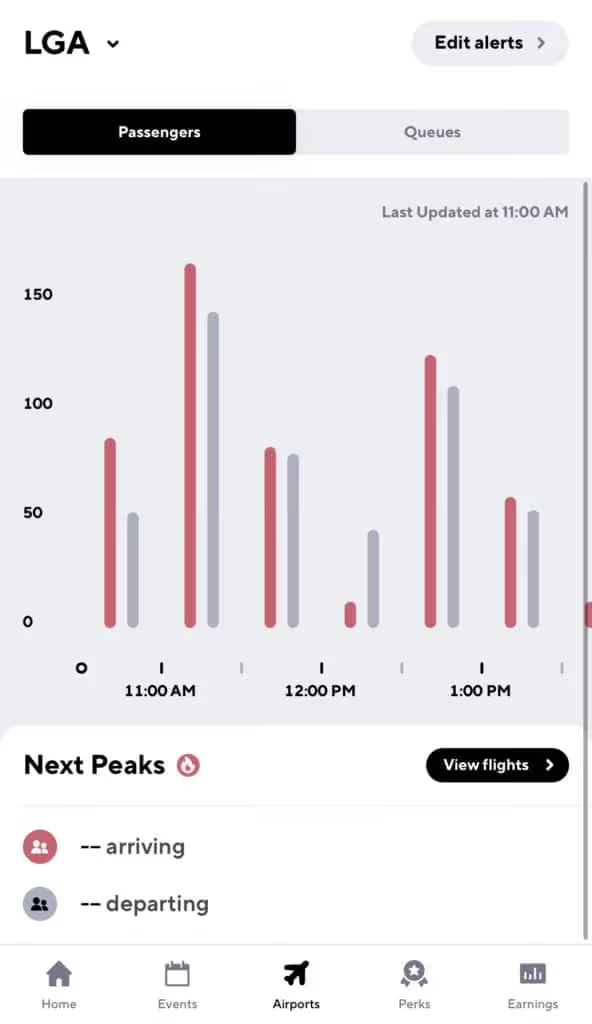
With Gridwise Plus you’ll be able to see airport data 24 hours in advance, so you can lock in a solid airport strategy the night before you head out. You’ll also be able to create custom alerts for arrivals and departures.
What are some good airport strategies?
Pick up a passenger on the way to the airport
Count on Gridwise to let you know when there’s a peak in airport departures, so you can hang around near hotels at that time to maximize your chances of an airport ride.
Do not cancel on a passenger after you’ve accepted a fare
If you do, you will be bumped to the bottom of the queue and your wait starts all over again. The good news is, if it’s a short ride some companies let you jump back in line after you’ve dropped the passenger off.
Be ready to present your waybill
A waybill is essentially a receipt of the last trip you completed. Be prepared to present this to airport officials or law enforcement while waiting for arrivals. You might also be asked by airport officials to see proof of the trip request before heading into the terminals.
Always be prepared
The fact is, you never know when law enforcement will show up. Keep your driver’s license, insurance card, and registration handy, and don’t forget to have your placard displayed.
Congrats! Now you’re all set to make some pickups and dropoffs at LaGuardia Airport. Happy driving!
Uber and Lyft Driver Instructions For Kansas City International Airport (MCI)
Kansas City International Airport (MCI) is located in Platte County, Missouri, 15 miles from downtown Kansas City. The airport averages 340 aircraft operations per day, and in 2019 saw more than 11 million visitors.
For rideshare drivers, that means high potential earnings. All those passengers need rides to and from the aviation hub, and that’s where you come in.
Kansas City International Airport allows Uber and Lyft vehicles at the pick-up and drop-off terminals, but before you head that way there are a few rules you’ll want to know. To maximize earnings (and avoid a fine), it’s important to understand how to navigate the airport, join the queue, and legitimize your vehicle.
To help rideshare drivers be successful at the Kansas City airport, we put together this blog post to serve as a guide. The following topics are covered:
- What should you do before arriving at Kansas City International Airport?
- Do you need any permits to drive there?
- Where is the rideshare waiting area at Kansas City International Airport?
- What are the passenger pick-up rules at Kansas City International Airport?
- What are the passenger drop-off rules at Kansas City International Airport?
- When is the best time to drive at the airport?
- What is the best driving strategy?
Let’s dive in!
What should you do before arriving at Kansas City International Airport and entering the airport queue?
To pick up passengers at Kansas City International, you’ll need your trade dress, which (as you know) is the Lyft or Uber decal that goes on your front passenger windshield facing outward.
Uber sends out this decal when drivers sign up. If you’ve lost yours since then, there are a few easy ways to replace it. You can request that a new one be mailed to you, pick one up at your local Greenlight Hub (be wary of recent closures), or print out a temporary version at home.
You can order a Lyft decal from your Dashboard or print a temporary emblem to use while waiting for yours to come in the mail.
Where is the Uber/Lyft waiting area at Kansas City International Airport?
The staging lot at MCI is located off of Brasilia Avenue near the Marriott Hotel. Refer to the map below for further details.
You’ll be automatically entered in the queue once you enter the lot, and you can check your place in line in the Uber or Lyft app. Unfortunately, if the lot is full you’ll have to leave the airport.
While waiting for requests, you may get a pre-match (Uber) or pre-dispatch (Lyft) message urging you to head to the pick-up terminal. While on the way, you should be matched with a rider. If not, just return to the staging lot within fifteen minutes, and you’ll be first in the queue.
How should Uber and Lyft drivers pick up passengers at Kansas City International Airport?
The driver who has been waiting the longest in the staging area gets the next rider request.
Once you accept a request, simply head to your rider’s terminal at the curbside Arrivals level.
Terminals B and C are located at the end of Cookingham Road. These terminals are roundabouts, so you’ll encounter Terminal C before Terminal B.
How should Uber and Lyft drivers drop off passengers at Kansas City International?
Drop-offs at the Kansas City airport are simple! Just head to Departures at the passenger’s carrier of choice.
You may receive a pick-up request in the next 60 seconds (part of a feature called Rematch) but if not, either head back to the road or to the staging lot.
When is the best time to drive at the Kansas City airport?
Turn to your Gridwise app for information about all arrivals and departures at MCI, as well as delays and cancellations.
Typically, midday is the best time for airport driving; most passenger arrivals and departures occur sometime between 11:00 a.m. and 3:00 p.m.
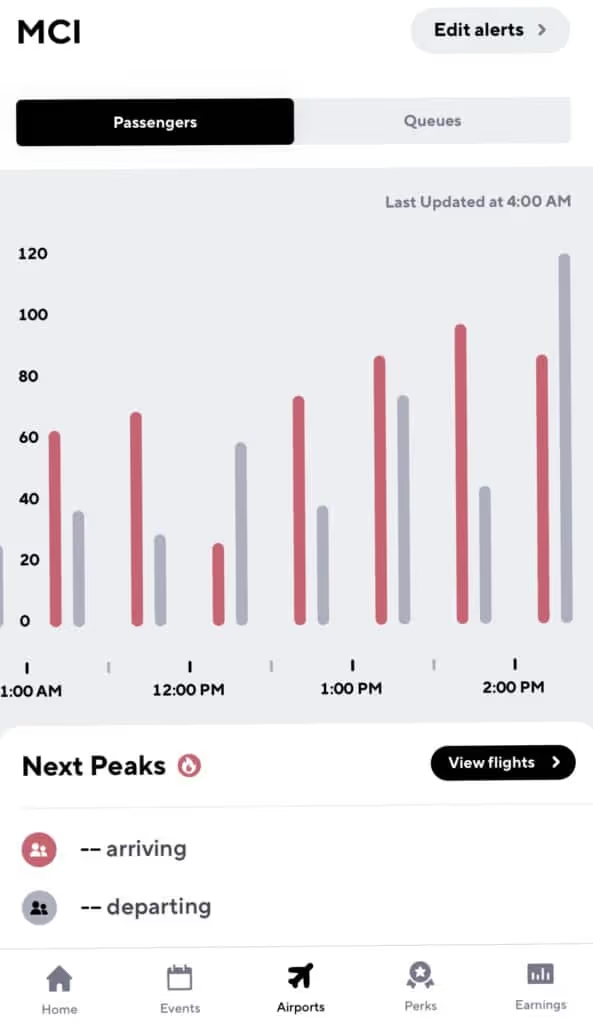
With Gridwise Plus you’ll be able to see airport data 24 hours in advance, so you can lock in a solid airport strategy the night before you head out. You’ll also be able to create custom alerts for arrivals and departures.
What are some good airport strategies?
Pick up a passenger on the way to the airport
Count on Gridwise to let you know when there’s a peak in airport departures, so you can hang around near hotels at that time to maximize your chances of an airport ride.
Do not cancel on a passenger after you’ve accepted a fare
If you do, you will be bumped to the bottom of the queue and your wait starts all over again. (This also happens if you enter out of driving mode or leave the property while in the queue.) The good news is, if it’s a short ride some companies let you jump back in line after you’ve dropped the passenger off.
Always be prepared
The fact is, you never know when law enforcement will show up. Keep your driver’s license, insurance card, and registration handy, and don’t forget to have your placard displayed.
Have your waybill ready
Your waybill is a digital receipt of your last drive, which airport officials may occasionally ask to see. Search ‘waybill’ on Lyft or click ‘Info’ on Uber to make it appear.
Congrats! Now you’re all set to make some pick-ups and drop-offs at the Kansas City International Airport—and maybe sneak a Chiefs game in between.

Uber and Lyft Driver Instructions for Boston Logan International Airport (BOS)
The General Edward Lawrence Logan International Airport (BOS), more commonly known as Boston Logan Airport, saw over 42 million visitors in 2019. A hub for Cape Air and Delta, Logan is the 16th-busiest airport in the United States and the biggest airport in New England based on passenger traffic.
This means high potential earnings for rideshare drivers in the Boston area. After all, those millions of passengers need rides to and from the aviation hub, right? And that’s where you come in.
Boston Logan allows Uber and Lyft vehicles at the pick-up and drop-off terminals, but before heading that way, there are a few rules you’ll want to know. To maximize earnings (and avoid a fine), it’s important to understand how to navigate the airport, join the queue, and legitimize your vehicle. The rules changed recently at Boston Logan, so it’s important to have your info as up-to-date as possible.
To help rideshare drivers be successful, we put together this blog post to serve as a guide. The following topics are covered:
- What should you do before arriving at Boston Logan International Airport?
- Do you need any permits to drive there?
- Where is the rideshare waiting area at Boston Logan?
- What are the passenger pick-up rules at Boston Logan?
- What are the passenger drop-off rules at Boston Logan?
- When is the best time to drive at the airport?
- What is the best driving strategy?
Let’s dive in!
What should you do before arriving at Boston Logan International Airport and entering the airport queue?
To pick up passengers at Boston Logan, you’ll need your trade dress, which (as you know) is the Lyft or Uber decal that goes on your front passenger windshield facing outward. Note that you’ll need both decals to drive at BOS, with the other decal on your rear passenger windshield facing outward.
Uber sends out this decal when drivers sign up. If you’ve lost yours since then, there are a few easy ways to replace it. You can request that a new one be mailed to you, pick one up at your local Greenlight Hub (be wary of recent closures), or print out a temporary version at home.
You can order a Lyft decal from your Dashboard, pick one up at the Boston Logan Lyft Hub, or print a temporary emblem to use while waiting for yours to come in the mail.
Before you head to Boston Logan Airport, depending on which rideshare company you drive for, you may need your Massachusetts Background Check Clearance Certificate from the Department of Public Utilities (DPU). You must have a digital or printed version of your certificate with you at all times while on airport property or risk a $500 fine. You can find some good information about that on the Lyft website, or email a question to the DPU at DPUTNCQuestions@massmail.state.ma.us.
One more thing to know if you drive for Lyft: You’ll have to log in to your app and complete your acknowledgement of BOS rules and regulations before heading onto the road.
Where is the Uber/Lyft waiting area at Boston Logan Airport?
The staging lot at Boston Logan is located opposite the car rental lot and the Embassy Suites. Refer to the map below to see where you’ll be going.
Once you get to the staging lot, you’ll automatically be entered into the airport queue. You’ll be able to check your place in line in the Lyft or Uber app.
Make sure not to leave the staging area or you’ll lose your place in the queue.
How should Uber and Lyft drivers pick up passengers at the Boston Logan Airport?
The driver who has been waiting the longest in the queue gets the next rider request.
All your riders will be picked up at the Central Parking Garage no matter what their terminal. Follow the signs to find the correct pickup location as you approach the garage.
Make sure to enter from the northeast entrance for Terminal A and E pickups, but from the northwest entrance for Terminals C and B pickups.
Also—keep an eye on the pin that the rideshare app places at the spot to meet your rider, and don’t hesitate to reach out to let him or her know that you’re on your way.
For riders who require accessibility accommodations, you are permitted to meet them at the curbside pick-up spot or drop them off at Arrivals.
How should Uber and Lyft drivers drop off passengers at Boston Logan Airport?
Beginning December 9, 2019, all drop-offs will be at Central Parking.
However, from the hours of 10:00 a.m. to 4:00 a.m., passengers going to Terminals A, B, and E will be allowed on the Arrivals level curbside for each terminal (Terminal C passengers are always dropped off in the garage).
When is the best time to drive at Boston Logan airport?
Turn to your Gridwise app for information about all arrivals and departures at BOS, as well as delays and cancellations.
Typically, midday is the best time for airport driving; most passenger arrivals and departures occur sometime between 11:30 a.m. and 2:30 p.m.
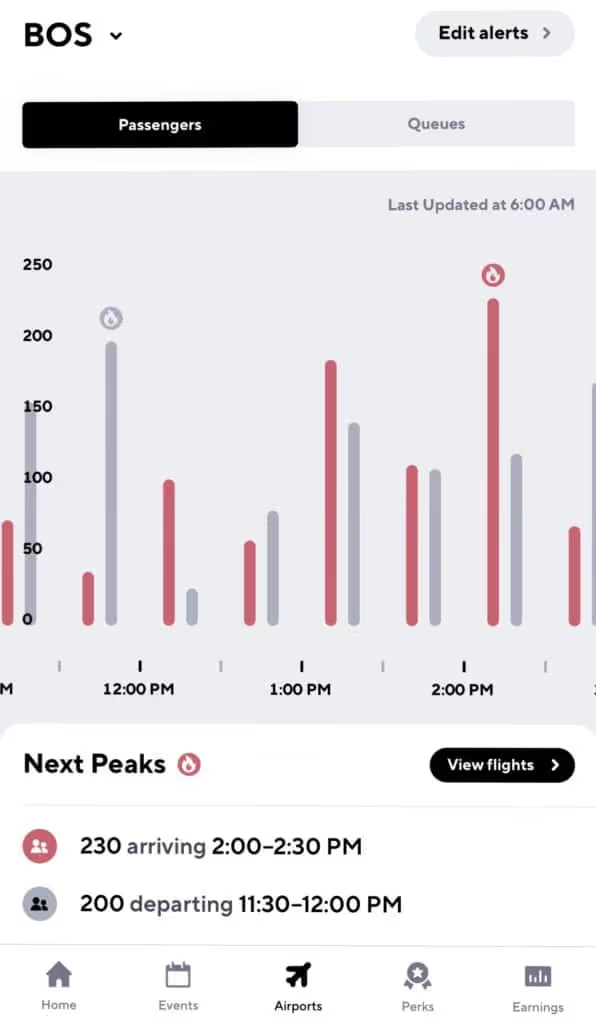
With Gridwise Plus you’ll be able to see airport data 24 hours in advance, so you can lock in a solid airport strategy the night before you head out. You’ll also be able to create custom alerts for arrivals and departures.
What are some good airport strategies?
Pick up a passenger on the way to the airport
Count on Gridwise to let you know when there’s a peak in airport departures, so you can hang around near hotels at that time to maximize your chances of an airport ride. Nearby hotels include a Hyatt Regency, a Hilton, and an Embassy Suites.
Do not cancel on a passenger after you’ve accepted a fare
If you do, you will be bumped to the bottom of the queue and your wait starts all over again. (This also happens if you enter out of driving mode or leave the property while in the queue.) The good news is, if it’s a short ride some companies let you jump back in line after you’ve dropped the passenger off.
Always be prepared
The fact is, you never know when law enforcement will show up. Keep your driver’s license, insurance card, and registration handy, and don’t forget to have your placard displayed.
Congrats! Now you’re all set to make some pickups and dropoffs at Boston Logan International Airport. Happy driving!

Uber and Lyft Driver Instructions for John F. Kennedy International Airport (JFK)
Wondering how to pick up passengers and find the cell phone waiting lot at JFK? We're going to tell you exactly what drivers need to know about picking up passengers at JFK.
John F. Kennedy International Airport, also known as JFK Airport, saw more than 62 million visitors in 2019. This makes it the sixth-busiest airport in the United States and one of the busiest airports in the world.
With more than ninety airlines with flights to all six inhabited continents, it’s safe to say that JFK is an extraordinarily busy airport.
That means extraordinary earning potential for rideshare drivers in the NYC area. After all, those tens of millions of passengers need rides to and from the aviation hub, right? And that’s where you come in.
JFK International allows Uber and Lyft vehicles at the pick-up and drop-off terminals, but before heading that way, there are a few rules you’ll want to know. To maximize earnings (and avoid a ticket), it’s important to understand how to navigate the airport, join the queue, and legitimize your vehicle.
To help rideshare drivers be successful at JFK International, we put together this blog post to serve as a guide. The following topics are covered:
- What should you do before arriving at JFK International Airport?
- Do you need any permits to drive at JFK International?
- Where is the rideshare waiting area/Cell phone lot at JFK International?
- What are the passenger pick-up rules at JFK International?
- What are the passenger drop-off rules at JFK International?
- When is the best time to drive at the airport?
- What is the best driving strategy?
Let’s dive in!
What should you do before arriving at JFK International Airport and entering the airport queue?
To pick up passengers at JFK, you’ll need your trade dress, which (as you know) is the Lyft or Uber decal that goes on your front passenger windshield facing outward.
Uber sends out this decal when drivers sign up. If you’ve lost yours since then, there are a few easy ways to replace it. You can request that a new one be mailed to you, pick one up at your local Greenlight Hub (be wary of recent closures), or print out a temporary version at home.
You can order a Lyft decal from your Dashboard, and print a temporary emblem to use while waiting for yours to come in the mail.
You’ll need your Taxi & Limousine Commission (TLC) license before you can drive at JFK. If you don’t already have your license, you can find more information by visiting the TLC website.
Where is the Uber/Lyft waiting area or cell phone lot at JFK International?
There are two staging lots where you can wait at JFK: the Cell Phone lot located off 130th Place and the Limousine lot on Cargo Plaza off 148th Street.
Check out this map for more information about staging lot locations.
Once you get to the staging lot, you’ll automatically be entered into the airport queue. You’ll be able to check your place in line in the Lyft or Uber app. Unfortunately, if the lot is full, you’ll have to leave the airport.
Note: There is now a limit on how many for-hire vehicles are allowed in airport waiting queues. This will vary by the time of day and level of demand, so keep an eye on your app and pay attention to directions from JFK’s airport workers.
How should Uber and Lyft drivers pick up passengers at JFK International Airport?
The driver who has been waiting the longest in the staging area gets the next rider request. Make sure not to enter out of driver mode while you wait or you’ll lose your spot in line.
Once you get a ride, pick up your passenger at the Arrivals curb at the indicated terminal or carrier of choice.
If you’ve ever driven at JFK, you know that terminal areas can be crowded. If you can't find your rider, message or call the person through your app to explain where you are.
How should Uber and Lyft drivers drop off passengers at JFK International Airport?
Dropping off passengers at JFK is a breeze. Just head to the Departure level at the passenger’s carrier of choice. That’s it, and you’re back on the road!
When is the best time to drive at JFK International?
Turn to your Gridwise app for information about all arrivals and departures at JFK, as well as delays and cancellations.
Typically, midday is the best time for airport driving; most passenger arrivals and departures occur sometime between 1:00 p.m. and 3:30 p.m.
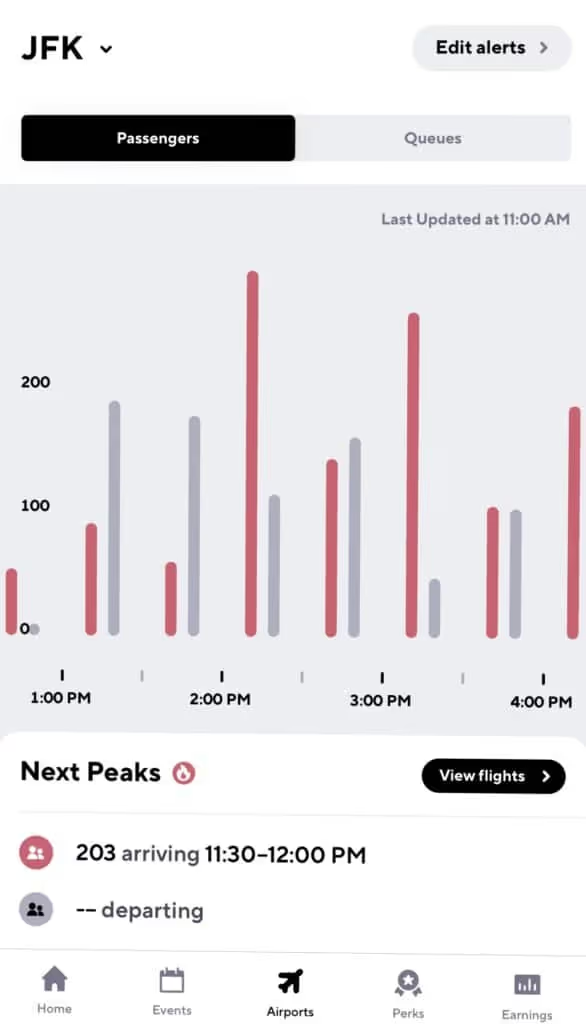
With Gridwise Plus you’ll be able to see airport data 24 hours in advance, so you can lock in a solid airport strategy the night before you head out. You’ll also be able to create custom alerts for arrivals and departures.
What are some good airport strategies?
Pick up a passenger on the way to the airport
Count on Gridwise to let you know when there’s a peak in airport departures, so you can hang around near hotels at that time to maximize your chances of an airport ride.
Do not cancel on a passenger after you’ve accepted a fare
If you do, you will be bumped to the bottom of the queue and your wait starts all over again. The good news is, if it’s a short ride some companies let you jump back in line after you’ve dropped the passenger off.
Be ready to present your waybill
A waybill is essentially a receipt of the last trip you completed. Be prepared to present this to airport officials or law enforcement while waiting for arrivals.
Always be prepared
The fact is, you never know when law enforcement will show up. Keep your driver’s license, insurance card, and registration handy, and don’t forget to have your placard displayed.
Congrats! Now you’re all set to make some pick-ups and drop-offs at the JFK International Airport—and maybe sneak a black and white cookie in between.
And when you need a little extra cash…
Whether it’s an unexpected car repair, medical bill, or another kind of expense, sometimes we all need a little extra cash.
At Gridwise, we get that. And it’s why we’ve partnered with a company called Coverr that provides drivers with a business cash advance of up to $1,500 for those unexpected emergencies.
Applying should only take about 10 minutes, approvals just two hours during business hours, and you’ll receive cash on the same day you apply.
So if you need a little extra cash for your rideshare business, apply with Coverr!

Uber and Lyft Driver Instructions for Nashville International Airport (BNA)
Just 8 miles east of downtown Nashville, the Nashville International Airport serves as a major hub for nearly 17 million passengers a year. Since this airport is so central to downtown, there is a lot of business traffic to and from the city.
There are plenty of opportunities to increase your earnings if you know how to operate as a driver at BNA. In order to get the most earnings from your driving, it’s important to know the rules. We’ve created this guide to help you navigate through picking up and dropping off passengers, permit information, and some rideshare driving strategies.
Here are some topics we’ll be covering:
- What do you need to do before arriving at Nashville International Airport?
- Do you need any permits to drive at Nashville International Airport?
- Where is the rideshare waiting area at Nashville International Airport?
- What are the passenger pick-up rules at Nashville International Airport?
- What are the passenger drop-off rules at Nashville International Airport?
- When is the best time to drive at Nashville International Airport?
- What is the best Nashville International Airport driving strategy?
Let’s dive in!
What should you do before arriving at Nashville International Airport and entering the airport queue?
Before picking up passengers from BNA you’ll need your trade dress, which (as you know) is the Lyft/Uber sticker that you place on your windshield.
Uber sends out this decal when drivers sign up. If you’ve lost yours since then, there are a few easy ways to replace it. You can request that a new one be mailed to you, pick one up at your local Greenlight Hub (be wary of recent closures), or print out a temporary version at home.
You can order a Lyft decal from your Dashboard, and print a temporary emblem to use while waiting for yours to come in the mail.
Where is the Uber and Lyft waiting area at Nashville International Airport?
Drivers can wait for requests in the staging area located at 602 Donelson Pike. Waiting in other areas of the airport is not allowed and could lead to a citation. In the staging area, you will be placed in a virtual queue on your Uber or Lyft app.
Make sure your Uber/Lyft driving app is open at all times in this area so you can be placed in the queue. If you exit out of the driver app, you can lose your spot. If the staging area is full, you will have to leave the airport.
How should Uber and Lyft drivers pick up passengers from the Nashville International Airport?
After you receive a request in your app, you’re ready to go! You can pick up your passenger at the Ground Transportation area, which is right across the main terminal. There’s also a pre-match or pre-dispatch feature at BNA using your Uber and Lyft apps. This feature allows drivers in the staging area to start heading to the pick-up area a few minutes before they receive a requested ride, which helps eliminate unproductive time.
How should Uber and Lyft drivers drop off passengers from the Nashville International Airport?
Drop-offs at BNA are super easy! Just head to the departure area on Level 3. When you are driving in, stay in the far left lane or the commercial drop-off lane as you proceed to your passenger’s carrier of choice. Make sure not to linger in the drop-off area after you’ve completed a trip.
You can also use the re-match feature, which allows you to receive and complete a pick-up without going back to the waiting lot. But be careful because if you wait too long in the dropoff area, you can receive a citation.
When is the best time to drive at the Nashville International Airport?
To learn about arrival and departure times at BNA, check your Gridwise app. You can access this information by going to the Airports tab.
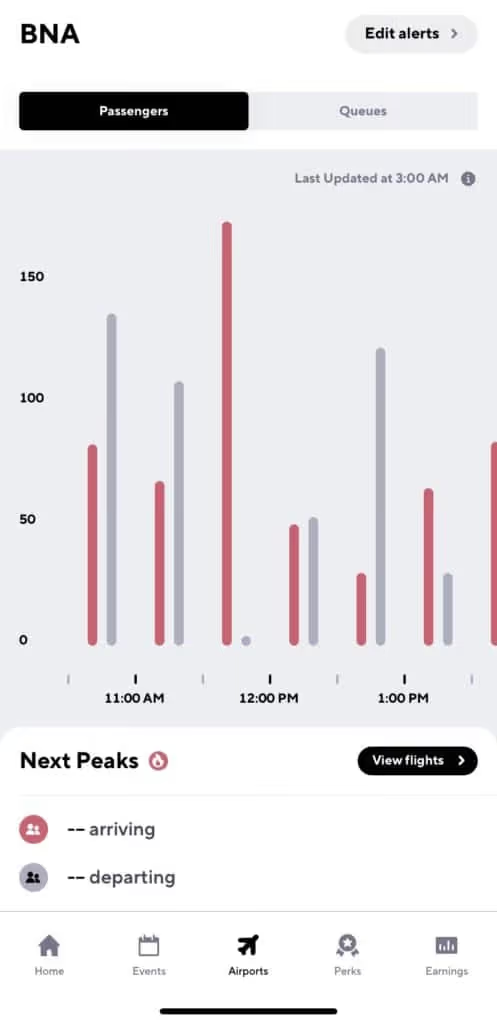
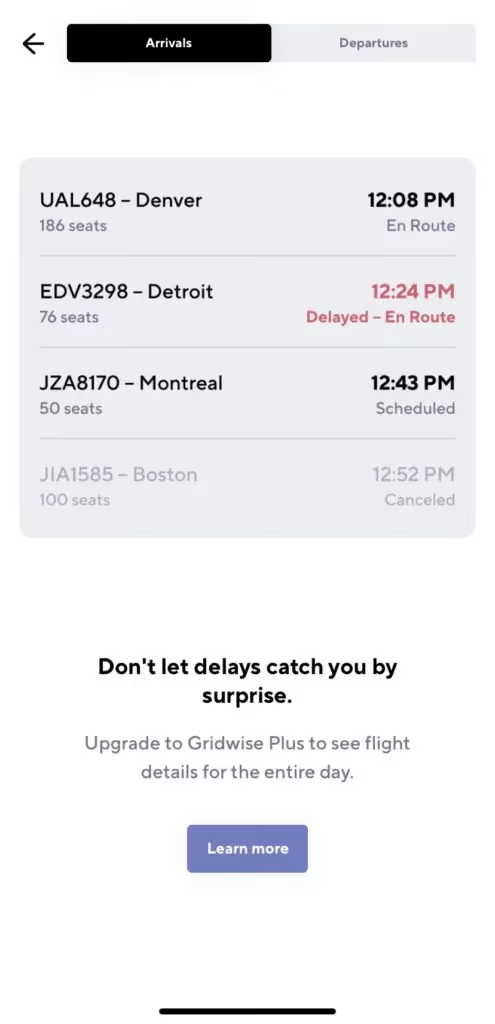
With Gridwise Plus, you can see flight information from three hours back and 24 hours forward. You can also create custom airport alerts for any arrivals, departures, or delays.
What are some good airport strategies?
Pick up a passenger on the way to the airport
Count on Gridwise to let you know when there’s a peak in airport departures, so you can hang around near hotels at that time to maximize your chances of an airport ride.
Don’t cancel on a passenger after you’ve accepted a fare
If you do, you’ll be pushed all the way to the bottom of the queue, making your waiting time start all over again. That’s not something you want to do.
The good news is, if it’s a short ride some companies let you jump back in line after you’ve dropped the passenger off.
Be ready to present your waybill and keep your app updated
A waybill is essentially a receipt of the last trip you completed. Be prepared to present this to airport officials or law enforcement while waiting for arrivals.
Always be prepared
As a driver, you want to be prepared for anything and everything, whether it’s law enforcement, passenger issues, or airport regulations. Make sure your Uber or Lyft decal is placed correctly on your vehicle. Also, always double-check that you have your driver’s license, registration, and insurance.
Now you should be ready to make some actual earnings at BNA like a pro. Happy driving!

Uber and Lyft Driver Instructions For McCarran International Airport (LAS)
The McCarran International Airport (LAS) saw over 50 million visitors in 2019. Located in Paradise, Nevada just five miles south of downtown Las Vegas, the airport is one of the busiest in the United States.
That means high potential earnings for rideshare drivers in the Las Vegas area. After all, those millions of passengers need rides to and from the aviation hub, right? And that’s where you come in.
McCarran International allows Uber and Lyft vehicles at the pick-up and drop-off terminals, but before heading that way, there are a few rules you’ll want to know. To maximize earnings (and avoid a fine), it’s important to understand how to navigate the airport, join the queue, and legitimize your vehicle.
To help rideshare drivers be successful at McCarran International, we put together this blog post to serve as a guide. The following topics are covered:
- What should you do before arriving at McCarran International Airport?
- Do you need any permits to drive there?
- Where is the rideshare waiting area at McCarran International?
- What are the passenger pick-up rules at McCarran International?
- What are the passenger drop-off rules at McCarran International?
- When is the best time to drive at the airport?
- What is the best driving strategy?
Let’s dive in!
What should you do before arriving at McCarran International and entering the airport queue?
To pick up passengers at McCarran International, you’ll need your trade dress, which (as you know) is the Lyft or Uber decal that goes on your front passenger windshield facing outward.
Uber sends out this decal when drivers sign up. If you’ve lost yours since then, there are a few easy ways to replace it. You can request that a new one be mailed to you, pick one up at your local Greenlight Hub (be wary of recent closures), or print out a temporary version at home.
You can order a Lyft decal from your Dashboard or print a temporary emblem to use while waiting for yours to come in the mail.
You’ll also have to have your NTA Vehicle Inspection Decal and a valid Clark County Business License (laminated) on the lower passenger side of your front windshield.
Also, make sure you familiarize yourself with McCarran’s TNC guidebook beforehand. There are some strange rules (who knew feeding the birds on airport grounds was prohibited?) that you’ll want to know about and follow.
Where is the Uber/Lyft waiting area at McCarran International?
The staging lot at McCarran International recently switched locations. It was formerly on the corner of Gus Giuffre Drive and Rent A Car Road, but it is now at the corner of Swenson Street and Thomas Mack Drive, just east of Paradise Road. This lot is closed daily during the early morning hours of 2:00 a.m. to 4:00 a.m.
You’ll be automatically entered in the queue once you enter the lot, and you can check your place in line in the Uber or Lyft app. Unfortunately, if the lot is full you’ll have to leave the airport.
While waiting for requests, you may get a pre-match (Uber) or pre-dispatch (Lyft) message urging you to head to the pick-up terminal. While on the way, you should be matched with a rider. If not, just return to the staging lot within fifteen minutes, and you’ll be first in the queue.
Remember to keep your app open in driver mode, park correctly in the stall, follow all traffic control signs, remain with your vehicle unless taking a short restroom break, and avoid littering. Or feeding birds.
How should Uber and Lyft drivers pick up passengers at McCarran International?
The driver who has been waiting the longest in the staging area gets the next rider request.
Once you accept a trip request, the Terminal 1 pick-up location is on Level 2 on the south side of the public parking garage. Terminal 3 pickups are on the valet level of the parking garage. It might help to call your passenger to tell him or her to follow the Rideshare signs from the main terminal to the designated parking garage (level and section) where you will meet.
Make sure to use the designated stalls when picking up passengers—NOT the Thru Lane. If the area is getting congested, airport staff will direct you where to go.
How should Uber and Lyft drivers drop off passengers at McCarran International?
Fortunately, drop-offs at the Las Vegas airport are simple. Just head to the Departure Curbs area at the passenger’s carrier of choice.
That’s it, and you’re back on the road!
When is the best time to drive at McCarran International Airport?
Turn to your Gridwise app for information about all arrivals and departures at McCarran International, as well as delays and cancellations.
Typically, midday is the best time for airport driving; most passenger arrivals and departures occur sometime between 11:00 a.m. and 3:00 p.m.
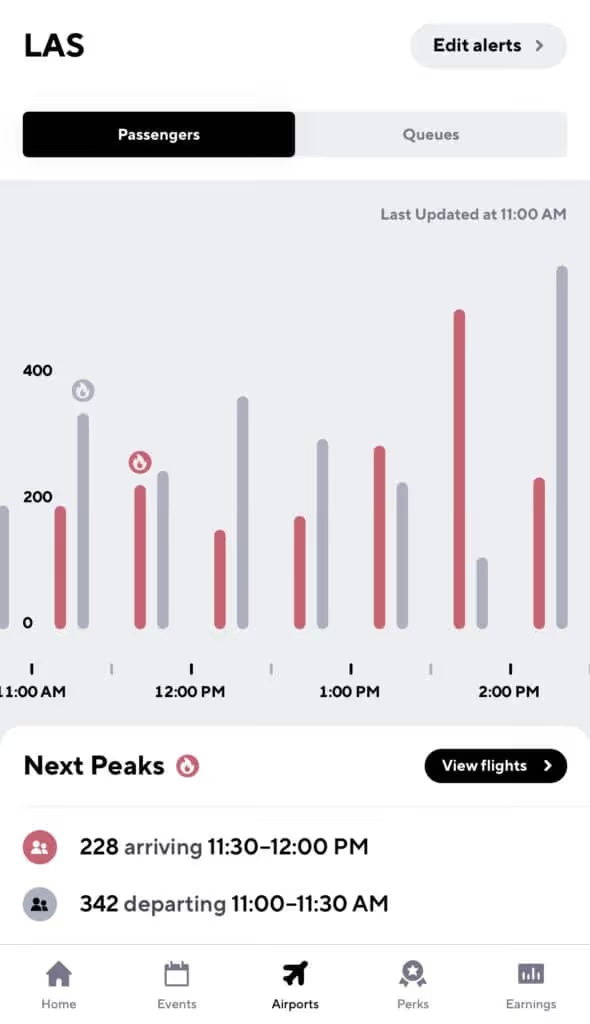
With Gridwise Plus you’ll be able to see airport data 24 hours in advance, so you can lock in a solid airport strategy the night before you head out. You’ll also be able to create custom alerts for arrivals and departures.
What are some good airport strategies?
Pick up a passenger on the way to the airport
Count on Gridwise to let you know when there’s a peak in airport departures, so you can hang around near hotels at that time to maximize your chances of an airport ride.
Do not cancel on a passenger after you’ve accepted a fare
If you do, you will be bumped to the bottom of the queue and your wait starts all over again. (This also happens if you enter out of driving mode or leave the property while in the queue.) The good news is, if it’s a short ride, some companies let you jump back in line after you’ve dropped the passenger off.
Always be prepared
The fact is, you never know when law enforcement will show up. Keep your driver’s license, insurance card, and registration handy, and don’t forget to have your placard displayed.
Have your waybill ready
Your waybill is a digital receipt of your last drive, which airport officials at McCarran International will occasionally ask to see. Search "waybill" on Lyft or click "Info" on Uber to make it appear.
Congrats! Now you’re all set to make some pick-ups and drop-offs at the McCarran International Airport—and maybe sneak some time at the slots in between.

Uber and Lyft Driver Instructions for Detroit Metropolitan Wayne County Airport (DTW)
The Detroit Metropolitan Wayne County Airport (DTW) saw more than 36 million visitors in 2019, making it the busiest airport in Michigan. A major hub for Delta and Spirit, the airport services over 140 destinations throughout the United States and overseas. DTW is also the primary airport for Detroit residents, as well as passengers traveling from Toledo, Ann Arbor, and Southwestern Ontario.
This means high potential earnings for nearby rideshare drivers. Those millions of passengers need rides to and from the aviation hub—and that’s where you come in.
The Detroit airport allows Uber and Lyft vehicles at the pick-up and drop-off terminals, but before heading that way, there are a few rules you’ll need to know. To maximize earnings (and avoid a ticket), it’s important to understand how to navigate the airport, join the queue, and legitimize your vehicle.
To help rideshare drivers be successful at DTW, we put together this blog post to serve as a guide. The following topics are covered:
- What should you do before arriving at Detroit Metropolitan Wayne County Airport?
- Do you need any permits to drive at Detroit Metropolitan Wayne County Airport?
- Where is the rideshare waiting area at Detroit Metropolitan Wayne County Airport?
- What are the passenger pick-up rules at Detroit Metropolitan Wayne County Airport?
- What are the passenger drop-off rules at Detroit Metropolitan Wayne County Airport?
- When is the best time to drive at Detroit Metropolitan Wayne County Airport?
- What is the best driving strategy at Detroit Metropolitan Wayne County Airport?
Let’s dive in!
What should you do before arriving at Detroit Metropolitan Wayne County Airport and entering the airport queue?
To pick up passengers at DTW, you’ll need your trade dress, which (as you know) is the Lyft or Uber decal that goes on your front passenger windshield facing outward.
Uber sends out this decal when drivers sign up. If you’ve lost yours since then, there are a few easy ways to replace it. You can request that a new one be mailed to you, pick one up at your local Greenlight Hub (be wary of recent closures), or print out a temporary version at home.
You can order a Lyft decal from your Dashboard, and print a temporary emblem to use while waiting for yours to come in the mail.
Where is the Uber/Lyft waiting area at the Detroit airport?
First, you’ll have to check in at a booth at the DTW Ground Transportation Center. This booth is where an airport official will check your waybill, an electronic receipt of your last drive that will be in your Uber or Lyft app. If you don’t show your waybill, you could face fines and bans. If there’s no attendant present, just stop fully at the stop sign before proceeding into the lot.
Access your Lyft waybill by going to your dashboard and typing “waybill” into your left-side menu. Your Uber waybill will be in your Profile section.
Once you’ve checked in, proceed to the Rideshare Hold Lot on Goddard Road and 94 Service Drive. This is where rideshare drivers wait for passengers for both the North and McNamara terminals.
Once you get to this staging lot, you’ll automatically be entered into the airport queue. You’ll be able to check your place in line in the Lyft or Uber app.
How should Uber and Lyft drivers pick up passengers at the Detroit Airport?
The driver who has been waiting the longest in the staging area gets the next rider request. Make sure not to enter out of driver mode while you wait or you’ll lose your spot in line.
Once you get a ride, head to the Ground Transportation Center at the Reserved/Pre-Arranged Transportation & Permit Parking Lot. “Rideshare” signs will mark the way as you approach the terminals.
If your passenger is at the McNamara terminal, follow signs from McNamara Terminal to Domestic Arrivals to Commercial/Rideshare, then check-in at the booth as a driver and park in the lot to wait for your passenger.
If your passenger is at the North terminal, follow signs from North Terminal to Commercial Vehicles/Rideshare, then stay left to enter the Rideshare area. Turn right, check-in at the booth on the right, then park and wait for the rider.
Make sure not to pick up your passengers curbside—doing so could result in permanent suspension from DTW.
How should Uber and Lyft drivers drop off passengers at the Detroit airport?
Luckily, dropping off passengers at DTW is a lot easier than picking them up. Just head to the curbside at the terminal entrance of your passenger’s carrier of choice.
That’s it, and you’re back on the road!
When is the best time to drive at the Detroit airport?
Turn to your Gridwise app for information about all arrivals and departures at DTW, as well as delays and cancellations.
Typically, midday is the best time for airport driving; most passenger arrivals and departures occur sometime between 12:30 a.m. and 2:30 p.m.
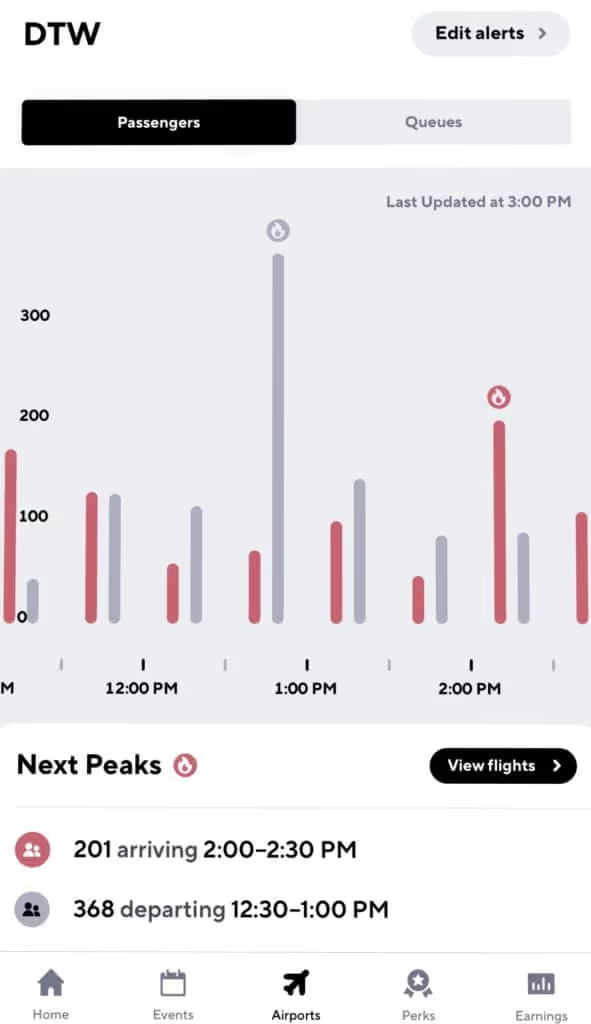
With Gridwise Plus you’ll be able to see airport data 24 hours in advance, so you can lock in a solid airport strategy the night before you head out. You’ll also be able to create custom alerts for arrivals and departures.
What are some good airport strategies?
Pick up a passenger on the way to the airport!
Count on Gridwise to let you know when there’s a peak in airport departures, so you can hang around near hotels at that time to maximize your chances of an airport ride.
Do not cancel on a passenger after you’ve accepted a fare
If you do, you will be bumped to the bottom of the queue and your wait starts all over again. (This also happens if you log out of driving mode or leave the property while in the queue.) The good news is, if it’s a short ride, some companies let you jump back in line after you’ve dropped the passenger off.
Always be prepared
The fact is, you never know when law enforcement will show up. Keep your driver’s license, insurance card, and registration handy, and don’t forget to have your placard displayed.
Congrats! Now you’re all set to make some pick-ups and drop-offs at the Detroit Metropolitan Wayne County Airport. Happy driving!
Work smarter. Earn more.
Whether you drive, deliver, or pick up shifts — Gridwise helps you track earnings, mileage, and performance so you stay in control of your work. Download the app and take charge today.
