Gridwise blog
Tips, insights, and advice to help you earn more and work smarter, whether you do gig work, hourly, or shift work.

How to Make $1,000 a Week With Uber Eats in 2026 (Tips + Hourly Data)
In this blog, we'll explore the strategies and techniques that can show you how to earn $1000 per week as an Uber Eats delivery driver. We'll cover everything from optimizing your delivery zones and schedules to maximizing your tips and customer satisfaction. Whether you're a seasoned Uber Eats driver or just starting out, this guide will provide you with the insights and actionable steps to take your Uber Eats driver earnings to the next level.
Becoming an Uber Eats delivery partner can be a lucrative opportunity, especially if you're able to consistently earn $1000 a week. By understanding the platform, optimizing your delivery strategies, and focusing on customer satisfaction, you can maximize your earnings and turn Uber Eats into a reliable source of income.
We’ll cover the following topics to provide coaching and ideas to help you push your earnings up to that $1000 per week level:
What do Uber Eats drivers do?
Uber Eats drivers deliver prepared food most of the time, but they also might shop for and deliver goods from convenience outlets and grocery stores. The job is pretty simple. You get a request for an order, you drive to the restaurant or store to pick it up, and then you deliver it to the customer. If you already drive for Uber, you can choose to take orders for Uber Eats delivery any time.
If you’re not an Uber Eats driver yet, it’s pretty easy to become one. This Gridwise post tells you what you need to do if you want to sign up and start making money Uber Eats style. Many rideshare drivers welcome the chance to deliver food rather than people. This article from Nerdwallet covers the Uber Eats gig from that angle.
There are some sweet advantages to working with Uber Eats. In lots of cities you don’t even need to have a car. You can use a bike or a scooter, or even walk, to make your rounds. If you do use a car, Uber Eats’ requirements are a lot easier to meet than they are for Uber rideshare driving.
You also have a lot of flexibility. You can shop and deliver convenience items and groceries, but you don’t have to. And, like most driving gigs, you can choose your own hours, and map out the locations where you want to work.
Use Gridwise features When to Drive and Where to Drive to help you figure out what work hours and which specific areas will be the most profitable for you. Real data from real delivery people will show you earning patterns for drivers in your town.
How much can you earn doing Uber Eats?
The honest answer to this question is: basically, as much as you want! It all depends on how many hours you put in and how strategic you are about your gig. Earnings vary from one area to another, as this article from Entrepreneur points out. To give you a baseline, let’s look at the earnings of Uber Eats drivers who tracked their earnings with Gridwise.
Remember that these numbers show us only average earnings. To make $1,000 a week with Uber Eats, you’re going to have to be better than average, and we’ll show you how. For now, though, it’s good to have these figures so you get a ballpark number of where to start.
How much do Uber Eats drivers make?
Gridwise data tell us the following:
- Monthly earnings average around $444.00 per month.
- Gross earnings per trip are between $9.00 and $10.00.
- Tips make up about 50% of most Uber Eats drivers’ income, which amounts to about $225.00 per month.
Is Uber Eats good money? It can be. While there are other gigs that pay more per trip, if you drive for Uber Eats, you’ll always be pretty busy.
https://datawrapper.dwcdn.net/HPAz8/3
You can also see that, unlike many other gigs, tips play a huge role in Uber Eats earnings.

With these numbers as a baseline, what can we say about how to earn $1,000 a week with Uber Eats? As we said in the introduction, it’s going to be a hustle, but it’s really possible. To figure out how to make the most money with Uber Eats, let’s start by looking at how many trips these “average” drivers made each month.
We know that average gross earnings were $444.00 per month, and drivers got around $10.00 per trip. That means they took 44 or 45 trips per month, which breaks down to 11 trips per week. That’s not a lot of Uber Eats delivery, is it?
The fact that Uber Eats drivers averaged so few trips shows us that many drivers use more than one app at the same time. This is called multi-apping, and you can learn more about it in this Gridwise post. If you want to answer the question of how much you can make with Uber Eats, then you need to stick with the app and keep plugging away at those orders. You also need solid strategies, as well as some inside tips and tricks.
How to make the most money on Uber Eats: Delivery driving tactics
Getting to that $1,000 a week with Uber Eats isn’t so hard when you remember that the drivers we saw making about $111 a week were only taking around 11 trips in the same time period. That’s not much at all! If you work the Uber Eats app like a boss, you’ll soon have many more trips than that, easily reaching the number needed to get you to $1,000 a week. Now, let’s get to some tactics you’ll need to make that kind of bank.
- Stay with the Uber Eats app, and track your earnings. Gridwise can easily do that for you. Simply sync your Uber Eats app with Gridwise, and you’ll be able to see how much you’ve earned with Uber Eats, what times were most profitable, and your average hourly pay. Racking up trips with Uber Eats has other benefits, including perks and bonuses that are awarded to top drivers.
- Leverage surge pricing and promotions. Surge pricing is applied when there is a lot of demand. When surge pricing is in effect, many of the trips you make will pay more than usual. Promotions are offered to drivers who complete a given number of trips in a certain time period. High traffic volume days, nights, and times give you these chances to get extra earnings. Challenging yourself to complete the right number of trips for promotions will add to the number of trips you can count on for big bucks, too. Learn more about Uber Eats surge pay, boosts, and promotions in this Gridwise blog post.
- Say yes to doubling up on orders. With Uber Eats, you can get back-to-back orders or receive batched orders. Back-to-back orders happen when you receive a new request while you’re on the way to deliver an original order. The Uber Eats app routes these trips automatically, so you won’t be sent out of your way.
Batched orders are Uber Eats’ way of bundling together orders from either the same restaurant, or two nearby eating establishments. You get money, and trip count credit, for all the orders you complete, plus customer tips, without having to make a bunch of separate trips.
- Turn on the charm and get bigger tips. Being nice really is part of the Uber Eats driver’s job, and getting tips is one way people who drive for Uber Eats make money beyond their basic pay.. Bring along those extra napkins and condiments, use equipment that keeps food and drinks at the right temperatures and prevents spilling, and consider your customers’ needs. If you deliver groceries, be extra careful with delicate items such as bread and eggs.
And, most important, follow your customers’ directions, and stay in communication with them if you are going to be delayed, or if you have questions about their order. This Gridwise post will tell how to get bigger tips as a delivery driver.
- Use even more charm to keep your ratings high. As an Uber Eats driver, you will be rated by the restaurant or store where you pick up the orders as well as the customers who are waiting for the deliveries. This two-way rating system is designed to keep you on your toes, so Uber can keep people satisfied with your service. Don’t worry, you get to rate them, too.
There’s another reason why your rating as a driver is important. It not only keeps you in good standing with Uber; it helps you to qualify for the Uber Eats Pro incentive program. To learn more about Uber Eats Pro, and what it takes to earn perks such as preferred services, discounts, and deals, check out this Gridwise blog post.
Smart business moves that seal the deal
Now that you know how to gobble up the deliveries you need to make $1,000 a week with Uber Eats, it’s going to be a breeze to get there. Let’s make it even easier, with business moves that boost your earnings and shrink your expenses. If you use these, it will also be easy to say yes when people ask, “Can you make good money with Uber Eats?”
Minimize expenses. Avoid racking up big fast-food bills by bringing your own food and beverages. You might not think you’re hungry when you first start your Uber Eats run, but once the aroma of pepperoni pizza, premium cheeseburgers, and piping hot fries start wafting through your car, that might change. Bring a sandwich or other healthy food from home, and buy bottled water in bulk to save tons of cash compared to what it costs to buy single servings.
Maximize tax deductions. Another way to minimize your expenses is to maximize your tax deductions. Start by tracking mileage with Gridwise.

Gridwise App
Gridwise captures every deductible mile you drive, including the distance you cover between the trips your driving app records. Know what expenses you can deduct, and put them to work for you when tax time comes. Learn more about tax deduction strategies in the Gridwise Tax Guide for drivers.
Boost earnings with referrals
As an independent contractor, you’re probably looking for ways to make even more money than you can with Uber Eats. And most gig workers like you enjoy getting passive income. With Uber Eats, there’s a really easy way to do that, referrals!
All you need to do is find friends and encourage them to deliver for Uber Eats. If they make a certain number of deliveries within a specified time, you will get paid for doing nothing more than having them sign up under your referral code! Rates of pay vary by city, so check your Uber Eats app to find out what the current deal might be, and learn more about the referral program on the Uber Eats website.
Also remember: “friends” don’t have to be your best buds. Many delivery people carry cards with a QR code linking to their referral information, so just about anyone you encounter can join Uber Eats and boost your earnings. You could meet a source of passive income at the gas station, on social media, or at your high school reunion. The more you hustle, the more there is to gain, right?
Master the art of self-employment
As an Uber Eats driver, you’re an independent contractor. That means the company isn’t going to withhold your taxes, provide insurance, keep track of your earnings, or tell you about tax deductions. You’ll have to do all these things for yourself.
If you want to maximize your tax advantages, open an official business entity. You can incorporate (create a corporation) or you can work as a limited liability corporation (LLC). You can also work with a DBA (Doing Business As) arrangement, but the corporation or LLC will do a better job of protecting you from liability.
Establishing a corporation or LLC offers better tax advantages than being a sole proprietor. For instance, if you simply collect your earnings into your private account, you’ll be charged self-employment taxes in most states. And paying extra taxes is something we all want to avoid, within legal limits, as much as possible.
Every Uber Eats driver needs to learn about self-employment, and there are some great resources you can review. Check out the CareerOneStop website about self employment which will help explain the basics. You can also check with a professional tax accountant, or look other websites to learn more about actually creating a business.
Scope out your market
Look at the area around you to see where you’re likely to get the most deliveries. Where are all the restaurants? Where might people be more inclined to order deliveries? What hours do you want to drive? What activities might be going on around those times? Think about late-night and after-school times as well as breakfast, lunch, and dinner times.
Be realistic about the potential for your area and aware of new services opening up. For example, in New York, there is already a tab on the Uber Eats app that allows customers to order groceries. In our article about the best food delivery service to work for you’ll see that Uber Eats stacks up well against other delivery companies, mainly because of its potential for expanded opportunities for drivers to earn.
So, is Uber Eats good money? As we said, it isn’t an automatic guarantee that everyone will make $1,000 a week with Uber Eats. Trying out the suggestions we give you here, though, should put you on the right track! Go out there and start stacking up those orders and raking in some impressive earnings!
Get more inside information on Uber Eats in these posts from the Gridwise blog:
- The delivery driver guide: Using the Uber Eats app
- Everything you need to know about driving for Uber Eats
- Uber Eats Pro: What drivers need to know
- Looking for a different gig, part-time or full time job? Check out the Gridwise Job board.
Uber Eats FAQ
How does the Uber Eats platform work for drivers?
Uber Eats is a food delivery service that connects customers with local restaurants and independent delivery partners. As an Uber Eats driver, you'll receive notifications of nearby delivery requests, which you can accept and complete. The platform provides flexibility, allowing you to work on your own schedule and earn money based on the number of deliveries you complete.
What are the requirements to become an Uber Eats delivery partner?
To become an Uber Eats delivery partner, you'll need to meet certain requirements, such as having a valid driver's license, a registered vehicle, and passing a background check.
How can I choose the right delivery zone to maximize my earnings?
Selecting the right delivery zone can significantly impact your earnings, as some areas may have higher demand and better-paying orders. It's important to research and identify the zones in your area that tend to have the most consistent and lucrative delivery opportunities.
How can I take advantage of peak delivery hours and surge pricing?
Understanding peak delivery hours, such as mealtimes and weekends, and taking advantage of surge pricing can boost your earnings. Be aware of when demand is highest in your area and adjust your schedule accordingly to capitalize on these peak periods.
What are some tips for maximizing tips and customer satisfaction?
Providing excellent customer service and going the extra mile to ensure a positive experience can lead to more tips and repeat business. Prioritize communication, timeliness, and attention to detail to keep your customers happy and satisfied.
How can I set realistic weekly goals to reach my $1000 target?
To make $1000 a week with Uber Eats, it's essential to set realistic weekly goals and track your earnings and expenses. Start by determining your target earnings and breaking it down into achievable daily or weekly goals. This will help you stay on track and make adjustments as needed.
What are some strategies for efficient route planning and navigation?
Effective route planning and navigation can save you time and fuel, allowing you to complete more deliveries. Utilize mapping apps and take advantage of features like real-time traffic updates and turn-by-turn directions to find the quickest routes.
How can I balance my Uber Eats deliveries with other commitments?
Develop a schedule that allows you to capitalize on peak delivery hours while still maintaining a healthy work-life balance. Consider using tools like calendar apps to plan your availability and track your hours to ensure you're maximizing your earning potential without sacrificing your personal life.
What are the key considerations for maintaining my vehicle as an Uber Eats driver?
Keeping your car clean and well-maintained is crucial for maximizing your Uber Eats earnings. Regularly scheduled oil changes, tire rotations, and other preventive maintenance can help extend the life of your vehicle and minimize downtime. Additionally, budgeting for vehicle-related expenses, such as fuel, insurance, and repairs, will ensure you're accounting for these costs and maximizing your net earnings.
What are the tax obligations and legal considerations for Uber Eats drivers?
As an Uber Eats delivery driver, it's essential to understand the tax obligations and legal considerations that come with being an independent contractor. This includes properly reporting your earnings, deducting eligible business expenses, and making quarterly estimated tax payments. Additionally, you'll need to ensure you have the appropriate insurance coverage, such as personal auto insurance and possibly commercial auto insurance, to protect yourself and your vehicle while on the road making deliveries.

The Gridwise Job Board: Find Your Ideal Job or Gig Work
Gridwise is an essential assistant app created by gig workers for gig workers. Our mission is to support those engaged in gig work in every way possible. We understand how challenging it can be to deal with income instability, a lack of benefits, and job insecurity that often comes with gig work. The Gridwise app tracks and organizes earnings and expenses, and offers a wide array of discounts, deals, and services that make the lives of independent contractors easier and more rewarding.
We firmly believe it’s possible to make a viable living and create a gig experience that offers flexible hours, variety, and excitement. With issues such as consistent earnings and job security in mind, Gridwise is proud to offer a centralized platform that shows you how to find gig work and secure reliable opportunities. We’re proud to introduce the Gridwise Job Board.
The Gridwise Job Board: Key features
Because Gridwise is dedicated to serving the gig worker community, we’ve filled the Gridwise Job Board with useful features that won’t waste your precious time.
- Comprehensive listings. Find part-time, full-time, temporary, and per-task work. Drive or deliver with your vehicle, utilize an employer’s vehicle, or even find non-driving gig work.
- User-friendly interface. Find the jobs that are right for you with a tap of your screen.
- Verified opportunities. We vet the jobs before they are listed to ensure you’re getting high-quality job postings.
How to get more gig work, seasonal, part-time or full-time jobs with the Gridwise Job Board
Looking specifically for “gig work apps” or “gig jobs near me?” You’re in luck. Our filters and search functions send you directly to the listings you seek.
Here’s how it works.
- Access the Job Board via the Gridwise website.
- Search for jobs by type, location, and more.
- Select the job that interests you, and read all about it.
- Scroll through the description, and if it appeals to you, click “Apply for job.”



Many types of jobs are available. Adjust the search filter to see the full variety of opportunities that will let you cash in. Deliver food, set up catering, do rideshare driving, get paid for doing package delivery, and much more. You’ll find short-term gigs, long-term contracts, and part-time positions.
Perks of the Gridwise Job Board for gig workers
Gig workers who know how to make extra money will appreciate how the Gridwise Job Board lets you multiply your chances of bringing in big earnings. Here’s how:
- Increased stability. Use the Gridwise Job Board to find part-time or permanent jobs in addition to the part-time gigs you already have. Always keep a steady stream of earning opportunities flowing toward you.
- Flexibility and autonomy. Choose jobs that fit your schedule, work around other jobs and family duties, and still leave room for some fun in your life. Discover side hustles to supplement your full-time job, permanently or just for the season.
- Skill development. Find part-time work that lets you use a skill you already have, or try your hand at something new. It’s a smart way to develop a portfolio to showcase what you can do, or even to find permanent employment.
Get Gridwise and stay up to date on the Gridwise Job Board
Gig workers need plenty of information and assistance, and Gridwise is here to give it to you. Download the app and get essential features such as
- seamless earnings tracking
- mileage tracking
- expense recording, including notes
- low-cost and no-cost insurance benefits
- access to affordable medical, dental, vision, mental health, and alternative care
- professional services including legal and financial help
- deals and discounts
- weather, events, and traffic reports
- inside information on where and when to drive
More to know about gig work:

5 Best Mileage Trackers For Gig Drivers
Many drivers ask, “Do I really need a mileage tracking app?” The answer is simple: only if you want to have an accurate count of all the miles you can legally deduct from your taxable income! You might think your rideshare or delivery driving app has got you covered. After all, they do quite a good job of logging the miles you drive while you’re on a trip or delivery. But, if you want to have the best app to track mileage for Uber, Lyft, Doordash, Instacart, or the other apps you may use, you need more. Why is that?
Without a separate tracker, you’re missing the miles you drive in between pings. Did you realize that all the miles you drive, from the moment you begin your shift until it’s over (as long as you don’t drive several miles on a break to hang with your friends), are tax deductible! That means you need something besides your driving app to keep an accurate count of your travels. Read this Gridwise post to see how important it is to keep track of every deductible mile.
You won’t be surprised to hear that there’s an app for tracking miles. In fact, there are several of them. Here, we’re going to tell you about five top mileage tracking apps, and help you figure out which one is best for you.
Before we get to the list and identify the best mileage tracker app, let’s clarify what exactly a mileage tracking app is. According to G2.com’s technology glossary, mileage tracking is done for the purpose of keeping a log of mileage that is either reimbursable or tax deductible.
And yes, of course you can track your miles simply by taking readings on your odometer. But are you really prepared to account for how many miles you drove for personal reasons and subtract them from the total to get your business mileage? Even if you can remember all that and do the arithmetic, if you want an accurate reading of the miles you drive for business, and can therefore deduct, a mileage tracking app will save you a lot of trouble and prevent you from making costly errors.
Plus, as a gig driver, you have specific needs when it comes to a mileage tracker. Ideally, you’d be able to handle mileage tracking and several other functions all in one app. It can be maddening enough to deal with driving apps, particularly if you’re an avid multi-apper. You would want your mileage tracker app to help you keep account of other aspects of your business, including income, expenses, and inside information about the art of gig driving.
Not all mileage apps are equal, to be sure! Let’s look at five of the best apps to track mileage and figure out which is the best app to track mileage with Uber and Lyft, or what mileage tracker app is best for DoorDash.
1. Zoho Expense

First up is Zoho Expense, which does exactly what its name says. This app is designed to allow companies to give employees a uniform way to create and submit expense reports. It can be used by individuals, including gig drivers, as well.
It includes a mileage tracker, as well as features that let you track other deductible expenses, including the ability to scan and record receipts.
Available on Android and Apple: Yes
Ratings: 4.8 stars on App Store, 4.7 stars on Google Play
Free Version: Yes
Subscription price: $3 per month, billed annually
Created specifically for gig drivers: No
2. Quickbooks Online

Quickbooks Online is a cloud-based app that allows you to track your mileage, earnings, and expenses. The information you enter can then be used to generate various reports that prepare you for tax time. It also allows you to create graphs that illustrate your cash flow, and includes a receipt scanner so you can instantly record deductible expenses. Quickbooks is popular, highly reliable, and designed mainly to help people keep track of their small businesses.
Available on Android and Apple: Yes
Ratings: 4.7 stars on App Store, 4.4 stars on Google Play
Free version: 30-day free trial
Subscription price: $15 per month for basic version if purchased for 3 months or more
Created specifically for gig drivers: No
Source: quickbooks.intuit.com
3. Shoeboxed

Shoeboxed started in 2007 as a service for scanning paper receipts into digital form. Now the app offers a free mileage tracker and has enabled users to scan receipts directly. It touts itself as the best mileage tracking app for DoorDash, but there are some elements missing that Dashers might like to have. While it provides features that record your expenses and prepare you for tax season, it doesn’t automatically track your earnings. The mileage tracker has a system where you can drop pins along your routes to make the tracking more precise, identifying those legs of a trip that you make for business purposes. The mileage tracker is “free” once you sign up for the basic version.
Available on Android and Apple: Yes
Ratings: 4.5 stars on App Store, 2.3 stars on Google Play
Free version: No
Subscription price: $18 per month for basic version
Created specifically for gig drivers: No
Source: blog.shoeboxed.com
4. Stride

This free mileage tracker does a fair job of keeping track of the distances you rack up while gig driving, but it doesn’t automatically track earnings. It can be a big help, though, in tracking your expenses. You can link Stride to your bank account, and it will automatically scan your expenses to identify items you can potentially deduct. The app is totally free. This could make it the best free mileage tracker app, but there is a small price to pay. The app will persistently push you to consider various insurance plans that they are affiliated with. If you don’t mind that, this is a solid mileage tracker, even if it doesn’t track your earnings.
Available on Android and Apple: Yes
Ratings: 4.8 stars on App Store, 4.6 stars on Google Play
Free version: Yes
Subscription price: None. The app is free.
Created specifically for gig drivers: No
5. Gridwise

Gridwise has a free mileage tracker and free features that record your income and expenses. It gives you access to insurance and benefits, as well as insights about the best times and places to make the most money while gig driving. The Gridwise mileage tracker captures all the miles you drive while you’re on your driving shift, and it can be used if you have other trips you need to make which qualify as business travel.
Drivers love it because it is geared toward the needs of rideshare and delivery workers, providing free information about airport departures and arrivals, event start and let out times, weather, traffic, and more. The Gridwise Plus subscription adds value by providing additional insights and reports, discounts on benefits, the ability to export data in .csv format,, and more.
Available on Android and Apple: Yes
Ratings: 4.9 stars on App Store, 4.6 stars on Google Play
Free version: Yes
Subscription price: $9.95 per month for Gridwise Plus, or $95.99 per year (a $23.41 savings)
Created specifically for gig drivers: Yes!
What is the best mileage tracking app?
Now that we’ve checked them all out, we’re positive about the answer to that. Hands down, it’s Gridwise. Are we biased? You bet we are! But drivers love it too. Gridwise is the best mileage tracker app, and so much more. So many of the features are free, and the subscription to Gridwise Plus will pay for itself with additional insights to boost your earnings and deeper discounts on products and services.
Most important, Gridwise is designed specifically for gig drivers by experts who were once gig drivers themselves! Knowing what gig drivers need is a crucial step in creating an app that rideshare and delivery drivers can really use! Here are a few of the features, besides mileage tracking:
- seamless earnings tracking
- automatic, on/off toggle and manual mileage tracking
- mileage categorization
- airport, traffic, weather, and events information
- insights into where to drive and when to drive
- reports showing earnings across the platforms you use
- discounts on countless products and services for drivers
- additional resources for finding side gigs
- an informative and comprehensive blog
- affordable benefits, including insurance, medical, dental, and alternative practitioner discounts
- a community of drivers just like you
Don’t settle for just any app. Get the best mileage tracker, and so much more, from Gridwise!

New in Gridwise: Smarter Tools for Hourly and Flexible Work
The way people work is changing, and fast. In today’s economy, many workers are finding that one job just isn’t enough. Inflation, rising living costs, and unpredictable hours are pushing more people to take on multiple roles just to stay afloat. That often means combining rideshare shifts, food deliveries, warehouse gigs, retail jobs, and more, sometimes all in the same week.
This growing trend is part of what’s known as flexible work. These are jobs or shifts that people can pick up as needed, often on their own schedule and across multiple platforms. Some workers drive for Uber or Lyft. Others deliver for DoorDash, pick up hourly shifts through Instawork, or run errands via TaskRabbit. Many do several of these at once.
What all flexible workers have in common is the ability to earn across different sources, without a consistent way to track it all in one place.
At Gridwise, we’re seeing this shift firsthand. And we’re evolving alongside it to support the realities of today’s flexible and hourly workforce.
Gridwise’s Evolution
Where We Started
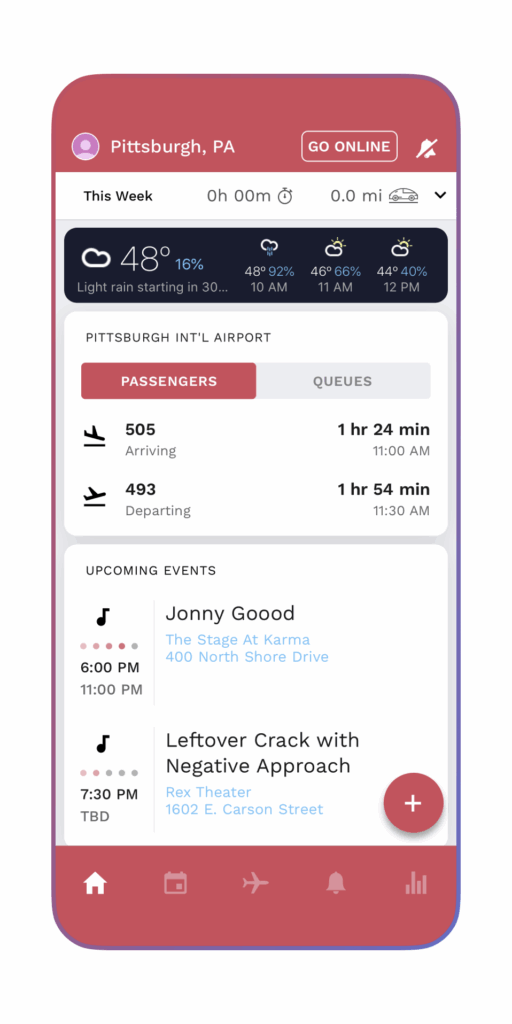
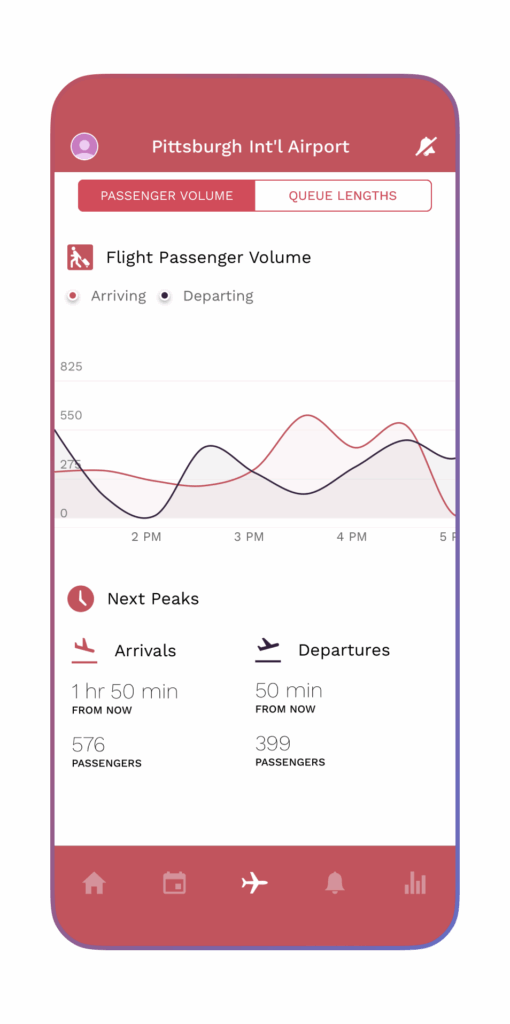
Gridwise was created to help rideshare drivers earn smarter. Early on, we focused on providing drivers with tools to track their earnings, understand their performance, and decide when and where to drive for maximum efficiency. By organizing scattered data into valuable insights, we made gig driving more predictable and more profitable.
When the Landscape Shifted
During the pandemic, the gig economy changed rapidly. Demand for rideshare services dipped, while delivery apps surged. In response, we expanded to support platforms like DoorDash, Instacart, Grubhub, and Uber Eats, giving delivery drivers access to the same tools and insights that rideshare drivers were already using.
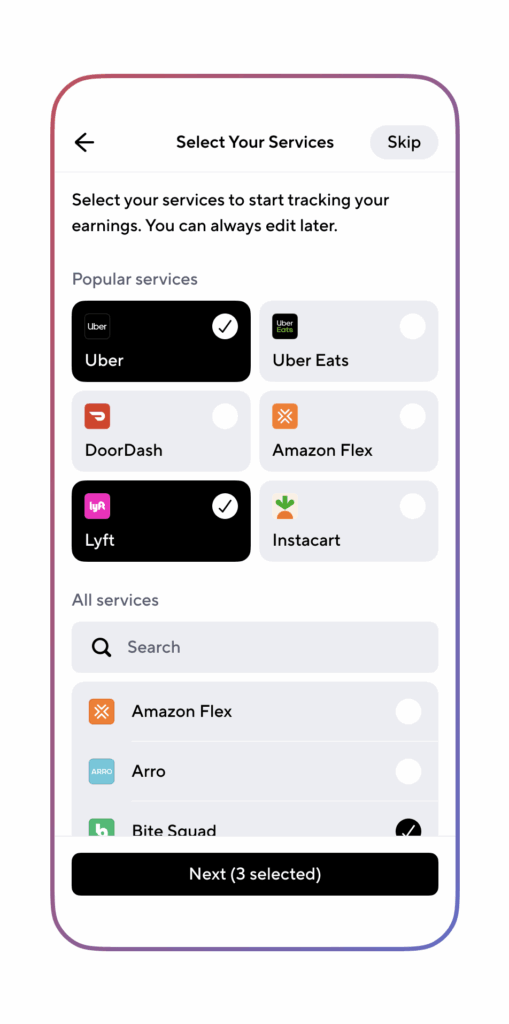
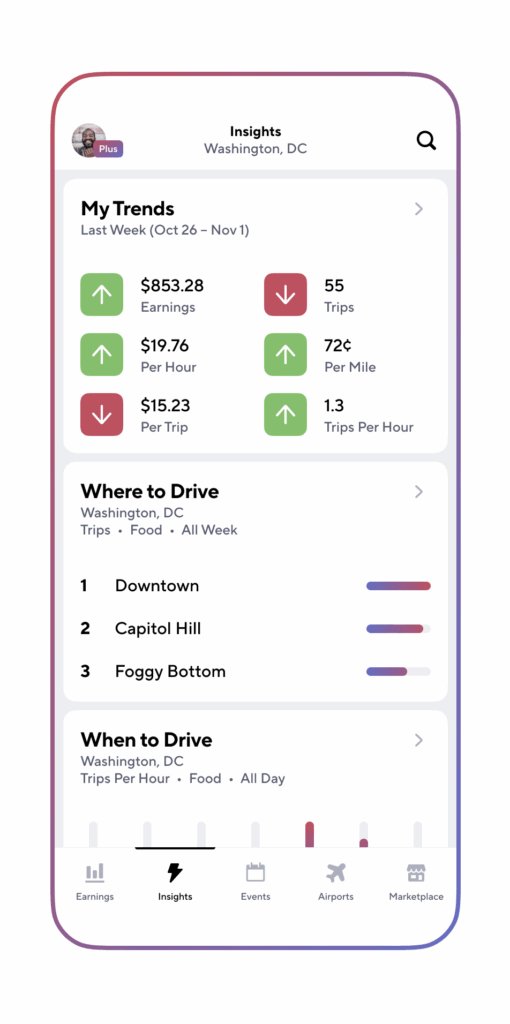
As the economy continued to evolve, so did the way people work. Many workers began mixing gig app work with hourly or shift-based jobs, sometimes across two, three, or even more platforms in a single week. To meet that growing need, we added support for services like Instawork, TaskRabbit, and Wonolo.
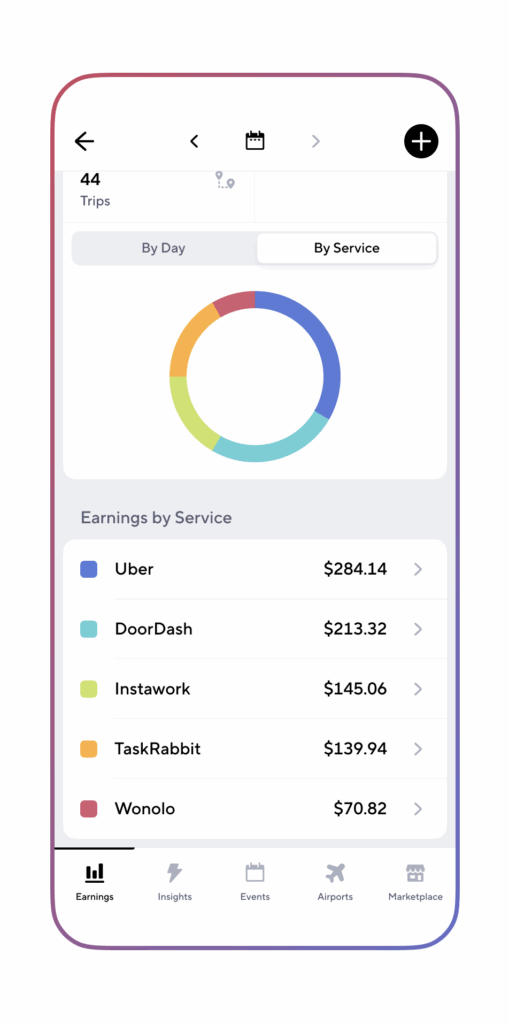
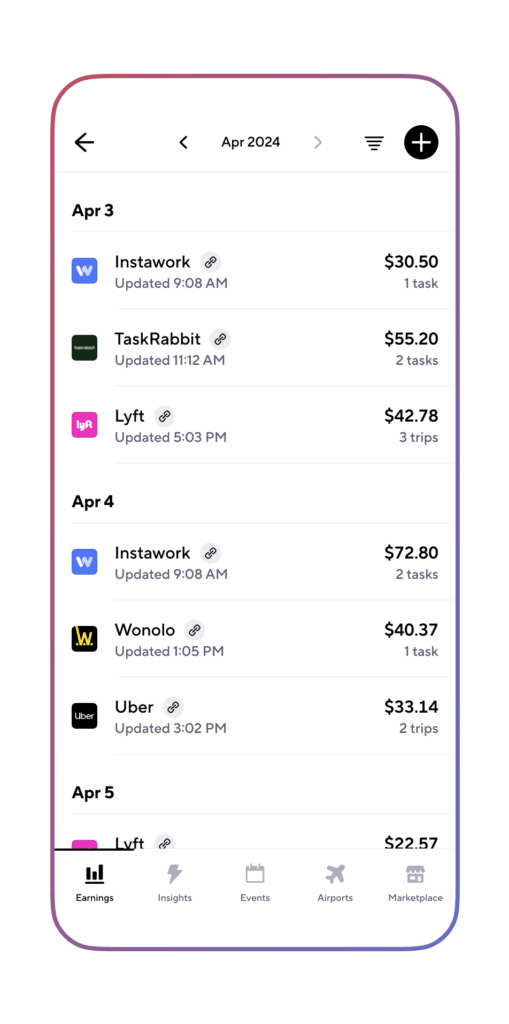
Where We Are Now: A Major Milestone for Gridwise
Today, we’re excited to share one of our biggest updates yet:
Gridwise now supports manual earnings tracking for more than 900 platforms!
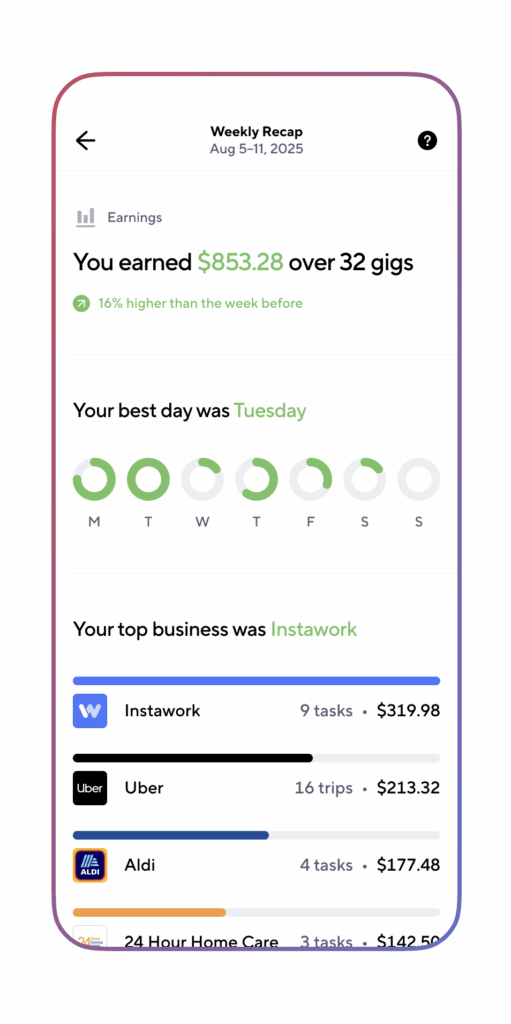
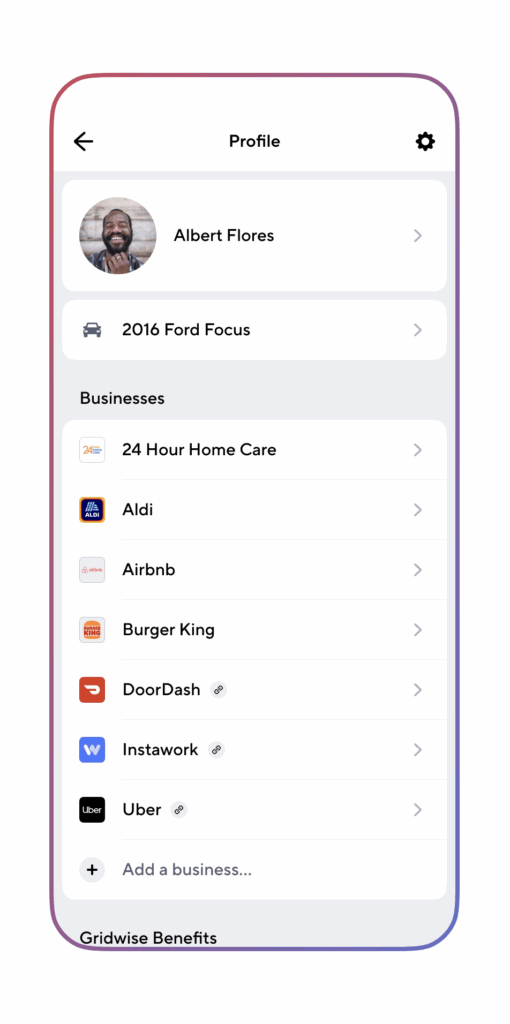
This includes not just rideshare and delivery services, but a wide range of industries where flexible and shift-based work is the norm, such as retail, hospitality, healthcare, warehouse operations, and more. Whether you’re picking up catering shifts, restocking store shelves, or driving for three different apps in one day, Gridwise can track it all in one place.
This is more than an update, it’s a transformation. Gridwise is evolving from a gig-driving tool into a comprehensive earnings hub for anyone working across multiple jobs, shifts, and platforms. Wherever you work, and however you piece together your income, Gridwise is here to give you visibility, clarity, and control.
And we’re just getting started.
What’s New in Gridwise
This latest expansion brings Gridwise closer to what today’s workers need: a flexible, inclusive tool that adapts to the many ways people earn.
Here’s what’s new:
- Expanded coverage across industries like retail, hospitality, healthcare, warehousing, and more
- Manual earnings tracking for over 900+ gig and hourly platforms
- Smarter insights that surface trends in your income, time, and location-based earnings
We’ve expanded our coverage to include a diverse range of industries where flexible and shift work are the norm. These jobs might not live in the gig app world, but they still follow the same unpredictable patterns, and workers still face the same challenges around planning, tracking, and comparing income.
With this update, you can now manually log earnings from more than 900+ platforms and services. Even if your employer or gig app isn’t yet directly integrated, you can still keep a full record of your shifts, hours, and pay. As you enter data, Gridwise highlights patterns, like which days tend to pay more, which locations yield better results, and when it makes sense to take on certain types of work.
These insights help you make more informed decisions about where to spend your time, which opportunities to prioritize, and how to optimize your schedule for steady, sustainable earnings.
Looking Ahead
This expansion is just the beginning. Gridwise is building toward a broader vision: to become the go-to platform for anyone working flexibly, whether you're clocking into shifts, picking up gigs, or combining both to make ends meet.
We know the challenges workers face aren’t limited to a single industry or app. That’s why our roadmap includes continued rollouts across new sectors, deeper earnings insights, and better tools to help you manage your time and income with more confidence.
As we grow, your feedback will be at the center of every improvement. We want to hear about how you're using the new features, what’s working, and where we can improve.
Got something to share? We want to hear from you. Get in touch here.
Your Work, Your Insights, Your Power
If you earn across apps or shifts, now’s the time to bring everything together in Gridwise. Start by adding all the services you use, even the ones that aren’t yet connected automatically. When you add them manually, you’re not just getting a clearer picture of your own earnings, you’re also helping Gridwise decide which services to prioritize for comprehensive automatic income tracking in the future.
Log your recent shifts, input your earnings, and take a look at the patterns that emerge. The more complete your record, the more valuable your insights become, both for your own strategy and for the improvements we continue to build.
Your experience helps shape what Gridwise becomes. By using the expanded tracking and sharing your feedback, you’re contributing to a future where flexible and hourly work are easier to manage, smarter to plan, and ultimately fairer for everyone.
Start by adding the services you use to Gridwise. If you don’t see your service listed, please get in touch with our team here.

Same Apps Different Pay: Why NYC Pay Is 2x More Than Miami
Driving for delivery apps might look the same everywhere, but earnings tell a different story.
The same hours, effort, and apps can produce very different results depending on where you work.
Why? City-specific factors like pay regulations, customer tipping habits, local demand, and even traffic patterns can make or break your bottom line.
In this post, we’ll explore how your market shapes your earnings, why some cities consistently outperform others, and what you can do to boost your take-home pay, no matter where you drive. We’ll break down real-world examples from New York City, Miami, and Philadelphia, then show you how to adapt your strategy using insights from Gridwise.
City-to-City Pay Gaps: What the Data Shows
This chart shows how average driver gross pay per hour varied across major metro areas (NYC, Philadelphia, and Miami) on apps like DoorDash, Gopuff, Grubhub, Instacart, and Uber Eats between July–December 2024.
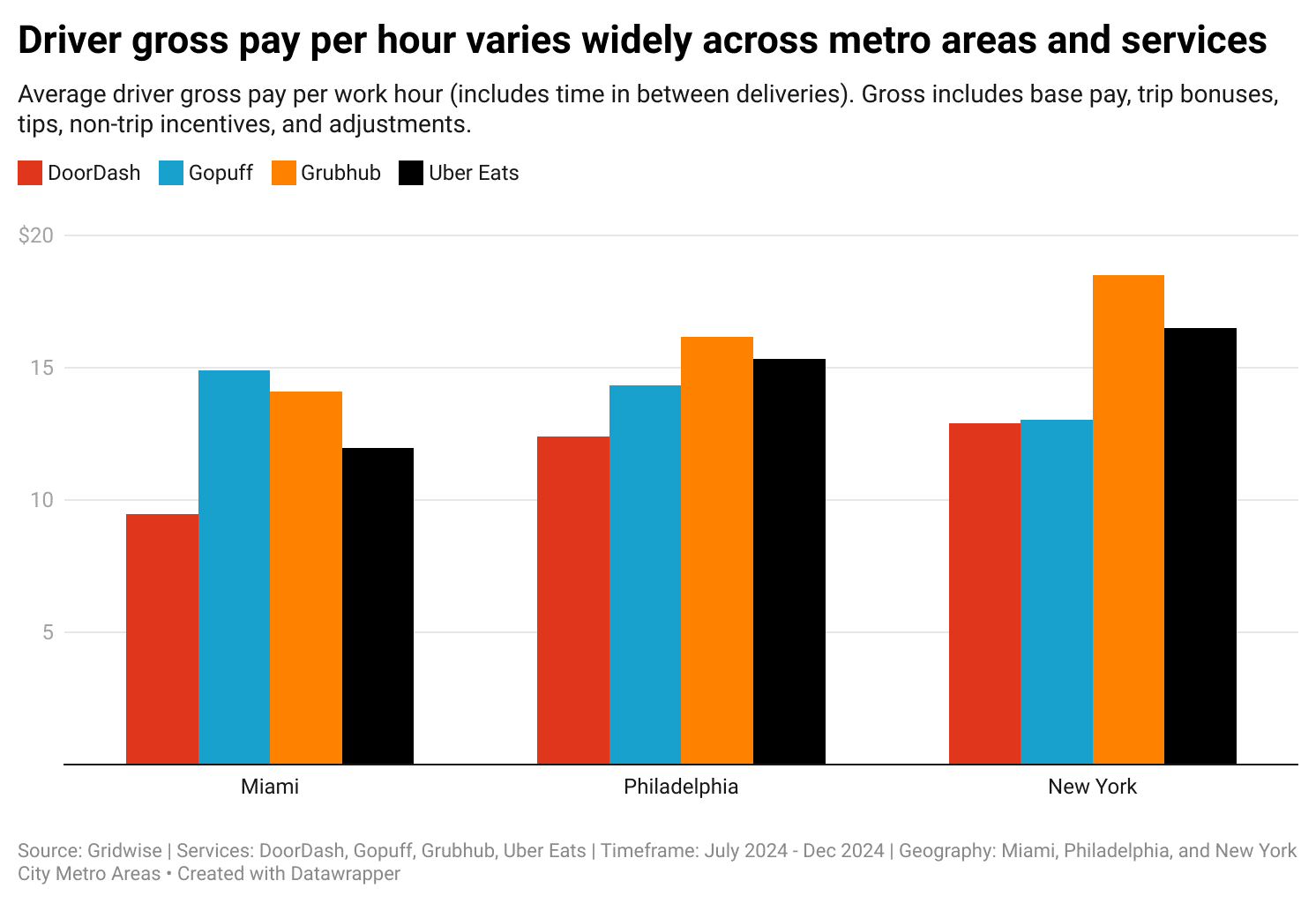
It highlights a key point: even with the same apps and effort, pay can vary widely by city.
In this sample:
- NYC leads across most platforms
- Philadelphia lands mid-range
- Miami trails behind
But keep in mind:
City averages don’t reflect your personal costs, idle time, or shift strategy. They also shift with the seasons or big events. That’s why they should be used as context, not benchmarks.
To really understand how you’re doing, use Gridwise to track your actual earnings by hour, app, and shift, then compare your results to local averages.
Same Job, Different Payday: The Policy Effect
Where you drive can affect your pay before you even turn the ignition, and local policy is a big reason why.
In New York City, app-based delivery workers benefit from a guaranteed minimum pay floor. As of April 1, 2025, the NYC Department of Consumer and Worker Protection mandates a $21.44/hour rate before tips, adjusted annually for inflation.
This floor boosts earnings across the board, and it’s one reason NYC consistently tops gig worker pay charts.
In contrast, Miami and Philadelphia have no minimum pay protections.
Drivers in these cities rely entirely on market forces, like order volume, tips, and competition. That means you could put in the same work and walk away with significantly less.
This policy gap helps explain why NYC pay starts high and stays stable, while pay in other cities fluctuates more,even before considering demand, traffic, or driver strategy.
Why Can Cities Differ?
Demand and Events
Local demand plays a major role in driver earnings. Cities with large travel hubs or busy event calendars create more consistent opportunities.
Know exactly what you earn. Gridwise auto-tracks your pay, miles, and expenses across every gig app in one place. Download for free →
- Miami’s Port hit a record in FY2024, serving 8.23 million cruise passengers. Turnaround days fuel weekend delivery and rideshare spikes.
- Philadelphia International Airport (PHL) moved 30.9 million passengers in 2024, driving steady airport-area demand even during slower weeks.
- Sporting events, concerts, and conventions all create temporary demand surges that drive pay above normal.
Markets without these kinds of built-in demand engines?
They often lead to slower days, longer idle periods, and lower pay per hour.
Tip and Dining Patterns
Even if demand is stable, your earnings can still swing based on how and when people order, and how much they tip.
- Miami saw a drop in dinner orders and average tips in Q2 2024 (according to Toast POS data). Fewer high-value dinner runs cut into what’s usually a peak shift.
- Philadelphia, by contrast, had stronger morning restaurant traffic, driving up breakfast earnings and tips.
These patterns matter. Tip-heavy deliveries can double the value of a run. Miss the high-tipping windows, and you might leave serious money on the table.
Cities with a strong tipping culture, or busier meal hours, tend to deliver higher hourly earnings for the same effort.
Operating Costs
Gross pay isn’t the full picture. Your true earnings depend on what it costs to work in your market.
- Fuel prices: Pennsylvania has some of the highest fuel taxes in the U.S., raising gas costs. Prices in Florida and New York vary week to week (AAA).
- Tolls and parking: NYC’s tolls, tunnels, and scarce street parking can eat into profits fast, even a few paid spots can wipe out short-trip margins.
- Vehicle wear: Stop-and-go driving adds maintenance costs. The IRS mileage rate for 2025 is $0.70/mile, a good baseline for estimating vehicle expenses.
Two drivers might gross the same $20/hour. But if one is paying more in gas, parking, and repairs, their net earnings could be far lower.
What Now? Win Where You Are
You can’t control your city’s policies or traffic, but you can control how you work within them.
In every market, top-earning drivers don’t just hustle more.
They track performance, optimize shift timing, and cut costs wherever they can. It's not about grinding longer, it's about working smarter.
Here are five ways to do exactly that:
Driver Pay Isn’t One-Size-Fits-All
Driving for apps may seem standardized, but your results won’t be.
Every market brings different earnings potential. Some of it is out of your hands. But a lot of it isn’t.
With the right tools and data, you can outperform local averages and maximize your earnings, even in tougher markets.
Guessing Doesn’t Work. Tracking Does.
Most drivers don’t realize how much they lose to slow hours, downtime, or underperforming apps. Relying on city averages won’t reveal the full story.
Gridwise shows you exactly what’s working, no spreadsheets or guesswork. Once you link your apps, you’ll see:
- Total earnings, miles driven, and time online
- Hourly pay breakdowns by app, day, and time
- Performance trends, like: “Fridays 11am–2pm run 18% above my average”
- Event and airport demand signals to catch high-value shifts in real time
Start with your actual numbers. Then make small shifts to when, where, and how you drive. That’s how smart drivers boost their pay, no matter the city.

Your App Choice Could Mean 30% More Pay
If you’ve been driving in the gig economy for a while, you already know one truth: no two cities are alike. The traffic patterns, the customers, the tipping culture, and even the kinds of restaurants available can all shape your earnings. But here’s the twist most drivers overlook, the app you use matters just as much as the city you’re in.
New Gridwise insights shows that the “best” platform is different depending on where you drive. In one city, Grubhub might top the charts. In another, Uber Eats or Gopuff could be the most reliable money-maker. And across multiple markets, DoorDash, despite being the biggest player, often trails the competition.
That means your earnings aren’t just about how hard you work. They’re about strategy. The right app in the right city could boost your hourly rate by several dollars, while the wrong one might hold you back.
App Earnings Vary More Than You Think
Between July and December 2024, Gridwise analyzed average gross hourly earnings across five major platforms: DoorDash, Uber Eats, Grubhub, Gopuff, and Instacart. The numbers included everything, base pay, tips, bonuses, and even the downtime between requests.
What the data revealed was clear: platform earnings shift dramatically depending on location. In Miami, Gopuff delivered the highest hourly earnings, while in Philadelphia and New York City, Grubhub consistently outperformed the competition. Across all three cities, DoorDash paid the least per hour.
This isn’t just a slight difference. In some cases, the gap between the highest-earning platform and the lowest was $5–$6 an hour. For full-time drivers, that can add up to hundreds of dollars a month, simply by choosing the right app for the city you’re in.
A Look at Three Cities
Miami: Gopuff Wins Out
In Miami, Gopuff drivers came out on top, averaging nearly $15 an hour. Grubhub followed at about $14, while Uber Eats and Instacart hovered closer to $12. DoorDash trailed significantly at under $10 an hour.
The numbers reflect the challenges of this market. Miami drivers often face longer distances between customers, heavy traffic, and more competition for orders. That combination drags down efficiency, making platform choice even more critical. For drivers relying only on DoorDash here, the gap is striking, you could be earning 30% less than your peers who focus on Gopuff.
Philadelphia: Grubhub Takes the Lead
In Philadelphia, Grubhub drivers earned the most, averaging about $16.50 an hour. Uber Eats followed closely at $15.40, while Gopuff came in at $14. DoorDash and Instacart both hovered near $12 an hour.
The city sits in the middle compared to Miami and New York, denser neighborhoods than Miami but less intensity than New York. That balance creates steady demand without overwhelming traffic. For drivers, the key takeaway is that Grubhub and Uber Eats clearly outperform the rest here, and multi-apping between them could help minimize downtime and maximize pay.
New York City: Grubhub Dominates
In New York, Grubhub pulled far ahead of the competition, with drivers averaging $18.60 an hour. Uber Eats followed at $16.70, while DoorDash, Instacart, and Gopuff all earned just above $13 an hour.
What makes New York different is density. Short delivery distances, constant demand, and a strong tipping culture all add up to higher earnings. With so many orders packed into tight areas, drivers can complete more trips per hour, which multiplies the impact of higher per-order tips. That’s why Grubhub’s edge in New York isn’t just a few dollars, it’s a consistent advantage that can translate into hundreds of extra dollars each month for full-time drivers.
Average Hourly Earnings by City and Platform
Here’s a side-by-side comparison of how the major gig apps stacked up in Miami, Philadelphia, and New York City. These numbers include base pay, tips, and bonuses, giving a clear picture of which platforms performed best in each market.
Know exactly what you earn. Gridwise auto-tracks your pay, miles, and expenses across every gig app in one place. Download for free →
Average Hourly Earnings by City and Platform (Jul–Dec 2024)
- Miami, FL: Grubhub $14.00, Uber Eats $12.10, Gopuff $14.90, Instacart $12.20, DoorDash $9.40
- Philadelphia, PA: Grubhub $16.50, Uber Eats $15.40, Gopuff $14.00, Instacart $12.00, DoorDash $12.30
- New York City, NY: Grubhub $18.60, Uber Eats $16.70, Gopuff $13.40, Instacart $13.20, DoorDash $13.20
Takeaway: The best-paying gig app isn’t the same everywhere. In Miami, Gopuff led the way, while Grubhub dominated in Philadelphia and New York City. Across all three markets, DoorDash consistently ranked lowest, showing why it’s important to compare platforms based on where you drive.
Why Platforms Perform Differently Across Markets
Several factors explain why one app pays more in one city and less in another:
- Customer demand. Each platform has different levels of popularity in different regions. If more customers in your city use Uber Eats, for example, you’ll likely see more frequent requests there than on other apps.
- Restaurant and retailer partnerships. Apps don’t all work with the same merchants. Grubhub’s strong ties with long-established restaurants in cities like New York and Philadelphia give it a steady base of high-value orders, while Gopuff’s warehouse model drives success in markets like Miami.
- Driver supply. The number of active drivers also shapes earnings. If an app is flooded with drivers in one market, wait times go up and pay per trip often falls.
- Local culture and tipping habits. Cities with higher tipping norms can boost average hourly pay on certain apps. Likewise, areas with longer delivery distances or more traffic can drag down earnings.
- Promotions and bonuses. Each platform sets promotions at the city level. Peak pay, bonuses, and challenges may look generous in one market but be nearly absent in another.
- Local pay regulations. Laws matter too. Cities like New York have set minimum pay standards for delivery workers, forcing platforms to adjust pay structures. These rules can drive up average earnings compared to cities without such protections.
The bottom line is that no single platform dominates everywhere. The app that delivers the best results in your market is determined by a mix of demand, competition, local habits, and even local laws.
How You Can Find Your Best App Match
Charts like the ones we’ve shared are a great starting point, but averages can only tell part of the story. Even in cities with minimum pay standards, such as New York, not every driver experiences the same results. Regulations can raise the floor on earnings, but they don’t guarantee you’re on the best app for your schedule, your location, or your style of driving.
That’s why it’s so important to track your own performance. Two drivers working in the same city can have completely different outcomes depending on which platform they choose, when they drive, and where they position themselves.
Gridwise makes this easy. By linking your gig accounts, you’ll see exactly:
- Which app is paying you the most per hour.
- When and where your trips are the most profitable.
- How downtime, bonuses, and tips affect your real take-home pay.
Instead of guessing whether a new law, a peak pay promotion, or a different platform is working in your favor, you’ll have data to prove it.

Multi-Apping: Max Your Earnings With the Right App Stack
If you’re working in the gig economy and bot multi-apping, it’s time to rethink your strategy. Today’s most successful drivers don’t just sit around waiting for pings from one platform, they actively manage their day across multiple apps. This is called multi-apping, and it’s one of the most powerful ways to boost your earnings without working more hours.
By switching between rideshare and delivery services throughout the day, you can stay consistently busy, take advantage of demand surges, and avoid wasting time sitting idle. Multi-apping puts control back in your hands, allowing you to earn more every week while making better use of your time on the road.
How Much More Do Multi-App Drivers Really Earn?
You might have heard that multi-app drivers earn more, but by how much?
According to insights from Gridwise, the answer is: a lot. Drivers who use multiple apps can earn up to 3x more per week than those who only work one platform.
This kind of increase comes from several advantages:
- Less downtime: When one app slows down, another one is still busy
- More flexibility: You can catch better offers across platforms
- Smarter stacking: Some services offer bonuses or surges at different times of day
Multi-apping doesn’t mean working nonstop. It means working smarter by knowing when and where to switch gears.
What App Combinations Are Most Common?
Not all app combos perform the same, and some pair better than others.
Based on Gridwise insights, the most common stacks for multi-app drivers include Uber, DoorDash, and Uber Eats.
Here are a few tried-and-true combinations:
- Uber + DoorDash: Rides in the morning, deliveries at night
- Uber Eats + DoorDash: A steady stream of food orders throughout the day
- Lyft + Uber: Double up on rideshare demand during peak commute hours
These combos work for many drivers because they help fill in gaps and keep trips coming in. But let’s be clear, just because these combinations are popular doesn’t mean they’re automatically the best fit for you.
What works in one market might not work in another. You might find that in your city, one app stays busy while another barely moves. That’s why it’s essential to use Gridwise insights to see what’s really working for you: in your city and on your schedule.
Timing Matters: Matching Apps to Peak Demand
The key to multi-apping isn’t just about running more apps, it’s about running the right apps at the right time.
Know exactly what you earn. Gridwise tracks your pay and expenses across every job, so you always see what you really make. Download for free →
Here’s how experienced drivers align their shifts with what’s actually in demand:
- Rideshare spikes in the morning and evening during commutes
- Food delivery jumps at lunch and dinner
- Grocery and package services tend to stay busy in the afternoons and on weekends
Multi-app drivers take advantage of these patterns. They treat their schedule like a business, adjusting in real time to what’s hot and when.
Instead of waiting around, you can use your stack to jump from one opportunity to the next. The result? More trips, more earnings, and fewer slow stretches.
Gridwise can help you identify these patterns and show you when the best hours really are in your city.
Your Best App Stack Depends on Where You Drive
This is something many new drivers overlook: what works in one city might be totally different in another.
Just because Uber Eats pays well in Dallas doesn’t mean it performs the same in Salt Lake City. Traffic patterns, local demand, population size, and even weather can change how each app performs.
To really know what’s working for you, you need personalized insights, based on your location, your shift times, and your own driving history.
When you connect your gig accounts to Gridwise, you unlock a clear view of which apps are bringing in the most money per trip, per hour, and per mile. You also get smart recommendations on when to work and which times are most profitable in your area.
How Gridwise Helps You Work Smarter (and Earn More)
Gridwise isn’t just about tracking your shifts. It’s about helping you make the most out of every hour you spend working.
Here’s what you get when you use Gridwise and connect your apps:
- Personalized performance insights across all your gigs
- Side-by-side comparisons of which apps earn you the most
- Demand heat maps that show you where the action is in real time
- "When to Drive" tools that show peak times based on your area
- Mileage tracking and income summaries to simplify taxes and planning
And here’s the best part: the more platforms you connect, the smarter your insights become.
With Gridwise, you’re not just collecting numbers, you’re learning what actually works for you. That means no more guessing. No more wasting time on slow apps. And no more wondering whether you could be earning more somewhere else.
Smarter Driving Starts with Better Insights
Multi-apping can help you earn up to 3x more, but only if you know which apps work best for you. What’s popular in one city might underperform in another, and timing matters just as much as platform choice.
Gridwise takes the guesswork out by showing you when to drive, where to go, and which apps are worth your time. When you connect your gig accounts, you unlock personalized insights that help you earn more, every shift.
Drive smarter. Earn more. Let Gridwise guide the way.

Grubhub vs Uber Eats Pay in 2026: Which Platform Pays Drivers More?
If you’ve ever compared your earnings across different delivery apps, you’ve probably asked the big question: Uber Eats vs Grubhub, who pays more? The answer isn’t as simple as one number. Each platform structures its pay differently, which affects both your totals and how your shifts feel.
This difference doesn’t just shape your totals at the end of a shift, it shapes how your work feels along the way.
Grubhub vs Uber Eats Pay in Tips: What’s the Difference?
From July through December 2024, Grubhub workers earned 56% of their pay from tips, while Uber Eats workers earned just 44% from tips.
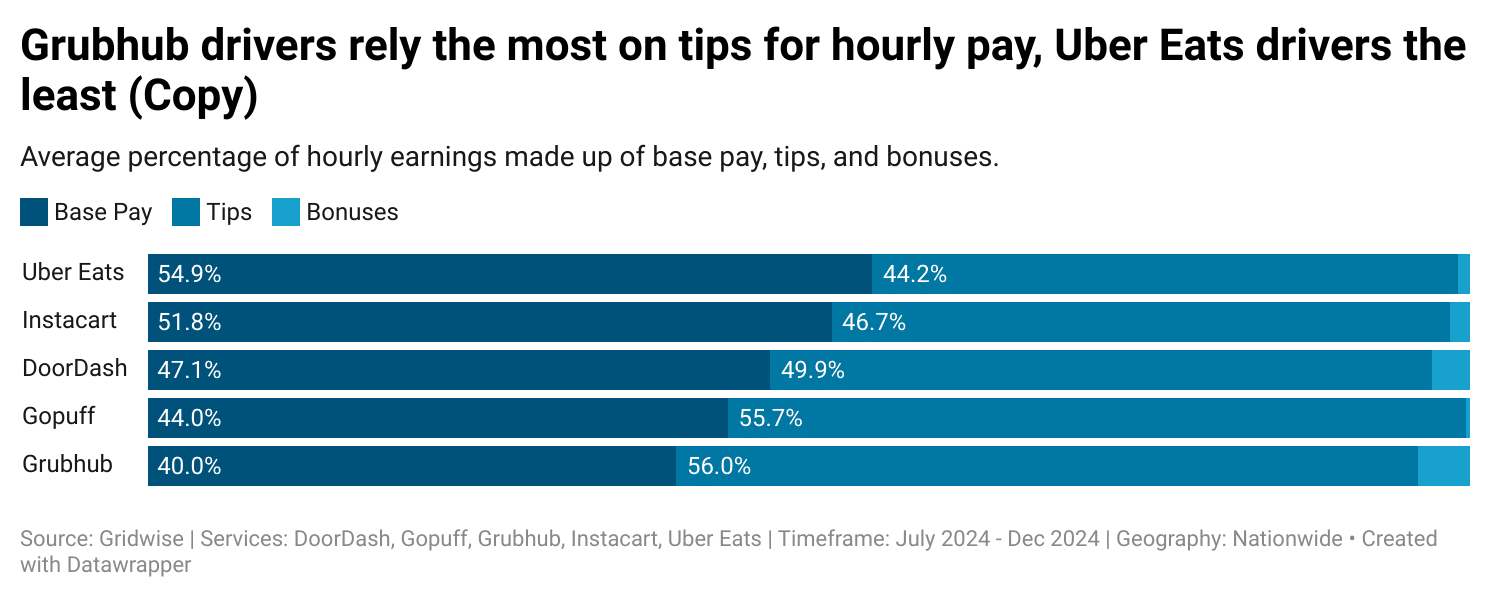
In other words, Grubhub relies more on customer generosity to boost payouts, while Uber Eats provides a steadier base (not taking bonuses into consideration). That might sound like a small distinction on paper, but it makes a real difference on the road.
- On Grubhub, a single big tip can turn a routine delivery into one of your best trips of the day, but if customers don’t tip, your totals drop quickly.
- On Uber Eats, tips are often smaller, but the stronger base pay cushions the impact, creating more predictable earnings.
Understanding this balance is essential if you want to set realistic expectations, plan your shifts, and ultimately decide which platform fits your goals best.
Why Pay Structure Matters for Gig Workers
Not all gig work feels the same. The structure of your pay doesn’t just shape your income, it shapes your strategy and even your mindset while you’re out earning.
Grubhub: High Reward, High Risk
On Grubhub, tips can make or break your shift. When customers tip generously, your pay climbs quickly. But when you’re flooded with low- or no-tip orders, your totals can stall. That volatility makes Grubhub exciting and rewarding in tip-friendly areas, and more frustrating in markets where tipping is less common.
Uber Eats: Steadier, But Lower Tips
Uber Eats is different. Base pay tends to be stronger and more consistent, which means you’re less dependent on customer generosity to maintain a decent hourly rate. The tradeoff, however, is that even when customers do tip well, the boost doesn’t have the same impact it does on Grubhub.
For workers, this matters because it changes how you think about your time. If you value predictability, Uber Eats may feel less stressful. If you’re confident about targeting wealthier neighborhoods or dinner rushes, Grubhub could deliver bigger rewards.
Uber Eats vs Grubhub: Who Pays More?
The numbers make one thing clear: there’s no single winner. The question of “Uber Eats vs Grubhub, who pays more?” depends on your city, your habits, and your comfort level with risk versus stability.
Know exactly what you earn. Gridwise auto-tracks your pay, miles, and expenses across every gig app in one place. Download for free →
- In tip-heavy markets, Grubhub can come out on top.
- In cities with lower tipping culture, Uber Eats’ stronger base pay can deliver steadier results.
- The only way to know for sure is to track your own mix of base pay and tips across platforms.
The Next Step: Use Your Own Insights
National averages give us a picture of how apps pay, but what really matters is your market. Tip percentages, base pay structures, and customer behavior can vary dramatically between cities, and even between neighborhoods.
That’s why the smartest move is to track your personal earnings mix. How much of your pay comes from tips, and how much comes from base pay? That’s why the best way to answer “Uber Eats vs Grubhub who pays more?” is to track your own results over time.
Use Gridwise to Understand Your Earnings
Charts and averages are helpful, but the real value comes from knowing how your own shifts stack up. The first step to getting there is simple: link your accounts in Gridwise.
Once you connect your accounts, Gridwise automatically brings your earnings into one place and gives you insights you can actually use:
- Track your total pay across Uber Eats, Grubhub, DoorDash, and more
- See how your earnings change week by week
- Compare platforms side by side to spot which one performs best in your market
- Identify local demand patterns so you know the best times and places to work
When all your results are in one place, you can finally stop guessing and start planning your shifts around what really works.
Download Gridwise today and link your accounts to unlock your personalized insights and take the first step toward smarter, more profitable driving.
Discover more articles like this:
Uber and Lyft Earnings Per Trip Are Rising in 2025
After a challenging year in 2024, many rideshare drivers are starting to see signs of a rebound—at least on a national scale.
That kind of shift suggests the market may be stabilizing. But remember—these are national trends. Your own results may vary based on when, where, and how you drive.
In this article, we’ll break down what this rebound could mean for your driving strategy. You’ll learn why pay per trip matters, how to take advantage of higher earnings, and how to track your own performance so you can drive smarter—not just longer.
Rideshare Earnings Per Trip Are Back on the Upswing
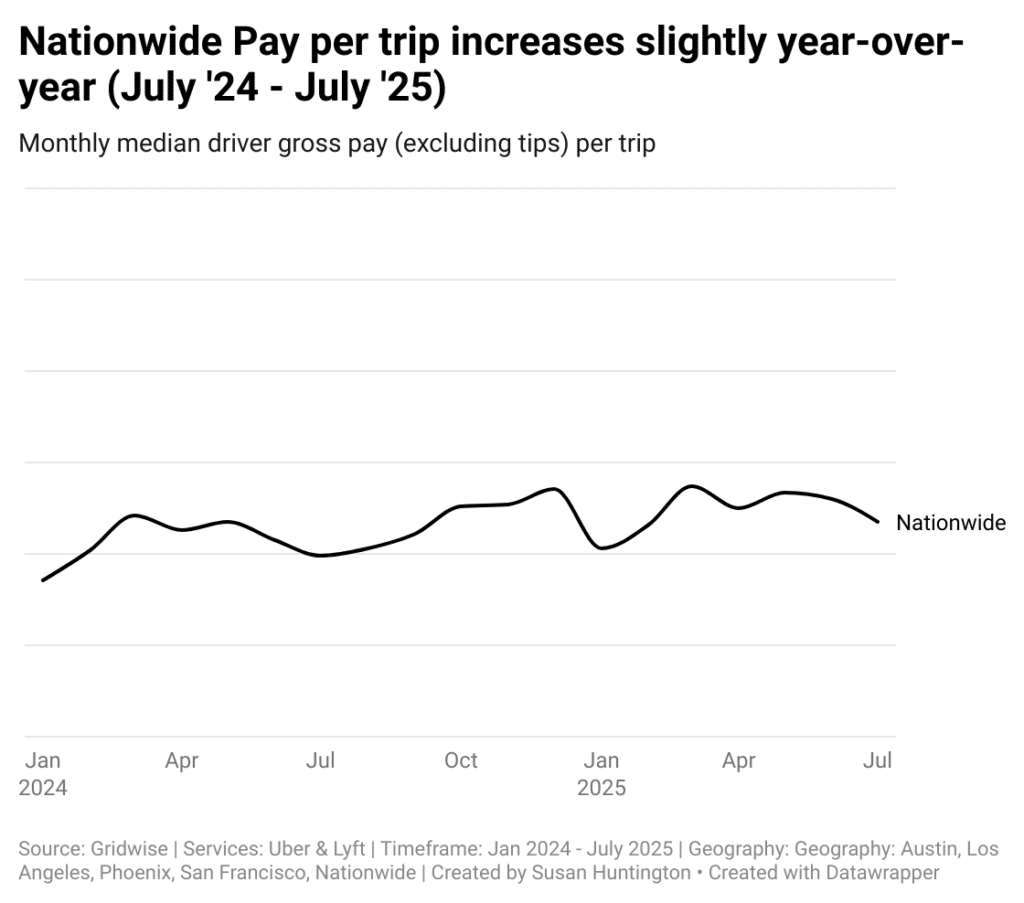
By late 2024, earnings began to recover—and the latest insights show some progress. In July 2025, average rideshare earnings per trip were 3.4% higher than in July 2024.
Why Pay Per Trip Matters
There are plenty of ways to measure gig earnings — per hour, per week, or even per mile — but pay per trip is one of the most meaningful. This single number reflects how efficiently your time translates into income. When pay per trip is higher, you need fewer rides to hit your goals, which means you can spend less time chasing low-value trips and more time driving when it counts.
On the other hand, when pay per trip falls, drivers are forced to accept more requests or stretch their shifts longer to make up the difference. That quickly leads to fatigue and burnout. This is why tracking your pay per trip is so important: it gives you a clear sense of whether your work is sustainable and rewarding, not just whether you’re scraping together enough hours.
What the Rebound Means for Your Strategy
The recent rebound in pay per trip gives workers a chance to rethink how they structure their shifts. Instead of feeling pressure to accept every request that comes through, you can be more selective and focus on the rides that truly make sense. With each trip paying more, it may not be necessary to chase sheer volume anymore.
For example, you might concentrate your efforts on peak demand periods like morning commutes, lunchtime rushes, or late-night crowds. Driving fewer but more focused shifts also delivers better results than spreading yourself thin across the whole week. And when promotions or bonuses appear, they now add even more value on top of improved base earnings. In short, the rebound means you can focus on quality over quantity and still reach your income targets.
Why Tracking Your Own Pay Is Essential
Of course, national averages only tell part of the story. Your pay per trip might look very different from someone else’s, even if they are in the same city. The difference often comes down to when you choose to work, which neighborhoods you drive in, the types of trips you accept, and how you structure your time online.
That’s why the most important question to ask isn’t whether rideshare pay in general is going up — it’s whether your own pay per trip is improving. Without keeping track, it’s almost impossible to know. When you monitor your earnings consistently, you can spot patterns, identify what works, and quickly adjust when conditions shift.
Use Gridwise to Unlock Personal Insights
The good news is that you don’t have to track everything manually. Gridwise makes it simple to see exactly how your pay per trip is trending. To get started, there’s one key step:
Step 1: Link Your Accounts
When you connect your rideshare accounts to Gridwise, the app automatically pulls in your trips and earnings. That unlocks personalized insights that show you:
- Your true pay per trip for every shift
- How your results compare across apps like Uber and Lyft
- Which days and hours deliver the best returns in your city
- How your performance stacks up against local trends
With these insights, you can plan smarter shifts, cut back on wasted time, and focus on the rides that actually move the needle.
Download Gridwise today and link your accounts to take the first step toward smarter driving and higher earnings.
More Tips for Smarter Driving:

How Are Robotaxis Affecting Driver Pay in AV Cities?
Autonomous vehicles (AVs) aren’t just hype anymore—they’re part of daily rideshare life in a handful of big U.S. markets. And in those places, drivers have been raising concerns: since AVs showed up, many have noticed their earnings slipping.
We wanted to understand if those concerns were reflected in the numbers. Using anonymized and aggregated data, we looked at activity in AV launch markets and compared it to a national baseline. The results line up with what many drivers have already been saying: earnings in AV-active cities are under pressure. While nationwide trends show modest growth, AV markets are moving in the opposite direction.
The impacts don’t look the same everywhere, but the patterns are hard to ignore. In some cities, the drop shows up as lower hourly pay. In others, it’s fewer trips during high-demand periods, shrinking incentive offers or other factors that used to help boost weekly totals.
Ahead, we’ll break down what the numbers show in AV cities versus the national trend, and share practical strategies drivers can test to protect their income.
A quick note on the numbers you’ll see below: they reflect median results across large groups of drivers and are meant to show market-level trends, not any one person’s experience. Your results will vary based on when and where you drive, your app mix, and how quickly you pivot. That’s why we close each section with practical moves—and why we encourage you to lean on your own personalized insights as you test changes week by week.
When AV services launched in each city
The timing of AV rollouts helps explain why driver earnings look different from city to city. Here’s a quick timeline of when autonomous rideshare started in the major AV markets:
- Phoenix: Waymo began full commercial service on October 8, 2020.
- San Francisco: Waymo expanded operations on June 25, 2024.
- Los Angeles: Waymo service launched on November 12, 2024.
- Austin: Waymo began operating through its Uber partnership on March 4, 2025, followed by Tesla’s limited Cybercab rollout on June 22, 2025
How driver earnings are shifting in AV cities
When you look closer at the numbers, it’s clear that AV markets aren’t following the same earnings trends as the rest of the country. Here’s what stands out:
How much are drivers in AV cities making per ride?
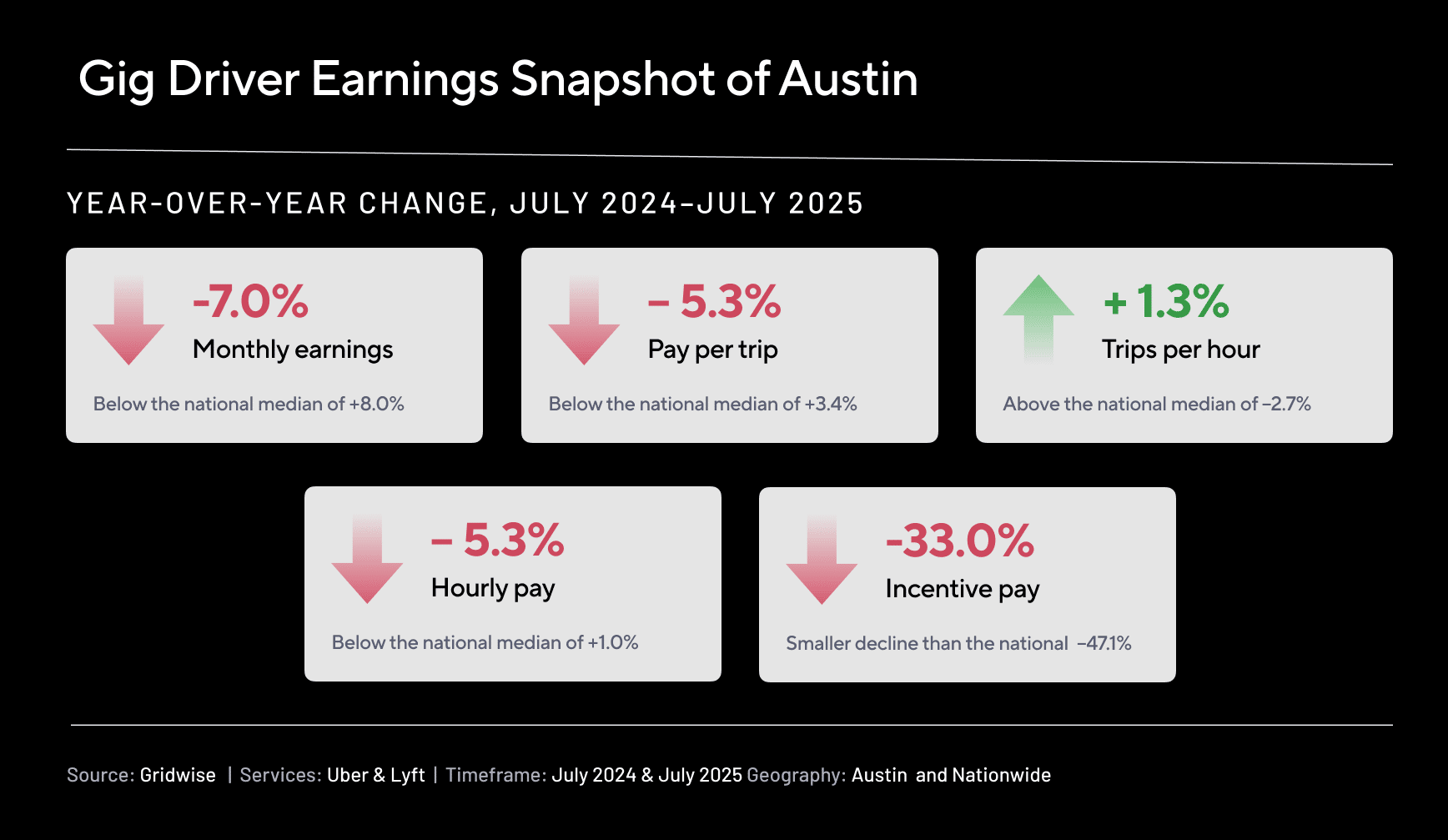
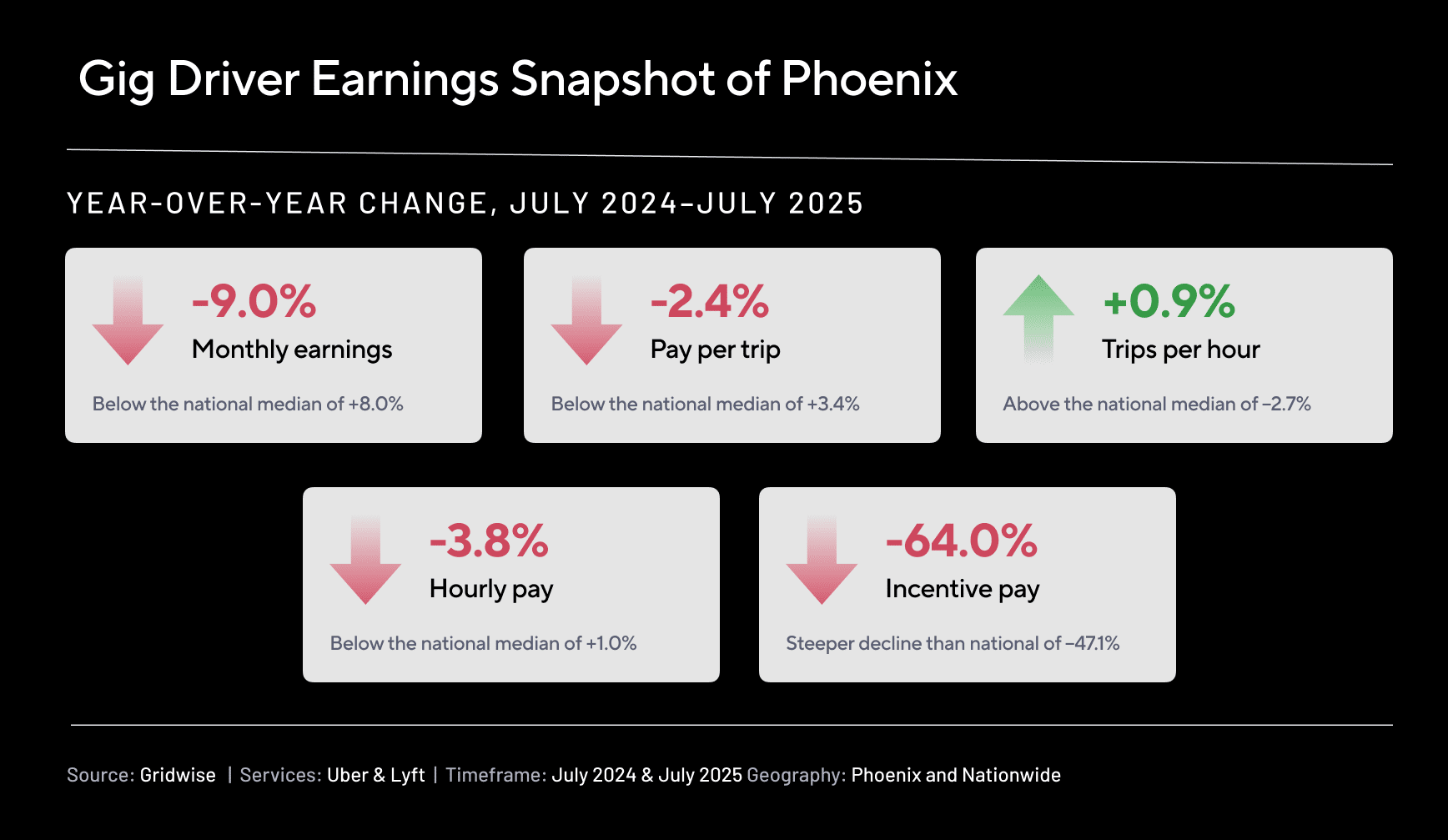
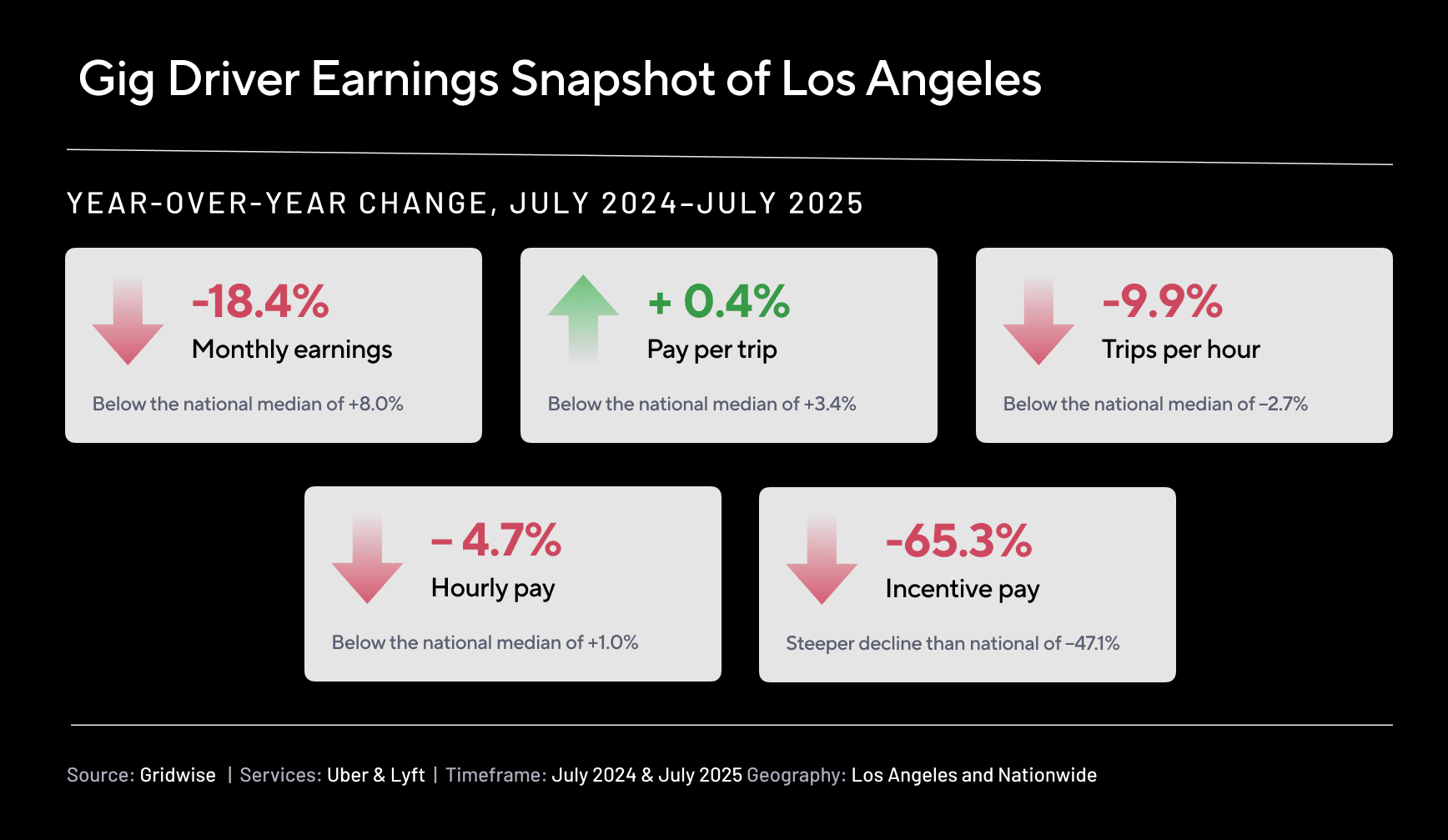
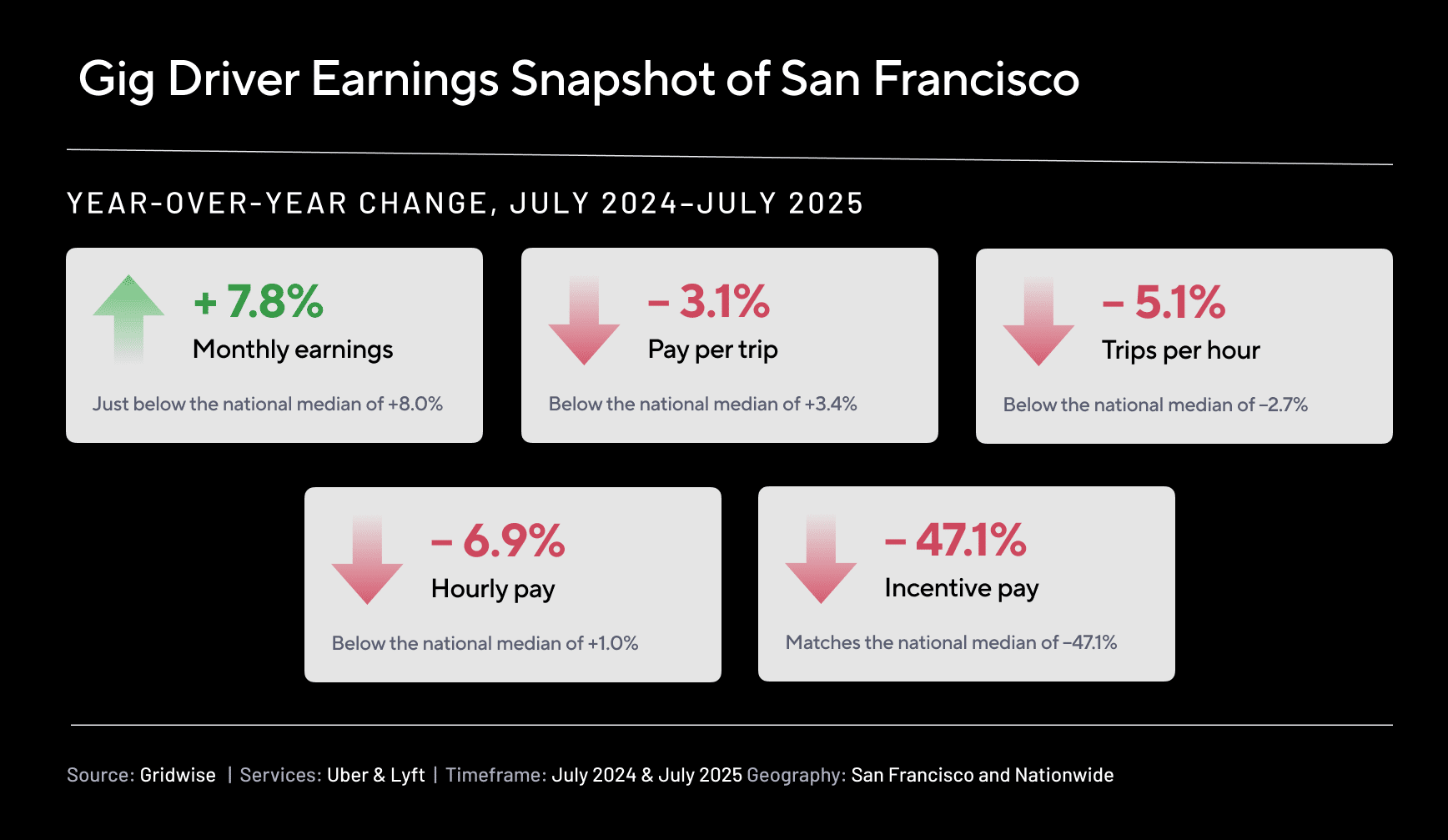
Nationwide, pay per trip rose modestly—up 3.4% year-over-year from July 2024 to July 2025. But AV cities didn’t keep pace. Austin drivers saw a 5.3% drop, San Francisco dipped 3.1%, and Phoenix was down 2.4%. Los Angeles held nearly flat with a slim 0.4% gain.

How much are drivers in AV cities earning per hour?
Hourly pay fell everywhere AVs are active, even as the nationwide average increased by 1.0%. The sharpest declines were in San Francisco (–6.9%) and Austin (–5.3%), with Los Angeles (–4.7%) and Phoenix (–3.8%) also sliding. This means drivers in those cities are making less per hour of work compared to the same time last year.

What’s happening with incentive pay in AV cities?
Platform incentives—things like streaks, quests, or non-trip bonuses—are shrinking nationwide, not just in AV markets. On average, incentive pay per trip fell 47.1% YoY. But the cuts were even deeper in Los Angeles (–65.3%) and Phoenix (–64.0%). San Francisco’s decline matched the national trend, while Austin saw a smaller, though still meaningful, drop of –33.0%. These cuts are happening everywhere, but in some AV cities they’re hitting harder.

What’s happening to monthly earnings in AV cities?
When you zoom out to total monthly pay, the picture is uneven. Los Angeles (–18.4%), Phoenix (–9.0%), and Austin (–7.0%) all saw meaningful declines, while San Francisco actually posted a 7.8% increase—close to the nationwide gain of 8.0%. That increase in San Francisco may come from drivers putting in more hours, since both hourly pay and trips per hour have declined there.

How many trips per hour are drivers in AV cities getting?
Trip volume per hour also shifted in different ways across markets. Austin (+1.3%) and Phoenix (+0.9%) saw small gains, but Los Angeles (–9.9%) and San Francisco (–5.1%) dropped sharply. Nationwide, trips per hour slipped by –2.7%. In LA and San Francisco, fewer rides per hour help explain lower hourly pay. But in Austin and Phoenix, trip counts held steady or even grew—suggesting other factors, like trip length or changes in rider mix, are driving down earnings.

City snapshots: Austin, Phoenix, Los Angeles, San Francisco
Here’s how the four AV cities in our sample are trending right now. These are median year-over-year shifts at the market level, but not a judgment on any one driver. Local events, tourism, weather, app policies, and AV rollout pace all play a role—so use this as context alongside your own week-to-week numbers.
Austin
Per-trip and hourly pay are both down –5.3%, with monthly earnings –7.0%. At the same time, trips per hour +1.3% and utilization +1.3% suggest it’s a bit easier to stay busy. If this matches what you’re seeing, consider leaning into higher-value windows (airports, event nights) so the extra activity translates into stronger hourly.
Phoenix
Median per-trip –2.4%, hourly –3.8%, and monthly –9.0% point to softer pay, even though trips per hour +0.9% and utilization +1.4% nudged up. In practice, that can feel like more pings but slightly thinner rides. Timing your blocks around dinner peaks, weekends, and stadium/concert surges can lift the average ticket without adding long hours.
Los Angeles
LA shows the steepest pullback in this group: monthly –18.4%, with hourly –4.7%, trips per hour –9.9%, and utilization –8.6%. Promos also cooled more than the national trend. That doesn’t mean you’re doing anything wrong—it means conditions are tougher. The best counter is to be selective: focus on high-confidence demand (major events, airport windows) and keep a flexible app mix so you’re parked where base fares are strongest.
San Francisco
SF is mixed: per-trip –3.1% and hourly –6.9%, yet monthly earnings +7.8%. Many drivers appear to be offsetting lower hourly by shifting when (and sometimes how long) they work. If your hourly looks similar, zero in on the blocks that still deliver—then make those your anchors and trim the rest.
Quick reminder: These are market medians, not destinies. Your results can run above or below these lines depending on your hours, zones, and service mix. In the next section, we’ll distill the key takeaways and then share simple, low-lift adjustments you can test this week to protect—and potentially grow—your earnings. We will also show you practical ways the Gridwise app can help.
What this means for drivers in AV cities
We know every driver’s situation is different, and that’s why these strategies are meant as small tests, not rules. Medians are helpful directionally, but they won’t capture every neighborhood, shift pattern, or app mix.
1) AVs are a factor—but not the only one.
Where AVs are active, some metrics have shifted. But promos, seasonality, local events, tourism, weather, and app policy changes all move earnings too. If your city looks different from the national baseline, it’s more about market dynamics than anything drivers are doing wrong.
2) Nationally, the floor looks stable to slightly positive.
Per-trip, hourly, and monthly figures are up overall. That’s reassuring if you’re outside AV hotspots. Still, national averages smooth over local swings—use them as an anchor, then compare them with your own week-to-week results.
3) Incentives are lighter almost everywhere.
If bonuses feel thinner, you’re not imagining it. This goes beyond AV markets. The practical move: plan around base-fare demand you can count on and treat promos as a bonus when they show up.
4) Small strategy shifts can help offset headwinds.
In several AV cities, drivers seem to keep monthly totals steadier by changing when they drive or leaning into higher-value trips. That doesn’t mean working more hours—it means testing different blocks, staging near predictable peaks, or flexing your app mix to find steadier base fares.
5) Medians aren’t your destiny.
These are market-level medians. Your results can outperform them—especially if your schedule, zones, and app mix line up with local demand. Personalized insights will always be more powerful than national or city-level averages.
Your action plan: put this to work in your city
Here’s how to make the numbers practical. Think of these as small weekly experiments—keep what works in your city, and drop what doesn’t. Remember: these are medians and market trends, not verdicts on your performance.
1) Test one time block each week
Pick two windows you can actually drive (for example, Friday 6–9 p.m. vs. Tuesday 4–7 p.m.) and run each once. Then open Insights → My Trends to compare earnings per hour and trips per hour. Keep the winner next week and replace the loser with a new challenger. Over a few weeks, your schedule shifts toward the hours that pay you best.
2) Build around demand you can predict
When ride flow feels slow, proximity matters. Plan one shift around a major event or an airport bank. Gridwise surfaces Events and Airport signals so you can arrive early, stage just outside congestion, and chain rides while the wave lasts. If When to Drive is available in your market, layer that in to fine-tune start times—then confirm what worked in your Trends.
3) Nudge up your average fare
If per-trip pay has flattened, favor longer, higher-value trips (airports, weekend evenings, big venues). In My Trends, track average trip length alongside per-trip earnings by day and time. When a window reliably produces stronger trips from a certain zone, make it an anchor.
4) Let base pay guide your app choice
With incentives lighter, steady base fares matter more. In your best block, open Insights → Compare Services and filter to that day/time. Compare Uber, Lyft, and delivery by earnings per hour, per trip, and trip volume—then run the app that wins for that block. Quick promo check: bonus ÷ required trips. If the “extra per trip” is small and the window overlaps weak hours in My Trends, skip it.
5) Keep more of what you make
Turn on automatic mileage tracking in the Gridwise app so every mile is logged, including between trips. Record routine expenses like tolls, parking, and car washes as you go. Cleaner records help at tax time and protect your take-home when promos are thin. (For individual tax advice, consult a professional.)
Your weekly testing routine using Gridwise
- Early week: Connect services (if you haven’t), enable mileage, and set a realistic weekly earnings goal.
- Midweek: Run your two test blocks; check My Trends and keep the winner.
- Weekend: Add one Event or Airport window; arrive early and stage smartly.
- Sunday: Use Compare Services to pick the lead app for next week’s best block, lock in one reliable block, pick one new challenger, and log any missed expenses.
Final thoughts
We know earnings aren’t just numbers—they affect your day-to-day and your ability to plan ahead. Nationally, the data points to steady or slightly positive earnings overall, but drivers in AV cities are facing more mixed results and reduced incentives. And because these are medians, it’s natural that your week might look very different.
The best approach is to focus on what you can control. Pay attention to your own trends, try small adjustments, and keep the ones that make a difference for your hourly pay. Gridwise is here to help by showing you how different services compare, helping you plan around events and airports, and tracking miles and expenses so your take-home stays strong. Even small steps—like testing two changes this week and reviewing them on Sunday—can help ease some of the pressure and put more control back in your hands.
We also know AVs add another layer of uncertainty, and that’s why we’ll keep sharing what the data shows—so you’re never left guessing.

How Much Do Lyft Drivers Make in 2026? ($22.45/hr — 1B+ Trips Tracked)
If you’re wondering how much do Lyft drivers make in 2025, you’re not alone. With rising costs, evolving demand, and ongoing changes in gig economy platforms, it’s more important than ever for drivers to understand what their time on the road is really worth.
Lyft offers flexible earning opportunities, but how much you take home depends on several factors, including your location, driving schedule, ride volume, and expenses. In this post, we’ll break down the most recent earnings data, including average pay per hour, per mile, and per week. We’ll also explore the real costs of driving, the impact of bonuses and tips, and smart strategies for making the most of your time behind the wheel.
Whether you’re a full-time driver or dashing between side hustles, this guide will help you assess your earnings and find ways to work smarter, not harder, in 2025.
How much do Lyft drivers earn per week in 2024?
Lyft drivers earn an average of $318 per week in 2024, which is noticeably lower than Uber. This could be due to fewer ride requests or shorter distances per ride compared to Uber, leading to reduced overall earnings.
How much do Lyft drivers earn per hour in 2024?
In terms of hourly wages, Lyft drivers make $23.23 per hour on average. This places them close to Uber drivers in terms of hourly pay, but their lower weekly earnings indicate that they may be working fewer hours or receiving fewer ride requests.
How much do Lyft drivers earn per mile in 2024?
Lyft drivers earn approximately $1.03 per mile, which is slightly higher than Uber’s per-mile rate. This could mean that Lyft drivers tend to have shorter, higher-paying rides compared to Uber drivers, or that Lyft’s pricing structure favors per-mile earnings more.
These numbers suggest that Lyft drivers are making comparable hourly rates to Uber drivers, though their weekly totals are lower, possibly due to fewer active hours or reduced trip frequency. On a per-mile basis, Lyft drivers earn slightly more than Uber drivers, which may reflect a different trip mix or pricing structure.
As with all gig work, these averages vary widely by market, driver availability, and overall platform demand.
Gross vs. Net: Understanding Real Income For Lyft Drivers
Your gross pay, the amount Lyft reports as your earnings, isn’t the same as your take-home pay. Net income factors in your operational expenses, which can reduce what you actually keep by 25–40%.
While $23.23/hour is the reported average for Lyft drivers, real profitability depends on how efficiently you manage time, costs, and trip strategy. Drivers who track their data, schedule smarter, and optimize expenses generally keep more of what they earn.
Expenses That Affect Lyft Driver Net Pay
Lyft drivers, like other gig workers, cover all their own vehicle-related costs. These include:
- Fuel – Often the largest weekly expense. Costs depend on mileage and vehicle efficiency.
- Maintenance – Oil changes, tire rotations, and unexpected repairs.
- Insurance – Lyft provides coverage while on a trip, but rideshare-specific insurance helps cover the app-on/no-passenger period.
- Depreciation – High mileage lowers the value of your car over time.
- Cleaning – Keeping your vehicle clean improves ratings and tips.
- Phone and data – Essential for navigating and staying connected with passengers and the app.
Tools like Gridwise make it easier to monitor and manage these costs over time, giving you a better understanding of your true take-home pay.
Do Location and Market Demand Affect Lyft Driver Earnings?
Where you drive significantly impacts how much you can earn.
For example, drivers in dense metro areas like San Francisco, Washington D.C., or Boston tend to see more ride requests, higher fares, and more surge pricing. Meanwhile, drivers in suburban or less populated areas may experience slower ride frequency, though they may also face less competition.
Gridwise’s market insights can help drivers determine the most profitable areas and compare trends across cities.
Factors That Impact Lyft Driver Income
Several factors affect how much Lyft drivers earn in any given shift:
- Time of day: Rush hours, late nights, and weekends typically see the most demand.
- Surge pricing (Prime Time): When demand outweighs driver supply, fares increase. Strategic driving during these windows can significantly boost earnings.
- Acceptance rate & cancellations: While Lyft states that declining requests doesn’t directly impact earnings, high cancellation rates can lead to deactivation or missed bonuses.
- Incentives & bonuses: Lyft often offers bonus pay for completing a certain number of rides or driving during peak times.
Using Gridwise’s “When to Drive” feature, drivers can identify optimal times to log in, helping them make the most of every hour.
Mileage and Ride Volume
Lyft drivers’ earnings also depend on how many rides they complete and how far they drive.
- Full-time drivers often complete between 50–80 rides per week, averaging 800–1,000 miles.
- Part-time drivers may drive 300–600 miles and complete 25–40 rides weekly.
Each market has a different ride density, which influences how much time is spent driving with a passenger versus waiting for the next trip. Gridwise’s trip logs and mileage tracking can provide insight into this balance when it comes to your income and expenses.
Lyft’s Commission and Fees
Lyft uses an upfront pricing model. Passengers see a flat fare, but drivers are paid based on time and distance estimates. Lyft then deducts its platform fee and any applicable service charges.
Know exactly what you earn. Gridwise auto-tracks your pay, miles, and expenses across every gig app in one place. Download for free →
Typically, drivers can expect Lyft to take about 20–25% of each fare as a service fee, though this may vary depending on promotions, markets, and ride types.
It’s helpful to review trip breakdowns and track earnings over time using a third-party dashboard like Gridwise to better understand how much you're keeping per trip.
Staying Tax-Ready*
As independent contractors, Lyft drivers are responsible for their own taxes. This means tracking income, mileage, and expenses throughout the year, not just at tax time.
In 2024, the IRS mileage deduction was $0.67 per mile. That adds up quickly for high-mileage drivers and can significantly reduce taxable income. To make tax time easier:
- Use an app like Gridwise to track every mile.
- Log all work-related expenses (fuel, maintenance, supplies).
- Set aside 25–30% of your earnings for taxes.
The Gridwise app also helps drivers to stay ready by providing real-time demand insights, automatic mileage tracking, and personalized earnings reports, so you’re always equipped to make smarter decisions on the road.
Insurance for Lyft Drivers
Lyft provides liability and contingent coverage when you're on a trip or on the way to pick up a passenger. However, there's a gap in coverage when you're logged into the app but haven't accepted a ride.
That’s where rideshare insurance comes in. It bridges that gap and typically costs an additional $20–$50 per month, depending on your provider. It’s worth speaking with your insurer to make sure you’re fully covered.
Vehicle Choice and Operating Costs
The type of car you drive plays a huge role in your overall profitability.
Look for vehicles that are:
- Fuel efficient – Hybrids or EVs can cut your gas costs in half.
- Low maintenance – Some brands/models are cheaper to repair.
- Comfortable and spacious – This boosts ratings and makes longer trips more pleasant for you and your riders.
Drivers with the right vehicle setup often keep a larger share of their earnings after expenses.
How Gridwise Helps Lyft Drivers
- When to Drive: Know the best times to go online, no more wasted hours.
- Where to Drive: Find hotspots and high-demand zones, no more aimless driving.
- Mileage Tracking
Log every mile automatically, no more missed deductions. - Airport Demand: See real-time flight volume and queue length, no more long waits without rides.
- Earnings Across Apps: Track Lyft, Uber, and others in one place, no more switching tabs to see your totals.
- Event Alerts: Stay informed about concerts and local events, no more missed peak earnings.
- Expense Tracking: Monitor costs in-app, no more guessing at tax time.
Final Thoughts on Lyft Driver Earnings in 2025
Lyft continues to offer flexible earning opportunities for drivers in 2025, with competitive hourly pay and room to grow depending on where and when you drive. Weekly earnings may vary, but drivers who track their data, optimize their schedules, and understand their expenses tend to come out ahead.
With tools like Gridwise, drivers gain access to the insights needed to make smarter decisions, maximize profits, and stay in control of their rideshare business, whether you're driving a few hours a week or treating it like a full-time job.
* Disclaimer: Gridwise is not a tax advisor, accounting firm, or financial institution. Any tax-related information provided in this article is for general informational purposes only and should not be considered professional tax advice. We strongly recommend consulting a licensed tax professional or accountant for guidance specific to your situation.
More about your success in the gig economy:
- The best times to drive for Lyft
- The Gridwise Job board
- Increase Your Earnings in 2024! How to Make $1000 per Week With Uber
- How Much Do Uber Drivers Make?
- How Much Do DoorDash Drivers Make?
- Everything You Need to Know About Amazon Flex
- Walmart Spark Delivery Driver Pay: How Much Does a Walmart Spark Driver Make?
- How Much Can You Make on Instacart?
- How Much Do Shipt Shoppers Make?
- How Much Do Uber Eats Drivers Make?
Work smarter. Earn more.
Whether you drive, deliver, or pick up shifts — Gridwise helps you track earnings, mileage, and performance so you stay in control of your work. Download the app and take charge today.
