Gridwise blog
Tips, insights, and advice to help you earn more and work smarter, whether you do gig work, hourly, or shift work.

How to Make $1,000 a Week With Uber Eats in 2026 (Tips + Hourly Data)
In this blog, we'll explore the strategies and techniques that can show you how to earn $1000 per week as an Uber Eats delivery driver. We'll cover everything from optimizing your delivery zones and schedules to maximizing your tips and customer satisfaction. Whether you're a seasoned Uber Eats driver or just starting out, this guide will provide you with the insights and actionable steps to take your Uber Eats driver earnings to the next level.
Becoming an Uber Eats delivery partner can be a lucrative opportunity, especially if you're able to consistently earn $1000 a week. By understanding the platform, optimizing your delivery strategies, and focusing on customer satisfaction, you can maximize your earnings and turn Uber Eats into a reliable source of income.
We’ll cover the following topics to provide coaching and ideas to help you push your earnings up to that $1000 per week level:
What do Uber Eats drivers do?
Uber Eats drivers deliver prepared food most of the time, but they also might shop for and deliver goods from convenience outlets and grocery stores. The job is pretty simple. You get a request for an order, you drive to the restaurant or store to pick it up, and then you deliver it to the customer. If you already drive for Uber, you can choose to take orders for Uber Eats delivery any time.
If you’re not an Uber Eats driver yet, it’s pretty easy to become one. This Gridwise post tells you what you need to do if you want to sign up and start making money Uber Eats style. Many rideshare drivers welcome the chance to deliver food rather than people. This article from Nerdwallet covers the Uber Eats gig from that angle.
There are some sweet advantages to working with Uber Eats. In lots of cities you don’t even need to have a car. You can use a bike or a scooter, or even walk, to make your rounds. If you do use a car, Uber Eats’ requirements are a lot easier to meet than they are for Uber rideshare driving.
You also have a lot of flexibility. You can shop and deliver convenience items and groceries, but you don’t have to. And, like most driving gigs, you can choose your own hours, and map out the locations where you want to work.
Use Gridwise features When to Drive and Where to Drive to help you figure out what work hours and which specific areas will be the most profitable for you. Real data from real delivery people will show you earning patterns for drivers in your town.
How much can you earn doing Uber Eats?
The honest answer to this question is: basically, as much as you want! It all depends on how many hours you put in and how strategic you are about your gig. Earnings vary from one area to another, as this article from Entrepreneur points out. To give you a baseline, let’s look at the earnings of Uber Eats drivers who tracked their earnings with Gridwise.
Remember that these numbers show us only average earnings. To make $1,000 a week with Uber Eats, you’re going to have to be better than average, and we’ll show you how. For now, though, it’s good to have these figures so you get a ballpark number of where to start.
How much do Uber Eats drivers make?
Gridwise data tell us the following:
- Monthly earnings average around $444.00 per month.
- Gross earnings per trip are between $9.00 and $10.00.
- Tips make up about 50% of most Uber Eats drivers’ income, which amounts to about $225.00 per month.
Is Uber Eats good money? It can be. While there are other gigs that pay more per trip, if you drive for Uber Eats, you’ll always be pretty busy.
https://datawrapper.dwcdn.net/HPAz8/3
You can also see that, unlike many other gigs, tips play a huge role in Uber Eats earnings.

With these numbers as a baseline, what can we say about how to earn $1,000 a week with Uber Eats? As we said in the introduction, it’s going to be a hustle, but it’s really possible. To figure out how to make the most money with Uber Eats, let’s start by looking at how many trips these “average” drivers made each month.
We know that average gross earnings were $444.00 per month, and drivers got around $10.00 per trip. That means they took 44 or 45 trips per month, which breaks down to 11 trips per week. That’s not a lot of Uber Eats delivery, is it?
The fact that Uber Eats drivers averaged so few trips shows us that many drivers use more than one app at the same time. This is called multi-apping, and you can learn more about it in this Gridwise post. If you want to answer the question of how much you can make with Uber Eats, then you need to stick with the app and keep plugging away at those orders. You also need solid strategies, as well as some inside tips and tricks.
How to make the most money on Uber Eats: Delivery driving tactics
Getting to that $1,000 a week with Uber Eats isn’t so hard when you remember that the drivers we saw making about $111 a week were only taking around 11 trips in the same time period. That’s not much at all! If you work the Uber Eats app like a boss, you’ll soon have many more trips than that, easily reaching the number needed to get you to $1,000 a week. Now, let’s get to some tactics you’ll need to make that kind of bank.
- Stay with the Uber Eats app, and track your earnings. Gridwise can easily do that for you. Simply sync your Uber Eats app with Gridwise, and you’ll be able to see how much you’ve earned with Uber Eats, what times were most profitable, and your average hourly pay. Racking up trips with Uber Eats has other benefits, including perks and bonuses that are awarded to top drivers.
- Leverage surge pricing and promotions. Surge pricing is applied when there is a lot of demand. When surge pricing is in effect, many of the trips you make will pay more than usual. Promotions are offered to drivers who complete a given number of trips in a certain time period. High traffic volume days, nights, and times give you these chances to get extra earnings. Challenging yourself to complete the right number of trips for promotions will add to the number of trips you can count on for big bucks, too. Learn more about Uber Eats surge pay, boosts, and promotions in this Gridwise blog post.
- Say yes to doubling up on orders. With Uber Eats, you can get back-to-back orders or receive batched orders. Back-to-back orders happen when you receive a new request while you’re on the way to deliver an original order. The Uber Eats app routes these trips automatically, so you won’t be sent out of your way.
Batched orders are Uber Eats’ way of bundling together orders from either the same restaurant, or two nearby eating establishments. You get money, and trip count credit, for all the orders you complete, plus customer tips, without having to make a bunch of separate trips.
- Turn on the charm and get bigger tips. Being nice really is part of the Uber Eats driver’s job, and getting tips is one way people who drive for Uber Eats make money beyond their basic pay.. Bring along those extra napkins and condiments, use equipment that keeps food and drinks at the right temperatures and prevents spilling, and consider your customers’ needs. If you deliver groceries, be extra careful with delicate items such as bread and eggs.
And, most important, follow your customers’ directions, and stay in communication with them if you are going to be delayed, or if you have questions about their order. This Gridwise post will tell how to get bigger tips as a delivery driver.
- Use even more charm to keep your ratings high. As an Uber Eats driver, you will be rated by the restaurant or store where you pick up the orders as well as the customers who are waiting for the deliveries. This two-way rating system is designed to keep you on your toes, so Uber can keep people satisfied with your service. Don’t worry, you get to rate them, too.
There’s another reason why your rating as a driver is important. It not only keeps you in good standing with Uber; it helps you to qualify for the Uber Eats Pro incentive program. To learn more about Uber Eats Pro, and what it takes to earn perks such as preferred services, discounts, and deals, check out this Gridwise blog post.
Smart business moves that seal the deal
Now that you know how to gobble up the deliveries you need to make $1,000 a week with Uber Eats, it’s going to be a breeze to get there. Let’s make it even easier, with business moves that boost your earnings and shrink your expenses. If you use these, it will also be easy to say yes when people ask, “Can you make good money with Uber Eats?”
Minimize expenses. Avoid racking up big fast-food bills by bringing your own food and beverages. You might not think you’re hungry when you first start your Uber Eats run, but once the aroma of pepperoni pizza, premium cheeseburgers, and piping hot fries start wafting through your car, that might change. Bring a sandwich or other healthy food from home, and buy bottled water in bulk to save tons of cash compared to what it costs to buy single servings.
Maximize tax deductions. Another way to minimize your expenses is to maximize your tax deductions. Start by tracking mileage with Gridwise.

Gridwise App
Gridwise captures every deductible mile you drive, including the distance you cover between the trips your driving app records. Know what expenses you can deduct, and put them to work for you when tax time comes. Learn more about tax deduction strategies in the Gridwise Tax Guide for drivers.
Boost earnings with referrals
As an independent contractor, you’re probably looking for ways to make even more money than you can with Uber Eats. And most gig workers like you enjoy getting passive income. With Uber Eats, there’s a really easy way to do that, referrals!
All you need to do is find friends and encourage them to deliver for Uber Eats. If they make a certain number of deliveries within a specified time, you will get paid for doing nothing more than having them sign up under your referral code! Rates of pay vary by city, so check your Uber Eats app to find out what the current deal might be, and learn more about the referral program on the Uber Eats website.
Also remember: “friends” don’t have to be your best buds. Many delivery people carry cards with a QR code linking to their referral information, so just about anyone you encounter can join Uber Eats and boost your earnings. You could meet a source of passive income at the gas station, on social media, or at your high school reunion. The more you hustle, the more there is to gain, right?
Master the art of self-employment
As an Uber Eats driver, you’re an independent contractor. That means the company isn’t going to withhold your taxes, provide insurance, keep track of your earnings, or tell you about tax deductions. You’ll have to do all these things for yourself.
If you want to maximize your tax advantages, open an official business entity. You can incorporate (create a corporation) or you can work as a limited liability corporation (LLC). You can also work with a DBA (Doing Business As) arrangement, but the corporation or LLC will do a better job of protecting you from liability.
Establishing a corporation or LLC offers better tax advantages than being a sole proprietor. For instance, if you simply collect your earnings into your private account, you’ll be charged self-employment taxes in most states. And paying extra taxes is something we all want to avoid, within legal limits, as much as possible.
Every Uber Eats driver needs to learn about self-employment, and there are some great resources you can review. Check out the CareerOneStop website about self employment which will help explain the basics. You can also check with a professional tax accountant, or look other websites to learn more about actually creating a business.
Scope out your market
Look at the area around you to see where you’re likely to get the most deliveries. Where are all the restaurants? Where might people be more inclined to order deliveries? What hours do you want to drive? What activities might be going on around those times? Think about late-night and after-school times as well as breakfast, lunch, and dinner times.
Be realistic about the potential for your area and aware of new services opening up. For example, in New York, there is already a tab on the Uber Eats app that allows customers to order groceries. In our article about the best food delivery service to work for you’ll see that Uber Eats stacks up well against other delivery companies, mainly because of its potential for expanded opportunities for drivers to earn.
So, is Uber Eats good money? As we said, it isn’t an automatic guarantee that everyone will make $1,000 a week with Uber Eats. Trying out the suggestions we give you here, though, should put you on the right track! Go out there and start stacking up those orders and raking in some impressive earnings!
Get more inside information on Uber Eats in these posts from the Gridwise blog:
- The delivery driver guide: Using the Uber Eats app
- Everything you need to know about driving for Uber Eats
- Uber Eats Pro: What drivers need to know
- Looking for a different gig, part-time or full time job? Check out the Gridwise Job board.
Uber Eats FAQ
How does the Uber Eats platform work for drivers?
Uber Eats is a food delivery service that connects customers with local restaurants and independent delivery partners. As an Uber Eats driver, you'll receive notifications of nearby delivery requests, which you can accept and complete. The platform provides flexibility, allowing you to work on your own schedule and earn money based on the number of deliveries you complete.
What are the requirements to become an Uber Eats delivery partner?
To become an Uber Eats delivery partner, you'll need to meet certain requirements, such as having a valid driver's license, a registered vehicle, and passing a background check.
How can I choose the right delivery zone to maximize my earnings?
Selecting the right delivery zone can significantly impact your earnings, as some areas may have higher demand and better-paying orders. It's important to research and identify the zones in your area that tend to have the most consistent and lucrative delivery opportunities.
How can I take advantage of peak delivery hours and surge pricing?
Understanding peak delivery hours, such as mealtimes and weekends, and taking advantage of surge pricing can boost your earnings. Be aware of when demand is highest in your area and adjust your schedule accordingly to capitalize on these peak periods.
What are some tips for maximizing tips and customer satisfaction?
Providing excellent customer service and going the extra mile to ensure a positive experience can lead to more tips and repeat business. Prioritize communication, timeliness, and attention to detail to keep your customers happy and satisfied.
How can I set realistic weekly goals to reach my $1000 target?
To make $1000 a week with Uber Eats, it's essential to set realistic weekly goals and track your earnings and expenses. Start by determining your target earnings and breaking it down into achievable daily or weekly goals. This will help you stay on track and make adjustments as needed.
What are some strategies for efficient route planning and navigation?
Effective route planning and navigation can save you time and fuel, allowing you to complete more deliveries. Utilize mapping apps and take advantage of features like real-time traffic updates and turn-by-turn directions to find the quickest routes.
How can I balance my Uber Eats deliveries with other commitments?
Develop a schedule that allows you to capitalize on peak delivery hours while still maintaining a healthy work-life balance. Consider using tools like calendar apps to plan your availability and track your hours to ensure you're maximizing your earning potential without sacrificing your personal life.
What are the key considerations for maintaining my vehicle as an Uber Eats driver?
Keeping your car clean and well-maintained is crucial for maximizing your Uber Eats earnings. Regularly scheduled oil changes, tire rotations, and other preventive maintenance can help extend the life of your vehicle and minimize downtime. Additionally, budgeting for vehicle-related expenses, such as fuel, insurance, and repairs, will ensure you're accounting for these costs and maximizing your net earnings.
What are the tax obligations and legal considerations for Uber Eats drivers?
As an Uber Eats delivery driver, it's essential to understand the tax obligations and legal considerations that come with being an independent contractor. This includes properly reporting your earnings, deducting eligible business expenses, and making quarterly estimated tax payments. Additionally, you'll need to ensure you have the appropriate insurance coverage, such as personal auto insurance and possibly commercial auto insurance, to protect yourself and your vehicle while on the road making deliveries.

The Gridwise Job Board: Find Your Ideal Job or Gig Work
Gridwise is an essential assistant app created by gig workers for gig workers. Our mission is to support those engaged in gig work in every way possible. We understand how challenging it can be to deal with income instability, a lack of benefits, and job insecurity that often comes with gig work. The Gridwise app tracks and organizes earnings and expenses, and offers a wide array of discounts, deals, and services that make the lives of independent contractors easier and more rewarding.
We firmly believe it’s possible to make a viable living and create a gig experience that offers flexible hours, variety, and excitement. With issues such as consistent earnings and job security in mind, Gridwise is proud to offer a centralized platform that shows you how to find gig work and secure reliable opportunities. We’re proud to introduce the Gridwise Job Board.
The Gridwise Job Board: Key features
Because Gridwise is dedicated to serving the gig worker community, we’ve filled the Gridwise Job Board with useful features that won’t waste your precious time.
- Comprehensive listings. Find part-time, full-time, temporary, and per-task work. Drive or deliver with your vehicle, utilize an employer’s vehicle, or even find non-driving gig work.
- User-friendly interface. Find the jobs that are right for you with a tap of your screen.
- Verified opportunities. We vet the jobs before they are listed to ensure you’re getting high-quality job postings.
How to get more gig work, seasonal, part-time or full-time jobs with the Gridwise Job Board
Looking specifically for “gig work apps” or “gig jobs near me?” You’re in luck. Our filters and search functions send you directly to the listings you seek.
Here’s how it works.
- Access the Job Board via the Gridwise website.
- Search for jobs by type, location, and more.
- Select the job that interests you, and read all about it.
- Scroll through the description, and if it appeals to you, click “Apply for job.”



Many types of jobs are available. Adjust the search filter to see the full variety of opportunities that will let you cash in. Deliver food, set up catering, do rideshare driving, get paid for doing package delivery, and much more. You’ll find short-term gigs, long-term contracts, and part-time positions.
Perks of the Gridwise Job Board for gig workers
Gig workers who know how to make extra money will appreciate how the Gridwise Job Board lets you multiply your chances of bringing in big earnings. Here’s how:
- Increased stability. Use the Gridwise Job Board to find part-time or permanent jobs in addition to the part-time gigs you already have. Always keep a steady stream of earning opportunities flowing toward you.
- Flexibility and autonomy. Choose jobs that fit your schedule, work around other jobs and family duties, and still leave room for some fun in your life. Discover side hustles to supplement your full-time job, permanently or just for the season.
- Skill development. Find part-time work that lets you use a skill you already have, or try your hand at something new. It’s a smart way to develop a portfolio to showcase what you can do, or even to find permanent employment.
Get Gridwise and stay up to date on the Gridwise Job Board
Gig workers need plenty of information and assistance, and Gridwise is here to give it to you. Download the app and get essential features such as
- seamless earnings tracking
- mileage tracking
- expense recording, including notes
- low-cost and no-cost insurance benefits
- access to affordable medical, dental, vision, mental health, and alternative care
- professional services including legal and financial help
- deals and discounts
- weather, events, and traffic reports
- inside information on where and when to drive
More to know about gig work:

5 Best Mileage Trackers For Gig Drivers
Many drivers ask, “Do I really need a mileage tracking app?” The answer is simple: only if you want to have an accurate count of all the miles you can legally deduct from your taxable income! You might think your rideshare or delivery driving app has got you covered. After all, they do quite a good job of logging the miles you drive while you’re on a trip or delivery. But, if you want to have the best app to track mileage for Uber, Lyft, Doordash, Instacart, or the other apps you may use, you need more. Why is that?
Without a separate tracker, you’re missing the miles you drive in between pings. Did you realize that all the miles you drive, from the moment you begin your shift until it’s over (as long as you don’t drive several miles on a break to hang with your friends), are tax deductible! That means you need something besides your driving app to keep an accurate count of your travels. Read this Gridwise post to see how important it is to keep track of every deductible mile.
You won’t be surprised to hear that there’s an app for tracking miles. In fact, there are several of them. Here, we’re going to tell you about five top mileage tracking apps, and help you figure out which one is best for you.
Before we get to the list and identify the best mileage tracker app, let’s clarify what exactly a mileage tracking app is. According to G2.com’s technology glossary, mileage tracking is done for the purpose of keeping a log of mileage that is either reimbursable or tax deductible.
And yes, of course you can track your miles simply by taking readings on your odometer. But are you really prepared to account for how many miles you drove for personal reasons and subtract them from the total to get your business mileage? Even if you can remember all that and do the arithmetic, if you want an accurate reading of the miles you drive for business, and can therefore deduct, a mileage tracking app will save you a lot of trouble and prevent you from making costly errors.
Plus, as a gig driver, you have specific needs when it comes to a mileage tracker. Ideally, you’d be able to handle mileage tracking and several other functions all in one app. It can be maddening enough to deal with driving apps, particularly if you’re an avid multi-apper. You would want your mileage tracker app to help you keep account of other aspects of your business, including income, expenses, and inside information about the art of gig driving.
Not all mileage apps are equal, to be sure! Let’s look at five of the best apps to track mileage and figure out which is the best app to track mileage with Uber and Lyft, or what mileage tracker app is best for DoorDash.
1. Zoho Expense

First up is Zoho Expense, which does exactly what its name says. This app is designed to allow companies to give employees a uniform way to create and submit expense reports. It can be used by individuals, including gig drivers, as well.
It includes a mileage tracker, as well as features that let you track other deductible expenses, including the ability to scan and record receipts.
Available on Android and Apple: Yes
Ratings: 4.8 stars on App Store, 4.7 stars on Google Play
Free Version: Yes
Subscription price: $3 per month, billed annually
Created specifically for gig drivers: No
2. Quickbooks Online

Quickbooks Online is a cloud-based app that allows you to track your mileage, earnings, and expenses. The information you enter can then be used to generate various reports that prepare you for tax time. It also allows you to create graphs that illustrate your cash flow, and includes a receipt scanner so you can instantly record deductible expenses. Quickbooks is popular, highly reliable, and designed mainly to help people keep track of their small businesses.
Available on Android and Apple: Yes
Ratings: 4.7 stars on App Store, 4.4 stars on Google Play
Free version: 30-day free trial
Subscription price: $15 per month for basic version if purchased for 3 months or more
Created specifically for gig drivers: No
Source: quickbooks.intuit.com
3. Shoeboxed

Shoeboxed started in 2007 as a service for scanning paper receipts into digital form. Now the app offers a free mileage tracker and has enabled users to scan receipts directly. It touts itself as the best mileage tracking app for DoorDash, but there are some elements missing that Dashers might like to have. While it provides features that record your expenses and prepare you for tax season, it doesn’t automatically track your earnings. The mileage tracker has a system where you can drop pins along your routes to make the tracking more precise, identifying those legs of a trip that you make for business purposes. The mileage tracker is “free” once you sign up for the basic version.
Available on Android and Apple: Yes
Ratings: 4.5 stars on App Store, 2.3 stars on Google Play
Free version: No
Subscription price: $18 per month for basic version
Created specifically for gig drivers: No
Source: blog.shoeboxed.com
4. Stride

This free mileage tracker does a fair job of keeping track of the distances you rack up while gig driving, but it doesn’t automatically track earnings. It can be a big help, though, in tracking your expenses. You can link Stride to your bank account, and it will automatically scan your expenses to identify items you can potentially deduct. The app is totally free. This could make it the best free mileage tracker app, but there is a small price to pay. The app will persistently push you to consider various insurance plans that they are affiliated with. If you don’t mind that, this is a solid mileage tracker, even if it doesn’t track your earnings.
Available on Android and Apple: Yes
Ratings: 4.8 stars on App Store, 4.6 stars on Google Play
Free version: Yes
Subscription price: None. The app is free.
Created specifically for gig drivers: No
5. Gridwise

Gridwise has a free mileage tracker and free features that record your income and expenses. It gives you access to insurance and benefits, as well as insights about the best times and places to make the most money while gig driving. The Gridwise mileage tracker captures all the miles you drive while you’re on your driving shift, and it can be used if you have other trips you need to make which qualify as business travel.
Drivers love it because it is geared toward the needs of rideshare and delivery workers, providing free information about airport departures and arrivals, event start and let out times, weather, traffic, and more. The Gridwise Plus subscription adds value by providing additional insights and reports, discounts on benefits, the ability to export data in .csv format,, and more.
Available on Android and Apple: Yes
Ratings: 4.9 stars on App Store, 4.6 stars on Google Play
Free version: Yes
Subscription price: $9.95 per month for Gridwise Plus, or $95.99 per year (a $23.41 savings)
Created specifically for gig drivers: Yes!
What is the best mileage tracking app?
Now that we’ve checked them all out, we’re positive about the answer to that. Hands down, it’s Gridwise. Are we biased? You bet we are! But drivers love it too. Gridwise is the best mileage tracker app, and so much more. So many of the features are free, and the subscription to Gridwise Plus will pay for itself with additional insights to boost your earnings and deeper discounts on products and services.
Most important, Gridwise is designed specifically for gig drivers by experts who were once gig drivers themselves! Knowing what gig drivers need is a crucial step in creating an app that rideshare and delivery drivers can really use! Here are a few of the features, besides mileage tracking:
- seamless earnings tracking
- automatic, on/off toggle and manual mileage tracking
- mileage categorization
- airport, traffic, weather, and events information
- insights into where to drive and when to drive
- reports showing earnings across the platforms you use
- discounts on countless products and services for drivers
- additional resources for finding side gigs
- an informative and comprehensive blog
- affordable benefits, including insurance, medical, dental, and alternative practitioner discounts
- a community of drivers just like you
Don’t settle for just any app. Get the best mileage tracker, and so much more, from Gridwise!
Uber Eats Pro: What Drivers Need to Know
Delivery drivers work hard and deserve perks that make all that hard work worth their while. Uber Eats Pro is the company’s way of rewarding drivers for making lots of deliveries and earning high star ratings from their customers.The program is still in the beta testing phase but is being rolled out in more cities all the time. If you haven’t seen it pop up in your app already, it could be coming to your town soon.
In this post, we’ll cover all the important points you need to know about the Uber Eats Pro program, including:
- What is Uber Eats Pro, and how does it work?
- Navigating Uber Pro: the rules that apply.
- What are Uber Eats Pro tiers?
- What it takes to reach the Uber Eats Pro tiers.
- Spruce up your customer service skills.
- A super perk: the Uber Pro Card.
What is Uber Eats Pro, and how does it work?
Uber Eats Pro is a program that rewards drivers with perks, privileges, and savings. Drivers earn points by making deliveries, being willing to work at busy times, and demonstrating their ability to be fast and reliable delivery drivers.
The program incentivizes drivers to be more diligent about their work by giving them discounts and special privileges that make the job of delivery driver easier and more profitable. This helps out Uber Eats, but it also pushes drivers to make more money. As they take on more deliveries and go out of their way to please their customers, they’ll get more pay and bigger tips. In essence, it’s a win for everybody involved.
Here’s how Uber Eats Pro works:
- Drivers earn points for deliveries. Some deliveries will earn more points than others. For instance, you’ll get one point for every completed delivery, three points for each order during lunch hours (11 am–2 pm), and six points for every delivery during dinner hours (5 pm–9 pm). The more points you score, the more perks you’ll get.
- Drivers must maintain a 95% satisfaction rate with customers and restaurants. This level of customer satisfaction is required to make your way up the ladder through the various levels of the Uber Pro program and continue receiving rewards.
- Drivers receive rewards. Depending on the number of points you accrue, and if you maintain that 95% customer service level, you unlock rewards at different levels.
Navigating Uber Eats Pro: the rules that apply
Making your way through the program isn’t terribly challenging, but there are a few things you need to consider. For instance, you might work really hard to get your points stacked up for a month, but to keep that level, you’ll need to keep piling up points. Here are the guidelines:
- You earn Uber Eats Pro points one month at a time and get to keep your rewards through the following month.
- When you earn enough points to move to the next level, you get your new rewards right away.
- You must keep your point level and customer satisfaction score up to maintain the higher status levels and continue getting the rewards until the end of the following month.
What are Uber Eats Pro tiers?
There are four tiers you can reach in the Uber Eats Pro program, and each includes an array of discounts and other benefits that range from reduced gas prices to a Costco membership and free tuition at Arizona State University Online. You can see the specific benefits offered for each tier on the Uber Eats website. Here, we’ll give you an overview of the tiers and what it takes to reach each one.
🟢 Green. At the Uber Eats Pro Green level, you get an array of discounts on items such as insurance and gasoline as money toward EV charging and $2,500 off a GM Bolt. Not bad, just for showing up!
🟡 Gold. With Gold, you’ll get all the Green tier perks plus free road service as part of your Uber Eats Pro Gold rewards.
⚪ Platinum. At the Platinum level, gas discounts rise from five to six or seven cents per gallon, 7-Eleven discounts increase by a dollar, and that free one-year Costco membership is yours.
⚫ Diamond. With Diamond status, you’ll get all the benefits of the Platinum tier; plus your discount on TurboTax will soar from 25% to 50%. You will also get priority treatment from Uber Eats support.
What it takes to reach the Uber Eats Pro tiers?
Now that you know what you get with each tier of the Uber Eats Pro program, let’s see what it takes to get there.
🟢 Green. Everyone starts here. Once Uber Eats Pro becomes available in your area, you automatically receive the perks for this tier.
🟡 Gold. Uber Eats Pro Gold benefits come once you’ve earned 400 points in a one month period.
⚪ Platinum. You’ll reach Uber Eats Pro Platinum when you log 800 points in a month.
⚫ Diamond. Unlock Uber Eats Pro Diamond status when you rack up an impressive 1,200 total points in a month.
Any reasonable driver might ask, “Is Uber Eats Pro worth it?” Since it doesn’t cost anything to qualify, there’s really nothing to lose by participating in the program. However, hustling to get more and more points might not pay off in the long run, as the benefits you get as you rise through the tiers don’t change a whole lot.
Plus, there’s a way to get benefits similar to the ones offered by Uber Eats Pro—from Gridwise! Get insurance, affordable healthcare options, discounts, deals, and insights that every driver needs. You’ll also have a way to track every gig-mile you drive and earnings records that will help you actually see how much money you’re bringing in from each app you sync with Gridwise.
Spruce up your customer service skills
Even if the Uber Eats Pro program doesn’t seem to be everything you’ve ever wished for in terms of perks and rewards, it still pays to participate, because keeping up your customer and restaurant satisfaction rating at 95% will help you become the best driver possible. A big part of this is your attitude and your efficiency.
You can keep those ratings up by following some of these tips for cultivating your customer service skills:
- Be friendly and helpful. Use your smile, offer quick and reliable service, and communicate with your customers. If a restaurant is backed up, a quick text will tell customers what to expect in terms of timing for their deliveries.
- Get geared up. If you want to keep foods at the proper temperature, avoid spills and other mishaps, and make your job easier, you need some delivery gear. Insulated bags, beverage holders, shoulder straps for bags, and more will do all of the above. Uber Eats offers recommendations for food delivery gear on their website.
- Be courteous to restaurant workers. You know that person’s face. You’ve seen those hands pass off delivery bags to you countless times. Now, what’s that person’s name? Be aware of the little things that make restaurants like you. Calling staff something besides “Hey, you” will help a lot, and most of them wear little tags, so you may not even have to ask their names. When you show respect, they’ll rave about you in your ratings.
- Know where the busy places are. Rather than mindlessly drive from one delivery to the next, pay close attention to where you get the most business, and make sure you put yourself there at the right times. If you need help with this, the Where to Drive and When to Drive features on the Gridwise app will help a whole lot.
- Practice speed. If it’s your jam, aim to do fast pickup and delivery in the busiest markets. How? Simply make it your mission to be in the right areas, and focus on strategizing so you can get the best orders.
A super perk: the Uber Pro Card

Image credit: Uber.com
There’s another nice perk that comes with being part of Uber Eats Pro that we want to make sure you don’t miss.
The Uber Pro Card is available to Uber Eats drivers in the Uber Eats Pro program. It’s a debit Mastercard featuring a bank account powered by Branch. On top of providing you with a fee-free way to cash out your earnings instantly, it gives you cash back on gas and other items. With this card, you won’t have to worry about the gas hold on your account. Also, you’ll receive an extra percentage point off your gas with each tier you reach. The total amounts depend on the city or area where you drive. Find out more about the Uber Pro card on the Uber website.
As we’ve said, it can’t hurt to participate in Uber Eats Pro, or in any program an app you use offers. Just remember that Gridwise offers many of the same perks! These include benefits, and programs drivers like you look for, plus features that boost your earnings and make your job a breeze!
Download the Gridwise app today.
Why We Launched Gridwise Analytics
Since the launch of ridesharing and delivery apps, on-demand mobility has exploded into one of the fastest-growing sectors of our modern economy.
What started as a simple way for drivers to earn supplemental income has become a lifeline for millions during these uncertain times. However, as the industry matures, challenges have emerged that impact all participants, from individuals pursuing flexible work to investors, financial services, gig platforms, and even autonomous vehicle companies.
Fortunately, companies like Gridwise are dedicated to supporting the entire on-demand ecosystem through transparency and data-driven insights through Gridwise Analytics.
The origins of Gridwise
Founded in 2017 by veteran drivers Ryan Green and Brian Finamore, Gridwise has had a mission to empower gig workers with the knowledge to boost earnings and quality of life.
The founders grew their mobility alert service from humble beginnings. In the early days, they manually created text alerts that consolidated information from over ten apps, notifying drivers about airport traffic, weather, major events, and other factors impacting their work.
They also researched multiple online sources to produce a weekly email curating events, weather, and traffic - valuable intelligence that helped drivers optimize their schedules.

Gridwise’s first offering to drivers was SMS alerts and a weekly email.
Gridwise then scaled from providing text messages and emails to a nationwide platform. Today, the platform helps gig drivers know when and where to drive based on rideshare and delivery demand hot spots. Gridwise also shows drivers how to maximize tax deductions via mileage and earnings tracking. The app also provides insights into when, where, and when to drive.
Over time, Gridwise grew exponentially, with 205K+ active drivers each quarter and 400 million rideshare and delivery trips tracked.
Gridwise is now a powerful and reliable platform that helps drivers optimize their schedules, finances, and earnings potential through a comprehensive app designed specifically for drivers and their unique needs.
From the beginning, the founders’ core focus has been to improve the lives of gig drivers by offering solutions the founders wish they had access to while gig-driving themselves.
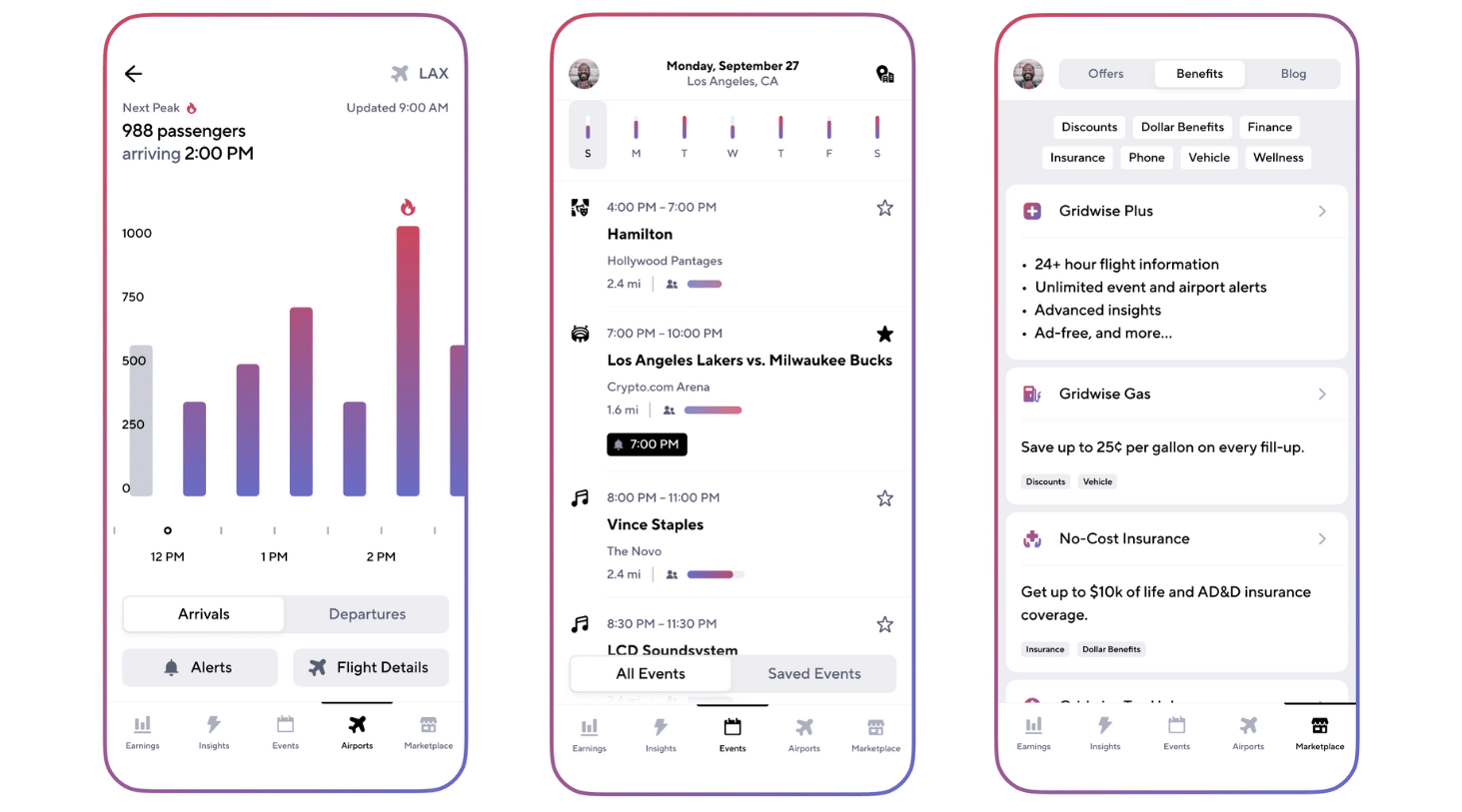
Screenshots from the Gridwise App 2023
Gridwise Analytics: The logical next step
As the company grew, the founders recognized the challenges facing the larger gig mobility industry. The decisions made by major gig platforms affect the companies, drivers, and customers they serve.
However, industry stakeholders often face challenges – a lack of ground truth data that would enable them to make decisions that could further positively impact the gig mobility industry.
To fill this data gap, Gridwise launched Gridwise Analytics - providing anonymized, first-party insights gleaned directly from their nationwide driver network. Their solution aims to benefit both gig workers and the wider industry.
With access to Gridwise Analytics, companies gain a comprehensive view of mobility patterns across their competitive landscape. Regulators and researchers can explore pressing issues with robust, unbiased information. Municipal planners obtain insights guiding policies that support thriving gig economies and transportation systems optimized for the future.
By aggregating data to protect individual privacy, Gridwise Analytics enables previously impossible studies valuable to stakeholders of all kinds. Its many use cases have the potential to impact the industry positively.
Gig mobility: A rapidly growing industry
Service companies such as Uber, Lyft, DoorDash, and Instacart have transformed the ways people and goods move within and around our cities, all while providing gig workers a profitable and flexible way to earn a living in a tough economy.
Ride-hail and demand-responsive transit systems have been adopted by the masses worldwide and depend on these systems as a primary mode of transportation. The long-term future of the ride-hail industry is looking bright, with the ride-hail market projected to reach $85.48 billion by 2023, representing a CAGR of 17.97%.
But this soaring growth isn’t limited to transporting people. App-based delivery has become a primary means for receiving groceries, food from restaurants, and every conceivable kind of household goods. The food delivery industry is included in these projections. This industry segment is also projected to grow, with the food delivery market alone expected to reach $154.34 billion in 2023 at a CAGR of 11.51%.
Gig workers continue to flock to rideshare and delivery. The number of US transportation-based gig workers is expected to top 9 million by 2023, up from 5 million in 2018, according to a joint report by Mastercard and Kaiser Associates.
Gig mobility’s growth challenges
Inevitably, however, rapid growth often brings challenges.
Challenges stem from the current mobility transformation, which affects business across many verticals. Companies must understand trends and patterns across gig mobility to make key operational, investment, and strategic decisions. For many organizations, making the wrong operational decisions could result in multi-billion-dollar mistakes, affecting drivers and the public.
What can Gridwise Analytics do for the industry?
When companies use Gridwise Analytics, key industry stakeholders and their data teams can access anonymized, first-party insights into how people and goods move in and around urban areas. This enables decisions based on ground truth data. When decisions are based on ground truth data, real needs can be met and actual problems solved for.
Aside from Gridwise, no other database-organized entities have access to aggregated insights into multi-provider mobility patterns. By working with us, companies can leverage mobility data intelligence to gain a competitive edge.
Data provided by Gridwise Analytics serves as a critical tool for numerous industries and entities, including:
- Gig platforms can leverage gig mobility data intelligence to optimize and expand their business in a highly competitive market. By understanding the market and not relying on biased data, teams within these companies can make decisions based on industry-gleaned data.
- Mobility Service Firms: Gridwise Analytics helps mobility service firms understand current supply and demand within the gig-driving economy so they can inform their go-to-market strategy, optimize pricing, and maximize utilization.
- Investors and Hedge Funds: Gridwise Analytics can help investment firms make smarter decisions. Using our data, stakeholders can better estimate or predict performance and stock prices for companies in ride-hailing, food delivery, retail, real estate, and other industries.
- Regulators and Researchers: Access to Gridwise Analytics data will help to inform policy decisions and research related to workers’ rights, the impact on congestion, multi-modal patterns, and how to create more equitable transportation.
- Developers and Retailers: Access to Gridwise Analytics data will enable retail restaurants and stores to better select their next location based on understanding the origin and destination trends of people and food, grocery, or parcel deliveries.
- Municipalities: Access to first-party Gridwise Analytics data helps cities and states better understand factors such as gig driver earnings, curb utilization, and the impact gig mobility has on traffic congestion, among others. This can be invaluable for policy, regulation, and infrastructure decisions.
Work with Gridwise Analytics
Access to accurate, ground truth data paves the way for smarter, more equitable decisions by all stakeholders. Most important, Gridwise Analytics fulfills the original mission of the company’s founders: to empower drivers and the companies they work for with knowledge that can boost earnings and advocate for needed changes. We further believe that access to ground truth data encourages industry growth.
As on-demand mobility continues transforming transportation, Gridwise will remain dedicated to empowering that transition through insights supplied through Gridwise Analytics that benefit all industry stakeholders.
Are you interested in working with Gridwise Analytics? Do you have questions about how we can help and support your business? You can get in contact with our team by filling out the form below.

How To Become A Gopuff Delivery Driver
Looking to be a GoPuff driver? If you are tired of waiting in restaurants, or constantly going from one place to another for delivery pickups and drop-offs this might be for you! When you sign up with the app, you “go” to a single location to pick up orders, and then… “puff!”…you deliver the customers’ items to their doors.
Does that sound appealing? We think it is. Once you read this post, you’ll have everything you need to know to become a Gopuff delivery driver. Here’s what we’ll include:
- What is Gopuff delivery?
- Why drivers like to work for Gopuff
- Gopuff delivery driver requirements
- How to apply and onboard as a Gopuff driver
- Is Gopuff right for you?
Let’s get started.
What is Gopuff delivery?
When people want items such as snacks, ice cream, alcohol, tobacco and vape products, hydration drinks, and sweets, they go to their Gopuff app to order them. Health items, such as over-the-counter medications and assorted things that make bodies feel better, are also available, and there’s even a selection of healthier snacks and ice cream products.
With Gopuff delivery, customers know they’re going to get the brands they want and that the goodies will be delivered fast. Delivery fees for customers start at $3.95, and an additional $3.95 is added for regulated products such as alcohol, tobacco, and vape items. That’s really not bad, especially when customers are tired and/or reluctant to go outside due to bad weather, or just because they’re binging on a series or watching a game they don’t want to be torn away from.
Customers love Gopuff because of the convenience and the reasonable delivery fees. That’s evident from the fact that there were approximately 2.1 million Gopuff customers by the end of 2021, according to Business of Apps. The company has grown astronomically from its humble beginnings in 2013, when it mainly delivered hookah products to college students (now you know how they got that name!).
They have since dropped the hookah deliveries but have doubled down by expanding their product lines. A capital infusion of more than $1 billion, according to Techcrunch, has allowed Gopuff to expand in the last year or so. In addition to their “dark stores,” which are localized distribution centers, they have recently added Gopuff kitchens, which allow customers to have prepared food delivered by Gopuff drivers.
Why drivers like to work for Gopuff
In addition to eliminating the wait at a different restaurant or store, Gopuff gives drivers a lot of reasons to love driving for the company. Here are a few”
- Guaranteed minimum income. Gopuff drivers get a commission on every order they deliver. If the total doesn’t add up to the minimum set by Gopuff, the company adds to the Gopuff driver pay to make up the difference.
- No tip sharing. Drivers get to keep 100% of their tips, which can be an essential part of Gopuff driver pay.
- No unruly passengers. As with all delivery apps, you don’t have to let anyone else into your vehicle.
- Orders are easy to pick up. Unless you really like to run up and down the aisles of an unfamiliar grocery or convenience store, you’ll love the way Gopuff has things arranged so that you can pick up deliveries at your local distribution center. Warehouse employees select and bag the items for drivers in most cases.
- Drive on your own time. You choose your own schedule and don’t have to edge out other drivers to compete for prime delivery blocks. You can choose to work hourly shifts, or work on demand. If you work a shift, you hang out at the distribution center to wait for orders. If you’re working on demand, you wait for orders to come in, and then go to the warehouse to pick them up.
Gopuff delivery driver requirements
If you’re interested in being a Gopuff driver, it’s important to know the requirements. You must
- be at least 21 years of age or older
- hold a valid driver’s license
- have a vehicle with insurance in your name
- have a smartphone with the latest software so you can run the Godrive app
- pass a driver and criminal background check
How to apply and onboard as a Gopuff driver
Are you in? Submit your application to Gopuff online or through the Gopuff driver app. The screenshots below show you what it looks like. Enter your zip code, and Gopuff will let you know if there is delivery work available in your area. From there, enter your personal information, and your application will be complete.

Source: Gopuff driver app
The background check occurs once you give Gopuff the permission to conduct it. It usually takes at least 3–4 days for a background check to clear, but it could be slightly longer. If everything goes well, you’ll be accepted and ready to begin the onboarding process.
Onboarding is rather straightforward. You’ll need to download another app, When I Work, which will permit you to create schedules. This is separate from the Godrive app that you use when you’re actually delivering for Gopuff. You will also have to pass a quiz to show that you know how to use When I Work.
This video from Your Driver Mike details the onboarding process. He also gives a general description of how you would go about working for Gopuff and what the app looks like once you begin earning.
Is Gopuff right for you?
Maybe you’re ready for something new, or perhaps you’re just starting out as a gig driver. In either case, Gopuff could be a nice gig either to add to your current array of driving apps or to begin with. Most drivers report that the company treats them fairly. There is also a lot of flexibility. Gopuff emphasizes to its customers that they operate 24/7/365, so if you need a gig you can fit in during odd hours, Gopuff is there for you.
Gridwise data show that the average Gopuff driver earns around $14.40 per hour and $1.30 per mile. This is rather good, but there are ways you can earn—and save—even more.
Using a driver’s assistant, namely Gridwise, will help make your Gopuff gig go more smoothly and boost your earnings. Track your mileage, sync Gopuff with Gridwise to get earnings reports, and keep up with traffic, weather, and events information. Reap the advantages of participating in insurance and health service plans through Gridwise Benefits, as well as amazing discounts and deals designed specifically to serve drivers.
.
The downside of Gopuff might come in when you discover that it doesn’t operate near where you live. At least the application process begins by asking for your zip code. This way you can immediately discover whether Gopuff is available in your area, and you won’t get your hopes up unnecessarily. Because Gopuff is in an expansion phase, though, you might be surprised just how wide their reach is.
As with all driving apps, drivers have different views of Gopuff. Some drivers say that it doesn’t pay off. Others don’t like dealing with the formalities of delivering alcohol and tobacco products. However, many also seem to think it’s rather easy to work with and can help them make money.
This YouTube video from Cars and Cribs follows a new driver and his partner going for their first Gopuff order. It offers a lot of insight into what it’s actually like to work for Gopuff and contrasts it with working for DoorDash.
Now that you know how to become a Gopuff delivery driver, all that’s left is to apply, and be sure you download Gridwise to make all your gig driving easy, efficient, and profitable!
Lyft Driver Payments: How Do They Work?
It started out so simple. When rideshare driving was new, you’d see a ride request, you’d accept it, and you’d take the passenger(s) to the appointed destination. Then you’d get paid. Ah, but that was then.
Now Lyft drivers have a wide array of possibilities when it comes to accepting and fulfilling ride requests and how they want to get paid for them. It could be a confusing morass, or a cornucopia of opportunity, depending on your point of view.
Making the most money in as little time as possible means that you want to know more about your payments, and how you can maximize them. You also need a savvy tool like Gridwise to keep you on top of your game and make sure you rake in the kind of cash you want.
In this post, we’ll address questions such as “How does Lyft pay drivers?” and “When do Lyft drivers get paid?” This information will, we hope, help you to see all the forms of Lyft driver payments for what they are: chances to earn. New and various payment opportunities are an answer to the many different issues Lyft drivers encounter on a daily basis. We’ll clear up any confusion you might have by covering the following:
- Your Lyft payout: the forms it takes and how earnings are calculated
- Special pay rates for different localities
- The Lyft weekly payout and alternatives
- More ways to maximize your Lyft earnings
Your Lyft payout: the forms it takes and how earnings are calculated
Let’s start with the components of Lyft earnings.
Basic Pay
Lyft rolled out an upfront pay feature to accommodate drivers’ need to know more about rides before agreeing to accept them. Lyft wants to offer transparency as well as choice to its drivers, and this is an effective way to do just that. With upfront pay, it’s possible for drivers to see
- pickup and drop-off locations
- estimated time and distance to complete the ride
- a map view of the full ride
- the fare
Upfront fares are calculated based on factors such as the supply of drivers and the demand for rides at a given location, as well as traffic conditions along the route. These factors make the estimated fare more accurate than if time and distance were the only considerations. Upfront pay is available to most Lyft drivers in many regions.
There are still some places where upfront pay is not available. In that case, Lyft pay is calculated by using the rate card system. You can view the rate card for any trip you make by looking at your ride history in the app. Rides that pay according to the rate card system are calculated based on
- time
- distance
- base fare
Rate card fares may vary according to ride mode (economy, luxury, XL, etc.) and the region where the passenger is picked up.
Wait Time
It’s never a happy moment when you arrive at the pickup location and your rider is nowhere to be seen. Whether they’re finishing their sandwich or putting on that last dab of glitter blush, they’re using up your precious time.
Fortunately, Lyft pays drivers for waiting time. For all drivers, except Lux Black and Lux Black XL, here’s the deal: if you’re stuck waiting between two and five minutes, Lyft will pay you for your time. If the passenger doesn’t show up after five minutes, you have the option of canceling the ride.
Lux Black and Lux Black XL Lyft drivers get paid for wait time after the first five minutes and can then cancel the ride after ten minutes of waiting.
Trip Changes
It happens all the time. In mid-trip, a passenger may decide to pick up a pal along the way, or stop for some coffee or a cold drink on route to the destination. There might even be times when a trip is longer or shorter than originally thought. If any of these events changes your trip substantially, your fare will change.
Check your ride details and any adjustments that were made by doing the following in your app:
- Go to your account
- Tap “ride history”
- Tap the ride you want to know more about
Tips
Passengers can tip you through the app, and most often, they will. Many even offer tips in cash. You retain 100% of all your tip earnings.
Bonuses and Incentives
Your willingness to drive at high demand times in busy areas will often qualify you for bonus pay. Here are the types of bonuses Lyft offers:
Real time
These appear in the app when there’s a high demand for drivers in your area.
Scheduled
Every Friday morning, the app is updated with bonuses scheduled for your area.
Bonus zones
Pink and purple highlights on your map in the app tell you where you can earn extra money, owing to especially high demand for drivers.
Bonus zones vary from nearly one minute to the next. It pays to keep an eye out for them, though, because they offer a great way to make extra money.
EV Ride Challenge
Through 2024, drivers can receive a $150 bonus for every 50 rides completed while driving an EV. This offer, so far, is available in California only. The Lyft website has more information on qualifications.
Earnings Guarantee Promotions
Lyft will guarantee a set amount of earnings within a given time period as a way to incentivize drivers, especially new ones. If you don’t earn the set amount before the time expires, Lyft pays you the difference between your actual earnings and the guaranteed amount. Read more about earnings guarantee promotions.
There are also incentives offered to drivers. These include
Referrals
Drivers who persuade friends and family to join Lyft can earn substantial amounts of extra money. The new drivers will have to complete a certain number of rides in a given period. These parameters vary depending on driver demand. Read more about this referral program on the Lyft website.
Tiered Rewards Program
Although these rewards are not a direct payout to drivers, they can help them save on gas, car maintenance, and other services. Drivers earn points by driving consistently during busy hours and keeping high star ratings. Lyft’s tiered rewards program is detailed on the Lyft website.
Special pay rates for different localities
You’ve probably heard that there are states and cities where drivers are guaranteed a minimum wage, or where they get extra help from rideshare companies. In California, as you can read in this Gridwise post, drivers receive minimum guaranteed earnings for their time on the road, as well as subsidies toward healthcare, among other items. For all rides picked up in California, drivers are guaranteed to earn 120% of the applicable minimum wage for booked time, plus $0.30 per mile.
In New York City, drivers receive a minimum wage based on mileage and time, and Seattle drivers pull in a minimum wage of $16.39 per hour. There are more cities and states, such as Minneapolis and Massachusetts, where laws instituting minimum wage requirements for drivers are being discussed. Obviously, Lyft must comply with any and all laws regarding these wage policies.
In addition to these special cases, Lyft has a certain class of payments called subregion rates, which apply to certain areas of cities and metropolitan areas. Rates in these areas will be specifically assigned.
Rides from subregions within an area where an offer stands are still applied to bonuses such as streaks. Individual ride earnings may vary. They are usually higher. You can find out what the subregion rates are and if they apply to your location, by accessing your rate card through the app.
The Lyft weekly payout and alternatives
There are basic questions every driver has about being paid. After all, making money is what driving for Lyft is all about. Here are the answers to some common queries.
When does Lyft pay out, and how often does Lyft pay?
Lyft pay is calculated based on your earnings Sunday–Monday, and your pay will be deposited once per week on Tuesdays.
Is it possible to get paid sooner?
Definitely! There are two ways to get paid sooner:
- Express Pay allows you to instantly transfer earnings to your own debit card. There is a charge for this version of Lyft Express Pay. It’s $0.85 for each transfer you make. If you rent your car from Express Drive, you’ll have to make enough to cover the cost of your rental before funds can be sent to you.
- With Lyft Direct, you set up an account with Lyft (via Payfare), and receive a debit card that gives you access to your account. With Lyft Direct, you can make as many transactions as you like with no fee. You also will get mobile banking services and cashback rewards.
More ways to maximize your Lyft earnings
Now that you know how you get paid and how often Lyft pays out, plus ways to get your pay right away, here’s some advice about how to make sure you get paid more!
The first step is to have the best driver’s assistant available: Gridwise! With this mighty app, you can
- strategize the best times to drive. See information about ride demand for Lyft and all the services you might drive for with the When to Drive feature.
- position yourself for higher earnings with Where to Drive from Gridwise.
- log all the miles you drive to, from, and between the rides you complete through your driving apps. Capturing all your miles means higher tax deductions and smaller tax bills!
Download the Gridwise app now!
This is How Rideshare Drivers are Taking Advantage of Football Season
Are you ready for some football?
The start of football season is an exciting time. Diehard football fans finally will have something to do on Sunday's again, casual fans will welcome the return of gameday parties, and everyone else gets to play fantasy football!
For rideshare drivers, football season means saying hello to some of the most profitable and predictable surges that you'll see all year if you take advantage of them.
But what's the best way to make the most money during this football season? We talked to rideshare drivers across the country to find out how they are taking advantage of the return of football to maximize their profits, and we came up with this comprehensive guide to football Sunday's (and Saturday's) for rideshare drivers.
Collegiate and NFL football create a base of devoted fans heading for the stadium and local sports bars or holding viewing parties at home. As a rideshare or food delivery driver, how can you take advantage of this? Fortunately, rideshare strategy for the two services is similar, even down to the pregame. Regarding college football tailgate parties and NFL games, Uber and Lyft strategies are virtually identical.
If you have been a rideshare driver for any time, you know there is a gig driver’s football game strategy. So take a few minutes to read this blog post and learn how to earn more on these days. Success doesn’t just hinge on rideshare to the football stadium; there are other opportunities as well.
Here's what we will cover:
- Football affects both rideshare and food delivery.
- Do the pregame homework.
- Working the airports.
- Other tactics if you drive rideshare.
- Tactics if you drive food delivery.
- General tips for rideshare and food delivery during football games.
- Gridwise can make you more successful on game day.
Do the pregame homework
If you have never driven rideshare during football season, then knowing a little about how the venues handle rideshare is advisable. Be familiar with football game rideshare drop-off zones and check out the pickup procedure, too. Often, drop-off and pickup are in different places.
Ask fellow rideshare drivers how venues have addressed rideshare in previous years. When do they see pregame rideshare rush hours? What about the postgame rideshare surge? What rate increases can you expect to see in Lyft and Uber football game surge pricing? Ask about pregame and postgame surge times and predicting when earnings will peak before and after games. How about rideshare to a sold-out football stadium? Do other drivers have any football game traffic tips for Uber and Lyft on game day?
Check the website of the venue stadiums. Are there any special instructions for fans arriving or leaving by rideshare? Are there any Uber or Lyft football game promotions?

In addition to profootballnetwork.com, you can also check the Gridwise app to see when local games will conclude, pouring out hundreds of fans looking for a rideshare. The Gridwise app also shows other events that will generate rides.
For rideshare drivers who work the sports bars and food delivery, check out profootballnetwork.com for complete schedules of the games. You can determine the best games and schedule your driving for those times. You might also use this information in advance, asking passengers, wait staff, and managers in the various food establishments for their tips on what they think will be the best games.
Working the airports
Any list of pro tips for football game rideshares includes pregame rideshare rush hours, and the reality is that the pregame bump in rideshare business starts on Friday. This is as true for collegiate games as it is for NFL games. Hardcore fans, collegiate parents, and devoted school alumni regularly attend the away games. You can expect to see them arriving at the airports as early as Friday afternoon, so make it a point to be around the airport for pickups.

Expect the Where to Drive screen on your Gridwise app to show a bump in traffic at the airports on Friday night when collegiate parents, alumni, and fans from the out-of-town team arrive. Restaurants will also show increased demand.
This is where you start your reconnaissance. The majority of these out-of-town visitors stay at local hotels. There might even be a headquarters hotel. These folks will need a ride on game day. If you can determine a headquarters hotel or a hotel that is giving fan groups a package deal, you can position yourself to pick up a good number of rides on game day.
Ask about special events. Are fans planning a meet-up at a local restaurant that night or brunch before the game? Does the group have plans to visit a local attraction? These are all opportunities for additional rides.
Other strategy if you drive rideshare
On the day of the game, expect rideshare drives to originate in the suburbs. Many local fans take a rideshare rather than hassle with the traffic themselves. They also anticipate consuming alcoholic beverages at the game, and taking a rideshare home is safer than driving under the influence.
Check maps for the metropolitan transit systems. Trains and buses typically reach the stadium, but this isn’t always the case. Fans frequently look for rides from a depot near the stadium. Look for special offers from Lyft or Uber providing additional incentives for rides that drop off at the stadium or pick up afterward.
Monitor the game from your car radio. If there is a sizable gap in the score by the end of the third quarter and the trailing team is unlikely to catch up, fans will start to slip away, hoping to avoid traffic. The surge of fans leaving the game can begin early in the case of runaway games.

West Hollywood near Los Angeles has a liberal sprinkling of sports bars. This is typical for most medium and large cities. Lots of folks need rides at the end of game day.
You can bypass the craziness of the sports stadiums and work the sports bars. For many drivers, sports bars are more profitable. Driving time lasts longer because the sports bars show all the games, regardless of where they occur. You’ll likely get customers who have had a lot more to drink, so prepare yourself. Carry emesis bags and perhaps even refer to the Gridwise blog post How to Deal with Drunk Uber or Lyft Passengers.

Check the My Trends screen on the Gridwise app to see, among other things, how your earnings compare to the average in your area during football season. Using the Gridwise app will help you stay above the norm.
Strategy if you drive food delivery
What kinds of restaurants should you expect to receive orders for food delivery during football season? In a report by Restaurant Business, DoorDash revealed the top five foods for football fans. Chicken wings lost their premier place as the food of choice. What were the top foods? Take a look:
- mozzarella sticks
- boneless chicken wings
- chips and salsa
- Caesar salad
- pepperoni pizza
Grubhub reminds restaurant owners that they can expect football-related food delivery orders on two extra days each week during the season: Mondays and Thursdays. If you are deciding which days to turn on your app and go for a drive, those two days need to go on your list during pigskin season.
You can expect orders to surge about 30 minutes before the start of the game and continue through halftime. Don’t stop at the end of the game, though. These football parties can go on for a few hours after the final play as fans watch the various postgame shows and rehash the game with friends.
General tips for rideshare and food delivery during football games
You can take additional measures to make football season more profitable, especially when looking for tips.
Wear a football jersey or cap. You can either show your preference for the home team or wear a generic football jersey or an NFL hat. The latter is neutral and makes everyone happy. When you work the airport on Fridays, though, wear the jersey or T-shirt of the visiting team. That’s who you’ll be picking up for the most part.
Spruce up your choice of music. If the Minnesota Vikings are in town, remember that Minneapolis is also the former home of Prince. There is a good chance you will have some Prince fans in the car. Your passengers will appreciate a playlist liberally sprinkled with Purple Rain, Little Red Corvette, Kiss, and others. A custom playlist based on the visiting team's city is always a hit with fans.
Drive a larger vehicle. Can you change your regular rideshare car for the family SUV on game day? If so, driving Lyft XL or UberXL gets you a higher rate.
Remember the really big games. Super Bowl Sunday rideshare tactics are the same but will be much more intense. The big game may not be in your city, but rideshare at the sports bars, along with food delivery, will be busy. Football season ends in January, but don’t forget March Madness, which some call “rideshare madness.” It’s another good time to work the sports bars and food delivery.
Multi-app. According to our data, 31% of drivers multi-app, and 21% multi-app across categories (meaning they do both rideshare and food delivery, or some other service).
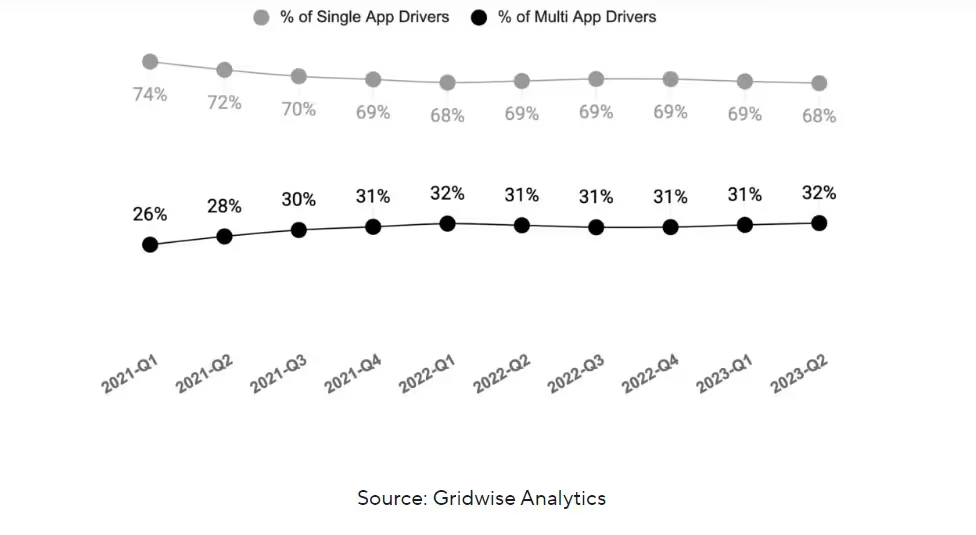
While the games are happening, rideshare might be slow, but people at football viewing parties are hungry. Switching to food delivery ensures that you earn as much as possible.

Gridwise messaging informs you of developing demand for rideshare and food delivery. The potential to earn more is always just a screen away when you use Gridwise.
Pay attention to Gridwise messaging. Through the Gridwise app, you can sign up for messaging, telling you when events let out, predicted surges in demand, and other opportunities as they materialize. It is an invaluable service, only available from Gridwise.
No two cities are alike on game day. According to this Gridwise blog post, The Impact of Pro Football Home Kickoff Games on Gig Mobility Demand, if your city has a hometown football team, professional or collegiate, you will have a unique pattern on game day for rideshare and food delivery. Likely factors include the location of the game venue and the types of restaurants and sports bars fans have available to them.
There are, however, some consistencies. Tailgate parties start about two hours before kickoff. If the game starts at 11:00 am, this means people will start arriving at the stadium at 9:00 am. Expect demand for rideshare to peak around that time and continue until kickoff. Food delivery to football fans at home is up and down depending on the city, but expect it to peak late in the day, around 7:00 pm, as the last games are wrapping up and fans are celebrating their wins and bemoaning their losses. For more information, visit the Gridwise Analytics website.
Gridwise can make you more successful on game day
The Gridwise app is essential for every rideshare driver, especially when you need pro tips for football game rideshares. Regular features such as When to Drive and Where to Drive provide real-time information on where rideshare and food delivery demand is greatest. You can track miles and fares for tax deductions from football weekend rides with the Gridwise Mileage Tracker.
Don’t forget the many benefits you can access through Gridwise, including roadside assistance, telemedicine, dental insurance, and more. The Gridwise blog offers vital information on strategies and tactics for making you a successful gig driver. Gridwise helps you stay safe and maximize your earnings.
And we also help you have fun out there.
Gridwise vs. Stride: Which Works Better For You?
All smart gig drivers use mileage trackers, but they also need an app that offers other features to maximize their income while minimizing expenses. The best mileage trackers address the needs of gig drivers and tailor information to their specific areas of interest. However, most stop at tracking mileage and do no more.
Let’s take a look at two mileage tracking apps, Stride and Gridwise. We’ll reveal what each app can do, and compare features to determine which one best serves all the needs of gig drivers.
What gig drivers need in a mileage tracking app
Getting a full and accurate account of the mileage you accrue while gig driving allows you to deduct a significant portion of your taxable income. The apps you drive for record only the distances you cover while you’re engaged in a ride or delivery trip. You also need to count the miles you travel in between trips as well as those you cover on the way to and from the area where you go to drive. That’s the reason most drivers have a mileage tracking app. But as you know, there’s more to gig driving and gig work than just tracking miles.
Mileage is not the only deductible expense drivers need to track. The things you buy to make your gig more effective, from new mats for your vehicle to the equipment you use to keep delivery food hot and cold, can also be deductible expenses*. It’s important that you keep track of all these things so they can be included in your itemization process at tax time.
On top of that, drivers need more than just information involving their expenses. It’s important to be aware of your earnings, and how they compare with your expenses. Then, you’ll want to know how to boost your profits, with features that help you decide the best times and places to drive, and keep you informed about issues that are essential to your gig-driving business.
Knowing where and when events will take place, what the weather will be like, when airport passengers will most urgently need rides, and how your earnings compare to those of other drivers are all pieces of information that make your job easier and more profitable. Gig drivers are very busy people and can’t always take the time to switch from one app to the next to gather all this information.
Also, drivers need to know they can secure support through affordable insurance, deals, and discounts that improve life for themselves and their families. That’s why it’s essential to find a tool that has all the services a gig driver needs, packed into one powerful app.
What you need to know about the Stride tax mileage tracker
Every app has a purpose, and these two are no exception. Both Gridwise and Stride are good mileage trackers. Keeping an account of the miles you drive for business allows you to take a large deduction off your taxable income. Learn more about tax deductions and mileage tracking in this Gridwise post.

Appstore rating: 4.8
Google Play Store Rating: 3.3

Stride’s mileage tracker, which is chiefly a financial app, is not designed specifically for gig drivers. The mileage tracker geared toward independent contractors of all types. This means that it lacks many of the features gig drivers need. By engaging Stride to track your miles while you drive for your gigs, you get a record of every mile you drive, which is only one of the things you need to maximize your earnings.
The Stride app allows you to connect to the bank account you use for business and keep track of your deductible expenses. It features a tax deduction finder, as well as connections to insurance plans, discounts, and deals geared toward independent contractors. The Stride app is free, but the insurance you choose will have costs attached. While some of the Stride Insurance plans are low cost, many are priced at levels you would expect through any insurance broker.
Almost all Stride Mileage Tracker reviews will tell you the same things. If all you want is a free mileage tracker, Stride can deliver.
As EntreCourier.com notes, there is a lot it doesn’t do. For instance, it doesn’t track your earnings as you drive. You have to enter them manually. When using Stride, your expenses have to be logged manually. And it doesn’t keep you on top of traffic, weather, events, or where to drive.
For additional fees these include
- health insurance
- dental insurance
- vision insurance
- life insurance
- accident coverage
- disability insurance
- features that help with organizing your finances to make tax preparation easier*
Discover Gridwise: The mileage tracking app and gig worker assistant
A quick look at Gridwise:

Appstore Rating: 4.9
Google Play Store Rating: 4.7

Gridwise is much more than a mileage tracker, and while it offers features that assist you at tax preparation time, it doesn’t stop there.
Gridwise is designed to be the gig driver’s personal assistant. It tracks all your gig driving miles and allows you to record other expenses, as well.
In addition to that, it provides traffic, event, and weather alerts that are crucial to drivers. Beyond what your individual apps might say about how much you’re making, Gridwise lets you track your actual earnings for every gig you drive.
Easy to read graphs enable you to see your driving trends, and how they compare to those of other drivers in your area. Gridwise users also gain access to affordable health and insurance benefits, deals, and discounts designed for gig drivers.
The Gridwise app offers a free version with all the Basic features, including access to Gridwise Benefits. Gridwise offers a diverse range of insurance and care plans—for your car, your phone, and for you and your family. See why Gridwise is a favorite among gig workers in our top 5 gig worker apps comparison.
Gridwise Plus members gain access to advanced features and additional insider information about where and when the best places and times to drive are, as well as more detailed reports in .csv format. Gridwise Plus members are also eligible for further discounts on the benefits and deals Gridwise offers.
Stride vs. Gridwise: Compare their features
Now that you have a basic idea of the differences between them, let’s look at a more detailed comparison.


Because Gridwise is a full-featured assistant, designed with features for gig drivers and gig workers, it beats Stride and other mileage tracking apps hands down. It offers features other apps don’t even realize that drivers, specifically, need.
Their dedication to making your job easier inspired the people behind Gridwise to offer an active support team. They can guide you through maximizing the utility of the Gridwise app—and your earnings. The app is as easy to use as it is comprehensive and supportive of your desire to maximize your gig earnings.
Here’s where you can learn more about Gridwise and mileage tracking:
- What’s the best mileage tracking app?
- Gridwise vs Solo: How they size up
- Mileage mistakes you don’t want to make
* Gridwise does not provide tax, legal, or accounting advice. This material has been prepared for information purposes only. It is not intended to provide, and should not be relied on for tax, legal, or accounting advice. You should consult your own tax, legal, and accounting advisors before filing your return.
Are you looking for more gig driver articles?

Reshape Mobility Together: Join Gridwise at MOVE America 2023 in Austin
Gridwise is Proud to Sponsor and Attend MOVE America 2023 in Austin
We are happy to announce that we will be a sponsor and an attendee for MOVE America 2023, held next month in Austin, Texas. As a leading provider of analytics and solutions for the gig mobility sector, Gridwise recognizes MOVE America as the premier event to engage with our industry peers.
The Importance Gridwise at Move America 2023
MOVE America is more than just a conference—it's a melting pot where industry leaders, startups, tech innovators, and governmental organizations come together to discuss, dissect, and pave the future of mobility. From ridesharing and electric vehicles to smart cities and last-mile delivery solutions, MOVE America covers it all.
We are excited to be participants and sponsors of an event that seeks to shape the future of sustainable mobility. As a company whose products are motivated and designed around the people we serve, it makes sense for us to lean into opportunities and events that focus on the longevity and sustainability of our industry. It's our goal to be contributors and glean insights that can help Gridwise further shape the future of sustainable mobility.
Gridwise: A Trusted Insights Partner in Gig Mobility
Gridwise is not just attending MOVE America 2023 to learn; we're there to share our deep insights as a trusted business companion to over 450,000 drivers across the Gig Mobility ecosystem. With our advanced analytics, real-time data, and tailor-made solutions, we offer insights that are unparalleled and unavailable anywhere else.
Our platform empowers gig drivers with actionable data, helping them make the most of their time on the road.
Brands seeking to connect with this dynamic workforce also benefit from our vast advertising network, specifically designed to reach Gig drivers effectively.
Other enterprise partners like the major gig services, autonomous vehicle companies, EV charging companies, data platforms, financial services, and many others find unique value in our insights and market intelligence.
Collaborations Across Industries
Whether it's logistics, food delivery, or ridesharing companies, we have proven use cases that demonstrate the value we bring to the table. Our multi-faceted approach allows us to be the go-to solution for anyone looking to understand, navigate, or capitalize on the Gig Mobility sector.
Why We're Excited
MOVE America 2023 gives us an unprecedented opportunity to interact with other leaders, understand market needs, and, most importantly—showcase how Gridwise can add value to various stakeholders.
We'll be sharing our insights throughout the conference and via one-on-one interactions. Attendees will learn how Gridwise:
- Helps Gig drivers maximize earnings through intelligent data.
- Provides companies with a direct channel to engage with a growing and active gig driver community.
- Offer advanced analytics solutions to partners for tangible business operations and strategy improvements.
We're not just participating; we're setting the stage for what the future of Gig Mobility will look like. So, if you will be at MOVE America 2023, you can find us at booth #1548 or schedule time with us here. We look forward to discussing how Gridwise can partner with you and your company to drive the future of mobility and enable constructive dialogue with fellow attendees.
We remain committed to advancing intelligent mobility through informed perspectives and innovative solutions. We believe MOVE America will lead to future partnerships to pursue that shared goal. Our team looks forward to connecting with industry peers at MOVE America.
10 Ways To Stay Safe As A Delivery Or Rideshare Driver
Do your friends ask you, “Is Uber driving dangerous?” or “Don’t you worry about delivering food to strangers’ houses alone?” They’re not crazy. Gig driving is a dynamic and straightforward way to make money, but it can also make drivers wonder about their personal safety. Delivering food, packages, and other items to unfamiliar addresses, not to mention inviting strangers to enjoy a ride inside your vehicle, can put you at risk.
There’s really no reason to let safety concerns get in the way of enjoying a fun and profitable driving gig, so we put together this post to provide tips to help keep you safe.
Rideshare and delivery driver safety
How big of an issue is safety? Much depends on where you drive, what times of day you’re out on the streets, and how well you prepare yourself for virtually almost any situation. There have been various incidents in the last few years where drivers have experienced muggings, carjackings, sexual assault, and worse.
Even if you think you’re keeping your gig work to low-risk situations only, you still need to be prepared for unexpected events. And if you’ve noticed the risks you’ve taken in your driving gig, it’s even more important to focus on developing a safety strategy. Here are 10 tips to get you on your way.
Tips for safe gig driving
1. Develop a calm and assertive attitude
You and your attitude form the first line of defense when it comes to protecting yourself from danger. When you act nervous or frightened, you can attract people who want to take advantage of your weakness. When you project an attitude of peaceful confidence, while establishing a sense of safe boundaries with everyone you encounter on your shift, you don’t bear any resemblance whatsoever to a victim. Bullies and perpetrators will look elsewhere for someone to pick on.
If you want to learn more about developing the right attitude, consider taking a self-defense course or enrolling at a martial arts school. You’ll learn all about “calm and assertive,” and you’ll walk the talk when you learn how to defend and protect your personal space.
2. Be aware of your surroundings
This can be harder than it sounds. The distractions of pinging phones, oncoming traffic, noisy pedestrians, loud music, and the other sights and sounds of rideshare driving and delivery work can live in your head without paying rent, and they often stop drivers from paying full attention to what’s going on around them. How can you become more observant and vigilant?
Be “in the moment.” Take care of issues such as finding your way into a restaurant or bathroom, or finding out your customer’s specific address before you get out of your (hopefully, locked) car. Avoid looking at your phone, but keep it close to hand in case you need a flashlight or to call for help.
Keep the calm and assertive attitude we mentioned earlier, walk confidently, and use your peripheral vision to widen the range of what you can see with your eyes. Also, if you’re on a quiet street, walk along the curb and away from entryways or other areas where a person with ill intent might be lurking, and you can be seen by cars that might pass by.
3. Use in-app safety features
Both rideshare and delivery companies have features that allow you to designate a family member or friend to track your location when you want to share it with them. The feature is available to rideshare passengers as well as drivers. Using this feature is sound advice for new Lyft drivers and Uber drivers, and can benefit delivery drivers as well.
If by chance your company’s app doesn’t have this feature, you can use Google maps, Apple’s Find My Friends, and other apps that allow you to share your location. This article shows 10 different apps you can download to let loved ones know where you are, so they can come to you or send help if there is trouble.
It’s even more important to know about the “panic button” options you have within your app. Study your app’s features to learn the steps of using built-in calls for help, such as this one from Uber. Most smartphones also have quick ways to call for help, it’s true. However, by using the one with your company, you keep them alert to the fact that you’ve let out a distress call, and they’ll have more information about youl.
Delivery drivers who have to feed parking meters on a regular basis can save themselves the exposure of standing around fumbling for the proper payment method. Parking apps let you stay safely inside your car while you pay the fee.
4. Get reliable road service
While it’s true that many driving apps provide road service to drivers, often as a performance perk, one source of emergency help might not be enough. Let’s say there’s a huge storm or extreme temperature conditions that raise the demand for road service through the roof. One road service might be totally swamped, while another might be less overwhelmed.
Gridwise Benefits provides full-service roadside assistance. It’s got you covered, no matter what the reason for your rescue might be. Count on Gridwise Benefits Roadside Services when you need a tow, a jump for your battery (or a new one), emergency tire changes, and even when you get locked out of your vehicle.
Roadside service is one of those items you don’t think you need, until you do! Don’t even think about carrying on a gig driving business without it.
5. Carry safety equipment
You need as much space as possible in your storage area to accommodate passengers’ luggage or several delivery containers, but save a small area for crucial equipment. Some of the things you should carry include
- a tire pressure gauge and portable air compressor
- a flashlight or headlamp
- backup oil, radiator fluid, washer fluid, etc.
- flares or triangles that alert other drivers to your stopped-in-traffic status
- a decent supply of drinking water and snack food, in case you’re stuck waiting for a long while
- winter weather gear, including a blanket, gloves, snow shovel, road salt, and hand warmers
- jumper cables
- your driver manual, or access to it through the Internet
- a first aid kit, in the event you fall or get a minor cut in the course of a ride or delivery
- a device capable of breaking your window glass, in case you find yourself trapped inside your vehicle after an accident. Tactical pens like these can be a good option here. They can also double as self-defense tools, flashlights, and screwdrivers.
- extra batteries for your key fob and any other electronic devices you depend on (tire gauge, flashlight)
- an extra phone charger, in case yours gets lost or “mistakenly” taken by a passenger
- a multi-tool for changing batteries or making minor repairs to your safety items
6. Check rider and delivery customer ratings
Who has time to notice a customer’s rating? You should make time. It takes a whole lot of bad behavior for a rider or customer to get a low star rating on your app. If you get a request from such a person, consider opting out of the ride or delivery; it could help you avoid trouble.
Can you remember the last time you gave a passenger or delivery customer a bad rating? You probably had a good reason. And with the benefit of the driver community in mind, you told it like it is. If a potential customer has a bad rating, those drivers probably had good reasons, too, and their honesty could keep you safe.
7. Keep a low profile
It’s hard not to be obvious about your role as a rideshare or delivery driver. After all, you have a decal, an amp, or maybe both on your dash, identifying you as a driver, plain as day. If you’re carrying packages, some people might see you as an easy target. If you’re delivering food, your bags and the sweet smell of yummy burgers and fries wafting from them are dead giveaways.
But if you want to stay safe and avoid giving away anything valuable, there are some ways to keep a low profile and steer clear of enticing potential pilferers from targeting you. Here they are:
- Drive a “plain brown wrapper” vehicle. Leave your upscale ride at home, and don’t put company branding all over your car.
- Dress down. Gold jewelry, precious stones, and even high-end kicks could inadvertently introduce you to someone you definitely don’t want to meet.
- Don’t carry a lot of money. One of the positive points of not driving a taxi is there’s no need to carry cash for your business. Just keep enough on you to grab a snack or buy your way out of a jam when you run out of fuel.
- Keep the volume low. It’s tempting to crank up the decibel level of your music just to keep yourself interested in going to the next ride or delivery trip, but if you’re in a sketchy area, booming speakers can also draw unwanted attention to your car, and you.
- Avoid controversial topics. Here’s another place where that “calm and assertive” attitude will help. There’s no need to start or continue an argument with a passenger, a restaurant worker, or a delivery customer. Keep the conversation superficial and pleasant; and if it starts to get unpleasant, don’t be afraid to end the ride or finish your delivery as fast as possible.
8. De-escalate tense situations
If you find yourself in a situation where someone decides to take out their bad mood on you, do your very best not to take it personally. Instead, de-escalate the situation. Don’t argue or engage in a battle of wits, whether it’s over whose team is going to win the game or why you were late for your pickup or delivery.
Did you know that the act of avoiding a fight is actually a martial arts tactic? It’s true. The first thing a martial artist is trained to do is find ways to avoid a conflict. The second is to get away. It’s only if and after these things don’t work, that the martial artist will be forced to engage in self-defense through physical means.
Remember, the next time you avoid a verbal battle with a customer, rider, or even someone you encounter randomly on the street, you’re not backing down. You’re showing off your smooth kung fu moves!
9. Know where and when to drive
Try to drive in areas you know well. Understand and be aware of the areas and times of day that pose the most risk. Here is an article you that will help you to do some research. While you always want to be ethical and fair to people who live in high crime areas, and don’t want to avoid serving them with a ride or delivery, you also want to know what you might find when you get there
But let’s say you pick someone up at a fancy office downtown and wind up taking this nice person to a destination that makes you very nervous.
There are a few things you can do:
- To avoid taking more trips from this apparently dangerous area, you can simply sign off your app until you can get to a safer neighborhood.
- Always program the coordinates of a busy, comparatively safe, area into your GPS so you can begin navigating there in one touch. That way, you can quickly find your way to a safe location.
Gridwise features Where to Drive and When to Drive are designed to help you make more money, but they can help you stay safe, too. Study them to see where drivers are making the most money. In general, these will also be places that are heavily populated, and therefore, on the safer side for you.
10. Self-defense and self-care
Most lists of Uber safety tips or Lyft safety tips, as well as lists of safety tips from delivery services, usually don’t address self-defense in positive ways. The one rule that’s pretty much in effect across the board is that the company will either forbid you from carrying firearms and other weapons, or fail to cover your back should you find yourself in a situation where you’ve had to use one.
It could be argued that these policies are, in fact, safety measures. However, they don’t offer much in terms of instructing drivers how to protect themselves. Even where it is legal to carry weapons, there is no reason to risk deactivation in the event you get caught carrying one.
You might hear recommendations that suggest carrying pepper spray or a Taser, and these might assist you in getting out of a violent situation. However, they can also get you into further trouble. There are other measures you can take, including the ones we’ve already listed, to defend yourself. If you want to carry something, a loud whistle or keychain siren can often inspire attackers to go away.
If you’re asking the question, “Is rideshare safe?” you can learn a lot about safety issues specific to rideshare drivers in this Gridwise post.
Getting back to the issue of weapons, there is one “weapon” that no one can deactivate you for using, and that’s a dashcam. Drivers nearly unanimously see their dashcam as a layer of protection against crime. A person who’s thinking of committing one is likely to think again when they realize that every move and sound is being recorded.
Check your state’s laws to see how yours must be mounted, and what you have to do to let passengers know they’re being recorded. You should also make sure the dashcam you buy can record what goes on both inside and outside of your vehicle. This helps to protect you from “they said, you said” situations no matter where they take place.
Dashcams can give a feeling of safety to delivery drivers, as well. A carjacker or aggressive driver will have their acts memorialized on your recorder and are likely to be deterred when they see your cam in action. Body cams are available if you want to keep customers from thinking they can get away with abusing you without putting it on your recorder. This Gridwise post will tell you more about dashcams and why they’re such an effective safety tool for drivers.
Self-care is also quite important. Get enough nutrition and sleep, so you’ll always be alert and able to follow the safety recommendations we’ve offered here. A body (and brain) that’s well taken care of will be prepared to stand strong in the face of any emergency.
What drivers have to say about safety
Any driver who’s been on the road for more than a day will tell you that safety is an issue. Even if nothing ever happens to directly threaten a driver, the mere idea of what could happen prompts drivers to take extra measures.
Some drivers make passengers ride in the back of the vehicle to keep some distance. Then, they also insist that they buckle their seatbelts. Once they hear the “click,” drivers can know that the passenger won’t make sudden moves without causing the sound of unbuckling the restraint.
Others get way more serious about their safety measures, and may install barriers between the front and back seats to act as a deterrent. There are pros and cons to this, but if you want to drive in urban areas that are known for being unsafe, this might be something you want to consider.
Drivers are forming advocacy groups focused on the issue of safety, and one of them, Justice for App Workers, offers recommendations such as confirming your rider’s identity before beginning the ride and avoiding permitting drunk passengers to get into your vehicle. You can read more comments from drivers in this article from Business Insider.
One more thing
We’ve already mentioned how Gridwise can help you with Gridwise Benefits and features Where to Drive and When to Drive, but there’s more! Track your mileage and earnings, get airport and event information, and gain access to a whole toolbox full of features that will make your driving gig safer, and more profitable!
Work smarter. Earn more.
Whether you drive, deliver, or pick up shifts — Gridwise helps you track earnings, mileage, and performance so you stay in control of your work. Download the app and take charge today.
