Gridwise blog
Tips, insights, and advice to help you earn more and work smarter, whether you do gig work, hourly, or shift work.

How to Make $1,000 a Week With Uber Eats in 2026 (Tips + Hourly Data)
In this blog, we'll explore the strategies and techniques that can show you how to earn $1000 per week as an Uber Eats delivery driver. We'll cover everything from optimizing your delivery zones and schedules to maximizing your tips and customer satisfaction. Whether you're a seasoned Uber Eats driver or just starting out, this guide will provide you with the insights and actionable steps to take your Uber Eats driver earnings to the next level.
Becoming an Uber Eats delivery partner can be a lucrative opportunity, especially if you're able to consistently earn $1000 a week. By understanding the platform, optimizing your delivery strategies, and focusing on customer satisfaction, you can maximize your earnings and turn Uber Eats into a reliable source of income.
We’ll cover the following topics to provide coaching and ideas to help you push your earnings up to that $1000 per week level:
What do Uber Eats drivers do?
Uber Eats drivers deliver prepared food most of the time, but they also might shop for and deliver goods from convenience outlets and grocery stores. The job is pretty simple. You get a request for an order, you drive to the restaurant or store to pick it up, and then you deliver it to the customer. If you already drive for Uber, you can choose to take orders for Uber Eats delivery any time.
If you’re not an Uber Eats driver yet, it’s pretty easy to become one. This Gridwise post tells you what you need to do if you want to sign up and start making money Uber Eats style. Many rideshare drivers welcome the chance to deliver food rather than people. This article from Nerdwallet covers the Uber Eats gig from that angle.
There are some sweet advantages to working with Uber Eats. In lots of cities you don’t even need to have a car. You can use a bike or a scooter, or even walk, to make your rounds. If you do use a car, Uber Eats’ requirements are a lot easier to meet than they are for Uber rideshare driving.
You also have a lot of flexibility. You can shop and deliver convenience items and groceries, but you don’t have to. And, like most driving gigs, you can choose your own hours, and map out the locations where you want to work.
Use Gridwise features When to Drive and Where to Drive to help you figure out what work hours and which specific areas will be the most profitable for you. Real data from real delivery people will show you earning patterns for drivers in your town.
How much can you earn doing Uber Eats?
The honest answer to this question is: basically, as much as you want! It all depends on how many hours you put in and how strategic you are about your gig. Earnings vary from one area to another, as this article from Entrepreneur points out. To give you a baseline, let’s look at the earnings of Uber Eats drivers who tracked their earnings with Gridwise.
Remember that these numbers show us only average earnings. To make $1,000 a week with Uber Eats, you’re going to have to be better than average, and we’ll show you how. For now, though, it’s good to have these figures so you get a ballpark number of where to start.
How much do Uber Eats drivers make?
Gridwise data tell us the following:
- Monthly earnings average around $444.00 per month.
- Gross earnings per trip are between $9.00 and $10.00.
- Tips make up about 50% of most Uber Eats drivers’ income, which amounts to about $225.00 per month.
Is Uber Eats good money? It can be. While there are other gigs that pay more per trip, if you drive for Uber Eats, you’ll always be pretty busy.
https://datawrapper.dwcdn.net/HPAz8/3
You can also see that, unlike many other gigs, tips play a huge role in Uber Eats earnings.

With these numbers as a baseline, what can we say about how to earn $1,000 a week with Uber Eats? As we said in the introduction, it’s going to be a hustle, but it’s really possible. To figure out how to make the most money with Uber Eats, let’s start by looking at how many trips these “average” drivers made each month.
We know that average gross earnings were $444.00 per month, and drivers got around $10.00 per trip. That means they took 44 or 45 trips per month, which breaks down to 11 trips per week. That’s not a lot of Uber Eats delivery, is it?
The fact that Uber Eats drivers averaged so few trips shows us that many drivers use more than one app at the same time. This is called multi-apping, and you can learn more about it in this Gridwise post. If you want to answer the question of how much you can make with Uber Eats, then you need to stick with the app and keep plugging away at those orders. You also need solid strategies, as well as some inside tips and tricks.
How to make the most money on Uber Eats: Delivery driving tactics
Getting to that $1,000 a week with Uber Eats isn’t so hard when you remember that the drivers we saw making about $111 a week were only taking around 11 trips in the same time period. That’s not much at all! If you work the Uber Eats app like a boss, you’ll soon have many more trips than that, easily reaching the number needed to get you to $1,000 a week. Now, let’s get to some tactics you’ll need to make that kind of bank.
- Stay with the Uber Eats app, and track your earnings. Gridwise can easily do that for you. Simply sync your Uber Eats app with Gridwise, and you’ll be able to see how much you’ve earned with Uber Eats, what times were most profitable, and your average hourly pay. Racking up trips with Uber Eats has other benefits, including perks and bonuses that are awarded to top drivers.
- Leverage surge pricing and promotions. Surge pricing is applied when there is a lot of demand. When surge pricing is in effect, many of the trips you make will pay more than usual. Promotions are offered to drivers who complete a given number of trips in a certain time period. High traffic volume days, nights, and times give you these chances to get extra earnings. Challenging yourself to complete the right number of trips for promotions will add to the number of trips you can count on for big bucks, too. Learn more about Uber Eats surge pay, boosts, and promotions in this Gridwise blog post.
- Say yes to doubling up on orders. With Uber Eats, you can get back-to-back orders or receive batched orders. Back-to-back orders happen when you receive a new request while you’re on the way to deliver an original order. The Uber Eats app routes these trips automatically, so you won’t be sent out of your way.
Batched orders are Uber Eats’ way of bundling together orders from either the same restaurant, or two nearby eating establishments. You get money, and trip count credit, for all the orders you complete, plus customer tips, without having to make a bunch of separate trips.
- Turn on the charm and get bigger tips. Being nice really is part of the Uber Eats driver’s job, and getting tips is one way people who drive for Uber Eats make money beyond their basic pay.. Bring along those extra napkins and condiments, use equipment that keeps food and drinks at the right temperatures and prevents spilling, and consider your customers’ needs. If you deliver groceries, be extra careful with delicate items such as bread and eggs.
And, most important, follow your customers’ directions, and stay in communication with them if you are going to be delayed, or if you have questions about their order. This Gridwise post will tell how to get bigger tips as a delivery driver.
- Use even more charm to keep your ratings high. As an Uber Eats driver, you will be rated by the restaurant or store where you pick up the orders as well as the customers who are waiting for the deliveries. This two-way rating system is designed to keep you on your toes, so Uber can keep people satisfied with your service. Don’t worry, you get to rate them, too.
There’s another reason why your rating as a driver is important. It not only keeps you in good standing with Uber; it helps you to qualify for the Uber Eats Pro incentive program. To learn more about Uber Eats Pro, and what it takes to earn perks such as preferred services, discounts, and deals, check out this Gridwise blog post.
Smart business moves that seal the deal
Now that you know how to gobble up the deliveries you need to make $1,000 a week with Uber Eats, it’s going to be a breeze to get there. Let’s make it even easier, with business moves that boost your earnings and shrink your expenses. If you use these, it will also be easy to say yes when people ask, “Can you make good money with Uber Eats?”
Minimize expenses. Avoid racking up big fast-food bills by bringing your own food and beverages. You might not think you’re hungry when you first start your Uber Eats run, but once the aroma of pepperoni pizza, premium cheeseburgers, and piping hot fries start wafting through your car, that might change. Bring a sandwich or other healthy food from home, and buy bottled water in bulk to save tons of cash compared to what it costs to buy single servings.
Maximize tax deductions. Another way to minimize your expenses is to maximize your tax deductions. Start by tracking mileage with Gridwise.

Gridwise App
Gridwise captures every deductible mile you drive, including the distance you cover between the trips your driving app records. Know what expenses you can deduct, and put them to work for you when tax time comes. Learn more about tax deduction strategies in the Gridwise Tax Guide for drivers.
Boost earnings with referrals
As an independent contractor, you’re probably looking for ways to make even more money than you can with Uber Eats. And most gig workers like you enjoy getting passive income. With Uber Eats, there’s a really easy way to do that, referrals!
All you need to do is find friends and encourage them to deliver for Uber Eats. If they make a certain number of deliveries within a specified time, you will get paid for doing nothing more than having them sign up under your referral code! Rates of pay vary by city, so check your Uber Eats app to find out what the current deal might be, and learn more about the referral program on the Uber Eats website.
Also remember: “friends” don’t have to be your best buds. Many delivery people carry cards with a QR code linking to their referral information, so just about anyone you encounter can join Uber Eats and boost your earnings. You could meet a source of passive income at the gas station, on social media, or at your high school reunion. The more you hustle, the more there is to gain, right?
Master the art of self-employment
As an Uber Eats driver, you’re an independent contractor. That means the company isn’t going to withhold your taxes, provide insurance, keep track of your earnings, or tell you about tax deductions. You’ll have to do all these things for yourself.
If you want to maximize your tax advantages, open an official business entity. You can incorporate (create a corporation) or you can work as a limited liability corporation (LLC). You can also work with a DBA (Doing Business As) arrangement, but the corporation or LLC will do a better job of protecting you from liability.
Establishing a corporation or LLC offers better tax advantages than being a sole proprietor. For instance, if you simply collect your earnings into your private account, you’ll be charged self-employment taxes in most states. And paying extra taxes is something we all want to avoid, within legal limits, as much as possible.
Every Uber Eats driver needs to learn about self-employment, and there are some great resources you can review. Check out the CareerOneStop website about self employment which will help explain the basics. You can also check with a professional tax accountant, or look other websites to learn more about actually creating a business.
Scope out your market
Look at the area around you to see where you’re likely to get the most deliveries. Where are all the restaurants? Where might people be more inclined to order deliveries? What hours do you want to drive? What activities might be going on around those times? Think about late-night and after-school times as well as breakfast, lunch, and dinner times.
Be realistic about the potential for your area and aware of new services opening up. For example, in New York, there is already a tab on the Uber Eats app that allows customers to order groceries. In our article about the best food delivery service to work for you’ll see that Uber Eats stacks up well against other delivery companies, mainly because of its potential for expanded opportunities for drivers to earn.
So, is Uber Eats good money? As we said, it isn’t an automatic guarantee that everyone will make $1,000 a week with Uber Eats. Trying out the suggestions we give you here, though, should put you on the right track! Go out there and start stacking up those orders and raking in some impressive earnings!
Get more inside information on Uber Eats in these posts from the Gridwise blog:
- The delivery driver guide: Using the Uber Eats app
- Everything you need to know about driving for Uber Eats
- Uber Eats Pro: What drivers need to know
- Looking for a different gig, part-time or full time job? Check out the Gridwise Job board.
Uber Eats FAQ
How does the Uber Eats platform work for drivers?
Uber Eats is a food delivery service that connects customers with local restaurants and independent delivery partners. As an Uber Eats driver, you'll receive notifications of nearby delivery requests, which you can accept and complete. The platform provides flexibility, allowing you to work on your own schedule and earn money based on the number of deliveries you complete.
What are the requirements to become an Uber Eats delivery partner?
To become an Uber Eats delivery partner, you'll need to meet certain requirements, such as having a valid driver's license, a registered vehicle, and passing a background check.
How can I choose the right delivery zone to maximize my earnings?
Selecting the right delivery zone can significantly impact your earnings, as some areas may have higher demand and better-paying orders. It's important to research and identify the zones in your area that tend to have the most consistent and lucrative delivery opportunities.
How can I take advantage of peak delivery hours and surge pricing?
Understanding peak delivery hours, such as mealtimes and weekends, and taking advantage of surge pricing can boost your earnings. Be aware of when demand is highest in your area and adjust your schedule accordingly to capitalize on these peak periods.
What are some tips for maximizing tips and customer satisfaction?
Providing excellent customer service and going the extra mile to ensure a positive experience can lead to more tips and repeat business. Prioritize communication, timeliness, and attention to detail to keep your customers happy and satisfied.
How can I set realistic weekly goals to reach my $1000 target?
To make $1000 a week with Uber Eats, it's essential to set realistic weekly goals and track your earnings and expenses. Start by determining your target earnings and breaking it down into achievable daily or weekly goals. This will help you stay on track and make adjustments as needed.
What are some strategies for efficient route planning and navigation?
Effective route planning and navigation can save you time and fuel, allowing you to complete more deliveries. Utilize mapping apps and take advantage of features like real-time traffic updates and turn-by-turn directions to find the quickest routes.
How can I balance my Uber Eats deliveries with other commitments?
Develop a schedule that allows you to capitalize on peak delivery hours while still maintaining a healthy work-life balance. Consider using tools like calendar apps to plan your availability and track your hours to ensure you're maximizing your earning potential without sacrificing your personal life.
What are the key considerations for maintaining my vehicle as an Uber Eats driver?
Keeping your car clean and well-maintained is crucial for maximizing your Uber Eats earnings. Regularly scheduled oil changes, tire rotations, and other preventive maintenance can help extend the life of your vehicle and minimize downtime. Additionally, budgeting for vehicle-related expenses, such as fuel, insurance, and repairs, will ensure you're accounting for these costs and maximizing your net earnings.
What are the tax obligations and legal considerations for Uber Eats drivers?
As an Uber Eats delivery driver, it's essential to understand the tax obligations and legal considerations that come with being an independent contractor. This includes properly reporting your earnings, deducting eligible business expenses, and making quarterly estimated tax payments. Additionally, you'll need to ensure you have the appropriate insurance coverage, such as personal auto insurance and possibly commercial auto insurance, to protect yourself and your vehicle while on the road making deliveries.

The Gridwise Job Board: Find Your Ideal Job or Gig Work
Gridwise is an essential assistant app created by gig workers for gig workers. Our mission is to support those engaged in gig work in every way possible. We understand how challenging it can be to deal with income instability, a lack of benefits, and job insecurity that often comes with gig work. The Gridwise app tracks and organizes earnings and expenses, and offers a wide array of discounts, deals, and services that make the lives of independent contractors easier and more rewarding.
We firmly believe it’s possible to make a viable living and create a gig experience that offers flexible hours, variety, and excitement. With issues such as consistent earnings and job security in mind, Gridwise is proud to offer a centralized platform that shows you how to find gig work and secure reliable opportunities. We’re proud to introduce the Gridwise Job Board.
The Gridwise Job Board: Key features
Because Gridwise is dedicated to serving the gig worker community, we’ve filled the Gridwise Job Board with useful features that won’t waste your precious time.
- Comprehensive listings. Find part-time, full-time, temporary, and per-task work. Drive or deliver with your vehicle, utilize an employer’s vehicle, or even find non-driving gig work.
- User-friendly interface. Find the jobs that are right for you with a tap of your screen.
- Verified opportunities. We vet the jobs before they are listed to ensure you’re getting high-quality job postings.
How to get more gig work, seasonal, part-time or full-time jobs with the Gridwise Job Board
Looking specifically for “gig work apps” or “gig jobs near me?” You’re in luck. Our filters and search functions send you directly to the listings you seek.
Here’s how it works.
- Access the Job Board via the Gridwise website.
- Search for jobs by type, location, and more.
- Select the job that interests you, and read all about it.
- Scroll through the description, and if it appeals to you, click “Apply for job.”



Many types of jobs are available. Adjust the search filter to see the full variety of opportunities that will let you cash in. Deliver food, set up catering, do rideshare driving, get paid for doing package delivery, and much more. You’ll find short-term gigs, long-term contracts, and part-time positions.
Perks of the Gridwise Job Board for gig workers
Gig workers who know how to make extra money will appreciate how the Gridwise Job Board lets you multiply your chances of bringing in big earnings. Here’s how:
- Increased stability. Use the Gridwise Job Board to find part-time or permanent jobs in addition to the part-time gigs you already have. Always keep a steady stream of earning opportunities flowing toward you.
- Flexibility and autonomy. Choose jobs that fit your schedule, work around other jobs and family duties, and still leave room for some fun in your life. Discover side hustles to supplement your full-time job, permanently or just for the season.
- Skill development. Find part-time work that lets you use a skill you already have, or try your hand at something new. It’s a smart way to develop a portfolio to showcase what you can do, or even to find permanent employment.
Get Gridwise and stay up to date on the Gridwise Job Board
Gig workers need plenty of information and assistance, and Gridwise is here to give it to you. Download the app and get essential features such as
- seamless earnings tracking
- mileage tracking
- expense recording, including notes
- low-cost and no-cost insurance benefits
- access to affordable medical, dental, vision, mental health, and alternative care
- professional services including legal and financial help
- deals and discounts
- weather, events, and traffic reports
- inside information on where and when to drive
More to know about gig work:

5 Best Mileage Trackers For Gig Drivers
Many drivers ask, “Do I really need a mileage tracking app?” The answer is simple: only if you want to have an accurate count of all the miles you can legally deduct from your taxable income! You might think your rideshare or delivery driving app has got you covered. After all, they do quite a good job of logging the miles you drive while you’re on a trip or delivery. But, if you want to have the best app to track mileage for Uber, Lyft, Doordash, Instacart, or the other apps you may use, you need more. Why is that?
Without a separate tracker, you’re missing the miles you drive in between pings. Did you realize that all the miles you drive, from the moment you begin your shift until it’s over (as long as you don’t drive several miles on a break to hang with your friends), are tax deductible! That means you need something besides your driving app to keep an accurate count of your travels. Read this Gridwise post to see how important it is to keep track of every deductible mile.
You won’t be surprised to hear that there’s an app for tracking miles. In fact, there are several of them. Here, we’re going to tell you about five top mileage tracking apps, and help you figure out which one is best for you.
Before we get to the list and identify the best mileage tracker app, let’s clarify what exactly a mileage tracking app is. According to G2.com’s technology glossary, mileage tracking is done for the purpose of keeping a log of mileage that is either reimbursable or tax deductible.
And yes, of course you can track your miles simply by taking readings on your odometer. But are you really prepared to account for how many miles you drove for personal reasons and subtract them from the total to get your business mileage? Even if you can remember all that and do the arithmetic, if you want an accurate reading of the miles you drive for business, and can therefore deduct, a mileage tracking app will save you a lot of trouble and prevent you from making costly errors.
Plus, as a gig driver, you have specific needs when it comes to a mileage tracker. Ideally, you’d be able to handle mileage tracking and several other functions all in one app. It can be maddening enough to deal with driving apps, particularly if you’re an avid multi-apper. You would want your mileage tracker app to help you keep account of other aspects of your business, including income, expenses, and inside information about the art of gig driving.
Not all mileage apps are equal, to be sure! Let’s look at five of the best apps to track mileage and figure out which is the best app to track mileage with Uber and Lyft, or what mileage tracker app is best for DoorDash.
1. Zoho Expense

First up is Zoho Expense, which does exactly what its name says. This app is designed to allow companies to give employees a uniform way to create and submit expense reports. It can be used by individuals, including gig drivers, as well.
It includes a mileage tracker, as well as features that let you track other deductible expenses, including the ability to scan and record receipts.
Available on Android and Apple: Yes
Ratings: 4.8 stars on App Store, 4.7 stars on Google Play
Free Version: Yes
Subscription price: $3 per month, billed annually
Created specifically for gig drivers: No
2. Quickbooks Online

Quickbooks Online is a cloud-based app that allows you to track your mileage, earnings, and expenses. The information you enter can then be used to generate various reports that prepare you for tax time. It also allows you to create graphs that illustrate your cash flow, and includes a receipt scanner so you can instantly record deductible expenses. Quickbooks is popular, highly reliable, and designed mainly to help people keep track of their small businesses.
Available on Android and Apple: Yes
Ratings: 4.7 stars on App Store, 4.4 stars on Google Play
Free version: 30-day free trial
Subscription price: $15 per month for basic version if purchased for 3 months or more
Created specifically for gig drivers: No
Source: quickbooks.intuit.com
3. Shoeboxed

Shoeboxed started in 2007 as a service for scanning paper receipts into digital form. Now the app offers a free mileage tracker and has enabled users to scan receipts directly. It touts itself as the best mileage tracking app for DoorDash, but there are some elements missing that Dashers might like to have. While it provides features that record your expenses and prepare you for tax season, it doesn’t automatically track your earnings. The mileage tracker has a system where you can drop pins along your routes to make the tracking more precise, identifying those legs of a trip that you make for business purposes. The mileage tracker is “free” once you sign up for the basic version.
Available on Android and Apple: Yes
Ratings: 4.5 stars on App Store, 2.3 stars on Google Play
Free version: No
Subscription price: $18 per month for basic version
Created specifically for gig drivers: No
Source: blog.shoeboxed.com
4. Stride

This free mileage tracker does a fair job of keeping track of the distances you rack up while gig driving, but it doesn’t automatically track earnings. It can be a big help, though, in tracking your expenses. You can link Stride to your bank account, and it will automatically scan your expenses to identify items you can potentially deduct. The app is totally free. This could make it the best free mileage tracker app, but there is a small price to pay. The app will persistently push you to consider various insurance plans that they are affiliated with. If you don’t mind that, this is a solid mileage tracker, even if it doesn’t track your earnings.
Available on Android and Apple: Yes
Ratings: 4.8 stars on App Store, 4.6 stars on Google Play
Free version: Yes
Subscription price: None. The app is free.
Created specifically for gig drivers: No
5. Gridwise

Gridwise has a free mileage tracker and free features that record your income and expenses. It gives you access to insurance and benefits, as well as insights about the best times and places to make the most money while gig driving. The Gridwise mileage tracker captures all the miles you drive while you’re on your driving shift, and it can be used if you have other trips you need to make which qualify as business travel.
Drivers love it because it is geared toward the needs of rideshare and delivery workers, providing free information about airport departures and arrivals, event start and let out times, weather, traffic, and more. The Gridwise Plus subscription adds value by providing additional insights and reports, discounts on benefits, the ability to export data in .csv format,, and more.
Available on Android and Apple: Yes
Ratings: 4.9 stars on App Store, 4.6 stars on Google Play
Free version: Yes
Subscription price: $9.95 per month for Gridwise Plus, or $95.99 per year (a $23.41 savings)
Created specifically for gig drivers: Yes!
What is the best mileage tracking app?
Now that we’ve checked them all out, we’re positive about the answer to that. Hands down, it’s Gridwise. Are we biased? You bet we are! But drivers love it too. Gridwise is the best mileage tracker app, and so much more. So many of the features are free, and the subscription to Gridwise Plus will pay for itself with additional insights to boost your earnings and deeper discounts on products and services.
Most important, Gridwise is designed specifically for gig drivers by experts who were once gig drivers themselves! Knowing what gig drivers need is a crucial step in creating an app that rideshare and delivery drivers can really use! Here are a few of the features, besides mileage tracking:
- seamless earnings tracking
- automatic, on/off toggle and manual mileage tracking
- mileage categorization
- airport, traffic, weather, and events information
- insights into where to drive and when to drive
- reports showing earnings across the platforms you use
- discounts on countless products and services for drivers
- additional resources for finding side gigs
- an informative and comprehensive blog
- affordable benefits, including insurance, medical, dental, and alternative practitioner discounts
- a community of drivers just like you
Don’t settle for just any app. Get the best mileage tracker, and so much more, from Gridwise!

Financing your gig business: Online vs. traditional banking which is better
Drivers like the convenience of doing everything online, including banking. But when it comes to major, real-life banking needs, like financing a house or a small business, you also need a good relationship with a traditional bank. Relationships, particularly with traditional banks, take time to develop. How can you create a successful reputation with a good old-fashioned (and well-financed) institution, while still enjoying the convenience of online banking?
In this post, we’ll discuss how it can be done, and how Giggle Finance, a business financing company, can help you along the way.. We’ll look at all the issues you’ll need to explore, as we cover:
- How to finance your business
- Differences between online and traditional banking
- How to get approved by banks, quickly and easily
- Help for gig drivers – Giggle Finance
How to finance your business
Let’s say you want to expand your rideshare business to include additional cars, invest in some updates, or upgrade your current ride. Just as likely, you could be gig driving in the hope of setting yourself up in a bigger business – maybe a food truck or restaurant, or an auto parts or recreation-based franchise.
You need money to start or improve your business; probably more money than you have on hand. You’ll need more than you could raise quickly just by driving and delivering. When you know there’s a need to come up with a large amount of money fast, there are many things you can do. Here are a few:
- Save. This is the easiest and most straightforward way to raise cash. If you have a substantial amount of savings tucked away, you can use it for all or part of your business investment.
- Friends and family. Do you have some loved ones who believe in you? If so, perhaps you can arrange for them to either lend you money, or offer you an advance on a future inheritance. This can work, but it’s always advisable to lay down a solid business agreement, even with your sister or your best friend. More than a few relationships have gone sour due to unclear terms on “friendly loans.”
- Credit cards. A deafening alarm bell goes off here. Certainly you’ll be able to get a better interest rate almost anywhere than most credit card companies lay on you. Use this source sparingly, if at all.
- Angel investors. Do you have a pool of bitcoin-wealthy buds who might invest some of their winnings in your new enterprise? Even if you don’t know an angel investor personally, it’s worth asking around to see if you can find a few. That ironclad agreement will be needed here, too. You won’t want to pour your heart into getting a business going, only to find out you gave away too much of it to those angels.
- Crowdfunding. Always an option – but you’d better have a good pitch and something to offer the people who put their hard-earned money in your pocket.
- Business loans and lines of credit. You can put together a business plan and try your luck at major institutions, or even the Small Business Administration, who’ll help you find and/or provide some funding.
- Factoring. This is a way of getting cash flow coming in by “selling” your incoming payments to pay off a loan you use to keep your business afloat. The factoring company may wait for your payments, or take their share of your earnings as they flow in, along with their fee. Factoring is a great way to build credit and prove you’re capable of earning what you need to pay off a loan, and ultimately score a larger loan from a traditional institution.
Differences between online and traditional banking
It’s pretty common for drivers to choose online banks because they’re so convenient. It’s easy to sign up, and your accounts can be managed from almost anywhere. Online banks don’t have lots of overhead, so they can offer you low fees on checking and savings accounts, and even some loans.
Online banks are fully hooked into ATM networks so you can use them when you need to. The downside is, those ATMs can’t resolve problems like the humans you’ll find at traditional banks.
What is traditional banking?
In addition to personal attention, traditional banks (aka, brick-and-mortar banks) offer more extensive services, such as the ability to make cash deposits. They can also approve higher loans and mortgages because they have the “deeper pockets” to back them. Some banks even offer insurance and brokerage services. Traditional banks will also cut you a decent rate on foreign exchange, and make it possible for you to secure cashier’s checks.
While it makes sense to use online banking for many of your financial transactions, it’s wise to develop and maintain a solid connection with a traditional bank as well. The good things about online banking don’t really outweigh what a traditional bank can give you when the stakes get higher.
How to get approved by banks, quickly and easily
We’ve given you some reasons to develop a relationship with a traditional bank: having access to extended services, and enjoying easy access to assistance from a real, live human when you need it. And, of course, there’s that thing about ultimately getting your hands on a bigger loan one day.
But, before you automatically assume you’re a shoo-in for a mortgage or auto loan because you’re dealing with a traditional bank, there are a few things you’ll want to know.
First, it’s just plain smart to establish accounts at a traditional bank. If and when you come in for a car loan, a mortgage, or a business loan, you probably will get much better treatment if you’re already a customer. Other ways you can do this are:
- Prove that you earn at least $2K per month doing gig work;
- Manage your cash flow effectively. That means keeping your bank balance out of the red, and ensuring that no checks are returned for insufficient funds;
- Keep your unsecured debt (credit card balances) to a minimum.
If you can keep on top of these three things, you’ll get approved for financing much faster. And with traditional banking, you can talk through your options person-to-person; i.e., you’re much more likely to meet with someone who’ll be there for you in the future as a potential perpetual line of credit. So while traditional banks aren’t always pitched as the first choice for most, these advantages make them a highly useful resource for gig drivers.
Help for gig drivers: Giggle Finance
What if you could get a nice-sized line of credit, have access to instant cash to help with unexpected expenses and small investments … and make inroads toward reaping the benefits of traditional banking? You can do all that and more with Giggle Finance.
Giggle Finance gives you financial peace of mind, and helps you achieve your dreams. Because your Giggle account is fully automated, you have access to instant cash 24/7, 365 days a year. You can cover the cost of an accident, or jump on an opportunity to invest. You have to be working your gig for at least three months, and as long as you prove you can earn the money you need to repay the loan, Giggle will lay it out for you.
Giggle Finance gives you:
- Funding up to $5,000, depending on what your business can afford to borrow
- Access to your funds in about eight minutes
- An advance for your business with no credit requirements
Your line of credit from Giggle is similar to the concept of factoring, which we talked about earlier, but with a sweet twist. The money goes straight into your gig platform or your bank account, giving you an easy way to make your payments back to Giggle.
Having a nice stash of cash go through your bank account rings bells with your traditional institution, too, paving the way for you to get bigger loans for your larger dreams in the future. Giggle Finance reports all your payments to Experian and TransUnion. So your credibility – and your credit score – rises. You can even get credit and breaks on your fees for making early payments.
Here’s how you can make Giggle Finance magic happen for you:
- Sign up: Tell Giggle a little about your business;
- Connect with your gig platform or bank account for automatic payments;
- Review the terms, and then sign your contract digitally;
- Get access to funds in your bank account within minutes.
Giggle Finance gives you the best of both worlds. You get the simplicity and ease of online banking, while developing a solid record you can use to get a future loan from a traditional bank. Get the money you deserve, and build the reputation you need to create a financially fabulous future.
Get started with Giggle today!
The best ways to track gig driving miles for taxes
As another year of earnings comes to a close, it’s time to start prepping for a critical step in your work: filing taxes as an independent contractor.
First, we need to mention that Gridwise is not a personal tax advisor. The information below is meant only for guidance purposes and not as professional, legal, or tax advice.
If there’s one thing you should take away from your article it’s that tracking your mileage and expenses is critical as a gig driver — and can help you keep more of what you earn at tax time.
As of 2021, you’ll be able to deduct $0.56 for every mile you drive, but only if you’re keeping a precise log.
Here are a few ways to track your mileage and boost your tax deduction as a gig driver:
Different methods for tracking gig mileage
Pen and paper
Many gig drivers choose to go old school, using pen, paper, and their car odometer to log miles driven on the job. This gets around the issue of apps not tracking your miles/earnings properly, but it comes with its own set of problems.
Even the most diligent driver can forget to check their odometer before and after a shift. Human error shouldn't be underestimated when it comes to calculating things by hand. Keeping track of calculations and sheets of paper, as well as receipts, gets messy and complicated quickly.
Excel spreadsheets
Logging your driving info on spreadsheets means less of a paper chase, but it still requires a diligent mindset to keep track of differences in car mileage before and after shifts. This method of mileage tracking can be very effective, but those missed or miscalculated miles add up fast.
Hybrid/blended
Doing a mix of these options can help minimize the downsides of each method. Drivers have logged miles and earnings for years this way, and it's been a fairly successful way to keep track. But is it the best method?
Driver assistant apps
While relying on driving assistant apps means dealing with occasional sync issues or glitches, it's by far the most convenient option. Instead of logging everything on paper or transferring data to a spreadsheet, everything is tracked automatically and kept in one place - your app!
You can export your data every quarter and generate reports that have your miles, expenses, and earnings in a few neatly organized pages - no paper chase or spreadsheets required!
Gig driver tax deductions - maximize your mileage
Track Every Mile
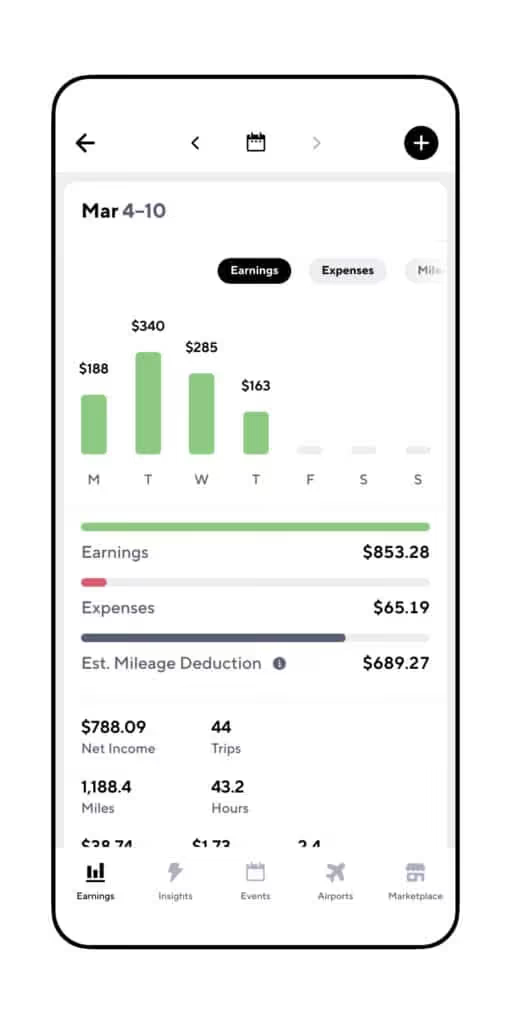
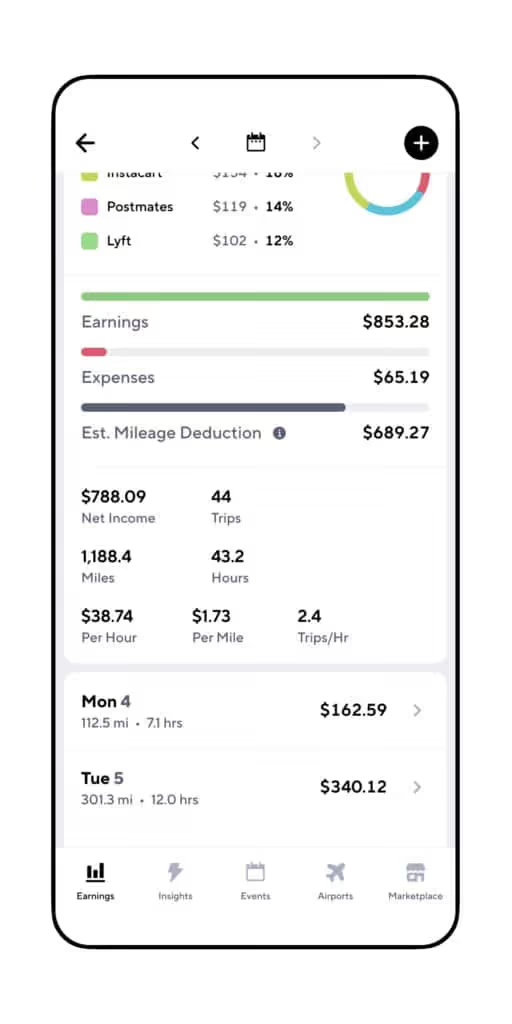
You might be thinking that your apps are already tracking mileage for you, but that’s only half correct. Your apps do track mileage, but only the miles you drive when on a ride or delivery. As an independent contractor, you should track every mile for the largest deduction.
And what you may not know is that you can track the miles you drive when not making a delivery or completing a ride. So all those "dead miles" you spend driving to hotspots or driving back home can be counted toward your deduction - even though apps like Uber and Doordash don't track those miles.
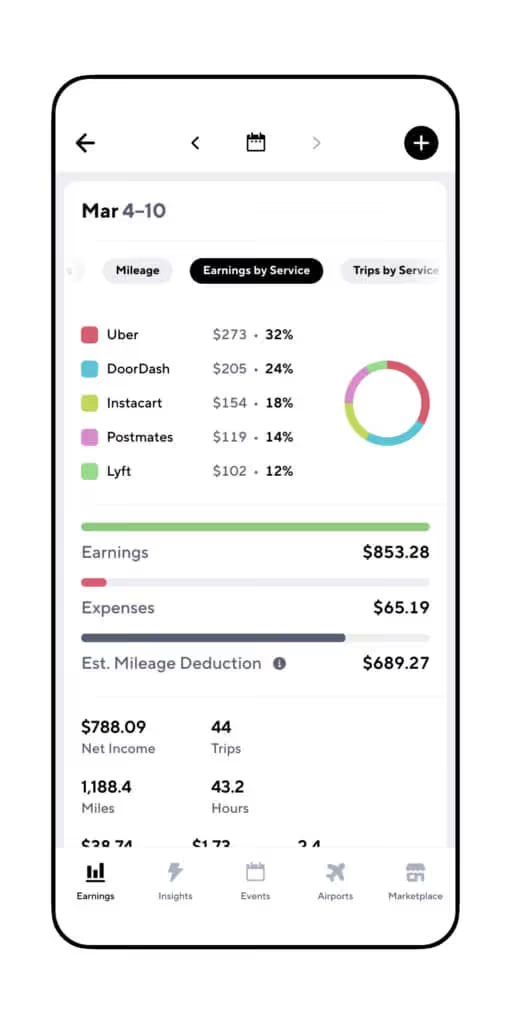
Plus, Gridwise also keeps track of your earnings and any other expenses you incur so you’ll have all the information you need when you’re ready to file.
And if you ever have issues with your earnings or miles syncing, our customer support team will address problems promptly to get your records straight ASAP.
Forgetting something? You need to make estimated payments…
Whether you’re on the road part-time or full-time, you need to make estimated quarterly tax payments if you expect to owe more than $1,000. These taxes cover things like Social Security and Medicare.
Why Stop at Mileage?
Being self-employed isn’t easy… make sure you’re taking advantage of the perks available to you like these additional deductions:
- Paid Apps & Services — are you using other paid apps to make your driving experience better for you or your passengers? As long as more than 30% of their usage is related to your business, that cost is expensable.
- Dash Cam — Dash cams are a great way to protect yourself and your riders in the event of an accident or incident, and their cost is another tax deduction.
- Parking & Tolls — While these fees can be annoying, they can also help you save.
- Roadside Assistance — Any fees associated with keeping you on the road are part of what helps you work, so they’re deductible.
Realizing the deductions available to you a gig driver is great, but a word of caution — don’t get too carried away. While there are a lot of legitimate deductions you can take, the IRS will spot it if you’re trying to blur the line between work and personal use. A few dollars saved on tax day isn’t worth a visit from the tax man.
Understanding Tracking Methods
Once you have your final number of miles driven, there are two ways to calculate your deduction: Standard Mileage Deduction and Actual Cost.
Standard Mileage Deduction — Using this method, you just multiply your miles driven by the standard deduction per mile for a given year. This rate includes expenses like gas, insurance, maintenance & repairs, registration, depreciation, and lease payments.
Actual Cost — The actual cost method requires you to keep detailed track of all of these expenses independently to calculate your actual cost per mile.
For most drivers, the standard deduction is the simplest way to go and will still help you save at tax time. If you’re wondering which method is best for your business, it’s best to consult with a tac professional. They’ll provide the best option based on your unique business.
Whether you’re driving full-time or part-time, make sure you’re keeping up with estimated taxes and keeping track of every expense you incur. You put in the work to be your own boss, you should enjoy the benefits!
To make it simple, just download Gridwise today to keep up with all of your miles and expenses. Plus, you’ll get access to our collaborative driver community and driver benefits only available to the Gridwise team.
The 2021 driver shortage - what does it mean for earnings and gig drivers
The great driver shortage of 2021: What does it mean for earnings and the future of rideshare?
This past year has been at least a bit less weird than 2020, but it still has held its share of surprises. As we’re sure you’ve noticed, some of them have rocked the rideshare business. One of these is the driver shortage. Whether you think it’s real or imagined, there surely has been a lot of talk about it, and there have been plenty of efforts to deal with it in the past year.
In this blog post, we’re going to look at the driver shortage of 2021, what caused it, what the companies did to make it less painful for customers, and how they even tried to make it easier for drivers. Here are the things we’ll explore:
- How did the driver shortage happen, and what did it do to rideshare?
- The salad days of driver incentives - did they help?
- How did Uber and Lyft earnings change as a result of the incentives?
- Is there going to be another driver shortage in 2022?
- How to keep on top of your rideshare game in the face of uncertain times
How did the driver shortage happen, and what did it do to rideshare?
The origins of the Uber and Lyft driver shortage aren’t the least bit mysterious. As it did for so many industries, the COVID-19 shutdowns hit the rideshare industry like the proverbial ton of bricks.
First of all, rideshare business went down to a mere trickle when offices, bars, restaurants, and schools closed down. Travel for pleasure as well as business ground to a halt. Even if drivers who were courageous enough to take to the road found very slim pickings when it came to getting rides.
Drivers were designated as “essential employees” in many states, in that they were needed to transport medical and emergency personnel to their places of work. This meant that they possibly could work. However, not many were willing to go out in the middle of a pandemic, ferrying passengers as they breathed on them in proximity that was far closer than the recommended six feet.
The government also made it easy for drivers to sit out their rideshare shifts when the CARES Act permitted independent contractors such as rideshare drivers to collect unemployment benefits. They were also given access to the generous federal supplements that sweetened the deal even further.
This situation may not have been intended as a disincentive for drivers to work, but for many of us, it turned out that way. Why go out and risk getting the killer virus when you can sit it out and collect as much or more money?
Passengers really felt the pain of the driver shortage, especially if they tried to get around during the height of the shutdowns. Long waits and high prices made it extremely difficult for customers to easily get rides from Uber or Lyft. Many times, the apps would tell them, in essence, “Uber: no cars available” or “Lyft: try us again later.”
With people who depended on rideshare raising the demand for drivers, and so few drivers willing to go out on the road, something had to be done. Both Uber and Lyft took action and poured money into their efforts to incentivize drivers to come back to work.
Gig driver incentives - did they help?
To make it easier for customers to find rides, and for drivers to feel more motivated to get back to work, Uber and Lyft heaped incentives onto the drivers’ pot. Uber spent more than $250 million in the second quarter of 2021 on driver bonuses. Lyft, meanwhile, is on track to up the ante to almost a billion dollars in extra enticements for the entire year.
There were times when an Uber driver could go out, complete three rides, and come home with $100. Even before 2020’s woes hit, and on a good shift, it would take way more than three rides to get that kind of cash. This “easy money” made drivers happy, and they did begin to return to work, if not in droves.
It’s no surprise to those of us who are familiar with the antics of rideshare companies to find out they didn’t really absorb these costs. They were, by and large, passed on to their customers.
Answers to the question “How much does an Uber cost?” reached numbers people had not heard before. They began to be more discerning and hesitant about their rideshare use, enquiring “How much does Uber cost per mile?” or “What are the cheapest rates for Lyft in my area?”
How did Uber and Lyft earnings change as a result of the incentives?
There are two sides to the earnings coin in rideshare. One is company profits, and the other is the one we care about most: driver earnings. Or Gridwise data show that in the first ten months of 2021, Uber driver median earnings rose more than 32 per cent. Beginning at almost $11 per trip, earnings peaked at $16 or so in the spring, and stabilized at a level around $14 in the fall.
Lyft drivers, similarly, experienced increased median earnings per trip. Growth throughout the spring was not as drastic as the Uber rate, but earnings did increase over the ten month period by about 33.5 per cent, from a little more than $10 per trip in January, to over $13 per trip in October.
The tactic of attracting drivers back to work with financial incentives worked, because as the earnings figures show, the incentives eventually got spread more thinly over a greater number of drivers. This is why the earnings leveled off at the end of the third quarter. It’s also worth noting that driver incentives are tapering off in the fourth quarter. While rideshare volume is still under 2019 levels, things do seem to have stabilized.
Now that we’ve established that the incentives and bonuses the companies offered over the course of the year boosted driver earnings, let’s look at the effects they had on the companies. Investors in the companies were concerned, initially, that the immense amounts of money being poured into driver incentives would hurt company profits.
In the cases of both Uber and Lyft, this was not the case. The reasons behind the success of the companies vary, but it is notable that both achieved profitability, in adjusted earnings reports, for the first time.
Uber’s success came from delivery as much as it did from rideshare. Uber Eats booked $30 billion in business during 2020, and its earning potential shows no signs of waning. Lyft also managed their business well enough to show an adjusted profit at the end of the third quarter. Their success was attributed to higher revenue per customer ride, which means, as we stated earlier, the costs of driver incentives were absorbed not by the companies, but by their customers.
This was a viable, if not totally fair, option for two companies who were under immense stockholder pressure to attain profitability. As customers are dependent on rideshare to get from place to place, they have become accustomed to the higher prices. While this has worked to the advantage of both Uber and Lyft, the bounty may not last forever.
In bigger cities, people are turning back to a source of transportation they’ve been using for decades: the taxi. It’s interesting to note that, between January and October of 2021, taxi rides rose 106 per cent. New York and Chicago, simReports from bigger cities tell us that, in the face of higher rideshare rartes, people are turning back to a source of transportation they’ve been using for decades: the taxi. It’s interesting to note that, between January and October 2021, taxi rides in San Francisco rose 106 percent. In New York and Chicago, similar rises in taxi ride volume were apparent. Also, these cities saw a decline in the number of rideshare trips in their metropolitan areas.
Is there going to be another driver shortage in 2022?
The answer to this question will depend on many variables. Driver incentives are off the table after the end of the year, most likely. Will drivers still be motivated to keep working rideshare? Drivers have lots of reasons to think twice about that. They include:
- Food and parcel delivery
When the pandemic struck, many drivers switched to delivery, and most of them came to like it! They realized they didn’t have to deal with difficult people quite as often, and they could make just about the same amount of money. In some cases, parcel delivery offers them the option of being employees of a company. Check out the hottest delivery driving trends to learn more!
- Driver classification issues
In some states, there have been major movements toward getting more benefits for drivers. Many drivers went on strike to protest against lack of benefits and low pay. The companies have fought these issues fiercely, and in the case of California, put together their own way of keeping drivers satisfied without making them employees. These issues are ongoing, and future strikes could cause another shortage.
- Rising fuel prices
These days, when drivers come home after a long shift and do the math, figuring out how much their earnings actually are once they factor in their expenses, the numbers have changed. With gas prices up way higher than they were a year ago, the cost of being a driver can potentially outweigh the benefits at a much more rapid rate. Use Gridwise to help you calculate your true earnings by tracking your activity and recording your expenses, including fuel. Also, now’s the time to get Gridwise Gas, so you can save up to 25 cents per gallon.
- Fear of COVID and its Variants, and government pressure on the rideshare industry
With new variants affecting even those who have been fully vaccinated, the fear that shooed drivers away from rideshare could rear its hideous head once again. Also, there could be restrictions on rideshare, due to COVID and its variants as well as court rulings. One such court edict states that drivers are private individuals, and therefore not eligible to provide taxi rides. You can read more about that in this article from The Street.
- Wearing masks and making sure passengers do, too
The burden of remaining masked for hours on end as a driver is only made worse by the fact drivers have to ensure passengers are also wearing masks. This is an extra duty that improves everyone’s safety, to be sure; but it also has the potential to strain the driver-passenger relationship. What do you think about this? Let us know in the comments below.
How to keep on top of your rideshare game in the face of uncertain times
While we like to think the worst days of the COVID-19 pandemic are behind us, and that rideshare driving can return to “normal,” we must face the fact that we still live in uncertain times. Because of this, it’s important for us drivers to remain alert and able to pivot in the event that circumstances change. Here are actions you can take:
Think local
Check alerts from your local news apps that might clue you in on COVID outbreaks, restrictions, and potential closings. You will probably find local Uber and Lyft driver groups across social media that will give you some inside information. Also check in with Where to Drive and When to Drive from Gridwise to get a real time view of what’s going on in your area.
Know your niche
Check the Gridwise blog regularly to get the latest news about the rideshare business, and how changes in the world affect you, the driver. Be sure to join the Gridwise Facebook group, where you can get current info. Before long, you’ll be able to use many of our popular Gridwise features to compare earnings between rideshare and other services, such as food, grocery and parcel delivery in your area. When the rideshare going gets rough, you can always switch to another way to get paid.
Spot your opportunities
You need to know what’s going on in your town, from events in the city center to activity at the airport. Gridwise gives you all this information and more, including alerts about when events are starting and when they’re estimated to let out. Passenger volume, arrival times, and departure times are available right on the Gridwise app, too.
We know that you love rideshare driving, and we love serving our rideshare drivers. No matter what happens in the world, there will always be a place for you in the mobility market. What would your passengers do without you?
The key is to remain flexible, and be informed, so you know if and when it’s time to make some moves. One move we hope you’ve already made is to be a Gridwise driver. If you haven’t yet, it’s about time, wouldn’t you say?
Download Gridwise now!
How much do Grubhub drivers earn
The more time you spend reading this article, the less time you have on the road. That’s not what we’re about at Gridwise; we’re about helping drivers get more from their business. So let’s get on with what you’re here for ...
According to our data collected from 150,000+ Gridwise drivers, from August through October this year Grubhub drivers earned an average of $15.73 per hour and $10.84 per trip. This is close to the $15 per hour reported for Grubhub drivers on Glassdoor.
Now, let’s break that down, because obviously average earnings aren’t the whole story. Keep in mind, we can’t promise your earnings will match these numbers; where, when, and how you drive have a major impact on what you take home at the end of the day.
The good news? You’re in control of your business – and thousands of drivers are making these earnings and more. To help you become one of them, we’re about to answer these questions:
- Is Grubhub the best app to drive for?
- How can I improve my Grubhub earnings?
- Should I switch platforms to do food delivery?
Let’s get started on the road to higher earnings.
Is Grubhub the best app to drive for?
In terms of earnings for food delivery apps, yes. Over the last few months, at least.
Among drivers who use Gridwise, Grubhub drivers earned more per trip than drivers with Uber Eats or DoorDash during August, September, and October of 2021.
Whether this trend continues is less certain. Grubhub only has a 15 percent share of restaurant food delivery sales (compared to DoorDash at 57 percent and Uber Eats at 24 percent).
Emerging apps like Caviar and Bite Squad can also be a great opportunity for drivers as these companies typically launch aggressive ad campaigns and roll out driver incentives.
So while earnings are high right now, they may not last as larger players take over more of the market. But you don’t have to wait. You can sign up to become a Grubhub driver today to capitalize on the earnings hot streak and take advantage of these tips for boosting earnings even higher.
How can I improve my Grubhub earnings?
Grubhub driver salaries can be hard to predict, but there are always ways to earn more.
Reddit Grubhub drivers are raving about the benefits of multi-apping – and we agree. Actively using multiple apps gives you more options, allowing you to get picky and only take on orders that are worth your time. Just make sure you’re not violating any use agreements.
The real secret to multi-apping is following the numbers to make sure you’re using the right apps at the right time. Gridwise helps you track your earnings across every app and automatically creates reports that help you get more strategic about your delivery app pay.
Knowing when to drive for Grubhub is another key to bigger paydays. The Gridwise When to Drive feature uses up-to-date driver data to show you when drivers are making the most money in real-time.
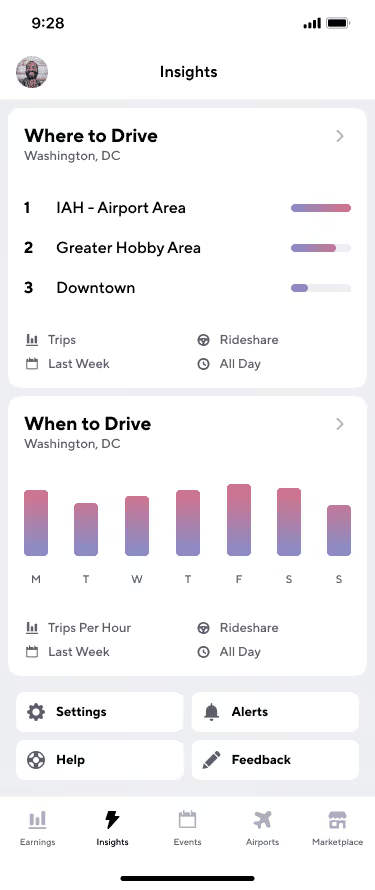
The Gridwise app also gives you:
- Up-to-date travel information on flights;
- Real-time traffic alerts;
- Gas deals: Save up to $0.25 per gallon with Gridwise Gas;
- The most current information on events happening in your city.
Having the data only gets you halfway there. A real difference-maker for Grubhub driver earnings is in the tips. Grubhub drivers keep 100 percent of their tips, so it pays to invest a bit in your delivery experience. Here are a few things Grubhub drivers can do to boost their tip take-home:
- Consider creating a small thank you card or another token of appreciation that you can quickly and easily add to an order. This sort of gesture will help ensure the customer remembers you when it’s time to add a tip;
- Always put the customer first and provide the most pleasant experience possible;
- Prioritize high-ticket orders from restaurants where tipping is the norm.
Should I switch platforms to do food delivery?
Here’s the truth: Earnings are going to vary. The best way to set yourself up for success as a rideshare or delivery contractor is to do your research and create a plan that meets your earning requirements and fits your lifestyle. Here are a few places to start.
- See how Grubhub earnings compare to Uber
- Should you drive for another food delivery company like Instacart?
- Take a look at the industry overall
Don’t be afraid to try a few different tactics until you find what works for you. Even without fringe benefits (or PTO), the flexibility of rideshare and delivery opportunities continues to bring many new people over to the gig economy. New apps are always popping up, and big names are constantly changing the rules.
Sometimes it can be a bit overwhelming, but keeping up with how much you’re earning from each app and tracking mileage and expenses is essential to being a successful driver.
Thankfully, you don’t have to resort to complex Excel sheets to make sense of your business. Instead, Gridwise can do the tracking for you so you can focus more on your customers (and those precious tips).
Apart from helping you build your business, you’ll also get access to exclusive driver benefits and the most comprehensive support for gig drivers.
For more suggestions on improving your earnings, check out our full list of ways to earn more with food delivery.
And as always, if you have something to add, share it with our collaborative driver community on Facebook!
The hottest delivery driving trends of 2021
If you’re a delivery driver, you might have noticed the competition is getting stiff out there. Many who used to drive exclusively for rideshare made the shift to delivery during the pandemic and never went back. New gig workers, according to this Insider article, are signing up to deliver food, packages, groceries, and other items rather than driving rideshare. So, delivery has become one of the biggest gig driving trends in 2021.
Although rideshare is taking its time to come back from the pandemic, it seems that delivery is still on an upswing. In fact, new companies appear to be cropping up all the time – which means there could potentially be lots of openings for people like us, who are always looking for variety and financial gain through gig driving.
These observations lead us to wonder about the general trends in delivery, and where the business is going. We’re also wondering exactly what kinds of opportunities might open up for delivery drivers as delivery becomes even more of a staple in our society.
As more business models develop, some exciting gigs are emerging. In this post, we’ll look at what’s going on in the delivery business and what trends portend, and then examine enticing new avenues that are opening up for drivers in the not-too-distant future.
Here’s what we’ll look at:
- The fad that didn’t die: Delivery driver trends 2021
- New ways to go: Delivery driver trends 2022
- A “flowering” prospect in the weed(s)
The fad that didn’t die: Delivery driver trends 2021
No one was exactly shocked when delivery driving took off in the spring of 2020. The COVID-19 shutdowns transformed the way people got their prepared food, groceries, and supplies. Delivery drivers were classified as “essential workers,” and it was up to us to ensure that people didn’t go without the things they wanted and needed.
Once stores, restaurants, and bars began to open, it seemed logical that delivery would become less popular – but that’s not what happened. Delivery became a part of life during the height of the pandemic, and most of us got accustomed to receiving all kinds of goods through delivery services, rather than venturing out to get it for ourselves. Who wants to give up the convenience and comfort of having what they need/want brought right to their doors?
While this may change the way many businesses operate and place a drain on their income streams, delivery drivers have everything to like about the way things are going. Restaurant delivery alone is expected to continue its amazing trajectory of growth. Industry experts estimate it will be a $220 billion industry by 2023, and make up some 40 percent of restaurant sales.
Yet even with promising projections like these, many delivery drivers would like to branch out beyond delivering those burgers and fries to customers. Many get into shopping for and delivering groceries, while others enjoy playing “Santa” year-round, dropping off packages of all kinds to happy customers.
New delivery driving companies are looking for drivers all the time. Courial, for example, advertises that it delivers “everything.” This could range from candy and flowers to newly repaired shoes and neatly folded laundry.
The big delivery companies are also getting more inventive all the time. DoorDash recently instituted a new service, “Nationwide Shipping,” which lets customers order their favorite foods from other cities. Now you can get a real “Philadelphia Cheesesteak” no matter where you live. And … DoorDash will need more drivers to deliver these new edibles to the hungry customers on the other end.
Uber, meanwhile, recently purchased Drizly, a service that delivers from liquor stores. This opens up a whole other realm of possibilities, whereby delivery drivers are no longer fetching only the essentials for people. Now they’ll be the “life of the party,” quite literally.
These examples show what the big-name companies are doing, and that’s only part of the story. More small companies are finding their market niches, and launching new delivery ventures with goods and services that are bound to keep the party going.
New ways to go: Delivery driver trends in 2022
In states where it’s legal, cannabis delivery is booming. The state governments are collecting handsome sums as a result of legalizing pot, so more are sure to get in on the game. California collected more than $1.8 billion in taxes alone since 2018. One delivery platform in the state says that cannabis delivery makes up 10 to 15 percent of the state’s legal market.
This is bound to grow as cannabis delivery companies continue to crop up, more states move toward legalization, and banking laws catch up with the cannabis trade. The hope of most industry players is that legalization takes place on the national level. This would eradicate many of the laws that make it impossible for clients to pay for cannabis with much else besides cash.
Even without federal legalization, the cannabis industry, including cannabis delivery, is slated to grow at phenomenal rates. In 2022, the industry is projected to bring in $30 billion. And, just like so many other industries, the cannabis business is looking to delivery drivers like us to bring their product to their customers.
So, with the food and grocery delivery driving gigs becoming overcrowded, and the cannabis industry expanding to such a great extent, maybe you’d like to know what it takes to be a cannabis delivery driver. That’s why we asked some experts, who’ve got all the details about the available opportunities, and how you can jump on it now.
A “flowering” prospect in the weed(s)
Weed is one of the hottest items in California delivery, and FLOWER CO. is a new and growing company that’s looking for drivers. The company is customer-focused, and its goal is to supply San Francisco with the best buds on the market. Customers place orders online and are given a two-hour window for their deliveries.
Drivers are the cornerstone of FLOWER CO.’s operation. Here are the “must-have” characteristics of the typical FLOWER CO. driver:
- Customer-service oriented
- Positive and professional attitude
- Dedicated to making customers happy
- Passion for cannabis products.
The “brass tacks” qualifications include:
- Age 21 or older
- Valid California driver’s license
- Vehicle insurance in your name
- Clear driving record
- Smartphone with newer OS
- Availability to drive multiple days, including weekends
- Being punctual, proactive, and kind.
Your car needs:
- A trunk with plenty of free space
- A car alarm
- A clean and professional interior and exterior
If you can meet those requirements, you’ll be able to reap these benefits:
- W2 employment
- Structured shifts that are scheduled in advance
- Mileage reimbursement
- Product discounts
FLOWER CO. is currently looking for drivers in San Francisco, so if you’re in the area, this could be a great opportunity for you!
You’ll operate from FLOWER CO.’s licensed, secure location, and deliver a variety of products to all kinds of customers. You’ll load, unload, prepare, and operate a delivery vehicle, and collect cash payments. You’ll also have a chance to inform customers about new services and products as they become available. And, of course, you’ll agree to abide by all cannabis regulations and compliance procedures.
This driving gig is bound to grow as the future unfolds, and FLOWER CO. is a reputable company that offers flexibility and the opportunity to polish and grow your skills. Your interaction with customers will invariably be engaging and exciting.
So, if you’re a delivery driver based in or near San Francisco, FLOWER CO. can offer you a way to turn your driving gig into a way of life that serves you well into the future. Want to get started?
Sign up to drive with FLOWER CO. today!
Postmates is merging with Uber Eats: are Uber Eats and Postmates the same
When Uber bought Postmates back in the summer of 2020, we were told that the two companies would operate separately, as detailed in the blog post Uber just bought Postmates. Now, however, it appears that the merger, which was officially completed on December 1, 2020, is a done deal for both drivers and customers. Many still ask "is Postmates Uber Eats?" and "Are post makes and Uber Eats the same?"In this post we’ll look at how these changes will affect Postmates and Uber Eats drivers as the apps merge and the two companies work as one. The main points to be covered:
- The status of the Postmates-Uber merger
- What the merger means for Postmates Fleet members and Uber Eats drivers
- How the Postmates acquisition could affect Uber’s rideshare and delivery services
- How can drivers get the most out of this deal?
The status of the Postmates-Uber merger: Is Postmates owned by Uber?
Does Uber own Postamtes? Although referred to as a “merger,” the deal is, in effect, a full-on acquisition. Uber now fully owns Postmates, after transferring $2.65 billion in Uber stock to Postmates.Even when the official news was released, Uber announced that Postmates would continue to operate separately. This may have been the case for some time, but things seem to have recently changed.Now, Postmates drivers are getting notices telling them they must apply to Uber Eats. Postmates has shut down its driver affiliate and referral plans and has told all its delivery people the app is going away, and they will no longer be part of the Fleet.On a corporate level, Postmates laid off 15 percent of its staff (185 employees) in January 2021 and its founder and CEO, Bastian Lehmann, announced that he was leaving the company. Recently, customers and restaurants have been introduced to the idea of Postmates being “folded into” Uber Eats. According to media reports, Postmates will no longer operate separately after June 2021.It appears that the Postmates–Uber transition is just about complete. That means it’s time for Postmates Fleet members and Uber Eats drivers to examine the impact the merger will have on their respective delivery gigs.Are you wondering, "What is Postmates?" "Is Postmates Uber Eats?" Like DoorDash, Postmates is an independent food delivery service that has both restaurants and stores on the platform. So unlike with the other food delivery apps, you might be stopping by a 7-Eleven on occasion to deliver someone a slurpee.
What the merger means for Postmates Fleet members and Uber Eats drivers
The not-so-good
Postmates drivers likely have the most to worry about, as Uber Eats is well known for having tougher restrictions on drivers. For example, vehicles more than 20 years old were acceptable for Postmates, but not for Uber Eats. Also, if you’re a driver who wants to hop on your bike and do deliveries rather than driving your car, you can’t do that with Uber Eats. You have to open a separate bike delivery account.Uber Eats’ background check is known to be stricter, too. The transfer from Postmates to Uber Eats is not automatic. Postmates Fleet members must apply separately to be Uber Eats delivery drivers. As the tech portion of the merger took effect, Postmates drivers found it pretty rough going. According to a May 17, 2021 article in Buzzfeed News, once the apps started to combine, there were reports of drivers failing to receive their payments. For now, things seem to have smoothed out, but it’s easy to see why these drivers may have felt slighted.Drivers for Uber Eats could also stand to lose from this merger. Obviously, more drivers in the same company means more competition for orders. But since former Postmates customers will be in the pool of Uber Eats orders, the impact might not be too severe.
The not-so-bad
Any driver who has worked for both Postmates and Uber Eats will tell you that Uber has much better customer service and the app is more reliable. It’s also more flexible; for instance, drivers for Uber Eats are always notified about stacked orders.That wasn’t the case with the Postmates app. A feature that allowed fee-free drop-offs for people at the same location. Other deliveries often meant Postmate Fleet members had to haul up to five hours in one run. Though there will be some stacked orders, drivers can choose whether or not to take them on the Uber platform.Customers can give tips on Uber Eats either before or after the trip. On Postmates, there was never any way to know whether you’d get a tip or what it would be. Uber’s platform and policies are clearer and more straightforward, and will be a welcome change for former Postmates drivers.
How the Postmates acquisition could affect Uber’s rideshare and delivery services
Let’s face it. Uber wouldn’t bother to pay all that cash for a company if it didn’t see the good that would come from it. One of the many benefits for Uber through this acquisition is access to a whole population of drivers at a time when the company is working hard to get people to drive. See more about the Uber incentives for drivers.An automatic influx of drivers from Postmates could provide the solution to Uber’s driver shortage problem on both sides of the business. Some delivery drivers might make the move over to rideshare, since it’s relatively easy for qualified drivers to switch back and forth between moving delivery items and carrying passengers on the Uber app.The Uber Pro rewards program applies to both sides of the company, so rideshare drivers can maintain their benefits through both rideshare and delivery. Those who drive for delivery only are eligible for Uber Eats Pro, where it’s available.Uber has stated that its acquisition of Postmates will help the company pave the way to profitability. Certainly, the surge in delivery business in 2020, show that investing more in this branch of mobility could be a smart move. Postmates’ stronghold in Los Angeles and the Southwest can only add to Uber’s potential for success and further growth both now and in the future.With Uber Eats gobbling up Postmates, Uber will now grab up 37 percent of the national food delivery market share.
How can drivers get the most out of this deal?
If you’re a Postmates driver, the best thing you can do (if you qualify) is sign up to drive for Uber’s rideshare service as well as Uber Eats. If you do this now, sign up as a rideshare driver first and you’ll automatically be accepted as an Uber Eats delivery driver. The incentives for signing up as a rideshare driver, during the second quarter of 2021, are considerable. Don’t miss out on them.If you’re already an Uber Eats driver, you’ll automatically benefit from the additional orders that are likely to come in through Postmates. Also, because some Postmates drivers won’t be eligible to drive for Uber, you’ll have the opportunity to pick up the business they’ll be unable to process because they don’t qualify to work for Uber.Since the companies are consolidating under one corporate umbrella, another advantage for both companies’ drivers is greater leverage for negotiating better pay and job security. Uber has made overtures to drivers through Prop 22 in California. It’s likely that more changes in driver compensation will emerge as drivers in other states also demand them.Drivers can also make the most of this deal by remembering that they can always work for more than one platform. If the conditions of driving for Uber don’t work out for you, consider moving over to another delivery company, or maybe into parcel or grocery delivery. You can get an idea of potential Shipt driver earnings.The Postmates driver app (formerly called Postmates Fleet app) is no longer in service. To drive for Postmates, sign up for Uber Eats and start making money delivering food and groceries.Common questions:What is Postmates? Like DoorDash, Postmates is an independent food delivery service that has both restaurants and stores on the platform. So unlike with the other food delivery apps, you might be stopping by a 7-Eleven on occasion to deliver someone a slurpee.Is Postmates owned by Uber?Yes, Uber completed the transaction in December, 2020.
Make more money and track it – with Gridwise!
Whether you move over to Uber from Postmates or decide to diversify into other driving gigs, Gridwise has you covered. Simply connect your driving app to Gridwise, sign on at the beginning of your shift, and your earnings and mileage will be tracked, tabulated, and consolidated into graphs like these:You can see how much you make per hour, what you’re getting for each trip, and also track your expenses as they come in. Use this information to see exactly what you’re making from each company, and then you can decide how to mix your gigs to maximize your earnings.Gridwise also helps you make money by giving you inside information about airport activity, traffic, and events in your area. Gridwise helps you save money by checking the Perks Tab for deals and discounts that make every driver smile.You’ll get alerts that take you to the latest news from our informative blog and YouTube channel, too. And, when you join us on Facebook, you’ll be in a community of drivers who share your concerns and turn you on to new ideas and opportunities.Gridwise is the ultimate assistant for rideshare and delivery drivers. If you don’t have the app yet, you need to download it – right now!If you are a delivery driver, here are some articles you will probably enjoy!

Is driving for Instacart in 2021 worth it
We’ll spare you the predictable pandemic intro and jump right into what matters.
While rideshare business suffered a sudden decline, delivery services like Instacart and Grubhub found their own. Propelled by lockdowns and stay-at-home orders, people relied heavily on delivery for food and grocery orders, which sharply increased demand.
Instacart grew rapidly under the conditions created by the pandemic, attracting many drivers to the platform. But with the economy reopening and people returning to life as normal, is it still an attractive option for drivers?
What are Instacart drivers taking home in 2021?
Unless it’s something to brag about, companies like Instacart don’t usually reveal how much drivers are making per hour. Thankfully, more than 100,000 drivers use the Gridwise driver assistant app to track their earnings across various rideshare and delivery services – and that allows us to analyze earnings and provide you with the information you need to make the most of your time on the road.
So, what does our latest Instacart data suggest?
Well, data from Q3 of 2021 show that median earnings dropped from $18.12 per hour in July to $14.85 in September.
Median earnings per trip have also dipped from $16.24 to $15.38 during this period. Based on those numbers, it’s looking like Instacart earnings are on the decline as we leave behind the worst of the pandemic.
Median earnings per hour for September 2021 were still more than what drivers used to make before the COVID outbreak last year. Instacart drivers made $12.31 per hour in January of 2020. The following April, when lockdowns were in full force, drivers made around $16.65 per hour and $23.43 per trip. For the rest of 2020, hourly earnings ranged between $14.50 and $16.50.
Interestingly, Instacart drivers made more money in Q1 of 2021 than any quarter last year. Median earnings per hour touched $17.08 in January 2021, the highest we have seen so far. Median earnings per trip were also higher in Q1 2021 than any other quarter.
What that means looking forward
From the data, Instacart drivers are making more money than they did in the months prior to the COVID outbreak in the U.S.
However, compared to Q1 of 2021, Q3 earnings show a downward trend, suggesting either the number of orders has gone down, or the number of active drivers has gone up. Unfortunately, either scenario is bad news for hopeful Instacart drivers.
How does Instacart compare to other services?
If Instacart drivers made the switch to drive for Uber or Lyft, they would be making around $20 to $35 per hour on average.
In fact, final earnings could be even higher as these ride-hailing companies are currently spending millions of dollars in incentives to bridge the driver shortage.
It’s a flip-flop. While rideshare suffered significantly during the pandemic, delivery businesses grew rapidly. But now that people are moving more freely, there is a growing demand for rideshare drivers and a reduced need for delivery drivers.
So, should you drive for Instacart in 2021?
At the end of the day, it’s your decision. Let’s look at the factors you need to consider and the questions you need to answer to decide whether Instacart is a viable option for you:
- Instacart earnings are significantly lower compared with Uber and Lyft. Even other delivery services like Amazon Flex and Walmart GoLocal boast higher earnings per hour than what Instacart drivers made in Q3 2021.
- Ridesharing involves sharing a small enclosed space with dozens of strangers every month, some/many of whom may be unvaccinated. If you are not fully vaccinated or have health conditions that make COVID deadly for you, you’ll need to seriously consider the health risks associated with ridesharing.
- Rideshare earnings are heavily influenced by your location. If you operate in any of the worst-performing markets, you may not make more than you would on Instacart.
- Delivery services usually allow you to see how much you are going to make (excluding tips) before you accept an order. Though rideshare services are experimenting with this feature, it’s not as widespread or transparent. So, if you want to be picky about your orders, delivery jobs have the upper hand.
What you can do to earn the most with Instacart
If Instacart is your app of choice, here are some tips to help you improve your earnings:
- Be picky. Don’t accept any and every order that comes your way. Wait for high-value batches for better payout and tips. It is possible to strike a balance between your acceptance rate and accepting worthwhile orders.
- Function over form. If you don’t already own a vehicle, opt for a fuel-efficient model (either purchased or rented). Unlike picking a car for rideshare, you don’t have to worry about riders’ comfort when delivering groceries.
- Over-deliver. Maintain a high customer rating to get priority access to batches. Being courteous, punctual, and proactive in anticipating customers’ needs can help you maintain a high rating without much effort.
- Get ahead. Set an alarm to quickly claim peak time slots for your shifts. Planning in advance will help you improve your earnings significantly through Peak Hour Pay Boosts and more batches.
- Share the love. Refer your friends to become Instacart drivers to earn a referral bonus. When someone shows interest in your job, help them decide if it’s right for them and guide them through the signup process.
- Work where it works. If feasible, move to busy zones to get more batches. Keep an eye on zones to spot patterns and schedule your shifts accordingly.
And, as always, rely on the Gridwise driver assistant app. Gridwise helps you keep track of all your Instacart earnings by comparing your performance and earnings across different services to gauge what’s working best for you … and your wallet. Download Gridwise today!
Changing Lyft driver incentives: What drivers need to know in 2021

Uber and Lyft are the go-to rideshare companies for both riders and drivers in the United States. In fact, many drivers have been happily working for both of them for years.
Unfortunately, the pandemic created a sudden and significant drop in ride demand, forcing many drivers off the road. Although both companies were affected, Uber seems to have salvaged the situation, primarily by doubling down on Uber Eats to keep its drivers busy.
However, with drivers not coming back to work and no alternative service, Lyft is struggling to keep up.
To stay afloat, the company has made some notable changes for 2021 — but are these measures enough to make Lyft a viable option for drivers again?
Where did all the drivers go?
There isn’t a single issue causing the driver shortage. It’s a culmination of several external and internal factors.
Lyft’s business is primarily focused on ride-hailing, which saw a slump during the pandemic. The company’s ridership was down by 75 percent last year, while delivery jobs on other platforms have seen a spike in business during the same period.
Since drivers can easily switch platforms, many have understandably left for greener pastures. As the economy continues to reopen, however, rideshare business is on the rise again – but Lyft doesn’t have enough drivers online to meet the demand.
Additionally, internal factors have caused many drivers to leave and refuse to return to Lyft.
Drivers cite a lack of transparency in earnings, deteriorating support, poor surge pricing, and declining incentives and rewards as some of the reasons to stay away.
Lyft drivers, and also Uber drivers, went on a 24-hour strike in July this year to air their grievances.
In contrast, DoorDash, Instacart, and other delivery apps have fared well, attracting more and more drivers.
How much are Lyft drivers making?
Lyft doesn’t guarantee minimum earnings, but the company does promise to provide drivers with a dependable and worthwhile opportunity.
In a blog post in 2018, Lyft’s Laura Copeland stated that drivers’ median earnings were $29.47/hour nationally and $31.18/hour in its top 25 markets.
It’s worth noting, however, that these earnings were calculated by considering only the total time spent in driving to a passenger and heading to their destination. It doesn’t include time spent waiting for requests. Once the waiting period is added to the mix, the median earnings drop to $18.83/hour nationally and $21.08/hour in the top 25 markets.
Lyft hasn’t published any recent data, but we analyzed the earnings of over 100,000 Gridwise drivers to get you the numbers that matter.
Lyft Bets Big on Bonuses
Both Uber and Lyft have taken big steps to get enough drivers back on the road to match the growing demand.
Lyft spent over $550 million in driver incentives in the first half of this year and yearly spending is expected to exceed $1 billion.
What else is Lyft doing to get drivers on the road?
Apart from increasing incentives, Lyft is also trying to address other complaints raised by drivers in the past. As part of this process, the company made some promises:
- Long pickup bonuses are live in six markets;
- Drivers can unlock the ability to see passenger destinations before starting a ride;
- The option for drivers to see trip details and earnings before accepting a ride is in testing in select markets.
What to do if Lyft isn’t right for you
Fortunately, there are plenty of options, and a lot of them are also offering great bonus opportunities.
- Uber: Uber’s main advantage is its multi-service platform that allows drivers to switch to food delivery if ride demand slows again.
- Instacart: Instacart specializes in delivering groceries from nearby stores and has seen a huge spike in demand over 2020 – and the demand is expected to last. It’s a good option for drivers who are uncomfortable with sharing their car with strangers during the pandemic.
- DoorDash: DoorDash trips are shorter and deliveries can be made without a car.
- Amazon Flex: Flex is Amazon’s delivery platform for gig drivers and allows drivers to deliver Amazon Fresh, Prime Now, Whole Foods Market, and Amazon.com orders.
- GoLocal: A white-label delivery service from Walmart, GoLocal caters to businesses of all sizes and promises a greater variety of merchants than competing apps.
Is it worth driving for Lyft in 2021?
According to a study by Rakuten Intelligence, the cost of a ride increased by 92 percent on rideshare apps between January 2018 and July 2021 due to the shortage of drivers. As of July 2021, Uber and Lyft were operating 40 percent below their usual driver capacity.
We believe it is worthwhile to drive for Lyft right now. The driver shortage is creating long wait times and high prices that aren’t sitting well with riders.
So Lyft is willing to spend billions of dollars in incentives to get drivers back on the road – and that’s money that could be in your pocket.
With the increased incentives, Lyft drivers in select cities are making at least $40/hour even when the waiting time is included. That’s not a bad gig, even if it is temporary.
Earn more anytime with Gridwise
We’ll never take incentives away for drivers that drive with Gridwise! The #1 gig-driving assistant pulls together all your driver data, so you can see exactly how much you’re earning at a glance, all in one centralized location.
Plus, you’ll get hooked up with driver offers and plugged into an engaged community to take your earnings to the next level. So download the app today and get the most from time on the road all year long.
Work smarter. Earn more.
Whether you drive, deliver, or pick up shifts — Gridwise helps you track earnings, mileage, and performance so you stay in control of your work. Download the app and take charge today.
