Gridwise blog
Tips, insights, and advice to help you earn more and work smarter, whether you do gig work, hourly, or shift work.

How to Make $1,000 a Week With Uber Eats in 2026 (Tips + Hourly Data)
In this blog, we'll explore the strategies and techniques that can show you how to earn $1000 per week as an Uber Eats delivery driver. We'll cover everything from optimizing your delivery zones and schedules to maximizing your tips and customer satisfaction. Whether you're a seasoned Uber Eats driver or just starting out, this guide will provide you with the insights and actionable steps to take your Uber Eats driver earnings to the next level.
Becoming an Uber Eats delivery partner can be a lucrative opportunity, especially if you're able to consistently earn $1000 a week. By understanding the platform, optimizing your delivery strategies, and focusing on customer satisfaction, you can maximize your earnings and turn Uber Eats into a reliable source of income.
We’ll cover the following topics to provide coaching and ideas to help you push your earnings up to that $1000 per week level:
What do Uber Eats drivers do?
Uber Eats drivers deliver prepared food most of the time, but they also might shop for and deliver goods from convenience outlets and grocery stores. The job is pretty simple. You get a request for an order, you drive to the restaurant or store to pick it up, and then you deliver it to the customer. If you already drive for Uber, you can choose to take orders for Uber Eats delivery any time.
If you’re not an Uber Eats driver yet, it’s pretty easy to become one. This Gridwise post tells you what you need to do if you want to sign up and start making money Uber Eats style. Many rideshare drivers welcome the chance to deliver food rather than people. This article from Nerdwallet covers the Uber Eats gig from that angle.
There are some sweet advantages to working with Uber Eats. In lots of cities you don’t even need to have a car. You can use a bike or a scooter, or even walk, to make your rounds. If you do use a car, Uber Eats’ requirements are a lot easier to meet than they are for Uber rideshare driving.
You also have a lot of flexibility. You can shop and deliver convenience items and groceries, but you don’t have to. And, like most driving gigs, you can choose your own hours, and map out the locations where you want to work.
Use Gridwise features When to Drive and Where to Drive to help you figure out what work hours and which specific areas will be the most profitable for you. Real data from real delivery people will show you earning patterns for drivers in your town.
How much can you earn doing Uber Eats?
The honest answer to this question is: basically, as much as you want! It all depends on how many hours you put in and how strategic you are about your gig. Earnings vary from one area to another, as this article from Entrepreneur points out. To give you a baseline, let’s look at the earnings of Uber Eats drivers who tracked their earnings with Gridwise.
Remember that these numbers show us only average earnings. To make $1,000 a week with Uber Eats, you’re going to have to be better than average, and we’ll show you how. For now, though, it’s good to have these figures so you get a ballpark number of where to start.
How much do Uber Eats drivers make?
Gridwise data tell us the following:
- Monthly earnings average around $444.00 per month.
- Gross earnings per trip are between $9.00 and $10.00.
- Tips make up about 50% of most Uber Eats drivers’ income, which amounts to about $225.00 per month.
Is Uber Eats good money? It can be. While there are other gigs that pay more per trip, if you drive for Uber Eats, you’ll always be pretty busy.
https://datawrapper.dwcdn.net/HPAz8/3
You can also see that, unlike many other gigs, tips play a huge role in Uber Eats earnings.

With these numbers as a baseline, what can we say about how to earn $1,000 a week with Uber Eats? As we said in the introduction, it’s going to be a hustle, but it’s really possible. To figure out how to make the most money with Uber Eats, let’s start by looking at how many trips these “average” drivers made each month.
We know that average gross earnings were $444.00 per month, and drivers got around $10.00 per trip. That means they took 44 or 45 trips per month, which breaks down to 11 trips per week. That’s not a lot of Uber Eats delivery, is it?
The fact that Uber Eats drivers averaged so few trips shows us that many drivers use more than one app at the same time. This is called multi-apping, and you can learn more about it in this Gridwise post. If you want to answer the question of how much you can make with Uber Eats, then you need to stick with the app and keep plugging away at those orders. You also need solid strategies, as well as some inside tips and tricks.
How to make the most money on Uber Eats: Delivery driving tactics
Getting to that $1,000 a week with Uber Eats isn’t so hard when you remember that the drivers we saw making about $111 a week were only taking around 11 trips in the same time period. That’s not much at all! If you work the Uber Eats app like a boss, you’ll soon have many more trips than that, easily reaching the number needed to get you to $1,000 a week. Now, let’s get to some tactics you’ll need to make that kind of bank.
- Stay with the Uber Eats app, and track your earnings. Gridwise can easily do that for you. Simply sync your Uber Eats app with Gridwise, and you’ll be able to see how much you’ve earned with Uber Eats, what times were most profitable, and your average hourly pay. Racking up trips with Uber Eats has other benefits, including perks and bonuses that are awarded to top drivers.
- Leverage surge pricing and promotions. Surge pricing is applied when there is a lot of demand. When surge pricing is in effect, many of the trips you make will pay more than usual. Promotions are offered to drivers who complete a given number of trips in a certain time period. High traffic volume days, nights, and times give you these chances to get extra earnings. Challenging yourself to complete the right number of trips for promotions will add to the number of trips you can count on for big bucks, too. Learn more about Uber Eats surge pay, boosts, and promotions in this Gridwise blog post.
- Say yes to doubling up on orders. With Uber Eats, you can get back-to-back orders or receive batched orders. Back-to-back orders happen when you receive a new request while you’re on the way to deliver an original order. The Uber Eats app routes these trips automatically, so you won’t be sent out of your way.
Batched orders are Uber Eats’ way of bundling together orders from either the same restaurant, or two nearby eating establishments. You get money, and trip count credit, for all the orders you complete, plus customer tips, without having to make a bunch of separate trips.
- Turn on the charm and get bigger tips. Being nice really is part of the Uber Eats driver’s job, and getting tips is one way people who drive for Uber Eats make money beyond their basic pay.. Bring along those extra napkins and condiments, use equipment that keeps food and drinks at the right temperatures and prevents spilling, and consider your customers’ needs. If you deliver groceries, be extra careful with delicate items such as bread and eggs.
And, most important, follow your customers’ directions, and stay in communication with them if you are going to be delayed, or if you have questions about their order. This Gridwise post will tell how to get bigger tips as a delivery driver.
- Use even more charm to keep your ratings high. As an Uber Eats driver, you will be rated by the restaurant or store where you pick up the orders as well as the customers who are waiting for the deliveries. This two-way rating system is designed to keep you on your toes, so Uber can keep people satisfied with your service. Don’t worry, you get to rate them, too.
There’s another reason why your rating as a driver is important. It not only keeps you in good standing with Uber; it helps you to qualify for the Uber Eats Pro incentive program. To learn more about Uber Eats Pro, and what it takes to earn perks such as preferred services, discounts, and deals, check out this Gridwise blog post.
Smart business moves that seal the deal
Now that you know how to gobble up the deliveries you need to make $1,000 a week with Uber Eats, it’s going to be a breeze to get there. Let’s make it even easier, with business moves that boost your earnings and shrink your expenses. If you use these, it will also be easy to say yes when people ask, “Can you make good money with Uber Eats?”
Minimize expenses. Avoid racking up big fast-food bills by bringing your own food and beverages. You might not think you’re hungry when you first start your Uber Eats run, but once the aroma of pepperoni pizza, premium cheeseburgers, and piping hot fries start wafting through your car, that might change. Bring a sandwich or other healthy food from home, and buy bottled water in bulk to save tons of cash compared to what it costs to buy single servings.
Maximize tax deductions. Another way to minimize your expenses is to maximize your tax deductions. Start by tracking mileage with Gridwise.

Gridwise App
Gridwise captures every deductible mile you drive, including the distance you cover between the trips your driving app records. Know what expenses you can deduct, and put them to work for you when tax time comes. Learn more about tax deduction strategies in the Gridwise Tax Guide for drivers.
Boost earnings with referrals
As an independent contractor, you’re probably looking for ways to make even more money than you can with Uber Eats. And most gig workers like you enjoy getting passive income. With Uber Eats, there’s a really easy way to do that, referrals!
All you need to do is find friends and encourage them to deliver for Uber Eats. If they make a certain number of deliveries within a specified time, you will get paid for doing nothing more than having them sign up under your referral code! Rates of pay vary by city, so check your Uber Eats app to find out what the current deal might be, and learn more about the referral program on the Uber Eats website.
Also remember: “friends” don’t have to be your best buds. Many delivery people carry cards with a QR code linking to their referral information, so just about anyone you encounter can join Uber Eats and boost your earnings. You could meet a source of passive income at the gas station, on social media, or at your high school reunion. The more you hustle, the more there is to gain, right?
Master the art of self-employment
As an Uber Eats driver, you’re an independent contractor. That means the company isn’t going to withhold your taxes, provide insurance, keep track of your earnings, or tell you about tax deductions. You’ll have to do all these things for yourself.
If you want to maximize your tax advantages, open an official business entity. You can incorporate (create a corporation) or you can work as a limited liability corporation (LLC). You can also work with a DBA (Doing Business As) arrangement, but the corporation or LLC will do a better job of protecting you from liability.
Establishing a corporation or LLC offers better tax advantages than being a sole proprietor. For instance, if you simply collect your earnings into your private account, you’ll be charged self-employment taxes in most states. And paying extra taxes is something we all want to avoid, within legal limits, as much as possible.
Every Uber Eats driver needs to learn about self-employment, and there are some great resources you can review. Check out the CareerOneStop website about self employment which will help explain the basics. You can also check with a professional tax accountant, or look other websites to learn more about actually creating a business.
Scope out your market
Look at the area around you to see where you’re likely to get the most deliveries. Where are all the restaurants? Where might people be more inclined to order deliveries? What hours do you want to drive? What activities might be going on around those times? Think about late-night and after-school times as well as breakfast, lunch, and dinner times.
Be realistic about the potential for your area and aware of new services opening up. For example, in New York, there is already a tab on the Uber Eats app that allows customers to order groceries. In our article about the best food delivery service to work for you’ll see that Uber Eats stacks up well against other delivery companies, mainly because of its potential for expanded opportunities for drivers to earn.
So, is Uber Eats good money? As we said, it isn’t an automatic guarantee that everyone will make $1,000 a week with Uber Eats. Trying out the suggestions we give you here, though, should put you on the right track! Go out there and start stacking up those orders and raking in some impressive earnings!
Get more inside information on Uber Eats in these posts from the Gridwise blog:
- The delivery driver guide: Using the Uber Eats app
- Everything you need to know about driving for Uber Eats
- Uber Eats Pro: What drivers need to know
- Looking for a different gig, part-time or full time job? Check out the Gridwise Job board.
Uber Eats FAQ
How does the Uber Eats platform work for drivers?
Uber Eats is a food delivery service that connects customers with local restaurants and independent delivery partners. As an Uber Eats driver, you'll receive notifications of nearby delivery requests, which you can accept and complete. The platform provides flexibility, allowing you to work on your own schedule and earn money based on the number of deliveries you complete.
What are the requirements to become an Uber Eats delivery partner?
To become an Uber Eats delivery partner, you'll need to meet certain requirements, such as having a valid driver's license, a registered vehicle, and passing a background check.
How can I choose the right delivery zone to maximize my earnings?
Selecting the right delivery zone can significantly impact your earnings, as some areas may have higher demand and better-paying orders. It's important to research and identify the zones in your area that tend to have the most consistent and lucrative delivery opportunities.
How can I take advantage of peak delivery hours and surge pricing?
Understanding peak delivery hours, such as mealtimes and weekends, and taking advantage of surge pricing can boost your earnings. Be aware of when demand is highest in your area and adjust your schedule accordingly to capitalize on these peak periods.
What are some tips for maximizing tips and customer satisfaction?
Providing excellent customer service and going the extra mile to ensure a positive experience can lead to more tips and repeat business. Prioritize communication, timeliness, and attention to detail to keep your customers happy and satisfied.
How can I set realistic weekly goals to reach my $1000 target?
To make $1000 a week with Uber Eats, it's essential to set realistic weekly goals and track your earnings and expenses. Start by determining your target earnings and breaking it down into achievable daily or weekly goals. This will help you stay on track and make adjustments as needed.
What are some strategies for efficient route planning and navigation?
Effective route planning and navigation can save you time and fuel, allowing you to complete more deliveries. Utilize mapping apps and take advantage of features like real-time traffic updates and turn-by-turn directions to find the quickest routes.
How can I balance my Uber Eats deliveries with other commitments?
Develop a schedule that allows you to capitalize on peak delivery hours while still maintaining a healthy work-life balance. Consider using tools like calendar apps to plan your availability and track your hours to ensure you're maximizing your earning potential without sacrificing your personal life.
What are the key considerations for maintaining my vehicle as an Uber Eats driver?
Keeping your car clean and well-maintained is crucial for maximizing your Uber Eats earnings. Regularly scheduled oil changes, tire rotations, and other preventive maintenance can help extend the life of your vehicle and minimize downtime. Additionally, budgeting for vehicle-related expenses, such as fuel, insurance, and repairs, will ensure you're accounting for these costs and maximizing your net earnings.
What are the tax obligations and legal considerations for Uber Eats drivers?
As an Uber Eats delivery driver, it's essential to understand the tax obligations and legal considerations that come with being an independent contractor. This includes properly reporting your earnings, deducting eligible business expenses, and making quarterly estimated tax payments. Additionally, you'll need to ensure you have the appropriate insurance coverage, such as personal auto insurance and possibly commercial auto insurance, to protect yourself and your vehicle while on the road making deliveries.

The Gridwise Job Board: Find Your Ideal Job or Gig Work
Gridwise is an essential assistant app created by gig workers for gig workers. Our mission is to support those engaged in gig work in every way possible. We understand how challenging it can be to deal with income instability, a lack of benefits, and job insecurity that often comes with gig work. The Gridwise app tracks and organizes earnings and expenses, and offers a wide array of discounts, deals, and services that make the lives of independent contractors easier and more rewarding.
We firmly believe it’s possible to make a viable living and create a gig experience that offers flexible hours, variety, and excitement. With issues such as consistent earnings and job security in mind, Gridwise is proud to offer a centralized platform that shows you how to find gig work and secure reliable opportunities. We’re proud to introduce the Gridwise Job Board.
The Gridwise Job Board: Key features
Because Gridwise is dedicated to serving the gig worker community, we’ve filled the Gridwise Job Board with useful features that won’t waste your precious time.
- Comprehensive listings. Find part-time, full-time, temporary, and per-task work. Drive or deliver with your vehicle, utilize an employer’s vehicle, or even find non-driving gig work.
- User-friendly interface. Find the jobs that are right for you with a tap of your screen.
- Verified opportunities. We vet the jobs before they are listed to ensure you’re getting high-quality job postings.
How to get more gig work, seasonal, part-time or full-time jobs with the Gridwise Job Board
Looking specifically for “gig work apps” or “gig jobs near me?” You’re in luck. Our filters and search functions send you directly to the listings you seek.
Here’s how it works.
- Access the Job Board via the Gridwise website.
- Search for jobs by type, location, and more.
- Select the job that interests you, and read all about it.
- Scroll through the description, and if it appeals to you, click “Apply for job.”



Many types of jobs are available. Adjust the search filter to see the full variety of opportunities that will let you cash in. Deliver food, set up catering, do rideshare driving, get paid for doing package delivery, and much more. You’ll find short-term gigs, long-term contracts, and part-time positions.
Perks of the Gridwise Job Board for gig workers
Gig workers who know how to make extra money will appreciate how the Gridwise Job Board lets you multiply your chances of bringing in big earnings. Here’s how:
- Increased stability. Use the Gridwise Job Board to find part-time or permanent jobs in addition to the part-time gigs you already have. Always keep a steady stream of earning opportunities flowing toward you.
- Flexibility and autonomy. Choose jobs that fit your schedule, work around other jobs and family duties, and still leave room for some fun in your life. Discover side hustles to supplement your full-time job, permanently or just for the season.
- Skill development. Find part-time work that lets you use a skill you already have, or try your hand at something new. It’s a smart way to develop a portfolio to showcase what you can do, or even to find permanent employment.
Get Gridwise and stay up to date on the Gridwise Job Board
Gig workers need plenty of information and assistance, and Gridwise is here to give it to you. Download the app and get essential features such as
- seamless earnings tracking
- mileage tracking
- expense recording, including notes
- low-cost and no-cost insurance benefits
- access to affordable medical, dental, vision, mental health, and alternative care
- professional services including legal and financial help
- deals and discounts
- weather, events, and traffic reports
- inside information on where and when to drive
More to know about gig work:

5 Best Mileage Trackers For Gig Drivers
Many drivers ask, “Do I really need a mileage tracking app?” The answer is simple: only if you want to have an accurate count of all the miles you can legally deduct from your taxable income! You might think your rideshare or delivery driving app has got you covered. After all, they do quite a good job of logging the miles you drive while you’re on a trip or delivery. But, if you want to have the best app to track mileage for Uber, Lyft, Doordash, Instacart, or the other apps you may use, you need more. Why is that?
Without a separate tracker, you’re missing the miles you drive in between pings. Did you realize that all the miles you drive, from the moment you begin your shift until it’s over (as long as you don’t drive several miles on a break to hang with your friends), are tax deductible! That means you need something besides your driving app to keep an accurate count of your travels. Read this Gridwise post to see how important it is to keep track of every deductible mile.
You won’t be surprised to hear that there’s an app for tracking miles. In fact, there are several of them. Here, we’re going to tell you about five top mileage tracking apps, and help you figure out which one is best for you.
Before we get to the list and identify the best mileage tracker app, let’s clarify what exactly a mileage tracking app is. According to G2.com’s technology glossary, mileage tracking is done for the purpose of keeping a log of mileage that is either reimbursable or tax deductible.
And yes, of course you can track your miles simply by taking readings on your odometer. But are you really prepared to account for how many miles you drove for personal reasons and subtract them from the total to get your business mileage? Even if you can remember all that and do the arithmetic, if you want an accurate reading of the miles you drive for business, and can therefore deduct, a mileage tracking app will save you a lot of trouble and prevent you from making costly errors.
Plus, as a gig driver, you have specific needs when it comes to a mileage tracker. Ideally, you’d be able to handle mileage tracking and several other functions all in one app. It can be maddening enough to deal with driving apps, particularly if you’re an avid multi-apper. You would want your mileage tracker app to help you keep account of other aspects of your business, including income, expenses, and inside information about the art of gig driving.
Not all mileage apps are equal, to be sure! Let’s look at five of the best apps to track mileage and figure out which is the best app to track mileage with Uber and Lyft, or what mileage tracker app is best for DoorDash.
1. Zoho Expense

First up is Zoho Expense, which does exactly what its name says. This app is designed to allow companies to give employees a uniform way to create and submit expense reports. It can be used by individuals, including gig drivers, as well.
It includes a mileage tracker, as well as features that let you track other deductible expenses, including the ability to scan and record receipts.
Available on Android and Apple: Yes
Ratings: 4.8 stars on App Store, 4.7 stars on Google Play
Free Version: Yes
Subscription price: $3 per month, billed annually
Created specifically for gig drivers: No
2. Quickbooks Online

Quickbooks Online is a cloud-based app that allows you to track your mileage, earnings, and expenses. The information you enter can then be used to generate various reports that prepare you for tax time. It also allows you to create graphs that illustrate your cash flow, and includes a receipt scanner so you can instantly record deductible expenses. Quickbooks is popular, highly reliable, and designed mainly to help people keep track of their small businesses.
Available on Android and Apple: Yes
Ratings: 4.7 stars on App Store, 4.4 stars on Google Play
Free version: 30-day free trial
Subscription price: $15 per month for basic version if purchased for 3 months or more
Created specifically for gig drivers: No
Source: quickbooks.intuit.com
3. Shoeboxed

Shoeboxed started in 2007 as a service for scanning paper receipts into digital form. Now the app offers a free mileage tracker and has enabled users to scan receipts directly. It touts itself as the best mileage tracking app for DoorDash, but there are some elements missing that Dashers might like to have. While it provides features that record your expenses and prepare you for tax season, it doesn’t automatically track your earnings. The mileage tracker has a system where you can drop pins along your routes to make the tracking more precise, identifying those legs of a trip that you make for business purposes. The mileage tracker is “free” once you sign up for the basic version.
Available on Android and Apple: Yes
Ratings: 4.5 stars on App Store, 2.3 stars on Google Play
Free version: No
Subscription price: $18 per month for basic version
Created specifically for gig drivers: No
Source: blog.shoeboxed.com
4. Stride

This free mileage tracker does a fair job of keeping track of the distances you rack up while gig driving, but it doesn’t automatically track earnings. It can be a big help, though, in tracking your expenses. You can link Stride to your bank account, and it will automatically scan your expenses to identify items you can potentially deduct. The app is totally free. This could make it the best free mileage tracker app, but there is a small price to pay. The app will persistently push you to consider various insurance plans that they are affiliated with. If you don’t mind that, this is a solid mileage tracker, even if it doesn’t track your earnings.
Available on Android and Apple: Yes
Ratings: 4.8 stars on App Store, 4.6 stars on Google Play
Free version: Yes
Subscription price: None. The app is free.
Created specifically for gig drivers: No
5. Gridwise

Gridwise has a free mileage tracker and free features that record your income and expenses. It gives you access to insurance and benefits, as well as insights about the best times and places to make the most money while gig driving. The Gridwise mileage tracker captures all the miles you drive while you’re on your driving shift, and it can be used if you have other trips you need to make which qualify as business travel.
Drivers love it because it is geared toward the needs of rideshare and delivery workers, providing free information about airport departures and arrivals, event start and let out times, weather, traffic, and more. The Gridwise Plus subscription adds value by providing additional insights and reports, discounts on benefits, the ability to export data in .csv format,, and more.
Available on Android and Apple: Yes
Ratings: 4.9 stars on App Store, 4.6 stars on Google Play
Free version: Yes
Subscription price: $9.95 per month for Gridwise Plus, or $95.99 per year (a $23.41 savings)
Created specifically for gig drivers: Yes!
What is the best mileage tracking app?
Now that we’ve checked them all out, we’re positive about the answer to that. Hands down, it’s Gridwise. Are we biased? You bet we are! But drivers love it too. Gridwise is the best mileage tracker app, and so much more. So many of the features are free, and the subscription to Gridwise Plus will pay for itself with additional insights to boost your earnings and deeper discounts on products and services.
Most important, Gridwise is designed specifically for gig drivers by experts who were once gig drivers themselves! Knowing what gig drivers need is a crucial step in creating an app that rideshare and delivery drivers can really use! Here are a few of the features, besides mileage tracking:
- seamless earnings tracking
- automatic, on/off toggle and manual mileage tracking
- mileage categorization
- airport, traffic, weather, and events information
- insights into where to drive and when to drive
- reports showing earnings across the platforms you use
- discounts on countless products and services for drivers
- additional resources for finding side gigs
- an informative and comprehensive blog
- affordable benefits, including insurance, medical, dental, and alternative practitioner discounts
- a community of drivers just like you
Don’t settle for just any app. Get the best mileage tracker, and so much more, from Gridwise!
The 3 best companies for package and materials delivery drivers
The advantages of gig driving are hard to beat. Freedom to pick your hours, higher than average hourly earnings, and sheer variety are just a few of them. Still, there’s a grind to delivering food and groceries, and more than a few hassles to rideshare driving. Most of these involve...dealing with people!
Have you had it with getting complaints about not including enough ranch dressing with a customer’s order? Are you completely sick of passengers putting their feet up on your seats and then reporting to your company that your car is dirty? If you want to escape these and any other irritations that arise when your delivering and driving involve prickly individuals, this blog post is for you.
Here, we’ll explore the three best options for delivering parcels. That’s right. With this kind of gig, all you have to do is pick up packages and materials and deliver them, usually to a doorstep or a company office, storefront, or job site. Additionally, your deliveries will take place during normal store hours - 6 a.m. to 6 p.m. No more drunken revelers or rancid french fries smell in your vehicle, ever again! Here’s what we’ll examine:
- The good & the bad of delivering parcels and materials
- What you need to get started
- The 3 best options for drivers
- Which parcel & material delivery job works the best for rideshare and delivery drivers?
The good & the bad of delivering parcels and materials
We’ve already touched on the biggest advantage to delivering packages and “stuff” that isn’t food-related. Eliminating the need to deal directly with people from the equation certainly removes the aggravation out of your driving life. There are other perks, as well:
- Predictable routes - You will know exactly where you need to go within your shift hours.
- Can use your own or a company vehicle - Depending on the company you choose, you can use the vehicle you already own, or a company car or truck.
- Physical exercise - The days of sitting in one place and doing nothing will be over when you move into loading and unloading parcels and materials.
- Not stuck in an office - The freedom of “being on the road” sure does beat being locked in a stuffy room filled with cubicles and ringing telephones.
- Decent earnings - Parcel and delivery companies, in general, pay as well or better than rideshare and food delivery.
There are some downsides to working in this part of the mobility industry, though. They will, again, depend on which company you wind up working for.
- Set hours - With some companies, you may have to work as many as 50 hours per week.
- Rules and restrictions - Some companies have rules about your appearance and personal style.
- Limited hours - In some cases, you may not be offered as many hours as you would like in order to make decent money.
- Pressure to complete lots of deliveries in a short time - Companies often lay heavy loads on drivers, expecting them to cover a lot of ground in a limited amount of time.
- Expenses reduce total earnings - Fuel costs, wear and tear on your vehicle, and other “hidden” costs could make those juicy earnings dry up fast.
What you need to get started
Depending on the company you choose, you’ll have to meet a certain set of standards and possibly comply with requirements that involve things such as the cleanliness of your car interior. This is certainly something you’ll want to think about before you get too excited about the prospects of delivering parcels and materials, but if you’re game, the opportunity to earn is there.
Here are the things you’ll need, pretty much across the board, but specific requirements will vary by company.
If you use a company truck or have your own vehicle, you may need to:
- Hold a valid driver’s license in your state of residence
- Pass a background check
- Pass a drug test
- Have the ability to drive a manual transmission
- Training from the company
- Meet age requirements
- Have a valid SSN, TIN, or EIN
- Be able to lift as much as 70 pounds
If you use your own vehicle you’ll have to:
- Have insurance (You may need to carry extra in your state. Check with your provider.)
- Be able to use a car, but consider using a truck or van for large loads.
There’s a big difference between the kinds of parcel delivery jobs you can choose from. Some are gig-oriented, much like Uber or DoorDash for packages and dry goods. Others involve taking on a full-time, employee position.
The 3 best options for drivers
Let’s look at what’s available, and see what the three best options for gig drivers might be. We’ll look at the option of working for a large company as an employee, and then at two companies that are more oriented to the gig driving lifestyle.
- UPS or FedEx. Working for one of these companies would require you to become an employee. While this would give you many benefits (including things such as insurance and a pension plan), there are some disadvantages to this kind of position. Your schedule would not be flexible, for one thing. Also, this is where you might run into those rules and regulations that prohibit long hair, facial hair, tattoos, and insist on the 21-year old age minimum and the like. The other thing is, to work for one of these companies, you’d have to wait for there to be an opening, interview for the position, and get it. You can’t just sign up and start driving.
- Amazon Flex. Driving for Amazon Flex allows you to download the app and begin to drive for them. You will be delivering packages for Amazon Prime, Prime Now, or even shopping for groceries from Whole Foods. You would schedule blocks when you make yourself available for a given time period. This gives you more flexibility, but also requires more of a hustle. There have been lots of complaints recently about Amazon Flex offering fewer hours, as more drivers come on board. You might have trouble making enough money to meet your needs. You would probably have to look at your stint with Amazon Flex as being a part-time kind of thing. As a driver, you’d go to the warehouse when your scheduled block begins, pick up your packages, and strive to deliver them all by the time your block ends. While this works out for many drivers, there are some who complain they often struggle to make all the deliveries on time, and also have trouble making ends meet.
- Curri. This is a comparatively new company, with an entirely different type of delivery service. With Curri, you deliver construction materials for that essential “last mile.” They will give you orders that fit into the average sedan, and some that would allow you to put your van or truck to good use. As a driver with Curri, you’ll pick up and transport items for prompt delivery, return pick-ups from customers, handle multiple pick-ups and drop-off deliveries, and perform multi-stop, “Daily Routes,” as you supply companies and individuals with the goods they need on a regular basis.
Which parcel & material delivery job works the best for rideshare and delivery drivers?
Let’s look at the problem you’re trying to solve, and which of these three options offers the best solution. If you’re sick of dealing with people either in your car or on the other end of those small food orders, you need a gig that takes those interactions off the table. If you need to make good money, but don’t want to commit to full-time employment, UPS and FedEx won’t work for you. Also, Amazon Flex doesn’t pay the kind of money it used to.
To get flexible hours, a minimum of requirements, respectable earnings, rewarding work, and no hassles with passengers or food delivery customers, Curri is definitely your best bet. Here are the advantages that make it the top choice for rideshare and delivery drivers who are looking for a change of pace:
- Ability to choose your own hours
- No unreasonable requirements & no cosmetic restrictions
- Consistent, full shifts and reliable income levels
- Variety in kinds of deliveries
- No need to take people into your car
- Reasonable hours (no late night runs to sketchy neighborhoods)
- State of the art routing and delivery app
- Large demand for drivers
The only “spare” equipment you need to drive for Curri might be a pair of sturdy closed-toe shoes. You’ll find them handy when you go to visit all those job sites! And - you’ll only be rated based on your punctuality. No more worrying about pleasing picky passengers!
Curri is easy to get for Android and Apple. Download the app and get started with Curri: The Standard in Materials Delivery.
The 3 hottest delivery gigs in Texas
Texas is a great place to be a delivery driver. Not only are there lots of friendly people, but there are also lots of friendly people in need of getting their items delivered! In this post, we’re going to explore three unique, local options and our top pick for the best delivery gig in Texas.
Delivering in Texas: why go local?
Unlike national companies like DoorDash, Uber Eats, and GrubHub, local delivery services are focused on supporting their communities—including providing opportunities for locals to make quick, easy cash while helping their neighbors.
Here are some good reasons to stay local while delivering in Texas:
- Deliver with companies focused on local needs
- Share tips and tricks with other delivery drivers in your area
- Feel like you’re an important part of your local community
3 awesome options for Texas delivery drivers
Delivering with companies that share Texas values like friendliness and hospitality is just one benefit of staying local.
Some others include:
- Quick, easy cash on your terms
- Flexible hours
- Friendly customers
- Serving customers in unique and useful ways
- Opportunities to earn more through bonuses and referrals
Now, let’s take a look at three Texas delivery companies and see how well they measure up against the typical driver’s wish list.
Favor
Favor is a whole different kind of delivery service. Favor’s name comes from the idea of, “Hey, can you do me a favor?” With Favor, you’ll deliver everything from balloons for a party to dry cleaning. You not only get to make money, you get to do favors that make your community a better and happier place.
To run with Favor, you have to be 18 years or older, have an iPhone or Android, and have access to reliable transportation, whether it’s a car or a scooter. You’ll also have to pass a background check because you wouldn’t want anyone who didn’t pass to deliver a birthday cake to a kid’s party, right?
Favor is a Texas-born and Texas-focused delivery service, so you have the option to run for Favor in Austin, Dallas, Fort/Ft. Worth, Houston, San Antonio, and many of the smaller communities surrounding these larger cities. These deliveries are focused on personalized customer service, different types of deliveries, plus the fact that Favor is so into local, community service, means you won’t be tripping over a bunch of other drivers or big company delivery services.
Farmhouse
You can’t get more local than this company because Farmhouse delivers local food, including meat, groceries, produce and more - all sourced from organic farmers and based on sustainable practices. So far the company operates in Austin, Dallas, Houston, San Antonio, and surrounding areas.
Farmhouse likes to make it fun to work with its delivery service, and that means you can have a pretty low-key and relaxed experience. You’ll deliver a van packed with goodies to businesses like local restaurants and hotels. You’ll use the Farmhouse delivery driver app to report when each delivery is complete.
To qualify, you’ll need to be at least 21 years of age, have a valid driver’s license and insurance, and the kind of personality that’s friendly and outgoing, because in addition to delivering, you’ll be promoting local food in Texas.
Dropoff
Although their operations aren’t just in Texas, Dropoff was founded in Austin and is very strong throughout the state and beyond. Founded in 2014 to compete in the same-day delivery market, Dropoff has found itself outperforming bigger companies. Their expansion has outpaced that of Uber’s same-day service, and now Dropoff is available in 16 states and between 20 and 30 cities.
In Texas, Dropoff operates in Austin, Dallas, Fort Worth, Houston, and San Antonio. One of the things that makes this gig fun and unique is that you might do anything from delivering a small package to completing a catering setup for an office event. Dropoff has expanded into the medical field, training its drivers in HIPAA compliance, and having its drivers deliver medical supplies.
To qualify, you’ll have to have a solid knowledge of your city, be 21 years of age or older, Have a car, SUV, pickup truck, or van that’s less than 10 years old and also registered, insured, and inspected. You’ll need a current driver’s license and a clean driving record, of course, and you’re going to have to be able to operate a smartphone and apps. Your iPhone or Android phone must be no more than four years old.
Our pick for “Favor-ite” delivery gig in Texas
Looking at these three hot gigs, the one that sizzles most for drivers is Favor. The biggest reason is that it’s so flexible and accessible. Drivers can jump right in and start earning without getting hung up on taking a truckload of food or delivering different goods all over town.
With Favor, you’ll be able to stay in local neighborhoods, where you’ll deliver something everyone wants: a sense of relief and gratitude. You know what that means, right? You’re also likely to do quite well with tips. Think about it—how grateful would you be to the person who delivered your dry cleaning just in time for you to be able to pack for a weekend wedding?
As a Favor Runner, you’ll do more than drop off dinner—you’ll make life easier and better for people in your community.
Sign up for Favor today!

Help for Flex drivers: how to get results from Amazon Flex driver support
If you’re a “pick it up and deliver it” road warrior, you know just how much you want to get your deliveries done and get paid for completing them, as quickly and as effectively as possible. Because of the nature of this job, though, unexpected trouble can arise. For example, app glitches, lost packages and missed scans can mean calling on Amazon Flex driver support to help complete deliveries.
We put together this blog post to take a look at the issues Flex drivers face, and offer the best, fastest ways to get results from Amazon Flex driver support.
Here’s how we lined it up:
- The problem: why Flex drivers need reliable support
- Amazon Flex driver support: how it works
- What can happen when support fails you
- The potential for improvement: Amazon Flex and drivers
The problem: why Flex drivers need reliable customer service
More so than in most other driving gigs, including rideshare and food delivery, Amazon Flex drivers run into situations that need swift action from responsive support reps. Packages can be damaged or undeliverable, a traffic jam could delay deliveries, and there can be problems with the app, or a customer.
While it’s comparatively easy to drive for Amazon Flex, it’s also important to maintain a good rating. Whether a driver needs help with an active or completed delivery, the driver’s status with Amazon is at stake.
Amazon prides itself on providing nearly everything a person could desire, and delivering it in a timely manner. Amazon Flex drivers work with scheduled blocks and have a set number of packages to deliver in a given timeframe.
When a problem arises, drivers need to communicate about it to Amazon support. Amazon support can then inform customers of potential delays.
Amazon Flex driver support: how it works
With so much at stake, drivers need to know how Amazon Flex driver support works, and when and how they can make contact in order to get the best results.
How you contact Amazon Flex driver support will depend on the nature of the problem at hand.
There are three ways to contact Amazon Flex driver support:
- Email: amazonflex-support@amazon.com
- In-app phone call: press the “?” and request a call back. Responses normally come within 30 seconds of your call.
- Call Amazon driver support directly at either of these numbers: (877) 212-6150 or (888) 281-6901
Now, let’s look at three common issues and the recommended method of contacting support for each one:
You have trouble completing the delivery due to car trouble, dangerous road conditions, personal safety concerns:
- Call through the app. If you don’t call in to report your potential lateness, you will be held accountable. Your call to support will be recorded and time stamped, so you can prove that you tried your very best to provide notice.
You have app problems such as a crash, nonresponsiveness, failure to record a completed delivery, or the GPS not working:
- Call through the app if possible, or call on the toll-free lines. Notify Amazon of these problems, particularly if they interfere with a delivery, but also if they are causing system-wide issues.
If you need navigation services, the rep on the other end of the call will be able to direct you to your destination, as long as the GPS software used to track your position is working. If the app is not functioning at all, you’ll have to use the direct phone lines. The response time may not be as fast, but help will eventually arrive.
You have a question or issue that’s unrelated to a current delivery route -
- Contact support via email. You may not get an immediate response, but if you continue to send email requests, you’ll eventually get an answer.
Examples of issues that fall into this category are:
- A report that a delivery was not received by the customer. In this case, you’ll be responding to a notification sent through the Amazon app.
- Any other kind of customer complaint that might have been received.
- The need to appeal a deactivation.
What can happen when support fails you
When support fails you, perhaps the biggest problems for drivers would be being accused of not delivering a package, delaying a delivery, or being unable to find the customer’s location.
If you’re unable to dispute a notification that one of the packages you were supposed to deliver didn’t get there, or you can’t get your side of the story across when a customer complains about your service, there could be big trouble.
Here are eight reasons Amazon might strip you of your right to be a Flex driver:
- “Double dipping” - delivering for another app while on an Amazon Flex block
- Frequent cancellation of scheduled blocks, especially if 45 minutes or less before the start time
- Verbal or physical assault on either end of the delivery
- Interfering with the packages - opening, tampering, and, of course, stealing
- Delivering under the influence - showing any evidence of being impaired by drugs or alcohol
- Giving up too easily - returning too many packages or failing to return undelivered packages
- Breaking the law, failing to carry proper insurance, losing your driver’s license, or not renewing your registration
- Lateness and absences - don’t miss or be late for scheduled blocks, but if you can’t avoid it, be sure to call driver support!
You can always appeal your deactivation, but it would be far better to avoid it in the first place, so follow the rules, and always notify Amazon when you’re going to be late or have a problem.
The potential for improvement: Amazon Flex and drivers
How effective is Amazon Flex driver support? Drivers who call through the app often get almost immediate responses. However, email communication is reported to be slower.
On the driver side, it’s wise to document everything that happens. If you take pictures of your deliveries with the app, and they don’t go through, then take an extra photo with your own camera, or get a screenshot of the app.
This will give you surefire proof that you delivered the goods. If the item gets stolen after that, or the customer tries to pull a fast one on Amazon, it would be hard for them to hold you responsible.
Since you’re going to be evaluated based on your metrics and given a certain rating, you need to make sure you’re following the rules. This includes contacting driver support any time you’re going to be late with a package, absent or running behind when it comes to starting your block.
Also, courtesy is something drivers should always carry along. Be kind to the warehouse workers, and be especially respectful of any customers you might encounter. If you treat your Flex gig with respect, you’ll probably get more respect from the people you interact with too.
Additional help all Flex drivers can use: Gridwise!
Gridwise keeps track of all your Amazon Flex earnings and mileage.
Gridwise is the ultimate assistant for rideshare and delivery drivers. Compare your Amazon Flex earnings to income from other apps and gigs. Simply sync your driving apps with Gridwise, and earnings will be seamlessly tracked, along with mileage.
No more making your own spreadsheets to compare your earnings anymore. Instead, your results will come up in easy to read and useful graphs like these:
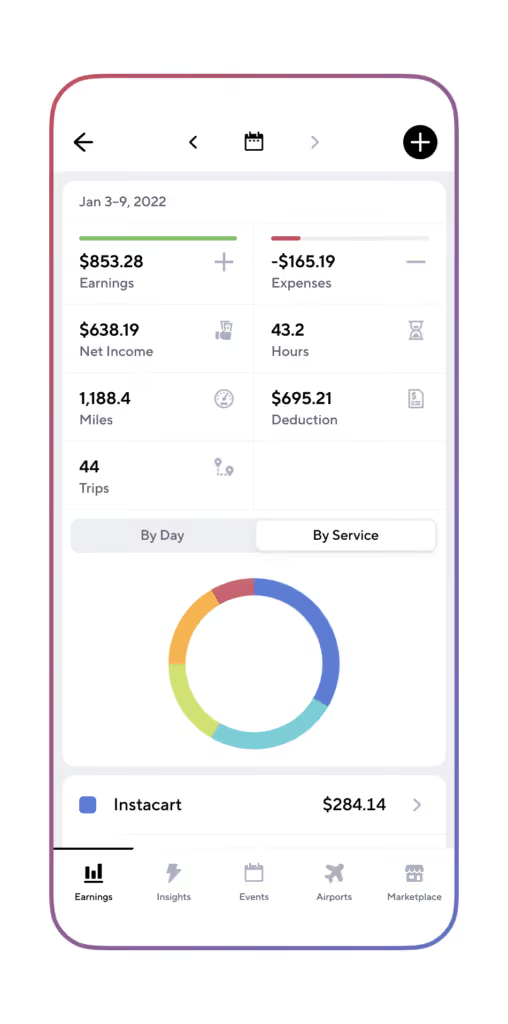
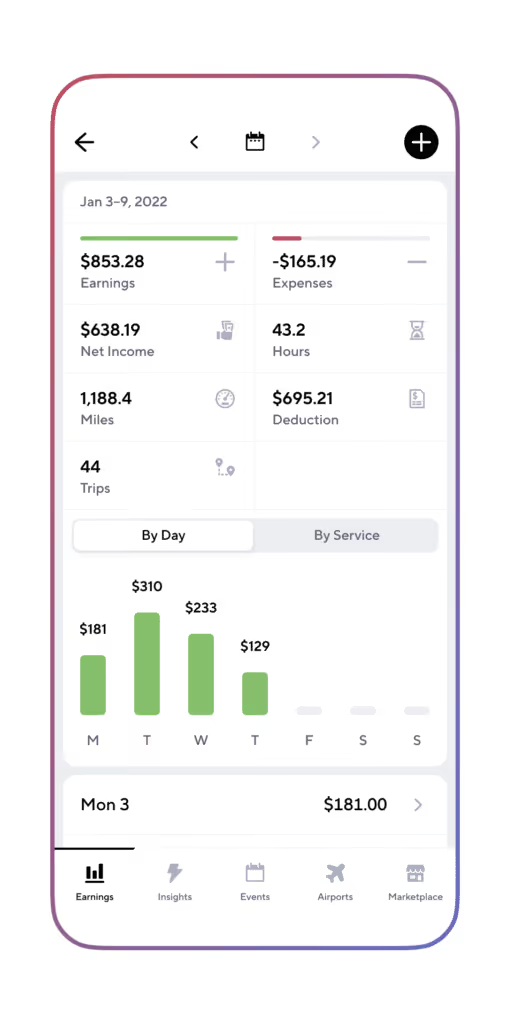
Gridwise App Screenshots
Gridwise also keeps track of your expenses. Simply enter them as you spend. Repairs, fuel, accessories, and more can add up to some sweet tax deductions at the end of the year.
This is all pretty amazing, but there’s even more! With Gridwise, you’ll know about road conditions, traffic, and crowd creators such as concerts and sporting events. You’ll also be able to see if there are any snarls around the airport, thanks to the Gridwise airport traffic feature.
In the Perks tab, you’ll find deals and discounts for drivers, easy access to our info-packed blog and our informative yet entertaining Gridwise YouTube channel. Get in on the gas card giveaways that are part of the fun in our Facebook community!
Gridwise is always there for you, helping you maximize profits and be the best driver for Flex, and all the gigs you run! Download the Gridwise app today.
Are you looking for more delivery resources?

Need a break from driving The best side gig for drivers
Driving is a great way to make a living. You are, for the most part, your own boss. You can earn a reasonable amount of money in short periods of time. And the work can be fun and engaging, especially if you like people and enjoy being of service to others.
There are downsides to driving, though. What if your car’s in the shop, or you can’t drive until you resolve a deactivation dispute, or you have a minor injury that puts you out of commission?
Another downside to driving is that it can be seasonal. When people go out on the town, need to get to and from their work, or travel through airports, train stations, and hotels, business is great. But what happens when business isn’t so great? Putting all your earning eggs into the single basket of driving for rideshare and/or delivery isn’t all that wise.
It’s a proven fact that creating multiple streams of income is a smart financial move. So, we’re offering some ideas for developing a life that lets you continue driving, but doesn’t leave you without any cash flow when driver incentives fizzle and surge prices are nowhere to be found.
Here’s what we’ll cover:
- Multiple streams of income: things to consider
- Three side gigs that can help you stash cash
- The best side gig for drivers
Multiple streams of income: Things to consider
Creating more than one way to make money is a smart move for drivers. Not only could you find yourself falling short when business is bad; you could simply get sick of the driving grind. Schedule changes, family obligations, or just the need to crank out more money to pay for unexpected expenses are other good reasons for developing side gigs that keep you out of the car and still earning money.
Once you decide this is something you want to do, you’ll have to choose jobs that help you make money fast, and are easy or interesting enough to make you want to do them. Here are some points you’ll want to think about:
- Use your skills. Rather than having to take extensive training, choose something that you already are well qualified to do.
- Convert crafting and tinkering to cash. Take a hobby, from making whimsical picture frames to playing music or detailing cars, and get it to make money for you.
- Keep it basic. Choose a side hustle that doesn’t take a tremendous amount of effort or marketing to do. This is probably the most important element you’ll want from that extra stream of income you’re creating.
Three kinds of side gigs that can help you stash cash
“Second career” gigs. There’s an enormous number of online, work-from-home type opportunities for people with skills these days. Consider bookkeeping, being a virtual assistant, translating, or transcribing. Or, you could teach English, write for blogs, develop websites, or venture into social media marketing. The benefit of these gigs is the high-income potential – but remember, you have to be fully qualified to do any of them. If you have to take an expensive training course, this tier of side gigs might require a hefty upfront investment.
“Roll up your sleeves” gigs. These jobs require your willingness to use your hands, your strength, and/or your artistic talents. Some examples include performing odd jobs, pet sitting, moving, cleaning, house painting, car detailing, or even child care. The plus side here is that you might already have the equipment you need, especially if you have a hobby that’s similar to the work you’d be doing. The potential downside is the physical energy you’ll need to do any of these kinds of jobs. If you’re doing this and driving, you might run out of energy faster than you thought possible.
“Sit back and watch the money flow” gigs. This kind of work is good for people with varying credentials who don’t want to exert much physical effort. You could, for instance, be an affiliate for a company. All that’s required of you is to set up a website for people to click through, and you’ll receive commissions on purchases that are made.
If you’d like to engage yourself more, another option is being a panelist for a product tester or survey firm. You’ll be amazed when you find out how much money you can make with this kind of gig. You work as little or as much as you want, you can be your own boss, and you participate in work that interests and engages you. Sounds like driving, without the driving, right? That’s the positive aspect of this kind of gig. The negative is, so many that are available aren’t trustworthy. You need to be careful and discerning before you get involved.
The best side gig for drivers: ACOP
Let’s recap what we discussed earlier – criteria for the best side gig for drivers. You’ll want something that allows you to:
- Use skills you already have
- Convert a hobby into a side job; and/or
- Keep it basic
Of all the side gigs we can envision, the one that brings all these attributes together is being a panelist for a survey firm. Why? One big reason is flexibility. Being a panelist is one of the “sit back and watch the money flow” gigs, meaning that hours are flexible; you are your own boss, and you can choose to work with areas that interest you and allow you to use your skills and talents.
Our cautionary words from earlier still apply, however. If being a panelist interests you, it’s essential to find a firm that’s honest, pays well, and has a sterling reputation. We’ve searched through multiple survey companies, and found one that fits the criteria needed to be the best side gig for drivers: American Consumer Opinion Panel (ACOP).
Gridwise has partnered with ACOP so we can offer great opportunities for drivers. It’s a dynamic company that offers a wide range of products and services for drivers to choose from. And best of all, ACOP passes our test for reliability, honesty, and fairness.
One of the best examples of American Consumer Opinion being a great company is what they don’t do. Based on a list of criteria included in a Balance Everyday article, reputable firms like American Consumer Opinion, will never:
- Require you to pay a membership fee
- Guarantee you a set income
- Mislead you about how you’ll be compensated
- Ask for personal information that is not necessary for the task(s)
- Request credit card numbers, bank account info, or Social Security numbers
- Sell member information to third parties
On its website, American Consumer Opinion posts a privacy policy you can rely on, and it’s a member in good standing of the Better Business Bureau.
Also, ACOP is highly rated by SurveyPolice, a group that offers honest assessments of online paid survey sites. Referring to American Consumer Opinion as a “research powerhouse,” SurveyPolice writes: “The website has been online for more than 20 years and with millions of survey takers worldwide and millions of dollars in payments, ACOP is a safe and legit survey site.”
American Consumer Opinion gives drivers looking for a side gig exactly what they’re looking for. Here’s how it works:
- Sign up for FREE.
- Answer a few questions about yourself (this will tell ACOP what kinds of surveys to send).
- Follow a link sent to your email to navigate to your ACOP Dashboard.
- Select surveys you want to take; points are listed, so you’ll know they’re worth your time.
- Opt in to receive emails alerting you to surveys you might like, or just use the dashboard.
- Earn points for your time, and get cash rewards.
ACOP surveys are interesting and quick, and the points add up rapidly. The average survey takes only 10 minutes to complete – you could do that while waiting for the airport queue to dwindle down. And, if you want, you can expand into product testing and evaluating marketing campaigns.
With ACOP, you get everything you need in a viable side gig, especially a way to create a whole new stream of income while you continue to drive. Sign up for ACOP today, get your voice heard, and make your opinion count … while getting paid for doing so.
10 Must-Have (and Nice-to-Have) Items for Drivers - Own It Now & Pay Over Time!
What are the items drivers need, and what are just nice to have? There are a few basic items we can’t do our jobs without - and some items that simply make our jobs easier and more fun, both in the car and at home.
In this post, we’re going to look at some of the stuff drivers need and crave, and show you how to get them, even if you think you don’t have the cash or can’t get the credit to get them now. Here’s how it will go:
- 5 must-have items
- 5 nice-to-have things for your car- and beyond
- Zebit: An easy way to buy today and pay over time for what you need...and what you want
5 must-have items
We’re giving you some general descriptions of here - but if you click on the links you’ll see the many choices available for all the items we mention.
- Tires. We can’t think of anything drivers need more than good tires. For one thing, rideshare and delivery drivers have their rubber meeting the road a lot more than most. Plus, if you get a flat tire, it can be a two-tire expense to ensure your car is aligned properly. Tires: do you need them? Oh, yeah. You bet! Need help affording them? Check out Zebit and pay over time without any hidden fees.
- Phone. This is the runner-up in must-haves, because without a decent smartphone, working is impossible! Unless you find a deal that’s as rare as it is sweet, you’re probably going to pay a substantial amount of cash to get one that will do the things you need. Next to your car itself, a decent smartphone, along with a serviceable phone plan, will be among the most important assets you’ll invest in as a driver.
- Smartphone car mount. You can try to drive without a car mount for your phone, but it wouldn’t be very safe or convenient. A good smartphone car mount is secure and flexible, in that it sticks to the windshield or dash, and it can be adjusted within easy reach. You will touch that phone more as a driver than you thought possible, so having it will make a huge difference to your safety and productivity. Translation: you need to get a car mount!
- Protective mats. All it takes is one spill on a delivery run or a “whoops” moment from a drunk passenger in your back seat to remind you how important it is to protect your car’s floor. Match the color of your vehicle or buy some that show your team spirit. Loyalty is something you can count on from a nice set of mats - they’ll faithfully protect your car from damage and smells that just won’t go away.
- Media receiver. This one might not seem like a “must-have” but if your car’s system isn’t serving you well, you need to have one that gives you decent sound and reception that you can count on. Would you want to go for a rideshare trip without some decent tunes? Your passengers won’t either. And...if you’re delivering, you’ll be far less lonely if you have the ability to play music, podcasts, and sports broadcasts to keep you company while you’re driving around.
5 nice-to-have items
- Remote car starter. If you’ve ever sat in a car that’s cold enough to freeze your fingers or hot enough to burn your “buns,” you know why you’d want a remote car starter. From the comfort of your home, you can get the vehicle going, let the engine warm up, and allow the heat or A/C do its thing until the car reaches a reasonable level of climate comfort. Once purchased, this “nice-to-have” item becomes something you can’t live without.
- Radar detector. Who needs to get speeding tickets? No one, really, but when you drive for a living, you can’t afford to get them. A radar detector can make things much easier for you. They’re legal everywhere in the US except Washington, D.C. and Virginia, and you can’t use them on military bases - but the rest of the states are fair game. Your radar detector will pay for itself the first time it saves you from a 3-digit fine and a point on your insurance.
- TVs and appliances. While you don’t need a nice TV or any appliances in your vehicle, you do need them at home! These high-cost items are not always so easy to afford, but they are the kind of thing you might have to buy on the spur of the moment. No household is going to run very smoothly when a TV, refrigerator, or clothes dryer bites the dust. It’s good to know where you can get replacements, fast - and how you can find ways to afford the unexpected expense. Zebit is a great way to get them without stretching our budget - or credit - to the limit.
- Electronics. While some of us may think of electronics as a “must-have,” the truth is we don’t need a great gaming system, high-powered laptop, or our very own little drone to do our job. But...having these things makes our jobs a lot more fun, especially during downtime. The problem with electronics is, again...they’re pricey! Can we always afford them? In many cases, no. That’s why we recommend Zebit, an awesome way to get what you need, when you need it.
- Gift cards and gift items. Most of the time, drivers do well when it comes to pulling in money, but we all know that some months are better than others. When we have a slow month that happens to coincide with a gifting occasion, say a holiday, birthday, or special occasion, it’s hard to give the way we want. This is especially true when it comes to babies and children. Try telling a tot that the tipping was slow last month, and that’s why they can’t have the boots they wanted for their birthday! It’s nice to be able to give gifts, and with fluctuations in earnings, we need to find ways that make it easy.
Zebit: An easy way buy what you need...and what you want
For both the must-have and nice-to-have items in our lives, money is always a factor. With things as they are these days, it’s not easy to get or maintain a high enough credit rating to finance big purchases such as the ones we’ve mentioned here. What can you do when you need tires, or a child you love just has to get the latest video game console - and you’re suffering from “funds-are-low” syndrome?
You won’t want to apply for yet another credit card, particularly if you’re going to have it ding your credit score. You won’t want to go without these things, either, and now...you don’t have to!
Zebit is here to rescue you when you need help getting the things you want. Pay for big ticket items over time, without any hidden fees! With Zebit, you could get a max of $2,500 in credit to shop Zebit’s site containing thousands of products, so you can get the important things you need...and some stuff you just want, too.
Shop for what you want on the Zebit site, and if approved, use your credit from Zebit to pay over time.
When you can’t pay in full for large purchases, then make them through Zebit. Worried about applying and getting hit on your FICO score? Don’t. Zebit’s application process is easy. Zebit verifies your information using certain specialty credit reporting agencies, which does not pull or affect your FICO score. They simply verify your identity and your income.
Register for Zebit today and you could get the purchasing power you need to buy your must-have and nice-to-have items without hidden fees! Do you have an item that you really need or want to buy? Sign up - and you could get it with Zebit today!
Case Study: How a courier company rapidly expanded their fleet at a low driver acquisition cost
“I loved it, it was super fast and super efficient.”
What Is Curri?
Curri is a new innovator in the world of goods delivery. Specializing in construction and industrial supplies delivery, Curri focuses on the B2B side of the industry. They’ve described themselves as “the Uber for construction material delivery” and “a one-stop-shop construction delivery service with flatbeds, trucks and cars available for hotshot, scheduled, daily routes and LTL/FTL deliveries.”
Drivers who use the Curri app perform a wide range of services, including:
- Picking up and transporting items that need prompt deliveries
- Returning pick-ups from customers
- Doing branch transfers
- Handling multiple pick-up and drop-off deliveries
- Recurring multi-stop deliveries, known as “Daily Routes”
Curri offers itself to drivers as an alternative to rideshare or food delivery. The recurring “Daily Routes” and long-distance deliveries can ensure a consistent and reliable stream of income for drivers – something neither rideshare driving nor food delivery can always provide.
Problem
As a relative newcomer to the delivery scene, Curri is seeking to expand its driver base and quickly start fulfilling orders. But it has stiff competition from well-established competitors like Uber, Lyft, and DoorDash, just to name a few. In fact, the market is saturated with employment opportunities for drivers.
Curri needed a way to advertise to drivers while keeping driver acquisition cost low. They’d been advertising using Facebook, Google Ads, and Indeed, but weren’t seeing the results they wanted. Also, their driver acquisition cost across the three platforms was high.
Then a Curri sales representative came across a Gridwise Facebook ad featuring Gridwise’s advertising services. When he brought it up to his team, they knew they were on to something.
Solution
Gridwise knows their target audience extremely well and is able to connect with them in a way that gets their attention. Through the Gridwise app, drivers can be targeted by region and by demographic. The Gridwise team has experience with crafting compelling emails, banners, and ads for both specifically targeted and national audiences.
Alice Warnier, the Growth Marketing Manager at Curri, headed up the project along with Alex and Clay on the Gridwise Brand Partnership team. She deeply appreciated the cost-effective solutions and the quick turnaround time for deliverables. Alice was especially happy with the messaging that Gridwise created for the Curri emails and ads.
“They really understood what we wanted and what we needed the tone of the brand voice to be.”
Results
Within 10 days, Alex and Clay had campaigns for Alice up and running. The Gridwise content team designed ads, emails, in-app banners, and a blog post to encourage drivers to sign up with Curri.
The campaigns were a huge and instant success.
“By advertising with Gridwise, our CPA was better than Facebook’s!”
Gridwise was able to help Curri meet and exceed their initial conversions goal within the first week of the campaigns being launched. Additionally, Curri kept their cost per acquisition well under their original threshold. Hundreds of drivers downloaded the app within 20 days of the launch.
Alice and the rest of the Curri team look forward to growing their fleet as Gridwise continues to expand its user base.

Carbon Health virtual care — a real lifesaver
Drivers work hard, and even with our flexible schedules, there’s not always enough time for all the things we need to do. Taking care of ourselves can fall between the cracks as we work to rack up the drives and deliveries that keep our gig businesses going.
But self-care is more important than anything we do. If we’re not healthy, physically and mentally, we won’t be able to take care of our families and customers to the best of our abilities. Especially now, drivers need a healthcare solution that keeps up with our busy, unpredictable schedules.
That’s where Carbon Health comes in.
Get seamless, affordable care
Virtual care from Carbon Health is the perfect healthcare solution for drivers. It’s fast, convenient, and affordable. There’s no membership fee, and Carbon Health works with most insurance plans.
Carbon Health serves drivers’ unique needs in key ways:
- Convenient scheduling: You can book a same-day appointment up to 15 minutes before you start a virtual visit — in case you need to reschedule because of a last-minute ride or delivery request.
- Affordable access: For virtual visits, Carbon Health accepts most insurance in California. Carbon Health virtual care is also available in 23 other states, and out-of-pocket fees are only $69 if you are not insured.
- Immediate attention: You can speak to a provider in a matter of minutes, in most cases.
- Help guaranteed: If the provider can’t help you virtually, or needs to refer you to a physical location for an in-person visit, you won’t be charged.
How Carbon Health virtual care works
All you need to get started is your ID, your smartphone, and your insurance information (if you have insurance). Then visit CarbonHealth.com or download the Carbon Health app.
Select “Book An Appointment'' on the website, or open the app and tap the green “Get Care” button. You can choose from the following options:
- Primary Care: Care for your day-to-day health, with no membership fees!
- Urgent Care: Immediate attention for injuries, infections, and other unexpected medical issues.
- Mental Health: Video-based therapy for common mental health concerns like anxiety and depression.
Before your appointment, the healthcare provider will review your registration information. If they determine that you need care beyond what can be achieved in a virtual visit, someone from Carbon Health will reach out immediately and suggest another course of action.
At your appointment time, you’ll get a call from the provider through the Carbon Health app. The provider will confirm your registration information and ask some questions. Then they will create a plan for your care and send it to you through the app. The plan will provide:
- A summary of what you discussed.
- Next steps for care or treatment.
- Relevant educational materials, if applicable.
- A link for booking any in-person appointments you may need.
- Prescriptions, which can be filled through the app, by the pharmacy of your choice. You can also have your meds delivered to your home.
Once your appointment is complete, you’ll be able to access everything you need through your Carbon Health account. You’ll have all your health records in one place, including the care plan, prescriptions, referrals, lab results, X-rays, and charts.
Your provider will reach out a few days after your appointment to see how you’re doing. Of course, you can contact the provider before that if you have further questions or concerns.
It’s that simple — healthcare that meets you where you are.
Are you ready to experience world-class health care that’s as convenient as using your phone or home computer? Book a virtual visit with Carbon Health today!
The US Secretary of Labor supports classifying rideshare and delivery drivers as employees: Here’s what you need to know
Should rideshare and delivery drivers be employees or remain independent contractors?
This is a question that’s been hanging in the air for years. When Proposition 22 passed in November 2020, the rideshare and delivery companies overturned a California law that sought to make the companies treat drivers and delivery people as employees. There's also been continued debate regarding employee vs. contractor issue which calls for better wages for gig drivers.
So far, activity surrounding this issue has arisen on the local and state levels. New York and Seattle set minimum wages for drivers, while in California, the controversy played out on the state level.
Recently, though, US Secretary of Labor Marty Walsh spoke up, and what he had to say did not bode well for rideshare and delivery companies who are against an employee model. This post will take you through the controversy that’s been brewing, and present some points worth consideration, including:
- What did Secretary Walsh say?
- What happened after the Secretary spoke?
- What this might mean for rideshare and delivery companies
- Other related activity that’s taking place around the country and the world
- What federal intervention could mean for drivers and the future of the gig economy
What did Secretary Walsh say?
In an April 29, 2021 interview with Reuters, Secretary Walsh didn’t say anything definite, nor did he cite specific rules that would take effect. He made it clear, however, that he feels gig employees are not being treated fairly in all cases, and he believes the federal government should do something to change that. “We are looking at it but in a lot of cases gig workers should be classified as employees... in some cases [gig workers] are treated respectfully and in some cases they are not,” Walsh said, “and I think it has to be consistent across the board.”
Even before Walsh was appointed, there was a proposal to rescind a rule that would have made it easier to classify workers as independent contractors. In the Reuters interview, Walsh said his department would have conversations with companies that utilize gig workers, to make sure these workers get consistent wages, sick pay, health care, and “all of the things that an average employee in America can access.”
Beyond that, Secretary Walsh didn’t say much more about the gig economy… but what he did say caused a whole lot of controversy.
What happened after the Secretary spoke?
In the immediate aftermath, Uber, Lyft, and DoorDash all took substantial hits on their stock prices. The price of Uber shares dipped 6%, and Lyft plummeted by almost 10%. DoorDash shares closed down 7.6%. Why would this be?
As we all know, these companies have struggled to become profitable. The costs of making rideshare and delivery drivers employees would be high, and it would set them back even further in their collective efforts to swim out of a sea of red ink.
Company spokespeople reacted quickly and with resolve, according to the Reuters article.
They emphasized that gig workers value their independence to choose when and where they will work, and regulations that required them to be classified and treated as employees would take that away from them. Uber’s spokesman said the United States should be encouraging companies to use independent workers, not make it harder for people who want this kind of work to get it.
The other side of the argument, also emanating from Walsh’s Reuters interview, is that if the federal government had not stepped in with supplemental unemployment compensation during the pandemic, these workers would have suffered even more than they already have.
Rideshare and delivery drivers are caught in the middle of this argument. Although there are many ways they might benefit from being classified as employees, the ensuing stress on the companies could mean that many drivers won’t have any work at all.
What this might mean for the rideshare and delivery companies
Federal regulations on companies almost always mean higher costs and lower profits. In the case of the companies that depend on gig workers, they have yet to make a profit as it is. Making rideshare and delivery drivers employees would mean companies would have to deal with some gigantic costs.
The companies, for example, would have to cover higher pay to meet minimum wage standards, unemployment insurance, HR compliance, liability (insurance and possible litigation costs), software development, and driver supply disruptions. They would also have to deal with the risk of being fined if they don’t meet government requirements. Read more to learn everything you need to know about rideshare drives and Proposition 22.
The business community’s perspective is that the federal government should, within limits, stay out of a company’s business, including when it comes to how they classify workers. The gig economy has created revolutionary new opportunities for many people, and these could be lost if regulations make it harder for gig companies to operate.
While Uber, Lyft, and a few other gig companies were successful in beating back the State of California, we can’t help wondering if they would be as successful battling the US Government.
Other related activity that’s taking place around the country and the world
In March 2021, the UK Supreme Court forced Uber to provide drivers with minimum wage payments and other benefits. And the battle rages in other parts of the world as well, with labor movements seeking more security for drivers. Again, while it’s true that drivers could benefit from these changes, there’s a delicate balance that must be achieved.
Even though rideshare and delivery drivers are aware that companies might have difficulty achieving profitability, many still believe they should be treated like other organizations treat employees.
In the US, here are a few examples of groups that are actively pursuing employee status for gig workers:
- In Philadelphia, the city council fought to include gig workers in a bill that provided extra sick leave during the COVID-19 pandemic.
- In Massachusetts, there is an active debate about how the commonwealth should treat gig workers.
- In Colorado, this organization is bringing gig workers together so they can fight for protections under the law.
- In New York, the service workers' union (SEIU 32BJ) backed food delivery workers in an April 22, 2021 protest in which more than 2,000 of them biked through the city demanding fair treatment from the “tech giants” that run the gig industry.
Obviously, even with the success the companies had with Proposition 22 in California, they face opposition from many different factions. This latest salvo from the federal government, if it ever translates into policy or law, will probably be the most formidable of all.
What federal intervention could mean for drivers and the future of the gig economy
Although what Secretary Walsh had to say affected the companies’ stocks, it doesn’t mean very much to the rest of us… yet. However, if the federal government does indeed impose regulations that require the companies to treat all workers as employees, it will have a huge impact on the gig economy.
While rideshare and delivery drivers would benefit greatly from benefits such as health insurance and guaranteed wages, they would come with a steep price tag. Not only would drivers lose their ability to choose when they wanted to work and for how long – they could also lose the opportunity to work for these companies at all.
More stringent background checks, Human Resources compliance issues, and a limit to the number of employees (due to the companies’ inability to pay for an unnamed number of them) could literally kill the gig driving business.
This is the concern the companies have, and many drivers share it – as our September 2020 survey proved. One finding: 65% of polled drivers prefer to remain as independent contractors. You can see the exact figures in our article about gig drivers and what these changes will mean to rideshare flexibility.
If drivers are no longer able to work as independent contractors, the gig companies will suffer, and so will the rideshare drivers, the delivery drivers, and the customers they serve. While it’s easy to welcome any ideas that support the wellbeing of gig workers, it’s essential to look at both sides of the issue … the cons as well as the pros.
How do you feel about the federal government stepping in to decide how gig companies should treat their workers? Leave us a comment and share your thoughts.
Track your gig driving income with Gridwise!
Whether you’re gung-ho for leaving the gig economy as it is, or you’d rather see the government make sure you get the benefits of an employee, you still need to track your earnings and record your expenses.
Gridwise does all this for you, seamlessly. Simply link your driving and delivery apps to Gridwise, log on at the beginning of every shift, record your expenses, and the mighty Gridwise app will do the rest. The results come out in impressive graphs like these:
These facts and figures come in handy at tax time, but they’re also useful to have if you’re wondering which of your gigs is making you the most money, or how close you are to your total weekly earnings goals.
Not only does Gridwise do all this, the Perks tab dishes out deals and discounts for drivers, news from our blog and YouTube channel, airport and event info, plus traffic and weather alerts! All of these features let you be more informed, and when you know your stuff, you make more money!
Find us on Facebook, too, and meet our community of gig workers who, just like you, want to get the most out of their rideshare and delivery work. Our gas card giveaways are a huge hit too.
It’s hard to believe any driver would want to go out on a shift without the ultimate assistant for rideshare and delivery running at all times, but in case you haven’t done so yet, download the app now.
Work smarter. Earn more.
Whether you drive, deliver, or pick up shifts — Gridwise helps you track earnings, mileage, and performance so you stay in control of your work. Download the app and take charge today.
