Gridwise blog
Tips, insights, and advice to help you earn more and work smarter, whether you do gig work, hourly, or shift work.

How to Make $1,000 a Week With Uber Eats in 2026 (Tips + Hourly Data)
In this blog, we'll explore the strategies and techniques that can show you how to earn $1000 per week as an Uber Eats delivery driver. We'll cover everything from optimizing your delivery zones and schedules to maximizing your tips and customer satisfaction. Whether you're a seasoned Uber Eats driver or just starting out, this guide will provide you with the insights and actionable steps to take your Uber Eats driver earnings to the next level.
Becoming an Uber Eats delivery partner can be a lucrative opportunity, especially if you're able to consistently earn $1000 a week. By understanding the platform, optimizing your delivery strategies, and focusing on customer satisfaction, you can maximize your earnings and turn Uber Eats into a reliable source of income.
We’ll cover the following topics to provide coaching and ideas to help you push your earnings up to that $1000 per week level:
What do Uber Eats drivers do?
Uber Eats drivers deliver prepared food most of the time, but they also might shop for and deliver goods from convenience outlets and grocery stores. The job is pretty simple. You get a request for an order, you drive to the restaurant or store to pick it up, and then you deliver it to the customer. If you already drive for Uber, you can choose to take orders for Uber Eats delivery any time.
If you’re not an Uber Eats driver yet, it’s pretty easy to become one. This Gridwise post tells you what you need to do if you want to sign up and start making money Uber Eats style. Many rideshare drivers welcome the chance to deliver food rather than people. This article from Nerdwallet covers the Uber Eats gig from that angle.
There are some sweet advantages to working with Uber Eats. In lots of cities you don’t even need to have a car. You can use a bike or a scooter, or even walk, to make your rounds. If you do use a car, Uber Eats’ requirements are a lot easier to meet than they are for Uber rideshare driving.
You also have a lot of flexibility. You can shop and deliver convenience items and groceries, but you don’t have to. And, like most driving gigs, you can choose your own hours, and map out the locations where you want to work.
Use Gridwise features When to Drive and Where to Drive to help you figure out what work hours and which specific areas will be the most profitable for you. Real data from real delivery people will show you earning patterns for drivers in your town.
How much can you earn doing Uber Eats?
The honest answer to this question is: basically, as much as you want! It all depends on how many hours you put in and how strategic you are about your gig. Earnings vary from one area to another, as this article from Entrepreneur points out. To give you a baseline, let’s look at the earnings of Uber Eats drivers who tracked their earnings with Gridwise.
Remember that these numbers show us only average earnings. To make $1,000 a week with Uber Eats, you’re going to have to be better than average, and we’ll show you how. For now, though, it’s good to have these figures so you get a ballpark number of where to start.
How much do Uber Eats drivers make?
Gridwise data tell us the following:
- Monthly earnings average around $444.00 per month.
- Gross earnings per trip are between $9.00 and $10.00.
- Tips make up about 50% of most Uber Eats drivers’ income, which amounts to about $225.00 per month.
Is Uber Eats good money? It can be. While there are other gigs that pay more per trip, if you drive for Uber Eats, you’ll always be pretty busy.
https://datawrapper.dwcdn.net/HPAz8/3
You can also see that, unlike many other gigs, tips play a huge role in Uber Eats earnings.

With these numbers as a baseline, what can we say about how to earn $1,000 a week with Uber Eats? As we said in the introduction, it’s going to be a hustle, but it’s really possible. To figure out how to make the most money with Uber Eats, let’s start by looking at how many trips these “average” drivers made each month.
We know that average gross earnings were $444.00 per month, and drivers got around $10.00 per trip. That means they took 44 or 45 trips per month, which breaks down to 11 trips per week. That’s not a lot of Uber Eats delivery, is it?
The fact that Uber Eats drivers averaged so few trips shows us that many drivers use more than one app at the same time. This is called multi-apping, and you can learn more about it in this Gridwise post. If you want to answer the question of how much you can make with Uber Eats, then you need to stick with the app and keep plugging away at those orders. You also need solid strategies, as well as some inside tips and tricks.
How to make the most money on Uber Eats: Delivery driving tactics
Getting to that $1,000 a week with Uber Eats isn’t so hard when you remember that the drivers we saw making about $111 a week were only taking around 11 trips in the same time period. That’s not much at all! If you work the Uber Eats app like a boss, you’ll soon have many more trips than that, easily reaching the number needed to get you to $1,000 a week. Now, let’s get to some tactics you’ll need to make that kind of bank.
- Stay with the Uber Eats app, and track your earnings. Gridwise can easily do that for you. Simply sync your Uber Eats app with Gridwise, and you’ll be able to see how much you’ve earned with Uber Eats, what times were most profitable, and your average hourly pay. Racking up trips with Uber Eats has other benefits, including perks and bonuses that are awarded to top drivers.
- Leverage surge pricing and promotions. Surge pricing is applied when there is a lot of demand. When surge pricing is in effect, many of the trips you make will pay more than usual. Promotions are offered to drivers who complete a given number of trips in a certain time period. High traffic volume days, nights, and times give you these chances to get extra earnings. Challenging yourself to complete the right number of trips for promotions will add to the number of trips you can count on for big bucks, too. Learn more about Uber Eats surge pay, boosts, and promotions in this Gridwise blog post.
- Say yes to doubling up on orders. With Uber Eats, you can get back-to-back orders or receive batched orders. Back-to-back orders happen when you receive a new request while you’re on the way to deliver an original order. The Uber Eats app routes these trips automatically, so you won’t be sent out of your way.
Batched orders are Uber Eats’ way of bundling together orders from either the same restaurant, or two nearby eating establishments. You get money, and trip count credit, for all the orders you complete, plus customer tips, without having to make a bunch of separate trips.
- Turn on the charm and get bigger tips. Being nice really is part of the Uber Eats driver’s job, and getting tips is one way people who drive for Uber Eats make money beyond their basic pay.. Bring along those extra napkins and condiments, use equipment that keeps food and drinks at the right temperatures and prevents spilling, and consider your customers’ needs. If you deliver groceries, be extra careful with delicate items such as bread and eggs.
And, most important, follow your customers’ directions, and stay in communication with them if you are going to be delayed, or if you have questions about their order. This Gridwise post will tell how to get bigger tips as a delivery driver.
- Use even more charm to keep your ratings high. As an Uber Eats driver, you will be rated by the restaurant or store where you pick up the orders as well as the customers who are waiting for the deliveries. This two-way rating system is designed to keep you on your toes, so Uber can keep people satisfied with your service. Don’t worry, you get to rate them, too.
There’s another reason why your rating as a driver is important. It not only keeps you in good standing with Uber; it helps you to qualify for the Uber Eats Pro incentive program. To learn more about Uber Eats Pro, and what it takes to earn perks such as preferred services, discounts, and deals, check out this Gridwise blog post.
Smart business moves that seal the deal
Now that you know how to gobble up the deliveries you need to make $1,000 a week with Uber Eats, it’s going to be a breeze to get there. Let’s make it even easier, with business moves that boost your earnings and shrink your expenses. If you use these, it will also be easy to say yes when people ask, “Can you make good money with Uber Eats?”
Minimize expenses. Avoid racking up big fast-food bills by bringing your own food and beverages. You might not think you’re hungry when you first start your Uber Eats run, but once the aroma of pepperoni pizza, premium cheeseburgers, and piping hot fries start wafting through your car, that might change. Bring a sandwich or other healthy food from home, and buy bottled water in bulk to save tons of cash compared to what it costs to buy single servings.
Maximize tax deductions. Another way to minimize your expenses is to maximize your tax deductions. Start by tracking mileage with Gridwise.

Gridwise App
Gridwise captures every deductible mile you drive, including the distance you cover between the trips your driving app records. Know what expenses you can deduct, and put them to work for you when tax time comes. Learn more about tax deduction strategies in the Gridwise Tax Guide for drivers.
Boost earnings with referrals
As an independent contractor, you’re probably looking for ways to make even more money than you can with Uber Eats. And most gig workers like you enjoy getting passive income. With Uber Eats, there’s a really easy way to do that, referrals!
All you need to do is find friends and encourage them to deliver for Uber Eats. If they make a certain number of deliveries within a specified time, you will get paid for doing nothing more than having them sign up under your referral code! Rates of pay vary by city, so check your Uber Eats app to find out what the current deal might be, and learn more about the referral program on the Uber Eats website.
Also remember: “friends” don’t have to be your best buds. Many delivery people carry cards with a QR code linking to their referral information, so just about anyone you encounter can join Uber Eats and boost your earnings. You could meet a source of passive income at the gas station, on social media, or at your high school reunion. The more you hustle, the more there is to gain, right?
Master the art of self-employment
As an Uber Eats driver, you’re an independent contractor. That means the company isn’t going to withhold your taxes, provide insurance, keep track of your earnings, or tell you about tax deductions. You’ll have to do all these things for yourself.
If you want to maximize your tax advantages, open an official business entity. You can incorporate (create a corporation) or you can work as a limited liability corporation (LLC). You can also work with a DBA (Doing Business As) arrangement, but the corporation or LLC will do a better job of protecting you from liability.
Establishing a corporation or LLC offers better tax advantages than being a sole proprietor. For instance, if you simply collect your earnings into your private account, you’ll be charged self-employment taxes in most states. And paying extra taxes is something we all want to avoid, within legal limits, as much as possible.
Every Uber Eats driver needs to learn about self-employment, and there are some great resources you can review. Check out the CareerOneStop website about self employment which will help explain the basics. You can also check with a professional tax accountant, or look other websites to learn more about actually creating a business.
Scope out your market
Look at the area around you to see where you’re likely to get the most deliveries. Where are all the restaurants? Where might people be more inclined to order deliveries? What hours do you want to drive? What activities might be going on around those times? Think about late-night and after-school times as well as breakfast, lunch, and dinner times.
Be realistic about the potential for your area and aware of new services opening up. For example, in New York, there is already a tab on the Uber Eats app that allows customers to order groceries. In our article about the best food delivery service to work for you’ll see that Uber Eats stacks up well against other delivery companies, mainly because of its potential for expanded opportunities for drivers to earn.
So, is Uber Eats good money? As we said, it isn’t an automatic guarantee that everyone will make $1,000 a week with Uber Eats. Trying out the suggestions we give you here, though, should put you on the right track! Go out there and start stacking up those orders and raking in some impressive earnings!
Get more inside information on Uber Eats in these posts from the Gridwise blog:
- The delivery driver guide: Using the Uber Eats app
- Everything you need to know about driving for Uber Eats
- Uber Eats Pro: What drivers need to know
- Looking for a different gig, part-time or full time job? Check out the Gridwise Job board.
Uber Eats FAQ
How does the Uber Eats platform work for drivers?
Uber Eats is a food delivery service that connects customers with local restaurants and independent delivery partners. As an Uber Eats driver, you'll receive notifications of nearby delivery requests, which you can accept and complete. The platform provides flexibility, allowing you to work on your own schedule and earn money based on the number of deliveries you complete.
What are the requirements to become an Uber Eats delivery partner?
To become an Uber Eats delivery partner, you'll need to meet certain requirements, such as having a valid driver's license, a registered vehicle, and passing a background check.
How can I choose the right delivery zone to maximize my earnings?
Selecting the right delivery zone can significantly impact your earnings, as some areas may have higher demand and better-paying orders. It's important to research and identify the zones in your area that tend to have the most consistent and lucrative delivery opportunities.
How can I take advantage of peak delivery hours and surge pricing?
Understanding peak delivery hours, such as mealtimes and weekends, and taking advantage of surge pricing can boost your earnings. Be aware of when demand is highest in your area and adjust your schedule accordingly to capitalize on these peak periods.
What are some tips for maximizing tips and customer satisfaction?
Providing excellent customer service and going the extra mile to ensure a positive experience can lead to more tips and repeat business. Prioritize communication, timeliness, and attention to detail to keep your customers happy and satisfied.
How can I set realistic weekly goals to reach my $1000 target?
To make $1000 a week with Uber Eats, it's essential to set realistic weekly goals and track your earnings and expenses. Start by determining your target earnings and breaking it down into achievable daily or weekly goals. This will help you stay on track and make adjustments as needed.
What are some strategies for efficient route planning and navigation?
Effective route planning and navigation can save you time and fuel, allowing you to complete more deliveries. Utilize mapping apps and take advantage of features like real-time traffic updates and turn-by-turn directions to find the quickest routes.
How can I balance my Uber Eats deliveries with other commitments?
Develop a schedule that allows you to capitalize on peak delivery hours while still maintaining a healthy work-life balance. Consider using tools like calendar apps to plan your availability and track your hours to ensure you're maximizing your earning potential without sacrificing your personal life.
What are the key considerations for maintaining my vehicle as an Uber Eats driver?
Keeping your car clean and well-maintained is crucial for maximizing your Uber Eats earnings. Regularly scheduled oil changes, tire rotations, and other preventive maintenance can help extend the life of your vehicle and minimize downtime. Additionally, budgeting for vehicle-related expenses, such as fuel, insurance, and repairs, will ensure you're accounting for these costs and maximizing your net earnings.
What are the tax obligations and legal considerations for Uber Eats drivers?
As an Uber Eats delivery driver, it's essential to understand the tax obligations and legal considerations that come with being an independent contractor. This includes properly reporting your earnings, deducting eligible business expenses, and making quarterly estimated tax payments. Additionally, you'll need to ensure you have the appropriate insurance coverage, such as personal auto insurance and possibly commercial auto insurance, to protect yourself and your vehicle while on the road making deliveries.

The Gridwise Job Board: Find Your Ideal Job or Gig Work
Gridwise is an essential assistant app created by gig workers for gig workers. Our mission is to support those engaged in gig work in every way possible. We understand how challenging it can be to deal with income instability, a lack of benefits, and job insecurity that often comes with gig work. The Gridwise app tracks and organizes earnings and expenses, and offers a wide array of discounts, deals, and services that make the lives of independent contractors easier and more rewarding.
We firmly believe it’s possible to make a viable living and create a gig experience that offers flexible hours, variety, and excitement. With issues such as consistent earnings and job security in mind, Gridwise is proud to offer a centralized platform that shows you how to find gig work and secure reliable opportunities. We’re proud to introduce the Gridwise Job Board.
The Gridwise Job Board: Key features
Because Gridwise is dedicated to serving the gig worker community, we’ve filled the Gridwise Job Board with useful features that won’t waste your precious time.
- Comprehensive listings. Find part-time, full-time, temporary, and per-task work. Drive or deliver with your vehicle, utilize an employer’s vehicle, or even find non-driving gig work.
- User-friendly interface. Find the jobs that are right for you with a tap of your screen.
- Verified opportunities. We vet the jobs before they are listed to ensure you’re getting high-quality job postings.
How to get more gig work, seasonal, part-time or full-time jobs with the Gridwise Job Board
Looking specifically for “gig work apps” or “gig jobs near me?” You’re in luck. Our filters and search functions send you directly to the listings you seek.
Here’s how it works.
- Access the Job Board via the Gridwise website.
- Search for jobs by type, location, and more.
- Select the job that interests you, and read all about it.
- Scroll through the description, and if it appeals to you, click “Apply for job.”



Many types of jobs are available. Adjust the search filter to see the full variety of opportunities that will let you cash in. Deliver food, set up catering, do rideshare driving, get paid for doing package delivery, and much more. You’ll find short-term gigs, long-term contracts, and part-time positions.
Perks of the Gridwise Job Board for gig workers
Gig workers who know how to make extra money will appreciate how the Gridwise Job Board lets you multiply your chances of bringing in big earnings. Here’s how:
- Increased stability. Use the Gridwise Job Board to find part-time or permanent jobs in addition to the part-time gigs you already have. Always keep a steady stream of earning opportunities flowing toward you.
- Flexibility and autonomy. Choose jobs that fit your schedule, work around other jobs and family duties, and still leave room for some fun in your life. Discover side hustles to supplement your full-time job, permanently or just for the season.
- Skill development. Find part-time work that lets you use a skill you already have, or try your hand at something new. It’s a smart way to develop a portfolio to showcase what you can do, or even to find permanent employment.
Get Gridwise and stay up to date on the Gridwise Job Board
Gig workers need plenty of information and assistance, and Gridwise is here to give it to you. Download the app and get essential features such as
- seamless earnings tracking
- mileage tracking
- expense recording, including notes
- low-cost and no-cost insurance benefits
- access to affordable medical, dental, vision, mental health, and alternative care
- professional services including legal and financial help
- deals and discounts
- weather, events, and traffic reports
- inside information on where and when to drive
More to know about gig work:

5 Best Mileage Trackers For Gig Drivers
Many drivers ask, “Do I really need a mileage tracking app?” The answer is simple: only if you want to have an accurate count of all the miles you can legally deduct from your taxable income! You might think your rideshare or delivery driving app has got you covered. After all, they do quite a good job of logging the miles you drive while you’re on a trip or delivery. But, if you want to have the best app to track mileage for Uber, Lyft, Doordash, Instacart, or the other apps you may use, you need more. Why is that?
Without a separate tracker, you’re missing the miles you drive in between pings. Did you realize that all the miles you drive, from the moment you begin your shift until it’s over (as long as you don’t drive several miles on a break to hang with your friends), are tax deductible! That means you need something besides your driving app to keep an accurate count of your travels. Read this Gridwise post to see how important it is to keep track of every deductible mile.
You won’t be surprised to hear that there’s an app for tracking miles. In fact, there are several of them. Here, we’re going to tell you about five top mileage tracking apps, and help you figure out which one is best for you.
Before we get to the list and identify the best mileage tracker app, let’s clarify what exactly a mileage tracking app is. According to G2.com’s technology glossary, mileage tracking is done for the purpose of keeping a log of mileage that is either reimbursable or tax deductible.
And yes, of course you can track your miles simply by taking readings on your odometer. But are you really prepared to account for how many miles you drove for personal reasons and subtract them from the total to get your business mileage? Even if you can remember all that and do the arithmetic, if you want an accurate reading of the miles you drive for business, and can therefore deduct, a mileage tracking app will save you a lot of trouble and prevent you from making costly errors.
Plus, as a gig driver, you have specific needs when it comes to a mileage tracker. Ideally, you’d be able to handle mileage tracking and several other functions all in one app. It can be maddening enough to deal with driving apps, particularly if you’re an avid multi-apper. You would want your mileage tracker app to help you keep account of other aspects of your business, including income, expenses, and inside information about the art of gig driving.
Not all mileage apps are equal, to be sure! Let’s look at five of the best apps to track mileage and figure out which is the best app to track mileage with Uber and Lyft, or what mileage tracker app is best for DoorDash.
1. Zoho Expense

First up is Zoho Expense, which does exactly what its name says. This app is designed to allow companies to give employees a uniform way to create and submit expense reports. It can be used by individuals, including gig drivers, as well.
It includes a mileage tracker, as well as features that let you track other deductible expenses, including the ability to scan and record receipts.
Available on Android and Apple: Yes
Ratings: 4.8 stars on App Store, 4.7 stars on Google Play
Free Version: Yes
Subscription price: $3 per month, billed annually
Created specifically for gig drivers: No
2. Quickbooks Online

Quickbooks Online is a cloud-based app that allows you to track your mileage, earnings, and expenses. The information you enter can then be used to generate various reports that prepare you for tax time. It also allows you to create graphs that illustrate your cash flow, and includes a receipt scanner so you can instantly record deductible expenses. Quickbooks is popular, highly reliable, and designed mainly to help people keep track of their small businesses.
Available on Android and Apple: Yes
Ratings: 4.7 stars on App Store, 4.4 stars on Google Play
Free version: 30-day free trial
Subscription price: $15 per month for basic version if purchased for 3 months or more
Created specifically for gig drivers: No
Source: quickbooks.intuit.com
3. Shoeboxed

Shoeboxed started in 2007 as a service for scanning paper receipts into digital form. Now the app offers a free mileage tracker and has enabled users to scan receipts directly. It touts itself as the best mileage tracking app for DoorDash, but there are some elements missing that Dashers might like to have. While it provides features that record your expenses and prepare you for tax season, it doesn’t automatically track your earnings. The mileage tracker has a system where you can drop pins along your routes to make the tracking more precise, identifying those legs of a trip that you make for business purposes. The mileage tracker is “free” once you sign up for the basic version.
Available on Android and Apple: Yes
Ratings: 4.5 stars on App Store, 2.3 stars on Google Play
Free version: No
Subscription price: $18 per month for basic version
Created specifically for gig drivers: No
Source: blog.shoeboxed.com
4. Stride

This free mileage tracker does a fair job of keeping track of the distances you rack up while gig driving, but it doesn’t automatically track earnings. It can be a big help, though, in tracking your expenses. You can link Stride to your bank account, and it will automatically scan your expenses to identify items you can potentially deduct. The app is totally free. This could make it the best free mileage tracker app, but there is a small price to pay. The app will persistently push you to consider various insurance plans that they are affiliated with. If you don’t mind that, this is a solid mileage tracker, even if it doesn’t track your earnings.
Available on Android and Apple: Yes
Ratings: 4.8 stars on App Store, 4.6 stars on Google Play
Free version: Yes
Subscription price: None. The app is free.
Created specifically for gig drivers: No
5. Gridwise

Gridwise has a free mileage tracker and free features that record your income and expenses. It gives you access to insurance and benefits, as well as insights about the best times and places to make the most money while gig driving. The Gridwise mileage tracker captures all the miles you drive while you’re on your driving shift, and it can be used if you have other trips you need to make which qualify as business travel.
Drivers love it because it is geared toward the needs of rideshare and delivery workers, providing free information about airport departures and arrivals, event start and let out times, weather, traffic, and more. The Gridwise Plus subscription adds value by providing additional insights and reports, discounts on benefits, the ability to export data in .csv format,, and more.
Available on Android and Apple: Yes
Ratings: 4.9 stars on App Store, 4.6 stars on Google Play
Free version: Yes
Subscription price: $9.95 per month for Gridwise Plus, or $95.99 per year (a $23.41 savings)
Created specifically for gig drivers: Yes!
What is the best mileage tracking app?
Now that we’ve checked them all out, we’re positive about the answer to that. Hands down, it’s Gridwise. Are we biased? You bet we are! But drivers love it too. Gridwise is the best mileage tracker app, and so much more. So many of the features are free, and the subscription to Gridwise Plus will pay for itself with additional insights to boost your earnings and deeper discounts on products and services.
Most important, Gridwise is designed specifically for gig drivers by experts who were once gig drivers themselves! Knowing what gig drivers need is a crucial step in creating an app that rideshare and delivery drivers can really use! Here are a few of the features, besides mileage tracking:
- seamless earnings tracking
- automatic, on/off toggle and manual mileage tracking
- mileage categorization
- airport, traffic, weather, and events information
- insights into where to drive and when to drive
- reports showing earnings across the platforms you use
- discounts on countless products and services for drivers
- additional resources for finding side gigs
- an informative and comprehensive blog
- affordable benefits, including insurance, medical, dental, and alternative practitioner discounts
- a community of drivers just like you
Don’t settle for just any app. Get the best mileage tracker, and so much more, from Gridwise!
How Much Do Skipcart Drivers Make in 2025?
If you’re considering joining Skipcart as a delivery driver, one of the first questions you probably have is, “How much do Skipcart drivers make in 2025?” With new gig platforms entering the market every year, it’s important to understand how they compare—not just in flexibility, but in real earning potential.
Skipcart offers last-mile delivery services for major retailers like Walmart and CVS, making it a solid option for drivers in suburban and mid-sized cities where other apps may have less coverage. But because Skipcart doesn’t include tips or surge pricing, understanding the pay structure and what affects your earnings is key.
In this guide, we’ll break down how Skipcart pays, what drivers are actually earning per hour and per week, and how you can use smart scheduling and tracking tools to boost your income.
Understanding Skipcart Driver Pay in 2025
Skipcart is a growing gig platform focused on last-mile delivery for major retailers. It may not be as widely recognized as Uber Eats or DoorDash, but it has become a reliable source of flexible delivery income in many suburban and mid-sized markets.
As of 2025, driver-reported earnings place Skipcart’s hourly pay somewhere between $12 and $18 per hour, depending heavily on the number of deliveries completed, route efficiency, and market conditions. According to Indeed, Skipcart drivers report an average hourly wage of $17.48, while Glassdoor estimates it as high as $27/hour in some markets.
Skipcart does not offer in-app tipping, so your earnings are tied directly to base pay per delivery and your ability to efficiently complete routes. The company also confirms that pay is influenced by delivery duration, distance, and timing, as outlined on Skipcart's official pay policy.
Before you jump in, it’s essential to understand how Skipcart pays, what to expect from typical delivery routes, and what factors can increase or limit your income potential.
How Pay Works on Skipcart
Skipcart uses a flat-rate pay model, meaning each delivery or route has a set payout that’s visible before you accept the job. This differs from platforms that rely on dynamic pricing, tipping, or surge pay.
Each delivery typically pays between $7 and $11, with no tipping feature available in the app. However, some drivers report receiving cash tips at the door, though this isn’t guaranteed and can’t be counted on consistently.
Drivers are paid weekly via direct deposit, with some markets offering access to instant pay through partners like Branch or Stripe.
Because you’re considered an independent contractor, Skipcart does not withhold taxes or cover any expenses. That means tracking your own earnings and costs is essential if you want a clear view of what you're truly taking home.
While the simplicity of the pay model makes it predictable, it also puts more responsibility on the driver to manage time and costs carefully to stay profitable.
Average Hourly and Weekly Earnings
So what can you realistically expect to earn?
Earnings can vary widely depending on your location, the availability of routes, and how efficiently you can complete each one. Here’s a general breakdown based on driver-reported data from platforms like Indeed and Reddit forums:
- Per delivery: $7 to $11
- Hourly (active driving): $12 to $18
- Part-time weekly: $150 to $300
- Full-time weekly: $500 to $750+
Because Skipcart often partners with retailers to handle pre-planned routes, you may have access to multi-stop deliveries that increase your total payout. However, waiting for dispatch, driving between stops, or returning to base can reduce your effective hourly earnings.
Tracking your time-on-task versus payout is crucial to understanding whether Skipcart is paying off relative to other gig platforms.
What Affects Skipcart Driver Pay
Skipcart’s flat-rate model doesn’t leave much room for sudden earnings spikes, so understanding what affects your base rate is even more important.
Location
The city or region you operate in makes a big difference. Markets with high demand but fewer drivers tend to offer more frequent routes and less competition. Some rural and suburban zones may have longer delivery distances but fewer active Skipcart workers, giving you more consistent access to routes.
Order Volume
Skipcart’s primary partnerships include big-box retailers like Walmart and pharmacy chains like CVS. You may receive a steady stream of route offers if those stores are active in your region. But if those locations are slow or already saturated with drivers, offers may be few and far between.
Route Type and Efficiency
Some routes involve a single delivery, while others are 6 to 12 stops bundled into a single run. Your per-hour pay can increase significantly if you can complete batch deliveries quickly and without traffic issues.
Time of Day
Like most platforms, demand fluctuates throughout the day. Late mornings, lunchtime, and early evenings tend to have more delivery volume. Being available during those windows and checking the app consistently can help you claim higher-paying routes than other drivers.
Understanding these variables helps you identify the most profitable times and locations in your area, allowing you to build your own route strategy around demand.
Common Expenses to Track
Because Skipcart doesn’t provide tips, incentives, or delivery bonuses, your profitability depends heavily on keeping costs in check. Here are a few key expenses to track:
- Fuel costs
- Wear and tear on your vehicle
- Data usage from the app
- Insurance coverage that includes delivery work
- Downtime between deliveries
While the per-delivery rate may look solid, these expenses can quietly eat into your profits. Using Gridwise to track mileage and trip-level earnings helps you see your actual take-home income and spot trends that may be affecting your bottom line.
How to Boost Your Income on Skipcart
Without surge pricing or tips, boosting your Skipcart earnings comes down to efficiency, consistency, and timing. Here’s what successful drivers focus on:
- Target high-volume partners like Walmart
- Deliver during windows with more route availability, such as late mornings and evenings
- Learn which areas consistently provide smooth routes with little traffic
- Avoid low-paying single trips, and prioritize routes with multiple stops and reasonable driving distances
- Track your effective hourly rate to evaluate whether specific routes are worth your time
Even if payouts seem fixed, the more you analyze your route efficiency and minimize downtime, the higher your overall earnings per hour can climb.
Tracking Your Income Across Apps
Many Skipcart drivers also deliver for platforms like DoorDash, Uber Eats, or Instacart to keep their schedule full. That’s why tracking performance across all apps is so important.
Gridwise lets you:
- Monitor earnings per app and per day
- Automatically log mileage for tax purposes
- Identify which platforms pay you best by the hour
- Analyze peak times, zones, and delivery types
- Keep everything organized for quarterly taxes or business planning
If you’re serious about turning gig work into a reliable income stream, multi-app tracking is essential to understanding where your time is best spent.
Disclaimer: Gridwise is not a tax advisor or financial institution. For personalized guidance, consult a certified tax professional.
Making Skipcart Work for You
Skipcart may not have the name recognition of larger gig apps, but it can still provide meaningful income, especially for drivers in areas with active retail partnerships and low platform saturation.
Success on Skipcart comes down to efficiency over volume. Without in-app tipping or dynamic bonuses, the way to win is by choosing the right routes, staying active during peak times, and keeping close tabs on your actual per-hour earnings.
With the right tools, you can understand your costs, track your income, and combine Skipcart with other platforms to build a well-rounded delivery strategy.
How Much Do Favor Drivers Make in 2025?
As the gig economy continues to evolve, Favor remains a unique, Texas-based delivery option offering food, groceries, and errands through a single app. But if you’re considering joining as a Runner, the most important question is: how much do favor drivers make?
The average hourly pay for Favor drivers in Texas ranges from $12.47 to $15.15, depending on the role and market conditions, as reported by Indeed. Delivery drivers specifically earn an average annual salary of $62,000, which translates to approximately $29.81 per hour assuming full-time work. Favor runners receive a base pay starting at $2.10 per delivery, plus 100% of customer tips, with additional bonuses and promotions available during peak times or high-demand areas. On busy days, hourly earnings can range between $12 and $18, influenced by factors like delivery distance, time, and customer generosity
These are gross earnings. After expenses like gas, maintenance, and taxes, your actual take-home pay will vary, but with a smart strategy, many drivers make Favor a reliable source of weekly income.
How Favor’s Pay Model Works
Favor’s payout system differs from traditional rideshare and food delivery apps.
Instead of paying per mile or minute, Favor uses a hybrid system made up of:
- A fixed Runner pay per delivery
- 100% of tips from customers
- In some cities, a minimum guaranteed hourly rate, provided you meet criteria like acceptance rate and active time
This model puts the power in your hands. While base pay is often modest, Favor's strong tipping culture helps you earn more when you provide great service. Many drivers find that the bulk of their earnings come from tips.
You’re also paid quickly, Favor offers instant payouts via the Runner app or their optional Runner card, so you don’t have to wait for weekly direct deposits.
Average Hourly and Weekly Earnings
Here's a breakdown of what Favor drivers typically earn based on estimates and reported driver averages:
Here are the estimated gross earnings for Favor drivers:
- On average, Favor drivers in Texas earn between $12.47 and $15.15 per hour.
- Part-time Favor drivers can expect to make approximately $150 to $300 weekly.
- Full-time Favor drivers have the potential to earn around $450 to $650+ per week.
- Favor drivers can earn roughly $0.50 to $0.75 per mile.
Note: These figures are estimates and can vary based on location, demand, time of day, and individual effort. Full-time earnings assume consistent availability and acceptance of orders. Earnings per mile are highly variable depending on the specific deliveries.
These numbers include tips but do not reflect expenses. Your real earnings depend on how far you drive, your efficiency between orders, and how you manage your time on the road.
What Affects How Much Favor Drivers Make
How much you earn as a Favor Runner isn’t just about how many hours you put in, it’s also shaped by where, when, and how you deliver. While Favor’s pay structure is relatively simple, the variables that impact your total earnings are not. Understanding these factors can help you make smarter decisions and optimize your strategy.
Market Size and Delivery Volume
The city or region you drive in plays a significant role in determining your income. Favor operates exclusively in Texas, but delivery volume and customer habits vary widely between metros like Austin, Houston, San Antonio, and smaller towns. Urban areas tend to offer:
- Higher order frequency
- More opportunities for stacked deliveries
- Greater customer density (less downtime between orders)
- Better average tips due to higher order values
Runners in suburban or lower-density zones may face longer drive times and more waiting between offers, which can impact hourly efficiency.
Time of Day and Day of Week
Like most delivery platforms, Favor experiences predictable demand spikes throughout the day and week. Lunch and dinner hours are consistently busy, while weekends often include errand-based or larger batch orders.
Delivering during peak windows generally results in:
- Shorter wait times between orders
- Higher delivery volume
- Better tip potential from larger meals or bulkier runs
Late-night orders and bad-weather days can also create high-demand surges when fewer drivers are on the road.
Type of Order
Not all Favor deliveries are created equal. You might be delivering:
- Fast food or restaurant meals
- Grocery or convenience store items
- Alcohol, prescriptions, or household goods
- Multi-stop errands or custom orders
Larger or more complex deliveries often come with higher base pay and greater tip potential, especially when they save the customer significant time or hassle.
Customer Tipping Behavior
While tipping varies from person to person, Favor’s model encourages gratuities by making tipping easy and expected. Many customers tip $5–$10 per delivery, especially on larger orders or when the service is fast and professional. Since 100% of the tip goes to the Runner, this can significantly affect your total payout for each run.
Tips can fluctuate based on:
- Order size and value
- Delivery time (lunch vs. late night)
- Driver communication and service
Geographic area (urban zones often see higher average tips)
Unlike hourly wage jobs, where your pay is fixed regardless of effort, delivery driving rewards drivers who consistently deliver great service.
Your Efficiency and Strategy
Your earnings are ultimately tied to how efficiently you work. Two Runners working the same hours can have very different results depending on how they manage their time and where they choose to deliver.
Drivers who position themselves near high-volume merchants, reduce dead miles, work during peak demand, and track their performance using tools like Gridwise tend to earn more in fewer hours than those who accept deliveries passively without a clear strategy.
Common Expenses to Track
Because you’re an independent contractor, Favor does not cover your operating costs. It’s important to track these to understand your net earnings:
- Gas: Delivery driving requires a lot of stop-and-go mileage, which burns more fuel.
- Maintenance: Frequent driving = more oil changes, tire rotations, and general wear.
- Phone & Data Plan: The app runs full-time with navigation and messaging.
- Delivery Gear: Thermal bags and secure phone mounts are essentials for speed and safety.
- Insurance: Some drivers add rideshare/delivery endorsements to their auto policy.
Know exactly what you earn. Gridwise auto-tracks your pay, miles, and expenses across every gig app in one place. Download for free →
Using Gridwise, you can automatically log mileage and categorize your expenses, giving you a full picture of what you’re really making after costs.
Tips Matter: Here’s How to Earn More
A report by Gridwise indicates that, on average, food delivery workers earned approximately 53.4% of their total income from tips in 2024. This underscores the significant role that tips play in the overall earnings of delivery drivers.
That means customer service isn’t optional, it’s essential. Here’s how you can boost your tip totals:
- Send polite text updates to let customers know when you’re arriving or if there’s a delay
- Use a thermal bag to keep food at the proper temperature
- Handle packages carefully and leave items neatly at the door
- Say thank you or leave a friendly note on no-contact deliveries
- Be reliable, fast, and polite, every time
These small gestures build rapport with customers and encourage larger tips, which can dramatically improve your daily payout.
Best Times to Deliver with Favor
Just like other gig apps, Favor has predictable high-demand windows:
- Lunch (11 AM to 2 PM): Peak orders from professionals and students
- Dinner (5 PM to 8 PM): Highest volume of the day, often larger orders and better tips
- Weekend afternoons: Errand requests, retail pickups, and extra grocery demand
- Friday and Saturday nights: Late-night orders, alcohol runs, and high tip potential
Gridwise’s “When to Drive” feature can help you identify the most profitable shifts in your area based on past data and current conditions, so you’re never wasting time waiting on slow periods.
Track Mileage and Earnings with Gridwise
Favor’s app doesn’t give you the full picture of your earnings or expenses. That’s where Gridwise fills in the gaps.
With Gridwise, you can:
- See total earnings across shifts and apps
- Log every mile driven for tax deductions
- Record fuel and maintenance expenses
- Track tips, bonuses, and hourly trends
- Compare which times and zones pay you the most
Moving from “just driving” to running your gig work like a business is essential.
Disclaimer: Gridwise is not a tax advisor or financial institution. Tax-related information is for general guidance only. Always consult a certified tax professional for personal advice.
Making Favor Work for You: The Bottom Line
Favor offers a straightforward way to earn flexible income, especially for those looking to work on their own terms. While it may not offer the highest base rates in the gig economy, Favor’s tipping structure and fast, lightweight delivery model make it a solid option, particularly if you prioritize customer service and work during peak hours.
The key to earning more as a Favor Runner lies in understanding when and where to drive, minimizing downtime, and tracking both your income and expenses over time. Tools like Gridwise make that easy, helping you stay organized, monitor performance, and make smarter decisions about your time on the road.
Whether you’re just getting started or looking to improve your profitability, combining Favor with a data-driven approach can help you make the most of every delivery.
Wondering how much other gig platforms pay?
- How To Make $1000 A Week With DoorDash
- Increase Your Earnings in 2024! How to Make $1000 per Week With Uber
- How Much Do Uber Drivers Make?
- How Much Do Lyft Drivers Make?
- Everything You Need to Know About Amazon Flex
- Walmart Spark Delivery Driver Pay: How Much Does a Walmart Spark Driver Make?
- How Much Can You Make on Instacart?
- How Much Do Shipt Shoppers Make?
- How Much Do Uber Eats Drivers Make?
- Check out the Gridwise Job Board
Strategies to Maximize Earnings as a DoorDasher
While DoorDash provides flexibility and freedom, consistent income depends on smart planning and strategic decision-making. Many of the factors that influence how much you earn—like base pay or local demand—are outside your control. But there are several practical steps you can take to improve your efficiency and boost your bottom line. These strategies are based on real-world driver behavior and supported by tools like Gridwise that help you stay ahead.
Focus on Peak Meal Times
DoorDash earnings are heavily tied to meal-time demand. That means your best bet for consistent, high-volume orders is during:
- Lunch hours: 11:00 AM – 2:00 PM
- Dinner hours: 5:00 PM – 9:00 PM
- Weekend brunch: Especially Sundays between 10:00 AM – 1:00 PM
- Late-night cravings: Friday and Saturday nights after 9:00 PM
- Lunch hours (11:00 AM to 2:00 PM): High order volume from office workers and remote employees ordering meals
- Dinner hours (5:00 PM to 9:00 PM): Peak delivery window with larger orders and better tipping potential
- Weekend brunch (10:00 AM to 1:00 PM): Especially busy on Sundays, a popular time for breakfast and brunch orders
- Late-night cravings (after 9:00 PM): Friday and Saturday nights see strong demand from late-night diners and partygoers
These times typically come with more frequent orders, higher-value baskets, and better tips. Gridwise’s “When to Drive” feature can show you the most profitable times to be active in your specific market, based on historical and real-time demand data.
Stack Orders and Choose High-Volume Zones
One of the easiest ways to increase your hourly earnings as a Dasher is to complete multiple deliveries per trip (a.k.a. stacked orders). These reduce your downtime and mileage per dollar earned.
To improve your order flow:
- Stay near popular restaurants or commercial clusters.
- Avoid low-density neighborhoods or areas with frequent long-distance, low-pay orders.
- Use Gridwise’s “Where to Drive” tool to find zones with consistent order volume and avoid areas with too many drivers.
The more efficiently you position yourself, the less time you spend waiting—and the more you earn per hour.
Use Multiple Apps to Fill Gaps
DoorDash isn’t always consistent, especially during off-peak times. That’s why many experienced Dashers multi-app with Uber Eats, Grubhub, or Instacart.
By toggling between platforms, you can:
- Fill in the slow periods with deliveries from other apps.
- Avoid sitting idle between orders.
- Compare payouts between platforms in real time.
Gridwise helps streamline this by tracking your earnings across multiple apps, so you can evaluate which ones are worth your time—and which aren’t.
4. Prioritize High-Tipping Orders
Tips are a critical part of a Dasher’s earnings. While you can’t guarantee a good tip, you can use order data to make smarter decisions.
Look for:
- Orders from upscale restaurants or higher-priced meals.
- Repeat customers or larger basket sizes.
- Shorter distance with decent base pay + tip.
Also, keeping food hot and on time helps encourage tips. Use a quality insulated delivery bag and consider texting the customer with updates on your ETA. Small touches can go a long way.
5. Track Mileage and Expenses to Maximize Tax Deductions
Every delivery adds to your deductible expenses—but only if you’re tracking them.
Here’s what you can deduct as a DoorDasher:
- Mileage (standard IRS deduction: $0.67/mile in 2024)
- Fuel and maintenance
- Phone and data plan costs
- Delivery equipment (hot bags, mounts, etc.)
Gridwise automatically logs your mileage and lets you record your expenses—all in one place. That makes tax season easier, and ensures you're not leaving money on the table.
Disclaimer: Gridwise is not a tax advisor, accounting firm, or financial institution. Any tax-related information provided in this article is for general informational purposes only and should not be considered professional tax advice. We strongly recommend consulting a licensed tax professional or accountant for guidance specific to your situation.
Take Advantage of Promotions and Bonuses
DoorDash frequently offers Promotions, including:
- Peak Pay: Extra money per order during busy times.
- Challenges: Bonuses for completing a set number of deliveries.
- Guaranteed Earnings: Short-term boosts for new Dashers or busy markets.
These can make a noticeable difference in your weekly totals, especially when combined with smart scheduling. Gridwise allows you to track how much you're earning during bonus windows—and whether the extra time is worth it.
Limit Dead Miles and Maximize Active Time
Dead miles (miles driven without an order) can drain your gas tank and reduce your earnings. To minimize them:
- Avoid areas with limited restaurants or low demand.
- Stay in zones with high order density.
- Time your return to busy zones carefully after a long drop-off.
Gridwise shows you where other Dashers are active and where demand is building, so you can reposition smartly and reduce the downtime between deliveries.
Evaluate Your Earnings Per Hour and Per Mile
It’s easy to focus only on how much you made in a shift—but knowing what you earned per hour and per mile gives you a better picture of your efficiency.
With Gridwise, you can:
- Track earnings per trip, per mile, and per hour.
- Identify which areas or times are most profitable.
- Adjust your driving habits to boost long-term results.
This data empowers you to work smarter—not longer.
Final Thoughts on How Much DoorDashers Make
As a DoorDasher in 2025, your income depends on more than just the number of deliveries you complete. Your schedule, location, strategy, and tools all affect how much you earn.
You can increase your earnings without increasing your hours by focusing on peak hours, tracking your performance, using multiple apps, and minimizing downtime.
Gridwise is here to help every step of the way—with tools that make it easier to drive strategically, track expenses, and optimize your time on the road.
- How To Make $1000 A Week With DoorDash
- Increase Your Earnings in 2024! How to Make $1000 per Week With Uber
- How Much Do Uber Drivers Make?
- How Much Do Lyft Drivers Make?
- Everything You Need to Know About Amazon Flex
- Walmart Spark Delivery Driver Pay: How Much Does a Walmart Spark Driver Make?
- How Much Can You Make on Instacart?
- How Much Do Shipt Shoppers Make?
- How Much Do Uber Eats Drivers Make?
- Check out the Gridwise Job Board
Strategies to Maximize Earnings as an Uber or Lyft Driver
Whether you're driving part-time or full-time, earning consistently with Uber or Lyft in 2025 comes down to strategy. While you can’t control factors like base fare pricing or demand fluctuations, you can control how you plan your time, choose your locations, and manage your costs. These strategies are designed to help you drive smarter—not harder—and improve your earnings potential across every shift.
1. Drive During Peak Demand Hours
Some hours of the day are simply more profitable than others when driving for Uber or Lyft. Rideshare demand tends to spike around:
- Morning commutes (6–9 AM)
- Evening commutes (4–7 PM)
- Weekend nights (Friday–Saturday after 9 PM)
- Big events (concerts, sports games, festivals)
- Weather events or holidays, when fewer drivers are on the road
- Morning commutes (6 to 9 AM): High demand from riders heading to work or transit stations
- Evening commutes (4 to 7 PM): Commuters returning home, plus overlap with dinner and early evening plans
- Weekend nights (after 9 PM): Increased traffic from bars, restaurants, and nightlife
- Major events: Surge pricing likely around concerts, sports games, and festivals
- Holidays and bad weather: Fewer drivers on the road means less competition and higher fare multipliers
Driving during these high-demand windows often unlocks surge (Uber) or Prime Time (Lyft) pricing, resulting in higher fares. Gridwise’s “When to Drive” feature helps you identify the most profitable times to go online based on historical and live data in your city.
Leverage Airport Trips for Higher Payouts
Airports are one of the most consistent sources of high-value trips for Uber and Lyft drivers. They often offer:
- Longer ride distances (especially to and from downtown or suburbs)
- Higher average fares
- More frequent tipping from travelers, especially business or out-of-town passengers
But airport pickups can also be unpredictable—long waits, queue systems, and changing flight schedules can make it difficult to know when it’s worth the trip.
Optimize Airport Trips Using Gridwise's Airport Feature
Airports are significant hubs for rideshare drivers, often providing longer trips and higher fares. However, airport pickups can lead to extended idle times and uncertainty without proper planning. Gridwise's Airport feature equips drivers with essential tools to make informed decisions about when and whether to head to the airport.
Key Features of Gridwise's Airport Tool:
- Real-Time Flight Schedules: Access up-to-date information on flight arrivals and departures to anticipate passenger demand.
- Passenger Volume Estimates: Gauge the number of potential passengers based on incoming and outgoing flights to determine optimal times for airport pickups. help.gridwise.io
- Queue Length Insights: Understand the length of rideshare queues at the airport, helping you decide whether it's worth waiting or relocating to busier areas. Gridwise
- Customizable Alerts: Set up notifications for peak arrival or departure times and significant delays, ensuring you're always informed of changes that could impact demand. help.gridwise.io
Benefits of Using the Airport Feature:
- Reduced Idle Time: By knowing when passenger demand is highest, you can minimize waiting periods and maximize active driving time.
- Informed Decision-Making: Real-time data allows you to choose strategically between waiting at the airport or seeking fares elsewhere.
- Enhanced Earnings Potential: Targeting high-demand periods and avoiding long queues can lead to more trips and increased income.
Integrating Gridwise's Airport feature into your driving strategy enables you to navigate airport pickups more efficiently, turning potential downtime into profitable opportunities.
Work Smart with Strategic Locations
Knowing where to drive is just as important as when to drive when it comes to driving for Uber or Lyft. Certain zones consistently offer:
- More ride requests
- Longer trip distances (which typically pay more)
- Higher tipping potential
- Proximity to airports, train stations, or nightlife hubs
Gridwise’s “Where to Drive” heat maps can help you avoid oversaturated zones and target high-demand areas before other drivers get there—minimizing downtime and increasing hourly earnings.
Use Multiple Apps to Stay Busy
Relying on just one app means you’re limited to one stream of ride requests. Many drivers use both Uber and Lyft (and sometimes Uber Eats or DoorDash during slower times) to avoid gaps between trips.
Multi-apping as a rideshare driver allows you to:
- Compare rates in real time
- Switch platforms during slowdowns
- Take the best-paying trip available at any given time
With Gridwise, you can track earnings across multiple apps in one place, helping you decide which platform is most profitable for you.
Maximize Ratings and Tips
Your service quality directly impacts tips and long-term earnings. Higher driver ratings can also unlock access to:
- Uber Pro or Lyft Rewards
- Trip promotions and scheduling preferences
- Rider trust (and better tips)
Here are a few proven ways to boost your tips and ratings as a rideshare driver:
- Keep your car clean and well-ventilated
- Offer phone chargers, bottled water, or music control
- Greet passengers and drive courteously
- Avoid aggressive driving or taking risky shortcuts
These small touches can significantly increase your per-trip earnings, especially over the course of a full shift.
Track Expenses to Reduce Tax Liability
Every mile you drive and dollar you spend on your rideshare business is a potential tax deduction. But you’re leaving money on the table if you're not tracking it.
Common deductible expenses include:
- Mileage (at $0.67 per mile for 2024)
- Gas and maintenance
- Car washes and cleaning supplies
- Phone plan and data usage
- Snacks or water for riders
Gridwise automatically tracks your mileage, trip logs, and expenses, giving you a clean record for tax season and helping you evaluate your true take-home pay.
Disclaimer: Gridwise is not a tax advisor or financial institution. Please consult a licensed tax professional for advice specific to your situation.
Take Advantage of Incentives and Promotions
Both Uber and Lyft offer driver incentives that can significantly boost your weekly earnings when timed right:
- Quests (Uber) – Earn bonuses for completing a set number of rides
- Streak Bonuses (Lyft) – Earn extra for completing consecutive trips
- Consecutive Trip Bonuses (Uber) – Back-to-back trips without declining
- Boost and Prime Time Zones – Earn more in specific areas during peak times
Monitor these in your driver app—and use Gridwise to see how these bonus windows align with your driving history.
Avoid Dead Miles and Idle Time
Dead miles—the distance you drive without a passenger—can eat into your earnings fast. To minimize unproductive time:
- Don’t drive too far to chase a pickup unless the trip is high-value.
- Stay in areas with consistent ride volume.
- Use Gridwise to avoid zones that are already saturated with drivers.
Staying in motion with passengers on board means more hourly revenue and better fuel efficiency.
Review Your Performance Metrics Regularly
Focusing on the number of trips is easy, but your earnings per hour and per mile are much more helpful performance indicators.
With Gridwise, you can:
- Compare earnings across platforms and time blocks
- Identify which days and zones are most profitable
- Spot patterns in downtime, trip frequency, and cost per mile
This data empowers you to continuously improve your strategy and maximize your time on the road.
Final Thoughts on Maximizing Uber and Lyft Earnings
Driving for Uber or Lyft in 2025 is still a strong income opportunity, but success depends on strategy, not just effort. You can significantly improve your earnings without increasing your hours by tracking your numbers, driving smarter during peak times, and minimizing idle time.
Gridwise is built to support rideshare drivers with tools that help you:
- Find the best times and zones to drive.
- Track your income and expenses automatically.
- Compare performance across multiple apps.
Make data-driven decisions about your driving strategy.
- How To Make $1000 A Week With DoorDash
- Increase Your Earnings in 2024! How to Make $1000 per Week With Uber
- How Much Do Uber Drivers Make?
- How Much Do Lyft Drivers Make?
- Everything You Need to Know About Amazon Flex
- Walmart Spark Delivery Driver Pay: How Much Does a Walmart Spark Driver Make?
- How Much Can You Make on Instacart?
- How Much Do Shipt Shoppers Make?
- How Much Do Uber Eats Drivers Make?
- Check out the Gridwise Job Board
How Much Do DoorDash Drivers Make in 2026? (Base Pay + Tips Breakdown)
If you want to know how much DoorDash drivers make, the number you see in app headlines rarely tells the whole story. Based on data from thousands of Dashers tracked through the Gridwise app, the average DoorDash driver earned $12.43 gross per active hour in 2025. But gross active-hour pay and what you actually take home after expenses are two different figures, and the gap between them is where most drivers run into trouble.
Base pay covers only 42 to 43 percent of a typical trip's total payout. Tips make up the rest, averaging over $7 per active hour for most drivers. That means your earnings are not primarily determined by DoorDash's pay structure. They are determined by the tip behavior in your market and your ability to work the hours and orders where that tipping is highest.
This post breaks down what the data actually shows, what eats into that gross figure before it becomes net income, and what top earners do differently to protect their take-home.
In this post:
- What Gridwise data shows about DoorDash driver earnings in 2026
- The difference between gross active-hour pay and net earnings
- How dead miles and vehicle costs affect your actual profit
- What top Dashers do differently
- How much DoorDashers make per week, per hour, and per mile
- Pay structure, expenses, taxes, insurance, and vehicle costs
In the video above, an active Dasher walks through what the earnings structure looks like trip by trip, including why the number shown in the app does not reflect what lands in your bank account. The breakdown below adds the Gridwise benchmark data, the expense math behind net income, and the scheduling decisions that separate high earners from average ones.
The DoorDash Earnings Benchmark: What Gridwise Data Shows
Gridwise tracks earnings across thousands of active Dashers, which makes it possible to measure what drivers actually earn rather than what any single driver reports. The 2025 benchmark is $12.43 gross per active hour. Active hours count only time spent on an order, so this figure excludes waiting time between deliveries.
Base pay covers 42 to 43 percent of total trip payout on average. The remainder comes from tips. That puts tips at over $7 per active hour, making them the single largest component of a Dasher's income. A market or schedule where tipping rates are low will produce significantly different results than the benchmark, even if base pay is identical.
Knowing these figures gives you something concrete to compare your own numbers against. If your active-hour earnings are running below $12.43, it is worth examining which variable is off: market, schedule, order selection, or tip rates in your area.
Why Gross Pay and Net Pay Tell Different Stories
The $12.43 active-hour figure is gross pay before expenses. What you keep depends on how efficiently you convert that gross into actual income after vehicle costs, fuel, and the miles you drive that do not earn anything.
Active hours exclude time spent waiting for orders, driving to restaurants, or repositioning between deliveries. That waiting and repositioning time still costs you fuel and vehicle wear. When you account for total work time rather than active time only, your effective hourly rate drops.
Dead miles are the clearest example of this cost. Every mile driven to a restaurant, between orders, or to a pickup hotspot costs money without producing income. When you factor in fuel, maintenance, and depreciation across all work miles, vehicle costs can run close to $1 per mile. High dead-mile ratios quietly erode margins that look fine on the active-hour surface.
Drivers who track their full cost picture, including total miles driven versus paid miles, consistently have a more accurate view of whether their market and schedule are actually profitable.
What Separates Top Dashers from Average Earners
Top earners are not putting in more hours than everyone else. They are making different decisions about which hours and which orders to accept.
Order selection is the most direct lever. Declining trips that do not meet a minimum dollar-per-mile or hourly threshold protects your effective rate. Accepting every order because it feels like forward progress leads to low-value trips that pull down your average while adding dead miles.
Scheduling around demand windows matters just as much. Lunch and dinner rushes, weekend evenings, and local event days produce higher order volume and better tip rates. Drivers who concentrate their hours in these windows consistently see higher per-hour averages than those who spread hours evenly across the week.
Tracking performance over time is what makes both of these decisions data-driven rather than instinct-driven. Knowing your actual earnings per active hour, your dead-mile ratio, and your best-performing windows gives you something to optimize, not just a general sense of whether things feel busy.
How Much Do DoorDashers Make Per Week?
DoorDashers make, on average, $240 per week, across drivers working all kinds of schedules, from a few hours on weekends to full-time during peak delivery hours. Your weekly total depends on how many hours you work, when you schedule those hours, and which delivery zone you operate in.
Drivers working primarily during peak windows in high-demand markets will track above that average. Those working off-peak hours or lower-density areas will typically come in below it. The $240 figure is a national average across all working patterns, not a guarantee or a ceiling.
Gridwise makes it easier to analyze your own earnings over time and identify which windows are producing results in your specific market.
How Much Do DoorDashers Make Per Hour?
The average DoorDash driver earned $12.43 gross per active hour in 2025, based on Gridwise data. Active hours count only time spent on an order, which means the real effective hourly rate, accounting for time spent waiting and repositioning, will be lower than this figure.
Dashers who focus on peak periods, prioritize stacked orders, or combine platforms tend to report higher real-world hourly earnings. Tracking active time versus total work time is the clearest way to understand what each hour of your day is actually producing.
How Much Do DoorDashers Earn Per Mile?
DoorDashers earn approximately $0.92 per mile based on total distance driven during deliveries. In dense urban areas, shorter trips and higher order frequency can improve this figure. In suburban or rural markets with longer distances between pickups, per-mile earnings tend to be lower and vehicle costs tend to be higher.
Fuel costs, maintenance, and order wait times all affect what you keep from each mile. Mileage tracking through Gridwise gives you an accurate per-mile earnings picture and ensures every deductible mile gets logged for tax purposes.
Expenses That Affect Net Earnings
DoorDash drivers cover all their own operating costs as independent contractors. The main categories are fuel, vehicle maintenance (oil changes, brakes, tire wear), insurance, phone and data, and delivery equipment like insulated bags and a reliable phone mount.
Keeping accurate records of these costs is the only way to know your actual net earnings, not just your gross totals. Drivers who track expenses consistently make better decisions about whether a particular market, schedule, or order type is worth their time.
Factors That Influence DoorDasher Pay
Market location, time of day, day of week, and customer tipping patterns all affect how much you earn. Urban markets tend to produce higher demand and shorter delivery distances. Lunch and dinner rushes generate more orders and better tip rates. Weekends and local events bring higher order volume and tipping potential.
None of these variables are fixed. Gridwise's When to Drive and Where to Drive features help you identify which hours and zones are performing best in your specific market rather than relying on general patterns that may not match your area.
DoorDash Pay Structure and Bonus Programs
DoorDash calculates driver pay using three components: base pay (determined by distance, time, and order complexity), promotions (including Peak Pay and Challenges), and tips. Tips go entirely to the driver and, as the Gridwise data shows, represent the largest share of total earnings per trip.
Promotions and bonus opportunities are available in the Dasher app. Gridwise tracks how these boosts affect your total earnings over time, so you can see which promotion types actually move your hourly average.
Tracking Taxes and Mileage as a DoorDasher
As an independent contractor, you are responsible for paying self-employment and income tax, tracking and reporting all earnings, and logging deductible expenses. The IRS standard mileage deduction for 2025 is $0.70 per mile, meaning accurate mileage records translate directly into tax savings.
Gridwise automatically tracks your miles and expenses, which simplifies tax preparation and ensures you capture every deductible mile across all your platforms.
Disclaimer: Gridwise is not a tax advisor or financial institution. For specific tax guidance, consult a qualified tax professional.
Insurance Coverage for DoorDash Delivery Workers
DoorDash provides limited auto liability insurance while you are actively on a delivery. Coverage does not apply during app-on, no-order time. Many Dashers add delivery insurance to their personal policy to close that gap. Rideshare and delivery endorsements typically run $20 to $50 per month depending on your provider and location.
How Your Vehicle and Gear Affect Your Profits
Compact and hybrid vehicles reduce fuel costs, particularly on short city trips with frequent stops. Reliable equipment, including insulated food bags, a solid phone mount, and a portable charger, improves delivery quality and prevents delays that affect ratings and tipping.
Routine maintenance keeps your car on the road. An unexpected breakdown during a peak period costs more than the repair itself in lost earnings and disrupted scheduling.
How Gridwise Helps Doordashers
- When to Drive: See which hours and days produce the best earnings in your market.
- Where to Drive: Identify high-demand zones and reduce repositioning time.
- Mileage Tracking: Log every mile automatically for accurate tax records.
- Multi-App Support: Track earnings across DoorDash, Uber Eats, Instacart, and other platforms in one place.
- Event Alerts: Know when local demand will spike before you go online.
- Expense Logging: Record fuel and maintenance costs to track real net earnings.
Treat Dashing Like a Business, Not a Shift
The drivers who consistently earn above the national benchmark share one habit: they know their numbers. They track active hours versus total hours, monitor their dead-mile ratio, compare their per-hour average week over week, and make scheduling and order decisions based on what that data shows.
The $12.43 gross active-hour benchmark is a starting point. Whether your own market and schedule can match or exceed it depends on when you drive, which orders you accept, and how closely you watch your costs. Drivers who treat their operation as a small business with measurable inputs and outputs consistently outperform those who log on and hope for the best.
If you are new to DoorDash, these benchmarks tell you what to aim for. If you have been dashing for a while, they tell you whether what you are doing is working.
Keep Reading
- DoorDash Sign Up Bonus: How to Maximize Your First Week
- Uber Eats vs DoorDash Pay: How Much Are Drivers Earning?
- How to Make $1,000 a Week With Uber Eats
Want to see how your DoorDash earnings stack up against the national benchmark? Download Gridwise free and track your real earnings, mileage, and expenses across all your platforms in one place.
* Disclaimer: Gridwise is not a tax advisor, accounting firm, or financial institution. Any tax-related information provided in this article is for general informational purposes only and should not be considered professional tax advice. We strongly recommend consulting a licensed tax professional or accountant for guidance specific to your situation.
Here's more about DoorDash and other gigs you can leverage for solid earnings.
DoorDash’s Rise: A Look at Recent Delivery Performance
DoorDash’s transformation from a Silicon Valley start-up to a dominant force in the gig economy has reshaped the food and retail delivery landscape. Once a niche service, it has expanded its reach and secured dominance across QSR, grocery, and retail sectors. For QSRs and retailers, this evolution presents unparalleled opportunities and new challenges.
DoorDash’s Market Leadership: Maintaining Its Edge
As of late 2024, DoorDash maintains a 67% market share in food delivery, yet competitors—notably Uber Eats—have gradually gained ground. Over the past two years, Uber Eats has expanded its footprint, capturing a larger share of the delivery market, while DoorDash’s overall percentage has slightly declined.

This shifting market share underscores an evolving delivery landscape where QSRs and retailers must take a strategic approach. While DoorDash remains dominant, businesses should consider a multi-platform strategy, leveraging Uber Eats’ growing presence to optimize reach. Additionally, Grubhub continues to hold a smaller but steady market share, highlighting the importance of diversified partnerships.
Understanding these shifts is crucial for QSRs to negotiate fees, optimize promotional spending, and ensure platform visibility. For retailers, the growing competition in third-party logistics presents new opportunities to engage customers increasingly using these apps for more than just food delivery.
DoorDash’s Expanding Market Share in Food, Grocery, and Retail
New data highlights how food-focused delivery services, including DoorDash, increasingly diversify into grocery and retail deliveries.
As of 2024, food delivery remains the dominant segment for services like DoorDash, Uber Eats, and Grubhub, but grocery and retail have gained significant ground. For example, while DoorDash and Uber Eats handled 86% of food deliveries in 2023, that share has declined to 82% in 2024 as more grocery and retail deliveries enter the mix. Instacart remains almost entirely grocery-focused, while Spark’s deliveries are overwhelmingly retail.

This trend signals a growing consumer appetite for multi-category delivery services for QSRs, increasing competitive pressures to offer a seamless, omnichannel experience.
The Retail Explosion: Macy’s and the DoorDash Surge
One of the most striking delivery trends of 2024 has been the meteoric rise of retail deliveries through DoorDash. From January to December 2024, Macy’s delivery volume via DoorDash skyrocketed by 4,525%, signaling an aggressive expansion of DoorDash’s retail footprint.

The surge in retail deliveries marks a pivotal shift in how consumers use third-party platforms, expanding beyond food into lifestyle and retail purchases. For retailers, this presents an opportunity to capitalize on DoorDash’s vast logistics network and customer reach. However, for QSRs, it introduces new competitive dynamics, as increased retail volume could impact fulfillment speed and prioritization for restaurant partners.
At the same time, retailers face a more complex operating environment within DoorDash’s app ecosystem. To remain competitive, they must optimize visibility, leverage in-app promotional tools, and ensure their fulfillment capabilities align with platform expectations.
Driver Loyalty and the Multi-Apping Challenge
One of the defining factors of DoorDash’s continued dominance is its ability to retain gig drivers. DoorDash has the lowest percentage of multi-apping drivers, meaning more of its workforce remains exclusive to its platform compared to Uber Eats, Grubhub, and Instacart.

This is an essential operational consideration for QSRs. Drivers who stick to a single platform tend to provide consistent service levels, reducing order delays and improving fulfillment reliability. A stable driver base for retailers translates to improved logistics efficiency and predictable last-mile fulfillment.
Comparing Driver Compensation and Pay Breakdown
An analysis of pay structure and earnings highlights key differences across major delivery and rideshare platforms. For DoorDash, the data reflects a moderate balance between base pay, tips, and minimal bonus incentives—positioning it between gig categories like rideshare and parcel delivery, which are far more reliant on fixed base pay.
DoorDash Drivers Earned More in 2024 While Working More Hours
DoorDash drivers earned an average of $240 per week in 2024, up 4.8% year-over-year. This growth came alongside a 5.2% increase in average weekly work hours—from 17.2 to 18.1 hours. Pay per hour fell slightly to $12.23, while pay per mile dropped to $0.92, down from $1.01. These shifts reflect higher total engagement on the platform, possibly driven by increased demand or improved driver activation.

DoorDash Relies Heavily on Tips to Drive Earnings
Tips accounted for 53.4% of total driver compensation on food delivery platforms—by far the highest of any gig category. Food delivery drivers on average received only 44.3% of their earnings from base pay, and 2.2% from bonuses. This compensation model emphasizes variability and highlights the importance of customer tipping behavior in sustaining earnings.

These compensation trends underscore key operational considerations for platforms. Tip-reliant models like DoorDash’s introduce variability in driver earnings, which may influence retention and engagement. Meanwhile, base-heavy models in parcel and rideshare offer greater earning predictability, albeit with less customer-facing variability.
Site Selection Insights Powered by Delivery Demand Data
ZIP-level delivery trip volume data offers valuable signals for delivery platforms to refine network operations, prioritize partnerships, and deepen geographic penetration. By analyzing neighborhood-level demand patterns, stakeholders can make smarter and more strategic decisions.
High Coffee Delivery Volumes Signal Platform Opportunity in Residential Zones
O’Hare/Dunning (60634) leads Starbucks delivery trip share at 5.3%, followed by Irving Park/Avondale (60618) at 4.7% and Uptown/Andersonville (60640) at 3.9%. These residential areas represent strong, sustained coffee demand—ideal for optimizing driver coverage, prioritizing peak-hour incentives, and identifying areas with under-onboarded café partners.

Healthy Food Demand Clusters Around Affluent Urban Hubs
River North/West Town (60654) accounts for 6.9% of healthy food delivery volume, with Lincoln Park/Old Town (60614) at 6.8% and Magnificent Mile/Streeterville (60611) at 6.1%. Delivery platforms can use this concentration to inform merchant recruitment, cross-promotions with health-focused brands, and hyperlocal marketing strategies targeting wellness-conscious consumers.

Fast Food Thrives in Youth-Dense, Social Neighborhoods
Lake View/Northalsted (60657) leads fast food delivery trip volume at 4.5%, with Wrigleyville/Buena Park (60613) at 3.9% and Uptown/Andersonville (60640) at 3.6%. These data points can guide platforms in load-balancing driver dispatch during evening hours, surfacing high-velocity fast food partners, and calibrating pricing algorithms in high-demand zones.

Delivery trip volume isn’t just a reflection of consumer behavior—it’s a strategic asset for platform operations and growth. As geographic preferences become clearer, platforms that use this intelligence effectively can deliver faster, increase order frequency, and deepen local engagement.
For QSR partners, these insights can help guide where to scale delivery operations or test new store formats.
For retail brands, trip density data can inform which neighborhoods are primed for rapid fulfillment infrastructure or exclusive promotions.
The Road Ahead: Adapting to an Evolving On-Demand Landscape
DoorDash’s expansion into grocery and retail reflects a broader industry shift toward multi-category convenience. For delivery platforms, this evolution creates new opportunities to deepen market penetration, optimize fulfillment networks, and refine geographic strategy using trip-level data.
Driver compensation trends—such as DoorDash’s high reliance on tips and modest base pay—underscore the need for platforms to balance engagement incentives with reliability. As more hours are worked and driver supply increases, platforms must continue optimizing earnings structures that sustain service levels without eroding margin.
At the same time, ZIP-level delivery volume data is becoming a critical strategic asset. Platforms can use these insights to guide driver coverage, surface merchant gaps, and enable QSR and retail partners to scale more effectively in the neighborhoods where demand is highest.
Ultimately, as consumers expect faster, more flexible service across food, retail, and beyond, delivery platforms must continue evolving from transaction enablers to localized infrastructure engines—powering the next chapter of on-demand commerce.
Insights and Strategies to Maximize Your Gig Work Income
A Practical Guide to Earning More in 2025
The gig economy is evolving rapidly, creating new opportunities and challenges for rideshare and delivery drivers. Over the past year, market conditions have shifted, leading to fluctuations in driver earnings, changes in consumer behavior, and adjustments in platform policies. As a result, it is more important than ever for gig workers to understand industry trends and adjust their strategies to maintain and grow their earnings.
This report analyzes gig economy earnings trends and offers practical recommendations to help drivers optimize their income while reducing inefficiencies. The insights in this report focus on:
- How pricing trends are affecting driver earnings and consumer demand.
- Which gig platforms offer the most stable and highest-paying opportunities
- How tipping varies across services and what drivers can do to increase gratuities.
- The best times and locations to work in order to maximize earnings.
- The impact of multi-apping on driver efficiency and overall income.
In addition to examining these trends, this report highlights practical ways gig workers can use the Gridwise app to improve their earnings, track expenses, track demand surges, and more. Using these insights, gig workers like rideshare and delivery drivers can make data-driven decisions to earn more while working smarter.
How Earnings Compare Across Rideshare & Delivery Apps
Which Gig Platforms Pay the Most?
Driver earnings vary significantly across gig platforms, with some services experiencing growth while others have seen notable declines. In 2024, rideshare drivers faced earnings decreases, while many delivery services saw increases in weekly income.
Average Weekly Earnings by Platform:
- Uber drivers earned an average of $513 per week, representing a 3.4% decline from the previous year.
- Lyft drivers earned $318 per week, reflecting a 13.9% decrease in earnings.
- DoorDash drivers experienced a 4.8% increase, bringing their weekly earnings to $240.
- Uber Eats drivers saw a 5.1% rise in earnings, reaching $178 weekly.
- Amazon Flex had the most substantial growth, with weekly earnings increasing by 18.1% to $413.
- Shipt drivers earned $258 per week, an 8.5% increase from the previous year.
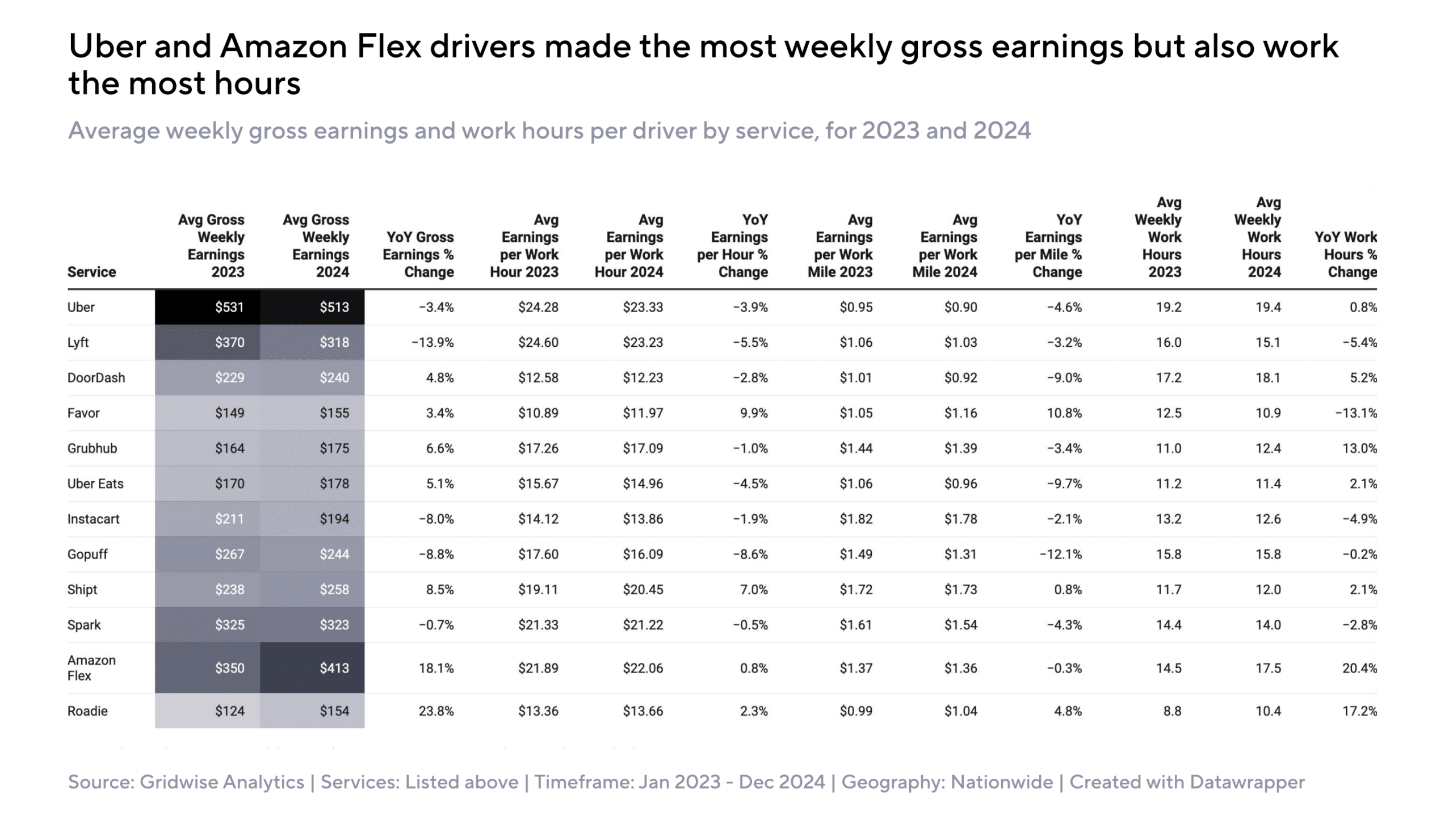
Key Takeaways:
- Drivers who seek stability in their earnings should consider Amazon Flex and Shipt. These platforms have demonstrated consistent growth, making them strong options for drivers looking for predictable income.
- Food delivery services such as DoorDash and Uber Eats are becoming more profitable. If rideshare demand continues to decline, these platforms can serve as effective alternatives or supplements to traditional rideshare work.
- Rideshare drivers should focus on high-demand periods and areas. Since earnings have declined, maximizing surge pricing and targeting locations with steady ride requests is essential for maintaining income.
How Gridwise Helps: Gridwise enables drivers to track earnings across multiple gig platforms, helping them determine which services offer the best pay in their specific market.
Pricing Trends: How Rising Passenger Costs Affect Gig Work
How Passenger Pricing Impacts Gig Drivers
As platform pricing increases, consumer demand tends to decline. When fares become too high, many riders reduce their usage of rideshare services or switch to alternative transportation methods. This shift can have a direct impact on driver earnings, as fewer trips result in longer idle periods and reduced overall income.
In 2024, the median price of a rideshare trip increased by 7.2%, rising from $14.91 to $15.99.
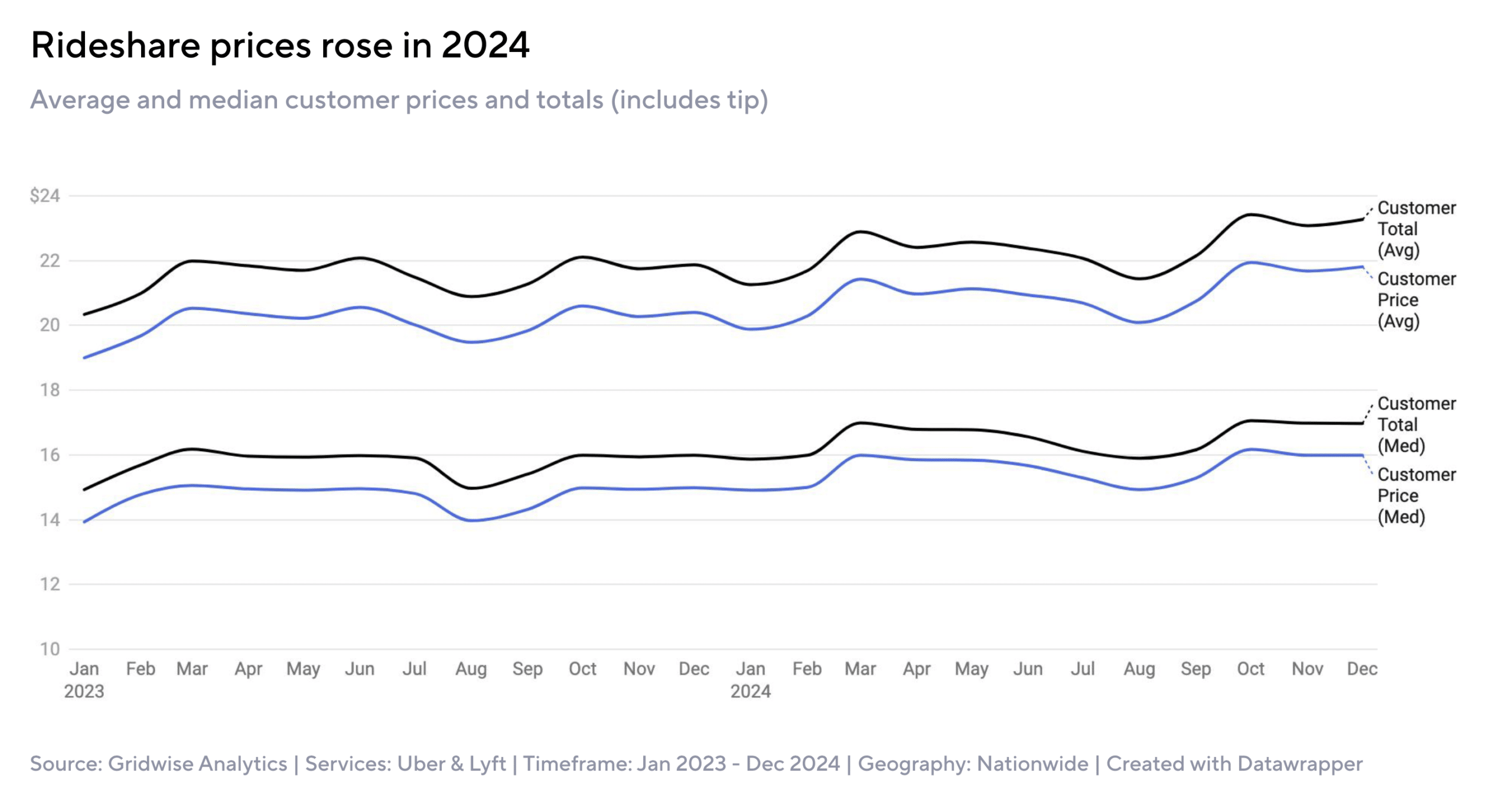
Key Takeaways:
- To maintain steady earnings, drivers should focus on high-demand periods. Riders are more willing to pay higher fares when transportation alternatives are limited, such as during rush hours, major events, or late-night hours.
- Taking advantage of surge pricing and platform bonuses can help offset declines in rider volume. Drivers should monitor when platforms offer increased rates and plan their schedules accordingly.
- Exploring other gig work options, such as food and parcel delivery, may provide greater income stability. Unlike rideshare, these services are less affected by consumer price sensitivity, as customers are often willing to pay extra for convenience.
How Gridwise Helps: The Gridwise app allows drivers to identify the best times and locations to work iso that they can maximize their earnings
Maximizing Tips: What Gig Workers Need to Know
Which Platforms Have the Highest Tips?
Tips are an essential part of earnings for many gig workers, particularly those in food and grocery delivery. And some platforms rely heavily on gratuities, while others offer more consistent base pay. Depending on how you prefer to work and earn, you can decide which structure works best for you.
Tip Income by Platform:
- Favor drivers receive 73-79% of their income from tips, making it the most tip-reliant platform.
- Food delivery drivers on DoorDash, Uber Eats, and Grubhub earn between 50-60% of their pay from tips.
- Rideshare drivers using Uber and Lyft earn only 10% of their total income from tips.
- Parcel delivery drivers on Amazon Flex and Roadie receive the lowest percentage of tips, averaging 4% of total earnings.
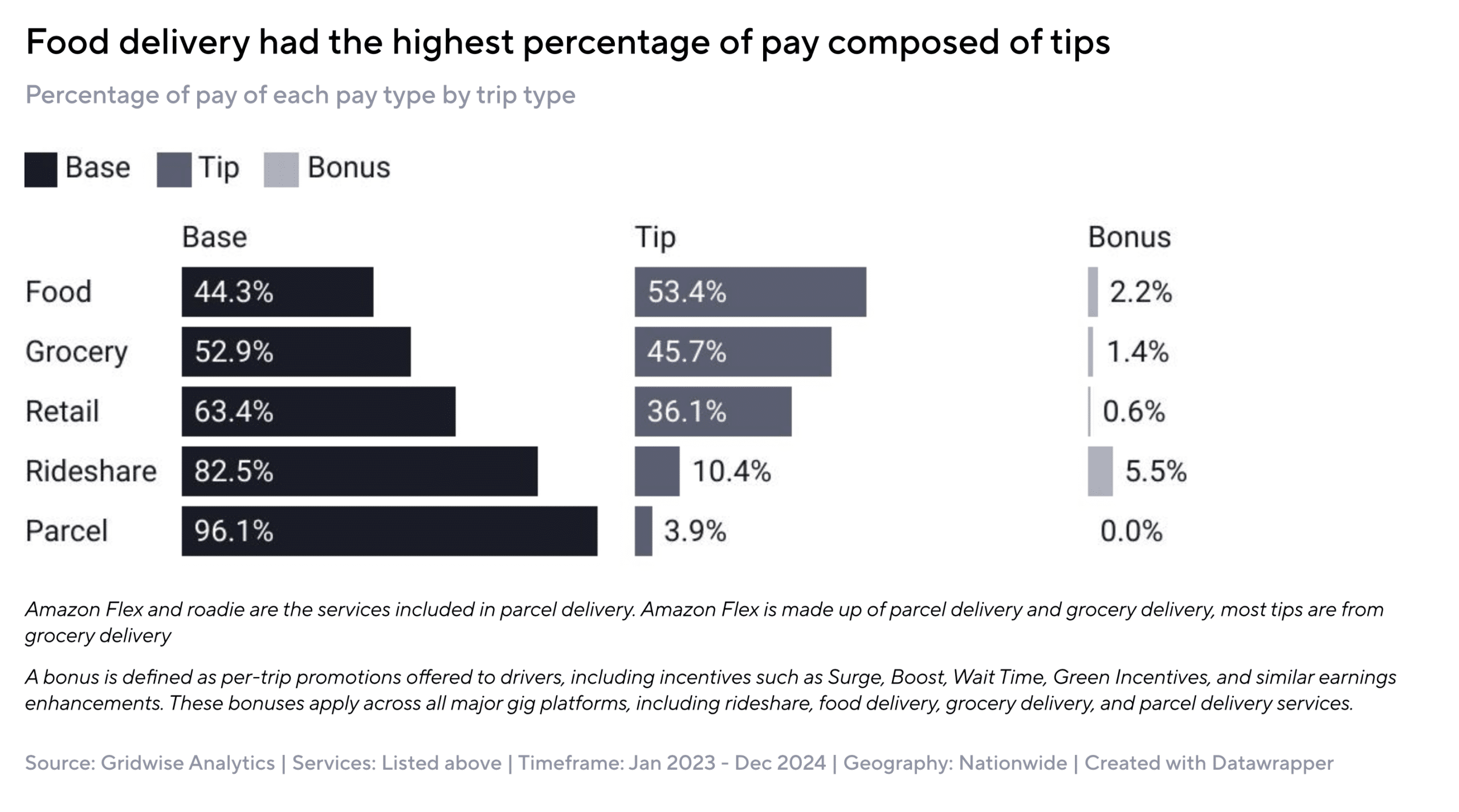
Key Takeaways:
- Drivers working in food and grocery delivery should focus on customer service. Courteous communication, prompt delivery, and attention to detail can increase gratuities.
- Rideshare drivers shouldn't only rely on tips as a significant income source. Instead, they should focus on maximizing peak-hour earnings and incentive programs.
- Parcel delivery services offer a more stable income but provide little opportunity for additional earnings through tips.
How Gridwise Helps: Gridwise allows drivers to track earnings and their local market trends and also analyze which platforms and shifts result in the highest gratuities.
Action Steps to Earn More in 2025
The gig economy is constantly evolving, but drivers who adapt to market trends can continue to earn a good income.
If you would like to maximize your earnings, you can try the following strategies:
- Understand pricing trends by working peak hours and utilizing bonuses to offset lower demand.
- Choose the right platforms based on current earnings trends—Amazon Flex and Shipt provide stability, while food delivery platforms offer tip potential.
- Optimize work hours by strategically scheduling shifts around events, airports, and high-demand periods.
- Utilize multi-apping to minimize idle time and maximize earnings across different platforms.
Next Steps for Drivers:
- Analyze your current earnings and identify areas for improvement.
- Test different gig platforms and shift timings to determine the best mix for your work style and lifestyle.
- Use Gridwise to track earnings, optimize routes, and receive insights on the best times to drive.

How Much Do Curri Drivers Make?
The gig economy has given drivers more ways than ever to make money. While rideshare and food delivery apps dominate the space, platforms like Curri are providing new opportunities for drivers who want to transport construction materials, industrial supplies, and large goods. Curri offers a high earning potential, especially for drivers with trucks and vans, but how much do Curri drivers make? More importantly, what can you do to maximize your income and efficiency? This guide provides a detailed breakdown of Curri driver earnings, what factors impact pay, and how tools like Gridwise can help you make the most of your time on the road.
What is Curri?
Curri is a gig delivery platform that specializes in transporting construction-related materials. It connects businesses with on-demand couriers who use personal vehicles to deliver items such as:
- Lumber, drywall, and hardware
- Pipes, electrical supplies, and industrial equipment
- Large tools and other commercial goods
Unlike Uber, Lyft, or DoorDash, Curri drivers do not transport passengers or food. Instead, they complete scheduled and on-demand deliveries for contractors, suppliers, and manufacturers.
This niche business model creates higher-paying opportunities than standard food or package delivery, especially for drivers with the right vehicle.
How Much Do Curri Drivers Make?
Curri driver pay varies based on location, vehicle type, job availability, and workload. Here’s what the data shows:
- Curri’s per-mile earnings: $1.50 to $1.75 per mile
- Curri’s weekly earnings: Some drivers earn $150–$300 per week, completing 3–4 deliveries that each pay $60–$80.
- Curri’s monthly earnings: Some drivers report earning $1,500–$1,700 per month using just a sedan or small vehicle.
Factors That Influence Curri Driver Earnings
Curri drivers have the potential to make great money, but several factors impact their earnings.
1. Location and Demand
Cities with a high construction volume tend to have more delivery requests and better pay rates. In contrast, drivers in rural areas may have fewer jobs available.
2. Vehicle Type
Your vehicle determines which types of deliveries you qualify for:
- Sedans and SUVs can handle small packages but have lower earning potential.
- Pickup trucks can transport bulkier loads, leading to higher pay.
- Box trucks and vans get the highest-paying jobs since they can move large industrial shipments.
3. Delivery Distance and Load Size
Curri pays drivers per mile, meaning longer-distance deliveries often result in higher payouts. Similarly, transporting heavier or larger loads increases earnings.
4. Time Commitment
According to this YouTuber, Part-time Curri drivers can make decent money, but those who treat it as a full-time gig have the potential to earn over $6,000 per month.
https://www.youtube.com/watch?v=KfDYp8qLOms
5. Market Competition
If more drivers become active in your area, the number of available deliveries may decrease. Staying strategic about when and where you work can help maximize earnings.
How Does Curri Pay Its Drivers?
One of the best advantages of driving for Curri is its fast and predictable payment system. Unlike some gig platforms that pay drivers every week or require manual cash-out requests, Curri ensures that drivers get paid daily, making it a great option for those who need quick access to their earnings.
1. Curri Has Daily Payouts for Faster Cash Flow
Many gig drivers struggle with delayed payments, especially on platforms that only pay out weekly or require long processing times for direct deposits. Curri eliminates this issue by providing daily payouts for completed deliveries.
- Payments are deposited directly into your bank account, reducing the need for third-party payment services.
- Daily payouts help drivers cover fuel costs and expenses without waiting for their earnings.
- This feature makes Curri ideal for drivers who rely on immediate cash flow to manage their financial responsibilities.
If you have ever found yourself waiting days to access your earnings from other gig apps, Curri's same-day payment system offers a significant advantage.
2. Upfront Pricing: No Surprises
Unlike some gig platforms that use complex, variable pricing models, Curri provides transparent, upfront pricing on every delivery request. Drivers see exactly how much they will make before accepting a job, allowing them to make informed decisions about whether a trip is worth their time and expenses.
- Each job displays the total payout, distance, and load details before you commit.
- There are no hidden fees or last-minute adjustments to your earnings.
- This allows drivers to prioritize the most profitable jobs rather than accepting lower-paying offers unknowingly.
For gig drivers who have experienced unpredictable pay on other platforms, this level of transparency makes it easier to plan and optimize earnings.
3. No Waiting for Weekly Paychecks
Many traditional gig platforms operate on weekly payment schedules, meaning drivers have to wait several days to receive the money they earned. This can be frustrating, especially when gas, maintenance, and insurance add up quickly.
By processing payments immediately after completing deliveries, Curri removes the hassle of waiting for payouts. This means drivers can:
- Get paid every day instead of waiting for weekly disbursements.
- Use their earnings to cover expenses in real time without needing savings.
- Maintain better financial stability and budgeting.
For gig workers who rely on consistent, frequent income, Curri’s daily payout model provides a significant financial advantage over platforms that offer weekly or biweekly deposits.
4. How to Make the Most of Curri’s Payment System
To get the most benefit from Curri’s fast payment structure, drivers should:
- Schedule fuel and maintenance costs around payouts to keep expenses manageable.
- Take advantage of peak earning hours to maximize daily deposits.
- Use financial tracking tools like Gridwise to monitor daily earnings and expenses across multiple gig platforms.
By leveraging Curri’s fast payout system, transparent pricing, and daily deposits, drivers can maintain a steady income flow, making it easier to cover expenses, reinvest in their business, and grow their earnings.
How to Maximize Your Curri Earnings
While Curri offers strong earning potential, maximizing your income requires a strategic approach. Earnings can fluctuate based on location, competition, and the types of deliveries you accept. Consider these proven strategies to ensure you get the most out of your time on the road.
Drive smarter, not harder. Gridwise shows you the best times, places, and platforms to drive. Download for free →
1. Drive a Larger Vehicle
The type of vehicle you drive significantly impacts your earning potential with Curri. The platform allows drivers with sedans and SUVs to complete smaller deliveries, but larger vehicles unlock higher-paying jobs. If you own or have access to a pickup truck, cargo van, or box truck, you will qualify for deliveries that involve transporting bulkier and heavier materials, often with better payouts.
- Pickup trucks are ideal for carrying large but manageable loads such as construction materials, pipes, and hardware.
- Cargo vans allow you to transport more oversized items while keeping them protected from weather conditions.
- Box trucks unlock some of the most lucrative deliveries on Curri, as they are needed for industrial and large-scale shipments.
If you currently drive a smaller vehicle but are serious about maximizing your earnings with Curri, consider renting or financing a larger vehicle. The higher pay from larger loads could quickly offset the cost of upgrading.
2. Choose Long-Distance Deliveries
Curri pays drivers based on mileage, meaning that longer deliveries often translate to higher earnings. While shorter, local deliveries may seem convenient, they often pay less per trip. If you are looking to increase your total earnings, consider accepting longer-distance deliveries that take you across multiple cities or even states.
- Plan efficiently: If you are taking a long-distance job, try to find another delivery that brings you back toward your starting location to avoid returning with an empty vehicle.
- Factor in fuel costs: While long trips pay more, always calculate how much gas and time will be required to ensure the job remains profitable.
Curri drivers who focus on longer hauls tend to earn more consistently, especially if they operate in areas where high-paying long-distance deliveries are frequent.
3. Work in High-Demand Areas
Not all locations provide the same volume of Curri delivery requests. If you want to maximize your earnings, position yourself in areas where demand for deliveries is high.
- Urban centers with active construction projects often generate more delivery requests for building materials.
- Industrial and commercial districts frequently require deliveries of equipment and supplies.
- Regions with a strong manufacturing presence may offer consistent long-distance delivery opportunities.
If Curri jobs are slow in your immediate area, it may be worth commuting to a nearby city with higher demand. A small adjustment in your work location could result in more frequent and better-paying jobs.
4. Use Apps to Optimize Efficiency
One of the biggest mistakes gig drivers make is failing to track their earnings, expenses, and routes. Without proper tracking, it is difficult to determine whether you are maximizing profitability. This is where Gridwise comes in.
- Track earnings across multiple platforms: Many Curri drivers also work for Uber, Lyft, or DoorDash. Gridwise allows you to see which platform is the most profitable at different times of the day.
- Optimize driving times: Gridwise provides data on when demand is highest, helping you avoid slow periods.
- Track mileage for tax deductions: Since gig drivers can write off miles driven for work, using Gridwise to track every mile ensures that you maximize deductions and keep more of your earnings.
- Find the cheapest gas prices: Fuel costs can eat into your profits, but Gridwise helps you locate the most affordable fuel options along your route.
By using Gridwise to manage your gig work, you can make data-driven decisions about when and where to drive, ensuring that you earn as much as possible while keeping expenses low.
By following these strategies, driving a larger vehicle, prioritizing long-distance deliveries, focusing on high-demand areas, and leveraging tools like Gridwise, you can maximize your Curri earnings and operate more efficiently as a gig driver.
How Gridwise Helps Curri Drivers Earn More
Curri can be highly profitable, but drivers need the right tools to track earnings, manage expenses, and find the best delivery opportunities. Gridwise is the number one app for gig drivers, helping you:
- Track earnings from Curri and other gig apps (Uber, DoorDash, etc.)
- See peak demand times for better-paying jobs
- Automatically track mileage for big tax deductions
- Optimize fuel costs with the cheapest gas station finder
- Analyze total profit by comparing income vs. expenses
Final Thoughts on Curri
Curri offers a great alternative to food delivery and rideshare gigs. However, tracking your earnings, managing expenses, and optimizing your driving strategy is key, and that is where Gridwise makes all the difference.
If you are serious about making the most money with Curri or any gig platform, Gridwise is your go-to tool.
Work smarter. Earn more.
Whether you drive, deliver, or pick up shifts — Gridwise helps you track earnings, mileage, and performance so you stay in control of your work. Download the app and take charge today.
