Gridwise blog
Tips, insights, and advice to help you earn more and work smarter, whether you do gig work, hourly, or shift work.

How to Make $1,000 a Week With Uber Eats in 2026 (Tips + Hourly Data)
In this blog, we'll explore the strategies and techniques that can show you how to earn $1000 per week as an Uber Eats delivery driver. We'll cover everything from optimizing your delivery zones and schedules to maximizing your tips and customer satisfaction. Whether you're a seasoned Uber Eats driver or just starting out, this guide will provide you with the insights and actionable steps to take your Uber Eats driver earnings to the next level.
Becoming an Uber Eats delivery partner can be a lucrative opportunity, especially if you're able to consistently earn $1000 a week. By understanding the platform, optimizing your delivery strategies, and focusing on customer satisfaction, you can maximize your earnings and turn Uber Eats into a reliable source of income.
We’ll cover the following topics to provide coaching and ideas to help you push your earnings up to that $1000 per week level:
What do Uber Eats drivers do?
Uber Eats drivers deliver prepared food most of the time, but they also might shop for and deliver goods from convenience outlets and grocery stores. The job is pretty simple. You get a request for an order, you drive to the restaurant or store to pick it up, and then you deliver it to the customer. If you already drive for Uber, you can choose to take orders for Uber Eats delivery any time.
If you’re not an Uber Eats driver yet, it’s pretty easy to become one. This Gridwise post tells you what you need to do if you want to sign up and start making money Uber Eats style. Many rideshare drivers welcome the chance to deliver food rather than people. This article from Nerdwallet covers the Uber Eats gig from that angle.
There are some sweet advantages to working with Uber Eats. In lots of cities you don’t even need to have a car. You can use a bike or a scooter, or even walk, to make your rounds. If you do use a car, Uber Eats’ requirements are a lot easier to meet than they are for Uber rideshare driving.
You also have a lot of flexibility. You can shop and deliver convenience items and groceries, but you don’t have to. And, like most driving gigs, you can choose your own hours, and map out the locations where you want to work.
Use Gridwise features When to Drive and Where to Drive to help you figure out what work hours and which specific areas will be the most profitable for you. Real data from real delivery people will show you earning patterns for drivers in your town.
How much can you earn doing Uber Eats?
The honest answer to this question is: basically, as much as you want! It all depends on how many hours you put in and how strategic you are about your gig. Earnings vary from one area to another, as this article from Entrepreneur points out. To give you a baseline, let’s look at the earnings of Uber Eats drivers who tracked their earnings with Gridwise.
Remember that these numbers show us only average earnings. To make $1,000 a week with Uber Eats, you’re going to have to be better than average, and we’ll show you how. For now, though, it’s good to have these figures so you get a ballpark number of where to start.
How much do Uber Eats drivers make?
Gridwise data tell us the following:
- Monthly earnings average around $444.00 per month.
- Gross earnings per trip are between $9.00 and $10.00.
- Tips make up about 50% of most Uber Eats drivers’ income, which amounts to about $225.00 per month.
Is Uber Eats good money? It can be. While there are other gigs that pay more per trip, if you drive for Uber Eats, you’ll always be pretty busy.
https://datawrapper.dwcdn.net/HPAz8/3
You can also see that, unlike many other gigs, tips play a huge role in Uber Eats earnings.

With these numbers as a baseline, what can we say about how to earn $1,000 a week with Uber Eats? As we said in the introduction, it’s going to be a hustle, but it’s really possible. To figure out how to make the most money with Uber Eats, let’s start by looking at how many trips these “average” drivers made each month.
We know that average gross earnings were $444.00 per month, and drivers got around $10.00 per trip. That means they took 44 or 45 trips per month, which breaks down to 11 trips per week. That’s not a lot of Uber Eats delivery, is it?
The fact that Uber Eats drivers averaged so few trips shows us that many drivers use more than one app at the same time. This is called multi-apping, and you can learn more about it in this Gridwise post. If you want to answer the question of how much you can make with Uber Eats, then you need to stick with the app and keep plugging away at those orders. You also need solid strategies, as well as some inside tips and tricks.
How to make the most money on Uber Eats: Delivery driving tactics
Getting to that $1,000 a week with Uber Eats isn’t so hard when you remember that the drivers we saw making about $111 a week were only taking around 11 trips in the same time period. That’s not much at all! If you work the Uber Eats app like a boss, you’ll soon have many more trips than that, easily reaching the number needed to get you to $1,000 a week. Now, let’s get to some tactics you’ll need to make that kind of bank.
- Stay with the Uber Eats app, and track your earnings. Gridwise can easily do that for you. Simply sync your Uber Eats app with Gridwise, and you’ll be able to see how much you’ve earned with Uber Eats, what times were most profitable, and your average hourly pay. Racking up trips with Uber Eats has other benefits, including perks and bonuses that are awarded to top drivers.
- Leverage surge pricing and promotions. Surge pricing is applied when there is a lot of demand. When surge pricing is in effect, many of the trips you make will pay more than usual. Promotions are offered to drivers who complete a given number of trips in a certain time period. High traffic volume days, nights, and times give you these chances to get extra earnings. Challenging yourself to complete the right number of trips for promotions will add to the number of trips you can count on for big bucks, too. Learn more about Uber Eats surge pay, boosts, and promotions in this Gridwise blog post.
- Say yes to doubling up on orders. With Uber Eats, you can get back-to-back orders or receive batched orders. Back-to-back orders happen when you receive a new request while you’re on the way to deliver an original order. The Uber Eats app routes these trips automatically, so you won’t be sent out of your way.
Batched orders are Uber Eats’ way of bundling together orders from either the same restaurant, or two nearby eating establishments. You get money, and trip count credit, for all the orders you complete, plus customer tips, without having to make a bunch of separate trips.
- Turn on the charm and get bigger tips. Being nice really is part of the Uber Eats driver’s job, and getting tips is one way people who drive for Uber Eats make money beyond their basic pay.. Bring along those extra napkins and condiments, use equipment that keeps food and drinks at the right temperatures and prevents spilling, and consider your customers’ needs. If you deliver groceries, be extra careful with delicate items such as bread and eggs.
And, most important, follow your customers’ directions, and stay in communication with them if you are going to be delayed, or if you have questions about their order. This Gridwise post will tell how to get bigger tips as a delivery driver.
- Use even more charm to keep your ratings high. As an Uber Eats driver, you will be rated by the restaurant or store where you pick up the orders as well as the customers who are waiting for the deliveries. This two-way rating system is designed to keep you on your toes, so Uber can keep people satisfied with your service. Don’t worry, you get to rate them, too.
There’s another reason why your rating as a driver is important. It not only keeps you in good standing with Uber; it helps you to qualify for the Uber Eats Pro incentive program. To learn more about Uber Eats Pro, and what it takes to earn perks such as preferred services, discounts, and deals, check out this Gridwise blog post.
Smart business moves that seal the deal
Now that you know how to gobble up the deliveries you need to make $1,000 a week with Uber Eats, it’s going to be a breeze to get there. Let’s make it even easier, with business moves that boost your earnings and shrink your expenses. If you use these, it will also be easy to say yes when people ask, “Can you make good money with Uber Eats?”
Minimize expenses. Avoid racking up big fast-food bills by bringing your own food and beverages. You might not think you’re hungry when you first start your Uber Eats run, but once the aroma of pepperoni pizza, premium cheeseburgers, and piping hot fries start wafting through your car, that might change. Bring a sandwich or other healthy food from home, and buy bottled water in bulk to save tons of cash compared to what it costs to buy single servings.
Maximize tax deductions. Another way to minimize your expenses is to maximize your tax deductions. Start by tracking mileage with Gridwise.

Gridwise App
Gridwise captures every deductible mile you drive, including the distance you cover between the trips your driving app records. Know what expenses you can deduct, and put them to work for you when tax time comes. Learn more about tax deduction strategies in the Gridwise Tax Guide for drivers.
Boost earnings with referrals
As an independent contractor, you’re probably looking for ways to make even more money than you can with Uber Eats. And most gig workers like you enjoy getting passive income. With Uber Eats, there’s a really easy way to do that, referrals!
All you need to do is find friends and encourage them to deliver for Uber Eats. If they make a certain number of deliveries within a specified time, you will get paid for doing nothing more than having them sign up under your referral code! Rates of pay vary by city, so check your Uber Eats app to find out what the current deal might be, and learn more about the referral program on the Uber Eats website.
Also remember: “friends” don’t have to be your best buds. Many delivery people carry cards with a QR code linking to their referral information, so just about anyone you encounter can join Uber Eats and boost your earnings. You could meet a source of passive income at the gas station, on social media, or at your high school reunion. The more you hustle, the more there is to gain, right?
Master the art of self-employment
As an Uber Eats driver, you’re an independent contractor. That means the company isn’t going to withhold your taxes, provide insurance, keep track of your earnings, or tell you about tax deductions. You’ll have to do all these things for yourself.
If you want to maximize your tax advantages, open an official business entity. You can incorporate (create a corporation) or you can work as a limited liability corporation (LLC). You can also work with a DBA (Doing Business As) arrangement, but the corporation or LLC will do a better job of protecting you from liability.
Establishing a corporation or LLC offers better tax advantages than being a sole proprietor. For instance, if you simply collect your earnings into your private account, you’ll be charged self-employment taxes in most states. And paying extra taxes is something we all want to avoid, within legal limits, as much as possible.
Every Uber Eats driver needs to learn about self-employment, and there are some great resources you can review. Check out the CareerOneStop website about self employment which will help explain the basics. You can also check with a professional tax accountant, or look other websites to learn more about actually creating a business.
Scope out your market
Look at the area around you to see where you’re likely to get the most deliveries. Where are all the restaurants? Where might people be more inclined to order deliveries? What hours do you want to drive? What activities might be going on around those times? Think about late-night and after-school times as well as breakfast, lunch, and dinner times.
Be realistic about the potential for your area and aware of new services opening up. For example, in New York, there is already a tab on the Uber Eats app that allows customers to order groceries. In our article about the best food delivery service to work for you’ll see that Uber Eats stacks up well against other delivery companies, mainly because of its potential for expanded opportunities for drivers to earn.
So, is Uber Eats good money? As we said, it isn’t an automatic guarantee that everyone will make $1,000 a week with Uber Eats. Trying out the suggestions we give you here, though, should put you on the right track! Go out there and start stacking up those orders and raking in some impressive earnings!
Get more inside information on Uber Eats in these posts from the Gridwise blog:
- The delivery driver guide: Using the Uber Eats app
- Everything you need to know about driving for Uber Eats
- Uber Eats Pro: What drivers need to know
- Looking for a different gig, part-time or full time job? Check out the Gridwise Job board.
Uber Eats FAQ
How does the Uber Eats platform work for drivers?
Uber Eats is a food delivery service that connects customers with local restaurants and independent delivery partners. As an Uber Eats driver, you'll receive notifications of nearby delivery requests, which you can accept and complete. The platform provides flexibility, allowing you to work on your own schedule and earn money based on the number of deliveries you complete.
What are the requirements to become an Uber Eats delivery partner?
To become an Uber Eats delivery partner, you'll need to meet certain requirements, such as having a valid driver's license, a registered vehicle, and passing a background check.
How can I choose the right delivery zone to maximize my earnings?
Selecting the right delivery zone can significantly impact your earnings, as some areas may have higher demand and better-paying orders. It's important to research and identify the zones in your area that tend to have the most consistent and lucrative delivery opportunities.
How can I take advantage of peak delivery hours and surge pricing?
Understanding peak delivery hours, such as mealtimes and weekends, and taking advantage of surge pricing can boost your earnings. Be aware of when demand is highest in your area and adjust your schedule accordingly to capitalize on these peak periods.
What are some tips for maximizing tips and customer satisfaction?
Providing excellent customer service and going the extra mile to ensure a positive experience can lead to more tips and repeat business. Prioritize communication, timeliness, and attention to detail to keep your customers happy and satisfied.
How can I set realistic weekly goals to reach my $1000 target?
To make $1000 a week with Uber Eats, it's essential to set realistic weekly goals and track your earnings and expenses. Start by determining your target earnings and breaking it down into achievable daily or weekly goals. This will help you stay on track and make adjustments as needed.
What are some strategies for efficient route planning and navigation?
Effective route planning and navigation can save you time and fuel, allowing you to complete more deliveries. Utilize mapping apps and take advantage of features like real-time traffic updates and turn-by-turn directions to find the quickest routes.
How can I balance my Uber Eats deliveries with other commitments?
Develop a schedule that allows you to capitalize on peak delivery hours while still maintaining a healthy work-life balance. Consider using tools like calendar apps to plan your availability and track your hours to ensure you're maximizing your earning potential without sacrificing your personal life.
What are the key considerations for maintaining my vehicle as an Uber Eats driver?
Keeping your car clean and well-maintained is crucial for maximizing your Uber Eats earnings. Regularly scheduled oil changes, tire rotations, and other preventive maintenance can help extend the life of your vehicle and minimize downtime. Additionally, budgeting for vehicle-related expenses, such as fuel, insurance, and repairs, will ensure you're accounting for these costs and maximizing your net earnings.
What are the tax obligations and legal considerations for Uber Eats drivers?
As an Uber Eats delivery driver, it's essential to understand the tax obligations and legal considerations that come with being an independent contractor. This includes properly reporting your earnings, deducting eligible business expenses, and making quarterly estimated tax payments. Additionally, you'll need to ensure you have the appropriate insurance coverage, such as personal auto insurance and possibly commercial auto insurance, to protect yourself and your vehicle while on the road making deliveries.

The Gridwise Job Board: Find Your Ideal Job or Gig Work
Gridwise is an essential assistant app created by gig workers for gig workers. Our mission is to support those engaged in gig work in every way possible. We understand how challenging it can be to deal with income instability, a lack of benefits, and job insecurity that often comes with gig work. The Gridwise app tracks and organizes earnings and expenses, and offers a wide array of discounts, deals, and services that make the lives of independent contractors easier and more rewarding.
We firmly believe it’s possible to make a viable living and create a gig experience that offers flexible hours, variety, and excitement. With issues such as consistent earnings and job security in mind, Gridwise is proud to offer a centralized platform that shows you how to find gig work and secure reliable opportunities. We’re proud to introduce the Gridwise Job Board.
The Gridwise Job Board: Key features
Because Gridwise is dedicated to serving the gig worker community, we’ve filled the Gridwise Job Board with useful features that won’t waste your precious time.
- Comprehensive listings. Find part-time, full-time, temporary, and per-task work. Drive or deliver with your vehicle, utilize an employer’s vehicle, or even find non-driving gig work.
- User-friendly interface. Find the jobs that are right for you with a tap of your screen.
- Verified opportunities. We vet the jobs before they are listed to ensure you’re getting high-quality job postings.
How to get more gig work, seasonal, part-time or full-time jobs with the Gridwise Job Board
Looking specifically for “gig work apps” or “gig jobs near me?” You’re in luck. Our filters and search functions send you directly to the listings you seek.
Here’s how it works.
- Access the Job Board via the Gridwise website.
- Search for jobs by type, location, and more.
- Select the job that interests you, and read all about it.
- Scroll through the description, and if it appeals to you, click “Apply for job.”



Many types of jobs are available. Adjust the search filter to see the full variety of opportunities that will let you cash in. Deliver food, set up catering, do rideshare driving, get paid for doing package delivery, and much more. You’ll find short-term gigs, long-term contracts, and part-time positions.
Perks of the Gridwise Job Board for gig workers
Gig workers who know how to make extra money will appreciate how the Gridwise Job Board lets you multiply your chances of bringing in big earnings. Here’s how:
- Increased stability. Use the Gridwise Job Board to find part-time or permanent jobs in addition to the part-time gigs you already have. Always keep a steady stream of earning opportunities flowing toward you.
- Flexibility and autonomy. Choose jobs that fit your schedule, work around other jobs and family duties, and still leave room for some fun in your life. Discover side hustles to supplement your full-time job, permanently or just for the season.
- Skill development. Find part-time work that lets you use a skill you already have, or try your hand at something new. It’s a smart way to develop a portfolio to showcase what you can do, or even to find permanent employment.
Get Gridwise and stay up to date on the Gridwise Job Board
Gig workers need plenty of information and assistance, and Gridwise is here to give it to you. Download the app and get essential features such as
- seamless earnings tracking
- mileage tracking
- expense recording, including notes
- low-cost and no-cost insurance benefits
- access to affordable medical, dental, vision, mental health, and alternative care
- professional services including legal and financial help
- deals and discounts
- weather, events, and traffic reports
- inside information on where and when to drive
More to know about gig work:

5 Best Mileage Trackers For Gig Drivers
Many drivers ask, “Do I really need a mileage tracking app?” The answer is simple: only if you want to have an accurate count of all the miles you can legally deduct from your taxable income! You might think your rideshare or delivery driving app has got you covered. After all, they do quite a good job of logging the miles you drive while you’re on a trip or delivery. But, if you want to have the best app to track mileage for Uber, Lyft, Doordash, Instacart, or the other apps you may use, you need more. Why is that?
Without a separate tracker, you’re missing the miles you drive in between pings. Did you realize that all the miles you drive, from the moment you begin your shift until it’s over (as long as you don’t drive several miles on a break to hang with your friends), are tax deductible! That means you need something besides your driving app to keep an accurate count of your travels. Read this Gridwise post to see how important it is to keep track of every deductible mile.
You won’t be surprised to hear that there’s an app for tracking miles. In fact, there are several of them. Here, we’re going to tell you about five top mileage tracking apps, and help you figure out which one is best for you.
Before we get to the list and identify the best mileage tracker app, let’s clarify what exactly a mileage tracking app is. According to G2.com’s technology glossary, mileage tracking is done for the purpose of keeping a log of mileage that is either reimbursable or tax deductible.
And yes, of course you can track your miles simply by taking readings on your odometer. But are you really prepared to account for how many miles you drove for personal reasons and subtract them from the total to get your business mileage? Even if you can remember all that and do the arithmetic, if you want an accurate reading of the miles you drive for business, and can therefore deduct, a mileage tracking app will save you a lot of trouble and prevent you from making costly errors.
Plus, as a gig driver, you have specific needs when it comes to a mileage tracker. Ideally, you’d be able to handle mileage tracking and several other functions all in one app. It can be maddening enough to deal with driving apps, particularly if you’re an avid multi-apper. You would want your mileage tracker app to help you keep account of other aspects of your business, including income, expenses, and inside information about the art of gig driving.
Not all mileage apps are equal, to be sure! Let’s look at five of the best apps to track mileage and figure out which is the best app to track mileage with Uber and Lyft, or what mileage tracker app is best for DoorDash.
1. Zoho Expense

First up is Zoho Expense, which does exactly what its name says. This app is designed to allow companies to give employees a uniform way to create and submit expense reports. It can be used by individuals, including gig drivers, as well.
It includes a mileage tracker, as well as features that let you track other deductible expenses, including the ability to scan and record receipts.
Available on Android and Apple: Yes
Ratings: 4.8 stars on App Store, 4.7 stars on Google Play
Free Version: Yes
Subscription price: $3 per month, billed annually
Created specifically for gig drivers: No
2. Quickbooks Online

Quickbooks Online is a cloud-based app that allows you to track your mileage, earnings, and expenses. The information you enter can then be used to generate various reports that prepare you for tax time. It also allows you to create graphs that illustrate your cash flow, and includes a receipt scanner so you can instantly record deductible expenses. Quickbooks is popular, highly reliable, and designed mainly to help people keep track of their small businesses.
Available on Android and Apple: Yes
Ratings: 4.7 stars on App Store, 4.4 stars on Google Play
Free version: 30-day free trial
Subscription price: $15 per month for basic version if purchased for 3 months or more
Created specifically for gig drivers: No
Source: quickbooks.intuit.com
3. Shoeboxed

Shoeboxed started in 2007 as a service for scanning paper receipts into digital form. Now the app offers a free mileage tracker and has enabled users to scan receipts directly. It touts itself as the best mileage tracking app for DoorDash, but there are some elements missing that Dashers might like to have. While it provides features that record your expenses and prepare you for tax season, it doesn’t automatically track your earnings. The mileage tracker has a system where you can drop pins along your routes to make the tracking more precise, identifying those legs of a trip that you make for business purposes. The mileage tracker is “free” once you sign up for the basic version.
Available on Android and Apple: Yes
Ratings: 4.5 stars on App Store, 2.3 stars on Google Play
Free version: No
Subscription price: $18 per month for basic version
Created specifically for gig drivers: No
Source: blog.shoeboxed.com
4. Stride

This free mileage tracker does a fair job of keeping track of the distances you rack up while gig driving, but it doesn’t automatically track earnings. It can be a big help, though, in tracking your expenses. You can link Stride to your bank account, and it will automatically scan your expenses to identify items you can potentially deduct. The app is totally free. This could make it the best free mileage tracker app, but there is a small price to pay. The app will persistently push you to consider various insurance plans that they are affiliated with. If you don’t mind that, this is a solid mileage tracker, even if it doesn’t track your earnings.
Available on Android and Apple: Yes
Ratings: 4.8 stars on App Store, 4.6 stars on Google Play
Free version: Yes
Subscription price: None. The app is free.
Created specifically for gig drivers: No
5. Gridwise

Gridwise has a free mileage tracker and free features that record your income and expenses. It gives you access to insurance and benefits, as well as insights about the best times and places to make the most money while gig driving. The Gridwise mileage tracker captures all the miles you drive while you’re on your driving shift, and it can be used if you have other trips you need to make which qualify as business travel.
Drivers love it because it is geared toward the needs of rideshare and delivery workers, providing free information about airport departures and arrivals, event start and let out times, weather, traffic, and more. The Gridwise Plus subscription adds value by providing additional insights and reports, discounts on benefits, the ability to export data in .csv format,, and more.
Available on Android and Apple: Yes
Ratings: 4.9 stars on App Store, 4.6 stars on Google Play
Free version: Yes
Subscription price: $9.95 per month for Gridwise Plus, or $95.99 per year (a $23.41 savings)
Created specifically for gig drivers: Yes!
What is the best mileage tracking app?
Now that we’ve checked them all out, we’re positive about the answer to that. Hands down, it’s Gridwise. Are we biased? You bet we are! But drivers love it too. Gridwise is the best mileage tracker app, and so much more. So many of the features are free, and the subscription to Gridwise Plus will pay for itself with additional insights to boost your earnings and deeper discounts on products and services.
Most important, Gridwise is designed specifically for gig drivers by experts who were once gig drivers themselves! Knowing what gig drivers need is a crucial step in creating an app that rideshare and delivery drivers can really use! Here are a few of the features, besides mileage tracking:
- seamless earnings tracking
- automatic, on/off toggle and manual mileage tracking
- mileage categorization
- airport, traffic, weather, and events information
- insights into where to drive and when to drive
- reports showing earnings across the platforms you use
- discounts on countless products and services for drivers
- additional resources for finding side gigs
- an informative and comprehensive blog
- affordable benefits, including insurance, medical, dental, and alternative practitioner discounts
- a community of drivers just like you
Don’t settle for just any app. Get the best mileage tracker, and so much more, from Gridwise!
Should Gig Drivers Try Delivering For Amazon Flex? What Are Flex's Perks?
Perks are a part of most driving gigs, but we all know that some are better than others. There might even be some programs that are so good, they tip the scales so everybody wants to work there just for the perks!
Is Amazon Flex one such company? In this post, we’ll look at what it’s like to deliver with Amazon Flex, with a special focus on Amazon Flex Rewards. We’ll look at the experience of working with Flex and how the rewards program affects driver satisfaction and Amazon Flex driver pay.
Here’s how we’ll size things up:
- The basics of being an Amazon Flex driver
- How much do Amazon Flex drivers make?
- Amazon Flex rewards and other perks
- How to make more money with Amazon Flex
The basics of being an Amazon Flex driver
You may not always notice it, but you’ve most likely benefited from the work of a whole bunch of Amazon Flex drivers. Doing their duty by going the “last mile” to deliver packages for Amazon, Flex drivers use their own vehicles. They are, like all gig workers, independent contractors.
Flex has been around since 2015, but Amazon ratcheted up the pressure to recruit more Flex drivers in 2019, when the company changed its Prime delivery service from two days to one. The pandemic made Amazon Flex drivers even more valuable, as a groundswell of customer orders created a demand for drivers to get them to their destinations.
There are a few different ways Amazon Flex drivers can work, but the most common one is by choosing “blocks” and delivering packages from a distribution center. You can read more about Amazon Flex, including what it takes to become a driver, in this Gridwise blog post.
Flex drivers choose blocks of time when they are available to drive and deliver packages. They report to the Amazon distribution center or store and wait their turn, often in long lines. When they get to the front of the line, they receive an allotment of packages to deliver within the time windows of their blocks.
Drivers say they are under a lot of pressure at times. There can be large loads of packages to deliver on routes that take them through high traffic areas. This makes their task more than a little daunting. The stress increases as the end of the time block approaches, especially if not all the packages have been dropped off. Basic needs such as eating, staying hydrated, and finding places “to go” have to be pushed aside so all the packages can be delivered before the deadline. Read this CNBC piece and watch the 2019 video for more insight into what driving for Flex can be like.
Every gig driving job has its good and bad points, so even though working for Amazon Flex can be a bit more stressful than it appears on the surface, it has its definite pluses, too. One of these is Amazon Flex driver pay.
How much do Amazon Flex drivers make?
Amazon claims that Flex drivers make as much as $18–$25 per hour, and Gridwise figures confirm that this is pretty close to reality. In this Gridwise blog post, you can see that median Flex hourly pay rose from $21.78 to $23.35 over the first three months of 2022.
How much do Amazon Flex drivers make a week? That depends on how many blocks drivers take on in a week. Because there can be considerable distances between the driver’s home base, the distribution center, and the delivery route, not all drivers can work more than 3 or 4 hours a day.
The next logical question is, how much do Amazon Flex drivers make a month? Gridwise figures for Q1 2022 show the answer to be encouraging. In March 2022, Flex drivers across the nation pulled in an average of $419.50 for the month. However, this figure shows that Flex drivers, by and large, are working mostly part time. If we take the monthly figure and divide it by the hourly figure of $23.35, we find that drivers would be working around 18 hours per month.
While Amazon Flex hourly earnings are solid, the model of working 3 or 4 hours at a time, and delivering packages to destinations that could lead drivers to rack up a great deal of mileage, could mean they don’t have time to do more than one or two blocks per day. It’s quite possible that many Flex drivers work this gig as a side hustle, or as part of a more comprehensive gig driving strategy that includes other modes of making money, such as rideshare or food delivery.
There’s more than just the straight earning rates to consider, though. Just what else does Amazon Flex have to offer?
Amazon Flex rewards and other perks
Amazon Flex drivers are eligible to earn points and get perks, just for completing blocks and making deliveries. Drivers must keep their standings high, by showing up for their blocks and delivering their packages. Drivers will make more points per block and per delivery, as their standing gets higher. Get specific details about how rewards points are allocated here.
The rewards available to drivers include:
cash back on purchases with the Amazon Flex debit card. Drivers can earn up to $500 cash back per month on fuel and EV charges, groceries from Whole Foods, items from amazon.com, and anything else that can be purchased with the debit card. They can deposit funds into the account linked to the Amazon Flex debit card, and also select the card as the preferred payment account for depositing Flex earnings. Percentages for cash back deals increase as drivers earn more points and reach higher levels.
preferred scheduling. Drivers can take more control over their time by earning preferred scheduling privileges. As they earn more points and rise through the levels, extra time is allocated for choosing blocks. They will also gain access to more blocks that meet individual block preferences as they earn more points.
discounts on gas, auto maintenance, and merchandise. As they continue to climb up the levels, drivers become eligible for an increasing number of discounts on items they need, as well as other consumer goods and services. Amazon says there are literally thousands of discounts available, more than we are able to list here, for sure.
The Amazon Flex Rewards Program gives drivers some perks that could be quite worthwhile. Still, the rewards and discounts available are not “free.” They’re linked to driver performance and delivery volume. If you only drive occasionally for Amazon Flex, it will be hard to get much from the program.
If you’re a regular, though, there are plenty of possibilities for being paid back for your hard work. The rewards program is a good way for Amazon Flex to make up for the fact that drivers don’t get tips or benefit from the surges and challenges rideshare and delivery drivers enjoy.
Besides the rewards program, how can Amazon Flex drivers add to their earnings?
How to make more money with Amazon Flex
The best thing to do is find ways to minimize your expenses. Start by getting the best Amazon Flex mileage tracker there is—Gridwise! Gridwise tracks your miles for tax deduction purposes, and also lets you enter all the expenses you can write off as a driver. Gridwise tracks your earnings, too, so you can see how much you’re earning, and how much your expenses might be eating into your income.
You’ll get all these services that make your Amazon Flex gig easier, too:
- traffic alerts
- information on better times of day, days of the week, and neighborhoods to deliver in
- deals and discounts on gas, insurance, car maintenance, and more
With Gridwise, you get our rewards no matter how many deliveries you’ve done or how quickly you’ve completed them. Gridwise is a free app that offers rewards, discounts, and deals to all its drivers. Download the app and see for yourself.
Get the free Gridwise app now!

5 Common Insurance Mistakes Rideshare and Delivery Drivers Make
Think talking about insurance is boring? Well, it might be but it’s also a critical part of your success as a driver. It could even wind up affecting your financial survival. Unless you’re in a unique situation, as a gig driver you’re an independent contractor. There is no such thing as rideshare driver health benefits or delivery driver sick pay.
Insurance isn’t as bright, shiny, or technologically appealing, but it’s every bit as important to your gig driving business as your car or phone. You also might want to avoid talking about insurance because it brings up pictures in your mind you’d rather not see. An accident, a protracted illness, and death are not scenarios we like to think about, but yet, we need to plan for them in the event that they occur.
There really isn’t an option. Drivers have to deal with getting themselves covered. Some of us wish to avoid that fact so badly, we make huge missteps. In this post we’re going to shine a halogen lamp on those mistakes, so you won’t wind up suffering from them. Then, we’ll give you practical solutions to address all your delivery and rideshare insurance needs.
Here’s how we’ll line things up:
- Insurance: What’s the price for peace of mind?
- The 5 big mistakes you can’t afford to make.
- Gig driver benefits designed to fit your needs—from Gridwise.
Insurance: Worth the peace of mind
Whether or not you’re convinced that insurance is a basic need you can’t do without, the rest of the world certainly is. Remember when you signed up to drive for your rideshare or delivery company? You had to prove that you had basic insurance for your vehicle. Without it, you wouldn’t even be allowed to take your first ride or order. In fact, if you don’t have basic vehicle insurance, you are in violation of state motor vehicle laws that require every vehicle to be insured.
You might think that basic policy, plus what you get from your company, is enough for you to get by, but that’s not the case. When you consider that all your basic auto policy covers is damage to your and other people’s vehicles that are involved in an accident, and some of the cost of injury or death, you’ll realize you’re not fully covered. In fact, you could start to feel as though you’re scantily clothed.
Let’s start with a look at your work life and then get personal about insurance concerns. What happens if you can’t work due to an injury or illness? Or how will you get treatment for an ailment that’s making it impossible for you to drive? Will your family still be able to afford groceries if you should have a fatal accident? Is your mortgage insured? Okay, so you rent your living space. How about your belongings—what will you be left with if they get stolen or damaged?
Life happens, and when bad things in life occur, we need to be prepared for them. As we pose all these questions about what “the worst” might look like, it’s easy to see why people are put off talking about insurance. It can be pretty complicated, in addition to not being the most riveting topic we’ll ever discuss.
Due to how complex insurance, and life, are, it’s easy to make mistakes. You will want to avoid that for sure, so let’s look at 5 of them now.
The 5 big mistakes you can’t afford to make
Mistake #1: Assuming “It will never happen”
There’s one thing we haven’t mentioned yet. Insurance can be expensive. You already know how much money it takes to insure your vehicle. When you start getting into your own body, your eyes, your teeth, and your home, the total insurance bill can get blown sky-high very quickly. With all that in mind, you still have to calculate how much it would cost if you fail to get insurance.
Even those of us who are in perfect health have plenty of exposure. Let’s say you decide to go rock climbing with your buds, and you come down from the climb with a torn rotator cuff. Do you have any idea how much the fix for that can cost? The X-rays and doctors’ visits alone will be in the thousands. If they recommend surgery, you’d better hope you have quite a stash set aside, or that you hit the lottery. Five-digit hospital bills are a given, not a remote possibility.
There will be more than just physical pain, because you won’t be able to drive with an injury of that nature. In fact, recovery will most likely dictate that you avoid driving for several weeks after your surgery. You’ll find more details about health insurance coverage in this Gridwise blog post.
Going without insurance could wipe you out in no time at all. Be fiscally responsible and get the coverage you need, but find reasonably priced options that won’t stretch your budget.
Mistake #2: not comparing policies
Those insurance ads we see streaming all the time keep trying to make us laugh, and some of them really are pretty funny. Nonetheless, you don’t want to base your insurance purchase on which company has the most clever ad writers.
Instead, you need to do sound research into the policies you’re considering buying to see how much money you need to pay for a given amount of coverage. Shop around. Even if you use a broker, who’ll offer you what might seem to be the “best” policies for you, insist on getting a chance to inspect the available policies on your own, and see if you agree with the broker’s assessment.
Mistake #3: buying too much insurance
You know what they say about reading the fine print when it comes to making a purchase or business deal of any kind. You have to do it, if you expect to be absolutely certain you’re getting what you asked for and not a bunch of extras you’ll most likely never need.
There is such a thing as being tricked into buying too much insurance and being forced to pay for it. Check through all the services you already have, even the ones you get through your rideshare or delivery app. For example, most companies offer roadside service. You won’t want to pay extra for that service in your basic car insurance. The same goes for home insurance. Why pay for water damage to your home in a separate policy when your homeowner’s insurance already has that covered?
Mistake #4: not buying enough insurance
When insurance sales reps try to get you to buy what they’re selling, you might get saturated to the point where you start to say no to everything they offer that goes beyond the basics. Don’t let your desire to stick to the bare bones of 1099 car insurance prevent you from getting coverage that could save you from falling into a financial abyss.
A good example of this is gap insurance on your auto policy. What happens if after even a fender bender your car gets “totaled?” There are lots of times when the insurance company determines that paying to fix the damage is costlier than replacing the vehicle. They merely pay you what you’d get if you were to sell it. That doesn’t sound so bad, but there’s something you might not be considering.
If you haven’t paid off your auto loan, there’s a possibility you will owe more money to the bank than the car is worth. If a $29,000 car gets totaled after an accident, you’re not going to get the full MSRP that you paid and/or borrowed. Your car loses value through depreciation the minute you drive it off the lot. When you rack up mileage and wear and tear as a gig driver, the value will plummet faster than you might want to believe.
If your car gets valued at $15,000 and you still owe $10,000 to the bank, and you don’t have gap insurance, you’re stuck paying the difference. Gap insurance covers the money you still owe and saves you from paying on a car that’s going to be sold for parts to the highest bidder.
Gap insurance, and other policies of this ilk, sound like something your agent or broker might be sneaking in to make you pay more. But if you find yourself in the scenario we just described, you’ll be pretty glad you have it. Learn more about delivery and rideshare insurance in this Gridwise blog post.
Mistake #5: neglecting the big picture
Insuring your vehicle and other possessions and buying coverage to pay for health care costs are smart things to do, but there’s something that could be even more important: life insurance. You are worth money to the people who depend on you and love you! They will suffer a financial as well as an emotional loss should something happen to you. It’s also worth mentioning that any debt (student loans, auto loans, etc.) are passed on to family members when you die. Life insurance can go toward covering that debt. Even if you have no dependents, what will happen upon your death? Who will cover the funeral costs and make sure your loved ones won’t be left digging deep into their own pockets?
Life insurance is something that makes a whole lot of sense. There are two types: whole life and term. Whole life is more expensive, and it’s kind of like a savings account. You contribute to the policy, and you’re covered for a given amount in the event “the worst” happens to you. At any time you can cash in the policy and get back the money you contributed, even if you’re still alive and well. (You won’t be insured anymore, however.) Term insurance is cheaper, but you or your loved ones won’t get any payments of any kind until after you’ve passed. Another thing to consider is that term policies have age limits. If your policy only pays if you die before 65, and you die at 66, your dependents won’t receive anything. Whole life covers you no matter what age you die at.
You can talk to a broker to see which kind of life insurance makes sense for you, but by all means, this kind of coverage is something everyone needs to have. Life insurance is not a frivolous expense. Ask anyone who’s had a loved one pass away and you’ll find out. Fortunately, even as a gig worker, it’s possible to get life insurance and all kinds of other coverage at low cost! With Gridwise, you get a basic safety net of at least $5,000 in coverage at no cost to you.
Gig driver benefits designed to fit your needs—from Gridwise
Gridwise gears its services to drivers, so it’s not surprising to find that Gridwise has ways to cover everything from health care to accidental death and disability. In partnership with Avibra, a provider of affordable, accessible, and convenient financial and wellness policies, Gridwise Dollar Benefits gives you easy, inexpensive access to insurance of all sorts. You don’t have to buy a big, expensive package of policies, either. You can customize your benefits to meet your individual needs.
Even better, the very name Gridwise Dollar Benefits has a good reason behind it. You can get benefits for as little as $1 per week! Here is a list of the insurance services made possible through a partnership between Gridwise and Avibra at this amazingly low cost.
- No-cost life insurance
- $5,000 in benefits becomes available to you the moment you join. Gridwise Plus users get $10,000 in coverage instantly. This gives your loved ones access to cash should the worst happen.
- Roadside assistance
- Towing, emergency tire changes, lockout, battery, and fuel delivery service.
- Telehealth
- Access to 24/7 unlimited virtual doctor visits.
- Dental
- Discounts on dental procedures, orthodontics, and other specialties.
- Vision
- Reduced prices for eye exams, eye care and eyewear—a must for drivers!
- Critical illness insurance
- $2,500 cash for an illness that’s covered by the plan.
- Medical expense insurance
- $1000 emergency cash in case you’re injured in an accident.
- Accidental Death & Disability (AD&D) insurance
- $20,000 in emergency cash to cover expenses over and above medical bills.
- Life insurance
- Add on to the free policy to provide cash for those you might leave behind.
- Teletherapy
- 30-minute virtual therapy sessions
- Chiropractic services
- 30-50% discount on chiropractic services nationwide
- Alternative medicine
- 10-30% discount on alternative medicine services nationwide
- Identity theft protection
- Prevent ID theft and get full restoration of your identity
- Fitness & nutrition
- 20,000+ free streaming exercise, nutrition, and stress management classes
Signing up for Gridwise Dollar Benefits is some of the best Uber or Doordash driver advice you can get! In fact, Gridwise Dollar Benefits can actually make talking about and getting insurance interesting, and possibly, even exciting! What are you waiting for? Sign up for Gridwise Benefits now. It’s easy.
Open your Gridwise app, go to the Benefits tab, then tap the “Dollar Benefits” filter at the top. From there, you’ll get everything you need to start your coverage right away.
With Gridwise Dollar Benefits, plus all the amazing Gridwise features that make gig driving easier and more profitable, there’s every reason to make sure, if you haven’t already, to do the smart thing!
Get the coverage you need today!
DoorDash vs. Grubhub: Which is Better For Drivers in 2023
What makes one food delivery app better for drivers than another? There are lots of things to consider, and in this blog post we’ll cover them. You might be new to gig driving, or maybe you’re ready to switch up to try a different food delivery app. In any event, you’ll have to make up your own mind about who wins the DoorDash vs. Grubhub contest. We just want to present some facts and background in this post that will make that task a whole lot easier.
Here’s what we’ll consider:
- DoorDash driver pay or Grubhub driver pay: which is better?
- Getting started: Which company makes it easier?
- Gearing up as you get going
- Business strategy: how to make big profits with DoorDash and Grubhub
Grubhub driver pay or Doordash driver pay: Which is better?
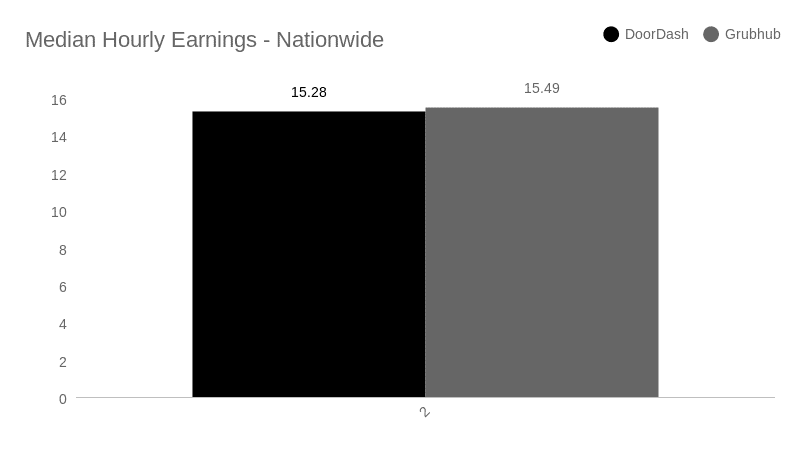
The latest figures from Gridwise show that both DoorDash and Grubhub offer decent earnings. The fairest comparison is probably gross earnings per work hour. There’s literally almost no difference, with Doordash showing an hourly figure of $15.28, and Grubhub coming in at $15.49.
Source: Gridwise
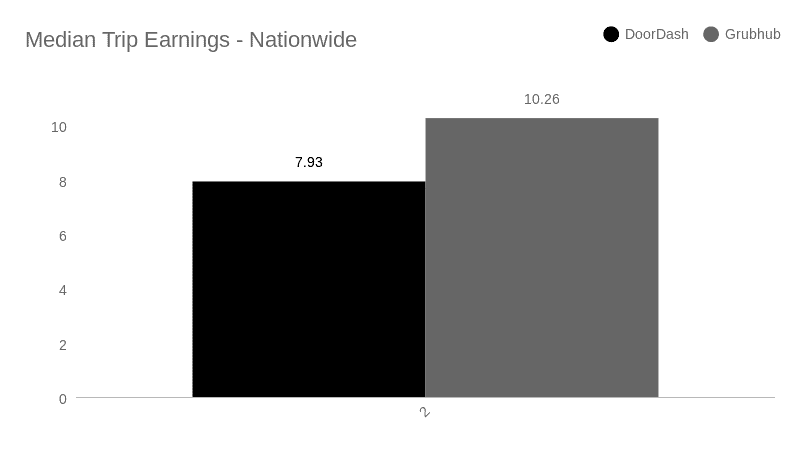
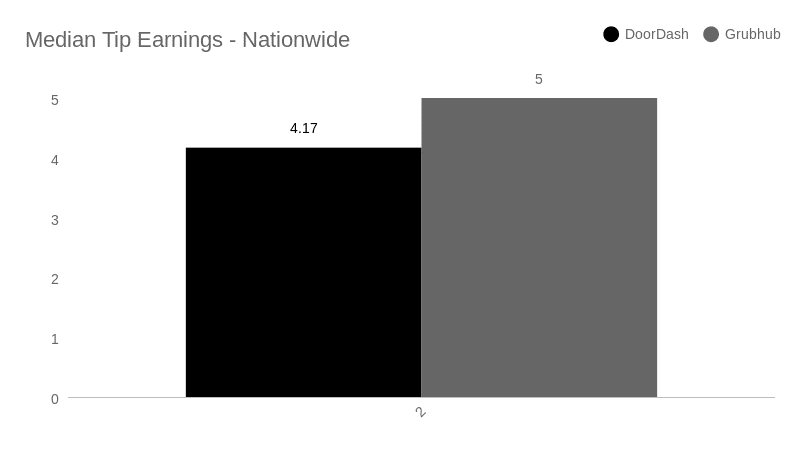
The numbers for gross earnings per trip show Grubhub with a substantial edge over Doordash, $10.26 vs. $7.93 per trip, respectively. Tips also look better at Grubhub, where the median tip earnings per trip amounted to $5.00, while average Doordash tips came in at $4.17.
Source: Gridwise
Source: Gridwise
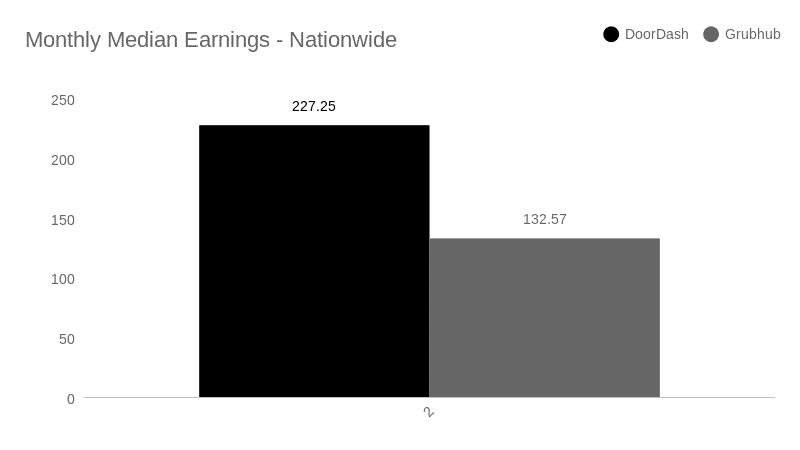
When it comes to gross monthly earnings and referrals, though, Doordash has it all over Grubhub. Dashers averaged $227.25 per month, while Grubhub drivers yielded only $132.57. What’s with the difference in the data? It might be that there is more business for DoorDash than for Grubhub. It may also be showing us that drivers could tend to work more hours for DoorDash than they drive for Grubhub.
Source: Gridwise
Referrals are another way for drivers to make money, and there’s a big difference there. Grubhub doesn’t offer money to drivers for referrals in most cities. DoorDash, on the other hand, has a rather strong referral program.
How much does a DoorDash driver make with referrals? It depends. Drivers receive bonuses for referring drivers who made a requisite number of deliveries in a given period of time. The bonus amount varies, based on the offers DoorDash makes at different times. Most likely, these would be based on the company’s need to attract new drivers.
We won’t drill down into regional data here, but it’s true that historically, DoorDash and Grubhub each dominated markets in different areas of the country. Yet, in the last year, DoorDash has overtaken Grubhub just about everywhere. According to this article from Visual Capitalist about which companies dominate the food delivery business, DoorDash commanded 53% of the food delivery business in 2021, while Grubhub had just 21% of market share that year. Industry specialists credit an aggressive marketing strategy and superior technology for DoorDash’s dominance.
This difference, in how much of the market each company has, can hold different meanings for drivers. You may want to drive for DoorDash because it’s the biggest company, but there might be less competition in your market area if you were to drive for Grubhub instead. Do some digging, and use the Gridwise features Where to Drive and When to Drive to see which app is making more money for drivers in your area.
Now that we’ve found out some things about the financial factors, let’s look at other considerations to keep in mind when you decide whether Grubhub or DoorDash is the best app for you.
Grubhub vs Doordash: Which company makes it easier?
While it’s good to discover the answer to “How much does Doordash pay an hour?” and to find out all the facts about Grubhub driver earnings, there’s more to the story. For starters, it’s important to know exactly how to become a DoorDash driver and learn about the ins and outs of how to become a Grubhub driver.
What are Grubhub requirements for their partners (aka drivers):
- a “people person”
- a positive attitude
- excellent communication skills
- punctuality
- age 18 or older, and 21 or older in Las Vegas
- ownership of an iPhone with iOS 11 or higher, or Android with 5.0 or higher
- data plan
- checking account for direct deposit
- clean criminal and driving records
- for car delivery: valid driver’s license (2 years or more if 19 years or older; 1 year or more if 28 years or older), plus auto insurance
- for bicycle delivery: valid state ID, driver’s license, or US or global passport
What does Doordash require for their dashers (aka drivers):
- proof of being 18 years of age or older
- an iPhone or Android phone (preferably not one that has been “jailbroken” or “rooted”)
- valid domestic driver’s license
- auto insurance (if using a car)
- bicycle, motorcycle, or scooter in certain cities
- clean driving and criminal records
It seems that DoorDash is somewhat less selective than Grubhub, at least at first glance. Let’s look at how to sign up with each of them to get more insight.
How to sign up to be a Grubhub driver
For Grubhub, you can apply through the website on your computer or a mobile device. While you’re waiting for the company to confirm that you meet the basic requirements, including passing the background check, there are one or two more steps.
First, you’ll download the app. There’s no interview process to determine if you’re a “people person” or have a positive attitude, but you will be asked to undergo an online onboarding process that teaches you how to use the app, how to treat customers, and how to be as efficient as possible about making deliveries.
Once you prove you’ve completed the videos, and have been fully approved, you will then wait for your official GrubHub insulated bag and Grubhub driver card to arrive in the mail.
How to sign up to be a Doordash driver
DoorDash also offers the ability to sign up through the website. Once you sign up, you can download the Dasher app and wait for your application to be processed. Your wait might seem less excruciating if you complete the onboarding videos in the meantime. Similar to the videos presented by Grubhub, these will give you the information you need to be a successful Dasher. Once you’re approved, DoorDash will send along your thermal delivery bag and your Dasher Red Card.
Acceptance times vary depending on the speed of the background check process. Usually you can anticipate approval within a week to ten days. That’s pretty much all you need to get started, but if you want to be successful, there are some more measures you’ll need to take.
Gearing up as you get going
We mentioned that the companies provide you with a thermal bag for carrying food, but we’d be lying if we told you that’s all you need. That little bag won’t hold much. It won’t prevent spills, either. If you want to do this job right, you’re probably going to find that you need more equipment. This can include
- extra insulated bags
- beverage holders
- crates or boxes to prevent spills
- extra napkins and condiments
- a flashlight or headlamp
- safety equipment for your vehicle
- your own food and beverages so you don’t go hungry and can stay hydrated
While much of this gear isn’t exactly essential, it can certainly help to raise your level of professionalism. It’s hard to get good ratings from customers if food spills out the side of a container, or a plastic bag splits from the weight and wetness of an upset cola drink. It’s also wise to protect your own vehicle from damage. Food and beverage spills can create unintended petri dishes where bacteria and mold can fester—not to mention unpleasant odors!
If you’re serious about delivery driving with DoorDash or Grubhub, getting the right equipment is crucial. Read this Gridwise post for suggestions that will help get you geared up right.
Business strategy: how to make money with DoorDash and Grubhub
Once you have signed up with your app of choice, have been approved, and have the right equipment, you’ll need to create a winning strategy. Delivery driving isn’t getting any easier in 2022. While business is still brisk, there’s more competition, and the costs of running a gig driving business are higher than ever.
That’s why you can’t just “play at” being a delivery driver. You need to treat your driving gig for what it is: your source of income, and—a business! Here are some things you need to do.
- Keep your driving earnings separate from your personal accounts.
It’s always smart to separate your business income from your personal assets. Having an LLC does that for you. If you’re shy of the red tape that you think starting an LLC might entail, don’t worry. There’s a service that cuts right through it all. Nearside Sprout offers an efficient, easy, and inexpensive way to set up a Limited Liability Corporation (LLC) that you can use to minimize tax exposure and liability.
With Nearside Sprout, all you have to do is fill out a simple form. From there, all the mind-numbing paperwork will be taken care of, and you’ll have a real, no kidding, business entity of your very own. Sign up with Nearside Sprout and get real about your business.
- Decide when and how much you’ll work.
Will you work just a few hours a week, or full time? With both Grubhub and DoorDash, you can either choose blocks of time, or make yourself available for deliveries on the spur of the moment. Your earnings will reflect how much you work, of course. The flexibility of delivery driving affords you the chance to choose work patterns that fit your lifestyle, which is a huge advantage. No matter how much you choose to work, though, you’ll need to manage your earnings and maximize them, so that you can make the most money in the least amount of time.
- Track your miles and analyze your earnings.
To be successful at any business, you need to know how much you’re making in a given period of time. Delivery driving is different from a job that gives you hourly wages. Rates vary as do the number of trips you might make on a given shift. To see how much you need to drive to reach your goals, you need to track your earnings.
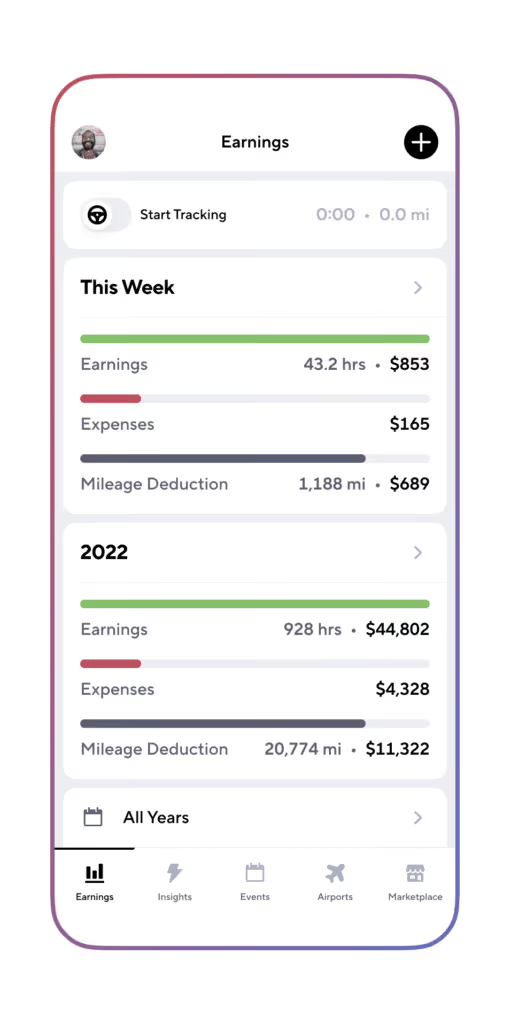
Gridwise makes this supremely easy. All you have to do is link your app to Gridwise, and your earnings will be seamlessly and confidentially recorded. You can see your earning patterns graphically, and literally get the full picture of your success for any time period you choose.
Gridwise is also the best DoorDash or Grubhub mileage tracker you can get, and it’s free! Simply log in to Gridwise when you go on a shift, and you’ll know the number of miles, so you have a record of your working miles to deduct from your taxes.
Whether you do DoorDash or Grubhub, make sure you drive with the best rideshare and delivery driver assistant app.
Download the free Gridwise app now!
Drivers! Are you looking for additional Doordash and Grubhub resources?
Basic Business Advice For Rideshare And Delivery Drivers
“I signed up to be a Lyft driver in 2018,” said one driver who soon found himself driving full time. “It was all online. There was no orientation video. I didn’t even know about the existence of driver hubs. My first time out, I got a shared drive. I had no idea what was happening. I knew my passenger’s destination, but the app directed me elsewhere. Noticing my confusion, the passenger looked at my app and told me what was going on.”
Rideshare and delivery companies have gotten better at driver orientation, but you have to learn how to run your own business, because that’s what you are doing; you are a self-employed contract worker.
Fortunately, the Gridwise blog fills some of those gaps. Whether you're a beginner just starting to drive for Uber or DoorDash, or whether you're a pro Spark driver, we've got you. We'll provide a selection of some of the best foundational advice for gig drivers. We’ll cover
- understanding the business side of gig driving
- protecting yourself legally
- taking care of yourself while you’re gig driving
- tracking rideshare and delivery mileage and earnings
Understanding the business side of gig driving
You are running your own business. Whether you drive for Lyft or Uber, or one of the other services, or if food delivery is your hustle, run it like a business.
Pay the taxman
Companies that use gig drivers generally do not withhold payroll taxes. Standard payroll deductions, federal income tax, state income tax, unemployment insurance, Medicare, and social security are now your responsibility. When you file your taxes at the end of the year, chances are you will owe. The way you avoid this is to calculate your taxes (how much you will approximately owe) and make quarterly estimated self-employment payments. Yes, this is difficult, but you need to discipline yourself. Quarterly payments are much easier than having a bill for back taxes hanging over your head with the potential of a penalty.
Talk to a bookkeeper
A bookkeeper can help you determine those quarterly payments and, at the end of the year, figure out how much you owe on taxes. With the rapid increase of gig workers in the US economy, the IRS is scrambling to figure out the details. Keeping up with the tax rules and regulations is a chore. A good bookkeeper knows all the minutiae. Look for reliable sources online (double-check information. Aside from Gridwise, the internet is not always the source of all truth 😉). Gridwise Tax Help, powered by Keeper Tax, has tons of tax resources to assist gig drivers with their bookkeeping, and can connect drivers to tax professionals for help.
Keep receipts
As a rideshare or food delivery driver, you can count on early morning or late night pickups or drop-offs in communities with no streetlights. A high-powered flashlight or spotlight can help you find addresses. That purchase is tax-deductible. Do you keep an emergency box in your trunk with a first aid kit, flares or reflectors, extra emesis bags (we’ll discuss those later), and other items? Those are all deductible. Also, learn how to track mileage as a gig driver. That’s tax deductible, too.
You never know when you will need a receipt. Several years ago, a malfunctioning gate in a private community broke a driver’s windshield. The community paid for a replacement, but when the driver logged onto the rideshare app the next night, a passenger had reported it, resulting in the driver’s temporary suspension until he fixed his car. Fortunately, he had photos of the installation and the receipt. He was reinstated a few hours later.
Keep your paperwork current
As a gig driver, important pieces of paperwork include your driver's license, insurance information, and car registration. As a security check, you may have to provide a copy of your license in the middle of a shift. Alway have it on you, and keep a photo of it on your phone just in case. Make sure payments on car insurance are made on time, and renew your car registration as soon as it comes in the mail.
Save for retirement
You are self-employed. Retirement is on you. Despite the naysayers, social security will probably be there but will likely not cover all your expenses, even as a senior citizen. Ask a financial planner for investment advice for retirement.
Protecting yourself legally
Because you are self-employed, you can be legally liable if something happens and you’re found at fault. Right or wrong, there is an entire cottage industry of attorneys geared to assisting someone in an accident with a gig driver who was on the job. There are things you can do to protect yourself.
Make sure you have the proper auto insurance for rideshare and food delivery drivers
Lyft and Uber both carry insurance policies, but these policies do not cover you during every instance. Make sure you know what your rideshare company’s insurance policy does cover (or the food delivery company, if that’s the case), and then verify what your auto insurance covers.
Many insurance companies cover rideshare, but only with a special rider on your policy. It pays to shop around and maybe change insurance companies to find affordable coverage. For more information on car insurance as a rideshare driver, check out Insurance for Independent Contractors: What to Look for and How to Get It.
Get a dash cam
Many people believe you can make a lot of money by engineering an accident with a rideshare or food delivery driver and cashing in on the lucrative insurance policies. Not true, but possibly expensive for you.
Installing a forward-facing dash cam acts as your witness in case of an accident. Consider a two-way dash cam, or a 360-degree view that also catches what’s happening inside your car. This protects you from false allegations. Be careful, though. Rideshare companies have policies about where you can and cannot post these videos.
Taking care of yourself while you are gig driving
Gig driving is stressful. You may not think so, but the stress you don't feel is often the most damaging to your body. Consider these words from a rideshare driver on a Quora thread:
“On days with light traffic and good passengers, it’s easy. Bad traffic, belligerent drunks, and unruly passengers, it’s a nightmare.”
Here are some things you can do to relieve that stress.
Set up a schedule and take regular time off
Self-employed people are critically aware that if they don’t work, they don’t make money. It’s easy to work, work, work, and work some more. Schedule days off and stick to them. Enjoy life.
“Driving in downtown Los Angeles, I know where all the best taco trucks are,” said one rideshare driver. “I had a good week this past spring and took that Saturday night off. My wife and I cruised all those taco trucks. We had a great time!”
Don’t work yourself into the ground.
Get quality sleep
Working as a rideshare or food delivery driver keeps you on the street much longer than the average driver. Especially if you drive weekend nights, there are lots of drunk drivers and road rage incidents.
Getting enough sleep leaves you alert and ready to take evasive action if needed. Take advantage of the downtimes. Even in larger cities, weekday afternoons can be slow for an hour or two. Find shade in a nearby park and take a nap. You’ll be bright-eyed and ready for rush hour.
Don’t skip meals
Gig driving doesn’t always lend itself to pulling into a drive-through to grab a quick burger. Carry a sack lunch and eat it before taking that afternoon nap or in the time you have between rides. Going for extended periods without eating leaves you vulnerable to binging on foods that are bad for you. Low blood sugar, another hazard, can lead to mood swings or worse. Think in terms of snacks. Research some good protein bars. Veggies and fruit are good, too, and drink lots of water.
Listen to podcasts or learn a language
Some drivers listen to music when they drive. Others enjoy podcasts. If you’re a history buff or have some other interest, there is a podcast for you.
You might consider a new language. The popular phone apps, such as Babbel and Duolingo, come in 10-minute lessons. You can breeze through two or three a day during down periods. There are also numerous YouTube videos and mobile-enabled websites. The Spanish Dude is a good one, and he’s still running his coronavirus special where you can name your price for a lifetime membership. Of course, watch these only when you are parked. Choose a language common to the region you drive in and practice with your passengers. They’ll get a kick out of it.
Learn where the restrooms are
If you are doing food delivery, you can use a restaurant bathroom, but having to go to the bathroom while driving rideshare is miserable. Learn where you can rely on an available bathroom.
Fast food restaurants are always good for restrooms. If you drop off a passenger at a nice hotel, there is typically a restroom in the lobby. Park your car out of the way, leave the flashers on, and let the valet know you will be back in a few minutes. You can also check the app store on your phone for bathroom finder apps; there are several of them.
Take care of your mental health
Gig drivers taking care of their mental health? Really?
Yes, really. This is especially true when you consider that rideshare drivers are dodging other drivers, fighting traffic, dealing with dozens of riders on a shift (some of whom might not be sober), working all sorts of hours, driving in all conditions, and all the time wondering if they will make enough money to cover the rent.
If you are a food delivery driver, there is the angst of hoping that the restaurant got the delivery right and that the food was warm enough or cold enough when you delivered it, not to mention a plethora of other things that can go wrong.
And of course, grocery and package delivery drivers have to worry about speedily picking up and delivering bags and packages without crushing the items. Finding grocery substitutes on the fly is enough to raise your blood pressure when shopping for yourself, let alone dozens of customers!
Last month, there was a post on the Gridwise blog, How to Maintain Mental Health as a Rideshare or Delivery Driver. Check it out to make sure you are taking proper care of yourself.
Another thing you can do is to mix it up a little. Drive rideshare for a few nights, then switch over to food delivery. You might even want to inquire about something different, such as applying for temporary FedEx and UPS delivery driver jobs or other package delivery driver gigs in advance of the holidays.
Carry emesis (throw up) bags
Every rideshare driver’s nightmare is a drunken passenger getting sick in the back of their car. There may still be a handful of good rideshare hours left, but your night is over if your car reeks of vomit. The rideshare companies will pay you to clean the car and then charge the customer for it, but that doesn’t make up for the lost business.
One way to make this a less frequent occurrence is to carry emesis bags. These are, to put it bluntly, heavy-duty, large-capacity barf bags. Place a few in the side pockets in the back seat of your car. If you suspect a passenger might get sick, make sure they know where the emesis bags are located. You can buy them on Amazon.
Have business cards
These are not very expensive, and two reasons immediately come to mind for having them. If someone does want to tip you off the app and they don’t have cash, you can give them your card, which should include the codes for leaving money on your various cash apps. Secondly, Uber and Lyft and many food delivery apps offer bonuses if you refer someone to drive for them. When that person signs up, they need to use your incentive code, which you retrieve from the app and include on the business card. Most of the gig companies provide artwork for the cards from their website.
Tracking rideshare and delivery miles and earnings
Tracking everything with Gridwise is one of the smartest things you can do as a rideshare or delivery driver. Gridwise's free mileage and earning tracking will keep you organized for tax season and help you maximize your tax deduction. And that's not even mentioning Gridwise's gas discount which gets you up to $50/month off at the pump.
With features like When to Drive, Where to Drive, Airports, and Events, gig drivers can find the best places and times to drive, and know exactly when to head to the airport or pick up passengers from events.
Save more and earn more with Gridwise
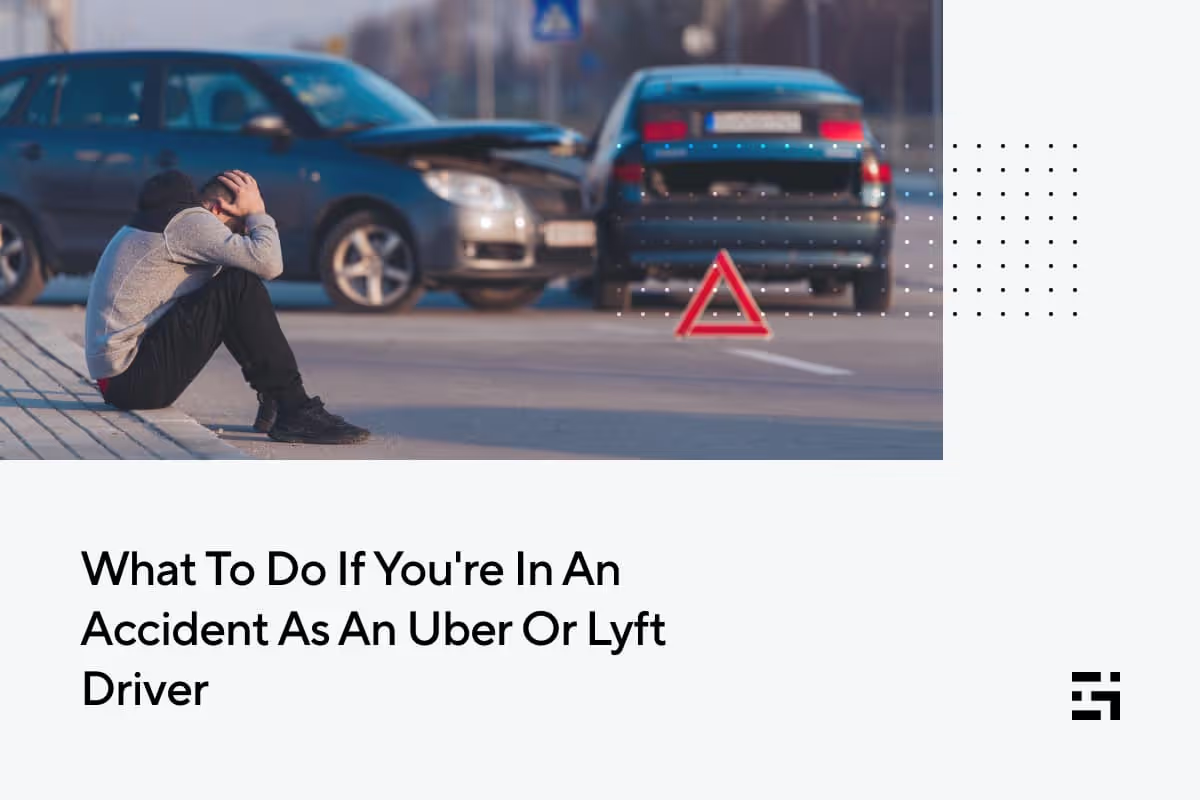
What To Do If You're In An Accident As An Uber Or Lyft Driver
As a rideshare driver, you spend hours behind the wheel. Many full-time drivers report 60,000 miles a year and even more. With all those miles, and given that rideshare drivers are out at all hours of the day and night, driving in all sorts of conditions, the chances of an accident are considerably greater than the average driver.
Knowing what to do in case of an accident while driving Lyft or Uber is essential. Both rideshare companies have car accident insurance, but you should be aware of the extent of the coverage, what it covers, and what it doesn’t.
First things first, though. The information in this article is for informational purposes only. In no way should it be considered legal advice from Gridwise. If you feel you need to speak with an attorney regarding a rideshare accident, it is your decision to select an attorney and how to use their services.
You should also know that insurance requirements and laws regarding accidents vary from state to state. Some jurisdictions are no-fault, and others are at-fault states. You should check your specific state and know the laws.
Topics we’ll cover in this blog post
- What you need to do if you get in an accident.
- Both Lyft and Uber insure drivers.
- What about your car?
- Your personal insurance: requirements and recommendations.
- A dash cam is your friend.
- How can Gridwise help?
What you need to do if you get in an accident
If you get into an accident while driving for Uber or Lyft, know that both rideshare companies provide coverage. Still, there are things you need to do at the accident scene.
Is anyone injured?
If you have a passenger or passengers in your car, your first responsibility is to them. Make sure they are okay. Call 911 and request an ambulance and law enforcement if there is an injury. Even if the passenger objects, if you feel they are injured, make that call. The Mayo Clinic reports that trauma and head injuries can leave a person unable to make decisions for their well-being. This includes injuries that are not visible. The individual can be belligerent and unreasonable. When in doubt, call an ambulance.
Also, check the other driver and all other parties and see if they are injured.
Call law enforcement
If it is a minor accident, no one is hurt, the damage is negligible, and the cars are drivable, don’t be surprised if law enforcement tells you to exchange driver information and report it to your respective insurance companies. This is especially true on a Friday or Saturday night or any other time when the police have bigger problems. Still, make the 911 call and request them to come to the scene. If this accident were to end up in court someday, you would look a lot better if you could say under oath that you reported the accident to the police, and they said they wouldn’t come out. “I didn’t think it was worth reporting” is not the statement you want to hear yourself saying in court, especially in front of a jury.
Stay calm and don’t accept blame
Accidents are traumatic, and people can get rattled and upset. Do your best to stay calm. Bottles of water are an essential part of any rideshare driver's must-have list of items. Offer one to all parties involved, including yourself.
Be careful not to accept blame or make statements that might be used against you. You may not be thinking clearly. If your passenger or the other driver presses you, and it is appropriate, say something innocuous such as, “Hey, the important thing is that no one is hurt, everyone is insured, and this will all turn out okay.”
Get as many names as you can
If law enforcement refuses to come out, get the name of the person you’re talking to at the police station. If law enforcement comes to the scene, get their names and business cards. Also, get a report number. The officer should be able to give that to you at the scene. Do not be surprised if it takes as long as three or four weeks to get a copy of the report.
If law enforcement does not come out, you should also consider going to the police station and reporting it. Again, get names and business cards.
Do not settle privately with the other driver
If you are at fault and it is a minor fender bender with no injuries, it may be tempting to offer to settle privately between yourself and the other driver. Another version of this scenario is if the other driver seems like a nice person and pleads with you to settle privately. They may say they are uninjured and agree to a private settlement. But if they wake up the following day with a crick in their neck, they may report it to the rideshare company. The rideshare company will in turn come to you to verify what happened, putting you in a bad spot.
Contact the rideshare company
The aftermath of an accident can be chaotic, especially if someone is injured, there is significant damage, or the other driver is belligerent or under the influence. Regardless, you should try to reach the rideshare company while you are still at the scene.
Both Uber and Lyft make this possible through the app. It is a good idea to look through the app during your downtime so you know where to find this particular function. As best as you are able, respond to all the requests and instructions of the rideshare company while at the scene.
Exchange information and be cooperative
Be cooperative with the other driver if the police don’t come out. Exchange information, including your driver’s license, registration, and insurance. This is another place where your cell phone camera comes in handy. Rather than write the information down, take photos. Take a picture of the license plate of the other car, too. Make sure the information in all the photos is readable.
Try to preserve the scene
If there are no serious injuries and the vehicles are driveable, drivers often want to pull the cars over to the side of the road, especially on a busy street, intersection, or freeway. This is understandable, but you should use your cell phone to take photos of the immediate scene, especially skid marks, crash debris on the road, damage to the cars, and the positions of cars. Make sure your photos show evidence of what the weather was like, too. Be careful, however. The last thing you want is to have your photography efforts result in another accident or injury. Be sensible and reasonable about it.
Beware of possible memory loss
Retrograde amnesia (before the accident) and anterograde amnesia (after the accident) are common, especially if the accident was severe, according to Florida Physical Medicine. The memory may return, or it may not. Look for this in your passengers, too. It is another sign you should call for medical assistance.
Get the names and contact information of witnesses
Witnesses are important, especially if you suffer from the amnesia we just discussed. In an accident where both drivers refuse to accept blame and there is no evidence otherwise, a witness statement may make the deciding difference.
Both Lyft and Uber insure their drivers
That’s good news. The other important fact for you to know is to what degree and under what circumstances you are insured. The easiest way to understand the coverage is to look at what was happening with your app at the time of the accident.
Scenario #1 – You are a rideshare driver, but the app was not on
The other way to view this is that you were not working at the time of the accident. In this case, your personal insurance applies.
Scenario #2 – The app was on and you were waiting for a ride request
During this time, you are covered by a basic policy from Lyft or Uber. Coverage includes
- $50,000 per person for bodily injury
- $100,000 per accident for bodily injury
- $25,000 per accident for property damage
Scenario #3 – You have received a ride request, you’re on your way to pick up a passenger, or you have a passenger(s) in your car
In these scenarios, your coverage from the rideshare company includes
- $1,000,000 for 3rd-party auto liability
- uninsured/underinsured motorist bodily injury
- contingent comprehensive and collision up to the actual cash value of your car ($2,500 deductible)
As you can see, Uber and Lyft offer similar levels of coverage, with some variables. Uber car accident insurance includes optional injury protection at a nominal cost to the driver. In some states, Lyft may also offer additional coverage. This Lyft accident insurance can include uninsured motorist, underinsured motorist, personal injury protection, MedPay, and occupational accident coverage. Check Lyft and the laws in your state to verify how it applies to you.
Remember that Uber, Lyft, and other ridesharing companies always evaluate their insurance coverage and procedures in the event you get into an accident. Check their website regularly to see if there is a change in coverage or how you go about reporting an accident.
What about your car?
In most cases, if you were on your way to pick up a passenger, or have a passenger in the car at the time of the accident, and if the accident was your fault or you were hit by an uninsured motorist, a $2,500 deductible applies to damages to your car. That means you’re responsible for that $2,500 to get your car repaired. That is a lot of money. You need to be aware of that exposure.
If you are waiting for a ride and have an accident, the rideshare company insurance is third-party liability only. This means you are likely responsible for all the damages to your car.
Your personal insurance: requirements and recommendations
To become a rideshare driver, you have to submit proof of car insurance, but this doesn’t mean you’re covered in all instances. You should check with your insurance company and verify your coverage. Don’t be surprised if your basic policy does not cover rideshare activities. Some insurance companies will deny you coverage and cancel your policy if they discover that you are a rideshare driver.
Other insurance companies offer a special addition or rider to your policy that covers rideshare activities, but get specific answers about what’s covered. Will they, for example, cover you and damage to your car in the event of an accident when you are waiting for a ride? Does their policy offer gap coverage to make up for the $2,500-deductible?
Take the time to shop around for a policy. You might have to change insurance companies. Prices vary from carrier to carrier, ranging from “Are you serious?” to “Eh, that’s not bad.”
While you may think you don't need rideshare insurance, remember: it's better to have and not need than to need and not have. Paying for an accident without insurance is much more expensive than making regular payments for insurance coverage.
A dashcam is your friend
Dashcams are an important part of every rideshare driver’s list of must-have essentials. They are an unbiased, independent witness of what happened. Consider making this investment - it could save you a lot of money.
How can Gridwise help?
Gridwise is dedicated to helping rideshare drivers realize the most from their gig driving activities. This includes offering access to legal assistance, accident medical expense insurance, and accidental death and dismemberment insurance. Download the app here to get access to the following accident related benefits:
- Legal assistance (Gridwise Legal Help)
- Accidental death and dismemberment insurance (Gridwise Dollar Benefits - AD&D)
- $20,000 in emergency cash for you or family members after a major accident.
- Accident medical expense insurance (AME)
- $1,000 in emergency cash for medical expenses and deductibles from an accident.
More important, Gridwise is the best app for rideshare drivers and includes a free rideshare and delivery mileage tracker, along with many more features that keep rideshare drivers informed and profitable.
Download Gridwise to drive smarter, not harder
Have fun and stay safe out there!
8 Common Gig Driver Problems And How To Fix Them
When you’re a gig driver, you can’t afford to slow down to deal with common obstacles that make your job difficult. That’s why we put together this list of gig driver issues and how to solve them in a flash! Go through the list, and watch all your worries melt away as you find slick and easy solutions. Then, rest easy as you get back out there on the road.
- Rising fuel costs. No one needs to tell you that gas price increases have taken a huge bite out of your earnings. Even with recent declines, the cost of running your vehicle is way higher than it was just a short year or two ago. What can you do to cut the cost of fuel? Sign up for Gridwise Gas! You can save as much as $50 per month when you’re a Gridwise Plus user, and even if you’re not, you can still use Gridwise Gas to get savings that you can’t afford to miss.
Save $50/month on gas with Gridwise
- Unexpected medical costs. Sure, you might figure that you’re healthy enough to get away without medical coverage, and you already realize that as an independent contractor you won’t get it. Should you be worried? Maybe.
What will happen, if say, you roll an ankle or injure your back while you’re trying to be the best possible package delivery driver? There’s going to be a huge medical bill to deal with, and you’ll be left wondering if there even is such a thing as insurance for delivery drivers.
Rest easy. It’s almost a given that one day every driver will need medical coverage. Fortunately, you can get it through Gridwise Dollar Benefits. Powered by Avibra, this flexible package of inexpensive insurance coverage can provide the safety net you need to get healthcare for you and your family.
With Gridwise Dollar Benefits, access to life insurance, critical illness coverage, and even dental and visual benefits are at your fingertips.
Simply sign up in the Gridwise app. From the Home screen, tap Marketplace, then click the Benefits tab. You’ll be glad you signed up for low cost insurance that lets you worry less, so you can focus, drive, and earn more. See? Gridwise is so much more than a mileage tracker for delivery drivers!
- No paid leave. Whether you get sick, need time off to care for a loved one, or just want to take a short vacation, it’s a fact of every driver’s life that there’s no such thing as paid leave. When you don’t work, you don’t get paid. Still, there are going to be times when you want to be off work.
Whether it’s because you want to polish off the turkey with your family or take a trip to visit a kid at college, it pays to plan for those times when you just don’t want to be working.
This should be part of any good Uber driver strategy, as well as every gig driver’s plan for having a life outside of their rideshare or delivery activity. There are ways to save up and save money on travel, and this Gridwise post about planning for unpaid leave will clue you in so you can get some treasured time off!
- Accidents. Yep, it’s true. They happen. It doesn’t even have to be your fault. You can be innocently sitting at a stop sign in a congested area when, Wham! an inattentive driver hits the back of your car. With luck, no one really gets hurt, but you’re out of business until you can get your car repaired!
Here are some things you can do to protect yourself:
- Make sure you have a rideshare/delivery rider on your personal policy, so you’ll be covered, should this mishap occur while you’re working your driving gig. Without this addition to your personal policy, your insurance company could have the right to refuse your claim.
- Exchange information with the other driver, no matter who’s at fault. If it’s the other driver, then follow up with the person to make sure their insurance covers your repair costs, rental car, and other transportation costs. Get a claim number to use with their insurance company. If it’s your fault, call your agent or company right away to get the repair process going.
- Get Accident Medical Expense (AME) insurance. If you do get hurt, you’ll have emergency medical costs, such as a deductible or out of pocket expense. You can find affordable AME insurance through the Gridwise Dollar Benefits program for only $1/week.
- Use Gridwise Legal Help to get free financial and legal assistance as you recover from the accident.
Download Gridwise to use these gig driver benefits
- Vehicle breakdowns. These happen, too, and not always at the most convenient time or place. Here are some ways to make bad situations much more manageable.
Keep your vehicle stocked with emergency supplies such as
- a tire gauge and portable air compressor, if possible
- spare supplies of oil, radiator, washer fluid, etc.
- a flashlight or headlamp (for your head, not the car!)
- flares or triangles that let other motorists see your disabled vehicle
- plenty of water and snack food, in case you’re stuck waiting for a long while
- a blanket, gloves, snow shovel, road salt, and hand warmers in case of wintery weather
- personal safety equipment (whistle, horn, or other device) to keep yourself safe if you’re waiting in a place that isn’t familiar or safe.
Sign up for Roadside Assistance with Gridwise Dollar Benefits. Towing costs can border on the astronomical, so keep them down to a scale appropriate for this planet with roadside assistance that covers your tow. When you need it, you’ll be happy you have it!
Get the best prices and up to 40% off retail prices for vehicle service, repair, and maintenance with Gridwise + CarAdvise. Search for the most highly rated service personnel and the best prices, and pay far less for keeping your car in working order.
Cover your car with a Vehicle Service Plan. Save up to 44% on a service plan for your ride with this benefit from Gridwise and ForeverCar.
- Traffic jams. Traffic jams are a fact of gig driving life, but you don’t have to get stuck in them! Keep Gridwise running at all times to get traffic alerts that keep you out of trouble spots.
Speaking of trouble, let’s face it. When you do get stuck in traffic, tempers can flare. This Gridwise post about protecting yourself from road rage drivers clues you in on what you can do to defuse volatile situations. To protect yourself from losing your cool, take care of your mental health so you can be as even-tempered as possible. This Gridwise blog post on how to maintain mental health offers great suggestions for avoiding any road rage moments of your own. Also, download some relaxing podcasts or calming music to help you stay relaxed and ready for anything.
- Unsafe areas. It’s a sad fact of life that rideshare and delivery gigs will take you into areas that are not safe. The fact that drivers don’t carry cash is some deterrent to criminals, but drivers have been the victims of crimes ranging from slashed tires to car jackings, and worse.
Staying safe isn’t always easy, but you can take precautions that will make you less likely to become a victim. These include keeping your doors locked and recording everything that goes on inside and outside of your vehicle with a dashcam. Always have a flashlight handy, and use the safety features on your driving app, such as trip tracking, to keep you connected with a trusted friend or family member.
This Gridwise post covers the safety issue in detail. One of the best ways to avoid becoming a crime victim is to learn martial arts or basic self-defense. This isn’t about getting into a crazy kung fu fight. Rather, it’s a way to learn how to carry yourself with an assertive posture, how to escape if you are attacked, and how to come out alive if a struggle becomes inevitable.
- Bathroom breaks. This one isn’t funny, either. In fact, some of the best DoorDash or Uber driver advice you can get centers around this topic. When you drive for a living, you need to know where you can easily find places to relieve yourself. You’ll want that place to be clean, safe, and easy to access.
You might know some prime spots, based on how familiar you are with your area, but what happens when you’re in unfamiliar territory? Well, there are apps for that!
Some of the best, according to the National Association for Continence, include
- Sit or Squat (“Sit” is rated clean, “Squat” is a different story)
- Bathroom Scout, and
-Flush
Read this Gridwise post for more details about how to solve the bathroom problem. You’ll find it to be as entertaining as it is useful.
Now that you’ve solved the 8 common gig driver issues, it’s time to get back out there and drive! As you can see from the solutions to the problems presented here, you’ll want to take Gridwise along for the ride. Not only do you get a free mileage tracker, you'll also get access to features, products, and benefits designed to solve all your driver problems!
Download the best gig driver assistant app
Gig Driver Guide: Renting a Car For Rideshare Or Delivery
When drivers for Lyft, Uber, or any food delivery service initially look at car rental rates, the reaction is usually negative. Paying between $200 and $250 weekly for a car, or possibly as high as $300? That’s a lot of money.
It is, but it makes sense when you consider all that a rental car entails and compare that to the miles you are putting on your personal car, especially if you are a full-time driver.
Still, renting a vehicle for rideshare or food delivery is a fine line. It is a considerable expense. You need to determine what kind of driver you are and the details of your rental plan. It might make sense for you.
The topics covered in this blog post include
- Why rent a car for Uber or Lyft?
- What about food or package delivery?
- How do you rent a car for gig driving?
- What should you look for in a rental car for rideshare?
- A look at the Lyft car rental program.
- A look at the Uber car rental program.
- General things to know when renting a car for gig driving.
Why rent a car for Uber or Lyft?
You are working as a gig driver to earn a living or as a second income. As a full-time rideshare driver, depending on the market you drive in, it is possible to make $1,000 a week (see the Gridwise blog post How to Make $1,000 a Week with Uber and Lyft) and possibly as much as $1,200 or $1,300 if you hustle and are smart about it. In many markets, that is not possible, but in others, it is. See the Gridwise blog post from earlier this year, How to Earn More as a Rideshare Driver.
A rideshare car rental costs you between $200 and $300 a week. Subtract that from your weekly income. It’s a chunk of change.
But let’s take a closer look. To make $1,000 to $1,300 a week, you need to drive 250 to 300 miles a day, five days a week, (you also need to be in the right market). You drive fifty weeks out of the year (we’ll give you two weeks for vacation). That is 62,500 to 75,000 miles a year. Putting that kind of mileage on your personal car is a lot. It means at least a set of tires a year, two sets of brakes a year, and an oil change and tire rotation every month.
But wait, there’s more. You have car registration. Given that rideshare cars need to be late-model cars, you likely pay a hefty car registration (these fees vary from state to state).
It also means repairs because things on a car break down quicker when you put on that kind of mileage. Then there is depreciation. The more miles on the odometer, the less you get when you sell the car.
Don’t forget insurance. The rental companies provide insurance, so that financial responsibility is also off your back (you should still verify with the rental company about the details of your car insurance and make sure you are covered).
The other reason renting a car might work for you is you don’t own a car. Perhaps rideshare is your ticket to car ownership. Renting a car might make more sense. Check out this October 2021 Gridwise post, Renting a Car for Rideshare: What Drivers Should Know about Car Rentals.
Now renting a car might make more sense.
What about food or package delivery?
Renting a car for food delivery doesn’t make as much sense as rideshare unless you live in a fantastic market with generous tippers (see blog post on Walmart Spark). Renting a car becomes a bigger question because it takes up a larger percentage of your income. In many cases food delivery doesn’t put as many miles on your car, either, so the benefits of renting are not as great. But again, it depends on your personal situation.
How do you rent a car for gig driving?
For Uber and Lyft, you arrange for a rental car through your app. On the Lyft driving app there is a section under your profile that lists the cars you’re approved to drive. At the bottom of this section, there is an option to rent a car. Press that, and you are taken to Lyft’s approved vendors. The app tells you what is available and the price. It’s an intuitive system and very easy to navigate. Once you select the car you want, the app gives you an appointment time and location to pay your deposit and pick up the car.
Not all the rental partners may be displayed on the app. Only those with cars available appear. Listings change constantly.
Exploring car rental for food or package delivery? Check out the delivery driver apps. If there is no mechanism for rental, there at least might be information on what rental cars are acceptable if you select to rent privately (if that is permissible).
What should you look for in a rental car for rideshare?
Lyft and Uber are clear in the requirements for a car: a four-door sedan or SUV that holds five passengers minimum, which includes the driver. It needs to be free of body damage, and it should be reliable. Horn, lights, and windshield wipers must be in working condition, as do seat belts and related equipment. This is what the rental car companies provide for you. All cars from the rental company have a safety certificate from the respective rideshare company.
Gas prices, even when they were lower, have always been a concern for rideshare drivers. As such, most rideshare car rental companies offer cars that are fuel efficient. Expect to see makes and models such as the Toyota Camry and Prius; the Hyundai Sonata, Elantra, and Ioniq; the Honda CR-V and Civic; the Nissan Altima; and the Chevy Malibu.
Some rental companies do not carry the larger SUVs needed for Lyft XL or Uber Luxe. Those might be a little more difficult to locate, and expect to pay more for those cars.
Food delivery and package delivery cars don’t have to be four-door, but the extra doors will make it easier to get boxes and bags in and out of the car. A hatchback or an SUV is nice because they give you extra room, especially for the package delivery services such as Amazon Flex, UPS, and FedEx.
A look at the Lyft car rental program
- Lyft Express Drive offers three different rental programs: Hertz, Avis, and Flexdrive. The cost varies from $126 to $289 a week, plus tax.
- Options include standard midsize cars, hybrid models, and electric. The hybrid and electric models are in demand. If you do get one, expect to pay more for it.
- Other requirements include
–you must be at least 25 years old.
–you must possess a credit card or debit card in your name (no pre-paid cards).
–you must make a refundable security deposit between $100 and $300 (the amount depends on the type of car).
A look at the Uber car rental program
- Uber drivers can select from three rental programs: Avis, Getaround, and Zipcar.
- Options include midsize cars, hybrids, and electrics.
- Requirements include
–you must be licensed to drive in the US for one year (this is extended to three years if you are under 23).
–you must have no major violations in the last three years, including a DUI or reckless driving, and no more than two moving violations in the last three years.
–you must be at least 25 years old.
–you must have an active credit card in your name.
General things to know when renting a car for gig driving
There are other things to keep in mind if you rent a car for a gig driving job or if you are considering it.
Check with the gig company you work with
Most rideshare and food delivery companies have partnerships with specific rental companies. They require you to get your rental from their partners. Using other rental car sources to get your car can get you suspended from the app.
Rental programs can vary from market to market
If you drive rideshare in Los Angeles and your brother-in-law drives in Albuquerque, New Mexico, don’t be surprised if there is a difference in programs—either in the rental agencies used, cars available, terms, or other fine print. These programs change from one market to another, even within the same rideshare company.
A deposit is required
There is an upfront deposit between $100 and $300, which is returned to you at the end of the rental. This deposit covers you in the event you don’t work enough in a week to cover the rental of the car. This applies to almost all rental companies, but there are a few exceptions.
The price listed on the app is not the full price
This is a little detail you discover when you sign the paperwork. Taxes and fees get added to the weekly charge. Don’t be surprised if state and local taxes and fees add up to as much as $50 extra on your weekly bill. These fees differ from one city to another, depending on the rental agency's location.
Rentals are usually open-ended
Most rideshare rental agreements roll over weekly. Rent a car for as long as you want, provided the rent is paid. You can turn the car in if you are going on vacation. No sense in paying the rent if you’re not driving.
Don’t get attached to your rental car
Don’t give it a name. Don’t knit it a sweater. Rental cars come and go. If you turn the car in because you’re on vacation, you will not get that same car back. You get another one. If you get the same car, consider it a freak of nature. Also, if your rental car is getting into high mileage on the odometer, they may ask you to bring it in for an exchange. Rental companies make a good part of their income from selling their cars, and there is a sweet spot where it is the most profitable to sell.
Make sure the car gets serviced
The rental agreement typically covers service, but it is your responsibility to ensure the car gets serviced. You get a message via email or on your app from the rental agency. They either ask you to come in and get the car serviced at their garage, or they refer you to a regional or national chain they contract with. If the car needs new tires or other maintenance, this is taken care of during service. Most rental agencies also have road services if the car breaks down.
Payment for the rental car is taken out of your earnings
Suppose you contracted with an approved firm for a rental car for $229 a week. The first $229 you earn is applied to the rental payment. You will not see any personal earnings until you have paid the rental for that week. Smart drivers drive those first few days of the week and pay off the car as quickly as possible. Whatever they make the rest of the week is theirs. This also provides a cushion in case something comes up later in the week and you need to take a few days off, or if you get sick with whatever flu we are importing this year.
You can’t multi-app with a rental car
If you drive for Lyft and rent a car through them, you can’t drive for Uber in that car. The same applies to Uber. The rental companies provide insurance for the car. As you can imagine, a Lyft rental insurance company will not be happy about paying for an accident in their rental car when you were carrying an Uber passenger. Most rideshare rental agreements also prohibit you from doing food or package delivery in the rental car. Make sure you know what you can and cannot do.
Beware of mileage caps
Most rideshare rental agreements don’t have a cap on miles as long as you are on the app, but some agreements limit the number of personal miles. For instance, you might be allowed 200 personal miles a week on the car. Many rental contracts allow you to purchase additional miles, but it costs money.
Things Change
Nothing in business stays the same. Rental rates, restrictions, and other rules change all the time. You need to make sure you are aware of any changes.
Gridwise is always there for you
Renting a car for rideshare or food and package delivery is a big decision. It is an expense, and you need to make sure you reap the maximum.
Whether you use your personal car or a rental, make sure that the miles you drive are correctly attributed to the right vehicle. Gridwise's free mileage tracker does just that and helps you maximize your tax deduction (and recoup some of those rental costs!).
Gridwise users also save as much as $50/month on gas through the Gridwise Gas program. There are other important features, such as When to Drive and Where to Drive, and information on peak times at airports and event venues, which show you the best times and areas for driving.
Ready to earn more and save more?
Download Gridwise now
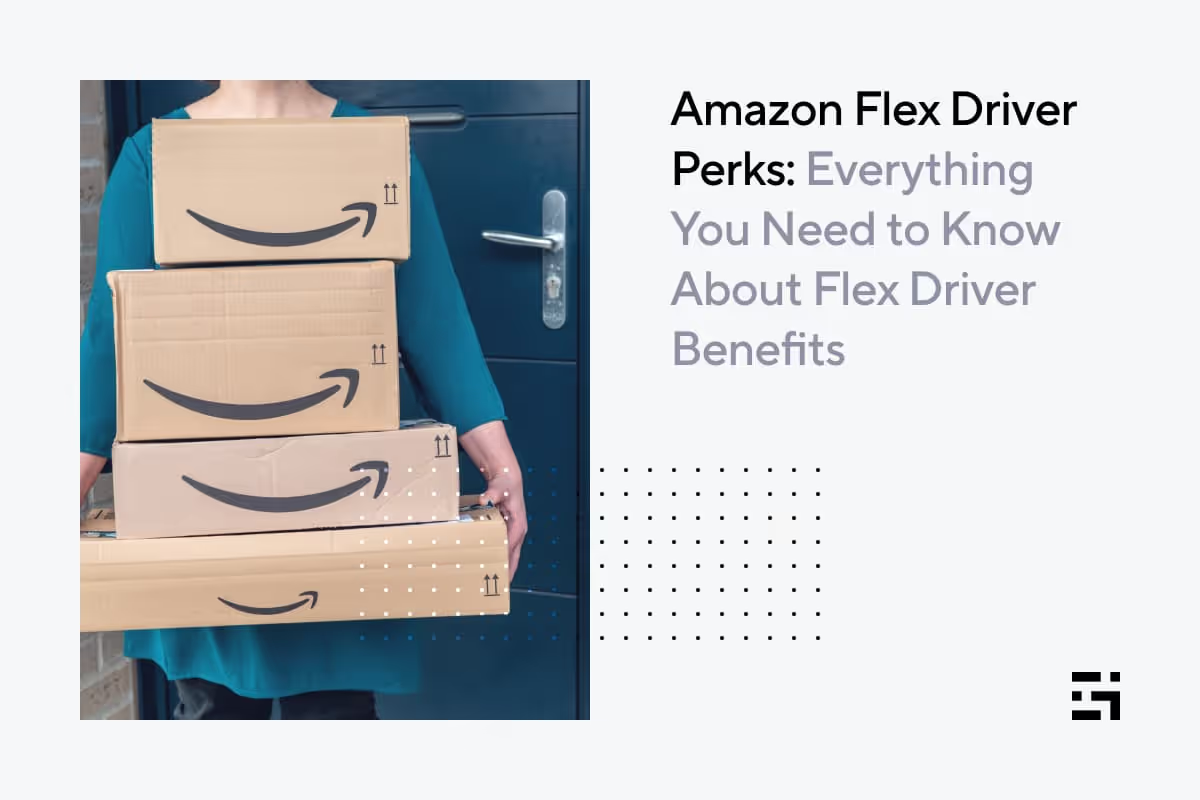
Amazon Flex Driver Perks: Everything You Need to Know About Flex Driver Benefits
Perks are a part of most driving gigs, but we all know that some are better than others. There might even be some programs that are so good, they tip the scales so everybody wants to work there just for the perks!
Is Amazon Flex one such company? In this post, we’ll look at what it’s like to deliver with Amazon Flex, with a special focus on Amazon Flex Rewards. We’ll look at the experience of working with Flex and how the rewards program affects driver satisfaction and Amazon Flex driver pay.
Here’s how we’ll size things up:
- The basics of being an Amazon Flex driver
- How much do Amazon Flex drivers make?
- Amazon Flex rewards and other perks
- How to make more money with Amazon Flex
The basics of being an Amazon Flex driver
You may not always notice it, but you’ve most likely benefited from the work of a whole bunch of Amazon Flex drivers. Doing their duty by going the “last mile” to deliver packages for Amazon, Flex drivers use their own vehicles. They are, like all gig workers, independent contractors.
Flex has been around since 2015, but Amazon ratcheted up the pressure to recruit more Flex drivers in 2019, when the company changed its Prime delivery service from two days to one. The pandemic made Amazon Flex drivers even more valuable, as a groundswell of customer orders created a demand for drivers to get them to their destinations.
There are a few different ways Amazon Flex drivers can work, but the most common one is by choosing “blocks” and delivering packages from a distribution center. You can read more about Amazon Flex, including what it takes to become a driver, in this Gridwise blog post.
Flex drivers choose blocks of time when they are available to drive and deliver packages. They report to the Amazon distribution center or store and wait their turn, often in long lines. When they get to the front of the line, they receive an allotment of packages to deliver within the time windows of their blocks.
Drivers say they are under a lot of pressure at times. There can be large loads of packages to deliver on routes that take them through high traffic areas. This makes their task more than a little daunting. The stress increases as the end of the time block approaches, especially if not all the packages have been dropped off. Basic needs such as eating, staying hydrated, and finding places “to go” have to be pushed aside so all the packages can be delivered before the deadline. Read this CNBC piece and watch the 2019 video for more insight into what driving for Flex can be like.
Every gig driving job has its good and bad points, so even though working for Amazon Flex can be a bit more stressful than it appears on the surface, it has its definite pluses, too. One of these is Amazon Flex driver pay.
How much do Amazon Flex drivers make?
Amazon claims that Flex drivers make as much as $18–$25 per hour, and Gridwise figures confirm that this is pretty close to reality. In this Gridwise blog post, you can see that median Flex hourly pay rose from $21.78 to $23.35 over the first three months of 2022.
How much do Amazon Flex drivers make a week? That depends on how many blocks drivers take on in a week. Because there can be considerable distances between the driver’s home base, the distribution center, and the delivery route, not all drivers can work more than 3 or 4 hours a day.
The next logical question is, how much do Amazon Flex drivers make a month? Gridwise figures for Q1 2022 show the answer to be encouraging. In March 2022, Flex drivers across the nation pulled in an average of $419.50 for the month. However, this figure shows that Flex drivers, by and large, are working mostly part time. If we take the monthly figure and divide it by the hourly figure of $23.35, we find that drivers would be working around 18 hours per month.
While Amazon Flex hourly earnings are solid, the model of working 3 or 4 hours at a time, and delivering packages to destinations that could lead drivers to rack up a great deal of mileage, could mean they don’t have time to do more than one or two blocks per day. It’s quite possible that many Flex drivers work this gig as a side hustle, or as part of a more comprehensive gig driving strategy that includes other modes of making money, such as rideshare or food delivery.
There’s more than just the straight earning rates to consider, though. What else does Amazon Flex have to offer?
Amazon Flex rewards and other perks
Amazon Flex drivers are eligible to earn points and get perks, just for completing blocks and making deliveries. Drivers must keep their standings high, by showing up for their blocks and delivering their packages. Drivers will make more points per block and per delivery, as their standing gets higher. Get specific details about how rewards points are allocated through this link.
The rewards available to drivers include
cash back on purchases with the Amazon Flex debit card. Drivers can earn up to $500 cash back per month on fuel and EV charges, groceries from Whole Foods, items from amazon.com, and anything else that can be purchased with the debit card. They can deposit funds into the account linked to the Amazon Flex debit card, and also select the card as the preferred payment account for depositing Flex earnings. Percentages for cash back deals increase as drivers earn more points and reach higher levels.
preferred scheduling. Drivers can take more control over their time by earning preferred scheduling privileges. As they earn more points and rise through the levels, extra time is allocated for choosing blocks. They will also gain access to more blocks that meet individual block preferences as they earn more points.
driver discounts. As they continue to climb up the levels, drivers become eligible for an increasing number of discounts on items they need, as well as other consumer goods and services. Amazon says there are literally thousands of discounts available, more than we are able to list here, for sure.
The rewards and discounts available are not “free.” They’re linked to driver performance and delivery volume. If you only drive occasionally for Amazon Flex, you may not benefit very much from the program.
If you’re a regular, though, there are plenty of possibilities for being paid back for your hard work. Still, considering that Amazon Flex drivers don’t get tips or surge pay, the rewards program is pretty much the least Amazon can do to show its appreciation for Flex drivers.
Given this situation, how can Amazon Flex drivers improve their chances for high earnings?
How to make more money with Amazon Flex
The best thing to do is find ways to minimize your expenses. Start by getting the best Amazon Flex mileage tracker there is—Gridwise! Gridwise tracks your miles for tax deduction purposes, and also lets you enter all the expenses you can write off as a driver. Gridwise tracks your earnings, too, so you can see how much you’re earning, and how much your expenses might be eating into your income.
You’ll get all these services that make your Amazon Flex gig easier, too:
- traffic alerts
- weather bulletins
- event information
- deals and discounts on gas, insurance, car maintenance, and more - whether full time or part time, you'll always have access to Gridwise Benefits.
With Gridwise, you get our rewards no matter how many deliveries you’ve done or how quickly you’ve completed them. Gridwise is a free app that offers rewards, discounts, and deals to all its drivers. Download the app and see for yourself.
Get the free Gridwise app now!
Work smarter. Earn more.
Whether you drive, deliver, or pick up shifts — Gridwise helps you track earnings, mileage, and performance so you stay in control of your work. Download the app and take charge today.
